RSS
 

Posts Tagged ‘comparison’

Light Tent Comparison – DIY Versus Kit Tents

27 Mar

A light tent is an invaluable photography tool for shooting smaller objects and items and for achieving even, near-shadowless lighting. In our earlier post, we looked at How to Use a Light Tent for Product-Style Photography, which covered the basics for using and shooting with a light tent. In this post, we will take a look at a head-to-head comparison between buying a light tent kit versus making your own DIY version.

The light tent contenders

In this corner, we have the Square Perfect SP500 Platinum Photo Studio In A Box. This kit contains: two pop-up light tents (one 30 inch cube and one 12 inch cube – 12 inch shown below); two lights with adjustable stands; two 30W, 5400K daylight fluorescent bulbs; a tripod; a carrying case; and two sets of four colored fabric backdrops (white, black, red, and blue) sized for each light tent.
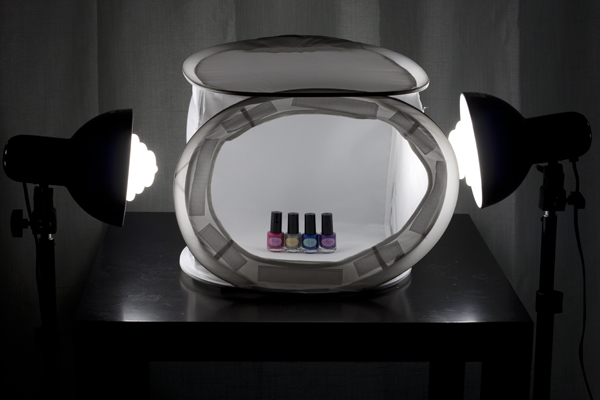
light tent kit, Square Perfect, photography, setup

And in this corner, we have the DIY Light Tent, built using these specifications: Foldable DIY Photography Light Tent. This light tent will be lit by means of two adjustable desk lamps and 60W, 2900K halogen bulbs. The backdrops are made from standard poster board and cut to size. You can purchase daylight-rated light bulbs for your DIY kit as well, but you may need to order them online from a photography or home improvement site.
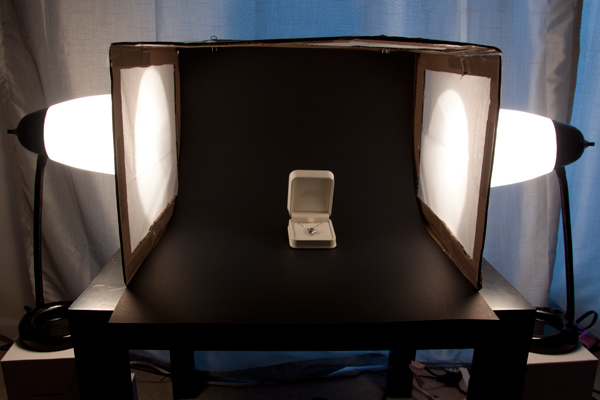
light tent, DIY, how to, photography

To make this an even test, we will be comparing the 12 inch kit cube against the 12 x 16 x 18 DIY tent. The first set of comparisons will feature each set as described above (the lights that come with each kit), while the second set will put the two up against each other using the same lighting set up for both kits.

Light tent comparison: using their own lights
light tent, product photography, knit bag, photography, how to, light tent

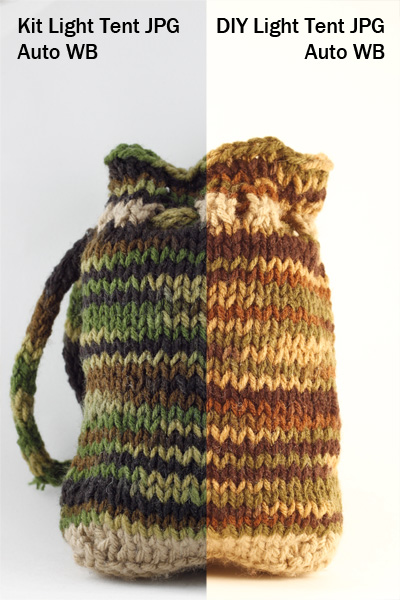
For this first photo-face-off, each light tent will be evaluated using its own lights (daylight fluorescents for the light tent kit and halogen bulbs for the DIY light tent). A major consideration when shooting with a light tent is controlling or choosing the correct white balance to match the lights being used. You want your white backdrop to look white and not have any color tint from the lights used. Read more about that issue in: How to Use a Light Tent for Product-Style Photography.

These shots show SOOC (Straight out of Camera) JPG files for the kit and DIY light tents using auto white balance.The kit’s light gives a cooler (more neutral) look to the background, and the colors of the knit bag are much truer to life, while the DIY lights impart a yellowish hue to the bag and the background. Setting your camera on “Tungsten” white balance for the DIY table lamps may give you a more neutral color, or you can also do a custom white balance using a gray card or even the white backdrop as a test shot. Consult your camera manual for how to perform a custom white balance with your camera.
compare-bag-autoWB-darker

This image is a little dark on purpose so you can see the color tint of the background more easily

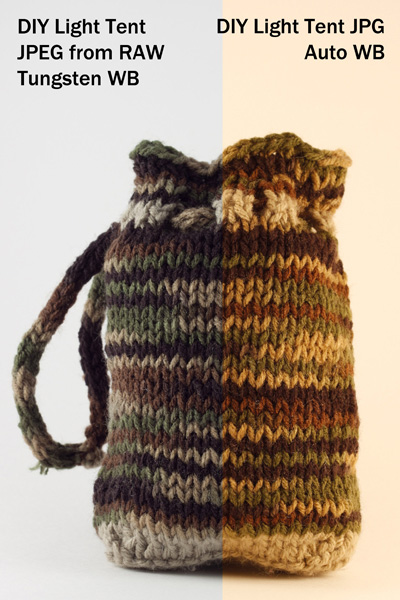
If you want perfectly clean whites and neutral blacks, then I would recommend shooting in RAW, which will give you greater flexibility regarding the white balance in post-processing. These images (left) show a comparison of the same image of the bag with a Tungsten white balance setting as compared to the Auto. The Tungsten white balance was selected in post-processing from the RAW image file, or it can also be selected as a white balance preset on the camera when shooting, especially if using JPG format.

Light intensity

As you can see by the image below the DIY lights are considerable less intense (not as bright), which will mean you will either need to use a much longer exposure (shutter speed) to get a correct exposure, or increase your ISO. If working on a tripod (recommended for this type of set up) exposure time shouldn’t be an issue though so just stay at ISO 100 and adjust accordingly.
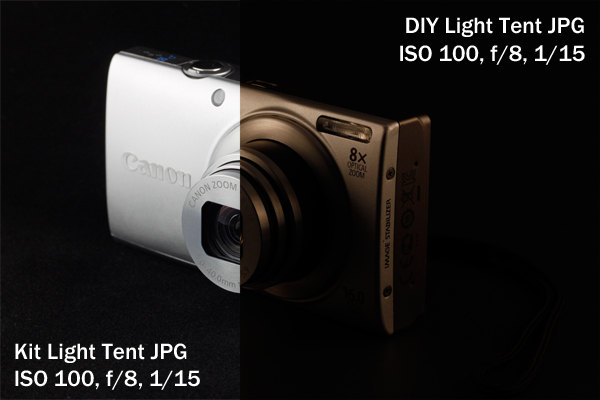
light tent, product photography, camera, Canon, point and shoot, Canon A4000IS

Light tent comparison: using the same lights

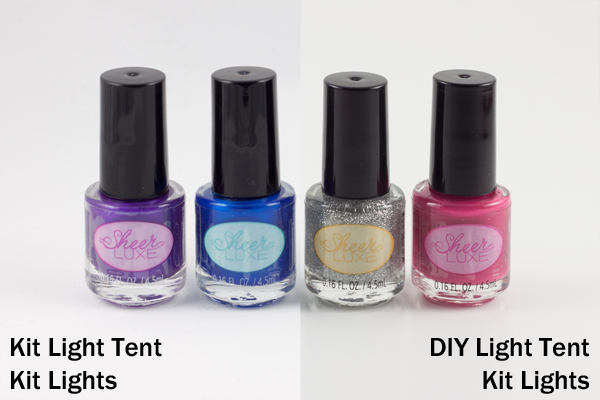
A final test was done to see whether this difference in light was due to the different light bulbs being used or to a difference in the light tents themselves.
light tent, product photography, nail polish

Left image shot at 1/25th – right image at 1/13th

These two shots were taken using the daylight lights from the light tent kit with both the kit tent and the DIY tent (again, in aperture priority, ISO 100, f/8). The kit light tent shot was taken at 1/25th of a second, and the DIY light tent shot was taken at 1/13th of a second, which is a full full stop difference. This means that even with the same lights, the DIY light tent blocked more light than the kit light tent and required longer shutter speeds to shoot the same exposure. The background also came out a little more gray than the kit light tent.

Light tent comparisons: practicalities

There are many other considerations to keep in mind when deciding which kind of light tent would be best for you. Think about how much room you have to devote to gear use and storage, as well as how much the benefits of a pricier kit outweigh the cost investment.

Use of ease
light tent, product photography, knit bag, how to

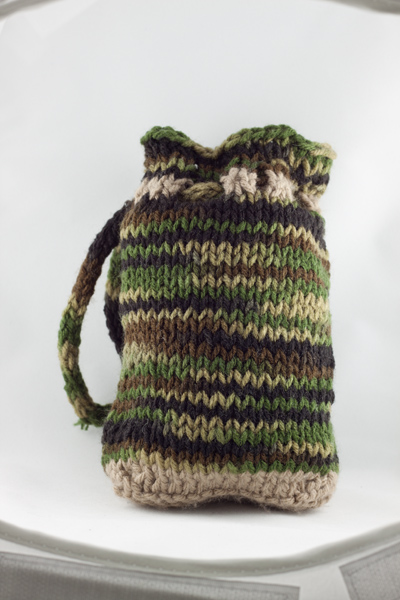
Notice edges of tent showing in places

The lighting stands that come with the light tent kit have greater range and reach than a typical desk lamp, but they cannot get down as low. This makes it difficult to use the kit lights for shooting with the 12-inch cube sitting on a table top, as the lights are too tall to sit beside it on the table and too short to reach up from the floor. A coffee table seems to be the ideal height. For the desk lamps, they work well when sitting on a table next to the light tent, but they will need to be placed on a stack of boxes or books if shooting from something like a coffee table (as shown earlier).

The 12-inch cube also has a lip around the edge, making the functional shooting space a bit smaller, as you want to avoid the edge appearing in your frame. This is far less of a problem with the 30-inch cube. One workaround is putting a book underneath the backdrop to raise the bottom up. The benefit here of the DIY box is that you can make it the size you want for the subject you have, and there is no lip to shoot around, so you can shoot straight-on at your subject.

Backdrops

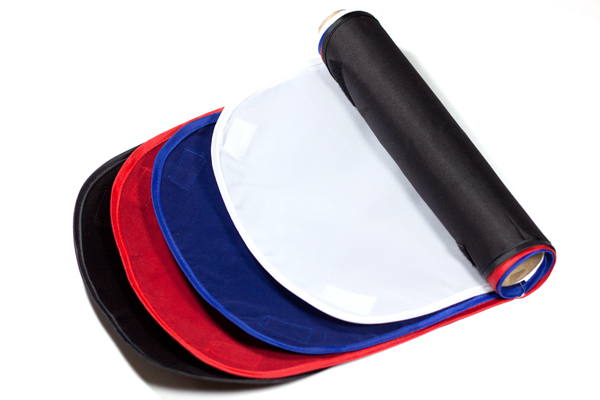
Backdrops require careful handling and attention, and the poster board DIY versions are much easier to replace than the fabric ones from the kit. If you are going to be shooting something potentially messy or greasy, consider using a poster board backdrop regardless of which light tent you use.
light tent, how to, photography, fabric, backdrops

Care for your fabric backdrops by ironing out the wrinkles before hanging. If you roll them up on a cardboard tube when you are finished shooting, you should be able to reuse them again without having to iron every time. Keep a lint roller or clear tape on hand to deal with any dust or lint, and save yourself the time of editing it all out in post-processing.

Portability

The light tent kit has the edge in portability, as it comes with its own carrying case. The case is not particularly sturdy or padded, however, so you would not want to travel with it other than carefully placing it in your car (without stacking anything on top of it).

Storage

The DIY light tent folds down flat for easy storage, and you can simply put your two desks lamps back where you borrowed them from, until the next time you are shooting. The light tent kit takes up significantly more space, and the process of folding the light tents back down into themselves is a little complicated and requires some practice, though there are plenty of “how to” videos online. There is also the risk of deformation if you leave the tents stored too long in their folded down state.

Cost

The DIY light tent is the clear winner in the cost department, particularly if you already own a desk lamp or two, which are the priciest elements. The cardboard box and tissue paper should not set you back more than about five dollars. The light tent kit is currently listed at $ 143, a very discounted price on Amazon, which makes it reasonable to consider as an investment.

Final verdict: which light tent to choose?

There are a lot of different variables to consider when making the final choice about whether a DIY light tent will serve your needs or whether you should invest in a light tent kit. If you are looking at exploring what a light tent can do and whether it would be useful, then definitely build your own to experiment with. Keep the white balance in mind and shoot in RAW. But if you are shooting JPG, remember to adjust the white balance setting when shooting by using a preset or doing a custom white balance.

If you know that you will be consistently shooting a lot of this style of shots, perhaps for selling jewelry or crafts online or for displaying directions for your own DIY projects on a blog, then you should consider investing in a light tent kit. The time savings of having bulbs that match your white balance is considerable if you are doing a lot of light tent photography. You will also have significant flexibility with a kit that offers different sizes of light tents and a better range of motion and height for the lights and light stands.

Do you shoot with a light tent? Do you prefer a light tent kit or a DIY version? Share your thoughts in the comments below.

The post Light Tent Comparison – DIY Versus Kit Tents by Katie McEnaney appeared first on Digital Photography School.
Digital Photography School

 
Comments Off on Light Tent Comparison – DIY Versus Kit Tents

Posted in Photography


Light Tent Comparison – DIY Versus Kit Tents

23 Mar

A light tent is an invaluable photography tool for shooting smaller objects and items and for achieving even, near-shadowless lighting. In our earlier post, we looked at How to Use a Light Tent for Product-Style Photography, which covered the basics for using and shooting with a light tent. In this post, we will take a look at a head-to-head comparison between buying a light tent kit versus making your own DIY version.

The light tent contenders

In this corner, we have the Square Perfect SP500 Platinum Photo Studio In A Box. This kit contains: two pop-up light tents (one 30 inch cube and one 12 inch cube – 12 inch shown below); two lights with adjustable stands; two 30W, 5400K daylight fluorescent bulbs; a tripod; a carrying case; and two sets of four colored fabric backdrops (white, black, red, and blue) sized for each light tent.

light tent kit, Square Perfect, photography, setup

And in this corner, we have the DIY Light Tent, built using these specifications: Foldable DIY Photography Light Tent. This light tent will be lit by means of two adjustable desk lamps and 60W, 2900K halogen bulbs. The backdrops are made from standard poster board and cut to size. You can purchase daylight-rated light bulbs for your DIY kit as well, but you may need to order them online from a photography or home improvement site.

light tent, DIY, how to, photography

To make this an even test, we will be comparing the 12 inch kit cube against the 12 x 16 x 18 DIY tent. The first set of comparisons will feature each set as described above (the lights that come with each kit), while the second set will put the two up against each other using the same lighting set up for both kits.

Light tent comparison: using their own lights

light tent, product photography, knit bag, photography, how to, light tent

For this first photo-face-off, each light tent will be evaluated using its own lights (daylight fluorescents for the light tent kit and halogen bulbs for the DIY light tent). A major consideration when shooting with a light tent is controlling or choosing the correct white balance to match the lights being used. You want your white backdrop to look white and not have any color tint from the lights used. Read more about that issue in: How to Use a Light Tent for Product-Style Photography.

These shots show SOOC (Straight out of Camera) JPG files for the kit and DIY light tents using auto white balance.The kit’s light gives a cooler (more neutral) look to the background, and the colors of the knit bag are much truer to life, while the DIY lights impart a yellowish hue to the bag and the background. Setting your camera on “Tungsten” white balance for the DIY table lamps may give you a more neutral color, or you can also do a custom white balance using a gray card or even the white backdrop as a test shot. Consult your camera manual for how to perform a custom white balance with your camera.

compare-bag-autoWB-darker

This image is a little dark on purpose so you can see the color tint of the background more easily

If you want perfectly clean whites and neutral blacks, then I would recommend shooting in RAW, which will give you greater flexibility regarding the white balance in post-processing. These images (left) show a comparison of the same image of the bag with a Tungsten white balance setting as compared to the Auto. The Tungsten white balance was selected in post-processing from the RAW image file, or it can also be selected as a white balance preset on the camera when shooting, especially if using JPG format.

Light intensity

As you can see by the image below the DIY lights are considerable less intense (not as bright), which will mean you will either need to use a much longer exposure (shutter speed) to get a correct exposure, or increase your ISO. If working on a tripod (recommended for this type of set up) exposure time shouldn’t be an issue though so just stay at ISO 100 and adjust accordingly.

light tent, product photography, camera, Canon, point and shoot, Canon A4000IS

Light tent comparison: using the same lights

A final test was done to see whether this difference in light was due to the different light bulbs being used or to a difference in the light tents themselves.

light tent, product photography, nail polish

Left image shot at 1/25th – right image at 1/13th

These two shots were taken using the daylight lights from the light tent kit with both the kit tent and the DIY tent (again, in aperture priority, ISO 100, f/8). The kit light tent shot was taken at 1/25th of a second, and the DIY light tent shot was taken at 1/13th of a second, which is a full full stop difference. This means that even with the same lights, the DIY light tent blocked more light than the kit light tent and required longer shutter speeds to shoot the same exposure. The background also came out a little more gray than the kit light tent.

Light tent comparisons: practicalities

There are many other considerations to keep in mind when deciding which kind of light tent would be best for you. Think about how much room you have to devote to gear use and storage, as well as how much the benefits of a pricier kit outweigh the cost investment.

Use of ease

light tent, product photography, knit bag, how to

Notice edges of tent showing in places

The lighting stands that come with the light tent kit have greater range and reach than a typical desk lamp, but they cannot get down as low. This makes it difficult to use the kit lights for shooting with the 12-inch cube sitting on a table top, as the lights are too tall to sit beside it on the table and too short to reach up from the floor. A coffee table seems to be the ideal height. For the desk lamps, they work well when sitting on a table next to the light tent, but they will need to be placed on a stack of boxes or books if shooting from something like a coffee table (as shown earlier).

The 12-inch cube also has a lip around the edge, making the functional shooting space a bit smaller, as you want to avoid the edge appearing in your frame. This is far less of a problem with the 30-inch cube. One workaround is putting a book underneath the backdrop to raise the bottom up. The benefit here of the DIY box is that you can make it the size you want for the subject you have, and there is no lip to shoot around, so you can shoot straight-on at your subject.

Backdrops

Backdrops require careful handling and attention, and the poster board DIY versions are much easier to replace than the fabric ones from the kit. If you are going to be shooting something potentially messy or greasy, consider using a poster board backdrop regardless of which light tent you use.

light tent, how to, photography, fabric, backdrops

Care for your fabric backdrops by ironing out the wrinkles before hanging. If you roll them up on a cardboard tube when you are finished shooting, you should be able to reuse them again without having to iron every time. Keep a lint roller or clear tape on hand to deal with any dust or lint, and save yourself the time of editing it all out in post-processing.

Portability

The light tent kit has the edge in portability, as it comes with its own carrying case. The case is not particularly sturdy or padded, however, so you would not want to travel with it other than carefully placing it in your car (without stacking anything on top of it).

Storage

The DIY light tent folds down flat for easy storage, and you can simply put your two desks lamps back where you borrowed them from, until the next time you are shooting. The light tent kit takes up significantly more space, and the process of folding the light tents back down into themselves is a little complicated and requires some practice, though there are plenty of “how to” videos online. There is also the risk of deformation if you leave the tents stored too long in their folded down state.

Cost

The DIY light tent is the clear winner in the cost department, particularly if you already own a desk lamp or two, which are the priciest elements. The cardboard box and tissue paper should not set you back more than about five dollars. The light tent kit is currently listed at $ 143, a very discounted price on Amazon, which makes it reasonable to consider as an investment.

Final verdict: which light tent to choose?

There are a lot of different variables to consider when making the final choice about whether a DIY light tent will serve your needs or whether you should invest in a light tent kit. If you are looking at exploring what a light tent can do and whether it would be useful, then definitely build your own to experiment with. Keep the white balance in mind and shoot in RAW. But if you are shooting JPG, remember to adjust the white balance setting when shooting by using a preset or doing a custom white balance.

If you know that you will be consistently shooting a lot of this style of shots, perhaps for selling jewelry or crafts online or for displaying directions for your own DIY projects on a blog, then you should consider investing in a light tent kit. The time savings of having bulbs that match your white balance is considerable if you are doing a lot of light tent photography. You will also have significant flexibility with a kit that offers different sizes of light tents and a better range of motion and height for the lights and light stands.

Do you shoot with a light tent? Do you prefer a light tent kit or a DIY version? Share your thoughts in the comments below.

The post Light Tent Comparison – DIY Versus Kit Tents by Katie McEnaney appeared first on Digital Photography School.

Digital Photography School

 
Comments Off on Light Tent Comparison – DIY Versus Kit Tents

Posted in Photography


Review Comparison of the Canon EOS 70D vs Canon 700D / Rebel T5i

21 Mar

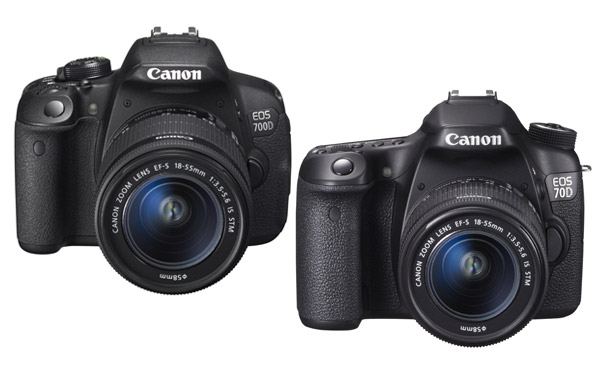
EOS 700D and 70D review comparison

Earlier in the year I compared the EOS 5D Mark III and 6D, Canon’s least expensive full-frame cameras. Today I’m going to look at two other models that cause confusion: the Canon EOS 70D vs Canon 700D (Rebel T5i).

Note: North America readers will know the EOS 700D as the Digital Rebel T5i. EOS 700D is the European name for the same camera. It is called the Kiss X7i in Japan.

The confusion arises because many photographers, when buying a new camera, start by searching online for information. While there are lots of websites that list the differences between the two cameras, it isn’t always easy to understand which of these matter to you.

The major differences

I’m going to start by looking at the major points of differentiation between the two models. It’s impossible to list them all, but these are the ones most likely to influence a buying decision:

Price

Budget is an important part of the buying decision, and there is a sizeable difference in price between the two models. At the moment you can buy the EOS 700D (Rebel T5i) body only for around $ 700 and the EOS 70D for about $ 1100 (body only prices, excluding tax). The difference isn’t really surprising considering the difference in specifications between the two models.

Bottom line:  If you’re on a tight budget then the EOS 700D (Rebel T5i)  is the model for you, but not before considering the benefits of the 70D.

Megapixels

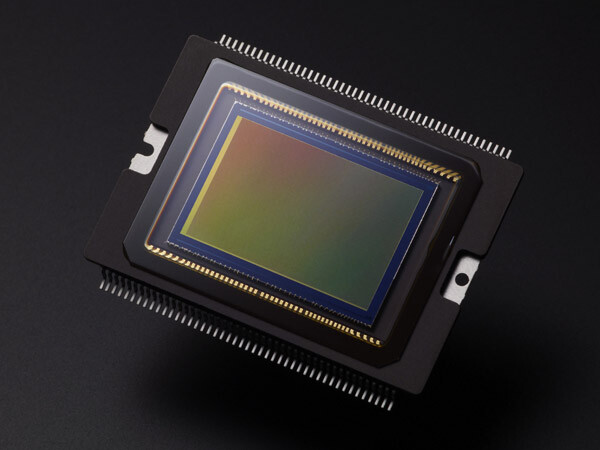
Not really a big deal in today’s world of high megapixel digital cameras, but it may matter to some. The EOS 70D has a 20.2 megapixel sensor compared to the EOS 700D’s (Rebel T5i) 18.0 megapixels.

EOS 700D and 70D review comparison

The sensor of the EOS 70D. Both cameras have an APS-C size sensor with a similar megapixel count.

Bottom line:  The difference between the two models is negligible, and shouldn’t greatly influence your decision.

Autofocus performance

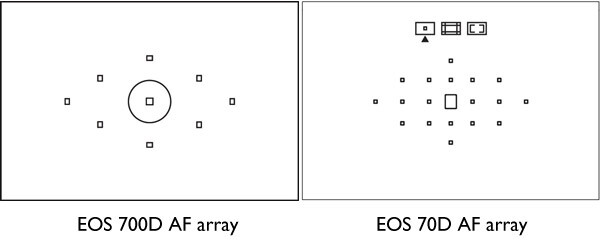
This is a big difference. Minor differences aside (and excluding AF in Live View or movie mode), the autofocus of the 70D is the same as that found in the more advanced Canon EOS 7D camera. It has 19 cross-type AF points (the more reactive ones) plus a transmissive LCD screen in the viewfinder that lets you configure different display options.

By contrast the EOS 700D (Rebel T5i) has 9 cross-type AF points and a fixed viewfinder display. This diagram shows the difference between the two:

EOS 700D and 70D review comparison

The autofocus arrays of the EOS 700D (Rebel T5i) and 70D compared

The higher AF point count of the EOS 70D makes it better for shooting moving subjects, as there are more AF points to measure the focusing distance to the subject. It is also more likely that you can find a well placed AF point to use when photographing still subjects, without having to focus and recompose. This is useful when using prime lenses at wide apertures, where the margin of error for focusing is small.

The autofocus of the EOS 70D also excels when using the camera in Live View or movie mode. It uses new technology called Dual Pixel CMOS Autofocus, the only EOS digital SLR to do so. This is mainly of interest to people who want to use the camera to shoot movies.

You can read about the autofocus performance of the EOS 70D in more detail in my article Understanding EOS Autofocus: The EOS 70D.

Bottom line:  The autofocus performance of the EOS 70D is much better than that of the EOS 700D (Rebel T5i). If you want to buy an EOS digital SLR to shoot movies, the 70D currently has the best AF performance in movie mode.

Lens micro-adjustment

The EOS 70D allows you to calibrate your lenses so they focus as accurately as possible. This is a feature found only on higher end Canon cameras and will appeal in particular to photographers who use prime lenses at wide aperture settings, where AF performance is critical. The EOS 700D (Rebel T5i) doesn’t have this feature.

Bottom line:  Autofocus micro-adjustment complements the more advanced autofocus of the EOS 70D. It is Canon’s least expensive camera with this feature.

The Quick Control dial

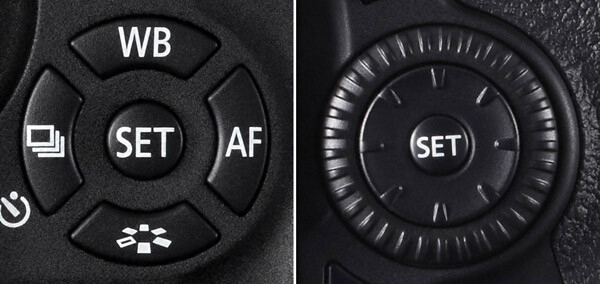
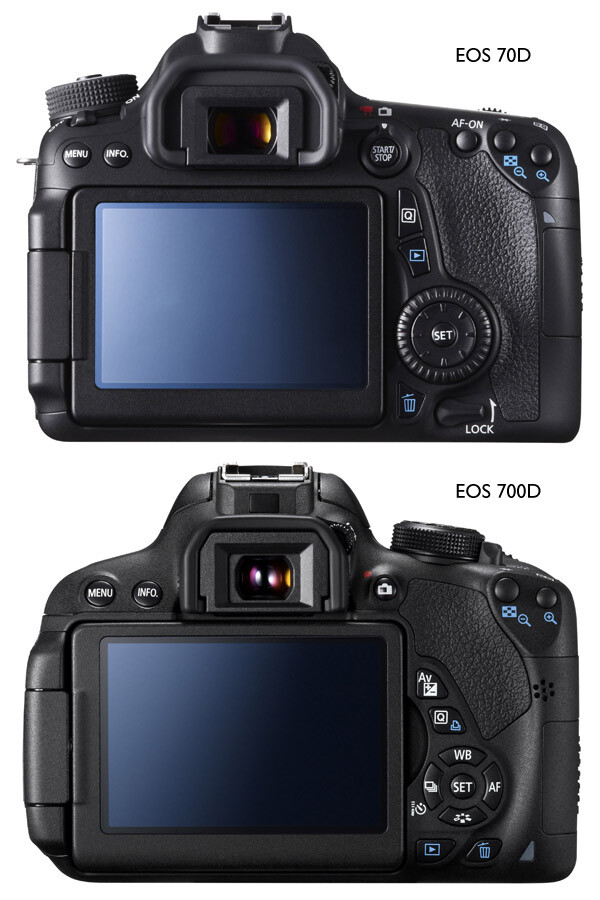
The Quick Control dial is one of the features that differentiates mid-range EOS cameras such as the EOS 70D from enthusiast level models like the 700D (Rebel T5i). It is located on the back of the camera where it is easily moved by your thumb when holding the camera. The benefit of the Quick Control dial is that it lets you adjust exposure compensation and focus point selection easily while looking through the viewfinder. This speeds up the photo taking process and may make the difference between getting a shot and missing it. The cross keys on the EOS 700D (Rebel T5i) can be used while looking through the viewfinder, but are much harder to do so.

This diagram shows the difference between the two:

EOS 700D and 70D review comparison

These photos show you how the Quick Control Dial (700D/T5i – left image) and (70D – right image above) cross keys influence the design of the back of the camera:

EOS 700D and 70D review comparison

Another advantage of the Quick Control dial is that it lets you scroll very quickly through your images when playing them back on the camera’s LCD screen.

For me, the Quick Control dial is so useful that I never want to use another camera without it.

Bottom line:  The Quick Control dial on the EOS 70D makes it easier and quicker to use in many situations. This is something you can only appreciate by trying the camera out, so make sure you do so before making a buying decision.

Size and weight

The EOS 70D isn’t a great deal bigger than the 700D/T5i, but it is heavier (755 grams/1.6 lbs. compared to 580 grams/1.3 lbs.). If you are intending to carry the camera around all day, then the lighter 700D/T5i may have more appeal. But it really is subjective, and this is where the hands-on comparison comes in again. I cannot stress the importance of trying out both models to see which one you prefer to handle.

Bottom line:  Try before you buy, as preferences when it comes to size and weight are personal.

Built-in Wi-fi

The EOS 70D has built-in Wi-fi, the EOS 700D/T5i doesn’t. The Wi-fi feature lets you:

  • Transfer images to other Canon cameras with Wi-fi
  • View saved images or operate the camera from a smartphone (the free app EOS remote is required)
  • Print images using a Wi-fi printer
  • Operate the camera remotely using EOS Utility (free software that comes with the camera) which lets you transfer photos wirelessly to your computer, something that photographers working in a studio may find useful
  • Upload images to Canon iMage Gateway, a free photo online service for Canon camera owners(but not to photo sharing sites like Flickr or FTP)
  • View photos on a television screen if you use a media player supporting (DLNA) Digital Living Network Alliance

You can’t do any of those things with an EOS 700D/T5i, nor can you buy a Wi-fi unit for the camera.

Bottom line:  If Wi-fi is important to you, then buy the EOS 70D. If you shoot tethered in a studio, remember you can transfer images to a computer using an extra long USB cable if your camera doesn’t have Wi-fi.

Electronic Level

The EOS 70D has an electronic level display that you can view on the LCD screen. It is useful for taking photos with a level horizon when you have the camera mounted on a tripod. There is also an electronic level display in the viewfinder to help you keep the camera level when shooting hand-held. The EOS 700D/T5i doesn’t have this feature.

Bottom line: The electronic level is a useful feature, especially for landscape photographers. However, if your budget doesn’t stretch to the EOS 70D, remember you can buy an inexpensive spirit level that fits in the EOS 700D/T5i’s hotshoe for landscape photography.

Shooting speed

The EOS 70D can shoot at 7 frames per second (fps), the 700D/T5i is a little slower at 5 fps. How important this is depends on the subjects you shoot – it is more likely to be of interest to those of you into sports and wildlife photography.

Bottom line: The more advanced autofocus and higher shooting speed of the EOS 70D makes it the better model for sports and wildlife photography.

Minor differences

There are lots of minor differences between the two cameras, so I’ve provided some links to in-depth reviews so that you can get more information before making a purchasing decision. You’ll also see some photos taken with both models. In the meantime, if you own or have used either of these cameras, why not tell us what you think in the comments. Why did you choose one or the other, and do you think you made the best choice?

EOS 70D reviews

  • Digital Photography School
  • DP Review
  • Camera Labs
  • Petapixel

EOS 700D/T5i reviews

  • Digital Photography School
  • DP Review
  • Pocket Lint

Finally, if you want to ask owners of these cameras what they think, a good place to do so is the EOS magazine forum. It’s a high quality forum with lots of helpful members. You should also take a look at EOS magazine – the most in-depth magazine for Canon EOS users you can buy.

For more reviews and discussion on cameras and equipment see our Cameras section!


Understanding EOS – a new ebook

Understanding EOS ebookMy ebook Understanding EOS is written for photographers who want to learn to get the best from their EOS cameras. It teaches you everything you need to know to take control of your camera and start creating beautiful photos. Click the link to learn more.

The post Review Comparison of the Canon EOS 70D vs Canon 700D / Rebel T5i by Andrew S. Gibson appeared first on Digital Photography School.

Digital Photography School

 
Comments Off on Review Comparison of the Canon EOS 70D vs Canon 700D / Rebel T5i

Posted in Photography


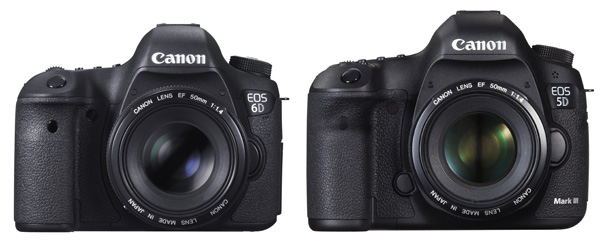
Review: Comparison Canon 5D MarkIII vs the Canon 6D

25 Jan

EOS 5D Mark III and EOS 6D

Now that Canon has two semi-professional full-frame cameras, the EOS 5D Mark III and EOS 6D, naturally photographers wonder which is the best model for them. As a former Technical Editor of EOS Magazine (the best magazine Canon owners could possible buy) I would like to share my insights.

But first, if you’re in the market for a full-frame EOS camera, let’s not forget the top of the range EOS 1D-X. This is a high-end, professional camera with a price tag to match. It’s big and heavy and built for the demands of a professional photographer’s life. Most photographers don’t need this much camera, but it’s interesting to look at because its size and price put Canon’s other full-frame cameras into perspective. Here’s a photo:

EOS 1D-X

EOS 1D-X

Big, right? The body alone weighs 1340 grams (nearly three pounds) and will set you back nearly $ 6800 USD+tax if you buy it from B&H Photo Video. The weight and price alone mean this camera isn’t suitable for most non-professional photographers, leaving Canon’s other full-frame models, the EOS 5D Mark III and EOS 6D, as the available choices.

Let’s compare – Canon 5D MarkIII vs the Canon 6D

Key differences

Let’s start by looking at what could be the deciding factor for some people – price. The EOS 5D Mark III costs around $ 3299. The EOS 6D is $ 1500 less expensive at $ 1799 (body only prices). That’s a huge difference, so why would anyone choose the 5D Mark III over the 6D? Let’s take a look.

Size and weight

  • The 5D Mark III weighs around 950g/2.1 lb.
  • The EOS 6D is Canon’s smallest and lightest full-frame digital SLR. It weighs 755g/1.6lb (body only, but including memory card and battery). It is also slightly smaller.

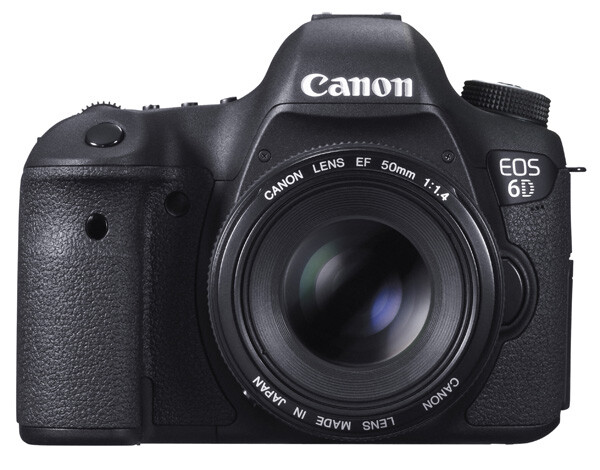
I own an EOS 5D Mark II and I can tell you that it gets heavy when I carry it around all day. If you’re planning to carry a camera on a strap over your shoulder for hours at a time, then it makes sense to buy the lighter model, and use light lenses (such as the EF 50mm f1.4 lens in the photo below).

EOS 6D

EOS 6D with EF 50mm f1.4 lens

On the other hand, if you are a landscape photographer, keep the camera mainly in the studio, or just take it with you on location and use it for a couple of hours then pack it away again, the weight probably makes no difference.

Bottom line: If size and weight are critical, then go for the EOS 6D. But not before considering autofocus performance!

Autofocus

Autofocus performance is the major difference between the two cameras. It is a big factor if you are into photographing sports, action, portraits or any moving subject.

  • The EOS 5D Mark III has a 61 point AF array with up to 41 cross-type AF sensors (depending on the maximum aperture of the lens mounted on the camera). Along with the EOS 1D-X, it has Canon’s most advanced autofocus system.
  • The EOS 6D has an eleven point autofocus (AF) array with one cross-type AF sensor in the centre.

Cross-type AF points are more sensitive, and therefore focus more accurately, than other AF sensors. This is especially important if you work at wide apertures (i.e. between f1.0 and f2.8) as depth-of-field is so narrow at these settings.

As an example, let’s look at how it works with portrait photography. Imagine that you’re taking a portrait of someone with an 85mm lens set to f1.8. Accurate focus is critical as depth-of-field is very narrow at this setting – you may have less than an inch of sharpness to play with. The normal way to focus in this situation is to use the AF point closest to the model’s eye. The photo below shows how this works by overlaying a diagram of the EOS 6D’s AF array over a portrait. The single cross-type AF point in the centre is shown in green, and the AF point the photographer would have to use is in red:

EOS 6D autofocus array

You can see the problem right away. As the only cross-type AF point is in the centre, you can’t use it to focus unless the model’s eye is also in the centre of the frame. You have to use one of the less sensitive, and therefore less accurate, AF points at the edge of the array.

With the EOS 5D Mark III the story changes. With up 41 cross-type AF points available (shown in red), it is far more likely you will find one to cover the model’s eye. The end result is that you will get more in-focus photos.

EOS 5D Mark III autofocus array

You can learn more about the autofocus of the EOS 5D Mark III in my article Understanding EOS Autofocus: The EOS 5D Mark III and EOS 1D-X

Bottom line: If autofocus performance is critical, then (budget allowing) go for the EOS 5D Mark III.

Wi-fi and GPS

This is another major difference between the two cameras. However this time, and somewhat counter-intuitively, it is the EOS 6D that has the features and the 5D Mark III that does not.

  • The EOS 6D’s built-in GPS lets you geotag your photos with the camera’s location as you take them. You can then use that to see where they were taken on a map, help organize or search your images in Lightroom, or as extra information if you sell your photos to a stock library. If you want to do the same with an EOS 5D Mark III, you have to buy a GPS unit separately.
  • The EOS 6D’s built-in wireless lets you upload your photos via a local wi-fi connection to a computer as you take them (useful in a studio or even on location if you have a laptop with you), upload photos to Facebook, or remotely control your camera using a Smartphone app. Again, you have to buy a separate wireless unit, which comes built-in to a portrait grip, to do the same with an EOS 5D Mark III.

Bottom line: If you need GPS or Wi-fi, then buying the EOS 6D will save you a lot of money.

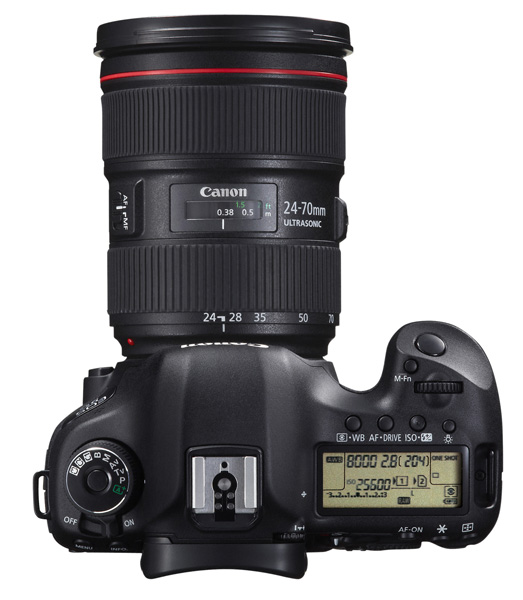
EOS 5D Mark III

EOS 5D Mark III with EF 24-70mm f4 lens

Dual card slots

  • The EOS 6D has a single card slot for an SD type memory card (it also accepts SDHC and SDXC cards)
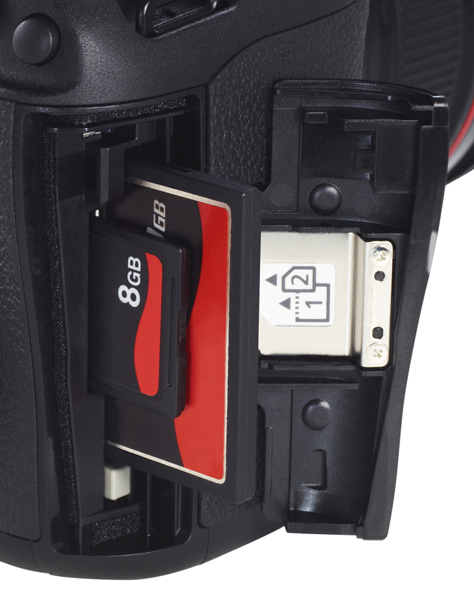
  • The EOS 5D Mark III has two card slots. One takes CF cards, and the other SD (plus SDHC/SDXC cards)

One benefit of dual card slots is speed. CF cards are faster, which helps give higher burst speeds and assists with recording movies.

Another is security. You can set the EOS 5D Mark III to save photos to both the CF card and SD card slots at the same time, giving you a back-up in case one fails. Bear in mind it will slow the camera down as it takes longer to write a file to two cards, but it may give you peace of mind on important shoots. I imagine wedding photographers will greatly appreciate this feature.

Having said that, if you look after your memory cards, and buy a reputable brand, they are highly unlikely to fail. Most memory card failures are the result of corruption caused by user error, such as removing a card from a reader while the computer is writing to it.

Bottom line: If dual card slots matter to you, then you need the EOS 5D Mark III.

EOS 5D Mark III dual card slots

The dual card slots of the EOS 5D Mark III.

Minor differences

There are lots of minor differences between the two cameras, so I’ve provided some links to in-depth reviews so that you can get more information before making a purchasing decision. You’ll also see some photos taken with both models. In the meantime, if you own or have used either of these cameras, why not tell us what you think in the comments. Why did you choose one or the other, and do you think you made the best choice?

EOS 5D Mark III reviews

  • DP Review
  • Photography blog
  • Photography Life

EOS 6D reviews

  • DP Review
  • Photography blog
  • The Phoblographer
  • Graham Clark Photography

Understanding EOS

Understanding EOS ebook cover

My ebook Understanding EOS is written for photographers who want to learn to get the best from their EOS cameras. Click the link to learn more.

The post Review: Comparison Canon 5D MarkIII vs the Canon 6D by Andrew S. Gibson appeared first on Digital Photography School.


Digital Photography School

 
Comments Off on Review: Comparison Canon 5D MarkIII vs the Canon 6D

Posted in Photography


Nikon D4 and Canon EOS 6D added to test scene comparison tool

18 Dec

shared:TestScene2.jpg

As we’re racing to complete our full review of the Nikon Df, we’ve added the Nikon D4 and Canon EOS 6D to our studio comparison tool. The studio test scene shows image quality for both JPEG and Raw files. It offers downloadable Raw samples and is designed to simulate real-world daylight and low-light shooting. As always, you can compare the D4 and EOS 6D to a number of other cameras, including the Df. See test scene

News: Digital Photography Review (dpreview.com)

 
Comments Off on Nikon D4 and Canon EOS 6D added to test scene comparison tool

Posted in Uncategorized


Latest and greatest smartphones battle it out in mobile photo comparison

28 Sep

shootout.jpg

Thinking of upgrading to the latest smartphone, and want to see which takes the best photos? We pit four top photocentric mobile devices in an imaging showdown to test three new smartphones — the Sony Xperia Z1, Nokia Lumia 1020 and LG G2 — and Samsung’s Galaxy S4 Zoom in real world shooting scenarios. See how they fared in our tests on connect.dpreview.com.

News: Digital Photography Review (dpreview.com)

 
Comments Off on Latest and greatest smartphones battle it out in mobile photo comparison

Posted in Uncategorized


Pentax Q7 added to our studio comparison database

11 Jul

Pentax_Q7.png

We’ve added the Pentax Q7 to our database of studio comparison images. The Q7 is the first Pentax Q-mount camera featuring a 1/1.7″ sensor to match its enthusiast compact peers. We’ll be adding a comprehensive review in the coming weeks but, in the meantime, click through to see how the Q7 stacks against the competition. 

News: Digital Photography Review (dpreview.com)

 
Comments Off on Pentax Q7 added to our studio comparison database

Posted in Uncategorized


Studio scene comparison pages added to Pentax MX-1 preview

23 May

pentax_mx1.png

We’ve just added three studio comparison pages to our previously-published preview of the Pentax MX-1. The MX-1 is Pentax’s flagship compact camera, and something of a departure for the manufacturer, offering a fast F1.8-2.5 zoom lens, full manual control and a high-class, metal body, to compete with more established peers like Panasonic’s LX7. Click through to go to the new pages in our preview, and see for yourself how the MX-1 compares to its rivals.  

News: Digital Photography Review (dpreview.com)

 
Comments Off on Studio scene comparison pages added to Pentax MX-1 preview

Posted in Uncategorized


Nikon Coolpix A Preview updated with studio comparison pages

09 Apr

specs-1.jpg

We’ve just updated our preview of the Nikon Coolpix A with a full set of studio shots, showing image quality in both JPEG and RAW capture modes. This is in addition to a gallery of real-world samples, and first impressions of our initial findings from shooting with the camera both in and out of the studio. The Nikon Coolpix A features a 16MP CMOS sensor, and a fixed, 28mm equivalent F2.8 lens. Click through for a link to our preview, which now includes our studio comparison pages. 

News: Digital Photography Review (dpreview.com)

 
Comments Off on Nikon Coolpix A Preview updated with studio comparison pages

Posted in Uncategorized


Studio comparison pages added to Fujifilm X100S Preview

28 Mar

fujifilm_x100s.png

We’ve just added three pages of studio test data to our preview of the Fujifilm X100S, following the publication of a gallery of real-world samples, last week. The X100S is the successor to the popular X100, and offers a fixed 35mm (equiv.) F2 lens, and a version of Fujifilm’s APS-C format X-Trans sensor with hybrid phase-detection AF. A host of other, smaller improvements should make the X100S a considerably more appealing camera than its predecessor. Click through for a link to the updated preview to see for yourself how it compares to its peers in our studio. 

News: Digital Photography Review (dpreview.com)

 
Comments Off on Studio comparison pages added to Fujifilm X100S Preview

Posted in Uncategorized