RSS
 

Posts Tagged ‘Cloud’

Adobe introduces cheaper Creative Cloud with Photoshop + Lightroom

05 Sep

shared:AdobeLogo.png

Adobe has added a new pricing tier to the Creative Cloud product, possibly in response to the negative response from the photography community when it announced that all Creative Suite products would require a monthly subscription. The Photoshop Photography Program gives users Photoshop CC, Lightroom 5, Bridge CC, Behance, and 20GB of storage for $ 9.99 per month. That’s not a promotional price, either, as long as you sign up by the end of this year. You must already own Photoshop CS3 or newer to be eligible for this offer.

News: Digital Photography Review (dpreview.com)

 
Comments Off on Adobe introduces cheaper Creative Cloud with Photoshop + Lightroom

Posted in Uncategorized


ioSafe N2 – Your own Private Muscly Cloud

26 Aug

I wrote recently about the Synology NAS, I will write more about it soon as I’ve added to it! But there are, as they say, two sides to every story and here’s the other side to that story!

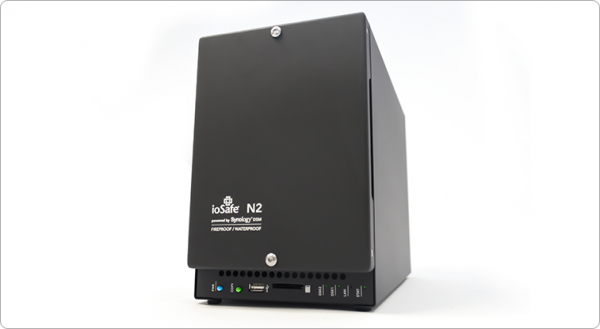
Introducing the ioSAFE N2 NAS
ioSafe-n2-review-simon-pollock

Having (had!) an IT background and experiencing first hand a number of times people losing their data – sometimes LOTS of data – and being completely overwhelmed at the thought of not knowing what they had saved somewhere else and what was “gone forever*” I wanted to make sure that wasn’t the case for me.

At the same time, I wanted to be able to get to “stuff” from wherever I was. I do use multiple “online” storage things, Dropbox is my main online storage space, I’ve also just started using COPY who give much more free space.. Why multiples? Who puts all of their eggs in one basket? But we’re talking 20gb here and 30gb there… If I wanted to have an entire copy of my computer online just incase something really shoddy happened like theft, flood, fire, or something else… The ability to get to my digital life (as I like to call it) is crucial. I work from home, I have client data (As a photographer, I have photographs obviously, but they’re covered with my other NAS, the DS1512+) and I need to be able to access that data at all time.

There’s also the whole “would I walk up to someone in the street and hand them all the photos of my kid, all of my important business data” that Robb touches on in the video below… I’m sure you’ve heard of businesses folding – well, it has happened to online storage companies too [READ THIS this is from 2009, but there’s nothing to say it can’t happen today] and with this firmly in mind, I smile about my N2 sitting securely in a cupboard in my house, out of line of sight, quietly backing up all of my precious digital stuffs…

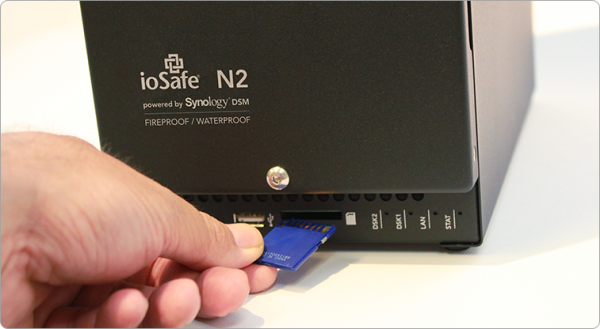
That said, having this NAS packed in a cupboard out of harms way, I don’t get to use the SDXC slot on the front of the unit, but it is there if you want to use it – simply take photographs on an SD card, pop the card into the front of your NAS and it mounts up like a little external drive and you can copy all of the images across. Very handy.
3

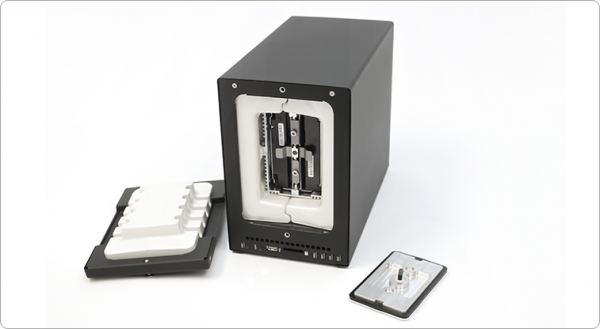
Lets hop around a little.. I run my own business, but it isn’t large and I don’t have co-located servers with my data replicating across multiple sites – if I wanted to make sure I was 100% safe, I’d do that, but it is cost restrictive for me right now, so I needed to be able to trust what I could afford** The ioSAFE N2 is sort of like a baby army tank that stores data.. It can withstand fire, water, three year olds etc… 1500 degrees f. for half hour – you’d want to hope the fire brigade had put your house out in that time!, Under ten feet of water for 72 hours… This is no ordinary NAS (Network attached storage) device. There’s also the included one time data recovery service – ioSAFE will recover your data up to $ 5K worth of DRS included with every ioSAFE product… that is pretty rad if you ask me! (read more on that here)
ioSafe-n2-internal-photo-simon-pollock-review-dps

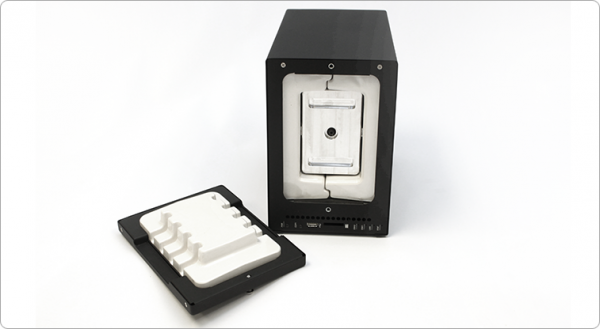
You can see above (and below) where your data is stored, on those two disks in the middle… Then there’s a solid metal plate that goes on the front of the disk bay, then a plug that is the front of the unit… There is airflow around the sealed unit that has heat dispersion wings on it, so your disks maintain a normal working temp, too.
ioSafe-fire-water-proof-nas-simon-pollock

Lets jump back to where I was talking about accessing my data remotely shall we… The ioSafe runs Synology DSM (I’m currently running the 4.3 Beta on my ioSafe with great success) DSM pretty much turns the N2 into a fully fledged cloud (cloud simply means server that can be accessed remotely in this case.. sort of) and there are some very handy iPhone and Android and (even haha) Windows phone apps that you can use to get to your data.. You can log into your server via FTP too.. (It also works as a web server, print server, ftp server, media server… this thing can’t make a decent espresso, but then I can, so we’re good!)

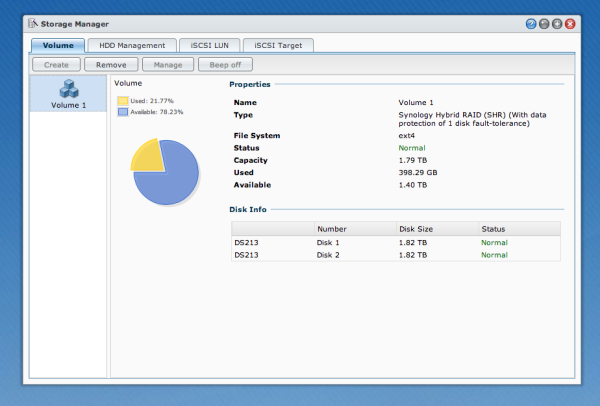
My ioSafe N2 is setup using the Synology Hybrid Raid, I use two 2TB disks in (basically) raid one so I have a one disk fault tolerance.. My stuff is essentially safe unless Godzilla comes along and eats my N2..
DSM-Synology-disk-manager-simon-pollock-review-iosafe-n2

I use my N2 in conjunction with my other ioSAFE drives.. I have a Solo G3 and a Rugged Portable (That my brother has borrowed to take around the world!!)

Who is the N2 for? 

Anyone that is serious about keeping their data safe but maybe not quite ready to buy a serve in a datacentre. (You can also bolt the N2 to your floor / hide it in a cupboard and access it wirelessly!)

Pros

  • Life proof.
  • Connectivity.
  • Massive feature set via DSM.
  • Small footprint by comparison.

Cons

  • Errr? For the market this beast is aimed at, there are none.

I want to leave you with a video from Robb Moore, he’s the guy that started ioSafe when nothing else would suit his needs… I’m very glad he did because right now, for me, nothing else does what this N2 does.


I was provided with the N2 for review, I was already an ioSafe user… I use product I love, I don’t have time for rubbish that doesn’t work – who does. I give this N2 a total of 10 out of 11 gold stars, I only deduct one because I know I’m going to need more space soon and there’s not a 4 disk model – yet.

Please feel free to ask any questions in the comments below.

–Sime


Post originally from: Digital Photography Tips.

Check out our more Photography Tips at Photography Tips for Beginners, Portrait Photography Tips and Wedding Photography Tips.

ioSafe N2 – Your own Private Muscly Cloud


Digital Photography School

 
Comments Off on ioSafe N2 – Your own Private Muscly Cloud

Posted in Photography


Cloud Storage: Why an External Hard Drive is Not Enough

11 Aug

A contribution from Lori Peterson

IMAGE 01A few years ago I shot a beautiful, heartfelt wedding. The bride’s grandmother had just gotten out of the hospital after a terrible fall. Her grandfather was not doing well, but he was managing the care of her grandmother in addition to taking care of himself. They made it a huge family occasion and created a beautiful, family oriented evening.

Celebrations continued to the later hours in the evening and then the bride and groom left to spend their first few days as man and wife. It was a beautiful, perfect day. The images I shot in camera looked just amazing and seemed to really capture the essence of the day.

I went home and loaded all the images onto my computer and then backed them up to my external. I edited a few images so that the bride and groom could have some sneak peeks of their wedding photographs to share with their friends and family.

A few days later my husband noticed that my computer was not displaying the photograph slideshow that I have my computer set to play. We sat down and looked at my computer together. While we were sitting there all of the images started disappearing off my computer. I thought “Well, at least they are on my external!” I apparently got too hopeful way too fast. My external and my hard drive crashed at the same time. While we sat there trying to figure out what was going on my computer’s hard drive and the external hard drive were dying….and wiping away all of the images they had.

We have a friend who works for a computer repair store. We called him. We immediately took over the external and left it waiting and hoping for a phone call and for him to say that they recovered the images. I couldn’t even think straight, it was the only thing on my mind.

Our phone finally rang, but he was not able to give us good news. Our external hard drive had crashed and wiped out all of the data on it. Nothing was able to be recovered. Not one image. I was frantic. I now had to call the bride and tell her that all of the images from that day were gone. All of them, except for their sneak peeks. Those little fragments were all that remained of their day.

That was one of the hardest phone calls I have ever had to make. I wanted to tell them in person, but I honestly felt that setting up a meeting to tell them this would make it worse for them. I picked up the phone and dialed the number. I explained what happened. I apologized profusely. She was disappointed and heartbroken, that much you could tell. She was also understanding and forgiving as well. As it turns out, just a few weeks before their wedding, their own computer had abruptly died. They wanted to get it repaired, but according to their computer technician, there was absolutely nothing they could do to save the computer, the photos, and the documents on the computer. When the computer died, it took all of its information with it, just like mine had done.

At this point refunding her money and offering her the world was on my agenda because I felt awful about the entire situation. I was surprised by how well they took the news. They knew that the situation was not one I created or that they created. It was just a by-product of our relying on our technology to keep everything safe. Sometimes it fails and lets us down.

On that day I vowed that would never, ever happen again. That was not a situation I was going to put myself into ever again. This is when I started researching cloud storage. I wanted something that immediately backed up my computer. I wanted a safety net. The external was just not a big enough safety net for me anymore.

You can get overwhelmed when you are looking for cloud storage by the number of providers available. You should factor in what you are looking to backup. Is it just your computer? What about an external? Photos or documents? Or all of it.

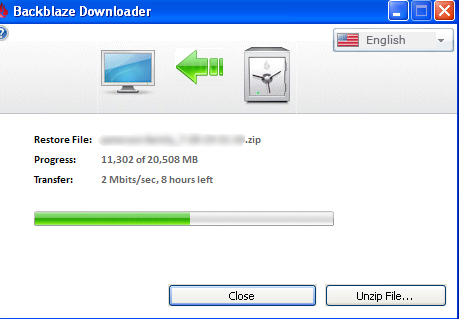
One of the easiest and cheapest options for backing up everything is BackBlaze. For $ 5 a month it will back up one computer and any external plugged into that computer. It will back up everything except your Operating Systems and applications. All your files, photos, and documents will be securely backed up and you can retrieve them in the event of any emergency.

IMAGE 02

Carbonite is another option. For one computer to be backed up their pricing begins at $ 59.99 per year. If you have an external hard drive that you also want backed up they have plans that begin at $ 99.99 per year.

Dropbox, Copy, and Google Drive all have free plans for anywhere from 15-18 GB of storage. Depending on your needs they have other plans that begin at $ 4.99 per month for 100GB and they go up from there. Dropbox does have an add on for $ 3.99 a month that lets you have unlimited undo history for those moments when you accidentally delete something and realize that you really should have kept it.

Whatever your situation, having a backup plan is always a good idea. If you are a photographer, it’s even more important to have that peace of mind not only for you but for your client as well. There are pricing structures and plans to fit every budget and every need, because sometimes technology fails. Don’t have to make that phone call like I did. Back your photos and documents up and then back them up to cloud storage. It’s inexpensive and well worth it to invest in some sort of extra storage.

Lori Peterson is an award winning photographer based out of the St. Louis Metro Area. Her dynamic work ranges from creative portraits to very unique fine art photography. Lori’s work can be seen at www.loripetersonphotography.com and also on her blog at www.loripetersonphotographyblog.com. You can follow her on Facebook at https://www.facebook.com/LoriPetersonPhotography.

Post originally from: Digital Photography Tips.

Check out our more Photography Tips at Photography Tips for Beginners, Portrait Photography Tips and Wedding Photography Tips.

Cloud Storage: Why an External Hard Drive is Not Enough


Digital Photography School

 
Comments Off on Cloud Storage: Why an External Hard Drive is Not Enough

Posted in Photography


3 Questions to Answer Before You Fly into Adobe’s New Creative Cloud

09 Aug

Adobe’s announcement of their decision to switch to a subscription-only model has sparked off hot debates on whether they are justified in making this move. The Internet is flooded with concerns expressed by users of Adobe software – especially Photoshop – on whether they can now afford to continue using the software. Doing so will mean they would have already Continue Reading

The post 3 Questions to Answer Before You Fly into Adobe’s New Creative Cloud appeared first on Photodoto.


Photodoto

 
Comments Off on 3 Questions to Answer Before You Fly into Adobe’s New Creative Cloud

Posted in Photography


10 May, 2013 – The Adobe Creative Cloud Storm

10 May

Adobe is moving its Creative Suite apps, including Photoshop, to the Cloud. What does this mean for photographers, both Pros and amateurs?

Find out what I think in Clouding The Issue.


 "Every time I go back to a module I had already seen, I learn additional things.  I have never seen tutorials that have the excellent mix of what the features are, 
how to use them, enough of the under-the-hood information 
and concepts so that I can utilize the features creatively and efficiently, 
and just enough humor to keep the motivation level high.  Wow!"


The Luminous Landscape – What’s New

 
Comments Off on 10 May, 2013 – The Adobe Creative Cloud Storm

Posted in News


Say Goodbye To Adobe Creative Suite (Adobe Moves To The Cloud)

09 May

Screen Shot 2013-05-06 at 1.56.03 PM

Unless you haven’t been on your computer at all in the last 24-48 hours, you have probably heard by now that Adobe announced an end to their Creative Suite of products and will now be moving to a subscription only based service. This news was not received well in the photography community on Monday as photographers flocked to social media sites to bash Adobe and voice their opinions. Here are some facts about Adobe’s new move…

  • First, like I mentioned above, Creative Suite will be no more. Gone are the days of walking into a brick and mortar store and purchasing a copy of Photoshop that you can call your own. While you will still be able to buy licensed copies of Adobe Photoshop Elements, any pro-grade version software like Photoshop, Dreamweaver, Illustrator, etc will only be cloud based.
  • As of right now, Adobe Lightroom will still be ‘cloud-free’ and available for purchase as a licensed product. Although I doubt this will last very long as Adobe CEO reported that, “Adobe has no immediate subscription-based plans for Lightroom, but the migration to digital copies is the wave of the future.”

New Pricing Options

Adobe Photoshop CS6 Extended used to cost $ 999. On average, Adobe seemed to be on an 18 (some odd) month product cycle between CS updates. This means that if you divide $ 999 by 18 months you come out with $ 55.50 per month.

Going forward (and this has been an option ever since the Creative Cloud became available) you’ll have the option of buying an annual subscription to Photoshop alone for $ 19.99/month or you can have access to the entire lineup of Adobe products (formerly known as the Creative Suite) for $ 49.99/month. And as a bonus, if you are a CS3/CS4/CS5/CS6 customer, you’ll get the entire suite of products for $ 29.99/month for the first year. Adobe used to have an option for if you just wanted to pay month to month without an ‘annual agreement’ but that seems to be gone now. I believe that was $ 29.99 a month. Now you have to make an annual agreement but it’s unclear at this point what that entails.

Let’s Do The Math

So let’s see if this is more expensive, less expensive or a wash. Well, as you’ve already read above, if you used to be a customer who upgraded with each update (ie: always upgraded from CS4 to CS5 to CS6) then you will save money now. You won’t have to shell out a fat stack of Benjamin’s any longer at your local software store. If you pay just the $ 19.99 a month on an annual agreement plan, you will pay $ 359.82 every 18 months. That’s a savings of $ 640.17 according to my calculator. Am I missing something? That’s a savings of 64%…

The entire creative suite (Photoshop, Dreamweaver, Illustrator, InDesign, After Effects, Premier Pro, Muse and more) used to cost $ 2599.99. Divide that by 18 months (again, 18 months is the average amount of time between previous versions of CS) and you get $ 144.44 a month. Compare that to the new $ 49.99 a month and you have a $ 94.45/month savings or (again) about 65% less.

Now, I was never much of a math wiz in school but I’m pretty sure I didn’t screw any of that up.

Did Adobe just decrease their pricing by 65%? It sure seems that way to me. At least if you’re going off an average 18-month product cycle. You do have to take into account that there will be no more Creative Suite. That means Adobe will no longer come out with NEW versions of Photoshop. There won’t be a CS7. They will only add features to Photoshop that will become available the next time you open up Photoshop.

What About Those Who Didn’t Buy Every New Version?

That’s a great point. At $ 19.99 a month, it would take 50 months to come out to $ 999.99 (the cost of the old Photoshop CS6 Extended version). That’s just over 4 years. That’s just under 3 18-month product cycles. Call it two. That means that for those who are still using Photoshop CS4 and haven’t updated to CS6; they are still paying the same amount in the long run but are now getting the advantage of having the latest version of the software, with effortless updates as well as access to Adobe’s new Behance community.

So What’s The Problem!?

I’ll admit…when I heard about all this on Monday I was pissed. I even blogged about it. I’m the kind of guy who likes to save up for things I want and pay cash for them, rather than throw it on a credit card and make payments. I don’t have a car payment. I would never lease a car. So the idea of basically leasing Photoshop on a month-to-month basis doesn’t make me particularly happy. The issue for a lot of people is that the consumer, the customer, no longer has a choice. There are some people out there who just want to buy a product and not worry about their bank account getting drafted every month. It’s one thing to plan for automatic drafts like your gas or electricity, your cable or your car payment. It’s another when you start adding stuff like software programs. It’s just one more thing that could go through at just the wrong time and cause someone to overdraft their account. People like having a choice. With the new system you are giving up your right to actually OWN a product.

Some people are also worried that since Adobe will have reliable/consistent income now with subscriptions that they will lose their competitive edge. They used to have to wow us all with each CS update. New features, new tools, new interface. They had to make us WANT it so we would flock to their website and stores to buy the new programs. If they get us all to sign up for these plans where they already have us, will they stop trying so hard to impress us? Who knows? Will that open the door to some relevant competitors? Who knows? Time will tell.

My Suggestion To Adobe

To be perfectly honest, I’m completely on board with getting rid of the physical copies of Photoshop and all the other Adobe products. When I buy a program like onOne Software’s Perfect Photo Suite, I don’t get anything shipped to my house. I get a license code emailed to me that I plug in once the software is downloaded. Easy peasy. What I think Adobe should do is just make an option available to us where we can rent the software for a full year or even multiple years at a time. And give us a discount for paying in advance. That way it’s pretty much just like it was before. Those of us who prefer this method won’t feel like we are renting a software program. It will be the same as owning it except we won’t have a disk sitting in the bottom of our junk drawer. This, at least to me, sounds very reasonable.

Chime In!

So what do you all think? This has been a very hot topic for the past day or so and everybody has different views. Let me know in the comments below and be sure to follow me on Twitter where you can get in touch as well.


Post originally from: Digital Photography Tips.

Check out our more Photography Tips at Photography Tips for Beginners, Portrait Photography Tips and Wedding Photography Tips.

Say Goodbye To Adobe Creative Suite (Adobe Moves To The Cloud)


Digital Photography School

 
Comments Off on Say Goodbye To Adobe Creative Suite (Adobe Moves To The Cloud)

Posted in Photography


Adobe announces Creative Cloud update with new Photoshop tools

06 May

shared:AdobeLogo.png

Adobe has updated its suite of Creative Cloud software, with the latest versions rebranded with the appendage ‘CC’. Adobe Photoshop CC highlights include the Camera Shake Reduction tool that Adobe demoed earlier this year, and the ability to apply Camera Raw as a filter to any raster, vector or video layer. Creative Cloud members can now sync their Photoshop preferences across multiple devices. Click to read about these and other Photoshop CC features.

News: Digital Photography Review (dpreview.com)

 
Comments Off on Adobe announces Creative Cloud update with new Photoshop tools

Posted in Uncategorized


Cloud Station: Floating Helium Roof for Ukraine Transport Hub

01 Mar

[ By Steph in Architecture & Public & Institutional. ]

Under the Cloud 1

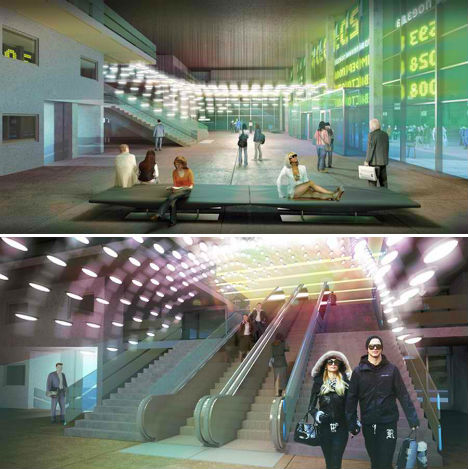
A train station envisioned for the town of Sevastopol in Ukraine seems to be perpetually covered in clouds, topped with a light, helium-lifted structure inspired by airships. ‘Under the Cloud‘ consists of a passenger terminal building and a buoyant freeform canopy that hovers over the green roof of the main building.

Under the Cloud 2

Under the Cloud 3

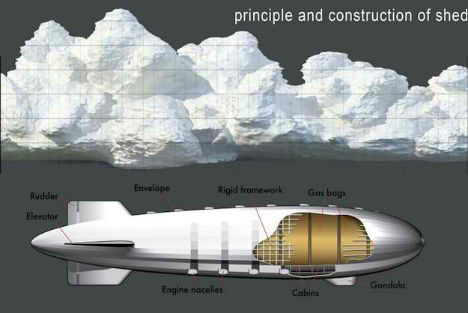
The canopy shell has an aluminum frame with longitudinal and transverse trusses, the helium gas held inside a rigid framework in bags. With the guy lines securing it, it really does seem as if it could lift away into the sky at any moment.

Under the Cloud 4Under the Clouds 5

Says designer Arthur Kupreychuk, “The supporting structure of the canopy is similar to the structure of an airship. The canopy strives upward by buoyancy forces, if its average density is less than the density of the atmosphere.”

Under the Cloud 5

Under the Clouds 6

What’s the purpose of this canopy? Judging by the designer’s other projects, it may just be for fun. Kupreychuk previously designed The Draft Parking Lot with the Car Service Station, another airship-inspired structure “conceived as the embodiment of the boundless creative thought of an architect, who often must try to restrict it and leave it unfulfilled.” This concept won the distinction of being “the most surreal project designed in ArchiCAD” in 2011.

Share on Facebook


[ By Steph in Architecture & Public & Institutional. ]

[ WebUrbanist | Archives | Galleries | Privacy | TOS ]


WebUrbanist

 
Comments Off on Cloud Station: Floating Helium Roof for Ukraine Transport Hub

Posted in Creativity


Cloud Stairs

25 Feb

Check out these visual art images:

Cloud Stairs
visual art
Image by Madison Guy
I’m not particularly fond of the Madison Museum of Contemporary Art, in the Cesar Pelli cultural temple known as the Overture Center, or even its previous, more modest incarnation as the Madison Art Center at the same site when it was the pre-Pelli Madison Civic Center. I much preferred it when Joe Wilfer was the director of the Madison Art Center and it was located in the old Lincoln School building on Lake Mendota, back when they had some remarkable shows, really connected with the community and local artists, and made the most of their modest but stunning location. But that’s water under the bridge.

Today, even a nostalgic grouch like me has to admit that the the glass stairwell/atrium of the MMoCA provides some remarkable visual effects.

The Mirror Log: Day 9 – DSC_1509
visual art
Image by Fabrice de Nola
Description: close-up on QR code painted in The Mirror by Fabrice de Nola.
Date: June 28, 2011.

Note: the code link to the Letter from a Fukushima mother (translated from Japanese by Hiroko Tabuchi).

Cite as: Fabrice de Nola, 2011. The Mirror, work in progress, detail.

Fabrice de Nola is an Italian-Belgian visual artist. He was the first artist in the world to create works of art, in 2006, using painted QR codes containg web links and texts readable through mobiles.
??????????? ??????????????2006?????????????????????????

Join me on Facebook
Follow me on Twitter

 
Comments Off on Cloud Stairs

Posted in Photographs


Cloud Machine Lets You Play God by Modifying the Weather

18 Jan

[ By Steph in Gadgets & Geekery & Technology. ]

Cloud Machine Modify Weather 1

Most of us have wished, at some point, that we could control the weather – to keep it from raining on a special day, perhaps, or conjure up a snowstorm that results in a few days off work and school. Artist, designer and animator Karolina Sobecka has come about as close as one individual can with ‘Cloud Machine‘, an invention that travels up into the atmosphere with a weather balloon.

Cloud Machine Modify Weather 2

Cloud Machine may not be able to create or disperse storms, but what it can do is still pretty fun: once it reaches a specific altitude, it disperses Cloud Condensation Nuclei (CCN) heat and water vapor. This causes moisture in the air to condense into cloud droplets around the CCN, creating small clouds.

Cloud Machine Modify Weather 3

Cloud Machine Modify Weather 4

“This method is inspired by a geo-engineering technique proposed to create brighter, more reflective clouds which shield earth from sun’s radiation, and thus partly counteract the climate change,” says Sobecka.

Cloud Machine Modify Weather 5

The Cloud Machine is part of Amateur Human and Nephologies, a project commissioned by V2_Institute for Unstable Media for a Blowup event exploring “the how and why of speculative realism, object-oriented ontology and artistic practice.”

via PSFK

Share on Facebook


[ By Steph in Gadgets & Geekery & Technology. ]

[ WebUrbanist | Archives | Galleries | Privacy | TOS ]


WebUrbanist

 
Comments Off on Cloud Machine Lets You Play God by Modifying the Weather

Posted in Creativity