RSS
 

Posts Tagged ‘Clamshell’

How to do Clamshell Lighting: A Reliable Two Light Setup

15 Sep

When it comes to lighting, there is an infinite choice on how you can light your portrait subjects. That’s great and it’s addicting, but when you are starting out it can also be overwhelming. To counter the inevitable information overload that you will get researching lighting, it is a good idea to know a few basic setups that you can fall back on should you be pressed for time or should you need a backup. This article will introduce you to a basic two light setup often called clamshell lighting.

It will provide you with a beautiful soft light with faint shadows and glorious catchlights. Clamshell lighting works very well and it is very flattering for men and women of all ages and it could be a very useful technique in your toolkit.
How to do Clamshell Lighting: A Reliable Two Light Setup

What is clamshell lighting?

In a nutshell, clamshell lighting is a configuration where two lights are placed facing toward your subject at a 45-degree angle. Your key light is facing downwards at a 45-degree angle and your fill light is a facing upwards at a 45-degree angle. The resulting appearance of your lights from the side somewhat resembles an open clamshell (imagination may be required).

How to do Clamshell Lighting: A Reliable Two Light Set-Up

Apologies for my stick figure skills, but here you can see just how easy clamshell lighting is to do.

If you start with your main light on axis (directly in front of your subject), raised up and pointed downward, you have a basic butterfly lighting set-up. Adding the second light from below serves as fill and eliminates any heavy shadows caused by the key light. This combination results in soft, flattering light that works well with almost any subject.

What you need

How to do Clamshell Lighting: A Reliable Two Light Set-Up
To create a clamshell lighting setup, you need two light sources. If you have modifiers to soften your light, all the better, but as long as you have two light sources you can get started with clamshell lighting.

I do recommend starting with a pair of softboxes roughly the same size. Once you’ve mastered that, you can then start experimenting with other modifiers such as beauty dishes and strip boxes.

Setting it up

How to do Clamshell Lighting: A Reliable Two Light Setup
Start with your key light (your main light source) and place it in front of your subject. Go closer for softer light and faster light fall off, or further away for a harder light. Place it above your subject, pointed directly at their nose. Meter for your desired aperture (we’ll use a hypothetical f/11 from this point) and take a test shot.

If everything is setup correctly you should have a decently lit image with deep shadows under your subject’s nose and chin.

How to do Clamshell Lighting: A Reliable Two Light Setup

Now, take your fill light and place it directly underneath your key light. Point it upwards toward your subject at 45-degrees and meter this light for two stops below your preferred aperture, which would result in f/5.6 for our hypothetical aperture of f/11. If the effect is too strong and your fill light is obliterating the shadows, turn the power down. If it isn’t doing enough, turn it up. The main thing to look out for is that you need to ensure that your fill light is not overpowering your key light. This would result in your image being lit from below with your shadows being filled in from above. This is not a good look to go for.

How to do Clamshell Lighting: A Reliable Two Light Setup

What to watch out for

The main thing to look out for is that you need to ensure that your fill light is not overpowering your key light. This would result in your image being lit from below with your shadows being filled in from above. This is not a good look.

Now that you have two lights sharing the same vertical space, stand behind them and shoot through the gap. If there isn’t much of a gap, raise and/or lower both of your lights (change the angle of each and take another meter reading if you need to) until you have enough room to work in the middle.

That’s all there is to it. Clamshell lighting is really is easy to set up and with a bit of practice you will be able to get it up and running in a couple of minutes.

How to do Clamshell Lighting: A Reliable Two Light Setup

Note: The softbox at camera left is NOT on so isn’t doing anything.

Alterations

Although I suggested using two evenly sized softboxes, to begin with, that is by no means a restriction of any kind. Feel free to use any kind of modifier you want and experiment liberally. Have a pair of strip boxes you want to use? Go for it. Do you want to use a beauty dish as your key light and an umbrella as fill? Sure. How about a snoot and a small soft box? Absolutely. Use what you have at hand.>

Also, you are not limited to just using two lights from the front. Feel free to add rim and hair lights and a background light as your images require.

Examples


How to do Clamshell Lighting: A Reliable Two Light Setup

How to do Clamshell Lighting: A Reliable Two Light Setup

How to do Clamshell Lighting: A Reliable Two Light Setup

How to do Clamshell Lighting: A Reliable Two Light Setup

This image included a third light serving as a background light.

How to do Clamshell Lighting: A Reliable Two Light Setup

How to do Clamshell Lighting: A Reliable Two Light Setup

Conclusion

If you’ve made it this far, hopefully, you can see how useful a basic clamshell lighting setup is, and how it might serve you. It’s easy, fairly compact and produces lovely, flattering light. If you’re still not sure, I urge you to try it for yourself. You may very well fall in love with it.

The post How to do Clamshell Lighting: A Reliable Two Light Setup by John McIntire appeared first on Digital Photography School.


Digital Photography School

 
Comments Off on How to do Clamshell Lighting: A Reliable Two Light Setup

Posted in Photography


Throwback Thursday: The Olympus Stylus Epic and my love for clamshell cameras

19 Aug

Bring back the clamshell!

From left to right: The Olympus Stylus Epic, The Olympus [mju :] II, The Olympus XA. The first two are the same camera (different names for different markets), the latter started my love for clamshell cameras.

My love affair with the clamshell camera design started with the Olympus XA and ultimately lead me to the Olympus Stylus Epic, also know as the Olympus [mju:] II in the Japanese market (pronounced mew two, like the Pokémon). It’s a funky plastic 90’s style camera that to the untrained eye, looks a little like a piece of junk.

Both the Olympus XA, released in 1979, and the Stylus Epic, released in 1997, feature excellent fixed 35mm F2.8 lenses and Olympus’ brilliant clamshell design. The XA is an aperture priority-only rangefinder, while the Stylus Epic is a fully automatic camera with a three spot autofocus system and built-in flash.

Open/On Closed/Off

Due to its ease-of-use, small size and sharp lens, the Stylus Epic is my go anywhere camera (the XA I use mainly for street photography and travel). I’ve long searched for the perfect camera to slide in my back pocket every time I leave the house and this soap-shaped oddball is the one for me. It’s not as cool looking as a Ricoh R1 (which I also shoot with occasionally), but I’ve found it to be much more reliable.

If you haven’t figured it out by now, I’m a huge camera nerd and a big supporter of shooting analog. Film photography offers a nice balance to my daily concentration on digital photography for DPReview (my analog site is PopularAmerican.club). It also helps me to slow down and practice decisiveness. Of course the Stylus Epic, being a fully automatic camera, isn’t exactly encouraging me to work on fundamentals, but it does free me up to be more in the moment and act on instinct.

While these cameras are mostly fully automatic, they feature good metering.

The major selling points of the Olympus Stylus Epic are as follows: it is a full-frame, 35mm camera with an excellent (and reasonably fast) lens in my favorite focal length, it weighs a mere 5.1 oz and is no larger than a Sony RX100 series camera (which weighs nearly double). It’s also weather-sealed and built extremely tough, despite its plastic appearance. Lastly, its strange curved design makes it easy to slide in and out of a pocket.

The Olympus Stylus Epic is about the same size as a Sony RX100-series camera and about half the weight.

But hands down my favorite feature of the Epic is its clamshell. There’s no on/off switch – simply slide it open and it’s ready to shoot. It’s essentially a lens cap that doubles as a power switch, and it’s brilliant.

“It’s essentially a lens cap that doubles as a power switch, and it’s brilliant.”

Of course, Olympus didn’t abandon the clamshell design when it moved to digital around the turn of the century. There were plenty of tiny sensor compacts that featured clamshells. But at some point, they were no more. I haven’t pinpointed when the last one was released (if you know, shout it out in the comments,) but it seems by around 2007, the clamshell had been phased out entirely.

But why? Perhaps aesthetically, the design was too dated-looking. Or perhaps due to the decline in sales of compacts, Olympus moved in a different direction. Whatever the reason, I implore you, Olympus, bring back the clamshell!

There are, of course, several excellent large sensor fixed lens digital compacts on the market, though only the Ricoh GR and Nikon A can really be considered pocketable (the Fujifilm X70 is just slightly too big IMHO.)

These cameras are cool, but they suffer from one flaw. Most of them extend their lens when turned on, a design execution made to keep the overall package compact. But what happens when the camera is accidentally turned on in your bag or pocket and the lens attempts to extend with nowhere to go? The point is, I like a lot of the digital fixed lens compacts on the market, but ultimately I find them to be somewhat fragile, an undesirable quality for a take-anywhere camera. Furthermore, none of the pocketable ones are weather-sealed and only the Leica Q and Sony RX1R offer a full-frame sensor to match that of my Stylus Epic. Both are also large (un-pocketable) and expensive.

The Stylus Epic extends its lens only to focus when the shutter is pressed.

So is it possible to make a modern camera as small as the Stylus Epic, without an extending lens, while retaining a relatively large sensor? We’ve been following along with Sony’s development of a curved sensor for a while now, and reading back through our coverage got me thinking: perhaps this technology is the key a digital reincarnation of my beloved Stylus Epic.

Available settings include: flash on, flash off, red eye reduction, slow synchro (night scene flash), slow synchro plus red eye and spot mode (which requires pressing both back buttons simultaneously to engage). I mostly keep it on the default setting. Unfortunately the only mode the camera retains after being turned off and back on is red eye reduction. I’ve read a lot of complaints that the Epic doesn’t recall the “flash off” setting once turned off, which I tend to agree is very annoying.

As far as designing a 90’s throwback, manufacturers are obviously very comfortable tapping into classic design styles; take the Olympus PEN-F and pretty much every recent Fujifilm X-camera, for instance. But up until now, these throwback designs have all come from cameras released in the 50’s, 60’s and 70’s. I think its about time we had some throwback designs from the 80’s and 90’s and a reincarnation of the Epic seems like the perfect place to start!

To be fair, the Olympus Stylus Epic does extend the lens barrel, but not until the shutter has been fully pressed. This leads to a very slight shutter delay, but it is hardly noticeable.

I’m not even asking for a full-framer, but even a 1″-type sensor, fixed lens compact with a fast 35mm-equivalent lens would do it for me. Just make sure it’s pocketable, has a good flash, is weather sealed and is built like a tank. So Olympus, if you’re reading this, please consider a reboot of my dear Stylus Epic. Just don’t forget the clamshell!

Curvy beauty.

Is there a classic film camera you’d like to see a a digital reincarnation of? Let us know in the comments!

*A previous version of this article incorrectly stated the Epic uses a curved film plane.

Articles: Digital Photography Review (dpreview.com)

 
Comments Off on Throwback Thursday: The Olympus Stylus Epic and my love for clamshell cameras

Posted in Uncategorized


Throwback Thursday: The Olympus Stylus Epic and my love for clamshell cameras

18 Aug

Bring back the clamshell!

From left to right: The Olympus Stylus Epic, The Olympus [mju :] II, The Olympus XA. The first two are the same camera (different names for different markets), the latter started my love for clamshell cameras.

My love affair with the clamshell camera design started with the Olympus XA and ultimately lead me to the Olympus Stylus Epic, also know as the Olympus [mju:] II in the Japanese market (pronounced mew two, like the Pokémon). It’s a funky plastic 90’s style camera that to the untrained eye, looks a little like a piece of junk.

Both the Olympus XA, released in 1979, and the Stylus Epic, released in 1997, feature excellent fixed 35mm F2.8 lenses and Olympus’ brilliant clamshell design. The XA is an aperture priority-only rangefinder, while the Stylus Epic is a fully automatic camera with a three spot autofocus system and built-in flash.

Open/On Closed/Off

Due to its ease-of-use, small size and sharp lens, the Stylus Epic is my go anywhere camera (the XA I use mainly for street photography and travel). I’ve long searched for the perfect camera to slide in my back pocket every time I leave the house and this soap-shaped oddball is the one for me. It’s not as cool looking as a Ricoh R1 (which I also shoot with occasionally), but I’ve found it to be much more reliable.

If you haven’t figured it out by now, I’m a huge camera nerd and a big supporter of shooting analog. Film photography offers a nice balance to my daily concentration on digital photography for DPReview (my analog site is PopularAmerican.club). It also helps me to slow down and practice decisiveness. Of course the Stylus Epic, being a fully automatic camera, isn’t exactly encouraging me to work on fundamentals, but it does free me up to be more in the moment and act on instinct.

While these cameras are mostly fully automatic, they feature outstanding metering.

The major selling points of the Olympus Stylus Epic are as follows: it is a full-frame, 35mm camera with an excellent (and reasonably fast) lens in my favorite focal length, it weighs a mere 5.1 oz and is no larger than a Sony RX100 series camera (which weighs nearly double). It’s also weather-sealed and built extremely tough, despite its plastic appearance. Lastly, it’s strange curved design makes it easy to slide in and out of a pocket.

The Olympus Stylus Epic is about the same size as a Sony RX100-series camera and about half the weight.

But hands down my favorite feature of the Epic is its clamshell. There’s no on/off switch – simply slide it open and it’s ready to shoot. It’s essentially a lens cap that doubles as a power switch, and it’s brilliant.

“It’s essentially a lens cap that doubles as a power switch, and it’s brilliant.”

Of course, Olympus didn’t abandon the clamshell design when its moved to digital around the turn of the century. There were plenty of tiny sensor compacts that featured clamshells. But at some point, they were no more. I haven’t pinpointed when the last one was released (if you know, shout it out in the comments,) but it seems by around 2007, the clamshell had been phased out entirely.

But why? Perhaps aesthetically, the design was too dated-looking. Or perhaps due to the decline in sales of compacts, Olympus moved in a different direction. Whatever the reason, I implore you, Olympus, bring back the clamshell!

There are, of course, several excellent large sensor fixed lens digital compacts on the market, though only the Ricoh GR and Nikon A can really be considered pocketable (the Fujifilm X70 is just slightly too big IMHO.)

These cameras are cool, but my biggest beef with them is their design, or rather the weak point of their design. Most of them extend their lens when turned on, a design execution made to keep the overall package compact. But what happens when the camera is accidentally turned on in your bag or pocket and the lens attempts to extend with nowhere to go? The point is, these cameras are great, but ultimately I find them to be a bit fragile, an undesirable quality for a take-anywhere camera. Furthermore, none of the pocketable ones are weather-sealed and only the Leica Q and Sony RX1R offer a full-frame sensor to match that of my Stylus Epic. Both are also large (un-pocketable) and expensive.

So how then does the Stylus Epic retain its incredibly small size, despite its full-frame ‘sensor?’  By utilizing a curved film plane, of course! This not only helps keep things shrunken, but the curvature of the film plane matches that of the lens. This is also a major reason that the Epic is so darn sharp.

Available settings include: flash on, flash off, red eye reduction, slow synchro (night scene flash), slow synchro plus red eye and spot mode (which requires pressing both back buttons simultaneously to engage). I mostly keep it on the default setting. Unfortunately the only mode the camera retains after being turned off and back on is red eye reduction. I’ve read a lot of complaints that the Epic doesn’t recall the “flash off” setting once turned off, which I tend to agree is very annoying.

We’ve been following along with Sony’s development of a curved sensor for a while now, and reading back through our coverage got me thinking: could this new sensor technology make it possible to create a digital reincarnation of my beloved Stylus Epic? Totally. Do I think Olympus should make it happen? Oh, hell yes.

Camera companies are obviously very comfortable tapping into classic design styles; take the Olympus PEN-F and pretty much every recent Fujifilm X-camera, for instance. But up until now, these throwback designs have all come from cameras released in the 50’s, 60’s and 70’s. I think its about time we had some throwback designs from the 80’s and 90’s and a reincarnation of the Epic seems like the perfect place to start!

To be fair, the Olympus Stylus Epic does extend the lens barrel, but not until the shutter has been fully pressed. This leads to a very slight shutter delay, but it is hardly noticeable.

I’m not asking for a full-framer, but even a 1″-type sensor, fixed lens compact with a fast 35mm-equivalent lens would do it for me. Just don’t forget to make sure it’s pocketable, has a good flash, is weather sealed and built like a tank (no extending the lens when turned on). So Olympus, if you’re reading this, please consider a reboot of my dear Stylus Epic. Just don’t forget the clamshell!

Curvy beauty.

Is there a classic film camera you’d like to see a a digital reincarnation of? Let us know in the comments!

Articles: Digital Photography Review (dpreview.com)

 
Comments Off on Throwback Thursday: The Olympus Stylus Epic and my love for clamshell cameras

Posted in Uncategorized


The Killer Clamshell – A Two Light Setup Guide

29 Nov

Awesome Two Light Clamshell Setup – A Real Beauty

Introduction

If your just getting started in off camera flash and studio photography then single light setups are a fantastic, uncomplicated way of getting to grips with lighting techniques.  Despite the wide range of effects that can be achieved with a one light setup, working with multiple lights provides even greater range of creative options and my favourite multi light setup has to be the clamshell.  This lighting setup can be used to produce a soft wrapping quality of light; a perfectly white background and stunning catch lights resulting in a classic beauty look ideal for photographing female models.  Best of all its incredibly easy, so hopefully with the following guide you can also have a go at this great lighting setup.

Setup & Equipment

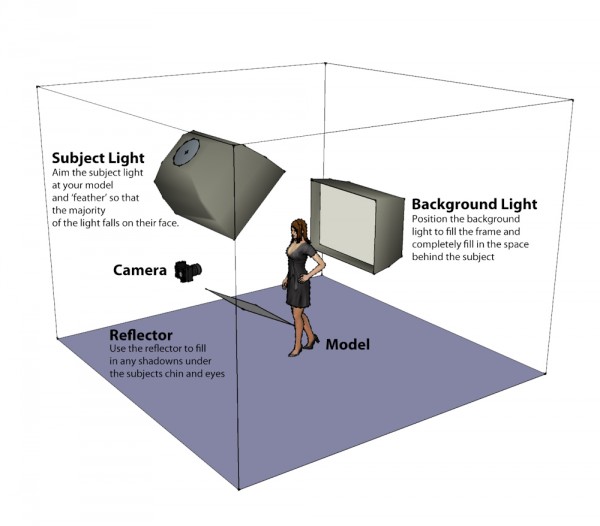
The basic idea behind this setup is to use a single large light source both as a backdrop and to provide wrap around light.  The subject is then illuminated from above using a second light with any remaining shadows filled in using a flat reflector.

For this setup you will need two light sources; ideally strobe heads although speedlights are also fine but might take slightly longer to recycle given the higher power required.  To achieve the soft quality of light both lights should be shot through large soft boxes, although if you don’t have these then you could us a large sheet as a background and something like an umbrella for the main light.

The basic setup is as follows; the key point to remember is to ensure the backlight completely fills the background.

Lighting Diagram – A Simple Two Light Setup

Metering

Metering for this shot is actually fairly simple and whilst a light meter can be helpful in speeding things up its easy enough to set the exposure for this shot by eye.  The main steps are as follows:

  • Start by leaving your flashes off and start with your camera settings.  Set a small aperture, (something like f8 or f11), a fast shutter speed (around 1/200 to 1/250) and set your ISO to its lowest setting.
  • Turn your back light on and starting with a low power take a test shot and check the image preview on your camera to see how ‘white’ the background is, a properly exposed background should be solid bright white.  A good way to check is to take a look at the image histogram, most of the reading should be to the very right hand edge of the graph indicating that the tones in the image are tending towards solid white.  If the background isn’t exposed properly increase the flash power and repeat.
  • Now its time to get your model in position and check the amount of wrap around light from the background.  Place your model in front of the back light and take another test shot.  Vary the distance between the subject and backlight to change the amount of light wrapping around your subjects head and shoulders.  The purpose of the wrap is to provide some separation and help add definition, so all you need to do is highlight the edges of your model.
  • Now turn your subject light on and take a test shot.  Check the overall exposure and vary the power/position of the light until your models face is correctly exposed.
  • Finally position a reflector below your subjects jawline and use this to bounce fill light into any dark areas of the shot in particular under your models chin, nose and eyes.

Summary

Hopefully the steps above are simple enough to convince you to give this lighting setup a try.   Not only is this a great way to try working with multiple lights but it also results in a really satisfying and flattering image and of course double the lights means double the creativity!

Post originally from: Digital Photography Tips.

Check out our more Photography Tips at Photography Tips for Beginners, Portrait Photography Tips and Wedding Photography Tips.

The Killer Clamshell – A Two Light Setup Guide


Digital Photography School

 
Comments Off on The Killer Clamshell – A Two Light Setup Guide

Posted in Photography


Review: iBook G3 Clamshell

20 Nov

Review: iBook G3 Clamshell Facebook www.facebook.com Twitter twitter.com Google+ gplus.to In this video I review the Apple iBook G3 Clamshell SE (Special Edition) from 2000. The iBook was the predecessor to the MacBook and had several brand new features including an AirPort Wi-Fi card, iMac like rubber and plastic design and ports such as Ethernet, FireWire and USB. This is my special mod iBook Clamshell upgrade with 576MB of RAM memory and a replaced hard drive with an SSD. Clips used: www.youtube.com by thinkingbricks & Lord of the Rings: The Fellowship of the Ring by New Line Cinema duncan33303 is a technology based YouTube channel that focuses on a wide variety of smartphones, tablets, game consoles as well as the weekly show D3Live. Video Gear: Nikon D3200 Camera: goo.gl Nikon 50mm 1.8G Lens: goo.gl Nikon 40mm 2.8G Micro Lens: goo.gl MacBook Air 11″ 2012: goo.gl Blue Yeti Microphone: goo.gl Zoom H1 Microphone: goo.gl 2400 Watt Softboxes: goo.gl Manfrotto 701HDV Fluid Video Head: goo.gl Dolica AX620B100 Tripod: goo.gl Audio-Technica ATH-M50 Headphones: goo.gl Corel VideoStudio Pro X5: goo.gl Subscribe! www.youtube.com Merch Store! duncan33303.spreadshirt.com Channel Link www.youtube.com Jailbreaking info stateofjailbreak.com Transcript Hey guys this is Austin and today I’m here with a review of the Apple iBook. The iBook was first announced in 1999 and even though many things have changed it’s interesting to take a look back. First let’s go over the design. There’s no

 
Comments Off on Review: iBook G3 Clamshell

Posted in Nikon Videos