RSS
 

Posts Tagged ‘Capture’

Nikon Capture NX 2.4.6 adds D3300 support, improved white balance

05 Feb

shared:NikonLogo.png

Nikon has released Capture NX version 2.4.6. The latest update adds Raw image support for the recently announced entry-level D3300 and the improved white balance adjustment options can now match the ‘Auto 1’ setting found in newer DSLR and Coolpix cameras. Version 2.4.6 also expands Fine Adjustment range from 4132–7042k to 2500–7042k when using the Direct Sunlight option for Daylight. Get the update

News: Digital Photography Review (dpreview.com)

 
Comments Off on Nikon Capture NX 2.4.6 adds D3300 support, improved white balance

Posted in Uncategorized


How to Capture the Essence of a Place – Travel Photography Tips

11 Dec

How to Capture the Essence of a Place
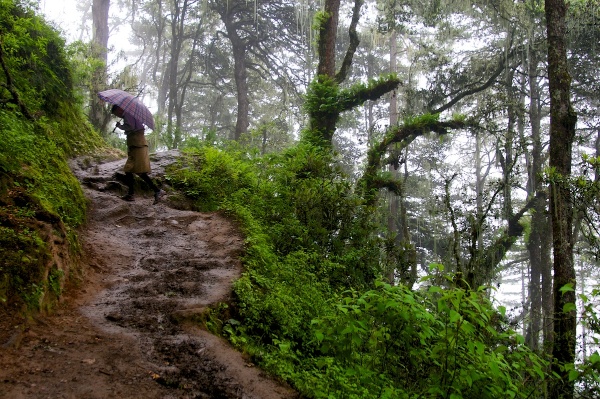
Storytelling  Sangay Walking Up Trail to Tiger s Nest Monastery  Paro Bhutan  Copyright 2013 Ralph Velasco

Travel Photography Tips

If you’re a traveler and you enjoy bringing back photos of the places you’ve visited – let’s face it, who doesn’t – then it’s extremely important to capture a set of images that more completely tells the story of the place. To me, the best way to ensure this in my own work is to work from a well thought out and organized shot list. Then I don’t have to worry about trying to remember the categories of images I have yet to photograph, as I have a check list at the ready all the time and I can easily track my progress.

Creating a shot list

The idea of creating a shot list is nothing new. It’s a concept that’s been around since the dawn of photography, and it’s so easy to incorporate into your photography workflow. I research what’s unique about the place so that I know what to be on the lookout for and then I make a list of all the categories of images I’d like to capture before I even set foot in a location. I find the more I know what I’m looking for, the more likely I am to find it. It really is as simple as that.

Scouting a location

Recently I had the opportunity to spend 10 days scouting in the reclusive Kingdom of Bhutan. It is one of the few countries in the world that require you to work with a local guide to drive and show you around the country at all times, that is unless you’re from a small number of surrounding countries, like India, whose citizens can come and go as they please.

Scouting trips are essential to laying the groundwork for the future photo tours I lead to any country, but even more so to this landlocked nation, about the size of Switzerland, but with only about 700,000 inhabitants. During a scouting trip I have a chance to meet, assess and bond with the local guide(s); visit the sites our group will visit; have the experiences they’ll be having; figure out the best times of days to be in certain locations and from where to shoot; and even test out the hotels, modes of transportation, restaurants and other services we’ll be using. But of course I’m also out to capture the quality images necessary to help market the trip to potential clients and to add these to my ever-growing portfolio from around the world. Additionally, although I’m often shooting right alongside my groups, having been to the location allows me to more fully concentrate on helping each participant to bring back the best possible images from their trip.

Dream location – Bhutan

Bhutan is a photographer’s dream, and there seems to be a photo opportunity around every corner from most of the categories on my shot list. But instead of shooting randomly, I try to use my list to track and organize the images I’m after. Maintaining your own shot list is as easy as using a piece of pen and paper, creating a spreadsheet, or simply using a free Notes app on your smart phone. Although, I did find the use of a shot list so important that I actually created an app for iPhone, iPad and iPod touch® called My Shot Lists for Travel to aid me in doing this, and it’s always in my pocket.

Below is a set of images I culled from the many thousands I made during that initial scouting trip, as well as several from the photo tour itself. This select group of images is meant to give viewers a high level sense of what the country of Bhutan is about, and what one might expect on a visit there. I could, of course, add dozens of other images from additional categories (food, interiors, sacred sites, details, etc.) to help create a complete cultural portrait of Bhutan, and when I put together my slideshow presentations I certainly have the chance to do that, but unfortunately space doesn’t allow here. Perhaps in a follow up article I’ll continue this theme.

The following categories are presented in alphabetical order:

ARCHITECTURE
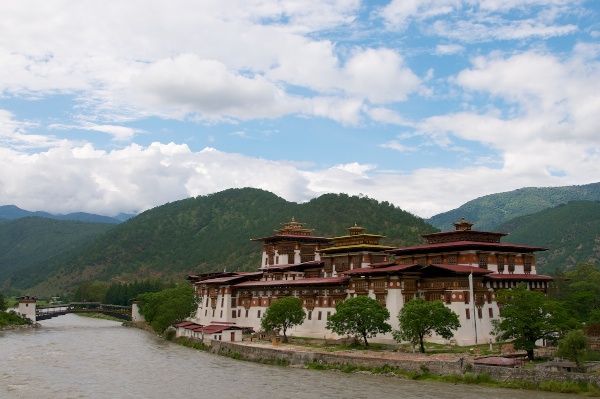
Travel Photography Tips Architecture  Punakha Dzong  Punakha Bhutan  Copyright 2013 Ralph Velasco

The architecture in Bhutan is extremely unique and it’s rare to find a single building that doesn’t adhere to this strict building convention. The “dzongs,” or fortresses (Punakha Dzong is pictured here), that dot the country are icons, and as such they’re an essential part of the visual story I want to tell.

EVERYDAY LIFE
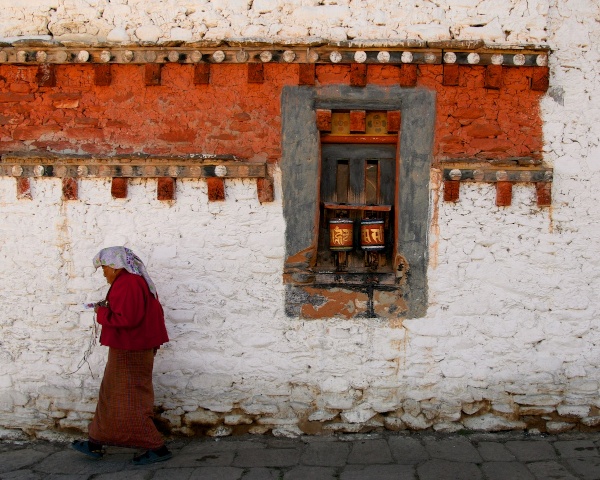
Travel Photography Tips - Everyday Life  Woman Spinning Prayer Wheels at 7th Century Monastery  Bumthang Bhutan  Copyright 2013 Ralph Velasco

It’s extremely important to show the local people just doing what they do. It might be standing in doorways, sweeping the local monastery courtyard, or filling butter lamps. As is the custom in Bhutan, many people, from young to old, are found at the local monasteries spinning everything from very large prayer wheels (with the right hand only and in a clockwise direction) to personal ones as they walk, again clockwise, around the building.

LANDSCAPES
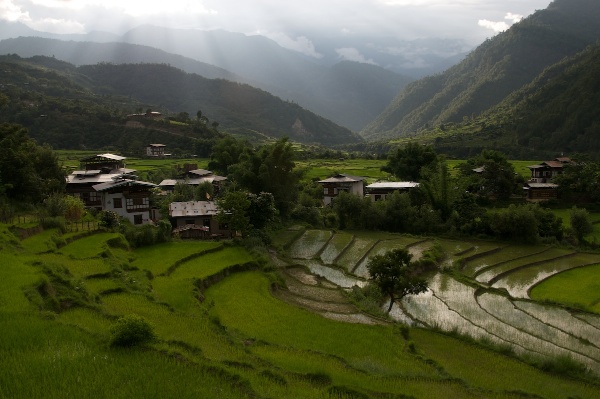
Travel Photography Tips Landscapes Sunset Over Rice Paddies  Punakha Bhutan  Copyright 2013 Ralph Velasco

Capturing the landscapes in Bhutan is a must. Here, venturing just outside the town of Punakha, on a fairly rough dirt road, we came upon yet another series of rice terraces spilling down the hillside. At this time of year (image above), during the summer monsoon season, the fields are an almost neon green, and just as the sun was falling behind the nearby mountains, considered foothills to the mighty Himalaya nearby, we pulled off the side of the road and I was able to make a few images before the good light was gone. Summertime is a great season to highlight the very green rice fields and other local vegetation. Come fall and winter, however, this area is completely dry and brown and a different photo opportunity presents itself (below).
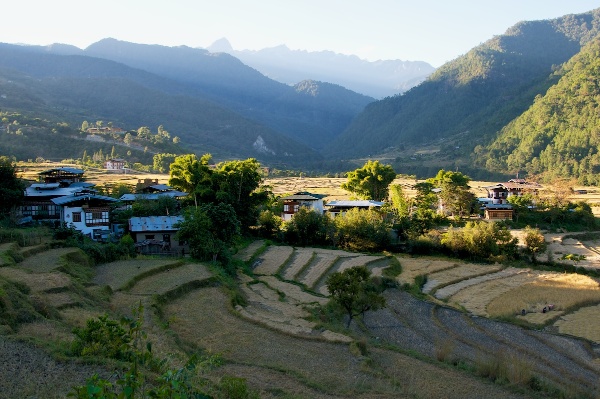
Travel Photography Tips Landscapes Dried Up Rice Paddy Landscape in November  Punakha Bhutan  Copyright 2013 Ralph Velasco

MAN-MADE WONDERS

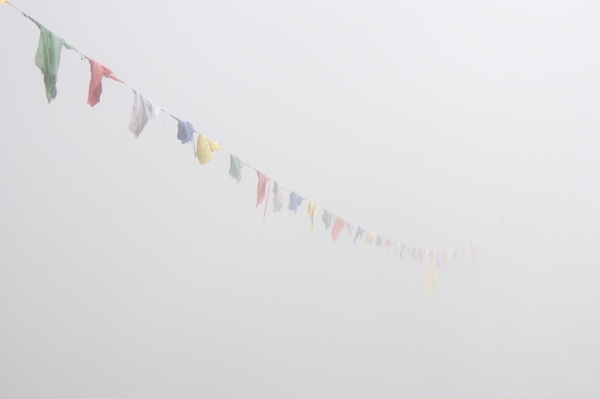
Travel Photography Tips - Man Made Wonders - Tigers Nest Monastery in Complete Fog  Paro Bhutan  Copyright 2013 Ralph Velasco

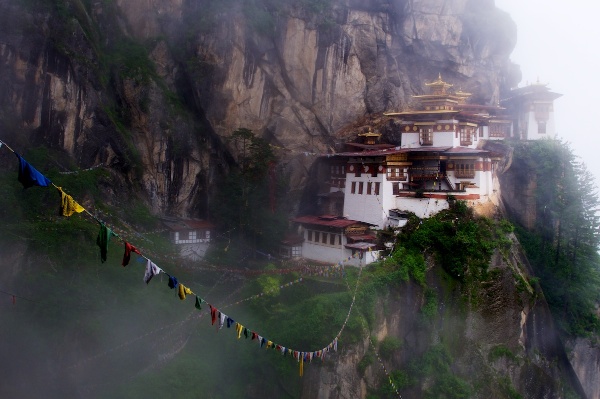
Travel Photography Tips - Man Made Wonders - Tiger s Nest Monastery in the Mist  Paro Bhutan  Copyright 2013 Ralph Velasco

The Tiger’s Nest monastery is a classic example of a man-made wonder. First constructed in the late 1600s (it’s since burned down and been rebuilt several times) at almost 3,000 feet above the valley floor on a sheer cliff face, this architectural wonder is a great way of demonstrating man’s ingenuity and building skills. These images were made from the local viewpoint, just across a gaping chasm with a 1,000-foot drop. In the summer, weather is a bit unpredictable, but that can make for some great photo opportunities. I’d prefer to shoot on the fringes of inclement weather any day, as opposed to a plain blue sky, it just makes for much more interesting images. In the first image above I wanted to show what the scene looked like upon arrival, the prayer flags disappearing into the fog. But a bit of patience, one of the photographer’s best qualities (along with curiosity), paid off as the low lying clouds came and went, eventually revealing the Tiger’s Nest in an otherworldly haze, adding to its mystery.

NATIVE CLOTHING
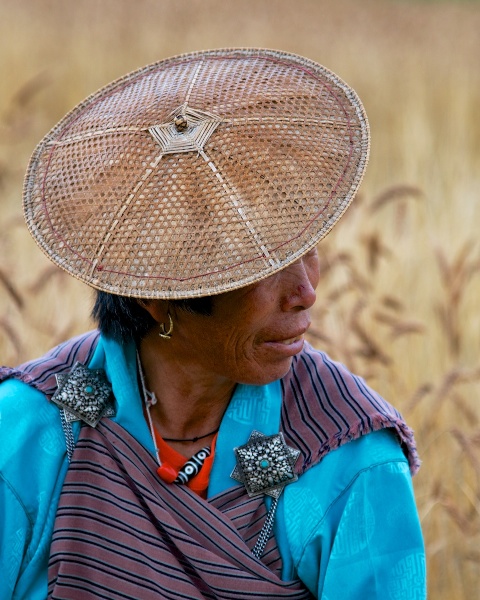
Travel Photography Tips - Native Clothing - Woman in Kira in Wheat Field  P  Bumthang Valley Bhutan  Copyright 2013 Ralph Velasco

The people of Bhutan wear very distinctive clothing. The women wear what’s known as a “kira,” often accented by two broaches, as in the first image above. Some of these broaches are antiques and have been handed down to each successive generation and can be worth thousands of dollars. Again, something very distinctive to this place. I encountered this particular woman as she was picking wheat in a field in the Bumthang Valley. Asking my guide/driver to pull over to the side of the road, I climbed over several fences and negotiated some muddy trails to get closer, but I like to think the result was worth the effort. She’s also wearing a traditional bamboo hat often seen in this part of the country, and I certainly want to highlight that.
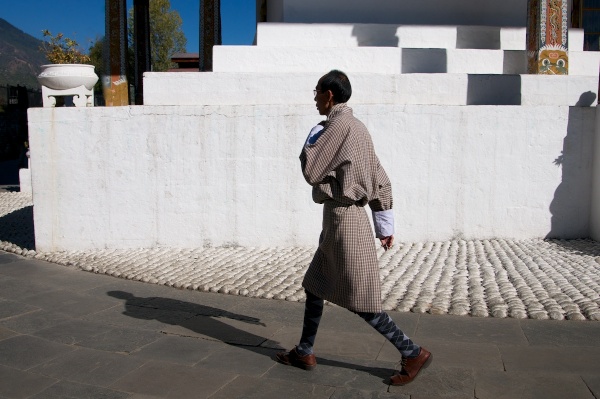
Travel Photography Tips- Native Clothing - Man in a Gho with Shadow  Thimpu Bhutan  Copyright 2013 Ralph Velasco

Men, on the other hand, wear what’s called a “gho.” This single piece of cloth, expertly wrapped around the man’s body and accented by the often white, rolled up sleeves, is seen everywhere in Bhutan, from the young school boys to the older men spinning their prayer wheels. The addition of a simple shawl is required to be draped over the man’s shoulder and around his waist as he enters the very sacred dzongs where it’s of the utmost importance to show respect for country and king. Our guide, Sangay, said that it’s law that during working hours a man must wear a gho. One of my tour participants asked him what the penalty is if a man is caught not wearing a gho, and Sangay said, “There is no penalty, it just doesn’t happen.”

PEOPLE
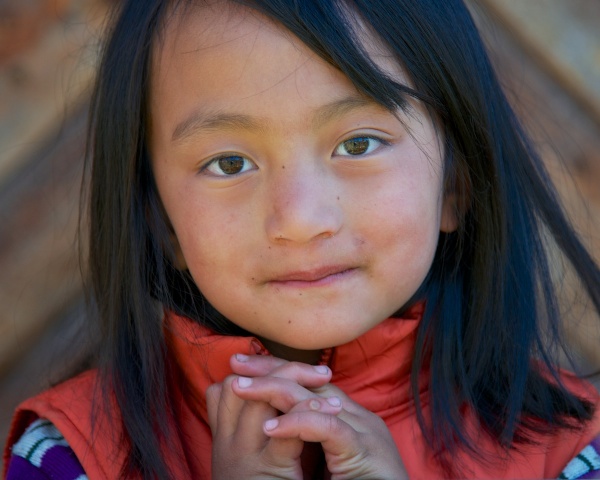
Travel Photography Tips - People - Little Girl with Hands Folded at Pepper House  Bumthang Valley Bhutan  Copyright 2013 Ralph Velasco

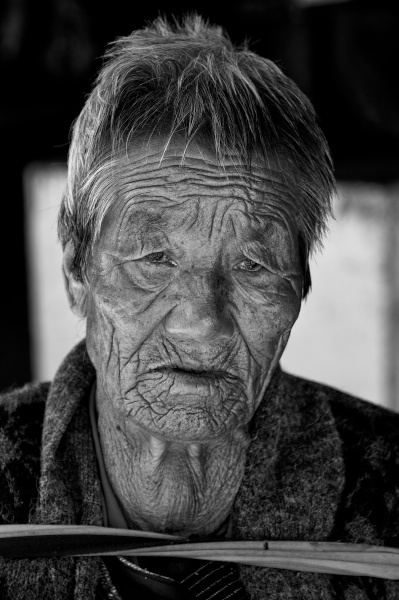
Travel Photography Tips - People -  Time in a Face  Thimpu Bhutan  Copyright 2013 Ralph Velasco

As in any country, a people are their culture, and undoubtedly Bhutan is no exception. The people photo opportunities are virtually endless in this nation where everyone seems to be outside most of the time (the interiors of the houses can be very dark and smoky from the wood burning stoves and lack of quality electricity). Although I do make an effort to get inside of people’s homes to experience this essential part of a place, as well. Getting out early in Bhutan will often be rewarded, allowing you to capture the children on their way to school, and the adults on their way to work, all generations dressed in their traditional ghos and kiras.

STORYTELLING
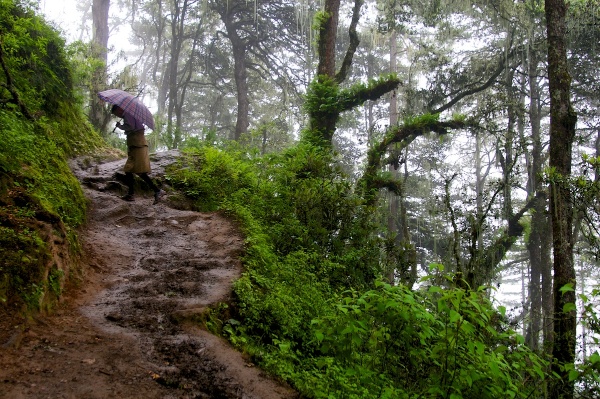
Travel Photography Tips - Storytelling  Sangay Walking Up Trail to Tiger s Nest Monastery  Paro Bhutan  Copyright 2013 Ralph Velasco

Although it’s a good aspiration, not every image has to be worthy of a magazine cover. Sometimes it’s important just to make an image so that you can convey the story behind it. In this shot I simply wanted to show the condition of the trail we took to get up to the viewpoint overlooking the infamous Tiger’s Nest Monastery near Paro, Bhutan. It’s not going to win any awards, but I think it conveys this idea, which was my intention.

Final words of advice

So my recommendation is to work from your physical shot list, not try to commit it to memory or shoot whatever presents itself at the time. The more prepared you are for the photo opportunities you seek, the more you’ll find them, I can almost guarantee it. Have a goal of five solid images in each category before you tick it off your list, as this will provide you with options when it comes to putting together that book, website or slideshow presentation later.

Finally, know that any single image may represent two, three or even five or more categories, so there can be some crossover.

Post originally from: Digital Photography Tips.

Check out our more Photography Tips at Photography Tips for Beginners, Portrait Photography Tips and Wedding Photography Tips.

How to Capture the Essence of a Place – Travel Photography Tips

The post How to Capture the Essence of a Place – Travel Photography Tips by Ralph Velasco appeared first on Digital Photography School.
Digital Photography School

 
Comments Off on How to Capture the Essence of a Place – Travel Photography Tips

Posted in Photography


Capture PRO Camera Clip Review

02 Dec

A Better Way to Carry Your Camera?

The updated Capture PRO from Peak Design offers a secure, hands-free alternative to traditional camera straps.

The updated Capture PRO from Peak Design offers a secure, hands-free alternative to traditional camera straps.

About a year and a half ago I posted a short review on Facebook of the original version of the Capture Camera Clip from Peak Design Ltd. Since getting my hands on it, Capture has become an integral tool for my location, event, and street photography, as well as a perfect solution for quick camera access while I’m teaching, either in the classroom or on location. That’s why I was so excited last August, when the San Francisco-based company launched two updated versions of Capture in what would end up being a wildly successful Kickstarter campaign. Going back to the community that helped make the original Capture such a popular accessory, the crowd-funded project raised $ 819,108 in just 54 days– crushing its goal of $ 100,00. With numbers like that, I had to find out how Capture Pro measured up to the original. You may have read Sime’s preview of the new versions before their release back in August, but now that I’ve had a chance to put Capture PRO through its paces for a few months, I figured it was time for an update.

What is Capture?

So, what is Capture? Imagine taking the quick-release assembly off your tripod and attaching it to your belt. Or your backpack strap. Or the shoulder strap from your camera bag. Or a climbing harness. Getting the idea? Simply put, the Capture Camera Clip allows you to use virtually any strap of almost any thickness to keep your camera close at hand and ready to go. I’ve never been a fan of traditional camera straps. Regardless of whether it is around my neck or over my shoulder, the weight is a strain and at least one hand is always on the camera, making sure it’s not bumping into anything or anyone. Sling straps are a great solution, but still get in the way when you are carrying a camera bag.  Capture not only allows me to “go strapless,” but also frees up my hands.

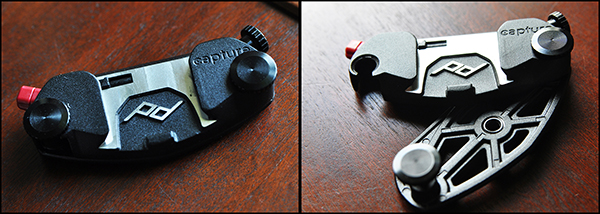
On the left, closed and locked. Sturdy-but-lightweight design makes sure Capture stays in place.

On the left, closed and locked. Sturdy-but-lightweight design makes sure Capture stays in place.

What’s New

As great as the original was, Version 1 was not without a few minor drawbacks, most notably its hard corners and uncomfortable screws. It’s always refreshing when companies take the time to not only listen to feedback from their customers, but to implement those suggestions into newer, better products. Constructed from die-cast aluminum, the clip is tightened into place with zinc-alloy clamping bolts. These bolts are what allows the clip to adjust to belts and straps of different thicknesses.  The new streamlined design is stronger and lighter, with a more narrow profile and smoother mechanics, while retaining all of the convenience and functionality of the original.

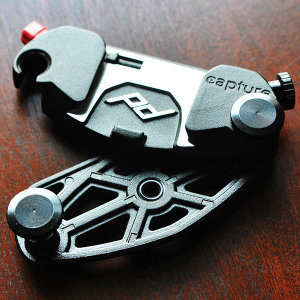
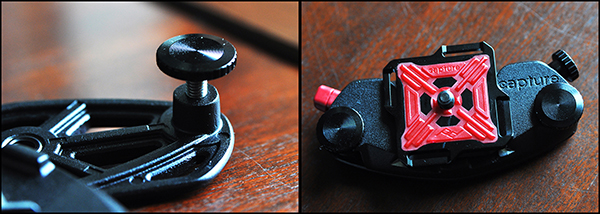
Zinc-alloy clamping bolts adjust to the thickness of the strap, and the standard ARCA Plate makes the unit compatible with a wide range of tripods.

Zinc-alloy clamping bolts adjust to the thickness of the strap, and the standard ARCA Plate makes the unit compatible with a wide range of tripods.

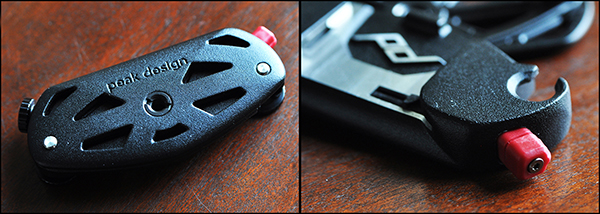
Perhaps the best added features however, are the mounting hole on the bottom for monopods and tripods (Pro version only), and the twisting safety lock on the quick release buttons for both Pro and V2.  The standard ARCA Plate is already compatible with ARCA-style tripod heads, but making the entire clip tripod-mountable adds a new facet of convenience that did not exist in the original.  While the original version had a twist lock for added security, both Capture PRO and Capture V2 have added an additional  safety lock to the quick release button, making sure that once latched, your camera isn’t going anywhere.  This comes in particularly handy for event photographers who have to navigate through large crowds. In one test, I had a group of friends try to strip my camera from the clip at my waist as I worked a crowd. All were unsuccessful.

The new tripod socket on the bottom and additional locking mechanism on the quick release button add functionality and security to the original design.

The new tripod socket on the bottom and additional locking mechanism on the quick release button add new levels of functionality and security to the original design.

Room for Improvement?

There is always room for improvement. No product is perfect, but any of the negative things I have to say about Capture are pretty minor– merely a matter of personal preference, and have no bearing on the quality of the product itself. For instance, I would have preferred for the quick-release button on the opposite side of the clip, but that doesn’t affect the quality of the build or the functionality of the device.

New Accessories

I prefer using Capture with lenses like the 24-70mm, the 35mm, or the 50mm. I wasn’t crazy about how Version 1 handled the extra weight and awkward movement of a larger lens, like the 70-200mm. With the new Capture PROpad, however, the developers and designers have gone a long way to solving this comfort and stability issue. The firm, compression-molded padding eases part of the load, redistributing some of the added weight of longer lenses.

Another new accessory– the POV Kit– turns the Capture Clip into a mount for any GoPro or small point-and-shoot camera. Getting POV photos or video from your backpack straps or similar vantage points has never been easier.

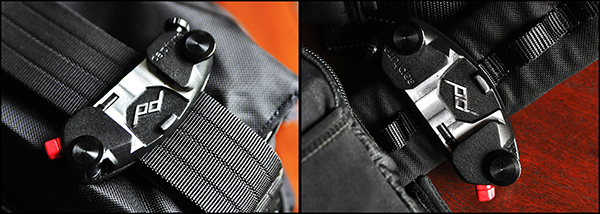
On the left, Capture attached to the shoulder strap of a Think Tank City Walker 30 camera bag. On the right, attached to a Think Tank Pro Speed Belt.

On the left, Capture attached to the shoulder strap of a Think Tank City Walker 30 camera bag. On the right, attached to a Think Tank Pro Speed Belt.

The Bottom Line

The Capture Camera Clip offers a great solution for photographers who don’t like traditional straps, but still want a well-made, safe, secure, hands-free way of carrying their camera.  One of the best things you can say about Capture– or any product for that matter– is that it does what it’s supposed to do and it does it well.  One of the great things about Capture is that you can expand its functionality by incorporating the Leash and Cuff camera straps, also from Peak Design.

The last two sentences of that Facebook review I wrote a year and a half ago are even more true now than they were when I first wrote them about the original Capture. “Every once in a while someone comes out with a piece of gear that leaves you scratching your head, wondering why you didn’t come up with the idea yourself.  This is one of them.”

Capture Pro and Capture V2, as well as the PROPad, POV Kit, Leash, and Cuff are all available on the Peak Design Wesbite.


Post originally from: Digital Photography Tips.

Check out our more Photography Tips at Photography Tips for Beginners, Portrait Photography Tips and Wedding Photography Tips.

Capture PRO Camera Clip Review

The post Capture PRO Camera Clip Review by Jeff Guyer appeared first on Digital Photography School.

Digital Photography School

 
Comments Off on Capture PRO Camera Clip Review

Posted in Photography


Award-winning wildlife photos capture candid moments

09 Nov

35_Greg-du-Toit-_South-Africa_-Essence-of-elephants.jpg

An owl in mid-flight, a polar bear peering from under icy waters, to a monkey being blasted by snow are some of the winning images from this year’s Wildlife Photographer of the Year competition. Elephants surrounding a watering hole in Botswana by South African photographer Greg du Toit was the overall winner. See gallery 

News: Digital Photography Review (dpreview.com)

 
Comments Off on Award-winning wildlife photos capture candid moments

Posted in Uncategorized


7 October, 2013 – Capture One 7 Tutorial Now Available

08 Oct

Luminous-Landscape releases the long awaited Capture One 7 Pro Tutorial today.  This 7.5 hour multi-segment training video answers all your questions about Capture One.  Learn this very robust program from top to bottom with Kevin Raber, Michael Reichmann and David Grover of Phase One.  Learn more about this new release by CLICKING HERE.  You can go directly to our e-shop by CLICKING HERE

There has been a lot of things happening at Luminous-Landscape.  Check back tomorrow evening and you’ll get a taste of what we have been up to.


The Luminous Landscape – What’s New

 
Comments Off on 7 October, 2013 – Capture One 7 Tutorial Now Available

Posted in News


Tablets for photographers: A versatile tool in your capture workflow

26 Sep

tablets.jpg

Tablets may be used as versatile tools in your photographic workflow, providing instant feedback as you shoot on a much larger format screen than your camera’s tiny LCD and helping you experiment with a final look while you still have the opportunity to make major changes on set. We’re looking at tools and tips for integrating a tablet into a live shoot with a DSLR, whether you’re shooting tethered or wirelessly. Learn more on connect.dpreview.com.

News: Digital Photography Review (dpreview.com)

 
Comments Off on Tablets for photographers: A versatile tool in your capture workflow

Posted in Uncategorized


Phase One makes Capture One 7.1.4 available

17 Sep

COP7_icon.png

Phase One has released the latest version of its Raw processing software, Capture One 7.1.4. This update offers support for more cameras and lenses, and also promises improved performance when working with large numbers of photos. With this version, Capture One 7 now supports the Sony Cyber-shot RX100 II, Fujifilm X-M1 and Olympus E-P5 among others, and adds 32 new lens profiles. Click through for the full press release.

News: Digital Photography Review (dpreview.com)

 
Comments Off on Phase One makes Capture One 7.1.4 available

Posted in Uncategorized


11 September, 2013 – Grading CinemaDNG in Lightroom, Camera Raw and Capture One

11 Sep

It hasn’t happened yet in still photography, but there is a growing movement to adopt a standardized raw format for video. It’s called CinemaDNG.

In my newest tutorial I show how these files can be processed in your favourite raw processing program; Lightroom, Camera Raw or Capture One. But – slowly.

Better alternatives are DaVinci Resolve (free up to 1920X1080), or better yet, the just announced update to Adobe’s Premier Pro CC, which will handle CinemaDNG files natively without the need for rendering or transcoding – coming October, 15.

Find out more about this is Grading CinemaDNG in Lightroom, Camera Raw and Capture One.

"Having been to Antarctica with Michael and Kevin, I would say after having traveled the world and shot nearly my entire life as an exhibiting photographer,  it was one of my highlights in my life and I talk about it, all the time.  The images and experience of seeing something visionary and nearly extinct from the world, to see and experience the wildlife and scenery that does not fear humans is amazing.  The images I shot there won me two Smithsonian awards and nearly 18 other international awards". – Tim Wolcott

 Find Out More Now
These Expeditions Will Sell Out Quickly. They Always Do


The Luminous Landscape – What’s New

 
Comments Off on 11 September, 2013 – Grading CinemaDNG in Lightroom, Camera Raw and Capture One

Posted in News


Black-and-white images capture the power of summer storms

02 Sep

Mitch-Dobrowner_Arm-of-God.jpg

Summer in North America means severe weather for much of the continent. Powerful storms are accompanied by unusual cloud formations, signs of the violent atmospheric conditions that spawn turbulent weather. Photographer Mitch Dobrowner and guide Roger Hill have spent the past few summers traveling the US chasing storms, and creating stunning black-and-white images in the process. Click through to see some of these gorgeous photos of some ugly weather.

News: Digital Photography Review (dpreview.com)

 
Comments Off on Black-and-white images capture the power of summer storms

Posted in Uncategorized


Flickr improves capture and editing tools in latest iOS app update

29 Aug

Screen_Shot_2013-08-29_at_9.52.55_AM.jpg

As part of its effort to ‘make Flickr awesome again’, parent company Yahoo has released a hefty update to its Flickr app for iOS. Improved capture tools include the ability to lock separate focal and exposure points on the capture screen with a two finger tap. In addition, users can view the filters ‘live’. When you are ready to edit, you can customize the exposure using the new Levels adjustment, correct color balance, sharpen, brighten, crop, straighten, or even add vignetting to your image. Click through for more details at connect.dpreview.com.

News: Digital Photography Review (dpreview.com)

 
Comments Off on Flickr improves capture and editing tools in latest iOS app update

Posted in Uncategorized