RSS
 

Posts Tagged ‘Cameras’

Blackmagic releases firmware 1.8 for all cinema cameras

26 Jun

black_magic.jpg

Blackmagic Design, maker of a range of high-end compact cinema cameras, has announced a firmware update for all of their models. Available today, the new firmware provides an entirely new code base for the Blackmagic cameras and will enable the company to roll out new features to their devices. The new update claims to provide improved performance and introduces a new user interface. Learn more

News: Digital Photography Review (dpreview.com)

 
Comments Off on Blackmagic releases firmware 1.8 for all cinema cameras

Posted in Uncategorized


Amazon Fire phone packs 6 cameras for 3D effects and object scanning

19 Jun

fire1.jpg

Amazon has officially announced its much-rumored smartphone, the Fire. Packing in six cameras in total, four of them are dedicated to enabling a new ‘Dynamic Perspective’ 3D-user interface possible, whereby the device can track a user’s face and change how content is displayed. The main 13MP rear-facing camera has an F2 aperture and optical image stabilization. As well as being used for capturing photographs is also enables a new feature called Firefly, which can scan and identify millions of items. Read more

News: Digital Photography Review (dpreview.com)

 
Comments Off on Amazon Fire phone packs 6 cameras for 3D effects and object scanning

Posted in Uncategorized


Cute Cameras: Animal Shapes Make CCTV More Palatable

22 May

[ By Steph in Design & Fixtures & Interiors. ]

Cute CCTV Camera Designs 1

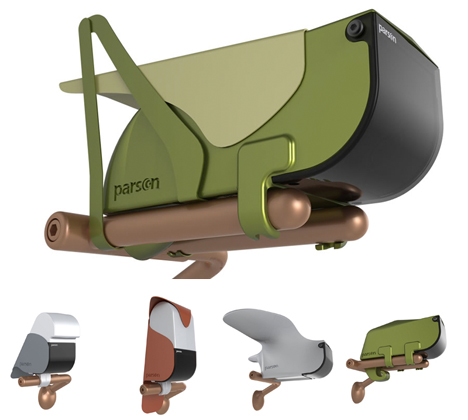
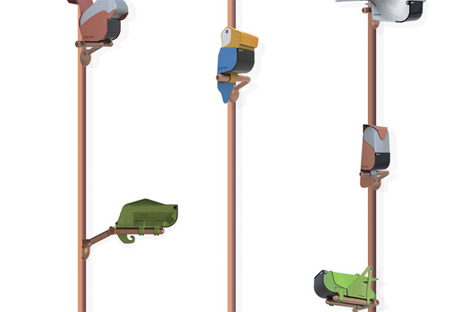
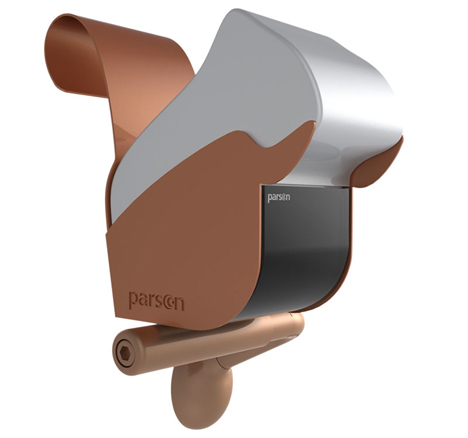
Would a cute, artistically designed chameleon sculpture make you feel better about being watched? A new series of CCTV camera cases by Italian designer Eleonora Trevisanutto transforms ugly, ordinary security equipment into decorative objects that make surveillance seem a little less intimidating.

Cute CCTV Camera Designs 3

Cute CCTV Camera Designs 4

You’re still being watched, sure, but by a lizard, squirrel, grasshopper, owl or an adorable abstracted bird. It’s like a kinder, gentler Orwellian vision of the future. “The camera is no longer a ‘looming control’ means, but a decor element, an integral part of the place in which it is located.”

Cute CCTV Camera Designs 5

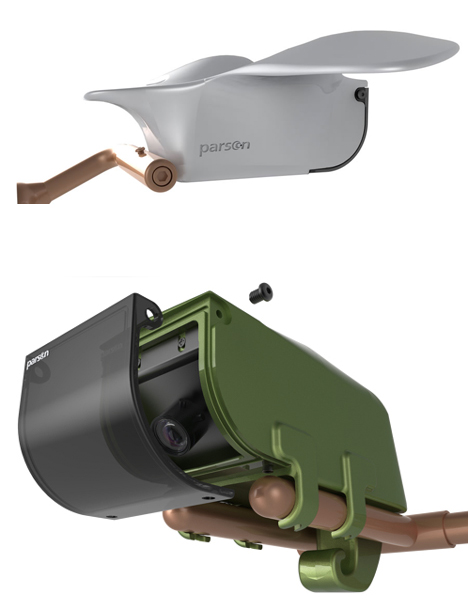
The need for less intimidating CCTV cameras does make sense for places like retail stores, daycares and other businesses where security is necessary, as well as private homes. The models don’t just differ visually; each animal offers its own individual functions, equipped with vision systems that can perform different operations like face recognition. That’s right – that lizard knows exactly who you are.

Cute CCTV Camera Designs 2

While many of us are so used to seeing ordinary cameras virtually everywhere we go that we don’t even notice them anymore, Parson’s ‘Animal’ series was made to be seen.

Share on Facebook


[ By Steph in Design & Fixtures & Interiors. ]

[ WebUrbanist | Archives | Galleries | Privacy | TOS ]


WebUrbanist

 
Comments Off on Cute Cameras: Animal Shapes Make CCTV More Palatable

Posted in Creativity


Light field cameras: Focusing on the future

15 May

Screen_Shot_2014-05-14_at_10.56.37_AM.png

Lytro’s new Illum camera packs in a few tricks that will appeal to some still photographers, but its aim is really to introduce a new type of imagery. Time will tell if that medium succeeds. Technology writer Liam McCabe spoke with a few players in the light field camera industry to get a sense of where this technology is headed in the next few years and beyond. Learn more

News: Digital Photography Review (dpreview.com)

 
Comments Off on Light field cameras: Focusing on the future

Posted in Uncategorized


DPReview is hiring for an Editorial Writer (digital cameras & photography)

14 May

DPRlogo.png

DPReview is hiring! We’re looking for an editorial writer to join our growing editorial team based in Seattle, WA. Responsibilities will include testing and producing reviews of digital system cameras, compact cameras, smart phone cameras, lenses and other photographic equipment. Successful applicants will have have a store of solid practical knowledge about the theory and practice of photography, and a strong understanding of dpreview, our principles and our community. Click through for more details.

News: Digital Photography Review (dpreview.com)

 
Comments Off on DPReview is hiring for an Editorial Writer (digital cameras & photography)

Posted in Uncategorized


Updating your Camera’s Firmware – What is it and Why it’s Important

28 Apr

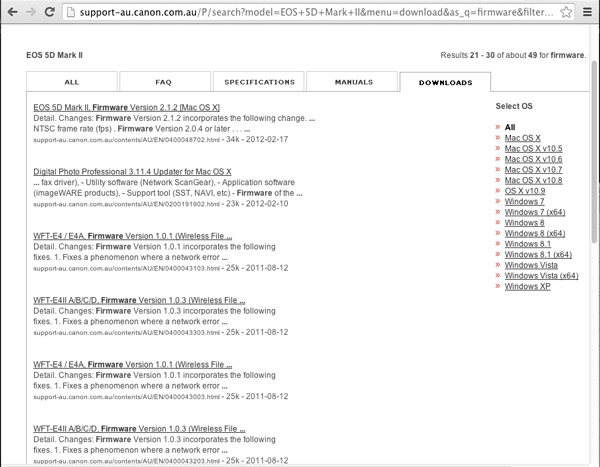
Canon 2 firmware page

Does your camera have the latest firmware?

This topic is one that I often find myself explaining in more detail, and one that many people aren’t even aware that they can update their camera’s firmware, and how this may affect their digital camera. An analogy is to updating the version of software on your smart phone.

What is firmware and why is it important?

Inside your camera is a microprocessor (small computer), that uses software stored on non-removable flash memory inside your camera. This is called firmware and is the operating system of your camera which allows you to control the features and functions, with the camera’s menus and buttons. Firmware also controls autofocus, exposure, image processing, noise reduction and other important functions within your camera. Without firmware your camera would not be able to operate.

Why check for firmware updates?

Updates generally contain fixes or feature enhancements. Firmware updates aren’t always necessary – some cameras never have updates.

When a new camera is assembled the manufacturer loads the firmware that was designed at that time. After the camera has been released to the public, people may find that there are bugs or problems with the way the camera operates. The manufacturer investigates these problems and produces fixes for them in the form of firmware updates. Some of these fixes can be minor, but some of them fix more serious issues such as autofocus problems, battery-draining issues, or the camera unexpectedly locking up.

Other reasons why firmware updates are released is to include new camera features such as added languages, or to have manually adjustable settings that were once solely automatic. Some updates are to support new optional accessories for your camera (e.g. wireless functions or GPS modules, etc.). I like to think of them as free upgrades to your camera.

When to check for firmware updates?

I recommend checking for updates on a semi-regular basis, every few months or so, and after you purchase a new camera is also a good time to check. There will likely be fewer firmware updates for older cameras but still worthwhile checking, perhaps on an annual basis. If you have never checked your camera for a firmware update then now is a good a time to do so.

Does your camera have the latest firmware?

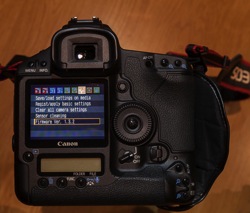
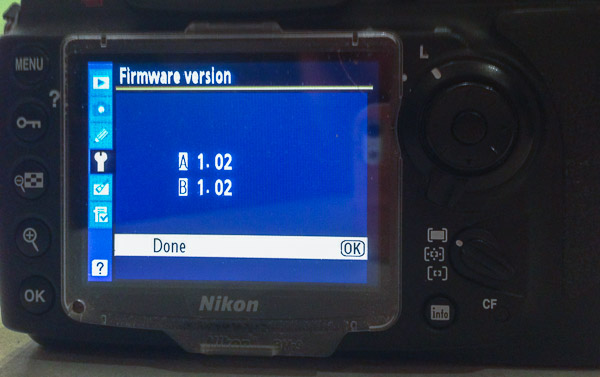
First check what version of firmware your camera is running. This information is found within one of your camera’s menu options. Finding it is different on every camera and not always obvious. Your instruction manual will help you find where to look in the menus.

Canon 1 firmware page

You can check for the latest firmware by looking at the manufactures support and downloads section of their website for your brand and model of camera. Look for higher version numbers than the one found on your camera. If the version numbers are the same, there is no need to perform an update. Please note that some camera models never had new or updated firmware released and therefore new firmware updates may not be listed at all.

Important: You need to know the model of your camera and only use the firmware that is specific to your model.
Nikon firmware image

The following links were recently current for the major camera manufacturers and may be of help when checking for releases of newer versions of firmware for your camera.

  • Canon
  • Nikon
  • Olympus
  • Sony
  • Pentax
  • Panasonic
  • Fujifilm
  • Leica

Canon firmware page

Why read the instructions carefully before updating your cameras firmware?

Read the instructions very carefully before updating the firmware on your camera – you don’t want to end up having a dead camera! If the battery fails during the firmware update or the update is interrupted in some manner, the risk is having a camera without usable software. Meaning you have a dead camera that you have to take to the manufacturer to fix!

How to find out what has been fixed or updated with the new firmware?

Check the release notes that come with the firmware updates. Usually you will find included a list of the fixes or updates in earlier versions of the firmware too.

Typical steps to update your cameras firmware*

* Sample only – Please read your own firmware update instructions for your camera model

  1. Check the firmware version on your camera – it will be shown on one of the menu options
  2. Check to see what the latest version of firmware is available for your camera on the manufacturers web site
  3. Read the instructions carefully
  4. Download the firmware
  5. Install a fully charged battery into your camera
  6. Format a memory card in your camera (read your manual if you aren’t sure how to do this)
  7. Place that memory card into a card reader connected to your computer (do not connect via a cord from the camera)
  8. Copy the firmware update file into the top-level (root) folder of the cameras memory card
  9. Safely eject the card on the computer
  10. Place the memory card back into the camera (remember to power off the camera any time you remove a card or open the slot door)
  11. Follow the instructions to update the cameras firmware
  12. Unless instructed to do so, don’t touch any buttons, or switch the camera off during the process
  13. Check to see that the camera is running the newly installed firmware version – as per the first step

If you have a Nikon
Nikon firmware image

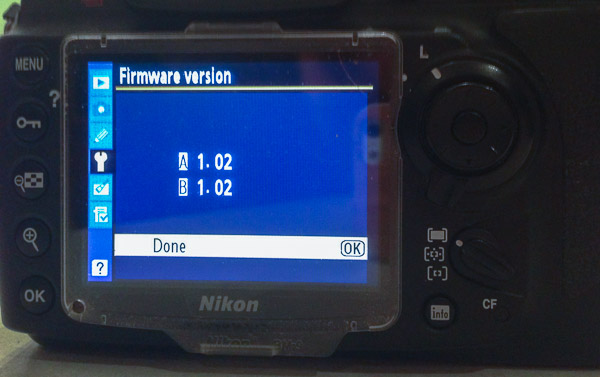
Some Nikon DSLR cameras may have A, B and L firmware – what are these? Nikon A-firmware is for the I/O (Input/Output) processor, B-firmware is for the Control (“Expeed”) integrated micro-controllers and L-firmware is for lens specific updates such as correction for lens distortion. You need not know why they have this scheme, just know what version is the latest for your camera model and use that to keep your camera up to date. Other camera manufacturers generally have just one firmware version to install.
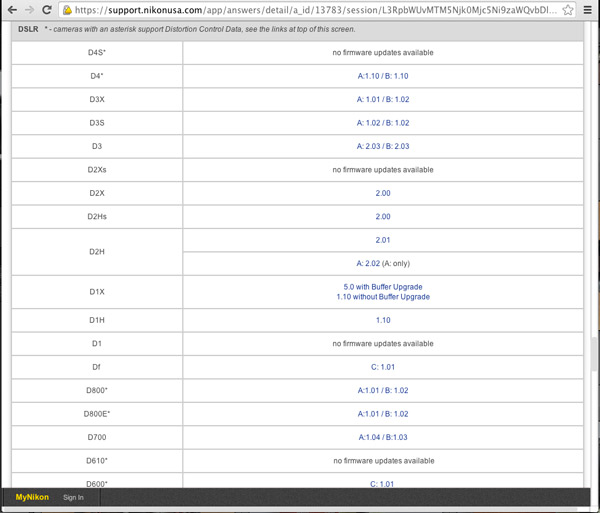
Nikon firmware page

Want more features on your camera – try Magic Lantern! (Canon EOS only)

Believe it or not some people wanted more from their cameras and the only option was to team up with other smart people and write their own firmware! This started back in 2009 after Canon first released the 5D mark II, a full-frame (35mm) sensor body that was also capable of recording full HD video. The users (film makers) wanted to be able to have more control over the 5D mark II for video functions. The camera was much cheaper than buying a $ 25,000 commercial video camera to do the same thing.

Since then, there have been various updates to this firmware that include support for other Canon EOS cameras while also including useful still photography features such as: an intervalometer, custom bulb timer for long exposures, motion detection, voice tags for photos, etc. This firmware runs from your CF or SD card, instead of the factory firmware inside your camera. The Magic Lantern software is only available for certain Canon EOS camera models. For a full list of supported cameras, to find out what it can do and how it works, you may like to visit Magic Lantern’s website.

Please note: running third party firmware is not supported by the manufacturer and may void your warranty. So unless you are very comfortable with what you are doing, using this firmware may not be a good idea, especially if you are new to photography or just bought a brand new camera.

What to do if something goes wrong?

Check the manufacturers instructions again, have you missed a step or misunderstood what is required?

If something is still not quite right after you have done all the troubleshooting you may like to contact an authorized service centre for your brand of camera and ask for their advice and support.

I hope that you are now much better informed about firmware for your camera. Let me know if you have enjoyed reading this article and leave any comments below.

The post Updating your Camera’s Firmware – What is it and Why it’s Important by Roy Vieth appeared first on Digital Photography School.


Digital Photography School

 
Comments Off on Updating your Camera’s Firmware – What is it and Why it’s Important

Posted in Photography


[MODIFIED] Buying a Digital Camera – Hidden Costs with Higher Megapixel Cameras

18 Apr

Higher-megapixel digital cameras may have hidden costs besides just the cost of the camera.

High megapixel modern digital cameras generally allow one to take photos with much greater clarity than with cameras made in years past. Mistakes can be cropped out, larger photos can be printed, and more details can be made clearly visible, allowing one to take photos that more accurately represent a treasured memory. Modern cameras also may let you shoot HD video, offering even more enjoyment from your investment.

However, before you plunk down money on a new high megapixel digital camera, recognize there may be some ‘hidden’ costs to use this technology to its fullest:…

Read more at MalekTips.
New Computer and Technology Help and Tips – MalekTips.Com

 
Comments Off on [MODIFIED] Buying a Digital Camera – Hidden Costs with Higher Megapixel Cameras

Posted in Technology


Lomography launches Russar+ for L39 and M mount cameras

12 Apr

Russar_Lens_side-Kopie.jpg

Designed by Lomography and manufactured in Russia by Zenit, the Russar+ is an update to the 1958 Russar MR-2 wide-angle lens. The new lens is handmade out of brass and offers a 20mm focal length. It’s compatible with L39 and M mount cameras. The lens can also be used on mirrorless systems using adapter mounts. Lomography is taking pre-orders now for $ 649.00 (~£387.) It is expected to ship in July. Learn more

News: Digital Photography Review (dpreview.com)

 
Comments Off on Lomography launches Russar+ for L39 and M mount cameras

Posted in Uncategorized


Canon recalls about 14,000 PowerShot SX50 cameras

10 Apr

_SX50.jpg

Canon U.S.A. has recalled about 14,000 PowerShot SX50 HS digital cameras. According to the United States Consumer Product Safety Commission, ‘A chemical used in the rubber part of the viewfinders on the camera can cause skin or eye irritation or an allergic reaction to the user’. The cameras in question have serial numbers beginning with 69, 70 or 71 and have 1 as the sixth digit of the serial number. Learn more

News: Digital Photography Review (dpreview.com)

 
Comments Off on Canon recalls about 14,000 PowerShot SX50 cameras

Posted in Uncategorized


Ricoh to give away cameras for ‘photojournalism’ competition

28 Mar

THETA-diagonalv2.jpg

Ricoh Imaging Company has announced an advertorial feature on cnn.com called ‘Spherical Report 360’, where 360 people will be selected to receive a free Ricoh Theta spherical camera to shoot local news and events. Images taken with the Theta will then be judged for a Pentax K-3 grand prize. To be considered for a free Theta camera visit the Spherical Report 360 website for application guidelines. Applications will be accepted between March 27, 2014 through April 10, 2014. Learn more

News: Digital Photography Review (dpreview.com)

 
Comments Off on Ricoh to give away cameras for ‘photojournalism’ competition

Posted in Uncategorized