RSS
 

Posts Tagged ‘Camera’

Insta 360 launches ONE X 360-degree 5.7K action camera

10 Oct

Insta360 today launched the ONE X, a 5.7K 360-degree action camera that’s compatible with Android and iOS mobile devices.

The new model is capable of recording spherical video at 5.7K resolution and 30 frames per second. For smooth motion in action videos or slow-motion effects you can also opt to record 4K footage at 50fps or 3K video at 100fps. In photo mode the camera captures 18MP still images.

OnePlus claims the new camera delivers “gimbal-like” stabilization without the gimbal. To achieve this the ONE X uses an upgraded version of Insta360’s FlowState stabilization algorithm which constantly analyzes movement in all directions.

Using the dedicated editing app, video can be reframed and re-edited to highlight the best elements of a scene and create cinematic clips that would be much more difficult to achieve with conventional cameras. In addition the new TimeShift feature lets users adjust the speed of different parts of a clip to put the focus on key moments, using either slow-motion or hyperlapse effects.

Insta360 says the ability to automatically remove a selfie stick from the footage in the app in combination with the company’s customized 10-foot selfie stick allows for the capture of drone-like footage without a drone. Thanks to its rugged construction the camera can even be thrown around when snapped into the Insta360 Drifter camera dart, allowing for very unusual effects.

The ONE X connects to mobile devices via WiFi, providing real-time image preview and control. The same connection can be used to transfer footage for editing but you also have the option to use a USB cable.

ISO, exposure compensation, white balance and shutter speed are user adjustable and optional accessories include a rugged case, an underwater case and a GPS Smart Remote.

The Insta360 ONE X can be pre-ordered on the Insta360 website and at retailers globally now and is priced at $ 399.95. Shipping starts on October 17. For more information and some quite impressive sample footage have a look at the video below.

{PressRelease}

Insta360 ONE X Redefines the Action Camera with 5.7K Video, Impossible Stabilization, Cinematic Slow-Mo

The future of the action camera is here. Insta360 today launched the ONE X, a 5.7K camera that uses 360° capture, groundbreaking stabilization and cinematic slow-mo to radically expand what’s possible with a camera.

Compatible with both iOS and Android, the ONE X is available to order today at Insta360.com, with shipments beginning Oct. 17.

Insta360 ONE X – The Future Of The Action Camera:

A new kind of camera.

The ONE X is more than a 360-degree shooter. It’s a new kind of camera that uses 360 to give users more freedom and more creative possibilities – both during and after capture.

Combining an unlimited field of view with gimbal-level stabilization and new high-FPS shooting modes, the ONE X unlocks the ability to control time and perspective in ways that make it feel more like a fleet of cameras than a single device.

Look sharp.

Shooting in every direction and making it all look good, requires some serious resolution.

That’s why the ONE X records at a best-in-class 5.7K (30 FPS). For dynamic scenes, new 50 FPS (4K) and 100 FPS (3K) shooting modes keep action super-smooth and let you slow the action down to highlight key moments.

18 MP photos show vivid detail, while an increased pixel size offers superior image quality and low-light performance.

Like a gimbal. Without the gimbal.

The ONE X uses the upgraded FlowState stabilization algorithm, analyzing movement in all directions to achieve a level of stabilization never before possible with a single device.

FlowState lets users capture impossibly smooth video with no accessories needed. Mount the ONE X anywhere – from a helmet to a selfie stick to a kayak – and footage comes out looking like it’s been professionally stabilized.

Shoot first, point later.

The magic of 360 is that it lets you choose the best way to frame an experience after it’s over – there’s no need to point your camera, and you’ll never miss a shot.

Using the ONE X’s simple editing app, users can easily reframe and re-edit the best parts of a scene, creating cinematic clips that would never be possible with a traditional camera.

Own the moment.

The ONE X’s new TimeShift feature lets users adjust the speed of different parts of a clip on a whim. Users can highlight key moments with cinematic slow-mo, or speed things up with a stabilized hyperlapse – the app always keeps playback smooth.

Combine TimeShift with the freedom to frame the shot in any direction, and the possibilities are endless. Users have total control over both time and perspective in their edits.

A drone without the noise.

Using the ONE X app, users can automatically remove a selfie stick from their scenes, leaving the ONE X apparently suspended in mid-air.

The result is the ability to shoot aerial angles without a drone. Pairing the ONE X with Insta360’s customized 10-foot (!) selfie stick leads to stunning possibilities.

Bullet Time. In 3K.

The Insta360 ONE introduced the unique Bullet Time shot, an orbiting perspective that puts a user at the center of an epic slow-mo shot. The ONE X takes this concept to the next level with a wider field of view and a sharper 3K resolution.

Throw them for a loop.

The ONE X is made to throw around. Seriously.

Creators can snap it into the new Insta360 Drifter camera dart, and send it soaring.

The resulting Drift Shots — airborne slow-mo shots enhanced by the full freedom of 360 — unlock impossible angles and create a mind-blowing effect.

High-speed WiFi for preview and transfer.

Users can connect to the ONE X via super-fast 5.8 GHz WiFi, letting them conveniently preview and control their shots in real time.

When they’re ready to transfer footage back to their phone for editing and sharing, they can quickly send it back over WiFi or connect directly with a transfer cable (Lightning, USB Type-C and Micro-USB cables come standard with the ONE X).

Staying power.

The ONE X has a removable 1200 mAh battery, ensuring that creators will stay powered up even when they’re far afield.

Natural lighting. In every direction.

Users can manually tweak image settings — including ISO, exposure value, white balance and shutter speed — to dial in the perfect shot.

The ONE X is also ready for HDR photos, timelapses, hyperlapses, interval shooting and timed shots.

Ready for the elements.

Two rugged case options for the ONE X mean it’s ready to go anywhere.

The Venture Case is a tough shell designed for above-water shooting, which offers splash protection and waterproofing to 5 meters.

The Dive Case is built to breach the depths. Specialized dome lenses allow for underwater 360 shooting — with a clean stitch – down to 30 meters.

Track your trek.

The optional GPS Smart Remote lets users control the ONE X, while automatically recording GPS data for video and photos.

This data can be used to easily upload video and photos to Google Maps Street View, and to add a customizable journey-tracking dashboard to video clips – overlaying speed, direction, elevation, location and route info.

Order now.

The Insta360 ONE X is priced at $ 399.95 USD and available to order now via Insta360.com and select retailers worldwide, including B&H Photo Video. Shipments begin Oct. 17.

Insta360 ONE X purchase link:

http://bit.ly/ONEX_pr

{PressRelease}

Articles: Digital Photography Review (dpreview.com)

 
Comments Off on Insta 360 launches ONE X 360-degree 5.7K action camera

Posted in Uncategorized


The Adonit Photogrip is a multi-use camera grip for smartphones

10 Oct

Stylus maker Adonit has launched a new product for mobile photographers, the Adonit Photogrip. As its name suggests, the Adonit Photogrip is a grip that attaches to smartphones, allowing for more camera-like operation and ergonomics of your smart device.

Additionally the Photogrip can be converted into a mini tripod and a detachable Bluetooth shutter remote can be used at a distance of up to 10 meters. In self-standing mode the Photogrip positions the smartphone in portrait orientation for comfortable video chatting or live-streaming.

The internal battery provides power for 20 hours of continuous use or 72,000 photos. A full charge from completely dead takes approximately 40 minutes.

The Adonit Photogrip is compatible with Apple iPhones running iOS 5.0 or newer, and Android devices with version 4.3 or newer of the Google OS. The remote shutter requires Bluetooth version 3.0 and the Photogrip can be attached to any smartphone with a 4.5-inch or larger display. It comes with a carry pouch and neck strap in the box.

The Adonit Photogrip is available now for $ 39.99. More info is available on the Adonit website.

Articles: Digital Photography Review (dpreview.com)

 
Comments Off on The Adonit Photogrip is a multi-use camera grip for smartphones

Posted in Uncategorized


New study reveals insights of first-time interchangeable lens camera owners

08 Oct
Kobe Subramaniam/Unsplash

KeyPoint Intelligence — InfoTrends has released its 2018 US Digital Interchangeable Lens Camera (DILC) Market Study.

The study, which “started as a digital single lens reflex camera (DSLR) market has now evolved into two segments: DSLR cameras and mirrorless cameras (MILCs),” says KeyPoint Intelligence — InfoTrends in its synopsis. Some of the data presented in the study seems obvious, while other tidbits stand out.

Starting off, the study revealed 72 percent of consumers looking to purchase a DILC in the next year currently don’t own one. The study says most of those potential first-time buyers are making the jump from smartphones and point-and-shoot cameras, with 33 percent of smartphone users and 42 percent of point-and-shoot users saying they’re considering a mirrorless camera.

The study also discovered that 30 percent of all camera and/or smartphone owners planned on taking photography more seriously in the next five years. Of the 30 percent, 80 percent plan on labelling themselves as a hobbyist photographer or higher.

KeyPoint Intelligence — InfoTrends says the “study is designed to equip companies that are interested in the DILC market with critical business planning information.” As such, the entire study is available for purchase, but it won’t come cheap. The study costs $ 20,000 and includes a 158 slide PDF presentation, demographic and digital camera banners and tabulations, and Excel pivot tables.

Articles: Digital Photography Review (dpreview.com)

 
Comments Off on New study reveals insights of first-time interchangeable lens camera owners

Posted in Uncategorized


These 3D-printed hotshoe covers remind you what speed film you have inside your camera

06 Oct

Before the days of LCD displays, the only way you could keep track of what speed film you had in your camera was to remember it, select a dial on the camera, or cut out a piece of the film box and place it in a designated area on the back of the camera.

However, not all cameras have ISO dials or places to put a note; and even if they do, some have a limited range of ISO labels to choose from. To remedy this problem, photographer Guy Sie customized a set of 3D-printed hotshoe covers with common ISO ratings on the top so you can easily check what speed film you have inside your camera.

“On my fully manual ’50s Leica M3 rangefinder camera, the ISO film speed indicator dial on the back only goes up to 200 – the fastest speed available at the time. With film speeds going up to ISO 3200 now the dial is basically useless so I don’t bother with it, but then I have to remember what film I loaded last time I used the camera – which might be weeks ago,” says Sie in the project summary. “After screwing this up a few times too many, I modified gcardinal’s hotshoe covers by adding ISO speed numbers to the top. Load your camera, swap out the cover for the right ISO, and never forget what film is loaded again!”

$ (document).ready(function() { SampleGalleryV2({“containerId”:”embeddedSampleGallery_7488268308″,”galleryId”:”7488268308″,”isEmbeddedWidget”:true,”selectedImageIndex”:0,”isMobile”:false}) });

The set consists of covers for ISO 100, 125, 160, 200, 320, 400, 800, 1600, and 3200 film stocks. As is, the numbers on the covers are raised, but if you really want to make them pop, you can give them a little coat of paint or black them out with a permanent marker, as Sie has done with the set he made for his Leica M3.

The files for Sie’s hotshoe covers are free to download through Thingaverse. You can print out at home if you have a 3D printer on hand or pay a few dollars to have some made through online print shops like Shapeways or Sculpteo.

Articles: Digital Photography Review (dpreview.com)

 
Comments Off on These 3D-printed hotshoe covers remind you what speed film you have inside your camera

Posted in Uncategorized


Camera app developer says there’s no ‘beauty filter’ being applied on the iPhone XS, XS Max

03 Oct

Yesterday we learned that at least a handful of iPhone XS and XS Max users are unhappy with their new devices’ front camera image quality, with some early adopters reporting over-excessive skin smoothening and beautification effects when taking self-portraits.

Software developer Sebastiaan de With, the man behind the Halide camera app, has had a closer look at the new iPhone models’ camera processing and says there isn’t any beautification applied to the front camera images. Instead, he says, it’s Apple’s new approach to image processing that can result in soft textures and smoothening.

Both the front and rear cameras in the iPhone XS and XS Max are applying computational photography methods, merging multiple frames into one to optimize image quality across the image. Frames are captured at different exposures, with the image processor picking the best elements of each frame and combining them into the final image output.

In his blog post de Wit says that this method results in a “whole new look” that’s quite different from previous iPhone cameras. The frame merging reduces the brightness of the bright areas and the darkness of the shadow areas, resulting in textures with lower levels of contrast. All the detail is still there but the viewer perceives those areas as softer and less sharp. This is also why the skin in selfie images looks softer.

Additionally, the new iPhone models are applying more aggressive noise reduction — something Apple was already known for going heavy on in the past. This is necessary because the iPhone XS tends to user faster shutter speeds and higher ISO values than previous versions, presumably to keep motion blur to a minimum. Getting rid of the noise inevitably also eliminates some fine detail.

The reduction in detail is particularly true for the front camera where a smaller image sensor comes with higher noise levels to start with. On the plus side, dynamic range is increased which is particularly useful for high-contrast scenes, where highlight-clipping is reduced and more shadow detail visible.

De With also says all these software parameters can be tweaked by Apple. So, if it turns out the “new look” isn’t too popular with consumers the Apple engineers could pretty easily revert to a more “traditional” look via a software update.

De With’s Halide app will soon receive a new Smart RAW feature that “deactivates” Apple’s Smart HDR algorithm to reduce noise reduction and reveal more image detail and fine textures. For more information head over to Sebastiaan’s complete article on the Halide blog.

Articles: Digital Photography Review (dpreview.com)

 
Comments Off on Camera app developer says there’s no ‘beauty filter’ being applied on the iPhone XS, XS Max

Posted in Uncategorized


NYA-EVO launches Kickstarter for its new Fjord 60-C expandable camera backpack

02 Oct

Photography bag manufacturer NYA-EVO has launched a Kickstarter campaign for its new camera backpack, the Fjord 60-C.

Designed to be a larger version of NYA-EVO’s Fjord 36, the Fjord 60-C is an expandable backpack that fits 60 liters worth of gear in full ‘Expedition mode’ while packing up to a more manageable carry-on size of 44 liters (the ‘C’ in Fjord 60-C stands for carry-on).

Specifically, the Fjord 60-C features three different size configurations that can be adjusted using zippers and the expandable top compartment: Carry-on, Adventure mode and Expedition mode. They offer 44 liters, 52 liters and 60 liters of storage space, respectively.

Like the Fjord 36 backpack, the Fjord 60-C will use NYA-EVO’s removable camera inserts that come in small, medium, and large. The Fjord 60-C will also come in the same colors as the Fjord 36: Midnight Blue, Powder White, Pine Green and Graphite Black.

The backpack is constructed of nylon 210 denier fabric with a water-repellant coating, features YKK aqua guard zippers and has an aluminum internal frame to help keep its shape. The shoulder straps have three adjustable configurations for a more precise fit and there’s a new waist belt to help distribute the weight when the pack is full.

The Kickstarter campaign started today, so there’s plenty of time to secure your pledge. €280 (approximately $ 324) will get you a single Fjord 60-C without any removable camera unites, while a €350 (approximately $ 405) pledge will secure you a single Fjord 60-C with all three removable camera unites.

To find out more and make a pledge, head on over to the Kickstarter campaign. As with all crowdfunded campaigns, proceed with caution. Although NYA-EVO has proven in the past that it’s capable of shipping a Kickstarter project, there’s always the risk of unforeseen circumstances from happening.

Articles: Digital Photography Review (dpreview.com)

 
Comments Off on NYA-EVO launches Kickstarter for its new Fjord 60-C expandable camera backpack

Posted in Uncategorized


Over $200K in Leica gear stolen from Scottish camera store Ffordes

02 Oct
Image of the Leica cabinets the equipment was stolen from, provided by Ffordes

Ffordes, a camera store in northern Scotland, was the target of what’s believed to be a professional burglary that’s left the store more than $ 200,000 in missing Leica equipment.

On Wednesday, September 26th, the alarm at Ffordes went off. Both the police and a member of the Fforde team alerted management, who quickly arrived on scene. Upon arriving at the shop, it was clear there had been a break-in. One of the front windows had been broken into and a secondary protection window was also removed. Once inside, it was discovered just how much was stolen.

‘From the CCTV footage, the thieves were very well prepared, not just for removing the safety window units but timing,’ said Fforde manager Alister Bowie, in an email to DPReview. ‘They were in and out in under 10 minutes. They went directly to the cabinets with the most expensive equipment inside [passing two other cabinets], broke the doors down and started filling the bags that they had taken in with them. [They were] all suited up and covered [but some] made mistakes and Police are looking over this at the moment. Out of the 12 shelves they only took from 9 of them — the most expensive items and the easiest to sell — they knew what they were looking for.’

Not only was the burglary quick, it was also meticulously planned. According to Bowie, the burglars had been scoping out the location for week and even went so far as to dismantle the street lights and flood lights outside the building. The vehicle believed to be used as a spotter and getaway car was parked 250 yards down the road. Ffordes says authorities are currently combing through both internal and external security footage in an attempt to find out more information.

Bowie says Ffordes has already submitted all of the information it has to the appropriate authorities and will soon release more details, pictures and videos of the burglary in hopes of catching the perpetrators.

Leica Germany has been notified and currently has all of the items re-registered as stolen. Leica dealers around the globe have also been notified and will be keeping en eye out for the stolen gear.

Ffordes has also started a massive social media campaign in an effort to track down the missing gear. Ffordes ‘honestly believes the equipment would be shipped abroad within 12 hours of it being stolen,’ but still has hope the gear will be recovered. Below is a full list of equipment that was taken, complete with serial numbers for verification.

If there’s a shred of good news in this, it’s that the gear was insured. Bowie says the insurance company is currently working on its own investigation and is expected to settle, albeit for far less than what Ffordes paid for the equipment.

If you have any information about the burglary or come across gear on the list, Ffordes asks that you connect with them via email or phone using information found on its contact page.

Articles: Digital Photography Review (dpreview.com)

 
Comments Off on Over $200K in Leica gear stolen from Scottish camera store Ffordes

Posted in Uncategorized


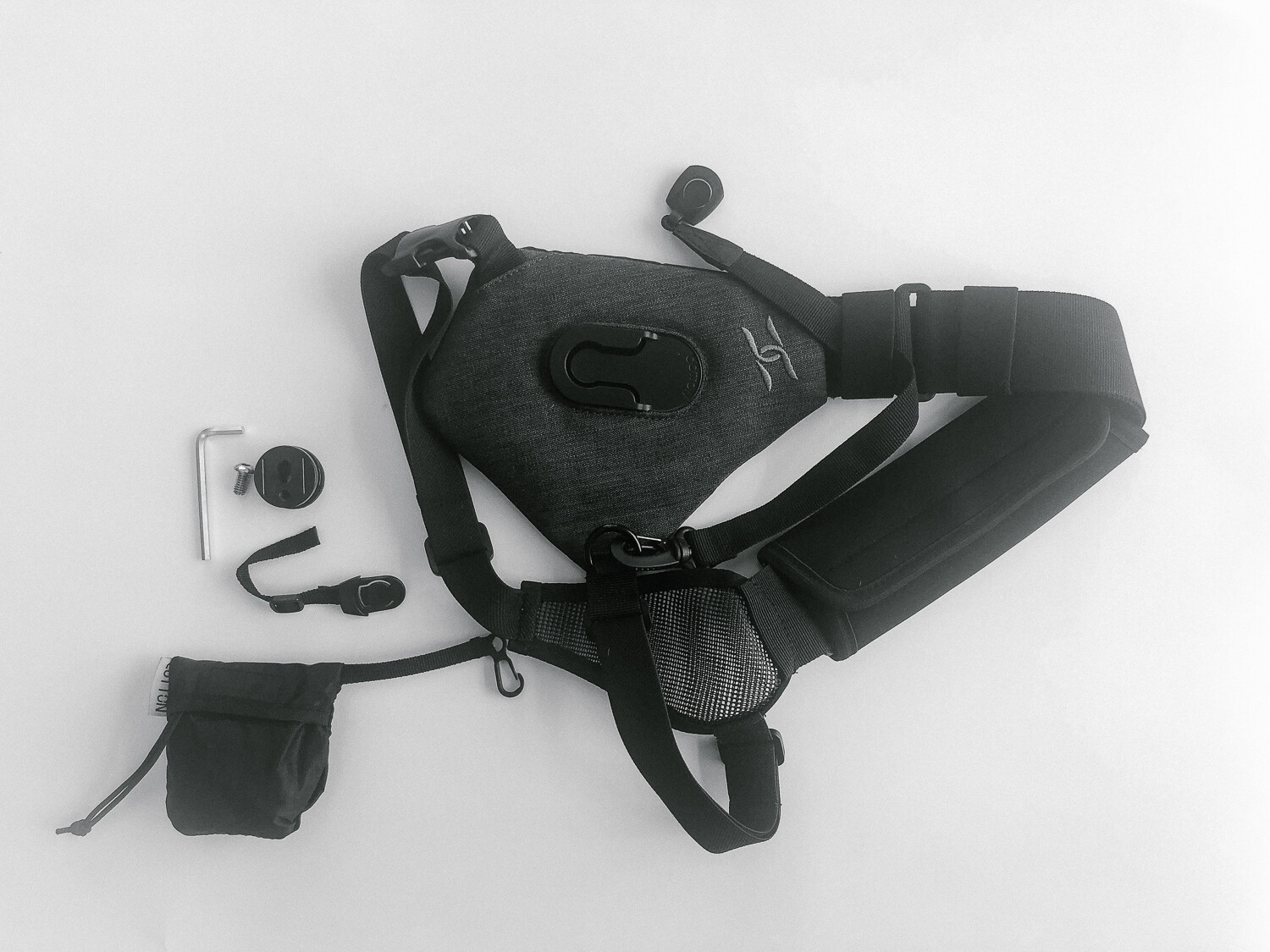
Review of the SKOUT Handsfree Camera Carrying System by Cotton Carrier

01 Oct

If you want an alternative to using the regular camera strap for hiking or walking around town type of activities, then this review is just the thing for you! Read on to find out about the SKOUT Handsfree Camera Carrying System and whether it will suit your needs.

Review of the SKOUT Handsfree Camera Carrying System

A couple of weeks ago, I had the opportunity to review the SKOUT handsfree camera carrying system by Cotton Carrier during a backcountry camping family trip in Colorado’s Rocky Mountain National Park over a period of five days.

To say I was impressed with the performance and comfort of the SKOUT would really be an understatement. I was super impressed with the way Cotton Carrier’s handsfree system worked. It actually held up really well over 30 miles of hard terrain for the duration of the entire trip.

If you have ever been hiking in the mountains, especially the backcountry, you know that total weight and back comfort are very high on the list of priorities for any hiker. I have broken down my review of the Cotton Carrier in terms of the following factors.

Review of the SKOUT Handsfree Camera Carrying System

The first day of the hike was without the SKOUT carrier and just using the camera strap around my neck. I was uncomfortable and the strap was so annoying to hold especially after 2-3 hours of a tough incline hike.

Review of the SKOUT Handsfree Camera Carrying System

A much happier me with the SKOUT sling on a day hike. Being handsfree was the best part.

#1 – Ease of use

The SKOUT design is a one-size fit all solution for almost any camera and lens attachment. I used it with my Canon 5D MKIII and 16-35mm L lens as well as the 24-70mm L lens. The first setup with the 16-35mm lens was definitely lighter than with the 24-70mm lens. But with both lenses, the sling held up really well.

The side-strap provided the support needed and balanced the weight effectively. Since I was already carrying a heavy camping pack on both my shoulders, the side strap ensured the camera was well balanced on my back. I was really impressed with the SKOUT’s patented “Twist & Lock” mount that attaches and detaches the camera from the anodized aluminum hub with a simple twist.

I have to admit I was a little nervous the first few minutes after attaching the camera to the SKOUT, being completely handsfree. But my body and my back quickly adjusted to the freedom and I loved not having to constantly pull up the camera strap from my shoulders while walking and hiking in the rough terrain.

Hidden inside the system is an internal stash pocket that fits a phone or a few credit cards. There’s also a rain cover/ weather guard so the gear stays safe and dry in less than ideal environments. I actually ended up using this a couple of times during my hike when we got caught is a mild downpour in the moutnains.

#2 Comfort

Attaching the SKOUT was fairly simple. After wrapping it over one shoulder, there is a single strap that wraps around the torso and snaps into place on the front, securing the entire system. The shoulder strap is really padded well, so even heavier camera systems don’t put too much stress on the body.

Review of the SKOUT Handsfree Camera Carrying System

The bracket attaches right where you would attach your tripod insert.

Review of the SKOUT Handsfree Camera Carrying System

The bracket then connects to the sling body with a twist and turn and it is quite secure.

Review of the SKOUT Handsfree Camera Carrying System

The crossbody sling with the camera attached to it along with the rain cover.

The cotton fabric is very breathable. I was hiking for almost 5-6 hours every day on some pretty rough terrain. Yet the shoulder and body straps were soft and did not rub against my back. The padding on the shoulder straps is thick and really does support the camera weight across your shoulder nicely.

#3 Durability

Like I mentioned earlier, I used the SKOUT camera sling system over a span of 10 days in the mountains of Colorado. I used it on backcountry hiking days as well as day hikes in Rocky Mountain National Park.

After the first few minutes of figuring out how to attach the camera and secure the system in place, I really forgot it was even on my body. I absolutely enjoyed being handsfree and having the camera readily available to snap a photo when I saw a beautiful landscape or wildlife.

No more taking the camera out of the daypack and risking missing the moment. The straps, the clasp, and even the camera attachment held up really well to some rough use during my trip.

Here is a video of the SKOUT handsfree camera system in use during my trip.

?

Conclusion

All in all, I would definitely rate this product a 9/10 and highly recommend it for anyone looking to do photography on a trail or during a backcountry hiking/camping trip.

It is easy to use, comfortable to wear for extended periods of time and seems reliable even after some rough use in the outdoors.

The post Review of the SKOUT Handsfree Camera Carrying System by Cotton Carrier appeared first on Digital Photography School.


Digital Photography School

 
Comments Off on Review of the SKOUT Handsfree Camera Carrying System by Cotton Carrier

Posted in Photography


Report: Apple working to fix aggressive iPhone Xs, Xs Max front camera “beautification”

01 Oct

Apple’s new iPhone Xs and iPhone Xs Max have only been available to buy for a short period of time but it seems some users are not particularly happy with the image quality of the front camera, specifically when shooting self-portraits.

According to multiple threads on Reddit, Apple’s front camera image processing creates images that looks like “really poor Photoshopping,” or as if a Snapchat filter had been applied. In some of the posted samples users have also seen the subject’s skin color rendered in a quite unnatural colors. Vlogger Unbox Therapy has even produced a video on the issue, shared below.

Image: Reddit / user chemicalsam

The good news is that, according to reports, Apple is already on the case. AppleInsider has confirmed with sources who are not authorized to speak on behalf of the company that the problem is being investigated. Reddit user chemicalsam, who posted the first message about the problem, also says Apple has been in touch and is “working on this issue actively.”

It also seems that the over-aggressive “beautification” or skin-smoothing effect is not applied across all shipped devices. AppleInsider says it is not noticeable on any of the iPhone Xs or Xs Max devices that its staff has purchased for review or personal use.

Some degree of “beautification” is being applied to front camera images from almost all manufacturers and in many cases is user-adjustable. In any case, the problem should only be a software issue and therefore easily fixable via an update.

Articles: Digital Photography Review (dpreview.com)

 
Comments Off on Report: Apple working to fix aggressive iPhone Xs, Xs Max front camera “beautification”

Posted in Uncategorized


Best Camera Settings for Portrait Photography

01 Oct

In this article and video, you will discover the best camera settings for portrait photography for taking photos in natural light and for flash photography. Whether you are brand new to portrait photography or a seasoned pro, you will benefit from these helpful photo tips.

Best camera settings for Portrait Photography

If you prefer watching videos to reading, I have also included a video that will walk you through these photo tips for taking photographs in both natural light and for using fill flash.

Taking photos in natural light is the most common so we will start with those camera settings first.

#1 Best Camera Settings for Portrait Photography

I suggest you set your camera to manual mode to give yourself more creative control of your exposure. Sure, it will take a little extra time to capture your images but you are a much better judge of how you want the final image to look than your camera.

ISO

First choose your ISO, which is usually the lowest setting in natural light, ISO 100 on most cameras. Some Nikon cameras have a lower ISO and allow you to you choose a native ISO of 64. Set your ISO as low as possible to avoid extra noise and that grainy look you will get if you use higher ISO settings.

best camera settings for natural light portraits

Aperture

Step two, decide which aperture you would like to use. For an out of focus background use an aperture like f/1.4. If you would like more of the background in focus or a sharper image, in most cases using an aperture that is two to three stops higher than the minimum aperture will be the sharpest point of the lens.

For example, an f/2.8 lens will be at its sharpest point at around f/5.6 to f/8. If you are a little confused by that, feel free to post your questions in the comment box below this article.

Read more here: How To Find Your Lens’s Sweet Spot: A Beginner’s Guide to Sharper Images

best portrait settings mirrorless cameras

Shutter Speed

Once you have set your ISO and decided on your aperture your next step is to refer to your in-camera meter and adjust your shutter speed until you get a center reading. Then take a test shot and have a look at your camera’s LCD screen and histogram.

Make sure your histogram is as far to the right as possible without blowing out the highlights in your image. Refer to the video above for some examples of how the histogram should look on your LCD screen.

best camera settings for high speed sync

A general rule is to set your shutter speed two times the focal length of your lens. For example, if you were using a 100mm prime lens then you would set a minimum shutter speed of 1/200th to avoid camera shake and image blur.

There are exceptions to this rule. If you are using a tripod or you have in-camera stabilization, like some mirrorless cameras have, or you are using a lens that has built-in image stabilization, then you can photograph at lower shutter speeds.

best camera settings for portrait photography with flash

Step #2 Best Camera Settings for Portrait Photography Using Flash

When it comes to using flash photography there are a couple of different strobes that are in common use today. There are smaller speedlights that fit on your camera’s hotshoe mount and there are larger studio strobes.

There are also strobe units that function differently. Some strobe systems do not allow you to shoot at a shutter speed faster than 1/200th (the camera’s sync speed). Other strobe setups will allow you to use something called (high-speed sync mode) to shoot with flash up to a shutter speed of 1/8000th.

best camera settings for portraits using fill flash

If a majority of your portrait photography is going to take place outdoors, then I would consider a strobe like the Godox AD600 Pro which is what I used to take a majority of the images in this article. The Godox AD600 Pro allows you to use high-speed sync and flash at shutter speeds of up to 1/8000th.

If your current strobe does not allow you to take photos at above 1/200th, you can use a filter like a B+W 3-stop ND filter which will allow you to shoot at a shutter speed of 1/200th but also at an aperture 3-stops larger than you could without it.

For example, with a 3-stop ND filter, you can shoot at f/2.8 instead of f/8 for the same exposure.

best camera setting for natural light portraits

Another important thing to keep in mind if you are shooting outdoors is that you will achieve better results if you shoot closer to sunrise or sunset when the sun is less harsh.

The image above was taken one hour before sunset in the shade and provides a nice even light on the subject’s face. If you would like softer light, then avoid shooting in the middle of the day or move to the shade if you do not have the luxury of shooting just before sunset.

Step #3 Practice These Tips and Explore Your Creativity

best camera settings for portraits at golden hour

One last tip I have for you is to set your camera’s LCD screen brightness level to 4 or 5 and to leave it there. Make sure your LCD screen brightness is not set to auto. That is because it will be difficult for you to gauge your exposure level if your LCD screen brightness is constantly changing.

Check your camera’s settings and set your LCD screen brightness level manually and keep it at the same setting for future photo outings.

best camera settings for shooting with strobes

Conclusion

If you are new to shooting in manual mode it may seem a little difficult at first. But with a little practice, you will be shooting like a pro.

If you have any questions about the best camera settings for portrait photography that were covered in this article, feel free to ask in the comment box below this article. I look forward to hearing from you.

The post Best Camera Settings for Portrait Photography appeared first on Digital Photography School.


Digital Photography School

 
Comments Off on Best Camera Settings for Portrait Photography

Posted in Photography