RSS
 

Posts Tagged ‘Camera’

Thieves steal more than $50,000 in equipment from camera store in less than a minute

24 Dec

This past week, Hunt’s Photo and Video, a small camera store located in Manchester, New Hampshire, had thousands of dollars worth of camera gear stolen from its stands and cases overnight.

Detailed in a video produced by NBC10 Boston, CCTV footage shows four thieves breaking through the front of the store with the help of an axe. Once the entrance is cleared, the thieves run inside with four containers and smash the display cases to access the gear. The thieves subsequently fill each container with thousands of dollars in camera equipment and slide them across the floor as they make their way towards the exit.

In less than a minute, the smash and grab netted the thieves more than $ 50,000 in equipment, according to Mike Mitchell, VP of Hunt’s Photo and Video. The high quality CCTV footage captured a partial identification on one of the thieves when their mask was lifted, but hasn’t led to any definitive identifications as of the publication of this video.

Four months prior to this break-in, Hunt’s experienced a nearly identical break-in wherein the thieves made off with another $ 50,000 in gear. Local authorities are working alongside Hunt’s Photo and Video to identify and capture the suspects and believe the two break-ins are related to each other.

DPReview has contacted Hunt’s for more information on what was stolen and what the serial numbers are. This article will be updated accordingly if Hunt’s responds with the information.

Articles: Digital Photography Review (dpreview.com)

 
Comments Off on Thieves steal more than $50,000 in equipment from camera store in less than a minute

Posted in Uncategorized


Video: Zeiss shows hands-on footage of its ZX1 camera with Lightroom integration

24 Dec

In September 2018, Zeiss announced the ZX1, a fixed-lens, full-frame camera that has onboard Adobe Lightroom CC integration. Yesterday, Zeiss shared a two minute video that gives the world its first hands-on look at the ZX1 and its onboard editing abilities.

Throughout the video, portrait photographer and photojournalist Sabrina Weniger walks around the streets of Little Tokyo in Düsseldorf narrating her experience with the ZX1 and the features she most enjoys about it. Unsurprisingly, she doesn’t hit on the negatives.

In addition to her overall positive thoughts on the camera, Zeiss shares a glimpse of the camera itself, including the 35mm F2 lens and the massive 4.3-inch touchscreen display that’s used to compose, view and edit photos using the onboard Lightroom. The video also details the onboard version of Lightroom CC in action, as she edits a portrait captured inside a small shop right on the rear display of the camera.

Nothing new is necessarily learned from the video, but it’s the first time Zeiss has shown off the camera in action before its yet-to-be-determined launch date said to be in the first part of 2019.

Articles: Digital Photography Review (dpreview.com)

 
Comments Off on Video: Zeiss shows hands-on footage of its ZX1 camera with Lightroom integration

Posted in Uncategorized


Gear Review: Canon EOS M50 Mirrorless Camera Kit

19 Dec

The post Gear Review: Canon EOS M50 Mirrorless Camera Kit appeared first on Digital Photography School. It was authored by Anabel DFlux.

1 - Gear Review Canon EOS M50 Mirrorless Camera Kit

The Canon EOS M50 is a compact interchangeable lens camera for aspiring photographers looking for an easy way to boost the quality of their photos and videos. Sporting 4k video capabilities to capture your favorite memories, 24-megapixel vibrant photographs, and Dual Pixel Autofocus system, the Canon EOS M50 is a masterful piece of technology.

Social media mavens can benefit from the camera’s Wifi function that allows users to connect to the Canon Camera Connect app to transfer images to their smart device. From there, you can share and upload from your device directly to various social media sites.

Canon’s newest addition is an excellent introduction to mirrorless cameras. Complete with a lens, its ready to go right out of the box – making it a fantastic holiday season gift for any photography enthusiast. Following is why this camera is so spectacular!

What is a Mirrorless Camera?

Before we get into it, let’s have a quick look at what a mirrorless camera is and how this new technology compares to digital Single Lens Reflex cameras (DSLRs).

2 - Gear Review Canon EOS M50 Mirrorless Camera Kit

The way that a digital SLR camera works is that a mirror inside the camera reflects the light up to the optical viewfinder (which is also how you see the image before you take it). When you release the shutter, the mirror lifts, allowing the light to hit the sensor and capture the image.

In a mirrorless camera, there is no mirror or optical viewfinder. Instead, the imaging sensor gets exposed to light at all times. This method gives you a digital preview of your image either on the rear LCD screen or an electronic viewfinder (EVF).  As such, a mirrorless camera is one that doesn’t require a reflex mirror – a key component of DSLR cameras.

Due to the lack of mirror, the camera is significantly smaller and lighter weight than a DSLR, a very distinct difference between the two. However, DSLRs are well-trusted because of their true-to-life through-the-lens optical viewfinder system, which uses a series of mirrors to reflect light to your eye.

Mirrorless cameras, on the other hand, require an electronic viewfinder or LCD screen for image monitoring. Both are equally spectacular. Each model has their own pros and cons and it comes down to personal choice.

Canon EOS M50 features and specifications
3 - Gear Review Canon EOS M50 Mirrorless Camera Kit

Features

The Canon EOS M50 mirrorless camera sports some very impressive features that would make even the smuggest photographer blush. The EOS M50 delivers improved Dual Pixel CMOS AF for fast, accurate autofocus that helps you get the photo you want right at the moment it happens.

The 24.1 Megapixel (APS-C) sensor is capable of capturing high-resolution image and video. The files grant the user images suitable for enlargements with sufficient resolution for significant cropping. The video capability of this hardy little camera is even more impressive. It has the ability to record in 4K UHD at 24 frames per second. The high-speed 120p mode is possible in HD.

According to the manufacturer, the built-in high-resolution electronic viewfinder features approximately 2,360,000 dots. So, you can see high amounts of detail in whatever you’re capturing.

The vari-angle Touchscreen LCD, which has a flexible tilt range. The tilt range is ideal for high-angle and low-angle shooting so you can get the composition you want without breaking your back. The Canon EOS M50 camera features the new DIGIC 8 Image Processor, which helps improve autofocus performance, enables you to shoot 4K UHD 24p video and aids with many other advanced features.

4 - Gear Review Canon EOS M50 Mirrorless Camera Kit

Specifications

  • Improved Dual Pixel CMOS AF and Eye Detection AF.
  • 24.1 Megapixel (APS-C) CMOS Sensor with ISO 100-25600 (H: 51200).
  • 4K UHD* 24p and HD 120p** for Slow Motion.
  • Built-in OLED EVF*** with Touch and Drag AF.
  • Vari-angle Touchscreen LCD.
  • Built-in Wi-Fi, NFC, and Bluetooth Technology.
  • Automatic Image Transfer to Compatible Devices while Shooting.
  • New DIGIC 8 Image Processor with Improved Auto Lighting Optimizer.
  • Silent Mode for Quiet Operation.

This is only the second EOS M model to have a built-in Electronic View Finder (with the first being the EOS M5). It is also the first EOS M model to offer 4k video, which puts it one step ahead of the EOS M5. The camera also uses a DIGIC 8 processor, rather than the older DIGIC 7 processor.

Physical build

5 - Gear Review Canon EOS M50 Mirrorless Camera Kit

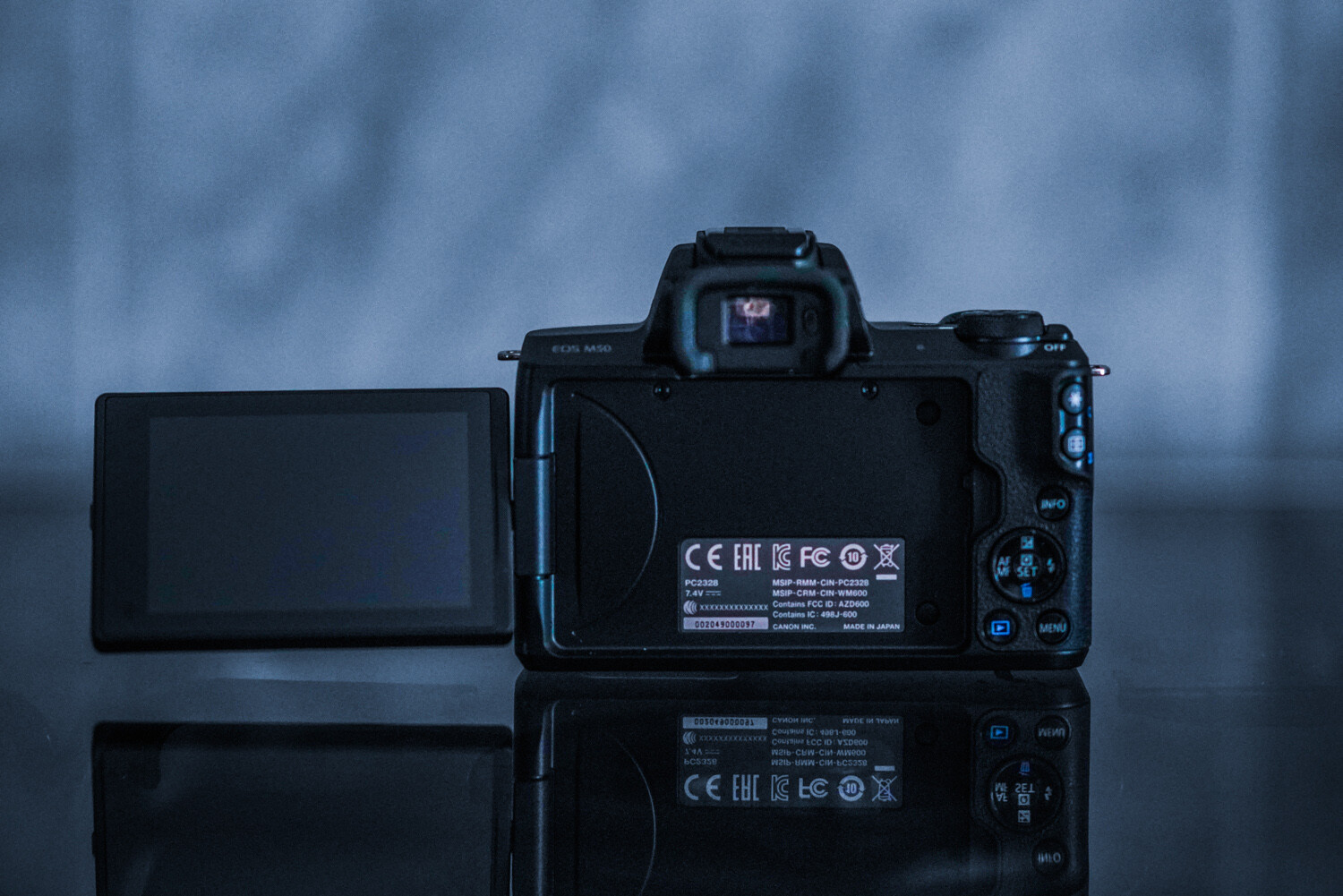
This camera’s size is brilliant! It is smaller than my cell phone (Google Pixel). Easy to throw into any bag, purse, or pocket. The body construction consists of polycarbonate rather than a metal body shell, but it still feels robust enough in your hand. The camera features a very comfortable and well-designed grip containing  ‘hooks’ for your second finger and thumb. As a result, the M50 feels surprisingly secure, even when used with one hand.

Much like Canon’s pro-level DSLRs, the controls are well laid-out. The buttons are a decent size and easily located by touch while using the viewfinder. However, the size may be an issue for those with larger hands. My hands are petite, and I find the controls just fine (haha)!

6 - Gear Review Canon EOS M50 Mirrorless Camera Kit

The tilt, vari-angle touch screen is brilliant. This nifty feature has infinite uses. Additionally, the screen can be stowed backward against the camera body to avoid any potential scratches (for those that don’t purchase screen protectors). The built-in viewfinder is very helpful when shooting during the noon sun or other bright conditions. There’s an auto activation when your eye approaches the viewfinder, ensuring that the LCD doesn’t blind you.

Canon has a knack for making its small models handle well and feel professional. The M50 is proof of this.

Autofocus

Canon’s autofocus is what has kept me loyal to the brand for over ten years now. Canon’s Dual Pixel CMOS sensor that the M50 sports mean every sensor pixel is capable of being used for phase detection. Allowing fast autofocus almost wherever the subject gets situated within the frame. The AF system is sensitive down to -2 EV, which means the camera continues to focus in extremely low light.

7 - Gear Review Canon EOS M50 Mirrorless Camera Kit

A new autofocus feature of this model is the eye-detection autofocus. The camera can find eyes on your subject and lock focus on them with the push of a button. It is photographic witchcraft, and I love it. This feature is activated when face detection is turned on, to focus specifically on your subject’s eye.

Do make note that this fun feature is only available in single-AF mode, which means you can’t use it track focus during burst shooting. As can be seen above, the eyes of my dog are nicely in focus (and this was easy to achieve, even when she moved a bit).

I have always preferred the AI Servo | Continuous Focus mode due to the majority of my subjects moving around a lot. Thanks to the ability to use phase-detection anywhere in the frame, this feature is fast and reliable.

Low light capability

8 - Gear Review Canon EOS M50 Mirrorless Camera Kit

As the years’ progress, so does low-light capability. In higher ISO levels, image quality stands up very well at ISO 800. It’s only at ISO 3200 noise, and noise reduction starts to blur away detail. However, the color gets retained well. The higher numbers are passable for smaller reproductions, but you’ll generally find yourself not wanting to move beyond 12,500 max! The autofocus continues to shine even at low-light levels.

9 - Gear Review Canon EOS M50 Mirrorless Camera Kit

Battery life

I have always been a tremendous fan of Canon’s batteries. They always continue to impress me with their longevity. This camera is no exception, despite having an always-on LCD screen! As always, I do suggest purchasing more than one battery, but you can remain confident in this camera lasting you through your entire photo session and photography adventures.

10 - Gear Review Canon EOS M50 Mirrorless Camera Kit

The lens: EF-M 15-45mm f/3.5-6.3 IS STM

The M50 kit comes complete with the EF-M 15-45mm f/3.5-6.3 IS STM, a compact and stylized zoom lens for the mirrorless camera. The lens is very compact and features a side switch to flatten the lens when stored. This feature makes traveling with the M50 kit an absolute breeze.

11 - Gear Review Canon EOS M50 Mirrorless Camera Kit

With the 15-45mm kit lens with its STM focus motor, autofocus is great. It is super-fast, silent, accurate, and excellent for any photography style. The 35mm-equivalent 24-72mm range combines a wide-angle for landscapes and big group photos, with a telephoto zoom for close-ups and detailed headshots.

12 - Gear Review Canon EOS M50 Mirrorless Camera Kit

I found the lens to be reliable, fast, and sharp – no complaints whatsoever!

Final thoughts

13 - Gear Review Canon EOS M50 Mirrorless Camera Kit

The Canon EOS M50 is an excellent entry-level camera for aspiring, beginner, and hobbyist photographers alike. From its variety of features to its portable size and ease-of-use, unraveling this camera under the Christmas tree would excite even the most controlled picture-takers. Plus, having a kit that comes with a lens is just a brilliant bonus!

The post Gear Review: Canon EOS M50 Mirrorless Camera Kit appeared first on Digital Photography School. It was authored by Anabel DFlux.


Digital Photography School

 
Comments Off on Gear Review: Canon EOS M50 Mirrorless Camera Kit

Posted in Photography


POLL – Do You Use Your Camera for Video?

19 Dec

The post POLL – Do You Use Your Camera for Video? appeared first on Digital Photography School. It was authored by Caz Nowaczyk.

Digital cameras have come leaps and bounds since their inception. They include many fantastic features to enable us to take better quality photos. However, they not only take still images, many now include video functionalities.

Some photography cameras even have 4K video capabilities.

So, we want to know if you use the video settings on your camera?

Do you just play around, use it professionally, or wish you knew how to use it?

We’d love to know.

Note: There is a poll embedded within this post, please visit the site to participate in this post’s poll.

Feel free to tell us more about your answer (why you do or what you do) in the comments below.

If you would like to learn more about making videos with your camera, see this article by Suzi Pratt.


The post POLL – Do You Use Your Camera for Video? appeared first on Digital Photography School. It was authored by Caz Nowaczyk.


Digital Photography School

 
Comments Off on POLL – Do You Use Your Camera for Video?

Posted in Photography


How To Read Your Camera Manual (and why you really, really should!)

18 Dec

The post How To Read Your Camera Manual (and why you really, really should!) appeared first on Digital Photography School. It was authored by Kevin Landwer-Johan.

Camera manuals are notoriously difficult to read and understand. Often they are not read as much, or as well, as they should be. You need to read your camera manual because it contains vital information that will help you to become a better photographer.

How To Read Your Camera Manual Night Camera

© Kevin Landwer-Johan

Just as we need to learn the alphabet before we can learn to read and write, we must learn the basics of operating our cameras in order to take the best photos we can.

Reading it from cover to cover is not necessary. There will not be a test on how much you can remember.

The best way to use your camera manual

Begin to skim with your camera in your hands. Look through the contents and take note of what’s covered. Mark which items you think may be of particular interest to you. Some you will be able to just glance over. Others may be just painfully obvious, like this from the Nikon D800 manual;

“When operating the viewfinder diopter adjustment control with your eye to the viewfinder, care should be taken not to put your finger in your eye accidentally.”

I would add that it’s always a good idea not to put your finger in your eye, even when you are not adjusting your diopter.

If you’ve just bought a new camera and it’s a model you’re not familiar with, you’ll need to pay more attention to the manual. For camera users who are upgrading you will be best to scan the book for what’s been upgraded since your previous model. Sometimes these may be highlighted.

How To Read Your Camera Manual Camera In Hand

© Kevin Landwer-Johan

Break your reading down into bite-size chunks. Don’t attempt to read and understand everything you need to know about your camera in one sitting. It’s a complex piece of equipment. Spread your reading out over a few days or a week.

Give yourself time to practice what you are reading about. Getting hands-on experience will help you retain what you’re learning about and make it much more relatable.

Do not read it all

Choose to learn the essentials first. Find out how to focus it and set the exposure well. There will be various options available to you. Start reading about the ones most applicable to the way you like to photograph.

If you are completely new to photography and not yet sure which exposure mode you prefer, take some time to read through all the options.

How To Read Your Camera Manual Happy Photographer

© Kevin Landwer-Johan

Getting a good start by understanding the basics of your camera leaves you freer to concentrate on photography. Don’t be filling your mind with more than you need to know. At the start you are not likely to need information about producing video, making multiple exposures or how to adjust the customs settings on your camera. These things can wait until you can find your way around your camera comfortably.

Carry your manual with you

Download a PDF of your camera manual to your phone. Take it with you everywhere so you can refer to it when you get stuck with a camera setting.

How To Read Your Camera Manual Chinese Woman Photographer

© Kevin Landwer-Johan

Practical application of the information contained in this little book will help you get to know your camera better. But only if you use it well. Hands on is best.

Once it’s on your phone you can take a few minutes to read a little more on the bus or train or whenever you have a few minutes to spare.

Consider buying a book specifically about your camera (that’s not the manual)

I have purchased books and resources about cameras I own by Thom Hogan. Thom is well known for his incredibly detailed writing about Nikon cameras. I find he’s much easier to read than the camera manuals.

How To Read Your Camera Manual Learning Photography

©Pansa Landwer-Johan

His books are well laid out and the information is broken down so it’s readily consumed.

This may be beyond the needs or wants of many photographers, but for those who have the time and want the resources, picking up a book, other than your camera manual will help advance you towards better picture taking.

Aim to be able to forget it all

As you become more confident and competent with your camera, you will have little need for your camera manual. Well, I would hope that before long you have put what you’ve read to good use and can remember it effortlessly.

How To Read Your Camera Manual Camera In Hand 2

©Pansa Landwer-Johan

Having the ability to pick up your camera and have it ready to take photos in any situation is well worth aiming for. The more you can concentrate on what’s happening in front of you the better photos you’ll obtain.

Gazing down at the camera in your hands as you try and figure out which settings you want to use leads to you missing out. You may be able to take your best photos when you are focused more on what you are making photographs about than what you are making them with.

The post How To Read Your Camera Manual (and why you really, really should!) appeared first on Digital Photography School. It was authored by Kevin Landwer-Johan.


Digital Photography School

 
Comments Off on How To Read Your Camera Manual (and why you really, really should!)

Posted in Photography


Adobe Camera Raw update brings support for latest mobile devices, Nikon Z6 and more

12 Dec

Adobe has released the December update for its Camera Raw plug-in that allows you to edit and import Raw image files in Adobe applications, such as Photoshop, Lightroom Classic CC, Lightroom CC, Photoshop Elements, After Effects, and Bridge.

The list of newly supported cameras is heavily populated with smartphones and mobile devices. Apple latest iPhones XS, XS Max and XR are on the list as well as the company’s 2018 iPad Pro models. In addition you’ll now also be able to use Camera Raw with Raw files from Google’s Pixel 3 models, the Huawei P9 Lite, LG G7 ThinQ and the Samsung models Galaxy Note 9 and Galaxy S6/S6 Edge.

Camera models include Nikon’s Z6 mirrorless camera and D3500 DSLR as well the Leica M10-D and P, in addition to a bunch of compact cameras. For a full list of supported cameras head to the Adobe Support Website.

If you have an older version of an Adobe application that is not compatible with the latest version of Camera Raw you can still get Raw support for your camera through the free Adobe DNG converter.

Articles: Digital Photography Review (dpreview.com)

 
Comments Off on Adobe Camera Raw update brings support for latest mobile devices, Nikon Z6 and more

Posted in Uncategorized


Samsung and Huawei introduce the ‘hole-punch’ front camera in their latest smartphones

12 Dec

Smartphone manufacturers are facing a dilemma these days. Consumers want a display that covers as much of the front of the device and has bezels that are as thin as possible. On the other hand some components, for example the front camera, proximity and light sensors or the earpiece have to be placed onto the front of the device as well to work efficiently, taking away some of the available real estate from the display.

This has resulted in the much-dreaded display-“notch” as it was first popularized by the iPhone X and since then has appeared on most other high-end phones as well.

Apple iPhone XR with display notch

Samsung and Huawei are now going down a different route, however, with their new A8s and Honor View20 models, respectively. Both new smartphones feature a so-called ‘hole-punch’ front camera which is designed to be less obtrusive than a ‘notch.’

In this design the camera is hidden behind the display which comes with a small circular hole for the lens to peek through. It’s worth noting however, that unlike many current high-end models neither the A8s nor the View20 come with any face recognition features that would require additional sensors at the front. Both new devices are placed in the mid-range bracket of the market which makes them more suitable for the new design.

Samsung Galaxy A8s with “hole-punch” front camera

The View20’s main camera also comes with a promising specification. The camera features the same 1/2″ Sony sensor with 48MP resolution that we are also expecting to see in an upcoming Xiaomi device. The sensor’s high pixel count is used for high-quality digital zooming and computational frame-stacking methods, though, so don’t expect any medium-format resolution out of your smartphone any time soon.

Articles: Digital Photography Review (dpreview.com)

 
Comments Off on Samsung and Huawei introduce the ‘hole-punch’ front camera in their latest smartphones

Posted in Uncategorized


Filmborn film camera app updated with new presets, iOS 12 support and bug fixes

08 Dec

Seattle-based Mastin Labs has released a large update for Filmborn, its camera app for iOS, adding additional film looks, free access to all current editing tools, support for iOS 12 and the three newest iPhone models and updates to the original film preset appearances.

Filmborn provides iPhone users with true-to-film presets that give images captured by the phone a realistic film appearance. Users are able to create up to three in-app camera kits containing customized specifications, as well as adjust exposure and white balance using gestures and curves using Filmborn’s Custom Curves tool. Other features includes last photo review, live film previews, and highlight clipping.

Version 1.4 update makes all of those tools free for users who purchase Filmborn. The app’s size and user interface have both been optimized, performance and responsiveness have been improved, and Mastin Labs has added haptic feedback for tool buttons when pressed in Camera view.

A number of bug fixes are included with this update, most notable being a fix for the iPhone X telephoto lens issue users previously experienced. Filmborn now offers a lens toggle under Camera view for dual-camera iPhone models, as well. The iPhone XS, XS Max, and XR are all now supported by the app.

The new preset packs available in Filmborn version 1.4.

In addition to the app update, Mastin Labs has also added three new film preset packs to Filmborn’s store: Kodak Everyday Original, Fujicolor Pushed, and Portra Pushed. Filmborn is available to purchase from the iOS App Store for $ 2.99. Additional preset packs are available as in-app purchases for $ 1.99.

Articles: Digital Photography Review (dpreview.com)

 
Comments Off on Filmborn film camera app updated with new presets, iOS 12 support and bug fixes

Posted in Uncategorized


Xiaomi co-founder teases 48MP smartphone camera

07 Dec

Earlier this year Chinese smartphone maker Xiaomi announced it had established an in-house camera division. Now it seems the initiative is bearing its first fruits.

Xiaomi co-founder and President Lin Bin has teased a smartphone with 48MP camera module on the Chinese social media platform Weibo. The image he posted shows a close-up of a rear camera with a ’48MP camera’ label next to the lens. Bin says he has used the phone for a few weeks and that it will be released in January.

That’s not an awful lot of information, but it means the upcoming Xiaomi phone will feature the highest pixel count ever on a mobile image sensor. Nokia’s 808 PureView juggernaut came with a 41MP sensor and the much more recent Huawei Mate 20 Pro features a 40MP quad Bayer arrangement.

Like the Nokia 808 PureView and Huawei Mate 20 Pro, the unreleased Xiaomi phone is likely to use its pixel count for high-quality digital zooming, pixel-binning for lower noise, and other computational trickery, rather than outputting enormous image files.

The sensor in question could be the Sony IMX586 quad-Bayer model which was announced in July. At 1/2″ it’s large for a mobile sensor, but due to the high pixel-count, individual pixels still only measure 0.8µm. Samsung’s Bright GM1 is another option with very similar specifications.

It’ll be interesting to see if the new Xiaomi will solely rely on the power of the 48MP sensor or add additional sensors, for example for tele, super-wide-angle or black-and-white shooting into the mix. We’ll know more in January.

Articles: Digital Photography Review (dpreview.com)

 
Comments Off on Xiaomi co-founder teases 48MP smartphone camera

Posted in Uncategorized


Buying Guide: The best camera bargains of 2018

06 Dec

Last updated: December 4, 2018

If you’re looking for a high-quality camera, you don’t need to spend a ton of cash, nor do you need to buy the latest and greatest new product on the market. If you’re willing to miss out on some features, you can save a lot of cash by picking up a last-generation model or shopping around for deals on refurbished or older, but still current, cameras.

In this buying guide we want to direct your attention to some great-value cameras, which are still available. We’ll start with the least expensive options and go up in price from there.

Street prices listed below are current as of December 4th, 2018.

  • Sony Cyber-shot DSC-RX100 $ 369
  • Nikon D3400 w/18-55 lens $ 399
  • Canon PowerShot G9 X II $ 399
  • Canon EOS M100 w/15-45mm lens $ 399
  • Sony a5100 w/16-50mm lens $ 449
  • Sony a6000 w/16-50mm lens $ 499
  • Panasonic Lumix DMC-ZS100 $ 499
  • Fujifilm X-E3 $ 799
  • Nikon D7200 $ 799
  • Sony a7 II $ 899
  • Nikon D750 $ 1399

Sony Cyber-shot DSC-RX100
$ 449 MSRP, $ 369 street

While not as capable as later models, Sony’s original Cyber-shot RX100 is an inexpensive way to snag a genuinely compact camera with a 1″ sensor. It has a 28-100mm equivalent lens that will do well in low light at the wide end of the lens, but not-so-great at telephoto. You miss out on the faster lenses, electronic viewfinders and improvements in autofocus and JPEG image quality that arrive in the latest models.

The camera fits in a pocket with ease, though the body is slippery and some may find the controls a bit clunky. The RX100 has a 3″ non-touch LCD but lacks a viewfinder. Photo quality is excellent and the same can be said for its Full HD video. It focuses quickly and can shoot continuously at 10 fps. Wi-Fi is built-in for photo sharing.

More info | Check prices


Nikon D3400 w/18-55mm lens
$ 499 MSRP, $ 399 street

While it’s since been replaced by the D3500, the Nikon D3400 is essentially the same camera but in a slightly different (but still very compact) body. Like other Nikons, the D3400’s 24MP APS-C sensor has excellent resolution and dynamic range. Its autofocus system is dated and it can’t take many photos in a burst, so a sports camera it is not.

What makes the D3400 so appealing is that it’s great for beginners, with its ‘Guide mode’, selecting the correct settings for you based on use case, and tells you which of them were actually changed so you learn. The camera also features Full HD video capture (though AF is essentially unusable) and Bluetooth for easy photo sharing.

More info | Check prices


Canon PowerShot G9 X Mark II
$ 529 MSRP, $ 399 street

The Canon PowerShot G9 X Mark II is one of the cheapest and smallest compact cameras with 1″ sensor that you can buy. The larger-than-average sensor will produce better-looking images than your typical compact, though the slow-ish lens will reduce that advantage in low light.

The lens has a small 28-84mm equiv. focal range, which isn’t as versatile as most of its peers. Despite that, the G9 X II has a well-designed touch interface, snappy performance, Full HD video capture and the latest wireless features.

More info | Check prices


Canon EOS M100 w/15-45mm lens
$ 599 MSRP, $ 399 street

The Canon EOS M100 is one of least-expensive mirrorless cameras you’ll find. It’s packed with Canon’s latest features, including its excellent Dual Pixel autofocus system and also has a flip-up touchscreen display. It’s not as good at shooting action as the newer M50 model, which can also capture 4K video.

The M100 features Full HD video capture and Wi-Fi with Bluetooth. While there aren’t many native EF-M lenses available, the M100 is compatible with Canon’s enormous selection of EF and EF-S glass with an optional adapter.

More info | Check prices


Sony a5100 w/16-50mm lens
$ 549 MSRP, $ 449 street

It’s hard to believe but, five years after its introduction, Sony is still making its a5100 mirrorless camera. The compact Sony a5100 is a good choice for those on a tight budget seeking a point-and-shoot experience, but with interchangeable lenses. It hasn’t seen the improvements in video, autofocus or JPEG color that have arrived in newer Sonys, meaning you don’t get the excellent Eye AF feature.

The a5100 uses a 24MP APS-C-size sensor and has a hybrid AF system that’s still responsive today. There’s a selfie-friendly flip-up touchscreen LCD on the a5100, but no viewfinder. It can capture Full HD video and has Wi-Fi with apps you can download to the camera.

More info | Check prices


Sony a6000 w/16-50mm lens
$ 649 MSRP, $ 499 street

The Sony a6000 is one of the best-selling interchangeable lens cameras of all time, and for good reason. It has excellent image quality, a reliable autofocus system, 11 fps burst shooting and a sharp OLED viewfinder. The a6000 is targeted a bit more toward enthusiasts than the a5100, with dual control dials but (disappointingly) no touchscreen. It pre-dates features such as 4K video and Sony’s excellent Eye AF feature, and improvements in interface and JPEG color.

It captures Full HD video, offers Wi-Fi and can download feature-adding apps into the camera. It’s worth pointing out that Sony’s APS-C lens collection is relatively small and expensive compared to other mirrorless brands.


Panasonic Lumix DMC-ZS100
$ 699 MSRP, $ 499 street

The Panasonic Lumix DMC-ZS100 (TZ100 in some regions) is a compact camera with a 1″ sensor and 25-250mm equiv. lens. It fits easily in your pocket, making it an ideal camera for travel. Its lens has a relatively slow maximum aperture, so it won’t perform terribly well in low light, though it will still out-do compacts with smaller sensors. It doesn’t get the nicer JPEG colors of newer Panasonic models.

The ZS100 has a fixed touchscreen display and a ‘better than nothing’ electronic viewfinder. In addition to taking 4K video, the ZS100 also has genuinely useful features like ‘Post Focus’ and ‘4K Photo’. For those looking for a portable, versatile travel camera, the ZS100 is a bargain.


Fujifilm X-E3
$ 899 MSRP, $ 799 street (body only)

The Fujifilm X-E3 is a rangefinder-style mirrorless camera that produces excellent images straight out of the camera courtesy of its modern 24MP X-Trans APS-C sensor. Its well-built body has direct controls for shutter speed and exposure compensation, and most buttons are customizable.

A high-resolution EVF and touchscreen await users on the rear plate. It also offers Wi-Fi and Bluetooth. The X-E3 captures 4K video but not nearly to the high standard or newer models.While it doesn’t have a built-in flash, with a small external one included in the box. The excellent 18-55mm F2.8-4 lens adds just $ 300 to the cost of the camera and is well worth the money.

More info | Check prices


Nikon D7200
$ 1099 MSRP, $ 799 street (body only)

The Nikon D7200 is a midrange DSLR with a 24MP APS-C sensor that produces sharp images with excellent dynamic range and solid high ISO performance. It’s reasonably small and light and is sealed against the elements. The D7200 has a large optical viewfinder and a fixed 3.2″ (non-touch) LCD.

Autofocus performance is superb, whether you’re tracking subjects or shooting in low light. While the D7200 can record Full HD video, quality isn’t as good as other midrange cameras and autofocus is effectively unusable. The D7200 has built-in Wi-Fi, but the aging smartphone app is unreliable.

More info | Check prices


Sony a7 II
$ 1399 MSRP, $ 899 street (body only)

The Sony a7 II is a solid full-frame mirrorless camera that currently sells for a remarkably low price. It has built-in 5-axis image stabilization, a 24MP sensor, fast hybrid autofocus system and Full HD video capture. The camera has a relatively rugged, with some weather-sealing, high resolution EVF and tilting (non-touch) LCD. It misses out on the further improvements Sony has made in terms of JPEG color, autofocus and user interface in its latest models.

Photos have great resolution and excellent Raw dynamic range, though the a7 II struggles a bit at high ISOs. Some users might find the buttons and dials to be too small, so it’s worth trying one in person before you buy.

More info | Check prices


Nikon D750
$ 1999 MSRP, $ 1399 street (body only)

Despite being released way back in 2014, the D750 is still one of the most attractive full-frame DSLRs on the market and an incredible bargain as it approaches its fifth year of production. The D750’s 24MP sensor produces beautiful photos with low noise at high ISOs and plenty of dynamic range. Its autofocus system tracks subjects with ease, though the camera’s buffer fills quickly when shooting bursts.

The D750’s body is compact for a full-frame DSLR and it has a giant optical viewfinder, a 3.2″ tilting (non-touch) LCD, built-in flash, dual SD card slots and Wi-Fi. It can shoot good quality Full HD video, though autofocus performance in video and live view is for static subjects only. Battery life, on the other hand, is exceptional.

More info | Check prices

Articles: Digital Photography Review (dpreview.com)

 
Comments Off on Buying Guide: The best camera bargains of 2018

Posted in Uncategorized