RSS
 

Posts Tagged ‘Camera’

Samsung publishes Galaxy Camera kernel code – opening door to developers

14 Nov

samsung_galaxycamera4g.png

Samsung has publicly released the kernel code for its Android-based Galaxy Camera, as it regularly does for its smartphones.The kernel is the core of the operating system including software that controls the hardware. In the short term, independent developers are discussing using the code to enable phone calls from the device but, beyond this, a publicly available kernel gives developers and hackers a greater insight into the Galaxy Camera’s workings than we’ve ever seen for a camera.

News: Digital Photography Review (dpreview.com)

 
Comments Off on Samsung publishes Galaxy Camera kernel code – opening door to developers

Posted in Uncategorized


Why You Might Want To Consider A Full Frame Fisheye Lens Even If You Have A Crop Sensor Camera

13 Nov

There are few things better in life than having something go wrong that leads to the discovery of something even better.

Such is the case with my plan to test out a Canon 8-15mm fisheye lens courtesy of BorrowLenses.com. My intent with the lens was to take it with me to the wilds of Arches and Canyonlands National Parks in Utah for some crazy, circular images. The problem is I lack a full frame Canon camera, but would be traveling with Michael Riffle, who owns a Canon 5D Mark III. He accepted the challenge to test the lens, being familiar with fisheyes himself.

One thing led to another and we never got around to testing the lens on his camera. Instead, I often found myself using the lens on my Canon 7D, a crop sensor camera. The Canon 8-15mm is intended to fit a full frame sensor and produce, at 8mm, a fully circular image, much like this example from a Sigma 4.5mm on a crop sensor camera.

PeterWestCarey-Nepal2011-1008-9891

What happened instead was a cross between this full circle and a more traditional 15mm on a crop sensor. The 8-15mm lens will show edges of the circle when below 10mm but will otherwise fully cover the sensor from 10mm-15mm. A major difference from a non-fisheye lens, though, is the curving in the image.

For instance, here are two shots, both taken at 10mm. The difference: the first lens is a non-fisheye Canon EF 10-22mm lens and the second is the Canon 8-15mm fisheye.
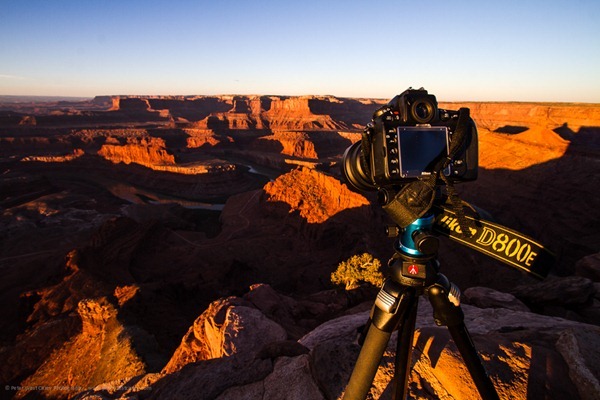
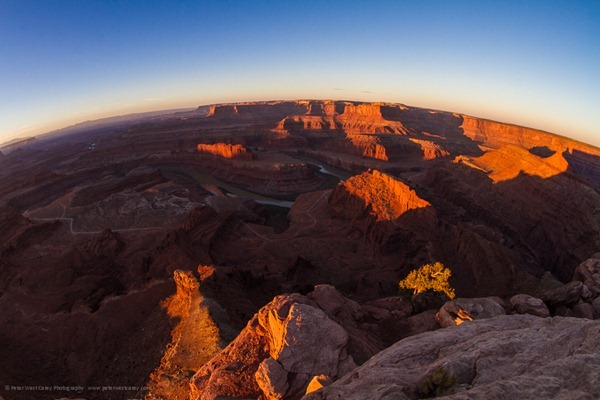
PeterWestCarey-Utah2012-1021-7193

PeterWestCarey-Utah2012-1021-7187

Both shots are taken from nearly the same perspective (the fisheye is taken from the position of the Nikon D800E in the first image) but the fisheye gives a different feel. I only made slight clarity and level adjustments in the photos and did not crop them, so this is what you can expect at 10mm.

Below 10mm the black edge of the area outside the fisheye is seen. How bad is it? It depends.

At first it annoyed me to have the incomplete image. Neither full fisheye nor filled frame. Like this:
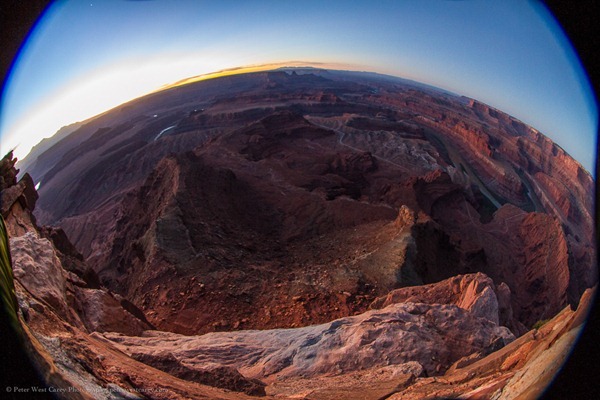
Peter-West-Carey-Utah2012-1021-7155

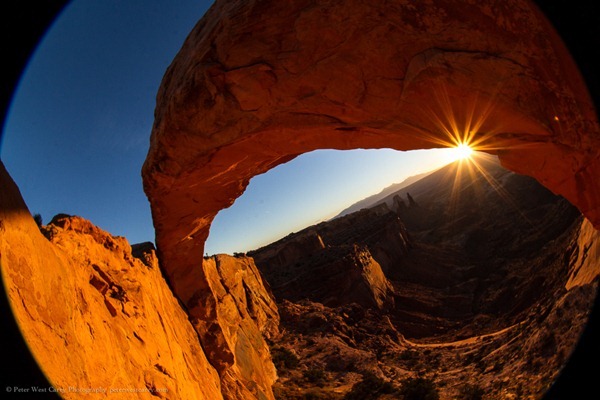
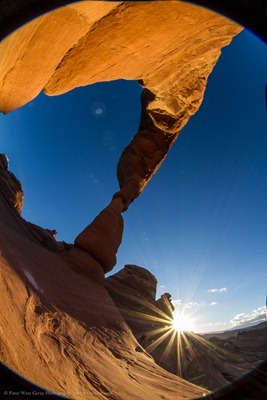
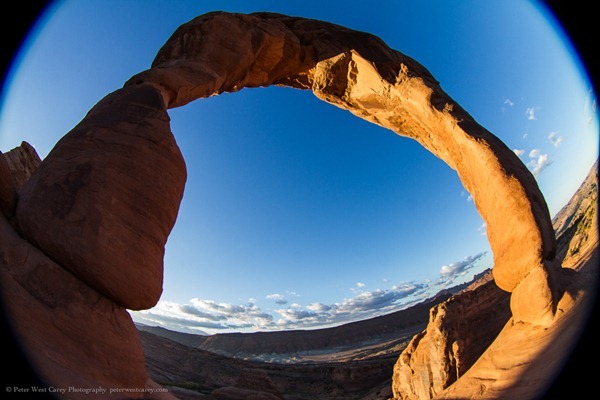
But then I started finding instances where it worked well. The arches found in these parks lent themselves naturally to the form factor. The more I experimented, the more I enjoyed the effect.

I realize not everyone will like this look. By the time you read this, there might be a dozen notes in the comment section below stating how horrible it is. But this is photography and it is art, so it doesn’t really matter what I like or the commenters like. It matters what you like.

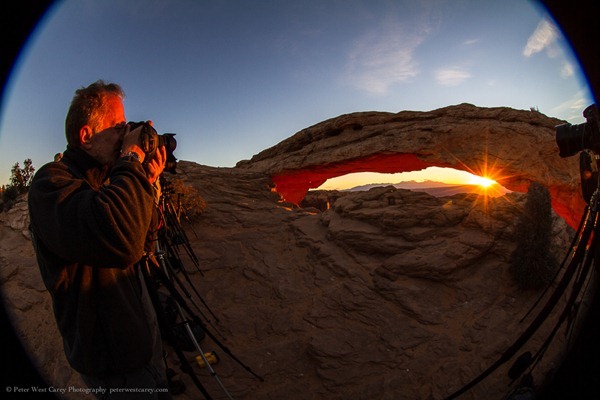
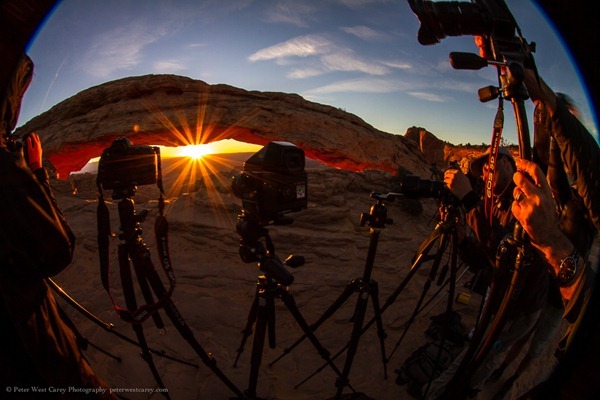
Below are more examples from my short trip. If they intrigue you to give the lens a try, all the better. Some have the corners blacked out and some are zoomed in slightly. Experiment, play, have fun.

(Click on an image for a 1000px version)

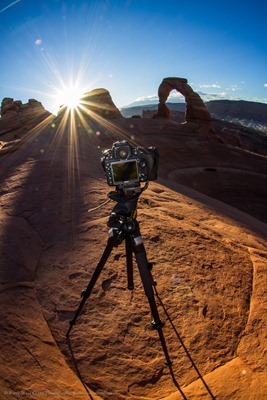
The first set of images are from Mesa Arch in Canyonlands NP at sunrise which was packed with 20 or more photographers. The second set is from Delicate Arch in Arches NP at sunrise with absolutely no one else around.
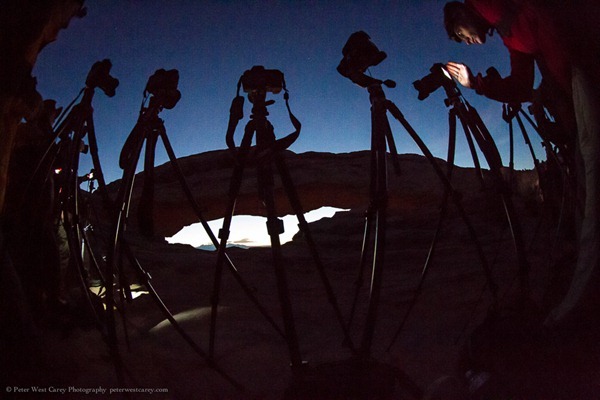
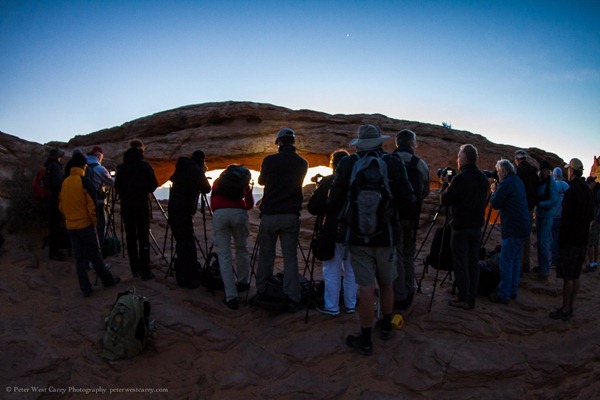
Peter-West-Carey-Utah2012-1022-7348

Peter-West-Carey-Utah2012-1022-7392

Peter-West-Carey-Utah2012-1022-7445

Peter-West-Carey-Utah2012-1022-7451

Peter-West-Carey-Utah2012-1022-7456

Peter-West-Carey-Utah2012-1022-7500

Peter-West-Carey-Utah2012-1023-7955

Peter-West-Carey-Utah2012-1023-7961

Peter-West-Carey-Utah2012-1023-8001

Peter-West-Carey-Utah2012-1023-8010

A special thank you to BorrowLenses.com for giving me the chance to play with the lens.

Post originally from: Digital Photography Tips.

Check out our more Photography Tips at Photography Tips for Beginners, Portrait Photography Tips and Wedding Photography Tips.

Why You Might Want To Consider A Full Frame Fisheye Lens Even If You Have A Crop Sensor Camera


Digital Photography School

 
Comments Off on Why You Might Want To Consider A Full Frame Fisheye Lens Even If You Have A Crop Sensor Camera

Posted in Photography


Crumpler 5MDH vs 6MDH Camera Bag

13 Nov

Size difference between the 5MDH and the 6MDH
Video Rating: 4 / 5

 
Comments Off on Crumpler 5MDH vs 6MDH Camera Bag

Posted in Nikon Videos


Man With a Camera – Profile Of A Killer

13 Nov

International superstar and iconic tough guy Charles Bronson stars in this gritty, action-packed TV series. Bronson portrays Mike Kovac, a New York City freelance photographer who specializes in getting difficult shots other lensmen cannot. Assisting law enforcement and insurance agencies, he invariable winds up acting as a private eye and gets himself into plenty of trouble!

 
Comments Off on Man With a Camera – Profile Of A Killer

Posted in Photography Videos


Triggertrap mobile app adds Wi-Fi control for remote smart camera triggering

13 Nov

TT.png

App-based smart camera trigger system ‘Triggertrap’ can now be used remotely if the user has two smart devices. The latest version of the mobile app, which allows a wide range of cameras to be triggered in response to a range of events or with sophisticated time-lapse functions, features a Wi-Fi mode. In Wi-Fi mode, a remote ‘master’ iOS device can be used to remotely configure and trigger a camera that is connected to a Tirggertrap mobile dongle and a second smart device (either an iOS or Android phone or tablet).

News: Digital Photography Review (dpreview.com)

 
Comments Off on Triggertrap mobile app adds Wi-Fi control for remote smart camera triggering

Posted in Uncategorized


AT&T announces Samsung Galaxy Camera for $499

12 Nov

samsung_galaxycamera4g.png

US cellphone network AT&T will sell Samsung’s Galaxy Camera from November 16th at a price of $ 499. The Android 4.1 connected camera, which essentially adds a 21x zoom compact camera to a Galaxy SIII smartphone (with the omission of phone function), will cost the same amount with or without a data contract – rather than being subsidized by the carrier, as smartphones usually are. Anyone buying a Samsung smartphone at the same time can receive up to a $ 100 discount. The AT&T version of the camera will offer a HSPA+ connection, not the faster LTE system.

News: Digital Photography Review (dpreview.com)

 
Comments Off on AT&T announces Samsung Galaxy Camera for $499

Posted in Uncategorized


AT&T announces Samsung Galaxy Camera for $499

12 Nov

samsung_galaxycamera4g.png

US cellphone network AT&T will sell Samsung’s Galaxy Camera from November 16th at a price of $ 499. The Android 4.1 connected camera, which essentially adds a 21x zoom compact camera to a Galaxy SIII smartphone (with the omission of phone function), will cost the same amount with or without a data contract – rather than being subsidized by the carrier, as smartphones usually are. Anyone buying a Samsung smartphone at the same time can receive up to a $ 100 discount. The AT&T version of the camera will offer a HSPA+ connection, not the faster LTE system.

News: Digital Photography Review (dpreview.com)

 
Comments Off on AT&T announces Samsung Galaxy Camera for $499

Posted in Uncategorized


How To: Change a Lens on a Digital SLR Camera

12 Nov

Visit my official blog! — youngflyer12.blogspot.com This video demonstrates how to change the lens on a digital SLR (DSLR) camera. The camera used in this How To is the Nikon D60. Methods for changing lenses vary depending on the manufacturer. Nevertheless, the process should be quite similar for any camera. Catch many more interesting videos on my channel. Enjoy!
Video Rating: 4 / 5

 
Comments Off on How To: Change a Lens on a Digital SLR Camera

Posted in Nikon Videos


What is Aperture? – Digital Photography Tips by Berger Bros Camera

12 Nov

www.Berger-Bros.com What is Aperture? Yvonne Berger, head instructor at Berger Bros Cameras in Amityville and Syosset Long Island, discusses aperture. Aperture is one part of your exposure that allows the light to come into your camera lens. So, the aperture combined with your shutter speed are the things that give you your exposure. Adjusting the aperture value on your lens changes the opening for light to come into the camera. Aperture Settings As you change the aperture value from larger to smaller you get less depth of field and as you change the aperture from smaller to larger you get more depth of field. For more information about all things related to cameras, lenses, digital photography, and taking great looking photos make sure to go to: www.Berger-Bros.com
Video Rating: 4 / 5

 
Comments Off on What is Aperture? – Digital Photography Tips by Berger Bros Camera

Posted in Nikon Videos


The Best Camera Is The One You Have With You (Mobile Photography TIPS)

11 Nov


All photographers go through a lifecycle; those distinct stages from new photographer through to seasoned shutter bug. It definitely happened to me and, looking back, my one embarrassing stage was the camera kit snob stage. I’m not going to dwell on it, but suffice to say, it was a pretty cringeworthy stage for me personally. Now I am not too proud to miss an opportunity just because I don’t have my main camera on me. 

Years ago I stumbled upon Chase Jarvis who is, I think, a massively creative photographer. He came up with a common sense mantra, the title of this article. The premise is that we should all embrace the camera we have on us and, hopefully a safe punt, that is going to be your cell/mobile phone.


If you are reading this article, chances are you don’t carry around an ageing Ericsson or Nokia from the late 90s. Personally I use iPhone, but I figured out early on with a few must-do tips, you can come up with some impressive images using just the camera in your phone.

All the images in this article were captured, hand held, with a Nokia 808 Pureview. All image editing was performed in Photoshop CS5 and, apart from black and white conversion, very basic – really, 3 minutes load through to save basic.

Shooting: Composition


Always think about the composition and what you are trying to capture. I’m willing to bet, with SLR and tripod, you put a great deal of thought into your shot, so why should it be different with your phone.

  • Rule of Thirds. Except for symmetrical compositions, like shooting down a tunnel, avoid centering subjects and horizons in the frame.
  • Reduce poor skies to the smaller portion of the frame.
  • The eye will follow leading Lines into the frame and distance. This is something you can control, like a winding road that will lead the eyes across the beautiful landscape in the frame.
  • Light is the biggest factor that will make or break a good photo. This is especially true for camera phones and their small sensors – they love the light. Early morning and late afternoon light (golden hour) will enhance everyone’s images! Try and move to compose where the light falls on your subject; faces, buildings, statues, etc.
  • Decisive moments make for strong compositions. See a great scene? Set up for the shot and then wait for something to occur. In Florence, on a recent trip, I waited on a bridge, with a great view into the distance, for… people on Segways! They’re a rare site in the UK, so I thought it would make a great juxtaposition.
  • Check out Christina Dickson’s most useful article, breaking down composition into geometric areas.

    Shooting: Steady


    As with an SLR and tripod, I always try to find a rest or surface to remain steady for the shot. Window frames, lamp posts, benches, trees, girlfriend’s head, etc. It will make such a difference to the resolving power of the pea sized lens on your phone’s camera.

    Shooting: Straight


    I do edit and publish on the move, so getting it right in shot will get the highest quality up front. Each app you use to edit shots will degrade and potentially resize your images all the more. You have a big LCD, so take a moment to line up and level before pressing the shutter.

    Editing: Color and contrast


    I don’t think twice that Photoshop will be editing this image for an SLR shot, so the same usually goes for my camera phone shots. It is rare if I do more than boost color and contrast, but it does make for a significant improvement.

    Editing: Straighten, Crop


    Someone out there always tells me if my images are not meticulously level, so I’ll recheck in Photoshop. If need be, I will crop too – too much sky, half a bird, etc.

    Editing: Sharpen, Resize


    Use your image editor to make the full size image sharp and then resize down for the internet. I will use a High Pass filter technique in Photoshop.

    Camera phone images don’t need to be terrible snaps and with these tips, equally important for compact cameras too, you can definitely open the eyes of those firmly entrenched in the ‘SLR is best’ camp!

    Want to learn more about mobile photography? Check out our iPhone Photography eBook.

    Post originally from: Digital Photography Tips.

    Check out our more Photography Tips at Photography Tips for Beginners, Portrait Photography Tips and Wedding Photography Tips.

    The Best Camera Is The One You Have With You (Mobile Photography TIPS)


    Digital Photography School

     
    Comments Off on The Best Camera Is The One You Have With You (Mobile Photography TIPS)

    Posted in Photography