RSS
 

Posts Tagged ‘Camera’

Xiaomi unveils Mi 4 high-end phone with 8MP front camera

23 Jul

Chinese device manufacturer Xiaomi unveiled its latest flagship smartphone, the Mi 4, today. With a metal frame and a distinctly iPhone-esque design the Mi 4 looks like a premium product and its specification sheet confirms this initial impression, boasting a Qualcomm Snapdragon 801 SoC and 3GB RAM. Main camera specs appear standard for current-generation Android phones, with a 13MP rear camera but an unusually high-resolution 8MP at the front. Click through for more details.

Articles: Digital Photography Review (dpreview.com)

 
Comments Off on Xiaomi unveils Mi 4 high-end phone with 8MP front camera

Posted in Uncategorized


Adobe Camera Raw 8.6 and DNG Converter 8.6 release candidates available

18 Jul

Adobe has made Camera Raw 8.6 and DNG Converter 8.6 release candidates available. This version adds support for the Nikon D810, Panasonic Lumix AG-GH4 (GH4 with interface unit) and Panasonic Lumix DMC-FZ1000. Color profiles are added for the Sony Cyber-shot RX100 III, A7S and Alpha SLT-A77 II. Also included are a number of new lens profiles. Learn more

Articles: Digital Photography Review (dpreview.com)

 
Comments Off on Adobe Camera Raw 8.6 and DNG Converter 8.6 release candidates available

Posted in Uncategorized


The Secret to Capturing the Best Image Quality with Your Digital Camera

16 Jul

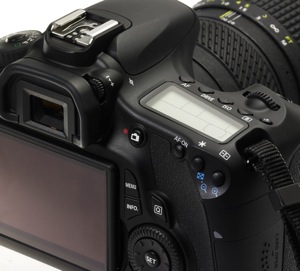
Many modern digital cameras boast incredible ISO speeds. Where ISO 400 or 800 was the top speed in the film era, usually accompanied by grain the size of golf balls, today’s digital cameras can give you top ISOs of 6400, 12,800, 25,600 or even higher. Camera makers boast of these high speeds and use this information to increase camera sales.
Photodune 2896107 digital camera xs

Inexperienced photographers will be tempted to jack up the ISO on their new cameras, and keep it there. However, just because the feature is there doesn’t mean you should use it all the time. In fact, the best practice is to keep your camera set at its lowest ISO setting by default so you will capture the best possible image.

With experience you will learn that higher ISO settings are more appropriate when shooting sports, street photography, photojournalism, and low-light situations where you need to stop action. Low ISO images will be cleaner (no digital noise), have a wider dynamic range (more shadow and highlight details), and produce better color depth (smoother color transitions). This is a better choice for travel, landscape and portrait photography, where good detail and accurate skin tone are important.

Let’s geek out

There are two ways you can understand the effect of low versus high ISO on digital images: by reading lab test results, and by looking at sample images. DxOMark Labs is a great resource for sensor tests. It’s an independent lab that tests most current digital camera sensors and publishes the results on their web site. For sample images, you can make your own. Continue reading to learn more.

Digital noise

Run any number of digital cameras through a battery of image quality tests and you’ll see a clear pattern emerge. At the lowest ISO setting, the signal to noise ratio, expressed in decibels (dB), is highest. That’s good, it indicates the lowest digital noise. As you increase ISO, the dB level decreases. The lower the dB level, the higher the digital noise, which degrades the image.

By lmvphoto

Example: If a Canon EOS 70D has a 41dB result at ISO 100, 30dB at ISO 1600 and around 17dB at its top ISO of 25,600, the image with the higher dB will have less noise than an image with a 17dB measurement.

Note: keep in mind that most images when viewed at the recommended distance will appear clean as low down as 30dB.

Dynamic range

Similarly, the dynamic range of a digital camera is widest at its lowest ISO. Depending on the camera, that range can be anywhere from 9 stops to around 14. Typically, with DSLRs, it is around 11-12 stops. In carefully exposed high-contrast scenes, both highlights and shadows will have more detail at low ISOs than at high speeds. In test result charts, dynamic range starts to decrease in more of a curve than a straight line; typically the first few ISO settings are acceptable, but once you pass ISO 800 or 1600 (depending on the camera) the range becomes more limited.

Dynamic range is acceptable at 10 stops or higher. Below that number shadows and/or highlights will become blocked up, especially in contrasty scenes.

Tip: RAW image capture is best for dynamic range. You can use the shadow and highlight sliders in your RAW image editor to reveal even more details in both the shadows and highlights, effectively stretching your camera’s dynamic range. The better your image’s dynamic range is, the more information you can reveal this way.

Tone and color

You may have noticed that some images that show the sky or other areas that should have smooth, subtle transitions, instead show subtle strips of color as the shading changes. This is called banding, and that’s what happens when the tonal range is limited. This is usually an artifact from compressing an image too much when preparing it for web use, but it happens in a more subtle form in photos that come straight out of the camera and, as above, this phenomenon is more apparent in high ISO images, but is imperceptible in low ISO photos.

A camera’s ability to capture subtle changes in tone and color (both expressed in bits) is best at its lowest ISO, and decreases steadily throughout the ISO range. Most DSLRs have a 21-24-bit maximum for color sensitivity, and it can degrade to half of that. Tonal range usually peaks at around 8-10 bit.

Testing your camera in the real world

Enough of the geeky stuff, let’s look at some pictures to see how this plays out in the real world. While the images here were shot with a Canon 7D, you can run your own tests:

  • With the camera on Program mode, take a sequence of photos
  • Start with your lowest ISO and work your way up to the highest
  • Mount the camera on a tripod to avoid shake, which is an unwanted additional variable, and turn off the anti-shake feature (Image Stabilization IS on Canon or VR on Nikon)
  • Shoot both landscapes and people pictures so you can see the effects ISO has on each
  • Make prints at your largest print size and see if you notice the distance at a typical viewing distance

Here are two image comparisons at a range of ISO settings.

Portraits show the difference

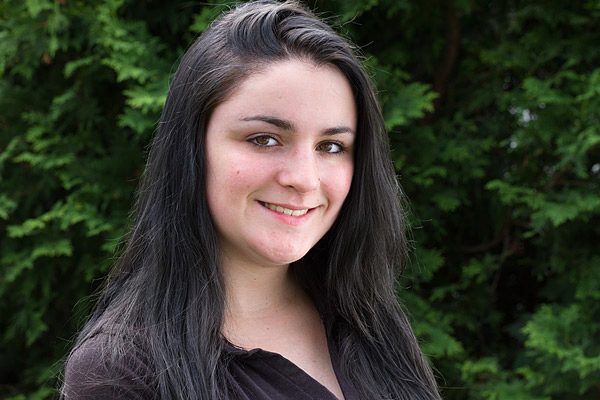
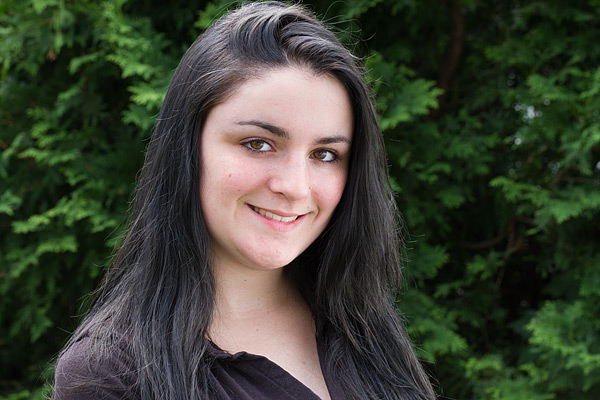
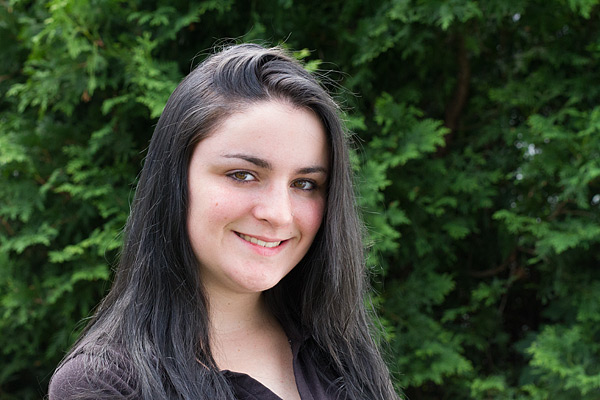
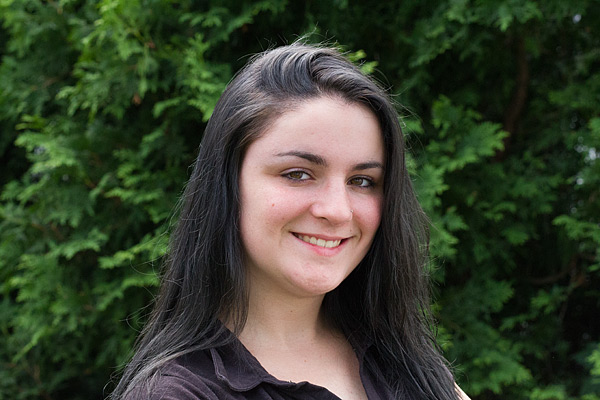
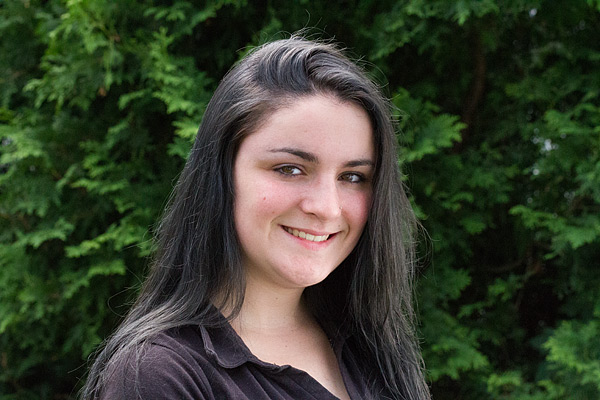
The effect of changing ISO is most obvious when you photograph people. In this example, the model was photographed on a sunny day while holding a reflector, against a low-key (darker) background. As the ISO setting is raised, the effect on her skin becomes obvious. Camera: Canon 7D with Canon 85mm f/1.8 lens.
ISO100 portrait full 600

ISO 100

ISO100 portrait detail 600

ISO 100

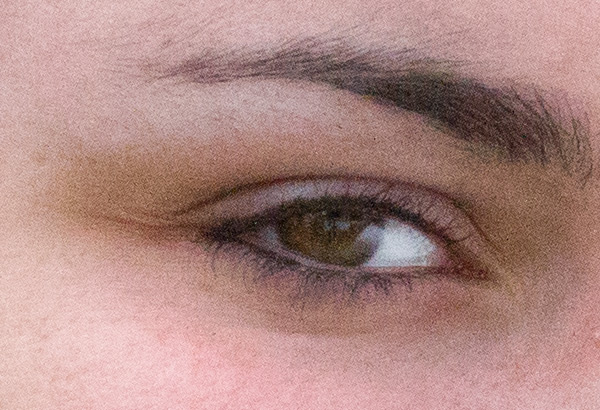
At ISO 100 (above), skin tone is accurate, with good contrast. In the 100% detail shot, there’s good, natural falloff of light, showing a wide range of tonality and good detail in the darker areas. You can especially see this in the eyes.
ISO800 portrait full 600

ISO 800

ISO800 portrait detail 600

ISO 800

At ISO 800 there is a subtle increase in contrast, an indicator that dynamic range has decreased slightly. Noise has not yet become apparent in the detail photo.
ISO1600 portrait full 600

ISO 1600

ISO1600 portrait detail 600

ISO 1600

By ISO 1600 there is a little more contrast, but again, it is a subtle change. However, you can see the noise in the blow-up, and the smooth gradation from light to shadow is starting to become a bit rougher, indicating that the tone has degraded.
ISO3200 portrait full 600

ISO 3200

ISO3200 portrait detail 600

ISO 3200

ISO 3200, at screen resolution it may still be hard to see the change when you compare this image to the one shot at ISO 100, but by ISO 3200 there is a pronounced decrease in highlight and shadow detail, and rougher color and light transitions.
ISO6400 portrait full 600

ISO 6400

ISO6400 portrait detail 600

ISO 6400

By ISO 6400, the Canon 7D’s highest resolution setting, even at screen resolution a difference is visible. If you look in the details of the shirt and hair, you can see that shadows are more blocked up. A quick glance at the 100% detail is all you need to see the graininess and reduced range of color and tone.

Bonus pointer: The advantage of shooting RAW
ISO100 portrait optimized 600b

Optimized

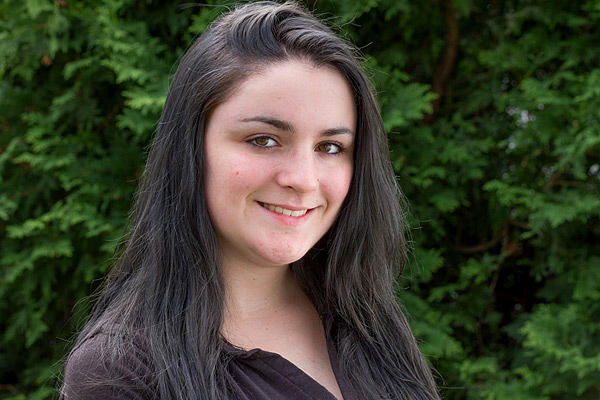
You can increase an image’s dynamic range by using your RAW image editor’s shadow and highlights sliders, which reveals more information in the highlights, and especially in the shadows. Compare this version of the ISO image with the ones above and notice how much more detail is visible in the shadows, thanks to tweaks done in the RAW image editor.

Landscape subtleties

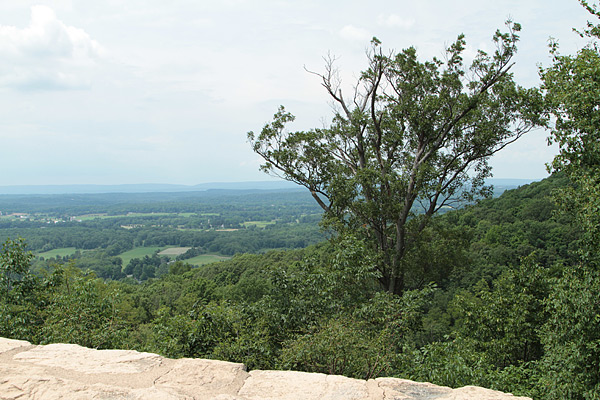
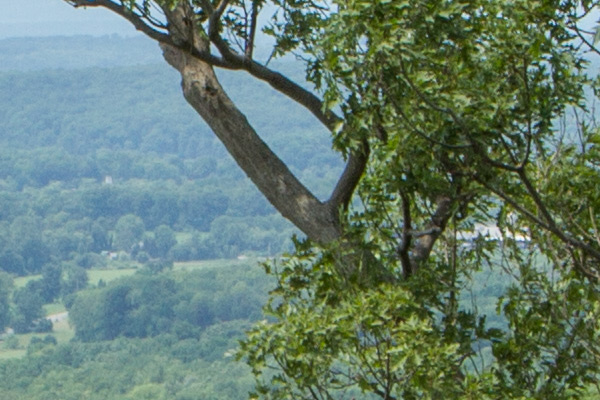
A scenic lookout in western New Jersey, shot in the middle of the day, at ISO 100, 800, and 3200 with a Canon 7D and Canon 24-70mm f/2.8L II USM zoom lens. While the dynamic range, tone and color only show minor differences here, the level of noise deteriorates at the faster speeds. After looking at these examples, you may wonder why anyone in their right mind would want to shoot above ISO 100 on a bright, sunny day. All samples are straight out of the camera.
ISO100 landscape sooc 600

ISO 100

At ISO 100, this is the full scene.
ISO100 landscape detail 600

ISO 100

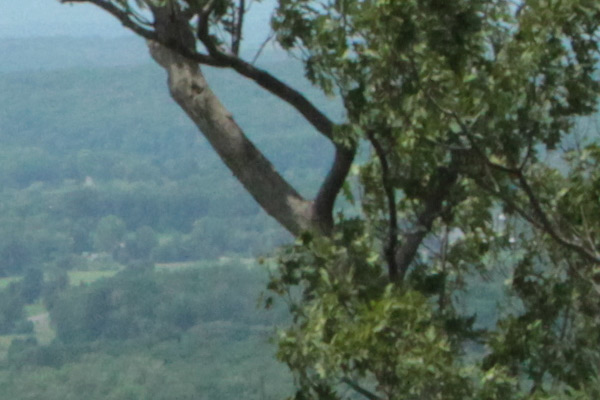
In this detail of a 100% blow-up of the ISO 100 image, there is no apparent digital noise, as expected.
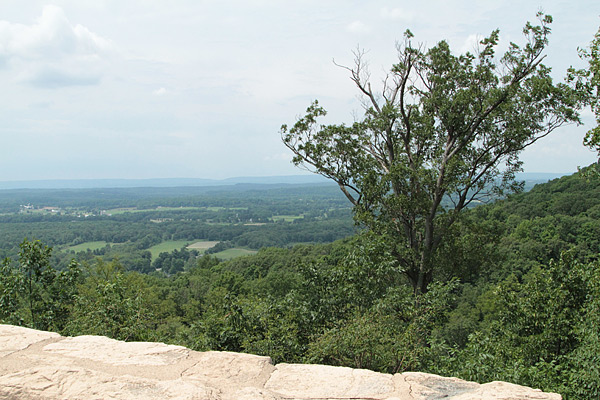
ISO800 landscape sooc 600

ISO 800

ISO800 landscape detail 600

ISO 800

At ISO 800, digital noise has started to become apparent in this 100% blow-up detail.
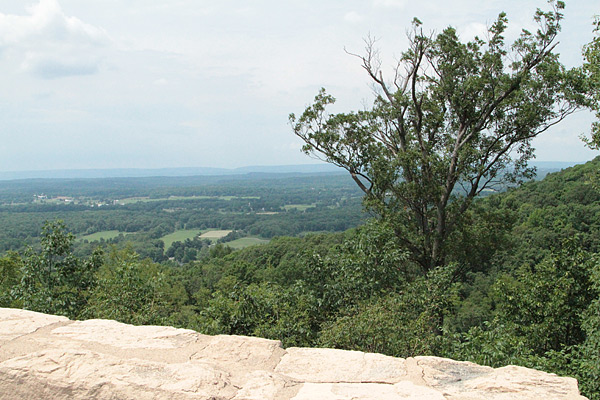
ISO3200 landscape sooc 600

ISO 3200

ISO3200 landscape detail 600

ISO 3200

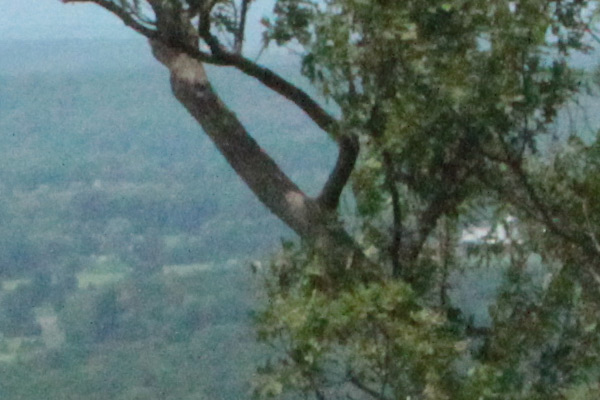
By ISO 3200, digital noise is obvious, and the overall image quality has deteriorated. The graininess covers up the loss of color quality and tonality somewhat.
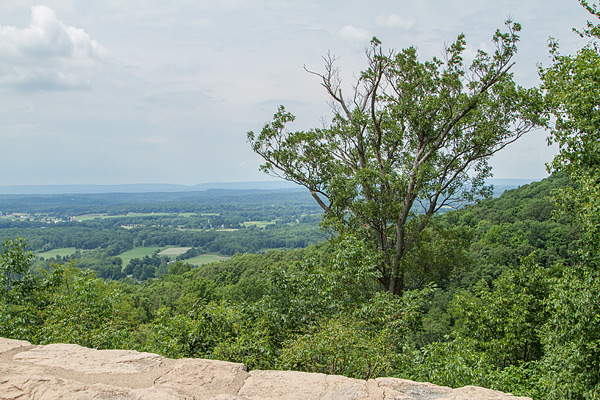
ISO100 landscape raw 600

While the samples above are unadulterated JPEGs, what happens if you try to coax more detail out of a shot in RAW? You get more detail in the shadows and highlights. Compare this shot to the original and you’ll see more detail in the sky (highlights) and in the bark and branches of the tree (shadows) on the right.

Bottom line

The bottom line? There may be times when you must pump up your ISO settings, and it’s nice to know that you have that option. But when you are shooting in daylight under normal shooting conditions, you will bring back higher quality images when you shoot at, or near, your camera’s lowest ISO settings.

The post The Secret to Capturing the Best Image Quality with Your Digital Camera by Mason Resnick appeared first on Digital Photography School.


Digital Photography School
 
Comments Off on The Secret to Capturing the Best Image Quality with Your Digital Camera

Posted in Photography


The Camera Histogram Explained

13 Jul

This video does a great job of explaining how the histogram on your camera works and how to read it.

I do slightly disagree with his tip on having a mountain in the center is the best option, as it does depend on the subject. If you are photographing a black cat on a black sofa that would be an incorrect overexposed image.

For more info on histograms check these dPS articles:

  • Histograms: Your Guide To Proper Exposure
  • How to Read and Use Histograms
  • Understanding Histograms

The post The Camera Histogram Explained by Darlene Hildebrandt appeared first on Digital Photography School.


Digital Photography School
 
Comments Off on The Camera Histogram Explained

Posted in Photography


Camera Review: Samsung Galaxy S5

10 Jul

We’ve come to expect loads of camera features from Samsung’s high end smartphones and the Galaxy S5 does not come up short. The S5 offers a 16MP BSI CMOS sensor, F2.2 lens and 4K video recording. With claims of improved AF speeds and the addition of features like real-time HDR processing and Selective Focus, Samsung’s flagship device has a lot of potential as a photographic tool. Does its performance live up to its specs? Read review

Articles: Digital Photography Review (dpreview.com)

 
Comments Off on Camera Review: Samsung Galaxy S5

Posted in Uncategorized


Preview of the Slide and Clutch Camera Carrying System from Peak Design

10 Jul

With Peak Design launching another set of products via Kickstarter, we’re very fortunate to get our hands on the new, as yet unreleased, Slide and Clutch camera carrying system prior to launch for a little dPS preview!

You can see the Kickstarter here and pre-order if that’s your thing!

As a Peak Design pro, I’ve been using “Capture” since it was released along with Leash and Cuff. The video below of Pete and Adam will give you a great idea of what the team at Peak Design are doing with this new gear and why they’re passionate about what they do – they love this stuff we do called photography.

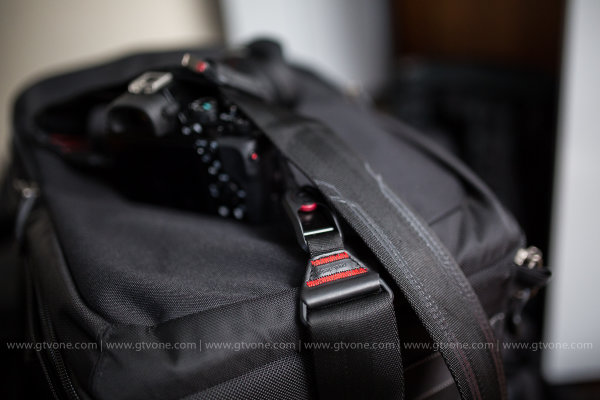
The Kickstarter is already funded, 450% funded, which says a lot about what they’ve built and the products they’ve created in the past. The new strap, Slide, is building on that, and after using it for a week (no, they don’t pay me to say this) it really is worth picking up now via the Kickstarter campaign. If you don’t, and you see it afterwards for more money, you will think to yourself “you know, Simon was right”. The strap sits really comfortably on my shoulder, it allows quick attachment to my camera through Peak Design’s unique anchor system, it literally slides around to where you want it and is so super easy when you’re wearing it, to make the strap shorter or longer as you can see in the video.

I’ve also been using Clutch, a hand strap system that keeps your camera firmly in your big greasy paw when you’re out and about shooting. I have used it with a gripped Canon 5DMK3 and without the grip – it’s quick to attach, quick to tighten and very quick to loosen off, too. When shooting portrait, I’d slide my hand out of Clutch and shoot my portrait photographs and then slide my hand back in. I didn’t really notice any loss of speed and after a few goes I was a veritable wild west camera slinger. I used Clutch on the weekend for a cycling event and loved the flexibility of being able to not worry about dropping my camera in the rain, and boy did it rain! It stayed firmly in my hand and allowed me to drop the camera into Capture to use the other body with my long lens and Slide attached – once done, I could let the long lens slide around to my hip / back and grab body number one back to continue shooting. Lots of bodies, no time to stop (over a thousand cyclists to grab a portrait of while they cycled past) and it worked perfectly (aside from when I tried to drink soup and shoot at the same time, but that’s another story).

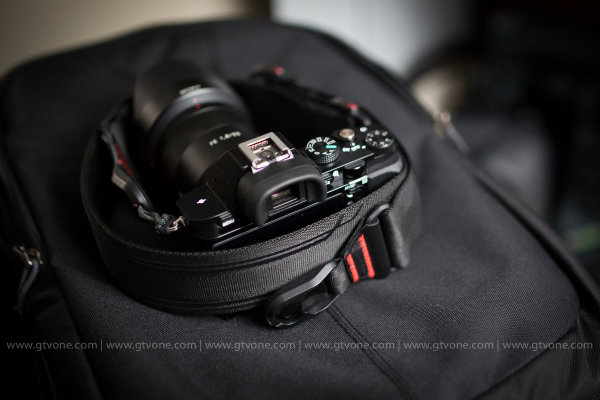
Back in my office now and this is what the Slide strap looks like attached to a Sony A7, (granted, at f/1.4 which doesn’t show you much A7 at all, but you get the picture) to give you a vague idea of scale.

peak-design-slide-preview

peak-design-slide-kickstarter-dps-preview

In conclusion, I’m super impressed with this, the next iteration of the Peak Design strap – Slide. (Leash being my first Peak Design strap) and from me, it’s highly recommended! I give it a healthy FIVE stars.

That said, I’m sure you have questions! So, as I have the Slide with me, and I’m taking it on a quick trip to China tomorrow, please feel free to ask any questions in the comments section below, I will answer as best I can. Another great product from Peak Design. Well done guys.

–Sime

The post Preview of the Slide and Clutch Camera Carrying System from Peak Design by Sime appeared first on Digital Photography School.


Digital Photography School

 
Comments Off on Preview of the Slide and Clutch Camera Carrying System from Peak Design

Posted in Photography


Android L to feature Raw shooting and added manual camera controls

09 Jul

Details were thin from Google I/O last week about Android’s plans for camera updates in its next OS release. Now with a developer preview of the new OS available, more information has emerged about what we can expect from Android’s camera capabilities. Raw image capture is on the way, along with additional manual exposure controls. Read more

Articles: Digital Photography Review (dpreview.com)

 
Comments Off on Android L to feature Raw shooting and added manual camera controls

Posted in Uncategorized


Add Felty Pockets toKeep Your Camera Bag Organized

07 Jul

Extra photos for bloggers: 1, 2, 3

You love all of your photog accessories equally, but some of the big guys like to beat up on the little ones in your camera bag.

Tuck away your phone, extra lenses, batteries and more in a warm and snuggly Photographer’s Pouch for safe keeping.

The Photographer’s Pouch is soft enough to keep your thingies safe, but strong and confident enough to fight off bullies when things get rough.

Plus it’s pretty darn handsome, made of heather gray felt with a velcro back and an elastic band to keep everything secure.

Throw a few Photographer’s Pouches in your camera bag to help keep everyone safe and happy until they can learn to get along.

Get Organized with a Photographer’s Pouch (or Three)
$ 12 at the Photojojo Shop


© Britta for Photojojo, 2014. |
Permalink |
No comment |
Add to
Keep Your Camera Bag Organized”>del.icio.us

Post tags:


Photojojo

 
Comments Off on Add Felty Pockets toKeep Your Camera Bag Organized

Posted in Equipment


Cecilia Gallery Camera Strap Giveaway

03 Jul

Recently, FashionPhotographyBlog.com reviewed the unique camera straps from Cecilia Gallery. Well today, I’m going to share with you how you can claim one of these gorgeously crafted straps for your camera because thanks to Cecilia Gallery, we have one of their camera straps to give away to one of our subscribers to our blog. To decide who will receive this coveted prize we are going to hold a competition between now and the end of the month.

Fashion Photography Blog Reviews Cecilia Gallery Camera Straps (FashionPhotographyBlog.com)

The rules on how to enter the competition are simple:

1) Take a photo of your favorite item that you use as a photographer.

It does not have to be restricted to cameras; you can think outside of the box as much as you like. It can be an accessory, a piece of software, a tablet, computer or electronic equipment, a book or even an app just to name a few suggestions.  Feel free to be as creative as you like in the photo – you may even want to appear in the photo if you are comfortable being seen in it. Just make sure that we can clearly identify what the item is.

2) Write a brief description of at least 100 words telling us why it’s a favorite item of yours as a photographer. You can detail how it has benefited you or how useful it is in your photography. Let us know why you love it.

3) Send these to us via this email competition@fashionphotographyblog.com with your first and last name so we know whose entries are whose.

4) Photo entries and their descriptions will then be posted on our Facebook page where the public will VOTE on for their favorite photos.

The scoring of these votes will be weighted and by the total number of SHARES, followed by the total number of COMMENTS, then the total number of LIKES. In a nutshell, the most popular photo with the top points at the end of the competition period will be announced as the winner of the camera straps. YAY!

6) You can enter as many times as you like, just that each entry needs to be accompanied with a photo and description.

7) Competition starts at the beginning of this month and closes at the end of this month, July 31st Midnight.

So that’s how you can will one of these trendy camera straps. Here’s how you can make sure that you stay updated about the competition and hear when we announce the winner:

1) LIKE us on Facebook

2) Join our mailing list

Once again, we would like to thank Cecilia Gallery for supporting this competition and offering one of their hand-woven alpaca wool and leather camera straps as the prize. We are officially starting the competition and receiving entries.

Good luck everyone! (Although there can only be one winner)


PHOTO SOURCE:

Images courtesy of Cecilia Gallery


Fashion Photography Blog

 
Comments Off on Cecilia Gallery Camera Strap Giveaway

Posted in Uncategorized


Review Domke Chronicle Camera Bag

03 Jul
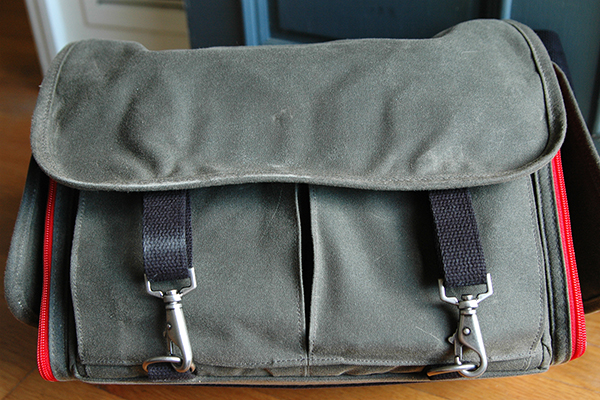
The new Chronicle is part of Domke's Next Generation line of camera bags.

The new Chronicle is part of Domke’s Next Generation line of camera bags.

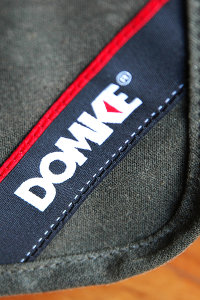
There’s a new line of camera bags on the market, but they come from an old, familiar name. Originally founded in 1976 by photojournalist Jim Domke with the introduction of the F-2, the Domke brand has been synonymous ever since with low-profile, high-quality bags geared towards photojournalists, travel photographers, and anyone else looking for a bag that does a great job protecting their gear without drawing unwarranted attention to the thousands of dollars worth of kit hanging from their shoulder.

Domke’s “Next Generation” consists of eight new bags, each available in different choices of materials and equipped with Domke’s new GearProtex™ and PocketFlex™ systems of customizable dividers, inserts and storage pockets. I recently had the chance to spend some time putting The Domke Chronicle (J-Chron) through its paces. One of three bags in the Journalist Series (alongside the Ledger and the Herald), the Chronicle– described as the grandchild of that original F-2– is obviously designed with the working photojournalist in mind, but would also be a great bag for any photographer, professional or otherwise, looking for a low profile or a classic retro look.

domke-chronicle-review-digitalphotographyschool-009

First Impressions

Fresh out of the box this bag brought a smile to my face. My dad was a truly amazing photographer. Wanting to make his hobby my own, when I was a kid, we spent countless hours together in the darkroom. This is a bag my father would have loved. Not getting too lost in its retro appeal, though, it’s abundantly clear that a lot of thought and attention to detail went into the design and production of this bag. Available in four different color options, I opted for the Ruggedwear Military/Black. All materials, both inside and out, appear to be of extremely high quality, yet they don’t add any unnecessary bulk or weight. This keeps the bag comfortable on your shoulder, even when fully packed.

domke-chronicle-review-digitalphotographyschool-008

domke-chronicle-review-digitalphotographyschool-006

Dimensions and Specs

  • Exterior:  15.75″ (L) x 7″ (W) x 10″ (H)  (40 cm x 17.8 cm x 25.4 cm)
  • Interior:  12.25″ (L) x 6.5″ (W) x 9.25″ (H)  (31.1 cm x 16.5 cm x 23.5 cm)
  • Weight: 4.2 lbs.  (1.9 kg)
  • YKK brand zippers
  • Top access double zipper
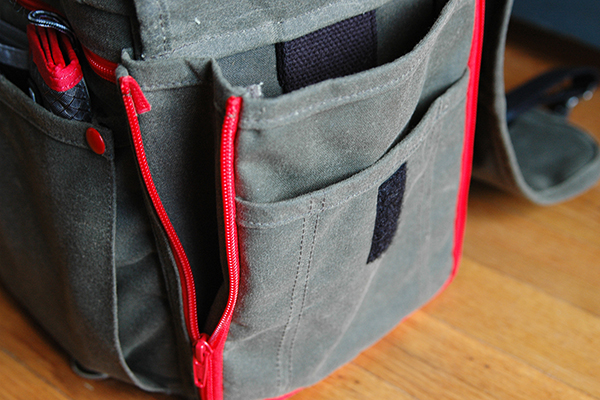
  • Expandable zippered side pockets
  • Expandable front pockets
  • Rear zippered pocket
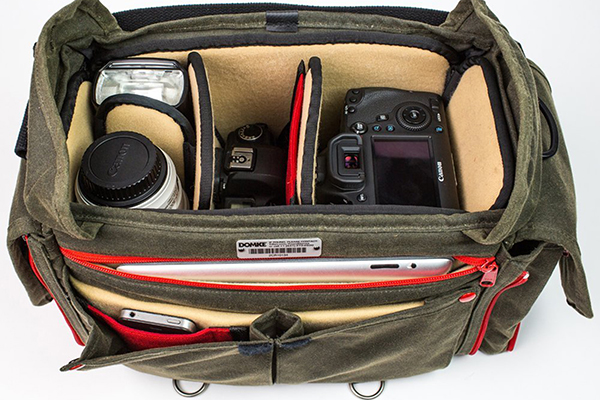
  • Padded zippered tablet pocket (fits up to 11″ x 8″)
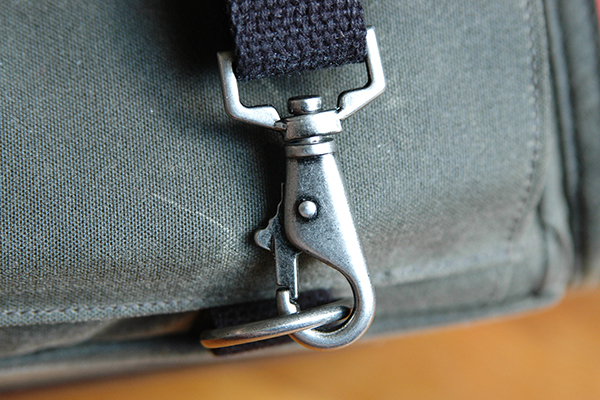
  • Antique steel hardware exterior flap fasteners
  • Detachable shoulder strap
  • Detachable hand strap
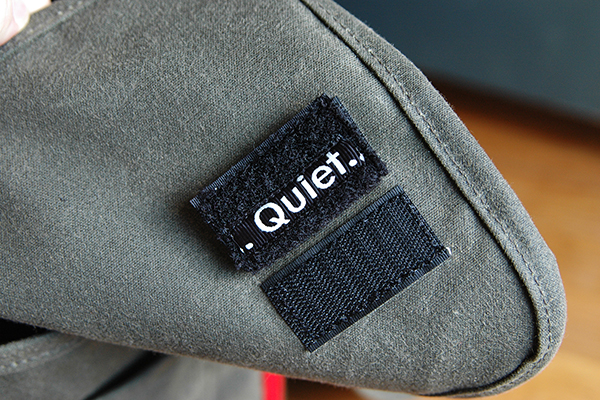
  • Velcro silencers
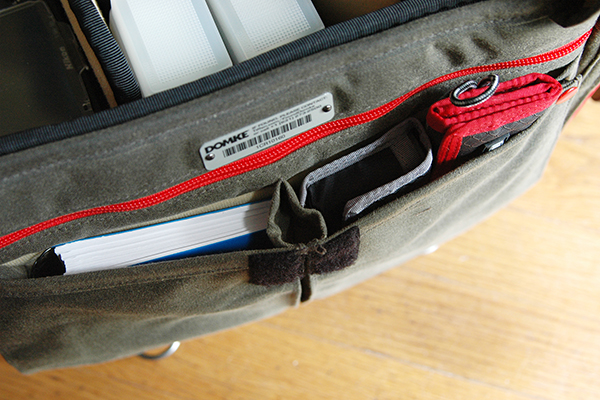
  • Numbered identity plate

domke-chronicle-review-digitalphotographyschool-003

What I Packed

  • Nikon D300s with 35mm prime lens attached
  • Nikon 70-200 mm f/2.8 lens
  • Two SB800 speedlights
  • Flashpoint Blast Power Pack
  • Think Tank PPR with extra CF cards
  • Think Tank DSLR battery holder
  • Light Meter
  • Gaffers tape
  • Notebook/pens/business cards
  • Client contract, model releases, and paperwork
  • iPad

It’s well worth pointing out here that the Chronicle could have easily handled several additional items, but I’ve been trying to travel a little lighter these days.

domke-chronicle-review-digitalphotographyschool-007

Dividers and Inserts

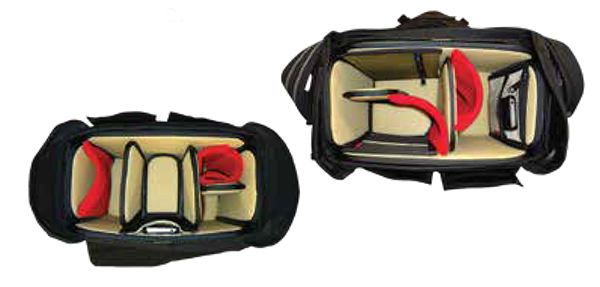
Domke’s new GearProtex system of dividers allows you to fully customize the inside of the bag with dividers that can attach to any interior surface, not just corresponding Velcro attachment points. The PocketFlex system is a collection of pockets and pouches that can also attach to any interior surface of the bag. If I had to pick one area where this bag fell slightly short it would be here, with the dividers. While many companies seem to give you way more dividers than you could ever possibly need, I found the number of included dividers to be a bit lacking for my taste. With only three included dividers and one included pocket patch, if I want this bag to be 100% in line with my needs, I’m going to have to order a few more dividers. Considering the cost of this bag ($ 349 USD), it might have been nice of them to include a few more dividers. On the up side, however, the flexibility of the dividers, combined with almost limitless attachment points, does help create sections of sizes and shapes I’ve never been able to get with standard dividers.

domke-chronicle-review-digitalphotographyschool-002

Domke PocketFlex SS

Fabric Choices

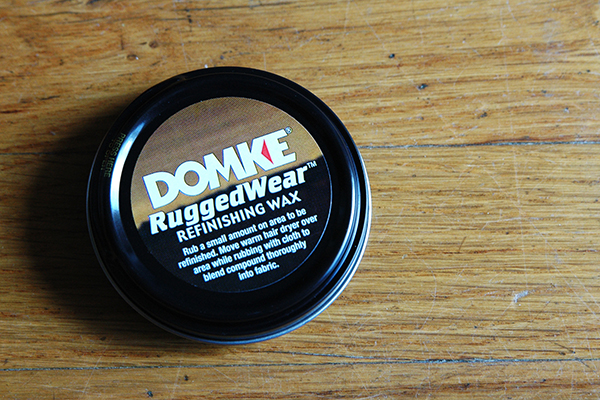
Here is an option you don’t often see when choosing a camera bag. The Chronicle, as well as every bag in the Next Generation line, is available in a choice of materials and colors. As noted, the bag in this review is the RuggedWear Military/Black option. Also available are Cordura Black/Black, Canvas Khaki/Black, and RuggedWear Black/Sand. While it’s obvious from a quick inspection that the exterior materials are of a high quality and built to withstand the regular challenges our bags face on a daily basis, let’s face it, it’s material and eventually it’s going to get dirty or show some wear. In what was a first for me, I was pleasantly surprised to find a tin of Domke Ruggedwear Refinishing Wax in the bag for those inevitable occasions when parts of the bag exterior might need a little attention.

domke-chronicle-review-digitalphotographyschool-010

Wrap-up and Recommendations

I really love this bag, particularly its classic retro look. I’ll most likely end up using it more for personal photography than commercial work, but it’s a bag that is well-suited for both. Even though it is the smallest bag in the Journalist series, I never felt limited in terms of what I could or couldn’t pack. This bag should appeal to a wide variety of photographers, from photojournalists and nature photographers, to hobbyists and travel photographers, as well as every photographer in between. The price may be a bit steep for a bag this size, but I think you absolutely get what you pay for in terms of quality, longevity, and adaptability. I’ve given it a 4.5 out of 5 due to not enough dividers.

The post Review Domke Chronicle Camera Bag by Jeff Guyer appeared first on Digital Photography School.


Digital Photography School

 
Comments Off on Review Domke Chronicle Camera Bag

Posted in Photography