RSS
 

Posts Tagged ‘Calibration’

Datacolor releases Spyder5CAPTURE PRO color calibration kit

20 Aug

Datacolor has announced the launch of its new Spyder5CAPTURE PRO color calibration kit for photographers. The kit includes the maker’s SpyderLENSCAL, SpyderCHECKR, SpyderCUBE and Spyder5ELITE to cover all the aspects of camera calibration, including autofocus, display, colors, contrast and white balance. 

The company lists each product as having the following features:

  • SpyderLENSCAL allows users to calibrate camera and lens combinations, resulting in accurate auto-focus.
  • SpyderCHECKR and SpyderCUBE provide the user with reference tools to allow control of contrast, white balance and color when editing images.
  • Spyder5ELITE calibrates displays to an industry standard, ensuring that on-screen colors of images are accurate and match photo prints every time.

According to Datacolor, the Spyder5CAPTURE PRO kit brings more than 30% savings versus buying the items individually. At launch, the bundle is priced at $ 269.99 USD, though that rate will increase to $ 369.99 USD after September 30. 

Via: Datacolor

Articles: Digital Photography Review (dpreview.com)

 
Comments Off on Datacolor releases Spyder5CAPTURE PRO color calibration kit

Posted in Uncategorized


Globell launches Kickstarter campaign for new screen calibration device

15 Jul

Globell, a software distributor and the company behind Meyer-Optik Gorlitz lenses, has announced it plans to introduce a new screen calibration device if it gets enough support from the Kickstarter campaign it has just begun. The company claims its proposed globellColorMeter can calibrate almost any computer monitor in three steps that take less than five minutes, and that the device will remain accurate for years.

The meter uses a lens developed with Meyer-Optik and a glass cover that won’t dis-color, according to Globell. Designed and built in Germany, the company says its device offers an alternative to calibration systems that are ‘technically ambitious but complicated and expensive to use‘ or ‘easy to use and affordable, but unable to function at a sufficiently high standard‘. Globell describes the globellColor, which comes with software for PC and Mac, as ‘affordable‘ and ‘the most precise, easy-to-use product in its price range‘.

The company expects the product to retail at $ 250, but is offering early-bird deals from $ 99. For more information see the Kickstarter page.

Press release:

globellColor: Color management on Kickstarter

Color management made in Germany: leading color management company Globell is launching a Kickstarter project for its new globellColor product range at www.globell.com/kickstarter.

Tegelen, July 2016 – Natural colors on all monitors and in printed photos: the globellColor product range makes color management simpler, better and faster. In order to get the word out to an international audience, Globell has started a worldwide Kickstarter campaign at www.globell.com/kickstarter.

This Globell solution is 100% made in Germany and delivers accurate calibration for all major monitor types and other display devices for both Mac and Windows. This benefits private users, photographers, design agencies and gamers.

True colors on all display devices
globellColor is affordable for everyone, easy to use and delivers professional quality calibration. To ensure this, the company developed its own colorimeter based on the latest technology and drew on expert knowledge and the optical expertise of lens specialists Meyer-Optik-Görlitz. The durable glass filter of the globellColorMeter will always provide accurate and consistently correct calibration and profiling – even after several years of use. The solution also includes powerful and user-friendly software for both Windows and Mac.

“We combine modern sensor technology and durability with sophisticated software to create an ideal tool for any professional or amateur photographer,” explains Thomas Kuligowski, globellColor Product Manager. “As a long-standing innovation partner for digital image processing, we are pleased to launch globellColor, a complete color management solution that is made in Germany. On completion of the successful Kickstarter project, we will expand the globellColor product range further to include more products.”

The Kickstarter campaign launches today (July 13, 2016) and ends on August 14, 2016. Supporters have the unique opportunity to acquire the innovative globellColor technology at an exceptionally low price starting at $ 99, with the RRP expected to be $ 249. After the products are delivered to campaign supporters this fall, they will be launched on the market.

globellColor features
– Fast and accurate calibration and profiling
– Easy to use: no experience required
– Can be used immediately: predefined calibration settings
– Also for professionals: customizable calibration settings
– Ability to examine results: before/after comparison
– Can be used with almost all monitor technologies
– Measure multiple monitors in a workplace
– High-quality glass lenses powered by Meyer-Optik-Görlitz
– Non-ageing glass filter
– View of the representable color space as a 3D model
– Many hardware-calibratable monitors supported
– Software also supports some third-party sensors
– Compatible with Windows and Mac

Technical requirements
Minimum RAM: 512MB, min. 150MB of free hard disk space, Windows (32-bit and 64-bit): XP, Vista, Win 7, Win 8.X, Win 10, Pentium or AMD K7; Mac OS: Mac 10.6, 10.7, 10.8, 10.9, 10.10, 10.11, Intel Hardware, Mac processors: Intel only. PowerPC not supported, USB connection

Articles: Digital Photography Review (dpreview.com)

 
Comments Off on Globell launches Kickstarter campaign for new screen calibration device

Posted in Uncategorized


Why is Monitor Calibration Important and How to do it

14 Feb

Why you need to calibrate your monitor

If there one thing that’s certain about photos on the internet, it’s that nobody is seeing exactly the same thing as you. In general, most screens are too bright, and have whatever default color the monitor happens to ship with. Some are great, others not so much. As the monitor gets older, these colors change too. It’s more of an issue with older bulb light monitors, and less so with LED, but still these colors change over time.

There’s also the matter of print matching. If you’ve ever printed (you’re missing out if you haven’t), and been dissatisfied with the print, it could be that your screen is fooling you when you’re editing.

There is a way to get your screen to a known standard, and doing this means that you know you have good representative color and brightness on your screen, and that you’ve made a step toward better prints. This is screen or monitor calibration.
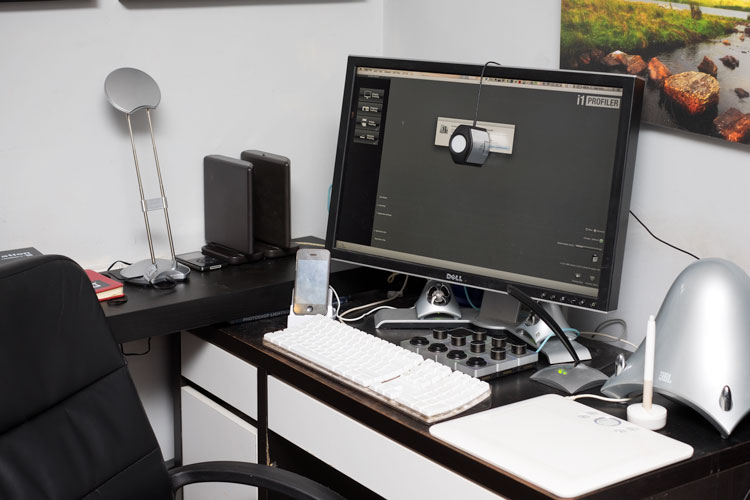
Calibrating your screen 01

What is monitor calibration?

To calibrate your screen, you need a puck-like device that sits on your screen, and measures the color being displayed. This is called a spectrophotometer. It’s just a name for what it does: photo = light, spectro = from spectrum meaning a range of colors, and meter = to measure. So it measures the light color. Don’t worry, you don’t need to buy one of these specifically, and match software to it, they come as kits, with the required software bundled with it.

What do you need to do it?

Some examples of the screen calibration kits include the X-Rite i1 Display Pro (which is what I have), the Spyder Pro, and the Color Munki. The process for each is similar and pretty straightforward. First you install the software, and run it. Next you attach the device. Initially you have to decide the settings, but the correct ones are usually suggested. Usually these are 120cd/m2 or less in brightness, D65 or Native for Illuminant and 2.2 for Gamma. At the start you may need to set the monitor brightness and contrast via the monitors own menu. Finally you just let the software run and it will create a profile automatically at the end. One thing that’s critical is that you need to have your monitor on for a while before starting the calibration. It takes up to 30 minutes for the monitor to settle.

How do you do monitor calibration?

Let’s look at this using the software supplied with the i1DisplayPro, i1 Profiler. Here’s the screen you see at the start (after registering the product).
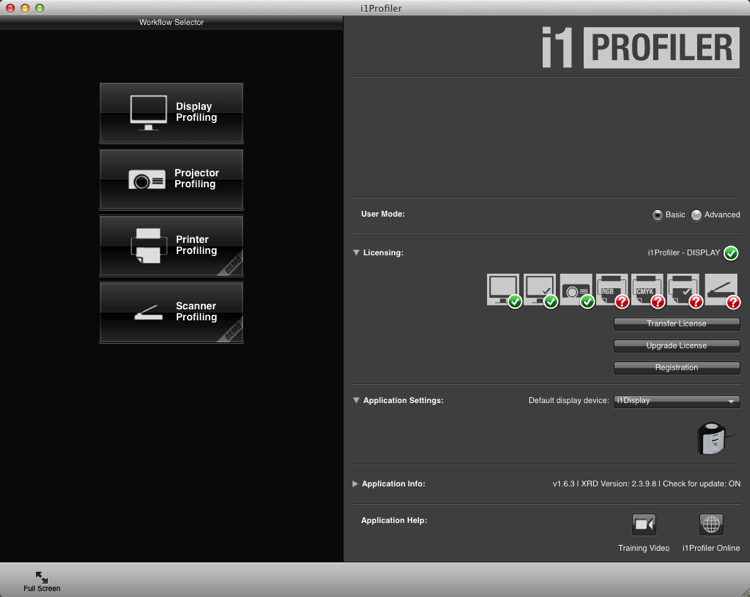
Calibrating your screen 02

Click on Display Profiling to begin. The software detects your screen type automatically and applies recommended defaults for the screen. Press Next (below).
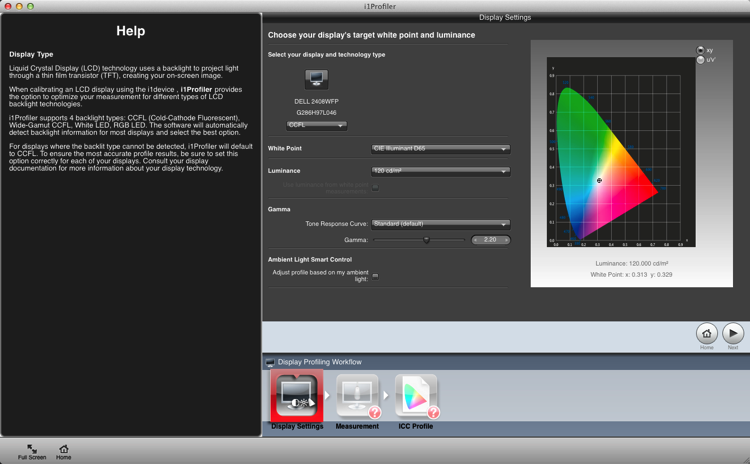
Calibrating your screen 03

You’re on to the Measurement screen now (below). Choose the manual option for the screen brightness and contrast. The color tiles you see on the right are the colors that will flash on the screen as the calibration runs. Click the Next button to begin.
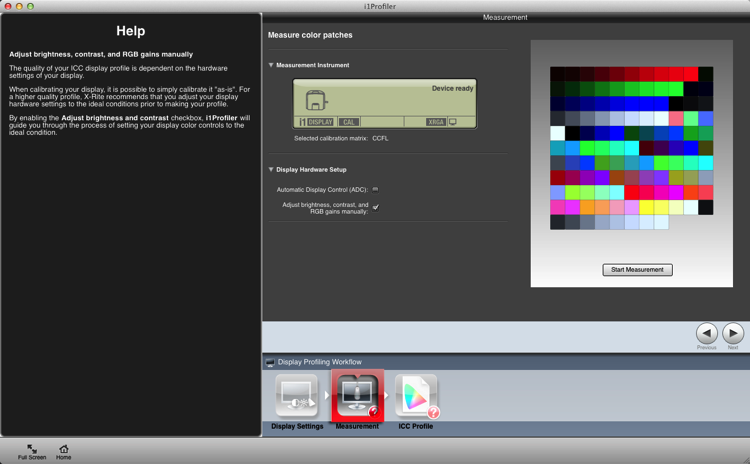
Calibrating your screen 04

The next figure below, is a cropped version of the screen you will see. Place the device on the screen as instructed. Press ‘Ok’ to continue.
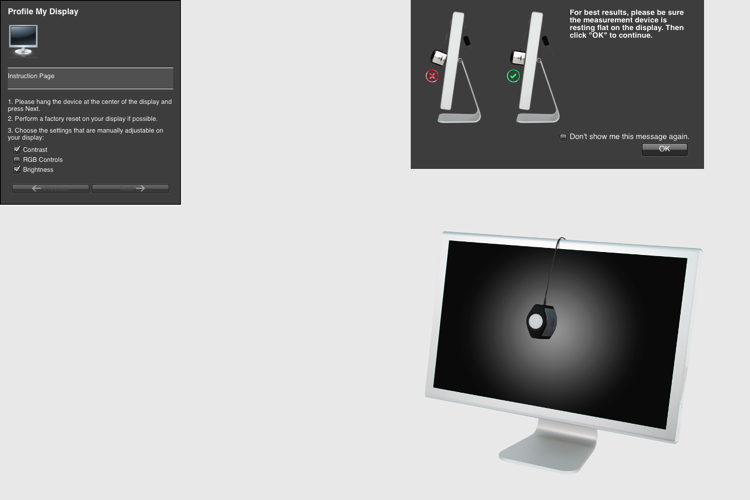
Calibrating your screen puck position

Use the controls on you monitor to get the correct brightness settings (see below) for the profile. Click Next when it’s correct. The screen will cycle through the series of colors seen as tiles back further. As each tile displays, the entire screen changes to that color. This takes about two minutes.
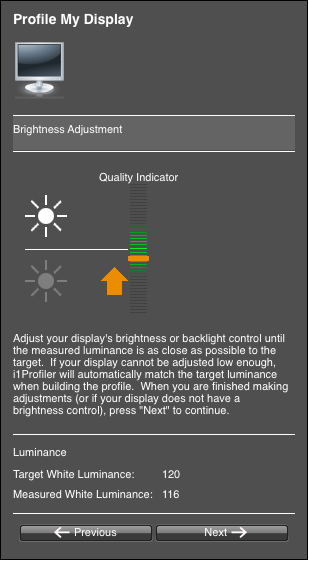
Calibrating your screen 06

Take the device off and set it for ambient light, even if you don’t use this function.
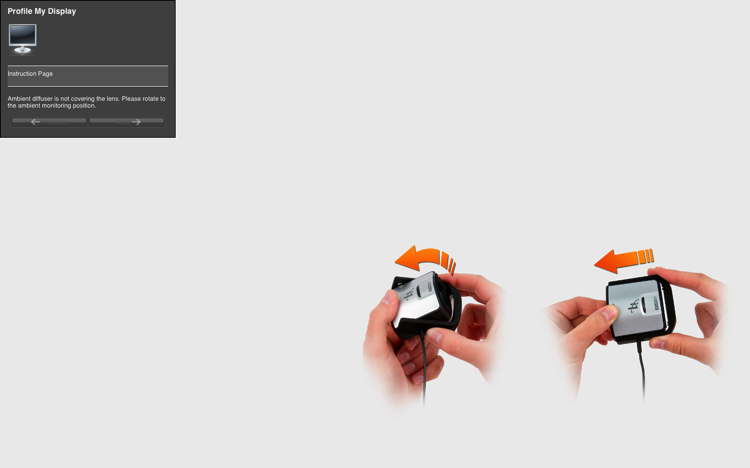
Calibrating your screen 07

The tiles now show a before and after view of the color changes from the profile. Click next.
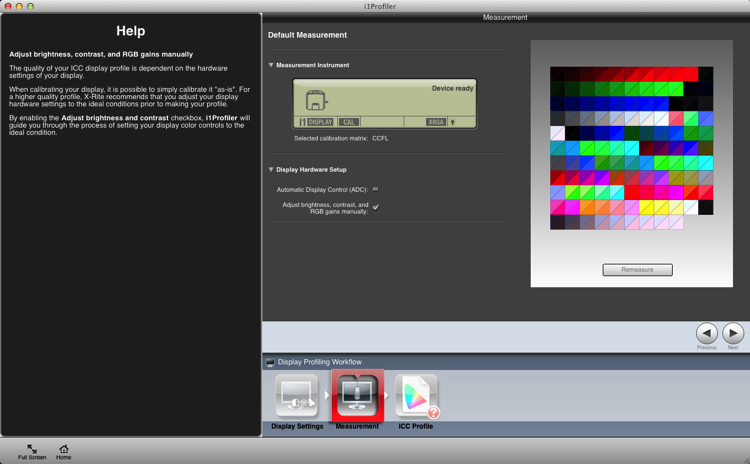
Calibrating your screen 08

Click Create and Save Profile to make a new monitor profile.
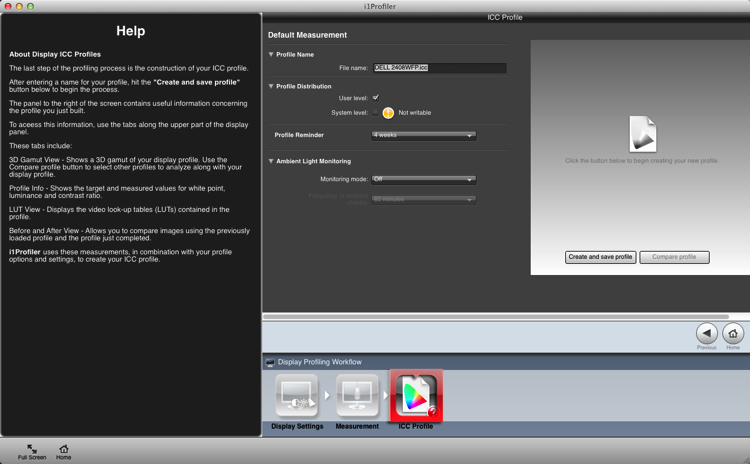
Calibrating your screen 09

Once the profile is made, you can do a comparison using the test charts in the screen.
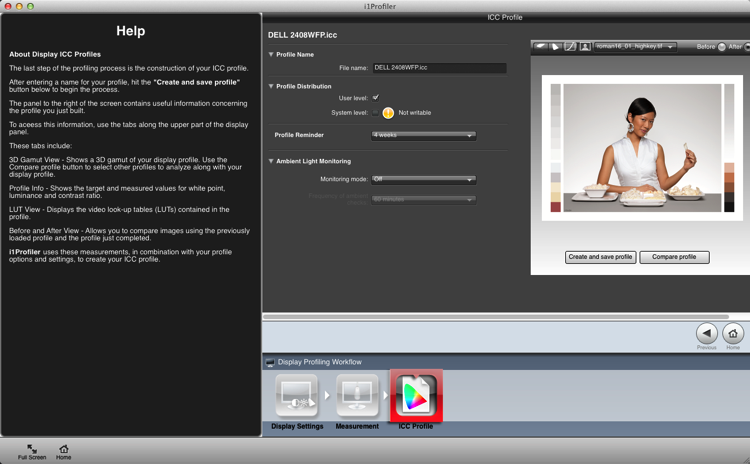
Calibrating your screen 10

Summary and questions

That’s it. You’re done. Lightroom, Photoshop and color managed browsers like Safari will use this profile when you view images, allowing you to edit and process images with the best color rendition. Ideally you should do this calibration no less than once a month for best color. You’ve also taken your first steps into color management without knowing it; probably the most important.

Do you have any questions about this process? Have you tried it? Had any difficulties? If you use a similar device which one, and have you had good success with it? Please share in the comments below.

googletag.cmd.push(function() {
tablet_slots.push( googletag.defineSlot( “/1005424/_dPSv4_tab-all-article-bottom_(300×250)”, [300, 250], “pb-ad-78623” ).addService( googletag.pubads() ) ); } );

googletag.cmd.push(function() {
mobile_slots.push( googletag.defineSlot( “/1005424/_dPSv4_mob-all-article-bottom_(300×250)”, [300, 250], “pb-ad-78158” ).addService( googletag.pubads() ) ); } );

The post Why is Monitor Calibration Important and How to do it by Sean McCormack appeared first on Digital Photography School.


Digital Photography School

 
Comments Off on Why is Monitor Calibration Important and How to do it

Posted in Photography


Get more accurate color with camera calibration

28 Apr

D3x_02_Jordan_13_11_-_02.jpg

One of the ways in which you can minimize the amount of work you need to do in post-processing is to calibrate your camera. Many digital photographers are familiar with calibrating their computer monitor to help them get accurate results when adjusting images. But few think of calibrating their camera. Professional travel photographer Steve Davey explains why and how to set up a custom profile. Learn more

News: Digital Photography Review (dpreview.com)

 
Comments Off on Get more accurate color with camera calibration

Posted in Uncategorized


LensRentals.com needs name for massive lens calibration tool

01 Apr

lensrentals.jpg

One of the drawbacks of running a company devoted to renting out photographic equipment is that it’s necessary to evaluate and service equipment just about every time it comes back. That’s why the team at LensRentals.com have just purchased and installed a massive and cumbersome looking lens calibration system. In one of the geekier unboxing articles, they show every step of the assembly of the device. Learn more

News: Digital Photography Review (dpreview.com)

 
Comments Off on LensRentals.com needs name for massive lens calibration tool

Posted in Uncategorized


11 July, 2013 – Beyond Calibration 2.0

11 Jul

Today Christopher Schneiter follows up on his very popular first article on the topic, titled Beyond Calibration, with Beyond Calibration 2.0.

The Luminous Landscape has just announced two spectacular new 
Antarctic Photographic Expeditions for January and February 2015

Find Out More Now
These Expeditions Will Sell Out Quickly. They Always Do.


The Luminous Landscape – What’s New

 
Comments Off on 11 July, 2013 – Beyond Calibration 2.0

Posted in News


28 January, 2013 – Beyond Calibration : The Heresy of Artistic Intent

28 Jan

Are you a slave to colour management? If so, why, and if not….?

In a new essay entitled Beyond Calibration : The Heresy of Artistic Intent, contributor Chris Schneiter explores how and why we can become trapped by a mechanistic approach to colour management.


"Yes I downloaded the videos. THEY ARE AWESOME!!! I learned so much I think my brain is going to explode.


Now I need to get the LR4 video to see how much of Lightroom 4 I don’t know". 


The Luminous Landscape – What’s New

 
Comments Off on 28 January, 2013 – Beyond Calibration : The Heresy of Artistic Intent

Posted in News