RSS
 

Posts Tagged ‘Build’

How to build a photo brand: Tips from photographer Art Wolfe

13 May

Screen_Shot_2014-05-12_at_10.34.35_AM.png

Branding is critical for a successful photography business regardless of the genre, and photographer Art Wolfe has built perhaps one of the strongest brands in his field. Wolfe has been shooting nature and wildlife images professionally for more than 30 years all over the world. This story on Photoshelter’s blog gives some insight on how he built his photography business. Learn more

News: Digital Photography Review (dpreview.com)

 
Comments Off on How to build a photo brand: Tips from photographer Art Wolfe

Posted in Uncategorized


Living Legos: Build Your Own Robot with TinkerBots Blocks

15 Apr

[ By Steph in Gadgets & Geekery & Technology. ]

TinkerBots Custom Robots 1

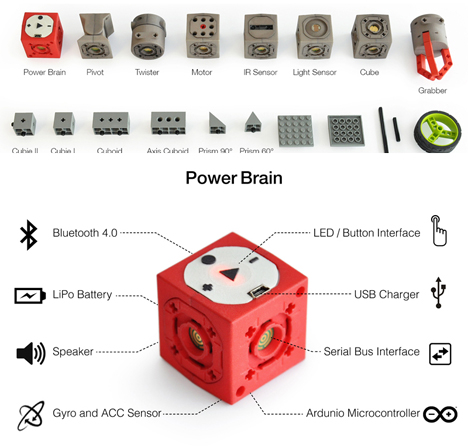
High-tech and low-tech come together with this set of not-so-basic building blocks connected to a central ‘Power Brain’ cube that turns your creation into a working robot. TinkerBots is a building kit that comes with all sorts of mobile and immobile components that snap together around the central cube so you can create an endless array of custom toys that walk, crawl, roll or or perform other movements.

tinkerbots

The red ‘Power Brain’ cube provides energy and contains an Arduino-compatible microcontroller, Bluetooth connectivity, a USB charger, an LED button interface, a speaker and more. Kinetic components include twisters, pivots, motor-modules and grabbers, while static components are simple building blocks in various shapes. The kit is also compatible with Legos.

TinkerBots Custom Robots 3

TInkerBots Custom Robots 4

Put them together any way you like – there’s no need to wire or program your creation, so even a five-year-old can get creative with it. Once you put it together, you ‘teach’ the robot what you want it to do. Hit the record button and move the robot the way you want it to move. Then, when you press play, it’ll repeat the action.

TinkerBots Custom Robots 2

TinkerBots Custom Robots 5

TinkerBots is currently raising money on IndieGoGo to distribute the kit and add even more parts like renewable energy-producing modules, wind engines, and generators with crank handles. The more money you donate to the fundraising campaign, the more advanced of a kit you receive to start on your own robotic creations.

Share on Facebook


[ By Steph in Gadgets & Geekery & Technology. ]

[ WebUrbanist | Archives | Galleries | Privacy | TOS ]


WebUrbanist

 
Comments Off on Living Legos: Build Your Own Robot with TinkerBots Blocks

Posted in Creativity


Practical Tips To Build Your Street Photography Confidence

28 Mar

MWTL1001921

The noble pursuit of street photography requires a good measure of cunning and bravado. Of course, there is the ever present hurdle of luck and opportunity. Beyond knowing your streets, their patterns and ad hoc events, getting that wonderful shot is a guessing game.

When you are in the right place and you see the converging paths that will result in a great decisive moment, you need to be able to capture the scene. This can be learned and practised. Here are some practical tips to help you build your street photography confidence.

I feel like I’m wearing a sign that says, “Look everyone, a street photographer!”

I know what you mean. When I first started out, doing street photography, I was so focused on seizing photo opportunities I could see people staring back at me. On numerous occasions people I spotted as a potential photo saw me and moved away. Market vendors are deeply suspicious and, even now, I still get glared at.

I quickly realized I was missing shots because I was looking conspicuous and acting a bit weird. That slow purposeful walking and excessive bobble headed looking, then stopping and staring for longer than normal people stop and stare. Very conspicuous.

MWTL1004072

What changed?

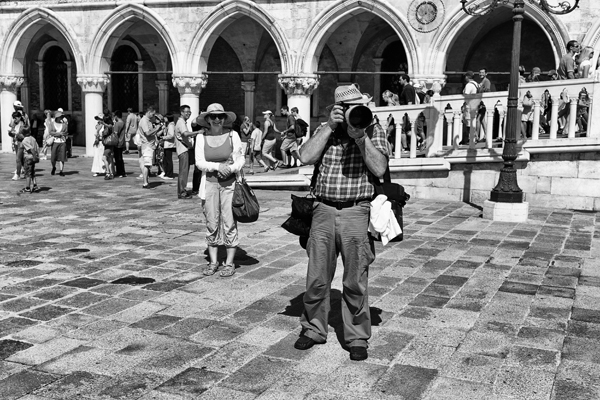
Tourists. London is a tourism mecca and even on week days, the capital is buzzing with visitors from all corners of the globe. I take quite a lot of photos of tourists but, when I don’t want them in my shot, they can be quite annoying. In fact, tourists annoy everyone as they parade through other peoples’ photos with no remorse. Here’s the real value though. While people are irritated with tourists being in their way, they are also tolerated. Others, particularly locals, don’t shy away from their business. They jostle through the visitor throng, or continue their conversations. Tourists are, for the most part, ignored!

This was a great revelation for me and, as a street photographer, I decided to be just like a tourist.

Don’t look conspicuous
MWTL1002538

Dress casually and for walking

Check the weather and wear layers for the best and worst of the predicted forecast. I would steer clear of photographer jackets and other ‘practical’ photographer clothing. Think tourist: jeans, sweaters, hoodies, etc. I’ve tried a street photo walk in a three piece suit after a morning meeting. Don’t wear a suit either!

Personally, I recommend a small camera

Before you all jump to berate me, this is my recommendation for being inconspicuous as a street photographer. I used to walk the streets with a 1D Mark IIn and a 50mm f/1.2L lens. An extraordinarily capable camera with a decent fast lens. More often than not, the people I paused to photograph would see this camera and curtly move aside because the professional wants to take a photo and we’re in the way. And the shutter! On a train, I would stealthily raise this camera and fire off a shot. The looks I would get from people being loudly ‘papped’!

Use the neck strap on your camera

Raising a camera from your side to your face could be enough to be seen. With your camera around your neck, raising it to your eye is much less apparent. Of course, you can point your body and shoot ‘from the hip’ without moving the camera.

Carry a small bag or backpack

I take a spare battery, SD card, lens cleaner pen, business cards and a waterproof bag. That’s all, for the entire day’s shooting.

You don’t need a tripod.

Now step forth and be bold
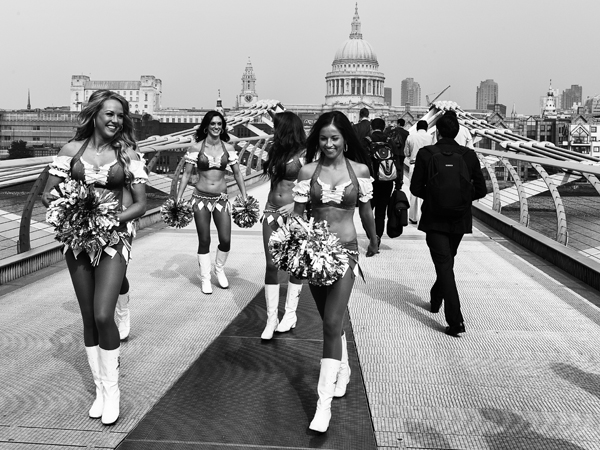
MWTL1003373

So now you look pretty much like a stereotypical tourist with a camera, how do you act like one?!

Tourists look around a lot and walk slowly, but casually, taking in the scenery. As an exercise, try putting your camera in its bag and just walk around taking in the location. Can you still carry off that casual saunter with your camera in your hand or around your neck?

The second tip, and equally as important as the first, is to look through people rather than at them. Tourists look at the scenery and other people are simply obscuring their view. People will quickly realise they are not the focus of your attention if you are looking past them to what is behind them. It will take a while, but you’ll become practised with seeing a potential photo whilst still looking nonchalant.

Personally, I shoot with a rangefinder. Most of my shots are from around 15 feet away, so I leave my lens focused at that distance for quick response captures, like when someone walks toward you.

Otherwise I will focus for distance and then frame the shot. The trick here is to focus on another object which is the same distance as your subject. Then turn to your subject and shoot. You have minimized the time you are gazing at them by focusing elsewhere.

Street Portraits
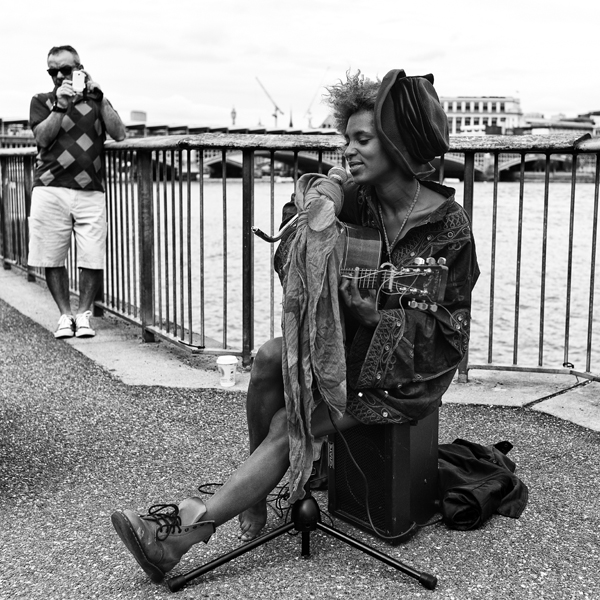
MWTL1001783

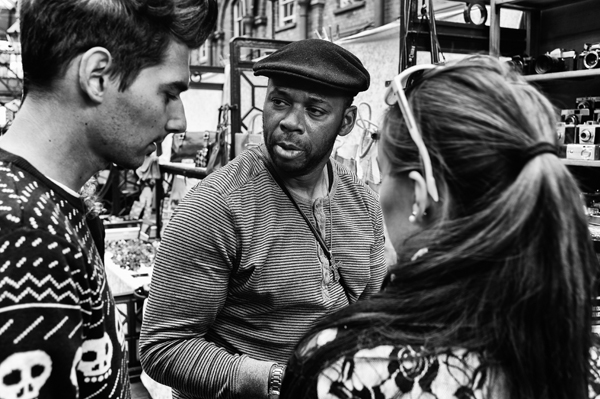
Occasionally I will see someone who would make a great street portrait. I carry business cards around and this supports my brand as a street photographer. It’s this that gives me that needed boost to actually approach someone.

Be bold and polite and, this is imperative, know how you want them to pose. You have one chance to get them in position, after all, they’re doing you a favour.

As I approach the person I might say, “Hi, I really like your outfit/tattoo/hair/etc and I wondered if I can take your portrait?”

Take one shot. Check composition on your LCD. Take one more if necessary.

This is where I thank them and hand over a business card. I explain I’m a street photographer and point out my web site so they can go find their picture. This post photo exchange makes me feel less of an intruder and, hopefully, they are not fazed by the two minute distraction either.

Final thoughts

Hopefully these small tips will help you take street pictures while getting over the nervousness of simply trying to take photos. Through practice and experience, you will learn how people react and what you can get away with.

I don’t like to invade the intimate privacy of people or chase them down or ask them to walk back along the route I liked, so I do have a line I won’t cross, but I don’t miss a shot through lack of confidence.

Good luck!

The post Practical Tips To Build Your Street Photography Confidence by Michael Walker-Toye appeared first on Digital Photography School.


Digital Photography School

 
Comments Off on Practical Tips To Build Your Street Photography Confidence

Posted in Photography


If You Build It: A True Story of Hands-On Design Education

23 Feb

[ By WebUrbanist in Architecture & Public & Institutional. ]

design build project movie

What if high schools replaced shop classes with results-driven, full-scale architectural projects, where the goal was to collaborate and make something substantial for the entire community? If it sounds idealistic, perhaps it is – the reality on the ground can be full of setbacks and surprises, as this film illustrates in evocative detail. The title of the documentary in perhaps intentionally open-ended, because, unlike the phrase’s cinematic inspiration (Field of Dreams), what will happen if you build something is never quite clear until you try.

Directed by Patrick Creado, If You Built It is the compelling story of a one-year design/build program set in a small American town – a story that is both inspirational and heartbreaking. Its protagonist teachers are enthusiastic visionaries who are exceptionally driven. Its director shows these strengths but is unafraid to also highlight their steep learning curve, right alongside that of the students, who struggle at first to understand what two outsiders want to teach them and why.

design build movie poster

Studio H, a collaboration of designers/builders Emily Pilloton and Matthew Miller, is named for its focus on “humanity, habitats, health and happiness”. Its mission is born of a noble desire to enable people to change where, how and how well they live, all through design.

design build model making

Of course, working with a community as outsiders is challenging, as this pair learned when they moved to Bertie County, North Carolina, for the first year of their program. Their mission: to start small and build up to a student-decided project for the community, which turns out to be a farmer’s market inspired by contextual farm architecture.

design build studio h

In the press, idealized renderings and carefully-staged architectural photographs often gloss over the gritty reality of designing and building projects, as well as the slow change in thinking that comes with learning to design. Likewise, a look at highly-funded architectural programs and never-to-be-built college-student projects can make it easy to forget we have an opportunities to educate high school students everywhere through designing to build.

design build construction collaboration

For anyone not educated in design, this movie provides  a unique window into how it can be taught and how understanding design processes can help us see unrealized possibilities in our everyday lives and built environments. For the broader public, the documentary also provides fascinating insights into the present and uncertain future of rural America.

design building process outdoors

In the end, the film is neither a tale of outright success or total failure, but it does show how even the best intentions may not work in every situation. In a key flashback, we are shown scenes of a home built for charity by Miller as a thesis project that ultimately failed in practice but also provided him critical real-world feedback on projects where the owner is just a passive recipient. Anyone interested in the intersection of architecture and education should watch If You Build It and sign up for screenings to share it with students.

rural design farmers market

design build project results

A synopsis: “IF YOU BUILD IT follows designer-activists Emily Pilloton and Matthew Miller to rural Bertie County, the poorest in North Carolina, where they work with local high school students to help transform both their community and their lives. Living on credit and grant money and fighting a change-resistant school board, Pilloton and Miller lead their students through a year-long, full-scale design and build project that does much more than just teach basic construction skills: it shows ten teenagers the power of design-thinking to re-invent not just their town but their own sense of what’s possible.”

Share on Facebook


[ By WebUrbanist in Architecture & Public & Institutional. ]

[ WebUrbanist | Archives | Galleries | Privacy | TOS ]


WebUrbanist

 
Comments Off on If You Build It: A True Story of Hands-On Design Education

Posted in Creativity


Virtual LEGO Blocks: Build with Chrome, Set on Google Maps

05 Feb

[ By WebUrbanist in Gaming & Computing & Technology. ]

build with chrome page

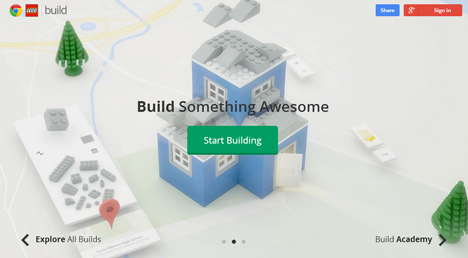
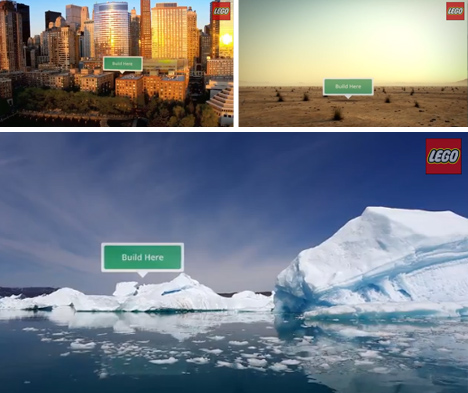
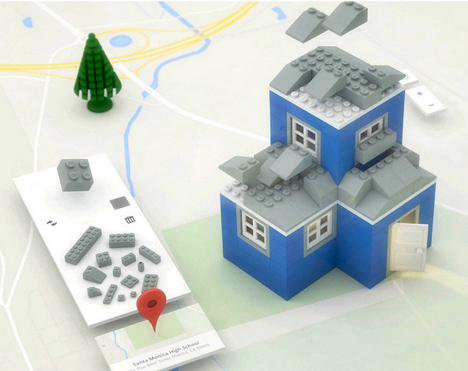
Build with Chrome is the new, fast and simple model-maker in town, and this one lets you create structures faster than digital SketchUp or physical LEGOs ever could.

build lego google maps

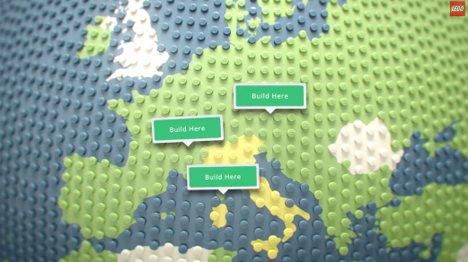
Of course, this Chrome Experiment project would not be complete without Google Maps integration, allowing you to deploy your creations around the world and interact with others.

build lego online browser

Architecture seems the most obvious, but infrastructure, ships and other complex shapes are all ultimately possibilities as well.

build lego pirate ships

Like SketchUp (previously owned by Google), the tool set is relatively simple, except in this case the learning curve is even faster, making it possible for anyone to participate with ease.

build lego house architecture

Users can select blocks, change colors, rotate with a key click, drop them into place then keep on stacking, then save or reset at any time. From private estates to pirate ships, anything is possible.

Share on Facebook


[ By WebUrbanist in Gaming & Computing & Technology. ]

[ WebUrbanist | Archives | Galleries | Privacy | TOS ]


WebUrbanist

 
Comments Off on Virtual LEGO Blocks: Build with Chrome, Set on Google Maps

Posted in Creativity


Build Your Own DIY Slide Light

29 Aug
Extra photos for bloggers: 1, 2, 3

Are you ready to come along on a fantastic voyage? No time travel to throwback music videos required.

We were thinking a voyage to the hardware store to gather building supplies for the coolest tutorial yet — a DIY slide light.

It’s a minimalist light box that can display pictures, and it sure looks good doing it. Whether you shoot film, digital, or even Instagram (remember this tutorial?) – the slide party is open invite!

Think of this project as a way to create a mini gallery, with which to show off and rotate tiny versions of your photography.

To start you’ll only need one more power tool than your average tool-free craft project. Totally coolio, huh?

Build Your Own Slide Light

p.s. Photo Week (from our buddies at creativeLIVE) is coming up! RSVP for 6 days of free live workshops with primo instructors.

Why It’s Cool

We were so inspired by the most awesome light ever that we wanted to make one ourselves! Like the hits of our rapper friend Coolio, Slide Light has been rocking it since the 90′s. Completely classic.

Although your cameras aren’t out for this tutorial, you can still pay homage to your beloved craft by building a beautiful home for teeny photographs. Isn’t that thoughtful of you?

Since keeping fingers intact for future shutter clicking is priority, all measurements used to build this light are based on standard sized cuts. No saws or reasons to fear tools! Your new slide light will be easier to assemble than, well… just about anything from Ikea.

Ingredients:

  • 24” Fluorescent cabinet light
  • 32” by 24” sheet of acrylic
  • Two 36” by ¾” Aluminum Angles (L shaped)
  • One 6ft  1” by 3” piece of pine wood – (cut in half at store)
  • One 6ft  1” by 4” piece of whitewood – (cut in half at store)
  • One piece outside corner finished moulding (see photo)
  • Small piece of balsa wood (or sub any thin plywood)

  • Eight 1 ¼” #8 phillips round head screws
  • Six 1” #8 phillips round head screws 
  • Ten 1/2” #4 phillips head wood screws
  • Power Drill with 1/8 & 5/64 bits
  • Phillips screwdriver
  • Staple gun
  • Box cutting knife
  • Measuring tape / straightedge
  • Vellum paper (enough to cover 32” by 2.25”)
  • Spray adhesive

STEP 1: Measure, Mark, and Mount

before

Off-center the cabinet light on a 1″ by 4″ board, with power chord positioned near the outside left edge. Leave at least 1” of space on all sides (to build the frame around the light). Use two #4 screws and follow the instructions on the package to mount your light to the board.

After mounting the (unplugged) light, ensure the switch is in the “on” position. Once the light is enclosed in the box, the plug will become the on/off switch.

before

Starting at opposite ends, mark both your Aluminum “L” angles 4 times, spaced every 12 inches. Use this same spacing measurement on the top and bottom edges on the back 1″ by 4″ board of the light.

Next, mark both of the 1” by 3” boards three times along the 1” side. Offset marks on the left side by at least 1 ½” from the edge. The other two marks will go in the middle of the light and 1 1/2″ from the right edge. When the frame for the light is assembled, these marked edges will face forward.

Use a permanent marker and a straightedge to mark the acrylic sheet so it is 2 1/4” tall by 32” wide.

STEP 2: Cutting and Prepping

before

Find a safe, level surface for cutting. Use the box cutter and a straightedge to score both sides of the acrylic along your guide line. Repeat this step as many times as it takes to ensure a deep cut.

Next, line up the the scored cut with a straight edge of a table. Use your forearm (for evenly distributed pressure) to press down on the side of acrylic that is not supported not on the table.

Keep applying pressure till it breaks! Feel free to clean up a jagged edge with wire cutters or sand paper… although, this edge isn’t going to be visible so it’s more important that it fits the dimensions.

Use spray adhesive to attach vellum paper to the piece of acrylic. Smooth out any bubbles and trim away excess paper.

Use scissors to cut the outside corner molding to the same length as the acrylic.

STEP 3: Pre-drill, Pre-drill, Pre-drill! Oh… and tack.

before

Because the wood is 1” thick in a lot of places, you’ll have more control installing the screws by hand when you use pre-drilled pilot holes as a guide.

Line up the acrylic along the left corner and trace the spacing of the marks from the side of the top 1” by 3” board. Use the ? bit to drill holes in the plastic where marked.

Use the 5/64 bit to drill holes in the aluminum along where marked (see step 1 if you missed it!).

With the staple gun, tack moulding to the inside edge of the bottom 1” by 3” board. Make sure the lip (edge that will hold the slides) is sticking out slightly to the front.

Next, line up the boards in a “U” shape. The 1″ by 3″ boards are the sides of the “U” and the 1″ by 4″ board is the base. Level the sides and use the staple gun to tack the top and bottom boards to the 1″ by 4″, so they will stay in place when you beforesecure the frame.

Flip the attached pieces so the back of the light is facing up. Use the ? drill bit to drill eight pilot holes on the top and bottom edges of the 1″ by 4″ board holding the light. If tacked down securely, the pilot hole should extend a little into the attached 1” by 3” board.


STEP 4: Business Time

before

When installing screws, apply pressure to the surfaces being connected until you feel the screw has engaged.

Install all eight 1 1/4″ #8 screws in the coordinating pilot holes along the back of the light.

Flip light over. Line up the acrylic with the top board so that the bottom of the plastic rests in the lip of the moulding. Use the 1/8 bit to drill pilot holes through the holes in the plastic. Install the six 1” #8 screws in the locations you marked. Although there is no plastic attached to the bottom board, the screws will ensure the bottom aluminum angle is flush with the rest of the light.

Position aluminum angles with the pre-drilled holes on top and on bottom. Use the 5/64 bit to drill pilot holes through the pre-existing holes, and install eight 1/2″ #4 screws.

STEP 5 – Finishing Touches

before

Trace the edge of both sides on the balsa wood in pencil. Return to your cutting surface and cut out end caps using box cutting knife.

Make a hole for side with plug and feed chord through the hole prior to stapling the balsa wood along the open edges of the light frame. Attach hanging hardware of your choice and hang on wall. Mount your slides and flex/change/rearrange to your heart’s content.

**note: as with most electrical dohickeys, do not leave on and unattended for extended periods of time. Remove the top aluminum angle and acrylic when the bulb needs to be replaced.


Taking It Further

  • Use the opening on the right side of the light as a mini library for your extra slides! Or get creative with your leftover materials to make a storage box.
  • Make Instagram slides using transparencies. Print on vellum paper for bold colors.
  • Let your slides work together! Use photo-editing software to adapt this tutorial and resize a wide landscape photo so it fits over several slides.
  • Enlist the pros at Digital Slides to turn your digital photos into 35mm slides!

Jenny Sathngam is a tutorial writer/photographer for Photojojo, based in Austin, TX. If she’s not shooting or editing, you’ll find her building, crafting, or scheming up the next big project.  

Related posts:

  1. Make a Magnetic Photo Bulletin Board for Under $ 15 ~Have a cool photo product or site? Reach 260,000 photo…
  2. DIY: Make Crazy Detailed Light Paintings with Photo Light Stencils Extra photos for bloggers: 1, 2, 3 Ever tried painting…
  3. How to Make a Mini Light Studio Using School Supplies When school’s out, most kids are thinkin’ “Oh man, summer’s…


Photojojo

 
Comments Off on Build Your Own DIY Slide Light

Posted in Equipment


Build your own point-and-shoot camera with Bigshot

07 Aug

bigshot.png

Budding young photographers (and curious adults) can put together their own camera with Bigshot, a DIY point-and-shoot aimed at teaching kids tech hardware basics. Developed partially with funding from Google, the kit includes everything needed to construct the camera including a 3 megapixel image sensor, LED flash, 1.4 inch LCD and a wheel with three built in lens options. Bigshot’s website also contains an impressive learning section packed with information about the technology behind digital photography. Click through for more details and pricing.

News: Digital Photography Review (dpreview.com)

 
Comments Off on Build your own point-and-shoot camera with Bigshot

Posted in Uncategorized


ZIG: Modular Furniture Lets You Build to Suit Your Space

05 Jul

[ By Steph in Design & Furniture & Decor. ]

ZIG Modular Furniture 1

Assemble rectangular furniture components like building blocks to create the exact arrangement of seating, tables and storage to suit your space and lifestyle. ZIG Modular furniture by Cezign comes in four different block types – upholstered foam, solid wood, open wood and clear polycarbonate – that can be stacked and strapped together any way you like for optimal versatility and adaptability.

Zig Modular Furniture 2

Perhaps you need to make the most of a tiny studio apartment, or you need to be able to quickly and easily clear furniture away to use your living space for other purposes. Maybe you just like to change things up. Modular systems like ZIG give you control over what is typically some of our bulkiest, heaviest, most unchangeable possessions.

ZIG Modular Furniture 3

ZIG offers colorful adjustable belts that hold the foam pieces together, so you can build couches and beds of any size, or just use them as soft tables with no sharp corners to harm clumsy toddlers. Putting them together is like a creative project, challenging the user to come up with the ideal geometries for their interiors and usage requirements.

ZIG Modular Furniture 5

Available through Cezign, ZIG comes as a set of six units, and expansions are virtually limitless. “Our focus is on creating affordable spaces that have a high level of multi-functionality but that still blend aesthetically with what is unique and contemporary,” say the creators. “It is a creative force that transforms unused existing raw spaces and turns them into attractive, modern design projects at  reasonable cost.”

Share on Facebook


[ By Steph in Design & Furniture & Decor. ]

[ WebUrbanist | Archives | Galleries | Privacy | TOS ]


WebUrbanist

 
Comments Off on ZIG: Modular Furniture Lets You Build to Suit Your Space

Posted in Creativity


Build your own tripod-mountable smartphone case: DIY instructions

12 Jun

DIY.jpeg

Do-it-yourselfers will love our instructions for a scrappy smartphone case that better serves your photography needs -complete with a tripod mount – which can be built for the bargain price of $ 7.38. A trip to the hardware store, some super glue and these directions will help you create a case designed with the serious mobile photographer in mind: click through to connect.dpreview.com.

News: Digital Photography Review (dpreview.com)

 
Comments Off on Build your own tripod-mountable smartphone case: DIY instructions

Posted in Uncategorized


Nikon to build $6.3m DSLR factory in Laos to lower costs

21 Mar

shared:NikonLogo.png

Nikon has said it will spend around ¥600m (around $ 6.3m) to establish a factory in Laos. The factory will conduct part of the production process for the company’s entry- and mid-level DSLRs, with final assembly still taking part in the existing Ayutthaya plant in Thailand. The move aims to increase production capacity and help reduce costs, the company says. The announcement suggests all mass-market Nikons will still pass through Ayutthaya, where all production was halted for several months following a devastating flood in October 2011.

News: Digital Photography Review (dpreview.com)

 
Comments Off on Nikon to build $6.3m DSLR factory in Laos to lower costs

Posted in Uncategorized