RSS
 

Posts Tagged ‘Beta’

Fujifilm X30 (beta) real-world samples

03 Sep

The Fujfilm X30 offers a 2/3″ X-Trans II CMOS sensor and a 28-112mm equivalent F2.0-2.8 lens – both of which are retained from the X20 that precedes it. New features include a larger, tilting 3″ LCD, an XGA OLED electronic viewfinder, a control wheel around the lens, and greatly improved battery life. We’ve had access to a pre-production camera for a few days now, and we’ve been given permission to post some images. Click through for a link to our gallery. 

Articles: Digital Photography Review (dpreview.com)

 
Comments Off on Fujifilm X30 (beta) real-world samples

Posted in Uncategorized


Pics.io, a browser-based Raw editor built on Google Drive, goes live with public beta

23 Aug

Ukrainian start-up Pics.io is hoping to change your photography post-processing workflow with its new browser-based Raw editing and organization service. Using WebGL technology to harness the power of your computer’s graphics card, Pics.io is able to offer Raw image editing and management for Canon, Nikon, Sony and Olympus Raw files right in your web browser. Read more

Articles: Digital Photography Review (dpreview.com)

 
Comments Off on Pics.io, a browser-based Raw editor built on Google Drive, goes live with public beta

Posted in Uncategorized


The New Photographer’s Ephemeris Desktop Beta Version Announce

07 Aug

The Photographer’s Ephemeris for Desktop: All Change!

Some important news for users of The Photographer’s Ephemeris (TPE) for Desktop: on 2 September 2014, Google will switch off the Google Maps for Flash API. On that date TPE for Desktop will stop working.

When TPE for Desktop was first launched in 2009, we still lived in a pre-iPad world and Steve Jobs had yet to write his thoughts on Flash. Building on Adobe AIR provided a convenient cross-platform technology that allowed users on Windows, Mac and Linux to run the same application.

Since then, the popularity of Flash has declined significantly and Adobe AIR was repurposed towards mobile development. It has served TPE for Desktop well, but it’s time for a change.

A New Photographer’s Ephemeris Web App

01-new-tpewa-screenshot

The new web app is already live

Happily, this hasn’t come as a total surprise! We have a new TPE for Desktop ready to step into the breach. The new TPE web app is already live and available at app.photoephemeris.com. You can start using it right now. We’re keeping it in Beta until September 2nd, and will continue to refine it over the coming weeks as you send us your feedback.

The web app runs in a variety of modern browsers. It has been tested in the current versions of Safari, Chrome, Firefox, Internet Explorer (11) and Opera. As with the old TPE, it is designed for use on desktop computers or laptops equipped with a mouse or track pad.

One advantage of the web app: you no longer need to install additional software or to continually update to a new version of Adobe AIR. You get the latest version automatically each time you visit the site.

New Features

TPE has a loyal following and this is going to be a big change for some. The user interface may look different, but the new web app includes the same functionality as the old desktop version and comes with a number of enhancements.

Celestial events for the day are displayed in the events timeline below the map. At a glance, you can see the day’s information chronologically.

A chart of the sun, and moon’s, journey throughout the day is displayed at the bottom of the screen. Scrolling the time slider changes sun and moon information relative to your selected pin position and date.

02-600x373-tpewa-graphic

Same features as the old desktop version, but with some great additions.

New features include:

  • Sharing: look up locations; set date and time, then share the URL of the web page
  • Saved locations can be used to set the grey pin position as well as the red – great for planning both camera and subject placement
  • Six degree shadow circle: this new feature shows sun and moon shadows, and highlights, when the sun or moon sit between +0° and +6° above the horizon – times when there’s often good light (so-called “golden hour”) or when the moon can be photographed against features in the landscape
  • Use Google Street View directly from the map
  • Timeline and chart toggle on and off to increase map “real estate” – great for users with small screens
  • Support: you can submit feedback or a support request directly from the app

Look after your locations!

Locations stored in the old desktop version can be exported and saved as a KML file, and then imported into the new web app. We’d encourage you to do this now ahead of the September 2nd deadline.

Once imported, the web app saves locations in your browser’s local storage. In order to ensure you don’t inadvertently lose your locations, we advise exporting and saving the KML files as backups. Look after your saved locations the way you look after your photos.

It’s time to switch

03 old tpe desktop screenshot

Say goodbye to the old TPE desktop app, it’s time to switch (caption)

Just like the original TPE for Desktop, the new desktop web app remains free to use.

You can send feedback to TPE at any time using the support tab in the web app. TPE is used by so many professional and amateur photographers around the world, and this is a great opportunity for you to help shape this useful tool.

We’re adding updated tutorials to the TPE website in the weeks leading up to September 2nd. There is also a Quick Start Guide you can download directly from the web app page. It outlines the major functionality along with a list of useful keyboard shortcuts.

Go ahead and try it out today!

Get The Photographer’s Ephemeris available free of charge. Tutorials are available.

Here’s a few dPS articles that mention TPE so you can try it out:

  • It’s all about the light: The Photographer’s Ephemeris
  • Finding New Photography Locations Just Got Easier With ShotHotspot
  • 8 Simple Guidelines for Capturing Spectacular Sunrise and Sunset Images
  • 5 Hot Tips For Improving Your Summer Photography

The post The New Photographer’s Ephemeris Desktop Beta Version Announce by Stephen Trainor appeared first on Digital Photography School.


Digital Photography School

 
Comments Off on The New Photographer’s Ephemeris Desktop Beta Version Announce

Posted in Photography


Nokia releases update to its Camera Beta app

15 May

395c7c4d-9019-4274-9e44-1bb980151986.jpg

Nokia’s Camera Beta for Windows Phone is arguably one of the best camera apps for enthusiast users. It combines comprehensive manual control with an excellent user interface. Now Nokia has released an update that makes the app even better. It now supports continuous autofocus and surround sound capture. Learn more

News: Digital Photography Review (dpreview.com)

 
Comments Off on Nokia releases update to its Camera Beta app

Posted in Uncategorized


Nikon releases beta version of next-generation Capture NX software

25 Feb

shared:NikonLogo.png

Nikon has released a beta version of an update to its Capture NX software, a product which has been relatively stagnant in recent years. Capture NX-D is the first version of Nikon’s Raw converter to be made since previous developer Nik Software was bought by Google in 2012. The software features a new user interface, batch conversion and a non-destructive workflow that saves adjustments in sidecar files alongside the original image. Find out how to try Capture NX-D for yourself.

News: Digital Photography Review (dpreview.com)

 
Comments Off on Nikon releases beta version of next-generation Capture NX software

Posted in Uncategorized


Fujifilm X-T1 and XF 10-24mm F4 R OIS (beta) samples gallery

25 Feb

1024mm_DSCF2161.JPG

We’ve just returned from the CP+ show in Japan, where Fujifilm was kind enough to loan us a beta sample of its new 10-24mm zoom lens for the X-series interchangeable lens cameras. Although this is a beta (not final) sample, Fujifilm is confident enough about its performance to allow us to post images. We’ve prepared a gallery of sample images taken in various conditions at various ISO sensitivity settings on the X-T1 for you to take a look at. See gallery

News: Digital Photography Review (dpreview.com)

 
Comments Off on Fujifilm X-T1 and XF 10-24mm F4 R OIS (beta) samples gallery

Posted in Uncategorized


New test scene beta begins with Panasonic Lumix DMC-GX7 samples

15 Aug

Screen_Shot_2013-08-14_at_12.13.57_PM.png

We’ve been working on a brand-new studio comparison scene for some time, and we’ve decided to give you a sneak peak, using images from the new Panasonic Lumix DMC-GX7. We’ll be speaking more about this new scene (and the new interface that goes with it) very soon, but for now we wanted to let you have a look, try it, play around and tell us what you think. As well as the new scene, you’ll notice two new options – ‘daylight’ and ‘low light’ simulation modes and the option to ‘normalize’ resolution to simulate print and web output, as well as 100%. Click through for a link. 

News: Digital Photography Review (dpreview.com)

 
Comments Off on New test scene beta begins with Panasonic Lumix DMC-GX7 samples

Posted in Uncategorized


3 Small But Important Lightroom 5 Beta Changes You Might Have Missed

17 Apr

Adobe announced the availability of Lightroom 5 Beta at Adobe Labs today and by all means, go grab a free copy and play. I’ve been using Lightroom since version 1 and have been impressed with every upgrading to the program, gladly plopping down my money for a new version as I have found the enhancements in subsequent revisions well worth the funds. And Lightroom 5 seems to be on the same track, based on my findings while playing with the beta this last week.

Adobe has a number of fine new features in this revision and they are sure not to be missed. They include

  • A Smart Preview feature which mobile photographers will love as it creates a smaller, editable version of their monstrously sized RAW image that is easily portable on a laptop and can be synced when the originals, possibly stored on an external drive or NAS back at home, become available.
  • Radial Gradient which allows for selecting oval or circular shaped areas for specific effects.
  • Upright, which attempts to correct crocked images or fine tune vertical lines. (My experience with this tool has been less than stellar on simple horizon shots at sea. More on this in a minute.)
  • Advanced Healing Brush. This one, I like a lot and it is very helpful. Now your “Spot Removal Tool” can be used as a brush to wipe out items that are not in the shape of a circle. This helps a lot and means I spend even less time in Photoshop CS6.

That’s the obvious stuff that Abode packs into their press kit and you probably have seen those items demonstrated on other sites. What I want to show you are three things I found to be helpful in little, but repetitive ways for how I use Lightroom.

(Click any image for a larger version)

Invert Mask
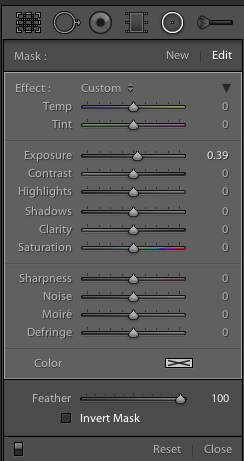
Shot4Thank you! I’ve been wanting this feature for the longest time to save time. But it’s not quite right.

Invert Mask is currently only available with the new Radial Gradient feature. See it at the right? It works well and I’d like to see if appear in the Gradient Tool (especially when creating a new gradient…it would be great to great one just the opposite of the one I am using at the moment) and in the Adjustment Brush.

Here’s a simple rundown of how the tool works.

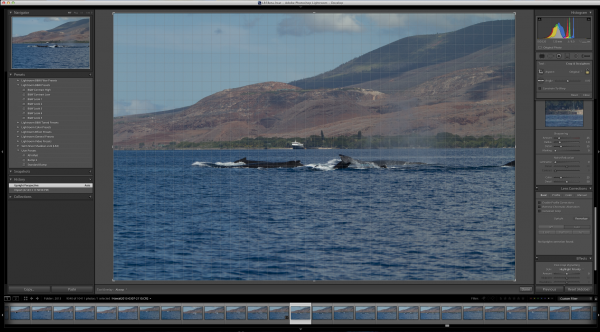
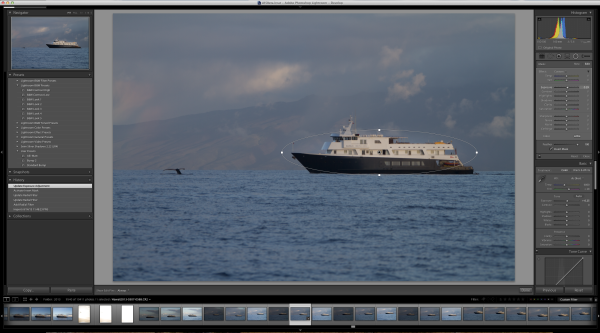
Starting with this image of one of my client’s boats, the Un-Cruise Adventures Safari Explorer off the shore of Maui, Hawaii, I want to see which direction works best: highlight the boat and darken the surrounding seas or slightly darken the boat and bring up the seas, in order to add contrast to the main subject.
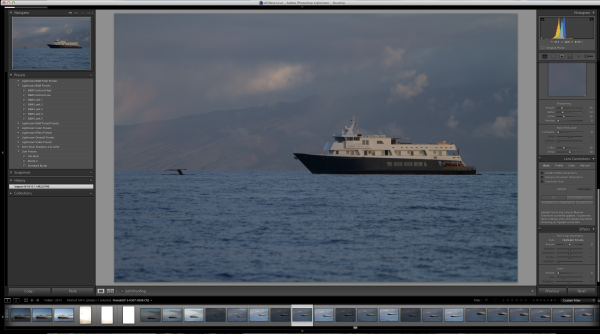
Shot1

I select the new Radial Gradient tool and draw an oval over the boat (Dear Adobe, please make this tool work like the Ellipse Tool in Photoshop for consistency. Specifically, please allow me to grab a “corner” of the ellipse and drag it down instead of starting with the middle of the ellipse. Consistency would really help. Thanks.).
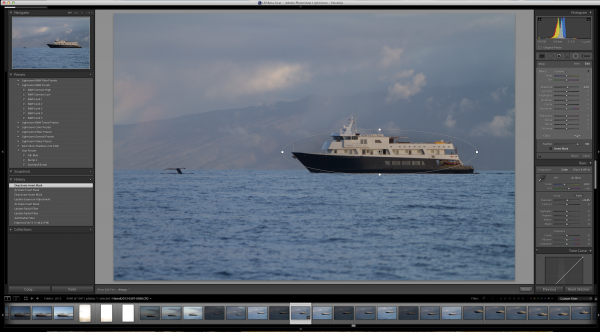
Shot2

Because I have chosen only to increase the exposure by .39, Lightroom masked the boat and increased the exposure for the rest of the image. But if I want to swap that and mask the entire picture except for the boat, it’s just a simple click of the “Invert Mask” check box.
Shot3

Subtle, but useful to me.

Now please, Adobe, add that ability to the Gradient Tool and to the Adjustment Brush especially.

Visualize Spot Healing

I’d like to think my sensor was perfectly clean before leading a recent tour to Bhutan. As a matter of fact, it was extremely clean before I left. But, as life goes, things don’t stay clean.

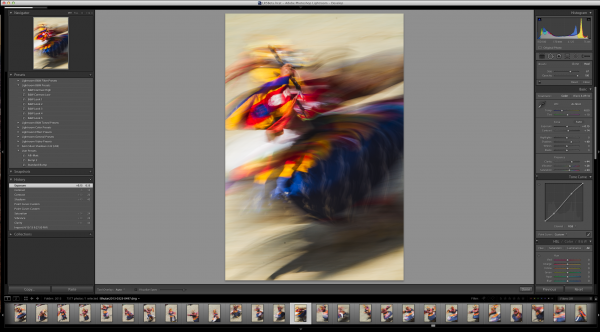
Take this image of a masked dancer at the Paro Tsechu.
Viz1

I wanted some blur (obviously) and used a small aperture to achieve a slow shutter speed. In this case, f/25 and 1/6th of a second. Closing down that aperture makes dust on the sensor more obvious, but this image has a lot going on making it hard to find all the dust.
Viz1-2


Viz2


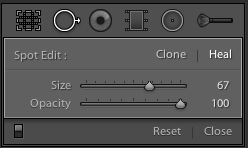
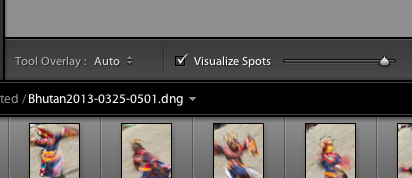
If I click on the “Visualize Spots” check box after clicking the Spot Removal Tool, the slider to the right of it comes alive and I can now more easily see spots. This is a technique used in Photoshop for a while and it works best where edge contrast can be spotted, so in areas without a lot going on.
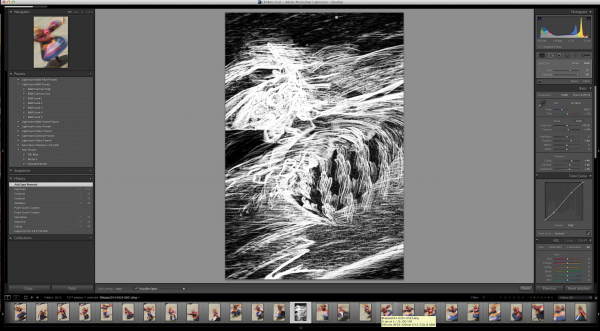
Viz11

In this image, I found three additional spots, two of which would have been easy to miss without the tool.
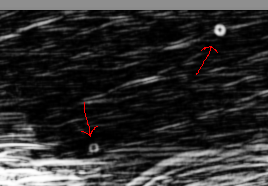
Viz4

Remove Chromatic Aberration Check Box

This one is really small, but helpful. With the addition of the “Upright” feature to the Lens Correction panel, Adobe made it easier to get to the Chromatic Aberration removal check box.
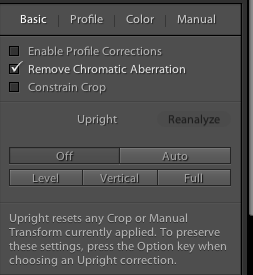
Rem1

It’s a small thing, but I often use the check box for “Enable Profile Corrections” for my lens and then want to remove chromatic aberration on only select images, but many. The placement of the box here, as well as on the “Color” tab, helps.

Upright Is Not That Functional For Me

Maybe I’m doing something wrong, but I doubt it. This is one of Adobe’s touted JDI (Just Do It) features and it seems to work well on the demos, but not in real life. If it did, it would be cool. I can get the feature to work part of the time, but no where near even 25% of the time reliably.

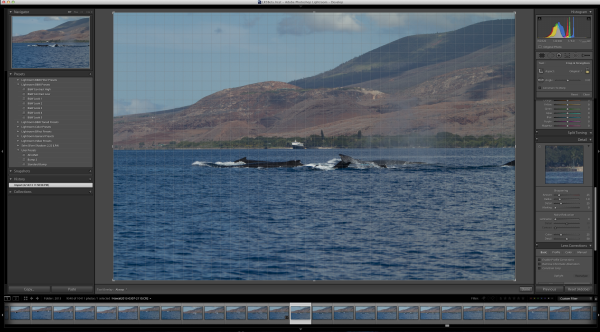
The feature is supposed to level a scene and make diverging or converging vertical lines straight. It can be helpful when it works. But something as simple as a horizon, an obvious one, in this example is not being leveled.  Here’s the initial image out of the camera.
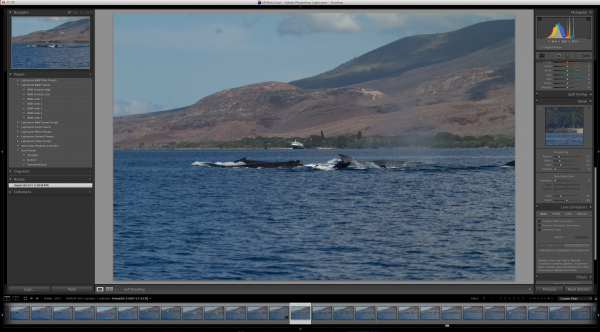
Level1

Now to show that the horizon is not level using the Crop Overlay.
Level2

And now using the tool in Auto mode.

Level3

I tried in Level and Full modes to no avail. The program clearly states “No Upright Correction Found”. This is supposed to be a boon for landscape photographers, but even with a clear horizon like this, it failed.

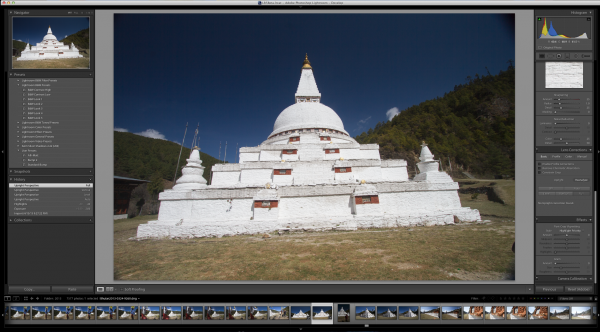
I tried another obvious shot from Bhutan.
Level4

Now how can it say, in all four modes (Auto, Level, Vertical and Full) that no data can be found?

I’m not saying it doesn’t work, I’m saying it’s wonky and not yet reliable.

But this is beta software and that is why they put it out, to find the kinks that mean the most for their users.

Give it a try, Lightroom 5 Beta is quite useful with all the upgrades instituted.


Post originally from: Digital Photography Tips.

Check out our more Photography Tips at Photography Tips for Beginners, Portrait Photography Tips and Wedding Photography Tips.

3 Small But Important Lightroom 5 Beta Changes You Might Have Missed


Digital Photography School

 
Comments Off on 3 Small But Important Lightroom 5 Beta Changes You Might Have Missed

Posted in Photography


Adobe launches Photoshop Lightroom 5 Public Beta

16 Apr

lr5logo.png

Adobe has released a public beta version of its Photoshop Lightroom 5 workflow and image editing software. Available immediately for free download from Adobe Labs, the beta introduces a more advanced healing/cloning tool, automatic image leveling and perspective correction, a new selective editing tool and the ability to edit files that are offline. We’ll have our hands-on preview online very shortly but you can click here to begin exploring this new release on your own.

News: Digital Photography Review (dpreview.com)

 
Comments Off on Adobe launches Photoshop Lightroom 5 Public Beta

Posted in Uncategorized


26 March, 2013 – Leica M (240) Beta Impressions

26 Feb

I have been a beta tester for Leica for several years, but the timing of the availablity of beta cameras this winter coincided with my being in Mexico, and therefore I was unable to take delivery of a testing sample of the new Leica M due to Mexican customs’ Byzantine restrictions.

But my friend and colleague Sean Reid has been testing the as-yet unreleased camera for a couple of months now, and today provides us with some insights on what we can expect from the new M.

I will do my own hands-on field review in the weeks ahead once I have access to a full production review sample.


Adobe Labs has released updates to Lightroom and Camera Raw with new camera support, including completely revised support for Fuji X-Trans sensor cameras. Great news for Fuji fans.


 "Every time I go back to a module I had already seen, I learn additional things.  I have never seen tutorials that have the excellent mix of what the features are, 
how to use them, enough of the under-the-hood information 
and concepts so that I can utilize the features creatively and efficiently, 
and just enough humor to keep the motivation level high.  Wow!"


The Luminous Landscape – What’s New

 
Comments Off on 26 March, 2013 – Leica M (240) Beta Impressions

Posted in News