RSS
 

Posts Tagged ‘Best’

DPReview Recommends: Best Compact Cameras for Travel

28 Nov

travel.jpg

There’s a big world out there, just waiting for you to explore it. In our opinion, a camera is one of the best traveling companions you can have. Depending on where you’re going, you might have specific priorities. Maybe you’re heading to the mountains? Or perhaps you’re exploring a city? Or maybe you’re doing a round the world tour. Here are our top five recommendations.

News: Digital Photography Review (dpreview.com)

 
Comments Off on DPReview Recommends: Best Compact Cameras for Travel

Posted in Uncategorized


DPReview Recommends: Best Waterproof Cameras

27 Nov

Screen_Shot_2013-11-26_at_5.16.51_PM.png

Most cameras are delicate objects, and the last thing you want to do is drop them or subject them to wet or freezing conditions. But there are cameras which are specifically designed to handle rough treatment. In this list, we’ve chosen our top five recommendations for tough cameras. Every model in this list can be dropped, soaked, frozen and, in some cases, crushed. Our recommendations cover the entire class, from stylish compacts that can handle the occasional accident to high-end rugged cameras capable of serious image quality.

News: Digital Photography Review (dpreview.com)

 
Comments Off on DPReview Recommends: Best Waterproof Cameras

Posted in Uncategorized


DPReview Recommends: Best Cameras for Beginners

26 Nov

Screen_Shot_2013-11-25_at_4.39.37_PM.png

It’s that time of year when thoughts turn to gift-giving, and photography is more popular than ever before. Choosing a first camera is extremely important. If you’ve got a friend or a family member who’s taking his or her first steps into the world of photography, we’ve prepared some recommendations for you, from best cameras for absolute novices, up to models more suitable for a student or budding enthusiast. This is the first in a series of articles giving our current recommendations for various different people and scenarios. Click through to read more.

News: Digital Photography Review (dpreview.com)

 
Comments Off on DPReview Recommends: Best Cameras for Beginners

Posted in Uncategorized


How to Find Your Best Images With Lightroom 5’s Compare View

15 Nov

Using Lightroom 5's Compare View

For decades photographers have faced the question of how to determine which of their images are the best. I’ve been through it all, from squinting at 35mm slides through a loupe on a lightbox, to creating contact sheets from negatives and marking the best with a red marker, to scanning negatives and slides through to the modern version of looking at Raw files on the camera’s LCD screen or in the various programs I have used over the last few years. Of those, there’s no doubt that Lightroom is one of the best for the task of comparing images and selecting the best ones.

Compare View

The tool I use for comparing images in Lightroom is the aptly named Compare View (I also use Survey View, to be covered in a future article).

To get the most out of Compare View, you should use Collections to organise your images, and Grid View to view thumbnails. Click the links to learn more about both.
Using Lightroom 5's Compare View

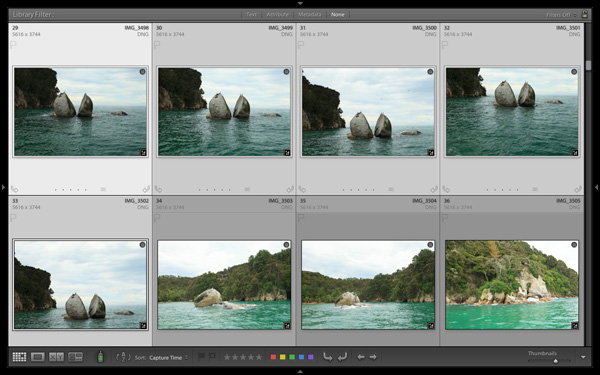
Grid View is the starting point for using Compare View. Select the images that you want to compare. It may be just two, or you may want to compare more. In this example (above) I selected five images.

Using Lightroom 5's Compare View

The first image that you select is, in Lightroom terminology, the most selected image. It is surrounded by a lighter frame than the other selected photos. In the screenshot above the photo on the left is the most selected.
Using Lightroom 5's Compare View

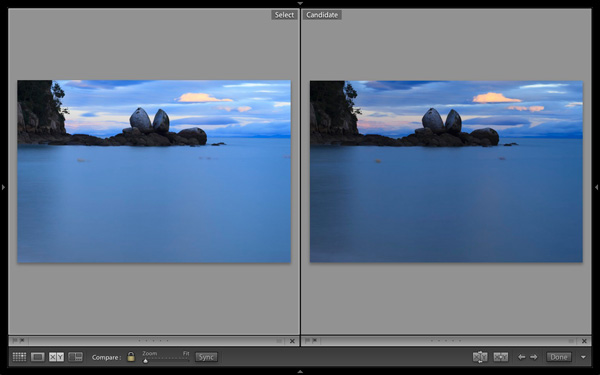
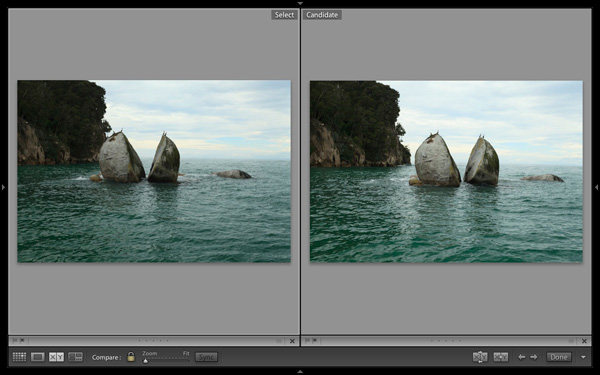
Images selected, press ‘C’ on your keyboard to go to Compare View. The most selected image is displayed on the left. Lightroom calls this photo the Select. The next image in the selection is displayed on the right. This one is called the Candidate.

The idea is to compare the Select with the rest of the images in the selection. Test it out by using the left- and right-arrow keys on your keyboard. If your selection contains more than two images, Lightroom cycles through the remainder of the selection, displaying each image as a Candidate.

Compare View icons

The icons along the bottom of the window in Compare View help you tell Lightroom what to do with either the Select or Candidate images. The first set is located underneath each photo:

Using Lightroom 5's Compare View

1. Click on these icons to flag the photo as a Pick (left) or a Reject (right).

2. Click on these dots to give the photo a Star rating.

3. Click on the faint grey square to apply a Colour label.

4. Click on the X to deselect the photo. Lightroom removes it from Compare View when you do this.

The icons change to indicate the updated status of the image.

If the photo changes when you click any of these options, it is because you have the Auto Advance option ticked. Turn Auto Advance off by going to Photo > Auto Advance. I find it easiest to use Compare View with Auto Advance disabled.

The Toolbar icons

The rest of the icons are displayed in the Toolbar at the bottom of the Compare View window (press ‘T’ on your keyboard to reveal the Toolbar if you don’t see it).

Using Lightroom 5's Compare View

This indicates that you are in Compare View. From left to right, these icons show Grid View (G), Loupe View (E), Compare View (C) and Survey View (N). You can switch between these modes by clicking on the icon or using the keyboard shortcuts (indicated in brackets).

Using Lightroom 5's Compare View

With the padlock icon in the locked position (above) you can zoom into both the Select and Candidate image simultaneously by clicking once on either one. The magnification is set by the Zoom slider and both images move in tandem with the hand tool. This is useful for comparing two near identical images for fine detail such as accurate focusing or noise.

Using Lightroom 5's Compare View

With the padlock icon in the unlocked position you can zoom into either image without affecting the other. Press the Sync button at any time to bring the second image into sync with the first.

Using Lightroom 5's Compare View

These icons are perhaps the most important in Compare View, as they help you navigate around the images in the selection.

The two arrows on the right are straightforward. Click on them to navigate through the selection, just like you did with the arrow keys earlier.

The Swap button (X|Y with two arrows) tells Lightroom to swap the Candidate and Select images. Use it when you decide that the Candidate is the strongest image in the selection, and you want to compare it to the others.

The Make Select button (X|Y with one arrow) tells Lightroom to turn the Candidate image into the Select. The Select is removed from the display, and the next image in the selection becomes the new Candidate.

Using Lightroom 5's Compare View

If you press the Done button Lightroom takes you to the Loupe View and displays the Select image. Alternatively, you can use the ‘G’ shortcut to return to Grid View.

Click the White arrow icon to add or remove icons from the Toolbar.

Putting it together

The main purpose of Compare view is to let you compare similar image so that you can decide which ones you want to process in the Develop module (you can also use it to compare photos that you have processed, or partly processed in the Develop module – but that’s another topic). Use the arrow keys to cycle through the images in your selection, and the Swap and Make Select buttons to compare different images. If this is new to you, it won’t take much practice before you settle into a rhythm. You’ll be pleasantly surprised at how quickly you can work you way through even hundreds of images using Compare View.

While some photographers use Star ratings and Colour labels to help organise their images, by far the simplest method is to use Flags. If you decide to process an image, click the grey flag icon underneath the photo (it’s on the left) to flag it as a Pick. If decide not to process it, leave it unpicked. Then, when you have finished, all you have to do is return to Grid View and choose the Flagged option in the Filter bar to remove the unwanted images from view. Then go to Edit > Select all to select all the flagged images and send them to a new Collection containing only the images that you want to process in the Develop module (using Collections to organise your images is covered in this article).

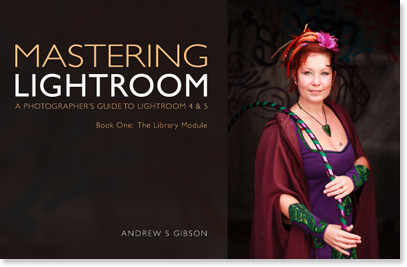
Mastering Lightroom Book One: The Library Module
Using Lightroom 5's Compare View

My latest ebook Mastering Lightroom Book One: The Library Module is a complete guide to using Lightroom’s Library module to import, organise and search your photo files. You’ll learn how to tame your growing photo collection using Collections and Collection Sets, and how to save time so you can spend more time in the Develop module processing your photos.

Post originally from: Digital Photography Tips.

Check out our more Photography Tips at Photography Tips for Beginners, Portrait Photography Tips and Wedding Photography Tips.

How to Find Your Best Images With Lightroom 5’s Compare View

The post How to Find Your Best Images With Lightroom 5’s Compare View by Andrew Gibson appeared first on Digital Photography School.


Digital Photography School

 
Comments Off on How to Find Your Best Images With Lightroom 5’s Compare View

Posted in Photography


Smartphone versus compact camera: Which is best when it comes to zoom?

13 Nov

1020vsS120_2.jpg

Nokia says it ‘reinvented zoom’ with its Lumia 1020 smartphone, but how does it stack up to the zooming prowess of a compact camera? We put Nokia’s flagship phone up against Canon’s PowerShot S120 in our zoom showdown today on connect.dpreview.com. Click through for more, you may be surprised by the results.

News: Digital Photography Review (dpreview.com)

 
Comments Off on Smartphone versus compact camera: Which is best when it comes to zoom?

Posted in Uncategorized


5+ Devices to Make Your Smartphone and DSLR Best Friends Forever

01 Nov

It’s hard to deny the fact that most people use only 10-15% of their gadgets’ abilities, either because they do not need much, or simply because they don’t know that their tiny little smartphones have so much in them! We all know that with a modern phone one can make calls, send messages and surf the Internet. But what about Continue Reading

The post 5+ Devices to Make Your Smartphone and DSLR Best Friends Forever appeared first on Photodoto.


Photodoto

 
Comments Off on 5+ Devices to Make Your Smartphone and DSLR Best Friends Forever

Posted in Photography


99% Invisible: 7 Episodes of the Best Radio Show on Design

24 Oct

[ By WebUrbanist in Architecture & Cities & Urbanism. ]

roman mars 99 invisible

There is no witty wordplay nor shocking truth in our title today, but that is quite by design – we simply did not want risk underselling Roman Mars, the maker of a radio show that covers architecture, design and cities at a level more than sufficiently clever to speak for itself. Below, we will share with you a hand-selected set of some of the most fascinating episodes 99% Invisible has aired to date. If you like what you hear, be sure to support the program on Kickstarter.

roman mars radio show

Roman Mars, host of 99% Invisible and Progam Director of Public Radio Remix from PRX, crafts artful stories that reveal hidden realities in the built environments around us and celebrate secret histories of seemingly ordinary spaces. Roman has 450,000 listeners on SoundCloud and has won praise from the likes of This American Life and RadioLab – two programs that this author has regularly compared to 99% Invisible (“It’s like RadioLab for design geeks”).

suburban cul de sac

Today, from the lawless metropolis of Kowloon Walled City to the tame suburbs of the American cul-de-sac and beyond, we invite you to explore a series of compelling stories from this stellar radio show, with more links and information at the end of this article.

 Kowloon Walled City – Den of Iniquity [Episode 66]

Kowloon Walled City, covered previously on WebUrbanist, was a lawless metropolis – a strange no-mans-land between (then) British Hong Kong and mainland China. “By its peak in the 1990s, the 6.5 acre Kowloon Walled City was home to at least 33,000 people (with estimates of up to 50,000). That’s a population density of at least 3.2 million per square mile. For New York City to get that dense, every man, woman, and child living in Texas would have to move to Manhattan.” Even with pictures, it is almost impossible to visualize – but listen to the above tale and it starts to come alive the same way a fictional city rises from the pages of a book.

Cul-De-Sac – Symbol of Suburbia [Episode 29]

The cul-de-sac once represented the American Dream, but has in the minds of many turned from a utopian ideal to a dystopian symbol of dead-end suburban life.  “When people critique cul-de-sacs, a lot of the time, they’re actually critiquing the suburbs more generally. The cul-de-sac has become sort of like the mascot of the suburbs– like if suburbia had a flag, it would have a picture of a cul-de-sac on it. Cul-de-sacs by definition aren’t well connected to other streets and they are far away town centers. For little kids, cul-de-sacs can be great, but they do have some real, quantifiable design flaws.” In the episode above, Roman and a guest explore the back and forth, exploring the evolution and alternating emphasis on urbanization and suburbanization, and changes in regulation that first allowed and are are now destroying these strange street layouts.

In and Out of LOVE – Skating in the Park [Episode 71]

Skateboarding enjoys a dubious reputation in most cities – some places are set aside for skateboarders in some cases, but many of the best impromptu skate parks (at least: from the perspective of skaters) are those that are forbidden. “Though its official name is JFK Plaza, the open space near Philadelphia’s City Hall is more commonly known as LOVE Park. With its sleek granite benches, geometric raised planter beds, and long expanses of pavement, its success as a pedestrian plaza is debatable. But it turned out to be perfect for skateboarding. As skateboarding culture grew in the 1990s, LOVE Park became a Mecca of the skating world–even though skateboarding was officially banned there.” Even if you hate having a skateboarder whip by you on the sidewalk, you may find yourself softening to their perspective as you listen to this episode.

Next Page:
99 Invisible 7 Episodes Of The Best Radio Show On Design

Share on Facebook


[ By WebUrbanist in Architecture & Cities & Urbanism. ]

[ WebUrbanist | Archives | Galleries | Privacy | TOS ]


WebUrbanist

 
Comments Off on 99% Invisible: 7 Episodes of the Best Radio Show on Design

Posted in Creativity


10 Best Photography Books Bursting With Inspiration for Every Photographer

24 Oct

Every passion in life begins with an inspiration. This is especially true in the arts, where inspiration is such a huge part of the artist mindset. One great piece of art can change someone’s world and set them on the right path. Many photographers today—from nature photographers to portrait photographers—have started out this way. Beautiful photographs incited in them a Continue Reading

The post 10 Best Photography Books Bursting With Inspiration for Every Photographer appeared first on Photodoto.


Photodoto

 
Comments Off on 10 Best Photography Books Bursting With Inspiration for Every Photographer

Posted in Photography


How to go Beyond the Regular Composition Advice for Getting the Best Shots of your Kids

01 Oct

A Guest post by Rachel Devine – author of Click! How to Take Beautiful Photos of Your Kids.

dps_rd_post_image3c.jpg

If you search for advice on how to take better pictures of children there are certain gems that are sure to appear on any list of tips. “Get on their level” and “Get Closer”, are the two that come to mind right away and they are both solid ways to improve your kid shots. Let’s look first at why these work and then how to expand those ideas to create infinitely more interesting images.

The top tip on any list you find is often going to be “Get on their level”. There is a reason that it should be as it is great advice and will make a big difference immediately. If you get down on the same level as a child to take their portrait, you give them power by allowing them to look into the camera straight on. Kneel down so that you become the same height as the child. Chat with your subject and engage them before just going right into taking their photograph. When the time is right, lift your camera and ask the kids if they can see themselves (or a fairy or a pony or any other magical subject) in your lens to get direct eye contact.

Photography is a visual language and the angle with which you shoot the photograph is an integral part of the structure of your story you are telling. Think of composition as part of the “grammar” of this language and that the choices that you make should serve a purpose. Photography is a common language that even kids can understand and when you make the effort to physically go down to their level you are showing them a certain respect.

Tech tip: Use a long lens so that you can put some distance between the camera and the child’s face. That is just another layer of respect.

Once you have begun to incorporate the “Get on their level” angle into your regular routine, here are four other ideas to break the cycle of the adult eye level shots:

dps_rd_post_image1.jpg

Over Their Shoulder: You are down on their level, you have taken a straight on portrait, now move around the child and have a look at what they are doing. Immerse yourself in their world and let your camera see what they see.

Tech tip: If you have a fast 50mm lens, use it now and include some of the child in the frame. If they are busy, you will need to use a faster shutter speed to freeze the motion. Using a fast 50mm lens means you will be able to open up the aperture to allow you to use that faster shutter speed indoors and avoid triggering your flash.

dps_rd_post_image2.jpg

dps_rd_post_image2b.jpg

Go Low: Kids are short and you may have gotten on your knees to get their eye level, but now, go further. Come on, you can do it, lie down. You may be amazed at what the world looks like from the ground. Babies tend to hate tummy time, but if you get down with them, they may even enjoy it more and you can end up with some wonderfully funny faces. Or, how about that mountain of toys on the playroom floor? You think it looks bad from where you are standing? It is massive from down here!

Tech tip: Keep your aperture as wide as your lens will let you go so you can blur some of the floor in the foreground of these shots. That will help you isolate your subject even more.

dps_rd_post_image3.jpg

dps_rd_post_image3b.jpg

Bird’s Eye: Breaking the adult’s eye level angle is not always just about sitting “criss-cross applesauce” or laying on the floor. It is about carefully observing the world that your child inhabits. It may be the same one as you, but it sure can appear different when you make an effort to look from unexpected points of view. Climb (carefully!) up above the kids and shoot directly down on mealtime, playtime, naptime, story time or bath time…anytime really. I have balanced (carefully! yet precariously) on the edges of various bathtubs, crib railings and dinner tables to get some of my favorite shots. It may be easier to grab a step stool though.

Tech tip: Use the widest focal length that you have and really get a sweeping scope of the children in their environment. Just watch out for your own feet getting into the frame.

dps_rd_post_image4.jpg

dps_rd_post_image4b.jpg

Reflections: Use reflections to not only capture yourself with kids, but to catch their expression when they don’t realize the camera is trained on them. You don’t need a house full of mirrors to do this either. When you start looking, you will find shiny surfaces all around you.

Tech Tip: Show yourself in the shot. Set the camera to closest subject auto focus mode and take the camera away from your face before you press the shutter button.

dps_rd_post_image5.jpg

dps_rd_post_image5b.jpg

Almost as often, when searching for ways to improve your photos of children, you will be told to “Get closer.” Children’s faces are so perfect and beautiful that it is great advice for you to fill the frame with them. Isolate the tiniest of details by photographing in close on things like newborn lashes, pursed toddler lips going in for a kiss or the drips of a juicy orange picked right from the tree. These shots make for beautiful additions to your collection of images.

Tech tip: Use a macro lens, close-up adapter (or the little flower icon for point and shooters) to get the closest focus possible.

dps_rd_post_image6.jpg

dps_rd_post_image6b.jpg

Far Away: Now that you have that powerful and fantastic full frame eye contact shot of your child, step back and let the kids in your photos breathe. You will need to really step back and feature the children in their big world. This angle will emphasize their smallness, but their confidence at being alone in the frame will be their strength.

Tech tip: Use color and negative space well. A messy shot will not be as powerful.

Image by Peta Mazey

Enjoy this post? Check out Rachel’s new eBook – CLICK! How to Take Beautiful Photos of Your Kids

Rachel Devine is an international commercial kid photographer and daily life photo blogger from the states. She currently lives in Melbourne, Australia. Rachel and Peta Mazey are the photography duo behind “Beyond Snapshots”. They teach and mentor (in person and online) photographers of all levels on how to take better photographs of life. Their book will be published next year on Amphoto/Random House.

Post originally from: Digital Photography Tips.

Check out our more Photography Tips at Photography Tips for Beginners, Portrait Photography Tips and Wedding Photography Tips.

How to go Beyond the Regular Composition Advice for Getting the Best Shots of your Kids


Digital Photography School

 
Comments Off on How to go Beyond the Regular Composition Advice for Getting the Best Shots of your Kids

Posted in Photography


Even the Best Photography Enthusiasts Have Their Limits

17 Sep

It doesn’t matter how much talent a photography enthusiast might have, what equipment they own or how comprehensive their technical skills, there are a number of jobs that they’re just never going to land. When it comes to the biggest, the most lucrative and the most demanding photography gigs, paying clients will always turn to a professional.

They want to be able to deliver a brief to someone who understands it. They expect the photographer to arrive on time. And, most importantly, they want to know that they’re going to get back the images they need.

And they also want to work with someone they know. That’s more likely to be a professional who has the motivation and the time to build those connections. You might have a great eye and know exactly how to focus and play with light but paid jobs still go to the people who know something equally important: the people who hand out the commissions.

But that doesn’t mean you can’t pick up paid work that’s nearly as satisfying — even if it doesn’t pay quite as much. Here are five professional jobs that enthusiasts can’t land and the alternatives that they can.

1.     Executive Portraits

When it comes to photographing the head of a corporation, giant firms won’t look at anyone less than an experienced professional. They’ll want a photographer who can give instruction to someone more used to giving orders than taking them and who’ll make the best use of the small amount of time available. Each time the board has to ask an executive on a multi-million dollar salary to stand and pose for twenty minutes, it costs the company thousands of dollars on top of the fee paid to the photographer. They won’t want to pay that fee twice, so they’ll always go for professional they can trust who can shoot fast and get the right images first time.

Enthusiast Job: Family and Pet Portraits

A non-professional might not be asked to create a portrait of Jeff Bezos, but he or she can certainly create other kinds of portraits. Build a portfolio of family photographs or offer pictures of pets and you might not get to spend time with the leaders of the corporate world but you will get to shoot  and tell stories through faces — and you’ll get paid for it.

2.     Fashion Shoots

Fashion shoots are complex. They might involve a designer and an art director, models and exotic locations. Hotels have to be booked, sites scouted, clothes delivered and make-up applied. The images that come out of a fashion shoot are the product of a team and every member of that team will be a professional, from the guy who drives the van to the person who arranges the flowers. Fashion companies will fly photographers to their shoots and pay them four-figure daily fees rather than run the risk of not getting the pictures they need.

Enthusiast Job: Street Fashion Photography

You have to be a professional before a fashion house will put its clothes in front of you, but anyone can photograph the fashion that’s already in front of them.  Scott Schuman was a fashion professional before he took time out to look after his daughter and started a blog showing his own photographs of street fashion. The success of thesartorialist.com has turned him from fashion enthusiast to photography professional.

3. Photojournalism

Enthusiasts can certainly sell their images to the press, a process that has become easier in the age of Twitter and Instagram for people who happened to be in eventful places at the right time. But newspapers are unlikely to send a photographer who hasn’t undergone professional training to a dangerous spot. For news editors, it’s important not just that the pictures come back but that the photographer does too. Before they commission a story, they’ll check the photographer’s experience as well as his or her pictures.

Enthusiast Job: Crowdsourced Documentary Photography

You might struggle to persuade an editor to give you a commission but you can persuade friends, family and other enthusiasts to pay for your idea. Emphas.is is a crowdfunding site specializing in documentary photography. You’ll have to market your idea to bring in the funds, but it’s much easier than marketing to a skeptical photo editor.

4. Architecture Photography

It’s not that businesses don’t believe you can shoot their buildings or their interiors; it’s that they know that lots of professionals with full portfolios and rich portfolios can do it at least as well. They know some of those photographers and they trust them. So why should they turn to an amateur they don’t know?

Enthusiast Job: Crowdsourced Documentary Photography

The answer is if you have a style or approach that only you can produce. Businesses will still turn to professionals for the sort of standard shots needed by hotels and resorts but they might turn to an artist for a special look. And creating those artistic architectural images will be an enjoyable end in itself even if you have to work hard to persuade gallery owners to show them or art fair buyers to pay for them.

5. Industrial Shoots

Mines, factories and other industrial sites are all professional places, staffed by professionals and shot by professionals too. Their owners might need images to document the work that takes place in them but they’re going to need a very good reason to turn to someone who isn’t a professional to take those images.

Enthusiast job: none

There are some jobs for which enthusiasts have no equivalent. While you’re out photographing landscapes or cashing in your emphas.is funds, professional will be at industrial sites, shooting workers and trying to make giant bits of machinery look good.

They might be getting paid, but you’ll probably be having more fun — and that’s always the best reward for any enthusiast. 


Photopreneur – Make Money Selling Your Photos

 
Comments Off on Even the Best Photography Enthusiasts Have Their Limits

Posted in Equipment