RSS
 

Posts Tagged ‘Best’

Sony RX100 VI vs Panasonic ZS200 vs Panasonic ZS100: which is the best travel companion?

26 Jun

Intro

Sony’s RX100 may have ushered in the era of the 1″ sensor compact, but it took Panasonic to combine these larger sensors with the long-lens flexibility that defines a travel zoom. This shouldn’t be a surprise, since Panasonic spearheaded that type of camera back in the days when small sensors ruled the Earth.

The RX100 VI, with its 24-200mm equivalent lens, marks Sony’s entry into the travel zoom sphere, pitching it squarely up against Panasonic’s ZS/TZ models: the ZS100 and ZS200. So how do they compare?

Body

The Panasonics, with their longer lenses, are a little larger in every dimension. They have viewfinder eye-pieces extending slightly from their upper left-hand corners. This extra space finds some use, though, with both cameras offering control dials on their top right shoulders, which the Sony lacks. The ZS200 even finds space for a rubber strip down the front of the camera, making it much easier to grip in a stable manner.

The RX100 M6 is still a pretty reasonable size for an 8x travel zoom

The Sony comes closest to counting as pocketable. The RX100 series have added a couple of mm here and there over their lifetime, but although they’ve been creeping up in size compared with enthusiast compacts, the RX100 M6 is still a pretty reasonable size for an 8x travel zoom.

All three cameras have metal bodies but in each case it’s a fairly thin shell, so don’t expect any of them to put up with much rough-and-tumble.

Lenses

The Lumix DC ZS200 has by far the greatest lens range of this trio but, in order to keep the size of the camera down, also has the least bright lens of the three. Its F3.3-6.4 maximum aperture is the most limited in terms of low light performance, and it gives a little less control over depth-of-field at traditional portrait focal lengths.

The ZS100 sits in the middle of the group, with a 25-250mm equivalent lens and F2.8-5.9 maximum aperture, while the Sony opts for the most modest zoom range (~24.5 to 200mm equivalent) but in combination with the brightest aperture range.

The RX100 VI maintains a value of F4 up to and a little beyond 100mm equivalent, meaning it can shoot passable portraits

F2.8-4.5 isn’t much to shout about if you compare it with the short, bright zoom on the RX100 V, but it’s noticeably brighter than those of the Panasonics. The RX100 VI maintains a value of F4 up to and a little beyond 100mm equivalent, meaning it can shoot a passable portrait, as well as a wide range of holiday snaps.

Autofocus

We’ve been pretty impressed with the autofocus performance of the Panasonic ZS / TZ cameras. It’s not pro sports level but it’s pretty good at subject tracking and produces a pretty reasonable hit-rate, even when shooting at 10 fps.

However the RX100 VI is playing at a rather different level. One of the main things you’re paying for in this camera is its fast sensor with on-sensor phase detection. This, along with algorithms Sony developed for its a9 pro sports camera, means hugely impressive autofocus performance. Even at its maximum shooting rate of 24 frames per second, it’s able to track moving subjects very effectively.

Sony’s Eye AF system outperforms the Panasonics by a significant degree, in terms of both speed and accuracy.

Even if you don’t shoot fast-moving subjects or rattle-off 24 fps bursts, the RX100 VI’s autofocus can be very useful. While the Panasonics are able to identify and focus on subjects’ eyes as part of its Face Detection mode, the Sony’s Eye AF system outperforms it by a significant degree, in terms of both speed and accuracy. If you hold down a button to engage Eye AF you can essentially depend on your subject being perfectly focused.

Viewfinders

All three cameras feature viewfinders, which is hugely useful when shooting in bright light, adding to the flexibility of all these cameras. The ZS100 has the smallest, lowest-resolution finder of the three, followed by ZS200, with the RX100 VI offering the highest resolution as well as the largest viewfinder image.

Camera Resolution Magnification
(35mm equiv)
Technology
Panasonic Lumix DMC ZS100 1.17m dot equiv 0.46x Field-sequential LCD
Panasonic Lumix DC ZS200 2.33m dot equiv 0.53 Field-sequential LCD
Sony Cyber-shot DSC RX100 VI 2.36m dots 0.59x OLED

The Sony has the upper hand in this respect, since it has a bright contrasty OLED viewfinder, whereas the Panasonics use field-sequential lower contrast LCDs. These refresh one color after another, rather than showing red, green and blue at the same time. The resulting ‘rainbow effect’ can be off-putting for some users and becomes more visible in low light.

Image Quality

All three cameras perform very well in terms of image quality, compared with older travel zooms or contemporary smartphones, thanks to their large, 1″-type sensors. A 13.2 x 8.8 mm chunk of silicon isn’t much when compared with most interchangeable lens cameras, but it’s enough to offer in the region of a 3EV difference to a smartphone shot at the same F-number (though multi-shot and computational techniques allow some of the latest phones to compete).

Panasonic and Sony have historically ranked somewhat poorly in our estimation when it came to JPEG color, but both have made significant improvements with their recent models. These improvements, combined with some of the most sophisticated noise reduction and sharpening available see us leaning towards the Sony when it comes to JPEG quality.

Lens performance tends to be somewhat variable with the complex, collapsible lenses used in this class of camera

Lens performance tends to be somewhat variable with the complex, collapsible lenses used in this class of camera but we’ve been impressed by what we’ve seen of the Sony lens, so far, whereas we haven’t encountered a ZS200 that could maintain sharpness across its full (extensive) zoom range.

Low light performance is somewhat hindered by the cameras’ relatively slow maximum apertures, which give them less access to light, meaning noisier images than you can get with the likes of the RX100 V or LX10 with their shorter but brighter lenses.

Video

All three cameras offer 4K video at up to 30 frames per second but they achieve it in very different ways. The Sony samples the full width of its sensor then processes and downsizes this higher-res footage to UHD 4K resolution. This allows it to capture more detail than the Panasonics, which use a 3840 x 2160 pixel crop from the center of their sensors.

Using a crop means the Lumixes are effectively using smaller sensors, which means less total light capture and noisier footage, as well as losing any wide-angle capability from their lenses. The Sony also offers a range of advanced video features such as the ability to shoot Log footage.

However, a major drawback for all three cameras is that none of them incorporate ND filters in their lenses, nor do they include filter threads for attaching one. This suggests video was fairly low down on the list of priorities in their design.

A major drawback for all three cameras is that none of them incorporate ND filters in their lenses, nor do they include filter threads for attaching one

Aftermarket options exist that glue a threaded mount onto the front of the lens. However, given how delicate these lenses are, we think you’d have to be pretty committed to shooting video to take this approach (and, ideally, fairly careful each time you apply torque to attach a filter).

The Panasonics limit their 4K recording to 15 minutes, while the RX100 VI claims only 5. In each case, these results are likely to be even shorter when shooting in warm environments, which may further restrict your shooting.

Add to this the lack of mic sockets on all three cameras, and you can pretty much rule them out for serious video work, unless you’re really fond of the booming, rasping interruption of wind noise or are willing to give up the convenience and compactness of the camera by carrying a separate audio recorder.

Controls

All three cameras have comparatively limited direct control. Each has a mode dial from which it’s entirely possible to engage P, A, S or M exposure modes, but none of them appears designed with constant settings changes in mind.

As alluded to earlier, the Panasonics do have an edge here though, thanks to the additional control dial on their top right corners. The function of this dial can be reconfigured, which you may wish to do, depending on how you like to shoot. This ability to customize the dial’s function and its more convenient location make it much more convenient than the small, fiddly dial on the back panel of the Sony, which you need to re-arrange your hand position to reach.

The RX100 VI has the most sophisticated Auto ISO system, whereas the ZS200 doesn’t offer quite so much scope for fine-tuning

The RX100 VI has the most sophisticated Auto ISO system, reducing your need to directly control this, the ZS200 doesn’t offer quite so much scope for fine-tuning and the ZS100 is the least clever, with you just having to hope it’ll make the right choices for you.

All three cameras have free-rotating dials around their lenses. These are great for controlling continuously adjustable settings, such as zoom or manual focus but give no tactile feedback to help indicate when you’re adjusting discrete settings, such as aperture value, ISO or exposure compensation, which can lead to accidental settings changes.

Touchscreen

The RX100 VI is the first of its line to include a touchscreen and, like other recent Sonys, this can be used to position the AF point, both when the rear screen is being used and as a touchpad when the camera is to your eye.

Panasonic was the first brand to use the rear screen as a touchpad, so it probably shouldn’t come as a surprise that its touchscreen implementation is rather more polished. The Lumixes may lack the ability to specify which areas of the screen should/shouldn’t be active in touchpad mode, but they allow the use of the touchscreen for a much wider range of functions.

Panasonic was the first brand to use the rear screen as a touchpad

The menus in the ZS100 and 200, while different, are both touch sensitive. Both cameras also offer a customizable version of their Q.Menus, which are designed with large, easy to press buttons. You can customize the Sony’s comparable ‘Fn’ menu but you can’t interact with it via the touchscreen.

Conclusion

Overall, then, it looks like an easy win for the Sony. It’s the smallest, and has the brightest lens. It may be the shortest zoom of the three, but it includes a range that will be enough for most applications, so this shouldn’t be limiting.

Our impressions so far are that it also has the best lens, the best autofocus and video that’s both cleaner and more detailed. There are also a couple of things the RX100 does that the Panasonics can’t. Its frankly ridiculous continuous shooting performance may be a differentiator for some photographers, and its Eye AF performance alone would make a huge difference for anyone taking portraits.

Where it loses out is in terms of control. The Panasonics have an extra control dial and make much more extensive use of their touchscreens, which makes it easier to take control over them when you’re shooting. They also trounce the Sony in terms of battery life, offering between 25 and 50% longer battery life depending on the model. This may be a deciding factor for anyone traveling.

The Sony certainly promises a lot more but you also have to pay for that.

Then, of course, there’s the price. Even at list prices, the RX100 VI’s $ 1200 price tag makes it 50% more expensive than the ZS200 and 70% more expensive than the ZS100. This price difference on the street is likely to be still larger, given how long the ZS100’s price has had to drop since launch.

The Sony certainly promises a lot more but you also have to pay for that. Whether it’s worth it for you is something we’ll try to establish in our forthcoming review.

Articles: Digital Photography Review (dpreview.com)

 
Comments Off on Sony RX100 VI vs Panasonic ZS200 vs Panasonic ZS100: which is the best travel companion?

Posted in Uncategorized


The Best Way to Improve Your Photography is to Forget About Your Camera

21 Jun

Are you confident using your camera to take photographs in every situation in which you want to shoot? Do you experience anxiety when you think about reaching for your camera? Would you like to feel sure that when you do head out for a photography session you will return more than satisfied with your results? So what is the best way to improve your photography?

portrait of a Kayan girl - improve your photography

If you are anxious or lacking confidence in using your camera you will most likely not be so happy with your photographs. As photographers, most of us like to be improving our pictures each time we use our cameras. I don’t know of a photographer who is not interested in continuing to create better photos than they have previously.

Photography is so much more than having the most up to date equipment and knowing which dials to turn and buttons to push to make it work. The best way to improve your photography is to forget about your camera.

Photography is More Popular Than Ever

Photography is currently more popular than it has ever been. People are taking more photos every day than ever before in history. Why? Because they can and because it is easy. And because everyone always has a camera with them.

Northern Thailand landscape near Suan Sook Homestay, Doi Inthanon - improve your photography

Mobile phone cameras have made photography more popular than ever. This photo was taken with my phone camera.

It is easier and more convenient than ever to be able to take and share your photographs. Most people can take a photo with their phone very easily and without much knowledge of photography technique. Most phone camera users are not concerned with their shutter speed or their ISO setting. But you don’t have to search much to find some outstanding photographs made with phone cameras.

When people take photos with their phone they are most often concentrating on the moment, not the mechanics of how to work the camera. The more you can learn to do this when you are using your DSLR, mirrorless or any other camera the more you will improve your photography.

Make Time to Learn

Make time to study how your camera works. If you are just starting out, begin with the essentials. Become familiar with the settings for obtaining a good exposure and well-focused photos.

Night photo of a buddhist monk at a ceremony at Wat Pan Tao - improve your photography

In any situation you find yourself wanting to photograph, you need to be confident in adjusting your settings well without losing concentration on your subject.

For more advanced photographers, don’t neglect to keep learning more about your camera. Learn to use more of the functions and become proficient at them. If you can do this you will be well prepared whenever you want to head out for a photography session.

If you are constantly trying to figure out how to use your camera at the times when you want to make great photos, you will not be as successful.

Know your camera functions and settings well, so you can use it as quickly and easily as your phone camera. You’ll be able to pay more attention to the moment if you do so.

:aughing Karen woman in a rice field - improve your photography

Be Prepared

When you are in a situation where you want to take photographs, be prepared. Have everything with you that you need. Do you need another lens? Will you need flash? How about your tripod? As well, be mindful of whether or not you will need anything other than your camera and one or two lenses. If not, don’t carry it with you. It will only hinder you.

Always try to anticipate the situation ahead of time. Be well set up with the right lens and any other accessories you need. If you can do this in advance you will be able to concentrate more on making great photos.

Thai woman in traditional costume - improve your photography

Being prepared means you will not miss any opportunities to make great photos.

Review and Critique

Always take a good look at your photos, including the ones you are not satisfied with. Hopefully, you are not deleting any of your photos from your cards before reviewing them on your computer. Aside from this being poor technical practice, you can learn a lot from your dud photos.

lady and giant soap bubbles - improve your photography

Studying your photos for composition, exposure, timing, subject choice, etc., will help you improve. If you are reviewing photos you are not so happy with, this will help you avoid making the same mistakes in future.

Having someone else look at your photos and offer critique can be very valuable. Even if it’s a friend or family member who has little or no photography experience it can help keep you on track, (so long as they are honest and positive.)

Sharing your photos for critique with an experienced photographer can help your growth. They will be able to point out things you may not have noticed. By seeking feedback you will learn directly from your own images.

Reflection of a monk in a puddle of water - improve your photography

Art and Science

Photography is very much a whole brain experience. The left hemisphere of your brain engages to manage the technical aspects. Your right hemisphere is more attentive to the creative aspects. There must be a cohesion and a balance.

If you are too focused on the technical aspects of photography you will not produce such creative pictures. If your right brain takes over you may not get well-exposed or focused images because of not paying attention to your camera.

Pink dahlia photo - improve your photography

Knowing your equipment, whatever camera you are using, will help you improve your photography. A photo that was taken with my camera phone.

Being confident to use your camera, whichever one you choose to use, will help you be more successful. Understand how to use it and to adjust the settings to get the photos you want easily. This takes some study, commitment, and practice, but it’s well worth it to be able to achieve consistently better results.

The post The Best Way to Improve Your Photography is to Forget About Your Camera appeared first on Digital Photography School.


Digital Photography School

 
Comments Off on The Best Way to Improve Your Photography is to Forget About Your Camera

Posted in Photography


The SeaLife DC2000 is the best tough camera you’ve never heard of

13 Jun

Introduction

The SeaLife DC2000 in all its 1″-type sensor glory, and near its natural habitat.

I have an addiction to small cameras with big sensors. I’ve owned a Ricoh GR, original Fujifilm X100 and still have a Nikon Coolpix A knocking around. The EOS M100 and 22mm F2 combo also fits the bill.

But with just how good 1″-type sensors have gotten lately and how well they can balance the compactness and speed of their lenses, I’ve been left wondering: Where are all the fixed lens, 1″-sensor compacts? The Canon G7 X II and G9 X II, Sony RX100-series and Panasonic LX10 all have short zooms in front of their sensors, and most manage to have pretty wide maximum apertures. Just think about how fast and yet compact a (possibly collapsible) prime lens could be on one of these.

I deliberately underexposed this image to protect the highlights and brighten up the Raw file in post. With smaller-sensor rugged cameras, this would result in way more noise than you see here, even at base ISO.
ISO 125 | 1/800 sec | F1.8

Which brings us to the SeaLife DC2000, a compact camera with a 1″-type 20MP sensor and a 31mm-equivalent F1.8 prime lens in a waterproof, shockproof body. Despite being, on paper, pretty close to the ideal pocket point-and-shoot for me, it is most definitely not marketed toward me. It’s really targeted at the diving community, not land-based photography enthusiasts. It’s also not manufactured by one of the more ‘traditional’ camera companies, and as such, doesn’t benefit from the years of refinements and iterations that the likes of Canon and Nikon can take advantage of.

Key features

  • 20MP 1″-type BSI-CMOS sensor
  • 31mm-equivalent F1.8 lens
  • Without housing, waterproof to 18m/60ft and shockproof to 1.5m/5ft
  • Full manual and aperture controls
  • 80MB internal storage, microSD slot
  • 1080/60p video recording
  • 3.5in / 9cm close focus
  • Assortment of underwater and above-water scene modes
  • Battery rated to 200 shots (CIPA)

I’ve been carrying the SeaLife DC2000 around with me over the past couple of weeks and attempting to use it as I use my Nikon Coolpix A – a fun snapshot camera to have on me that takes better quality images than my smartphone. Here’s what I found.

Image quality

The sensor / lens combo on the SeaLife DC2000 is plenty sharp, with moiré apparent on the building in the distance.
Processed in Adobe Camera Raw | ISO 125 | 1/320 sec | F4

First of all, the DC2000’s image quality is pretty darn good. With what is likely the same sensor as a Sony RX100 III, you can expect good dynamic range and low light performance, particularly if you shoot Raw. The JPEGs out of the camera are solidly above-average with pleasing color most of the time, but sharpening and noise reduction are a little aggressive (no real surprise there). White balance strays a bit to the cool side, but whether you like that or not is really a matter of personal taste.
The lens is a great performer at all apertures

One criticism I have is that the tone curve applied to JPEGs can result in highlights that are a little abruptly clipped; it doesn’t happen all the time, but I was happy to have Raw files to play with to smooth the highlights out when this happened. Though there are an abundance of scene modes (I almost exclusively shot with it in Program Auto or Aperture Priority), it’d be nice to see some JPEG fine-tuning adjustments on future models.

I don’t mind some intentional lens flare, but those sensitive to it will wish for a hood as the DC2000 can lose contrast with bright light sources near the edges of the frame. That said, despite having a flat glass protective element in front of the lens, flare is reasonably well-controlled.
Processed in Adobe Camara Raw | ISO 125 | 1/1000 sec | F5.6

I have to say I’m impressed with the lens on the DC2000. It’s a good performer at all apertures, is more than sharp enough edge-to-edge and even makes some decent sunstars. I just didn’t expect this sort of quality from such a compact lens in a small waterproof body, and it’s nice to be pleasantly surprised here. That said, there can be some green and purple fringing (lateral chromatic aberration) on high-contrast edges (see the image of the backlit trees earlier on), particularly if you’re shooting backlit subjects and brightening in post. There’s no profiles to correct this automatically in Adobe Camera Raw, but it’s easily taken care of manually with a few sliders.

In use

The 1″-type sensor really makes a difference when the ISO value climbs.
Processed in Adobe Camera Raw | ISO 1600 | 1/125 sec | F1.8

Alright, so the images out of the DC2000 are pretty darn good. But what’s it like to use?

It’s a mixed bag. As you’d expect from a rugged waterproof camera, build quality is exceptional. The camera feels dense and solid, and though most buttons feel a bit mushy (a side-effect of the sealing no doubt), the shutter button has great feedback and an easy-to-feel distinction between the focus half-press and a full press to capture an image. The mode dial is likewise better-feeling than I expected.

The controls, though, are downright strange if you’ve ever used a digital camera from one of the more established manufacturers.

While the actual controls take some getting used-to, the layout is at least familiar.

When browsing your captured images in playback, you go back by hitting ‘up’ on the four way controller, and forward by hitting ‘down.’* You will forget this, even after shooting with the camera for several weeks, and you will occasionally hit ‘left’ to go back. This will rotate your image 90 degrees counter-clockwise. You will then curse under your breath as you prepare yourself to hit that same mushy button three more times to turn the photo the right way around, with each press being followed by a pronounced delay if you’ve been shooting Raw files. There’s also no way that I can find to view your shooting settings in playback.

However, once you enable the ‘delete’ function for eliminating single or multiple images, ‘left’ and ‘right’ on the directional pad become the method for browsing images.

The controls are downright strange

As far as the Raw files go, they’re great to process but frustrating to capture. With around five full seconds required for the camera to write the huge 40MB files to the microSD card, this is not your next ‘caught moment’ burst camera. My old Coolpix A positively smokes the DC2000 in terms of interface and shooting responsiveness, regardless of whether I’m shooting JPEGs or Raws.

A macro mode helps you get up-close-and-personal with your subjects.
Out-of-camera JPEG | ISO 125 | 1/1000 sec | F4.5

There’s also a wireless button that does absolutely nothing most of the time. Only after you’ve established a connection to your smart device with the ‘Link 123 Plus’ app does the wireless button bring up a menu option to automatically send each image to your phone. You can’t reassign it. I just downloaded my files from the card at the end of the day.

Lastly, when you go to change exposure parameters, you must press the ‘OK’ button before you can then adjust them by pressing up/down on the four way controller. Curiously, they work the opposite way I would expect, though, with ‘up’ lengthening the shutter speed and widening the aperture. You get used to it, but there’s still a bit of a disconnect there.

Some of this should be qualified, though, that simply putting the camera into ‘P’ or Auto modes gives generally good results for casual shooting (much of the gallery was shot this way). Unfortunately, if you’re hoping to fire off a quick shot or two to check settings (or if you’re underwater, check framing), this does little to mitigate the lag if you’re capturing Raw files.

Should you buy one?

This is a tough one. I’m absolutely in love with the idea of this camera, but am having a hard time rationalizing purchasing one.

Out-of-camera JPEG | ISO 125 | 1/800 sec | F5

If you’re in the market for a tough camera, like the Olympus TG-5 (a perennial staff favorite), the SeaLife DC2000 will absolutely reward you with higher-quality images if you can live without the zoom. It’s a great beach or vacation camera that can stand up to a fair amount of abuse. Power-on is quick, and you can also take an image quickly after startup. And then you’ll have to wait five seconds before the next image if you’re shooting Raw.

I can’t help but wonder how wide an aperture they could give this sort of prime lens if it were retractable and could forego the environmental sealing. That said, the SeaLife files stand up pretty well to those from my Nikon, and because of that sealing, I’ll never get dust on the sensor (this is an ongoing battle I have with retractable-lens cameras that I always seem to be on the losing side of).

I’m going to keep hoping and praying for one of the established manufacturers to make something that can approach the philosophy of the DC2000, but with greater responsiveness and more modern controls (though it’s possible SeaLife could address some of my qualms with a firmware update). If you can live with the operational quirks, it’s easy to recommend the DC2000 on the merits of its image and build quality. And of course there’s something to be said for the camera that’s always with you to also be able to take a knock or two.

Sample gallery

$ (document).ready(function() { SampleGalleryV2({“containerId”:”embeddedSampleGallery_5090018911″,”galleryId”:”5090018911″,”isEmbeddedWidget”:true,”selectedImageIndex”:0,”isMobile”:false}) });


*Our Senior Editor Barney Britton was kind enough to educate me on early Nikon digital bodies, such as the D1, which also have this control philosophy. Without going into detail, I’ll say that was before my time as a photographer.

Articles: Digital Photography Review (dpreview.com)

 
Comments Off on The SeaLife DC2000 is the best tough camera you’ve never heard of

Posted in Uncategorized


Buying Guide: The best waterproof cameras

11 Jun

Last updated: June 11, 2018

Whether you want a compact camera for a trip to the beach or ski resort – or maybe just something that the kids won’t break – there are plenty of waterproof, rugged cameras available at a variety of price-points.

All of the cameras in our group are waterproof, freezeproof and dustproof, while a few are also crushproof. With the exception of the SeaLife DC2000, the cameras have zoom lenses in the 4X-5X range, while the DC2000 has a fixed, 31mm equiv. prime. The DC2000 is also unique in having the only 1″-type sensor in the group, which should give it a big leg up on the other cameras in this market segment, which use 1/2.3″ sensors. The Nikon W100 comes in even smaller with a 1/3.1″ sensor equivalent to what’s in a smartphone.


Our pick: Olympus Tough TG-5

Olympus has made many of our favorite rugged cameras and that tradition continues with the TG-5. Naturally, it can dive deep, freeze, be dropped or be crushed without skipping a beat. It also has a cool tracking mode that keeps a log of your location and altitude during your travels. Olympus has created a number of useful accessories for the TG-5, including fisheye and telephoto adapters and a ring flash.

While the TG-5’s image quality will never match a camera with a larger sensor, such as the SeaLife DC2000, it’s still very good. Having Raw support is a big deal, allowing you to adjust contrast and remove color casts in underwater photos. Performance is generally snappy (notably burst shooting speeds,) battery life is excellent and 4K video looks good.

Downsides are few; The control dial is poorly placed, there’s no shutter priority mode, the video record button is too flush with the body and the screen scratches way too easily. Overall, though, the TG-5 is the best rugged camera in this class.

Also consider: SeaLife DC2000

If you want better image quality and don’t mind having a fixed focal length lens, the SeaLife DC2000 is well worth considering. On its own the DC2000 can go 18m / 60ft underwater and with its included housing* those numbers increase to 60m / 200ft. The DC2000 has a 1″-type, 20 Megapixel sensor and a 31mm equiv. F1.8 lens. Image quality is markedly better than the rest of the cameras in the group, and Raw support lets you get the most of it the sensor.

What you won’t find on the DC2000 is GPS, super-close macro mode or 4K video. Battery life is relatively poor, as well. But if you’re a diver who wants to ‘focus’ on image quality, the DC2000 is easily the best in the group.

* You can purchase the camera without the housing directly through SeaLife


While we haven’t completed full reviews of the cameras in this group, the summaries below give you a good idea about their feature sets and how they perform.

  • Our pick: Olympus Tough TG-5
  • Also consider: SeaLife DC2000

  • Fujifilm FinePix XP130
  • Nikon Coolpix W100
  • Nikon Coolpix W300
  • Panasonic Lumix DC-TS7 (FT7)
  • Ricoh WG-50

Articles: Digital Photography Review (dpreview.com)

 
Comments Off on Buying Guide: The best waterproof cameras

Posted in Uncategorized


Optical Versus Electronic Viewfinders: Which is Best for You?

14 May

In this article, we’ll take a look at optical versus electronic viewfinders so you can get a better understanding of the differences and strengths and weaknesses of each.

Coke versus Pepsi, Star Wars versus Star Trek, football versus futbol. The world is full of great rivalries, and photography is no exception. Aside from simple brand loyalty and lens preference, there are dozens, perhaps hundreds, of other tools, features, and options that photographers to argue about. One of the most recent but most pronounced has to do with how you see the world in front of your lens.

Some cameras have optical viewfinders while others sport more technologically advanced versions called electronic viewfinders. Other cameras even have hybrid options that attempt to combine the best of both worlds. So which is better? Just like most rivalries, that question is impossible to answer, but it is worth exploring some of their individual strengths and weaknesses to help you know which one might be right for you.

Optical Versus Electronic Viewfinders - low angle sunset shot

Seeing the scene

A viewfinder is one of the most basic elements of any camera; it’s what you use to look at what you will be photographing. When you hold your camera up to your eye, whether you’re shooting DSLR or mirrorless, the tiny little hole you look through is what’s known as the viewfinder. This is what you use to compose your shots.

Some cameras forego the viewfinder altogether and just have a giant LCD screen on the back, which is how all mobile phones work. But it’s not uncommon for many cameras to include a viewfinder along with the rear screen.

It’s not just a holdover from days gone by, and even in today’s fast-paced tech-centric world, there is a myriad of reasons why many photographers prefer to compose their shots with the viewfinder instead of the rear LCD screen.

  • The scene appears much larger when held up to your eye which gives you a better sense of how your picture will look.
  • Holding your camera up to your face also has the rather practical benefit of making things more stabilized.
  • Viewfinders in DSLR (and more mirrorless) cameras often contain a row of numbers and indicators at the bottom showing you things like your aperture, shutter speed, metering mode, shots remaining, and more.
Optical Versus Electronic Viewfinders - inside the camera view

Optical viewfinders have a row of exposure and photo information at the bottom to help you as you shoot pictures.

Optical Viewfinders

Despite being decades-old technology, optical viewfinders still have many staunch supporters in photography today, with good reason. Their most important benefit, and the reason many photographers prefer them, is that they present an unfiltered and unaltered view of the scene in front of you as you are composing your shot.

Looking through an optical viewfinder, or OVF, is no different than looking through a window: nothing is changed in any way, shape, or form. This lets you see exactly what your shot will look like, and the view is not dependent on any type of fancy technology in order to function.

Optical viewfinders work even if your camera is turned off, in much the same way that looking through binoculars, a telescope, or even a paper towel roll does not require a battery. OVFs have no issue with accurate color rendition or screen refresh rates, and they work the same in bright light as they do in low light.

Optical Versus Electronic Viewfinders - crowd watching a speech outdoors

Most optical viewfinders also have indicators to show things like focus points and framing guides. When you half-press the shutter button to focus your camera, a small dot or square will show up in your camera’s OVF to let you know where the point of focus will be, and you can use a dial or knob on your camera to change this if you prefer.

Limitations of OVFs

However, not everything is sunshine and roses in the land of optical viewfinders. They do have some significant limitations that could be a factor depending on the type of photographs you take.

One of the most important is that you can’t see your image when you take a picture – a phenomenon known as viewfinder blackout. When you press the shutter button the mirror in a DSLR camera flips up and out of the way to let light pass through to the image sensor, which means the OVF goes completely dark.

dog with a frisbee - Optical Versus Electronic Viewfinders

This is not very noticeable when using fast shutter speeds but if you are shooting at about 1/30th of second or slower you will see a big blank box of nothing for a brief moment whenever you take a picture. In most situations, this blackout period is not going to make or break the photograph but it can cause issues if you are shooting fast-moving subjects. In those cases, the short amount of time that the OVF is blank is enough for the object you are photographing to move around quite a bit and it can take some practice to get used to this type of shooting.

Disadvantage

Another disadvantage of optical viewfinders is that they show you the world around you as it really is, not as it will appear in your digital photograph. The OVF sees what your eyes see, which is not necessarily the same as what your camera’s image sensor sees.

Unless you have a solid grasp on metering modes and how they affect your exposure, you might end up with pictures that are too bright or too dark, especially if there is a great deal of light and shadow in the scene itself. Looking through the OVF you might think your pictures are going to be just fine only to realize later that they are under or overexposed. Unless you shoot in RAW there might not be much you can do about it.

flowers with shallow DoF - Optical Versus Electronic Viewfinders

Electronic Viewfinders

A few years ago, this discussion about optical versus electronic viewfinders would have been more of an academic exercise without a whole lot of practical value because EVFs simply couldn’t compete with their analog counterparts in practical terms. Their list of downsides was as long as a 70-200mm lens, and aside from a few key benefits, there wasn’t much reason to use an EVF compared to an OVF.

However as time marches on and technology gets better and better, electronic viewfinders have now just about reached parity with optical viewfinders. They are not just a viable option, but in some cases are a superior one for some photographers.

Main difference

The most obvious difference with electronic viewfinders is that just like looking at the LCD screen on the back of your camera, you see a digital representation of the world in front of your camera instead of the actual world that your eye sees. An EVF is a tiny high-resolution screen that you hold less than an inch from your eye. Because it is entirely digital, it can show you a wealth of information and data that you simply can’t get with an optical viewfinder.

bike panning shot - Optical Versus Electronic Viewfinders

Benefits and bonuses of EVFs

While optical viewfinders have static overlays with framing guides and focus points splayed across your field of view, electronic viewfinders can show all kinds of information that is highly useful when taking photographs. You can see things like a live histogram and digital level along with the usual collection of exposure and metering information. But the ace up the sleeve of any OVF is its ability to show you exactly what your photograph will look like, not what the world in front of the lens looks like.

Electronic viewfinders will let you see instantly, in real-time, whether your shot is exposed correctly. This allows you to quickly made adjustments not based on a light meter (though you certainly can) but on the final image and how you want it to appear.

Things OVF can’t provide

If you’re shooting in a black and white mode, then that’s precisely what you will see as you look through the EVF to compose your image. You will also see the depth of field reflected exactly as the final image will appear, and you can watch it change in real-time as you adjust your focus point or aperture.

To put it simply, EVFs remove much of the guesswork inherent in OVFs. In many cases, this makes the act of taking pictures much easier, especially for new photographers.

pink flowers - Optical Versus Electronic Viewfinders

Getting the exposure right on this shot was easier thanks to the electronic viewfinder in my Fuji X100F.

Due to their electronic nature, EVFs gives you options that an OVF is simply incapable of doing. Many cameras with EVFs allow you to check focus by enlarging a portion of your image so it fills the screen, and you can often get visual aids like focus peaking in the EVF as well. You can use an EVF to go through menus, review pictures, and even record and review movie footage you have captured with your camera–all things that are impossible with an OVF.

Drawbacks of EVFs

There are, as you might expect, some important downsides to EVFs not the least of which is power consumption. Optical viewfinders work without any batteries at all, whereas electronic viewfinders require constant power to operate. It’s not uncommon for cameras that rely on electronic viewfinders to have much shorter battery lives than their optical counterparts, and many photographers who use these cameras are in the habit of carrying spare batteries for a day of shooting.

Electronic viewfinders also suffer from screen refresh rate issues, which means that they can be difficult to use in situations with a lot of fast-moving action. Some EVFs have a great deal of lag which means the image you see is just slightly behind what is actually happening. While they have certainly gotten much better in recent years, they are still not quite on par with optical viewfinders in this regard (in my opinion).

Finally, even though electronic viewfinders show you a good representation of what your final image will look like they don’t quite have the same color range and resolution as what you will see in your photographs. Even the best EVFs top out at 3 megapixels with most hovering around 1-2, which means you’re looking at a much lower-resolution version of what you will see in your pictures.

low camera angle of a long passage way - Optical Versus Electronic Viewfinders

So which is better?

Like many aspects of photography, this issue isn’t about whether an optical versus electronic viewfinder is better, but which one will suit you and your needs as a photographer. Some people prefer the analog precision of an optical viewfinder, while others like the high-tech features offered by electronic viewfinders. At the end of the day, what really matters is that you have the right tool for the job. So if you tend to prefer one of these over the other then, by all means, go ahead and use it.

I would like to add one caveat to all this, which is if you have not used an EVF in a few years you might want to give it a try. The shortcomings of EVFs are rapidly being addressed by many camera manufacturers today, and EVFs from days gone by have been eclipsed many times over by their modern counterparts. It might be worth your time to go to your local camera store and check out one of the newer models with a built-in EVF and see what you think, just so you can make an informed decision when choosing your next camera.

Optical Versus Electronic Viewfinders - pink flower

What about you? Do you prefer optical or electronic viewfinders? Leave your thoughts below. I’d love to hear from the dPS community about all of this, and I’m sure other readers would like having your thoughts as a way of learning more about this whole issue.

The post Optical Versus Electronic Viewfinders: Which is Best for You? appeared first on Digital Photography School.


Digital Photography School

 
Comments Off on Optical Versus Electronic Viewfinders: Which is Best for You?

Posted in Photography


Free Versus Paid Photography Portfolio Websites – Which is Best for You?

13 May

One of the joys of photography is sharing it with the world. Once upon a time, a photography portfolio was a collection of prints, but digital photography and the internet have changed everything. Photography portfolios these days come in many forms, and they are almost exclusively online.

So, do you need a portfolio, and how do you decide where to proudly display your photos for the world to see?

Long exposure landscape photo of rocks at sunset, Mt Maunganui, New Zealand - photography portfolio

Why You Need a Photography Portfolio

You may be asking why you need a portfolio at all. Maybe you’re happy keeping your photos to yourself and never sharing or printing them for anyone else to see? It’s your photography, and you can do what you like with it. But, there are a few benefits that only come from sharing your work, though.

A photography portfolio allows other people to see and enjoy your creations. I’m betting you love not only the process of creating images but also the final product. So why not let others appreciate your artwork too?

You will be driven to stretch yourself and work on improving your photography if you put it out there for others to see. This is often a quiet voice nudging you to try a new technique or take a workshop or develop your post-production skills. A portfolio opens your photography up to critique, which is a little daunting, but I’ve found it to be positive and helpful most of the time.

noosa heads sunshine coast queensland australia - photography portfolio

A portfolio is also necessary if you ever plan to sell your photography. This isn’t for everyone, and I wouldn’t recommend that this be your primary motivation, but it’s worth considering. You may not think you want to make money with your photography, or not yet at least, but if and when that time comes, you will be better prepared if you already have an online presence and portfolio.

Free Versus Paid Photography Portfolio Websites

The options for displaying your photography portfolio online can be a little overwhelming. A quick google search for “photography portfolio website” returns 48 million results. The first question you need to ask is whether a paid or free service is best for you? There are many options within each category, but they each have their pros and cons.

It’s also worth noting that “photography portfolio” doesn’t necessarily look how you expect. In fact, you may already have a portfolio online, you just aren’t thinking about it in that way yet. Let’s look at a few of the options and you’ll see what I mean.

Free Services

If you’ve ever shared any of your photos online, whether on social media or on a photo-sharing website, then you already have an online portfolio. Although not generally considered portfolio websites, some social networks actually make great free portfolios.

Photo sharing websites are a great place to display your portfolio for free. They’re aimed more towards photographers than most social networks, so often include features that may assist you in using them as your primary portfolio.

Sunrise at Urangan Pier, Hervey Bay, Fraser Coast, Queensland, Australia - photography portfolio

Pros

Other than being free, the biggest advantage of free services is the volume of traffic. The larger websites are among the biggest on the internet, so the potential for people seeing your photos is far greater. With all these visitors and traffic comes community. The ability to engage with other users is a huge advantage in my opinion. They have become the modern camera club. They are places where you can not only find an audience for your work, but other photographers to inspire you and network with.

Free services are constantly pushing forward with new features and technology, so you get to be on the cutting edge. The regular updates can be frustrating at times, but I think the good far outweighs the bad in this regard.

These are also the places that you are likely to be found by buyers. One of my first magazine features was an image that was found on Flickr by a photo editor searching for a specific image to buy. Again, this isn’t for everyone, but something worth considering if you are wanting to sell your photos.

Landscape photo of Two Mile Bay, Lake Taupo, New Zealand - photography portfolio

Cons

There are downsides to using a free service, though. The biggest one for me is that you are depending on someone else’s platform to build your portfolio. Their primary interest is profit, not making you rich or famous. They can and will change things whenever they like and you have no say in the matter. If they close down or are sold to a new owner, that can mean a lot of hard work goes down the drain.

You have little or no ability to customize your profile page, meaning you have no options for how your portfolio looks. This may not be something you’re concerned about, but it’s worth considering. Free services make money by either selling ads (social networks) or offering premium features to users (photo sharing sites). This is fine, as it keeps the service free for those who don’t want to pay, but it means you’ll miss out on some of the best features the service has to offer.

You’re probably already using one or more free portfolio services, or are at least aware of them. Let’s take a look at a few of the biggest ones and see if they’re right for you.

Flickr

The photo-sharing website Flickr has been around forever and was one of the first places I began sharing my photography when I started out. With around 75 million users, it is a giant in the photo-sharing world. Flickr’s biggest strength lies in its communities. I have been involved with many Flickr groups where I have met lots of other photographers and learned a ton.

flickr free vs paid photography portfolio websites

Flickr’s popularity has declined over the last few years as users have moved on to other things, and the Yahoo-owned website (recently acquired by SmugMug) hasn’t done itself any favors by being incredibly slow to innovate and keep up with the competition.That being said, it still has a thriving photography community and is worth considering.

500px

Like many Flickr users, I abandoned ship when I discovered 500px, a newer photo sharing website that offered many of the same features but with a fresh new user experience. 500px also used an algorithm that meant you were far more likely to see amazing photography on its “popular” page. The standard of photography seemed higher, so it naturally attracted a lot of photographers.

500px has never reached the same volume of users as Flickr, with current numbers sitting around 12 million, but the service has added new features like communities and their “Marketplace”, which is essentially a way to license your images to sell as prints or stock.

500px free vs paid photography portfolio websites

500px has made headlines recently in the photography world after it was sold to VCG, the “Getty Images of China”. This has been a hugely controversial issue for 500px users, and there has been a mass exodus of previously loyal users. Don’t let that be the deciding factor for you, as 500px still has a lot to offer as far as free portfolio websites go.

Instagram

You may think of Instagram as just another social network, but you might be surprised how many photographers are now using it as their primary portfolio.

I’m sure I don’t need to tell you that Instagram is currently the world’s number one photography app, and for good reason. People want to go where the masses are. With over 800 million users, there is no question as to whether it’s a place to consider sharing your portfolio.

instagram free vs paid photography portfolio websites

Instagram can be used in many different ways, but if you choose to use it as a portfolio, you must learn to be selective about what you share. Try to resist the temptation to share every photo. Curate your feed well, and you will have a portfolio that will attract people to it. If you must share photos of your cat, try using Instagram’s awesome Stories feature.

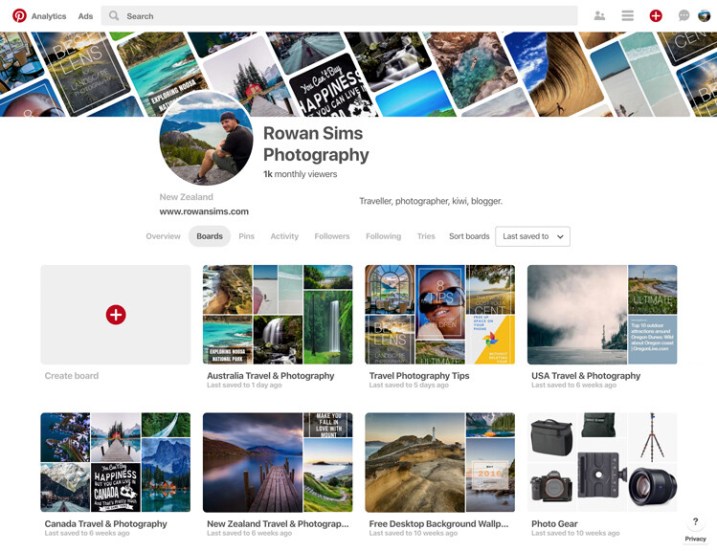
Pinterest

Just like Instagram, Pinterest has grown into a social network with a massive number of users, and it has the added advantage of being heavily visual. It’s a great place to be able to share your portfolio with the potential of being seen by a large audience.

Pinterest allows you to create boards and then “pin” your photos to as many boards as you like. You can create a different board for each photography category or location, such as “Weddings” or “Australia”. You can even have a “Portfolio” board where you only pin your best photos.

pinterest free vs paid photography portfolio websites

Pinterest also allows you to pin web pages, so if you have a blog you can pin your posts. The ability for others to re-pin your pins to their own boards means your work can be seen by a lot more people. You can also create inspiration boards for re-pinning other photographers’ pins. With all these features, Pinterest is definitely worth considering as a place to share your photography portfolio for free.

Paid Services

When it comes to paid photography portfolio websites, there aren’t as many options, but the ones that are available give you pretty amazing bang for your buck. Most professional photographers use one of these services these days, but that doesn’t mean you have to be a professional to use one.

They all have a range of options that vary in cost and features, but if you are considering a paid service for your portfolio, I’m sure you can find something that will fit your budget and needs.

Pros and Advantages

As with the free options, these services have their pros and cons. The biggest advantage, in my opinion, is the ability to customize how your portfolio looks and feels. You can change colors, layouts, text, logos, etc., all without needing to know how to code websites.

noosa national park sunshine coast queensland australia - photography portfolio

Most of them include unlimited storage for your photos, meaning you can upload as many high-resolution images as you want. This not only means you never have to delete another photo to make space for new ones, but you also have a copy of your photos backed up in the cloud.

The ability to sell your photos as prints or license them as stock directly from the website is a major attraction for many photographers. Each service’s e-commerce system works differently, but if this is a feature you want, you will find something that works for you. Some paid portfolio websites also allow you to deliver image files directly to clients, which works great if you’re a wedding or portrait photographer, or if you want to deliver files directly to a magazine, etc.

If you have a blog, some of these services will allow you to integrate your domain with your portfolio. For example, you can make your portfolio URL something like “portfolio.yourdomainname.com” rather than “yourname.photoshelter.com”. Visitors to your portfolio won’t even know that they’re on another website.

Driftwood bench seat on sand dunes overlooking Mount Maunganui Beach at sunset. - photography portfolio

Cons or Disadvantages

As you’re paying for premium features, there aren’t as many disadvantages of using a paid service. The main one is that they don’t have the social element that you get with photo-sharing sites or social networks. Getting your portfolio in front of eyeballs is a lot harder without the ability for viewers to engage with your work like they can on social media.

Although you have far more options to customize the way your portfolio appears, you’re still at the whim of the website that it is hosted on, and therefore how it functions. If you don’t like the features a website offers, it’s take-it-or-leave-it.

The following paid photography portfolio websites are by no means an exhaustive list, but these are some of the largest and most popular amongst photographers.

PhotoShelter

This is the first paid portfolio service I used for my own photography. PhotoShelter offers some of the best photography portfolios money can buy. Their websites look and work great, and their e-commerce features are second-to-none.

You can sell and license your photos directly through the website, and they even offer self-fulfilled printing if you want to print and ship images yourself. Although it’s one of the most expensive services, PhotoShelter is a solid option.

photoshelter free vs paid photography portfolio websites

SmugMug

I switched from PhotoShelter to SmugMug a few years ago after running an experiment to see how the two big boys compared in terms of Google search traffic. SmugMug won hands-down, so I moved my portfolio over. The two are very comparable in terms of cost and features.

If you want a beautiful portfolio website that works well and offers unlimited storage, I would definitely consider SmugMug. They also offer a solid e-commerce system, although they let themselves down with their refusal to allow self-fulfilled printing, despite users requesting it for years.

smugmug free vs paid photography portfolio websites

Zenfolio

I haven’t used Zenfolio personally, but from what I’ve seen and heard from other photographers, it’s a service worth considering. Their websites look great, although aren’t as customizable as the competition. Zenfolio is one of the more affordable services available, especially if you aren’t planning to sell your photos. It’s definitely, worth a look.

zenfolio free vs paid photography portfolio websites

Editor’s note: I personally use Zenfolio (screenshot below) and have used their print fulfillment services for clients, as well as for file downloads. It all works seamlessly and you can set your own prices with the Pro or Advanced plans. So, I can add my recommendation for this service. 

Zenfolio photography portfolio of Darlene Hildebrandt, dPS Managing Editor.

Self-Hosted Website and Portfolio

The last option sits somewhere between paid and free, and is yet another option to consider. If you want total freedom to customize and run your portfolio website however you want, you need your own self-hosted website.

The easiest way to do this is with an installation of WordPress on your own domain. It’s cheap and easy to set up with a service like BlueHost. Once it’s up and running, the options for your portfolio are endless. There are many free and paid gallery plugins, and if you want to sell your photos you can do it directly from your own website with a plugin like WooCommerce, all without having to pay anyone else a commission, so you get 100% of the profit.

If you have time (and are technology savvy) and you like to have total control over how things look and work, this is a great option. It does require a lot more user input, though, so be careful about rushing into it. If you prefer something that’s easier to set up and does most of the heavy lifting for you, one of the paid services is probably best.

tea tree bay sunset noosa heads queensland australia - photography portfolio

How do you choose?

With so many options, it’s hard to know which is best for you. The good news is that whatever you choose, nothing is permanent. I have used almost all of the services that I’ve mentioned in this article. They all worked for me at the time that I used them, and then I moved on when they no longer served my needs.

Try one or two of the free ones and see if you like them. If you think one of the paid services might be for you, they all offer free trials, so you don’t need to commit until you’re ready.

Whatever you decide, remember to have fun and don’t take it too seriously. Sharing your photos with the world can be one of the most enjoyable parts of photography. I would love to know about your experiences with portfolio websites. Have you used any of the websites mentioned? Are there any others you would recommend? Questions? Let me know in the comments area below.

The post Free Versus Paid Photography Portfolio Websites – Which is Best for You? appeared first on Digital Photography School.


Digital Photography School

 
Comments Off on Free Versus Paid Photography Portfolio Websites – Which is Best for You?

Posted in Photography


Buying guide update: The Sony a7 III is the best camera you can buy for under $2000

09 May

The Sony a7 III impressed us in our recent in-depth review, and now that it has a final score we’ve revisited our collection of buying guides to reflect our final conclusions about the camera. The a7 III’s combination of solid image quality, versatile autofocus and impressive 4K video quality make it extremely competitive, and for those reasons we’ve selected it both as our top choice for shooting people and events, and our overall top pick under $ 2000.

Read our updated buying guide: Best Cameras for People and Events

Read our updated buying guide: Best Cameras Under $ 2000

Articles: Digital Photography Review (dpreview.com)

 
Comments Off on Buying guide update: The Sony a7 III is the best camera you can buy for under $2000

Posted in Uncategorized


PIXEO is a crowdsourced collection of the best photo spots around the world

08 May

Whether you’re looking for new spots in town or looking for the best photo locations while on vacation, a new app called PIXEO is here to help.

Made exclusively for iOS (for now), PIXEO is a paid photo scouting app that relies on crowdsourced information to show the best photo spots in a given area. It currently features more than 10,000 locations, provided by more than 200 paid subscribers.

Beyond location, the pins across the map include photos that have been taking there, the current weather at a chosen location, directions to get there and notes from other photographers on whether or not the location is worth your time.

Using the app is simple. After downloading PIXEO from the iOS App Store, you’re presented with the opportunity to subscribe monthly or annually for $ 3 per month or $ 25 per year, respectively. Don’t worry, though. There’s a 30-day free trial to test the waters and see if it works for you.

Once in the app, it’s just a matter of finding an area you want to scout for locations. After you select a location and find a pin that another photographer has contributed, you can just save it to your favorites and hit the road.

PIXEO was only launched two weeks ago, so don’t worry if there’s nothing nearby. It has been featured in the ‘Best of What’s New’ section in the iOS App Store in multiple countries and is continually gaining new locations.

You can take PIXEO for a spin by downloading it from the iOS App Store.

Articles: Digital Photography Review (dpreview.com)

 
Comments Off on PIXEO is a crowdsourced collection of the best photo spots around the world

Posted in Uncategorized


Which Size Lensball is Best for Crystal Ball Photography?

06 May

The world is in your hands, well it can certainly seem that way when you do crystal ball photography. The crystal ball allows you to take refraction photos, which reveal the background scene within the ball. It’s a great technique, with which many people are having a lot of fun.

The photographic technique has now become so popular that photographers have re-branded the crystal ball as a lensball! So the question that’s often asked is which lensball size is the correct one to buy? Let’s take a look at the various options available when buying a crystal ball, and decide which is the best for you.

Which Size Lensball is Best for Crystal Ball Photography? - 3 sizes

Which size of the lensball is the best? There are three here, an 80, a 120 and a 60mm ball.

Small Lensball

The small size lensball is anything less than 60mm, so all the way down to a marble. These balls are the easiest to pack and are considerably lighter than the other balls. So what are the strengths and weaknesses of this particular size?

Strengths

  • Weight – These add almost no weight to your bag at all, and this also makes them easier to use for handheld photos.
  • Size – Again owing to their small size they’ll be easier to pack, giving you more space for other items. The smaller size also allows you to place the ball in gaps where the larger balls won’t fit.
  • Handheld – This size makes it easier to hold the ball between your finger and thumb, which becomes more difficult at larger sizes.
Which Size Lensball is Best for Crystal Ball Photography?

This position to rest the ball is only possible with a small lensball.

Weaknesses

  • Weight – This is also a weakness. Once a heavy ball is in place it usually stays there. The problem comes on a windy day, where the wind can move a lighter ball much more easily.
  • Focus and distortion – This lensball size will have a smaller sweet spot for focus, and a greater proportion of the ball will be distorted. Using a smaller aperture can help, as more of the ball will be focused.
  • Lens required – You will need a macro lens when using a small lensball if you wish to fill the frame with the ball.
Which Size Lensball is Best for Crystal Ball Photography?

The small size is perfect to hold between your index finger and thumb.

Medium Lensball size

This refers to balls at 80mm in diameter. Many photographers see this as the ideal size for their refraction photography. There are a lot of good reasons why you should also use this size of lensball. Let’s break it down, as this is the crystal ball you’ll likely be using.

Strengths

  • Weight – This is a little heavier, but still not noticeable. So it’s a nice thing to carry in your camera bag to add a bit more creativity to your work.
  • Size – This is a decent size, though you might not fit this ball into a small space. The ball will fill a nice portion of your frame with a standard lens, using a macro is optional at this size.
  • Focus and distortion – By this size, the sweet spot area of focus within the ball dominates the scene inside the ball, and distortions at the edge are much less noticeable.

Weaknesses

  • Size – There are very few weaknesses in this size of a lensball. However, if you wish to take a photo where you frame just the edge of the ball this is more difficult. Likewise using the ball to eclipse a background object is also more difficult, as the ball is that much smaller.
Which Size Lensball is Best for Crystal Ball Photography?

The lensball is ideal for many kinds of creative takes on typical scenes. Here it’s used to capture a road lined with cherry blossom trees.

Large Lensball

The large size refers to those balls that are 100mm or over in diameter. This size is not common amongst most photographers, though this is the size I cut my teeth on for crystal ball photography.

Even with the extra weight, this is often the preferred size for me personally, it just gives better quality images in my opinion. Whether this is the size for you will come down to if you want to carry the extra weight or not.

Strengths

  • Optics – This size offers the best in optics, a larger proportion of the ball will be in sharp focus.
  • Handheld – This is a much more natural size to fit in the palm of your hand or someone else’s palm. One classic crystal ball composition is that of a hand cupping the ball.
  • Size – This makes it far easier to fill the frame with your ball, and even hide some background elements behind the ball.
Which Size Lensball is Best for Crystal Ball Photography?

A larger size ball will both fill the frame more easily and cover up the background when it’s close to the camera.

Weaknesses

  • Weight – The obvious weakness here is weight. Those not used to carrying a heavy camera bag should avoid this crystal ball size. The weight is equivalent to an extra lens in your camera bag. It comes down to whether you want an extra lens or the larger crystal ball in your bag.
  • Size – While optics are better when photographing this size, the larger size is not so good for storage. This will take up a large space in your bag.
Which Size Lensball is Best for Crystal Ball Photography?

This particular way of holding the crystal ball is one of the classics. It’s not so natural looking with a smaller sized ball.

Safety

The crystal ball is a really great photographic tool to play with, though there are some safety issues you need to be aware of. You will also find that staff in the airport may consider the crystal ball a lethal weapon! This means you will have to put it in your checked luggage, hand luggage is not an option.

So what are these safety concerns then?

  • Fire hazard – Keep the crystal ball stored somewhere out of the sun. The glass will act in the same way a magnifying glass does, and while this will usually only result in smoke it can lead to a fire as well. Oh not to mention, it can burn your hand when you are holding it as well!
  • Gravity – Due to its spherical nature the ball is liable to roll. If it rolls off the edge of a tall building it can cause damage to whatever it hits. Take care with the ball in such situations.
Which Size Lensball is Best for Crystal Ball Photography?

Having a small crystal ball with me enabled me to fit it in the gap of this fence.

Conclusion

Asking which size if crystal ball you should buy is a little like asking which is the best tripod. Everyone knows the sturdiest tripod is best, but that it’s impractical to carry around for the whole day.

The same is true of the crystal ball, the 80mm medium sized ball then is probably the best choice. There is certainly a case for the smaller or larger size of balls though, so if you decide to get a second ball how about a different size?

Using more than one ball at a time can also be fun!

As mentioned in this article, the 80mm is both not too heavy, yet doesn’t sacrifice the image within the ball making this a good size.

Have you bought a crystal ball, or are you thinking of doing so? We’d love to see your comments, and images – please share below.

The post Which Size Lensball is Best for Crystal Ball Photography? appeared first on Digital Photography School.


Digital Photography School

 
Comments Off on Which Size Lensball is Best for Crystal Ball Photography?

Posted in Photography


Tutorial: The best way to sharpen portraits in Photoshop

03 May

Sharpening plays an important role in influencing how the human eye interprets a photo and it is the only way to create the illusion of higher definition and detail. Also, much like we use light, color, and composition, it is an extremely effective way to guide the eyes of the viewer to wherever you want them to focus.

The first question to ask isn’t how to sharpen but when to sharpen. Any retouching, compositing, coloring, and any other edits you’ve made should be included in the sharpening process. So make sure that it’s the final step in your workflow just before you export! It’s important to note that you’ll want to resize your images beforehand as well. Resizing an image that has already been sharpened can have adverse effects such as reducing or exaggerating the amount of sharpening.

For example, if you want to upload one of your latest photos to Instagram, first resize your image to 1080 x 1080 pixels (their recommended dimensions for square images). Then go through the sharpening process as normal. Doing this will guarantee that your image quality will be consistent no matter what size your image is or where it will be displayed.

To begin the sharpening process, create a new layer, go to the Image menu, and select Apply Image. Apply Image will take all of the visible layers in your project and merge them together onto the new layer. This will allow you to sharpen your final image (including all of the edits you’ve made) without affecting the originals.

As far as technique goes, there are many ways to sharpen an image. I’ve always preferred the High Pass method which involves converting the new merged image into a Smart Object and then using a High Pass Filter to apply the sharpening effect. Since we’re working with a Smart Object and a Smart Filter, we can always go back to make changes to the radius by simply double-clicking on the High Pass option underneath the layer.

My favorite thing about this technique is just how flexible and precise it can be! If I ever need to make changes to the amount of sharpening I can either duplicate the sharpening layer (for a subtle adjustment), change the radius of the High Pass Filter, raise or lower the opacity, or simply paint with the Brush Tool on the layer mask.

Using Layer Masks, you can apply different levels of sharpening to different parts of a photo. You can have a sharpening layer just for facial features and a second for wardrobe. Create as many layers of sharpening as you need to get the look that you want. Overall, focus your sharpening on aesthetic details in your photo—hair, eyes, jewelry, details in clothing—anything that you want to stand out. Avoid sharpening things that might distract the viewer or bring out details you don’t want to be as noticeable (i.e. pores).

Like most things that we’ll do in Photoshop, sharpening is highly subjective. It’s up to you to determine where and how much to sharpen. And while we use a portrait as our example, this method works across all types of photography! This is a process I’ve developed over several years and it has served me well. So give it a try! I only hope that it helps you figure out your own favorite method that’s best suited for you and your work.


About the Author: For over seven years, Aaron Nace has been teaching photography and photo manipulation on PHLEARN.com to millions of users across the world at every skill level. You can subscribe for his professional videos or view the Photoshop tutorials as well.

Articles: Digital Photography Review (dpreview.com)

 
Comments Off on Tutorial: The best way to sharpen portraits in Photoshop

Posted in Uncategorized