RSS
 

Posts Tagged ‘Before’

Before and After: How This Photo was Processed in Lightroom

16 Sep

Andrew’s ebook Mastering Lightroom: Book Four – The Photos is available now at a special price of 40% off for a limited time from Snapndeals. It’s an advanced guide to processing photos in Lightroom’s Develop module, explaining how to use Lightroom’s powerful processing engine plus Develop Presets and plug-ins to create beautiful images.
Post-processing in Lightroom

The Story

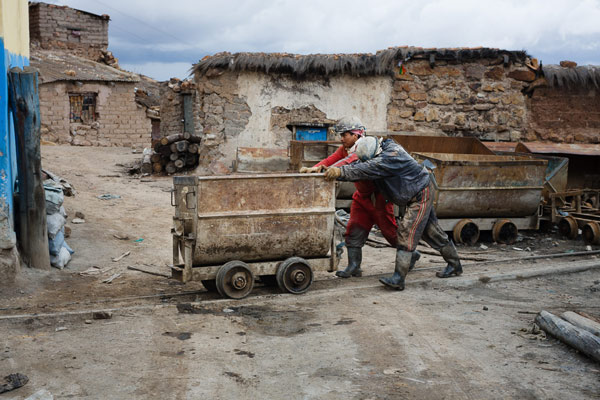
A few years ago I passed through Bolivia, South America’s poorest and, in some ways, least developed country. I spent a few days in Potosí, a small, largely forgotten city whose history had a central role in shaping the modern world. Built at the foot of the Cerro Rico (Rich Hill), the silver mined in Potosí flowed across the continent, through the cities of Cartagena and Havana, and across the ocean to Sevilla and Madrid in Spain, where it powered the rise of European nations as the wealthiest and most developed of the era.
lightroom-post-processing-example-10

The silver no longer flows from Potosí, although the mines are still open. The city seems to exist on a mixture of mining output and tourism. It’s one of the world’s highest cities, sitting a little over 4,000 metres above sea level in the Bolivian Andes. It’s a cold place, even in the summer. Sleet or snow can strike at any time of the year.

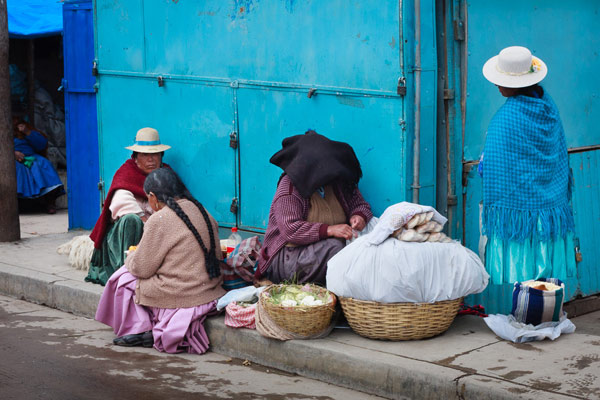
I liked wandering the streets as dusk fell, watching the local people as they went about their daily activities. It was a busy time, with kids out of school, shops closing and people leaving work. Potosí is a city of contrasts: the poverty of some of the local inhabitants against the relative affluence of foreign travellers; the fading grandeur of the magnificent old colonial architecture against the newer mud brick houses at the edges of the city; the tragedy and scope of the city’s history against the snippets of modern daily life. The feeling that, even after hundreds of years, this is still a place where the traditions of the people who lived here before the Spanish came intersect with the ways of modern, European descended South Americans.
lightroom-post-processing-example-11

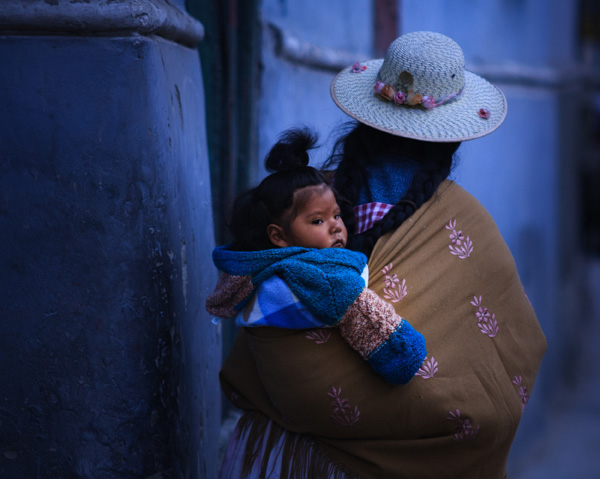
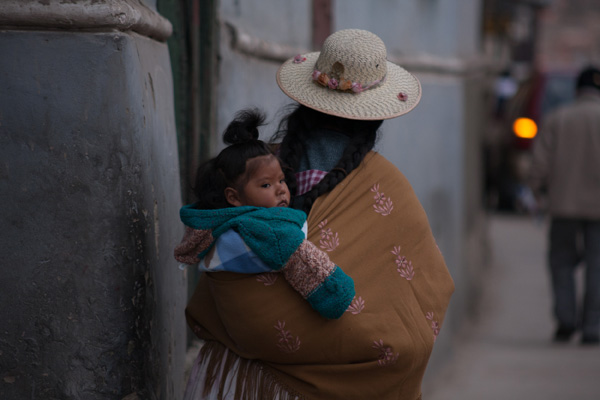
As I wandered around the streets, dusk falling, a Bolivian lady walked around the corner. She had tied her hair in two long plaits, and wore a Bolivian style sun hat on her head. There was a blanket slung around her shoulders, inside which sat a baby, hair styled in a topknot, looking behind it as his mother walked onwards. I had time to raise the camera and take a single photo before a second child walked around the corner and blocked my view.

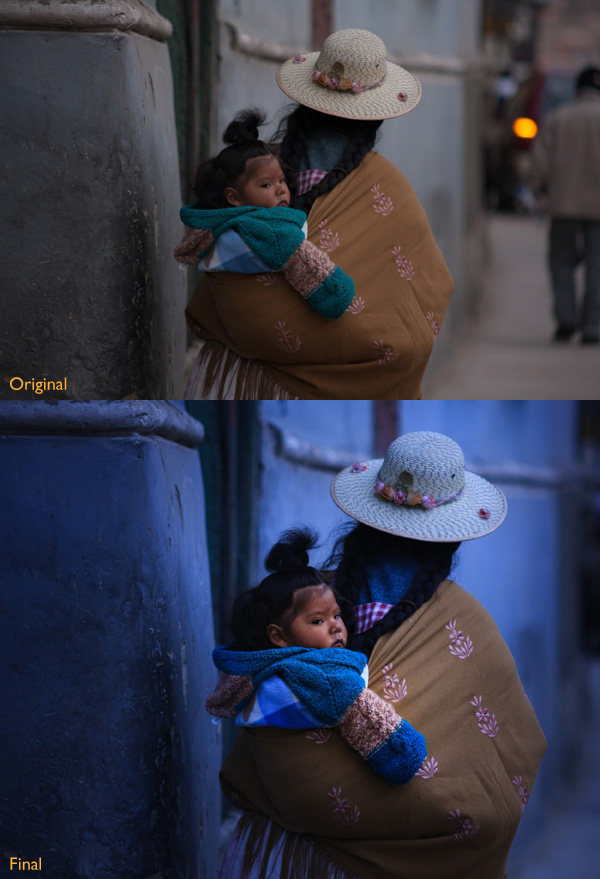
This photo isn’t perfect. The baby’s face is slightly out of focus. The photo was underexposed (the moment happened so fast I didn’t have time to dial in exposure compensation). The rear light of a car and the out of focus man in the background are distractions (see the original version below). Yet that’s not important. Photography is about evoking emotion, and sometimes things happen too fast for technical perfection.

What matters is the moment. In this photo it’s the juxtaposition between the mother walking one way and her baby looking another. The atmosphere created by the fading light of another cold night in Potosí. The age of the building she is walking past. The intersection of ancient ways with the present day.

This is a photo I come back to again and again, reprocessing as my skills improve. Each time my approach is driven by my memory of that moment and how it felt. Ask yourself the same question when processing images. How did the moment feel? And how can you express that feeling with colour, light and shadow?

First steps

There are plenty of things wrong with the original photo (below). It’s underexposed, and needs brightening (although not too much as I want to retain the atmosphere created by the fading light). The background is distracting. The colours are muddy.
Post-processing in Lightroom

Step 1 Basic corrections

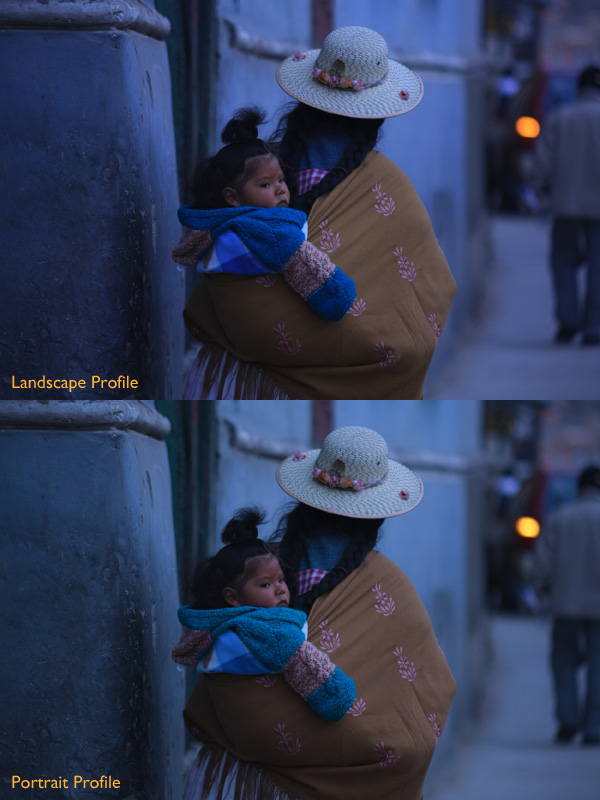
The baby is the natural focal point of the photo, and I wanted to emphasize it. I also wanted a lot of blue, the natural colour of light during dusk, in the photo. To start, I set Profile in the Camera Calibration panel to Camera Landscape. This setting is intended for use with landscape photos, but you can use it whenever you want to emphasize the colours blue or green. I also went to the Lens Corrections panel and enabled both Profile Corrections (with Vignetting set to zero) and Chromatic Aberration removal.

I went to the Basic panel and kept Exposure where it was, even though the photo was underexposed, because I liked the gloomy atmosphere. I set White Balance to auto, which gave a neutral colour, then reduced it (to 3639 Kelvin) to create a blue colour cast. This gave me a good starting point.
Post-processing in Lightroom

Two versions of the photo after the completion of step one. One has the Camera Landscape profile and the other the Camera Portrait profile. Even though it may seem logical to use the Camera Portrait profile on a photo containing people, Camera Landscape is the better option given my intention, as it gives the most appropriate colours.

Isolating the subject

My aim now is to continue the processing in a way that minimises distractions and places the emphasis on the baby.

Step 2 Crop

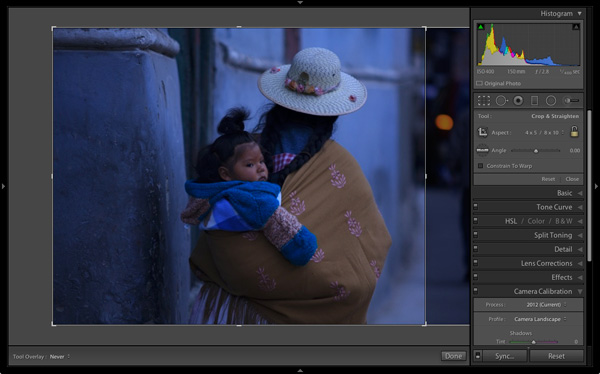
I used the Crop tool to cut the right-hand side of the photo, eliminating the distracting background. This makes a big difference as the eye is no longer being pulled away from the people by the blurred light.
Post-processing in Lightroom

Step 3 Local adjustments

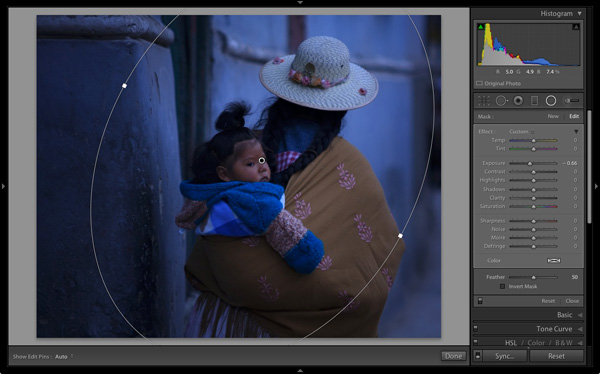
I added a Radial Filter and moved the Exposure slider left to make the background darker. The Radial Filter is new to Lightroom 5, but if you have an earlier version of Lightroom, you can do something similar with the Adjustment Brush (by painting in the area you want to darken).
Post-processing in Lightroom

Step 4 Add some punch

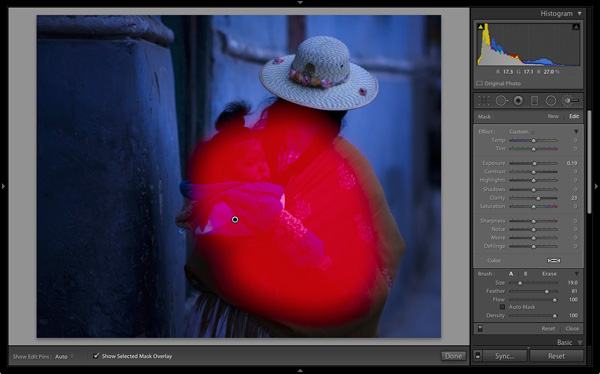
The photo was quite flat so I returned to the Basic panel and increased Contrast. Then I used the Adjustment Brush to make a selection over the woman’s back and the child, and increased Clarity and Exposure. The aim was to make the baby sharper, and a little brighter, than the rest of the image, encouraging the eye to go to that part of the photo.

This screen shot shows the mask created by the Adjustment Brush.
Post-processing in Lightroom

Step 5 Make color work

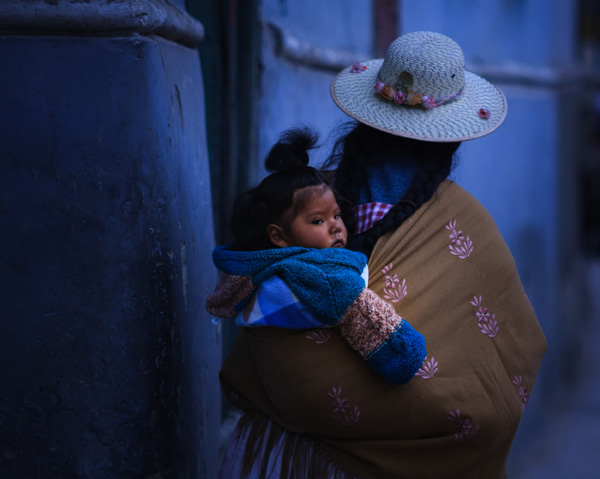
Next I used the Adjustment Brush again to select a smaller area and moved the Temp slider right, making that area warmer. The idea here is to work on the natural colour contrast between the colours of orange and blue.

This image below shows the result of these adjustments. The key was to make them subtle so the image looked natural and not over-processed.
Post-processing in Lightroom

Throughout the processing I imagined that I had taken the photo on slide film and that the scene really did look like that. The fact that the scene would have come out differently than my version is incidental. The idea was just a guide to the approach I should take.

Step 6 Darken edges of the image

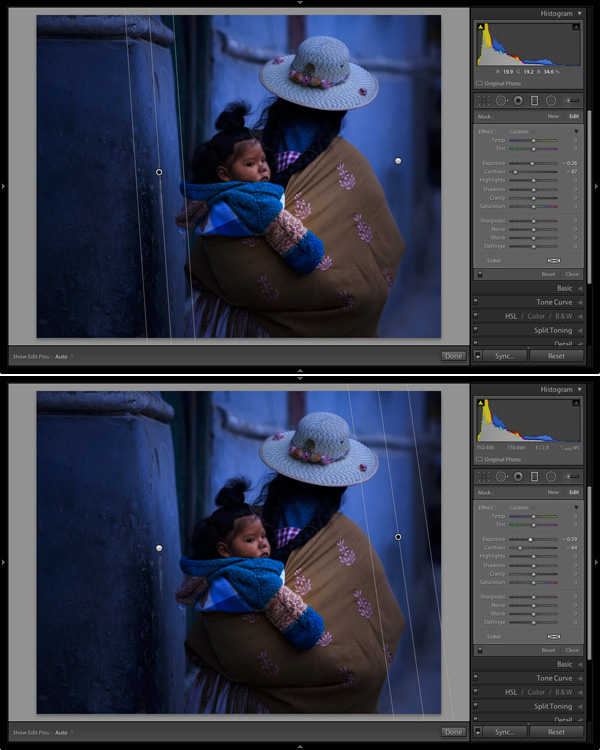
Next I created two Graduated Filters, one on either side of the frame. I reduced the Contrast in each one. A side effect of reducing Contrast is that the area affected also becomes lighter, so I adjusted Exposure to make them darker again.

These are subtle adjustments that reduce contrast at the edges to emphasise the area around the baby in the centre of the image, where I increased Clarity earlier.
Post-processing in Lightroom

Finally I decided the image was too dark and increased Exposure to compensate. Here’s the original and final versions together so you can compare them.
Post-processing in Lightroom

What do you think of these processing techniques and the style in which the photo was processed? Do you have any suggestions for an alternative interpretation of the original Raw file?  Please let us know in the comments.
Mastering Lightroom: Book Four – The PhotosAndrew’s ebook Mastering Lightroom: Book Four – The Photos is available now at a special price of 40% off for a limited time from Snapndeals. It’s an advanced guide to processing photos in Lightroom’s Develop module, explaining how to use Lightroom’s powerful processing engine plus Develop Presets and plug-ins to create beautiful images.

The post Before and After: How This Photo was Processed in Lightroom by Andrew S. Gibson appeared first on Digital Photography School.



Digital Photography School

 
Comments Off on Before and After: How This Photo was Processed in Lightroom

Posted in Photography


Sigma offers ‘Try before you buy’ program for DP2 Quattro

02 Jul

Photographers looking to try out a Sigma dp2 Quattro compact digital camera before making a purchase (and given its radical design, that’s a really good idea) can now take advantage of the Sigma ‘Try Before You Buy’ loaner program, launched today. Under the new program, photographers are invited to test the new camera before it begins shipping. Learn more

related news: Digital Photography Review (dpreview.com)

 
Comments Off on Sigma offers ‘Try before you buy’ program for DP2 Quattro

Posted in Uncategorized


Developing a Creative Eye – be Careful Before Deleting Your Photos

06 Apr
PhotoA Good Eye

Photo A: ‘Reflections On Land’ by Patrick Elliott

DEVELOP A CREATIVE EYE

The more you get out and use your camera, the more proficient you become as a photographer. In the process of learning and using your camera, you will develop a better eye from a creative perspective. It is important that you put this “creative eye” to use on a regular basis, not only to maintain it, but also to improve it.

Taking pictures isn’t the only time you have to use your creative eye. You can use it by looking at other people’s pictures to see what you could have done differently, or what factors you will take from their pictures to add to your photography. As you go through your daily routine, you can imagine that you are constantly looking through a viewfinder or LCD screen, and as your eye develops, you will have more and more ideas for creative shots everywhere you go.

You can especially put your eye to use by looking at your pictures before the editing process. Developing this creative eye will benefit you as you are sorting through the pictures after a photo shoot. Put your eye to use by carefully looking at all of your images before deleting any of them. Let me tell you why.

DELETE IT OR KEEP IT?

It is very common to come back to your computer after a photo shoot, dump the images into your computer, and start deleting all the “bad” shots. Or, you may be the type who deletes the “bad” shots in the camera before importing them into your computer. Either way, be careful as you do this because you could overlook a good thing in those shots. The photo above (Photo A) isn’t a planned shot that I took during a photo shoot. It is the result of using my eye before deleting a bad shot. If you look at the photo below (Photo B), it is a bad shot that was not the model’s fault. We were outdoors and the lighting kept changing constantly because the sky was rapidly going through changes. She was in the process of getting prepared for a shot, and I was taking test shots while adjusting my settings to get the correct exposure.

As I got the images from that photo shoot to my computer, the photo that you see below (Photo B) was a “bad” shot that would normally go to the trash bin. But, before deleting it, I put my creative eye to use by carefully looking over it and something caught my eye. I saw a photo within the photo, and decided to open it up in my photo editor to bring this vision to life. I put my crop tool to use, and the result was the photo that you see above (Photo A).

PhotoB Bad Shot

Photo B: Carefully look over a bad shot like this before deleting

HOW SHARP IS YOUR EYE?

Do all that you can to develop a creative eye. I have mentioned a few techniques for you to practice so that your eye can become sharper. It is more than likely that photography may have you spending more time sitting down at the computer rather than the actual photo shoot. Use that time to really put your eye to use. What ways do you develop your creative eye? Have you ever seen something special in a picture before deleting it?

PhotoC Bad Shot

A test shot that would normally be deleted

PhotoD Good Eye

‘Living Outside’ by Patrick Elliott. Using the creative eye to make good use of a ‘bad shot’ you see in the image just above.

The post Developing a Creative Eye – be Careful Before Deleting Your Photos by Patrick Elliott appeared first on Digital Photography School.


Digital Photography School

 
Comments Off on Developing a Creative Eye – be Careful Before Deleting Your Photos

Posted in Photography


5 Things to Consider Before Starting Your Photography Business

29 Jan

Starting a photography business is extremely easy with the accessibility and affordability of digital cameras and processing programs. Often the lure of entrepreneurship, with these low barriers to entry, leads to many photography business owners of all business experiences. Experience levels range from lack of business competence, to the need for growth in photography skills to a mixture of skills with varying weaknesses and strengths. Before entering into business it is important to evaluate whether you are technically proficient, ready to deal with business legalities, have a good grasp of business operating costs, engaging in market research and client management.

Photography business 05

#1 – Are you technically proficient?

The first step is to determine if technical proficiency is at a level to provide a quality, consistent product to each client that comes through the door. The importance of delivering consistently rests in word of mouth marketing and preventing disappointment when a client’s expectations are not met.

Photography business 04

#2 – Are you ready to deal with business legalities?

After technical proficiency comes the battle of business legalities including (but certainly not limited to: business formation, filing appropriate tax documents, acquiring required permits and licenses and using quality contractual documents. These legalities can be acquired through outsourcing to lawyers and certified public accountants, but a good, knowledgeable grasp of business legalities and the requirements placed on business owners is paramount to the success of your business.

Photography business 03

#3 – Do you know your business operating costs?

Following the previous two business necessities comes the costs of running the business. Having arms around the operating costs will assist you in setting appropriate pricing, and in making future investment decisions. Business operating costs are expenses that are directly related to the operation of the photography business. This is calculated by ascertaining costs of resources used to maintain the existence of the business. Operating costs include: rent, utilities, licenses, fees, insurance, maintenance of equipment, office supplies, income taxes, and wages.

Note: It is a good idea to also include a “rainy day savings” into the operating costs for you to have to fall-back on in times of need.

Photography business 02

#4 – Have you done your research?

An ever-required and demanding aspect of business is the initial and constant research on market influences, demands and overall factors that impact how the business will be maintained and marketed. Engaging in research is an organized effort to obtain information about the local market and potential clients. In order to effectively create and implement a successful business strategy, research must be done. Research should include identifying marketing information, trends, and the SWOT (SWOT = Strength, Weakness, Opportunity and Threats to the business) analysis of competitors. The strategies decided upon from out of this research are a key factor to maintaining a competitive edge over competitors and a higher probability for engaging clients.

Photography business 07

#5 – Do you know how to manage clients?

Juggling all of the previous “business things” can get even more complicated when adding on managing of clients. Having a solid business workflow filled with automation, organization and constant revision is necessity to keep the business moving forward when it becomes easy to be distracted with client management and production of the products and services.

Photography business 06

Having the right answers to these considerations does not guarantee a successful business but will increase probability for success, higher level of client satisfaction and less frustration along the way.

The post 5 Things to Consider Before Starting Your Photography Business by Rachel Brenke appeared first on Digital Photography School.


Digital Photography School

 
Comments Off on 5 Things to Consider Before Starting Your Photography Business

Posted in Photography


Photographing the World’s Most Secluded Tribes: Before they Pass Away

17 Nov

Got 12 minutes? Check out this TED talk by photographer Jimmy Nelson who tells the story behind his amazing project ‘Before they Pass Away‘. A project where Jimmy sets out to photograph 35 of the world’s most secluded tribes.

In this video Jimmy shares 3 lessons (through story) that he’s learned through meeting and photographing these tribes.

Learn more about Jimmy’s project and meet the tribes he photographed at his website and grab a copy of his book of the same name to see the amazing images he’s created.

Post originally from: Digital Photography Tips.

Check out our more Photography Tips at Photography Tips for Beginners, Portrait Photography Tips and Wedding Photography Tips.

Photographing the World’s Most Secluded Tribes: Before they Pass Away

The post Photographing the World’s Most Secluded Tribes: Before they Pass Away by Darren Rowse appeared first on Digital Photography School.

Digital Photography School

 
Comments Off on Photographing the World’s Most Secluded Tribes: Before they Pass Away

Posted in Photography


The Hardest Part: What Happens Before Clicking The Shutter

11 Nov

It’s late afternoon and I’m headed to a location that should have interesting subject material to photograph. Did I leave enough time to get there? Is the weather going to cooperate? Is the light going to be right? Will I even make it in time to set up before the light hits? More importantly and most unnerving in the back of my mind the biggest question hits, “Will I even be able to find something worthy of photographing?” This important question isn’t about physically finding something, it has to do with mentally being able to see something worthy of photographing and showing to others.

The hardest part of photography happens before the shutter even clicks. It’s easy to fret over logistical concerns, but my biggest source of anxiety is not being able to mentally picture a photo worth taking and showing. Consider this stage fright for an audience of one, the twilight zone of a photographer’s universe.

Over time I’ve tackled insecurities about technical concerns, but without fail this one powerful question always creeps into my mind on every shoot. The “art of seeing” is about experience, practice, breaking habits, but most importantly clarity of mind. Whether out in the field or in a studio it is the same, idle time fuels doubtful thoughts. As soon as I step foot into the environment I am photographing this anxiety inducing question is quickly drowned out.  Why? Because what I photograph and “see” is a reflection of my passion. What I love to photograph I know inside and out. Even if I didn’t have a camera in hand my natural curiosity and mind’s eye would fill my brain with ideas when immersed in an environment I love. The best trick I learned when in an environment I may not love, but need to get the shot is to extrapolate ideas and techniques I’ve applied in “loved” environments in new environments.

Whether you’re new to photography or if you’re a seasoned professional I am 100% certain you’ve had this doubtful question creep into your mind. While it goes unspoken because we’re either too proud or insecure, we’re all in the same boat and subject to the same self doubt. Just be sure if fuels you, rather than consumes you.

Recommended & Related Reading

  • One of Photography’s Great Paradoxes
  • Pro Tip: Always Check the Views Behind You
  • Nature, Creativity and Seeing Plus
  • Two Quotes of Note On The Topic of “Art of Seeing”
Bonus Quote of Inspiration

Clarity of mind means clarity of passion, too; this is why a great and clear mind loves ardently and sees distinctly what it loves.

Blaise Pascal

French mathematician, physicist (1623 – 1662)


Copyright Jim M. Goldstein, All Rights Reserved

The Hardest Part: What Happens Before Clicking The Shutter

The post The Hardest Part: What Happens Before Clicking The Shutter appeared first on JMG-Galleries – Landscape, Nature & Travel Photography.


Related Stories

  • The Hardest Part: What Happens Before Clicking The Shutter – Enclosure
  • The Ancients – Bristlecone Pine Forest, California – Enclosure
  • The Ancients – Bristlecone Pine Forest, California
Feed Ads by FeedBlitz
powered by ad choices


JMG-Galleries

 
Comments Off on The Hardest Part: What Happens Before Clicking The Shutter

Posted in Equipment


How To Prepare For Successful Landscape Shoots [Before You Head Out]

11 Oct

One of the simplest ways to capture great photographs is to prepare yourself for success before you head out the door. I’ve used this process of preparing for shoots for the last few years and it’s worked great for me – I’d love to hear what else people are doing to prepare for their own shoots in the comments below.

How To Prepare For Successful Landscape Shoots: The Day Before

Virtually Scout the Location

How To Prepare For Successful Landscape Shoots

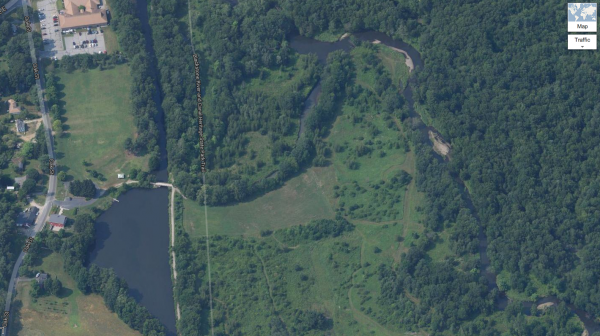
Usually the night before a shoot I will open up Google Earth, Maps and/or various other apps to scout the location for things like parking spots, water features, sun angles and whatever else might be of interest to me for that particular shoot.

It can be helpful to look through Flickr or another location based photography service to get an idea of what other photographers have found interesting before your visit.

Charge Up

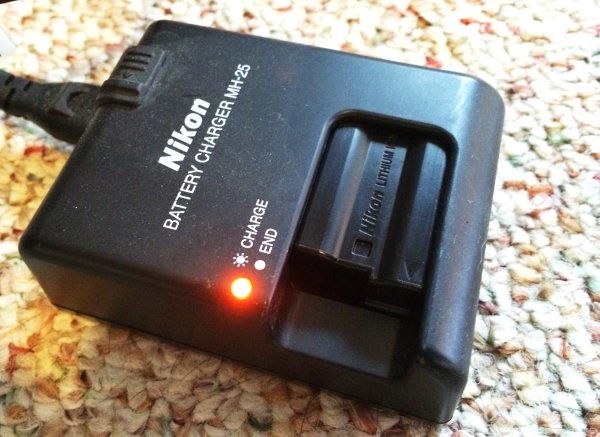
It should go without saying, but make sure you’re camera is fully charged before you go to sleep. The last thing you want is to be ready to head out the door and find out your camera’s got one bar of battery life left in it. On the same note make sure your SD/CF cards are empty and packed as well – that’s a mistake you’ll only make once.

How To Prepare For Successful Landscape Shoots

This step doesn’t just include the camera though – you should make sure that your own body is fully charged as well. Have a good sized dinner and get to bed early, eat a healthy breakfast and pack snacks to take with you. If there’s one thing that will ruin your photos faster than anything it’s an empty belly – you’ll start to get frustrated easy, you’ll care less about what you’re doing, and ultimately you will make mistakes which is the last thing we want to do when we’ve gone through all the effort to get to this location in the first place.

How To Prepare For Successful Landscape Shoots: Before You Leave

Check the Weather Report

How To Prepare For Successful Landscape Shoots

It’s easy to take for granted, but it’s important to get a weather report for the day and area you’re heading before you leave the house. If you’re planning to hike a mountain know that it will be chillier the higher you go and just because the weather is fair in your backyard doesn’t mean that it’s the same at your location of interest.

Dress Accordingly

How To Prepare For Successful Landscape Shoots

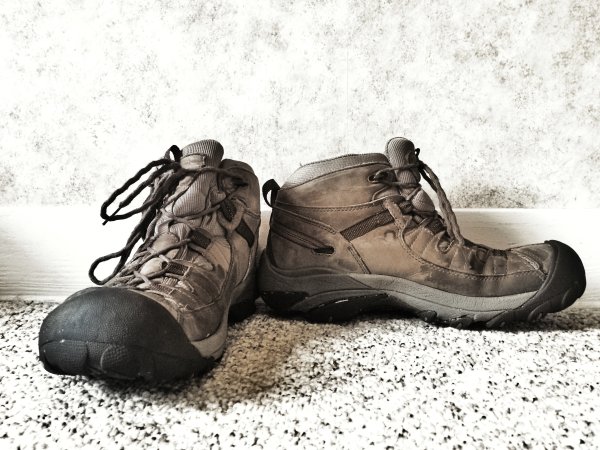
Hiking boots are a must if you want to get into locations off-the-beaten path, but you can do fine in comfortable sneakers if you’re not planning traverse any serious terrain. That said you should plan to wear comfortable and breathable clothing – jeans and cotton shirts are rarely a good option as they don’t keep you warm and if they get wet they will take forever to dry.

How To Prepare For Successful Landscape Shoots: On Scene

Arrive Early

I can’t stress this enough! The last thing you want to do is show up as the sun is setting or after it has risen. If you arrive early you can set up the camera and capture many different locations with the light that you have.

How To Prepare For Successful Landscape Shoots

As the light changes you may want to revisit your previous locations or continue looking for new ones, but as long as you’ve gotten there early, you should end up with a bunch of shots to process when you return home.

Take Your Time

Rushing around will not allow your mind to think properly. When you rush your shots the odds are increased that you’ll get home to find out that you left your ISO at some unusable number or your aperture was at f/2.8 when it was supposed to be at f/11.

How To Prepare For Successful Landscape Shoots

Take each shot as seriously as the last one you took and make the adjustments that are needed to get the best image out of the scene before you. Sometimes I find it helpful to even simply get up and walk away from the camera and give myself a break. Of course, when I do that, I still end up taking photographs with my phone, but those are more  for fun than anything else.

Returning Home

Processing the Results

After all is captured and you’ve safely made it back to your house it’s time to process your what you’ve recorded. This part is truly up to you and your creative style, but here is my workflow as a basis point.

How To Prepare For Successful Landscape Shoots

I will start with import the RAW files into Lightroom and going through to clean out the ones I absolutely don’t see any use for. I’ll then make my selections of the ones that are first on the list to get process and do just that. On occasion I will do more processing and clean up in Photoshop, but with how powerful Lightroom has gotten over the last couple iterations of the software I’ve seen less and less need to do so. If you’re curious you can also watch me edit select photos every week on my Let’s Edit series.

To get even more information on landscape photography check out this amazing DPS eBook on the entire process.

Post originally from: Digital Photography Tips.

Check out our more Photography Tips at Photography Tips for Beginners, Portrait Photography Tips and Wedding Photography Tips.

How To Prepare For Successful Landscape Shoots [Before You Head Out]

The post How To Prepare For Successful Landscape Shoots [Before You Head Out] by John Davenport appeared first on Digital Photography School.


Digital Photography School

 
Comments Off on How To Prepare For Successful Landscape Shoots [Before You Head Out]

Posted in Photography


Catch the Moon: 100 Magnificent Moon Photos You Have Never Seen Before

21 Aug

The moon is at her full, and riding high, Floods the calm fields with light. The airs that hover in the summer sky Are all asleep tonight William C. Bryant Since the beginning of the world the Moon has always attracted humans with its magic light. So many years of history had passed before the first step on the Moon Continue Reading

The post Catch the Moon: 100 Magnificent Moon Photos You Have Never Seen Before appeared first on Photodoto.


Photodoto

 
Comments Off on Catch the Moon: 100 Magnificent Moon Photos You Have Never Seen Before

Posted in Photography


3 Questions to Answer Before You Fly into Adobe’s New Creative Cloud

09 Aug

Adobe’s announcement of their decision to switch to a subscription-only model has sparked off hot debates on whether they are justified in making this move. The Internet is flooded with concerns expressed by users of Adobe software – especially Photoshop – on whether they can now afford to continue using the software. Doing so will mean they would have already Continue Reading

The post 3 Questions to Answer Before You Fly into Adobe’s New Creative Cloud appeared first on Photodoto.


Photodoto

 
Comments Off on 3 Questions to Answer Before You Fly into Adobe’s New Creative Cloud

Posted in Photography


17 Signs That You Were Alive Before Digital Photography

02 Aug

bulk_film_loader.jpg

Feeling old? Photoshelter has published a humorous list of 17 signs that you were around before digital photography became the norm. For those of us that were, the list is a nostalgic look at some tools and accessories that have fallen into disuse, as well as a reminder, possibly, that some things remain useful, even in the digital age. If you’re too young to remember anything before digital, you should take a look at the list anyway. You might learn something. 

News: Digital Photography Review (dpreview.com)

 
Comments Off on 17 Signs That You Were Alive Before Digital Photography

Posted in Uncategorized