RSS
 

Posts Tagged ‘backgrounds’

Tutorial: How to light paint product photo backgrounds on the cheap

17 May

Dustin Dolby of workphlo is great at creating professional product shots using just one or two speedlights and some compositing in Photoshop. In this tutorial, he combines that approach—it takes just two speedlights to light these bottles, and he could have made due with one—with some simple smartphone light painting to create a dynamic and colorful soft drink product shot.

Here are the four exposures he composited together to light just the bottle. One shot using a stripbox through a diffusion panel on the right, one with a reflector added in on the left, another to light the label, and a fourth to give the bottle a bit of pop from behind:

$ (document).ready(function() { SampleGalleryV2({“containerId”:”embeddedSampleGallery_2436914201″,”galleryId”:”2436914201″,”isEmbeddedWidget”:true,”selectedImageIndex”:0,”isMobile”:false}) });

Combine that with a long-exposure light painting shot done in darkness by simply waving a smartphone with a solid color background around behind your product, and you get these two final images—one for each flavor:

Check out the full video up top to see how all of these images were composited together to create the final product photos. And if you’re just getting into product photography and enjoy simple, one or two-light setups, definitely give the whole workphlo YouTube channel a look.

Articles: Digital Photography Review (dpreview.com)

 
Comments Off on Tutorial: How to light paint product photo backgrounds on the cheap

Posted in Uncategorized


5 Tips for Killer Macro Backgrounds

20 Dec

You’ve got a perfect macro subject, the perfect angle, and the perfect composition. You’ve checked your focus, and it’s spot on. Your finger hovers over the shutter button. One quick press, and you’ll have the shot. It’s all there before you…right?

Maybe not. There’s one more thing that I’d urge you to check before you shoot – and that is the background.

Macro backgrounds coneflower 1

See, while subject, lighting, and setup matter a great deal in macro photography, the background matters too, far more than people often realize. This is quite understandable; it’s the background. As long as you’ve got the perfect subject, why worry?

But when it comes to macro photography, the background can make or break a shot. You’re often working with a limited compositional palette, of sorts. Lines, colors, shapes; macro photography simplifies things, which is not to say that it makes photography easier. Instead, it magnifies each element, making attention to detail all the more important.

Fortunately, getting good backgrounds is not that difficult. As you start to become conscious of backgrounds and of their importance, your eye will develop. But to jump-start your technique, here are five tips that will dramatically improve your macro images right away.

1. Simplicity is key

I said I’d give you five tips, but this one right here is the big one. This is the starting point that should drive all other background considerations.

When I say simplicity, I’m not necessarily advocating a static, uniform, black or white background (although that can work well). What I mean is that you don’t want clutter. You don’t want a background full of distracting shapes and lines that draw the eye away from the main subject.

For instance, one of my favorite types of backgrounds is just a single color. Nothing fancy, but nothing distracting, either. If you’re shooting in a natural area, maybe you can position yourself so that your subject has some trees behind it. Then you can capture a nice, green wash for your background.

Macro backgrounds pink cosmos 2

The background here is a simple green, which allows the colorful subject to pop.

And if it’s autumn, even better. The golds of the changing leaves make for some beautiful hues.

Macro backgrounds daisy 3

Once I found this flower, I shifted my position to include distant trees, which were exhibiting some lovely fall colors.

The key consideration here is that the background isn’t distracting. Aim for the background to complement the subject without overpowering it. In general, you’ll be safe with a uniform wash (but it’s also possible to go with something a little more complex, as you will see in tips four and five below).

2. Achieve good subject-background separation

When it comes to macro photography, sufficient separation between the subject and the background is crucial. That is, you’re going to want to find a subject that is a significant distance away from whatever sits behind it. When you focus on your subject in the foreground, distant background elements will generally become a pleasing blur, creating the solid wash that I discussed above.

So what exactly is a significant distance? In general, this is going to depend on a couple of things.

Macro backgrounds blackeyedsusan 9

First, camera to subject distance. The closer your camera is to the subject, the closer the background can be to the subject. If your camera is just five inches from a flower, then you’ll probably be okay with a background that’s only 10 inches behind that flower. However, if your camera is five feet from the flower, then you’re going to need perhaps ten feet of distance between the flower and background.

Second, depth of field is a factor. Briefly, depth of field refers to the amount of the subject that is sharp and in focus, which is altered by widening and narrowing the lens’s aperture.

The shallower your depth of field (achieved by using a wide aperture, generally in the f/1.8-5.6 range), the closer your subject can be to the background, while still allowing for a nice uniform wash. But when you’re using a narrow aperture (e.g., f/8-32), you’ll need to be a lot more careful. Without a large distance between your background and subject, you’ll find that whatever exists in your background (leaves, stems, trees, etc.) will remain well defined, and will, therefore, distract from the subject.

Macro backgrounds cosmos 4

This flower was a few feet in front of the background. The large distance, plus the shallow depth of field at f/2.8, allowed for the background leaves, drenched in evening sunlight, to blur in a pleasing manner.

3. Shoot toward a cloudy sky

This one is easy to pull off, and can result in some really pleasing images. All it takes is a willingness to get low to the ground so that you can place the sky behind your subject. If you take the picture as you normally would, exposing for the main subject, then you’ll find that the background will be rendered as a pleasing, uniform white.

Macro backgrounds highkey 5

I got down to a level with this subject so that it was positioned just above the horizon, and I could capture clouds as the background.

4. Shoot into the sun

Often, macro photographers like to position the sun behind them, so that the light is coming over their shoulders and falling on the front of the subject. While this can be a great strategy, sometimes switching things up can result in creative effects.

One of the most interesting techniques is to wait until the sun is low on the horizon. Then position the subject between yourself and the sun, get down low, and expose for the main subject. Don’t aim to get the sun in your shot. Instead, try to capture some of that golden light that sits just beside the sun.

Macro backgrounds sunflower 6

I took this image while lying on my front lawn, as the sun sank below the horizon. These colors are essentially straight-out-of-camera.

It’s critical that you do this in the late evening. Any earlier and the sun will be too bright. You won’t get those rich, golden colors, and it will be tough to expose for the main subject.

I’d also urge you to be careful; do not look at the sun through your camera viewfinder. This will be damaging to your eyes. Instead, capture the image while using your camera’s Live View function.

5. Use the surrounding color

While a uniform wash often works quite well as a background, you may want to give your shots something extra. A little bit of pop. That’s where vibrant colors can come in handy.

For now, I’m not necessarily suggesting that you match colors like clothes, nor am I suggesting you use color theory. There’s no need to be that particular, not when you’re starting out. Instead, just try to look for colorful spots in the background, and compose the shot so that the main subject has a bit of color behind it.

Macro backgrounds fairytale 7

For this image, I angled my camera so that a few yellow flowers in the background contrasted with the reds of the subject.

When you’re out in the field, you may not see an abundance of options, but pause and glance around. Try looking through the viewfinder while shifting your camera angle. It may turn out that certain areas become startlingly beautiful once they’re out of focus.

One of my favorite techniques when shooting flowers is to adjust my composition so that a second bloom is a bit behind the first, while shooting with a shallow depth of field. Rendered as an out-of-focus patch of color, this background bloom complements the main subject.

Macro backgrounds yellow 8

Here I positioned myself so that a second flower, a little behind the first, was rendered nicely out of focus.

In conclusion

Macro photography requires careful attention to your background, but don’t let that hold you back. By achieving good separation between the subject and the background, by shooting toward the sky, the setting sun, or including vibrant colors, and by—above all—concentrating on simplicity, you’ll be well on your way to getting fantastic macro images.

If you have any tips that I didn’t mention here, I’d love to hear them in the comments!


The post 5 Tips for Killer Macro Backgrounds by Jaymes Dempsey appeared first on Digital Photography School.


Digital Photography School

 
Comments Off on 5 Tips for Killer Macro Backgrounds

Posted in Photography


Lastolite unveils two new ‘stone effect’ panoramic backgrounds for portrait photographers

15 Sep

Studio accessories manufacturer Lastolite has introduced a pair of new stone effects to its panoramic background range. Granite and Limestone are the first textured materials to join the range that currently just includes white, black and Chromakey Green plain finishes.

The Lastolite Panoramic Background system consists of a three-part collapsible frame that is self-supporting once erected. Plain or patterned covers stretch over the frame to form a 4×2.3m/13×7.5ft backdrop suitable for shooting groups, and once packed away the kit measures just 100cmx30cmx35cm/39x12x14in.

The new patterns will be available with or without the panoramic frame, and will cost £306 on their own or £600 with the frame (US prices still to be released). For more information see the Manfrotto website.

Press Release

Lastolite by Manfrotto presents new Granite and Limestone panoramic backgrounds to the collection

Lastolite By Manfrotto, the world’s leading manufacturer of backgrounds and lighting control systems has announced the launch of the new Panoramic Background in Granite and Limestone.

The Panoramic Background has quickly become the go to background for busy photographers needing a 4m wide, seamless, crease free, collapsible solution. Built around a three-panel collapsible lightweight aluminium framework, the Panoramic background is completely self-supporting so there is no need for additional stands and crossbars. The Panoramic Background is assembled in a matter of minutes and, once assembled, is simply clipped onto the framework. The stretchable cover fabric ensures a flat, crease free surface at all times. Unlike other large seamless background solutions, the Panoramic collapses down to an impressive 100cm x 30cm x 35cm size, making it very easy to transport. The Panoramic Background is perfect for shooting larger groups, shooting with props or creating the negative space in a photograph that agencies so often request.

The new themed covers now bring textured surfaces to the range and perfectly complement the existing black, white and Chromakey Green solid colour surfaces. There are two new covers available – Granite and Limestone. Granite offers a stone texture effect with a full range of grey tones and a dark vignette around the edges, whilst Limestone is much lighter, offering a subtle range of mid to light greys giving the effect of a Limestone surface.

The Granite and Limestone Panoramic background includes the framework and the cover. For existing Panoramic background users the new covers are also available separately.

Click here to see a video of the new Panoramic Background in action https://vimeo.com/230936776

The Granite and Limestone Panoramic Background has an RRP of £600.
The Granite and Limestone Panoramic Background covers have an RRP of £306.

For more information, please visit www.manfrotto.co.uk/lastolite

Articles: Digital Photography Review (dpreview.com)

 
Comments Off on Lastolite unveils two new ‘stone effect’ panoramic backgrounds for portrait photographers

Posted in Uncategorized


Google Pixel owners can compete to have their images shown as Chromecast backgrounds

27 Jun

Who hasn’t spent a few minutes watching Chromecast’s rotation of bliss-inducing, long exposure landscape photography? What better buffer is there between the end of a 30 Rock Netflix marathon and a return to reality than a never-ending loop of HDR cityscapes and peaceful beach sunsets? None better, and now regular folk like us can have our photos considered for inclusion in Chromecast’s screen saver repertoire, provided you own a Google Pixel or Pixel XL.

If you’re interested in that kind of fame and glory, you can submit photos taken with your Pixel phone to Google’s attention by posting them to Twitter, Instagram or Google+ and tagging it #teampixel. The company is looking for images that fit the established Chromecast background aesthetic, so landscape orientation is recommended, as are landscapes, architecture, wildlife and abstract subjects. Portraits and images with logos are discouraged, extreme HDR treatment optional.

Articles: Digital Photography Review (dpreview.com)

 
Comments Off on Google Pixel owners can compete to have their images shown as Chromecast backgrounds

Posted in Uncategorized


How to Find Great Backgrounds for Outdoor Portraits

11 Aug

Outdoor portrait photography involves going outside, and utilizing the beauty (or the ugliness) of your surroundings. You probably already know some local beauty spots, and can think of some good places to take portraits right away. But once you start observing your local area with the aim of making portraits in mind, you will begin to see the potential, even in mundane locations. But how do you find great backgrounds for outdoor portraits?

Portrait taken outdoors

Here are some ideas to get you started.

1. What lens are you going to use?

This is important because, broadly speaking, there are two different ways to take portraits. Both involve the use of different types of lenses.

The first is to to use a wide-angle lens to take an environmental portrait. This may be documentary in approach, or it may be more fashion or beauty orientated. Either way, the idea is that you use a wide-angle lens to take a portrait, and that the setting is as important as the model.

The second is to use a longer focal length, and shoot with a wide aperture to throw the background out of focus. In this situation the requirements for the background are different, because you are looking for something that looks good out of focus. Also, because longer lenses have a narrower angle of view, you are using less of the setting in your portrait.

Of course, it is more than likely that you can find opportunities to take both types of portraits, in the same setting. You may also make up your mind, once you have scouted a location and assessed its potential. But it helps immensely if you know what your approach to the shoot will be, while searching for a spot to shoot.

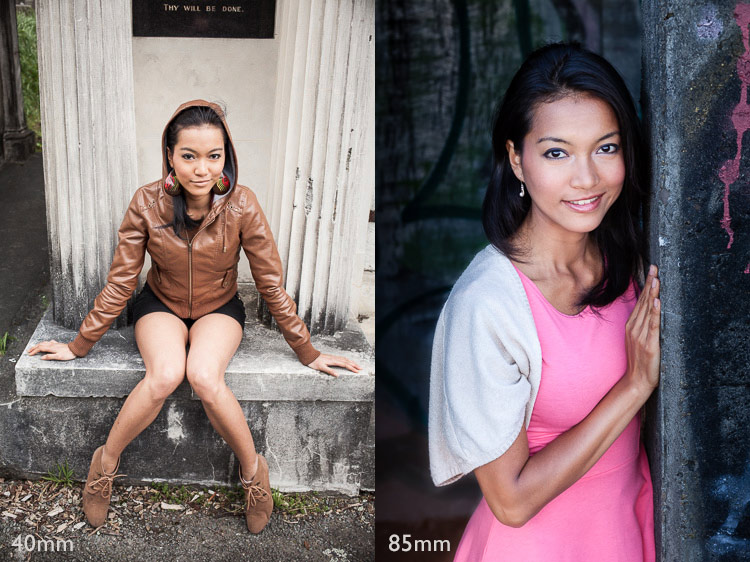
These two portraits show the differences in the two approaches. The first was taken with a 40mm lens (on a full-frame camera), and shows the setting as well as the model. The second was taken with an 85mm lens (also on a full-frame camera) and shows much less of the setting.

Portraits taken outdoors

2. Where does the light fall?

Some photographers tend to shoot portraits entirely in natural light; others use flash to supplement it. Whichever approach you take, it is still important to assess the quality of the light in your given location.

Take into account the time of day you plan to do the shoot. To take full advantage of natural light you should aim to shoot in late afternoon or evening, during the golden hour, when the sun is close to the horizon. For this reason it helps if you do your scouting at the same time of day, so you can see how the location looks in this beautiful light.

Another option is to take photos on a bright sunny day, but in the shade. The light bounces off nearby surfaces, which acts as a giant reflector. This is another type of natural light with beautiful qualities.

Alternatively, you might like to shoot on a cloudy day. This means that time of day is not so important, but it does mean that the light is most likely to come from above, and may create shadows under your model’s eyes and chin. In this situation you can use a reflector or fill-flash to minimize shadows. So think about whether there is room to set up a light-stand (if using flash) or for somebody to stand and hold a reflector (if using natural light).

This photo was taken in Wellington Botanical Gardens, and the model is illuminated by light coming from above, through the tree tops. As she is in costume, I thought the direction of the light was reminiscent of a spotlight on a stage, and appropriate to the style of portrait. I used a short telephoto lens (85mm, full-frame camera) to separate the model from the background.

Portrait taken outdoors

3. Use a smartphone to take photos

You can use a smartphone to take photos of locations to help you remember what they look like. Of course, you can do this with any camera, but the advantage of a smartphone is that most of them have GPS, and this helps you remember, and find, the exact location again later. This could be important if you are out in the countryside somewhere. There is nothing more frustrating than finding a great place to take some portraits, then not being able to remember where it is.

You could also import the photos into a specific Collection in Lightroom, and go to the Maps module to see the locations displayed on a map.

Here are some types of location you can search for. Remember, it’s important to think about what type of lens you are going to use for your portraits, as well as to assess the quality of light.

Backgrounds by the coast

Any location by the sea is full of potential. The same place can look very different every day, thanks to changing tides, weather patterns, and light. If the coastline is rugged, look for locations where you can use the rocks and cliffs as a background. Each bay or beach has its own character, so get out and explore. You are likely to find a good variety of beautiful locations, even in a relatively small area.

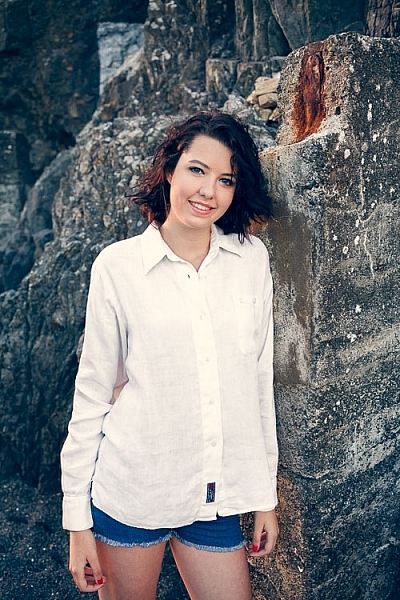
This photo was taken on a local beach, which has become one of my favorite locations for taking portraits, using a 40mm lens on a full-frame camera. This lens has a slightly wider angle of view than a 50mm standard lens, and allowed me to include a little of the beautiful location, but still make the model the focal point of the photo.

Portrait taken outdoors

Graffiti backgrounds

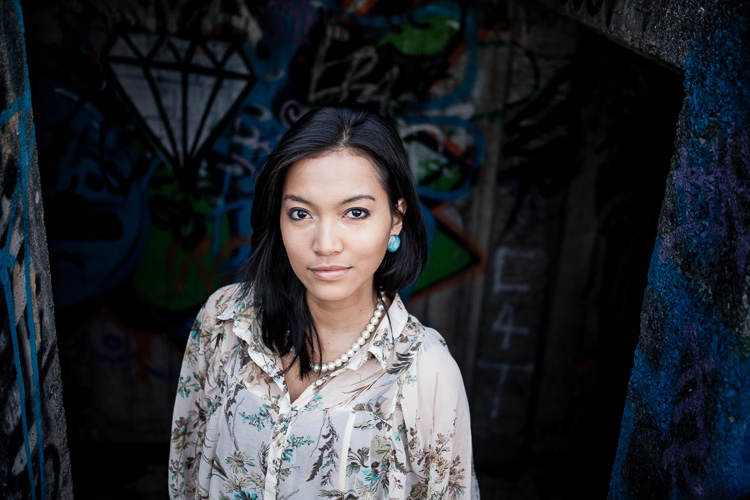
It may be bit of a cliche, but there’s no doubt that graffiti or street art, can make an interesting and colorful background.

This photo was taken on a local beach with a graffiti covered, concrete bunker in the background. I used an 85mm lens (on a full-frame camera) to include just a little of the artwork in the frame.

Portrait taken outdoors

Field and forest backgrounds

Fields and woodlands often make good locations for taking portraits, especially in the spring and summer. Fields of flowers are gorgeous locations. Try using a telephoto lens, and shooting through the flowers so they are out of focus.

The light in a forest is usually most suitable for portraits on a cloudy day. The light is soft, and unlike on a sunny day, your camera can easily cope with the brightness range. The one thing to watch out for is the direction of light. It comes from above, through the trees, and is highly directional. You will have to search for the places where gaps in the trees let light through. You may have to use a reflector to fill in the shadows created by the top light, or ask your model to tilt her face toward the light.

On sunny days, try shooting at the end of the day, when the light is softer, and use backlighting.

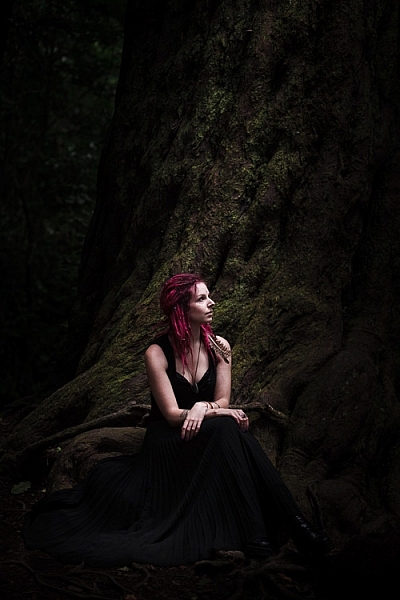
This portrait was taken on a cloudy day, in a thick forest where not much light penetrated through the trees. We found a clearing next to a large tree that we were able to use as a background. I used an 85mm lens (full-frame camera) to pull the tree in close to the model, and exclude most of the forest from the frame.

Portrait taken outdoors

Local buildings for backgrounds

Keep an eye out for local buildings with public access that you can use for photos. I’m not talking about busy locations, as they are difficult places to work, unless both you and your model are very experienced. Let me give you some examples.

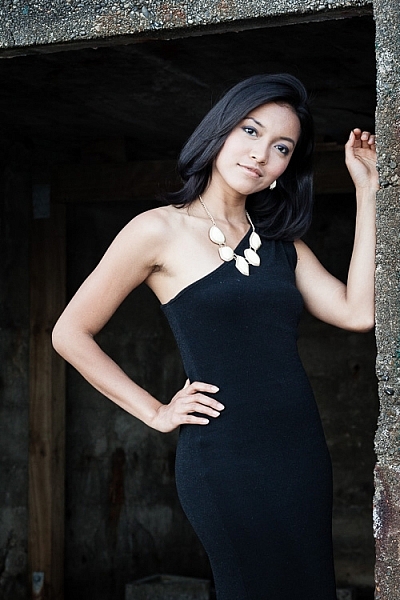
Here’s an abandoned boat shed on a lonely beach. 

outdoor-portrait-locations-12

Test shot

outdoor-portrait-locations-13

This is the portrait we made at that location.

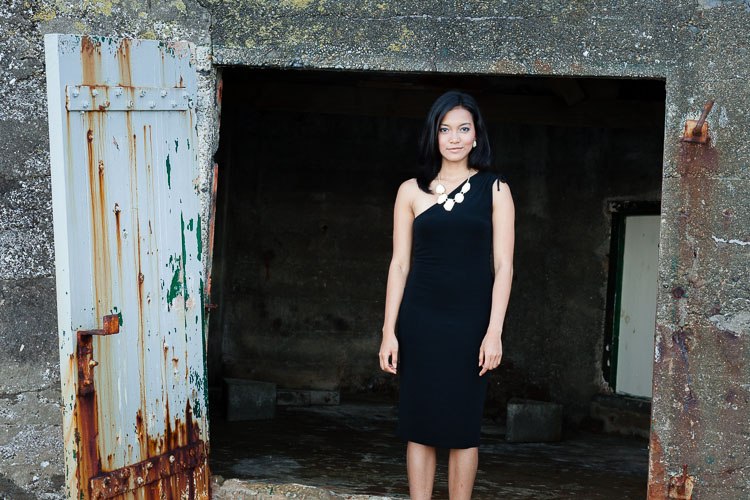
The second example is a graffiti covered concrete bunker left over from WWII.

Test shot.

Test shot.

Here’s a portrait we made there.

Here’s a portrait we made there.

In both examples I used a small part of the building as a background. You can see the same technique in the other photos in this article. The idea is to make sure the background complements the model in your portraits, and doesn’t overwhelm her.

Summary

The outdoors is a bit like a giant stage set, just waiting for you and your model to use. Wherever you live, I am sure that there are plenty of great locations for portrait photography nearby. It’s just a matter of learning to spot their potential, and thinking about which lens (or lenses) you will use for your portraits. 

Share some of your images from your favorite spots in the comments below.


Mastering Lenses

If you want to know more about buying and using lenses then please check out my ebook Mastering Lenses: A Photographer’s Guide to Creating Beautiful Photos With Any Lens.

googletag.cmd.push(function() {
tablet_slots.push( googletag.defineSlot( “/1005424/_dPSv4_tab-all-article-bottom_(300×250)”, [300, 250], “pb-ad-78623” ).addService( googletag.pubads() ) ); } );

googletag.cmd.push(function() {
mobile_slots.push( googletag.defineSlot( “/1005424/_dPSv4_mob-all-article-bottom_(300×250)”, [300, 250], “pb-ad-78158” ).addService( googletag.pubads() ) ); } );

The post How to Find Great Backgrounds for Outdoor Portraits by Andrew S. Gibson appeared first on Digital Photography School.


Digital Photography School

 
Comments Off on How to Find Great Backgrounds for Outdoor Portraits

Posted in Photography


Manfrotto and Lastolite brands combine and launch new Speed-Lite softbox and Perspective Backgrounds

03 Nov

The accessory brands Lastolite and Manfrotto, both of which are owned by the Vitec Group, have combined to form the new brand ‘Lastolite By Manfrotto’. The new brand name will eventually encompass the entire Lastolite product range, but for now it includes a new version of the Ezybox Speed-Lite softbox for hotshoe flash units and three new scene-painted backgrounds. Read more

Articles: Digital Photography Review (dpreview.com)

 
Comments Off on Manfrotto and Lastolite brands combine and launch new Speed-Lite softbox and Perspective Backgrounds

Posted in Uncategorized


How to Find Great Backgrounds for Portraits

17 Nov
Portraits and backgrounds

I used a short telephoto lens at a wide aperture to throw the cliff in the background out of focus in this photo. With this technique, the background itself isn’t so important as no-one can tell what it is, but it must still complement the subject.

Finding great backgrounds that complement the subject is an essential part of the process of creating beautiful portraits. My article How to Plan the Perfect Portrait Shoot will help you with the other aspects of putting together a portrait shoot, but today I thought it would be interesting to delve deeper into the subject of backgrounds for portraits. Here are some things to think about in your search for the perfect background for your portraits.

Do you want your background to be sharp or blurred?

This is an important question because the answer dictates your entire approach to the portrait shoot.

If you want the background to be in focus, then this suggests that the background is in some way relevant to your subject. For instance, if you are taking a portrait of a performing musician, then perhaps it would be nice to take a photo in a venue where they perform, including the background to show the environment.

On the other hand, if your aim is simply to take a pretty portrait of somebody, then the background may not be so relevant, but it must be complementary. A good example of this is taking a portrait of somebody on a beach, where the environment becomes an important part of the composition.

The easiest way to take a portrait with the background in focus is to use a wide-angle lens with a smallish aperture (f/8 is ideal). You should be careful not to get too close to the subject (avoiding distortion) and to include lots of background.

Portraits and backgrounds

I used a 24mm lens at f/4 for this portrait. With such a wide-angle lens f/4 was sufficient to ensure the entire background was relatively sharp.

If you want to take photos with a completely blurred background, then the background itself isn’t so important. It will be out of focus, so nobody will be able to tell what it is. The important thing is that you need to be able to position your model some distance from the background. Then all you need to do is to use a short telephoto lens with a wide aperture, and if the model is far enough from the background it will go out of focus.

This technique works best with prime lenses because of their wider maximum apertures. But you can still make it work, even with an 18-55mm kit lens (which typically have maximum aperture settings of f/5.6). You’ll just need to move your model further away from the background, and get as close to her as you can (try taking a simple head and shoulders shot) to make it work.

Don’t forget there’s a middle ground between these two extremes. You may want to render the background slightly out of focus, so it is still recognizable but not so sharp it competes with the model for attention.

Portraits and backgrounds

The background of this portrait is out of focus, but still sharp enough for the viewer to tell what it is.

Are you going to take your photos indoors or outside?

The answer to this question is important because it leads to the question of how you are going to light your photo.

For example, indoor locations can be great for shoots that take place in the winter time, or even at night, when you can’t rely on the weather to be good enough to take photos outdoors. While you may be able to use your house as a location, another idea is to keep an eye out for interesting indoor locations in your local area that you may be able to use. Examples are cafes, bars and hotels. Once you’ve found a photogenic location, it’s a simple matter of finding the right person to ask for permission to use that location for a shoot.

Once you’ve found the location, you need to decide how to light the portrait. You might be fine with natural light, especially if there are large windows or your camera works well at high ISOs. You’ll probably need an assistant with a reflector to help out.

If you decide to use flash to light your portrait, things may be a little more complex. You’ll need room for lighting stands, and you may need to run power cords across the floor. If you intend to use flash, make sure you mention this when you ask permission to use the location.

Portraits and backgrounds

I took this portrait in a cafe, using natural light from the windows.

If you are going to take your photos outside then the question of lighting still applies. Do you intend to use natural light? Again, an assistant with a reflector may be useful. If you intend to use flash to supplement or even overpower the natural light, then you need to consider if you have enough room in your chosen location to set them up? Will you need someone to help you? Thinking through the practicalities will help your shoot run smoothly.

Background ideas

Finally, here are some of my favourite locations for taking portraits. You may find these suggestions useful in your search for great backgrounds.

Beaches: I especially like rocky beaches as rocks make great backgrounds. The key to getting the best from a beach location is to take the portraits close to the sunset and utilize the beautiful quality of light during the golden hour.

Gardens or parks: Public gardens can be a great place to take portraits. They are normally quite beautiful and may contain a variety of plants and trees that you can’t find elsewhere in your area.

Urban or suburban areas: I like to wander around interesting parts of the city I live in with my model looking for good backgrounds. It’s amazing how many times a wall or doorway can make a simple yet effective background for a portrait.

Portraits and backgrounds

This portrait was taken using an ivy covered wall (that I found on a street near my house) as a background.

Woodlands: These can be tricky as the light tends to come from above, between the trees, almost like a spotlight. The result is harsh shadows under your model’s eyes and nose, even on an overcast day. The solution is to use a reflector or flash to fill in the shadows. While the lighting isn’t always easy in woodlands, the results can be worth the effort.

Children’s playgrounds: Use a playground at a quiet time and your model can have lots of fun on the rides, adding a sense of movement and vitality to your portraits.

Portraits and backgrounds

We went to a children’s playground in the late afternoon (no kids to disturb) to take this portrait. My model enjoyed playing around on the rides.

Your turn

These are my suggestions, now it’s your turn. Can you suggest any locations or types of background that are suitable for portraits? Please let us know in the comments.


The Natural Portrait photography ebookThe Natural Portrait

My ebook The Natural Portrait teaches you how to take beautiful portraits in natural light. This 240 page ebook, published by Craft & Vision, takes you through the entire process of natural light portrait photography through from finding a model, deciding where to shoot, working with natural light and post-processing your images. Click the link to learn more or buy.

The post How to Find Great Backgrounds for Portraits by Andrew S. Gibson appeared first on Digital Photography School.


Digital Photography School

 
Comments Off on How to Find Great Backgrounds for Portraits

Posted in Photography


Lastolite ‘Out of Focus’ backgrounds bring beautiful bokeh to your home studio

26 Jul

Everyone loves the look of a nice out of focus background, but it’s hard to achieve in a home studio. Accessory manufacturer Lastolite believes it might have the solution, with two new reversible backgrounds printed with out of focus images of the ocean / autumn foliage and summer foliage / city lights. Measuring 1.5 x 1.2m, the backgrounds are big enough for almost full-length portraits of most adults, and weigh in at 3kg (6.6lb) each. Click through for more details.

Articles: Digital Photography Review (dpreview.com)

 
Comments Off on Lastolite ‘Out of Focus’ backgrounds bring beautiful bokeh to your home studio

Posted in Uncategorized


Improve Your Backgrounds – Improve Your Photography

22 Apr

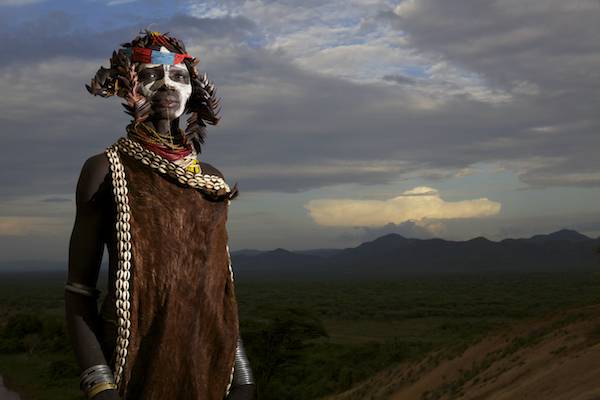
Photography-backgrounds-Omo-Valley-Piper-14

The background in your image can quickly reveal your skill level as a photographer. Learning to see past an exotic or exciting subject, to catch the details in the background, is what will distinguish you from a beginning, hobbyist photographer to an experienced professional. The background in your image immediately stands out to a trained eye. Learning just this skill can very quickly elevate and improve your photography.

Most times, the difference between a snapshot and a strong, compelling image can be as simple as one small step, slightly changing your perspective, or blurring out a background. If the photograph is about an exciting subject, then try to eliminate the background, making it about your subject. If you wish to photograph your subject in their environment check to make sure that:  the background is equally as  impressive as your subject, is part of the story, and adds value to the image.

Keep it simple for a more powerful image

Here are several examples of how one simple movement or adjustment can change an unusable image into a very powerful one. In the portrait below, the light had become too harsh to make a usable image.  I moved my subject into a hut, but then the light coming through the wood created a horrible background.

photography, distracting, background

Watch for bright, distracting spots in the background

I looked around, picked up one of the skins lying on the floor, and put it up behind the subject. This removed the distractions by making the background solid and created a powerful portrait.

photography, backgrounds

The image below on the left is beautiful, but once you look at the subject your eyes wonder up to the sky and out of the photograph. The sky is not part of the story. My subject is the story, therefore the sky is a distraction. I got a little higher and zoomed in a little closer, filling the frame with my subject, eliminating the distraction of the sky. Here the viewers eyes are drawn directly to the subject and stay there.

photography backgrounds photography background

Where is the horizon?

photography, backgrouds

Look where the horizon falls in respect to your subject

If you are going to have sky in your image, you want to make sure the horizon does not cut through the head of your subject, like the image above. To adjust and create the image below, I dropped  down about a foot lower and zoomed in slightly so the horizon line is below the subjects head, creating a stronger image.

photography backgrounds

Below is another example of keeping your subjects head above the horizon. This was a difficult shot. If my eyes had not been trained to quickly hone in on the background, the horizon could easily have cut right though his head, or been on a slant.   This would have ruined the power of this image. It is these small details that make the difference in a great shot or a snapshot.

Photography-backgrounds-Omo-Valley-Piper-Mackay-10

Create separation between subject and background

photography backgrounds

Separation between your subject and background is essential to draw the viewers eye to the subject

In the image above I was careful not to clip the toes and have the subject’s shadow in the frame, but the background around his head was distracting. I simply took a step to the left and the v-shape of the tree-line now leads the viewer directly to my subject. The man’s face is now in plain view without any distractions (image below).

photography background

Watch for bright spots

In this image I wanted to show the subjects connection with nature, but I was challenged by not being able to create a composition without the distraction of the bright sky coming through.

Photography background

Where does your eye go in this image? To the bright sky

The solution was to slightly change my angle and shoot it as a vertical (see below)

Photography backgrounds

Blur it out

photography backgrounds

The background in the image above is not bad, but since the subject is the bird it is distracting. The best way to handle this type situation is to blur the background by opening up to f/2.8 and zooming in on your subject, filling the frame. This is a much stronger image (below)

Photography backgrounds

Color can be a distraction

Photography background

When you are filling the frame with your subject always check for distracting elements in your background. In this first image (above) there is a brown line going directly across the background. Your eyes look directly at the cheetah, but then immediately pick up the break of color, distracting you as the viewer. The next two images have solid backgrounds. Your eyes go directly to the subject and stay there.

Photography backgrounds

Photography backgrounds

Great subject alone is not enough for a wow image

The image below looks more like a photograph that was taken because it was the first time the photographer saw a lion or because the photographer did not have a long enough lens. Sometimes a situation is what I call eye candy; just for looking at, and not for taking a photograph.  Just because your subject is exotic it does not mean it will make it a great photograph.

photography backgrounds

If the background does not add to the photograph or story, then remove it. Get up close and make the photograph about the subject.

photography backgrounds

Notice how much stronger this image is than the one above?

Put it into practice

The easiest way to train your eye is to practice. Get out and shoot, but before you head out, take a quick look through  a few of your existing galleries. Were you seeing what was in the background, when you clicked the shutter?

Challenge your self by going to a busy downtown tourist area and try to isolate your subjects or  visit the zoo where the backgrounds can be difficult. Download the images and view them on your monitor. Looking at them in the back of your camera is a good tool for a quick peek. But it is when are no longer in the emotion of the moment, viewing the images on your monitor, that unwanted elements will scream out at you. The more you see these mistakes on your computer, the more you will remember them behind the camera. Repeat this exercise often until what you see on the monitor is what you were seeing in the frame when you click the shutter.

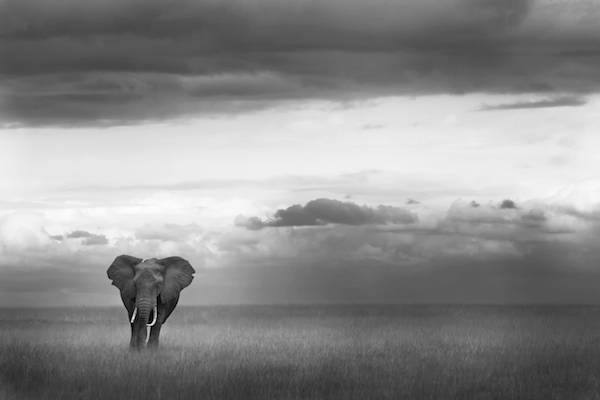
Practice putting your subjects in simple clean environments first, as the sample images below.

photography backgrounds

Photography-backgrounds-elphant-africa-Piper-Mackay-01

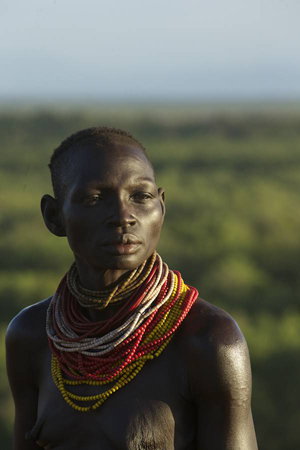
Photography-backgrounds-Omo-Valley-Piper-14

Soon you will be able to introduce a secondary subject in the background for a more complicated image. This draws the viewer to the main subject and then through the image to the discover what else is going on in the images, holding their attention in your image a lot longer.

Good Luck and enjoy the process

Photography-backgrounds-lion-africa-Piper-Mackay-02

Photography-backgrounds-Omo-Valley-Piper-Mackay-11

The post Improve Your Backgrounds – Improve Your Photography by Piper Mackay appeared first on Digital Photography School.


Digital Photography School

 
Comments Off on Improve Your Backgrounds – Improve Your Photography

Posted in Photography


How to shoot Black Objects on Black Backgrounds

05 Dec

In my last post, I talked about using a DIY blue gel to add interest to a portrait by lighting the background. This time I’ve added a DIY orange gel, and used the same Gary Fong Powersnoot for some product photography. This is a three-light setup.

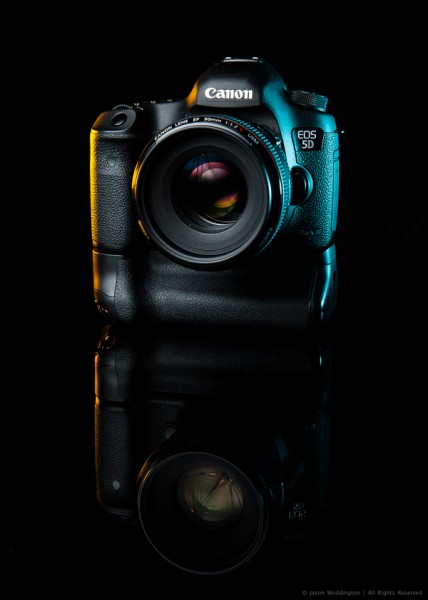
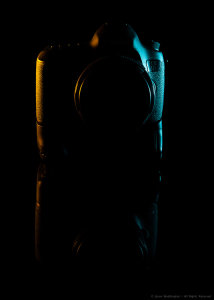
Photo of a Canon EOS 5D MkIII on a black background

Exposure: 1/200, f/14, ISO 100
Camera: Canon EOS 5D MkII
Lens: Canon EF24-70mm f/2.8L @ 60mm

When shooting a dark colored object against a dark background, one challenge is that the edges of the object tend to get lost in the background. Here are two ways to deal with this:

1. Light the background to add separation. This it the technique I used in my last post.

2. Use rim lighting to clearly define the edges of the object, as shown in the photo above.

The key to this kind of rim lighting is hard, directional light, so that the light goes exactly where you want it, and nowhere else. Good lighting is often about what not to light, as much as it is about what to light.

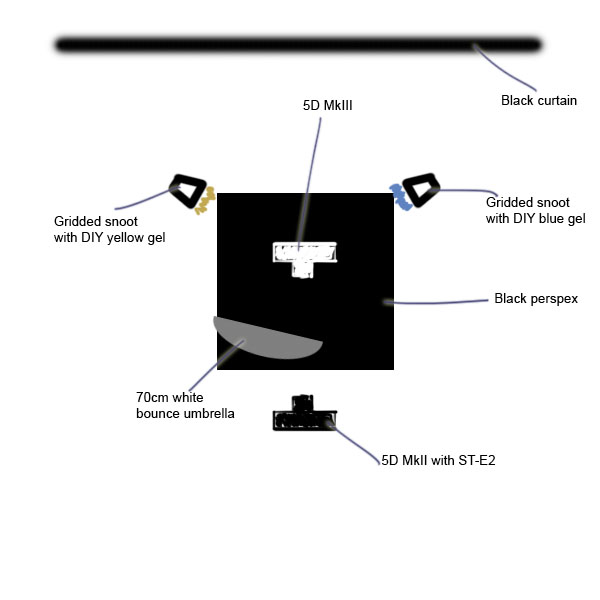
Set Diagram

Photo lighting diagram

Main Light: Canon 430EX II @ 1/2 power into 70cm white bounce umbrella just outside the frame to camera left

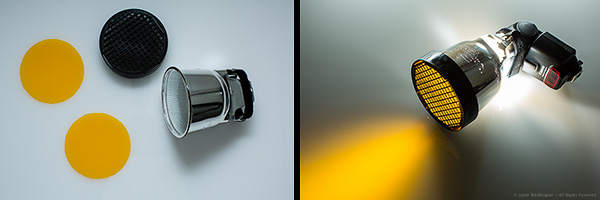
Rim Lights: 2 x Canon 430EX II @ 1/2 power into Gary Fong Powersnoots with grids a back left and right

I triggered the flashes with the Canon ST-E2.

Gary Fong Powersnoot with DIY orange gel

Background: Black curtain about 1.5 meters behind the camera. The distance is important. If the background is too close, it will pick up some light from the main source and not appear totally black. Get your background cloth as far away as possible if you’re going for a pure black background.

The camera is sitting on a small square of black plexiglass (aka perspex) that I picked up at a local home improvement store.

Start With the Rim Light

To get the orange and blue highlights and the reflection right, I started with the gridded snoots. I shot a few frames and made small adjustments until I was happy with the look. Then I added the main light. It helps to build your lighting set up piece by piece.

Setup photo showing only the rim light

Once I was happy with the rim lighting, I added the main flash, in the 70cm umbrella. Here I was looking for two things. First I wanted a nice catchlight on the lens. Second, I wanted enough light on the 5D logo on the top right side of the camera body. The umbrella is located just outside the frame on the left side, a little above, and angled down toward the 5D MkIII.

You don’t need a lot of space for a shot like this – I made this photo in my living room. The perspex is sitting on the coffee table, and the black curtain is draped over our TV.

I hope this article has given you a few useful ideas for lighting black objects against black backgrounds. I’d love you hear your comments, and as always, feel free to contact me on Facebook or Google+.

Post originally from: Digital Photography Tips.

Check out our more Photography Tips at Photography Tips for Beginners, Portrait Photography Tips and Wedding Photography Tips.

How to shoot Black Objects on Black Backgrounds


Digital Photography School
 
Comments Off on How to shoot Black Objects on Black Backgrounds

Posted in Photography