RSS
 

Posts Tagged ‘Auto’

75% OFF: Get Out of Auto Mode & Gain Creative Control Of Your Camera

23 Dec

It’s day 10 of our 12 deals of Christmas and todays deal is one we’ve been getting requests for – it’s deals on our brand new Photography Courses by Neil Creek.

These two courses were both released in 2015 and both have helped many of our readers to get out of Auto mode and gain creative control over their cameras.

Today you can pick up either course for $ 20 (they are each normally $ 59) or you can bundle them together for just $ 30.

Course 1: Photo Nuts and Bolts

NewImage.png
This course is all about getting out of Auto mode and getting to know your camera and how to get control over it to take fantastic images.

In 10 practical video lessons, you’ll discover the key photography concepts that will put you in creative control of your camera and increase your technical confidence, to take more amazing photos than you ever thought possible!

  • Shutter speed
  • Aperture
  • F-stops
  • ISO
  • Metering
  • Depth of field
  • Lenses
  • Focus
  • Magnification

Photo Nuts and Bolts is perfect for new camera owners or those who are yet to venture out of Auto Mode.

Take the course today for just $ 20

Course 2: Photo Nuts and Shots

NewImage.png
This second course is for those who understand the basics (it builds perfectly upon the first course above) and helps you to discover tools, techniques and thought processes for creative photography.

In 10 video lessons you’ll:

  • Learn to harness light to convey emotion
  • Understand the impact of great composition and how to achieve it
  • Tips for the sharpest possible photos
  • How to adapt your camera’s exposure for the shot you want
  • Master the concepts of shot perception, planning and execution – in any setting
  • When to break the rules for creative effect

Today only you can grab it for just $ 20 (66% off).

Take Both Courses for $ 30 (75% Off)

These courses are designed to be taken stand alone but are beautiful companion courses when you bundle them.

You can start though courses immediately and go through them all at once or pace it over time. You’ve got lifetime access so it’s completely up to you!

If you’re sick of looking at the dials and settings on your camera and knowing it can do so much more than what you do with it they’re the perfect gift to yourself to help you take beautiful images in 2016 and beyond.

This is one deal you don’t want to miss.

googletag.cmd.push(function() {
tablet_slots.push( googletag.defineSlot( “/1005424/_dPSv4_tab-all-article-bottom_(300×250)”, [300, 250], “pb-ad-78623” ).addService( googletag.pubads() ) ); } );

googletag.cmd.push(function() {
mobile_slots.push( googletag.defineSlot( “/1005424/_dPSv4_mob-all-article-bottom_(300×250)”, [300, 250], “pb-ad-78158” ).addService( googletag.pubads() ) ); } );

The post 75% OFF: Get Out of Auto Mode & Gain Creative Control Of Your Camera by Darren Rowse appeared first on Digital Photography School.


Digital Photography School

 
Comments Off on 75% OFF: Get Out of Auto Mode & Gain Creative Control Of Your Camera

Posted in Photography


Fender Bender Menders: 15 Abandoned Auto Body Shops

06 Sep

[ By Steve in Abandoned Places & Architecture. ]

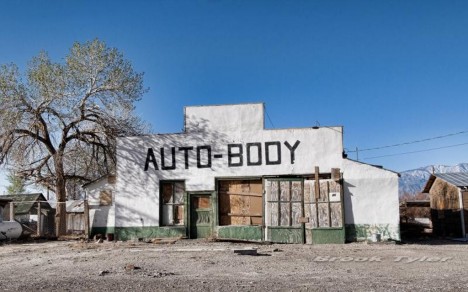
abandoned-auto-body-1
Auto body repair requires extensive training and expensive tooling these days, setting classic independent auto body shops squarely on the road to ruins.

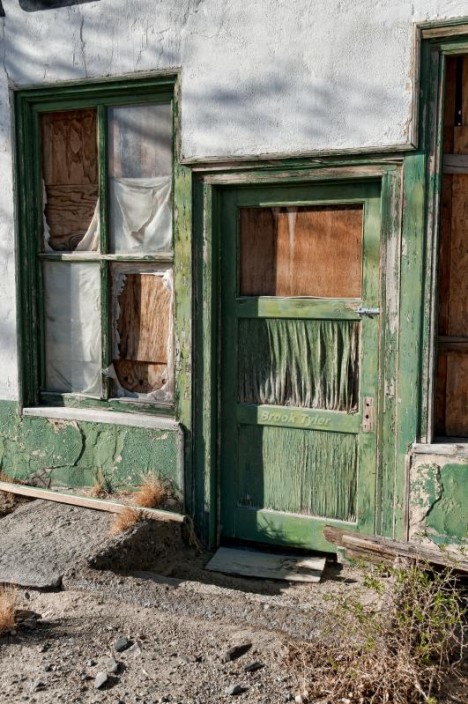
abandoned-auto-body-1b

Automotive innovations such as aluminum body panels and self-cleaning paint are cutting-edge today but they’ll be commonplace tomorrow, so if you’re thinking of taking the family ride down to (insert folksy name here) Auto Body next time you dent a door, fuggeddaboutit! End result: hundreds of abandoned auto body shops across the nation, from big cities to tiny towns like Keeler, California (population 66).

Post No Bills

abandoned-auto-body-labelscar-2a

abandoned-auto-body-labelscar-2b
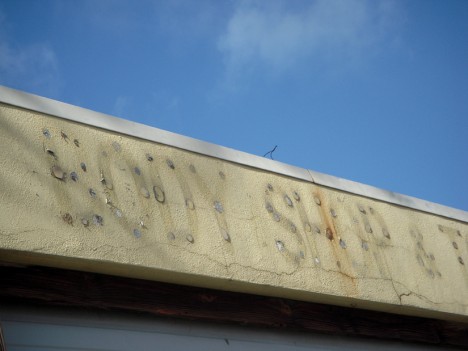
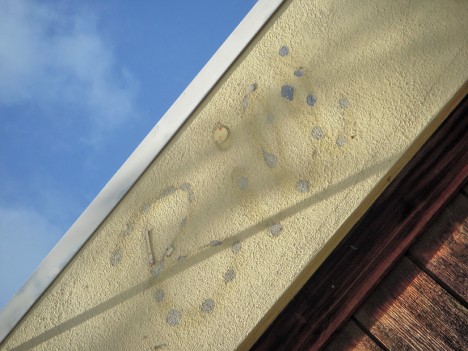
Indeed, neighborhood auto body shops are fading away… and so are their signs. Flickr user suism1 captured the rough and weathered “labelscar” above on January 13th of 2010.

Unclean Sweep

abandoned-auto-body-broomworks-3

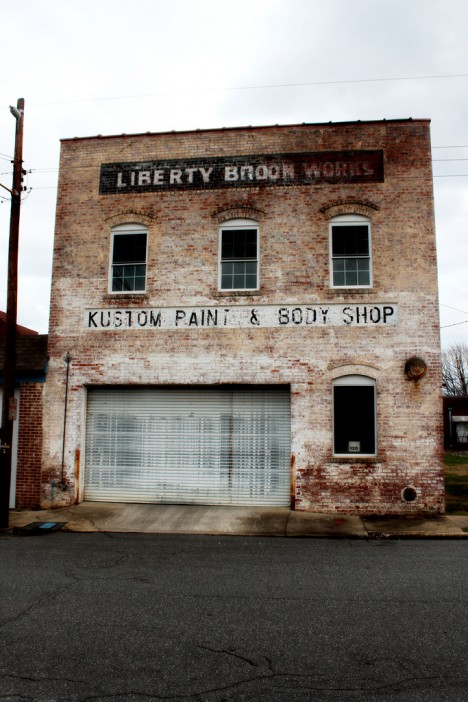
“I doubt the Liberty Broom Works or the Kustom Paint & Body Shop have been at this location for quite a while,” comments Barbara Hullett of Hullett Photography about the gritty abandoned edifice above. Located in Liberty, North Carolina, the curious conjunction of defunct businesses begs the question: which one was abandoned first, the broom works or the body shop?

Them’s The Brakes

abandoned-auto-body-4a

abandoned-auto-body-4b

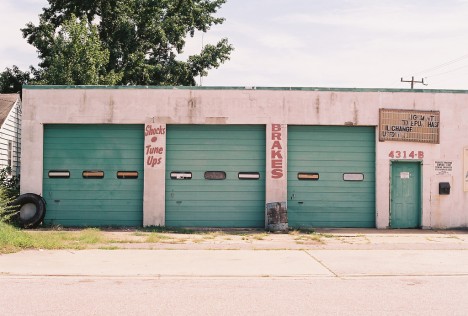
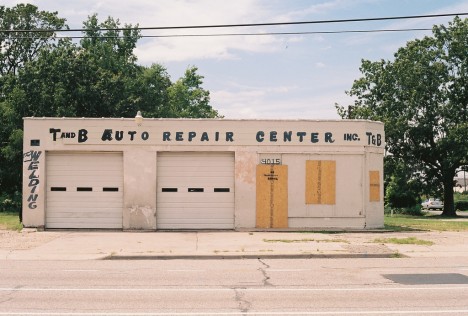
Small auto body and car repair shops of a certain age typically share a similar style and structure – cheap, practical, and plenty of garage doors. Though modern quick-lube and oil change shops are often built on this type of plan, it’s rare that one of the chain stores takes over a closed or abandoned body shop. Flickr user Justin Wolfe managed to find two similar-looking abandoned auto body shops within a stone’s throw of each other in Newport News, Virginia, on September 20th of 2013.

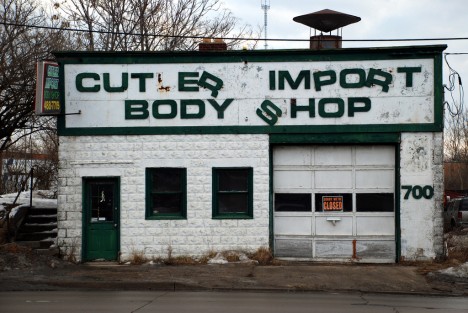
Import Expired

abandoned-auto-body-cutler-5

Owners of Ferrari, Porsche, Aston Martin and other exotic foreign makes must be scratching their heads, wiping their monocles and driving veddy cawefuwy since the Cutler Import Body Shop threw in the grimy, oil-stained towel. The Grandview Heights, Ohio establishment was captured in all its letter-shedding glory on February 7th, 2009 by Flickr user brew127.

Next Page – Click Below to Read More:
Fender Bender Menders 15 Abandoned Auto Body Shops

Share on Facebook


[ By Steve in Abandoned Places & Architecture. ]

[ WebUrbanist | Archives | Galleries | Privacy | TOS ]


WebUrbanist

 
Comments Off on Fender Bender Menders: 15 Abandoned Auto Body Shops

Posted in Creativity


Fender Bender Menders: 15 Abandoned Auto Body Shops

06 Sep

[ By Steve in Abandoned Places & Architecture. ]

abandoned-auto-body-1
Auto body repair requires extensive training and expensive tooling these days, setting classic independent auto body shops squarely on the road to ruins.

abandoned-auto-body-1b

Automotive innovations such as aluminum body panels and self-cleaning paint are cutting-edge today but they’ll be commonplace tomorrow, so if you’re thinking of taking the family ride down to (insert folksy name here) Auto Body next time you dent a door, fuggeddaboutit! End result: hundreds of abandoned auto body shops across the nation, from big cities to tiny towns like Keeler, California (population 66).

Post No Bills

abandoned-auto-body-labelscar-2a

abandoned-auto-body-labelscar-2b
Indeed, neighborhood auto body shops are fading away… and so are their signs. Flickr user suism1 captured the rough and weathered “labelscar” above on January 13th of 2010.

Unclean Sweep

abandoned-auto-body-broomworks-3

“I doubt the Liberty Broom Works or the Kustom Paint & Body Shop have been at this location for quite a while,” comments Barbara Hullett of Hullett Photography about the gritty abandoned edifice above. Located in Liberty, North Carolina, the curious conjunction of defunct businesses begs the question: which one was abandoned first, the broom works or the body shop?

Them’s The Brakes

abandoned-auto-body-4a

abandoned-auto-body-4b

Small auto body and car repair shops of a certain age typically share a similar style and structure – cheap, practical, and plenty of garage doors. Though modern quick-lube and oil change shops are often built on this type of plan, it’s rare that one of the chain stores takes over a closed or abandoned body shop. Flickr user Justin Wolfe managed to find two similar-looking abandoned auto body shops within a stone’s throw of each other in Newport News, Virginia, on September 20th of 2013.

Import Expired

abandoned-auto-body-cutler-5

Owners of Ferrari, Porsche, Aston Martin and other exotic foreign makes must be scratching their heads, wiping their monocles and driving veddy cawefuwy since the Cutler Import Body Shop threw in the grimy, oil-stained towel. The Grandview Heights, Ohio establishment was captured in all its letter-shedding glory on February 7th, 2009 by Flickr user brew127.

Next Page – Click Below to Read More:
Fender Bender Menders 15 Abandoned Auto Body Shops

Share on Facebook


[ By Steve in Abandoned Places & Architecture. ]

[ WebUrbanist | Archives | Galleries | Privacy | TOS ]


WebUrbanist

 
Comments Off on Fender Bender Menders: 15 Abandoned Auto Body Shops

Posted in Creativity


Tips for Photographing Auto Racing

31 Mar

“Racing is life. Anything that happens before or after is just waiting.” – to quote Michael Delaney (played by Steve McQueen) in the movie ‘LeMans’. You don’t have to be a race car driver to feel the adrenaline rush that is auto racing. Being a photographer, and being part of the action can also be very exciting and a lot of fun.

There are a number of different types of racing such as sports cars, stock cars, rally cars, open wheel cars and even your local short track cars that might race on dirt or asphalt. Each type will have different tracks with their own level of accessibility for you to take photos. Nothing beats having unlimited access and if you can get a press pass, that is definitely the way to go. But if you don’t have that option available what can you do?
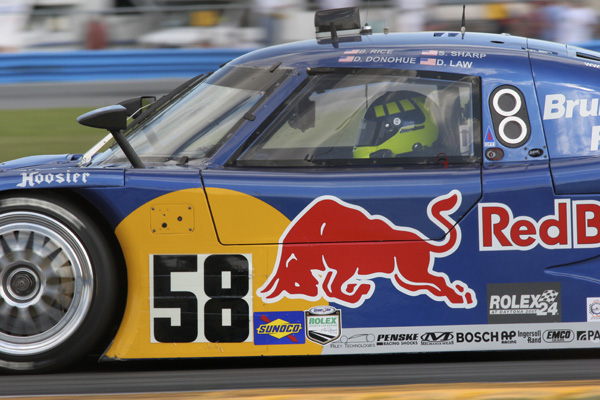
Fig 1

PANNING

Road courses offer opportunities to get great action photos without having any special access. The images above was taken from the same vantage point of all spectators. By using a short ladder, I was able take this image over the fence instead of trying to look through it. A 300mm lens was enough to more than fill the frame, so an extreme telephoto lens was not required to get this photo.

I also used the technique known as panning. Panning with the car allowed the focus to stay on the main subject, but by slowing the shutter speed down enough you are still able to get the feeling of speed. You will need to find the right balance between aperture, shutter speed and ISO. If the shutter speed is too fast the car will look like it’s just stopped on the track. If it’s too slow then everything could be blurred. You want to slow your shutter speed down until the lettering on the tires just transforms into a nice short blur. Photograph a few laps at different speeds and then check them on your camera’s LCD screen until you get the right effect that you’re looking for.

Next, take notice of your aperture because this will determine your depth of field. Depth of field is typically less with a telephoto lens than it is with a wide angle. Adjusting your aperture will require a corresponding adjustment of the ISO to compensate and keep your exposure accurate. A depth of field that is too shallow may make it difficult to obtain a critical focus, so again take a look at a few practice images and make sure that your focus looks good to you (zoom in to 100% on your screen to be sure).

PREFOCUS

Autofocus is still sometimes unpredictable and it may lock onto a subject in the foreground or background just as you are about to take the shot. By switching to manual focus you can prefocus a location on the track and just wait for the cars (or motorcycles) to come to you. Once there, a simple click of the shutter and you’ve captured your racer in focus. There’s always an ideal racing line on any track so more than likely all racers will speed through at that same location unless they’re passing or being passed.

BLUR
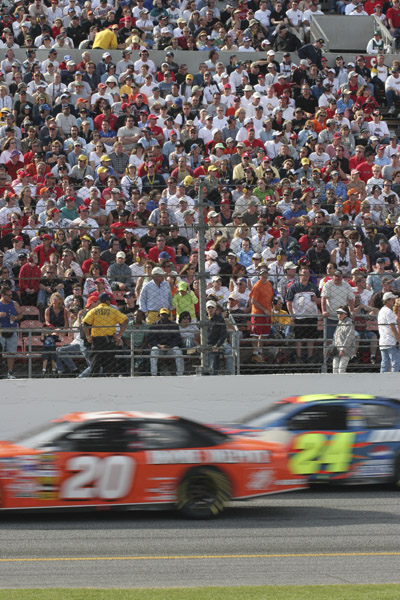
Fig 2

This photo (image above) shows that sometimes you need to look around, notice your surroundings and try something a little different. By focusing on the spectators you can allow the cars to become a blur and emphasize their action on the track. Try different shutter speeds until you get the effect that you desire. This technique can be used for daytime or nighttime racing. A neutral density or gradual filter was not used for this image, but one could be used to increase the blur.

TRIPOD or MONOPOD?

Tripods and monopods are helpful to stabilize the action and help give you a sharper image. If you don’t want to use them there’s a formula for hand holding a camera with a long lens and it is as follows:

The shutter speed should be equal to or greater (faster) than the focal length of the lens (eg., 200mm lens = 1/200th shutter speed or faster) to avoid camera movement as you take your photo.

If you have a zoom lens like a 75-300 then this rule would apply at the longer focal length (1/300th of a second or faster). Don’t forget to add in the crop factor if this applies to your camera’s sensor also. With cameras that have stabilization systems either in the lens or camera body you can typically bend this rule by a couple of stops, but the tripod and monopod are still there to help when you need them. They are definitely preferable when using a super telephoto that you may be carrying around all day. I prefer a monopod because they are lightweight and easy to move around with, but you will need to find what works best for you with a little trial and error.

TWO CAMERAS

Photographing auto racing does require a certain amount of photographic equipment. We would all like to have the best that’s available, but most times that is not the case. Get the best equipment that you can afford and learn to make the best with what you have. If you can, carry a second camera with you so that you’re ready for that unexpected shot. Keep a telephoto lens on one camera and a shorter lens on the other. Being prepared for the unexpected to happen is when you’re going to get that great action photo.

ANGLE OF VIEW
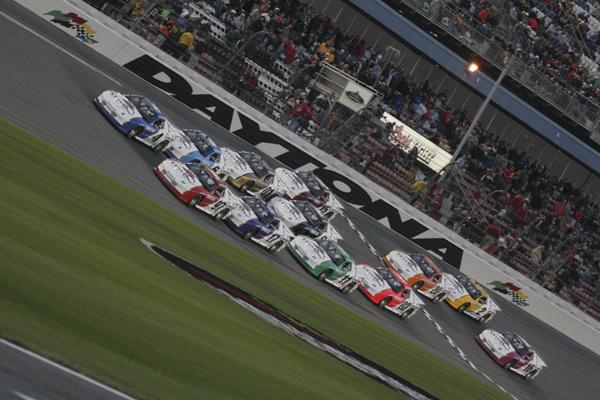
Fig 3

Be on the lookout for creative images. If you see a crowd of photographers in one location – try looking for an angle of view that they haven’t seen. You can hold the camera at a 45 degree angle and take photos with cars going across the screen diagonally to emphasize speed (see image above). Try taking photos from a low angle or a high angle. You can attach your camera to a monopod with a remote release and capture a high angle such as this car being rolled out to the starting grid (image below). Even though there are crowds of people around, this car is isolated and not something that you see everyday.
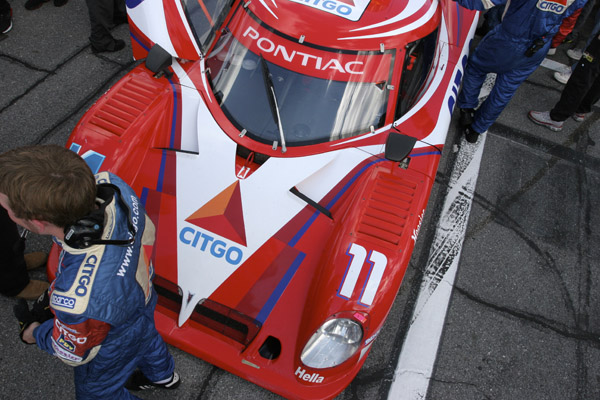
Fig 4

PIT STOPS

Pit stops are some of my favorite things to photograph because there is always a lot of action! You can get a lot of great images with a relatively inexpensive wide angle such as this image (below) taken with a 20-35mm lens. Some race tracks will allow you to purchase a pit pass, or a press pass will gain you access to pit road. If you do obtain access to photograph pit stops maintain your ‘situational awareness’. Be aware that every one of the pit crew members around you has a job to do and you don’t want to get in their way while they’re doing it. There is the potential for serious injury for you and crew members. So pick the moment that you want to get in there, take your images and step back so that they can do their job.
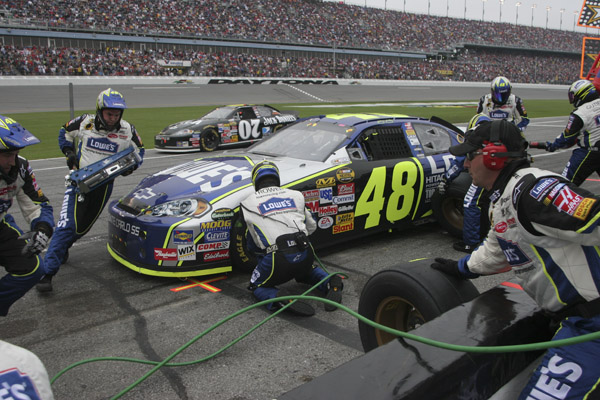
Fig 5

Some forms of racing allow photographers over the pit road wall to photograph pit stop action as long as you wear a firesuit. This type of access, in my opinion, is the ultimate and you are able to move around the car taking images that few photographers get to take (like the image below). If you are able to gain this type of access you also need to be aware of cars (or motorcycles) entering and exiting their pits.
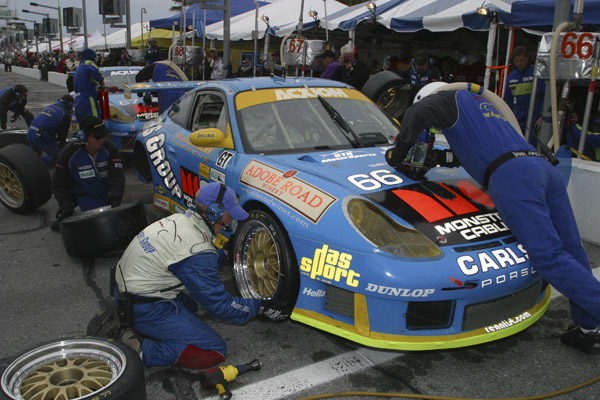
Fig 6

IN SUMMARY – ACTION PLAN

Photographing auto racing can be challenging but a lot of fun. Take the best photos you can from the areas that you have access to and buy a pit pass to get closer to the action. The camera equipment required can be expensive, but learn to work with what you have, and upgrade your equipment when you can. There are also numerous rental companies available now and you may want to consider renting equipment to try before you buy. Good luck and good racing!

If you have racing photos that you’d like to share with others here please add them in the comments.

The post Tips for Photographing Auto Racing by Jim Wise appeared first on Digital Photography School.


Digital Photography School
 
Comments Off on Tips for Photographing Auto Racing

Posted in Photography


iOS 7.1 brings auto HDR mode to iPhone 5S

11 Mar

4732188980.jpg

Apple has released its first major update to iOS 7. iOS 7.1 brings a host of bug fixes and refinements, including support for Apple’s CarPlay, interface and design improvements and a new Auto HDR mode to the flagship iPhone 5S. Click through to read more at connect.dpreview.com.

News: Digital Photography Review (dpreview.com)

 
Comments Off on iOS 7.1 brings auto HDR mode to iPhone 5S

Posted in Uncategorized


Auto Draft

21 May

[ By WebUrbanist in Drawing & Digital. ]

adsf

adsf

Share on Facebook


[ By WebUrbanist in Drawing & Digital. ]

[ WebUrbanist | Archives | Galleries | Privacy | TOS ]


WebUrbanist

 
Comments Off on Auto Draft

Posted in Creativity


Getting off Auto – Manual, Aperture and Shutter Priority modes explained

04 Apr

Macro image of a digital camera's controls set on autoYou may have heard that once you get a DSLR you need to learn to shoot in manual and only ever use that mode. That if you are using the Aperture or Shutter Priority you’re cheating and if you want to be more like a pro you have to shoot in Manual only, all the time. To that I say “horse pucky”! (if you’re old enough to remember M.A.S.H. you’ll get that reference).

What you’ll learn from this article:

  • what each of the A (Av), S (Tv) and M modes are, a definition of each
  • what types of situations I would choose each of them and why
  • some advantages of A (Av) and S (Tv) over manual
  • some advantages of Manual and when it’s the only choice
  • some things to look out for

The three manual shooting modes what are they?

  1. Manual mode: this mode puts you in full control of the three settings on your camera that control the exposure (commonly known as the exposure triangle).  ISO, aperture and shutter speed. In manual you will be making all of those choices.
  2. Aperture priority:  (A on Nikon, Av on Canon) this mode has you in control of two of the three exposure controls:  ISO and aperture.  The camera will select an appropriate shutter speed to give you a correct exposure.
  3. Shutter priority: (S on Nikon, Tv on Canon) this mode once again puts you in control of two of the three exposure settings, this time it is ISO and shutter speed.  The camera will select the aperture for a correct exposure.

There are of course other factors involved that will affect the exposure such as what Metering Mode you’re using and Exposure Compensation. More on the latter later.

Shot in Aperture mode to control Depth of Field

Shot in Aperture mode to control Depth of Field

How do you decide which mode to use?

I actually use the Aperture and Shutter priority modes more often than I use Manual. How I decide which mode to use is based on my subject matter and what is my goal of the image as follows:

  • I choose Aperture Mode when I want to control depth of field (DoF) as my top priority.  Such as to create shallow DoF for a portrait, people photos, or any time I want a blurred background (choose a large aperture like f2.8 or f1.8). That also applies if I want a larger DoF as well such as for a landscape photo, group portraits, or shots where I want maximum detail and sharpness (choose a smaller aperture like f11 or smaller)
  • I choose Shutter Mode when my top priority is controlling motion, either freezing or blurry it. So freezing for subjects like sports or action and I will choose a faster shutter speed such as 1/500th or faster depending on the subject. Subjects like flowing water, waterfalls, or panning a moving subject I will select a slower shutter speed like 1/15th for panning and 2-5 seconds for flowing water. (for more on this topic read my article Using Shutter Speed to Freeze or Blur Motion)
  • I switch to Manual Mode in a few specific instances: doing a portrait where the subject is not moving; night photography; pretty much any time I’m using a tripod; doing HDR bracketed exposures (even though my camera does 7 on AEB I still use Manual when on tripod); when using studio lighting; certain times when using a speedlight (such as working in a dark room and I want to maintain some ambient light levels)

Here’s some example images taken with each of the modes as explained above.

Shot in Aperture mode to control Depth of Field

Shot in Aperture mode to control Depth of Field

Shot using Shutter Priority to use a panning technique and slow shutter speed

Shot using Shutter Priority to use a panning technique and slow shutter speed

Shot in manual mode for night photography challenges

Shot in manual mode for night photography challenges

Things to watch out for and keep in mind

ISO: remember that when you select either A or S mode you are still choosing the ISO
I usually select my ISO first, based on the lighting conditions I’m shooting in.  If it’s bright sunlight I go to 100 or 200.  If it’s subdued light, shade or overcast I might bump it up to 400. For indoors or dimly lit rooms I may go to 800 or higher up to 3200 if necessary (you need to test to know the upper limits of your ISO and where you’re comfortable shooting with your camera, mine will yield pretty decent results even at 6400 and beyond).How I know I’ve gone high enough with the ISO, is if I have a fast enough shutter speed to eliminate camera shake when hand holding.  If I’m on a tripod, I’m usually shooting a ISO 100 or 200 because I can use any shutter speed safely.

Check your shutter speed when in A mode
Just because the camera is picking the shutter speed does not mean it will give you a nice sharp image. Yes it will choose a shutter speed to give you the correct exposure, but if you set up your camera for ISO 100 at f16 in dark room you’ll wind up with a pretty slow shutter speed like 1/2 of a second perhaps, and without a tripod you’ll get blur from camera shake.So keep your eye on the shutter speed the camera is picking and if it is too slow (I suggest you follow the 1/focal length rule for minimum shutter speed – for more on getting sharp images read my article 5 tips for Getting Sharper Images) readjust the ISO, the aperture or both – picking a higher ISO will help, so will choosing a larger aperture like f4 as that will let the camera pick a faster corresponding shutter speed.

Multiple bracketed exposures using Manual for HDR processing

Multiple bracketed exposures using Manual for HDR processing taken during my Drumheller Workshop

Watch for exposure warning notices in A or S modes
Your camera is pretty smart but it can only work within its own limitations. So it will tell you if you’ve gone outside that boundaries of what it can adjust for you.  This will show up as a flashing warning in your viewfinder. I’ll give you an example for both Aperture and Shutter modes.

Scenario #1 in Aperture mode if you choose say ISO 800, F1.8 on a bright sunny day the camera will tell you there is simply too much light and give you a flashing shutter speed (your fastest) like 1/4000th of a second.  If you take the photo it will be overexposed which is what the camera is warning you above.  Choose a lower ISO or smaller aperture and try again until the warning is gone.

Scenario #2 in shutter mode in a darkened room with settings of ISO 400 and 1/1000th of a second you will likely get a flashing aperture shown in your viewfinder (the largest your lens goes to such as f3.5 or f5.6).  To correct this you need to choose a slower shutter speed and likely a larger ISO as well until that warning disappears.Side note: this is why kit lenses with a maximum aperture zoomed in of f5.6 become somewhat limiting. Grab yourself a simple 50mm f1.8 for low light conditions, it’s an inexpensive great lens to have in your bag

Painting with Light during night photography on my Drumheller workshop

Painting with Light during night photography on my Drumheller workshop

Exposure compensation in Manual
There is often confusion among students about using Exposure Compensation when in Manual mode.  This behaves differently depending in the camera you have, in Canons for example it just doesn’t apply, as it is has no affect. When using a Nikon if you shift the Exposure Compensation to say +2 what it does it adjusts the scale you see in your viewfinder to reflect that so if you then set the exposure to match the “0″ mark it will give you a +2 exposure. I’d personally find that even more confusing, so if you want +2 just set your exposure in Manual so that it shows +2 on the scale.

Summary

Steps I use are these:  

  1. choose ISO first
  2. decide whether motion or depth of field are most important and choose my shooting mode
  3. set my shutter speed or aperture for the results I want
  4. check for warnings and slow shutter speeds
  5. review image and correct as necessary

Tell me what you do and if you find this information helpful.

Post originally from: Digital Photography Tips.

Check out our more Photography Tips at Photography Tips for Beginners, Portrait Photography Tips and Wedding Photography Tips.

Getting off Auto – Manual, Aperture and Shutter Priority modes explained


Digital Photography School

 
Comments Off on Getting off Auto – Manual, Aperture and Shutter Priority modes explained

Posted in Photography


How to use auto exposure bracketing on your Canon EOS 40D Digital SLR

05 Feb

How to use auto exposure bracketing on your Canon EOS 40D Digital SLR, from the Canon 40D Digital Field Guide


Lesson17 – Auto and Manual Focus (Photography tutorial)

23 Nov

In this photography lesson we will be talking about auto and manual focus. I will show your how to change the focus setting in the camera from auto to manual. We will discus different auto focusing modes. I will also how your how to focus with a single focus point and when is better to use manual focus instead of auto. Music: Kevin MacLeod. (Licensed under Creative Commons “Attribution 3.0”)

 
Comments Off on Lesson17 – Auto and Manual Focus (Photography tutorial)

Posted in Nikon Videos


2011 Volvo S60 – New York Auto Show – Kelley Blue Book

29 Oct

FOR PRICING & SPECS ON THIS CAR VISIT: www.kbb.com Volvo describes their new S60 Sedan as naughty. If striking looks and improved handling make a car naughty, then sure, the 2011 Volvo S60 might just be naughty. On the other hand, a wealth of safety features, including a new pedestrian detection system with automatic braking, make the S60 seem downright responsible. Naughty or not, the 2011 Volvo S60 looks to be another compelling product from the land of fermented herring and build-it-yourself furniture. In this video Volvos Thomas Broberg shares all the naughty details about the 2011 Volvo S60 with Kelley Blue Books Jack Nerad.

 
Comments Off on 2011 Volvo S60 – New York Auto Show – Kelley Blue Book

Posted in Nikon Videos