RSS
 

Posts Tagged ‘Apple’

Apple mounts 32 iPhones XR on bullet-time rig to shoot experimental video

30 Jan

Apple posted an experimental video on its Youtube channel today that was edited using footage from 32 iPhone XR devices mounted on a circular bullet-time rig.

In the video you can see all sorts of different materials and objects, such as dry ice bubbles, slime or burning metal balls, filmed from varying angles, using creative lighting techniques and a range of the camera’s special modes, for example the 240 fps slow-motion mode.

A making-of video gives you a behind-the scenes look, showing how the rig is being assembled and how a team of technicians is working to achieve the desired special effects.

We’d assume most of the editing for the video done was done on a desktop or laptop computer rather than a mobile device, but still, the results are stunning and show in an impressive way what smartphone cameras are capable of these days.

This isn’t the first video of this kind. Apple shared a similar video last year and back in 2014 photographer Paul Trillo and Microsoft mounted 50 Nokia Lumia 1020 on a rig to achieve a bullet-time effect.

Articles: Digital Photography Review (dpreview.com)

 
Comments Off on Apple mounts 32 iPhones XR on bullet-time rig to shoot experimental video

Posted in Uncategorized


Apple announces it will pay licensing fee to ‘Shot on iPhone’ contest winners after complaints

25 Jan
Shot on iPhone 7 by Erdem Summak

Recently we reported on the launch of Apple’s 2019 ‘Shot on iPhone’ photo contest and the complaints some professional photographers were having about the small print. Trevor Mahlmann for example, shared his thoughts in a post on Reddit.

Essentially photographers were handing over exclusive commercial ownership of their images in exchange for photo credit.

It seems the complaints have not gone unnoticed, however, resulting in Apple clarifying its position. In an updated press release the company today announced it is planning to pay the winning photographers of its competition.

“Apple believes strongly that artists should be compensated for their work. Photographers who shoot the final 10 winning photos will receive a licensing fee for use of such photos on billboards and other Apple marketing channels.”

The PDF with the official rules has been updated accordingly as well. We still don’t know how much the licensing fee will be but Apple recognizing that an image worth putting on a billboard is an image worth paying for is a step into the right direction.

Apple’s “Shot on iPhone” contest will run through February 7. Read our previous post to find out how to enter.

Articles: Digital Photography Review (dpreview.com)

 
Comments Off on Apple announces it will pay licensing fee to ‘Shot on iPhone’ contest winners after complaints

Posted in Uncategorized


Apple launches its 2019 ‘Shot on iPhone’ contest, but don’t forget to read the fine print

24 Jan
Shot on iPhone 6s by Mariko Klug.

Apple is launching its 2019 ‘Shot on iPhone’ photo contest by inviting iPhone photographers to submit their best photographs shot on an Apple device. Photos can be submitted from now to February 7th and will be judged by an impressive panel including photographer Pete Souza and Annet de Graaf, as well as Apple’s VP of Marketing Phil Schiller and head of camera software team Jon McCormack. Apple says winning images will be featured on billboards in select cities, Apple retail stores and online.

Shot on iPhone 6 by Mandy Blake.

To participate you can post images on Instagram or Twitter using the hashtag #ShotOniPhone. In the image caption you should note which iPhone model it was captured with. Alternatively images can be submitted by emailing them in full resolution to shotoniphone@apple.com with the file format ‘firstname_lastname_iphonemodel.’ Photos can be straight out of the camera or edited.

If you’re thinking about submitting your photos you should probably have a look at official rules on the Apple website, to make sure you know what participation in the contest means for your images. Photographers are essentially handing over exclusive commercial ownership of their images in exchange for photo credit. In a post on Reddit, photographer Trevor Mahlmann shared his thoughts on the campaign and the issues he noticed with the fine print.

Shot on iPhone 7 by Erdem Summak.

In the fine print Apple says: ‘you retain your rights to your photograph; however, by submitting your photo, you grant Apple a royalty-free, world-wide, irrevocable, non-exclusive license for one year to use, modify, publish, display, distribute, create derivative works from and reproduce the photo on Apple Newsroom, apple.com, Twitter, Instagram, in Apple retail stores, Weibo, WeChat, on billboards and any Apple internal exhibitions. Any photograph reproduced will include a photographer credit.’

The company goes on to say: ‘If your photo is selected to be featured on a billboard, you further agree to grant Apple exclusive commercial use of the photo for the life of the license.’

Articles: Digital Photography Review (dpreview.com)

 
Comments Off on Apple launches its 2019 ‘Shot on iPhone’ contest, but don’t forget to read the fine print

Posted in Uncategorized


Apple unveils new 2018 iPad Pro, MacBook Air, Mac Mini, and Apple Pencil

31 Oct

Today, Apple announced updated MacBook Air, iPad Pro, Mac Mini, and Apple Pencil models at its event in Brooklyn, New York. Both the iPad Pro and the MacBook Air received considerable design changes, including the addition of Touch ID to the latest MacBook Air model and an elimination of the home button from the new 11″ and 12.9″ iPad Pros. This follows last month’s iPhone event.

The 2018 iPad Pro swaps Touch ID for Face ID, the face-scanning security technology first introduced with the iPhone X. Both the 11″ and 12.9″ 2018 iPad Pro models feature an all-screen design with Liquid Retina displays, rounded corners, flat edges, and a 5.9mm thickness, making them the thinnest iPads to date.

The new iPad Pro features Apple’s A12X Bionic chip with four performance cores and four efficiency cores, as well as a new performance controller that Apple says allows all eight cores to be used at once. This is joined by Apple’s own seven core GPU, which the company claims offers “console-quality graphics.” As rumored, Apple has replaced the Lightning connector with USB-C.

Apple is offering the new 2018 iPad Pro tablets in space gray and silver with 64GB, 256GB, 512GB, and 1TB configurations; both WiFi-only and WiFi+cellular options are available. Prices start at $ 799 USD for the 11″ model and $ 999 USD for the 12.9″ model.

Full details on the new iPads are available here.

The two new iPad Pro tablets are joined by an updated Apple Pencil, the stylus that originally launched as an iPad Pro exclusive. The new Pencil model charges wirelessly and attaches magnetically to the iPad Pro’s edge. This eliminates the highly criticized Lightning connector found on the bottom of the original Apple Pencil. The updated model likewise packs a touch sensor that can detect taps, which Apple describes as a new way to interact with apps.

Joining the new iPad Pro models is the fabled MacBook Air update, which brings Touch ID to the Apple laptop, as well as a 13″ Retina display, faster SSD options, a Force Touch trackpad, an Apple T2 Security Chip, Thunderbolt 3, and wide stereo audio. Other features include a FaceTime HD camera, the ability to display 48% more color than the previous Air generation, an 8th-generation Intel Core i5 processor and Intel UHD Graphics, up to 13 hours of battery life, and a new “wedge-shaped” design.

Apple is offering the 2018 MacBook Air starting at $ 1,199 USD. More information on the laptop can be found here.

Joining the MacBook Air is a new Mac Mini with quad-core and six-core processor options, up to 64GB of RAM, the Apple T2 Security Chip, Thunderbolt 3 ports, and what Apple says is five times faster performance than the previous model. The updated model boasts 10Gb Ethernet, all-flash storage in capacities up to 2TB, HEVC video transcoding up to 30 times faster than before, and an enclosure that’s the same size as the previous model.

Apple says it used entirely recycled aluminum for the enclosure and increased its use of post-consumer recycled plastic for parts. The company claims these two things combined reduce the Mac Mini’s carbon footprint by almost 50%.

The 2018 Mac Mini is available from Apple now starting at $ 799 USD. More information on the model can be found here.

Articles: Digital Photography Review (dpreview.com)

 
Comments Off on Apple unveils new 2018 iPad Pro, MacBook Air, Mac Mini, and Apple Pencil

Posted in Uncategorized


Apple to fix ‘beauty filter’ issue with iOS 12.1 update

24 Oct

Apple’s iOS 12.1 software update will fix a bug causing the “beautygate” scandal impacting the iPhone XS and XS Max, according to The Verge. Critics have complained about overly smooth skin in selfies taken with the front-facing camera on the iPhone XS, believing it to be the result of a beauty filter akin to what Samsung uses on some of its phones.

Earlier this month, Sebastiaan de With, developer of iOS camera app Halide, had placed blame for the issue on excessive noise reduction, but The Verge reports that Smart HDR is to blame. The feature may incorrectly choose a base frame captured with a longer shutter speed, using this frame for preserving detail in the selfie.

The lack of optical image stabilization for the front camera may result in a slight blur on the frame that smooths out some details, this producing the “beauty filter” look some users have complained about. According to the report, iOS 12.1, which is currently in beta, will fix Smart HDR so that it chooses a frame captured with a short shutter speed, eliminating the issue.

Articles: Digital Photography Review (dpreview.com)

 
Comments Off on Apple to fix ‘beauty filter’ issue with iOS 12.1 update

Posted in Uncategorized


Report: Apple discretely acquired mixed-reality startup Spektral for $30M

10 Oct

According to a report from Fortune, Apple discretely acquired Danish visual effects startup Spektral in December 2017.

Spektral was once named CloudCutout and focused on a cloud-based solution to masking a subject from the background of an photograph. Now, Spektral specializes in masking technology that uses machine learning to separate a subject in an image from the background in real-time on mobile devices. “Combining deep neural networks and spectral graph theory with the computing power of modern GPUs, our engine can process images and video from the camera in real-time (60 fps) directly on the device,” says Spektral on its website.

Neither Apple nor Spektral have confirmed the acquisition, but Fortune reports the deal was worth “more than $ 30 million.”

With no comment, we can’t say for sure what Apple intends to do with Spektral’s intellectual property and personnel, but Spektral Co-Founder and Chief Technical Officer Toke Jansen now lists “Manager, Computational Imaging” as his title at Apple on his LinkedIn profile. Combined with Apple’s ongoing efforts to beef up its augmented reality efforts in its apps — both its own and third-party — it’s safe to assume we’ll see the fruits of the acquisition in the near future, if we haven’t already seen parts of it.

Articles: Digital Photography Review (dpreview.com)

 
Comments Off on Report: Apple discretely acquired mixed-reality startup Spektral for $30M

Posted in Uncategorized


Halide update brings Smart RAW, Apple watch update and more

09 Oct

Popular iOS camera app Halide has received its latest update. Halide version 1.10 comes with a new Smart HDR feature, an improved watch app for the Apple Watch Series 4 , and more.

Smart RAW is a feature specifically designed for the new iPhone XS, XS Max and XR models. In a recent blog post Halide founder Sebastiaan de With detailed how the new iPhones tend to use higher ISO values and more aggressive noise reduction than previous iterations, presumably to enable Apple’s new SmartHDR feature and/or reduce motion blur on moving subjects.

Smart RAW uses an exposure logic that is different from the default iPhone camera and uses lower ISOs for lower levels of noise and better image detail in Raw files. The feature is unnecessary on the iPhone X or 8 as those older models use smaller sensors and are by default programmed to use the lowest possible ISO setting.

The update also brings a feature that lets you easily compare JPG image output to its Raw counterpart, allowing you to decide which format is best for a particular job. The Halide watch component has been optimized for the larger screen on Apple’s new Watch Series 4.

The developers say they have also done some cleaning up of the code and have shrunk the app down to half the size of the previous version. You can download Halide version 1.10 now from the Apple App Store for $ 5.99.

Articles: Digital Photography Review (dpreview.com)

 
Comments Off on Halide update brings Smart RAW, Apple watch update and more

Posted in Uncategorized


Report: Apple working to fix aggressive iPhone Xs, Xs Max front camera “beautification”

01 Oct

Apple’s new iPhone Xs and iPhone Xs Max have only been available to buy for a short period of time but it seems some users are not particularly happy with the image quality of the front camera, specifically when shooting self-portraits.

According to multiple threads on Reddit, Apple’s front camera image processing creates images that looks like “really poor Photoshopping,” or as if a Snapchat filter had been applied. In some of the posted samples users have also seen the subject’s skin color rendered in a quite unnatural colors. Vlogger Unbox Therapy has even produced a video on the issue, shared below.

Image: Reddit / user chemicalsam

The good news is that, according to reports, Apple is already on the case. AppleInsider has confirmed with sources who are not authorized to speak on behalf of the company that the problem is being investigated. Reddit user chemicalsam, who posted the first message about the problem, also says Apple has been in touch and is “working on this issue actively.”

It also seems that the over-aggressive “beautification” or skin-smoothing effect is not applied across all shipped devices. AppleInsider says it is not noticeable on any of the iPhone Xs or Xs Max devices that its staff has purchased for review or personal use.

Some degree of “beautification” is being applied to front camera images from almost all manufacturers and in many cases is user-adjustable. In any case, the problem should only be a software issue and therefore easily fixable via an update.

Articles: Digital Photography Review (dpreview.com)

 
Comments Off on Report: Apple working to fix aggressive iPhone Xs, Xs Max front camera “beautification”

Posted in Uncategorized


The Apple TV 4K Device is a Deeply Flawed and Frustrating Product… for Me

27 Sep

Pictures are so broken on Apple TV

About 12 years ago, in 2006, I had what at the time felt like the biggest technological change in my life. I switched from a PC to my first MacBook Pro. Switching computer operating systems at the time seemed like a massive chasm to overcome, but I did it and I’m glad I did. My main motivation was that I was tired of all of the errors that I was getting from PCs and all my friends with Macs just kept saying pretty much the exact same thing, “it just works.” After hearing that enough I broke down and made a decision that it was time for a change.

Over the last decade, that first decision has brought dozens of new Apple products into my life. Every three years or so I’d upgrade MacBook Pros. I bought a Mac Mini for the kitchen which I upgraded to a nicer iMac latter. I bought a high end iMac to edit my photos on for my home office. I bought a Cinema Display as a second monitor. I spent the night in line overnight to buy the very first iPhone. I bought the iPhone 3g, the iPhone 4, 5, 6s and most recently the 10. I’ve bought iPads, MacBook Pros and iPhones for my wife and kids. I always buy Apple Care. Apple iCloud storage, movies, tv shows, airpods, the list goes on and on.

I haven’t added it all up yet, but I’d say over the past decade I’ve easily spent tens of thousands of dollars on Apple products.

I feel like at some point I’ve just about purchased every product as a good Apple consumer is supposed to… except maybe the watch. The watch feels stupid to me. If I want to know what time it is I can just look at my phone. I haven’t worn a watch in 20 years. I don’t need an uncomfortable thing strapped to my hand and my health is good enough that I don’t need to constantly run ECGs or have someone notified if I fall down and can’t get back up (which hasn’t happened once yet in the 50+ years I’ve been on the planet).

Unfortunately for me though, it’s the Apple TV which I’ve always been the most excited about and which has also unfortunately frustrated me more than any Apple other gadget I’ve ever owned. I’ve bought every version of the Apple TV as they’ve been released dutifully. Giving Apple my hard earned money for the promise of something great, the ability to watch my photos in my living room — and it’s been a completely frustrating experience along the way.

I’m not sure exactly why I’m writing this blog post about Apple TV. I haven’t blogged in a while. In part it’s probably cathartic for me. In part I feel like I’m giving up on photos tonight and hope that maybe someday someone will Google one of my error codes and have a better answer. Maybe someone will read it and have some suggestion that I haven’t considered. Maybe someone will suggest a better way to watch photos on a TV.

My most recent problem revolves around the new Apple 4k TV. Of the six Apple TVs in my house I have two connected to Vizio 4k TVs. Of course I upgraded to the 4k Apple TV because what’s the point of having a 4k TV without a 4k device.

For the most part over the life of the AppleTV product photos have been frustrating. I have a large library of images that I want to play on my Apple TVs. I use home sharing and point my iTunes to a folder of images and ask for my Apple TVs to stream those images. (File >> Home Sharing >> Choose Photos to Share with Apple TV…) Frequently my AppleTVs lose their connections to my iTunes library and the only way to get the photos to play again is to quit iTunes and relaunch it. I frequently would have to restart the Apple TVs. The Apple TV in the living would be working but then the one in the attic couldn’t connect. The one in the attic would work but then the one in the bedroom wouldn’t connect. It was a constant exercise of frustration. I set all of the Apple TVs to update automatically and I’d constantly check for updates to apply them manually.

About a year ago I spent several weeks working with Apple Engineers. They sent these trace packet things to me by email and I’d do different things, run the logging software and send them log files. After several weeks and many log files I did get an answer back about a year ago that Apple engineers had found a problem related to my Apple TVs constantly disconnecting from home sharing that that a fix would be coming. They couldn’t tell me when but said that it was an issue on their end and to keep checking for updates. So at least I wasn’t totally crazy and at least there was hope… kind of?

Although this was a frustrating way to use my AppleTV, the payoff of being able to relax on the couch and watch my life’s work, my photos that I love so much, while enjoying a glass of wine was such a high payoff that I put up with it… until, unfortunately now, with the latest dreaded TVOS12 update.

Last week I updated all of my Apple TVs to TVOS12. On my non-4k Apple TVs, it’s the same sad, frustrating experience of having to restart Apple TVs, restart, my iMac, restart iTunes, constantly to get them to work. But when they do work it will play my photos for hours. Unfortunately on the two 4k Apple TVs photos crash 100% of the time. Usually within 10 seconds, but sometimes I can get them to play for 20 seconds or 45 seconds or maybe even 2 minutes before it crashes. But they crash 100% of the time. I’ve spent at least 20 hours trying to fix my photos over the past week (including a good 3 hour phone call last night with an Apple Care tech) but nothing seems to work.

If I try to stream photos on my iMac to my 4K Apple TVs the photos crash. If I try to stream photos on my MacBook Pro to my 4k Apple TVs the photos crash. If I try to stream photos on my home network to the 4k AppleTVs the photos crash. If I create a hotspot with my iPhone with just my MacBook Pro and one 4k Apple TV photos crash.

If instead of pointing home sharing to a folder, I import all the photos into Apple’s Photos app on my iMac (I hate the Apple Photos App on my iMac) and share from there instead still photos crash.

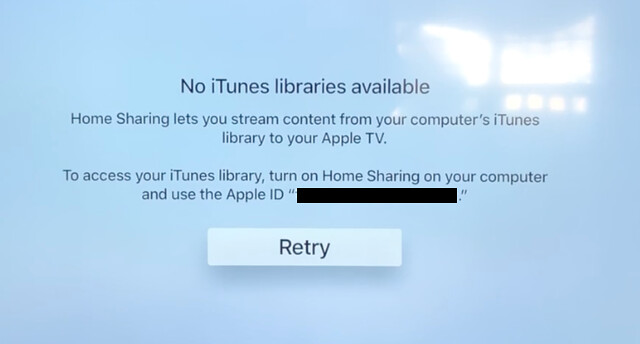
Every time after the photos crash there is a brief error message on the screen for about 1 second that reads “No iTunes libraries available. Home Sharing lets you stream content from your computer’s iTunes library to your Apple TV. To access your iTunes library, turn on Home Sharing on your computer and use the Apple ID. Retry.”

That message disappears and brings me right back to the main home sharing page on the Apple TV.

I’ve made sure that the photos that I want to share are all on the internal hard drives of the devices I’m trying to stream. I even upgraded yesterday to the new Apple OS Mojave, in the hopes that this might fix things. I’ve turned my Comcast router on and off.

The bottom line is there is simply nothing that I can do to make photos work on my 4k Apple TVs since updating to TVOS 12. And, of course, Apple will not allow you to roll your OS on your Apple TV back to a previous version so there is no getting out of TVOS 12 hell. I did a reset of the entire device back to factory settings, but instead of resetting it back to the factory setting from when I bought it. It reset it back to the factory settings for TVOS 12.

The Apple Tech I spent hours on the phone with yesterday suggested that I take my Macbook Pro and my 4k AppleTV into the Apple store and set an appointment to show them there. I had an appointment this afternoon at 2pm to do just that, but after only getting three hours of sleep last night trying to troubleshoot my Apple TV I just couldn’t go through with it today. It’s just too much, too soon.

In the meantime it looks as though I wasted $ 200 each on some useless Apple hockey pucks, but maybe at some point I’ll regain the strength to try again, or maybe someday, somewhere I’ll find an answer on how to make these devices stream photos for me again.

Or maybe like I ditched Windows back in 2006, it’s now time to ditch Apple again and maybe go find something that you know, “just works.”

Needless to say, your 4k AppleTV may work flawlessly and perfectly for you. This is my personal experience though and it’s my blog and this is what the experience has been like for me.

I made a video of this problem here. If anyone does have any constructive advice I’d love to hear it. Thanks.


Thomas Hawk Digital Connection

 
Comments Off on The Apple TV 4K Device is a Deeply Flawed and Frustrating Product… for Me

Posted in Photography


Apple introduces iPhone XS, XS Max, and XR with better Portrait Mode and Smart HDR

13 Sep
iPhone XS and XS Max

Apple has unveiled the next generation of its iPhone X in the form of three variants: the 5.8″ iPhone XS and 6.5″ iPhone XS Max with OLED displays, and an iPhone XR with 6.1″ LCD “Liquid Retina” screen. iPhone XS and XS Max offer dual-camera modules like the X, while the XR uses a single 12MP wide-angle camera.

The iPhone XS and XS Max’s dual-camera module includes a new, larger 12MP sensor behind the wide-angle lens, with 1.4 µm pixels (up from 1.22 µm). The telephoto camera is still 12MP, and both lenses offer optical stabilization as they do on the iPhone X. The rear camera’s True Tone flash as been improved, and the front-facing camera has been updated with a faster 7MP sensor.

The iPhone XR uses the same updated 12MP sensor as the XS and XS Max, and is still able to produce Portrait Mode effects without a secondary rear camera – Apple says it uses the sensor’s focus pixels to produce a depth map.

On the software side, Apple has put some effort into improving the bokeh effect in Portrait Mode and now allows for post-capture adjustment of depth-of-field for stills in the native camera app, which is available on all three new phones.

…the camera will buffer four frames pre-capture for a “zero shutter lag” effect

A new Smart HDR mode is also available in all three devices, and leans even further into computational photography. When a moving subject is detected, the camera will buffer four frames pre-capture for a “zero shutter lag” effect. An image signal processor works with the device’s CPU to analyze scenes and do a better job of isolating Portrait Mode subjects. Apple says the camera captures secondary interframes at different exposures to capture highlight and shadow detail, analyzes the information and merges it into one image.

The XS and XS Max include an IP68 water resistance rating, while the XR offers an IP67 rating consistent with the iPhone X’s.

Both XS and XS Max offer a Super Retina OLED HDR screen, and Apple claims the displays offer a 60% improvement in dynamic range compared to the iPhone X. We considered the OLED display on the X to already be class-leading in its dynamic range and wide P3 color gamut, so this is an impressive accomplishment. The XS screen is (not surprisingly) spec’d identically to the iPhone X’s with 2.7 million pixels and 458 ppi, though the XS Max’s display is the largest to appear in an iPhone to date with 3.3 million pixels at 458 ppi. Both screens will render HDR photos and HDR streaming content from the likes of Netflix with high contrast and a wide color gamut.

iPhone XR

The XR stands on its own with an LCD, a 1792 x 828, 326ppi display Apple designates as “Liquid Retina.” It’s not designated an ‘HDR’ display like the XS models, and there’s no 3D touch present, but the display provides haptic feedback. The device uses the same updated front-facing camera as the XS and XS Max (yep, there’s a notch on this one too) enabling Face ID and front-facing Portrait Mode.

iPhone XS and XS Max will arrive first, shipping September 21st in 64GB, 256GB and 512GB configurations. The XS starts at $ 999; the XS Max starts at $ 1099. The iPhone XR will ship October 26th starting at $ 749 with 64GB, 128GB and 256GB configurations.

Articles: Digital Photography Review (dpreview.com)

 
Comments Off on Apple introduces iPhone XS, XS Max, and XR with better Portrait Mode and Smart HDR

Posted in Uncategorized