RSS
 

Posts Tagged ‘Apple’

An Apple a Day Keeps Creativity Awake

17 Feb

Do you find yourself lacking inspiration? Without new ideas? Or just unsatisfied with your average looking images? Pablo Picasso – the famous and talented artist – once said, “Inspiration exists, but it has to find you working.” This exercise is designed to help you achieve exactly that, and awaken your creativity.

An old English proverb says, “An apple a day keeps the doctor away”. So following this principle I came up with a routine for your photographic health. Something to keep you busy so that inspiration can find you working, as Picasso suggested.

Step 1: Photograph an apple

An Apple a Day Keeps Creativity Awake

Why an apple? Well, because I found that many times the excuses that we use are linked to the idea that we don’t have an interesting subject, or a nice-looking one, or an expensive one, in other words something worthy of photographing. So don’t procrastinate at the market looking for the perfect red shiny apple that looks like one from a fairy tale, just get an apple. An apple is something we all have access to. It’s not particularly expensive, and as you will see, also very versatile.

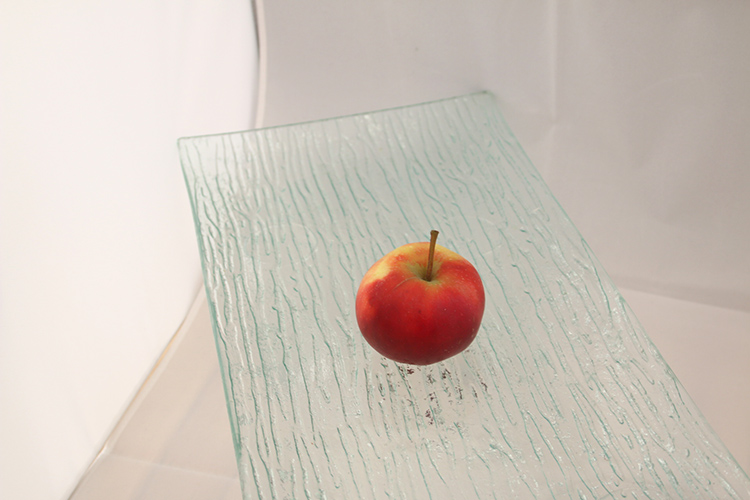
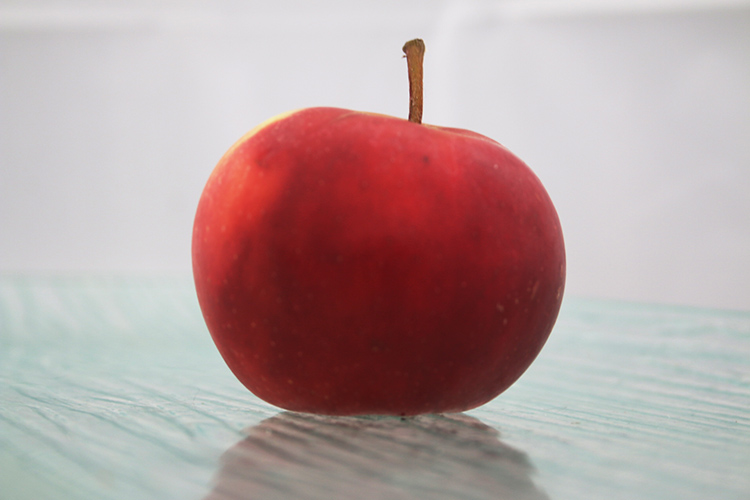
The first part of the exercise is to photograph your subject, in this case the apple without altering it. In other words, you are the one who is going to adapt in order to get the most out of it. For now you don’t have to worry about the technical part, so you can just leave your camera on automatic mode and shoot away. Photograph your apple from the top and from the bottom; from afar and in macro; with a wide-angle lens and a telephoto – anything you can think of.

Once you have done this and you can’t think of any other ways to photograph the apple, push yourself to do at least two more. Yes, it may take some time to come up with them, but trust me, those will be the best ones! Why? Because photograph has been around for almost two centuries, and lately thousands of images are done everyday, so most likely the first images you can come up with, are also the same ones everybody thinks about. That is why you need to come out of your comfort zone and exercise your photographic mind and eye.
An Apple a Day Keeps Creativity Awake

An Apple a Day Keeps Creativity Awake

An Apple a Day Keeps Creativity Awake

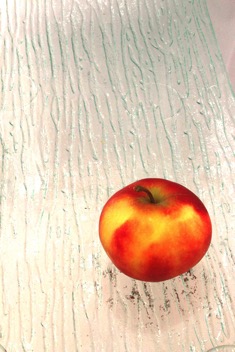
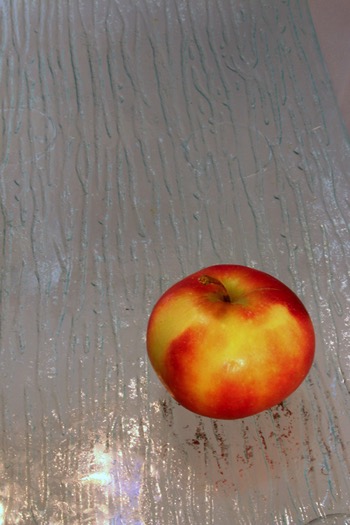
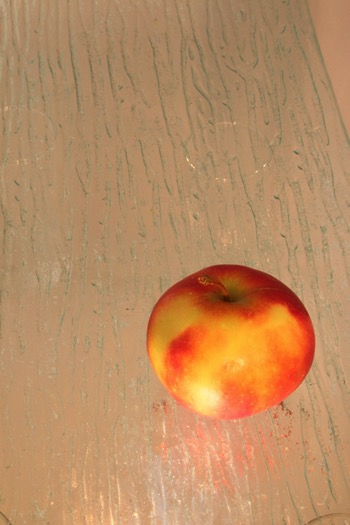
As you can see, the color and exposure on each one is different. This is because the camera was set on automatic mode. This way the settings adjust to the information it’s receiving. If most of the frame is covered by the warm colors of the apple it sends different information than a frame mostly covered by the white background. This is why the next step is very important.

Step 2: Put your technique to good use

Now that you have found the best angle for photographing your apple, you can move on to the next level – make it professional!

When you had your camera on auto mode it made the decisions by itself. Let’s be honest, with the cameras that exist on the market today, it’s very easy to get a well-exposed photo. However, what I always say to my students is, “We learn photography not to make it good, but to make it our own.”

If you use the automatic mode of your camera, it might come out a good photo, but it won’t be your photo, because you didn’t make any of the decisions. In this part of the exercise you need to put your photographic knowledge – no matter how much that is – to good use.

If you know about bracketing (the process of making the same photo with different exposures) then do that.

An Apple a Day Keeps Creativity Awake

Underexposed

An Apple a Day Keeps Creativity Awake

Correctly exposed

An Apple a Day Keeps Creativity Awake

Overexposed

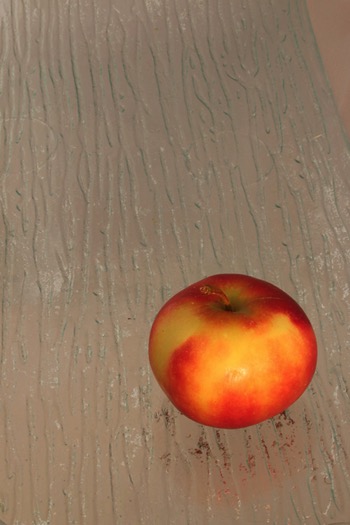
If you know about lighting, then play with your lights. Use a direct flash to create a hard shadow for one image, then use a flash and a reflector to soften the shadow, and so on. Even if you don’t have a professional set of lighting gear you can always play with artificial light from lamps and natural light from windows. The point is to use your tools and techniques to make your photo the way you want it to be and not just another snapshot.
An Apple a Day Keeps Creativity Awake An Apple a Day Keeps Creativity Awake

Step 3: Get creative

Now it’s all about the finishing touches. It’s always important that you are able to produce a technically good and unique photo of an object/subject. But how about getting a bit more creative? Try to tell a story, to set a mood, or to use the apple as a metaphor, anything goes! (Image basket.jpg)

An Apple a Day Keeps Creativity Awake

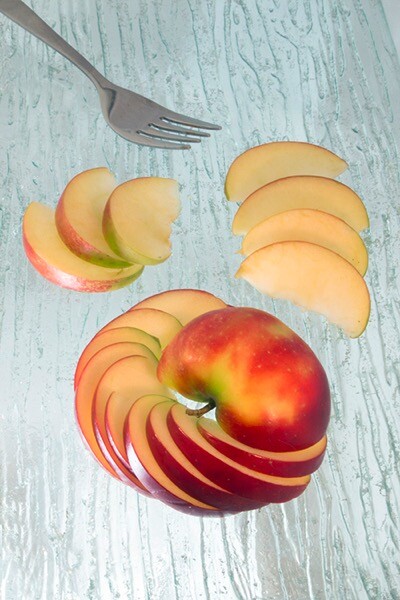
Once you have your best angle and your light and settings selected, it’s time to decide what you want to say with your photo. Do you want your photo to be yummy and inviting? Maybe cut the apple and plate it on a beautiful table. Do you want it to be about health and nutrition? Maybe add some other fruits to the set.

If you want to push yourself a little bit more then try to tell a story, maybe make a photographic series. Think about Snow White or Adam and Eve, in both cases the apple plays an important role. Do you want it to be conceptual? Think about life and death for example using a fresh and a rotten apple. You can do anything you want just by adding some elements, add some context, and get creative!

Today for me it was a healthy, ready-to-eat snack!
An Apple a Day Keeps Creativity Awake

Conclusion and what’s next

Great work! I hope you enjoyed your apple for today. Tomorrow maybe go with an orange, or a dog, or a self-portrait. You can apply this three steps to everything, or stay with the apples and see how far you can get, the important thing is to exercise every day.

googletag.cmd.push(function() {
tablet_slots.push( googletag.defineSlot( “/1005424/_dPSv4_tab-all-article-bottom_(300×250)”, [300, 250], “pb-ad-78623” ).addService( googletag.pubads() ) ); } );

googletag.cmd.push(function() {
mobile_slots.push( googletag.defineSlot( “/1005424/_dPSv4_mob-all-article-bottom_(300×250)”, [300, 250], “pb-ad-78158” ).addService( googletag.pubads() ) ); } );

The post An Apple a Day Keeps Creativity Awake by Ana Mireles appeared first on Digital Photography School.


Digital Photography School

 
Comments Off on An Apple a Day Keeps Creativity Awake

Posted in Photography


Apple files patent application for optimization of focus stacks

14 Feb

Focus stacking on smartphone cameras is not an entirely new thing. It was used on some Nokia Lumia phones, including the Lumia 1520 in 2014, to create a shallow depth-of-field effect and allow for refocusing an image after capture, similar to what the Lytro light field cameras can do.

However, now it appears Apple is also taking an interest in the technique. The company describes a method for the optimization of focus stacking in a patent application that was filed in 2015, but only published in December 2016. The patent details a method for calculating what positions the lens elements need to be in for an optimized capture process. After the lens is positioned in its first location and collects initial focus information, an algorithm calculates ‘target depths’ that would be required to capture all objects in the scene in focus. The camera would then capture an image at the current lens location, continuing to other focal points until all elements of the screen have been captured in focus. 

In combination with ever improving smartphone processing power and potentially optimized camera hardware, this new method could help speed up the focus stacking process significantly, making it a possible default camera setting. Current options usually take at least a couple of seconds per focus stack for capturing and processing. The method could also be used for depth mapping and help improve the precision of portrait modes, such as the one implemented on the iPhone 7 Plus.

Articles: Digital Photography Review (dpreview.com)

 
Comments Off on Apple files patent application for optimization of focus stacks

Posted in Uncategorized


Apple emphasizes iPhone 7 low light capabilities in “One Night” ad campaign

02 Feb

$ (document).ready(function() { SampleGalleryV2({“containerId”:”embeddedSampleGallery_7980537670″,”galleryId”:”7980537670″,”isEmbeddedWidget”:true,”standalone”:false,”selectedImageIndex”:0,”startInCommentsView”:false,”isMobile”:false}) });

Apple’s ‘Shot on iPhone’ ads have been a familiar sight on billboards and on TV for quite some time now. For the latest round of advertising Apple is now focusing on the iPhone 7’s low light capabilities. The campaign’s title is ‘One Night,’ because all images were taken by a group of photographers around the world on the night of November 5th, 2016.

The group captured life around them from dusk to dawn, only using the iPhone’s camera. Like most smartphone cameras, with its small image sensor the mobile device has a distinct disadvantage compared to DSLRs and other system cameras in low light, but with its fast F1.8 aperture, improved optical image stabilization and a clever multi-frame mode, it’s a step into the right direction and a noticeable improvement over the previous iPhone 6 generation. 

You can read and view the samples in our own comprehensive review of the iPhone 7 Plus or view a selection of the campaign images in full size in our gallery above. 

Articles: Digital Photography Review (dpreview.com)

 
Comments Off on Apple emphasizes iPhone 7 low light capabilities in “One Night” ad campaign

Posted in Uncategorized


Apple selling more Plus models than ever

31 Jan

Apple’s financial results, which will be released tomorrow, show that in Q4 2016 Apple has sold more iPhone 7 Plus units than any of the preceding Plus models in previous years. The Plus model has a larger screen, more RAM and a bigger battery than its standard counterpart but we’d suspect the iPhone 7 Plus dual-camera with its 2x optical zoom factor and portrait mode has a lot to do with consumers increasingly opting for the more expensive iPhone variant. Overall 24 million iPhone 7 Plus units have been sold which is a 55% increase compared to the 15.5 million iPhone 6s Plus in Q4 2016. This represents 40% of all iPhone 7 sales.

This is also the first time that users in China bought more Plus devices than standard iPhones. 52% of iPhone buyers opted for the dual-camera model. With the previous iPhone 6s generation only 40% decided to go with the larger version. 

Despite good news for the iPhone 7 Plus, overall the iPhone has been struggling in the fourth quarter of 2016. According to analysts Cowen & Co, the Apple results show that consumers are less willing to upgrade their device than before and rumors about a 10 year anniversary iPhone model in 2017 made some users skip the 2016 model. Like all mobile manufacturers, Apple is under constant pressure to innovate. At least in terms of imaging the 7 Plus dual-cam looked like a step into the right directions. Let’s hope Apple can follow up on it 2017.

Articles: Digital Photography Review (dpreview.com)

 
Comments Off on Apple selling more Plus models than ever

Posted in Uncategorized


Astropad launches Astropad Studio for the Apple iPad Pro

12 Jan

The team behind Astropad, an iOS app that turns your iPad into a graphics tablet for the Mac, has today released Astropad Studio, a premium version of the original Astropad. The new release was specifically designed to work with the iPad Pro and offers better performance and an expanded feature set. 

Astropad Studio can communicate with an Apple Mac computer via a Wi-Fi or USB connection and uses Liquid Extreme, an improved and 5 times faster version of the standard app’s Liquid technology which allows for smooth operation of the tablet and image quality that is free of compression artifacts. 

In addition, Astropad Studio supports both Bluetooth and wired keyboards and comes with the new Magic Gestures feature that allows for the creation of gesture shortcuts using touch-Pencil combinations. Sidebar shortcuts automatically adapt to the Mac app you are working with and Stroke Lab lets you adjust the characteristics of your pencil stroke in a variety of ways. 

Astropad Studio will be available as a subscription service for either $ 64.99 per year or $ 7.99 per month. This includes syncing of settings across devices and priority support. A 7-day free trial is available for those who are interested in trying the app. More information is available in the video below and on the Astropad Studio website.

Articles: Digital Photography Review (dpreview.com)

 
Comments Off on Astropad launches Astropad Studio for the Apple iPad Pro

Posted in Uncategorized


Throwback Thursday: Apple QuickTake cameras, pioneers of consumer digital photography

28 Dec
Apple QuickTake 100. Photo by Carl Berkeley

While Apple Inc. is known for being a pioneer in the world of computers and smartphones, it also produced some of the first consumer digital cameras. The QuickTake 100, built by Kodak and priced at $ 750, had a unique binocular-like design and captured images at a whopping 640 x 480. It wasn’t designed for a day of shooting. In fact, the internal memory filled up after just eight shots. An RS-232C port was used to transfer photos (in QuickTake or PICT format) to your Mac.

Apple QuickTake 100. Photo by Carl Berkeley

The QuickTake 100 had a fixed 50mm equivalent F2 lens, an optical viewfinder and an LCD info display on which to adjust settings. As you can see, there was no way to review photos on the camera – you needed a computer for that.

The successor to the 100 – the QuickTake 150 – came about 15 months later. This model, priced at about $ 700, looked identical to its predecessor, but offered twice the storage and support for more image formats (even PCX, for those who remember it). It included a macro conversion lens and also supported Windows PCs. Not wanting to leave original QT 100 owners out in the cold, Apple released a firmware update that essentially converted it into a QT 150.

QuickTake 200. Photo by Jared C. Benedict.

Apple and Kodak parted ways after the QuickTake 150, with 1997’s follow-up, the QuickTake 200, being built by Fujifilm. In fact, Fujifilm sold a nearly identical camera itself – the DS-7. The QuickTake 200 had a more traditional design and had a 48mm equivalent F2.2 lens. 

QuickTake 200. Photo by Jared C. Benedict.

By far the most important addition to the QT200 was a 1.8″ LCD display. Finally, there was a way to preview and review your photos without having to get out a serial cable. For those seeking an optical viewfinder, Apple included one which you could clip onto the camera. Other new features on the QuickTake 200 were a mode dial, limited aperture and focus adjustment, and a SmartMedia card slot.

While they were some of the first consumer digital cameras, the QuickTake cameras didn’t take off as the ‘big names’ got into the business. When Steve Jobs returned to Apple in 1997, the QuickTakes, along with the LaserWriter and ahead-of-its-time Newton PDA were unceremoniously killed off.

Articles: Digital Photography Review (dpreview.com)

 
Comments Off on Throwback Thursday: Apple QuickTake cameras, pioneers of consumer digital photography

Posted in Uncategorized


Apple rumored to work on 5-inch iPhone with vertical dual-cam

28 Dec

According to the Japanese blog Mac Okatara, Apple might introduce a new smartphone model in 2017 with a 5″ display to slot in between the existing 4.7″ and 5.5″ variants. The report, which originates from a Taiwanese supplier, also says the new mid-size iPhone would use an iPhone 7 Plus-like dual-camera, albeit with a vertical lens alignment rather than a horizontal one.

This rumor is in line with multiple other reports which have stated that in 2017 Apple will launch three rather than two new iPhone models. Alongside updated versions of the current models with 4.7″ and 5.5″ LCD displays, a new premium model with OLED display technology is expected. This device could also feature Apple’s dual-camera technology. 

As always, this kind of rumor is best taken with a pinch of salt but we were quite impressed with the iPhone 7 Plus dual-camera in our full review and would love to see the technology integrated into a smaller form factor. We should know more by September 2017.

Articles: Digital Photography Review (dpreview.com)

 
Comments Off on Apple rumored to work on 5-inch iPhone with vertical dual-cam

Posted in Uncategorized


Apple cuts adapter and card reader prices to appease new MacBook Pro buyers

05 Nov

When Apple announced its new MacBook Pro last week, Mac fans were up in arms about the removal of its HDMI port, SD card reader and MagSafe power connector (among other things.)  The new models have four Thunderbolt 3 ports (two on each side), and that’s it, thus requiring ‘dongles’ in order to use legacy connectors. SanDisk also produces an SD card reader (pictured) that plugs right into the side of the computer.

To help placate those who aren’t excited about spending nearly $ 120 just to get their SD card reader and HDMI port back, the company has cut prices of many USB-C and Thunderbolt adapters for a limited time.

  • USB-C to USB adapter: $ 19 to $ 9
  • Thunderbolt 3 to 2 adapter: $ 49 to $ 29
  • USB-C to Lightning cables (1/2 meter): $ 25 to $ 19 / $ 35 to $ 29
  • Multiport adapter w/HDMI, USB and USB-C: $ 69 to $ 49
  • Multiport adapter w/VGA, USB and USB-C: $ 69 to $ 49
  • SanDisk USB-C SD card reader: $ 49 to $ 29

Articles: Digital Photography Review (dpreview.com)

 
Comments Off on Apple cuts adapter and card reader prices to appease new MacBook Pro buyers

Posted in Uncategorized


CMRA band for Apple Watch features front and rear cameras

03 Nov

If you’re worried that having to pull your smartphone out of your pocket might make you miss the decisive moment, the CMRA band for the Apple Watch could be just what you’re waiting for. The watch band comes with not one but two built-in cameras. An upward-facing 2MP module is meant to be used for video calls, via a dedicated app, and the occasional selfie. The outward-facing camera captures 8MP images or HD-video clips right from your wrist.

To do so you have to tap a button that is built into the band or long-press it for video recording. A double-tap of the button switches between cameras. The makers of the CMRA claim you can capture ‘hundreds’ of images with one battery charge or record approximately 30 minutes of video footage. 

Recorded images and videos are accessible via Apple’s stock Photos app, so they can be easily sorted, edited and shared. In terms of storage the CMRA offers 8GB of built-in memory. The band comes with a dual-charging dock that charges Apple Watch and CMRA band at the same time.

The CMRA band is expected to launch in Spring 2017, but those interested can already put a pre-order in at an early bird price of $ 149 for either the 38mm or 42mm version. The estimated retail price after launch is $ 249. More information is available in the video below or on the CMRA website where you can also order the band.

Articles: Digital Photography Review (dpreview.com)

 
Comments Off on CMRA band for Apple Watch features front and rear cameras

Posted in Uncategorized


Apple revamps MacBook Pro lineup, adds ‘Touch Bar’

28 Oct

On the 25th anniversary of the first PowerBook, Apple has announced three new MacBook Pro models. The long-awaited new flagship 13″ and 15″ MacBook Pros bring performance boosts compared to the previous generation, revamped ergonomics, and a new ‘Touch Bar’, aimed at making the machines more versatile for creative professionals.

It’s no surprise that the two new flagship MacBook Pro models are slimmer and lighter than their predecessors, but the ergonomic changes are more fundamental than that. Their new ‘force touch’ trackpads are twice as large as the previous-generation, and the keyboards have been redesigned, with a slimmer butterfly switch design, that Apple claims will offer superior tactile feel to the similar switches in the 12″ MacBook. 

The big news, however, is the addition of a ‘Touch Bar’. Much anticipated (and leaked), this is a touch-sensitive display strip, that effectively replaces the traditional function keys which have been a feature of consumer computing for more than 40 years. The Touch Bar is fully customizable, and its default functions change depending on the application. Obvious uses including scrubbing through a video timeline in Final Cut Pro, and quick text formatting and email flagging in Apple’s Mail app.

In addition to the new 13″ and 15″ Touch Bar-equipped models, a third new 13″ MacBook Pro has also been introduced, which is even slimmer, even lighter, but features only two thunderbolt ports, and a traditional function key array. Base configurations of the new 13″ and 15″ MacBook Pro models will be available starting at $ 1799 and $ 2399 respectively, and the slimmer non-Touch Bar model will start at $ 1499.

During a demo at the launch event, a representative from Adobe demonstrated how the Touch Bar can be used in Photoshop to quickly switch between layers, blending modes and select brushes without needing to access any of the usual on-screen pallets – effectively allowing true ‘full-screen’ image editing. Adobe is expecting to add full support for the Touch Bar before the end of 2016.

Another big change is how the new MacBook Pro models manage peripherals. Gone is the built-in SD reader, MagSafe connector, and any traditional USB or HDMI ports. Instead, the new computers offer four Thunderbolt 3 ports, all of which can serve as power, USB 3, HDMI, display, or ThunderBolt connectors.

In terms of performance, Apple claims that the new MacBook Pro’s displays are 67% brighter, offer a 67% greater contrast ratio and 25% greater color gamut than the previous generation, and the 15in version offers 130% greater 3D graphics performance. Video editing on the 15in model should be 57% faster than the previous generation, thanks to a quad-core Intel Core i7 processor, faster 2133Mhz memory and up to 4GB of video Ram. Built-in storage has been boosted too, up to 3TB with a maximum rated data transfer rate of 3.1 gigabytes per second. 

We’re intrigued by the possibilities of the new Touch Bar, and after watching Adobe’s demonstration of its integration into Photoshop, we can see it becoming popular with photographers. Likewise video editing. The ability to run a video at full-screen, without any on-screen clutter but still have access to key navigation and editing tools from the Touch Bar is pretty neat. Business users will appreciate Touch Bar integration with MS Office, and an integrated iOS-style Touch ID fingerprint scanner for quick unlocking and user-switching.

Every time Apple adds or removes an I/O port, certain Internet commenters get up in arms, but with the exception of the lack of SD slot, the move to an all-Thunderbolt I/O interface makes sense. We suspect that for serious users, the sheer versatility of the four USB-C style ports should outweigh the inconvenience of switching away from traditional USB, HDMI and display connectors in the long run.

Less clear-cut is the matter of how Apple intends to evolve its desktop and mobile operating systems. With iOS getting more powerful (just anecdotally, the iPad Pro has effectively replaced laptops for several of us here at DPReview), and Mac OS getting progressively more iOS-like, we’re curious to see what happens next. The addition of the Touch Bar to the new MacBooks brings OS integration a little closer, but will Apple continue to expect developers like Adobe to create separate versions of its applications for both iOS and Mac OS – even as the user bases overlap?

What do you think? With Microsoft’s new hybrid device, the Surface Studio snapping at their heels, is Apple still providing creative professionals with the high-end computers that they need? Let us know in the comments.

Articles: Digital Photography Review (dpreview.com)

 
Comments Off on Apple revamps MacBook Pro lineup, adds ‘Touch Bar’

Posted in Uncategorized