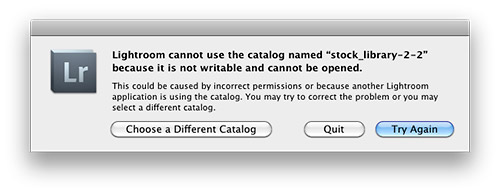
If you use Adobe Lightroom then let me warn you, the following dialog box is the last thing you want to see when all is configured correctly (permissions are correct and another application is not using the catalog). Why? Because it means that your catalog file is inaccessible and may have big problems. The net result being lost work and time to fix the problem. Alas there is something you can do before this ever appears that will save you from spontaneously cursing late in the evening and/or instantly turning your hair white, but first a short story…
Learn From My Experience
This past Friday night at 11pm I was that guy in a darkened room being warmed by the glow of my monitor and cursing at the dialog box pictured above. Innocently enough I thought I’d work on an image or two before bed and brought up Lightroom 3.4.1, but the Zen-like activity of working on an image or two (cue the sound of water trickling over a cascading slope of river rocks with birds chirping above) was abruptly cut short (cue sound of a needle scratching on a record). Panic didn’t set in right away because I backup my Lightroom library on an external hard drive (see my drive setup) and I also employ Apple’s Timemachine backup function for my primary hard drive that houses my Lightroom catalog.
Note: It’s best practice to not keep your working Adobe catalog on an external drive due to degraded performance.
Remembering that I had these two backup mechanisms in place I thought, “Keep it together Jim. Let’s see if we can retrieve things to make this a quick fix before bed.” Then 30 milliseconds later my inner voice countered, “Shit! You’ve avoided backing up your Lightroom library for a at least 2 weeks so you could shut down your computer more quickly. Good job Jim, considering you just made a bunch of new smart collections and keyworded hundreds of photos.” Sure enough I looked and my last catalog backup via Lightroom was made to my external hard drive over two weeks before all my recent work had been completed. Backup plan #1 was a failure purely because I was lazy and impatient.
I then started sorting through my Timemachine drive to find my Lightroom catalog date stamped Thursday (the day before this mess happened). There were multiple backups for Thursday and Friday so I was starting to feel relieved, but then I noticed the file size was half what it should be. I loaded the catalog and sure enough it was what my Lightroom catalog looked like not days or weeks ago, but several months ago. I’ll spare you the cuss filled thoughts that were shooting through my brain at this point. I opened backup after back up for the past week or two and Timemachine had not updated my catalog for what seems to be months…seemingly just duplicating an older copy.
As you can imagine the thought, “Holy shit!” kept repeating in my mind. Instantly I opened a browser window and I started searching on Google “Lightroom cannot use the catalog named” and what I found was limited, very limited in fact. Most of the posts were for version 2 and not version 3. The one thing that was consistent advice was to delete the lrcat.lock file that comes up next to your catalog file ending with lrcat. (Note: Do not delete your catalog file ending in .lrcat that is having problems!!!!) I deleted the lrcat.lock file and reloaded Lighroom but kept getting the same result, seeing that dreaded dialog box. I was resigned to having to eat the loss of a lot of work at this point. At best I’d have to copy and paste metadata from exported files made the past 2 weeks to get back to where I was before my catalog had problems.
Finally as a last resort I decided to restart my computer. The lrcat.lock file was removed and the catalog file didn’t show any signs of corruption you might visually see on a Mac. After my restart I loaded Lightroom and…
everything came up normal. So with out any hesitation I quit Lightroom and at the prompt backed up my catalog via Lightroom’s backup function. I then made a triple backup by copying the verified working catalog to a thumb-drive I carry on my keychain.
Lessons Learned, Please Take Note:
- Don’t be lazy and regularly backup your Lightroom catalog especially after completing a lot of work.
- Have a backup of your backup catalog
- Don’t rely on Timemachine as a backup for your Lightroom catalog. Period.
- Verify that your backup catalogs work
- Seriously don’t be lazy and regularly backup your Lightroom catalog!!!
Left Wondering
Granted I didn’t look at every forum entry when searching for a solution to this problem, but those that came up at the top of the search results were not helpful and dated. I was surprised I couldn’t easily find something in the Adobe Labs forum about this that was relevant to version 3.x either. While things are working again I’m not 100% satisfied and I’m going to be researching further what exactly caused my catalog to become inaccessible. Seeing that my Lightroom catalog now spans content on 4 drives and contains information for 110,000 image I’m not keen to risk losing it all.
Technorati Tags: Adobe, Lightroom, backup, error, best practice
.gif)
Copyright Jim M. Goldstein, All Rights Reserved
Adobe Lightroom Lesson to Learn – Backup Your Library


JMG-Galleries – Jim M. Goldstein Photography

 Adobe has released ‘Release Candidates’ of its Camera Raw 6.6 and Lightroom 3.6 raw processing software. The updates cover 5 additional cameras, namely the Canon Powershot S100, Nikon 1 J1, Nikon 1 V1, Panasonic Lumix DMX-GX1 and Samsung NX5. Also included are lens profiles for a number of recent Sigma and Nikon lenses, along with several medium format optics and the Sigma DP2x. Both updates are available from the Adobe Labs site. The company uses the term ‘Release Candidate’ to denote software that is well tested but not yet the final version.
 Adobe Senior Product Marketing Manager Chris Quek explains the company’s cloud-based Carousel image sharing and editing service. When Adobe Carousel was announced, back in September 2011, the initial responses were that it looked like an expensive cloud storage service. But it’s a little more ambitious than that. Quek talked us through what Adobe Carousel offers and where it might go next.
How To Make A Desktop Background – Adobe Photoshop CS5 (HD) (Commentary)
Hello Guys! My First Tutorial! Sorry It’s a bit weird haha! This is the first part, I will soon be making another tutorial on how to make a background like I have! Sorry it is Crap Haha, It’s my first tutorial IGNORE THESE: how to computer tutorials hacks cmd never again will i be able to make money online with youtube ebay myspace hacks crack white black facebook he was so cute irfanview audacity photoshop retouching effects sony vegas platinum eight 8 1 2 3 4 5 6 7 8 9 10 lol he got owned everyone lets party like a rock star rockstar sean paul ownage hitting drunk these are my tags lol coming for pizza eating pig squealing technician techie making cash with your profile account on youtube haha charlie bit me smosh fred fred gets his finger bit off the song charlie the unicorn funny stuff to look at making cash online scratched chalk videos scratchedchalkvideos we own the tutorial making industry the how to masters ignore these tags tags ignore these MONEY FREE AWESOMEThis is an E3 preview of the new Xbox 360 dashboard soon to be released. xbox 360 new dashboard gears marcus dom halo e3 electronic enterntainment expo dashboards fall update 2008, including new avatars, 1vs100, and Netflix support. New Xbox 360 Dashboard Fall Update 2008 walks you through some of the new features xbox dashboards fall update including avatars 1vs10 Demo game installation process for the New Xbox Expe… SUBSCRIBER HACK WEBDemo game installation process for the New Xbox Experience dashboard …
Video Rating: 4 / 5
Posted in Retouching in Photoshop