RSS
 

Posts Tagged ‘About’

Consent in Photography – What to Think About When Photographing People

10 May

You might not think about it, but as a photographer, you possess a certain power over the people you photograph. In her well-known book On Photography, Susan Sontag wrote:

”To take a photograph is to participate in another person’s mortality, vulnerability, mutability.”

Consent in Photography – What to Think About When Photographing People - street portraits

Photographing someone exposes them to scrutiny, both by others and by themselves. The photographer captures a representation of the person which may be very different from how they see themselves; it’s a representation made by someone else. This is not a bad thing or a good thing, but it is the basis for this discussion about consent in photography.

What is consent in photography?

People have a basic right to integrity, to make their own decisions about their bodies. Consent is someone’s agreement for another person to do something that would violate their integrity if it were done without their approval. For instance, we can consent to take part in a medical examination, joining a dance, or performing on stage, all of which would be wrong for someone to force us to do.

So how is this relevant to you? When do you need to ask for consent in photography, and how is it done?

Silhouettes at sunset on the beach in Brighton, England. - Consent in Photography – What to Think About When Photographing People

Consent in photography

When it comes to photography, the absence of consent usually isn’t about a direct physical violation. It’s (fortunately) rare for someone to be dragged into a studio against their will or forced to pose. The legal and ethical issues have more to do with the ”aggression” of the act itself, the right to privacy, and also to some extent the control the person may want to have over how they’re represented.

Even if you may not have considered it in those terms, you’ve probably encountered the question of consent if you’ve ever taken photos of other people, especially if you do street photography. For example, maybe you’ve considered whether to photograph people kissing or taken a photo and received an annoyed or angry expression in return.

Photographing demonstrations and consent. - Consent in Photography – What to Think About When Photographing People

When considering consent, you need to keep in mind both the making of the photograph and its publication.

For instance, imagine that you’ve been hired to photograph a wedding reception. The consent in these situations is often implied, meaning that even if you’re an outsider in a private space at a private occasion, you can assume that photographing the guests is okay unless they specifically ask you not to. However, this implied consent does not extend to publication on your website or anywhere else, so you’ll have to ask for explicit consent from photographed persons before publishing those photos.

When do you need to ask for consent?

 Consent in Photography – What to Think About When Photographing People

Photographing children and consent.

Legalities

Laws obviously differ from country to country, so you should familiarize yourself with the laws concerning photography in your country or where you travel. For many places, you can find handy summaries of your legal rights as a photographer.

In general, it’s legal to take and publish photographs in and from a public space without asking, whereas taking photographs in a private space requires consent. Selling a photograph usually requires consent from the persons in the picture. If you’re unsure or traveling to a foreign country, it’s always worth looking up the rules.

Anonymous street photography -- tips on consent in photography.

Ethics

Apart from the legal aspect, there is also an ethical one. This one is up to you and your values. Do you feel it’s okay to take a picture of a child playing on a beach or publish a series of portraits of people leaving a bar on your website, without asking first?

We all take part in creating the atmosphere and shaping the attitudes of the society we live in or the communities we visit. Thinking about consent makes it easier to decide which photographs are worth making and which ones are not.

Consent in Photography – What to Think About When Photographing People

Photographing Pride parades and other festivals where people may wish to remain anonymous.

In the end, there’s a spectrum of situations in which you can ask for consent. The range goes from just asking when you’re legally required to do so, to asking every single time you take a photo with a recognizable person in the frame. Don’t expect that doing unto others what you want them to do to you will always work in these situations. People’s attitudes toward being photographed differ a lot between individuals.

Interpreting the law in its least strict sense means you may never need to ask for consent as long as you avoid certain situations, whereas asking every single time will help you avoid unpleasant confrontations. Consent may seem tricky, but in the end, it’s not. All it requires is awareness of the law, knowing your own limits, and respecting the people around you.
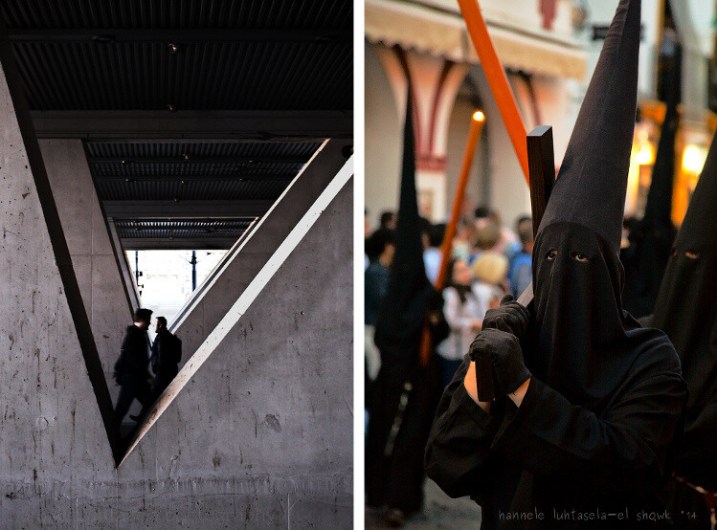
Street photography, religion, anonymity, and consent. Consent in Photography – What to Think About When Photographing People

Getting consent in practice

So you’ve decided that you are required to or want to ask for consent from someone you’d like to photograph. What does that actually mean? How do you get a person’s consent to photograph them and maybe publish their picture somewhere?

To get written permission to photograph someone and use their photograph, you can use consent forms or a model release.

There aren’t any correct or incorrect forms; you can make your own and include whatever you want in it. However, the form should at least contain the photographed person’s name and what they’re consenting to (being photographed and the photographs being published in a certain place or a specific context).

The purpose and date are good to add, but it’s also good to keep forms simple so there won’t be any question as to whether the person who signs the form understood it or not.

Who do you ask for consent to take and publish pictures? Consent in Photography – What to Think About When Photographing People

Who do you ask for consent?

Implied consent

Implied consent is when you can assume that the subject is okay with being photographed without explicit written or oral permission. This requires that the person understands that they are being photographed and that they react in a way that implies that they’re okay with it.

As a paid event photographer, you can often assume that the guests know that they may be photographed and that they’ll approach you if they don’t want to be photographed. You can also put up a clear sign at the venue, identifying you as the photographer and explaining that guests can ask to be avoided in the photos if they wish.

In my experience, it’s very rare that people aren’t okay with being photographed at weddings or other events.

Publishing pictures taken at private events often requires permission. -Consent in Photography – What to Think About When Photographing People

Publishing pictures that were taken at private events often require permission.

There are many consent-related issues to consider in street photography. Tips on how to avoid most issues are presented in this article on how to take an anonymous approach to street photography.

And if you’re unsure, you can always just ask!

Summary

This article is a very general overview of what consent in photography entails, with the intent to inspire you to think about the subject. I have no legal training, so please only use this article as a basis for discussion, and please do add your own ideas to it!

Do you think about consent when you’re making photographs? Which of the photos in this article would you have made sure to get consent for, and which do you think don’t call for consent? Have you ever wished that a photographer had asked before taking a picture of you? I’d love to hear your thoughts on this, please add your comments below.

In the end, maybe we can participate not only in the photographed person’s mortality and vulnerability, but also in their pleasant memories, self-confidence, and all the positive sides of mutability.

The post Consent in Photography – What to Think About When Photographing People appeared first on Digital Photography School.


Digital Photography School

 
Comments Off on Consent in Photography – What to Think About When Photographing People

Posted in Photography


New 2018 dPS Reader Survey – Tell Us More About You

27 Apr

At dPS we value you, our readers, above all else. We want to help you take better pictures.

By doing this survey you will be helping dPS serve you better. By knowing what kinds of things are you struggling with, and the types of articles you want to see we can work toward providing more of what you need to move your photography forward.

We value your time, and you, as our regular reader and always strive to improve – you will help us by completing this form, for which we will be especially grateful.

Click on this link, or the image below to start the survey.

dPS-annual-reader-survey

Thank you for your continued support and being a dPS reader. We wish you all the success on your photography journey.

The dPS Team

The post New 2018 dPS Reader Survey – Tell Us More About You appeared first on Digital Photography School.


Digital Photography School

 
Comments Off on New 2018 dPS Reader Survey – Tell Us More About You

Posted in Photography


Video: 10 Lightroom features you may not know about

17 Apr

No matter how well you think you know Adobe Lightroom, this video probably still has something to teach you about Adobe’s photo editing and digital asset management program.

In the video, photographer and YouTuber Jamie Windsor spends twelve minutes looking at 10 “hidden” Lightroom Classic features you may or may not know about. Some are a bit more common-knowledge than the others, but odds are you’ll find at least one feature you didn’t know existed.

Check out the video above for a full rundown, or keep reading for a quick synopsis of all 10 tips:

  1. Sharing online – Using an integrated share function, you can easily share an album of your images online, where people can favorite and even comment on your photos.
  2. Getting good color – Hidden inside the develop dialog is a little color calibration tool. Adobe recently updated this tool, but the tip still stands and proves even more useful.
  3. Change preset opacity – This tip needs a plugin (The Fader), so it’s not directly integrated into Lightroom. But the tool is free to download. Once installed, you can choose how strong any presets are that you’ve installed.
  4. Targeted adjustment tool – Rather than using HSL sliders, the targeted adjustment tool lets you adjust the variables in a specific area with minimal affect on the rest of the image.
  5. Auto exposures match – This one is pure magic. Take a batch of photos with varying exposures, edit one how you want, and select the auto exposure match tool in the menu. Boom. The photos will look like they were shot with exactly the same settings. Great for wedding and even sports photography.
  6. Faster image rating – Rather than using the arrow keys and pressing numbers, simply press caps lock on your keyboard. Now, after you press a number it will automatically advance to the next image.
  7. Selective auto settings – If you hold shift and double-click the slider on an adjustment, Lightroom will automatically give you what it believes to be the proper setup.
  8. Edit local adjustment tools – Does that gradient filter overlay you just applied affect the subject of your image? Don’t fret. Simply click on the brush tool and use the erase function to selectively remove the are of the gradient you don’t want.
  9. Increased slider size – Drag out your adjustment tools to get more accurate edits (in case you didn’t know, you can also hold shift while moving a slider to make it more precise)
  10. Alt precision views – Holding the Alt key will more precisely show you what edits are being made—great for sharpening and exposure tools.

These tips apply to Adobe Lightroom Classic CC. If you’re using the new cloud-based Lightroom CC, a few of them will translate over, but not all, so play around a bit and see what you find. And if you found these tips useful, you can check out more of Windsor’s videos on his YouTube channel.

Articles: Digital Photography Review (dpreview.com)

 
Comments Off on Video: 10 Lightroom features you may not know about

Posted in Uncategorized


Shedding Light on the Histogram – 8 Rumors and the Real Facts About this Graph

05 Apr

There have been dozens of articles and many videos published about the purpose and interpretation of the histogram in post-production. It serves a purpose in both the camera capture and post-production processes.

Tons of pulp has been generated about this tiny graph clarifying the general purpose of the histogram. But there is still much to be learned about this graph. This article will clarify some issues while focusing mainly on post-production concerns.

Shedding Light on the Histogram - How to Use it in Post-Production

The individual RGB values are dominant in this image. Only the cracks in the sidewalk and spots of white in the cement cause the spikes on the outside edges of the graph.

Some articles I’ve read portray the histogram as the Holy Grail of digital photography and even describe an ideal histogram shape. Others describe the histogram as an accurate revelation of image health, sort of like a digital EKG. Still, others downplay the value of the statistical feedback completely and totally miss its primary purpose. Listed below are actual quotes from tutorials and articles about the histogram.

Colored Fence - Shedding Light on the Histogram - How to Use it in Post-Production

The two histograms reveal more information than you might think. The RGB graph reveals the same solid yellow and blue colors while the Luminosity graph represents the combined RGB luminosity (effectively, the grayscale equivalent values).

I’ve been adjusting images for decades; long before the graph was publicly introduced and I’ve worked with it every day since so I’d like to weigh-in on rumors and clarify some facts. Once you understand the histogram’s primary function and limitations, you’ll find it to be a solid feedback resource.

The Histogram’s Vertical Lines Defined

RUMOR #1: The histogram is a graphic blueprint of a digital image. The horizontal span represents the image’s tonal range and the vertical lines reflect the contrast of the image; the higher the vertical lines, the more contrast the picture contains.

FACT: The horizontal axis does reflect the image’s tonal range (from the darkest tones to the lightest), though the vertical lines reveal little about its contrast. Actually, the horizontal distribution is what reveals the overall contrast. Tones located mostly on the right reveal very light (or high-key) images while tones favoring the left side are darker (low-key) images.

The extreme right side wall represents white and the extreme left wall of the graph represents solid black. The highest (vertical) peak of the graph merely indicates the highest ratio of pixels containing that particular color tone as it relates to the others. The lowest vertical level on the graph indicates the tone color with the least number of pixels in the image.

Hi Key Low Key Histogram

The left graph represents a high-key or light toned image. The histogram on the right represents a low-key or dark toned image.

Histogram Shape

RUMOR #2: There is a preferred “mountain” shape for a histogram. The ideal shape displays a single peak beginning at the “ground” on one side, reaching upward into a bell shape near the middle, and tapering down to the ground on the other side. An ideal histogram contains information from all channels everywhere, from the left to the right in the graph.

FACT: There are as many histogram shapes as there are images. There is no such thing as a good or bad histogram and there is no such thing as an ideal histogram. Because these graphs reflect each image’s distribution of tones, you’ll be hard-pressed to find any two alike.

Histogram Shapes

Only images containing mostly middle tones will actually display a true bell (mountain) shape on the histogram as in the one top left.

Clipping

RUMOR #3: The extreme left and extreme right sides of the histogram should never hit the “sidewalls” of the graph. If the left or right side hits and travels vertically up the wall, an undesirable effect called “clipping” will occur, indicating that either solid black or solid white “no-detail” areas will be visible in the image. Utilize the warning signs (The Blinkies and triangles) and avoid clipping on either tonal extremes of the graph.

FACT: Depending on whether the image is high-key (medium contrast on a pure white background) or low-key (dramatic lighting with a black background), either side of the mountain may actually resemble a tonal cliff. Real-life lighting dynamics make these wall-climbing graphs quite acceptable. Photos captured against white seamless backdrops are purposely exposed to produce dropout white backgrounds.

Jupiter Air Show - Shedding Light on the Histogram - How to Use it in Post-Production

The U.S. Air Force Thunderbirds screaming across a very bright mid-summer South Florida sky were captured against totally white clouds. The apparent clipping shown in the histogram accurately reports the totally white clouds.

Tone Distribution

RUMOR #4: Histograms that display significant gaps on either side of the graph should be adjusted to distribute the tones more evenly. A well-shaped histogram is a happy histogram.

FACT: Real life lighting doesn’t demand that every scene contain both deep shadows and bright highlights. Images are sometimes brightened or darkened unnecessarily revealing a typical rookie editing mistake. Many times these bookend extremes establish an emotional mood that would be lost if the images were over-corrected in this manner.

Dark Green Leaves2 - Shedding Light on the Histogram - How to Use it in Post-Production

This low-key shaded scene contains very little highlight shades at all.

Corrected Dark Green Leaves2 - Shedding Light on the Histogram - How to Use it in Post-Production

Adjusting the image destroys the rich colors of the low-key scene.

Histogram Gaps

RUMOR #5: The silhouette of the histogram mountain should remain smooth, displaying no gaps or fissures in the mountain shape. These smooth tone transitions are necessary to maintain the photo’s full visual range. Gaps in the histogram’s silhouette indicate an interruption in the gradual tones and will result in banded or posterized stages. These gaps appear because the JPEG image is only 8-bit.

FACT: There are only 256 vertical bars presented in the Histogram. Each horizontal bar represents less than one-half of one percent (0.4%) of the total tonal range (100% / 256 = 0.390625%). Even if a photo contains a very gradual change in tones across a wide area (like an unclouded sky), your eyes will only perceive “banding” if the JPEG image has been degraded by repeated Save functions.

JPEG images contain a maximum of 256 levels (8-bits) of tone between black (solid color) and white (no color). Once JPEG files have been opened and saved a number of times, the number of tone levels can become significantly reduced and tone-banding may occur.

News Journal - Shedding Light on the Histogram - How to Use it in Post-Production

News Journal Gappy - Shedding Light on the Histogram - How to Use it in Post-Production

These two histograms appear quite different though the images are very similar. As you can see, “gappy” pictures rarely interrupt the flowing tones in a photo and often clarify more detail.

Full Range Images

RUMOR #6: 8-bit images (256 levels of tone/color per Grayscale/RGB channel) are required for an image to display the full range of detail contained in a high-resolution digital image.

FACT: The human eye is designed to focus on detail in a scene or image. Detail is a product of contrast, and contrast is only noticeable when adjacent colors display significant differences. For the most part, the fewer colors that are displayed, the more obvious are the differences in those colors. This sounds bad but it is actually quite beneficial. It may fly in the face of popular logic but there is a fundamental truth to be recognized. The picture with the least colors (also known as bit depth) is many times the most detailed picture.

Daytona Beach Bandshell 750px - Shedding Light on the Histogram - How to Use it in Post-Production

Daytona Beach Bandshell 15 Post 750px

The top image contains 256 levels of color per RGB channel; or up to 16,800,000,000 colors. The bottom image contains only 15 levels of color per RGB channel; only 3375 possible colors. This image uses less than 5% of the tones that are used in the top image. Don’t live or die on the issue of bit depth. It is important, but like other issues in life, more isn’t necessarily better.

There is, of course, a reasonable limit to this reduced color observation. Too few levels of color will lose the smooth transitions between colors and thus will also lose detail.

Try this exercise: open a full-range photo in Photoshop and duplicate the image on another layer. Open the Histogram (Window/Histogram). Now select Image > Adjustments > Posterize, enter the number 15 and view the image as a Preview. Watch the Histogram window as you preview the image. The graph will display only 15 vertical columns instead of 256 but the image will look pretty much the same.

The point I’m making is that “gaps” in a normally smooth histogram doesn’t necessarily indicate a visual disaster. Instead, a few gaps might just inject a little more drama in your images.

Smooth Flowing Tones

RUMOR #7: Digital captures should display the highest number of tones possible in order to preserve the smooth continuous tones.

FACT: While nature provides an extreme level of dynamic range and true continuous tone gradation, there is no such thing as “continuous tone” digital images. The word “digital” affirms this statement. Virtually all digital images are comprised of square pixels displaying individual tone values. The perception of continuous tone is an illusion.

Pixel Patch - Shedding Light on the Histogram - How to Use it in Post-Production

These blue pixels were captured from the sky of the Thunderbirds image above. The patch of sky appears as continuous tone in the original picture although the enlarged individual pixels vary quite a bit in value. The top histogram shows the combined channel luminance while the bottom shows individual RGB channel values. It’s complicated.

Exhaustive Reference

RUMOR #8: A Histogram is an exhaustive systematic and statistical accounting of all the internal colors and tones of an image, from dark to light (100% – 0%).

FACT: Each histogram does reveal the relative placement and distribution of all tones and colors, but due to its size, there is a serious limitation to its accuracy. Since editing software histograms are based on a horizontal graph only 256 pixels wide, each representation is a basic overview at best. If the full range of possible colors were truly represented by a single graph, the chart would occupy the wall of a good size room!

HistoMeasurements

Both the top and bottom tonal adjustments were severe enough to create significant gaps in the histogram and to alter the shift of tones in each range, though there are no visible interruptions in the smoothness of each gradation.

Let me break down the numbers. This 256 pixel-wide graph portrays each image’s potential color range using an 8-bit (256 level) interpolation. This means that all 16.8 million possible colors are represented in a mere 256 horizontal point histogram. Tones change levels in 0.4% increments. The graph significantly exaggerates the difference between minor shifts in tonal value.

256 Pixel Histogram2

Human eyes barely perceive a half-percent (0.5%) difference between tones, which is why 256 levels in a JPEG image provides the illusion of continuous tone. This means the histogram uses less than two vertical columns to represent a single percent of change in value.

57 58 percent

The two bottom patches are separated by only 1% in tone, though your eyes may have trouble seeing the difference. The top band shows a gradual change between the two values.

What does all this mean? Quite simply, the histogram delivers a good estimation of overall tone distribution but cannot be relied on for accurate measurement. A few gaps in the graph will rarely be visible to the human eye.

Wrap Up

The histogram is a valuable instrument intended to deliver a quick overview of the makeup and tonal shape of digital images. It was never intended to be a scary reference tool.

Learn to use the histogram to deliver interactive feedback as you work through your editing steps but appreciate the graph for the information it provides; mostly defining the distribution of tones, highlights, and shadows.

What the histogram does not show is whether the image requires internal adjustments to reveal hidden detail. That’s another topic altogether.

Push pixels around and stay focused.

The post Shedding Light on the Histogram – 8 Rumors and the Real Facts About this Graph appeared first on Digital Photography School.


Digital Photography School

 
Comments Off on Shedding Light on the Histogram – 8 Rumors and the Real Facts About this Graph

Posted in Photography


All About Laser Chopping

27 Mar

Laser reducing continues to be launched to your producing marketplace a couple of great decades in the past nevertheless such a technology appears to generally be advancing in a more rapidly and faster price with every year that passes. It might also appear that most in the industrialists today which can be encountering difficulties satisfying all their client desires and facing around complex projects have not pretty learned with regards to the good gains that laser chopping has to offer. http://www.apa21.org/2017/09/laguna-tools-laser-reviews/ This can be new age technological innovation plus some of it sound like it has been plucked straight out of a Steven Spielberg film.

Laser cutting initial of all nonetheless will work over the same principle it really works when it was initially promoted. Only the dimensions in the devices has lowered regarding lessen the functioning area you use for the machines and there have appeared some new equipment and additional methods that happen to be included for the laser cutting process.

The natural theory of laser equipment implicates a laser or a hugely concentrated beam of sunshine that passes by way of a nozzle to be able to be targeted more accurately on to a slab of fabric that is definitely prior selected for chopping. Once the laser would make connection with the surface area from the materials it can burn it, vaporize it or simply blow it absent so you have remaining at the end of the process an excellent surface with all of the finishes and designs on it that your shoppers desire from you.

Laser slicing technological know-how currently needs to arrive provided with some beneficial attributes that could assist you considerably on your way up the harsh ladder to success. Initial of all you might have for making positive that the laser chopping technologies you use to your production purposes has the chance to lower different types of components to ensure that you to definitely access the demands with the shoppers.

Also the afterwards principles of laser chopping engineering suggest a cellular laser head and also a fixed materials to make sure that whilst your laser cuts the material it will be able to get to an ample variety of angles in order for the customers patterns to generally be satisfied towards the specific extent and in addition in the event the product is on the mounted placement you can minimise the doing the job house employed by your laser cutters.

While in the very last several decades there have been some new gamers released in into the laser know-how match plus they supply you with the potential for cutting your styles now in 3D given that the notion of depth has been extra and for the cleaner surface now you could encompass your laser with water otherwise you can enclose it within a jet of drinking water making sure that all particles is swiftly eliminated as well as your laser cuts as exact as possible. Fantastic Luck!

The post All About Laser Chopping appeared first on Photonovice.

Photonovice

 
Comments Off on All About Laser Chopping

Posted in Equipment


Tips for Client Photo Sessions – What it’s NOT All About

26 Mar

There are a host of things which are important when doing photo sessions for clients. But if you’re not careful you could end up falling into the trap of assuming that photo sessions are about something that they really are not. The list of things to keep in mind covers topics such as lighting, exposure, location, posing, and even practical elements like what to charge and what to recommend they wear.

I’ve personally made some mistakes in my development as a photographer when I got caught in the trap of focusing on the wrong things. An understanding of what client sessions are not about can be just as impactful as knowing what they are all about.

With that, here are a few things to keep in mind the next time you set out to take pictures for people.

Tips for Client Photo Sessions - What it's NOT All About - family portrait

It’s not about your gear

I know how fun and exciting it is to get new photography equipment. While I don’t have an entire room full of cameras and lenses, I do have enough to fill a pretty large backpack, and I once chased down a UPS driver just to get my new 70-200mm f/2.8 lens one day early. I always enjoy showing my latest camera purchase to friends and family. While none of this is necessarily a bad thing, an obsession with photo gear can actually become a hindrance when working with clients.

I can remember some photo sessions from a few years ago that I’m almost embarrassed to recall because of the way I showed up and starting flaunting my cameras, lenses, and accessories for my clients. There were times when I would make it a point to explain that my lenses had super wide apertures which meant that they were so much better than a kit lens.

Or when visiting with potential clients I would make sure to point out that I was shooting with the latest, greatest, and costliest full-frame camera on the market. Shamefully, I have even gone so far as to literally pull out speedlights, tripods, and other accessories that I had no intention of using just so the clients could see that I had them.

mom and baby photo - Tips for Client Photo Sessions - What it's NOT All About

Clients want results and to feel important

In hindsight, not a single client I have ever worked with was impressed with my camera gear. They wanted results, not grandstanding, and it was the pictures that mattered to them rather than the gear I used to make the images. For all my clients care, I might as well be using an old Canon Rebel T3 and the on-camera flash! (Truth be told I know some photographers who do great work with a basic setup like that.)

If you try to dazzle your clients with how cool your camera stuff is, it could actually make things worse by setting unrealistic expectations in their mind of what you can actually do. Or worse yet, you could come across seeming like an arrogant show-off even if that’s not your intention at all.

When you work with clients I recommend leaving gear out of the equation entirely. Don’t talk about your cameras, your lenses, your super cool equipment bag with dozens of folding pockets, or the camera you don’t have but hope to buy someday.

Discuss your goals for the photo session, explain your plan for getting the kids to smile, or take a few minutes and just get to know your clients on a personal level. Don’t make the session about your expensive fancy camera stuff. Instead, make it about your clients and let them be impressed with your pictures, not your camera.

Tips for Client Photo Sessions - What it's NOT All About - photo of a little girl

It’s not about your last gig

Have you ever been to a holiday gathering and had the unfortunate luck of sitting by a particular relative who just wouldn’t stop talking about all the things he or she has done, the places they have visited, or the new stuff in their house?

Every time you bring up something from your own life, they counter with a swift rebuttal, “Oh you went to the Grand Canyon for a day? That’s nice. But it’s nothing compared to the week I spent backpacking in the Swiss Alps!” 

All you want is to share some of your life experiences, but all this unfortunate friend or family member wants to do is play an endless game of one-upmanship until you finally excuse yourself to go get some pie. And you don’t even like pie.

Tips for Client Photo Sessions - What it's NOT All About - family photo

Think about those uncomfortable situations the next time you are at a photo session with clients and you feel tempted to regale the people with tales of fun, excitement, and adventure from previous sessions. You might have some fun stories to share of how you barely got the shot before a thunderstorm rolled in, or you might want to pull out your phone and show off some amazing images of that time you photographed a destination wedding at a national park.

Focus on the people in front of you right now

The best course of action in those situations is to say nothing at all and keep the focus squarely on your clients and the job you are currently doing. You know, the one you are getting paid for.

Regaling clients with tales of your previous sessions can make them feel inadequate by comparison, and often sends them messages that you don’t intend. It can make your clients feel inferior, outclassed, or even jealous when pitted against the fantastic tales being spun of your other work.

Save your stories for your friends and instead talk with your clients about how great they look, how much fun you are having, and how you plan to address the questions and concerns they might have.

Tips for Client Photo Sessions - What it's NOT All About - family photo siblings

Rest assured your clients already have a high opinion of you and your work based on what they saw on your website or heard from others. Otherwise, they would not have asked you to take their pictures. So put away the stories of past gigs you’ve had and make the session about the only people who matter at the moment – the ones in front of your camera.

It’s not about how awesome you are

Look, I get it. As a photographer, you’ve done some pretty cool things, seen some great places, made some incredible images, burned the midnight oil into the wee hours of the morning to make sure your RAW files were edited to absolute metaphysical perfection.

You’ve got some stories to tell and you might have even earned an award or two along the way. Perhaps one of your pictures ended up in a print publication, or you teach photography classes at your local vocational/technical school. As Ron Burgundy might say, you’re kind of a big deal.

Tips for Client Photo Sessions - What it's NOT All About

All this may sound harsh, but I bring it up because I’m ashamed to admit it used to be my attitude. There were times when visiting with clients that I would make it a point to describe, in painful detail, how hard I worked on other sessions. Or I’d brag about the number of images on my memory card the last time I did a similar shoot. And I would talk about this as if it had any bearing at all on the quality of my work when all it did was alienate people and send them the wrong message about me as a photographer.

The most important people in the room

Your clients don’t care about the stories you might want to tell them demonstrating how great you are. What they care about is the job you are doing for them and the pictures they are paying you for, not your stories, your adventures, or your portfolio.

They hired you for a reason, and they are probably already familiar with your work after seeing samples on your website or talking with friends, family, or other client referrals. They already think highly of you or they wouldn’t have hired you, so you don’t need to keep reminding them of your greatness.

Tips for Client Photo Sessions - What it's NOT All About

Conclusion

When it’s time to do the photo session just show up, do the work, and rest easy in the confidence of knowing you are an awesome photographer. You consistently produce great results, and people like your work enough to pay you for it! Let your work speak for itself, pay attention to your clients and their needs, and you’ll get some phenomenal photos that will keep your clients returning and sending others your way as well.

What about you? Do you have any lessons you have learned from doing client photo sessions over the years, or mistakes you feel comfortable sharing with others so they can avoid the same pitfalls? Please leave your thoughts in the comments below.

The post Tips for Client Photo Sessions – What it’s NOT All About appeared first on Digital Photography School.


Digital Photography School

 
Comments Off on Tips for Client Photo Sessions – What it’s NOT All About

Posted in Photography


Introducing the new Sony a7 III – Let’s see what all the fuss is about

16 Mar

Sony recently released their newest full frame camera, available in April 2018 (at the time of this writing), the Sony a7 III. There’s been a lot of talk about it – let’s take a look at a few hands-on field tests to see what all the fuss is about.

Official video for the Sony a7 III

Check out some of the specs and features of the new Sony a7 III in this official product feature from Sony.

Some of the specs for the Sony a7 III at a glance include:

  • 24-megapixel full-frame sensor
  • 5-axis image stabilization
  • 4K video
  • 693 focus points (same as the more expensive a9)
  • 10 frames per second mechanic shutter
  • 15 stops dynamic range
  • Dual memory card slot
  • Uses new NP-FZ100 battery with an improved life up to 710 shots per charge
  • Touch-screen for focus
  • Ultrafast tracking focus and eye focus

Things missing:

  • No GPS
  • No time-lapse

Sneak peak and predictions

?
Dave Altizer from Kinotika goes over some of the specs of the Sony a7 III and why you might be excited about this entry-level full frame camera. Coming in at $ 2000, it has many features of its big siblings the a7R III and a9, without the big hit to your pocketbook.

Early thoughts

In this video from PhotoRec TV, hear why this photographer’s headline for the Sony a7 III is,

“With this camera, there isn’t much to complain about!”

He talks about some of the differences between the Sony a7 III and the a7R  III, as well as the high-end a9. Also, learn about some of the things he’s excited about in regards to this new camera including the longer lasting battery, dual slots, the joystick, USB-C, and touchscreen interface.

Full hands-on review

Finally, in this video go more in-depth with a hands-on review from Sony artisan photographer, Jason Lanier. He puts the camera through its paces testing the autofocus, burst shooting rate, buffer time, and more. This is a really helpful, real-world review that may help you decide if this camera is for you.

If you found that one valuable he’s got another video where he tests Canon lenses on the Sony a7 III with amazing results. And he doesn’t even own a Canon camera body!

What are your thoughts? I don’t know about you, but just watching these videos I was really impressed with its fast focus abilities. This could be a game-changer for sports or wildlife shooters, or even those doing video. Are you ready to give the Sony a7 III a try?

The post Introducing the new Sony a7 III – Let’s see what all the fuss is about by Darlene Hildebrandt appeared first on Digital Photography School.


Digital Photography School

 
Comments Off on Introducing the new Sony a7 III – Let’s see what all the fuss is about

Posted in Photography


It’s not the low light king, but here’s why we’re excited about the GH5S

26 Jan

There’s no getting around physics. The GH5S uses an oversized Four Thirds type sensor – pretty big for a video camera – but still kinda small when compared with the 36 x 20.3mm expanse of silicon the Sony a7S II uses to shoot video. As you’d expect, the GH5S can’t simply leap this vast chasm using only some sensor improvements, better noise reduction and a little moxie. It’s good but, in spite of anything you may have read, it’s not magic.

Read our analysis of our side-by-side shooting with the Sony a7S II

And yet, the more we test and use the camera, the more excited we are by it.

For a start, our shooting suggests that GH5S can outperform the a7S II whenever you require a depth-of-field that the Panasonic can offer. That alone means the GH5S will perform better than the Sony in some circumstances and can work across a greater range of lighting conditions than its IS-enabled sibling, the GH5.

But that’s not the end of it. The ability to shoot Log footage in 10-bit means that it can retain a lot more subtle tonal information than the 8-bit output of the Sony. So although the deep shadows might be more susceptible to noise than the a7S II, the quality of the midtones in the final footage may well be better preserved and more tolerant of grading.

That’s before you consider the features such as waveforms and vectorscopes that the GH5S inherits from the GH5, features that really aid setting exposure when shooting Log. Add to this the existing ecosystem that’s grown up around the GH series and the full picture reveals itself. We’re currently shooting the GH5S with a 0.71x SpeedBooster and a Sigma 18-35mm T2.0 CINE lens and can’t wait to show the results. If only Seattle would drop out of Log mode for a moment…

Articles: Digital Photography Review (dpreview.com)

 
Comments Off on It’s not the low light king, but here’s why we’re excited about the GH5S

Posted in Uncategorized


Learn about Photoshop blending modes in just 8 minutes

21 Jan

Confused about what all those layer blending modes do in Photoshop? Well, you don’t need to be any more. Jesus Ramirez of the Photoshop Training Channel has made an excellent short video tutorial that explains each mode in simple and easily-understood terms, so even beginners will get the picture.

His 8-minute Crash Course uses a gray tone chart over a normal photograph to show how each blending mode alters the way the chart appears. Jesus also demonstrates how different brightness values blend together, and how to use layer blending to control color density and saturation. Finally, he also explains why the modes are grouped into six sections on the drop-down menu, so you can quickly find the mode you need depending on the situation.

Check out the full video above. It’ll only cost you eight minutes of your life, and you’ll almost certainly learn something new unless you’re already a Photoshop expert.

Articles: Digital Photography Review (dpreview.com)

 
Comments Off on Learn about Photoshop blending modes in just 8 minutes

Posted in Uncategorized


Instagram starts warning users about wildlife abuse when they search certain hashtags

07 Dec

Instagram has announced a new wildlife protection measure following a New York Times report on how some traffickers are using the platform as part of the illicit animal trade. In a blog post published earlier this week, Instagram said that it will start presenting a content advisory screen to users who search for hashtags that are, “associated with harmful behavior to animals or the environment.”

This advisory, shown below, links to both the posts and a page where additional information on the matter is provided. That page, which discusses both environmental considerations and wild animal interactions, further links to TRAFFIC, the World Wildlife Fund, and World Animal Protection agencies.

In addition to encouraging its users not to damage the environment in order to get the perfect shot, Instagram says:

We also encourage you to be mindful of your interactions with wild animals, and consider whether an animal has been smuggled, poached or abused for the sake of tourism. For example, be wary when paying for photo opportunities with exotic animals, as these photos and videos may put endangered animals at risk.

Users who come across a video or photo they believe to be violating Instagram’s guidelines on this matter are urged to report it. The company explicitly states that it does not allow endangered animals to be sold via its platform, nor does it allow content featuring animal abuse.

Articles: Digital Photography Review (dpreview.com)

 
Comments Off on Instagram starts warning users about wildlife abuse when they search certain hashtags

Posted in Uncategorized