RSS
 

Archive for September, 2020

digiKam 7.1.0 ‘maintenance’ bug fix update arrives with a few new features

10 Sep

Open-source photo management app digiKam is back with another update a little more than a month after launching its big version 7.0.0 release. This latest update largely revolves around ‘maintenance,’ but it does include a few relatively minor new features amid the numerous bug fixes.

With digiKam version 7.1.0, the team has expanded upon its basic Canon CR3 RAW metadata support, enabling the software to read a greater amount of Exif tags, including color profile and GPS data. The team explains that dealing with camera RAW files is a ‘big challenge’ due to, among other things, the lack of standardization.

DigiKam 7.1.0 features a metadata interface that was written based on the libraw library, expanding the CR3 read support. However, the app doesn’t feature write support for this particular RAW format. The full list of cameras support for libraw can be found on its website here.

The expanded CR3 support aside, digiKam 7.1.0 brings a new Batch Queue Manager plugin offering an automatic fix for Hot Pixels. This feature isn’t new; rather, the update improves it and enables the tool to ‘manage a collection of black frames from different camera models,’ according to the team.

The Batch Queue Manager has also received another new plugin, this one for applying textures to images. As with the Hot Pixels fix, this tool has already been available in the Image Editor, but adding it to the Batch Queue Manager makes it possible to automatically process target images.

Finally, the new digiKam update also brings expanded IPTC compatibility with UTF-8 characters encoding, according to the team, enabling users to use ‘extended characters set everywhere in legacy IPTC text containers.’

These tweaks and new features come alongside a slew of bug fixes, with the team saying they managed to close out more than 300 Bugzilla entries in the past couple of months. The full list of these bug fixes can be found here.

Work on digiKam 7.2.0 is already underway with a few features planned, including improved support for face management. The team says there are some beta releases coming up that will test new planned features. As always, digiKam is available to download for free.

Articles: Digital Photography Review (dpreview.com)

 
Comments Off on digiKam 7.1.0 ‘maintenance’ bug fix update arrives with a few new features

Posted in Uncategorized


Fashion photography with Ulysses Curry and the Zeiss Batis 85mm F1.8

09 Sep

The Zeiss Batis 85mm F1.8 is a short telephoto prime lens for the Sony E-mount, compatible with both full-frame and APS-C format cameras. 85mm is a classic focal length for portraiture, while on an APS-C body, the lens becomes a 128mm equivalent, making it a useful general-purpose telephoto.

In this video, photographer Ulysses Curry takes the Zeiss Batis 85mm F1.8 to a fashion shoot in downtown Seattle, working with stylist Margo Jones to create unique looks.

Zeiss Batis 85mm F1.8 sample images by Ulysses Curry

$ (document).ready(function() { SampleGalleryV2({“containerId”:”embeddedSampleGallery_1882377589″,”galleryId”:”1882377589″,”isEmbeddedWidget”:true,”selectedImageIndex”:0,”isMobile”:false}) });


This is sponsored content, created with the support of Amazon and Zeiss. What does this mean?

Articles: Digital Photography Review (dpreview.com)

 
Comments Off on Fashion photography with Ulysses Curry and the Zeiss Batis 85mm F1.8

Posted in Uncategorized


How to Use a Split Tone Style in Lightroom Mobile for a Consistent Instagram Feed

09 Sep

The post How to Use a Split Tone Style in Lightroom Mobile for a Consistent Instagram Feed appeared first on Digital Photography School. It was authored by Ana Mireles.

Have you ever seen an image and immediately known who took it? That’s because the photographer has a unique style.

If you want to make your own images recognizable for your clients and followers, you might want to try a split tone style.

Keep reading to learn how this works.

Create a split tone style
Snapshot taken with the default camera app on a Redmi Note 8.

Style

You can create your own style through many different elements, from lighting and composition to a particular way of post-processing.

This last one is where a split tone style fits.

Introduction to split toning style
Canon 50D | Sigma 28-300mm | 28mm | 1/800 sec | f/3.5 | ISO 100

Using this technique, you can keep your images consistent. That way, the viewer feels like all your images belong together and associates the images with you and your brand. This works for your portfolio, your website, and your Instagram feed.

Split tone

When you assign a certain tone to the shadows and a different tone to the highlights, it’s known as a split tone. The full white and full black will always remain untouched. But the highlights will be cool while the shadows will be warm.

Let me show you what I mean with this gradient:

Split tone gradient

You can also change the ratio between highlights and shadows. On these next gradients, see how the same split tone colors give a different effect when you adjust the split tone balance:

Split tone changing balance

This is just an example, but you can use any combination of colors that suits your style and brand. For that, you can create a color palette.

Choose a color palette

A color palette is a range of colors used in a particular context. These colors need to work well together and reinforce your style.

There are different theories you can use to create your color palette. You can go for a monochromatic scheme or a complementary one. If you’re not sure, there are some great tools to help you. You can check out Adobe Color or Color Hexa.

Adobe Color Website

Just like a filter, different split tones may look better on some images than others. Having a color scheme gives you the flexibility to apply different split tone combinations while maintaining your style.

Split tone style

Almost every program has a feature or a way to do split toning: ACR, Capture One, Photoshop, Luminar, Lightroom, etc. Also, many apps allow you to do split toning on your phone: Photoshop Express, Lightroom Mobile, and VSCO Cam. Choose whichever fits best into your workflow.

In most cases, the split toning interface is similar from program to program. You’ll have two gradients: one for the highlights and one for the shadows. You’ll also have a balance slider.

I’m going to show you how to split tone in Lightroom Mobile, because it’s the program I find most comfortable. Also, because Lightroom Mobile allows you to save your split tone effect as a preset.

Both split toning and preset functionality are included in the free version of Lightroom Mobile, so you can follow along without getting a subscription.

Split toning in Lightroom Mobile

When you have your image open in Lightroom Mobile, you can see the menu at the bottom. Scroll to the right until you find Effects.

Once you open the Effects tab, on the top right you can find Split Tone. This will open the gradients for the highlights and shadows. Below these gradients, you’ll find a slider to control the split tone balance.

Move the highlights, shadows, and balance values until you’re satisfied.

Split tone style in Lightroom Mobile

In the color palette section of this article, I was telling you that there are different ways to split tone. Here you can see an example of split toning using a monochromatic scheme (the center photo), and another that uses complementary colors (the right photo).

Make it a preset

To keep your split tone style consistent without having to remember the specific values every time, you can create a split tone preset. That way it becomes a one-touch edit you can apply to every photo.

To do this, click on the three dots in the top right. This will open a menu; from there choose Create Preset. Make sure that only the Split Toning option that you find inside Effects is checked. Otherwise, the preset will save additional edits that you might not want to replicate in other photos.

Then name the preset and tap on the check icon (in the top right) to save.

Lightroom Mobile Presets

Next time you want to apply the split tone effect to a photo, just open it in Lightroom Mobile, go to Presets, then User Presets, and find the split tone preset you want.

You can also create different split tone presets that use variations from your color palette. That way, you can use the preset that fits each image best while maintaining the overall aesthetic.

Conclusion

Using a split tone style will help you maintain a consistent look in your images. This will make your account recognizable to your followers and let your clients know what they can expect from your brand.

It doesn’t matter which app or program you use; the important thing is that it’s easy to incorporate into your workflow.

Share your recommendations and experiences in the comments section.

The post How to Use a Split Tone Style in Lightroom Mobile for a Consistent Instagram Feed appeared first on Digital Photography School. It was authored by Ana Mireles.


Digital Photography School

 
Comments Off on How to Use a Split Tone Style in Lightroom Mobile for a Consistent Instagram Feed

Posted in Photography


New DAIN algorithm generates near-perfect slow-motion videos from ordinary footage

09 Sep

Researchers with Google, UC Merced and Shanghai Jiao Tong University have detailed the development of DAIN, a depth-aware video frame interpolation algorithm that can seamlessly generate slow-motion videos from existing content without introducing excessive noise and unwanted artifacts. The algorithm has been demonstrated in a number of videos, including historical footage boosted to 4K/60fps.

Rapidly advancing technologies have paved the way for high-resolution displays and videos; the result is a mass of lower-resolution content made for older display and video technologies that look increasingly poor on modern hardware. Remastering this content to a higher resolution and frame rate will improve the viewing experience, but would typically be a costly undertaking reserved only for the most popular media.

Artificial intelligence is a promising solution for updating older video content as evidenced by the growing number of fan-remastered movies and TV shows. Key to these efforts are algorithms trained to upscale and, when necessary, repair the individual frames of videos, which are recompiled into a higher-resolution ‘remaster.’

The newly detailed DAIN algorithm is different — rather than upscaling and repairing the individual frames in a video, this AI tool works by generating new frames and slotting them between the original frames, increasing the video’s FPS for smoother and, depending on how many frames are generated, slower-motion content.

This is a process called motion (video frame) interpolation, and it typically causes a drop in quality by adding unwanted noise and artifacts to the final videos. The DAIN algorithm presents a solution to this problem, offering motion interpolation to boost frames-per-second up to 480fps without introducing any readily noticeable artifacts.

The resulting content is high-quality and nearly visually identical to the source footage, but with the added smoothness that comes with increasing the frames-per-second to 60fps. In addition, DAIN has been demonstrated as capable of transforming ordinary 30/60fps footage into smooth slow-motion videos without choppiness or decreased quality.

According to the researchers, DAIN is ‘compact, efficient, and fully differentiable,’ offering results that perform ‘favorably against state-of-the-art frame interpolation methods on a wide variety of datasets.’ The technology has many potential uses, including recovering lost frames, improving content to be more visually appealing for viewers, generating slow-motion from regular footage and more.

Such technology is arguably necessary for preserving aging media in a useful way, making it possible for new generations of people to experience historical footage, old TV shows and movies, home videos and similar content using modern high-resolution displays. As well, the technology could be useful for content creators of all sorts, enabling them to salvage the footage they already have, improve the quality of old clips for use in documentaries and similar things.

The researchers explain on their project website:

Starting from the birth of photographing in the 18-th centuries, videos became important media to keep vivid memories of their age being captured. And it’s shown in varying forms including movies, animations, and vlogs. However, due to the limit of video technologies including sensor density, storage and compression, quite a lot of video contents in the past centuries remain at low quality.

Among those important metrics for video quality, the most important one is the temporal resolution measured in frame-per-second or fps for short. Higher-frame-rate videos bring about more immersive visual experience to users so that the reality of the captured content is perceived. Therefore, the demand to improve the low-frame-rate videos, particularly the 12fps old films, 5~12fps animations, pixel-arts and stop motions, 25~30 fps movies, 30fps video games, becomes more and more urgent.

The public can view more examples of videos updated using the DAIN algorithm by checking out the related collection playlist on YouTube. As well, the full study is available in PDF form on the Arxiv website here.

Articles: Digital Photography Review (dpreview.com)

 
Comments Off on New DAIN algorithm generates near-perfect slow-motion videos from ordinary footage

Posted in Uncategorized


Lensrentals tears down the Canon EOS R5 and finds interesting sealing and thermal flow

09 Sep
Image credits: Photos published with kind permission from Lensrentals.

Since Canon announced the 8K-capable EOS R5 mirrorless camera, there has been heated discourse online about the thermal flow inside the camera and its propensity to overheat. Curious photographers have been wondering what the inside of the EOS R5 looks like and what sort of design features Canon has implemented into its latest high-resolution full frame camera. Wonder no more as Roger Cicala and Aaron Closz at Lensrentals have disassembled a Canon R5 to see what’s going on inside.

In terms of thermal design, when tearing down the R5, the duo found multiple heat sinks and thermal pads. For a photo camera, there is a lot of heat sink inside the EOS R5. However, compared to a video camera, the R5 features ‘not even a fraction of what’ is seen in a video camera.

Cicala speculates that it’s possible the camera has been designed to allow heat to exit through the top panel of the camera, as the connection of the top panel to the main body does not feature the same level of sealing found in the connections between the body and the bottom and side plates.

You can see some of the sealing along the edges where the side plate attaches to the main body. Image credit: Lensrentals

Speaking of sealing, after having removed the camera’s grip, battery door, bottom plate and side plates, Cicala and Closz found an impressive level of sealing throughout the camera. The battery door has weather resistant gaskets around the edge and the bottom of the battery door compartment itself is a soft gasket material.

Along the bottom plate, Canon placed a ‘soft rubber gasket along the entire mating edge of the pieces.’ This provides a ‘greater seal area’ than what is usually seen in disassembled cameras at Lensrentals headquarters. The same sealing gaskets found here are also present where other body parts are sealed together, such as along the sides of the camera.

Of the weather sealing in the EOS R5, Cicala writes, ‘When we took these pieces apart, you feel the suction when they disengage. That’s not something we’ve seen in other cameras. The thing about weather sealing is it only takes one weak place to leak, but this sealing seems to be a step up from anything we’ve seen before.’ This is certainly a promising find for prospective R5 owners.

While there are gaskets around the I/O ports on the R5, Cicala notes that the HDMI and digital out ports are part of the main printed circuit board (PCB). This means that users should be careful to not damage these ports, as it will result in an expensive repair. On the other hand, the tripod plate and tripod mount itself are both replaceable parts and not soldered anywhere. This is great news for the team at Lensrentals, as they regularly must take apart cameras to make repairs like this before sending them out to new customers.

Moving to the back of the camera, the R5 has more dials than the EOS R but maintains an identical wiring arrangement. There’s a new flex design on the LCD side and you can even see a mark made by a Canon tech in the image below.

On the back of the circuit boards, there is a notable difference between the EOS R5 and the EOS R. The new camera has ‘immensely more intense and dense circuitry.’ In the image below, the green sub-board ‘appears to be about DC power conversion.’ On the left black board, the large white chip is a Wi-Fi chip.

Located beneath the green sub-board is either an aluminum heat sink or an electronic shield. Cicala notes that ‘electronic shields tend to be quite thin, but this is a manly piece of aluminum, 0.98mm thick. I speculate it’s more about heat than electronics. Notice I said ‘speculate.”

When removing the main PCB, Cicala and Closz found a large aluminum heat sink on the underside of the board. There is a layer of insulating tape over the sensor as well. There is also a thermal pad located underneath the CPU, which Cicala speculates means that Canon is directing heat from the four SDRAM chips located around the CPU to one heat sink and the heat from the CPU itself to a different area.

After removing the circuitry, the Lensrentals team was able to inspect the image stabilization system and image sensor arrangement. The sensor assembly is held in place by three screws. To ensure that the image sensor stays perfectly parallel to the lens mount, Canon uses shims to make tiny adjustments. The EOS R used spring tension screws instead. Cicala assumes that ‘the vibration of an IBIS unit could loosen them over time’ and notes that ‘every IBIS camera we’ve opened uses shims.’

Once the circuitry and image sensor/IBIS unit has been removed from the R5’s body, there’s not much left besides the shutter assembly. Lensrentals don’t take apart shutter assemblies as they are incredibly labor-intensive to rebuild and if anything is not lined up perfectly, the shutter timing will be off and only factory software can be used for recalibration.

The sensor is mounted directly to the IBIS plate. Some cameras use screws and plastic tabs to support the sensor, which Lensrentals has seen result in fractures. ‘On all the edges of the Canon unit, the sensor is mounted directly to the IBIS plate; no tabs. That doesn’t mean it can’t break, of course, or glue comes loose. But this seems sturdier to me,’ says Cicala.

Summing up the findings, Cicala writes that the R5 is ‘pretty thoroughly filled up, there are lots of parts and not much air.’ The new weather sealing method found in the lower two-thirds of the camera ‘seems to give a really, really tight seal.’ The IBIS unit ‘is very compact but well-engineered.’

With respect to thermal flow, Cicala believes there are a pair of separate heat sinks. One of them is located under the voltage board and the other between the main PCB and sensor assembly. Both heat sinks include thermal pads to direct heat. There may also be a heat sink in the tripod plate, although it’s unclear. Cicala says, ‘In a small photo camera, there’s not a lot of ventilation/convection current to let the heat out. This camera is better sealed than most; I doubt there’s very much ventilation at all. Somebody should look into that.’

For many more images and details, head to Lensrentals’ full teardown.

Articles: Digital Photography Review (dpreview.com)

 
Comments Off on Lensrentals tears down the Canon EOS R5 and finds interesting sealing and thermal flow

Posted in Uncategorized


Sony countdown timer teases a ‘new concept’ set to be announced next week

08 Sep

Prepare your calendars (and your wallets), because Sony has unveiled a countdown for its next product, a ‘new concept’ that’s due to be announced within the next week.

While a still image of the countdown was first shared on the Sony Japan website, the official Sony Camera YouTube channel has since created a countdown video, embedded below, that points to an announcement being made at 9pm EDT / 6pm PDT on September 14.

No further information is being shared at this time about what exactly is being announced, but you can set a reminder on the Youtube countdown to be notified in advance of the virtual event.

Articles: Digital Photography Review (dpreview.com)

 
Comments Off on Sony countdown timer teases a ‘new concept’ set to be announced next week

Posted in Uncategorized


Nature and Wildlife Photography Tips for Beginners

08 Sep

The post Nature and Wildlife Photography Tips for Beginners appeared first on Digital Photography School. It was authored by Adam Welch.

If you have an interest in wildlife or nature photography, then there is a good chance you have seen an image at some point that has completely taken your breath away. Maybe it was a photograph of a sweeping landscape washed in the golden light of the dying afternoon sun, or a close-up of some small natural miracle that you had never noticed before that moment.

You might even have asked yourself, “How did they do that?”

Winter landscape

Well, the majority of those incredible photographs came about through a good deal of physical hardship, practiced patience, and a healthy amount of self-made luck.

Here are some tips to help you become stronger at wildlife photography and better at recording the natural world.

Do your homework before heading out

Be as educated as possible before you ever make a photo. Doing your homework is one of the most important, yet loathed, parts of wildlife photography. It never pays to walk into a situation and be completely clueless.

Though you can never be totally prepared for every challenge you will face (that’s part of the fun), you can educate yourself so that you safely make the most of your outing.

What gear to pack

Advanced gear is not a requirement. However, patience and perseverance are essential. You don’t need the latest and greatest zoom lens or space-age gadgetry in order to produce outstanding nature and wildlife photos.

At the same, you must also understand any limitations of your kit, so that you will have realistic expectations and avoid disappointment.

Deer

This photograph was made using the 28-135mm kit lens that came with my camera after I slowly and quietly crawled into range.

Gear up for what you’ll most likely be shooting. Packing for a photographic outing can cause a lot of anxiety. It’s easy to overpack due to fear of lacking a piece of gear.

Overpacking, though, can be even worse than underpacking. You become weighed down and uncomfortable. You find yourself not enjoying what you’re doing, which is one of the most preventable of all mistakes made by photographers.

Research the animals and scenes you are likely to encounter. Decide what gear most and least important to you. Make choices, commit to them, and then let it go. It will make packing a lot less stressful.

If you plan on photographing wildlife, such as birds and animals that scare easily, then pack your best zoom lens so you can keep distance between you and your subject.

Are you shooting landscapes or scenes where stealth is not a concern? You might consider taking along a wider angle lens to better capture your scene.

Ultimately, there is no secret formula and no true all-in-one lens to cover every situation. Be informed before you leave so that you can make the best use of whatever lens you have.

A good bag is worth its weight in gold

All the planning in the world isn’t worth much unless you can comfortably carry your essential tools with you. Find a camera bag that can carry the gear you need easily and is equally comfortable on your body.

Bags range greatly in price and quality, but you usually get what you pay for. For added peace of mind, you might consider a bag that is semi-weatherproof or water-resistant.

Here’s my go-to lightweight bag for wildlife photography, shown with and without the handy rain cover deployed:

Camerabag

Read reviews and find a bag that fits your body, your gear, and your planned outing. You will have a much more comfortable and enjoyable experience.

Speaking of comfort:

Shoes

Comfort items

Shoes: A good pair of hiking shoes or boots is one of the most important pieces of gear for any wildlife photographer. Grit, dirt, mud, water, insects, rocks, and creepy-crawlies; you need a pair of shoes or boots that can handle all of these elements.

Your shoes should be well-fitting and suitable for walking long distances. If your feet become uncomfortable, it won’t be long before you start thinking about cutting your trip short.

Prepare a checklist

It’s always a good idea to have a mental checklist before beginning any shoot. Before your outing, ask yourself the following questions:

  • Are any special permits or permissions required? Some national parks, state parks, and wildlife sanctuaries require special permits for access to certain areas, especially backcountry environments.
  • Where will I park my vehicle? This is very important. Believe me, if you park your vehicle in an unauthorized area, then you will be stuck with a sizeable fine. Or worse, you’ll return to find your vehicle has been towed.
  • Are there time restraints of any kind? Most natural areas and parks have hours of operation just like a business. You might arrive expecting to shoot a great sunrise, only to find out the location you chose isn’t accessible until after daybreak. Also remember that wild creatures and critters are usually most active in the early morning or late evening.
  • What are the expected weather conditions? This is a biggie. Know what to expect as far as the weather is concerned. Check the forecast the day of departure and keep tabs on it throughout the day if possible. Never risk endangering yourself or your equipment by venturing out unprepared for bad weather.
  • What are the times for sunrise and sunset? Again, be sure the places you want to capture a sunrise or sunset are accessible during those times. You need to also be aware of the sunrise-sunset schedule so that you can allow enough time to reach your location and set up your gear before it’s go time.
  • Are there any commonly photographed animals, landmarks, or structures? Research what is usually photographed around the area you plan to visit. Find a park ranger or staff member and ask about lesser-known spots that are less traveled by tourists. Knowing what’s popular will save you time and help you avoid shooting a scene the same way it has been done time and time again. Look for ways to be creative and set your work apart!

So, you’ve researched your location and have a good idea of what to expect. Here are a few basic tips that can help you after you’ve reached your destination.

Shoot RAW

Shootraw

If possible, set your camera to capture images in RAW format. RAW image files are basically unprocessed (one might say uncooked), straight from your camera’s image sensor. They contain a massive amount of pixel information when compared to JPEGs and take up a lot more memory card space. However, this additional information allows more latitude for adjustments in post-processing.

Use the lowest practical ISO

The ISO number of photographic film and image-sensors relates to their sensitivity to light. The boiled-down explanation is that, everything else being equal, the higher the ISO number, the less light that is required to make an image.

Unfortunately, with higher light sensitivity comes increased image noise. In most (but not all) situations, you will want to use the lowest ISO possible. That is not to say you should be afraid of bumping up the ISO. A fast shutter speed is often needed to capture the quick movements of wildlife, and increased noise is far less noticeable than a blurred image.

Use AF continuous (AI Servo) mode when photographing wildlife
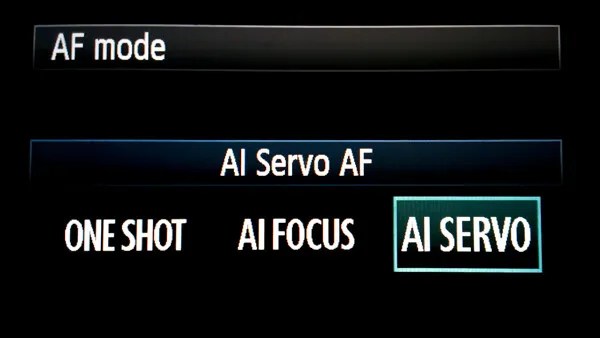
Afservo

Autofocus (AF) can be your best friend or your worst enemy. When it comes to photographing most wildlife, however, autofocus is a great tool!

Animals and birds, especially the wild variety, are almost constantly on the move. They shift positions and move closer or farther away selfishly, with little regard for the photo you are so carefully trying to compose. This is when AF-Continuous and AF-Servo modes come in handy.

Though called different names depending on your camera’s make, these settings both accomplish the same objective: They keep a moving subject constantly in focus.

Place your selected focus point over your subject and half-press the shutter button to engage the AF. Focus will be tracked for as long as you follow your subject while maintaining pressure on the shutter button. Read your camera’s manual (you’ve done that already, right?) for detailed information concerning specific autofocus capabilities for your model, and how each mode can be selected.

Don’t forget the tripod

“I really didn’t think I would need my tripod” are words that usually begin a sad story about how a potentially great shot was missed. In most wildlife and nature photography situations, a tripod is always a good idea. It’s better to have access to a tripod and not need it than to need it and not have one available. Find the lightest and most compact tripod that is sturdy enough to handle your camera setup.

Learn so you can prepare. Prepare so you can photograph. Photograph so you can grow.

Photographing wildlife can be difficult, but it can also yield huge artistic, personal, and even spiritual rewards. So go out and have fun doing what you do, but don’t forget to put the camera down every now and then to enjoy the world around you.

“Nature never goes out of style.” – Unknown

The post Nature and Wildlife Photography Tips for Beginners appeared first on Digital Photography School. It was authored by Adam Welch.


Digital Photography School

 
Comments Off on Nature and Wildlife Photography Tips for Beginners

Posted in Photography


Jakumei Optics announces the $735 Dulens APO 85mm F2 for Canon EF, Nikon F mounts

08 Sep

Chinese lens manufacturer Jakumei Optics has announced (translated) the release of the Dulens APO 85mm F2 manual lens for Canon EF- and Nikon F-mount camera systems.

According to the manufacturer, the lens’ apochromatic (APO) design is inspired by ‘Sonnar-style’ lenses, the first of which was created by Dr. Ludwig Bertele in 1929.

The lens is constructed of seven elements in six groups, including two extra-low dispersion elements and one high-refractive index lens. Other features include an aperture range of F2-F16, a nine-blade aperture diaphragm, a 90cm (3ft) minimum focusing distance and a 55mm front filter thread.

The lens is available in black, grey and silver, and is available to purchase on the Shoten Kobo website (translated) for approximately $ 735 (76,950 JPY).

Articles: Digital Photography Review (dpreview.com)

 
Comments Off on Jakumei Optics announces the $735 Dulens APO 85mm F2 for Canon EF, Nikon F mounts

Posted in Uncategorized


Hasselblad 907X and CFV II 50C sample gallery and impressions

08 Sep

$ (document).ready(function() { SampleGalleryV2({“containerId”:”embeddedSampleGallery_0891752730″,”galleryId”:”0891752730″,”isEmbeddedWidget”:true,”selectedImageIndex”:0,”isMobile”:false}) });

It has been a while since the Hasselblad 907X was launched. It didn’t go on general release at first as the company made a limited edition all-black kit to commemorate the moon landing, but now the chrome-edged production version is finally available to purchase.

The concept is a tiny, slim body that acts as an interface between the CFV ll 50C digital back and Hasselblad’s XCD lens series, to create a very small lightweight kit that is highly portable, fun to use and, most importantly, beautiful to look at. As the sensor in the CFV ll 50C is the same as that used in the X1D ll and the lenses are the same, in theory we should expect the same image quality, so really choosing this camera over the more conventional X1D ll is a matter of the handling experience.

Hasselblad CFV II 50C digital back and 907X

The kit is very small for a medium format setup, though certainly not tiny by general camera standards. It is, however, very comfortable to hold and pretty simple to use. Most operations are conducted via the rear screen as there are few control points on the actual body. The shutter release is surrounded by a dial for changing exposure values and a single press button that accesses exposure compensation or shutter speed in manual exposure mode. In landscape orientation this is all very comfortable and easy, but working in portrait orientation takes a bit of getting used to.

The rear screen flips up to make shooting from low angles easy, but doesn’t twist for low angles when the camera is flipped over. A small flap opens below the screen to access flash, headphone and mic sockets and iOS users will be able to use an app for remote control and image previews.

It’s a very fun camera to use and a kit does (just) fit in a coat pocket or a small bag

The shape and style of the 907X is reminiscent of the V series film cameras, and the experience of using it is strangely similar too. It’s a very fun camera to use and a kit does (just) fit in a coat pocket or a small bag, and returns first class results. There is a big difference in image rendering between Adobe Camera Raw and Hasselblad’s Phocus software, so as awkward as Phocus is to use I recommend processing these files in that rather than the application most people will automatically reach for.

There is an accessory optical viewfinder coming soon as well as a grip, but neither were available at the time of shooting. The optical finder looks cool, but it won’t necessarily be essential since the rear screen is clear and bright even in sunny conditions. The grip though will make it easier to hold the camera still when shooting video.

Articles: Digital Photography Review (dpreview.com)

 
Comments Off on Hasselblad 907X and CFV II 50C sample gallery and impressions

Posted in Uncategorized


Coming into focus: how Panasonic’s DFD gamble may yet pay off

08 Sep
Panasonic’s DFD autofocus system tries to determine distance information without masking pixels as most on-sensor phase detection systems do.

We’ve been impressed by what we’ve seen so far of the autofocus changes Panasonic introduced with its new S5. The latest version doesn’t iron-out all the quirks but continuous AF for stills, in particular, appears much improved. But beyond this, the details we were given about how these improvements had been achieved are interesting. They help to highlight both the benefits and the continued challenges of the company’s Depth-from-Defocus system.

It’s a system with a poor reputation in some quarters but one that’s continued to improve significantly in recent years. The S5 shows both how far DFD has come as well as hinting at what’s still needed.

What is depth-from-defocus?

Fundamentally, focus is a a question of distance: adjusting the lens optics until the light rays from a subject at a particular distance converge on the sensor plane.

The alternative: phase detection

Most manufacturers have settled on phase-detection as the heart of their AF systems: this views the target from two different perspectives then works out how much the focus needs to be moved in order to bring those two perspectives into phase with one another (the point at which that subject is in focus).

In mirrorless cameras, this is usually done by having partial pixels that only receive light from one or other half of the lens, to provide two differing perspectives. The downsides of these systems tend to be that these partial pixels either receive less light than a full pixel or that the complexity of the electronics (and the noise they produce) increases, in systems that combine pairs of half pixels. The performance can be excellent, but to a degree you’re trading away some light capture or noise performance to attain that AF performance.

There are two broad approaches used by cameras to conduct autofocus: ones that hunt until they find the point that’s in focus and those that try to interpret the depth in the scene, so that they can drive the focus without the same need to hunt.

DFD is Panasonic’s system for interpreting depth. It works by making a tiny focus adjustment and analyzing how the image has changed as a result. With an understanding of the out-of-focus characteristics of the lens being used, the camera can interpret these changes and build a depth map of the scene.

This challenge is made more difficult if elements in the scene are moving: the camera’s depth map needs to be constantly updated, because the distances are changing. This is where subject-recognition and algorithms designed to anticipate subject movement come into play, since they allow the camera to understand which bits of the scene are moving and what’s likely to happen next.

What’s new with the S5

Panasonic told us that the S5’s autofocus has been improved by a number of fundamental changes. Part of it comes from improved subject recognition. This is based on deep learning (an algorithm trained to recognize specific types of subject) which helps the camera know what to focus on and to not refocus away from it. For instance, teaching the algorithms to recognize human heads when they’re looking away means the camera understands it doesn’t need to find a new subject or refocus when the face it had recognized suddenly ‘disappears.’

Another part comes from re-writing the AF code to make better use of the available processing power. During the development of the S5, Panasonic’s engineers discovered they didn’t have to lean on the machine-learning trained algorithms for both subject recognition and movement tracking: they could combine the machine-learned recognition with their existing, faster, distance and movement algorithms, which freed-up processing power to run the process much more frequently.

This video shows the view though the viewfinders of the S5 (left) and older S1 (right). Note that even when the S1 is in focus, there’s still some very obvious pulsing and fluttering, this is much less noticeable in the S5.

Finally, other software improvements allowed the entire AF system to be run faster: providing more up-to-date information to the processor. The combined result of these changes, for stills shooters at least, is much improved autofocus with less reliance on the trial-and-error hunting of contrast detection AF. This, in turn, reduces the focus flutter in the viewfinder, making it easier for a photographer to follow the action they’re trying to capture, so you get an improved experience as well as improved focus accuracy.

Video is a greater challenge

But this approach is primarily a benefit for stills photography. Video is a more difficult challenge, partly because the focusing process is visible in the resulting video but on a technical level, because you have to read out the sensor in a manner that’s similar to the video you’re trying to produce. In stills mode you can reduce the resolution of the sensor feed (in terms of spatial resolution or bit-depth), to increase the readout rate, which increases how often the AF system receives new information about what’s happening. This low-res feed during focus doesn’t have any impact on the final image.

For video you need to run the sensor in a mode that’s tied to that of the footage you’re trying to capture

In high res video modes you need to run the sensor at a bit depth, pixel resolution and frame rate tied much more closely to those of the footage you’re trying to capture. At best, you get to read the sensor at double the output frame rate. Video is typically shot using shutter speeds at least twice as fast as the frame rate, meaning you can read the sensor out at 60 fps for 30p output, because each frame of video is usually made up from 1/60th second chunk of time or less, leaving you time to conduct another readout for the AF system before you have to expose your next frame.

The problem is that full frame sensors are big and slow to read out. The sensor in the S5 is very similar to the ones used in the likes of the Sony a7 III, which typically take over 21ms to read-out in 12-bit mode: not quite fast enough to run at 48 fps for double-speed capture of 24p footage. This has the unfortunate side-effect of meaning the camera’s worst AF performance comes in the mode most likely to be used by the most demanding video shooters.

Unfortunately for a brand so associated with video, the S5’s full-frame 4K/24p is the mode that delivers its weakest AF performance.

Despite this challenge, Panasonic has re-worked the AF response even in this weakest mode, to be less prone to unnecessary refocusing.

A bright new tomorrow

The updates in the S5 show us a couple of things. Firstly, that Panasonic is well aware of the criticisms being leveled at its cameras and is continuing to fine-tune its software to squeeze everything it can out of the current hardware.

DFD is not there yet but, in principle, staying committed to an AF method that gets better as hardware gets faster may prove a good choice

But, more significantly, the improvements we’re seeing when shooting stills and when using AF-C during bursts of stills in particular suggest that some of the downsides we’ve seen in the past aren’t necessarily inherent flaws of the DFD concept. Instead they’re aspects that can improve as sensor readout and processing power improve. You don’t need to be a semiconductor physicist to recognize that improvements in those areas are always coming.

In principle, in the long run, staying committed to an AF method that gets better as hardware gets faster may prove to be a better choice than an approach that trades-off light capture for AF performance. But the S5’s performance, particularly in video, shows DFD is not there yet. The risk for Panasonic is whether these fast-readout sensors and powerful processors arrive before the majority of full frame buyers have already committed themselves to other camera systems.

Articles: Digital Photography Review (dpreview.com)

 
Comments Off on Coming into focus: how Panasonic’s DFD gamble may yet pay off

Posted in Uncategorized