RSS
 

Archive for August, 2020

TTArtisan announces limited-edition 35mm F1.4 M-mount lens wrapped in 24K gold

04 Aug

TTArtisan lenses tend to be more basic and budget-friendly than larger third-party or first-party lens manufacturers, but its latest lens eschews that mentality and puts an emphasis on luxury. The Chinese optics manufacturer has revealed a limited-edition version of its 35mm F1.4 lens for Leica M-mount cameras that’s covered in 24K gold.

Aside from the fancy exterior, the basic specs of the fully-manual lens remain the same as its less-flashy black and silver counterparts. It’s constructed of eight elements in seven groups, features an aperture range of F1.4 through F16, uses a 10-blade aperture diaphragm, has a 49mm front filter thread and offers a minimum focusing distance of 70cm.

TTArtisan doesn’t elaborate on whether the ‘Gold Skin’ lens constructed of gold-plated or gold-filled metal, but based on the price, it’s safe to assume the former. TTArtisan will also engrave a custom image onto the lens cap and lens barrel for buyers at no extra cost.

TTArtisan is making just 200 of these lenses. You can pre-order the lens now for $ 1,150, a $ 750 premium over the black and silver editions of the lens. The first units are expected to ship next week.

Articles: Digital Photography Review (dpreview.com)

 
Comments Off on TTArtisan announces limited-edition 35mm F1.4 M-mount lens wrapped in 24K gold

Posted in Uncategorized


Canon image hosting platform, image.canon, temporarily shut down after loss of users content

03 Aug

Over the weekend, Canon’s cloud media hosting platform, image.canon, suffered an outage that left users unable to login and use the service. No specific information was provided over the weekend, but we now know what went wrong.

In a statement shared on the image.canon homepage, Canon confirmed there’s been an issue with its long-term storage on image.canon that’s resulted in the loss of original image and video uploads. The full notice reads as follows:

Important Notice
Thank you for using image.canon.
On the 30th of July, we identified an issue within the 10GB long term storage on image.canon. Some of the original photo and video data files have been lost. We have confirmed that the still image thumbnails of the affected files have not been affected.
In order to conduct further review, we have temporarily suspended both the mobile app and web browser service of image.canon.
Information regarding the resumption of service and contact information for customer support will be made available soon.
There has been no leak of image data.
We apologize for any inconvenience.

To prevent any further issues, Canon has temporarily shut down both the mobile and web app versions of image.canon. Per the notice, we should have further updates ‘soon.’ We will update this article when further updates are provided.

Articles: Digital Photography Review (dpreview.com)

 
Comments Off on Canon image hosting platform, image.canon, temporarily shut down after loss of users content

Posted in Uncategorized


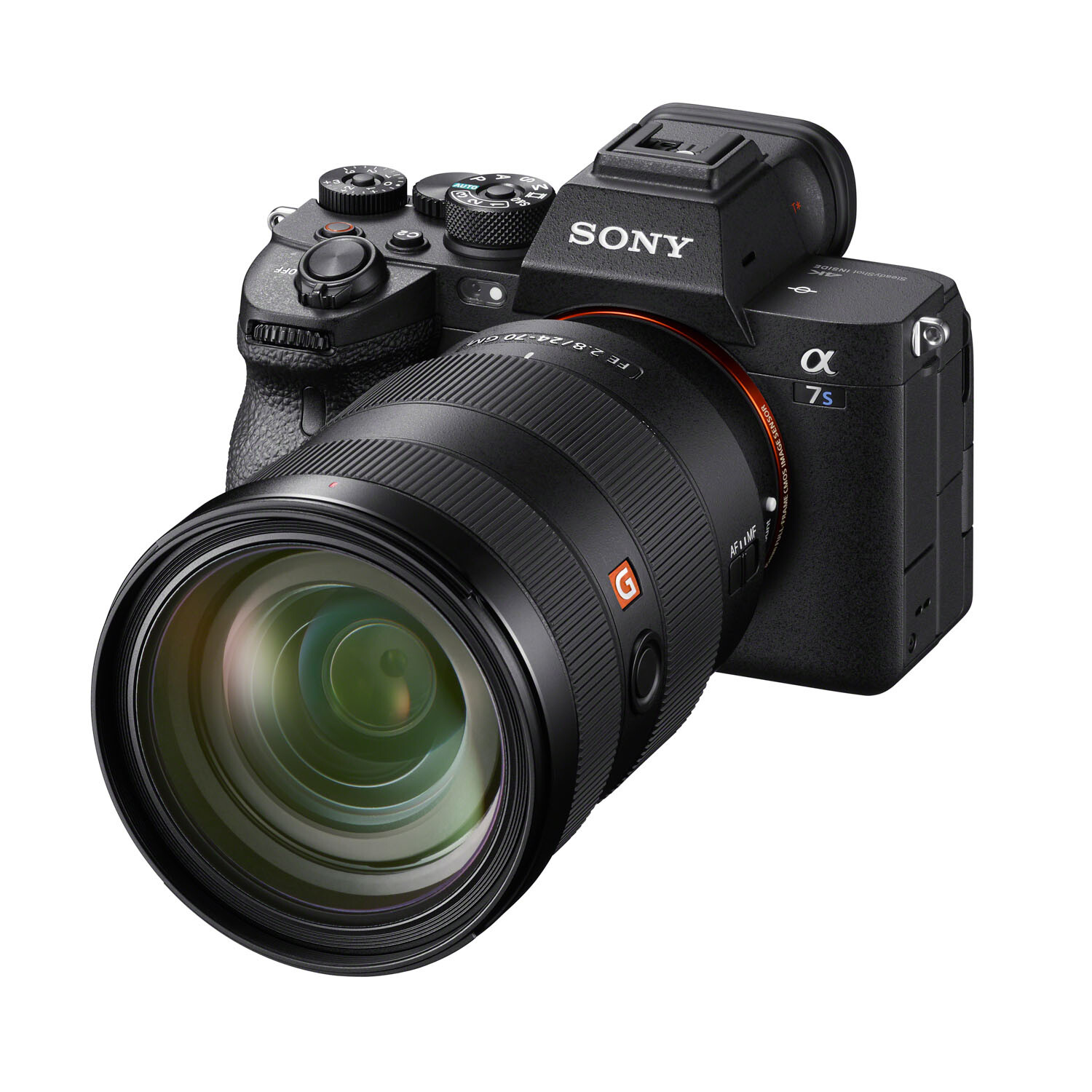
Sony Announces the a7S III, With 4K/120p and a 9.44M-dot EVF

03 Aug

The post Sony Announces the a7S III, With 4K/120p and a 9.44M-dot EVF appeared first on Digital Photography School. It was authored by Jaymes Dempsey.

sony a7s iii announcement

After months of rumors, it’s finally official:

The Sony a7S III will hit the shelves in September, offering a whole host of brand new features, including a stellar autofocus system, a class-leading electronic viewfinder, pro-level video recording capabilities, and much more.

Let’s take a closer look.

What is the Sony a7S III?

The a7S III is Sony’s latest video/stills hybrid camera, which replaces the a7S II (a camera that debuted way back in 2015 and was long overdue for an upgrade).

The a7S III is a full-frame mirrorless model and technically designed to excel at both video and still shooting. But there’s a clear lean toward videographers, thanks to advanced recording capabilities such as:

  • 4K/120p video (with a 1.1x crop)
  • Internally recorded, uncropped 4K/60p video (with a recording limit of 1 hour)
  • Internally recorded, uncropped 4K/30p video (with no time limit)
  • 10 bit 4:2:2 recording
  • S-Log

As you can see, there’s quite a lot to satisfy serious videographers, such as the internal 4K/120p (for high-quality slow-motion footage), as well as unlimited 4K/30p shooting (for projects that require longer recording times).

You also get in-body image stabilization, as well as impressive high-ISO performance and at least 15 stops of dynamic range (according to Sony, anyway).

But while the a7S III is an impressive video contender, how does it look when arranged against more still-centric cameras? Can it hold its own?

Can the a7S III work for still photography?

At first glance, the a7S III is an extraordinarily capable camera for still photographers.

I mentioned the in-body image stabilization above, and that’s a boon for videographers and still photographers alike. You also get dual card slots, important for a select crowd of professional photographers, and a fully-articulating LCD for capturing images (or video) from awkward angles.

And the a7S III packs a 9.44M-dot electronic viewfinder, which is by far the highest resolution EVF currently available in a mirrorless camera (the former EVF champions sit at a still-respectable 5.76M-dot resolution). This should put to rest any claims by photographers that mirrorless EVFs just can’t compete with OVFs, because a near 10M-dot EVF is going to look insanely good.

The a7S III also features a new AF system, offering 759 phase-detection points, as well as 10 frames-per-second continuous shooting with a buffer of 1000+ RAW images.

All this seems extremely impressive, but for one major feature:

Resolution.

The a7S III only packs 12 MP, which is perfect for video but deeply disappointing for still photographers, especially in the current resolution-hungry market. These days, full-frame cameras offer a resolution of at least 20 MP, but often push higher, from 24 MP in the Sony a7 III to 61 MP in the Sony a7R IV.

Of course, there are photographers out there who aren’t caught up in the megapixel craze, and those folks might be willing to use the a7S III for still shooting, assuming they also have significant video needs. But megapixels aren’t just about marketing; a 12 MP camera does offer serious limitations in terms of high-resolution printing, as well as cropping in post-processing.

So while the a7S III is a truly impressive video camera, it (like its predecessors) sacrifices too much to be a serious still photography option for most shooters.

The a7S III will hit the shelves in September for an MSRP of $ 3500 USD, and is currently available for preorder here.

Now over to you:

What do you think about the a7S III? Are you pleased? Disappointed? And would you use it for still photography? Share your thoughts in the comments!

The post Sony Announces the a7S III, With 4K/120p and a 9.44M-dot EVF appeared first on Digital Photography School. It was authored by Jaymes Dempsey.


Digital Photography School

 
Comments Off on Sony Announces the a7S III, With 4K/120p and a 9.44M-dot EVF

Posted in Photography


Sigma 100-400mm F5-6.3 DG DN OS sample gallery

02 Aug

$ (document).ready(function() { SampleGalleryV2({“containerId”:”embeddedSampleGallery_3022925854″,”galleryId”:”3022925854″,”isEmbeddedWidget”:true,”selectedImageIndex”:0,”isMobile”:false}) });

Sigma’s 100-400mm F5-6.3 for full-frame Sony mirrorless (and L-mount cameras) offers quite a bit of reach for under $ 1000. It’s a bit slower than some of Sony’s own E-mount telephoto zooms, but it’s a comparably light and affordable alternative for FE shooters looking to add a telezoom to their kits. Take a look at our gallery and see what it’s capable of.

Articles: Digital Photography Review (dpreview.com)

 
Comments Off on Sigma 100-400mm F5-6.3 DG DN OS sample gallery

Posted in Uncategorized


Step-by-step Guide to Long Exposure Photography

02 Aug

The post Step-by-step Guide to Long Exposure Photography appeared first on Digital Photography School. It was authored by Francesco Gola.

In the past few years, thanks to the diffusion of useful accessories and photographic filters with good quality and low prices, the technique of long exposure has become increasingly popular among photography enthusiasts. Even if this technique can be used both in the studio and in an urban environment, the perfect playground for long exposures is landscape photography.

Unfortunately, it often happens that the result we get is far from our expectations, and we end up classifying the long exposure as an impossible technique. However, following this step-by-step guide to long exposure photography, you’ll see how easy it is to get a good result on the first attempt (or almost!).

Picture 1

Step One: Study the weather

A day with a cloudless sky is a good day to drink a beer with friends, not to make long exposures. Likewise, it cannot rain forever, so do not resign yourself to an afternoon with your PlayStation. You should study satellite images rather than the meteorological sites, trying to figure out if there is an incoming storm, or if the downpour is about to end.

Step Two: Visit the location well in advance

Scout the location ahead of time, as you need a lot of time to find the perfect composition, or at least more than the time needed for a “short exposure”. In fact, in a long exposure, the world is completely different from how you see it with your own eyes. You have to try to see it with your mind, looking for a harmonious composition that includes moving subjects, trying to predict the direction of the clouds or the force of the sea.

Try not to put the sun into the composition, because its movement will ruin the shot and it will create an area of overexposure that is not recoverable. If you cannot avoid the sun, wait for it to hide behind a cloud.

Picture 2

Step Three: Use a tripod

Mount your camera on a tripod and install all the accessories such as the remote shutter release and the filter holder (if you are using drop-in filters). However, wait to actually install the filters. This is very important!

Step Four: Compose the image and lock focus

Refine your composition, focus on the subject, and lock the focus. If you are using manual focus, go ahead and turn the lens’s focus ring.

If you are using your camera’s autofocus mode, you should focus by half-pressing the shutter button, and once the focus has been made, while still holding down the shutter button halfway, push the lever from Auto Focus to Manual. In this way, your camera will maintain the focus (alternately, you could use back-button focus).

Picture 3

Step Five: Set the exposure

Now set your camera to Manual (M) mode or Aperture Priority (A/Av) mode. Then set the aperture to an appropriate value for the scene (for landscapes I suggest between f/8 and f/11) and take a “test shot.”

The test is complete when you get a correct exposure. To determine if the exposure is correct, check the histogram (do not trust your display, it is too bright). It is true that there is no universally correct result on the histogram, but there are histograms that are universally incorrect, namely moved completely to the right or left side (the image is respectively overexposed or underexposed).

Once the test shot is successful, write down the shutter speed you used for that shot.

Step Six: Add your filter

Now add your Neutral Density (ND) filter. If the filter is very strong (10 stops, for example), you will not be able to see through the viewfinder or the Live View. Do not worry, because if you have followed the guide up to this point you will notice that we have already made the composition and the focus too. You are blind, but your camera will see everything perfectly.

Picture 4

Step Seven: Change to Bulb mode

Set the shooting mode to Bulb (B) in order to discard the thirty-second limit of the camera. Do not change any of the other settings (ISO and aperture) used in the test shot.

Step Eight: Take your long exposure shot

It is finally time to take our long exposure shot.

But how long will you need to leave the shutter open? It is less difficult than you might expect. First of all, recollect the shutter speed that you noted down from the “test shot” you did in Step Five above. Now you must compensate by the number of stops introduced by the filter.

For example, if your test shot was 1/15th of a second, adding 10 stops will get a shutter speed of approximately 60 seconds. Now you have your shutter speed!

(No need to get stuck in the mathematics: On the internet you can easily find conversion tables and applications for your smartphone that will do the conversion for you.)

Picture 5

Step Nine: Check the histogram again

Once you’ve taken the shot with the calculated shutter speed, check the histogram. If the new histogram is approximately equal to the histogram of the test shot, mission accomplished. If it is shifted too far to the right or to the left, repeat the shot again correcting the shutter speed.

Easy, isn’t it? Now fill your backpack with your camera and filters and go to practice in the field!

The post Step-by-step Guide to Long Exposure Photography appeared first on Digital Photography School. It was authored by Francesco Gola.


Digital Photography School

 
Comments Off on Step-by-step Guide to Long Exposure Photography

Posted in Photography


Study: smartphone camera use on the rise among pro photographers

02 Aug

Your average consumers use — almost exclusively — the cameras inside their smartphones for picture taking these days. Professionals use big black cameras with even bigger lenses. Or, at least that’s the perception most us have when thinking about camera use. But is this actually true?

The analysts at Suite48Analytics have conducted a survey among a total of 881 professional photographers from North America and Europe to find out and published the results in a report titled Pro Photographers and their Camera Use’.

The report covers camera use in general but puts some emphasis on ‘stand-alone cameras’ versus smartphones. The results aren’t entirely surprising. Most photographs for business purposes are still captured with a dedicated camera of some sorts. However, 11 percent of the surveyed photographers use a smartphone camera for approximately 50 percent of their pro images. Smartphone use for professional images is also on the rise, with 31 percent saying they use the smartphone more now than they did 12 months ago.

As one would assume, smartphone use is higher for personal photography. 29 percent take 50 percent of their non-work photos with a smartphone. 36 percent take even more than half of their personal pictures with a phone.

Despite Android phone makers putting a lot of emphasis on their devices’ camera capabilities, the iPhone is still the clear favorite among pro professionals, with 86 percent using an Apple model.

So for what type of work do pro photographers use their smartphone camera? Interestingly smartphones are mostly used in situations that don’t involve a client present at the scene. 58 percent use the smartphone to take photos that support their own business, for example, website photos or social media posts. 20 percent use phones for behind the scenes type of work.

In those situations when professional photographers do use a dedicated camera the trusty DSLR is still the most popular choice with 53 percent, but at 30 percent mirrorless full-frame cameras are getting closer. Medium format cameras get some use, too, but all other types of cameras are represented in a fairly minor way.

Professionals who use smartphones do so predominantly because they have less gear to carry and the phone allows you to ‘catch moments’ because it is always within reach. On the other hand, phone use is still much lower than it could otherwise be because professional photographers have concerns about the optical quality of smartphone cameras, even those on high-end models, but also client perception. It seems in some people’s minds it’s still the camera that makes the pro and that also has an impact on gear choice among professionals.

You can find a summary and the full (paid) report for download on the Suite48Analytics website.

Articles: Digital Photography Review (dpreview.com)

 
Comments Off on Study: smartphone camera use on the rise among pro photographers

Posted in Uncategorized


Canon EOS R5 sample gallery (DPReview TV)

01 Aug

$ (document).ready(function() { SampleGalleryV2({“containerId”:”embeddedSampleGallery_8198842835″,”galleryId”:”8198842835″,”isEmbeddedWidget”:true,”selectedImageIndex”:0,”isMobile”:false}) });

Much of the early attention surrounding the Canon EOS R5 focused on video specs, but it’s a mean photo machine as well. Check out this new gallery from DPReview TV, complete with Raw images.

View the Canon EOS R5 sample gallery

Articles: Digital Photography Review (dpreview.com)

 
Comments Off on Canon EOS R5 sample gallery (DPReview TV)

Posted in Uncategorized


Posing Guide: 21 Sample Poses to Get You Started with Photographing Men

01 Aug

The post Posing Guide: 21 Sample Poses to Get You Started with Photographing Men appeared first on Digital Photography School. It was authored by Guest Contributor.

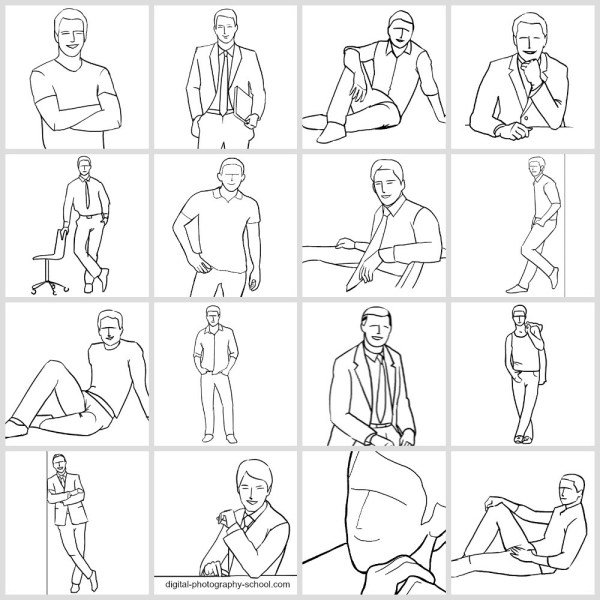
Posing Guide for taking Great Photos of Men

Previously we’ve created posing guides with suggested sample poses to help you get started posing women (also see part 2 for posing women), posing children, posing couples, posing groups, and posing weddings, so today let’s look at some sample starting poses for photographing men.

Men are usually less comfortable with being photographed, so it’s important to set them at ease with posing in order to get good results.

It is always a good idea to prepare before the photoshoot.

Just one more piece of advice: Involve your subject in the process!

He will feel more confident knowing the plan, what he has to “do,” and what kind of outcome is expected. Showing this kind of posing cheat sheet to your model is indeed a very good way to prepare your subject for a photoshoot and make him feel more relaxed and confident at the same time.

So, let’s look at some sample poses for men

1. Very simple pose for a man’s portrait: An upper body shot with crossed arms.

Two things to take care of: Shoulders should be pulled back a little, stomach muscles kept in check.

Posing Guide for taking Great Photos of Men

2. Crossed arms work very well in full height shots as well. In addition, ask him to cross one leg in front of the other. But make sure the body weight is not supported equally on both legs; otherwise, that would look just awkward!

Posing Guide for taking Great Photos of Men

3. A recurring question from your subject might be “Where shall I put my hands?” The solution is actually quite simple. There are four places to keep in mind (mixed in any combination, utilizing both hands).

#1. Loosely by the side.

#2. On the hips.

#3. In the pockets.

#4. Both hands crossed on the chest.

And in addition, hands should always be relaxed, which means no muscle pressure, except when you are photographing a bodybuilder.

Posing Guide for taking Great Photos of Men

4. A casual pose for a man standing upright. Men indeed have a problem with placing their hands; by keeping them fully or partly in the side pockets, you have a sure way to achieve a natural and relaxed pose.

Posing Guide for taking Great Photos of Men

5. Just a slight variation on the previous pose. A piece of clothing over the shoulder, merely a thumb in the pocket, and legs crossed work very well.

Posing Guide for taking Great Photos of Men

6. For a sitting pose, putting the ankle of one leg onto the knee of the other looks relaxed and natural. Shoot slightly from above.

Posing Guide for taking Great Photos of Men

7. Leaning against a wall is just another variant for upright posing.

Posing Guide for taking Great Photos of Men

8. The sideways way of leaning against the same wall. Works very well for both casual and formal shots.

Posing Guide for taking Great Photos of Men

9. A very simple pose for a formal portrait. Items held in the hand (e.g. a laptop, books, or even tools) can work as indicators of the subject’s occupation.

Posing Guide for taking Great Photos of Men

10. Against common belief, it is absolutely fine to make shots of a man sitting partly on a desk. For formal portraits, such a pose might counteract rigidness.

posing-men-subjects10.png

11. A very simple pose for a portrait: A man sitting at a desk. To reveal the subject’s profession, place work-related items on the desk.

Posing Guide for taking Great Photos of Men

12. A slight variation of the previous pose. Very appropriate for formal portraits.

Posing Guide for taking Great Photos of Men

13. To show the work environment while removing the distance created by a foreground object like a desk, take your shot from the backside. The result will be formal but inviting at the same time.

Posing Guide for taking Great Photos of Men

14. A man supporting himself on a desk with arms crossed. Again, you could place work-related items on the desk to point to the subject’s profession.

Posing Guide for taking Great Photos of Men

15. Using a chair as a prop can make a portrait more engaging and interesting. Very suitable when introducing creative people in their work environment.

Posing Guide for taking Great Photos of Men

16. Sitting comfortably in a chair usually works for corporate and formal portraits.

Posing Guide for taking Great Photos of Men

17. An easy and natural pose with a man sitting on the ground. Try different shooting directions and angles.

Posing Guide for taking Great Photos of Men

18. Another variant of a man’s pose while sitting on the ground. Suitable for outdoor locations.

Posing Guide for taking Great Photos of Men

19. An easy and relaxed-looking pose for a sitting man.

Posing Guide for taking Great Photos of Men

20. Informal pose. The man is sitting on the ground resting his back against the wall or some object.

Posing Guide for taking Great Photos of Men

21. Finally, let your subject be the protagonist of your picture. Never be afraid to crop tightly around the model’s face.

Posing Guide for taking Great Photos of Men

That should offer a starting point. Again, remember that there are no absolutes; each sample pose might and should be adjusted depending on your shooting environment and scenario. There is no need to overdo anything.

In reality, all you need for good people portraits is simplicity:

Simple backgrounds, simple clothing, simple poses, and natural expressions.

Check out our other Posing Guides:

  • Posing Guide: Sample Poses for Photographing Women (Part 1)
  • Posing Guide: Sample Poses for Photographing Women (Part 2)
  • Posing Guide: Sample Poses for Photographing Children
  • Posing Guide: Sample Poses for Photographing Couples
  • Posing Guide: Sample Poses for Photographing Groups of People
  • Posing Guide: Sample Poses for Photographing Weddings

Grab Our Guide to Portrait Posing

Kaspars Grinvalds is a photographer working and living in Riga, Latvia. He is the author of Posing App where more poses and tips about people photography are available.

The post Posing Guide: 21 Sample Poses to Get You Started with Photographing Men appeared first on Digital Photography School. It was authored by Guest Contributor.


Digital Photography School

 
Comments Off on Posing Guide: 21 Sample Poses to Get You Started with Photographing Men

Posted in Photography


DPReview TV: Canon EOS R5 review

01 Aug

The EOS R5 is Canon’s flagship mirrorless camera, and there’s a lot to like. We put it to the test for both stills and video and also address the overheating issues you may have heard about.

Subscribe to our YouTube channel to get new episodes of DPReview TV every week.

  • Intro
  • Handling
  • Image stabilization
  • Displays
  • Autofocus
  • Badlands sample photos
  • Image quality
  • Video capabilities
  • Who's it for?

Sample gallery from this episode

$ (document).ready(function() { SampleGalleryV2({“containerId”:”embeddedSampleGallery_8198842835″,”galleryId”:”8198842835″,”isEmbeddedWidget”:true,”selectedImageIndex”:0,”isMobile”:false}) });
Articles: Digital Photography Review (dpreview.com)

 
Comments Off on DPReview TV: Canon EOS R5 review

Posted in Uncategorized