RSS
 

Archive for June, 2020

Adobe Photoshop Camera app released for Android and iOS, offering AI-powered ‘Lenses’

13 Jun

Adobe has launched its Photoshop Camera application for Android and iOS devices. The app, previewed last November, utilizes Adobe’s artificial intelligence technology, Sensei, to deliver highly-stylized and filters and camera effects in real-time as you capture images.

The Adobe Photoshop Camera app is designed to help users capture ‘gorgeous selfies, food and scenery shots, and more.’ The application includes numerous automatic image adjustment tools via a Magic Wand tool, such as portrait relighting and lens distortion correction.

The app includes different categories of ‘Lenses’, which act like filters: Portrait, Pop Art, Spectrum, filters inspired by Billie Eilish, Artful, Food, Scenery, Blue Skies and Reverie. Each Lens includes numerous filters, such as Blue Skies Lenses with different cloud formations. Users can also download additional Lenses created by various influential photographers and Instagram users.

Screenshot from Adobe Photoshop Camera app for iOS

Within the Photoshop Camera app, users can edit their captured images through a variety of basic editing tools. You can adjust shadow detail, highlight detail, clarity, vibrance, exposure, contrast, white level, black level and saturation. As mentioned earlier, there is also an automatic adjustment performed, which happens as soon as you view an image in your library. You can also tap a Photoshop Express button at the top of the display to take your image into the Photoshop Express app for additional and more in-depth adjustments.

In a hands-on with Photoshop Camera, the application worked well. The application made automatic adjustments and determined that the ‘Scenery Lens’ would be a good starting place for me to select from different filter options. I also tried out the ‘Artful’ lens, which was quickly applied to my image. In other photos, the app did a good job of picking out the sky, although unsurprisingly, its sky replacement is not as sophisticated nor as effective as what you find in Skylum’s Luminar software.

Speaking to The Verge, Adobe CTO Abhay Parasnis stated the goal of Photoshop Camera is to ‘bring the magic of Photoshop directly to your camera’s viewfinder.’ When Adobe introduced Photoshop Camera last fall, it notes the app’s role in broadening the appeal and overall platform strength of Adobe Creative Cloud, its subscription-based software ecosystem. Alluding to appealing to future Creative Cloud consumers, Adobe said, ‘We are committed to investing in accessible tools like Photoshop Camera built for the next generation of consumers and creatives.’

Adobe Photoshop Camera is available as a free download with in-app purchases for Android and iOS.

Articles: Digital Photography Review (dpreview.com)

 
Comments Off on Adobe Photoshop Camera app released for Android and iOS, offering AI-powered ‘Lenses’

Posted in Uncategorized


Lensrentals discovers cracked sensor mounts inside some of its Sony a7-series rental fleet

12 Jun
Photo credits: All photos and illustrations (except for this one), kindly provided by Lensrentals.

As promised, Lensrentals is back with part two of its flange-to-sensor measurement test, this time testing photo-centric cameras instead of cine cameras.

As Roger and his team meticulously pored over the measurements of every compatible camera they had on hand (the testing rig only had mount options for Canon, Sony and MFT cameras), they discovered a concerning percentage of Sony a7-series cameras had suffered from an unexpected and consistent failure of a key component.

Although Roger starts off his blog post with his Canon measurements, we’re going to begin with Sony, as that’s where the surprising and concerning discovery lies. In total, the Lensrentals team tested 487 various Sony full-frame and APS-C mirrorless bodies. To those concerned the in-body image stabilization (IBIS) would affect the flange-to-sensor distance, Roger has the following to say:

‘First let me mention that we asked and answered the obvious question “does the IBIS system change the flange-to-sensor distance.” We took some cameras, measured them, put a lens on, focused it on various things to run the IBIS, and measured again, about a dozen times each. Each camera had identical measurements every time.’

An overview of the flange-to-sensor distance measurements of all Sony cameras Lensrentals tested. Note the scale on all of these charts: this chart is -0.1mm to +0.1mm.

With that debate wrapped up, Roger presents the overall findings for Sony mirrorless cameras (seen above) before further dividing up the Sony camera bodies, grouping the Sony a9 and Sony APS-C cameras together and grouping all of the a7-series camera bodies together. Roger grouped the data this way because the a9 and APS-C models ‘look[ed] marvelous,’ with minimal variation, while the a7-series showed rather dramatic variations, particularly with their outliers.

This is the a7-series chart, showing the a7R III (blue), a7R IV (red) and a7 III (yellow). Note the unusual number of outliers on the very extremes of the chart.

After testing each unit, Roger pulled 28 outliers for further inspection (5.75% of the Sony cameras tested). While a few of them needed to have the lens mount screws tightened or entirely replaced to correct their flange-to-sensor distance, there were a number of units that stood out as ‘large outliers.’ Upon closer inspection, Roger and his team discovered a number of these units had a more unexpected and more serious issue: there was a fracture between the sensor mount and stabilization system.

The arrow points to a fractured sensor-to-IBIS mount inside a Sony a7-series camera.

As you can see in Lensrentals’ a7R III teardown, Sony mounts the sensors to a plastic plate that attaches to the IBIS system via three screws. In two of the ‘large outlier’ units the plastic plate the sensor is mounted to had fractured; two others had screws that had wiggled their way out; one had what appeared to be a ‘metal fatigue type fracture’ in the mount; and one had a ‘displaced fracture of the sensor frame’ that was serious enough to pop off the retaining clip.

The arrow points to the tab where the retainer clip is supposed to be secured to.

While these are all serious issues that raise concerns, Roger says he was amazed to realize ‘the cameras really didn’t show much disfunction.’ He elaborates:

‘If you had just shown me the pictures above I would have expected error messages, horrible images, something dramatic. These were renting regularly, customers were happy with them, our 64-point tech inspection was passed before and after each rental.’

Even after hours of stress testing by Lensrentals’ most experienced techs, the only complaints they had with these broken units were the same minor complaints a few renters had pointed out in the past, including ‘Seems images might be a little soft on one side,’ or ‘maybe the stabilization isn’t quite as good as it should be.’

Roger says it appears as though a single broken mount (remember, there are three screws holding the sensor to the IBIS unit) doesn’t appear to have much affect on overall operation, but suggests if two of the mounts were to break it would be likely to cause noticeable issues.

Roger says the crack in this image displaced the mount by about 0.5mm, but despite this dramatic displacement, the center of the sensor shifted much less than that.

Wonky mounts and fractured components sound scary, but in total, less than 2% of Lensrentals’ Sony camera stock was found to have lens mount issues and only 1.6% suffered from the sensor mount problem. That’s not an insignificant number of cameras given how large the rental fleet is, but considering these are rental cameras and it took hours of intense inspection of the outlier samples to notice even the smallest impact on image quality, it’s hard to say how serious the issue really is in practical terms.

Wonky mounts and fractured components sound scary, but in total, less than 2% of Lensrentals’ Sony camera stock was found to have lens mount issues and only 1.6% suffered from the sensor mount problem

Still, though, any kind of failure like this is concerning and both Roger and DPReview have contacted Sony to inform them of Lensrentals’ finding and request comment on the matter.

With the Sony camera data out of the way, it’s on to Canon cameras. Within the data, Roger discovered a few interesting tidbits. First, the flange-to-sensor distance in photo cameras doesn’t vary any more than in Canon’s cine cameras. Second, of the 11 cameras (out of 478 Canon DSLR cameras tested) that Roger pulled for closer inspection due to variations, all of them were either 5D IV or 1DX bodies, i.e., pro bodies.

A chart showing the variation of the Canon DSLR cameras Lensrentals tested, with the outliers highlighted. Again, note the scale of this graph: this chart is -0.1mm to +0.04mm.

Upon further inspection of the most affected camera bodies, Roger discovered each of them had a history of a drop or required ‘significant internal work’ after being rented out at one time or another. He also notes it makes sense these cameras are more susceptible to damage when bumped or dropped due to the tendency for these cameras to be used in harsher conditions and with longer, heavier telephoto lenses, which could more easily bend the mount ‘because force proportional to mass and all.’

Roger concludes his data with a breakdown of variation in 138 Micro Four Thirds cameras: 82 Panasonic units, 36 Olympus units and 20 Black Magic Pocket Cinema Camera 4K units.

A breakdown of the various Micro Four Thirds camer models Lensrentals tested.

Overall, the variation between units proved to be relatively minimal, with only five cameras being outliers. Of these five cameras, four had been sent back to the factory to have their sensors replaced and one had a shutter replacement. Roger notes five other Micro Four Thirds cameras also had their sensors replaced and were within the nominal variation range, so don’t assume all cameras with sensor replacements will have abnormal flange-to-sensor distance measurements.

In wrapping up, Roger concludes that while it might’ve been seemed unnecessary to measure the flange-to-sensor distance of still cameras, it proved just as useful as it was with cine cameras. The team found fixable issues in roughly 2% of its still camera fleet thanks to the testing and, in Roger’s own words, ‘To me, that’s a huge thing […] Huge enough that we need to get a second Denz tool for the photo techs since the first one is already monopolized by the video people.’

Read the full article at Lensrentals.com

Articles: Digital Photography Review (dpreview.com)

 
Comments Off on Lensrentals discovers cracked sensor mounts inside some of its Sony a7-series rental fleet

Posted in Uncategorized


Anonymous Camera for iOS anonymizes images to help protect the innocent

12 Jun

London-based startup Playground has launched a new iOS app called Anonymous Camera that, as its name suggests, anonymizes images and videos to protect the subjects featured in them. The app leverages artificial intelligence to detect and remove or blur the subjects, a process that takes place locally on the user’s device if it’s running iOS 13.0 or higher.

Because facial recognition software makes it easier than ever to identify someone featured in a video or photo, anonymizing these images to protect innocent individuals, whistleblowers and more is vitally important. Anonymous Camera aims to make this process simple for iPhone users by using facial recognition to find subjects and hide them.

The process can include blurring a face, the most traditional way to anonymous subjects, or entirely removing their bodies in cases where enhanced steps are necessary. In addition to blurring the subjects, Anonymous Camera also supports putting a solid object over the subject’s face, which would prevent blur-reversal technologies from being used, plus there’s the option of using noise to hide the subject.

Playground claims that it uses ‘state of the art’ facial recognition technology to find and blur faces regardless of angles, including in videos where the subject is moving. There is a limitation, however: the full-body anonymization feature can only be used on the iPhone XS or newer models. Other features include distorting audio to mask the subject’s voice, removing metadata from the content and splitting the screen to anonymize only the subject in an interview.

Anonymous Camera doesn’t use the cloud, instead storing and processing images locally on the device; this is a key feature that decreases the odds of unmodified images being intercepted or otherwise acquired.

According to The Verge, Anonymous Camera was designed for anonymizing videos and images of single subjects and small groups of people; when tested at a large Black Lives Matter protest, the app wasn’t able to deal with the large number of subjects, but it was never intended to do so, according to Playground.

Though the app could be useful for anyone who wants to protect someone’s privacy, it is pitched specifically as a tool that could be used by journalists, activists, whistleblowers and other people who are providing sensitive information, operating in oppressive regions or anyone capturing content in places that require public individuals to be blurred.

Such privacy tools are becoming increasingly popular and important. Earlier this week, encrypted messaging app Signal introduced its own built-in face-blurring feature that enables users to blur the faces of subjects featured in shared images. The tool also allows users to draw over faces or hide them with stickers.

It’s important to note that blurring alone may not be enough to protect subjects featured in content. In addition to other potential identifiers like unique tattoos or piercings, there are also forensic software tools that use machine learning to reverse the blur applied to an image, revealing the content that was hidden. Hiding the subject behind solid color or stickers may be the safer option.

Anonymous Camera is available for free now from the iOS App Store with a ‘Pro’ in-app purchase that costs $ 1.99 and offers video recording without watermarks.

Articles: Digital Photography Review (dpreview.com)

 
Comments Off on Anonymous Camera for iOS anonymizes images to help protect the innocent

Posted in Uncategorized


Are mechanical film cameras better than electronic?

12 Jun
The electronic Pentax ME Super can be picked up for a bargain price compared to the mechanical Pentax MX.
Image: Say_Cheddar

There are a lot of mechanical film camera snobs out there, and I’m one of them. There’s something about the way a mechanical camera feels, that sensation of meshing gears and tightening springs that you can feel right in your fingers, which is just magical. To me, a camera that goes ‘KA-CLACK!’ will always be superior to one that goes ‘bzzzt.’

But I also know that electronic film cameras have key advantages over mechanical cameras, and those advantages don’t always get proper recognition. In fact, I’d argue that for many photographers and many situations, electronics are better. Here’s why.

Mechanical vs. Electronic: What do we mean?

Before we begin, some quick definitions: For the sake of our discussion, an all-mechanical camera is one that has no electronics in the shutter, exposure or film-winding mechanisms. It may have a light meter, but mechanically speaking, it’s fully functional without a battery.

An all-mechanical camera is fully functional without a battery

When we talk about electronic cameras, we either mean cameras with an electronically-controlled shutter, which still have manual focusing and winding, or cameras with electric/electronic everything, including shutter, exposure control, winder, and (usually) autofocus. Some electronic cameras will work at one shutter speed (usually the flash sync speed) with no batteries; for others, no power means no pictures. (Note that some cameras, like the Canon EF and Pentax LX, use a hybrid shutter with mechanical timing for fast speeds and electronic for slow speeds.)

Some electronic cameras will work at one shutter speed (flash sync) with no batteries; for others, no power means no pictures

Got it? Good! Let’s dive in and talk about the advantages of electronics, then we’ll revisit a few of the arguments in favor of mechanicals.

Why electronic cameras are better

You’d be hard-pressed to spend more than $ 75 on an electronic Ricoh KR-10 with lens.
Image: Arapaoa Moffat

Electronic cameras have fewer moving parts than mechanical cameras.

This is one of the main reasons camera manufacturers moved to electronics in the first place: The complexity of the mechanism is greatly reduced. Mechanical cameras are clockwork marvels, filled with minuscule gears, levers, springs, cords and chains – moving parts that can wear out, disengage, clog up or break. Electronic cameras replace a lot of these intricate bits with non-moving solid-state electronics, which are simpler, more robust and generally more reliable. From the manufacturer’s perspective, electronics make the cameras cheaper to build. From the photographer’s perspective, electronics mean fewer things to go wrong.

From the manufacturer’s perspective, electronics make the cameras cheaper to build. From the photographer’s perspective, electronics mean fewer things to go wrong

Electronic cameras rarely go out of adjustment.

One of the problems with a mechanical shutter-timing mechanism is that it’s subject to wear, degraded lubrication, and temperature variations. After a while, your 1/250 shutter setting no longer delivers a 1/250 second exposure. (Hence the ‘A’ in the common CLA service – cleaning, lubrication and adjustment.) With an electronic shutter, the timing is done by solid-state bits that are not prone to such discrepancies.

That’s not to say electronic shutters are always perfect; they still have moving parts that can be affected by dirty electromagnets or dried-up lubricant. But they tend to stay pretty darn close to the mark. If a forty-year-old electronic camera is working, it’s probably working correctly – and will likely be shooting more accurate than an older mechanical camera that hasn’t been serviced.

Electronic cameras can deliver more precise exposures than mechanical cameras.

With a mechanical camera, you’re generally locked into pre-set full-stop shutter speeds – 1/500, 1/250, 1/125, 1/60, etc. Same with an electronic camera in manual mode. But electronic cameras with an automatic exposure setting can take advantage of one of the key benefits of an electronic shutter: Infinitely variable speed settings. If the meter decides the ideal shutter speed is, say, 1/300 of a second, that’s how long the shutter will stay open. 1/75 sec ? No problem. 1/854 sec? Sure! They can fine-tune your exposure in a way that a mechanical camera can’t, which is especially critical if you’re shooting with slide or technical film.

The electronic Nikon FE2 sells for about half the price of the mechanical FM2.
Image: Paul1513

Electronic cameras have faster top and sync speeds than mechanical cameras.

The camera with the fastest purely mechanical shutter I know of is the Nikon FM3A, which tops out at 1/4000th of a second, but that’s atypical; most mechanical cameras stop at 1/1000 sec, and some ‘pro’ models at 1/2000 sec. So did early electronic cameras, but advances in electronics and curtain materials meant faster speeds, and many electronic cameras top out at 1/4000 or (in very high-end models) 1/8000 sec. The speed champ is the Minolta Maxxum 9, which can snap off an exposure in 1/12,000 sec.

Fast shutters are usually associated with action photography, but they are handy for casual shooters as well: If you’re running 400 speed film and the sun comes out, you can still shoot at wide apertures. Electronic shutters also give you faster flash sync speeds, typically 1/125 sec to 1/250 sec versus 1/60 sec for most mechanical shutters. Again, that’s one or two more stops of flexibility, allowing you to use a wider aperture for outdoor portraits with fill flash.

Electronic shutters also give you faster flash sync speeds, typically 1/125 sec to 1/250 sec versus 1/60 sec for most mechanical shutters

Finally, my favorite:

Electronic cameras are usually less expensive.

Electronic cameras are the bargains of the used-film-camera market. Nikon’s all-mechanical FM2 typically sells for twice as much as its electronic-shutter counterpart, the FE2. Same for the mechanical Pentax MX and the electronic ME Super.

And the more electronic you go, the better the prices get. The Nikon N8008, a “prosumer” camera one notch below the vaunted F4, sold for $ 600-$ 800 when new, but today you can buy them for $ 10-$ 50. Minolta’s excellent Maxxum/Dynax autofocus cameras of the 1990s can easily be bought for $ 20-$ 50 in good operating order with a Minolta lens – not just the low-end consumer models, but fully-featured high-end cameras as well.

Why mechanical cameras are better

We’ve covered the advantages of electronic cameras. What about the arguments in favor of mechanical cameras? Let’s discuss a few.

A Nikon ad from the 80’s showing a mix of electronic, mechanical and hybrid cameras.
Image: Nester

Mechanical cameras work without batteries.

This is true, though I’ve personally never seen it as a real advantage (although I can understand how those who have found themselves on the losing end of a dying digital camera battery would). The story I’ve heard is of a professional photographer on a once-in-a-lifetime shoot atop an icy mountain. Suddenly their camera’s battery dies – but they have a mechanical camera, so they can go right on shooting! Fine – but that’s a niche use-case. Most of us aren’t going to be shooting regularly in situations where batteries degrade fast (like extreme cold) or in places where spares aren’t easily available.

The more likely explanation for the cult of the battery-less camera is that pros mistrusted electronics when they first came out, which is a natural human reaction to anything new and unfamiliar. Within a few years, once they realized that electronics were not evil, those same professionals were relying on battery-reliant cameras like the Nikon F4/F5 and Canon EOS-1.

All-mechanical cameras are fabulous beasties and a treat to use. But manual-wind, manual-focus cameras with electronic shutters give you most of that same feel.

Besides, while it’s true a mechanical camera will work without the batteries, its meter won’t, and who wants to shoot without a meter? Sure, you can use an external meter/phone app or ‘Sunny 16’, but there’s no need for a fallback when spare batteries are cheap and easy to carry. Remember that electronic cameras that use button batteries go years on one set, and autofocus cameras that use AAs or lithium ions should give you a few dozen rolls and a warning before the batteries die. So yes, this argument is valid, but I don’t think it’s very relevant.

Mechanical cameras are more repairable.

There is some truth to this. One of the reasons older electronic cameras can fail is that their flexible printed circuit boards can crack with age. When new parts aren’t available, repair shops rely on donor cameras, which may have the same age-related issues. But not all problems with electronic cameras are insoluble – some repairs require a bit of soldering, and other failures are mechanical, not electrical, and involve the same types of issues to which mechanical cameras are prone.

Even if a given camera cannot be repaired, remember those low replacement costs. I’ve had two cameras cleaned and repaired at a cost of around $ 100 each– worth it for more expensive cameras. But if it’s my Minolta 400si or Ricoh KR-10 that breaks, for that same $ 100 I could buy 3 or 4 replacement bodies in working condition.

Mechanical cameras have more ‘soul’.

You’ll get no argument from me there. All-mechanical cameras are fabulous beasties and a treat to use. But manual-wind, manual-focus cameras with electronic shutters give you most of that same feel. And while autofocus, auto-wind cameras don’t feel the same, using them is a unique experience that I have grown to appreciate.

The mechanical Pentax MX (shown with accessory grip) is a joy to shoot with.
Image: Wikipedia

Bottom line

Mechanical cameras are great, and they have their advantages, and disadvantages. Electronic cameras, meanwhile, are the unsung heroes: They are generally cheaper to buy, more likely to give you accurate exposures, and if they aren’t always easily repairable, they are usually easily (and cheaply) replaceable. There’s a reason all camera manufacturers embraced electronics. We, as film photographers, ought to embrace them as well.

Articles: Digital Photography Review (dpreview.com)

 
Comments Off on Are mechanical film cameras better than electronic?

Posted in Uncategorized


How to Make Exciting Flash Action Photos with Second-Curtain Sync

12 Jun

The post How to Make Exciting Flash Action Photos with Second-Curtain Sync appeared first on Digital Photography School. It was authored by Rick Ohnsman.

dps-flash-action-photos
Blur or Freeze motion?  How about both?!!
In still photography, we can choose to blur or freeze motion. Or… we can do both! Read on to learn how.

All the excitement surrounding the latest cameras seems to center around their video capabilities. Fine, I guess. But, maybe you’re like me, a dedicated still photo shooter with no desire to make videos? I don’t need to make things move in my photos, but I do want to illustrate movement.

My options?

1) Use a long exposure/slow shutter speed causing moving things to blur creating the suggestion of movement, or

How to Make Exciting Flash Action Photos with Second-Curtain Sync
Panning with the subject, and using a slower shutter speed blurs the background, giving a sense of motion. Canon D30 with Tamron 17-50mm f/2.8 lens. 1/60th sec. f/4 ISO 400.

2) Use a short shutter duration to freeze the action, capturing a moment of motion that could not have been seen with the human eye, or

A fast shutter speed will freeze the action.  1/8000 sec.  No flash.
A very short shutter speed will freeze action in many cases. This was lit with bright sunlight only, no flash. Canon 50D with Canon 50mm f/1.8 lens. 1/8000th sec. f/3.5 ISO 400.

3) Use the very short duration of a flash to capture an even thinner slice of time freezing very fast-moving objects.

But have you considered the fourth option? How might you make flash action photos that combine the motion blur of a long shutter speed with the freezing power of flash in the same shot? Let’s explore how that works.

Flash action photos - combining motion blur with frozen action.
Motion blur + Frozen action = Flash action photos. Combining slow shutter speeds with the freezing power of a flash. Canon D30 with Canon 24-105mm f/4 lens. 1/20th sec. f/4 ISO 400. Canon 500EX flash – Second-curtain sync.

An exposure within an exposure

When you make a flash photo, you are really making two exposures in one. Open the shutter and whatever available ambient light is there streams in through the camera iris onto the sensor. How much light is controlled by two things; the size of the aperture (measured using f/stop terminology), and the duration of the exposure (controlled by the shutter speed.)

When we use a flash, the burst of light happens during that same shutter duration. Flash duration is typically much shorter than the total shutter duration and happens “within” the total exposure. Thus, an “exposure within an exposure.”

Flash action photo - an exposure within an exposure.
There are two exposures in one here – The ambient light creates the blur using a longer shutter speed while the flash freezes the action at the end. Canon 50D with Tamron 17-50mm f/2.8 lens. 1-second, f/13 ISO 100. Second curtain sync flash – Canon 500EX.

Open the curtain and let the show begin

Unless you’re using a camera with a leaf shutter (rather rare anymore), your camera probably uses a focal-plane shutter. There are two “curtains” (and that’s what they are called), between the rear of the lens and the sensor.

Watch this slow-motion video of what happens during an exposure.

When the shutter button is pressed: 1) With a DSLR, the mirror swings up out of the way. 2) The first curtain goes down, exposing the sensor to light. 3) The second curtain then comes down, again blocking light from the sensor.

The total exposure duration, the time between the opening of the first curtain and the closing of the second, that is the amount of time the sensor is exposed to light and is what we control with the shutter speed setting.

Back in the outside world

Outside the camera in the real world, life goes on. If the subject or the camera moves during the exposure, the relative distance it moves during the exposure duration will be recorded as a blur.

Subjects that don’t move at all won’t blur even during a long exposure.

Fast-moving objects could move quite a bit and thus blur more unless the shutter speed is fast, the exposure duration short, and the amount of motion imperceptible during that brief period.

Enter the flash

The above describes what happens when a photo is made using only ambient light. It doesn’t matter the light source; it could be the sun, the moon, candlelight, continuous man-made lighting sources like incandescent, fluorescent, LED, flashlights, whatever. For our purposes, ambient light is whatever light exists during the entire duration of the exposure.

The flash, however, will be comparably short and happen within the duration of the exposure. Depending on output power and the type of flash used, flash duration can be very short. Take a look at the chart below illustrating the flash duration of a typical Speedlight (here a Canon 580EX).

Flash power/duration chart for Canon 580EX.
The lower the power, the shorter the flash duration. However, less power also means less working distance.

At a 1/128th power setting, the flash duration can be as short as 1/20,000th of a second! Even fast-moving objects won’t move far during such a thin sliver of time, so they will be frozen by the flash.

Flash did the freezing here - The room was dark, so no ambient light and the shutter speed not that fast – 1/60th sec. f/25 ISO 100 (but the flash at 1/16th power had a duration of just 1/16,000 sec.
Flash did the freezing here – The room was dark, so no ambient light. The shutter speed not that fast – 1/60th sec. f/25 ISO 100 (but the flash at 1/16th power had a duration of just 1/16,000 sec. so everything is totally frozen with no motion blur.

Ambient + Flash = Flash action photos

Since a photo using flash is an exposure-in-an-exposure, what if we harness the power of both ambient light and the flash to use the advantages of each?

What might we get if we used a long exposure to capture the ambient light and thus blur the moving subject and then a burst of flash to freeze it? We could get a photo that combined both motion blur and a frozen subject! We could call that a flash action photo.

Flash action photos - Combine a long shutter speed for the blur with a 2nd curtain sync flash to freeze the action too.
Combine a long shutter speed for the blur with a 2nd-curtain sync flash to freeze the action. Canon 50D with Tamron 17-50 f/2.8 lens. 1 Second, f/5.6, ISO 100

First versus Second-Curtain Sync

The flash will be fired within the total duration of the exposure. If, say, the shutter speed is 1/125th second and the flash duration at 1/64th power is 1/14,000 second, when during that 1/125th second does the flash fire?

The default for most cameras and flashes is to have the flash fire as soon as the first curtain drops to expose the sensor. This is what is termed “first curtain” (aka front curtain) sync.” The timeline below illustrates how that works.

First Curtain Sync Timeline

In a standard flash photo with the flash in ETTL mode, this will be the sequence with the default first-curtain sync:

  • Shutter is pressed.
  • Pre-Flash fires (Omitted if Flash is in Manual Mode).
  • Camera calculates necessary flash output power needed (Only in ETTL Mode).
  • First curtain drops exposing the sensor to ambient light.
  • Flash fires.
  • Ambient light continues for the duration of the exposure.
  • Second (aka “rear”) curtain drops, covering the sensor and the exposure ends.

With most flash photos, especially things like portraits and such, the total exposure will be short enough there won’t be a noticeable difference between the portion of the exposure made with ambient light and that made with the flash. To best capture the moment, having the flash immediately fire is usually a good thing and probably one reason manufacturers make first-curtain sync the default.

So why use second-curtain sync?

We started out talking about photos that combine the blurred motion caused by a slow shutter speed with the freezing power of a flash. The problem with the default first-curtain sync that triggers the flash at the beginning of the exposure is that the frozen portion of the image happens immediately, and the blurred portion made with the remaining ambient light happens after. As the subject moves, the recorded blur will be in front of the frozen portion of the shot.

Flash action photos - Illustrating first and second curtain sync flash.
Assuming we want to make the car look like it’s traveling forward, the top shot done with second-curtain sync flash looks more natural. All settings were the same and the toy car was pushed from right to left in both cases. The top shot is second-curtain sync, the bottom shot the default, first-curtain sync.

But that looks weird

Standard convention is to see the blurred portion of action behind, not in front of the moving object. Illustrators and cartoonists know this and use motion lines (also called “sphericasia”) to help depict motion. (They also use Quimps, Plewds, Grawlixes, and a bunch of other cartoonist marks. Check out this fun read).

How to Make Exciting Flash Action Photos with Second-Curtain Sync

Sometimes as photographers, we will pan with a moving object, use a longer shutter speed, and if we pace our pan correctly, get a photo with a blurred background and the subject relatively frozen. The blur will be behind the subject, and that looks natural. But use a long shutter speed combined with a default first-curtain sync flash and…nope…that just looks weird.

A fast jet can be made to look motionless with a 1/200th second shutter speed.
Though flying at hundreds of miles per hour, this U.S. Air Force Thunderbirds jet can be made to look motionless with a very fast shutter speed. Canon 6D with Canon 400mm f/5.6 lens. 1/2000th sec. f/5.6 ISO 200.
Illustrating movement with motion lines.
This is how an illustrator or cartoonist might depict motion using “sphericasia” or motion lines.

Activate second-curtain sync

So let’s make it look right and create some flash action photos that look correct. You will need to activate second (rear) curtain sync. In some cases, this will be done on your camera. In others, you will do it on your flash. There are too many variables of camera/flash combinations for me to tell you just how to do it with your equipment, so you’ll need to get out your manuals. Look for second (sometimes called rear) curtain sync.

How to Make Exciting Flash Action Photos with Second-Curtain Sync
Left to right – This is the symbol that indicates second-curtain sync on my Canon 550EX flash. Center and right – Setting up second-curtain sync on my Canon 6D camera. Every camera/flash combination will differ, so you may need to consult your manual on how to get into second-curtain sync flash.

This is usually pretty easy. In the combo I used for this article, a Canon 6D camera with a Canon 550EX flash, it was done on the flash. Once set, I was good to go.

Flash action photos - First vs second curtain sync flash.
The same action, swinging the hatchet down into the log. was performed in both photos. All the settings were the same except, the left shot used first-curtain sync flash, while the one on the right used second-curtain sync flash.

Other considerations

You will need to experiment to determine exactly what your settings should be given the variables of amount of ambient light, distance to the subject, speed of the moving subject, and exactly the look you’re going for. There is no precise “recipe” here.

However, here are a few things that may help you get great flash action photos:

  • Going full-manual with both the camera and flash will give you the most control.
  • Going manual with the flash should prevent a pre-flash, which you don’t want.
  • Determine what ISO and aperture you need to expose for the given ambient lighting conditions.
  • Shutter speed will vary depending on the speed of your moving subject, how much blur you want, and whether you’ll be panning with the movement of the subject.
Which is which?  Flash Action photos with first / second flash curtain sync.
Which uses first and which second curtain sync flash? It’s hard to tell with objects like this ball. Here’s a clue – The ball was rolling away from the camera in both shots.
  • You will need sufficient light on your subject to properly expose the ambient portion of the exposure. Take some test shots without the flash to see how things look.
  • You will likely want to manually adjust the flash output power depending on how close you are to the subject and how much “freezing” power you want for that part of the photo. Use the aperture and ISO to control the ambient portion of the image, the shutter speed to control the amount of blur, and the flash power to control the frozen part of the image.
Flash Action Photos - First or second curtain sync?
Another test… In both shots the ball was rolling right to left. So which uses first and which second curtain sync flash?
How to Make Exciting Flash Action Photos with Second-Curtain Sync
If you will be controlling the motion of your subject and also the camera, a remote trigger is handy. Here, I used a Yongnuo RF602 radio trigger.
  • The blurred portion of your moving subject made with the ambient part of the exposure will have a translucent, “see-through” look. You will need some contrast between it and the background to help it show up. Shooting a brighter subject on a darker background helps a lot, especially as you learn the technique.
How to Make Exciting Flash Action Photos with Second-Curtain Sync
Canon 50D with Tamron 17-50mm f/2.8 lens. 1/6th sec. f/ 4.5 ISO 100 w/ second-curtain sync flash.

The key – practice!

As with so much of photography, there is no substitute for practice. Getting your camera/flash into second-curtain sync mode is the easy part.

After that, do some simple experiments such as I show, rolling a bright ball across a dark floor. That should help you grasp the concepts.

You will find that timing can be the tricky part. Know that the flash will fire at the end of the exposure, so experiment to determine where the object will be when that happens as it won’t be when you first click the shutter.

Flash action photos - illustrating he fast and furious of cycle racing with second curtain sync flash.
Illustrate the fast and furious action of cycle racing but still get the expression on the rider’s face with a 1/8th second shutter speed combined with second-curtain sync flash. Canon 6D with Canon 70-200mm f/2.8 lens. 1/8th second, f/8 ISO 800.

Move up to something like the hatchet photos I show here, or maybe someone swinging a golf club or baseball bat. When you have the concepts down, head out to a sporting event or something where there’s some action, to depict like the bicycle races I show or recruit some dancers or other performers.

Blur and frozen action both - Flash action photos with second curtain sync flash.
Canon 50D with Tamron 17-50mm f/2.8 lens. 2 seconds, f/5.6 ISO 100. Second-curtain sync flash with Canon 550EX flash.

Flash action photos that combine blur and a frozen subject all in one shot, will teach you the principals of ambient and flash lighting. Best of all, you can make some really cool and unique images! Gotta scoot now…have fun!

Flash action photo - Scale model of the author's 2003 Ford Sport Trac.  Second curtain sync flash.
Canon 6D with Canon 24-105mm f/4 lens. 1.7 seconds, f/8 ISO 100.

The post How to Make Exciting Flash Action Photos with Second-Curtain Sync appeared first on Digital Photography School. It was authored by Rick Ohnsman.


Digital Photography School

 
Comments Off on How to Make Exciting Flash Action Photos with Second-Curtain Sync

Posted in Photography


SLC-2L-12: Two-Light Bike for the Bucks

12 Jun

Have you tried to buy a new bike lately? Or even a used bike?

The coronavirus pandemic has made them very tough to find. Between homebound people snapping them up and all of the various broken supply chains, most of the bike inventory — other than very pricey specialty bikes — has pretty much vanished.

Which means that if you have a functional bike in your garage that you don't need, it will likely never be worth more than it is right now.

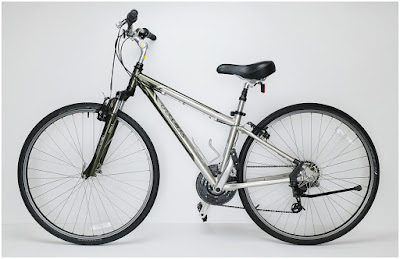
My daughter Emily has an unneeded bike in the garage. It's a Trek 7100, which is decent hybrid. She rode it to middle school. But she's just graduated college and won't be bringing it to her new job.

But right now it should fetch a nice price in the Craigslist Bicycle Hunger Games. Especially if it is photographed and presented well.

So that's exactly what we are going to do today: photograph a bike with a basic two speedlight kit.Read more »
Strobist

 
Comments Off on SLC-2L-12: Two-Light Bike for the Bucks

Posted in Photography


Video: Photographer Martin Henson shows the versatility of pinhole cameras from his backyard

11 Jun

UK-based photographer Martin Henson has recently published a video showcasing his pinhole photography process. An experienced film and digital photographer, Henson combined a 4×5-inch pinhole camera with Ilford FP4 film to capture a photo of flowers in his back garden. The result will show that one doesn’t need to travel far to capture beautiful images.

With his pinhole camera laying in the undergrowth and pointing toward the sky through the flowers in his garden, Henson also used an orange filter to darken the blue in the sky. The pinhole camera captures a wide field of view, so Henson must look down from above through the flowers to get a sense of how they will be arranged within the frame. After settling on the location for his camera, he must then determine the correct exposure.

When determining the correct exposure, Henson must consider that the Ilford FP4 film he’s developing is rated at ISO 200, but with the addition of the orange filter, he must compensate for an additional stop. Henson then places his light meter on top of his pinhole camera and meters at ISO 100. The reading states a 1/15s exposure at an F22 aperture. For Henson’s pinhole camera, he then had to convert this exposure time to an F216 aperture, which results in an exposure time of 6.5 seconds. Further, accounting for the reciprocity of Ilford FP4 film, the final exposure time is 12 seconds.

As you can see in the video above, after making his captures, Henson then slid the dark slide back in and developed the image. As he states, his video shows that the pinhole camera is a versatile photographic tool. It can be placed in positions and allow for compositions that would be ‘virtually impossible with a normal camera.’

The finished image, Chaos, is up for auction on eBay. There’s much more to learn about pinhole photography and analog photography in general. Henson has additional excellent resources. You can visit his large format photography forum and his black and white photography forum. He has recently published another pair of videos about pinhole photography on his YouTube channel, which can be seen above.

Articles: Digital Photography Review (dpreview.com)

 
Comments Off on Video: Photographer Martin Henson shows the versatility of pinhole cameras from his backyard

Posted in Uncategorized


Flashpoint announces wireless XPLOR Power 1200 Pro R2 flash, its most powerful flash

11 Jun

Flashpoint has announced a new flagship portable flash, the XPLOR Power 1200 R2. The flash is the newest member of Flashpoint’s R2 series of portable, wireless flashes.

The XPLOR Power 1200 R2 is Flashpoint’s most powerful flash unit and it offers multiple flash modes, including power recycling of less than two seconds and long flash duration for continuous shooting. The XPLOR Power 1200 Pro power pack and flash head combine to weigh just over 17 pounds. Of the wireless flash, Flashpoint Brand Manager, Solomon Leifer, said the following:

The Flashpoint XPLOR Power 1200 Pro is our most robust and powerful wireless flash, while remaining lightweight and portable for location shooting. With 1200W output and an excellent battery-powered system, the XPLOR Power 1200 Pro flash is perfect for ‘big event’ and outdoor photographers.

The Flashpoint XPLOR Power 1200 Pro includes a built-in Flashpoint 2.4 GHz R2 wireless flash system and offers wireless control for Canon, Fujifilm, Nikon, Olympus, Panasonic, Pentax and Sony TTL camera systems. The strobe offers nine steps of output power, ranging from 1/1 to 1/256. The flash includes a high-speed sync (HSS) mode that can work with shutter speeds up to 1/8000s. For stopping action, flash durations range from 1/220 to 1/10,860s.

Photographers need more than speed and power; they also need color stability with their lighting. The flash offers a Stable Color Temperature mode to better control temperature changes. Flashpoint states that this mode keeps temperatures ranges within +/- 75K throughout the entire power range.

Connectivity features include a pair of 3.5mm sync cord plug holes for wired connection, a wireless control port and a USB Type-C port for future firmware upgrades. For connecting light modifiers, the flash head is compatible with Bowens S-Type modifiers, resulting in compatibility with hundreds of light modifiers.

For extended shooting, the large-capacity lithium-ion battery in the power pack delivers 480 full-power flashes and can be fully recharged in two hours. The battery is 36V/5200mAh and it can be swapped out of the power pack in seconds. There is also an optional AC adapter to replace the battery chamber for a direct main connection when shooting indoors or in a studio environment. If photographers want to travel by air, there’s also a 36V/2600mAh rechargeable battery pack option.

Close-up image of the Power Pack.

Additional features include a 40W LED modeling lamp with three selectable modes, fan cooled flash head, three active flash modes (Manual, TTL and Multiflash) and a Stroboscopic Mode capable of delivering 100 continuous flashes at 1/16 power output.

The Flashpoint XPLOR Power 1200 Pro R2 flash comes with the flash head, power pack, reflector, glass lamp cover, lithium-ion battery, battery charger, power cable, carrying case and rolling case.

The Flashpoint XPLOR Power 1200 Pro R2 flash system is available now for $ 1,599 USD from Adorama and comes with a power pack, flash head, reflector, glass lamp cover, lithium-ion battery, battery charger, power cable, carrying case and rolling case.

As Adorama’s house brand in the United States, this flash is sold as a Flashpoint product. However, it can also be purchased as the Godox AD1200 Pro from other retailers and in other markets. As we noted in our coverage of the Flashpoint XPLOR 300 Pro, for customers in the United States, Flashpoint products are covered by a two-year warranty when purchased through Adorama.

Articles: Digital Photography Review (dpreview.com)

 
Comments Off on Flashpoint announces wireless XPLOR Power 1200 Pro R2 flash, its most powerful flash

Posted in Uncategorized


Nikon to Release Full-Frame Z5 and APS-C Z30

11 Jun

The post Nikon to Release Full-Frame Z5 and APS-C Z30 appeared first on Digital Photography School. It was authored by Jaymes Dempsey.

dps-nikon-z5-and-z30-news

For months now, we’ve been hearing rumors about several new Nikon cameras debuting in 2020.

But just last week, Nikon Rumors revealed several nuggets of information regarding these new mirrorless models.

First, one of these cameras will likely be called the Nikon Z5, and will be a full-frame mirrorless body a step below Nikon’s current Z6.

The other Z-series model is labeled the Nikon Z30, which will sit underneath Nikon’s Z50 as the second APS-C mirrorless model in Nikon’s lineup.

Nikon Rumors also predicts a Nikon professional mirrorless camera (often referred to as the Nikon Z8 or the Nikon Z9) coming in “late 2020 or in early 2021.”

Nikon Z30 and Nikon Z5 may soon be released

Thus far, Nikon’s mirrorless lineup has remained fairly limited, especially when ranged against competitors such as Sony and even Canon. Aside from the Nikon Z50, which debuted in October 2019, we’ve seen no new mirrorless models from Nikon. So the predicted Nikon Z30 and Nikon Z5 should inject some much-needed options into the Nikon ecosystem, especially for entry-level snappers who require a more powerful alternative to compact cameras, smartphones, and APS-C DSLRs.

The truth is, Nikon has lagged behind both Sony and Canon in the mirrorless race. It wasn’t until last year that Nikon offered a single APS-C mirrorless body, the Z50, a camera that remains out of the reach of many consumers thanks to its near-$ 1000 USD price tag. The addition of a Nikon Z30 should help round out the bottom part of Nikon’s lineup, and hopefully indicates Nikon’s commitment to expanding into the affordable mirrorless market.

On the other end of Nikon’s lineup, we have the Z6 and Z7. But while these two cameras are well-regarded in the photography community, Nikon still lacks a full-frame model positioned against the Canon EOS RP, as well as (potentially) the upcoming Canon EOS R6, a gap which the new Z5 will likely seek to fill.

Interestingly, another recent rumor suggests that the Z5 may not include a built-in electronic viewfinder, but will instead offer it as an accessory. Personally, I find this questionable; if Nikon decides to test this design, I’d expect it to happen in one of the lower-end cameras, potentially even the Z30. But not in the Z5, Nikon’s only full-frame mirrorless body to debut since 2018.

Regardless, we should know soon enough! And if you’re a photographer looking for a cheaper Nikon mirrorless body, keep your eyes peeled. We should have more news before long!

Now over to you:

Which of these mirrorless models are you more excited about? And do you think Nikon would drop the built-in EVF on the Z5? Let us know your thoughts in the comments!

The post Nikon to Release Full-Frame Z5 and APS-C Z30 appeared first on Digital Photography School. It was authored by Jaymes Dempsey.


Digital Photography School

 
Comments Off on Nikon to Release Full-Frame Z5 and APS-C Z30

Posted in Photography


How Fujifilm could make its next X-H series camera the class leader for video

11 Jun

Introduction

The X-H1 appeared to be the start of a more video-centric line of cameras from Fujifilm. However, we’ve subsequently seen the release the X-T3 and X-T4, both of which provide similar or better levels of video performance.

Does the X-H series still have a future? In a recent interview with DPReview, Toshihisa Iida, General Manager of Fujifilm’s Optical Device and Electronic Imaging Products Division, confirmed that the company plans to keep the X-H line, stating only that ‘the concept will be very different to the X-T series.’

Assuming Fujifilm intends to keep the series video-focused, we decided to contemplate what features would be required to make the X-H2 the undisputed class-leading camera for video. The APS-C/Super35 format remains very popular among videographers for a variety of reasons: fast readout rates, less rolling shutter and relatively compact lenses among them.

Video scopes

Recent Fujifilm cameras delivered great video quality, but lacked important exposure tools designed for videographers. Histograms are great, but we’d like to see waveforms and vectorscopes.

Waveforms help visualize exposure across the entire frame. They tell you how many pixels have a given brightness value as well as where those pixels exist in the image, useful for judging exposure in a specific area of the frame, such as on a subject’s face. Vectorscopes can be used to assess hue and saturation, particularly important given that most video isn’t recorded in Raw format.

To really impress, Fujifilm could even add false-color overlays, which make it easy to quickly judge exposure anywhere in the frame at a glance. Equally important is a workflow that makes video scopes easy to use – accessible at the tap of a button for evaluating exposure.

Video-centric exposure settings

Exposure settings used for photography work fine for video, but they don’t always represent the best workflow for videographers.

We’d like to see an option to set shutter angle as an alternative to shutter speed. Of course, you can always set your shutter speed to replicate a 180° shutter, but each time you switch frame rates you’ll have to update the shutter speed as well. In contrast, a constant shutter angle means you’ll always get the appropriate shutter speed for the frame rate at which you’re shooting. (The ability to lock shutter angle to prevent accidental changes would also be welcome.)

A bonus would be explicit dual gain states, similar to what’s found on the Panasonic GH5S and S1H. This would allow users to expressly determine whether they want to prioritize the widest dynamic range or use the higher-gain step to reduce shadow noise at the expense of some dynamic range. It might also clear up confusion around ISO values that may appear to change when using different modes (e.g. Standard vs Log gamma) even when the underlying amplification remains the same.

A full suite of ports

Video work often requires cameras to be rigged with external accessories, so connection points are crucial.

We don’t expect the X-H2 to embrace the SDI connectors commonly found on pro video cameras, but do hope for a full size HDMI port. Standard HDMI cables are easy to find, and a full size port is going to hold up better over time than the small micro HDMI ports found on other Fujifilm bodies.

We’d also like to see dedicated 3.5mm microphone and headphone jacks. Recent Fujifilm models have relied on a 3.5mm-to-USB-C adapter for headphones, but on a video-centric camera we’d prefer a standard headphone port. Not only does it eliminate a potential point of failure, but we have some other high hopes for that USB-C port.

XLR microphone adapter

In many cases, a simple hot shoe mic with a 3.5mm connector to the camera is just what you need, but what if you want to record high quality audio, possibly from a couple different sources such as lavalier mics, straight into camera? For that, we may want XLR connections.

Panasonic provides a solution to this in the form of its XLR1 adapter (pictured above), which sits in the camera’s hot shoe and provides two XLR inputs with independent controls. Similarly, Sony has its XLR-KTM adapter for mirrorless cameras. It would be a strong statement to videographers if Fujifilm were to introduce a similar product alongside a future X-H2.

Improved video codec

When introduced, the X-H1 set a new bar for video on a Fujifilm camera, but its maximum resolution of 4K/30p, along with 4:2:0 8-bit color and reliance on the H.264 codec, is dated by today’s standards. In contrast, the newer X-T4 shoots internally up to 4K/30p All-I at 400 Mbps, with 4:2:0 10-bit color, using the H.265 codec. (And even goes to 4K/60p, albeit at a lower 200 Mbps.)

At a minimum, we’re hoping to see the X-H2 capture both 4K/60p and 6K/30p internally, with 4:2:2 10-bit color, a high bit rate, and using the H.265 codec.

There have even been suggestions that Fujiflm might use a rumored 8K-capable, 43MP Sony sensor in the X-H2 that’s capable of capturing video at high bit rates. Is it a stretch? It might be, but if true it would be a major differentiator between the X-H2 and Fujifilm’s other models, not to mention the rest of the APS-C mirrorless camera market.

Raw video options

Thanks to recent firmware updates, some mirrorless cameras support ProRes Raw recording when paired with a Atomos recorder. We would expect to see that on the X-H2 as well, but for truly class leading performance we’d like to see Fujifilm go further.

The often overlooked implication of Raw video is that output resolution should match sensor resolution, otherwise it’s necessary to line or column skip to capture a Bayer-like array of data (as occurs on the Nikon Z6). Raw video with an approximate resolution of 6K would closely match the 24MP or 26MP sensors used on recent Fujifilm bodies. If the rumors of a higher resolution, 43MP sensor turn out to be true, such an approach might be required.

Also, remember the USB-C port we didn’t want to use for headphones? How about using it to write Raw video directly to an attached SSD, similar to the Blackmagic Pocket Cinema Camera or Sigma fp? Design the body with a means to attach it securely and it would fit on a gimbal without fussy rigging.

If Fujifilm wanted to go all-in on video, it could even offer internal Raw recording with selectable compression, similar to the Blackmagic camera. It also raises an interesting question: whether it would make sense to use Apple ProRes Raw or BlackmagicRaw. A popular camera with internal Raw recording could tip the industry in one direction or another.

Improved autofocus

Though videographers often prefer to use manual focus, autofocus is becoming increasingly important. Recent Fujifilm models have demonstrated impressive autofocus capabilities, though important gaps still exist.

In particular, as improved as Fujifilm’s subject tracking is, there’s still no subject tracking in video. To achieve class-leading status, that’s a pretty important feature we’d want to see added. Additionally, the AF interface could use a revamp; the addition of a tap-to-track feature, similar to the the one found on many Canon cameras, would make the system even more useful.

Displays

It’s probably a no-brainer that we’d like to see a fully articulating screen on a video-focused camera. Fortunately, Fujifilm is already doing this on models like the X-T4 and X-A7, so it shouldn’t be a heavy lift to do it on the X-H2. What we’d really like to see is an even more innovative design, maybe along the lines of the one found on the Panasonic S1H, which puts the screen’s articulating hinge on a tilting platform. This allows it to tilt out and avoid interfering with the ports on the side of the camera.

Another upgrade we’d vote for is a move from the 3.69M dot panel found on the X-T4’s EVF to the newer 5.76M dot panel used by several other cameras. The extra resolution would be especially helpful when using tools like video scopes with the camera to your eye.

Improved 5-axis IBIS

Fujifilm introduced in-body image stabilization on the X-H1. While effective for stills, it had some quirks when shooting video. The system had a tendency to overcorrect for intentional movement, and when it hit the limit of its travel would reset in a clumsy way. Fortunately, Fujifilm was able to improve it through firmware.

The 5-axis system in the X-T4 can stabilize video effectively, particularly using its ‘Boost IS’ mode, which provides the maximum correction possible to compensate against any camera movements when taking a static a shot; it works well and can be tripod-like. However, the system still has difficulty distinguishing between intentional and unintentional camera movement, such as pans, resulting in hesitation or jerky video. It’s also noticeably less effective than the sub-full frame video leader, the Panasonic GH5.

We’d like to see a more refined image stabilization algorithm in a future X-H2 for best-in-class handheld video shooting.

Separate menus and settings for stills and video

Separate menus and settings for stills and video is another one of those problems that’s mostly been solved on the X-T4. It even has separate ‘My Menu’ tabs for stills and video. Fujifilm, just port this to the X-H2 and videographers will thank you.

Oh, and throw in a hardware switch between video and stills modes, like the X-T4, while you’re at it. Because it just makes sense.

Unlimited recording time

Wouldn’t it be great if the X-H2 had unlimited recording time?

It would be even greater if you could record continuously while powering the camera via the USB-C port.

Eterna in-camera LUT display

When shooting Log video, Fujifilm’s F-Log View Assist function lets users apply an in-camera F-Log to Rec.709 LUT, which displays an approximation of graded footage while recording in Log.

It would be great to see Fujifilm extend this functionality to include its Eterna film profile. Eterna has proved to be popular among videographers, and Fujifilm has a lovely F-Log to Eterna LUT. Making it available in the View Assist function would be a great addition to the camera.

Anamorphic lens support

Admittedly, we’re getting into niche stuff here. Most people probably won’t be shooting anamorphic lenses, so this is probably a nice-to-have rather than an essential feature. However, if Fujifilm wants to establish itself as a class leader in video, it’s an opportunity.

What does anamorphic support entail? Primarily, the ability to display a desqueezed image in the viewfinder while continuing to record a squeezed anamorphic image in-camera. Anamorphic support would ideally include full-sensor desqueeze, allowing one to use the entire surface area of the sensor when shooting video.

If the camera’s image stabilization could take anamorphic squeeze into account, it would join the Panasonic GH5 and S1H as the only stabilized platforms for anamorphic shooting. As most anamorphics are built for Super35 coverage, this would be a standout feature.

Conclusion

We don’t expect to see all these features on a new X-H2: it’s a pretty big list, and even we’ll admit that some of the items are a bit of a stretch. However, if Fujifilm is serious about putting a stake in the ground with video enthusiasts, this would be a heck of a way to do it.

Of course, it’s entirely possible that Fujifilm has a completely different vision for the X-H series in mind. As we mentioned, there are rumors that a future X-H2 might use a higher resolution (43MP?) sensor. This would allow Fujifilm to significantly differentiate the X-H2 from the rest of its product line for still photography as well, similar to the Nikon Z6/Z7 or Panasonic S1/S1R models. That it might also allow for 8K video would be a significant upside for video enthusiasts.

Anything’s possible, but since the X-H1 had a video bent our gut tells us that, whatever form the camera takes, video will be a significant focus. We’re holding our breath as we wait to find out.

Articles: Digital Photography Review (dpreview.com)

 
Comments Off on How Fujifilm could make its next X-H series camera the class leader for video

Posted in Uncategorized