RSS
 

Archive for February, 2020

Video: How Lewis Hine’s photos helped shed light on child labor in the US

24 Feb

As part of its ongoing series ‘Darkroom,’ Vox has published a video showing how the work of photographer Lewis Hine helped bring to light the injustice of child labor across the United States.

The roughly seven-minute video not only shows the meticulous work of Hine, but also contextualizes the significance of his photography, which was captured at a time when 1.75 million children aged 10–15 were at work in factories, mines, plantations and other dangerous work environments. In total, more than 5,000 photographs were captured, each of which is accompanied by a detailed caption of its subject(s).

It’s a brilliant breakdown and well worth a watch. You can find more videos from Vox’s ‘Darkroom’ series on Vox’s YouTube channel.

Articles: Digital Photography Review (dpreview.com)

 
Comments Off on Video: How Lewis Hine’s photos helped shed light on child labor in the US

Posted in Uncategorized


Interview: Fujifilm X100V – ‘We decided we could change more in the fifth generation’

24 Feb
From left, Shinichiro Udono, Senior Manager of Fujifilm’s Optical Device & Electronic Imaging Products Division and Maszumi Imai, Design Manager of Fujifilm’s Design Center are pictured here at the launch of the Fujifilm X100V in London earlier this month.

Earlier this month we attended the launch of the Fujifilm X100V in London, where we had the opportunity to sit down with two senior figures within the company: Chief Designer Maszumi Imai and Senior Manager Shinichiro Udono.

In a conversation primarily focused on the X100-Series, we discussed the evolution of the X100 line and the challenges of updating a ‘signature’ model.

Note: This interview is broadly split into two parts: The first part is a strategy-focused conversation with Mr. Udono about the development of the X100V in the context of the continuing evolution of the X100 line. The second part is a discussion with Mr. Imai about the design process of the X100V and previous models in the line, and more broadly, his background and influences as a designer.

This interview has been edited lightly for clarity and length.


How important is the X100 line to Fujifilm?

(S.U.) It was where we started. It was our first high-end camera. In 2010-11 our main camera business was in small-sensor compacts. The X100 established the concept of dial-controlled operation, which is found now across the X-Series. We have the same concept across the X-T1, X-Pro 1, and so on.

So the X100 established the Fujifilm shooting style, and then we extended this concept to the entire X-Series.

So when you’re discussing a new X100, are you more careful about changes to this model because it’s so important?

(S.U.) We’re always careful to maintain the camera concept, the style, and the size. But we also really want to provide the latest technology to our customers. Quicker autofocus, better resolution, better image quality, color reproduction and so on. That’s very important. So while we don’t want to change the camera’s style – how it looks – we’re always thinking about how we can deliver the best performance, and the best functions to our customers.

The X100V is unmistakably a member of the X100 line, but several subtle changes have been made to its physical design and ergonomics.

How have sales of the different X100 models compared over the past few years?

(S.U.) The sales of each generation were fairly similar, however the latest model X100F had the most success. With that in mind and with the new features, I expect the X100V to sell more than the previous four models.

What were your biggest priorities when planning the development of the X100V?

(S.U.) The first and most important point is the hybrid viewfinder. Next, the lens, the single focal length. We knew we had to keep that concept. And then we considered what sensor and processor we should put inside the camera. So we start with the concept, and with the basic form factor, and then we think about what goes inside.

What was the number one request from X100F customers?

(S.U.) Weather resistance. And also image stabilization. After we launched the X-T3, a lot of customers [also] wanted the latest sensor and processor.

We thought it would break the basic concept of the X100V. So we didn’t pursue stabilization in this model

The X100V does not offer image stabilization – why not?

(S.U.) Simply, size. There are two ways we could add stabilization – one is optically, in the lens, and the other is IBIS. We made some rough studies of both possibilities, but in both cases the camera would have become bigger. We thought it would break the basic concept of the X100V. So we didn’t pursue stabilization in this model.

How long does it typically take to develop a new X100 model?

(S.U.) Well with the X100V we redesigned the lens, so it took around two years. A little longer than normal. If we only made changes to the body, it would have been a shorter process.

The X100V’s 23mm F2 lens has the same specifications, and physical dimensions as the lenses used on previous models in the X100 line but it employs an additional aspherical element, for better sharpness at close distances, and in the corners of the frame.

Where do you see most sales of the X100 line, globally?

(S.U.) With the first generation, Japan was the biggest market. Later on, the USA became the biggest. Because it’s not an interchangeable lens model, it can reach a wider market of photo enthusiasts. There’s a big market in the US for photo enthusiasts, especially people who know about the history of film cameras. Those customers really like the X100 line.

How will the X100-series evolve in future?

(S.U.) In terms of technology, maybe we can add image stabilization, if we can develop it. But in the longer term, I don’t think we’ll change the style. We’ll probably keep this style and design even for another ten years. But we may have totally different technology, which I don’t know about at the moment. Different style sensor, or Ai technology. We’ll keep adding new technology into the X100 line but we’ll keep the basic design concept.

If you did add IBIS to the X100, would it require a totally new mechanism?

(S.U.) Probably, yes. We’d have to develop it from scratch. We’d need a very small IBIS unit.

Do you tend to find that these cameras are most popular with a certain age-group, or demographic?

(S.U.) The biggest audience is slightly older people, who remember film cameras. But we also see a lot of young people, especially in Japan, buying X100 models. It’s a fashionable camera. Those people take pictures, of course, but they also like the design.

We felt that a more classic design would be a good fit for our new brand

What was the original idea behind the X100?

(M.I.) In 2009, we started to consider how to make our next high-end digital camera. At that time we only made FinePix small-sensor compacts at that time. Other companies had their own interchangeable lens cameras, but we didn’t. So we were a challenger in that space – we could have done anything. But we wanted to create our own brand.

We designed a lot of concepts for cameras, which were a completely different shape to the original X100. For example we had a square concept, and a vertical style one, and one that was designed for the perfect grip – things like that. And then we decided that we were inspired by classic-styled cameras. We felt that a more classic design would be a good fit for our new brand. So at that time I started designing around the concept of purity – a classic camera design.

The film-era Fujifilm Klasse is cited as one of the design inspirations for the X100 line. Photo by David Narbecki, from an article originally posted on 35mmc.com. Used with permission.

(S.U.) Some background to why we reached for the classic style design, when Fujifilm made film cameras we made cameras which shared a similar shooting style to the X100. Cameras like the TX-series, the Klasse, and so on. They offered a similar shooting experience. In our digital camera division there were several people who came from the film camera division. We asked ourselves ‘what would be the best camera for the Fujifilm brand?’ At that time there were many good cameras from other brands, but we wanted to show what it meant to be a Fujfilm camera.

(M.I.) The first-generation X100 was created according to a set of tenets: The best quality, a good user experience, and styling that would tell photographers at a glance that this was a serious camera. That was a big reason why we chose this kind of classic style.

From the very beginning of the design process was about two years. We started the X100 project in 2009 and launched in 2011.

The innovative ‘hybrid’ viewfinder introduced in the original X100 was created about halfway through the development process of the camera itself. The X100 was originally envisaged as having a simple optical finder.

Was there any particular model or style of camera that you were particularly inspired by?

(M.I.) During the design planning process, around halfway through the project, our engineering team invented the hybrid viewfinder. So we decided that we should go with a rangefinder-style camera, not DSLR-style. Originally the X100 was intended to just have an optical viewfinder.

We looked at most of the legendary film-era cameras for inspiration. The Leica M3, of course, and others, including our own designs. The X100 was a homage to traditional film cameras.

What was your background as a designer, before you joined Fujifilm?

(M.I.) I worked at Minolta, in Osaka. At that time the main market was film cameras. When I was a student, my professor told me that camera design was one of the most difficult branches of industrial design. So he said if you go to a camera company, you’ll acquire the most useful skills. So I decided to go to Minolta.

What are your biggest design influences outside of photography?

(M.I.) Vehicles. Especially cars, but also airplanes. When I was a child, supercars were very popular in Japan. Lamborghinis, Ferraris, those were our dream cars. Airplanes like the F4 Phantom, the F15, and the F14 too. Very popular and stylish airplanes.

When I was five years old, my dad took to me to the cinema for the first time, to see Star Wars. So cars, planes and science fiction were a big influence.

We’ve talked about the physical engineering challenges of putting stabilization into the X100, and last year we saw some of the early modular GFX concepts – how often do engineering considerations restrict your vision as a designer?

(M.I.) Taking the X100 first, I know the basic size and the basic [details of] construction. First of all, we make an actual-size image-mockup. Sometimes these mockups can lead us to make the camera better. For example if I [deliberately] make a mockup thinner, maybe people will react well to it, and then we’d realize we should aim for this kind of size [in future]. Inspiration, and first impressions are very important when we make a product.

We take are two different approaches to design at Fujifilm. One is just the daily work of knowing ‘OK, we need to make a new X100’, where we consider all the technical limitations, and the R&D side will prepare some rough designs, [based on] of the lens, battery, the LCD, things like that. And these decide the final size of the camera.

That’s the standard approach. But once a year we also conduct a study where we think about the future without considering the current technical limitations. Like a vision exercise. And we create more visionary image mockups. And in a few years, some elements of those image-mockups might end up in final cameras.

Mr. Imai’s team makes ‘image mockups’ for internal discussion, to highlight possible directions for future products. This one, of a proposed medium-format rangefinder-style camera (which eventually evolved into the GFX 50R) features the ‘hidden’ rear LCD that finally made it into the X-Pro 3.

You were the lead designer on the X100, and after that you supervised the teams working on the S, the T and the F, and now you’re lead designer again on the V. Was this because the V is considered to be particularly important, to you or the brand?

(M.I.) Both, actually. The X100F had a great reputation, so it was hard to think about what we could add, to make something new. That was a big concern. With a ‘signature’ model like this it’s hard to make a successor, so I was appointed as the designer of the next model.

This is the fifth generation, and as I’ve already explained we have these tenets about the X100-series. Nine years have passed, the world has changed, and the X100 brand is familiar in the market, and has grown in reputation. So we decided we could change more in the fifth generation, in terms of concept and design. It’s still based on the X100 core concept, but this time I had freedom to explore more possibilities.

How do you balance the concept of simplicity against demands for more control and customization?

(M.I.) It’s very difficult to find a way to do that. We see a lot of comments from people who prefer the simplicity [of the original X100]. At the beginning of this project I made a mockup which looked almost the same as the original X100. I also made a mockup that looked almost the same as the production model of the X100V, which gained everyone’s approval. In the end we were able to make something that satisfied all of our goals.

The original X100 featured a simple twin-dial interface and limited number of external controls. Subsequent X100-Series cameras have become more complex, but immensely more powerful.

If you didn’t have any engineering or technical restraints, or any need to be true to the designs of previous models – if you could do whatever you wanted – what kind of camera would you make?

(M.I.) Right now I want to make the simplest, purest camera. Simple, and sharp in style. The X-Series cameras are based on classic styling, but I think that this kind of classic style, if it were to meet with an extremely modern style, we could create something new. I want to try. Simple, sharp, but solid design.

Could a future X100 camera have a simpler interface?

(M.I.) Maybe. But ‘simple’ doesn’t necessarily mean fewer dials or buttons.

Sometimes I think about musical instruments, versus using software like Garage Band […] It’s the same thing with shooting using a camera

Being intuitive in operation for photographers is the most important thing. A smartphone doesn’t have any buttons or dials, but it’s not necessarily the most intuitive interface for shooting photos. So we need to keep a balance.

When the original X100 was being planned, smartphone photography was in its infancy. How has the development of the smartphone, and changing customer behavior that resulted, influenced how you design cameras?

(M.I.) Maybe in the future we’ll invent brain-controlled cameras! But I wouldn’t want that. This (indicating the interface of the X100V) is the best way to shoot, to create an expression of creativity through photography. And this style of camera is completely different from a smartphone. Sometimes I think about musical instruments, versus using software like Garage Band. I like using Garage Band, but it’s completely different to playing an instrument. Playing something by hand is fun, and comfortable. It’s the same thing with shooting using a camera.

We always look at new technologies, like Ai, and we carefully choose the best way [to implement them]. We could create a haptic touch interface for buttons and dials and things like that, but it wouldn’t be a good fit for the X-series. That’s why we keep the buttons and dials, and the classic style.

Do you have any particular designers or artists that inspire you?

(M.I.) There are a lot of very good designers in the world, and a lot of them have inspired me. Every kind of industry has its masterpieces. It’s difficult to choose one, but I’d like to choose [industrial designer and Blade Runner concept artist] Syd Mead, who passed away recently.


Editor’s note: Barnaby Britton

The launch of the X100V in London recently provided a good opportunity to have an unusually tightly focused conversation with two of the figures most responsible for its development. Mr. Udono and Mr. Imai are key members of the team that has shepherded the X-Series (and later the GF line) from an idea, ten years ago, to the broad lineup of products that are available today.

From previous conversations with Fujifilm executives, we knew that of all the products in the company’s lineup, the X100 line is the one over which the most care is taken to update only the right things, and only in the right way. The X100 line is sometimes referred to by Fujifilm representatives as a ‘signature’ product line and for good reason: as Mr. Udono says, the X100 was ‘where we started’.

This small, quirky, retro-styled camera was a hit with enthusiast photographers almost from the word go, and subsequent generations have been embraced by photographers of all types, and all ages, all over the world. The X100F has proven the most popular iteration of all, which of course means that it was always going to be among the hardest to replace.

The X100 could have been launched (and was apparently originally planned to have been launched) with a simple fixed optical finder

Mr. Imai has been working at Fujifilm for a long time, and before that Minolta. As lead designer on the original X100, he has had a key role in the evolution of the X100 line and took full control over the design of the X100V. It was interesting to speak to him about the process of the original X100’s development, from mockups to a final product.

I didn’t know, for example, that the creation of the signature ‘hybrid’ viewfinder only happened around halfway through the development process of the camera. The X100 could have been launched (and was apparently originally planned to have been launched) with a simple fixed optical finder. Would it still have been a hit? I’m not sure. It’s certainly hard to imagine an X100 without the option for a hybrid finder, but I know a lot of X100-series owners claim that they rarely or never engage the EVF.

The message that came out of my conversation with Mr. Udono and Mr. Imai most clearly is that when it comes to the development of the X100 line, it’s almost more important for photographers to understand what Fujifilm can’t or won’t change than what they will. A lot of X100 fans want some kind of stabilization for example, but the simple fact is that adding it would be impossible without the dimensions of the camera changing.

With the current state of Fujifilm’s technology, Mr. Udono claims that adding an IBIS unit into the camera body would increase the body size, while an optical stabilization system would force (another) redesign of the lens and would inevitably also add bulk. The X100V is slightly larger than the X100F, but only very slightly (which is impressive, considering that it has a tilting screen – another long-standing request from some customers). Notably, the X100V can still use the same hood and filter adapter – and even the same converter lenses – that were released for the original X100.

As a fan of the series, with a drawer full of caps and adapters that I’ve picked up over the years, I personally appreciate this commitment to what Mr. Udono calls the key ‘tenets’ (Mr. Imai also referred to a design ‘law’) of the X100, as laid down almost a decade ago.

I always enjoy talking to artists and designers, partly because of my own background, but mostly because I’m always interested in what – and who – they cite as influences. Mr. Imai was no exception. During our conversation he mentioned such diverse influences as Star Wars and the F4 Phantom, but I shouldn’t have been surprised that as his main inspiration he cited the late Syd Mead.

A lot has happened since the original X100 was launched, and despite looking similar, the X100V is a different beast

Mead was a famed futurist, known for his work on 2001: A Space Odyssey and Star Wars, among many others. He is credited for visualizing what George Lucas described as the ‘used future’. This was a concept which arguably evolved into (or at least informed) the emergent retrofuturism of the late 1970s and 1980s, wherein nostalgic styling is melded with modern technology. In the world of digital photography, it’s hard to think of a better example of this aesthetic than the X100.

That being said, a lot has happened since the original X100 was launched, and despite looking similar, the X100V is a different beast. More versatile, sure, and definitely more powerful. But with a total of seven dials, an articulating screen, and the need to support serious video capture, it’s an altogether more complicated, less streamlined camera than its early ancestors. Mr. Imai admits as much, and it was interesting to hear him speak about his ‘dream’ camera: one that melds classic styling with modern simplicity. How this dream ends up being manifested in Fujifilm’s future camera lineup remains to be seen, but it’s something to look forward to.

Read more in-depth interviews

Articles: Digital Photography Review (dpreview.com)

 
Comments Off on Interview: Fujifilm X100V – ‘We decided we could change more in the fifth generation’

Posted in Uncategorized


Luminar vs Lightroom: Three Reasons Luminar is Better (and Two Reasons It’s Not)

24 Feb

The post Luminar vs Lightroom: Three Reasons Luminar is Better (and Two Reasons It’s Not) appeared first on Digital Photography School. It was authored by Jaymes Dempsey.

luminar-vs-lightroom

Are you struggling to decide whether you should be working in Luminar vs Lightroom? Do you want to know how these two post-processing powerhouses match up?

You’ve come to the right place.

Luminar vs Lightroom

Because this article will give you three ways Luminar excels over Lightroom, followed by two areas where Lightroom dominates.

And it’ll help you decide which option is best for your needs.

Let’s dive right in, starting with the biggest reason to choose Luminar:

1. Luminar offers one-click features for quick edits

When dealing with the question of Luminar vs Lightroom, I always recommend you take a look at the biggest feature Luminar offers:

One-click editing.

You see, Luminar offers a modern approach to editing, where you tap a few buttons and the software does most of the editing for you. This is ideal for photographers who don’t feel comfortable doing advanced edits in a program like Lightroom, or who simply don’t have time to carefully edit every photo.

These one-click options include the Orton Effect (which gives your photos a soft glow), to the Sunrays tool (which adds surprisingly realistic sun rays to your photos), to the Fog tool (which adds, well, fog).

Luminar vs Lightroom: Three Reasons Luminar is Better (and Two Reasons It's Not)

Even more impressive, some of Luminar’s best editing features are powered by artificial intelligence.

For instance, Luminar’s AI Enhance tool offers an AI Accent slider that often looks quite good; it makes your photo pop with some carefully applied color and tonal adjustments, among others.

And the Luminar AI Sky Replacement is nothing short of amazing. With a couple of clicks, you can take a boring sky and turn it into something eye-catching (an edit that could previously only be pulled off by a Photoshop expert).

Luminar vs Lightroom AI sky replacement tool

So if quick editing is your thing, then Luminar is a great choice.

2. Luminar offers useful layer-based editing

If you’ve ever used Photoshop, then you’ll know that one of its most powerful features is layer-based edits.

Because with layers, you can stack edits on top of one another, selectively delete edits, mask out certain edits, and more.

And while Lightroom doesn’t offer layer-based editing…

…Luminar does.

In Luminar, you can make adjustments on different layers. Then you can selectively apply these adjustments by masking out different areas of the layer, ensuring that only part of the photo is enhanced by a slider or corrected by a tool.

Luminar vs Lightroom layer editing

You can also use Luminar’s Luminosity Mask tool to selectively adjust areas of your photos based on their underlying brightness.

Now, Lightroom does offer some similar features, though they don’t technically use layers. Features such as the Adjustment Brush.

But these aren’t quite as useful as true layer-based editing, not least because you can only apply some edits via the Adjustment Brush, whereas Luminar allows for almost every slider to be separated into a different layer and masked out (if you so choose).

Personally, I’m a huge fan of layer-based editing, and I love that Skylum included it in their software.

On the other hand, layer-based editing can be a bit complex for newcomers. Fortunately, as discussed in the section above, Luminar also has a handle on basic editing tools.

So you have a choice:

Do more complex, layer-based editing.

Or work with the one-click edits.

(Or both!)

Very cool.

3. The Luminar editing interface is incredibly easy to work with

Here’s the third big area where Luminar dominates Lightroom in the Luminar vs Lightroom question:

The Luminar interface is streamlined, simple, and ridiculously easy to use.

Open up Luminar, and you can immediately tell that it’s great for beginners. There’s a toolbar at the top that lets you access basic options, no matter the module you’re in, and the tool panels on the right are simple and uncluttered.

To do some quick editing, all you have to do is tap the Looks icon at the top, and a handy image carousel pops up:

Luminar vs Lightroom interface

Lightroom, on the other hand, is far less sleek, and a little bit messy.

Take a look at the Lightroom interface:

Luminar vs Lightroom: Three Reasons Luminar is Better (and Two Reasons It's Not)

Sure, it’s workable, but it’s not exactly simple, and it can feel overwhelming at times. There’s a huge number of editing panels, quite a few modules, and many sliders.

So while a professional probably wouldn’t balk at the Lightroom display, a beginner may feel far too out of their depth.

Which is why Luminar is worth a look.

4. Lightroom offers far superior image organization options

Now it’s time to look at areas where Lightroom excels over Luminar, starting with Lightroom’s digital asset management capabilities.

You see, Lightroom is carefully designed to catalog, group, and label your photos. It has ultra-useful collection options and a huge number of ways to filter your images (in case you’re after an elusive image buried somewhere deep in your catalog).

image organization Luminar vs Lightroom

I love Lightroom’s organization features, and I still use my Lightroom catalogs to keep track of all my images, even when I’m doing editing in Luminar.

You see, Luminar’s photo organization options are far less powerful compared to Lightroom’s. Luminar does offer a Library feature, which gives you the option to group your photos into Albums.

But Albums don’t offer much in the way of functionality; for instance, you can’t group one album under another, nor can you sort them into a meaningful hierarchy.

Hence, when it comes to Luminar vs Lightroom in photo organization capabilities, Lightroom is the winner. Hands down.

Lightroom features a set of powerful, complex tools for precise editing

One other gripe that I have with Luminar compared to Lightroom:

It’s just not as precise.

Even though Lightroom has a complex interface, there’s a lot of options within that interface. Whereas Luminar’s editing tools are often a bit too simple.

For instance, look at Lightroom’s Split Toning panel:

Luminar vs Lightroom: Three Reasons Luminar is Better (and Two Reasons It's Not)

You can drag around a point on the color display, and your photo will respond.

Then compare this to Luminar’s Split Toning tool, where you’re stuck dragging sliders in a far less helpful way:

Luminar vs Lightroom luminar split toning

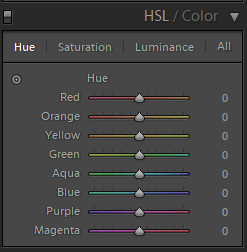
The same is true of Lightroom’s HSL/Color editing panel. You have basic HSL options, which allow you to modify colors according to hue:

Luminar vs Lightroom: Three Reasons Luminar is Better (and Two Reasons It's Not)

But then you also have a more targeted color adjustment tool, where you can click and drag to edit particular colors of your photos.

This is in contrast to Luminar’s Color tool, where you have the basic HSL options, and that’s all:

Luminar vs Lightroom Luminar color tool

Now, for a beginner, this may not be a big deal. You may not be interested in more complex editing tools.

But more experienced editors want this sort of thing, and so you should be aware that you can’t find it in Luminar.

Luminar vs Lightroom: Conclusion

Lightroom and Luminar are both excellent for post-processing, just in different ways.

Luminar offers fantastic one-click editing, along with powerful AI options.

Whereas Lightroom features superior image organizational features and complex editing tools.

So which is better, Luminar vs Lightroom?

In the end, the choice is yours!

The post Luminar vs Lightroom: Three Reasons Luminar is Better (and Two Reasons It’s Not) appeared first on Digital Photography School. It was authored by Jaymes Dempsey.


Digital Photography School

 
Comments Off on Luminar vs Lightroom: Three Reasons Luminar is Better (and Two Reasons It’s Not)

Posted in Photography


Moving to Manual Mode: Which Setting Should You Adjust First?

23 Feb

The post Moving to Manual Mode: Which Setting Should You Adjust First? appeared first on Digital Photography School. It was authored by Kevin Landwer-Johan.

moving-to-manual-mode-photography

Moving to manual mode is often considered too difficult by many beginner photographers. In reality, learning manual mode is not so hard to do. Sure, it’s not for everyone. Many photographers are content to let their camera sort out the exposure settings.

One of the most common questions I get asked by people I am teaching to use manual mode is “which setting should I adjust first?” Unfortunately, there is no set answer to this question. It depends on what you are photographing.

motion and DOF control, moving to manual mode, ballet dancer

© Kevin Landwer-Johan

Moving to manual mode

Shifting your mindset is the most important aspect of moving to manual mode. Are you comfortable using any of the auto or semi-auto exposure modes on your camera? Then you need to make some changes to the way you think.

First, it rarely matters if it takes you a little longer to set your camera. Very few memorable photos are taken as snaps on the spur of the moment. Slow down.

Understand the basics of how you can set the exposure manually, then practice. Once you commit to moving to manual mode, you will find it’s not difficult to manage.

There are only three settings you need to work with to manually control your exposure – shutter speed, aperture, and ISO. These regulate the exposure.

The exposure meter, also known as the light meter, guides your decision making. With many cameras, you can also use the rear monitor to gauge your exposure. With mirrorless cameras, you can typically see the effect of adjustments you make to exposure in the viewfinder.

Woman Photographer at the Shopping Mall, moving to manual mode

© Kevin Landwer-Johan

Balancing these three settings will result in a well-exposed subject. Each setting can also affect your photos in different ways. These are important to understand to be in control of how you want your photos to look.

When you are first moving to manual mode, you may not know where to start in setting your exposure. There are many variations on how to set your camera.

Each photographer may use a different method. I base my choices on what I am photographing.

Here are the answers I give my workshop participants about which setting to change first.

When to adjust your shutter speed first

Photographing a moving subject means you need to consider your shutter speed first. If your shutter speed is too slow, your moving subject may appear blurred.

At times you will want this effect. Often you will want your subject to be sharp, without any motion blur or camera shake fuzziness.

Young woman standing in a busy market. Shot using a slow shutter speed to get the movement of the people blurred. Moving to manual mode

Shutter speed was 1/2 a second. My model stood very still © Kevin Landwer-Johan

You need to consider how fast your subject is moving to know an appropriate shutter speed to use. The faster the movement, the faster the shutter speed you’ll need to use to freeze the action.

Making use of motion blur in your photos also requires you to think about how fast your subject is moving. If you set your shutter speed too slow, you’ll see too much blur, and your subject may not be recognizable.

Alternatively, if your shutter speed is a bit too fast, your subject may only blur a little. This often looks like a mistake has been made.

To capture a person walking and have them look sharp, you’ll need to use a shutter speed of 1/250th of a second or faster. If you want them to blur a little and still be recognizable, you’ll need to set your shutter speed at around 1/10 of a second or a little slower.

Low light may mean your shutter speed needs to be slow. It’s important not to choose a speed that’s so slow you’ll get blurring from camera shake. This happens when you are hand-holding your camera and move it slightly during the exposure. I’ll address this more in the section about ISO setting.

Once you have adjusted your shutter speed, you will then need to set your aperture and ISO. This is what your exposure meter, monitor, or viewfinder can guide you to do.

Image: I used a shutter speed of 1/1250th of a second to ‘freeze’ the flying water © Kev...

I used a shutter speed of 1/1250th of a second to ‘freeze’ the flying water © Kevin Landwer-Johan

When to adjust your aperture setting first

Aperture, among other things, allows you to control the depth of field in your photographs. This is the amount of your photo that is sufficiently sharp. The wider aperture you choose (lower f/stop number), the less you’ll have in focus in your picture.

Choosing to adjust the aperture first is a decision based on how much of your composition you want in focus.

At times, you might want to render as much of your composition in focus as possible. This is a common choice when photographing landscapes.

Setting your aperture to a higher f/stop number (i.e., f/8-f/22) will give you more depth of field. Understanding hyperfocal distance will help you make better choices about getting a deep depth of field.

Isolating your subject by blurring the background requires you use a lower f/stop number (i.e., f/1.2 to f4). Doing so means more light will enter your lens. You’ll need to adjust your shutter speed and/or ISO to make sure your subject is well exposed.

Manipulating the aperture setting first is something I often do when I have a static subject. This is because the shutter speed I use is not so significant as it is when my subject is moving.

Moving to manual mode to photograph a Thai dancer

I used an aperture of f/2 on an 85mm lens to control the depth of field. © Kevin Landwer-Johan

When to adjust your ISO setting first

I treat my ISO setting as the foundation of my exposure. I only alter it when I need to. Unlike shutter speed and aperture settings, ISO has no creative influence. However, it does have an effect on the technical quality of your images.

Changing your ISO first is a good idea when you have moved from one location to another, and the light is significantly different. If you’re outside photographing in the bright sun and move inside, you will most likely need to adjust your ISO. Likewise, if you’re photographing in a dark place, and then want to take photos somewhere that’s well illuminated, you may need to change your ISO.

When you are having to set a slow shutter speed to get a good exposure, you need to consider changing your ISO setting. This is more vital when you are hand-holding your camera, because of the risk of camera shake. When your shutter speed is slow, and your aperture is wide open, increasing your ISO will allow you to also increase your shutter speed.

My rule of thumb is to keep the ISO setting as low as possible. This will ensure the best technical quality. As camera sensors have improved over the years, quality problems at high ISO settings have diminished. I still find keeping my ISO low is a good way of managing my settings.

Monks Lighting Candles at night

I used an ISO setting of 3200 © Kevin Landwer-Johan

Manual mode balancing act

Obtaining a well-exposed subject using manual mode is not very difficult. It’s a matter of balancing your shutter speed, aperture, and ISO settings. The key to managing to do this well is practice.

Moving to manual mode may seem like a big step, especially if you’ve been comfortable letting your camera control the exposure. Once you do make the decision to take control of your camera you will need to stick with it.

Switch back to an auto mode only when you need to. Otherwise, you will never learn how to take charge of your manual exposure settings properly.


The post Moving to Manual Mode: Which Setting Should You Adjust First? appeared first on Digital Photography School. It was authored by Kevin Landwer-Johan.


Digital Photography School

 
Comments Off on Moving to Manual Mode: Which Setting Should You Adjust First?

Posted in Photography


Vital Tips to Capture Fast-Action Photos

23 Feb

The post Vital Tips to Capture Fast-Action Photos appeared first on Digital Photography School. It was authored by Simon Ringsmuth.

capture-fast-action-photos-tips

Whether you’re photographing cars racing down the track, athletes running across a field, or your kids playing in the yard, it can seem impossible to get tack-sharp photos of fast action. If you have ever struggled to capture fast-action photos, you’re not alone. Lots of people deal with the same issue!

Fortunately, it’s not as difficult as it seems. With a few simple tweaks to your photography process, you can get great action photos in no time at all.

girls-running-forest

Nikon D750, 112mm, f/4, 1/350 second, ISO 500

A major element of action photography involves knowing where to position yourself and what to look for.

In addition to that, there are some critical camera functions you need to understand and know how to control if you want to get the kinds of shots you see in sports magazines. Mastering a few shooting techniques will help you get the kind of fast-action photos you’ve always wanted.

Taking a picture is pretty simple. You press the shutter button, your camera initiates autofocus, and then it takes the picture. A quick beep-beep might sound once focus is acquired, or you might see a dot or square light up in the viewfinder of your camera. That works great for still subjects, but if you want to capture fast-action photos, you’re going to need to adjust your settings.

capture-fast-action-photos-soccer

Nikon D750, 140mm, f/2.8, 1/1500 second, ISO 100

Use the right autofocus mode

Understanding how to use autofocus to capture fast-action photos is one of the first and most important steps you can take.

Autofocus first came to prominence in 1985 on the Minolta Maxxum 7000 camera. Ever since then, it has continued to evolve. Now, modern cameras have a host of ways to configure and control this basic feature.

Every camera has a variety of autofocus modes. They go by different names depending on the manufacturer, but, in general, you can expect the following on any given camera.

  • Focus-and-lock: Once focus is acquired, it will not change until you take a picture or re-focus.
  • Continuous focus: Your camera will constantly adjust focus as your subject moves.
  • Manual. Not recommended for most fast action. It can be good if you know exactly where your subject will be at a specific point in time, but in general, it’s best to use autofocus.

Your camera will also have a few settings for how it computes autofocus. Names will vary but they will be something like the following.

  • Full auto: Your camera decides what to focus on without any input from you.
  • Expanded AF or Group: You use multiple focus points to keep the subject in focus instead of just a single dot or square.
  • Tracking: You set a focus point and your camera will maintain focus continuously until you take a picture. You will see the focus point move around as your camera adjusts to keep the subject in focus.
tubing-lake

Nikon D7100, 200mm, f/3.3, 1/1500 second, ISO 100

To capture fast-action photos, you will need to use one of the final two modes and make sure you set your camera to continuous autofocus. There is so much unpredictability with action shots that you want to use all the smarts and capabilities of your camera to help you out.

Tracking modes are particularly useful on newer cameras since the algorithms used to lock on subjects and track them are very advanced.

If your camera has a tracking option, I recommend using that, but Expanded or Group modes work well too. They give you a little more freedom and wiggle room compared to relying on one single autofocus point.

Back Button Focus

Back button focus is more of a technique than a camera setting. While it’s going to feel really weird at first, it will make your life a lot easier when capturing action photos.

Instead of using the shutter button to focus your camera, you use a button on the back of your camera.

Back button focus might seem counterintuitive since it feels like autofocus would go hand-in-hand with clicking the shutter button. There are some good reasons to use back button focus, though, especially when it comes to capturing fast-action photos.

When you set your camera to continuous autofocus and use the shutter button to engage autofocus, it can be difficult to keep the button half-pressed while following your subject around. Back button focus lets you track your subject continuously with a firm press of your thumb.

Then whenever the decisive moment hits, you press the shutter button to get the perfect shot. Or you can start snapping pictures well before the moment arrives and continuing to maintain focus with your thumb.

capture-fast-action-photos-tubing

Nikon D7100, 200mm, f/2.8, 1/1500 second, ISO 100

Almost every camera can do back button focus, but you will need to change a few menu settings to enable it. Do an online search for your exact camera along with the words “back button focus,” and you should find the information you need.

It took me about a week to train my mind to use back button focus, but now I use it all the time, even on casual everyday photos.

It works so well once you get used to it!

Embrace Auto-ISO

When shooting action photos, the most important thing is to get images that are tack sharp. A well-composed shot won’t mean anything if your subject is blurry (unless, of course, you are trying to capture motion blur), so that means you need to use a fast shutter. And that often means embracing higher ISO values, especially when shooting indoors where there isn’t nearly as much light as outside.

Fortunately, Auto-ISO can take the guesswork out of your action shots.

You can set a minimum shutter speed and a maximum ISO value and let your camera take care of the rest. Most modern cameras look great up to ISO 6400, and many can go well beyond that while still maintaining enough color and detail to be usable.

Image: Nikon D750, 80mm, f/4, 1/500 second, ISO 2000. A fast shutter speed might be overkill for peo...

Nikon D750, 80mm, f/4, 1/500 second, ISO 2000. A fast shutter speed might be overkill for people just walking, but I wanted to be absolutely sure they were tack sharp. Auto-ISO chose a value of 2000 which was perfectly acceptable.

My Auto-ISO settings for action are minimum shutter speed of 1/500 second (or 1/1000 second if my subjects are moving really fast) and maximum ISO value of 6400. You will need to experiment to find out what your comfort level is and what settings you prefer.

Shoot in Aperture Priority

This tip piggybacks on the last one, though just like back button focus, it might seem counterintuitive.

If you need a fast shutter speed to capture fast-action photos, why not shoot in Shutter Priority? Because Aperture Priority and Auto-ISO let you get the best of both worlds.

Using this technique, you can worry a lot less about getting a properly exposed shutter, free of motion blur. That way, you can concentrate on composing your shot while your camera does the rest.

tubing-snow

Nikon D750, 35mm, f/4, 1/1000 second, ISO 100

When you shoot in Aperture Priority with Auto-ISO, you can set the aperture that gives you the right depth of field. That means you don’t have to think about other elements of exposure because your camera is going to stay within the shutter and ISO parameters you set.

If you know you are in a low-light situation, you can increase the aperture size or dial in a higher ISO value for Auto-ISO.

I shoot in Aperture Priority so I can control the depth of field while making sure I always get a tack-sharp photo. That’s because I know my shutter speed will never go below 1/500 second.

If you have never tried this when shooting action photos, you might be surprised at how well it works!

capture-fast-action-photos-soccer-multiple-kids

Nikon D750, 200mm, f/2.8, 1/1000 second, ISO 100. I used a large aperture to make the kids in the background blurry and focus the viewer on the child in the middle. My camera figured out the ISO and shutter speed based on my Auto-ISO parameters.

Adjust your viewpoint

When shooting any style of photos, you need to make sure you compose the scene in your camera from the proper point of view. That might mean kneeling, sitting, or even lying on the ground.

Sometimes you might find yourself sitting on top of a ladder or in the bed of a truck to get a higher vantage point. The goal, especially with action shots, is to take your pictures in such a way that they are dynamic, interesting, and help put your viewers in the middle of the scene.

capture-fast-action-photos-frisbee

Nikon D7100, 200mm, f/2.8, 1/350 second, ISO 100. I shot this so it looks like the disc is coming right towards the viewer.

When shooting fast-action photos, you can’t always control your surroundings, and in that case, you might need to move around.

There might be physical barriers like guardrails, fences, or other people in your way. One solution is to sit there and settle for whatever happens. However, a good action shooter will move around until they find the vantage point that works best for the shot. (Within reason, of course. Be polite about it, and certainly don’t do anything illegal!)

Image: Nikon D750, 105mm, f/4, 1/1000 second, ISO 200. I should have scooted over to get that table...

Nikon D750, 105mm, f/4, 1/1000 second, ISO 200. I should have scooted over to get that table out of the foreground. A simple adjustment on my part would have made for a better image.

One factor you can’t control when taking fast-action photos outdoors is light and weather.

It might be cloudy or sunny, windy or calm, rainy or clear, and there’s nothing you can do to change it.

What you can do is adjust your viewpoint accordingly to get the best shots. Position yourself such that your subjects aren’t backlit, and make sure to have protective gear for your camera if the weather is bad.

Take a lot of photos!

What’s the best-kept secret for capturing fast-action photos? Take a ton of pictures! 

When you see a perfectly-composed shot of your favorite athlete on the cover of a magazine, there are a thousand similar images sitting unused on a hard drive that weren’t good enough. 

If you want one great photo, you need to be willing to take a lot of mediocre photos and sort through to find the keepers.

All cameras can shoot in high-speed bursts. This is critical for action photos since you never know which picture will be just the right one. 

Often the only limitation is the size of your camera’s internal buffer or the rate at which your camera transfers images can to a memory card.

capture-fast-action-photos-scooter

Nikon D500, 200mm, f/2.8, 1/1500 second, ISO 100. The 10fps burst rate on my camera made this image possible. I shot about 30 images but this was the best one.

You will need to check your camera manual or do some online searching to find out how to enable burst mode on your camera. Just don’t think you can take a few pictures and get the perfect shot.

Professional action photographers will take thousands of pictures of a single game or event, and only a handful will be published.

The same holds true for you: if you want to get great action photos, you need to take a lot of photos.

What are some of your tips and techniques to capture fast-action photos?

Are there things that have worked for you that you would like to share with others?

Leave your thoughts in the comments below. And if you have some examples of action shots you would like to share, make sure to include them too!

The post Vital Tips to Capture Fast-Action Photos appeared first on Digital Photography School. It was authored by Simon Ringsmuth.


Digital Photography School

 
Comments Off on Vital Tips to Capture Fast-Action Photos

Posted in Photography


Nikon D780 sample gallery (DPReview TV)

22 Feb

$ (document).ready(function() { SampleGalleryV2({“containerId”:”embeddedSampleGallery_8456926871″,”galleryId”:”8456926871″,”isEmbeddedWidget”:true,”selectedImageIndex”:0,”isMobile”:false}) });

Our new Nikon D780 gallery takes you to the Canadian Rockies for photos mountains, people and, of course, a couple of ducks. Because who doesn’t love ducks?

View sample gallery

Watch DPReview TV’s Nikon D780 review

Articles: Digital Photography Review (dpreview.com)

 
Comments Off on Nikon D780 sample gallery (DPReview TV)

Posted in Uncategorized


Weekly Photography Challenge – Orange

22 Feb

The post Weekly Photography Challenge – Orange appeared first on Digital Photography School. It was authored by Caz Nowaczyk.

This week’s photography challenge topic is the color ORANGE!

Autumn Colors 06

Photo by dPS writer, Jeremy Flint © Jeremy Flint

Image: Photo by dPS writer, Megan Kennedy © Megan Kennedy

Photo by dPS writer, Megan Kennedy © Megan Kennedy

This is a fun challenge. You can capture the color orange in so many ways. You can use macro, flowers and autumn leaves, landscapes (think orange sunrises or sunsets, or wildflowers), cityscapes, minimalist photography, abstracts or people wearing orange clothing. The orange can be a major part of the composition or be more subtle. There are so many options!

So, check out these pics to give you some ideas, have fun, and I look forward to seeing what you come up with!

natural light macro poppy

Photo by dPS writer, Jaymes Dempsey © Jaymes Dempsey

Image: Photo by dPS guest writer, Joey J © Joey J

Photo by dPS guest writer, Joey J © Joey J


Check out some of the articles below that give you tips on this week’s challenge.

Tips for Shooting the color ORANGE

Mastering Color Series – The Psychology and Evolution of the Color ORANGE and its Use in Photography

How to Capture the Colors of Autumn in Your Photography

How to Use Color in Your Photography to Give Your Photos the Wow Factor

How to Use Vibrant Colors in Photography with Great Success

How to Find the Best Possible Time to Shoot Cityscapes at Blue Hour

How to Take Epic Sunrise Photos with a Zoom Lens

Create Amazing Sunrise Photos with these Easy Lightroom Editing Tips

5 Reasons Why Your Sunrise or Sunset Photos Don’t Look So Stunning

Simply upload your shot into the comment field (look for the little camera icon in the Disqus comments section) and they’ll get embedded for us all to see or if you’d prefer, upload them to your favorite photo-sharing site and leave the link to them. Show me your best images in this week’s challenge.

Share in the dPS Facebook Group

You can also share your images in the dPS Facebook group as the challenge is posted there each week as well.

If you tag your photos on Flickr, Instagram, Twitter or other sites – tag them as #DPSorange to help others find them. Linking back to this page might also help others know what you’re doing so that they can share in the fun.

The post Weekly Photography Challenge – Orange appeared first on Digital Photography School. It was authored by Caz Nowaczyk.


Digital Photography School

 
Comments Off on Weekly Photography Challenge – Orange

Posted in Photography


7 Tips for Using a Tripod in Landscape and Travel Photography

22 Feb

The post 7 Tips for Using a Tripod in Landscape and Travel Photography appeared first on Digital Photography School. It was authored by Caz Nowaczyk.

In this video from Julian Elliott Photography, he gives you 7 tips for using a tripod in landscape and travel photography.

?

You may want to know why you need a tripod at all when you do landscape and travel photography? There are times when you will want to use slower shutter speeds. For example, when doing long exposures to get silky smooth waters, shooting in low light situations, or for bracketing exposures.

So watch Julian’s video and find out some invaluable tips on how to get the most out of your tripod, how to keep it in good condition, and how to use it.

You may also like:

  • How to Choose the Right Tripod for Landscape Photography
  • Review: 2 K&F Concept Carbon Tripods Put to the Test
  • 6 Advantages of Using a Tripod in Your Photography
  • 10 Dos and Don’ts for Mastering Your Tripod
  • Peak Design Travel Tripod Review
  • 7 Reasons Why a Tripod is Must for Outdoor Photographers
  • K&F Concept TC2335 Carbon Fiber Tripod Review


The post 7 Tips for Using a Tripod in Landscape and Travel Photography appeared first on Digital Photography School. It was authored by Caz Nowaczyk.


Digital Photography School

 
Comments Off on 7 Tips for Using a Tripod in Landscape and Travel Photography

Posted in Photography


DPReview TV: Nikon D780 review

22 Feb

The Nikon D780 is a two-trick pony: it combines the great DSLR experience of Nikon’s D750 with some of the great mirrorless features found on the Z6. Does it manage to do both well? Chris and Jordan seem to think so.

Subscribe to our YouTube channel to get new episodes of DPReview TV every week.

  • TrianglePlace
  • Introduction
  • Lenses used
  • Sample photos
  • Body and controls: D780 vs. D750
  • Battery and charging
  • Long exposures
  • Sensor
  • Autofocus
  • Video
  • Who's it for?

Sample gallery from this episode

$ (document).ready(function() { SampleGalleryV2({“containerId”:”embeddedSampleGallery_8456926871″,”galleryId”:”8456926871″,”isEmbeddedWidget”:true,”selectedImageIndex”:0,”isMobile”:false}) });
Articles: Digital Photography Review (dpreview.com)

 
Comments Off on DPReview TV: Nikon D780 review

Posted in Uncategorized


US Pentagon’s Defense Department tasked with building a counter-drone SWAT team

22 Feb

Silicon Valley may be the hub for technical innovation but that’s not impressive to the Pentagon’s director of the Defense Digital Service (DDS), Brett Goldstein. He’s recruiting rapid-response ‘SWAT teams’ in-house to conquer threats posed by enemy drones. The team assembled for the first project is tasked with detecting, hacking, and jamming signals from pint-sized planes that are easy to build but difficult to detect – making them a significant threat.

How Goldstein intends to track these particular threats, primarily from terrorists, isn’t immediately clear. However, he tells Breaking Defense that ‘one of the things that I’ve been doing over the past few months is bringing in some new skill sets. It’s an interdisciplinary, multi-modal group ranging from electrical engineers to radio frequency experts to software engineers — and that is real today.’

‘We are top-notch engineers, and every engineer I assign to anything is a critical decision. That is a big investment to us and that level of engineering and technical talent… will be very high impact.’

‘We have this team, they’re working on these types of problems as we speak,’ he continues. The question remains: why not draw on everything the tech world has already built? The idea is to solve critical issues in real-time instead of waiting for solutions from the commercial sector. This approach is atypical for the DDS, who usually brings in Silicon Valley contractors. Goldstein, who succeeded founding director Chris Lynch last April, thinks that real innovation will only be accomplished with the type of long-term commitment found in developing teams with existing DDS employees.

The DDS, which is made up of 70 people, has merged with the 14 members of Rogue Squadron – part of the Defense Innovation Unit based in Palo Alto. While small by Pentagon standards, the collective consists entirely of in-house experts on small-drone threats. Goldstein will assign a half-dozen experts to work with Rogue Squadron. Goldstein plans to incrementally add on more team members.

‘We are top-notch engineers, and every engineer I assign to anything is a critical decision. That is a big investment to us and that level of engineering and technical talent… will be very high impact,’ Goldstein emphasizes. The task of getting members of the Army, Navy, Air Force, and Marine Corps coordinated to combat threats from small drones is one the Pentagon’s top priorities. The resulting project is called Joint All Domain Command & Control.

If it all works out, members of the different forces listed above will be able to effectively communicate over land, sea, air, and cyberspace. The tech created from these efforts will be used for other threats besides targeting rogue drones. ‘This isn’t just about S-UAS; this is about broader DoD (Department of Defense) systems,’ Goldstein concludes.

Articles: Digital Photography Review (dpreview.com)

 
Comments Off on US Pentagon’s Defense Department tasked with building a counter-drone SWAT team

Posted in Uncategorized