RSS
 

Archive for January, 2020

GANPaint Studio uses neural network to ‘paint’ new elements into images

24 Jan

A team of researchers with IBM Research, MIT CSAIL and MIT-IBM Watson AI Lab has launched a new online tool called GANPaint Studio that utilizes a GAN neural network and semantic brushes to ‘draw’ entirely new elements into existing images. In the case of this particular tool, the elements include grass, clouds, brick, doors, trees, sky and domes.

Unedited before image.

As demonstrated in the images above and below, GANPaint Studio is more of a fun demonstration rather than a serious tool for modifying images. The input images are stripped down to a very low resolution when uploaded; the resulting images are clearly edited, though the neural network is capable of some surprisingly realistic edits.

After adding grass, trees and clouds.

In addition to drawing elements into the images, the tool also features an eraser icon that, when clicked, enables the user to erase elements from the input image. This isn’t the first time we’ve seen a demonstration of a neural network capable of producing realistic elements in an image using a basic ‘drawing’ tool.

In March 2019, for example, NVIDIA Research demonstrated a similar tool it calls GauGAN to generate a photorealistic image from a series of crudely painted marks, each mark made to represent types of elements like water, trees and sky. NVIDIA has published a sizeable body of research on AI and its potential for generating photorealistic images.

As for GANPaint Studio, anyone can access the photo editor here; it comes populated with a selection of preloaded images, but users also have the option of uploading their own image. While using the tool, we found that the images need to be at a fairly low resolution, such as 800 x 500, for the editor to successfully upload the input image.

The MIT and IBM researchers have made their research on the project publicly available [Note: This is a 48MB PDF].

Articles: Digital Photography Review (dpreview.com)

 
Comments Off on GANPaint Studio uses neural network to ‘paint’ new elements into images

Posted in Uncategorized


Fujifilm GF 45-100mm F4 R LM OIS WR will ship in February for $2300

24 Jan

The Fujifilm GF 45-100mm F4 first appeared on the company’s medium format lens roadmap in September 2018 for release in 2020, and it’s now slated to ship in February with a $ 2300 price tag. This weather-sealed zoom covers an equivalent range of 36-79mm and includes image stabilization rated at 5 stops.

The GF 45-100mm is sealed at 11 points to promote dust- and moisture-resistance, and will continue operating in temperatures as low as -10°C (14°F). It weighs 1005g (2.2lb).

You can add it to your GF lens collection in late February for $ 2,299.95.

FUJIFILM INTRODUCES THE FUJINON GF45-100MMF4 R LM OIS WR LENS

Valhalla, New York – January 23, 2020 – FUJIFILM North America Corporation is pleased to announce the launch of the standard zoom “FUJINON Lens GF45-100F4 R LM OIS WR” (hereinafter “GF45-100mmF4 R LM OIS WR”) in late February 2020.

This new lens joins the current family of interchangeable GF Lenses, designed for the GFX large format*1 Camera System and covers some of the most frequently used focal lengths by photographers. The GF45-100mmF4 R LM OIS WR lens has an equivalent focal length range of 36mm and 79mm on a smaller 35mm format system, a maximum aperture of F4 and is a natural fit with two other GF Zoom Lenses–the GF32-64mmF4 R LM WR and the GF100-200mmF5.6 R LM OIS WR. Together, these three lenses provide photographers with a broad range of focal lengths, accommodating a wide range of shooting styles and enabling them to become incredibly versatile and creative.

Combining rugged construction with high-performance optics, GF45-100mmF4 R LM OIS WR is an incredibly versatile lens that is perfect for capturing nature, landscapes, or portraits. Featuring powerful 5-axis image stabilization, one super ED lens element, and a near-silent, high-speed autofocus motor, this is the perfect tool for creating images in challenging and unpredictable situations. Its dust- and weather-resistant construction allows the lens to operate in temperatures down to 14 degrees Fahrenheit/-10 degrees Celsius and its high-resolution performance and wonderfully smooth bokeh will capture the atmosphere of any scene or subject.

Product features:

Astonishing image-resolving power and wide tonal reproduction
The GF45-100mmF4 R LM OIS WR lens consists of 16 elements in 12 groups, including three aspherical elements, one Super ED element and one ED element to effectively control spherical aberration, field curvature and chromatic aberration. This minimizes the negative effects of various forms of aberration, such as luminance shift and color bleeding, to deliver astonishing image sharpness.

Compact and lightweight large format standard zoom
Weighing 2.2lb (1,005g), measuring 5.69in (144.5mm) long, and having a diameter of 3.66in (93mm), the lens is extremely portable and compact despite being a 2.2x zoom for a large format camera system.

Fast, quiet and highly-accurate AF
The use of an Internal Focusing system has minimized the size and weight of the focusing group, which is driven by a linear motor to achieve fast, quiet and highly accurate AF.

Powerful image stabilization
The lens is equipped with five stop image stabilization (CIPA guidelines), allowing
photographers to make the most of the high-resolution sensors found in GFX System
cameras, especially when making images hand-held.

Highly robust design that withstands various shooting conditions
The lens has 11 seals for dust and weather resistance to allow for peace of mind in
tough environments, allowing for operation at temperatures down to 14°F / -10°C.

The GF45-100mmF4 R LM OIS WR lens will be available in late February 2020, at a manufacturer’s suggested retail price of $ 2,299.95 USD and $ 2,999.99 CAD. For more information, please visit https://fujifilm-x.com/en-us/products/lenses/gf45-100mmf4-r-lm- ois-wr/.

*1 An image sensor that measures 55mm diagonally (43.8mm x 32.9mm), providing approx. 1.7 times the area of a 35mm full-frame sensor

Fujifilm GF 45-10mm F4 R LM OIS WR specifications

Principal specifications
Lens type Zoom lens
Max Format size Medium Format (44x33mm)
Focal length 45–100 mm
Image stabilization Yes
CIPA Image stabilization rating 5 stop(s)
Lens mount Fujifilm G
Aperture
Maximum aperture F4
Minimum aperture F32
Aperture ring Yes
Number of diaphragm blades 9
Optics
Elements 16
Groups 2
Special elements / coatings 1 ED, 1 super ED, 3 aspherical elements
Focus
Minimum focus 0.65 m (25.59)
Maximum magnification 0.13×
Autofocus Yes
Motor type Linear Motor
Full time manual Yes
Focus method Internal
Distance scale No
DoF scale No
Physical
Weight 1005 g (2.22 lb)
Diameter 93 mm (3.66)
Length 145 mm (5.71)
Materials Magnesium alloy
Sealing Yes
Colour Black
Zoom method Rotary (extending)
Power zoom No
Filter thread 82 mm
Hood supplied Yes

Articles: Digital Photography Review (dpreview.com)

 
Comments Off on Fujifilm GF 45-100mm F4 R LM OIS WR will ship in February for $2300

Posted in Uncategorized


Important Considerations for Great Coastal Photography

24 Jan

The post Important Considerations for Great Coastal Photography appeared first on Digital Photography School. It was authored by Jeremy Flint.

great-coastal-photography

There are few places more exciting to take photos than at the coast. The joy of being by the sea is truly spectacular and an opportunity to capture the ever-changing conditions. Surrounded by rolling waves, soft powdered sands, rugged cliffs, and the truly hypnotic sound of the ocean, great coastal photography can be achieved in any season throughout the year.

There are several important factors you need to consider when capturing images by the coast.

Great Coastal Photography

Antigua, Caribbean. Canon 5DSr, 24-70mm f2.8L II, 24mm, 1/125 sec, f/11, ISO 100, Aperture Priority.

Potential risks: saltwater/corrosion and large, unpredictable rogue waves

The coastline can be dangerous as well as beautiful and commands an element of respect. There are inherent risks to yourself and your kit from the sea. Saltwater from sea spray can harm your lenses and filters and can cause corrosion to your camera, potentially making it irreparable. I suggest bringing a cleaning cloth to wipe away any unwanted saltwater and consider using a rain cover to protect your camera and lenses.

One of the major draws for people when photographing the sea is the waves. It can be very enticing to go and photograph the sea in stormy weather with dramatic light or when large waves occur. 

However, lives have been lost where people have come into difficulty with strong currents or large, unpredictable rogue waves and have even been swept out to sea. 

Be aware of these potential risks, and put safety first when going to photograph the coast. Moreover, never underestimate the sea.

Time of day

Great coastal photography can be achieved at any time of day that you visit the sea and in all weathers. Sunrise or sunset are the best times of day for taking photos along the coast. The light that appears at these times can be magical. You can capture the afterglow of the sun or the coastline as the rays of the setting sun light it.

If you shoot the coast during the day, look for interesting scenes and elements that can make your images more striking.

Image: Cornwall, England. Canon 5DSr, 24-70mm f2.8L II, 24mm, 1/90 sec, f/5.6, ISO 800, Aperture Pri...

Cornwall, England. Canon 5DSr, 24-70mm f2.8L II, 24mm, 1/90 sec, f/5.6, ISO 800, Aperture Priority.

What to shoot

There is always an opportunity to capture interesting coastal scenes. It offers a huge variety of subjects to shoot from views of the seashore and crashing waves to shells, different rock formations, and architecture. This includes lighthouses, piers, and beach huts.

You can use a wide-angle lens to capture a broader view and include several of these elements in your shots or zoom in for pictures of isolated details such as patterns on a rock or shell.

Other interesting subjects you can photograph at the coast include the motion of the sea as it swirls around some rocks, the tide moving in and out and dramatic weather.

Great coastal photography can even include a boat or person in the frame – for example, a person swimming in the sea or walking along the beach.

Great Coastal Photography

Antigua, Caribbean. Canon 5DSr, 16-35mm f2.8L III, 35mm, 1/125 sec, f/11, ISO 100, Aperture Priority.

Atmosphere

Don’t be put off visiting the coast if the forecast isn’t sunny. You can make great coastal photography in almost any weather.

Make the most of overcast conditions by capturing cloudy and moody skies, which can be great for adding atmosphere.

Alternatively, visit the coast in the winter and capture something different such as mist, fog, and seaspray. These conditions can create more drama in your shots and provide a unique look and feel.

Image: Wales. Canon 5DSr, 70-200mm f2.8L III, 70mm, 1/90 sec, f/8, ISO 200, Aperture Priority.

Wales. Canon 5DSr, 70-200mm f2.8L III, 70mm, 1/90 sec, f/8, ISO 200, Aperture Priority.

Mood of your image

One way to capture great coastal photography is to convey a sense of mood in your images. Think about what mood you are trying to demonstrate and how you can add more ambiance to your pictures.

You can create a mood with light or add drama by capturing fast-moving water and crashing waves using a quick shutter speed. The fast shutter will freeze the action.

You can also develop a feeling of tranquility with longer exposures. The blur of the water and subsequent movement can look great.

Great Coastal Photography

Wales. Canon 5DSr, 16-35mm f2.8L III, 26mm, 1/90 sec, f/11, ISO 200, Aperture Priority.

Tide times

Check the tide times and time your visit accordingly. Visit the coast when the tide is low if you want to photograph the sea coming in or at high tide when the sea is out and the beach is more exposed. Be sure to know the tides of the area you are visiting so that you don’t get stranded if the tide comes in.

You can use apps such as Tides Near Me, to keep up-to-date on the tides of the area you are visiting.

Leaving things as you found them

One thing worth mentioning for coastal photography is to leave things as you found them. Remember to keep beaches clean and take all rubbish with you. Also, be careful not to cause any damage to the landscape if you go venturing onto fragile rocks or cliffs so nature can be enjoyed by everyone who visits after you too.

Conclusion

In summary, many photographers are enticed by the sea and return to it time and time again.

For great coastal photography, consider the importance of its risks, the time of day, what you want to shoot, tide times and how to add atmosphere and mood. Now it’s your turn to capture some coastal scenes and share your images with us below.


The post Important Considerations for Great Coastal Photography appeared first on Digital Photography School. It was authored by Jeremy Flint.


Digital Photography School

 
Comments Off on Important Considerations for Great Coastal Photography

Posted in Photography


DJI expected to release at least 3 new drones in 2020, starting February

24 Jan
The Mavic 2 is suspected to be succeeded by the next-generation Mavic drone.

Last May, DJI made an important announcement: starting January 1, 2020, every drone model weighing over 250 grams will have AirSense Automatic Dependent Surveillance-Broadcast (ADS-B) receivers installed. By identifying helicopters and airplanes nearby, drones equipped with ADS-B sensors will be able to detect obstacles and avoid collisions. It would only make sense that DJI plans on rolling out new models soon, especially after a relatively quiet 2019.

A DJI Mavic 3 was expected by the end of this month. However, according to DroneDJ, invites for an industry release party have yet to be sent out. This is certainly not a promising sign. There are two reasons for this possible delay – the Skydio 2 and Autel EVO II. The latter is the most concerning as it blows the Mavic series out of the water with superior specs including the first consumer-grade 8K camera.

A delay in the Mavic 3 may mean the DJI Mavic Air 2 will be the first consumer-grade model featuring ADS-B technology to be released in 2020. Rumored upgrades to the original Mavic Air include longer battery life, 360º obstacle avoidance, aerodynamic propellers for quieter flights, and improved 4K video with an Ambarella processor.

The Matrice 300 is expected to arrive before the end of February. The Matrice 200 and 210 models are primarily used by search and rescue teams, police forces, and firefighters. The enterprise-grade drones started malfunctioning and falling from the sky, according to a report by the UK’s Air Accidents Investigation Branch. A Matrice 600 is also a possibility toward the third or fourth quarter of this year.

Keep in mind these are only rumors. DPReview has not received any confirmation on new releases for 2020 from our contacts at DJI.

Articles: Digital Photography Review (dpreview.com)

 
Comments Off on DJI expected to release at least 3 new drones in 2020, starting February

Posted in Uncategorized


News: Inexpensive Canon RF Lenses are in the Works, Including a 50mm f/1.8

24 Jan

The post News: Inexpensive Canon RF Lenses are in the Works, Including a 50mm f/1.8 appeared first on Digital Photography School. It was authored by Jaymes Dempsey.


news-Inexpensive-Canon-RF-Lenses

Earlier this month, Canon announced its intention to produce RF lenses over EF lenses. A Canon Europe spokesperson indicated that the imaging giant would continue to support the EF mount, but that we can expect to see only new RF lenses for the foreseeable future.

For longtime Canon users who haven’t jumped on the mirrorless bandwagon, this is a blow. But for Canon’s mirrorless users, this is excellent news. One of the main reasons to switch to a company like Sony over Canon is the mirrorless lens lineup; Sony’s mirrorless lens development has had a big head start over Canon’s, and Sony now offers dozens of full-frame and APS-C mirrorless lenses.

But with Canon focusing on its RF lenses, we might get to see it close the mirrorless gap.

In fact, it looks as if Canon is already making good on its commitment to the RF mount, especially in the budget lens category. Up until now, Canon has offered very few cheap RF lens options.

Over the twelve months, we might see that change.

According to Canon Rumors, we can expect to see several new low-priced RF lenses announced in the near future, including “at least one…this year.”

This should include some type of pancake lens with an f/2.8 maximum aperture, as well as the possibility of an RF 50mm f/1.8.

While it’s unlikely that Canon’s 50mm f/1.8 could rival the price of the current EF 50mm f/1.8 STM, its good to know that we might have some strong options for consumers.

Thus far, anyone looking for a 50mm lens option (which is great for shooting portraits, street images, and more) would have to settle for the Canon RF 50mm f/1.2L, which currently costs over $ 2000 USD.

But with a cheaper 50mm option, the Canon RF lens lineup should feel much more accessible, even for beginners.

And with some luck, we should see both these new RF lenses before the year is out.

The post News: Inexpensive Canon RF Lenses are in the Works, Including a 50mm f/1.8 appeared first on Digital Photography School. It was authored by Jaymes Dempsey.


Digital Photography School

 
Comments Off on News: Inexpensive Canon RF Lenses are in the Works, Including a 50mm f/1.8

Posted in Photography


Hands-on with new Fujifilm X-T200

24 Jan

Hands-on with new Fujifilm X-T200

Pitched to us by Fujifilm representatives as ‘an X-A7 with an EVF’ (hey, we’ll take it), the X-T200 is arguably the company’s most compelling entry-level option yet. Offering updates across the board, the X-T200 appears to improve on an already well-featured camera – especially when it comes to autofocus and video.

Click through for a closer look at the new Fujifilm X-T200.

Body and Design

While the X-T200 looks a lot like its predecessor, it’s actually slightly lighter than the X-T100, by 80g (about three ounces). And there are some key differences, ergonomically. For starters, the X-T200 gains a front control dial (around the shutter button), and as you can see in this image, a deep, sculpted grip.

New top-plate controls

From the top, the new control layout is more obvious. The X-T200 inherits the same rather awkward ‘Fn dial’ as its predecessor on the far left (which can be customized to switch between various functions, including film simulation modes and – by default – shutter speed in movie mode), but the X-T100’s small, thin rear control dial has been deleted.

The X-T100’s ‘big top dial and skinny rear dial’ interface has been replaced by a more conventional twin top-dial arrangement in the X-T200, which on balance we prefer.

New sensor

Although it offers the same 24MP resolution as its predecessor, the X-T200 almost certainly borrows its APS-C format sensor from the X-T2, meaning that it offers a more advanced copper-wiring design, capable of up to 3.5X faster data transmission and (Fujifilm claims) greatly reduced rolling-shutter.

Bayer-pattern sensor design

Unlike the X-T2 however, the X-T200 uses a conventional Bayer-pattern design, rather than Fujifilm’s unique ‘X-Trans’ technology, which the company reserves for higher-end cameras. This may result in slightly less detailed JPEGs at standard settings, but has the benefit of making Raw files more manageable across a wide range of Raw processing software.

Continuous shooting

This extra speed pays off in faster continuous shooting. The X-T200 is capable of capturing photos at up to 8 fps with autofocus, which makes it pretty competitive in its class, and compares well even against some more expensive cameras.

This shot shows the X-T200’s fairly pared-down rear control layout, which includes a small but usable joystick for AF positioning, and a fairly substantial rear thumb rest to the upper right of the articulating LCD, where the X-T100’s rear control dial used to live. The two unlabeled buttons to the right of the EVF can be customized.

Updated autofocus

Another consequence of using a new sensor and processor is a major bump in the autofocus capabilities of the X-T200 compared to its predecessor. We weren’t particularly impressed by the performance of the X-T100’s AF system, but the X-T200 looks much more promising, with 425 on-sensor phase-detection AF points (compared to 91 in the X-T100) and updated face and eye-detection.

Viewfinder and LCD

The DSLR-style X-T200 offers a high-quality electronic viewfinder, with 2.36 million dots, and 100% frame coverage. The rear LCD is very large for a camera in this class, measuring 3.5 inches, in a 16:9 aspect ratio, and its 2.76 million-dot resolution is impressive for a camera in this class. As we’d expect, the screen is touch-sensitive, and as you can see it’s also fully articulating.

The rear panel is also brighter than most, hitting a peak of around 1000 nits, with a ‘bright’ mode for use in bright light.

Proper 4K video

A major deficiency of the X-T100 was its video mode, infamous for topping out at an (impressive) 4K resolution but at a (less impressive) frame rate of 15 fps. We’re pleased to see that this has been fixed in the X-T200, which now offers a genuinely convincing-looking video feature set, including un-cropped UHD 4K at 30p and HD capture at up to 120p.

Electronic image stabilization is included for video capture and is available in 4K mode, with just a slight crop. If you plan to move as you shoot, or you’re shooting from an unsteady position, there’s a Digital Gimbal mode in 1080, though this imposes a very heavy crop.

Battery and UHS-I SD card slot

The X-T200 has a single card slot, which supports the UHS-I standard. Under the same door in the base of the camera you’ll also find a NP-W126S battery, with a (CIPA) rated capacity of 270 frames, but up to 450 frames in ‘Economy’ mode.

We’re pleased to see a USB Type-C socket in the X-T200, which supports in-camera charging and data transfer up to USB 3.1 speeds. Videophiles will be very pleased to see that the X-T200 includes a 3.5mm headphone socket (via an included adapter) in addition to an input for an external mic.

What do you make of the new X-T200? Let us know in the comments.

Articles: Digital Photography Review (dpreview.com)

 
Comments Off on Hands-on with new Fujifilm X-T200

Posted in Uncategorized


10 Beginner Tips for Creating Beautiful Images Without an Expensive Camera

24 Jan

The post 10 Beginner Tips for Creating Beautiful Images Without an Expensive Camera appeared first on Digital Photography School. It was authored by Shreyas Yadav.

Beautiful-Images-Without-an-Expensive-Camera

I can’t take beautiful pictures because I have a basic entry-level camera.

My pictures are not looking great, it’s time that I should upgrade to the higher version of the camera.

My images aren’t looking excellent, ummm! I think it is because my camera is not full frame, does not have a high dynamic range and high ISO capability.

I am not getting beautiful images with my DSLR, I should upgrade to Mirrorless camera.

Does this sound familiar to you? Are these types of thoughts stopping you from making great pictures?

Well, I have good news for you.

I am going to show you the exact photography techniques that I use to create beautiful images without an expensive camera.

And the best part is…

These proven techniques work great with any type of camera, such as entry-level DSLR, Mirrorless, and so on.

You can start using these techniques to create beautiful images right away.

Let’s get started.

Here are 10 tips for creating beautiful images without an expensive camera

  1. Rule of thirds
  2. Golden Spiral
  3. Color wheel – choosing opposite colors
  4. Including the foreground object
  5. Patterns
  6. Symmetry
  7. Leading lines
  8. Negative space
  9. Rule of odds
  10. Including the frame

1. Rule of thirds

Let’s start with one of the fundamental ‘rules’ in photography – the Rule of Thirds.

Refer to the image below.

Image: Rule of Thirds – Oriental Dwarf Kingfisher

Rule of Thirds – Oriental Dwarf Kingfisher


In this image, the Kingfisher is the main object; hence, I have placed the Kingfisher at the line of intersection.

Divide the frame into nine parts by using two horizontal and vertical lines. Horizontal and vertical lines intersect at four points.

When you are composing the picture, position the main object on a point where horizontal and vertical lines intersect.

If there is a secondary object in an image, try to compose the secondary object where the line intersects.

Note – In your camera, turn the Grid option on. This will enable the Grid display while you photograph your image.

Rule of Thirds will improve your composition significantly and will significantly impact the visual appeal of your image.

2. Golden spiral

The golden spiral (or Golden ratio, Fibonacci spiral or ratio) is a composition technique based on the Fibonacci series. It has been in use from ancient times in arts, sculptures, and architecture. The golden spiral technique is useful in creating beautiful and pleasing compositions in photography, as well.

Check out the below Spiral (Golden Spiral)

Image: Golden Spiral – Crab on the tree

Golden Spiral – Crab on the tree

The main object here is the crab. Hence, I have positioned the crab where the spiral converges.

Place the main object at the smallest rectangle/square. Place the secondary supporting object along with the other rectangles. Try to place the other objects on the spiral curve. The Golden Spiral composition technique will be useful for you to create eye-pleasing compositions.

3. Color wheel

Check out the basic color wheel.

Image: Image courtesy Wikimedia Commons

Image courtesy Wikimedia Commons

For example – red and green or violet and yellow are opposing colors.

One of the best ways to pop up the color in your image is to look for objects with opposing colors. Also, include objects with contrasting colors.

When you include the two opposing colors in an image, the image will look beautiful. This technique you can try with common objects as well. Instead of making an image of everyday objects as it is, photograph the common objects against an opposite-colored background or surroundings.

Here is an image of Red Munia.

Image: Color Wheel – Red Munia bird against green grass

Color Wheel – Red Munia bird against green grass

I had an option to photograph the Red Munia against yellowish-white flowers, blue water of the lake, and green grass. I changed my position to photograph the Red Munia against the green grass.

Here is one more example.

Beautiful-Images-Without-an-Expensive-Camera

Color Wheel – Corynandra flower with yellow and violet color.


This is a close-up image of a flower.

At the center of the flower, the color is yellow, whereas the surroundings (stamens) are of violet color. Yellow and violet are the opposite colors on the color wheel. Learn more about color in our Mastering Color Series.

4. Include the foreground object

Beautiful-Images-Without-an-Expensive-Camera

Foreground object – Waterfall and the rocks.


Apart from the main object and background, the foreground is an essential part of the image too. Adding a foreground object will give depth to your picture – especially landscape and cityscape images.

In general, most of the images in which we click have the main object and background as a part of an image. Include the object in the foreground. It will add depth to the picture.

An image is two-dimensional. Adding an interesting foreground object will make the image feel more three-dimensional because of the depth.

In the image of a waterfall, I have included rocks in the foreground. Foreground rocks add depth to the picture. Without a foreground object, the waterfall image would have been appeared flat.

5. Patterns

Beautiful-Images-Without-an-Expensive-Camera

An image showing patterns in the rice field.

Image: Patterns of the Utricularia flowers

Patterns of the Utricularia flowers


In the first image, I photographed the paddy field during the rainy season. Instead of taking a general view of the rice field, I focussed on the repeating pattern of the rice field.

The second image is of the Utricularia flower, whose flowers bloom during monsoon season. I have photographed the flower from the top. There colors and shape of the flower is repeating in the pattern.

Patterns are a repetition of objects, shapes, or colors. While you are photographing outdoors, you will always find patterns.

There are two effective ways to shoot patterns

1. Photograph a uniform pattern of the objects or shapes

  • Flowers of similar shape and color
  • Historical monuments
  • Farmlands
  • Raindrops
  • People with similar uniform and position
  • Festival images
  • Wildlife moving in the herd such as Zebra, Elephant, Deers and birds

2. Photograph a uniform pattern along with the object which is breaking that pattern

  • Flowers with similar shape and colors along with the flower of different color or cactus
  • Wildlife moving in a herd with one or another different animal or animal moving in the opposite direction

Photographing a similar pattern adds uniformity to the image, whereas, an object breaking a uniform pattern makes the image dynamic.

6. Symmetry

Image: Symmetry of the Hornbills.

Symmetry of the Hornbills.


This image is of Malabar Pied Hornbills during the bunting season. Shown here is a male and female hornbill. I was observing the hornbills for some time before taking a photo. As soon as their beaks lined up and both of them appeared in symmetry, I pressed the shutter.

Symmetrical composition is a beautiful way to photograph an object. You can photograph symmetrical objects, reflections in the water, or symmetrical position of the object.

For symmetrical composition, you can choose the main object to be at the center. Keeping the line of symmetry at the center of the frame will make the image symmetries well-balanced.

7. Leading lines

Composition with the main object and leading lines makes for a powerful image. While photographing the main object, use a line that is directing towards it. The leading lines can be streets, compound walls, floors, stairs, trees, or any objects which form a leading line towards your main object.

Image: Leading Lines – Man walking on the road.

Leading Lines – Man walking on the road.


In this image, the main subject is a lonely man walking. The leading lines I have used are flowers and the road. This type of composition will have your attention as these leading lines will point your eyes towards the lonely man.

8. Negative space

Beautiful-Images-Without-an-Expensive-Camera

An example of negative Space – Sunbird

Beautiful-Images-Without-an-Expensive-Camera

Negative Space – Sitana Lizard running


In the first image, there is empty space in which the sunbird is looking. With the second image, there is space in the direction of the movement of the lizard.

In your images, look where the main object is moving and leave some space in that area. Alternatively, leave some space in the direction they are looking toward. This space is called negative space. Composing with negative space can make for very effective compositions.

You can apply negative space to a wide variety of images too. You can use it for portraits, wildlife, birds, automobiles, cityscapes, etc.

9. Rule of odds

Image: Rule of Odds – Three Chinkaras

Rule of Odds – Three Chinkaras


While you compose an image, try to include an odd number of elements in the frame. An odd number of objects can be three, five or seven, etc. With an odd number of objects, the image becomes harmonized and balanced.

On the other hand, an even quantity of objects can add a sense of comparison.

It is not a rule. Still, we perceive images with an odd number of objects as balanced as compared to that of an even number of objects.

In this image of Chinkara, instead of photographing from eye level, I shot the image from a low level. This helped to get the foreground in the picture. Three Chinkaras were moving around. I waited for some time until three of them looked in the same direction. I pressed the shutter as soon as three of them appeared.

With three Chinkaras (an odd number of objects), the image looks balanced.

10. Including the frame

Beautiful-Images-Without-an-Expensive-Camera

Frame – Spotted Deer in the forest.


The frame around the main subject adds depth to the image, driving the viewer’s attention towards it. The main object, along with a frame, gives perspective to the picture.

When you photograph an object, compose a frame in the foreground. Include the frame entirely or partially. Both techniques work well. Some of the frames which you can include are tree branches, forest, windows, car windows, architectural buildings, and flowers.

This deer showed up during the beautiful misty morning in the forest. With sunlight in the background, I tried to include forests in the foreground as a partial frame.

A subtle forest frame in the foreground and partially bright sunlight in the background brings this image alive!

Now it’s your turn

I hope these photography techniques will help you to create beautiful images without an expensive camera. Of course, some of these photography “rules” can be broken.

Now I would like to hear from you.

Which of the techniques are you going to try first? Let me know by leaving a comment below.

The post 10 Beginner Tips for Creating Beautiful Images Without an Expensive Camera appeared first on Digital Photography School. It was authored by Shreyas Yadav.


Digital Photography School

 
Comments Off on 10 Beginner Tips for Creating Beautiful Images Without an Expensive Camera

Posted in Photography


Spider Holster launches updated Hand Strap and Lens Collar Plate, as well as two new products

24 Jan

Spider Holster, the company best known for its camera-carrying accessories, has launched four new products, including updated versions of its SpiderPro Hand Strap and its Lens Collar Plate. All four products are available from the company’s website now, making it easier to carry around a camera, attach it to tripods and tote around all of your photography accessories.

Most notable among the new products is the company’s new SpiderPro Hand Strap v2, a new version of the camera-carrying strap already offered by Spider Holster. This strap can be used with mirrorless and DSLR cameras, this time featuring Nylon cores for slowly conforming to the shape of the user’s hand.

As well, the updated version can be installed more quickly using a three-snap attachment feature, plus there’s a new Graphite version of the strap made from synthetic Hypalon fiber with a carbon fiber finish. This, Spider Holster explains, is an alternative for customers who don’t want to purchase the leather version. The model is available now for $ 70.

Joining the updated Hand Strap is the new Lens Collar Plate v2, an updated model that can be used to holster a telephoto lens with a tripod collar to the company’s SpiderPro Single and Dual camera-carrying products. The updated version of this product is Arca-Swiss compatible for use with tripods, features a built-in 1/4″-20 thread, built-in hex wrench, as well as a pair of Spider pins and a Spider Tether Bail. The model is available now for $ 55.

Spider Holster has also launched the new Spider Light Z Plate specifically for the Nikon Z6 and Z7 cameras, a model that can be used or without the FTZ Mount Adapter. The Z Plate can be used with any Arca-Swiss tripod in addition to the holster, plus it allows access to the camera’s battery door. The Spider Light Z Plate is currently available to preorder for $ 32.

Finally, Spider Holster has also launched its new SpiderMonkey Ultimate Kit, a bundle that features the entire SpiderMonkey product line, including the SMv2 Tab, Studio Assistant, Rain Cover, rotating and non-rotating Action Grip, Utility Pouch, Backpack Adapter, Bag Strap Clamp and more. With these accessories, users can easily clip a variety of camera gear to belts, backpack straps and bags.

The SpiderMonkey Ultimate Kit is available now in Essentials and Ultimate bundle options for $ 55 and $ 75, respectively.

Articles: Digital Photography Review (dpreview.com)

 
Comments Off on Spider Holster launches updated Hand Strap and Lens Collar Plate, as well as two new products

Posted in Uncategorized


Tokina issues compatibility notice for Nikon Z owners using its F-mount lenses via adapter

23 Jan

Tokina has published a compatibility noticed for Nikon Z-series owners, regarding a few issues the company came across while ‘thoroughly’ testing the functionality of its F-mount lenses when used on Z-series cameras with Nikon’s FTZ adapter.

The notice highlights four lenses that can’t use autofocus with Nikon’s FTZ adapter and one lens that has slightly slower autofocus when used with the adapter.

The four lenses without autofocus functionality are the Tokina AT-X 70–200mm F4 FX VCM-S, Tokina AT-X M100 AF PRO D, Tokina AT-X 107 AF DX NH Fisheye and Tokina AT-X 107 AF DX Fisheye. When put in manual focus mode, however, all of these lenses will work without issue, according to Tokina.

Tokina notes its opera 50mm F1.4 FF lens works when autofocus is on, but notes that when ‘Compared with general conditions depending on aperture value AF speed might be slower.’

Compatibility notice:

Tokina Compatibility Notice for Nikon Z-Series Mirrorless Camera Owners

Thank you for using Tokina products.

We have thoroughly tested all current Tokina interchangeable lenses (Nikon F mount) with the Nikon Z 6, Nikon Z 7 and Nikon Z 50 mirrorless camera using the Nikon mount adapter FTZ.

The results confirm that current Tokina lens models showed no issues in general operations with the following exceptions:

Tokina opera 50mm F1.4 FF Issue: Compared with general conditions depending on aperture value AF speed might be slower. Tokina AT-X 70–200mm F4 FX VCM-S Issue: AF communication error. However, the lens will operate normally in manual focus mode.

Please, note that due to mount adapter FTZ specifications, the following Tokina lenses do not AF but will operate in manual focus mode:

Tokina AT-X M100 AF PRO D Tokina AT-X 107 AF DX NH Fisheye Tokina AT-X 107 AF DX Fisheye

For any question about compatibility of Tokina interchangeable lenses with Nikon Z 6, Nikon Z 7 and Nikon Z 50 mirrorless camera contact us via contact form.

Articles: Digital Photography Review (dpreview.com)

 
Comments Off on Tokina issues compatibility notice for Nikon Z owners using its F-mount lenses via adapter

Posted in Uncategorized


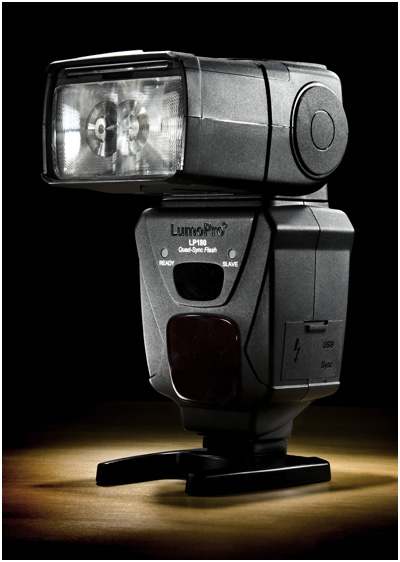
In Appreciation: The LumoPro LP180 [2013-2020]

23 Jan

The LumoPro LP180 is no more.

You could make a strong case that the LP180 was the best manual hot shoe flash ever produced — and maybe that ever will be produced. It was a beast of a flash, with a fluid user interface and features designed specifically for off-camera lighting photographers. Now, it's the last of a bygone era.

Why did it have to die? What made it so good? And what will replace it as the flash of choice for discerning-but-frugal off-camera shooters?

Read more »
Strobist

 
Comments Off on In Appreciation: The LumoPro LP180 [2013-2020]

Posted in Photography