RSS
 

Archive for October, 2019

Canon releases ‘Content Creator Kits’ for its 90D, G7X Mark III and M200 cameras

24 Oct

Canon has announced new Content Creator Kits for three of its newest camera systems: the EOS 90D, the PowerShot G7X Mark III and the EOS M200. In addition to the camera (and kit lens, in the case of the EOS 90D and EOS M200), each Content Creator Kit will include a new Canon accessory and a 32GB SanDisk SD card.

For the EOS 90D, the Content Creator Kit will include Canon’s new Stereo Microphone DM-E100, which is powered directly through 90D, negating the need for additional batteries. The PowerShot G7X Mark III and EOS M200, on the other hand, will feature Canon’s new Tripod Grip HG-100TBR, which has built-in storage for Canon’s BR-E1 wireless remote. The new tripod grip swivels 360-degrees and tilts 90-degrees to make vlogging and vertical video easier.

Below is a list from Canon detailing what is included with each of the kits:

EOS 90D Video Creator Kit – For the Advanced Video Creator

– Kit Includes: EOS 90D, EF-S 18-55mm STM lens, Stereo Microphone DM-E100, 32GB SD Card
– Pricing: $ 1,449.00 (MSRP)
– Availability: December 2019

PowerShot G7X Mark III Video Creator Kit – For the Vlogging Enthusiast

– Kit Includes: PowerShot G7 X Mark III kit, Tripod Grip HG-100TBR, additional NB-13L battery, 32GB SD Card
– Pricing: $ 899.99 (MSRP)
– Availability: Late November 2019

EOS M200 Content Creator Kit – For the Social Media Maven

– Kit Includes: EOS M200, EF-M 15-45mm lens kit, Tripod Grip HG-100TBR, 32GB SD Card
– Pricing: $ 649.99 (MSRP)
– Availability: Late November 2019

The Content Creator Kits will be available through authorized Canon retailers for their respective prices. For more information, visit Canon’s online shop.

Canon Serves Up New Content Creator Kits

MELVILLE, N.Y., October 24, 2019 – It’s almost impossible to scroll through your social feeds or visit a website and not encounter a video catching your eye – some online video platforms can see 500 hours of video uploaded every minute1. With so many platforms for innovative vloggers and content creators to share their work, Canon U.S.A., Inc., a leader in digital imaging solutions, is making it easier for them to produce and distribute quality content with the introduction of creator kits for three of the Company’s newest cameras – EOS 90D, PowerShot G7X Mark III and EOS M200.

Included in each creator kit is a new Canon accessory. Small and mighty, the new Stereo Microphone DM-E100 doesn’t require a battery as it is powered when it’s plugged directly into the microphone jack of the EOS 90D. The new Tripod Grip HG-100TBR includes Wireless Remote BR-E1 that snaps directly into the tripod, providing the ability to release the shutter and start/stop recording video remotely. The grip can rotate 360 degrees for selfies as well as 90 degrees making it ideal for vertical video with both the PowerShot G7 X Mark III and EOS M200.

For more information and the full list of product specifications, visit http://shop.usa.canon.com/

Articles: Digital Photography Review (dpreview.com)

 
Comments Off on Canon releases ‘Content Creator Kits’ for its 90D, G7X Mark III and M200 cameras

Posted in Uncategorized


4 Ideas for More Creative Shots when Photographing from One Position

24 Oct

The post 4 Ideas for More Creative Shots when Photographing from One Position appeared first on Digital Photography School. It was authored by Lily Sawyer.

ideas-for-more-creative-shots

4-creative-shots-ideas-shooting-in-one-place

This year, as has been the case in the past few years, as a family, we take a few days in the summer to go camping. I’m not going to lie; I find camping really tough. I don’t like the inconveniences camping requires but I do love the campfires and stargazing. This year has been particularly difficult as we went during a heatwave. The heat was relentless, and during the day we couldn’t even stay in our tents. We had to seek shelter in the forest for hours when not going on a long walk.

This article came to me on one of those mornings finding respite from the heat in the forest. My kids were drawing, sitting on the swings, hacking a path through some bushes, and I sat on a picnic blanket with my camera. I gave myself the maximum space of the mat to move around in, approximately 1.5m square. All I had with me was my Nikon D610 and a 60mm micro prime lens, so I gave myself a challenge. What can I photograph creatively whilst glued to this picnic mat?

4 ideas to get more creative shots when restricted in space and position

1. Direction and perspective

To get more creative shots, look at different perspectives. Here I lay down and looked upwards at the branches and leaves above me against the sky.

4-ideas-for-more-creative-shots-shooting-in-one-place

I tried to find more interesting compositions given the limited subject matter. Also, I tried to find layers of branches to achieve some bokeh and depth of field and focused on the nearest branches above me.

4-creative-shots-ideas-shooting-in-one-place

I moved around the mat while still on my back, and took shots with the tree trunks as leading lines reaching up to the sky for interest whilst still looking upwards as pictured above. Then I looked down and took some close up of twigs on the forest floor as pictured on the right below.

4-ideas-for-more-creative-shots-shooting-in-one-place

Look both directions: left and right.

To my left was this tree (pictured above left). I used the forest floor to create foreground interest, some greenery as the middle ground (which was focused), and the big tree in the distance as the background. To my left was a big tree trunk covered in moss and knots, both of which I found an interesting subject to take close-ups of.

4-ideas-for-more-creative-shots-shooting-in-one-place

This is what I love about this micro/macro lens. When you shoot close up, even at small apertures, you still get really pretty bokeh. So, I leveraged this and used the distant leaves and the sky to achieve bokeh behind the mossy trunk.

4-creative-shots-ideas-shooting-in-one-place

2. Distance

For more creative shots, take your gaze further and see what’s on the horizon. Below is the furthest view I could see.

4 Ideas for More Creative Shots when Photographing from One Position

To the left of this tree trunk is the tall spindly white tree that dominated my distant scenery. I thought this was a rather unusual tree and made for a good, strong subject. It stood out from the lush greenery as if constantly growing its way into the sky.

4 Ideas for More Creative Shots when Photographing from One Position

Also, don’t forget to check what’s right in front of you – especially anything that could be close-up material too. Below-right is a cut off tree shot at normal eye-view distance. I put a little leaf on top, so I had some close-up material to play with.

4-ideas-for-more-creative-shots-shooting-in-one-place

This trunk below was too far for me to reach or do a close-up of so this was my “midway” subject to photograph. Again, I used the foreground and background to create some interesting bokeh.

4 Ideas for More Creative Shots when Photographing from One Position

3. Create a new subject matter

Whilst it’s good to use our observational skills to find interesting things to photograph, we mustn’t solely rely on what’s already there! Get creative and think of unusual out-of-the-box ideas you can put together as your subject matter.

Here I happened to see heart-shaped leaf just outside the blanket I was sitting on, so I created a ring of seeds around it. I liked the way the colored leaf pops out of the brown earth.

4 Ideas for More Creative Shots when Photographing from One Position

Our picnic was laid out on the blanket and wondered what I could do with an empty water bottle. I photographed it looking through the hole at the top into the bottom of the bottle.

4 Ideas for More Creative Shots when Photographing from One Position

4. Experiment with effects

We had some plastic from our picnic stash and I used it to create a soft-focus effect on this landscape shot of the tree. I achieved this by wrapping the plastic around my lens, so it covered a little bit of the lens around the edges. Doing so, rendered those areas soft whilst the rest of the tree is still in focus.

4 Ideas for More Creative Shots when Photographing from One Position

I played around with how much or how little of the plastic I wanted to obscure the image. This one below had more soft-focus leaving only the strip of horizon sharp and clear.

4 Ideas for More Creative Shots when Photographing from One Position

I tried recreating a tilt-shift effect.

Tilt-shift lenses are called so because you can rotate, tilt and shift the lens optics in order to blur parts of the image whilst leaving other parts sharp if you wish. This is a neat trick when trying to photograph miniatures. I asked my daughter to create a little miniature teepee for me. These are my attempts whilst shifting the positional angles of my lens as I was still using the 60mm micro and not a tilt-shift lens.

4-ideas-for-more-creative-shots-shooting-in-one-place4-ideas-for-more-creative-shots-shooting-in-one-place

This was a fun little challenge for me and got me out of boredom and into thinking creatively! I hope you enjoyed this and will try it sometime!

If you have any other ideas for more creative shots, share them in the comments below!

4 Ideas for More Creative Shots when Photographing from One Position

The post 4 Ideas for More Creative Shots when Photographing from One Position appeared first on Digital Photography School. It was authored by Lily Sawyer.


Digital Photography School

 
Comments Off on 4 Ideas for More Creative Shots when Photographing from One Position

Posted in Photography


Canon RF 70-200mm F2.8L and RF 85mm F1.2L DS will arrive before the end of the year

24 Oct

$ (document).ready(function() { SampleGalleryV2({“containerId”:”embeddedSampleGallery_4708630478″,”galleryId”:”4708630478″,”isEmbeddedWidget”:true,”selectedImageIndex”:0,”isMobile”:false}) });

Canon’s RF 70-200mm F2.8 and 85mm F1.2 DS were announced some time ago, but as of today they’re official. Canon has revealed full details and pricing for these new additions to its full-frame mirrorless lineup.

The RF 70-200mm F2.8L IS USM boasts an impressively compact design, measuring 146mm (5.8″) in length when at its widest zoom position. It extends when zoomed in towards 200mm, marking a departure from its EF-mount equivalents.

The RF 70-200mm F2.8 includes a floating focus lens element for reduced focus breathing, with a total of 17 elements in 13 groups making up the optical construction. Its image stabilization system is CIPA-rated to 5 stops.

Defocus Smoothing works thanks to a special coating to two of the lens’ thirteen elements

The 85mm F1.2L USM DS sits alongside the standard RF 85mm F1.2, but is differentiated by what Canon calls Defocus Smoothing (DS). Defocus Smoothing works thanks to a special coating to two of the lens’ thirteen elements. This gives out-of-focus highlights smoother edges compared to those rendered by the standard version of the lens.

The Canon RF 70-200mm F2.8L IS USM will be available in late November for $ 2700; the RF 85mm F1.2L USM DS is scheduled to arrive in December for $ 3000.

Press release:

THE RF FAMILY GROWS BY TWO: CANON RF 70-200MM F2.8L IS USM LENS IS THE WORLD’S SHORTEST AND LIGHTEST LENS IN ITS CLASS AND RF 85MM F1.2L USM DS IS THE FIRST LENS TO FEATURE DEFOCUS SMOOTHING

New RF L-Series Lenses Aim to Provide Impeccable Performance, Handling and Unique Features to Photographers Shooting with EOS R and EOS RP Cameras

MELVILLE, N.Y., October 24, 2019 – Completing the “trinity” of RF lenses for the EOS R Full-Frame mirrorless camera system, Canon U.S.A., Inc., a leader in digital imaging solutions, today announced the RF 70-200mm F2.8L IS USM telephoto lens. Additionally, the company also announced its first lens to feature Defocus Smoothing lens coating, the Canon RF 85 F1.2L DS. The ninth and tenth lenses in the RF family are both powerful tools for photographers using the EOS R or EOS RP cameras, in particular, those shooting sports or wildlife photography with the RF 70-200mm F2.8L or portrait photography with the RF 85mm F1.2L USM DS.

Short and Light With All The Might: Canon RF 70-200mm F2.8L IS USM
The new lens features a large and bright f/2.8 aperture, which, along with the 70-200mm focal zoom ranges, presents an ideal workhorse lens for professional and amateur photographers shooting sports, wildlife, wedding and event action. The new RF lens is 27 percent shorter and 28 percent lighter than its EF counterpart with a large portion of the lens element arrangement closer to the camera body. This arrangement is designed to provide photographers with a more balanced feel and experience even at telephoto end of the zoom range. Additionally, the shorter and lighter design allows the lens to be more easily stowed away in a camera bag when not in-use.

A first for Canon lenses, the new RF 70-200mm F2.8L IS USM features two Nano USM motors providing an even greater level of high-speed autofocus for still image shooting and quiet and smooth autofocus for video shooting. The lens also incorporates a floating focus control, another Canon first, that drives the two lens groups individually while using the two aforementioned Nano USM motors. The floating focus lens element shortens focusing distance and help reduce breathing, providing users with fast, consistent and reliable performance.

Additional Features of The Canon RF 70-200mm F2.8 L IS USM Include:

  • Customizable control ring that allows photographers to adjust exposure compensation, shutter speed, aperture or ISO
  • 17 lens elements in 13 groups including two aspherical lenses, one super UD lens and four UD lenses, that help to reduce chromatic aberration
  • CIPA standard five stops of image stabilization (IS) including three IS modes with dual-sensing and combination IS
  • 12-pin communication system
  • L-Series dust and weather resistant build with fluorine coating
  • Subwavelength Structure Coating (SWC) helps minimize lens flare and ghosting

Teaching an Old Dog a New Trick: Canon 85mm F1.2L USM DS
Canon has a rich history spanning over 40 years of producing 85mm lenses with f/1.2 apertures, and the new Canon RF 85mm F1.2L USM DS is no different, or is it? The lens ushers in a new lens coating from Canon, Defocus Smoothing , designed to enhance the appearance of bokeh in the images captured with the lens. DS coating is a vapor-deposited coating technology that is applied to the front and rear surfaces of a specific lens element inside the lens. The coating allows off-axis flux to pass through the periphery of the lens that gradually decreases the transmittance of light, which results in images with beautifully blurred backgrounds.

In addition, the new lens features a bright f/1.2 aperture which, along with the 85mm focal length, encompasses an ideal lens for portrait photographers. 85mm is often the preferred focal length selected by photographers when shooting portraits because it provides an appropriate depth and perspective of the subject relative to the background, helping to capture high-quality imagery with beautiful and desirable bokeh. The focal length also allows for the photographer and subject to maintain optimum distance apart to support strong communication, while not being too close.

Additional Features of The Canon RF 85mm F1.2L USM DS Include:

  • Minimum focusing distance of 2.79 feet/0.85 meters
  • Customizable control ring that allows photographers to adjust exposure compensation, shutter speed, aperture or ISO
  • One Aspheric lens and one UD Lens, along with BR optics that help to reduce chromatic aberration
  • 12-pin communication system
  • L-Series dust and weather resistant build with fluorine coating
  • Air Sphere Coating (ASC) that helps minimize lens flare and ghosting

Pricing and Availability
The Canon RF 70-200mm F2.8L IS USM and RF 85mm F1.2L USM DS lenses are scheduled to be available late November 2019 and December 2019, respectively for an estimated retail price of $ 2,699.00 and $ 2,999.00 respectively . For additional information, please visit, usa.canon.com.

Canon RF 70-200mm F2.8L IS USM and RF 85mm F1.2L USM DS specifications

  Canon RF 70-200mm F2.8L IS USM Canon RF 85mm F1.2L USM DS
Principal specifications
Lens type Zoom lens Prime lens
Max Format size 35mm FF
Focal length 70–200 mm 85 mm
Image stabilization Yes No
Lens mount Canon RF
Aperture
Maximum aperture F2.8 F1.2
Aperture ring No
Focus
Autofocus Yes
Motor type Ultrasonic
Full time manual Yes
Focus method Internal
Distance scale No
DoF scale No
Focus distance limiter Yes
Physical
Power zoom No
Zoom lock Yes
Hood supplied Yes
Tripod collar Yes

Articles: Digital Photography Review (dpreview.com)

 
Comments Off on Canon RF 70-200mm F2.8L and RF 85mm F1.2L DS will arrive before the end of the year

Posted in Uncategorized


Canon aims to please professionals with the EOS-1D X Mark III

24 Oct

$ (document).ready(function() { SampleGalleryV2({“containerId”:”embeddedSampleGallery_5471342450″,”galleryId”:”5471342450″,”isEmbeddedWidget”:true,”selectedImageIndex”:0,”isMobile”:false}) });

Canon has announced the development of its next flagship DSLR, the EOS-1D X Mark III. Sitting at the top of the company’s EF-mount lineup, the EOS-1D X Mark III will continue to prioritize speed, image quality and durability for the most demanding of professional photographers. We don’t have an enormous number of details just yet, but all signs point to this being a significant update for photographers that use the previous models day in and day out.

It’s no surprise that the heart of the new camera will be an all-new CMOS sensor with Dual Pixel AF and a new Digic processor. That combination will be able to produce not only standard JPEG and Raw files, but also 10-bit HEIF files for a greater tonal range than JPEGs are capable of. The Dual Pixel AF region of the sensor will cover 90% of the frame horizontally and 100% vertically, with 525 AF areas. We don’t yet know the sensor’s resolution, but Canon is touting “incredible low-light shooting capabilities,” so while we’re not anticipating a huge pixel count, you should expect high ISO performance to be very good (the older 1D X II was no slouch).

Canon has also updated the autofocus system used through the optical viewfinder – we don’t know how many AF points there will be, but we’re told that the central AF pixels have “28 times the resolution” of the 1D X II, and the ability to focus accurately in “even brighter and darker conditions than before.” New autofocus algorithms utilize deep learning.

This will be the most video-capable EOS camera Canon has yet released

Also interestingly (and cryptically), Canon is touting a new way to control autofocus points by using the AF-On button. We have no idea what this means, but we’ll bring you more details as they become available.

In terms of speed, the new camera will shoot at 16 fps through the optical viewfinder with autofocus, and 20 fps with AF when in Live View mode, whether you’re using the mechanical or electronic shutter. The camera will come with dual CF Express card slots, and the buffer has been increased by five times compared to its predecessor.

Canon told us that this will be the most video-capable EOS camera they’ve yet released, and we can confirm that it’s able to capture 10-bit, 4:2:2 video footage at up to 4K/60p. They’ve also built in a C-Log profile, to enhance users’ ability to grade the video files in post.

Other minor touches include the addition of backlit buttons, and though it uses the same LP-E19 battery as before, battery life is improved.

Details regarding pricing and availability aren’t yet available.

Press release:

POWERFUL, FASTER AND RUGGED: CANON ANNOUNCES THE DEVELOPMENT OF THE EOS-1D X MARK III CAMERA

MELVILLE, N.Y., October 24, 2019 – Canon U.S.A. Inc., a leader in digital imaging solutions, today announced that its parent company, Canon Inc. is developing the highly anticipated Canon EOS-1D X Mark III Camera – the successor to the world-renowned and award-winning EOS-1D X Mark II. Ideal for sports and wildlife, the flagship DSLR is being engineered and designed using feedback from the worldwide community of EOS-1D X and EOS-1D X Mark II photographers. Continuing Canon’s rich heritage of creating first-rate optical products, the EOS-1D X Mark III offers an enhanced autofocus system, with dramatically improved still and video image quality and communication. When using this camera, professionals will have the confidence they will get ‘the shot’ and can deliver it at a competitive speed – faster than ever before – ideal for the increasingly fast-paced industry.

“The innovations put forth by the new EOS-1D X Mark III will set the new standard for professional DSLR cameras and further cement Canon’s commitment to its professional photographers,” said Kazuto Ogawa, president and chief operating officer, Canon U.S.A., Inc. “In developing the new camera, Canon listened to extensive user-feedback from professionals out in the field. The result is a camera that has evolved from its predecessor and maintained the overall quality that professional photographers have come to expect from the Canon EOS-1D series.”

Need for Speed

The Canon EOS-1D X Mark III will be blisteringly fast – offering exceptional precision, reliability, high-performance autofocus and subject tracking – providing photographers with a tool that will help to capture the shot they are chasing. The camera’s new autofocus algorithm will improve stability and tracking when using both the Optical Viewfinder and in Live View shooting mode, using Deep Learning Technology and adapting to help facilitate accurate focus tracking for every shot.

When using the optical viewfinder the camera will use a new autofocus sensor, with approximately 28 times the resolution in the center of the EOS-1D X Mark II. Offering the ability to autofocus in even brighter and darker situations than before and with greater precision, the camera will have a range of autofocus capabilities, which will enable the photographer to get their shot. In Live View mode, users will be able to make use of 525 AF areas using the Dual Pixel CMOS AF system will cover approximately 90×100 percent of the image sensor. The camera will support significantly faster frame rates with full AF and AE, using either the optical viewfinder (up to approximately 16fps mechanical shutter) or Live View (up to approximately 20fps mechanical or electronic shutter). Additionally, the camera’s dual CFexpress card slots will enable more than five times the RAW burst depth of its predecessor.

Powered to Dominate

The development of EOS-1D X Mark III is a clear example of Canon’s commitment to pushing the boundaries of innovative imaging products featuring optically excellent technology. The camera will support an all new, Canon-developed, CMOS sensor and DIGIC processor, that will deliver greater image quality, at even higher ISOs, with the ability to capture stills in 10-bit using the HEIF (High Efficiency Image File) file format. HEIF produces wider dynamic range and greater color representation compared to JPEG. The power of 4K resolution brings stories to life – shoot 4K videos including 4K60p with 10-bit 4:2:2 Canon Log internal recording.

Conveniently Connected

For professionals, content delivery is just as important as image capture – the EOS-1D X Mark III will make it easy, featuring built-in Wi-Fi® and Bluetooth® low-energy connectivity in addition to GPS technology. To keep pace with ever-shortening deadlines, the camera will transfer data at more than twice[i] the speed of the EOS-1D X Mark II when using the built-in Ethernet connection, or the new optional wireless file transmitter – the WFT-E9, which is also compatible with Canon’s recently launched Cinema EOS C500 Mark II camera. Coupled with simpler network set-up the camera will greatly enhance the professional workflow.

A Familiar Feel with Improved Attributes

Existing EOS-1D series users will be familiar and comfortable handling the EOS-1D X Mark III allowing seamless navigation with trusted ergonomics – whilst the magnesium alloy body will offer the durability expected from Canon’s EOS-1D cameras. Professional photographers can trust the same impressive build-quality as the EOS-1D X Mark II – with phenomenal weather-sealing, standing up to harsh conditions, including wind, rain and humidity. With incredible low-light shooting capabilities, the camera will now feature select illuminated buttons that allow for precision operation in challenging, dark and dimly lit conditions.

The camera will also offer a new additional control for selecting AF points, built into the AF-ON button, allowing photographers to change AF points on-the-fly for the best composition – further helping to simplify their work. In addition, dramatically improved battery life – with the same LP-E19 – will allow professionals to shoot for longer periods of time, without having to change batteries, helping reduce the chance of missing a shot.

[i] Transfer speeds may be adversely affected depending on the usage environment.

Articles: Digital Photography Review (dpreview.com)

 
Comments Off on Canon aims to please professionals with the EOS-1D X Mark III

Posted in Uncategorized


Photographer uses drone with thermal camera to find missing 6-year-old boy

24 Oct

Photographer Steve Fines helped save the life of a 6-year-old boy who went missing last week on a subfreezing night in Sherburne County, Minnesota.

A group of roughly 600 people showed up to search for Ethan and his dog. As temperatures dropped below 30ºF that evening, the situation became increasingly dire. ‘I heard about the search at 8:00 pm and arrived on site about 9:00 pm,’ Fines tells DPReview. He arrived carrying his DJI m210RTK v2 drone equipped with an XT2 dual thermal camera.

An annotated image shared by Fine showing the location of Ethan and his dog being rescued.

Since Fines uses the drone for business purposes, he already had 10-12 sets of batteries charged and ready to go. ‘I went to the command center and introduced myself. They asked me not to fly until the state police helicopter left the area, which happened about 10:30 pm,’ Fines told us. He also emphasized how important it is for drone operators to yield the right of way to helicopters and other emergency response efforts. Interfering with these critical operations is against the law and can result in fines upwards of $ 20,000. Drone operators need to coordinate with local authorities first before getting involved.

Once Fines received clearance for takeoff, he said ‘I quickly started flying and it was by using a programmed flight path that I could efficiently cover a lot of ground. After quite a few false positives – otters, deer, bear – at 1:40 am, I spotted the six-year-old and his dog. By 1:50 am, a ground rescue team made it to his location and I watched them pick him up on the thermal monitor.’

While Fines has received a lion’s share of the credit from local news station KARE 11 for the success of the rescue, he took to social media and gave thanks to the coordinated efforts led by the County Sheriff along with the hundreds of volunteers that helped guide him in the right direction.

This thermal image shows a stream of volunteers walking a path to find missing 6-year-old Ethan.

While I was running the camera that found him […] I only knew in which direction to look because volunteers on the ground had found a footprint that pointed me in the right direction. I knew which areas had already been searched because of the excellent coordination of the Sherburne County Sheriff. I had other volunteers running radios to coordinate ground search parties – the people moving across really rough ground to find him. There were 600 of us that found Ethan that night.

Below is a video from KARE 11 showing more behind-the-scenes footage of the rescue and a thank you from Ethan:

You can check out more of Fines’ work via his website and follow Fines Aerial Imaging on Facebook and Instagram.

Articles: Digital Photography Review (dpreview.com)

 
Comments Off on Photographer uses drone with thermal camera to find missing 6-year-old boy

Posted in Uncategorized


DPReview TV: Fujifilm X-Pro3 hands-on preview

23 Oct

Some might argue that Fujifilm’s new X-Pro3 rangefinder-style camera takes a page from the Leica playbook, omitting a full-time rear screen in favor of a more ‘pure’ shooting experience. So, is the X-Pro3 a carbon-coated classic or a titanium trinket? Chris and Jordan aim to find out.

Also, subscribe to our YouTube channel to get new episodes of DPReview TV every week.

  • Introduction
  • The X-Pro3 in context
  • Street photography
  • Optical viewfinder (OVF)
  • Displays
  • Titanium plates
  • Monochromatic color
  • Controls and custom buttons
  • Function menu
  • Electronic viewfinder (EVF)
  • Autofocus
  • Focus limiter
  • Video features
  • Conclusion

Articles: Digital Photography Review (dpreview.com)

 
Comments Off on DPReview TV: Fujifilm X-Pro3 hands-on preview

Posted in Uncategorized


Our Fujifilm X-Pro3 initial review: What’s new, how it compares

23 Oct

$ (document).ready(function() { SampleGalleryStripV2({“galleryId”:”5133487436″,”isMobile”:false}) })

Sample photoSample photoSample photoSample photoSample photo

The Fujifilm X-Pro3 is a 26 megapixel mirrorless interchangeable lens camera built around a clever optical / electronic viewfinder and designed to look like a classic rangefinder.

This, the third iteration of Fujifilm’s first X-mount camera gains titanium top and base plates but the most noteworthy feature is an LCD panel that faces the back of the camera and needs to be flipped down to use it. The viewfinder and rear screen are the main distinctions between this and the similarly-specced X-T3.

A low-resolution status panel on the back of the camera speaks to the underlying ethos of the camera, which we’ll look into in more detail on the next page.

Key Specifications

  • 26MP APS-C BSI CMOS sensor
  • Optical/Electronic hybrid viewfinder
  • Fold down rear LCD
  • Rear-facing Memory LCD status panel
  • Titanium top/bottom plates
  • 4K video at up to 30p, 200Mbps
  • 11 Film Simulation modes, now with ‘Classic Neg’

The X-Pro3 will be available in a painted black version for $ 1799 or variants with a silver or black hardened, coated surface for $ 1999.


What’s new and how it compares

The X-Pro3 looks a lot like its predecessors except for one major change.

Read more

Body and controls

A new titanium top plate, rear ‘sub monitor’ and hidden flip-out LCD round out the major body updates.

Read more

First impressions

Photo editor Dan Bracaglia took a pre-production X-Pro3 on holiday to Northern California. Here are his thoughts on the hidden rear screen.

Read more

Sample gallery

The X-Pro3 gains the ‘Classic Negative’ film stimulation. Check out examples of it and more in our hardy samples gallery.

See more

Articles: Digital Photography Review (dpreview.com)

 
Comments Off on Our Fujifilm X-Pro3 initial review: What’s new, how it compares

Posted in Uncategorized


A Step-by-Step Guide to Using Light in Flower Photography for Awesome Photos

23 Oct

The post A Step-by-Step Guide to Using Light in Flower Photography for Awesome Photos appeared first on Digital Photography School. It was authored by Simon Ringsmuth.

using-light-in-flower-photography

Flowers are brilliant subjects for photography. They are bright, colorful, and are stay perfectly still for you as long as the wind is calm. You don’t need any special equipment or lenses to take great photos of flowers either. You can get great photos with just a mobile phone or a basic DSLR with a kit lens. If you really want to elevate your flower photography to the next level, you need to pay very close attention to one thing – the sun – because the light in flower photography is everything.
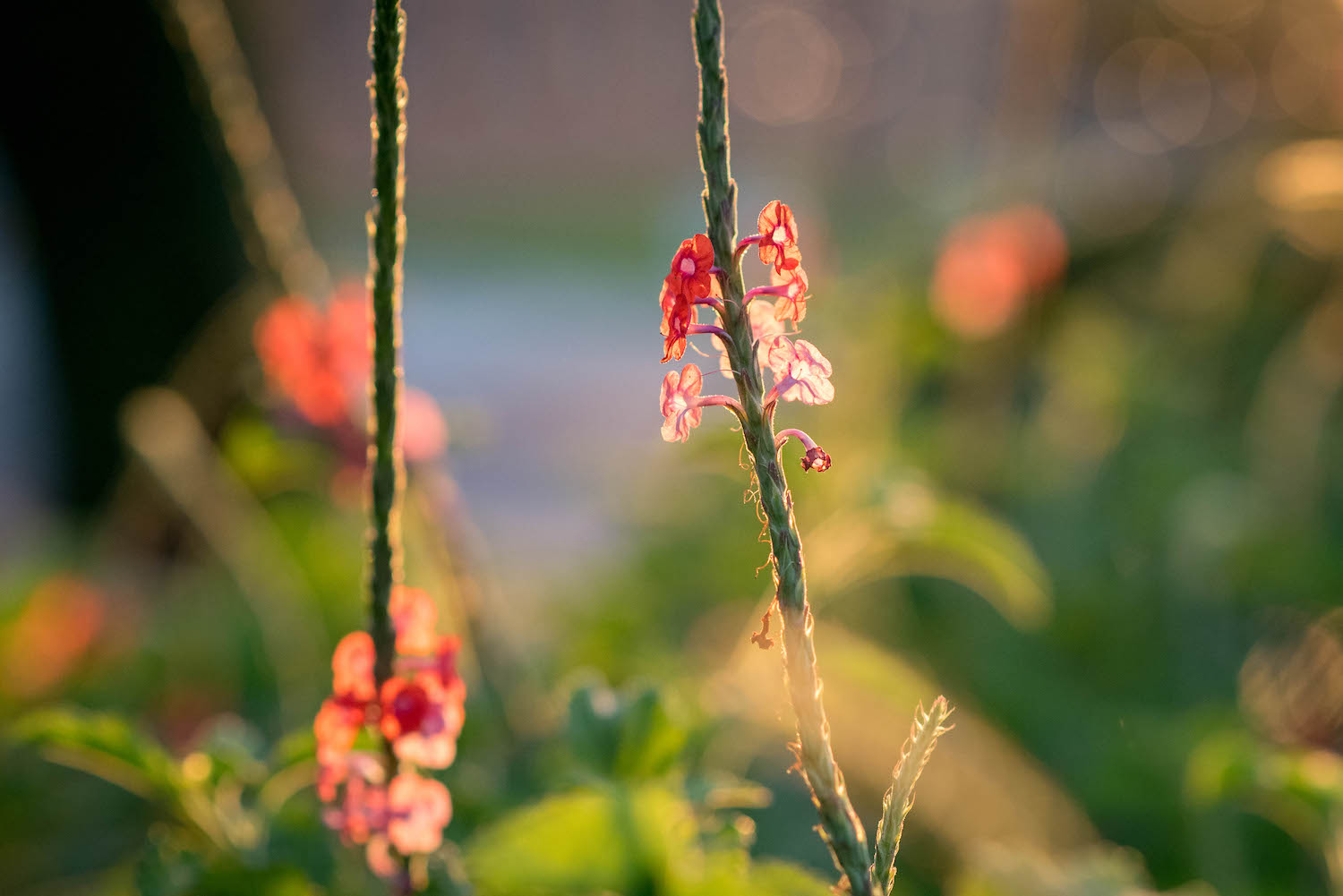
Image: 85mm, f/2.8, 1/3000 second, ISO 2200

85mm, f/2.8, 1/3000 second, ISO 2200

Of course, there are other sources of light besides the sun, but this is the most obvious and easily-accessible one when considering flower photography. Unfortunately, you can’t position the sun exactly where you want it, but you can position yourself to make the best use of it. You can also take note of the lighting conditions when you go out to shoot flower pictures. Understanding how the sunlight, and your angle of view, affect the finished product is key to getting great shots.

Don’t let anyone tell you that if you want to get good pictures of flowers you have to do it in certain conditions like a cloudy day or the evening. In truth, you can get great flower photos almost any time as long as you pay attention to the sun and the shot you are trying to get. Let’s take a look at some different scenarios and see how they affect flower photography.

Time of day

The time at which you shoot, such as early morning or mid-afternoon, can have a huge impact on your flower photos. In addition to altering the amount of light available, shooting in the morning or evening changes the type of light. It also changes the angle at which it hits your flowers and the surrounding area.

I shot the picture below just as the sun was coming up. The blurry triad in the background is a street lamp that had not yet turned off. It added a nice background touch to the picture. This would have looked entirely different had I taken the picture a few hours later.

Image: 50mm, f/1.8, 1/180 second, ISO 400.

50mm, f/1.8, 1/180 second, ISO 400.

If you want your flowers gently illuminated for a soft, almost hazy appearance, then early morning or late evening is going to work great. However, if you want your flowers bright, sharp, and punchy, then harsh overhead lighting is ideal.

It all depends on the type of picture you want to take and knowing how the lighting conditions affect the final image.

using-light-in-flower-photography

50mm, f/2.8, 1/1500 second, ISO 200

A monarch butterfly joined me as I was taking the above picture in the afternoon. The bright overhead sun made the reds, yellows, and greens bright and crisp, which doesn’t happen in the early morning or late in the day.

The sun was directly overhead when I took the picture below. This caused each of the colors in this picture to shine. It turned out I wasn’t the only one interested in this particular magnolia flower.

using-light-in-flower-photography

50mm, f/1.8, 1/6400 second, ISO 200

You can get great pictures of flowers at any time of the day. Just make sure you know where the sun is and how it will impact your pictures. Armed with that knowledge, you’ll be able to make better choices about the pictures you are going for.

Types of light in flower photography

Backlighting vs. front lighting

Backlight is when the main source of light comes from behind your subject. This can lead to some creative scenarios, especially when used to shoot subjects with rim lighting. Conversely, front light is when the main source of light comes from the front of your subject, usually behind the photographer.

Either one of these types of lighting works great for flower photography. However, you need to understand how backlighting and front lighting affect your flower pictures, so you know which one to use. I photographed the flower below with front lighting. The sun was behind me as I took the picture.

using-light-in-flower-photography

85mm, f/1.8, 1/3000 second, ISO 100

Front lighting makes the purples really stand out, especially against the background. There are also some prominent shadows along the left-hand side and at the base. These are neither good nor bad, just a result of using front lighting.

A similar flower, shot in the same location a few minutes later, reveals a much different image when employing backlighting.

Image: 85mm, f/2.8, 1/500 second, ISO 560

85mm, f/2.8, 1/500 second, ISO 560

Notice how the petals almost look like they are glowing as the sun shines through them. The shadows are more diffused, which is also due to the late hour of the day at which this was shot. Both pictures are good but in different ways. If you traditionally shoot flowers with front lighting, try doing some backlit shots and see if you like the results.

Image: Another backlit flower, where the shining sun made the yellow flower appear bright and radian...

Another backlit flower, where the shining sun made the yellow flower appear bright and radiant.

Sunny vs. overcast

There’s a common perception among photographers that cloudy, overcast skies make for some of the best lighting conditions. While I certainly enjoy shooting on days like that, the truth is, you can make any lighting condition work for flower photography. You just need to know how the light will affect your images.

One of my favorite flower photos I have ever taken was in the middle of the day just after a bit of rain. It’s a few coneflowers low to the ground. The overcast sky led to even lighting across the entire frame and rich, deep colors. There are no harsh shadows, no translucent petals, and no bright spots in the background. Instead, the frame is a mix of saturated greens, purples, and reds that I really like.

using-light-in-flower-photography

50mm, f/1.8, 1/640 second, ISO 200

Another example of this is the following picture, which I took in the morning after a night of thunderstorms. The clouds overhead dispersed the sunlight into all directions, which gave me an evenly-lit scene that worked great for this particular show.

Image: 85mm, f/1.8, 1/200 second, ISO 125

85mm, f/1.8, 1/200 second, ISO 125

However, these two pictures don’t mean you can’t take great flower pictures in bright sunlight. Far from it! Just know that flower images in bright sunlight will look much different than their cloudy-skied counterparts. The picture below is similar to the one above, but I took it on a bright sunny day.

using-light-in-flower-photography

50mm, f/1.8, 1/8000 second, ISO 360

This picture is neither better nor worse than the one above it, just different. Bright sunlight makes the red petals leap out of the frame. The rich blue sky and deep shadows of the grove of trees add a sense of space and depth that is missing in this picture’s counterpart.

Similarly, I photographed the purple magnolia flower below on a bright sunny day, but with just a bit of cloud cover. It’s kind of a cross between sunny and overcast and yields an interesting picture.

using-light-in-flower-photography

85mm, f/1.8, 1/200 second, ISO 140

The sun was off to the left, making the white inside of the flower petal shine out and compete with the purple in the foreground for the viewer’s attention.

I show all these examples as an illustration that you can get great shots of flowers in a variety of lighting conditions. The key is to use the sunlight (however it happens to be at the moment) to your advantage by knowing how it will affect your flower photos.

A comparison

If you can’t control the light in your flower photography, you can still control the angle from which you shoot your pictures. This has an amazing impact on how your flower photos turn out.

I shot the three photos below on a bright sunny day in about three minutes. The same flower is in each shot, and I used a 50mm lens with an f/2.8 aperture. The only difference is the angle from which I took each photo but that one simple thing changes each picture a great deal.

In this first picture, the flower is front-lit, meaning the sun was behind me and almost directly overhead as I took the photo. Notice the bright orange colors and stark shadows, which create a sense of depth and isolation. The background is shrouded in shadow because of the overhead light and the angle from which I took the picture. I see a lot of pictures similar to this online, especially on social media sites.

Image: 50mm, f/2.8, 1/2000 second, ISO 100

50mm, f/2.8, 1/2000 second, ISO 100

For this next photo, I stood in the exact opposite spot, looking up from below into the sun. Notice how the petals have become brilliantly translucent, and the greenery on the left is bursting with blurry bokeh.

It’s an entirely different version of the same flower and didn’t require anything on my part other than a simple perspective change.

Unlike the first picture, I don’t often see flower shots like this on social media. This is most likely because it’s just not something a lot of people think about doing.

Image: 50mm, f/2.8, 1/2000 second, ISO 100

50mm, f/2.8, 1/2000 second, ISO 100

I photographed this final image from the side, and what’s interesting here isn’t necessarily the flower but the background. From this angle, the background was entirely green, making the oranges and reds of the flower scream out by comparison. The lighting is similar to the first image, but this one is a lot more interesting to me because it’s a mix of colors instead of a flower against a mostly black background.

using-light-in-flower-photography

50mm, f/2.8, 1/2000 second, ISO 100

I really want to stress that none of the pictures in this tutorial are objectively better than any others. What I hope to have illustrated is that paying attention to the light in flower photography, as well as considering alternative viewpoints from which to shoot, can dramatically impact your flower photos.

Image: 23mm, f/5.6, 1/160 second, ISO 200. I had to hold my camera high above my head and fire off a...

23mm, f/5.6, 1/160 second, ISO 200. I had to hold my camera high above my head and fire off a series of shots hoping one of them would turn out. It did, and I’m so glad I didn’t just shoot a single sunflower from my normal eye level.

If you enjoy taking pictures of flowers, hopefully these images will give you some new ideas to consider. And if you haven’t spent much time out in nature capturing the beauty of blossoms like this, I hope you can find some time to go out, look at the lighting in flower photography and give it a try. You might be surprised at what you can get!

I’d love to see some of your shots – please share them with us in the comments below.

The post A Step-by-Step Guide to Using Light in Flower Photography for Awesome Photos appeared first on Digital Photography School. It was authored by Simon Ringsmuth.


Digital Photography School

 
Comments Off on A Step-by-Step Guide to Using Light in Flower Photography for Awesome Photos

Posted in Photography


Hands-on with the quirky, retro fantastic Fujifilm X-Pro3

23 Oct

Hands-on with the Fujifilm X-Pro3

Fujifilm has just announced the X-Pro3 – an X-mount mirrorless camera which is styled to look like a classic rangefinder camera, but is built around a modern 26MP APS-C sensor. From a purely specs-based point of view, there’s not a whole lot separating the X-Pro3 from Fujifilm’s other high-end APS-C camera, the X-T3, so the company has doubled down on design philosophy and ergonomics as the main differentiators between the two.

We were certainly curious not only about how the camera would handle, but how some of its out-of-the-ordinary features would impact how we used it. Click through for a closer look at our pre-production X-Pro3.

The rear screen(s)

The X-Pro3 features a unique dual-screen system, which is intended to both encourage use of the hybrid optical / electronic viewfinder (more on that later) and inspire a bit of nostalgia.

The rear status panel, pictured here, defaults to showing you which film simulation you’ve chosen, as well as your white balance and ISO setting. The nostalgia sets in when you notice that the on-screen display changes depending on which film simulation you use, with looks that are inspired by the packaging of Fujifilm’s classic film stocks. It’s the digital equivalent of ripping a portion of the film packaging off the box and tucking it into a slot on the back of your camera – ah, the good ‘ole days.

Though the legibility of the screen is reasonably good (despite fairly low resolution), it lacks a backlight, so you’ll need to rely on ambient lighting to be able to make out what it’s showing. Also, if you’ve programmed any custom buttons to change any of the options shown, be aware that the option you’re changing doesn’t become highlighted. So if you’re still learning the camera, you may hit a custom button intending to change the ISO value, but end up changing the white balance instead.

The rear screen(s)

When the camera is powered down, this is the view that you’ll see – it shows the remaining number of shots on the memory card, your exposure compensation setting (though if you move the exposure compensation dial when the camera is off, the screen will not update until you power it back on) as well as remaining battery life.

Oh, and if film-box nostalgia isn’t your thing, you can configure the panel to show a screen similar to this when the camera is on and in use, and you can customize which options you want to be shown. In this regard, the monitor is akin to a rear-mounted version of the top-plate display on the Fujifilm X-H1.

Flipping out

Now, the bottom-hinged design is where we expect a bit of controversy. It’s a touch-enabled screen, so you can place your desired autofocus point by touching anywhere, and it’s very sharp with a resolution of 1.62 million dots. But the bottom hinge makes it inconvenient and unwieldy for general use. Fujifilm really seems to want you to use the viewfinder.

In our time with the camera, the screen design did indeed encourage us to rely on the viewfinder more than we generally would while still allowing us to get ground-level shots without laying on our stomachs. But of course, some photographers just won’t be able to stomach this design choice, and that’s fine – within Fujifilm’s own lineup there’s always the X-T3’s more conventional screen if you need it.

Hybrid viewfinder

The hybrid viewfinder has always been a big element of what set the X-Pro series apart, and with the X-Pro3, Fujifilm has completely redesigned it. Let’s start with the viewfinder in its optical mode.

The optics in the finder are a reverse Galilean implementation with an electronic overlay, but the optical formula is all new and offers 0.52x magnification. Unfortunately, gone is the option to change the magnification if you want to use more telephoto lenses. Basically, shooting with anything over 75mm-equivalent will be difficult, as the actual image area corresponds to a pretty small portion of the viewfinder frame. But for Fujifilm’s 23mm, 35mm and 50mm F2 primes, it’s a good fit (the 16mm F2.8 prime actually captures a wider area than the optical viewfinder can show you).

Lastly, you also have to bear in mind the parallax effect when using the optical viewfinder, particularly when changing from nearby to faraway subjects and vice versa – this is because you’re getting a different view than what the sensor is getting through the lens. Unfortunately, Fujifilm has done away with the ability to see where your focus point would show up at infinity as well as where it would show up at minimum focus distance; it only shows your current focus distance, and the minimum. This can make it hard to estimate framing with changing subject distances.

Hybrid viewfinder

A lever on the front of the camera allows you to switch from the optical viewfinder to a fully-electronic display, similar to what you’d see on other mirrorless cameras. It offers great quality, having 3.69M dots of resolution on a 0.5-inch OLED panel. With a 50mm-equivalent lens, you’re getting 0.66x magnification.

But if you’re not sure whether to choose EVF or OVF, Fujifilm goes one step further by letting you use both, in a way. The viewfinder lever also allows you to enable a pop-up display tab in the corner, showing a live digital view of the portion of your frame that’s directly under your focus area. It’s a handy way to check your critical focus without losing the immediacy the optical finder provides.

Rear panel controls

The rear panel of the X-Pro3 has seen some further changes; the four-way controller is gone, and the ‘View Mode’ button from its predecessor has departed as well. The 8-way AF joystick works well for navigating the menus, and that rear control dial can be pushed inwards, as well as scrolled.

Typically for Fujifilm, the X-Pro 3 features a lot of customization options as well. You can adjust the functionality of the AE-L/AF-L button, the rear dial click-in action, and customize the blank button above the Q button. The Q button gives you access to a Q menu, which can be customized with your choice of 4, 8 12 or 16 commonly used settings.

Top plate controls

The X-Pro3’s top plate controls will be familiar to Fujifilm users, with a dedicated exposure compensation dial and a dual-function shutter speed and ISO dial (you lift this dial to change the ISO value). There’s one custom function button near the shutter and the on/off switch as well.

It’s also worth pointing out that the top and bottom plates of the X-Pro3 are both now made of titanium. This is the base black model, but ‘Duratect’ coated ‘Dura Black’ and ‘Dura Silver’ versions feature increased scratch resistance for a $ 200 price premium.

Updated sensor and front controls

Here you can see the new 26MP APS-C X-Trans sensor that we first saw in Fujifilm’s X-T3. Given equivalent lenses, this sensor should offer identical image quality and autofocus performance (at least when using the screen or electronic viewfinder) as the X-T3 offers – and we’ve been pretty impressed with what the X-T3 is capable of.

You can also clearly see the EVF / OVF lever here to the upper right of the lens mount, and this has a customizable button within it. There is also a customizable front control dial and the single-continuous-manual focus switch on the bottom right.

Card slots

The X-Pro3 comes with dual card slots, which is a nice touch. One could argue, of course, that for the way this camera is meant to be used, it’s unlikely that this is a deal-breaking feature for potential buyers. But then again, given the premium pricing, we’re still glad to see them. They can be set up so that Raw and JPEG files are split between them, so that still and movie files are split between them, and also so that one is a redundant backup of the other.

Battery

No surprise, the X-Pro3 uses the same NP-W126S battery that is ubiquitous among Fujifilm’s current APS-C mirrorless lineup. The camera is CIPA rated to 440 shots per charge if you use the optical viewfinder, and 370 if you use the EVF – not amazing numbers, but certainly not bad. In our experience, a rating of around 400 shots per charge is likely to last you a day of heavy shooting, or several days of more lighter use.

And of course, you can top the camera battery up over USB-C, which brings us to…

Ports

The X-Pro3 has a USB type C port as well as a 2.5mm remote / headphone jack. As mentioned, the USB port supports in-camera battery charging, though with the proper adapter, it can be used as a headphone port for monitoring audio while shooting video. And not that we think this is really a camera for video shooters, but the quality and feature set its capable of are honestly quite impressive. You can read more about its video feature set in our initial review.

Fujifilm X-Pro3 hands-on

And that about does it. There’s no doubt that the X-Pro3 is a strikingly handsome camera. It feels great in the hand, and the controls are excellent and highly customizable. With the right lenses, it’s a fun camera to carry around and shoot. But the screen mechanism and likewise the optical viewfinder, with the limitations that both create, are going to limit the broader appeal of the X-Pro3. But that’s the point – if you want something that has more of a personality to it, get the X-Pro3. You want a generalist camera? The X-T3 might be a better option.

But we’re curious – let us know what you think in the comments. Are you drawn in by the X-Pro 3’s redesigned optical viewfinder and unconventional rear screen? Or, would you rather just have the X-T3? Let us know.

Articles: Digital Photography Review (dpreview.com)

 
Comments Off on Hands-on with the quirky, retro fantastic Fujifilm X-Pro3

Posted in Uncategorized


Why These are My Favorite Free Online Photo Editing Tools

23 Oct

The post Why These are My Favorite Free Online Photo Editing Tools appeared first on Digital Photography School. It was authored by Ana Mireles.

free-online-photo-editing-tools

Are you looking for a way to keep your photography workflow going without your computer? Fortunately, there are some free online photo editing tools that can help you out. Here are a few of my favorites and why.

Maybe you’re traveling light or your computer doesn’t have enough capacity? Perhaps it just crashed and you sent it to get fixed? Whatever the reason, sometimes you just can’t work with downloadable programs.

Browser Photo Editors

But there are no more excuses because here are some great browser tools to solve your needs regardless of your level of expertise.

Google Photos

With Google Photos, you can have unlimited storage in their Cloud, but your photos and videos are limited to 16 MP in their file size. If you store files that are bigger than that, it eats into your Google Drive quota. Still, you can back up or share your images from anywhere you have Internet access.

If you want to learn more about protecting your work, check the article Are Your Photo Backups Rock Solid?

Back up, storage, archiving, organizing

Archiving

In order to keep track of all these images, you can organize them by album. But in case you haven’t gotten around to doing it, you can find them by type: video, movie, animations, collages or photos. Furthermore, you can search for them by the things or places featured in them, even if you didn’t tag them.

Albums, Artificial Intelligence, Face recognizion, Format

You can use Google Photos for free; all you need is to have a Google account. In this day and age, most of us already have one anyway.

Features

You can also create photo books to print directly from Google Photos. Other features include movies, collages, and animations.

print, buy, checkout, photobook, photoalbum

It includes some photo editing tools, but it’s mostly filters and very basic adjustments. If you need to do further edits, I suggest to move on to my next favorite on the list.

Fotor

Fotor is a photo editing and graphic design platform that you can use online or download it to your desktop. There is a free version or a paid pro version. The tools available depend on which of these combinations you’re using. Here, I’ll talk, as the title says, of the free online one.

interface, user experience, home page

Photo editing

I like the Fotor editor because it offers a good balance between customizable adjustments and one-click effects. If you want to do some controlled editing, just go to the Basic tab. If you prefer presets, go to Effects and Beauty. In these last ones, you’ll find some free choices and some premium ones.

post-production, photo-retouching,photo-editing

Collage

For the collage feature, it offers many more designs than Google Photos. There are four main categories, and each one has a series of templates. What I find particularly useful is Photo Stitching. With this, you can create a panorama by ‘stitching’ many images into one.

Collage, Montage, Design tools

Graphic Design

However, my favorite part is the ability to do graphic design. From a thank you card to a brochure, you can easily customize the templates with your photos. You can then adjust colors, fonts, and stickers to your liking.

The templates also cover any social media needs as well as the more traditional formats. Some are free and some you have to get the paid subscription.

Design, marketing, templates, social media, documents

Storage

If you decide to create an account, you also have free storage in the cloud for your photos and any work you make in Fotor. And, of course, if you go for the paid version, the storage space increases.

Pixlr

Pixlr is a browser photo editor that offers different versions to fit your needs. Again, there are different versions available that offer certain levels of functionality and effects.

The free Pixlr Express is very basic – not much more than any other editor.

Still free, the Pixlr Editor allows you to do more controlled and personalized edits and is the one I prefer to use.

Pixlr X, which is a blend of the first two, is the paid version, and it comes with more professional features.

interface, homepage, photo editor

Pixlr Editor

The interface is similar to Photoshop or GIMP, to explore these more in-depth, you can check my previous articles: A Brief Introduction to GIMP and How to Set Up the Photoshop Interface.

You’ll find a tool panel on the left side, the canvas for your image in the middle, and the panels for history, layers and other options on the right.

photo retouching, adjustments, photo editing

Tools

You have all the adjustments you need to correct and fine-tune your image and filters and effects for you to choose from. It also includes two of my most important tools when doing photo retouching – layers and masks.

layers, photo editing, black and white

Conclusion

I hope you liked my list of favorite free online photo editing tools. Remember, there are many solutions out there that are free. I’ll leave you some related articles in case you want to explore some more tools and software.

Please, also share your favorite free online photo editing tools with us in the comments section.

Related Topics:

Your Comprehensive Guide to Photography Post-Processing Software

3 Alternative Post-Processing Applications that Challenge the Adobe Throne

Tips on Choosing a Free Photo Editor for Post-Processing

Free Versus Paid Photography Portfolio Websites – Which is Best for you?

36 of the Best Online Tools to Boost Your Photography Business

The post Why These are My Favorite Free Online Photo Editing Tools appeared first on Digital Photography School. It was authored by Ana Mireles.


Digital Photography School

 
Comments Off on Why These are My Favorite Free Online Photo Editing Tools

Posted in Photography