RSS
 

Archive for April, 2019

5 Tips for Shooting Fine Art Photography

24 Apr

The post 5 Tips for Shooting Fine Art Photography appeared first on Digital Photography School. It was authored by Jeremy Flint.

Fine-art photography is a term given to describe ‘photography created according to the vision of the artist as a photographer.’

In this context, photography is utilized as a way of bringing to life an image that only exists in the artist’s mind.

Rickshaw rider, Kathmandu, Nepal © Jeremy Flint

In essence, the goal of fine art is to express an idea, a message or an emotion rather than representational photography as found in photojournalism, documentary or commercial photography. Generally, it is more subjective than objective in nature.

With the concept of fine-art photography in mind, here are 5 tips to help you shoot fine art photography:

1. Check the weather

As simple as it may seem, one thing to do when shooting fine-art photography is to check the weather. You will find having good light can help to transform mundane scenes into remarkable images.

On occasion, you may turn up at a location and get lucky with the weather. However, particularly for fine-art landscape photography, weather forecasts help you to decide when the light is right to shoot on a certain day and when to avoid getting caught in heavy downpours.

2. Be creative

Being creative is one of the best ways to develop fine art photography. Putting your unique vision into your work helps you create fine art photos you can be proud of. For example, trying to show the landscapes you witness with the best impact and emotion is a proven method of developing fine art.

I recommend asking yourself what fine art do I want to capture and what do I want to convey in my images?

This is purely a personal choice where you can create an image that connects with how you are feeling at that moment in time or a unique and interesting way of embracing and documenting your chosen subject and showing this as an art form through your photos.

3. Choose a subject to stimulate the viewer

This brings me on to my next tip, choose a subject to enthuse the viewer. Finding a subject that connects with the audience can lift an image from ordinary to great. This could be anything from abstract details such as those found on rustic doors, textures of flowers or water droplets to interesting patterns.

It could also be something that can be challenging to recognize or is easily identifiable. Whatever you choose, select a topic that interests you.

4. Use colors or moods for fine art

The paintings you often see in exhibitions and galleries are considered to be forms of fine art and often demonstrate different themes and moods. Therefore, my next tip is to shoot photographs with a painterly approach using color or moods.

Color can be utilized to evoke emotion and is an excellent way of putting life into your fine art photography. Using colors such as blues and oranges can help evoke cooler or warmer tones, respectively. Bright and warm colors can add energy and an overall positive feeling, whilst cooler tones can be calming and relaxing.

You can achieve different feelings in fine art photography by capturing something dark and moody or bright and uplifting. Reducing your exposure compensation is a great way of making your images darker and more dramatic. Increasing exposure can evoke vitality. Using contrast is also a good way to create mood as it provides variety in tones.

Namibia

5. Use motion blur

Being experimental with fine-art photography is a wonderful way to achieve great pictures, and one way to do this is through motion blur. You can practice this technique in several different ways; you can photograph moving subjects, or you can move your camera when you release your shutter.

Zebras, Tanzania

Capturing moving subject’s over a period of time can create motion in the image. This technique tends to work well where either the subject or background is still, and the other is moving, giving contrast.

You can also develop continuity in an image by physically moving your camera, either up, down or sideways as you press the shutter. You will find that even by zooming your lens in while you take a photograph can create movement in your images.

Hyena Pan, Tanzania

Conclusion

In conclusion, fine-art photography is a great way to express your own ideas and vision in an interesting and subjective way. It offers the opportunity to be creative and stimulate the viewer using themes, moods and motion blur.

With these tips, go out and take some pictures of what you perceive to be fine art and share your images with us below.

The post 5 Tips for Shooting Fine Art Photography appeared first on Digital Photography School. It was authored by Jeremy Flint.


Digital Photography School

 
Comments Off on 5 Tips for Shooting Fine Art Photography

Posted in Photography


Interview: Frans Lanting – ‘I speak to a lot of younger people, and that’s the generation we need to cultivate’

24 Apr
Frans Lanting, pictured at DPReview’s offices in Seattle.

Frans Lanting is one of the most recognizable names in photography. With his wife Christine Eckstrom he’s created some of the most popular and ambitious photo books of the last 30 years. Known for his distinctive approach to wildlife photography, Lanting has inspired generations of photographers and ecologists with his photography and his environmental advocacy.

Fresh from teaching a Creative Live workshop on bird photography, Frans dropped by the DPReview office recently to talk about his life and career.


Before photography, what was your background?

I’m from the Netherlands and I was an environmental economist before I was a photographer. And then I switched careers after I came to the US to do research. I was focused on ecosystem services, which was a novelty at the time, we’re talking about the late 70s. I switched to photography in about 1979-1980.

I’d always had an interest in pictures, and in the United States I connected with a very different tradition in photography – outdoor-oriented, and activism. We didn’t really have that tradition in Europe. There’s a great tradition of natural history, and a great tradition of photography, but [in Europe] the two things didn’t quite come together. Nature photography was pretty stagnant in Europe in the 70s, but it was much more of an art-form in the US at the time. The great west coast photographers led the way.

Who were those photographers?

The greats – Ansel Adams, Edward Weston, Philip Hyde was really important, too. And they all – especially Phillip and Ansel – lent their names and their work in the service of supporting changes. In partnership with the Sierra Club, Friends of the Earth and so on. And that really appealed to me.

I found my own way to make a mark in editorial publications. Storytelling in the nature and wildlife field was really underdeveloped at the time.

Frans Lanting in the field, back in the days of film. © Frans Lanting/lanting.com

How did you break into that?

By doing it! I could rattle off names of publications and editors, most of the editors are forgotten now but they were really important gatekeepers – the ‘influencers’ of their time. Editors were much more important back then than they are now. National Geographic was important – there was a day when there were magazines about more than just celebrities. Especially in Europe, the editorial universe was very rich at that time. The 1970s and 80s were a golden era for editorial photography.

There are fewer ‘gatekeepers’ now, how has that changed the industry?

Editors are gatekeepers, but they’re also curators. Curators of talent. They’re really important for nurturing talent. People who come in and they have a passion and a vision but they don’t know quite how to cultivate their talent. Editors are indispensable for that. It’s more difficult for photographers breaking into the profession now to connect with those kinds of people. In the first place, there are far fewer of them, because most of the publishing houses have been hollowed-out, and the few editors still there are so overworked they don’t have time to cultivate relationships with talent anymore. That makes it much more difficult for photographers. That vital connection is under a lot of pressure.

But it’s not just photography, the same thing is happening to journalism. The world is very different now. I don’t want to come off as nostalgic, because things weren’t perfect then either but especially now, when we’re getting more concerned about whether or not we can trust media, the role of editors is crucial. And of course the role of the writers and photographers who are out there covering things. And that’s under so much pressure. Yes you can publish on social media but there’s no much noise, and a lot of it is so self-referential it doesn’t give you a clue about what’s really happening in the world.

Lesser flamingos, Lake Nakuru National Park, Kenya. © Frans Lanting/lanting.com

So what was it about your approach to photography that made it different, at the time?

My background was different, I came from academia, so I was trained in social sciences. I had an analytical way of appreciating things that were happening in society. I knew a lot about nature and wildlife – I was passionate about it, but I think my point of view was broader than the more traditionally, more narrowly-defined perspective than most wildlife photographers had at the time.

I’ve never been [interested] in isolating nature, and ignoring the connections with human society and the environment as a bridge in between. In fact that’s one of the areas where I cultivated my interest. I came from Europe, and when I started publishing in North America what I was showing editors was different. It was a breath of fresh air. I was not schooled in photography, I didn’t know what the rules were, and I broke a lot of them. I think it made my work more intriguing.

And for editors in Europe, I brought something different back from the US. So I was able to navigate those two worlds.

What makes photography unique as a medium, in your opinion?

Pictures are perfect for this time of instant global communications. They transmit very easily and become a global language. So platforms like Instagram are meant for this era, in combination with smartphones where you can capture, share and consume images. Except for a couple of visionaries, I don’t think any of us saw that coming until pretty late in the transition.

Photography has influenced appreciation of the environment, and for examples of that you can go way back to the first photographers who started exploring the American west, with their darkroom in an oxcart. There are celebrated examples from Carlton Watkins and the rest of them, with the first glass plates showing what Yosemite looks like, which were hugely influential. They’re still iconic images and sources of inspiration.

Toco toucan face, Pantanal, Brazil. © Frans Lanting/lanting.com

I think photography has been there all along, in this process of changing how we think about the world that we’re a part of. But photography that is specifically focused on these issues, and their solutions has only come of age in the past 10, 15 maybe 20 years.

Conservation photography as a term didn’t exist until 20 years ago. For the longest time, photography that dealt with the earth was kind of a stepchild. It still is – World Press Photo, for example, it took forever to get recognition for ‘concern’ photography – hardcore photojournalism and pictures of nature. It wasn’t considered important. In the world of museums, and fine art, there is finally recognition that this is a legitimate genre, but it’s still late in getting recognition.

Can photography make a difference to how people view the world, and their environmental consciousness?

Sure, but only in connection with other activities. The brilliant relationship that I was really inspired by was the one between Ansel Adams and David Brower. David Brower was the chairman of the Sierra Club and the chief of this landmark series of publications, which launched the genre of the coffee table book that celebrated nature. He hand-picked places that were under [environmental] pressure, and he got his friends, Ansel, Phillip Hyde and others to contribute.

The whole idea of coffee table books didn’t exist until David Brower decided to use them as a way to communicate. It was hugely influential – and successful. Those books were not intended to sell a lot of copies, they were made to influence the political conversation.

During the course of your career, you must have been able to return to some parts of the world a few times…

Yes, I have been doing that more deliberately over the past couple of years. It’s really interesting to see changes, and when they’re positive change and negative change, and what makes the difference locally.

The first time I became aware of your work as a young photographer was ‘Jungles’. There’s less jungle now than there was then – compared to 20, 25 years ago, when you look at the world now, are you worried about the direction we’re going in?

Of course. But let me talk a little about that book. The concept behind ‘Jungles’ was to look at them as a whole, rather than focus on a rainforest here, a rainforest there, which is the more common approach. Now we’re realizing, in this era of climate change, that jungles are the green belt around the world which helps do the heavy lifting. They’re the lungs of the planet. The book isn’t focused on conservation solutions, but that is mentioned. I serve on the advisory council of an organization called Conservation International and we’re very concerned, and very focused on providing solutions to climate change. Very smart scientists are calculating that it’s unequivocal that the most cost-effective solutions are to conserve nature and let the trees and the jungles do the heavy lifting for us, because they can absorb Co2. Better than any of our human engineered solutions. Which means stemming deforestation, not burning trees, and elevating more forests to protected status.

Is it happening? Yes. Is it happening fast enough? No. Have we lost a lot? Yes. And are we going to get there in time? I don’t know. The latest reports indicate that we have maybe 11 years to turn things around, and when you look at how stuck we are politically, I don’t know. I don’t see how we can get through the bottleneck.

Dead camelthorn trees, Namibia. © Frans Lanting/lanting.com

What do you feel is your particular mission, or responsibility as a photographer?

From the very beginning my mission has been to use my personal sense of wonder and create images that can help other people see what we have and what is at stake. And sometimes the sense of wonder is paramount, and that’s definitely the case in ‘Jungles’ and also our ‘LIFE’ project, which is an imaginary journey from the big bang to the present. Our books and our exhibitions and the events that we do are really intended to be celebrations. For the cause-oriented activities for many years I’ve focused on magazines. Those editorial platforms are uniquely suited to getting a focused set of images out there with a strong message. With magazines you can absorb things quickly. But magazines are being replaced by other media, consumed on smartphones. Magazines are now considered long-form content!

I’m very active on social media. My Instagram account reaches more than a million people around the world, and I’m now using Instagram in the way that I used to use magazines. Our stories are really substantive, and it’s not just a picture of an animal, I really want to educate people. They may stumble across my Instagram account because they love animals, but it’s really incredible how people just start connecting with the stories and the issues behind the pictures. There’s a real hunger for it. I have 25,000 followers in Indonesia alone, and that’s a crucial country. When I speak there I speak to a lot of younger people, and that’s the generation we need to cultivate when it comes to influencing voices locally.

‘Jungles’ came out in 2000, just on the cusp of the digital revolution – how has digital technology changed the way you work?

It’s changed everything. Everything except the subject matter. I did an assignment back in the 90s in the Amazonian part of Peru, where we spent months in an upper tributary of the Amazon – very remote, very tough. I would bury film in canisters in the ground to keep them cool. I would periodically dig up some film, and bury the exposed film. It was cooler below the ground than in a Pelican case above. I don’t have to do that anymore!

For me, worrying about whether I had actually captured what I was there to do, and not seeing the results for months at a time, compared to now when I can get instant feedback, that’s changed everything. Especially if you’re trying to push the boundaries of what’s technically possible.

Chinstrap penguins on an iceberg, Antarctica. © Frans Lanting/lanting.com

It’s much easier to get in and out of those locations now too, because travel has evolved. Gear has also changed, it’s much more compact and more sophisticated, but it’s also become much more difficult to fix.

I can’t fix a Nikon D5 or any of its Canon or Sony equivalents on location, but I remember in the old days I was in Turkey, and my camera failed. I went into a watch repair shop. There was a guy there with no expertise in working on cameras, but he was able to fix it because it was a mechanical thing. You can’t do that these days.

I was talking about this during my recent Creative Live class: the unimaginable revolution when it comes to the sensitivity of our capture medium. Film ISO sensitivity used to be ISO 25 or 64. And you can’t do much in the jungle when you’re limited to film stock rated at 64. If I could have had modern tools back in those days… you know, ISO 100,000 – the sky is the limit. That alone has completely transformed everything.

I remember you were using slow sync flash for some of the photos in ‘Jungles’…

Yeah, fill flash and all kinds of other things. We were taking big risks.It was partly a creative response, but in part it was a response to the technical limitations. but I was trying to push things far out into times of the day when we otherwise couldn’t work. I’m using fill flash less and less now because you don’t have to anymore, and it almost looks and feels like an intrusion. That’s a big change.

I loved that book.

So did I. It’s a classic. I’m so proud of all of these books, because we approached books [at the time] very differently to most of my colleagues, and Benedict Taschen was supportive of that. And he validated his instincts and our intuition.

Red-and-green Macaws in flight, Buraco das Araras, Brazil. © Frans Lanting/lanting.com

You have a long association with National Geographic. What’s it like to shoot for Nat Geo?

Things have changed considerably since I first started working there. The number of editors has shrunk, budgets are under pressure, everything has to be turned around faster. It used to be a very closed world, with photographers and writers coming up with stories but things are determined much more now by editors and publishers, and decided by executives.

The editorial world has long been a nursery for talent. A place where you could prove yourself, and you were given creative freedom. You weren’t being paid a lot, but you were given opportunities to develop as a photographer, and start communicating with editors and photographers, and then the world at large. It’s very different these days. Photographers are hired to do this picture, that picture, and that picture – ‘this is what we need’. Editorial photography has become more like commercial photography, but it used to be very different.

How long would you get to work on a particular project?

It would depend, for the Geographic it would be measured in months. For other publications, weeks.

What are you working on right now?

I just did a Creative Live class on bird photography, which is very popular around the world. But many people interested in birds practice bird photography in pretty narrow parameters. It was very gratifying to hear people saying that ‘I never thought you could do this’ or they didn’t know you could think about birds in that way, that you could start looking at birds as metaphors, as symbols for environmental change, or examples of design, and so on and so on. That inspires me. I’m at a stage of my career where I get a lot of gratification from nurturing new talent.

If someone came to you and just wanted to improve their bird photography, do you have any quick tips?

Think of birds differently, as a rich subject for photographic expression. Rather than just sitting on a branch doing nothing. Whether you want to challenge yourself technically, by capturing them in flight, or challenge yourself with intricate compositions of birds in flocks, which really becomes a search for patterns. Or whether you look at them as vehicles for visual storytelling about what we’re doing to the planet. That’s a very different approach to bird photography to what most people practice.

There’s nothing wrong with frame-filling portraits of birds, but I want people to think about the character within the bird, so to speak. People should check out the course! And if they really want to learn, they can join me for a workshop.

Green-crowned brilliant hummingbird feeding on ginger torch, Costa Rica. © Frans Lanting/lanting.coms

What’s next for Frans Lanting?

Documenting the process of environmental change is something i’m working on, in some specific locations. Environmental change as triggered by economic and cultural changes. I did that in Madagascar last year, I went back to a couple of places I worked 30 years ago, and that was astonishing, to reconnect with individuals and their children and grandchildren and tell stories through their life experience. I also did that recently in the Congo, where I went to go back and worked with bonobos, which I did for the first time 25 years ago.

So that’s one thing I’m working on. I’m also working on a longer format publication about my way of practicing photography.

There’s a lot of bad news in the world – what gives you hope?

The next generation. People are saying ‘No, we’re not going to accept incremental change’. This Swedish schoolgirl Greta Thunberg who started lecturing the adults in the room at the Global Economic Forum. Saying ‘no we’re not going to accept this’. She went on strike, in Sweden. ‘I’m going to give up going to school – there are more important things to do’. Hopefully she can rally millions of others around that cause, and the people in their 20s and 30s who are causing huge economic upheaval and technological disruption should rally around the cause of creating a more sustainable planet [too]. Instead of just tinkering with new apps. You know?

You’re one half of a creative partnership, with your wife, Christine Eckstrom. How does that influence how you work?

We met at the Geographic. She was a staff writer there. She taught me how to write, how to use words. I’ve always liked to write, and I started early on because I found that it was a parallel way to express a story. But after we met, we became a unique team. There are other examples of husband and wife symbiotic relationships in the world of photography – Helmut and June Newton, for instance. Very few people realize how important June was for Helmut and vis-versa. Sebastião Salgado, and his wife Lélia – Lélia was hugely important for Sebastião, she gave him a voice and channeled his creativity.

Frans Lanting and editor and filmmaker Christine Eckstrom have worked together since they met at National Geographic after Frans moved to the US in the late 1970s. © Frans Lanting/lanting.com

I think what makes Chris and me unique together is that we developed a vocabulary together that married images and words together in a different way. ‘Jungles’ is a good example of that. It’s very conceptual, and the way we chose the dualities of water and light, order and chaos, form and evolution. It’s like poetry. The ‘Life’ project is another good example. We worked on that for seven years. At the end of it we knew way too much about the evolution of life on earth and we had all these facts and figures, but you bore people to death with that. That’s what scientists do.

We found our way back to the essence of it by writing what is essentially an extended poem about life on earth. It was triggered by a Ted Talk I was invited to deliver. I knew I had to describe the project and all the ideas behind it in 18 minutes. I managed to do it, and after we did that – I say ‘we’ because I was on stage, but Chris and I shaped it together – we knew how to package it for the book.

Now we have a complete toolkit – she taught herself how to use video, so we write, we edit, we produce video, mixed-media and social media. We do all of those things. We have a really good support staff and they help us create things that we believe in.

Looking back over your career, what are you most proud of?

Oh gosh, to distill it to one thing… when I think of all of the photographers, and also scientists who are now active in conservation; that I’ve been able to inspire other people, and validate for them the idea that there are ways to give expression to things in ways that they might not have thought of previously… that’s more important than awards and publications. It’s ultimately about making a difference in the lives of other people.


Frans Lanting is a world-renowned photographer and environmentalist. The Collector’s edition of his book ‘Into Africa’ is available now, and for information on Frans’ range of online courses, photo workshops and tours, click here. To access Frans’ complete collection of Creative Live courses, click here.

Articles: Digital Photography Review (dpreview.com)

 
Comments Off on Interview: Frans Lanting – ‘I speak to a lot of younger people, and that’s the generation we need to cultivate’

Posted in Uncategorized


Panasonic Lumix S Pro 70-200mm F4 OIS sample gallery

24 Apr

$ (document).ready(function() { SampleGalleryV2({“containerId”:”embeddedSampleGallery_7151231795″,”galleryId”:”7151231795″,”isEmbeddedWidget”:true,”selectedImageIndex”:0,”isMobile”:false}) });

Panasonic’s S Pro 70-200mm F4 is one of three lenses to launch with the full-frame S system, covering a popular focal range with a claimed 6 stops of stabilization to boot. We took it along on a few shooting excursions recently to get a feel for its performance shooting sports, planes and general springtime scenery around town.

See our Panasonic Lumix S Pro 70-200mm F4 OIS sample gallery

Articles: Digital Photography Review (dpreview.com)

 
Comments Off on Panasonic Lumix S Pro 70-200mm F4 OIS sample gallery

Posted in Uncategorized


Panasonic Lumix S1/S1R studio scenes with high-res mode published

24 Apr

We’ve been working through our full review of Panasonic’s high-megapixel, full-frame flagship, the Lumix S1R and its lower-resolution S1 sibling, and have published our studio test scene images from them – including the 187MP high-res mode. It’s, well, quite something. Take a look for yourself and prepare to get well acquainted with every detail of our studio test scene.

$ (document).ready(function() { ImageComparisonWidget({“containerId”:”reviewImageComparisonWidget-47369057″,”widgetId”:674,”initialStateId”:null}) })
Articles: Digital Photography Review (dpreview.com)

 
Comments Off on Panasonic Lumix S1/S1R studio scenes with high-res mode published

Posted in Uncategorized


Ricoh GR III gets firmware update to improve low-light focusing, add Wi-Fi Image Sync option

24 Apr

The Ricoh GR III is far from perfect, but it’s won over the heart of at least one DPReview writer. Many of the imperfections it has can’t be fixed with a firmware update, but Ricoh is still attempting to address at least a few problems with the camera in the form of a new firmware update — version 1.10.

The updated firmware improves the autofocus performance of the camera in dark scenes and low-contrast environments, a complaint note by Barney in the aforementioned article. It also adds a Wi-Fi option for Image Sync (version 2.0.4 or later) and fixes a number of under-the-hood issues to improve the overall stability of the camera.

Firmware version 1.10 for the Ricoh GR III will be available to downloaded for macOS and Windows on Ricoh’s website by the end of the day, according to a Ricoh spokesperson. If you can’t wait, you can download it from Ricoh Japan’s English-translated website.

Articles: Digital Photography Review (dpreview.com)

 
Comments Off on Ricoh GR III gets firmware update to improve low-light focusing, add Wi-Fi Image Sync option

Posted in Uncategorized


Nikon announces COOLPIX W150 kid-friendly waterproof digital camera

24 Apr

Nikon has announced the COOLPIX W150, a colorful and rugged point-and-shoot digital camera that’s shockproof from drops up to 1.8m (5.9ft), waterproof down to 10m (33ft), dustproof and coldproof down to -10C (14F). The new model features a 13-megapixel sensor and a 3x optical zoom NIKKOR lens, Target Finding AF, multiple scene modes and support for recording Full HD videos with stereo audio.

Nikon has positioned the W150 as a digital camera suitable for both adults and children; the camera maker utilized a modified user interface that is simple enough for first-time users to navigate. The camera supports SnapBridge for automatically transferring images from the camera to an Android or iOS device.

$ (document).ready(function() { SampleGalleryV2({“containerId”:”embeddedSampleGallery_2263652953″,”galleryId”:”2263652953″,”isEmbeddedWidget”:true,”selectedImageIndex”:0,”isMobile”:false}) });

The W150 includes a few unique scene modes, including ‘underwater face framing,’ ‘add clarity underwater,’ ‘picture-in-picture’ and ‘add little planet effect.’ Other features include image lock, Smile Timer, Exchange Messages for adding voice messages to photos and a grading function for rating images and videos.

The Nikon W150 will be available in white, orange, blue, flower and resort color and pattern options. Nikon hasn’t made any mention of pricing or availability yet.

Press release:

Nikon releases the COOLPIX W150 compact digital camera

A waterproof and shockproof camera with a wide variety of scene modes and editing functions to offer users an enjoyable shooting experience

TOKYO – April 23, 2019 – Nikon Corporation (Nikon) is pleased to announce the release of the COOLPIX W150, a compact digital camera that offers superior water- and shock-proofing.

The COOLPIX W150 is a highly water-, shock-, cold- and dust-proof camera that supports shooting in a wide variety of situations, including capturing leisure activities at the pool or beach. A compact, rounded design makes it easy to handle for both children and adults alike. The addition of new and appealing color options and patterns to the camera body will make shooting leisure activities even more enjoyable.

The camera offers an effective pixel count of 13.2 million*1 pixels, and is equipped with a 3x optical zoom NIKKOR lens. It is also equipped with functions that make recording photos and movies with superior image and picture quality fun and easy for anyone. These include the Target Finding AF*2function, where the camera detects and focuses on the primary subject, and a function for recording Full HD movies*3 with stereo sound.

It also offers a variety of scene modes*4 and editing functions that allow users to capture memories and experiences in impressive photos. The variety of scene modes and effects allow users to explore unique possibilities and share these photos and movies with their loved ones.

Its compatibility with SnapBridge allows photos taken with the camera to be automatically downloaded*5 to a smart device*6 for easy sharing of high-quality photos.

Articles: Digital Photography Review (dpreview.com)

 
Comments Off on Nikon announces COOLPIX W150 kid-friendly waterproof digital camera

Posted in Uncategorized


ThinkTank Vision 15 Camera Bag Review

24 Apr

The post ThinkTank Vision 15 Camera Bag Review appeared first on Digital Photography School. It was authored by Peter West Carey.

ThinkTank’s Vision 15 camera bag is one in a line of stylish camera and computer shoulder bags built for photographers who want a functional bag that looks good walking down the street. It’s designed for someone who wants easy access to their gear and isn’t looking for a backpack.

Key features

The Vision 15 has a host of features that I enjoyed while testing. These include:

Fits a DSLR mounted on a long lens

I love my 28-300mm L lens (the same size as a 70-200mm f/2.8 or 100-400mm L lens) and this bag does a grand job of storing it while attached. ThinkTank, in their literature, mentions leaving the camera unattached, but I found the combination just barely fits, with easy, quick access.

Canon 6D mounted with 28-300mm L lens alongside Canon 10-22mm lens

Side view with padding removed

Great organization for extras

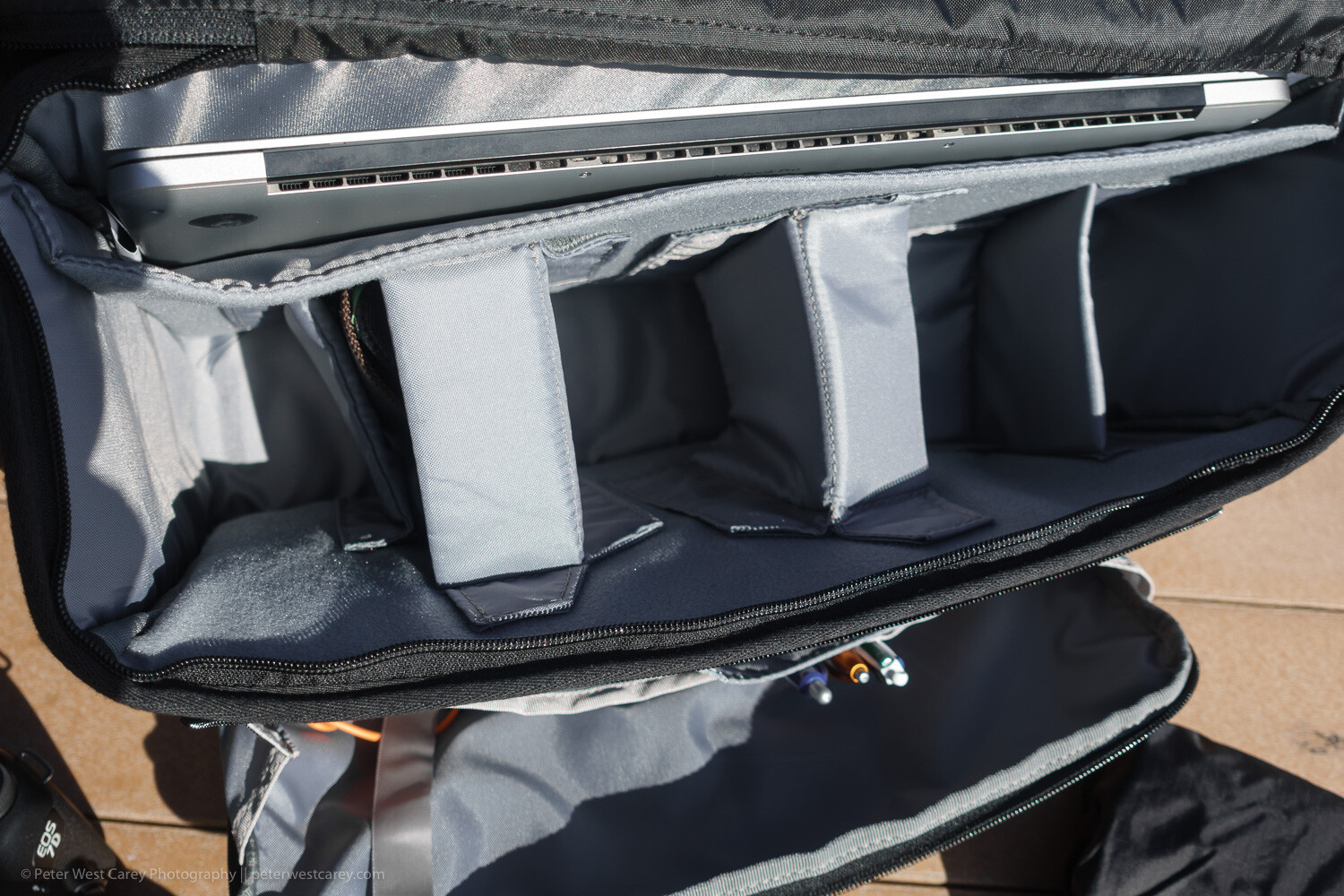
Inside the spacious main compartment is space enough for a few lenses and speedlights. There are both vertical and horizontal padded dividers to protect your shorter lens stacked one on the other.

All the dividers have velcro on each side, so they can be attached to either long side of the bag or to other dividers. I usually travel with a long lens attached and a wide angle lens stored. This means I have room for: smaller Sony RX-100 V, waterproof cover (included with bag), battery pack for phone and tablet, glasses case, power brick for laptop and DJI Osmo Pocket. And there is still more room in there.

It can handle a portable office

If your bag is not just for your camera, but for all the other items you want with you on a shoot or day out of the office, this bag can carry most of it.

The Vision 15 can manage a 15″ laptop and a 10″ tablet. The laptop sleeve is padded on the back and bottom while the tablet slot is found on the zippered front pocket.

That front pocket has a host of other slots to hold pens, business cards, large phones, cables, and keys (with a tether and clip so that don’t get lost). And it still has ample pocket space for books, batteries, chargers and all the other little things that join you on the road.

An added bit of security to the main compartment

While the generous top flap of the bag keeps the elements at bay, a secondary zippered flap will help keep prying hands away. The flap has velcro to help hold it in place, meaning it will open when the main flap opens and close when it closes. Or zip up the inner flap for an added sense of security. It can also be tucked under the main flap to keep it out of the way for quicker access.

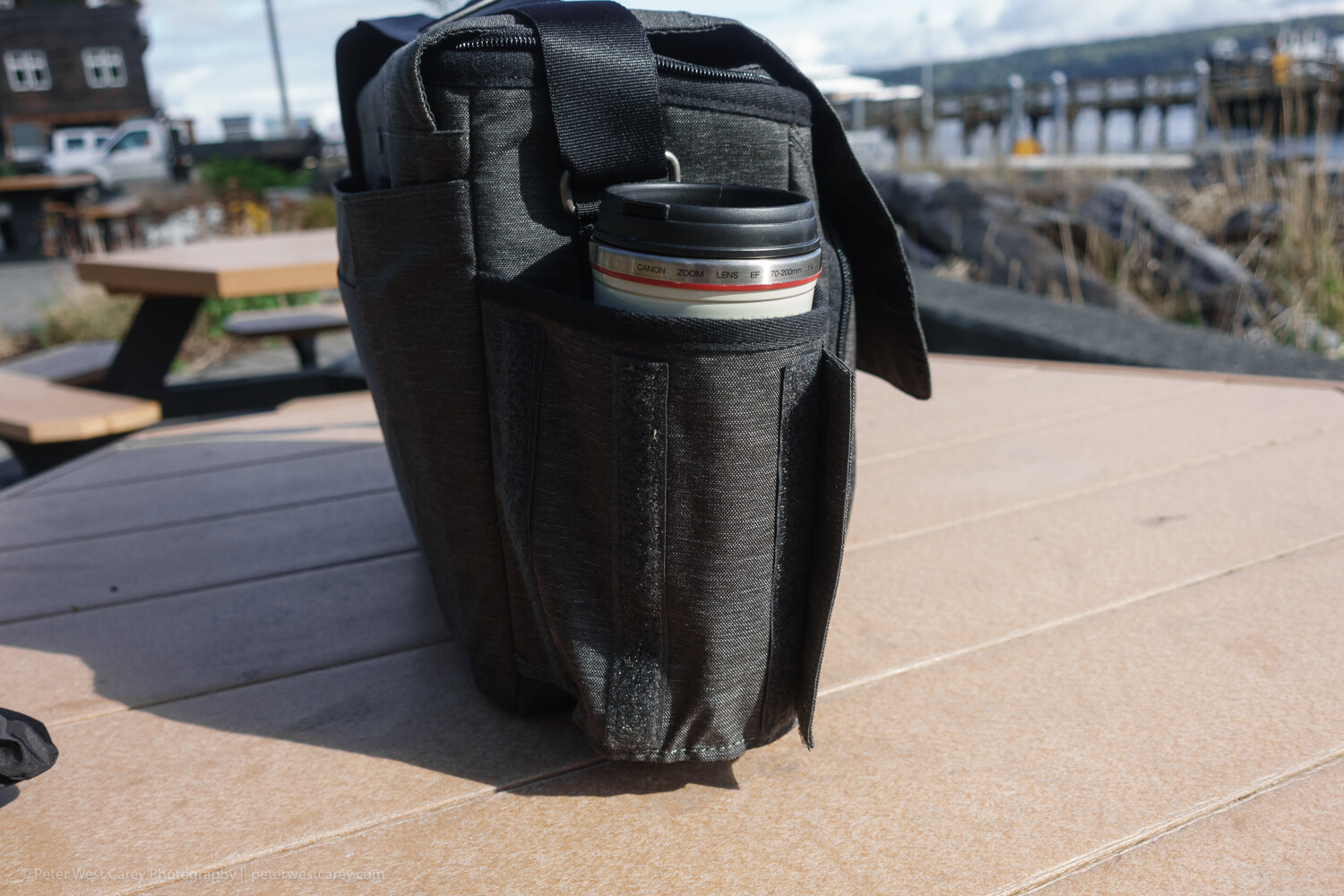
Expandable bottle holder

This little design aesthetic impressed me when I wasn’t expecting it to. Velcro keeps the bottle holder closed when not in use, reducing the chance that it will get caught on something. Plus it looks more stylish this way.

But when you need to hold your coffee or water bottle, just expand the pocket to one of two sizes for a (nearly) custom fit.

Tough, coated bottom

While the bag’s fabric is stylish and does a good job of resisting stains and water, the bottom is made of beefed-up waterproof tarpaulin. This tough option makes for easy clean up when the bag is placed in anything but the most pristine locations. A quick wipe with a damp cloth keeps it clean and your contents dry.

Front and back book/papers pockets

On the back of the bag is a large pocket for books or notebooks. This is a great spot to place quick-at-hand items, and I use it for my calendar and main notebook.

On the front of the bag is a smaller pocket. While you could fit a book in there, it presses against the organizer pocket behind it. While is looks good in photos, it’s not useful for thick items.

Generously padded shoulder strap and carry handle

The bag comes with two main modes of transport: a padded shoulder strap and a carry handle on top. The padding on the shoulder strap is generous and the strap itself has a wide range of adjustment for a variety of torsos. However, the top carry handle only works when you remember to clip the top flap shut. Still, it is a secure way to get the bag in and out of your car for a quick grab.

It fits easily under a seat on a plane

I’ve tested the bag under economy coach seats on 737s and smaller planes with ease. There is ample room and the bag doesn’t scratch along the underside of the seat.

Not so artful tripod holder

On a bag like this, the tripod attachment goes in the only location it can; on the bottom. ThinkTank uses their attachment straps (which can be removed when not in use, as shown above) to allow for a variety of tripod sizes. There’s really no other place for a tripod to go and the clips do an adequate job.

Roller Bag Passthrough

For those who love their roller bags for airports, the back of the Vision 15 has a slot for your roller bag handle to pass through.

Limits

While this bag has a lot going for it, I find the pockets get full fast. Even just throwing a Mindshift card wallet into the front pocket will expand it enough to press on the other pockets. Toss in a charger and Miops cable release as pictured above and you quickly start puffing the bag up, unlike a backpack-style bag.

Vision 15 with rain cover attached

Don’t expect to comfortably carry a full-size tripod on the bottom of this bag. The length would make things unwieldy. Also, with the tripod attached, you suddenly don’t have an easy way to set down the bag.

In use

I tested the bag in use on my job for a month, which included travel on four different flights up an down the West Coast. Its smaller form factor (compared to my normal backpack) is welcome as it packs into my car trunk easily and was effortless to remove, thanks to its clean lines and lack of straps like a backpack.

Opening and accessing contents is straightforward and I left the velcro attachment connected on the inside lid most of the time. Yet, when I had to set the bag down a couple of times in less than ideal situations, that inner zipper was nice to employ. I never did use the rain cover but I am glad they shipped the bag with a black cover to keep it stylish.

Conclusion

The ThinkTank Vision 15 is a very useful shoulder bag. While it can’t quite hold all I like to carry (no space for a drone), it holds all you need on a day-to-day basis when away from the office all day. It easily holds a long lens as well as battery packs, chargers, cards, tablet and laptop. It can easily handle four lenses and a flash, while the padded shoulder strap makes carrying that load bearable.

While the Vision 15 is sized for a 15″ laptop, they have two other, smaller sizes (which cut out the space for a tablet) that might fit your particular setup better.


The post ThinkTank Vision 15 Camera Bag Review appeared first on Digital Photography School. It was authored by Peter West Carey.


Digital Photography School

 
Comments Off on ThinkTank Vision 15 Camera Bag Review

Posted in Photography


Leak: Canon has a 63MP full-frame sensor destined for high-resolution EOS R camera

23 Apr

There’s been rumors of a high-resolution EOS R camera since the EOS R was first released last year, but a leaked data sheet detailing a new 63-megapixel full frame CMOS sensor is the best hint yet that a mirrorless 5DS equivalent might be right around the corner.

According to the leaked data sheet, the sensor — referred to as 35MM63MXSCD — features Canon’s Dual Pixel AF and 63 million effective 3.7nm pixels (9696 x 6464). Using the 16 channel digital signal outputs, the data sheet says the sensor should be capable of up to 5.2 fps at 12-bit.

Below is the data sheet and a collection of leaked illustrations showing the various specs and schematics of the 35MM63MXSCD sensor:

Canon has been teasing in interviews that it’s excited to make cameras capable of showing off the quality and performance of its latest lenses, including its impending ‘holy trinity’ (16-35mm, 24-70mm and 70-200mm). Combined with the ongoing rumors churning around the mill that the next EOS R would be a high-resolution model due out sometime this year, it seems pretty clear this will be at the heart of the camera whenever it is released.

Articles: Digital Photography Review (dpreview.com)

 
Comments Off on Leak: Canon has a 63MP full-frame sensor destined for high-resolution EOS R camera

Posted in Uncategorized


A Short Introduction to Basic Photo Editing for Beginners

23 Apr

The post A Short Introduction to Basic Photo Editing for Beginners appeared first on Digital Photography School. It was authored by Lily Sawyer.

If you’re a beginner, using editing software can be a daunting prospect. What if you can’t get a handle on the technology? What if it’s too complicated a process? What if it’s just too time-consuming? What if the images turn out horrible? So many what ifs! I get it; I’ve been there. In this article, I’m offering a very simple way of delving into editing if you’re a novice. These are basic principles that I hope will set you in good stead for more fancy editing in the future!

dps-basic-editing-tutorial-final-image

First things first.

You need to be able to see what is a good image and a bad image. The key is in your perception.

If you think heavily edited images are the perfect image, then your editing will lean that way and vice versa. If you think an overly-tinted image is perfect, then that would be your bar for perfection. We all have a bias towards something. However, for editing, I think we need to try and be as neutral as possible and leave our personal preferences for the moment.

To be able to see things objectively, we need to:

  1. See the differences between over-exposed and under-exposed images and decide as to what is the correct exposure
  2. Understand white balance where white looks white, as it should, and not yellow or blue or orange
  3. See the contrast between dark and light
  4. Decide on the noise

Once we have a basic grip of the above, then editing will be a breeze, and we can get more creative from a solid image base or what I’d like to call a clean edit.

But first, a word on shooting format. Shoot in RAW.

The images below are the original RAW images opened in Bridge without any edits applied.

You can see there is a choice of Adobe color profiles. See the difference between the standard profile below left and the color profile used on the image on the right.

You can choose which profile you prefer.

dps-basic-editing-tutorial-profile

To successfully understand the above, and make the edits towards them, it is important that you shoot in RAW format. If you shoot in JPEG, you are allowing the camera to process the image, discard pixels the camera deems unnecessary, and accept the color adjustments the camera has made. With a JPEG image, you have less control, are working on a great loss and compression of pixels at the very start and an already compromised image color.

You can read more about RAW processing in Bridge here.

Having said that, someone who is a really good, seasoned, experienced photographer may well shoot JPEGS and achieve the desired image they want. I am not there yet!

Secondly, the type of camera you use affects the original images you get.

A full-frame camera gives you the 35mm sensor – wider, more space, more light hitting the camera sensor and more pixels. What you see through the lens is pretty much what you get. A crop-sensor, on the other hand, works in the opposite way. The lens only allows you to use a portion of the sensor so that a 35mm lens mounted on a crop-sensor camera will only give you the point of view of a 52mm lens equivalent – a more zoomed-in longer focal length. You are losing some width, some light and some pixels.

Let’s dive in!

1. Correct exposure

Correct exposure means getting the balance right between the 3 components of the exposure triangle. Namely: aperture, shutter speed, and ISO. Balancing all three correctly will give you a perfectly exposed image. That means no blown highlights or details are lost entirely in the shadow or darker areas of the image that should still be visible.

A most useful tool in determining whether your exposure is perfect is to look at the histogram when you are editing. Alternatively, you can view the histogram when you have just taken the photo as there is also a histogram on the LCD of many cameras these days. Simply put, a histogram is a representation of the tonal value distribution across your image in the form of a visual graph. Just by looking at a histogram (that graph on the top right corner of the image below), you can immediately tell whether there is an even spread of tonal values on the image judging from the troughs and crests on the graph or a stark contrast.

If the image you shot has incorrect exposure, then editing is your solution. You can move the sliders on your editing software to increase exposure if the photo is too dark or decrease your exposure if the photo’s too bright. You can usually recover some blown highlights in the case of overexposure.

dps-basic-editing-tutorial-color-raw

Take a look at the image above. This is the RAW image opened in Bridge. You can see it’s a little bright with the histogram showing a tall mountain almost touching the right edge. When the histogram touches both left and right edges, this would indicate the dark and light parts of your images are clipped and therefore there is overexposure and underexposure in the image. This is an okay image as nothing touches the edges, but it is too bright for me.

The image on the left below shows an overexposed image with the exposure turned up and the image on the right shows an underexposed image with the exposure turned down. See what the histogram is doing in these images.

dps-basic-editing-tutorial-color-raw

2. White balance

Simply put, white balance is the adjustment on your camera that reads the color temperature of the light you are shooting in in relation to neutral white. A perfect white balance should show white to be white as perceived in reality and there are no color casts that distorts the whiteness of white. You can, however, go for a warm white or a cool white by adjusting the white balance sliders. Generally speaking, what you don’t want is for white to look too yellow or orange or too cold like with a strong blue cast. Compare both photos below: too cool on the left and too warm on the right.

dps-basic-editing-tutorial-color-raw

3. Contrast

There is nothing rocket science about contrast in my opinion. It is simply to do with the strength of the blacks on the photo. After the adjustments above, our photo is still looking very flat. All that’s needed is a fiddle on the blacks, shadows, highlights and light areas. Just remember not to clip your blacks or whites or if you want a bit more contrast, not too much clipping. You can also use the curves tab (the one that shows a grid with a curvy line) for contrast adjustments.

dps-basic-editing-tutorial-finish

I also played with the other sliders to get the result I wanted on the images above. Just do so gently – a touch here and there rather than extreme adjustments.

Remember, you are only after a clean edit at this stage. The images above show the same edits on the standard and color profiles. The results are different so deciding on your color profile matters.

4. Noise and Sharpening

If you click on to the third tab which shows two black triangles, you get to the panel where you can adjust noise and sharpening. Again, gentle adjustments are needed here.

It is vital to view your photo at 100% so you can see what the adjustments are doing to the image.

Luminance has to do with the smoothness of the pixels. You don’t want to go too much, or you lose definition.

Color has to do with how much the RGB pixels show up and extreme adjustments will either strip your image of color or make the pixels appear too saturated.

dps-basic-editing-tutorial-sharpening-noise

Conclusion

Now I have a clean edit, there is still so much I can do to this photo. The eyes are a tad soft so I will need to adjust that. I could add vignettes or change the appearance of the background. I could add sunflares or textures. The possibilities are endless. But most of that has to happen in Photoshop.

I hope this has helped you understand the basics of editing.

Please share your comments below or if you have any questions!

The post A Short Introduction to Basic Photo Editing for Beginners appeared first on Digital Photography School. It was authored by Lily Sawyer.


Digital Photography School

 
Comments Off on A Short Introduction to Basic Photo Editing for Beginners

Posted in Photography


Panasonic Lumix S1R studio scene with high-res mode published

23 Apr

We’ve been working through our full review of Panasonic’s high-megapixel, full-frame flagship, the Lumix S1R, and have published our studio test scene images from it – including the 187MP high-res mode. It’s, well, quite something. Take a look for yourself and prepare to get well acquainted with every detail of our studio test scene.

$ (document).ready(function() { ImageComparisonWidget({“containerId”:”reviewImageComparisonWidget-44664544″,”widgetId”:674,”initialStateId”:null}) })
Articles: Digital Photography Review (dpreview.com)

 
Comments Off on Panasonic Lumix S1R studio scene with high-res mode published

Posted in Uncategorized