RSS
 

Archive for March, 2019

CP+ 2019: Ricoh GR III shown with firmware 1.0, Theta goes 1″

03 Mar

GR III dominates the Ricoh booth

Ricoh formally launched the GR III earlier this week, so it’s no surprise that its presence dominates the company’s stand at CP+. The units on display are running firmware 1.0 and we’re told we’ll be able to get our hands on one in the next few days to go shooting with.

Familiar controls

Many of the camera’s features will immediately be familiar to users of previous GR models. The ADJ lever controls exposure compensation or brings up a customizable menu of core camera functions. Several of the camera’s buttons can also be re-assigned, including a dedicated Fn button, the left and right presses of the four-way controller and the movie/Wi-Fi button on the side (which can control a second function in response to a long press). And, of course, there’s the ‘Full Press Snap’ focus option that leaves the camera pre-focused to your chosen distance, to maximize responsiveness. The improved speed of being able to position the AF point that the touchscreen brings may not wholly outweigh the loss of the rocker that’s featured on the back of GR cameras up until now for experienced users.

New lens, new autofocus

The GR III adds phase detection autofocus but, interestingly, still appears to use a unit focus design, where the entire lens is moved back and forth as the camera focuses. This helps maximize image quality, as the lenses maintain their relationships to one another, but slows down the process, since it means moving more mass. The addition of phase-detection autofocus helps with this, since it means the lens can be driven straight to the desired location, but the autofocus of these firmware v1.0 cameras wasn’t especially speedy.

Innovation and legacy

Ricoh was keen to show that, while the GR III is a relatively major update to the series, it understands that it needs to fit into a series that goes back over twenty years. It’s an important reminder that, even relatively recently, the GR series attracted a dedicated audience even when they were built around relatively modest 1/1.7″ sensors. Anyone who enjoyed one of the GR Digital models is likely to be impressed with what the GR III offers. And we’re looking forward to getting a closer look at the final JPEGs soon.

Ricoh Theta goes 1″

The Theta VR camera has been something of a success for Ricoh and it’s been progressively iterating on the design for a number of years. Back at Photokina 2016 they told us one of the big challenges they faced was trying to cope with the heat generated by 4K capture without having to change the popular form-factor of the device. The Theta Z1 shows how far things have come since then. The Theta Z1 is not only capable of 4K video capture but does so from a pair of 1″-type sensors.

Ricoh Theta Z1 with DNG Raw

The Theta Z1 is a little taller and a little thicker than previous models but they’re relatively minor changes, considering how much larger the sensors its using are. Bear in mind that the Theta’s 360° capability is formed by having two of these chips mounted back-to-back, it’s not surprising that the Z1 had to get a little (~6mm) thicker. Despite this slight extra separation, its lenses are able to give an overlapping view to form a 360° view. And, unlike previous versions, the Z1 can shoot DNG Raw stills.

Articles: Digital Photography Review (dpreview.com)

 
Comments Off on CP+ 2019: Ricoh GR III shown with firmware 1.0, Theta goes 1″

Posted in Uncategorized


What’s The Highest ISO You Can Use? How To Find Out For Yourself

03 Mar

The post What’s The Highest ISO You Can Use? How To Find Out For Yourself appeared first on Digital Photography School. It was authored by Peter West Carey.

Do you know the limits of your camera’s ISO?

By limit, I mean the point at which, egads!, it’s just too much noise. If not, or if you’ve never bothered to figure out your camera’s limits, I have an easy experiment for you to try.

Each camera model is different and camera manufacturers are improving ISO performance with every new release. This is why it’s important not to assume that Mark IV version is mostly the same as the Mark III.

What is ISO?

ISO stands for the International Organization for Standardization. Do big, long governmental-style names make you fall asleep? I’ll make this quick.

The ISO group sets standards so 100 speed Kodak film is the same as ISO 100 Fuji or Agfa or any other manufacture. It’s good to have standards otherwise you wouldn’t know how to set your shutter speed and aperture.

Carry that concept over to digital and ISO is a measure of the sensitivity of your camera’s sensor. The lower the number, the less sensitive, therefore, you need more light to make an exposure. A higher ISO allows for less light in the same situation, which can result in a faster shutter speed or more optimal aperture setting.

Why should you care?

Increasing your ISO setting has one big drawback: the increased sensitivity can create unwanted artifacts called “noise.”

In the days of film, higher ISO meant added grain in an image, something some of us enjoy in our photos. Noise, on the other hand, is disliked by all. It discolors images, mostly in the dark and black areas. It muddles things.

Let me show you the difference with two shots, the first was taken at ISO 12,800 and the second at ISO 80.

Can you see the green and purple discoloration? That’s noise.

Use the lowest ISO you can

Knowing that a higher ISO can create this ugly noise, it’s a good idea to almost always take photos at the lowest ISO that still gives you a crisp image. For instance, landscape photographers in the days of film loved ISO 50 film and some still return to their film gear for the amazing smoothness that film lends to its images.

There are many DSLRs that can utilize ISO 50, such as the older Canon EOS 5D.

Machermo and the Moon – Nepal’s Himalayas – Canon 5D ISO 50

Unless you can’t

But what about dark situations? For instance, what about when you have a dimly lit auditorium or stage? Parents with kids in indoor sports or drama classes and school plays or holiday programs know this situation well. Here’s an example:

ISO 5000

In situations like this it is good to know what your camera’s maximum useable ISO is. It’s also a great idea to know how much noise you will encounter if you go above that self-imposed maximum, because sometimes the emotions and memories are more important than worrying about noise-free images.

Or perhaps you need a high shutter speed given the current lighting conditions and a flash would ruin the scene.

ISO 5000

A simple experiment

The experiment to find out the highest ISO you should use, without gaining too much noise beyond your tastes, is quite easy.

You will need:

  • Camera
  • Table or tripod
  • A variety of objects, with dark and black colors, maybe some shadows too
  • Ample lighting (but not overly bright)

  1. Set up your camera either on a table or tripod. You’re going to want it steady because some of the photos you take might have a slow shutter speed. Blurring will ruin the results.
  2. On the other end of the table set up your objects. I suggest objects without much gloss and as solid a field of black as you can find. Black fur on your kids’ stuffed animals might hide some noise and so will flecks of fabric in a shirt of the like.
  3. Make sure there is enough light in your scene.
  4. Set your camera to Program mode unless you have a favorite.
  5. Also turn off any in camera noise reduction options.
  6. Set your ISO to 100 or L if it goes lower than 100.
  7. Focus on your black objects and take a photo.
  8. Now change the ISO to 200 and take another photo.
  9. Continue moving up your ISO by one stop (a doubling of the number) while snapping an image each time.
  10. Stop when you reach the highest limits of your camera. This may be ISO 3200 or maybe ISO 512,000.

Examine the results

Transfer your images into a computer so you can pixel-peep the results. As your camera was in Program mode, the overall exposure of your images should be close to the same. If you’re using photo editing software like Lightroom, I suggest turning off any automatic noise reduction widgets.

Now zoom in on your images.

ISO 12,800

As the ISO gets higher you will notice more and more noise creep into the dark areas. As mentioned, it’s discoloration that is often purple and green in color. It doesn’t look right and it is not the grain that was characteristic of high ISO films.

At some point, and the choice is yours, the noise gets to be too much. Each camera model is a little different and in the 18 years I’ve been using digital cameras, the quality consistently gets better and better. This is why this experiment is one of the first things you should do with a new camera.

Examples

Let me give you a few examples of what looks like too much noise. These are just my opinion, but I hope the examples can help you get a better idea of where your camera has its limits.

ISO 12,800

ISO 12,800

ISO 12,800

ISO 40,000

Conclusion

Knowing the ISO limits of your camera is important in any type of photography. There are times that might warrant a higher ISO, such as shooting in very low light. How much noise is too much for your situation and camera is a level best tested before the situation arrises.

One additional note: This experiment does not take into account the wonderful ability of most modern photo editing software to greatly reduce the negative aspects of noise. That’s a whole other article!

The post What’s The Highest ISO You Can Use? How To Find Out For Yourself appeared first on Digital Photography School. It was authored by Peter West Carey.


Digital Photography School

 
Comments Off on What’s The Highest ISO You Can Use? How To Find Out For Yourself

Posted in Photography


Costco says it will close the photo departments at several stores in April

03 Mar

American retailer Costco is shutting down the photo labs in a growing number of its stores, according to letters the company has sent to its customers. The most recent letter to surface comes from the company’s store in Woodland, California, which plans to close its photo department on April 25.

The letter, which was recently published by PetaPixel, cites low demand as the reason for the closure, stating, ‘the need for printing photos has steeply declined, even though the number of pictures taken continues to grow.’ The retailer will continue to offer photo printing through its Photo Center website and at select other locations, however.

Photo Center customers who receive the letter from Costco are offered a $ 50 credit for use with the company’s photo website. This is the latest among a growing number of Costco photo department closures. According to The Dead Pixels Society, the company will also shutter all but one photo department in its Massachusetts stores, as well as the photo lab at its busiest Hawaii location, the Iwilei store.

Though Costco has made the decision to repurpose its limited floor space in stores with low consumer printing demand, select other retailers continue to offer in-store photo printing services, including Walgreens and Walmart. Online photo printing services remain ubiquitous, and Costco is still counted among them.

Articles: Digital Photography Review (dpreview.com)

 
Comments Off on Costco says it will close the photo departments at several stores in April

Posted in Uncategorized


CFexpress Type B memory cards double read speed to 1.7GBps, write speed to 1.4GBps

03 Mar

Sony has announced it will introduce the next generation CFexpress memory cards this summer, and promises read speeds of up to 1.7GB per second and write speeds up to 1.48GB/s. The Type B cards will use the third generation PCI-E interface that allows them to read and write at twice the rates of current models.

To make the most of the new cards a faster card reader will be launched — called the MRW-G1 — that will be backward compatible with existing CFexpress cards as well as XQD memory cards. The new cards will be more drop-proof than their predecessors and will be able to withstand a force of 70N.

The cards are aimed at industrial users as well as professional photographers. The first cards will come in a capacity of 128GB, but later units will offer 256GB and 512GB of space. For more information see the Sony website and the Compact Flash Association.

Press release:

Sony develops CFexpress Type B memory card boasting ultra-fast read and write speeds of up to 1700MB/s[1] and 1480MB/s1

  • Incomparably fast speed, designed for professional and industrial use, supports future evolution of digital devices
  • High reliability in extreme conditions thanks to TOUGH performance and smart software
  • New Sony CFexpress card reader, MRW-G1, takes full advantage of Sony CFexpress Type B’s high-speed performance
  • The Sony CFexpress Type B memory card and the CFexpress Card Reader will be in the market in early summer 2019

Sony today announced the development of the CFexpress Type B memory card (CEB-G128), a new ultra-fast next generation memory card2 that is ideal for professional and industrial use. With its super-fast speed of up to 1700MB/s (read) along with highly reliable toughness, this memory card supports the future evolution of digital devices.

Enhancing Sony’s high performance, value-added memory card line-up, the CFexpress Type B is designed based on a new specification which adopts the latest interface, PCIe®3 Gen3, standardised by the CompactFlash Association.

The Sony CFexpress Type B memory card offers a 128GB capacity, with higher capacity models of 256 GB and 512 GB planned for the future.

Incomparably fast
The Sony CFexpress Type B memory card is around 3 times faster than Sony’s fastest CFast memory card (with 530MB/s read speed). With a write speed of up to 1480MB/s, this card meets future requirement needs for secure industry data-recording or requirements from professionals to capture hi-resolution images or high-bitrate video.

With an ultra-fast read speed of up to 1700MB/s, even large-sized data files can be transferred quickly, when compared to existing memory cards. For example, when making copies or backing up large-sized data from multiple memory cards, transfer time will be dramatically reduced. This greatly improves work efficiency.

The new CFexpress Card Reader, MRW-G1, is optimised for Sony CFexpress Type B memory card and takes full advantage of the card’s fast read speed. This reader is also compatible with Sony XQD card G series and M series.

TOUGH performance
The Sony CFexpress Type B memory card has superior strength, surpassing the CFexpress standard by a factor of three, being able to withstand 70N of force in bend, and five times greater withstanding falls from up to 5m high.

The card is also temperature proof, X-ray proof, anti-static and has a UV guard so it can perfectly support usage in tricky or tough environments.

Peace of mind
Media Scan Utility and Memory Card File Rescue are available as a free download to Sony CFexpress card users.

Media Scan Utility is PC software that automatically scans your Sony CFexpress memory card every time you connect it to a PC via your MRW-G1 card reader4. The software keeps you informed of the condition of your card and lets you know if you’re nearing or have reached the flash memory limit.

Memory Card File Rescue eradicates every photographer’s worst nightmare – deleting photos accidentally and losing your precious work. The software recovers accidentally deleted files including RAW or high-resolution images and videos, so your work is safe from whatever obstacles are thrown your way.

The Sony CFexpress Type B memory card and the CFexpress MRW-G1 Card Reader will be on the market in early summer 2019.

– Ends –

[1] Based on Sony internal testing. Actual performance may vary and is dependent on environment and usage.
2 Based on memory card standard announced from the CompactFlash Association in 2017 as the next generation of XQD memory card and CFast memory card. CompactFlash is a trademark of CompactFlash Association.
3 PCIe is a registered trademark of PCI-SIG.
4 MRW-G1 is required to scan Sony CFexpress memory card

[1] Based on Sony internal testing. Actual performance may vary and is dependent on environment and usage.
2 Based on memory card standard announced from the CompactFlash Association in 2017 as the next generation of XQD memory card and CFast memory card. CompactFlash is a trademark of CompactFlash Association.

3 PCIe is a registered trademark of PCI-SIG.
4 MRW-G1 is required to scan Sony CFexpress memory card

Articles: Digital Photography Review (dpreview.com)

 
Comments Off on CFexpress Type B memory cards double read speed to 1.7GBps, write speed to 1.4GBps

Posted in Uncategorized


Canon USA unveils RAISE, an online photo platform with AI-powered features

02 Mar

Canon USA has launched RAISE, its first online photo community. The platform offers photographers a destination for storing their images, which are organized using Canon’s artificial intelligence engine. Users have the option to create Collections for privately sharing images with others outside of the community, and they can browse other users’ images via a personalized feed.

RAISE’s most notable feature is its AI-powered organization, which includes auto-tagging images with the subject, category, color, style, composition, and emotion. Canon designed the platform for more than just uploading images, however, with Canon USA President Kazuto Ogawa explaining, ‘Creativity is born from community – from collaboration with like-minded individuals. With RAISE, we are building that community for photographers.’

Photographers have the option of publicly sharing their work with the RAISE community. Images can be uploaded in high-resolution JPEG format, and starting in March, Canon will release a RAISE plugin for Adobe Lightroom Classic CC. The company says its users retain ownership of images uploaded to the platform.

Canon is showcasing RAISE at the Wedding Portrait & Photography Show in Las Vegas through March 1, 2019.

Articles: Digital Photography Review (dpreview.com)

 
Comments Off on Canon USA unveils RAISE, an online photo platform with AI-powered features

Posted in Uncategorized


How to Correct Perspective Distortion in Photoshop

02 Mar

The post How to Correct Perspective Distortion in Photoshop appeared first on Digital Photography School. It was authored by Ana Mireles.

When talking about perspective, you step into a deep and somewhat complicated subject. It has to do with geometry, history of art, viewpoint and so on. However, solving that big issue won’t be the point of this tutorial. Instead, it focuses on solving perspective issues in your photography using photoshop. So keep reading to learn which Photoshop tools can help you out.

Because perspective can be a broad term, in this article, I’m going to narrow it down to one aspect, and that is the way straight lines seem to converge as they get further away. This can be used as a creative element of the picture, or it can help convey a sense of depth and tridimensionality as per this example:

You may be familiar with this effect, such as when you’re walking on the street, and you tilt your camera up to photograph a building. Now, this might be your intention, but sometimes you don’t want or need this distortion. Of course, you can correct this issue by using tilt and shift lenses, or with a large format camera. However, many of us don’t have access to that equipment. This is where Photoshop is handy to fix perspective in post-production.

As usual, Photoshop has different ways of dealing with the same problem. One may work better than others in different cases. However, I find that more often than not, you need to combine them to get the job done. So here’s an introduction to some different approaches:

Lens correction and transformation

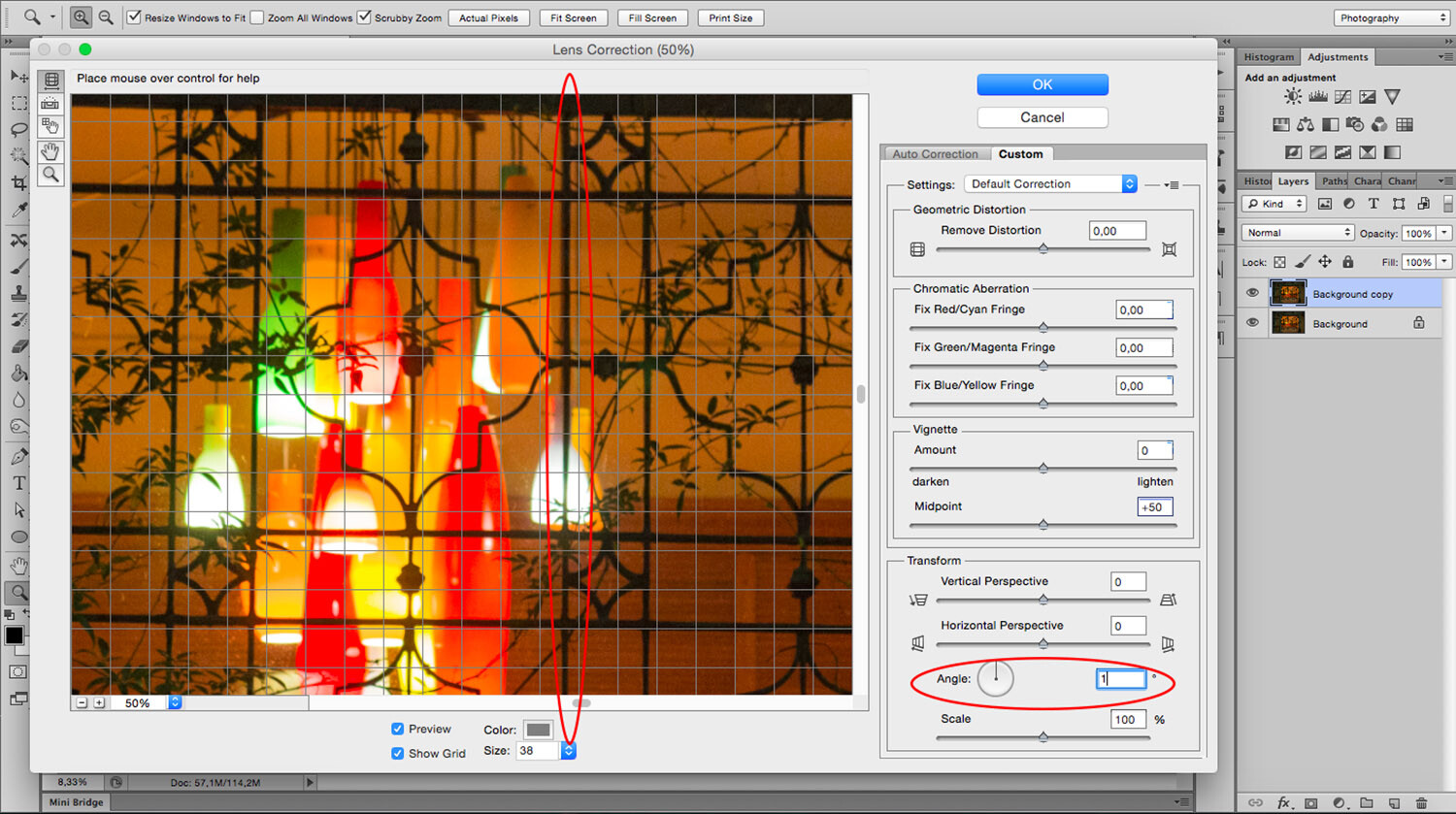
One way to correct perspective distortion is by using the Lens Correction Filter. You can find it under the Filter Menu. When you choose this, a new window pops up. To start working on it, ensure you’re in the Custom tab to access the settings and set your grid with the bottom slider so that you can have it as a reference.

For this exercise, you’re only going to need the Transform part of the panel that you’ll find in the bottom right. I find that starting with the center point saves time as the changes you make after happen on both sides simultaneously. So I zoomed in to the center and rotated the angle so that the central line aligned with the grid. Remember, you can make the grill tighter if you need to.

Now you can start fixing the vertical and horizontal lines with the sliders. On the sides of each slider, you can see an icon showing the way the image gets affected. If you pull the vertical slider to the left, the top part gets wider or sliding to the right the bottom part is the one that becomes wider and so on.

As you move the lines around, you may be losing part of the image towards the edges. To bring everything back in, use the scale slider. After you’re done, you’ll have to crop out the blank pixels.

As you can see the Lens Correction Tool can be handy, but sometimes you still have to make some adjustments here and there. For this step, you can use the different Transform tools found under the Edit menu.

In this case, I’m using the Skew tool which allows me to move all the corners and middle points independently. Whenever you’re using any of these tools, you can pull out Guide Lines by clicking on the ruler and dragging. That way you can work more precisely without leaving the transform mode.

For this image that’s all I needed to do. However, remember that all the transformation tools can help to correct perspective, so experiment with them to find the one that works best for you and your image. Here, you can see on the left how I started, and on the right, is the new corrected version.

Perspective Tool Crop

Another way of fixing the problem is with the Perspective Tool Crop. This feature corrects the lines almost automatically. However, I wanted to give you the option of doing it manually first so that you have more control over the perspective. If you want to try it out, draw a rectangle around the image with the Perspective Tool Crop active and then drag the corners to match the grid with the distorted lines.

It usually does a good job, but you might still need to tweak it a little bit with the transform tools. Be aware that the Perspective Tool Crop, as the name says, crops your image. You might lose some information from the borders. In any case, you can give it a try and decide which method is best for you.

If you have any other tips to correct perspective distortion, share them with us in the comment section.

The post How to Correct Perspective Distortion in Photoshop appeared first on Digital Photography School. It was authored by Ana Mireles.


Digital Photography School

 
Comments Off on How to Correct Perspective Distortion in Photoshop

Posted in Photography


Spectre is an AI-powered long-exposure app for the iPhone

02 Mar

The team behind the popular Halide app has has launched its second app. Spectre uses computational imaging methods to simulate long-exposure photography on conventional cameras.

You can use the app to make moving subjects disappear in busy areas, such as the cars on the bridge below, or you can create light painting and other effects through subject motion, just like when shooting with a DSLR that has been set to a long shutter speed.

However, Spectre works in a different way, doing away with many of the limitations of a conventional long-exposure. There is no need to put the phone on a tripod or take a series of test exposures to find the shutter speed that works best.

Instead, the app uses machine learning and computer vision to create a computational shutter. Spectre doesn’t capture a single frame at a long exposure but takes hundreds of frames during the exposure time and merges them. This means you not only get a still image as a final result but also a video.

Results are saved in Apple’s Live Photos format which lets you make adjustments after capture, such as choosing a key frame or applying Live Photo effects.

The app uses scene recognition for optimized results. For example, frames captured of a beach scene might be merged for a smooth appearance of the water. A busy cityscape at night is processed for a pleasant rendering of light trails. Thanks to AI-powered image stabilization handheld long exposures of up to nine seconds are possible and during capture a stability indicator tells you if your hands are too shaky.

If you’d like to try long-exposure photography with the iPhone and Spectre, you can download the app on the App Store now for an introductory price of $ 1.99.

Articles: Digital Photography Review (dpreview.com)

 
Comments Off on Spectre is an AI-powered long-exposure app for the iPhone

Posted in Uncategorized


DPReview TV: Canon EOS RP review

02 Mar

The EOS RP is Canon’s second full frame mirrorless camera, built around the new RF mount, and comes with an aggressive launch price of $ 1300. While there are some inevitable compromises to be made at this cost, Chris and Jordan discovered that there’s a lot to like about this pint-sized full-framer.

Get new episodes of DPReview TV every week by subscribing to our YouTube channel!

  • Introduction
  • Body and handling
  • EVF
  • Battery
  • Sensor protection
  • Sensor
  • Dynamic range
  • Low light performance
  • Focus stacking
  • User interface
  • Autofocus
  • Video capabilities
  • Wrap-up

Articles: Digital Photography Review (dpreview.com)

 
Comments Off on DPReview TV: Canon EOS RP review

Posted in Uncategorized


CP+ 2019: Voigtländer unveils new manual focus lenses for Sony E-mount and Leica M

02 Mar

CP+ 2019: Voigtländer shows new lenses for Sony E-mount

We’re at the CP+ show in Yokohama, Japan, where Cosina is letting customers get their hands on three fast manual-focus primes for Sony E-mount and Leica M, respectively. We took a closer look.

Nokton 50mm F1.2 Aspherical

First up is the Nokton 50mm F1.2 Aspherical for E-mount. Although this is a metal-bodies, classically-styles manual focus prime, optical construction is thoroughly modern, comprising eight elements in six groups, including two aspheres.

Nokton 50mm F1.2 Aspherical

Considering the fast maximum aperture of F1.2, the Nokton is very compact, and fairly light at 434 g. Voigtländer claims that this is thanks to the use of aspherics, which allow for high-resolution imaging wide-open without the need for more, or larger elements.

Nokton 50mm F1.2 Aspherical

The Nokton 50mm F1.2 features a 12-bladed manual aperture, and a 58mm filter ring. Electrical contacts on the mount allow for focal length and aperture information to be transmitted to compatible E-mount cameras. Minimum focus distance is 0.45m (about 18 inches).

Nokton 21mm F1.4 Aspherical

The Nokton 21mm F1.4 for Sony E-mount handles like a slightly larger version of the 50mm, and operates in exactly the same way. Manual focus and aperture rings allow for direct manual control, and the overall quality of build and finish is as high as we would expect from a premium Voigtländer lens. All three of these new lenses, in fact, are lovely to hold and use.

Nokton 21mm F1.4 Aspherical

Optical construction comprises 13 elements in 11 groups, with at least one aspherical element (Cosina is being a little vague, for now, on the exact optical formulation). Like the Nokton 50mm, there are 12 aperture blades, and electrical contacts communicate focal length and aperture to the camera.

Nokton 21mm F1.4 Aspherical

The Nokton 21mm F1.4 is a fairly large lens, with a 62mm filter thread. For video use, the aperture dial can be ‘de-clicked’ for smooth stepless control. Minimum focus is 0.25m (about 10 inches).

Nokton ‘Vintage’ 75mm F1.5 Aspherical

The Nokton 75mm F1.5 Aspherical is a fast short telephoto prime lens for Leica M-mount. Preferred by some rangefinder photographers over 80mm+ lenses for portraiture, 75mm is meaningfully longer than 50mm, while not quite long enough that the framelines in an optical viewfinder end up too small for accurate composition.

Nokton ‘Vintage’ 75mm F1.5 Aspherical

Intended to recall the classic rangefinder lenses of the mid 20th Century, the Nokton 75mm might look like an antique, but its optical makeup is entirely modern. Optical construction comprises seven elements in six groups, including one aspherical element. According to Voigtländer, this should ensure good sharpness and resolution even at the lens’ widest aperture of F1.5.

Again, there are 12 aperture blades, which ensures near-circular apertures across the range of F1.5-16. At wide and medium apertures, this should result in the all-important pleasant circular highlight bokeh beloved of portrait photographers. As we’d expect for a lens designed for rangefinder cameras, minimum focus is a fairly unremarkable 0.7m, which represents the minimum focus coupling distance for a Leica M-series camera.

Pricing and availability for all three new lenses has yet to be confirmed, but we’ll bring you more details as they become available.

Articles: Digital Photography Review (dpreview.com)

 
Comments Off on CP+ 2019: Voigtländer unveils new manual focus lenses for Sony E-mount and Leica M

Posted in Uncategorized


CP+ 2019: Hands-on with Tamron’s trio of full-frame lenses

02 Mar

Introduction

Tamron has its three newly-announced full frame lenses on show at CP+ in Yokohama. It’s a slight odd setup, though. You can look at the lenses in a glass cabinet or you can handle rather more rudimentary samples, with no marking on their switches and their names stick on with labelling tape. Thankfully we were able to convince Tamron to let us photograph the more complete versions.

Tamron SP 35mm F1.4 Di USD

The SP 35mm F1.4 Di USD [Model F045] is the company’s latest fast prime for Canon and Nikon DSLRs. It’s designed for full frame and arrives as a higher-end alternative to its stabilized 35mm F1.8 VC. It uses a conventional ring-type USD (ultrasonic drive) focus motor.

Tamron SP 35mm F1.4 Di USD

The SP 35mm F1.4 is fairly long lens but isn’t excessively wide. The company promises you get the image quality to justify the size. Tamron suggests it’s suitable for ‘nearly every photographic genre, including photojournalism, landscape, sports, street life, wedding groups and family snapshots,’ which is a pretty wide range.

Among the best 35s

Despite its fairly modest proportions (by modern standards, at least), Tamron seems bullish about the SP 35mm’s performance, saying it should by the best of its type. We were certainly impressed by how smooth and solid everything felt, when we handled it. Not a bad way to mark the 40th anniversary of the SP series.

Tamron 35-150mm F2.8-4 Di VC OSD

The Tamron 35-150mm F2.8-4 Di VC OSD [Model A043] is an interesting and somewhat unfamiliar concept: a full-frame lens extending from slightly wide-angle to moderate telepoto focal lengths, while retaining a semi-fast maximum aperture. Tamron describes it as a ‘Portrait Zoom.’

35-150mm F2.8-4: a ‘portrait zoom’

It’s about half the size of a 70-200mm F2.8, and still shorter even when extended, which should make it easy both to carry and to handle. Interestingly, the company says all its functions will remain available when adapted to a mirrorless camera. The sample we saw is fairly early, so we haven’t been able to get a sense for the speed or sound of the ‘Optimized Silent Drive’ micromotor.

35-150mm F2.8-4: handy for APS-C?

Although Tamron doesn’t mention its use on APS-C cameras, we reckon the 52.5-225mm equivalent range it would offer on a Nikon APS-C DSLR, long with the F4.2-6 equiv maximum aperture could be fairly interesting for a range of shooting situations. It wouldn’t offer especially shallow depth-of-field, but might make a temptingly portable midway point between a variable-aperture 55-200mm and the significantly higher cost of a 70-200mm lens, depending on how Tamron prices it.

Tamron 17-28mm F2.8 Di III RXD

The final lens we got to see what Tamron’s wide-angle F2.8 zoom for Sony’s E-mount cameras. The 17-28mm F2.8 Di III RXD is a full-frame zoom that makes a lot of sense alongside the relatively small 28-75mm F/2.8 Di III RXD that’s one of our favorite lenses for FE-mount Sonys.

Tamron 17-28mm F2.8 – a compact wide-angle

The Model A046 is based around the same ‘Rapid eXtra-silent stepping Drive’ focus motor used in the 28-75mm, so should be both quick and quiet. The lens itself is a touch shorter than its normal zoom counterpart but otherwise resembles it pretty closely. The biggest difference is that, unlike the 28-75mm, the 17-28mm F2.8 doesn’t extend when you zoom.

Articles: Digital Photography Review (dpreview.com)

 
Comments Off on CP+ 2019: Hands-on with Tamron’s trio of full-frame lenses

Posted in Uncategorized