RSS
 

Archive for September, 2018

Konseen launches Photo Studio, a portable light box tent for portraits

15 Sep

Konseen has launched Photo Studio, a new light box tent large enough to photograph people, in addition to smaller objects like clothing and jewelry. Photo Studio is offered in two sizes, one measuring 47 x 39 x 78in / 119 x 99 x 198cm with enough room for adults, the other 47 x 32 x 63in / 120 x 80 x 160cm, which is large enough for children. Both models include LED lights, a silver reflector, and multiple backgrounds.

Features include three soft cloth backgrounds, as well as three PVC backgrounds

The Konseen Photo Studio features a pipe-based frame with a tent cloth that zips over the structure. Users assemble the tent, which includes the option of attaching light panels to any of the frame pipes. The smaller Photo Studio model includes six light boards, each with 96 LEDs; the larger model includes 8 light boards, each also featuring 96 LEDs.

Each light board includes its own dimmable AC adapter. Other features include three soft cloth backgrounds, as well as three PVC backgrounds in white, black, and blue colors. The light color temperature is 5500K and each board has a dimming range from 1- to 100-percent.

The Photo Studio is priced at $ 280 USD (small model) and $ 340 USD (large model).

Via: PetaPixel

Articles: Digital Photography Review (dpreview.com)

 
Comments Off on Konseen launches Photo Studio, a portable light box tent for portraits

Posted in Uncategorized


SCL-OE-04: Cheap, Portable Outdoor Light Source

15 Sep

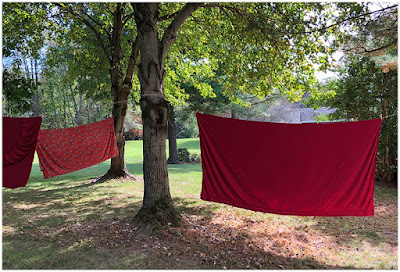
No matter how long you have been doing something, be it lighting or photography or, well, anything, you're never too old to be dumbstruck by a cool new idea.

Take the linens drying on the line above, for example. In the right frame of mind they are essentially super-portable outdoor light sources.

Read more »
Strobist

 
Comments Off on SCL-OE-04: Cheap, Portable Outdoor Light Source

Posted in Photography


Weekly Photography Challenge – Mellow Yellow

15 Sep

In the last couple of week’s you’ve done blue and red as the photography challenge, so it’s only fitting to complete the triangle of primary colors with yellow this week.

Photo by Boris Smokrovic on Unsplash

Weekly Photography Challenge – Yellow

Simply upload your shot into the comment field (look for the little camera icon in the Disqus comments section) and they’ll get embedded for us all to see or if you’d prefer, upload them to your favorite photo-sharing site and leave the link to them. Show me your best images in this week’s challenge. Sometimes it takes a while for an image to appear so be patient and try not to post the same image twice.

Share in the dPS Facebook Group

You can also share your images in the dPS Facebook group as the challenge is posted there each week as well.

The post Weekly Photography Challenge – Mellow Yellow appeared first on Digital Photography School.


Digital Photography School

 
Comments Off on Weekly Photography Challenge – Mellow Yellow

Posted in Photography


Atomos Ninja V shipping at the end of the month, with new AtomX expansion modules

15 Sep

The Atomos Ninja V external video recorder and monitor will be ready to ship at the end of this month. Announced in April this year, the 5.2in Ninja V is designed to provide a smaller option for those using more compact video cameras while still offering many of the features of the larger 7-inch models.

The recorder can handle 4K 60p footage in 10-bit 4:2:2 over HDMI from the collection of recent cameras capable of producing it – such as the new Nikon Z7/Z6 and Canon EOS R mirrorless bodies as well as Fujifilm’s X-T3 and the existing Panasonic Lumix GH5 and GH5s.

The recorder now comes with options for expansion modules to extend its feature-set. These modules are called AtomX, and the first will be the AtomX Ethernet/NDI that allows the cameras to stream broadcast quality footage and to network with multi-camera set-ups and for the Ninja V to receive NDI data from a range of sources.

The AtomX modules will cost ‘less than $ 199’, while the Ninja V itself costs $ 695

A second module, the Atomx Sync wirelessly handles and generates timecode to synchronise recordings from multiple devices. The AtomX modules will cost ‘less than $ 199’, while the Ninja V itself costs $ 695. For more information see the Atomos website.

Press release:

Atomos Ninja V ready to ship, innovative new AtomX Sync and AtomX Ethernet/NDI modules announced

Atomos is delighted to announce that the highly anticipated Ninja V 4k HDR monitor/recorder is in mass production and on schedule to reach stores before the end of the month – fulfilling our commitment to deliver in Q3. The all new 5″ 4kp60 HDR monitor recorder has unrivalled features in a sleek, compact and extremely light form factor that is perfect for mirrorless cameras, DSLRs and gaming consoles.

The 10-bit mirrorless revolution
The timing of shipment coincides with the launch of several new mirrorless cameras with 4k 10-bit HDMI output and Log gammas that partner perfectly with the Ninja V. The new Canon EOS R, Nikon Z6 and Z7 and Fujifilm X-T3 now join the Panasonic GH5 and GH5S in taking full advantage of the Ninja V 4k 10-bit 422 recording to Apple ProRes or Avid DNxHR. The results from the Ninja V and these cameras are extraordinary, with billions of shades of color for smooth gradients and better grading in all NLEs.

New AtomX modules under $ 199 – the most flexible ecosystem in Pro Video
Modularity is at the heart of the Ninja V with a bi-directional high-speed expansion port breaking out connectivity for I/O of video, audio and power. Atomos created AtomX to ensure users could adapt and connect to any legacy or future wireless or wired video standard. The expansion system offers endless scalability and is demonstrated by the first of many modules – the AtomX Ethernet/NDI® $ 199 and the AtomX Sync $ 149 announced today. These dock into the AtomX port and instantly add important features like NDI® over ethernet and Wireless Sync and Bluetooth control to the Ninja V.

Atomos are proud to expand their close partner program with Newtek for the NDI® module and Timecode Systems for Wireless and Bluetooth sync module.

The AtomX Ethernet/NDI module has a wired ethernet (1 GigE) connector that makes it possible to deliver live broadcast-grade video over IP networks. Newtek’s NDI technology harnesses this – allowing for simple installation and control of multi-camera networks, replacing traditional SDI cabling. The AtomX Ethernet/NDI module has NDI input and output with encode, decode, control and sync, allowing Ninja V users to transmit, distribute or receive and monitor NDI from any NDI source. Simply power on the Ninja V with AtomX Ethernet/NDI module installed, plug in your network cable, and your source will be automatically discovered on the NDI network ready for production.

The AtomX Sync module brings professional wireless timecode, genlock and Bluetooth control to Ninja V, perfect for enhancing DSLRs, mirrorless cameras or game recordings. You can sync and/or control literally thousands of Ninja V units equipped with AtomX Sync modules on the same network at ranges of up to 300m. Multi-cam shoots have never been so easy. AtomX modules bring broadcast level standards to any HDMI camera or source, making it easy to integrate large sensor consumer cameras easily into traditional live productions. AtomX Sync has a built-in battery extender that allows for continuous power when swapping batteries, ensuring uninterrupted operation of the Ninja V during a shoot.

Class leading technology partnerships
The beauty of licensing technology from Newtek and Timecode Systems is that all their products are fully compatible with the relevant AtomX modules – so large and small productions currently using NDI’s or Timecode Systems’ class leading products can effortlessly integrate Atomos devices. The simplest application with Newtek is integration with their famous TriCaster products. For Timecode systems the most basic use case is to sync a mirrorless camera to an appropriately equipped audio device for perfect automated sync sound – a huge benefit for anyone from vloggers through to Hollywood productions.

New AtomOS 10 for easier operation
To coincide with the Ninja V release Atomos have announced a major new update to the AtomOS operating system. AtomOS 10 has been redesigned from the ground up to offer simpler operation combined with fewer distractions when monitoring your shot. Operation is quick and intuitive, with extensive use of swipe commands. Redesigned icons have an emphasis on easier HDR production enhancing the creative process. The waveform monitor and audio level meters are clearer than ever. The result is the best monitoring experience available for your DSLR of mirrorless camera bar none.

The perfect small monitor
The near edge-to-edge high bright 5 inch screen has a stunning 1000nits of output coupled with an anti-reflection finish – allowing users to clearly see their images even in daylight. Use the color-accurate display with AtomHDR to see in High Dynamic Range, or load creative LUTs at the touch of a button. Ninja V gives you all the critical monitoring tools you need in SDR – Rec709 or HDR – HLG or PQ. False color, peaking, movable 1-1 and 2-1 pixel magnification, waveform, RGB parade, vectorscope, eight channel audio level meters and more are all available in AtomOS 10.

HDR perfection every time
The AtomHDR engine ensures simple and perfect exposures when shooting HDR every time. It delivers a stunning 10+ stops of dynamic range to the LCD in real time from Log/PQ/HLG camera signals. Playout Log as PQ or HLG to a larger HDR-compatible screen. The Ninja V display can be calibrated to maintain perfect color and brightness accuracy over time.

Why external recording makes sense
Camera manufacturers are already pushing their designs to the limits of computing, heat and power consumption, especially with the new, larger sensors. Despite these efforts, all DSLR and mirrorless cameras on the market are limited in what they can record internally.

This necessitates compromises – limiting the bit depth, codecs used and the data rates used for internal recording. Recognizing that users want better quality and maximum flexibility the camera makers work with Atomos to optimize external recording at higher bit depth and higher bitrates, offering HDR and Post Production quality earlier.

By moving recording to the Ninja V, DSLR and mirrorless cameras are freed of many of their key video limitations. Record time limits are lifted and easy-to-edit Apple ProRes or Avid DNx codecs recorded, instead of hard to edit H.264 or H.265.

Affordable, reliable AtomX Media.
When recording video with the Ninja V you can shoot to the new generation of Atomos AtomX SSDmini drives, as well as existing MasterCaddy 2 compatible media. These are developed with leading brands and offer high speed and high reliability in a compact metal chassis. Guard your video by recording to proven, economical SATA SSD media.

Atomos CEO Jeromy Young said, “The Ninja V is the best monitor/recorder we’ve ever made and I’m delighted to ship it to our loyal customers on time. The new AtomX modules bring amazing flexibility to the Ninja V, allowing us to seamlessly integrate new technologies faster than ever. This is made possible only by working closely with partners like Newtek and Timecode Systems. I’m looking forward to bringing cutting edge innovation through AtomX into the future.”

Come and see Ninja V and AtomX modules, plus all the other Atomos products on booth (11.D15 & 11.D25) at IBC2018.

Ninja V: http://www.atomos.com/ninjav
AtomX: http://www.atomos.com/AtomX

Articles: Digital Photography Review (dpreview.com)

 
Comments Off on Atomos Ninja V shipping at the end of the month, with new AtomX expansion modules

Posted in Uncategorized


Inspiring Photography of the Waves and Oceans of Tahiti by Ben Thouard

14 Sep

Ben Thouard is an award-winning ocean and surfing photographer living on Tahiti – an island in French Polynesia. His love of surfing and photography took him there at the age of 22, and he hasn’t looked back since.

In this film by Roam, titled SURFACE, Thouard gives us a unique view of waves and surfing. The film documents how he works, and how his shots are captured – it’s a valuable look into the creative process of such an experienced photographer.

Note: Watch it fullscreen, you’ll feel like you’re in the water with him!

?

“Being in the water, moving with the waves and going with the flow… you feel the energy from the ocean,” says Thouard. “You feel very humble in front of all of that power.”

Thouard discovered photography at the age of 15 and spent all of his time underwater trying to capture images of the ocean. Most of Thouard’s days are spent exploring and waiting for the perfect conditions, but when all of that comes together it makes for stunning photography.

Thouard has now created a 184-page book, also titled SURFACE, documenting his work photographing waves and the ocean in beautiful imagery.

Here’s a short trailer on the film above, if you want a more concise insight into his work:
?

To see more of Thouard’s work, head over to his website.

The post Inspiring Photography of the Waves and Oceans of Tahiti by Ben Thouard appeared first on Digital Photography School.


Digital Photography School

 
Comments Off on Inspiring Photography of the Waves and Oceans of Tahiti by Ben Thouard

Posted in Photography


What does the EOS R tell us about Canon and the RF mount’s future?

14 Sep

Despite not being tremendously exciting, I believe Canon’s EOS R shows a more adventurous attitude, at least by Canon’s standards, than we’re used to seeing. Having shot with the camera, spoken to Canon and read the tea leaves, here’s what I think the EOS R tells us about Canon and the RF’s mount’s future.

The RF mount

Interestingly, both Canon and Nikon have settled on a similar solution: a short, wide lens mount and have both said it gives them greater design freedom when it comes to making lenses. Canon gave a little more detail about the ways in which it does so.

Both Canon and Nikon have settled on a similar solution: a short and wide lens mount

The shorter flange-back distance allows Canon to mount a large rear lens element much closer to the sensor, and the wide diameter means they can create lenses that don’t need to squeeze light through a narrow tunnel. Designing lenses that don’t have to make such dramatic adjustments to the course of the light passing through the lens allows lenses with fewer optical aberrations. It allows gives the option to use fewer elements, which can make some lenses lighter.

I said I thought it was an uncharacteristically bold move by Nikon to step away from the F-mount and I think you could say the same for Canon. If someone were trying to be really cynical, they might suggest Canon and Nikon are making such a noise about the use of wide and short designs just so they can imply a design limitation in Sony’s narrower E mount. But having shot the 28-70mm F2 wide-open a little over the last few days, I’m more likely to believe there’s some benefit to what Nikon and Canon say they’re doing.

But perhaps that’s where the comparisons with the Nikon should end.

The quiet radical

While Nikon tried to mimic its DSLR’s behavior as closely as possible, but primarily using its live-view AF modes, Canon seems to have taken a more open-minded approach. The general perception we see from our readers (and it’s one we have some sympathy for), is that Canon is a cautious company with a dominant market position that discourages the kinds of unexpected innovation we see from the likes of Fujifilm, Olympus, Panasonic and Sony.

The EOS R has a number of interesting features, including the habit of stopping down its lens on shutdown. This lets the company close the mechanical shutter to reduce dust ingress, since it minimizes the risk of sunlight condensed by the lens warping the shutter blades.

But that’s not true of the EOS R. For years we’e been calling on manufacturers to try to work from a blank sheet of paper, rather than just doing what’s always been done. And the more we’ve used the EOS R, the more it feels like Canon has at least tried to do that. Not to the extent of throwing everything away, but at least using this new system as an opportunity to think about which existing elements they want to maintain and where there’s room for something new. So not quite a blank sheet, but at least stopping to consider existing assumptions.

It looks to me like a genuine attempt to create the best of both worlds

More so than the Nikon Z cameras, Canon has taken some elements of its live view AF system: Face + AF Tracking mode, for instance, but then blended this with the way AF points work on its DSLRs. It looks to me like a genuine attempt to create the best of both worlds, rather than being completely constrained by trying to deliver what they think their existing customers will expect.

The EOS R takes the Face + Tracking mode from its live view system but adds the custom option from its DSLRs that lets you choose whether to specify the starting subject or let the camera choose.

There is a lot of continuity, though. For instance in continuous autofocus mode, Face + AF Tracking works, by default, analogously to Canon’s 61-point auto system: automatically picking a subject and following it. And, like on those DSLRs, there’s a menu option to change this behavior so that you specify the starting point and subject for the camera to track. It’s an interesting blend of the live view AF mode with DSLR behavior that I think says a lot about the approach Canon has taken.

The EOS R feels like a ‘version 1’ product

Oh course the down-side of starting afresh (relatively), is that you introduce new problems and bugs that you’d ironed-out of your existing interface. There are certainly aspects that make the EOS R feels like a ‘version 1’ product: something we don’t usually expect from Canon.

Innovative touches (for better or worse)

The EOS R also shows some innovative touches in its design, some more visible than others.

The M-Fn Bar along the back of the camera can be customized to act as two buttons and a ‘swipeable’ control pad. None of us have been very impressed, so far.

The funky ‘M-Fn Bar’ control strip along the back of the camera, for instance. To me it feels a touch gimmicky. I’ve yet to find anything I really want to assign to it, find it easy to inadvertently operate and have experienced the occasional glitch when I do intentionally use it (another very un-Canon-like experience).

The M-Fn Bar will need to evolve into something useful or will die-out.

It’s a fun idea and a very prominent display of original thinking, but it feels to me like the ‘Touchbar’ that Apple has added to its recent laptops: a device looking for a purpose and one that I think will need to evolve into something useful or will die-out in a couple of generations. Worse still, it occupies a prime location on the back of the camera and, while you can configure it to essentially just act as two buttons, there’s only a limited choice over what those two buttons do.

We were all quite impressed with the clicking control dial on all the RF lenses. We were even more impressed that Canon has made an adapter ring that means you retain the capability when working with EF lenses.

An idea I suspect will persist is the additional, clicking control ring on the RF lenses (whose function, cleverly, is duplicated on one of the EF-to-RF adapters Canon offers). It’s a cute move – one first tried by Samsung – that lets you quickly access another camera parameter without the body being overrun by dials. We’re also told Canon service centers will (for a fee), ‘de-click’ the dials on your lenses if you need smooth or silent operation for video work.

The illusion of customization

But there are also signs of Canon still being, well, Canon. A criticism we’ve leveled at Canon over the years is that, even when it does offer customization, it’s often very restrictive in how much change it lets you make. Sadly, while the EOS R initially appears to take some steps in the right direction: a large number of buttons are customizable and have an extensive set of custom options available (between 25 and 45, depending on the button), the reality is different. In many instances they’re not necessarily the custom options you might want, and you’ll still have to learn which features can be placed on which buttons before you can find your preferred setup. Or, at least, the closest to it that Canon allows.

You still can’t always do everything you might want: despite lots of options about which dial controls what setting. There’s relatively little choice over which dial controls Exposure Compensation, for instance. And there’s no easy way to gain access to the Auto ISO threshold setting, without digging into the main menu. There’s also little access to drive mode or metering mode, meaning the EOS R is a camera that demands you use the Q.Menu, rather than letting you put everything at your fingertips.

In perhaps the most un-Canon-like move imaginable, it’s said it will improve these cameras via firmware updates.

However, in perhaps the most un-Canon-like move imaginable, the company has also said it will implement a new policy of improving these cameras via firmware updates. Fingers crossed.

RF > EOS R

What perhaps makes all of the positives harder to see is that the first camera, the EOS R, isn’t very exciting. The pre-launch rumors and use of the 5D IV’s sensor led a lot of people to expect an EOS 5D IV level camera, which it most certainly isn’t. But even as something more comparable to a 6D Mark II it’s still a little underwhelming.

The pictures it takes are great, which shouldn’t come as a surprise for a camera with the 5D IV’s sensor. The dynamic range isn’t class-leading but it’s much closer to being competitive than Canon had previously been. It also feels superb when you first pick it up: solid, comfortable and with well-positioned controls, at least for the most part.

After admiring the hand-feel of the camera, the second thing you’ll notice is the apparent lack of means of controlling the AF point. The touchpad mode, disabled by default, is the only sensible way to operate the EOS R.

The rest of package is a little less impressive. Heavily cropped 4K video with visible rolling shutter isn’t the level of performance most other brands are offering (though the inclusion of Canon-Log and 10-bit output suggest the company wants to do video properly in these cameras). Separate exposure settings for video (which was part of what sounds like an anxiously-made decision to dispense with the conventional mode dial), and separate button custom settings for video are big steps forward.

The EOS R’s burst rate (with AF at least) is also poor by contemporary standards, again suggesting a sensor or processor bottleneck.

The bigger picture

But while we’re not especially blown-away by the EOS R, I think we’re all quite impressed by the system it hints at. It should be pretty obvious that Canon didn’t develop a $ 3000 24-70mm F2 zoom or $ 2300 50mm F1.2 to be mounted on a $ 2300 mid-range full frame body. Nor does it seem likely that its engineers works away to produce a 24-105mm F4 with silent autofocus, 1/8th EV aperture control and extremely well controlled focus breathing for a camera whose 4K capture gives it a 40mm equivalent wide-angle field of view.

Canon didn’t develop a $ 3000 24-70mm F2 zoom to be mounted on a mid-range body.

Beyond the system, I also think that the EOS R shows Canon being more flexible and innovative than we’re used to seeing, whether it’s in the apparent approach to the UI development, the creation of the M-Fn Bar or its stated willingness to improve the camera via firmware updates. Just as I said of Nikon, I hope Canon will retain this more adaptable approach as the system continues to develop.

If you’re a Canon DSLR shooter, it’s probably not yet time to begin the migration across to the RF system, but the work the company has already done and its apparent approach make us believe it’ll look increasingly compelling in the coming years. If that’s enough to stop you thinking about jumping-ship (with your existing lenses) to Sony, then I suspect Canon’s done what they were trying to achieve. It’ll be interesting to see what the RF series leads to.

Articles: Digital Photography Review (dpreview.com)

 
Comments Off on What does the EOS R tell us about Canon and the RF mount’s future?

Posted in Uncategorized


Profoto launches compact 250Ws B10 studio flash

14 Sep

$ (document).ready(function() { SampleGalleryV2({“containerId”:”embeddedSampleGallery_9794331079″,”galleryId”:”9794331079″,”isEmbeddedWidget”:true,”selectedImageIndex”:0,”isMobile”:false}) });

After last week’s teaser, lighting manufacturer Profoto has announced its new ‘small big’ product. The B10 is designed to be used as studio flash head but in a very small body, and has a powerful continuous light source for videographers as well. The 250Ws unit is fully wireless with a removable lithium ion battery and output control via the company’s AirTTL system.

The B10 can also be controlled via the Profoto smartphone app that allows users to adjust flash power as well as the continuous light’s brightness and color temperature. A new Creative Capture feature that lets users preview a scene through the smaertphone’s camera and adjust lights at the same time to achieve the desired effect. The picture can then be captured through the app so the results can be inspected to check exposure and light positioning. The app also offers users the means to download and update firmware as it becomes available.

The lithium ion battery that powers the B10 can be charged while in use, and will provide up to 75 minutes of full power continuous lighting

The continuous LED light has a maximum output of 2500 lm and can be dimmed between 10 and a 100%, with temperature changed between 3000-6500K. The lithium ion battery that powers the B10 can be charged while in use in the head, and will provide up to 75 minutes of full power continuous lighting or 400 full power flashes. It is said to charge in less than an hour and a half.

The B10 measures 11cm / 4.3in wide, is 17.5 / 6.9in long and 10cm / 3.9in high – and it weighs 1.5 kg / 3.3 lbs including the battery. The stand clamp can be removed to fit the light on a tripod, and there are 12 OCF small light modifiers to fit the head, as well as 120 from the full-size range.

The Profoto B10 is shipping now and costs £1175 / $ 1595. For more information see the Profoto website.

Press release

The power of small

Profoto B10

Size matters, it does. Because how much gear you have to carry matters. How much space you have to set up and work in matters. Being able to move fast, getting in, getting out and nailing the shot matters.

Something else matters too; knowing that the equipment you have will push you forward rather than hold you back – that you’ll be inspired to grow and to express yourself creatively. To be you, at your best.

That’s why when Profoto set out to create the Profoto B10, their brand new cordless off-camera flash, the company first considered size. Or rather, a lack of it. “We designed the B10 to be small,” said Göran Maren, Product Manager at Profoto. “Just a little bigger than a medium-sized zoom lens. That means you can fit it in your bag with the rest of your gear and because it’s cordless and lightweight, it’s easy to bring and set up anywhere. That said, this is in every way a Profoto light, so the power and quality of light is essential.”

And while the B10 is small, it’s small without compromise. The B10 gives you five times more light than a speedlight; it’s a light that has a natural and beautiful soft fall off.

But this is more than just a flash; it’s also a highly effective continuous light that you can use for both stills and video. And like all Profoto lights, it’s easy to use. A separate dial on the sleek B10 interface allows you to adjust both brightness and color temperature until it blends perfectly with the ambient light.

The continuous light is just one example of the extreme flexibility contained within the B10. The stand mount and the battery are prime examples. The stand mount can be swiftly removed. As a result, you can mount the B10 on any camera tripod. It is just as quick to replace the battery too, and you can charge it while you’re using it.

Göran Marén continues: “every part of the B10 has been designed to help the photographer to be more creative with light on location. We felt that the more flexibility we built in, the more an image creator can adapt to any issues or opportunities that a location might offer.”

Better still, the possibilities don’t end there since your creativity can run riot with an enormous range of Profoto light shaping tools that are as flexible as the B10. There are a dozen light shapers in Profoto’s compact and lightweight OCF series to start with, and if they’re not enough, there are 120 more light shaping tools in the full Profoto range.

Controlling the B10 off-camera is also easy. You can trigger and control the B10 wirelessly from any Profoto AirTTL remote or the Profoto A1. From up to 300metres/1000ft you can point and shoot with TTL or switch to manual control at any time. AirTTL Remotes are available for all major camera brands.

To further capture the imagination, Profoto has added smart connectivity in the form of a unique and innovative smartphone app. With the B10 connected to the Profoto app you always have the latest B10 updates available at your fingertips. The app also gives you an ingenious remote control that lets you view and control all B10 settings from your smartphone screen.

But the most exciting part of the app might be the unique smartphone camera that brings smartphone photography and the creative use of light closer together than ever before. Göran adds: “we wanted to inspire new ways of being creative with light, and to give photographers a glimpse into the future of photography.” Ultimately the B10 is a big light in a small package. And that means the possibilities are enormous.

The final words belong to Göran. “It’s what we like to call, ‘the power of small.’ It’s the power to be creative with light in so many more ways. It’s the ability to take all those incredible images that live in your imagination – and make them real.”

The Profoto B10 is light unleashed. Actually, it’s more than that – it’s you unleashed.

Articles: Digital Photography Review (dpreview.com)

 
Comments Off on Profoto launches compact 250Ws B10 studio flash

Posted in Uncategorized


5 Ways to Make Extraordinary Photographs of Ordinary Subjects

14 Sep

How to Take Extraordinary Photographs of Ordinary Subjects - leaf in the snow

How do you take extraordinary photographs of ordinary subjects? Many photographers think that this is impossible. They think that the best photography requires far-flung locations or sweeping landscapes. Yet creating beautiful photographs of everyday things is not only possible, it’s easy!

In this tutorial, you will find five ways to make incredible photographs of ordinary subjects.

5 Ways to Make Extraordinary Photographs of Ordinary Subjects - close up of a white flower

1. Change your angle

I’ll start with a simple but very useful trick, that is changing your camera angle. Many photographers often shoot from a standing position, and this can be a useful starting point.

Yet when faced with an ordinary subject, it’s important to change things up. Otherwise, you’ll get a boring image that anybody could have taken.

red leaves - 5 Ways to Make Extraordinary Photographs of Ordinary Subjects

I stood underneath the leaves to get this image.

Instead, you should be more creative. Try crouching down low, so that you’re shooting up at your subject. This will create a sense of drama and your subject will loom in the frame.

I often lie on the ground, especially when shooting wildlife. Getting down on this level, even with the most ordinary of subjects, will give your images a sense of intimacy and draw the viewer right in.

Another option is to shoot from up high. You can hold the camera above your head, and use the LCD to compose your photograph. Or you can find some way of elevating yourself by using a chair, a balcony, or some stairs.

succulent plant - 5 Ways to Make Extraordinary Photographs of Ordinary Subjects

Regardless of which method you use, by changing your angle, you’ll find that you can make even the most ordinary of subjects come to life.

2. Photograph in dramatic light

A second way to take extraordinary photographs is to use dramatic lighting. Dramatic lighting can significantly add to the feeling and mood of your images. Therefore, by using dramatic lighting, you can create powerful images of ordinary subjects.

How do you create dramatic lighting?

One of my favorite types of dramatic lighting is with direct backlight. By this, I am referring to situations where the sun is low in the sky and directly behind your subject.

tree bark backlit - 5 Ways to Make Extraordinary Photographs of Ordinary Subjects

The sun was setting just beside the tree in the background.

Make sure that the sun itself is not in the image. You can either hide the sun behind the subject or photograph so the sun is just out of the frame.

Direct backlighting can single-handedly save a lackluster image. It will make viewers stop in their tracks. They’ll be pulled in by the high contrast and the drama.

Try it. I guarantee that you’ll see huge improvements in your photographs.

3. Find abstract compositions

A third way of taking extraordinary photographs of ordinary subjects is to look carefully for abstract compositions.

Abstract compositions are ones that don’t view the subject merely as the subject. A good abstract image emphasizes lines, shapes, and colors over any identifiable real-world elements.

dandelion - 5 Ways to Make Extraordinary Photographs of Ordinary Subjects

Often, good abstract photographs can be made by zooming in close (perhaps with a macro lens). But you can take beautiful abstract photographs with any lens.

How?

The trick is to forget about the subject as you would normally think about it. Say you’re taking a picture of a rose. You must stop thinking about the rose as a flower. Start thinking about the rose in terms of its delicate lines, its solid color, and its curves.

rose abstract - 5 Ways to Make Extraordinary Photographs of Ordinary Subjects

Compose with these components in mind.

Even if your subject is completely ordinary, being able to find abstract compositions will do wonders for your photographs of the most mundane subjects.

4. Use creative photographic techniques

By “creative photographic techniques,” I’m referring to tricks that professional photographers employ.

These tricks will add a special touch to any photograph. By using these tricks, your everyday images will come to life.

snow and ice - 5 Ways to Make Extraordinary Photographs of Ordinary Subjects

I’ll share two with you today.

The first technique is called “freelensing.” It involves detaching the lens from your camera and holding it manually in front of the camera body.

By tilting the lens in different directions, you can change the area of the image that is in focus, resulting in some very creative effects.

I use this technique quite often when photographing nature.

red leaf on a tree - 5 Ways to Make Extraordinary Photographs of Ordinary Subjects

I used freelensing to capture this photograph of autumn leaves.

The second technique is called “intentional camera movement.” You simply set your shutter speed for a significant length of time (anywhere between 1/50th of a second and 2 seconds is a good place to start).

Then, once you’ve pressed the shutter button, you intentionally move the camera during the exposure. You might try panning from left to right. Or you can bring the camera downward. Really, you can use any kind of motion, the possibilities are endless!

This intentional camera movement technique will undoubtedly result in some stunning abstract images. So go ahead and experiment!

camera movement - 5 Ways to Make Extraordinary Photographs of Ordinary Subjects

5. Add a touch of editing

Some photographers often skip post-processing, thinking it unnecessary. But while you don’t have to edit your images, even subtle editing can be used to accentuate certain aspects of a photograph. Editing can make a photograph moody, colorful, or dramatic.

In short, a touch of editing can make your ordinary photographs extraordinary.

One of my favorite tricks for editing a photograph of an ordinary subject is simple. Convert it to black and white.

cute dog - 5 Ways to Make Extraordinary Photographs of Ordinary Subjects

I liked the color version of this pet photograph, but I loved the drama of the black and white.

That’s it. If you have Lightroom, go ahead and use one of their free presets.

What’s so special about black and white?

Black and white emphasizes the contrasting elements of a scene while stripping away all color. This makes your images far more artistic and dramatic.

By lightly editing your photographs, you can make them pop off the screen. You can make them come to life. You’ll create images that you’ll be proud of, even years later.

palm leaf backlighting - 5 Ways to Make Extraordinary Photographs of Ordinary Subjects

In Conclusion

By changing your angle, photographing in dramatic light, finding abstract compositions, using creative techniques, and by lightly editing your photographs, you’ll be able to take stunning images of even the most ordinary of subjects.

abstract of a leaf - 5 Ways to Make Extraordinary Photographs of Ordinary Subjects

So get out there and start shooting!

Have another tip for taking great photographs of ordinary subjects? Share it in the comments!

purple flower - 5 Ways to Make Extraordinary Photographs of Ordinary Subjects

The post 5 Ways to Make Extraordinary Photographs of Ordinary Subjects appeared first on Digital Photography School.


Digital Photography School

 
Comments Off on 5 Ways to Make Extraordinary Photographs of Ordinary Subjects

Posted in Photography


Manfrotto adds new two-in-one tripod to its Befree lineup

14 Sep

Manfrotto has added a new two-in-one tripod to its Befree Live lineup — a tripod it calls ‘the most versatile model in the Befree range.’

Appropriately named the Manfrotto Befree 2N1, the contraption is both a tripod and monopod. ‘The Befree 2N1 is made to enable quick and easy switching from a tripod to a monopod,’ says Manfrotto. ‘After a half-turn anticlockwise, a red rubber ring will appear on the tripod leg, providing the user with visual feedback that the tube can be safely removed for use as a monopod.’

The Befree 2N1 comes in two versions: one with Manfrotto’s Quick Power Lock lever setup and one with its M-Lock twist setup. Both versions, which use Manfrotto’s 494 Ball Head with 200PL PRO Plate for mounting the camera to, hold up to 8.07kg/17.8lbs and fold down to 40.64cm/16in long. The legs extend using four dedicated sections and extends just shy of 152cm/60in for both models.

There’s also a kit version of the lever-lock Befree 2N1 that comes with Manfrotto’s fluid head and a dedicated case. This system is oriented more towards videography content capture.

Both versions of the Manfrotto Befree 2N1 tripods will retail for $ 220, while the video-centric kit version will retail for $ 240. You can pre-order all three models on B&H now. They’re set to ship later September 2018.

Articles: Digital Photography Review (dpreview.com)

 
Comments Off on Manfrotto adds new two-in-one tripod to its Befree lineup

Posted in Uncategorized


Tips for How to Photograph a Rock Concert or Show

14 Sep

There are the stories, I’m sure you’ve heard them. Annie Leibowitz hanging out with the Rolling Stones. Bob Gruen photographing John Lennon on New York rooftops.

Let’s face it, second to being an actual rock star (we’ve all used a hairbrush as a microphone at some point, right?) being a music photographer and capturing all of the action, has a certain allure to it that for many of us, is hard to shake. But how do you actually do it? How do you photograph a rock concert or show?

Tips for How to Photograph a Rock Concert or Show - wide shot from the stage

Let’s start by getting one thing straight, your first show is not going to be a recording artist at the height of their fame. Even if it was, you will not have the skills you need to be able to do it justice. These shows come with time, effort and a good portfolio. The best thing to do is start with lower expectations.

Step 1. Find a band to shoot

Although it may seem a little daunting, this is pretty simple. There are two ways to go about it.

Firstly there is Social media. Search for musicians in your local area. Many towns and cities will have Facebook groups for live music, which is a great place to start, and most bands will have some sort of Social Media presence. You can check out their music, see what photos they already have and find out where they are playing. From here, you can simply send them a message and see if they would be happy for you to take photos at their next gig.

Tips for How to Photograph a Rock Concert or Show

The other way is to go to venues in your local area that put on bands. Get out there, talk to the bar staff, talk to the locals. Ask if they have any restrictions on photography in the venue, etc. This way you can see what the venue has to offer in terms of lighting, as well as being able to approach bands directly and build relationships with people who can help get you in front of bands you want to photograph.

It is simply is a case of speaking to people. Being an introvert myself, I know this can be hard, but sometimes you need to suck it up and put yourself out there.

Step 2. Know your camera

This is the key technical thing you need to be aware of. Do you know how to change your ISO with your eyes closed? If not, you should so practice until you can. Shooting live music means you will generally be in very dark conditions and unless you are able to access things quickly, you may miss the perfect shot.

It might seem pretty boring learning this stuff and, to be honest, it is, but consider it the homework you need to do in order to begin your journey into music photography. Imagine the lead guitarist hitting their rock god pose only to find that you have been staring at your camera, trying to remember how many clicks you need to change your ISO by one stop and completely missed it.

Tips for How to Photograph a Rock Concert or Show

While we are on the subject of knowing your camera, you really need to shoot in RAW. Live music images generally need to be processed to get the best color from them and RAW gives you the largest amount of data to work with.

Although there is technically no pressure to deliver amazing images for a shoot like this, you should approach every shoot like a dream assignment and deliver the best images possible. Seeing the band members reactions to your amazing photos will make all the memories of the boring stuff fade away.

In the same way, learning the exposure triangle is never the most fun but it is the thing that really helps you cope with the demanding situations you will face when shooting live music. Which brings me nicely to my next point.

Step 3. Learn to shoot in Manual Mode

Lighting in live music is complicated at best. At worst it is downright terrible. Camera meters will generally struggle with the type of lighting you are going to be facing. While aperture or shutter priority is great, what happens when those fail you?

Tips for How to Photograph a Rock Concert or Show

Shooting in Manual Mode means that if you find there is heavy backlight on the performer, you know how to move past it. It is the difference between looking at the back of your camera and wondering what is going wrong, to looking at the back of your camera and knowing how to fix it.

Manual Mode is something that will really help you up your photography game no matter what you shoot. It is the basic principle of photography that you really should take the time to learn. There are so many great resources available for this, it simply needs practice and isn’t as hard as it seems at first.

Having the knowledge to be able to fix exposure problems is something that takes your photography game to the next level. Why? Because you have the confidence to be able to handle the lighting, rather than hope that it is going to be okay.

Step 4. Gear

While I am no means a gear nerd, or an advocate of buying gear for the sake of it, if you are wanting to do this regularly you really need to consider a lens with a fixed f/2.8 aperture.

Most music photography means almost exclusively low light shooting situations and having a lens with a wide aperture means you can get more light into your camera. In terms of focal length, the 24-70mm (or 17-50mm if you are on a crop sensor camera) is the most used lens in almost every music photographer’s bag. The wide aperture also has the advantage of blurring the background, which is useful in venues that don’t have the most attractive backgrounds.

Tips for How to Photograph a Rock Concert or Show

You can purchase these lenses reasonably second hand, or you could always rent them. A cheaper alternative is the legendary Nifty Fifty lens, but it has big limitations for shooting music and even more if shooting in a small venue. While I love the 50mm lens I can’t really recommend it as a one to purchase for music photography when starting out.

I must stress though, these lenses are nice to have. You can shoot a show with any lens and any camera, but if you are considering this in the longer term, it will be a worthwhile investment.

Step 5. Shoot Day

It’s here. You’ve found a band to photograph, you know your camera and have learned how to shoot better in Manual Mode. It is time to go to the show.

Tips for How to Photograph a Rock Concert or Show

The first thing is to make sure you get to the venue in plenty of time. This means you will not be rushing around and it also means you can check the venue, say hello to the band, and get yourself prepared. You may be tempted to have a drink for some liquid confidence, but I would advise against that. You need to be at your best and a few drinks aren’t always helpful.

It is always a good time to check the basics. Format your memory card in the camera. Make sure you have a spare card at hand, check your camera is in the right mode and the lens is clean. It sounds really simple when you are reading this, but honestly, this is the sort of thing you will easily forget due to nerves.

On one of my first shoots, I forgot to put a memory card in the camera, so when the show started, I had to rush into my bag and sort it out. Luckily nobody noticed and the shoot went well, but this mistake is the reason I am so anally retentive in my pre-shoot ritual and you should be too.

Step 6. Etiquette

This is a big one!

You need to make sure you behave appropriately. The most obvious thing is to be mindful of those who are watching the show. You need to be aware of them and make sure you are courteous. A general rule of thumb is to not stay in one place too long. People generally want to see the band, not just the back of the photographer’s head.

Some fans will also be quick to let you know. I have been sworn at, had beer thrown at me and been threatened with violence. While you want to tell them off or snap back, you must remain professional and rise above it. To the band, their fans are number one, so make sure you treat them the same way.

Tips for How to Photograph a Rock Concert or Show

If there are other photographers shooting the show, always say hello and be polite. It is nice to see people you know when shooting shows and having friends to bounce ideas off, etc., is always a great thing.

When shooting the show, the general rule of thumb is if you want to go behind someone while they are taking photographs, gently tap them on the back and carefully walk behind them. It is a simple gesture, but one that people always appreciate. Again make sure that you don’t stick in one spot, make sure the other photographers can shoot from the same place as you. Get your shot, move on, and let others have their chance.

Now we come to one of my pet peeves. Please, pretty please with a cherry on top, don’t hold your camera over your head and blindly take photos. While it may get you a shot you like, it is the most annoying thing for the fans, for the other photographers, and for the band themselves. It also screams “I don’t know what I am doing”. Just don’t be that person, please.

Step 7. To flash or not to flash

The next thing to consider is using your flash. Now many smaller bands will not mind this, or at least they will say they don’t. But imagine being in a dimly lit space and having someone fire off a camera flash at you 10 times a minute. It soon becomes annoying!

The best solution is to try and avoid flash wherever possible. Modern cameras hold up really well at higher ISOs, so you should not have a problem. Photographing live music, generally means shooting at ISO 3200 or even 6400, but this is something most newer cameras can handle well enough.

Tips for How to Photograph a Rock Concert or Show

Shutter speeds should be 1/125th or higher and your aperture will generally be as wide as your lens will go.

Now having said all that, what if you do need to use flash because the lighting is just that bad? Firstly be frugal. As tempting as it is to fire off hundreds of shots, it will just annoy everyone. Pick your shots carefully and shoot sparingly.

The other thing when shooting flash is to make sure you pick up some ambient light or your shots will lack atmosphere. Start with an exposure that gets close to where ambient would be, then add flash as a small fill. This not only means you get more atmosphere in your shots, it also lessens the flash power, which is better for the artist you are photographing.

Don’t be afraid of slowing your shutter speed down when using this technique. 1/30th of a second or even slower can add some cool effects to your shot and will help keep the atmosphere.

Once you move into bigger bands, it is a simple rule, first three songs, no flash allowed. Break this rule and not only will you be removed from this show, but you will find it hard to get your next pass. The music business is a small world and lots of promoters know each other, lots of tour managers talk and if you annoy one, your name may spread. Practice not needing your flash now, then when you move onto bigger bands, you will be more confident and be able to do the show justice.

Step 8. Composition

Tips for How to Photograph a Rock Concert or Show

Composition is incredibly important in music photography. Simply put, there are shots to get and shots not to bother with. The most common shot that I see from those starting out in music photography is one of the singer’s face covered by the mic. This shot is considered a no-no in professional music photography, simply because it hides the singer’s expression.

When shooting, you need to pick your moments and move around frequently to be able to capture the best images possible. Do your research before the shoot. Look at popular music websites, look at professional music photographers and see what the best in the business are doing, then apply this to the band you are photographing.

Every band wants to be on the cover of Rolling Stone. While you can’t provide them with this, you can give them photographs that look like they could be in the magazine.

Step 9. Post-Processing

Tips for How to Photograph a Rock Concert or Show

This could be a whole tutorial in itself, so I will keep it brief. You will need to work with the color. By shooting in RAW this will give you the best data to work with later. You generally will need to tweak live music images, especially the color balance and JPEG simply does not give you enough scope to do this.

The most important thing is getting the images out quickly. When shooting professional bands, this means as soon as possible after the concert. When you are just starting out it is still a good idea to get the images to the band while the gig is still fresh in their minds.

Step 10. Practice

You’ve done it. You’ve now photographed your first show. I am sure you had a blast and the band loved the images. So what now?

Do it again and again, and again. Get out there and shoot! This will make sure you are constantly improving, but also allows you to start to build a reputation in your local area and building up a portfolio. This is key in moving to the next level and shooting bigger bands. They want to know you will take photos that make them look good.

Tips for How to Photograph a Rock Concert or Show

So how do you shoot bigger bands? Well, that’s a story for another day. For now, you need to get out there and practice. What’s stopping you? I can’t wait to hear how it went. Please share your rock concert photos and questions in the comment area below.

The post Tips for How to Photograph a Rock Concert or Show appeared first on Digital Photography School.


Digital Photography School

 
Comments Off on Tips for How to Photograph a Rock Concert or Show

Posted in Photography