RSS
 

Archive for August, 2018

Smartphone image sensors are low in supply

21 Aug

In May we reported that CMOS sensor sales were at an all time high and record numbers were expected for 2018.

It appears the strong sales have not slowed down at all over the summer, and we’re now in a situation where CMOS sensors are in short supply. Industry news publication IFNews quotes a number of Chinese sources that refer to an article in the Taiwan Economic Times, reporting that image sensors are now in short supply.

Big suppliers like Sony and Omnivision are increasing their prices for image sensors

This is largely due to dual and triple cameras becoming more commonplace on smartphones, with even mid-range models often featuring dual-setups now, sometimes at front and back.

As a result big suppliers like Sony and Omnivision are increasing their prices for image sensors. Smaller smartphone manufacturers who don’t get the same priority access to the big suppliers as major manufacturers are diverting orders to smaller sensor makers, such as Pixart and Silicon Optronics (SOI) to keep component cost under control.

The trend for multiple cameras and sensors on smartphones is unlikely to stop any time soon, so be prepared for increased sensor prices having a minor knock-on effect on final device retail pricing. On the plus side, as this development mainly affects the smaller sensor implemented in smartphone cameras, the impact on the market for the larger units used in DLSRs and most mirrorless system cameras should be minimal.

Articles: Digital Photography Review (dpreview.com)

 
Comments Off on Smartphone image sensors are low in supply

Posted in Uncategorized


How Color Balance Can Kill Your Color

21 Aug

Sometimes taking a neutral position on things like color balance isn’t really the safe or smart thing to do – sometimes it’s downright dangerous!

Gray Balance Versus White Balance

The camera term for color balance is White Balance, although we measure gray cards rather than white surfaces. Why? The difference isn’t about semantics, it’s about math.

Color Checker Gray - How Color Balance Can Kill Your Color

This is the bottom row of patches from the full ColorChecker chart published (now) by X-Rite.

Neutral gray colors (yes, gray is a color) are all composed of equal measurable parts of each RGB color, while pure white contains no measurable color at all. Photographic gray cards are absolutely color-neutral. We don’t use white cards simply because you can’t measure data that doesn’t exist.

What we perceive as white in a photograph more often than not contains trace amounts of red, green, or blue. Just enough to throw the color balance of the photo way off center if used as a reference (try it and you’ll see).

The Gray Balance tools in Photoshop and Lightroom will neutralize whatever color you click on, so always pick a gray patch rather than a white one. The ColorChecker includes a row of neutral gray patches, none of them being pure white.

Eye Versus Camera

The human eye is very forgiving in this respect. It perceives white in a very assumptive manner. White paper viewed under color light still appears white because of what we call memory colors, a cognitive database of repeated experience. If we associate a color with an object often enough, we establish a link between the two.

Not so with the camera. Its sensors have no such recollection and are not so forgiving. This is why you must balance color in Photoshop and Lightroom by referencing known neutral gray elements in the photo to known values.

Auto White Balance

Your camera’s Auto White Balance, or AWB, is what is relied on by most shooters because the flawed assumption that cameras recognize light like we humans do. Actually, the cameras are dumb electronic devices that evaluate light more clinically than do our eyes. Our brain’s cerebral cortex parses the hues of light according to our memory color catalog.

Memory Colors

White Balance Memory Colors - How Color Balance Can Kill Your Color

Memory colors are logged into our brains. These include grass (green), sky (blue), paper (white), orange (orange), etc.

Whether under candlelight or sunlight, fluorescent or tungsten, sunset or noonday, a white sheet of paper will always appear white because your brain retains the associative reference. Your brain compensates for almost every color of light, delivering a believable impression of what you’ve come to think of as reality.

No matter when you see these memory color items, your brain registers these colors and in a sense, overrides the actual color of the light. Unfortunately, this is not true for (digital or film) cameras.

White Balance Symbols - How Color Balance Can Kill Your Color

How it works

Trusting that the camera’s AWB will correctly diagnose light and set the proper color interpretation is a flawed and risky assumption fraught with problems.

First, in the language of RGB color, equal values of red, green, and blue (like red 128, green 128, and blue 128) light produce an absolutely neutral gray color. This is an absolute of color science.

In order for the camera’s AWB algorithm to deliver accurate color, it must assume that there exists a detectable and absolutely neutral gray component in the scene. A pretty wild assumption considering that there are over 16,000,000 colors in the visible spectrum.

The camera then examines the light reflecting from objects in the scene and locks onto the cluster of pixels whose RGB values are closest to equal (regardless of how dissimilar). The AWB mandate then forces those colors to become absolutely neutral value while twisting all other colors in the scene in a similar manner.

This is all well and good IF that cluster of pixels in the captured scene actually is, in reality, neutral (gray) in color. The corrected values will then actually balance the colors in the image and produce an image that looks “real”.

The issue

But, if the scene does not have an absolutely neutral component – if there is a bluish somewhat-gray item in the scene but is not truly neutral gray (like the snow scene below) – then the image processor in your camera will dutifully and obediently change that bluish color to neutral gray, and shift all the other colors in the scene in the same direction on the color wheel.

While your eyes and your cerebral cortex use memory colors to forgive any color cast in a scene, they do not afford that same corrective assumption to photographic images. If the collection of pixels or printed dots produce off-color results, your perception will register and report “bad color”.

You are smarter than your camera

Your camera is not smart, it is simply efficient and obedient. It will obey anything you tell it to do. It’s a machine, it is not a volitional entity. It has neither reasoning power nor color-compensating algorithms.

Your camera may claim to have “intelligence,” but that intelligence is merely scripted logic, sometimes labeled artificial intelligence (the keyword here is “artificial”). You are the only one with actual intelligence. You must tell the camera what to do, NOT the other way around.

Take control of the situation and set your camera’s white balance setting according to the current lighting conditions. Your options include manual pre-sets for all typical lighting situations: Daylight, Cloudy, Shade, Tungsten, Fluorescent, Flash, and usually a couple of custom setups.

White Balance Genoa Cathedral - How Color Balance Can Kill Your Color

These two images were captured within 5 minutes of one another, under identical lighting. AWB (left) neutralized the color but destroyed the richness of the scene. The camera’s Shade color balance (right) added a slight amount of warmth and captured more closely what my eyes observed.

Color Balance Tools

There is a time to use your white balance tools to reference true neutral gray in the scene to set the gray balance in your photos, and there is a time to keep those items in your camera bag. The truth is, neutralizing every image can literally suck the natural color right out of a scene.

White Balance Tools - How Color Balance Can Kill Your Color

White Balance Tools: A) Digital Grey Card, B) DataColor SpyderCube, C) X-Rite ColorChecker Passport, D) Photoshop Levels, E) Camera Raw, F) Lightroom.

A gray balance tool placed in the scene (for an initial test shot) will serve as the gray balance reference for correcting any color casts in images captured in that scene.

This correction takes place after the capture when the test image is opened in Adobe Lightroom, Camera Raw, or Photoshop. When the White Balance tool is applied to a reference gray in the test image, all photos open at the time can be color corrected automatically.

This is truly a great way to accurately set the lighting balance within a series of photos taken during a single session.

White Balance Sunset Fence - How Color Balance Can Kill Your Color

The sunset light reflecting off this wooden fence would be scuttled if the colors were neutral balanced.

Exceptions

Unless the scene contains “emotional” light such as candlelight, sunrise/sunset, late afternoon or early morning light, nightlife/neon, etc. If the scene to be captured contains this kind of emotional (or mood) lighting, the very mood can effectively be neutered by the white balance process. Shooter beware.

White Balance Disney - How Color Balance Can Kill Your Color

Late afternoon Florida sun added a very warm and rich appearance to the shot on the left. I used the Neutral Balance eyedropper (choosing the most neutral colored surface I could find) to set the White Balance. As a result, the process destroyed the warmth that attracted me to capture the image in the first place.

White Balance Alaska - How Color Balance Can Kill Your Color

This snowy night shot was taken in Fairbanks Alaska on December 28th at 10 PM, capturing the surreal natural lighting that occurs in Alaska at this time of year.

The cool shadows that are evident in the image on the left are typical of moonlight reflecting off the snow. Setting the camera’s color mode to Daylight, allowed the tungsten lamplight to capture warm lighting amidst the cold snow, recording the scene exactly as I experienced it.

In the picture on the right, the camera’s White Balance was set to AWB, assuming that this “automatic” setting would capture the colors of the image faithfully. Oops! In truth, AWB actually lost the shivering cold lighting altogether.

In both of the above cases, white/neutral balance routines were employed, and the ambiance of both scenes was dutifully destroyed. By forcing each unique lighting to be neutralized, both the warmth of the sun and the frigid look of the night snow were lost.

Conclusion

There is no single, always-right color balance setting on the camera. In fairness, most times the AWB setting in the camera and gray balance in the editing software work out very nicely.

But occasionally the “intelligent” camera and the powerful editing software need smarter input. That means you. Using a known neutral color element in the picture as a reference allows you to become the color expert.

White Balance Kids - How Color Balance Can Kill Your Color

Using the aluminum window panel (top right) as a gray reference allowed me to automatically color correct this picture with a single click.

So what have we learned? There is a time for White Balance just as there is a time for political correctness. BUT to force the strict application of either in every situation can destroy the spirit of free expression.

Use gray balance only when emotional/mood lighting isn’t present and when a good gray component is in the scene. Too many dramatic scenes get neutered (or neutralized) in the name of neutrality.

The post How Color Balance Can Kill Your Color appeared first on Digital Photography School.


Digital Photography School

 
Comments Off on How Color Balance Can Kill Your Color

Posted in Photography


4 Less Popular Types of Lighting Every Photographer Should Know

20 Aug

How can you, as a photographer, best use lighting to your advantage? Working with different kinds of light can be a challenge for even the most seasoned photographers. This often leads to a common suggestion: “Point your shadow at the subject.” Yet certain underutilized less popular types of lighting can actually enhance your photographs.

macro photography bokeh flower dahlia - Types of Lighting

In this article, you’ll get tips for working with four different types of natural lighting, including shade, overcast light, and strong backlighting. Hopefully, you’ll come away with the know-how and inspiration to start using more creative lighting in your own photographs.

macro photography bokeh flower tulip - Types of Lighting

1. Shade plus front light

By “shade plus front light” I’m referring to the lighting situation when the sun is behind you (and coming over your shoulder), but the subject is shaded. That is, the sun would normally front light the subject, but it is blocked by an object.

macro photography bokeh flower trout lily - Types of Lighting

I shaded this trout lily with my body, resulting in a shaded subject and a well-lit background.

Many photographers like to ignore shaded subjects. However, I love this lighting situation for a few reasons.

The first is that it is easier to expose for a shaded subject. You don’t have to deal with intense highlights and shadows. Instead, you can rest easy knowing that the range of lights and darks in your image will be rendered properly by your camera’s sensor.

purple flower - Types of Lighting

Another shaded but front lit situation. Notice the brighter background here.

The second is that this lighting scenario offers up wonderful backgrounds. This is an especially powerful technique when shooting during the “golden hours”, the time just after sunrise and just before sunset.

If you can position the subject so that the sun falls behind it, you can take images with rich, warm background colors. The key is to expose for the main subject (i.e., meter off it), and let the background remain bright. Use a wide aperture to ensure that the background is thrown out of focus.

macro photography bokeh flower cosmos - Types of Lighting

Shading this cosmos flower allowed me to produce a more subtle looking subject with a beautiful background.

Shaded subjects can make for great photographs if you know how to use them!

2. Shade plus backlight

To continue with the “shade” theme, let’s discuss another underutilized type of light: shade and backlight.

By this, I am referring to a situation with a shaded subject where the sun is positioned behind that subject so that you are pointed toward the sun. In this situation, you cannot do the shading yourself. Instead, you have to rely on environmental features to block the light.

macro photography bokeh flower - Types of Lighting

This flower was shaded by some nearby grasses. I was able to get these background highlights by including the edge of the sun in the frame.

What does this type of lighting offer you? Similar to a shaded and front lit subject, a shaded but backlit subject is easier to expose.

If you’re struggling to photograph a brightly colored flower, for instance, it might be beneficial to find a similar specimen in a shaded area. This will help prevent you from blowing out the highlights on the flower’s petals.

macro photography bokeh flower aster - Types of Lighting

Another compelling reason to use this particular type of lighting is that it can create beautiful bokeh. I’m not really talking about bokeh in the sense of that smooth, creamy look that we photographers love (for that, go back to shade plus front light).

Rather, I’m referring to those beautiful geometric shapes that occasionally appear in the background of photographs.

macro photography bokeh flower tulip - Types of Lighting

Notice the slight highlights in the background, created by the shade-sun combination.

How do you do this?

In a backlit environment, the light is often filtered through the surrounding greenery. These are often leaves, but also grasses, shrubs, branches, tree trunks, etc. The rays of the sun are broken up into small points of light, which are then rendered in that geometric fashion when incorporated into your images.

This is a beautiful effect that can add an extra punch to your photographs.

3. Overcast lighting

This type of lighting is more commonly used than the two mentioned above, but overcast light (i.e., light on cloudy days) deserves a mention.

macro photography bokeh flower aster - Types of Lighting

I photographed these flowers on a cloudy afternoon.

You might think that the camera should stay inside on overcast days. After all, the subjects aren’t very well lit, and everything seems a bit gloomy and bland.

Actually, overcast days are fantastic for photography. Especially if you go out toward the middle of the day when the sun is high in the sky (and blocked by clouds), you’ll find wonderfully diffused lighting.

The clouds act as a giant softbox, subtly lighting the entire landscape. This results in colors that are deeply saturated. Macro photographers such as myself love overcast lighting because our flower photographs become much more colorful.

macro photography bokeh flower tulip - Types of Lighting

Another advantage to shooting on overcast days is similar to that of shaded lighting in that the subjects are easier to expose well. There is no bright sunlight to create harsh shadows and unpleasant highlights.

Therefore, overcast days can be a great choice for photographing brightly colored subjects.

4. Direct backlighting

Direct backlighting refers to situations where the sun is directly behind the subject (and therefore directly in front of the photographer).

macro photography bokeh flower tulip - Types of Lighting

The sun is just out of the frame here, above the tulip.

This type of lighting is difficult to work with. Photographers often come away with unwanted flare and a drastically underexposed subject. However, using backlighting is simpler than you might think. Just remember a few key guidelines.

The first thing to note is that I don’t like to use direct backlighting unless the sun is low in the sky. Otherwise, instead of achieving a charming, warm look, you’ll find yourself with a harsh, contrasty image. Sunrise and sunset are your windows, so you’ll need to work quickly and efficiently.

Second, don’t put the sun in the image itself. This will result in a nearly impossible lighting situation. Instead, block the sun with your subject. Move around a bit. Get down low. If you do decide to include the sun in the image, put it at the very edge of the frame (as I did in one of the photos above).

macro photography bokeh flower bleeding heart - Types of Lighting

Backlighting (the sun was in the background on the right-hand side) produced some really interesting bokeh in this bleeding heart photograph.

Third, make sure that your subject stands out against the background. I often try to compose with the subject against the sky.

Fourth, expose for your main subject. Don’t worry about the bright background. Then, once you’ve settled on an accurate exposure for the subject itself, feel free to raise or lower the exposure. Lower it for a slightly darker, more dramatic look (and if you lower it a significant amount, you’ll end up shooting a silhouette). Raise it for a slightly brighter, in-your-face type image.

While there are certainly variations in backlighting conditions, these four guidelines will get you well on your way to shooting some creative backlit images.

Conclusion

While it can be difficult to think outside the box and take risks when it comes to lighting, the rewards can be great.

Try using some of the lighting scenarios discussed above: shade and front light or backlight, overcast light, or even direct backlighting.

Your images will become far more diverse and a lot more impressive!

macro photography bokeh flower aster - Types of Lighting

The post 4 Less Popular Types of Lighting Every Photographer Should Know appeared first on Digital Photography School.


Digital Photography School

 
Comments Off on 4 Less Popular Types of Lighting Every Photographer Should Know

Posted in Photography


Huawei caught trying to pass off DSLR images as smartphone photos…again

20 Aug

It appears Huawei hasn’t learned its lesson. Two years after the Chinese smartphone manufacturer was busted for trying to pass off a DSLR image as a photograph captured with its P9 smartphone, it’s under scrutiny yet again.

Huawei is now taking heat over a recent advertisement for its Nova 3 and 3i smartphones, wherein Huawei insinuates certain photos were captured with a smartphone when a behind-the-scenes photo proves that’s not the case.

The video, which is 30 seconds long, shows various scenes in which the subjects snap photos using various built-in camera features, including beauty, HDR and AI modes. Although the video never explicitly states the images were captured with a Huawei smartphone, it’s very much implied that’s the case.

A critical eye would instantly realize the images weren’t captured with the phone. But for the sake of empirical evidence, we’ll reference the above image uploaded to Instagram (and subsequently deleted) by Sarah Elshamy, the actress in the ad. In the behind-the-scenes still, pictured above, it’s clear the main actor was holding his hand out to make it appear as though he’s holding a phone, when in reality the scene was being shot with a Canon DSLR.

Again, Huawei never specifically mentions what the ad was shot with, leaving a bit of room for leniency. But it’s misleading at best, and downright false advertising at worst. We’ve reached out to Huawei for an official comment and will update this article accordingly if we hear back.

Articles: Digital Photography Review (dpreview.com)

 
Comments Off on Huawei caught trying to pass off DSLR images as smartphone photos…again

Posted in Uncategorized


Nikon mirrorless system beta testers share first impressions in latest teaser

20 Aug

Nikon has posted teaser number five for its full-frame mirrorless system that will be announced in just three days. In this one, early users of the camera share their first impressions, and there’s also a quick glimpse of an F-mount adapter.

You can find the rest of Nikon’s teaser videos here.

Articles: Digital Photography Review (dpreview.com)

 
Comments Off on Nikon mirrorless system beta testers share first impressions in latest teaser

Posted in Uncategorized


How to Work a Location to Get More Great Photos

20 Aug

I wouldn’t be able to count the number of potentially great photos I’ve missed because I visited a location with only one image in mind. It’s easy to fall for the temptation to set up, get your shot, then pack up and leave. I’ve done it countless times, and I’m sure you have too.

How to Work a Location to Get More Great Photos- photo of a rocky coast and trees

Every location on earth has the potential for thousands of different images. Even a simple beach scene can be photographed in a huge variety of ways to create many beautiful images. You don’t need to have stunning scenery to come home with a collection of great images.

It only takes a little planning combined with the ability to improvise and adapt to the environment. Here are some tips to help you work a location to come home with more and better photos.

Step 1: Plan Plan Plan

I’m a huge advocate of planning your photos. In landscape photography, you’re at the mercy of mother nature, so the more prepared you are, the better your chances are of getting the shot.

How do the top landscape photographers in the world manage to consistently produce gorgeous images? They’re in the right place at the right time. Of course, there’s a bit of luck involved, but it’s largely down to a lot of careful planning.

How to Work a Location to Get More Great Photos - sunset and reflection in water

Once I’ve chosen a photography location I’ll almost always do some planning for the shots I want. This usually involves looking at satellite and topographical maps on Google Maps. This will give you an idea of the landscape and features of the location.

Consider the time of day

Once you have an idea of the photos you want to take, it’s worth considering the best time of day. Golden hour at either end of the day provide great light, but you also may need to consider other factors like the tide and travel time.

There are many tools available to help you research and plan your photos. My favorite by far is PhotoPills. It’s a paid app, but worth every cent. It includes too many features to list here, and I can’t recommend it enough.

Photo sharing sites like Flickr and Instagram are great for finding inspiration. Experiment with a variety of tools and find what works for you. Whatever you decide on, be sure to use them. Planning your landscape photos will dramatically increase your rate of keepers.

How to Work the Scene to Get More Great Photos - overhead view of a rocky beach

Step 2: Work the Location

Once you’ve planned your photos, the obvious next step is to go and create the beautiful images you’ve imagined.

Make sure you’re well prepared. Nothing will ruin well-planned photography like flat batteries or full memory cards. Watch the weather forecast and get to your location with plenty of time to spare. Wear comfortable shoes because you’ll likely be doing some walking.

Get the shot, but don’t stop there. There are still many opportunities to get more great photos. Exploring on foot is the best way to find different and interesting photos that you may not have considered when originally researching the location.

Walk in the direction you just photographed and look back the way you came. Hike up to a high place. Walk up a river or climb some rocks. Move your legs. Very few incredible photos are taken from parking lots.

How to Work the Scene to Get More Great Photos - empty beach and blue sky

Change it up

Other than finding different perspectives and subjects to photograph, there are a few other ways to get more out of a location. Try using different gear. A different focal length can open up a bunch of new possibilities for shooting the same scene.

If you’re used to photographing landscapes with a wide-angle lens, put a longer lens on your camera. It will not only allow you to create many more compositions from the same place, but it will also stretch you creatively.

How to Work the Scene to Get More Great Photos - aerial view of coastline

Rent or borrow a macro lens and try taking a look at the smaller details of the location. You have almost limitless possibilities once you start looking at the grass, rocks, sand, or trees around you.

Light is everything

Another option is to wait for the light to change. Within the space of a couple of hours, you can photograph everything from daylight, through the golden hour, and into twilight. The same scene can look very different as the intensity, color, and direction of the light changes. Watch the way the shadows shape a landscape as the sun drops.

How to Work the Scene to Get More Great Photos - tidal pool at sunset

I learned to love photographing blue hour when I went out for sunset and noticed that I loved the light about 30 to 60 minutes after sunset. Try sticking around into the evening and playing with the low light. You could even stay until well after sunset and try including some stars or the Milky Way in the scene.

Finally, using various photographic techniques or effects can add a different look to the same location. If there’s movement in the scene, try photographing it with different shutter speeds. Fast shutter speeds that freeze movement look very different from long exposures that blur movement.

How to Work the Scene to Get More Great Photos - long exposure of ocean waves sunset

The way you expose the light can also change the look of the image a lot. Try exposing for a blown-out back-lit image or an underexposed the foreground for dark silhouettes. Photograph landscapes with both a large and small depth-of-field for a different look.

That’s it!

As you can see, with a bit of creativity, forethought, and patience, your options are many. You don’t need to come home from a location with only one good image.

Since I’ve learned to work a location, I often come home with many more decent images than I expected. Even with plenty of research and planning. Next time you go out to photograph a location, do some planning, get the shot, then walk, wait, and get creative to find a bunch more photos you’ll be happy with.

The post How to Work a Location to Get More Great Photos appeared first on Digital Photography School.


Digital Photography School

 
Comments Off on How to Work a Location to Get More Great Photos

Posted in Photography


DPReview TV: Looking back at the Panasonic G1 and ten years of mirrorless

20 Aug

It’s not just the Seattle team celebrating ten years since the announcement of the first mirrorless system. Chris and Jordan have also been looking back at the camera that started it all: the Panasonic Lumix DMC G1. This week they’ve been remembering what it was like and how things have progressed from there.

Click here to see Richard’s look back at Micro Four Thirds and the birth of Mirrorless

Be sure to subscribe to our YouTube channel to get new episodes of DPReview TV every week.

Articles: Digital Photography Review (dpreview.com)

 
Comments Off on DPReview TV: Looking back at the Panasonic G1 and ten years of mirrorless

Posted in Uncategorized


Cell Phone Versus DSLR – Can you tell which is which?

19 Aug

We live in weird times as photographers. Paradoxes abound and when it comes to the idea of cameras and whether or not cellphone photographic performance is on par with dedicated digital camera systems is an issue which sees even learned opinions hopelessly polarized.

“Cellphone cameras are killing photography!” – “It’s such a great time to be a photographer since we have cameras right on our phones.” – “A cell phone is not a camera!” – There are many opinions on this topic!

I have a good friend who photographed his way through Europe with nothing but his cellphone while editing along the way using Lightroom Mobile. His photographs are nothing short of incredible.

At the same time, even I sometimes get tired of all the “cellphone artists” who seem to bypass the fundamental nature of photography with their tiny little gadgets held out in front of them.

Canon camera and a smartphone - Mobile Phones Versus DSLRs

So with the debate still raging over whether or not a cellphone can match the performance of a more traditional camera…an idea suddenly came to me. Granted, I’m not the first person to ever think of this but it’s a new idea for me nonetheless and one that I wanted to share with all of you fine people.

I decided to put my own cell phone up against one of my standby full-frame DSLR camera bodies and do some blind comparisons of the images.

I want you to come along for the ride. Can you tell which images were shot with the DSLR and which were done with the cell phone? Could it be that a cell phone will ever be capable of producing images that are close to or dare I say even exceed the results obtained from a “professional” grade DSLR?

The Test

For this fun little evaluation we will be looking at the core quality of both RAW and JPEG files from a DSLR and a cellphone. The test camera is a Canon 5D Mk3 and the phone is the Samsung Galaxy S8 Active.

The comparison is for image quality only. Pay attention to the sharpness, the color, and the contrast presented in each one of the images. I’ve numbered each photo so you can make your guesses down below in the comment area if you like!

And yes, before you mention it, lenses play a huge role in final image quality. To me that makes this test even more interesting because the glass of the cell phone camera isn’t interchangeable; meaning the lens you have on your phone is the essentially the only one you can use (unless you go with aftermarket attachments) which makes its fidelity all the more crucial.

Let’s talk sensors…

As far as image sensor size is concerned there really isn’t much comparison between one inside a full-frame DSLR image and the one that fits inside of your cellphone. This is what interests me. Dimensionally speaking the image sensors from the 5D MK3 and the S8 Active is like comparing grapes and watermelons.

That being said, deciding how that impacts image quality is completely up to the eye of the beholder depending on your definition of “professional quality”.

Samsung Galaxy S8 Active

Samsung phone - Mobile Phones Versus DSLRs

The camera on the Galaxy S8 Active sports a 12MP sensor which has a physical dimension of 1/2.55 inches or about 12.7mm with individual pixels measuring 1.4 microns. I assume the 12.7mm is the diagonal measurement but I have found no information directly indicating this.

The lens of the S8 Active has a maximum aperture of f/1.7 and fixed (??mm) focal length.

Canon 5D MK3

The Canon 5D MK3 has a 22.3MP full frame sensor featuring a diagonal measurement of approximately 1.7 inches (about 43.27mm) with a pixel size of 6.1 microns. I used a (??mm) lens with a maximum aperture of f/1.4.

Canon camera and 50mm lens - Mobile Phones Versus DSLRs

I know I know…there’s no focal length indicated for either the S8 Active or the one I used with the 5D MK3. This is because some of you astute readers would probably connect the dots for each image and that would ruin the fun!

So, I’m keeping everyone in the dark as far as the focal lengths for both lenses are concerned.

RAW Versus RAW

Just like the estimable 5D MK3, the Samsung S8 (like many others) has the capability to record both RAW and JPEG image files when shooting in “Pro” mode.

So the first series of photos will be comparing the typically drab RAW images from both the 5D MK3 and the S8 Active. Each image was shot at ISO 100 with the shutter speed being matched as closely as possible.

Mobile Phones Versus DSLRs - red fire hydrant

Image #1

Mobile Phones Versus DSLRs - puddle reflection

#2

Mobile Phones Versus DSLRs - cat

#3

#4

brick wall - Mobile Phones Versus DSLRs

#5

JPEG Versus JPEG

Moving into the realm of non-RAW (uncooked?) image files, it’s time to take a look at the JPEG photos from both the Canon 5D MK3 and the Samsung Galaxy S8 Active.

Just like the RAW files before, each one of these images was shot with the same ISO setting except this time at ISO 400. The 5D MK3 was set to Adobe Standard Fine JPEG and the S8 Active was set to its “Standard” profile mode as well. Again, shutter speeds were kept as close to uniform as could be achieved.

Toyota car logo - Mobile Phones Versus DSLRs

#6

shadows of door handles - Mobile Phones Versus DSLRs

#7

door handles - Mobile Phones Versus DSLRs

#8…These two looked so similar that I had to include them both.

laptop keyboard - Mobile Phones Versus DSLRs

#9

fence design - Mobile Phones Versus DSLRs

#10

Peeping at Pixels

Alright, you know you want to do it. Let’s really take a close look at the images from my S8 Active cell phone and the tried and true 5D MK3.

Just to refresh ourselves with the rules of the game here, we are looking at overall image quality. First, let’s have a look at a RAW file of a leaf lying on a bed of grass.

leaf on grass - Mobile Phones Versus DSLRs

Then I cropped and got extremely up close and personal with said leaf…

Mobile Phones Versus DSLRs

11a (left)
11b (right)

And here’s one more for those of us who like to hold a magnifying glass up to each one of our photos. This time let’s take a look at a side-by-side zoom of a JPEG image from both the 5D MK3 and the S8 Active.

Here we have a photo originally shot as an in-camera JPEG.

Sony camera - Mobile Phones Versus DSLRs

Now zooming in on those knobs and buttons.

Mobile Phones Versus DSLRs

12a (left)
12b (right)

Final Thoughts

I realize that it’s somewhat of a risky move not telling you which one of the images are which here at the terminus of this article. Alas, that is exactly what I’m going to do.

Have a look at each one of these images which I assure you were, in fact, each shot with both my everyday-carry Galaxy S8 Active cell phone and my trusty 5D MK3. As you look at the photos examine them closely and pick which one you think came from which source.

I also encourage you to evaluate where you stand on the idea of whether or not cellphone photography is a good or a bad thing for the medium as an art. Do you think cameras and cell phones will forever remain separate pieces of technology or do you feel that some day they will be one in the same?

I’d love to hear your ideas on the future of camera tech and your opinions on the photos from the above tests. Please post your thoughts in the comments below. And yes, eventually I will provide an answer key so you have to forgive me.

The post Cell Phone Versus DSLR – Can you tell which is which? appeared first on Digital Photography School.


Digital Photography School

 
Comments Off on Cell Phone Versus DSLR – Can you tell which is which?

Posted in Photography


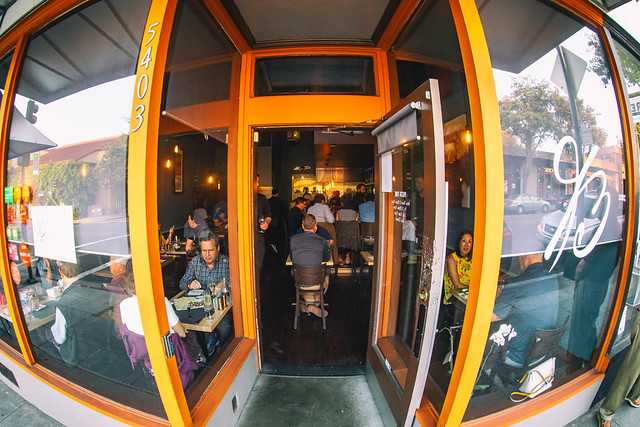
Belotti, Oakland, California

19 Aug

Had dinner tonight at the lovely Belotti on College Avenue in Oakland, California — a wonderful Italian restaurant with some of the most amazing dishes. Definitely a memorable meal and definitely a new local favorite. Since we were speaking Italian, brought a nicely cellared 1998 Barolo which accompanied the meal perfectly.

Belotti

Belotti

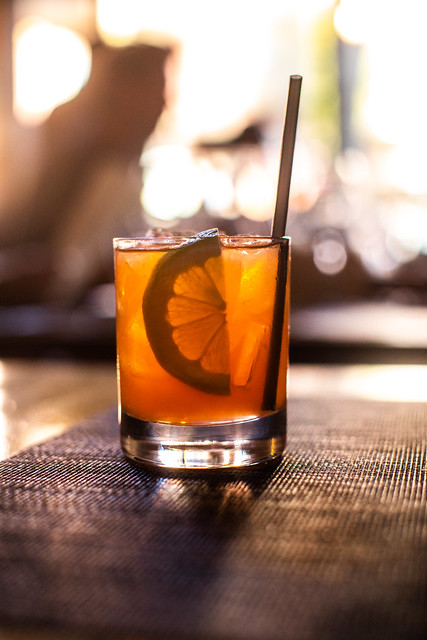
Sen?or Belotti

Clerico 1998  Ciabot Ginestra Mentin Barolo

Belotti
Hand cut certified Piedmontese ribeye dry aged beef tartare, carasau bread, parmigiano reggiano, micro arugula, aged balsamic, truffle caviar, quail egg yolk.

INSALATA DI BURRATA
INSALATA DI BURRATA — Organic mixed leaves, celery, California nectarines, Italian burrata, crostini, Piedmontese amaretti cookies, 8 years aged balsamic Giuseppe Giusti

Tortino
My favorite dish of the night. Don’t miss this one! Tortino. Organic spinach flan with runny egg yolk center, Grana Padano D.O.P. sauce, sauteed spinach, brown butter, Alba black truffle.

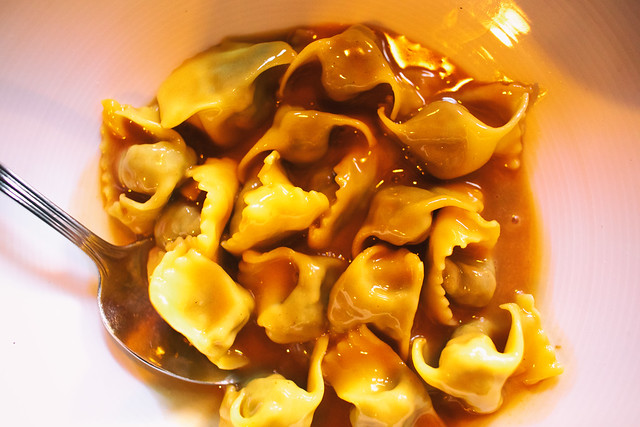
AGNOLOTTI DI LIDIA
AGNOLOTTI DI LIDIA — Traditional Piedmontese style stuffed pasta with beef shank, flat iron, pork loin, sausage, escarole, spinach, parmigiano, beef reduction

BRASATO
Brasato — 5-hour braised flat iron, Italian organic polenta, organic hen of woods mushrooms, nebbiolo reduction

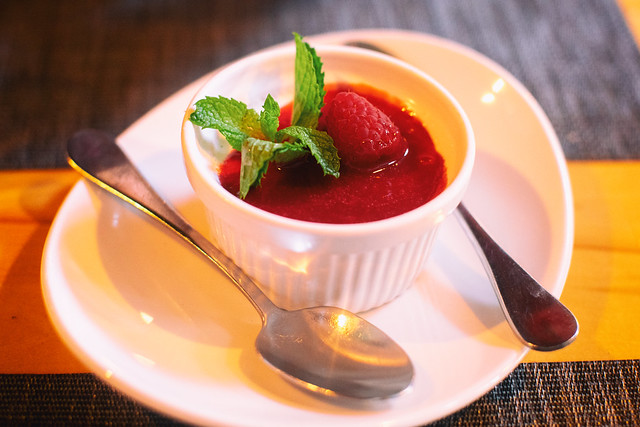
Panna Cota
Panna Cota for dessert.


Thomas Hawk Digital Connection

 
Comments Off on Belotti, Oakland, California

Posted in Photography


8 Elementary Travel Photography Mistakes to Avoid When Starting Out

19 Aug

Starting out in photography may seem like a daunting task. There are so many things to learn and practice that sometimes it can seem like an impossible task. Unfortunately, there are no shortcuts and if you want to take better photos then you need to be willing to put the hours of practice and learning in.

The good news is that these days there are lots of resources online that can help you. To get you started here are 8 elementary travel photography mistakes to cut out when starting in photography.

temple in asia in golden light -  Travel Photography Mistakes

Mistake #1 – Setting Your Camera On Auto

It always amazes me when I see newbie photographers with the latest expensive DSLR, using the auto mode. Besides capturing better quality photos from a resolution point of view, the other main benefit of DSLRs is the amount of control that you have over the photo taking process.

Admittedly auto functions on cameras are a lot better these days. But often it means compromises which are not necessarily best for the image. For example, if your camera is setting your ISO too high you will get a lot of noise in your photo. Instead, you may decide that actually underexposing your image slightly, which you can then adjust in post-production, will be a better compromise than extra noise.

But the biggest reason you should avoid auto mode when starting out is that it will stop you from learning. You need to learn to be able to set your shutter speed and aperture. You need to learn when and how much to raise your ISO by because it’s the only way that you can have full control over the final outcome.

auto mode on DSLR -  Travel Photography Mistakes

Mistake #2 – Shooting in JPEG

I can’t see any reason why anyone would want to shoot in JPEG format with a DSLR camera. Unless you are on a specific brief that requires instant upload of the images to the client, capturing JPEGs shouldn’t be an option. The only reason that people use JPEG mode in the camera is to save disk space.

But ask yourself if it’s worth compromising the quality of the photo for the sake of buying a couple more memory cards?

If your camera has RAW files (which all DSLRs and most mirrorless and compact cameras do these days) that’s what you should use. It gives so much more flexibility when it comes to post-processing, supplying images to clients, and even printing them out.

Even if you plan to only use your images on social media you are better off capturing the images in RAW, post-processing them and then saving them as JPEGs.

raw setting on a DSLR menu -  Travel Photography Mistakes

Mistake #3 – ISO Too High

A few years ago I remember bumping into an amateur photographer in Vietnam. As we got talking it became apparent that he didn’t understand what ISO actually was and how it affected his photos. He just assumed it was a number that allowed him to take photos in most conditions. So while his ISO was at 6400, his shutter speed was 1/4000th.

For those of us who were photographing in the days of film, ISO was the sensitivity of the film to light. So if you wanted to capture photos in darker conditions you would use a roll of film with a higher ISO.

This concept is exactly the same now in digital photography. The higher your ISO the more sensitive the camera’s sensor is to light. The downside of this is that the higher your ISO is, the more noise you will get in your image.

So while the amateur photographer I met was able to capture photos in any and lighting conditions, all of his images when zoomed-in were soft and grainy. So one of the biggest tips for any aspiring photographer is to always keep your ISO as low a possible and only increase it as much as you have to in order to get the shot.

The Kremlin -  Travel Photography Mistakes

Image taken at 4000 ISO means noise and an image lacking sharpness.

Mistake #4 – Shutter Speed too Slow

One of the biggest struggles for newbie photographers is often capturing sharp images. One reason could be that the camera has been focused on the wrong part of the image. The other big reason is often that the photographer didn’t use a fast enough shutter speed.

At slow shutter speeds of 1/60th or slower, you simply will not be able to hold the camera steady enough for sharp photos. Even 1/60th for some people might be too slow so it’s worth testing this when you are starting out.

Start capturing photos of the same subject at 1/100th all the way down until the image is blurred. You’ll then know how slow you can go. But your shutter speed is also dependent on how fast the object that you are photographing is moving and the lens you’re using.

For example, you might be able to capture a photo of someone running with a shutter speed of 1/250th. But a fast-moving car would need a faster shutter speed to freeze it. If you’re using a 300mm lens you will also need a faster shutter speed (keep the shutter speed as a reciprocal of the focal length so 1/300th).

With experience you will learn what shutter speed you will need so make sure you practice photographing different moving objects.

blurry trumpet player -  Travel Photography Mistakes

Shot at 1/40th of a second. This was not fast enough to freeze the action so the image is blurred.

Mistake #5 – Photographing at Midday

For any outdoor photography, light is often the key component of turning an okay image into a great image. As such photographing at midday when it’s bright and sunny will usually mean your images will look flat as the harsh light washes out shadows. So try to avoid photographing around midday and instead build your shoot around early morning or late afternoon/evening.

 Travel Photography Mistakes - two guys by a lake

The light is too harsh and so the image looks flat.

Mistake #6 – Not Being Ready

One of the great satisfactions for photographers is capturing those fleeting moments that would otherwise be missed. But to do that you have to be ready.

That means having your camera out of your bag, turned on, with the lens cap off. You should also get into the habit of adjusting your settings as you are moving around to cater for the conditions so that you are ready to capture the image when the opportunity arises.

rural farm with pigs in Asia -  Travel Photography Mistakes

Mistake #7 – Highlights / Shadows Clipped

One of the key tools for you as a photographer is the histogram. Even if you don’t fully learn or understand how to read one, the one thing you should know is how to use it to see if your highlights and shadows are within an acceptable range.

Highlights are bright areas in your photos and shadows are dark areas. If your highlights are too bright they may actually be completely white with no detail at all. Similarly, if your shadows are too dark they will be completely black. This is called “clipping”.

The best way to check this at the time of taking the photo or in post-production is to use your histogram. If any part of the histogram is cut off on the left there are pure black areas in your image and if it is cut off on the right there are pure white areas in your image.

By spotting this on your histogram you can either adjust your settings to avoid clipping or fix any issues in post-production.

photo with clipped areas -  Travel Photography Mistakes

The areas highlighted in red are pure white and the areas highlighted in blue are pure black. In other words, those areas are “clipped” and will have no detail.

Mistake #8 – Photo Not Straight

Whether you are an advocate of post-processing or someone who doesn’t believe photos should be altered, the one thing that you should always do is to ensure that your images are straight.

Of course, it is best to get things right in-camera when you are taking the photo. Some DSLRs have various elements to help you get your image straight when you look through the viewfinder or on the LCD screen.

But if you find that your image is not straight, make sure you fix it in post-production.

grid view on a DSLR screen -  Travel Photography Mistakes

Conclusion

Most people who start out in photography will make some of these mistakes along the way. The important thing is to learn from them and move on. But if you can cut these mistakes out from the start you’ll be well on your way to capturing better photos.

Have you made any mistakes that others should avoid? Please share your experiences below.

The post 8 Elementary Travel Photography Mistakes to Avoid When Starting Out appeared first on Digital Photography School.


Digital Photography School

 
Comments Off on 8 Elementary Travel Photography Mistakes to Avoid When Starting Out

Posted in Photography