RSS
 

Archive for May, 2018

Not your ordinary camera bag: Rhake waterproof pack with Camera Capsule insert review

26 May

The Rhake Weatherproof Bag + Camera Capsule
$ 365 (bag) + $ 130 (insert) | MissionWorkshop.com

The Rhake pack has a roll top giving it a decent degree of expansion.

The Rhake waterproof backpack by Mission Workshops doesn’t look like an ordinary camera bag – instead it looks a lot more like a high quality bike messenger pack or something you might take on a weekend trip when packing light. And that’s the point. The bag’s 22L main compartment is designed to be multi-functional. Once you slide the Capsule Camera insert ($ 130) into the Rhake you have a camera bag with a utilitarian design, albeit with a very high price tag.

The Capsule Camera insert that slides into the Rhake pack.

Though this pack is not designed specifically with photographers in mind, I was intrigued to find out just how functional it could be.

Specifications

  • Exterior: 21 x 13 x 5 in / 53 x 33 x 13cm
  • Interior Volume: 22L
  • Capsule Insert: 9.75 x 17.75 x 4.25in / 25 x 45 x 11cm
  • Laptop Compartment: Dedicated 17in Exterior Pocket
  • Weight: 3.1lbs / 1.4kg

Design & construction

The first thing I noticed about the Rhake was the high quality construction – Mission Design guarantees their products for life – which makes me believe that this thing was built to last. The bag is made of weatherproof nylon fabric called HT500 that is apparently exclusive to the company. It gives the pack an understated look and a good degree of water and stain resistance.

The Rhake pack’s laptop compartment can fit up to a 17″ computer. The pack also has a dedicated tablet compartment.

The second thing I noticed about this bag was the amount of organizational pockets. There are technically two zippered compartments that are large enough to fit a laptop (a dedicated exterior pocket, shown above left, and a second one within the 22L main compartment). On the back of the bag, opposite the exterior laptop pocket, there is a mesh water bottle pocket that tucks away when not in use.

There are numerous options for organization within this bag to suit your tastes

The front of the Rhake features a dedicated 10” tablet pocket and two accessory pouches (one at the top of the bag and one at the bottom) for stashing chargers, spare batteries or other items that need to be accessed quickly.

There are two zippered front pockets with plenty of room to organize smaller odds and ends. There are also two accessory pouches, one at the top (accessible via the roll top) – and one at the bottom (accessible via zipper).

There are also two larger zippered front pockets, one of which is filled with three smaller interior zippered mesh pockets. In short, there are numerous options for organization within this bag to suit your tastes.

The straps are well-padded and a horizontal strap offers added stability.

The back of the Rhake is made of perforated foam and there is a luggage handle pass-through for use with roller bags. The straps have a nice amount of padding and feature an additional horizontal buckled strap.

The camera insert can be accessed from the top of the bag. A look inside the Rhake pack once the camera insert has been removed.

The Camera Capsule insert is accessed from the top of the Rhake pack. The inside can be customized to your taste using the padded partitions. There’s also a back pocket in the insert where you can slide in an 11″ laptop or tablet.

A close-up look inside the Camera Capsule insert. I was able to fit two bodies, several lenses and a flash.

In the field

All of my photographer friends who saw the Rhake in action immediately complimented the style of this bag. It looks good, and it can comfortably hold a large amount of gear. I loved the many organizational pockets and those tiny mesh interiors were a great place for all of my miscellaneous items that I end up with at a shoot.

Once it’s packed, the front is snapped together and the top rolled shut, the Rhake pack is a surprisingly compact gear bag with the ability to expand to hold a large amount of equipment.

Its compact silhouette made it a good for riding the subway (even during rush hour) and hauling it around didn’t make me feel like I was in danger of destroying a shoulder.

There’s no way to access most of the gear stored within the Camera Capsule insert unless you completely remove it from the bag

Unfortunately, there is one glaring design flaw with the Rhake: there’s no way to access most of the gear stored within the Camera Capsule insert unless you completely remove it from the bag. For some photographers, this might seem like a minor oversight; after all the Rhake is a multi-functional bag, but I found this design element to be really inconvenient. It was easy enough to access my main camera body through the top zipper, but if I wanted to switch lenses I needed to totally unpack the 22L compartment – which is kind of a pain when working in the cramped quarters of a dark music venue.

When the bag is fully packed it also takes a little bit of elbow grease to remove the Camera Capsule from the main compartment. I imagine that with more use the bag’s structure will become less tight, but on the shoots I took the Rhake to I found myself having to spend a few extra moments safely removing the capsule from the bag. The Camera Capsule essentially fills the 22L compartment, making it difficult to stash anything else in there (a jacket, supplies for an overnight trip, etc.). I’d be curious to see how the Rhake would function with smaller camera inserts like the Topo Camera Cubes.

What’s the bottom line?

The Rhake’s construction is high quality, the design is aesthetically pleasing and it can hold a good deal of gear without looking bulky, making it great for everyday use. But the bag is pricey and the multi-functionality aspects make certain elements of the design inconvenient for photographers. Ultimately, if you’re looking for a dedicated camera bag, there are other more cost-friendly and functional options out there. However, if you want a pack that can pull double duty as a bike bag or a weekend travel pack, the Rhake might be for you.

What We Like:

  • Utilitarian design
  • Durable construction
  • Slim profile
  • Ample organizational pockets
  • Holds a lot of equipment
  • Multi-functional bag, could be used as a camera bag or for something else

What We Don’t Like:

  • High price tag
  • Inability to access lenses in Camera Capsule without unpacking

Rating:

Articles: Digital Photography Review (dpreview.com)

 
Comments Off on Not your ordinary camera bag: Rhake waterproof pack with Camera Capsule insert review

Posted in Uncategorized


RED and Lucid unveil 8K 3D camera that produces 4V holographic video in real time

26 May

Computer vision company Lucid and cinema camera maker RED have partnered to create an 8K 3D camera that can capture 4-view (4V) holographic images and video in real-time. The camera is designed to work with RED’s upcoming holographic Hydrogen One smartphone—both by shooting holographic content that can be viewed on the phone’s 4V screen, and by using the modular phone as a “viewfinder.”

The camera itself (which has yet to be named) will be made by RED, but it will be powered by Lucid’s “real-time 3D Fusion Technology.” This tech generates 3D/4V footage in real-time, promising to turn a processing-intensive task into “an instantaneous point-and-shoot experience.”

The camera looks like any other RED cinema camera… sort of. Except instead of one 8K sensor the camera uses two “perfectly hardware-synced” 4K sensors and a beam splitter to capture and output 8K 4-view footage. That footage can be viewed after the fact or even live using the upcoming RED Hydrogen One smartphone, which will be able to integrate directly into the RED 3D/4V and act as a 3D viewfinder.

It’s important to not that this isn’t just a concept. RED and Lucid had a working prototype shooting scenes at the Hydrogen One launch party on May 19th.

If you see this as a gimmick—and an expensive one at that—you’re probably not alone. But Lucid CEO and Co-Founder Han Jin has faith the world is ready for, and in fact craving, 3D/4V content you can digest without goggles or glasses.

“This partnership allows us for the first time to deliver the highest-quality 3D capture to our customers, and now they can view the content immediately in 3D/4V without headsets,” says Jin via press release. “At a time when two of the biggest challenges in the industry have been resolution and easy viewing of 3D content, we believe this is the solution everyone has been waiting for.”

We don’t have official pricing and release date information just yet. All Lucid and RED will reveal is that the camera—colloquially called the RED 3D/4V but still officially unnamed—will “be rolled out” in Q4 of 2018. To learn more about Lucid’s tech or this strange new camera, read the full press release below or visit the Lucid website.

Press Release

Lucid Partners with RED to Build 8K 3D/4V Camera for Hydrogen One

Collaboration will result in the first camera to convert full 8K 3D/4-View (4V) holographic images and videos in real time and the capability to dynamically adjust lens distances for the best 3D focus and zoom

Santa Clara, CA – May 22, 2018 Lucid, the maker of the first VR180 3D camera, LucidCam, announces today it is working with Hollywood camera maker RED to build the next generation prosumer 3D/4-View (4V) camera for 8K video and image capture. The new camera is the first dual camera to give users full 8K video and picture capabilities converting to 4V in real-time while allowing them to shoot like professionals with dynamically adjustable lens distances for the best 3D focus and zoom. By attaching the soon-to-be-released modular holographic phone–RED Hydrogen One–to the camera, users will be able to view 3D/4V content in post and live as if it were the viewfinder.

The new RED camera is powered by Lucid’s real-time 3D Fusion Technology, transforming the time and processing-intensive 3D/4V workflow into an instantaneous point-and-shoot experience users crave. The look and feel of the new camera sticks to RED’s previous designs, but this time it has two perfectly hardware-synced 4K cameras which leverage a beam splitter to capture and convert the output to 8K 4V (.h4v) files. Once the content is created, all the high resolution 3D/4V videos and images can be distributed on YouTube and Facebook as well as through RED’s curated content universe.

“Having RED as a partner allows us to combine the best of both worlds – the highest resolution and quality hardware from RED with the most advanced software, our 3D Fusion Technology,” said Han Jin, CEO and co-founder, Lucid.

The RED and Lucid partnership enables both companies to extend their customer reach. Over the past year, Lucid has shipped and sold thousands of its VR180 3D LucidCams through Amazon and Best Buy as well as direct to consumers online, confirming the market interest and demand for creating and consuming such content. With Lucid’s solid consumer base and RED’s base of independent filmmakers and Hollywood producers, the new camera meets the need of a large, combined audience. The magic of 3D, VR and AR videos and images created by both the LucidCam and the RED 3D/4V camera can be enjoyed on the Hydrogen One without the hassle of wearing headsets.

The unique functions of the Hydrogen One phone in combination with the new 3D camera were showcased with a live 3D/4V preview at RED’s launch party on May 19th. Many people came to experience the holographic display capabilities, which provide a unique ability to let users look around and behind objects through 4-Views, and allow for viewing 3D, VR and AR content without any glasses or goggles. This phone also attaches easily to RED’s new camera and can act as a 3D viewfinder.

“This partnership allows us for the first time to deliver the highest-quality 3D capture to our customers, and now they can view the content immediately in 3D/4V without headsets,” said Jin. “At a time when two of the biggest challenges in the industry have been resolution and easy viewing of 3D content, we believe this is the solution everyone has been waiting for.”

The camera will be rolled out in Q4. Exact pricing is to be announced, as is the name of the camera. It will be sold through RED and its reseller channels.

For more information about Lucid, visit www.lucidcam.com.

Articles: Digital Photography Review (dpreview.com)

 
Comments Off on RED and Lucid unveil 8K 3D camera that produces 4V holographic video in real time

Posted in Uncategorized


Tips for Using On-Camera Flash for Beginners

26 May

Flash is a challenging subject and can be confusing if you’ve never used it. These two videos will give you an overview of some flash basics you need to know, and how to take the next step when using flash – bouncing it for better lighting.

On-Camera Flash Basics

In this video, Chris from The Camera Store gives you a crash course in some on-camera flash basics. He covers what you need to know to get your flash photos looking better and more natural so you don’t have subjects with deer in the headlights looks or black cavernous backgrounds with no light.

?

Flash for new users

?

Next, this video from Mark Goodin of RealWorld will walk you through understanding some of the settings on your flash and how to use it to make better light on your subject. He even gives a couple tips for diffusing your on-camera flash (the built-in one that pops up) so it isn’t so harsh.

Want more?

If you want more flash photography tips, try these dPS articles:

  • A Quick Guide to Using Bounce Flash for More Natural-Looking Photos
  • How to use Off-Camera Flash to Create Dramatic Images with Cross Lighting
  • What is a Flash Bracket and Why Do You Need One?
  • How to Understand the Difference Between TTL Versus Manual Flash Modes
  • Flash Shopping Guide – 5 Things to Consider When Buying a Speedlight
  • Tips for Using Speedlights to Create the Right Lighting for Outdoor Portraits

The post Tips for Using On-Camera Flash for Beginners appeared first on Digital Photography School.


Digital Photography School

 
Comments Off on Tips for Using On-Camera Flash for Beginners

Posted in Photography


Zeiss launches new lineup of lightweight and compact ‘Supreme Prime’ lenses

26 May

Zeiss has announced a new lineup of 13 ‘Supreme Prime’ lenses for large format cinematographers who want smaller and lighter glass that still produces top-quality results. The kind of lenses that’ll make your salivary glands work… and your wallet groan.

The Supreme Prime range will comprise focal lengths from 15mm to 200mm, and Zeiss says that most of those lenses will have a maximum aperture of T1.5. In fact, ten of the focal lengths will offer a maximum aperture of T1.5, while the 15mm and 150mm will be T1.8, and the 200mm will be a T2.1.

Despite their diminutive size, Zeiss stresses that the Supreme Primes are designed for high-end advertising work and movie production; consequently, they will be compatible with large format (full-frame) movie cameras such as the Sony Venice, ARRI Alexa LF, and the RED Monstro. Zeiss says the lenses will be versatile and able to create different looks because of their “gentle sharpness, the aesthetic focus fall-off, and elegant bokeh” which the company claims makes them suitable for a wide range of production styles.

Communication between the lenses and the camera will be performed via the Zeiss eXtended Data and Cooke’s /i metadata protocols. These record optical characteristics and lens settings to every frame recorded to assist post-production processes, especially when visual effects need to be added to the footage.

The 25mm, 29mm, 35mm, 50mm, and 85mm lenses will be released in August 2018 and the 100mm will be ready in December. All six can be purchased together as a set for $ 108,000, but you’ll have to wait until 2019 for the 15mm, 18mm, 21mm, 65mm, 135mm and 150mm focal lengths to finish drip-feeding into the range. The 200mm T2.1, meanwhile, will arrive in 2020.

To see the new Zeiss Supreme Prime lenses in action, check out the sample film below shot with these lenses on the Sony Venice, Phantom 4K, and RED Monstro VV. And if you want to learn more about the lenses, head over to the Zeiss website.

Press Release

New High-End Cinema Lens Family ZEISS Supreme Primes

With its 13 high-speed, full-frame, prime lenses for high-quality film productions, ZEISS is focusing on maximum quality, low weight, and significant versatility when it comes to creating superb visual imagery.

ZEISS has introduced a new family of high-speed lenses for high-end film production: The ZEISS Supreme Prime family consists of 13 lenses with fixed focal lengths between 15 and 200 millimeters, the majority with a maximum aperture of T1.5. “The lenses are designed for film productions of an extremely high quality,” says Christophe Casenave from ZEISS. “They are perfect for high-budget advertising or feature films, for example.” ZEISS Supreme Primes are designed to cover cinematic large format camera sensors and are compatible with all of the latest camera models, such as the Sony Venice, ARRI Alexa LF, and RED Monstro. According to Casenave, the versatility of the Supreme Prime lenses to create different visual looks is due to the gentle sharpness, the aesthetic focus fall-off and elegant bokeh. The lenses are extremely flexible and can be used equally well for science fiction thrillers as well as for dramas.

Compact and Lightweight

“Weighing an average of 1600 grams (3.5 pounds), ZEISS Supreme Primes are significantly lighter and smaller than comparable lenses on the market,” says Casenave. With these compact and lightweight lenses, ZEISS is responding to many camera operators’ desire for compact equipment that still meets the highest standards of quality. “ZEISS Supreme Primes are unbelievably rugged and reliable. Regardless of whether filming in the desert or in the Arctic, the lenses perform flawlessly. And in the event that something should ever break, our worldwide service network provides fast and professional help.”

ZEISS eXtended Data Metadata Technology

The ZEISS Supreme Primes are equipped with the ZEISS eXtended Data metadata technology. Introduced in 2017, ZEISS eXtended Data provides frame by frame data on lens vignetting and distortion in addition to the standard lens metadata provided using Cooke’s /i technology1 protocol. This greatly speeds up the entire film production’s workflow. When using visual effects for example, with only a few clicks, the lens properties can be removed so that computer-generated effects imagery can be accurately applied to the captured imagery. The lens properties can then be reapplied with the same click of a button and combined with the film material to create a realistic image. Previously, all of the data had to be measured manually so that it could be corrected in post-production. But ZEISS eXtended Data eliminates this time-consuming job.

Price and Availability

The first ZEISS Supreme Primes lenses with focal lengths of 25, 29, 35, 50, and 85 millimeters will be available starting on August 1, 2018. The ZEISS Supreme Prime 100 millimeter will be available in December 2018. The set of six lenses, consisting of the focal lengths mentioned above, is available from ZEISS Cinema lens dealers for 108,000 USD. The remaining focal lengths will be released successively until 2020.

Articles: Digital Photography Review (dpreview.com)

 
Comments Off on Zeiss launches new lineup of lightweight and compact ‘Supreme Prime’ lenses

Posted in Uncategorized


Nikon D5 firmware update adds useful ‘recall shooting functions’ feature

26 May

Nikon has released firmware version 1.30 for its D5 professional DSLR, and the new camera software offers a new feature that’s potentially very useful: recall shooting functions.

The “recall shooting functions” option is now available for Custom settings f1 (custom control assignment) and can be configured so that pressing and holding specific controls will recall previously saved exposure settings (including shutter speed and aperture). The function is designed to allow for quick changes of shooting parameters in variable light conditions.

The function can be assigned to the Preview button, Fn1 button, Fn2 button, AF-ON button, Sub-selector center, AF-ON button for vertical shooting, or Lens focus function buttons. If you are using a WR-1 or WR-T10 remote control, it can also be assigned to the Fn buttons on those controls. An addendum to the camera manual that explains the new function in more detail can be downloaded on the Nikon website.

All other changes in this update are fairly minor. The focal lengths of some AF-S and AF-I lenses that are displayed with a teleconverter attached to the camera have been updated, and the time zone display in the Setup Menu only shows the names of major cities in the currently selected time zone. There are also a couple of minor bug fixes.

To read the full change log or download the new firmware for yourself, head over to the Nikon website.

Articles: Digital Photography Review (dpreview.com)

 
Comments Off on Nikon D5 firmware update adds useful ‘recall shooting functions’ feature

Posted in Uncategorized


SLC-0L-02: Shiny Object, Using an iPhone and the Sun

26 May

Whether photographing people or objects, how you approach your lighting is far more important than what camera and lighting gear you use.

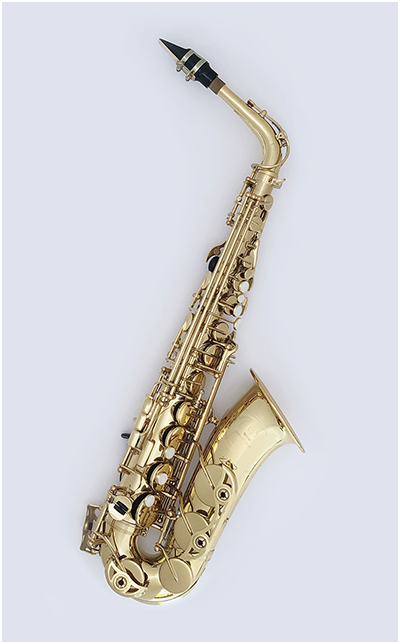
To illustrate, today we are going to photograph a complex, mirrored surface—an alto saxophone—using just an iPhone for our camera and the sun as our light source. Read more »
Strobist

 
Comments Off on SLC-0L-02: Shiny Object, Using an iPhone and the Sun

Posted in Photography


Weekly Photography Challenge: Sunsets – With Prizes from ViewBug

26 May

Who doesn’t love a good sunset? It’s colorful and makes you feel all warm and fuzzy inside, right?

Think you can take a great sunset photo? It’s not as easy as just pointing your camera at the sun. In this week’s photography challenge it’s time to get out and shoot some sunsets and share your images with us.

Need some tips? Try these dPS articles:

  • 5 Reasons Why Your Sunrise or Sunset Photos Don’t Look So Stunning
  • How to Take Better Sunset Photos
  • How to Plan and Take Killer Sunset Photos on Your Next Vacation
  • How to Shoot Stunning Photos at Sunrise and Sunset
  • Tips for Location Scouting to Get the Perfect Sunset Photograph
  • Tips for Doing More Spectacular Sunset Photography

Weekly Photography Challenge – Sunsets

Simply upload your shot into the comment field (look for the little camera icon in the Disqus comments section) and they’ll get embedded for us all to see or if you’d prefer, upload them to your favorite photo-sharing site and leave the link to them. Show me your best images in this week’s challenge. Sometimes it takes a while for an image to appear so be patient and try not to post the same image twice.

Share in the dPS Facebook Group

You can also share your images in the dPS Facebook group as the challenge is posted there each week as well.

Win Prizes from ViewBug

We’re excited to introduce a sponsor and prizes for this week’s challenge. ViewBug is the World’s biggest photo contest community with over 70 contests always open for submissions. Win prizes, exposure, and the bragging rights. It’s FREE to join! This week, ViewBug will be awarding three winners prizes!

One Challenge winner will receive 1 year of ViewBug PRO ($ 139 value) plus a free photography logo bundle ($ 59 value). Two Runners Up will receive a 1 year of ViewBug Premium ($ 59 value) plus a free photography logo bundle ($ 59 value).

To Enter

Participate in the challenge as you normally would (as described above) by posting your photo. To be considered for a prize you just need to complete the entry form below (or via this link) and submit your photo.

The Contest is open continuously from 05:00 am Australian Eastern Standard Time (“AEST”) on May 26, 2018 (03:00 pm United States Eastern Daylight Time (“EDT”) on May 25, 2018), through June 2nd 2018, 04:59am AEST (June 1st, 2018, 02:59pm EDT) (the “Contest Promotion Period”).

Full Terms and Conditions Digital Photography School Weekly Challenge Sunset – ViewBug T&C

Winners are announced on the Weekly Challenge Winners page on 9th of June.

Loading…

The post Weekly Photography Challenge: Sunsets – With Prizes from ViewBug appeared first on Digital Photography School.


Digital Photography School

 
Comments Off on Weekly Photography Challenge: Sunsets – With Prizes from ViewBug

Posted in Photography


Sigma announces price and ship date of 105mm F1.4 ‘bokeh master’ Art lens

26 May

Sigma’s special ‘bokeh master’ 105mm F1.4 DG HSM Art lens made quite a splash when it was first announced back in February, and now Sigma is finally revealing when it will ship and how much it will cost. If you’re in the market for this behemoth of a lens—seriously, we got a hands on at CP+… it’s huge—for either Nikon, Canon, or Sigma mounts, you’ll have to pony up $ 1,600 USD and wait until “late June” to get it.

For Canon and Sigma shooters, this is a whole new speed of lens that you’ve never had access to before. For Nikon shooters, it’s an opportunity to save $ 600 on the Nikon 105mm F1.4E ED lens, which is currently going for $ 2,200.

To learn more about this lens, check out our hands-on coverage from CP+, read the full pricing and availability press release below, or visit the Sigma website.

Press Release

Sigma Announces Pricing and Availability for Its 105mm F1.4 DG HSM Art Lens

The “Bokeh Master” will begin shipping in Canon, Nikon and Sigma mounts in late June for a retail price of $ 1,599.00 USD

Ronkonkoma, NY – May 25, 2018 – Sigma Corporation of America, a leading still photo and cinema lens, camera, flash and accessory manufacturer, today announced that its 105mm F1.4 DG HSM Art lens will be available in Canon, Nikon and Sigma camera mounts in late June for $ 1,599.00 USD through authorized US dealers. The Sony E-mount availability will be announced later.

The “Bokeh Master” with Longest Focal Length Among Sigma Wide-Aperture F1.4 Art Lenses

The Sigma 105mm F1.4 DG HSM Art is the ninth lens in the Sigma F1.4 line-up designed for full-frame cameras. To combine outstanding wide-aperture, mid-telephoto performance with F1.4 brightness at maximum aperture, this lens incorporates 17 optical elements in 12 groups, including three FLD glass elements, two SLD glass elements and one aspherical lens element. This optical setup minimizes axial chromatic aberration to deliver ultra high resolution along with ample peripheral light volume, which minimizes vignetting. As a result, the area in focus is extremely sharp, while the out-of-focus area features a beautiful bokeh effect with highly natural colors, making this a desired lens for portrait photography. The optical design also minimizes sagittal coma flare, making it an excellent choice for capturing starry skies.

Featuring the Sports line level dust- and splash-proof design, this lens can be used in varying weather conditions. The high-speed, high-accuracy autofocus helps photographers react in an instant to capture those special moments.

Other lens highlights include carbon fiber reinforced plastic hood for durability and compatibility of the Canon mount lens with the Canon Lens Aberration Correction function.

Articles: Digital Photography Review (dpreview.com)

 
Comments Off on Sigma announces price and ship date of 105mm F1.4 ‘bokeh master’ Art lens

Posted in Uncategorized


Video: How Tony and Chelsea Northrup won $40,000 in image theft lawsuit

25 May

Well-known photography educators Tony and Chelsea Northrup have published a new video that details the saga of a stolen photograph, and the eventual $ 40,000 settlement they received as a result of going after the offending party.

The image, a portrait of Chelsea originally taken for a book cover, was used by an Australian company to promote a smartphone selfie case with built-in LEDs. According to the duo, they became aware of the unauthorized usage in 2016 after someone who recognized the image alerted them. Tony sent the company an email requesting information, he explains in the video, but instead received a letter from a lawyer hired by the company.

The lawyer’s letter claimed that a graphic designer hired by the company to design the product packaging had acquired the image “from a website” and used it as a stock image without the company’s knowledge. As the Northrups note, a high-resolution version of the image is the first result on Google when searching for “ring light portrait.”

The company, via the lawyer’s letter, had stated that it would recall all of the products with that packaging and cease use of material containing the image. However, Tony explains that the duo continued to receive images from followers showing the cases—complete with the pilfered portrait—being sold in Australian and New Zealand stores.

That ultimately set in motion a long legal tussle that involved hiring an Australian attorney willing to deal with an international copyright case. The duo explain everything that went into this process and the eventual $ 40,000 in settlement payments that resulted, with Tony estimating the company spent around $ 60k total when including fees.

Articles: Digital Photography Review (dpreview.com)

 
Comments Off on Video: How Tony and Chelsea Northrup won $40,000 in image theft lawsuit

Posted in Uncategorized


Apollo app for iOS uses dual-cam depth map to create impressive lighting tricks

25 May
Apple’s dual-camera setup can create a depth map to simulate background blur – but now, someone’s figured out how to simulate lighting effects with an impressive level of control.

Apple’s dual camera devices (the 7 Plus, 8 Plus and X to be precise) generate a depth map to create the effects of Portrait Mode and Portrait Lighting that we’ve all come to know well. Whether you love, hate or feel generally ‘meh’ toward fake background blur, things get interesting when Apple makes that depth map information available to third party app developers. Enter Apollo: Immersive illumination, a $ 1.99 iOS app with an unusual name and a few interesting tricks up its sleeve.

Apollo uses the depth map not for background-blurring purposes, but to allow users to add realistic lighting effects to photos after they’re taken. Up to 20 light sources can be positioned throughout an image, with the ability to adjust intensity, color and distance. With the depth information provided, light sources interact with subjects in a three-dimensional fashion, and can even be positioned behind a subject to create a rim light.

It’s hard not to be a little taken aback the first time you drag a light source around your image and see how it interacts with your subject

It’s essentially an interactive version of Apple’s Portrait Lighting, which applies different light style effects to images. Apollo’s effects are highly customizable, and with so many parameters to play with it’s naturally quite a bit more complicated to use than Apple’s very simple lighting modes.

In use

We’ve been messing around with the Apollo app (for an admittedly short period of time), and have to say we’re impressed with what it’s capable of – but that doesn’t mean we don’t have a few requests for the next version.

$ (document).ready(function() { SampleGalleryV2({“containerId”:”embeddedSampleGallery_7103999524″,”galleryId”:”7103999524″,”isEmbeddedWidget”:true,”selectedImageIndex”:0,”isMobile”:false}) });

Click through to see the images full-screen and see how many lights were used in the Apollo app.

It’s hard not to be a little taken aback the first time you drag a light source around your image and see how it interacts with your subject(s). You are able to adjust the color, brightness and spread of your source, which are all fairly self descriptive.

You can also change the ‘Distance’ of your light, or it’s position in Z-space; this means you can move the light to be closer to you, the photographer, or further away into the background of your scene.

Lastly, there are two global adjustments, ‘Shadows’ and ‘Effect Range.’ Shadows essentially controls overall image brightness, though it biases toward the darker tones. Effect Range adjusts the brightness of all of your lights simultaneously in the image, though keeping the brightness ratios between them constant as it does so.

Along the bottom are the parameters you’re allowed for each light source you create (up to 20). Two global adjustments are ‘Shadows’ which adjusts overall brightness and Effect Range which adjusts the brightness of all lights simultaneously.

Overall, it’s an incredibly neat – and kind of addictive – first effort. But there are a few things that we’d like to see addressed in future versions.

Currently, every new ‘light’ you create starts out with a certain set of default parameters. This is alright, except for the fact that the default color is a yellowy tungsten sort of thing; it should really just begin as ‘white.’

Also, if I’ve already tuned in a ‘light’ and just want another one based on those, it’d be nice to be able to duplicate one that I’ve already created instead of having to start from scratch each time.

And once you’ve finished with your new creation, you can save it out as a JPEG – but there’s no way to save the lights themselves so that you can come back and tweak later. Each time you exit to tackle another image, the app asks you, ‘Close photo and discard all changes?’ Well, I’d rather not discard them, but if I have to, then I suppose that’s that.

Lastly, it doesn’t look like there’s any way to preserve the blurriness of the background once you’ve added your lights. It’d be great to be able to still take advantage of the depth map and progressive blurring while adding in your own lighting sources.

Wrapping up

Okay, so those are some fairly major requests on our part. But we make them because we’re really blown away by what the app already offers, and are excited to see how it evolves. It wasn’t so long ago you’d need a powerful workstation and some serious software skills to manipulate lighting in the same way that this app does with a few taps and drags.

If you have a dual camera iPhone and want to give the Apollo app a try, head on over to the App Store yourself and take it for a spin.

Articles: Digital Photography Review (dpreview.com)

 
Comments Off on Apollo app for iOS uses dual-cam depth map to create impressive lighting tricks

Posted in Uncategorized