RSS
 

Archive for April, 2018

Nikon dominates World Press Photo 2018 camera breakdown

17 Apr
Photo by chuttersnap

Last week, the prestigious photojournalism contest World Press Photo announced its 2018 winning photos, and most of those winners included information about the gear used to capture their images. Taking advantage of this fact, Spanish photography website Photolari pulled that public data and created a series of graphs breaking down the equipment used by participating photojournalists.

Of the 129 winning images, 97 included gear details; though the graphs don’t represent the models were used by all participants, they do cover the majority. And the short version of the results goes something like this: Nikon dominated the brands, and the DSLR continues to dominate over mirrorless.

According to the breakdown, the Nikon D5, Nikon D810, and Canon EOS 5D Mark III tied for first place, with 11 winning photos each. Coming in second is the Nikon D800E and Canon EOS 5D Mark IV with seven units each. Finally, both the Nikon D4S and Nikon D700 tied for third place with six units each.

Nikon is the overall winner among gear use, representing a total of 51.5% versus Canon’s second place 29.9%. Other makers represented far smaller pieces of the pie, with Fujifilm taking 6.2%, Sony taking 5.1%, and both Pentax and DJI taking 2.1% each. Not represented in the percentage graph are three Leica models, two of them the M10 and the other a Leica SL.

Further revealing the type of gear used is another category: types of cameras. That breakdown reveals DSLRs comprised the majority of participants’ gear at 83.5%, with mirrorless taking second place at 11.3%, and other unspecified types representing a total of 5.2%.

This isn’t Photolari’s first breakdown of World Press Photo winner gear. Last year, the site found that Canon took the top three slots, with the 5D Mark III in first place, while the 5D Mark II and Mark IV models took second and third, respectively. Nikon wasn’t even represented until 7th place on last year’s breakdown. Photolari’s graphs also reveal an uptick in mirrorless popularity. In 2017, DSLRs claimed 88.8% of the “types” category, a figure that dropped to 83.5% in 2018. Mirrorless only claimed 5.55% in 2017, increasing to 11.3% this year.

That said, it’s important to note that Photolari’s 2017 graphs are based on only 36 out of 45 awarded photos. So while it’s nice to compare 2017 to 2018 and draw grand conclusions about the camera market, this is probably more an exercise in bragging rights than an accurate representation of camera company health.

Articles: Digital Photography Review (dpreview.com)

 
Comments Off on Nikon dominates World Press Photo 2018 camera breakdown

Posted in Uncategorized


5 Ways to Challenge Yourself as a Wildlife Photographer

16 Apr

As a wildlife photographer, often it can seem challenging enough just to find your subjects out in the field, let alone get close enough to take that perfect image. However, to develop as a photographer, constantly challenging yourself is a key ingredient to learning and growing, helping you to tell stories in a more meaningful and creative way through your images.

In this article, I will give you a few ideas to explore when you next head out on a nature photography shoot, to keep you challenged and growing as a photographer.

1 – Take one lens

One lens - wildlife photographer

Restricting yourself is often a great way to encourage creativity. Working with constraints can help you to think outside the box and explore ideas or ways of working that you might have missed in other cases. As photographers, having a boatload of lenses at our disposal means we have options to capture the world in a multitude of ways. Yet still, within this, we often become restricted within our view, choosing to consistently work with convention rather than explore creative options.

For example, if you are going to work with birds you will likely select your long telephoto, whereas, for insects or flowers, the obvious choice is a macro lens. However, if you decide to restrict yourself to a certain lens or focal length you have to use that in order to explore and create a photograph. That means that sometimes you’ll have to work in a new way, choose a different composition, or go for a different type of image than you would normally attempt.

For example, taking a macro lens out for a full day of shooting you might feel restricted. But the 100mm focal length (common for most macro lenses) is actually highly adaptable for working with a variety of subjects from landscapes to tiny insects, or even people and street images. Prime lenses further enhance this restriction, forcing you to zoom with your feet.

However, after a number of days solely focused on each lens in your bag, you’ll have a much greater appreciation for the wide variety of subjects and images it can produce. Thus helping you to be more creative with your choices in the future.

2 – Work wide

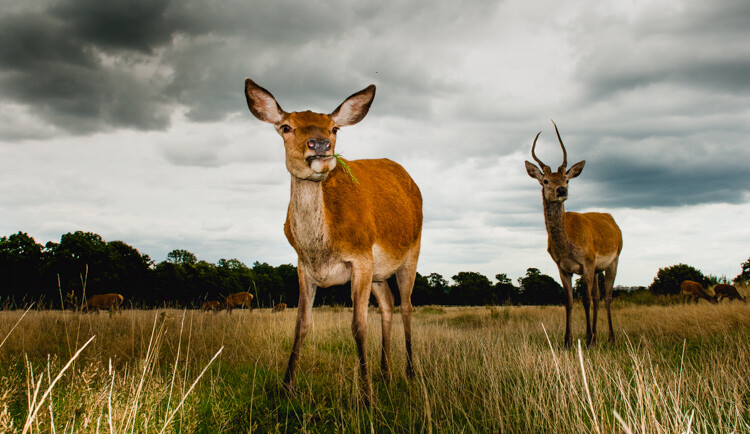
Shooting wide two deer in a field - wildlife photographer

For most wildlife photographers, the long telephoto is our safe haven. We know that when using a 300mm, 500mm or 600mm lens we can frame up our subjects and get wonderful clean portrait images. Allowing us to concentrate on our subjects and not necessarily needing to worry about the other elements in the landscape.

The thing is that, although telephotos are fantastic for filling the frame and showing close details of distant creatures, they don’t give an impression of scale. Images show with a long lens almost seem less immersive than shots taken with shorter focal lengths.

Of course, one of the biggest problems is that shooting wildlife with a wide lens is often a lot harder, (depending on the subject) than your traditional long lens wildlife photography. But this is a great learning curve. Yes, the complexities of predicting animal behavior, working out positioning for remote cameras and triggering them at the perfect time without always being able to look through the viewfinder is difficult. But the struggles will certainly push you to be a better wildlife photographer in the long run.

Try working with a wireless remote in the garden to get started. A simple bird feeder or setup for urban mammals is a great way to hone your skills, to add another string to your photographic bow.

Remote camera triggers - wildlife photographer

Remote camera setup

Remote triggered wideangle

Remote-triggered wide-angle shot.

3 – Add movement

Often, I hear wildlife photographers talking about always getting the image tack sharp. But in reality, how much in nature ever freezes dead still? Adding motion to your images is a great way to explore and develop your shooting style, adding drama to images and also helping the wildlife you’re recording to come alive in your frames.

When working in the field it can be tempting to always have that 1/1000 of a second shutter speed dialed in. Learning how and when to slow your shutter to display movement is a great skill, but it takes practice to get it right.

Often I find that for large moving creatures, such as deer, a shutter speed of 1/15th of a second allows enough movement into the frame to make great panning shots. In contrast, birds with their fast-moving nature mean that often 1/100th or 1/60th easily provides enough movement within the frame for lovely streaking effects.

a deer running - wildlife photographer

Birds in flight - wildlife photographer

Of course, in addition to panning with slow shutter speeds, keeping your camera dead steady and allowing the creatures to move is another effective technique for creating unique and captivating images of nature’s patterns and movements.

4 – Pick a theme and stick to it

Another way to challenge yourself as a nature photographer is to set yourself a theme to work on. This could be a practical theme like birds in flight, animal portraits, or in the landscape images. Another option is exploring a certain location or place with a geographical theme or even delving a little deeper to explore emotions or feelings as a base for a set of images.

The reason for shooting around a theme is to train yourself how to showcase and express your ideas through images more effectively. As a photographer, you are a visual storyteller. So being able to draw from inspirations, ideas, and emotions and express them photographically helps you to tell better and more powerful stories through your images.

Aim to develop a couple of small bodies of work, maybe three sets of three images, each with a different focus as a training exercise. It’s a great way to focus on areas where you’re less confident and give yourself a mini-assignment to develop and shoot to keep you focused on improving your work.

Shooting a set of images (3 images of deer)

5 – Shoot like you have one roll of film

A final way to challenge yourself is to go out on a shoot and pretend that you only have 36 images or a single roll of film. This is to force yourself to be more critical and picky with your images, choosing the perfect moment to get a shot rather than just taking a number to be sure one will be okay.

Shooting with a limit slows you down and makes you consider things more intently, thinking through your exposure, composition, and technique before shooting. The idea is that you only shoot one frame per subject, aiming to get it perfect on every image.

You can do this even more strictly by getting hold of an old school 1gb or 2GB memory card, the modern equivalent of a single roll of film. You can pick them up cheap on eBay and they are great training aids.

Small SD and film

Of course, if you want even more of a challenge why not try shooting an actual roll of film. With each frame literally costing you money, you will soon focus your shooting in order to make sure you nail it out on location. It’s good fun and a really great learning tool!

Conclusion

So there you have it, a quick rundown of five ways to challenge yourself as a nature or wildlife photographer to help develop your photography.

By focusing on specific challenges and setting yourself goals and tasks, you’ll certainly see your photography improve. As well, you will have more confidence going for those creative images when you’re on your next shoot.

The post 5 Ways to Challenge Yourself as a Wildlife Photographer appeared first on Digital Photography School.


Digital Photography School

 
Comments Off on 5 Ways to Challenge Yourself as a Wildlife Photographer

Posted in Photography


How to Simulate Venetian Blinds Lighting Using Photoshop

16 Apr

When you’re having a romantic dinner you light it with candles and not a bright reflector, right? That’s because light contributes to forming an atmosphere. When you’re making a photograph, measuring the right exposure is not the only thing that matters. Wouldn’t you agree that manipulating that light is what makes it or break it?

In this tutorial, I’ll show you how to simulate light coming in through a window, so that your photo has a warmer ambiance.

Venetian Blinds Lighting Effect Photoshop Tutorial Intro

Getting started

In this case, we’re going to make the effect of sunlight passing through a window with Venetian blinds. This is why the first thing you need to do is delineate the spacing in between the blinds. To make this task easier you can turn on the rulers, just go to Menu > View > Rulers so you can make the spaces more evenly.

Make a new empty layer by going to Menu > Layer > New Layer. Then select the Rectangle Marquee Tool and start tracing. They don’t have to be perfect just try to keep more or less the same width and the same spacing in between. The amount is up to you, for this example, I’ll do 8.

NOTE: Hold the Shift key down to add multiple rectangular selections.

Marquee Selection Venetian Blinds Through Window Light Photoshop Tutorial

Adding the light

Next, you need to fill the selections with white. You can either select the Paint Bucket Tool and click inside each of the rectangles, or you can go to Menu > Edit > Fill which will bring out a pop-up window. Just make sure the content is set to white and all the selected areas get colored at once when you click OK.

Edit Fill Venetian Blinds Through Window Light Photoshop Tutorial jpg

This doesn’t look very realistic yet, but don’t worry, we’ll make it better. To start, you need to give it some perspective to make it fit your image. For this, you can go to Menu > Edit > Transform > Perspective. Find the real light source and make the light (the white bars) smaller on that side. Then turn it and drag it until it feels as if the strips are coming out from that source.

Free Transform Venetian Blinds Through Window Light Photoshop Tutorial jpg

Tweak the light beams

Once it fits you need to make the white bars look more like light beams by smoothing them using a blur filter. Go to Menu > Filter > Blur > Gaussian Blur.

A pop-up window appears and you can set how blurred you want it by dragging the Radius slider. Make sure the preview option is checked so that you can see how your adjustment looks before you apply it. I’m leaving it at around 50 pixels but this is up to you. When you’re happy just click OK.

Gaussian Blur Venetian Blinds Through Window Light Photoshop Tutorial jpg

Then change the blending mode of the layer where your stripes are so that it integrates better with the background image. You can do this in the drop-down menu on top of the layers panel. Open it and select Soft Light blend mode.

SoftLigh Blend Mode Venetian Blinds Through Window Light Photoshop Tutorial

Apply a gradient

It’s already looking much better, there’s just one final touch that needs to be done. Because the light will obviously be stronger closer to the source and slowly fade away; you need to apply a gradient to achieve this effect.

Add a Layer Mask by clicking on the button that looks like a rectangle with a circle in the middle, located at the bottom of the layers panel. While the mask is selected, go to the Gradient Tool that is hidden behind the Paint Bucket Tool. Then from the top sub-menu, choose the one that goes from black to transparent.

Apply the gradient by dragging your mouse across your image. Follow the lines and make sure the white part of the gradient is at the end of the image where you want the light the brightest. If it’s not, you can just invert the layer mask, or undo it and try again.

Graded Layer Mask Venetian Blinds Through Window Light Photoshop Tutorial jpg

Finishing up

There you go, light passing through Venetian blinds from the window onto your subject without even needing a window!

Venetian Blinds Lighting Effect Photoshop Tutorial After

Applying the effect to the background only

This, of course, works if your subject is lit by the same source as the background, but what happens if you have two different light sources? Let’s do an example where we want only the background to receive the light from the window and the subject will be lit by a different light source.

Venetian Blinds Lighting Effect Photoshop Tutorial Before2

Start by doing exactly the same as you did in the previous example. When you’re done with that you have to add one more step. Duplicate the subject that you want to be in front of the Venetian blinds lighting effect.

You do this by selecting the object. It doesn’t matter which tool you use. In this case, I used a combination of the Quick Selection tool refined later in the Quick Mask. Once you have your selection go to Menu > Layer > New > Layer via Copy. A new layer will be created duplicating the subject that you selected onto an empty background; drag this layer to the top.

Venetian Blinds Lighting Effect Photoshop Tutorial Duplicate Layer

That’s it, your subject will be in front of the lighting effect and therefore won’t be affected by it. Give it a try and show us your results in the comment section below.

Venetian Blinds Lighting Effect Photoshop Tutorial After2

The post How to Simulate Venetian Blinds Lighting Using Photoshop appeared first on Digital Photography School.


Digital Photography School

 
Comments Off on How to Simulate Venetian Blinds Lighting Using Photoshop

Posted in Photography


Five Simple Exercises to Improve your Photography

16 Apr

In this article, you will get five simple exercises to help you improve your photography.

How to grow as a photographer

Everyone, from beginners to professionals, seeks to improve their photography. Yet we often struggle to do just that, repeatedly asking the question, “How do I actively move my photography forward?

macro photography flower - Five Simple Exercises to Improve your Photography

Learning to take top-notch photographs isn’t like learning a musical instrument, where you can practice fingerings and scales while slowly gaining skills. When it comes to improving photography, the path often seems nebulous, difficult to grasp.

It doesn’t have to be this way. There are more focused ways of improving your photography. Below, I discuss five of these exercises, which, if done consistently, will help you improve your photography by leaps and bounds.

Exercise #1: Photograph every day for a month

The first exercise is simple; photograph every day. This may sound easy, but it often isn’t. With a job and family and life, it’s surprisingly difficult to get out and do photography.

But I’d like to emphasize this, if you’re serious about improving your photography, start here. Make sure that you use your camera each day, even if you only take one image. Carve out a particular time of the day that works. Or, if it’s easier for you, carry a camera around in your purse/backpack/briefcase, and bring it out during your lunch break.

macro photography flower abstract - Five Simple Exercises to Improve your Photography

I’ve found that there’s a sort of magic that comes from photographing—not just consistently—but daily. Your camera becomes a familiar tool in your hands. You start to see compositions everywhere. The photographic medium starts to make sense.

Trust me, if you do this your work will improve fast.

Exercise #2: Make 10 unique images of one subject

One of the main barriers to photographic improvement is not the technique so much as it is the ability to see.

A great photographer often views a subject and starts to visualize the many possibilities, quickly rejecting those which won’t work, and selecting that which does.

macro photography flower abstract aster - Five Simple Exercises to Improve your Photography

Hence, choose a subject and start by taking the obvious photographs.

Then, rather than moving on, force yourself to look for more. Get in close and take some more abstract or detail shots. Move back and look for more environmental images. Alter the background, the angle, and/or the lighting. If you normally use a tripod, try working handheld, or vice versa.

macro photography flower aster abstract - Five Simple Exercises to Improve your Photography

This exercise is meant to improve your ability to see. It is meant to take you out of your comfort zone so that you go beyond the obvious, and start looking deeper at your subject. Once that is ingrained, the photographic possibilities begin to open up, and your images will become unique and more satisfying.

macro photography flower abstract aster - Five Simple Exercises to Improve your Photography

Exercise #3: Share only one image per week

Let me explain this one. Part of improving one’s photography involves becoming a better self-critic. If you cannot recognize where you need to improve, then it’s very difficult to improve at all. But if you can pinpoint your strengths and your weaknesses, then you can improve upon the weaknesses—and harness your strengths.

To this end, I recommend joining a photo sharing site, one that is geared towards photography. Flickr, 500PX, and Tumblr would work well (or the dPS Facebook group). Then post one, and only one, image per week. Make sure that you’ve looked through your recent work, and that the image that you’re sharing is your best.

Before posting, think to yourself, “What is it that makes this a strong image? What would make it better? And what was it that made me reject the other images in favor of this one?” Take note of your responses, and remember them the next time you’re out in the field.

macro photography flower coneflower - Five Simple Exercises to Improve your Photography

So why can’t you just do this privately, rather than posting to a photo sharing site?

I find that there’s a bit of pressure that comes from posting your pictures publicly. This forces you to work slightly harder in identifying your best images. However, if you would strongly prefer not to post your images publicly, you could adjust the settings on your chosen sharing site so that only you can view the images—but imagine that you’re assembling them for a gallery showing.

Exercise #4: Critique at least 10 images per week

Similar to Exercise #3, but with a slightly different focus. Learning to critique your own work is great, but it’s also important to look at a broad array of photography with a critical eye. Hence, join a photo critique forum, and critique at least 10 images per week.

There are a number of forums out there that I recommend for nature photographers like myself: Naturescapes, Nature Photographers Network, and Birdphotographers.net are all good ones. They should allow you to make a free account in order to comment on other images.

macro photography flower abstract pink - Five Simple Exercises to Improve your Photography

This will help you in a few ways. First, constantly looking at images will help you to internalize compositions and get a sense of what works and what doesn’t. It’s difficult to improve your own photography if you don’t have a sense of what good photography looks like.

Second, it may give you ideas for your own photography. By this, I don’t mean that you copy other people’s photographs directly. But you can take note of interesting techniques, camera settings, and compositions, and incorporate them into your own work.

Third, being forced to articulate, in writing, what you find pleasing about an image will go a long way toward being able to understand how to make your own images more pleasing.

Notice that I’m not telling you to post your images on the critique forum—but if you feel confident enough to do so, then that is an excellent way to improve as well.

Exercise #5: Work in another genre of photography

This exercise is for those who would self-identify as intermediate or advanced photographers. Early on in your photographic journey, I would recommend focusing on a single genre and improving within that genre.

street photography ann arbor nickels arcade - Five Simple Exercises to Improve your Photography

I took a break from macro photography to work on my street photography skills.

However, once you have a decent amount of experience, I find that it is really beneficial to get out of your comfort zone by working on another photographic genre (the more different, the better!). Stick with this genre for an entire month.

street photography ann arbor - Five Simple Exercises to Improve your Photography

This forces you to expand your photographic eye and think in new ways. It can often generate unique ideas that you can apply to your primary area of photography. And when the month is up and you switch back to your favored type of photography, you’ll likely find that you’ll be seeing the world in a whole new light.

ann arbor street photography - Five Simple Exercises to Improve your Photography

In conclusion…

If you’re seeking to improve your photography, follow the exercises discussed above.

If you photograph every day, focus on expanding your photographic eye, look at numerous images and learn to critique your own, and expand your photographic horizons—you will soon be on your way to a higher level of photography. I wish you the best of luck!

macro photography flower abstract tulip - Five Simple Exercises to Improve your Photography

Have any exercises that you’ve found useful for photographic improvement? Share them in the comments!

The post Five Simple Exercises to Improve your Photography appeared first on Digital Photography School.


Digital Photography School

 
Comments Off on Five Simple Exercises to Improve your Photography

Posted in Photography


Opinion: the Sony a7 III could be the new Nikon D750

15 Apr

For the past few years, I’ve been recommending the Nikon D750 to enthusiasts and semi-professionals needing a reliable DSLR to grow in to – probably more than any other ILC on the market. It was even my Gear of the Year in 2015 for its excellent feature set to price ratio.

Though it debuted in late 2014, the D750 remains a relevant and reliable workhorse years later. 24MP of resolution on a full frame sensor is a sweet spot for a lot of shooters, and the D750 still offers competitive dynamic range and excellent high ISO performance. It also has terrific autofocus, with Nikon’s reliable 3D Tracking.

The D750 has proven to be among the most future-proof full frame DSLRs in recent memory

And as far as full frame DSLRs go, it’s among the lightest ever made. But it’s also a camera we know will likely stand the test of time thanks to aggressive weather-sealing and sturdy construction. In short, the D750 has proven to be among the most future-proof full frame DSLRs in recent memory. Even today it’s still priced aggressively enough – with technology that is relevant – to warrant my recommendation, not to mention the recommendation of the DPReview staff in our Best Camera Under $ 2000 roundup.

Time for a new recommendation?

I swapped out my Nikon D750 to shoot a show with the Sony a7 III: the combination of excellent AF coverage and good low light IQ left me questioning whether it’s time to recommend this Sony over the Nikon I’ve come to love.
ISO 12800 | 1/400 sec | F4 | Shot on Sony FE 35mm F1.4 ZA | Edited to taste in ACR

But like all of us, the D750 is starting to show its age. Though it offers an articulating LCD (a Nikon full frame first), the live view experience is just plain unrefined when compared to a modern mirrorless camera. This is because the D750 relies on Contrast Detect AF in live view, which is painfully slow and often misses.

Though the 51-point AF system performs admirably, even in low light, it only covers the central potion of the frame, limiting compositional freedom when using 3D Tracking. And though the D750 offers decent-looking 1080/60p video, the lack of continuous AF in video limits its use. Plus the lack of 4K makes the camera’s video spec feel dated.

The a7 III just might be my go-to recommendation moving forward

If only a camera matched or surpassed what the D750 is capable of, all for a similar cost! Enter the Sony a7 III. Its debut price is a couple hundred dollars less than that of the Nikon and as of this writing it can be had for just a few hundred dollars more than the now heavily discounted D750 (new). As a result, the a7 III just might be my go-to recommendation moving forward.

On paper, it has all the ingredients to make it a relevant camera for years to come. This includes a 24MP Full Frame sensor, high-quality stabilized 4K video (with AF-C), AF points covering 93% of the frame with reliable subject tracking and Eye AF, solid battery life, a small form factor and good build quality. Plus, every lens you put on it – even adapted ones – automatically becomes stabilized thanks to its 5-axis IBIS system (rated at 5 stops).

Sony a7 III, on paper vs in use

AF performance from the a7 III is excellent, even in challenging light.
ISO 12800 | 1/400 sec | F2.8 | Shot on Sony FE 35mm F1.4 ZA | Edited to taste in ACR

Of course specs are one thing and in the field operation is another – something a few readers occasionally forget. That said, I’ve been really impressed by how refined this recent generation of Sony full frame cameras are – the Sony a9 was even my 2017 Gear of the Year. And thankfully one evening spent shooting live music with the a7 III proved that it largely operates like its $ 4500 high-speed sibling.

The a7 III’s lock-on AF is reassuringly effective at tracking a subject and nailing focus in low light, just like the D750’s 3D Tracking. The main difference? The AF point coverage is significantly greater on the Sony, giving me far more room to place my subject in the frame. On the downside, it’s nearly impossible to see what AF point you’ve selected on a Sony when shooting in the dark (or even in daylight) because the AF area does not illuminate when moved with the joystick. To work around this, I left my initial medium lock-on point dead center and began each new acquisition with my subject in the middle of the frame.

One evening spent shooting live music with the a7 III proved that it largely operates like its $ 4500 high speed sibling

Image quality also impressed me – I was pleased with the Raw files I came back with and was able to make some nice edits despite the high ISO nature of my shots. But don’t take my word alone, have a look at our studio scene, which proves both cameras (a7 III and D750) perform exceptionally in low light. The a7 III’s shadows are actually cleaner at high ISO, thanks to its higher dynamic range at ISOs above 500.

The live view experience using the LCD, by the very nature of mirrorless, was also refreshing. Unlike the D750, AF works the same when using the LCD or EVF. This meant I could actually use the LCD to get shots without having to worry about missed focus.

And while I didn’t make use of the camera’s silent shooting mode, it’s something I could certainly see appealing to wedding or event shooters. Same goes for the a7 III’s over-sampled 4K video; though I didn’t put it to use at the show, the footage I’ve seen from fellow editors proves it’s both extremely detailed and offers high dynamic range with minimal rolling shutter.

Normally I micro adjust lenses before a shoot. With the a7 III there’s no need.
ISO 12800 | 1/400 sec | F2 | Shot on Sony FE 85mm F1.8 | Edited to taste in ACR

Lingering hesitations

Despite my largely positive shooting experience with the camera, I still have a few hesitations about it: First, there is a perceivable lag when turning dials on the a7 III (and other Sony cameras for that matter), something that is not the case with other DSLRs at this price point. I also find the EVF can take a fraction of a second to engage when one’s eye is brought to the finder. This sounds like nitpicking, but those used to an optical EVF might find they miss shots, as I did, due to this. Other annoyances include the occasional operation error.

The lack of weather-sealing on the battery door concerns me when it comes to the longevity of this camera

Fortunately, all of those concerns can likely be addressed via firmware. But something that can’t be fixed so easily is the lack of weather-sealing on the battery door, which concerns me when it comes to the longevity of this camera – I’d hate to recommend a product that might fail due to a little water. Adding to my concerns, our pals over at Imaging Resource ran a sort-of-scientific test looking at the weather sealing on high-end cameras, including the a7R III. The results were, to put it lightly, not encouraging for Sony cameras.

Another hesitation in recommending the well-priced a7 III is the present lack of well-priced autofocusing glass available for it. One major reason I like to point folks to the D750, especially those on a budget, is due to the enormous catalog of autofocusing lenses offered for the system at varying prices. With Sony full frame, most AF lenses are pricey, large and the selection is currently limited. But it’s encouraging to see third party lens manufacturers like Sigma, Tamron and Tokina getting into the FE game.

The Takeaway

The a7 III is a lot of camera for the money and will likely be a technologically relevant product for quite some time – if Sony’s a6000-series is any indication, the a7 III will have a long and fruitful product life, with price breaks every so often for years to come. My few hesitations aside, I feel that the a7 III gets enough right for the right price to almost certainly be my new go-to full frame recommendation moving forward.

That said, I’m going to hold off making any serious recommendations until our full technical review – to be published soon – goes live.

Articles: Digital Photography Review (dpreview.com)

 
Comments Off on Opinion: the Sony a7 III could be the new Nikon D750

Posted in Uncategorized


Review of the Lensbaby Burnside 35 Special Effects Lens

15 Apr

Review of the Lensbaby Burnside 35 Special Effects Lens

A Lensbaby lens is a dream come true for artistic, creative, and ground-breaking photographers. A company made famous by their innovative effect lenses and optics, Lensbaby has captivated the industry for nearly 14 years. This company’s newest pride and joy is the Lensbaby Burnside 35, an f/2.8 lens that is unlike any other in their arsenal.

Swirly Bokeh

The Burnside 35 features the iconic “swirly bokeh” that Lensbaby is famous for. This effect is seemingly influenced by the Petzval objective which causes a swirly bokeh and vignette, and it is created by pairing two doublet lenses with an aperture stop in between.

The first lens corrects spherical aberrations and the second lens corrects for astigmatism. However, the pairing creates the swirly distortion that we all love.

You can adjust the intensity of the swirly bokeh by changing the aperture: f/2.8 will be most intense, while something like an f/16 won’t have any swirl at all. The thing that I find most compelling about Lensbaby is the fact that all of the effects are in-camera/in-lens, hence saving you a lot of time on the editing front.

Review of the Lensbaby Burnside 35 Special Effects Lens

Built-in vignetting

I was very intrigued to stumble upon this lens, as it has a feature I have never before seen in any other – a built-in vignette slider. Instead of needing to darken the edges of your photograph in post-processing, you can do an in-camera effect and save yourself the editing trouble.

Review of the Lensbaby Burnside 35 Special Effects Lens

Review of the Lensbaby Burnside 35 Special Effects Lens

It’s a manual lens

That being said, much like other lenses in the Lensbaby collection, this one is fully manual. The aperture is adjusted by rotating the aperture cuff at the very back of the lens rather than in the camera as is common for other lenses. The vignette slider is located near the cuff on the opposite side of the lens.

When rotating either the vignette slider or the aperture ring, you can feel each stop as there feels to be a minor indent that pops into place – a welcome feeling when wanting to make quick adjustments without looking up from the lens.

Review of the Lensbaby Burnside 35 Special Effects Lens

The focus is also manual, which may cause a bit of a learning curve for photographers that rely heavily on autofocus. However, I found that it was rather easy to see when the focus was captured or not and I was able to become proficient in a matter of a half hour.

Keeping the fully manual aspect of the lens in mind, this may not be the right piece of equipment for fast-paced action shooting. That being said, the artistic look of Lensbaby Burnside 35 can even make out of focus images look intentionally fuzzy (although any stylistic choice should look intentional, not as a mistake).

Review of the Lensbaby Burnside 35 Special Effects Lens

Build

The lens’s build feels incredibly sturdy (it’s made of metal) and it is visually striking. Though I’d consider the lens fairly light in comparison to other 35mm lenses, it is still a significant weight that adds to the impression of a very sturdy build.

The lens does not come with a case, and I’d highly recommend one. Despite a sturdy build, a good bump could crack something, and that’s not a risk worth taking.

The metal front lens cap is easy to slide on and off but holds very tight when it’s on; exactly how you’d want it to be. The rear mounting cap is equivalent to all the ones I’ve seen from other lenses. The box comes with a user guide with tips and tricks on how to get the most out of your lens, a welcome addition to any lens purchase.

Review of the Lensbaby Burnside 35 Special Effects Lens

The vignette slider in action

The vignette slider makes a significant, visual difference in the image. It’s great to be able to see right-off-the-bat how the image will look at the various vignette stops. As well, from a purely aesthetic perspective, it can be rather fun to watch the vignette open and close on the glass itself – it’s a bit like a reptilian creature blinking.

Do keep in mind that the frame will darken significantly when the vignette slider is set at its most closed point. As such, I actually found myself using the vignette slider almost like a neutral density filter to bring out the colors of a very bright sky.

The versatility of this lens is also notable enough to bring up. You are certainly not obligated to photograph at a low aperture number and a shallow depth of field, when bumping the aperture up to f/16, architectural photographs are exceptional at the 35mm focal length. Add the vignette slider and you have a dramatic image worthy of any gallery.

Review of the Lensbaby Burnside 35 Special Effects Lens

The vignette slider at the dark end of the scale.

Review of the Lensbaby Burnside 35 Special Effects Lens

Review of the Lensbaby Burnside 35 Special Effects Lens

Review of the Lensbaby Burnside 35 Special Effects Lens

The vignette slider at the light end of the scale.

Overall

This 35mm lens is nice and wide and can focus up to 6 inches away from the glass itself, excellent for macro photography. There isn’t much distortion on the subject that is in focus in the center, which is much appreciated.

Compatible with both full-frame cameras and crop sensors, I tested the Burnside 35 on my Canon 5D Mark IV (full-frame) and Canon 7D Mark II (crop sensor) to see how well it performed. I was brilliantly satisfied with its abilities for both, though it was clear to see that the full-frame yielded even more fantastic results than the crop sensor.

It’s worth mentioning that I was exceptionally pleased with how fluid the manual focus was as well as the vignette slider, both moved with ease and can be adjusted with just one or two fingers! This lens is exceptionally sharp when the focus is right, making sure that whatever you want to be the subject is very clear.

The equipment is small and easy to carry, another welcome sight in lenses.

Review of the Lensbaby Burnside 35 Special Effects Lens

At a retail price of $ 499.99 (available now), the Lensbaby Burnside 35 is worth every penny if I do say so myself. The Burnside 35 is available in the following mounts: Canon EF, Nikon F, Sony E, Sony Alpha A, Fuji X, Micro 4/3, Pentax K, and Samsung NX.

The post Review of the Lensbaby Burnside 35 Special Effects Lens appeared first on Digital Photography School.


Digital Photography School

 
Comments Off on Review of the Lensbaby Burnside 35 Special Effects Lens

Posted in Photography


Photographing Toddlers – 5 Tips for Keeping Your Sanity

15 Apr

“Having a two-year-old is like having a blender that you don’t have the top for.” – Jerry Seinfeld

No doubt, you’ve experienced the frustration of photographing your own toddler or a family with toddlers. Frustration and anxiety come from not knowing how to relate to toddlers and get them to cooperate for photos. But there is a way to have a great experience photographing toddlers even if they are grumpy, unruly, shy or scared.

I’ve developed five strategies based on my own career as a portrait photographer and insights from childhood psychology.

If you struggle when photographing toddlers, these five tips will transform your experience and theirs too!

Photographing toddlers 1

This is often how a sibling photo with toddlers goes! There are times when you need to forget about the perfect photo and go for comical instead.

1. Meet the toddler where they are

“The fundamental job of a toddler is to rule the universe.” – Lawrence Kutner

Most toddlers are not interested in sitting for a picture. For them, life is all about exploration. They don’t understand the picture taking process. Photography is about cherishing their childhood and marveling at their growth.

Photographing toddlers 2 rec

Toddlers love to explore. They were born for picking up sticks and wandering off.

Begin by realizing that a toddler does not know what a photography session is about. They may even be confused or scared during this new experience.

I was photographing a family and the mom and dad told me that their little guy was terrified of the camera. When he saw my camera he burst into tears and ran away. It seemed like an impossible situation.

Photographing toddlers 3

Never fear when a toddler runs away from a photo. Turn it into a fun game of chase.

2. Promise to be patient

“You can learn many things from children. How much patience you have, for instance.” – Franklin P. Jones

If you’re planning to photograph your own toddler or another family, you must begin by promising to be patient.

This should happen long before you pick up your camera. Patience must be built into your photo session. Make the decision in advance that nothing will cause you to become upset.

Photographers only feel impatient with toddlers because they’ve lost control and don’t know what to do. When you promise to be patient, your mind will be clear to think of solutions.

Photographing toddlers 4

Embrace a variety of emotions. Sometimes a grumpy look adds an interesting mood to the photo, especially in black and white.

When that little boy ran away from the camera, I had to be clear in my thinking and figure out what to do next.

Promise to be patient no matter what happens and then begin to create an environment in which toddlers will thrive.

Photographing toddlers 5

3. Develop a friendship

“My best friend is the one who brings out the best in me.”– Henry Ford

Kids love to make new friends. During photo sessions with toddlers (or older kids), you must make time to befriend them. A fun grown-up is like a superhero leading them into adventures.

When a toddler is shy, give them time to warm up. They’ll let you know when they’re ready to be friends.

Photographing toddlers 6

Go ahead and provoke a great expression by being a comedian, toddlers will love it.

You can even make friends with misbehaving toddlers. Give them time to run free and pretty soon they’ll pull you by the hand to go play. This will give you great opportunities for candid photos.

The terrified little boy took about 20 minutes to calm down. In a few more minutes we were friends and my camera was no longer a threat to him.

Photographing toddlers 15

This was actually a grumpy moment, but nobody can resist a funny photographer!

4. Give the child high fives

“Our chief want is someone who will inspire us to be what we know we could be.” – Ralph Waldo Emerson

Toddlers love to show off and make you laugh, and they love to receive praise from grown-ups.

When they do something well, give them a pat on the head or a high five. Simple gestures like this bring them to life.

Note: Be aware of cultural differences. Touching an Asian (or more specifically, Buddhist) person on the head is an insult.

If they give you rocks, leaves, or sticks as gifts, receive them with excitement!

Photographing toddlers 7

Allow time for true joy to emerge.

Now that you’ve established an encouraging friendship, you can ask them to sit or pose. Get your pictures quickly, give the child a high five, and move on.

I didn’t force the terrified little guy to sit and smile properly. There was nothing but friendship, encouragement, and high fives. He would gladly sit for a moment or two. I was quick with my camera and captured many candid photos too.

When you focus less on telling the toddler what to do, and more on drawing out genuine happiness and laughter, you’ll get the photos you want without the stress.

You won’t even need patience if you create a toddler-friendly experience.

5. Don’t force the moment

“The quickest way for a parent to get a child’s attention is to sit down and look comfortable.” – Lane Olinghouse

One of the toughest problems you’ll face is toddlers not wanting to be in group photos. The more you try to force the toddler to sit for a photo, the harder it often becomes.

Photographing toddlers 8

All sorts of fun can happen between the poses. Look around your environment to see what fun elements can be used in your photos.

Photographing toddlers 9

Just moments later came a perfect pose and a smile.

Allow for a contrast of sitting for a photo and then time to explore.


When toddlers refuse to join in the family photo, I don’t force them. Every parent knows that toddlers love to interrupt what adults are doing. As soon as I start photographing Mom and Dad together, the toddler wants to be picked up. It’s a perfect moment for group cuddles, bringing out beautiful smiles from everyone.

That terrified little boy did not want to be in photos, but he did want to be comforted by mom and dad.

As he sat with them, I did things that would make him smile and laugh. I made a teddy bear dance on my camera. He smiled at Teddy which was as good as smiling at the camera.

Photographing toddlers 12 rec

Photographing toddlers 13

Photographing toddlers 14 rec

Bring in the background as part of the photo. Let the little one wander off and then call their name when you’re ready with the camera.

Bonus: Dealing with the toddler’s parents

We spend the first 12 months of our children’s lives teaching them to walk and talk and the next 12 months teaching them to sit down and shut up.” – Phyllis Diller

Sometimes the hard part is dealing with a toddler’s parents. Some parents will be easy-going and let you run the photo session the way it seems best to you. Other parents will not. They have a deep need for things to be orderly and go as they planned.

During the session, keep reassuring parents that everything is going well, even if it doesn’t feel like it to them. Assure and show them that you know how to handle toddlers and that you will make beautiful photos.

Photographing toddlers 16 rec

This moment took a lot of work. It was a tiny moment of stillness in the midst of chaos.

Remind them how much their child has accomplished in these early years of life. Inspire parents to see the fun of the moment. Remember, you promised to have patience with the toddler, and his/her parents!

Let them be toddlers

“There was never a child so lovely but his mother was glad to get him to sleep.” – Ralph Waldo Emerson

Photographing toddlers 17

Remember what it’s like to be a two-year-old. They don’t care about pictures like we do (but they will one day).

Promise to be patient and then create an environment for toddlers to thrive. Even when they start out cranky, angry, shy or scared, you’ll let them be themselves and experience friendship and encouragement. This is what leads to wonderful photos of toddlers.

I’d love to hear about your experiences photographing toddlers in the comments below. Please share your thoughts and images of toddlers.

The post Photographing Toddlers – 5 Tips for Keeping Your Sanity appeared first on Digital Photography School.


Digital Photography School

 
Comments Off on Photographing Toddlers – 5 Tips for Keeping Your Sanity

Posted in Photography


Don’t buy the phone with the ‘best camera,’ buy the phone you like as a phone

14 Apr

If your job entails giving people on the internet buying advice about photo gear, you field a lot of questions from friends who want to make a camera purchase. It sounds corny, but we at DPR actually love these questions – it’s a chance to put an otherwise somewhat useless store of knowledge to work. We get something out of the transaction too: a data point about the needs and wants of people who are actually buying cameras. It’s like a pop quiz we spend 40 hours a week studying for.

Lately, it’s not just cameras we’re asked about. Friends have seen plenty of advertising declaring this or that smartphone as having the ‘best camera.’ More and more, we see people treating their smartphone purchase as a camera purchase too, so it makes plenty of sense that these claims hold a lot of sway. People who seek our advice are now debating between a couple of flagship devices, sometimes within the same operating system, and sometimes not. But the question is the same – “‘Such and such phone’ has the best camera, should I buy it?”

Here’s the short answer: Not necessarily.

The flagship phones from the major manufacturers all have pretty darn good cameras at this point. Sure, there are slight advantages in image quality in different scenarios, but overall, any minor shortcomings are going to be easier to live with than an operating system you don’t like. This is especially true if you’re upgrading from a phone that’s several generations old. Manufacturers have been leaning hard into camera tech innovation for the past few years, so you’ll probably see plenty of improvement even upgrading from a device several years old to last year’s flagship.

You’ll probably see plenty of improvement even upgrading from a device several years old to last year’s flagship

There’s a slight caveat here: while quality from most smartphone cameras is good, a few of them do offer unique hardware-based camera features. The LG V30’s super-wide-angle lens is a good example – if a wider lens is something you really want, it’s worth checking the V30 out because it’s basically one-of-a-kind right now.

It’s also worth remembering that the demands on image quality in smartphones are, in most cases, much lower than on dedicated cameras. Photos taken with phones will likely only ever be viewed at lower resolution on another device screen or in smaller printed formats, like Chatbooks. In many situations, even the image quality benefits of a dedicated camera will be negligible when images are downsized for viewing on a 5″ screen.

So why even test phone cameras if they’re all good enough at this point? The same reason why we test cameras: so you can make an informed buying decision. We also fully expect them to eventually challenge more traditional cameras, but that’s another story for another day. Even if we could declare one traditional camera as the objective ‘best camera,’ that would be a pretty meaningless award. Size and cost, for example, are two huge factors to consider when buying a camera. It doesn’t matter if you bought the ‘best’ camera of all time; if it’s too heavy and you leave it at home most of the time then it wasn’t the best camera for you.

How you get along with your smartphone is an important consideration since many of us spend an embarrassing amount of our waking hours using them

How you get along with your smartphone is an important consideration since many of us spend an embarrassing amount of our waking hours using them. It has taken the place of a dedicated camera for lots of folks, but it’s not just our camera – it’s also our communication hub, media player, notepad, grocery list, bank, travel agent, the list goes on. How you like using it and how it feels in your hand should be given as much, if not more consideration than whether the camera scored three points higher than another.

We’ll keep testing smartphone cameras so we can help inform your decision and point out where there’s still room for improvement. In the meantime, if you’re debating upgrading to a new phone and you’ve got an eye on the one with the ‘best camera,’ consider heading to a wireless retail store and see if that’s the one you like best as a phone. You’ll be glad that you did.

Articles: Digital Photography Review (dpreview.com)

 
Comments Off on Don’t buy the phone with the ‘best camera,’ buy the phone you like as a phone

Posted in Uncategorized


Composite timelapse combines Death Valley’s night sky with New York City’s streets

14 Apr

In honor of International Dark Sky Week 2018—which will run from April 15th to the 21st—timelapse filmmakers Gavin Heffernan and Harun Mehmedinovic decided to create an interesting composite. Using their ample post-processing skills and footage they’d captured across the country, they replaced the light-polluted skies over New York City with long-exposure footage captured in pristine locations like Death Valley and Grand Canyon National Parks.

The whole thing is part of the duo’s project Skyglow: an ongoing quest to raise awareness about and examine the dangers of light pollution. The project features a 192-page hardcover book and blu ray video series made up of footage and photos captured all over the United States, but it was also the impetus behind an inspiring series of Skyglow timelapses. The project began three years ago with another composite timelapse—in which they ‘darkened’ the skies over LA—so Heffernan and Mehmedinovic decided they would cross the country and do it again, this time in NYC, for Dark Sky Week 2018.

You can learn more about the Skyglow Project at this link, watch the new New York City composite timelapse above, and scroll through some stills from the project below.

$ (document).ready(function() { SampleGalleryV2({“containerId”:”embeddedSampleGallery_9724141581″,”galleryId”:”9724141581″,”isEmbeddedWidget”:true,”selectedImageIndex”:0,”isMobile”:false}) });
Articles: Digital Photography Review (dpreview.com)

 
Comments Off on Composite timelapse combines Death Valley’s night sky with New York City’s streets

Posted in Uncategorized


You will soon be able to download your entire photo archive from Instagram

14 Apr

Currently, if you wanted to download all of your content from Instagram, you have no choice but to use a third party service like DownloadGram and 4K Stogram. Fortunately, that may not be the case for too much longer. In a statement to TechCrunch earlier this week, an Instagram spokesperson said:

We are building a new data portability tool. You’ll soon be able to download a copy of what you’ve shared on Instagram, including your photos, videos and messages.

It’s not known exactly how the tool will work or what other data will be available for download beyond your photos, but if Facebook’s Download Your Information tool is anything to go on, it’s likely you’ll be able to download most of your content and activity into a ZIP file.

As noted by TechCrunch, if Instagram implements its new download tool before May 25th, it will ensure it’s in compliance with the EU General Data Protection Regulation (GDPR) privacy law, which requires organizations to let individuals download any data that’s been gathered on them. But there’s no guarantee Instagram will get the tool out in time.

Regardless of when it happens, it’ll be nice to see an integrated tool for easily downloading your content, be it because you’re jumping to another platform or simply want to make an offline copy. It also means days are numbered for apps like DownloadGram.

Articles: Digital Photography Review (dpreview.com)

 
Comments Off on You will soon be able to download your entire photo archive from Instagram

Posted in Uncategorized