RSS
 

Archive for February, 2018

Top 10 Luminar 2018 Features That I Discovered by Accident

07 Feb

Luminar’s powerful, customizable approach to image editing is wrapped in a cloak of simplicity which is great for photographers who tend to feel intimidated by the hundreds of buttons, menu options, and sliders available in other post-processing programs. The more you use it the more you will likely realize that there is far more to Luminar 2018 than a handful of presets and filters. You will probably stumble across some neat hidden features that can do a lot to improve your editing and workflow.

Here are 10 of my favorite features, in no particular order, that I found just by poking around and going about my usual business of editing photos with Luminar. Not all of these will change your life, but several might make you react like I did, by thinking “Hey now, that’s really useful!”

Top 10 Luminar 2018 Features That I Discovered by Accident

Luminar has a host of small but useful features up its sleeve to help novices and professionals alike.

#1 – Before/after preview slider

As a longtime user of Lightroom, the idea of having a before/after preview is nothing new. With one click you can see your image split in two, with one half as the original and the other half showing the edits. Luminar has this feature as well but it kicks things up one notch by allowing you to move the preview slider back and forth.

This lets you see your edits applied to any part of the image you want, and it updates instantaneously as you move the slider. It’s an incredibly useful feature that you might not notice at first, but once you do could seriously improve your editing.

Top 10 Luminar 2018 Features That I Discovered by Accident

#2 – Lasso tool for erasing

Sometimes you need the Spot Healing tool to remove unwanted blemishes and imperfections from an image, but sometimes that very same tool can drive you crazy due to its imprecise nature and circular application brush. When I first started using Luminar I was well aware of its healing tool that functioned much like similar tools in other applications, but I didn’t realize that it was also possible to use the same technology with a lasso-style implementation.

To erase oddly-shaped portions of an image select Tools>Erase, then select the lasso tool, and then click to outline the spot that you want to erase. When you are finished, click “done” and Luminar will eliminate it like it was never even there.

Top 10 Luminar 2018 Features That I Discovered by Accident

I liked this image but was not happy with the orange banner in the background.

Top 10 Luminar 2018 Features That I Discovered by Accident

The Lasso Erase tool let me select just the banner and then remove it from the photo with one click.

Top 10 Luminar 2018 Features That I Discovered by Accident

The final image is much improved, and it took very little effort to do so.

#3 – Single View Mode

As you add filters to an image it can get a little cumbersome having to deal with an ever-expanding vertical list of image adjustments. Thankfully there is an easy way to tame your filters. Just click on the Filters label at the top of the list and choose Single View Mode.

This collapses all of your filters and allows you to work with just one at a time, dynamically collapsing it when you click on another one. This single tip has saved me countless headaches as I scroll up and down my filters workspace to find the one I need, and I don’t think I could ever go back to any other way of editing.

Top 10 Luminar 2018 Features That I Discovered by Accident

#4 – Edit multiple images at one time

This one requires a bit of legwork but it can really come in handy depending on your editing needs. If you want to work with multiple images at one time, each on its own layer and with its own set of filters, click the + button in the Layers panel and add a new Image Layer. This new layer is added on top of your existing layer and can be combined with another layer with tools like masking and by changing the opacity.

However, you can also work on both images side-by-side by using the Free Transform option in the Tools menu. First select one of the layers, then click Tools > Free Transform, and re-size the image so it’s on one side of your screen. Do the same for the other layer, and you now have a workspace that allows you to edit multiple images at the same time.

Top 10 Luminar 2018 Features That I Discovered by Accident

#5 – Crop to Facebook cover

If you have ever uploaded a picture to your Facebook page as a Cover Photo you may have been disappointed to see your painstakingly-edited picture re-cropped and re-sized so the final result is a shadow of what you intended.

Luminar’s crop tool has a way to mitigate this issue entirely by including a Crop to Facebook Cover option in the crop tool. This will ensure that your resulting image will be just the right dimensions to fit perfectly on top of your Facebook profile page without any annoying automated edits from Mark Zuckerberg and his company.

Top 10 Luminar 2018 Features That I Discovered by Accident

#6 – Click the histogram to show color channels

It’s no secret that Luminar has a histogram view, and in fact, it would be kind of surprising if any image editor worth its salt didn’t have this tool. But what’s a little different here is that you can click the histogram to show individual color channels one by one.

This might not be something you use every single day but can really come in handy if you want to see the exposure level of the reds, blues, and greens.

Top 10 Luminar 2018 Features That I Discovered by Accident

#7 – Apply user presets during batch processing

Luminar’s workflow generally revolves around the idea of applying filters. You can also instantly apply many filters at once using a preset. What I find more useful, though, is that you can combine different filters to make your own presets, such as one that I use quite often called “Clarignette” that applies a bit of clarity while also adding a vignette.

It’s a simple but effective preset that I tend to use on many images, and Luminar’s batch processing tool makes this even easier. When you load a series of images for batch processing you can apply any of Luminar’s existing presets in addition to any custom presets you create yourself. This can dramatically speed up your editing if you find yourself doing the same types of editing operations on many of your photos.

Top 10 Luminar 2018 Features That I Discovered by Accident

#8 – Drag-and-drop layer reordering

Luminar’s layer-based workflow functions much like Photoshop and other editing applications. While this particular tip might not be especially groundbreaking it is something I found to be very handy. You can, of course, rename layers by double-clicking on their name and use blend modes by right-clicking on them (or control-clicking on a Mac).

But one thing I didn’t realize at first was how easy it was to reorder the layers in Luminar 2018. A simple drag-and-drop can be used to adjust which layer comes first. Since your edits are applied in a top-down fashion this can have a big impact on your overall image.

Top 10 Luminar 2018 Features That I Discovered by Accident

#9 – Change editing background color with one click

As a longtime user of Lightroom I have developed a pretty consistent set of editing preferences, and I have found that a light gray background helps me focus on editing my images without straining my eyes too much. However, sometimes I want to change the background color.

Luminar handles this with one click, which makes it a lot easier and more practical. Simply right-click (or control-click on a Mac) anywhere in the background area of your editing workspace to change the color.

Top 10 Luminar 2018 Features That I Discovered by Accident

#10 – One-Click Preset Updates

It’s not uncommon for me to create a preset and then change it over time as my editing evolves, but for a while I used a cumbersome process to do this. It involved clicking on a preset, changing its parameters, saving it as a new preset. Then I’d navigate to the Preset folder on my computer to delete the original preset and finally change the name of the revised preset.

It was a chore and often resulted in a Preset folder littered with old versions that I didn’t use anymore, but thankfully there is a much easier way to do this. Simply click the name of one of your Custom Presets in the tray at the bottom of the screen and choose “Update with current settings” and your preset will be updated without any other work on your part.

Top 10 Luminar 2018 Features That I Discovered by Accident

More to discover

While some of these tips might not be new to you at all, each was something I stumbled across by accident while using Luminar 2018. They served as a reminder to me of how I appreciate this program’s ability to surprise and delight.

I enjoy finding useful tips and tools by accident, and Luminar is full of these sorts of hidden, helpful features. What sorts of things have you come across while using Luminar? Do you have a favorite tip or trick to share? Please leave your thoughts in the comments below.

Disclaimer: Macphun, soon to be Skylum, is a dPS advertising partner.

The post Top 10 Luminar 2018 Features That I Discovered by Accident by Simon Ringsmuth appeared first on Digital Photography School.


Digital Photography School

 
Comments Off on Top 10 Luminar 2018 Features That I Discovered by Accident

Posted in Photography


Huawei’s Mate 10 Pro is finally available for pre-order in the US

07 Feb

AT&T and Verizon may have pulled out of selling the Huawei Mate 10 Pro in the US—under a little bit of political pressure—but luckily, you can still get your hands on Huawei’s latest flagship smartphone and it’s well-reviewed “co-engineered with Leica” dual camera.

The Chinese manufacturer announced that pre-orders for the unlocked version of the Mate 10 Pro are starting in the US today, in-store and online at electronic retailers including Amazon, BestBuy, Microsoft, Newegg, and B&H. The phone will initially be available in Midnight Blue and Titanium Grey. A Mocha Brown variant will make it to the stores in the near future. In addition, the souped-up Porsche Design version of the Mate 10 Pro will be available online starting February 18th.

We spoke to a Huawei spokesperson to confirm, and even though you won’t be able to purchase a Mate 10 Pro through a carrier, the unlocked device will operate on GSM networks in the U.S., including: AT&T, T-Mobile, Cricket, MetroPCS, Simple Mobile and Tracfone. As an added bonus, customers that pre-order between now and February 17th will receive a $ 150 gift card from the retailer from which it was purchased.

If you are contemplating replacing your current device, the Huawei Mate 10 Pro is definitely worth a closer look. Its Leica-co-engineered camera performed very well during our testing, and it’s a great device is general use as well. The regular Mate 10 Pro in its various colors goes for $ 800 unlocked, while the special Porsche Design version will retail for $ 1,225 when it starts shipping in 12 days’ time.

The ‘Best Smartphone at CES’ Now Available in the U.S.

Award-winning HUAWEI Mate 10 Pro now available for pre-order in-stores and online at BestBuy, Amazon, Microsoft, Newegg, and B&H with a $ 150 gift card promotion until Feb. 17

PLANO, Texas, Feb. 5, 2018 /PRNewswire/ — Pre-orders for the highly acclaimed HUAWEI Mate 10 Pro will begin on Feb. 5in-stores and online at major electronic retailers including Amazon, BestBuy, Microsoft, Newegg, and B&H. Customers who pre-order the device from now until Feb. 17 will receive a $ 150 gift card from the retailer in which it was purchased. The HUAWEI Mate 10 Pro will begin shipping Feb. 18.

Available in Midnight Blue and Titanium Grey now, and Mocha Brown soon; the HUAWEI Mate 10 Pro’s stunning design is matched only by its performance. Featuring the world’s first AI-enhanced processor with a dedicated Neural Network Processing Unit (NPU) in a smartphone, the HUAWEI Mate 10 Pro achieves new breakthroughs in computing capacity to deliver up to 25 times better performance and up to 50 times greater energy efficiency for AI-related tasks.

Partnering with renowned camera maker Leica, Huawei co-engineered the HUAWEI Mate 10 Pro’s dual camera with AI capabilities that enables users to take professional quality photos without having to adjust the camera settings. The camera’s computer vision technology supports real-time scene and object recognition to automatically choose and adjust camera settings to capture the best photos possible.

“Huawei prides itself in delivering premium, high-performing devices that are elegant, secure and user-friendly, and the award-winning HUAWEI Mate 10 Pro embodies all those characteristics and more,” said Richard Yu, CEO of Huawei Consumer Business Group. “The HUAWEI Mate 10 Pro has the ideal combination of camera, battery life and performance; and was designed for how individuals use a smartphone today.”

Highlighting the HUAWEI Mate 10 Pro’s mobile AI capabilities, intelligent and intuitive new Leica camera, long-lasting battery life, and elegant design; the HUAWEI Mate 10 Pro has earned 42 awards to date from global technology media, including “Best Smartphone of CES” from TechRadar, “Best of CES 2018” from Android Police, “2018 CES Top Pick” from Android Central and “Best Smartphone of 2017” from Android Authority. Editors from Android Central even proclaimed the device as Huawei’s “best phone ever.”

In addition to the HUAWEI Mate 10 Pro, the new Porsche Design HUAWEI Mate 10 will be available online at major retailers, including Best Buy, Amazon, Microsoft, Newegg, and B&H. Retailing for $ 1,225 starting Feb. 18, the Porsche Design HUAWEI Mate 10 combines luxury aesthetics with cutting-edge mobile engineering and technology. Porsche Design HUAWEI Mate 10 showcases a race track inspired design in a Diamond Black body, and features 6GB of RAM, 256GB of ROM and a customized UI to perfectly complement its premium experience.

Articles: Digital Photography Review (dpreview.com)

 
Comments Off on Huawei’s Mate 10 Pro is finally available for pre-order in the US

Posted in Uncategorized


Atech’s Blackjet UX-1 Cinema Dock might just be the ultimate memory card reader

07 Feb

It’s not often a memory card reader turns heads, but the Atech Blackjet UX-1 Cinema Dock might just be that card reader. Using a 40Gb/s Thunderbolt 3 connection, the UX-1 can transfer data from SSD, XQDm CFast, CF, SD and MicroSD cards at blistering speeds from one of its seven media slots.

The reader is compatible with Mac and PC systems, and if 7 media slots isn’t enough, it features dual Thunderbolt ports to allow up to four more UX-1 readers to be daisy-chained to the same computer.

The speed of the reader allows users to download files from all seven media slots at the same time, and heavyweight content can be worked on directly from the cards. Users can load drives into both 2.5-inch SSD slots and choose RAID-0, RAID-1 or JBOD configurations, and the reader can be mounted in a standard 1U rack system.

The Atech Blackjet UX-1 costs $ 500 and will ship this quarter. For more information visit the Atech website.

Press Release

BLACKJET UX-1 THUNDERBOLT™ 3 cinema dock

Atech Flash Technology (AFT) manufacturers of industrial and professional media card readers and storage solutions will be launching their new premium line of products under the Blackjet brand. Their latest media reader named the Blackjet UX-1 Cinema Dock features dual SSD docking solution plus five multimedia card slots supporting media cards XQD 2.0, CFast 2.0, CompactFlash, SD, and microSD.

The Blackjet UX-1 is designed to be used in any standard industry rack mount system.Blackjet UX-1 utilizes the large bandwidth 2,750 MB/s of Thunderbolt™ 3, which allows you to ingest, edit and archive your creative content simultaneously from all six media formats at their maximum speeds.

Blackjet UX-1 is compatible with existing Mac® and Windows® Thunderbolt 3 computers, but it is also compatible with Mac® Thunderbolt 2 computers when used with the Apple® Thunderbolt 3 to Thunderbolt 2 adapter.

Pricing and Availability

The Blackjet UX-1 will have a suggested MSRP of $ 499 USD and will be shipping in Q1 2018.

Key Features

  • Media Reader for popular media formats SSD, CFast 2.0, XQD 2.0, CF, SDXC and microSD
  • Dual SSD can be RAID 0, RAID 1, JBOD (Software RAID)
  • Dual Thunderbolt™ 3 Connections with speeds of up to 40Gb/s
  • 2nd Thunderbolt 3 port supports Daisy Chaining of five additional Thunderbolt devices, a 5K display, or one USB device
  • Rack mountable for 1U specifications

Articles: Digital Photography Review (dpreview.com)

 
Comments Off on Atech’s Blackjet UX-1 Cinema Dock might just be the ultimate memory card reader

Posted in Uncategorized


Review of the Venus Laowa 15mm F/4 Wide Angle Lens for Landscape Photographers

07 Feb

The choice of camera lens always represents a crucial moment for every photographer. But it is not always easy to find the lens that fits our actual needs, as too often we get seduced by features that we don’t really need, and are therefore just useful in raising the price.

Have you chosen a stabilized lens and you always use the camera on a tripod? You exclusively take landscape photos in the daylight but have chosen to rely on a f/2.8 lens. Sound familiar?

Especially if you are at the beginning of your journey through the world of photography, your budget won’t likely be particularly high and you may want to maximize your investment by choosing something that can be really useful to you now.

Review of the Venus Laowa 15mm F/4 Wide Angle 1:1 Macro Lens for Landscape Photographers

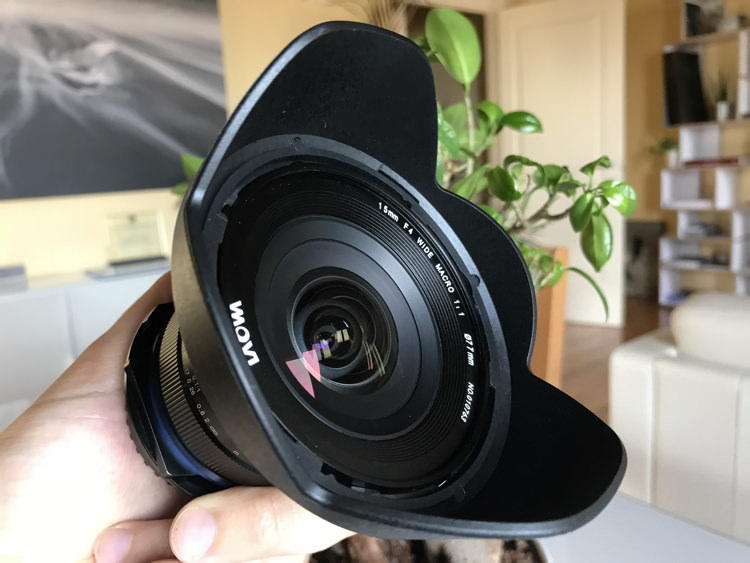
This is why today I want to tell you about the Venus Laowa 15mm f/4 Lens (with macro), an entry-level lens that every landscape photographer should take into consideration.

Why? Let’s see it together.

Review of the Laowa 15mm F/4 Lens for Landscape Photographers

Construction features

The Venus Laowa 15mm f/4 Macro is a lens that has been on the market since 2015. Although it certainly does not stand out for its cosmetic appearance, it comes with features that really make this a unique lens in the world. So much so that it can simultaneously seduce landscape photographers, lovers of macro photography, and architectural photographers.

Here are its main features, that I’m going to examine with you:

  • Focal length: 15 mm
  • Angle of view: 110.4°
  • Maximum Magnification: 1:1
  • Maximum Aperture: f/4
  • Shift function: +/- 6 mm
  • Minimum Focusing Distance: 12.2 cm
  • Filter Thread: 77 mm
  • Mounts: Canon, Nikon, Sony A, Pentax K, Sony E

Exactly, you’ve read it right. The Venus Laowa 15mm f/4 is a Macro 1:1 lens with an angle of view of 110° and a shift function that allows a translation equal to +/- 6mm.

The optical scheme is composed of 12 elements in 9 groups, including 3 high refractive index elements and one low dispersion element, and on paper that holds great promise for excellent performances in terms of sharpness.

And in case that wasn’t enough, add the fact that this lens is compatible with most of the mounts currently available on the market.

One last point, and it’s absolutely not a negative one, is the price. While I’m writing, the list price of the Venus Laowa 15mm f/4 Wide Angle 1:1 Macro is only $ 499.

Review of the Venus Laowa 15mm F/4 Wide Angle 1:1 Macro Lens for Landscape Photographers

Using this lens for landscape photography

When evaluating a lens, we’re always going to start from the analysis of its MTF charts, and then we carry out an almost infinite series of laboratory tests so as to bench-test it, from a perspective that is more theoretical than practical.

Of course, these tests are absolutely fundamental and I encourage you to look at them. But I also think that you are likely more interested in the real-world behavior of the lens. Knowing that certain optical limits of the lens will be then invisible in the real world, and what you are more concerned about is understanding whether the lens has the features that are really essential to you or not.

Review of the Venus Laowa 15mm F/4 Wide Angle 1:1 Macro Lens for Landscape Photographers

While there are many online reviews available regarding the use of this lens for macro and architectural photography, I haven’t found much regarding its use for landscape photography. So, my purpose here is to examine this lens from the point of view of the landscape photographer, omitting other features that are not fundamental for us hunters of sunrises and sunsets.

So let’s start to analyze the features seen in the previous chapter, now with a more critical eye.

Features

The fact that this is a prime lens and not a zoom gives us great hope with regard to quality, as the optical scheme will be optimized for a single focal length.

Review of the Venus Laowa 15mm F/4 Wide Angle 1:1 Macro Lens for Landscape Photographers

We are not afraid at all of the maximum aperture available, which is f/4. As good landscape photographers, we’ll be normally working around f/11, where sharpness will also be clearly higher.

The lens does not have stabilization or autofocus. While this may make you turn your nose up at first sight, surely you will soon realize that you really don’t care about those things. As you likely use the camera on a tripod you should turn off stabilization anyway, and you may choose to adjust the focus based on hyperfocal distance, making use of the hyperfocal marks available on the lens body.

Review of the Venus Laowa 15mm F/4 Wide Angle 1:1 Macro Lens for Landscape Photographers

So, those are two fewer functions that you don’t need, and their absence has certainly had a positive impact on the market price of the lens.

Using Filters with the Laowa 15mm Lens

With regard to the focal length, this clearly is not the first 15mm lens available on the market. But it is the only one with a feature that has convinced me to test this lens in action – the 77 mm filter thread.

Review of the Venus Laowa 15mm F/4 Wide Angle 1:1 Macro Lens for Landscape Photographers - filter thread 77mm

The 77mm filter size is very handy!

Normally all wide-angle and ultra wide-angle lenses (usually 15mm is considered the boundary between those two worlds) have a front optical element that is particularly curved. They often come with a built-in lens hood that makes it impossible to mount filters, unless we resort to particular solutions. Ultra wide-angle lenses whose front lens is not so curved and without a built-in lens hood, usually come with a large diameter and it’s therefore impossible to find filter threads smaller than 95 mm.

Thanks to the absence of a built-in lens hood (it does have a bayonet one) and to the 77 mm filter thread, the Venus Laowa 15mm f/4 lens opens the door to using a tool that I deem absolutely essential for every landscape photographer – drop-in filters.

Review of the Venus Laowa 15mm F/4 Wide Angle 1:1 Macro Lens for Landscape Photographers

As I was saying above, with a lens that has a built-in lens hood or a 95 mm filter thread it is possible to use systems that can hold 150 mm filters. But with a 77 mm filter thread, you will be able to use the same system that you use on any other lens equipped with a filter thread up to 82 mm. In a word, it is priceless.

Shift Function

The last of the features coming with this multi-purpose lens is the shift function. Thanks to a lever mechanism positioned next to the lens mount, it is possible to shift the lens by +/- 6mm. Even if this function might not seem very interesting for landscape photography at first sight (after all a rock is always a rock), it turns out to be useful in case there are human artifacts, like buildings, within the frame.

Review of the Venus Laowa 15mm F/4 Wide Angle 1:1 Macro Lens for Landscape Photographers

Shift lever.

Review of the Venus Laowa 15mm F/4 Wide Angle 1:1 Macro Lens for Landscape Photographers

The lens in shifted position.

The lens in action

If this lens appears very promising on paper, despite a very moderate price, let’s see its actual real-world behavior.

I have tested the Venus Laowa 15mm f/4 lens with my trusty Nikon D810, a full-frame camera body.

Testing the filter mount

Since this is fundamentally the reason why I decided to try this lens, again thanks to the existing 77 mm filter thread, I quickly mounted my loyal Nisi V5 Filter Holder, which holds 100mm filters. Even if it is possible to mount the holder, the fear of vignetting is too high, considering that we’re talking about a 15mm lens after all.

Review of the Venus Laowa 15mm F/4 lens

Review of the Venus Laowa 15mm F/4 lens


Although the Nisi filter holder is guaranteed to be vignette-free up to a 16mm focal length, once mounted on the Venus Laowa 15mm the result was doubtlessly amazing. Vignetting was practically invisible, as you’re going to see below, and it’s possible to quickly remove it in post-production by activating the lens correction profile.

A little dream of mine was substantially coming true. The dream of using an ultra wide-angle lens, and adding up to three 100mm filters and a polarizer without vignetting!

Review of the Venus Laowa 15mm F/4 lens

Review of the Venus Laowa 15mm F/4 lens

Review of the Venus Laowa 15mm F/4 lens

Review of the Venus Laowa 15mm F/4 lens

The lens barrel

On the lens body (which is sturdy metal, not plastic) you find the focus and aperture rings, whose operations are smooth and precise.

On the aperture ring, I would have preferred a locking system or a snap selection so as to make sure that I never lose the desired aperture. But actually, I haven’t encountered any problems during real-world use of the lens.

The focusing ring is really precise, as well as the existing focusing marks, which allow you to focus using the hyperfocal distance in no time. Just for the sake of being fussy, I would have placed the metric indications of distance upside down, or a vertical line next to each distance, just to be really precise. But you simply have to check the photo you’ve just taken, so as to make sure you have got the desired focus.

Review of the Venus Laowa 15mm F/4 lens

Review of the Venus Laowa 15mm F/4 lens

Although the manufacturer does not formally advertise this lens as weather sealed, most of my tests have been carried out in the rain (just for a change!). I protected the lens using only an umbrella or makeshift means, and no problems were detected.

Results

When I examine the images, the results were really comforting.

Sharpness

Shooting at both f/8 and f/11, the image definition is really excellent in the center of the frame. Obviously, the image becomes softer the closer you get to the edges, but doubtlessly the result is much more than acceptable. If you try to use higher apertures, you can naturally start to see that optical phenomenon called diffraction. But, as good landscape photographers, we know that we can go past f/16 only for situations of extreme necessity.

Definition Center - Review of the Venus Laowa 15mm F/4 lens

Centre image sharpness.

Definition Center Low - Review of the Venus Laowa 15mm F/4 lens

Lower center of the image sharpness.

Definition Corner - Review of the Venus Laowa 15mm F/4 lens

Corner of the image sharpness.

Aberration and vignetting

There are no particular problems with regards to chromatic aberration with this lens. I mean, some chromatic aberration is there, but nothing that can’t easily be solved using the automatic chromatic aberration removal included in any post-production software.

Chromatic Aberration With - Review of the Venus Laowa 15mm F/4 Wide Angle lens

Chromatic aberration showing before correction.

Chromatic Aberration corrected - Review of the Venus Laowa 15mm F/4 Wide Angle lens

After the chromatic aberration has been corrected in post-production.

As for vignetting, as I said above, the problem is almost non-existent when using the 100mm Nisi filter holder. For me personally, this fact alone is worth the purchase price of this lens.

Distortion

It is worthwhile to talk a little about distortion. It is predictable that a 15 mm lens will have barrel distortion. To landscape photographers, this is not a great concern. As I said before, a little distortion on a rock will not invalidate your image, as an irregular rock will always remain an irregular rock. Unfortunately, though, barrel distortion will invalidate the only real line included in your landscape – the horizon.

Review of the Venus Laowa 15mm F/4 lens

The distortion caused by this lens to the horizon is of the “mustache” type, which doubtlessly is the most annoying kind. If when we take a first look at the live view this problem may give us some concern,

If this problem gives you some concern when you first notice it in Live View, as soon as you import the image into any post-production software the correction becomes really easy and immediate.

Unfortunately, at the present time, there is no automatic correction profile for this lens included in Adobe software (Lightroom and Photoshop). But the Venus Laowa technical support is very efficient and within a few hours, they emailed the correction profile that I needed. Once installed, one click was enough to do the job and the image automatically recovered from both distortion (completely removing the mustache horizon) and peripheral shading.

Distortion Original - Review of the Venus Laowa 15mm F/4 lens

Original

Distortion Corrected - Review of the Venus Laowa 15mm F/4 lens

Corrected

Conclusion

The Venus Laowa 15mm f/4 lens has really turned out to be a surprise, exceeding my expectations. Although it comes with a very moderate price, this lens really provides remarkable results in terms of image quality.

Once the lens distortion is corrected, the only thing that still needs attention is edge softness which is absolutely within acceptable values for an entry-level lens.

Construction quality is really remarkable and you can notice that as soon as you take the lens into your hands. Lastly, the possibility of using a 100mm filter holder makes this lens really priceless.

If you are a landscape photographer who is looking for an ultra wide-angle lens with a very advantageous quality to price ratio, then the Venus Laowa 15mm f/4 lens is undoubtedly what you are seeking.

Review of the Venus Laowa 15mm F/4 Wide Angle 1:1 Macro Lens for Landscape Photographers


PROS

  • Price
  • Ability to use a 100mm filter holder
  • Excellent sharpness in the center of the frame
  • Low chromatic aberration when not used at macro distances
  • Lens shift function
  • Lightweight and small

CONS

  • Manual focusing
  • Slight edge softness
  • Barrel distortion (but it can be solved in post-production without any problems)
  • Cosmetic appearance

The post Review of the Venus Laowa 15mm F/4 Wide Angle Lens for Landscape Photographers by Francesco Gola appeared first on Digital Photography School.


Digital Photography School

 
Comments Off on Review of the Venus Laowa 15mm F/4 Wide Angle Lens for Landscape Photographers

Posted in Photography


$2,500 Sony a7S II vs $50,000 ARRI Alexa Mini: Can you tell the difference?

07 Feb

Brent Barbano—co-founder of camera rental community ShareGrid—recently took a trip to Flashbox Films in Hollywood to meet up with co-owner Will Kamp and do one of those “affordable camera vs crazy expensive camera” tests the internet seems to love (and hate) oh so much.

So what did they test? They put the $ 2,500 Sony a7S II, an affordable filmmaking favorite, up against the $ 50,000+ ARRI Alexa Mini, a professional-grade filmmaking monster. Here’s how Brent introduces the comparison:

The Sony a7s II has been a game-changer for filmmakers and creatives across the world. Cinematographers and photographers have been creating amazing images with this mirrorless camera that can rival some of the best. So, we thought we’d put it to the test and do a side-by-side comparison of the Sony a7S II and the ARRI Alexa Mini. Can you tell the difference?

Well… can you? Check out the video above to watch the footage, or scroll through the slides in the gallery below:

$ (document).ready(function() { SampleGalleryV2({“containerId”:”embeddedSampleGallery_8545856720″,”galleryId”:”8545856720″,”isEmbeddedWidget”:true,”selectedImageIndex”:0,”isMobile”:false}) });

Brent and Will were obviously impressed by just how similar the final footage turned out to be, and if you’re curious how you did on this ‘test,’ you’re in luck: ShareGrid was kind enough to give DPReview readers the answer key early.

The initial plan was to update it in the video description on YouTube this Friday, but if you’ve made your picks, you can scroll down and see which slide was which down below.

Answer Key

Some of you may have noticed, others may not, but the cameras didn’t actually switch sides between shots. The Sony was always on one side, and the ARRI was always on the other. But… which was which? It turns out A was Sony, and B was ARRI:

SLIDE 1

A: Sony a7S II

B: ARRI Alexa Mini

SLIDE 2

A: Sony a7S II

B: ARRI Alexa Mini

SLIDE 3

A: Sony a7S II

B: ARRI Alexa Mini

SLIDE 4

A: Sony a7S II

B: ARRI Alexa Mini

Articles: Digital Photography Review (dpreview.com)

 
Comments Off on $2,500 Sony a7S II vs $50,000 ARRI Alexa Mini: Can you tell the difference?

Posted in Uncategorized


Camera makers continue to ignore photojournalist pleas for encryption

07 Feb
Photo by Markus Spiske

In late 2016, more than 150 professionals sent a letter to camera makers requesting that they add encryption to their camera products. This encryption, as it does with other devices like smartphones, would help protect content on the camera and its media cards. “Without encryption capabilities,” the letter explained, “photographs and footage that we take can be examined and searched by the police, military, and border agents in countries where we operate and travel, and the consequences can be dire.”

More than a year has passed since the letter was circulated, and major camera manufacturers have largely failed to introduce encryption-based security on their camera products. Tech website ZDNet recently quizzed major camera manufacturers about potential plans to introduce encryption, and the response was underwhelming.

Fuji failed to respond to the site’s request for info, while Sony declined to discuss any product roadmaps related to camera encryption. Canon declined to talk about “future products and/or innovation.” Both Olympus and Nikon gave more extensive answers, though neither indicate any real progress on the topic.

Nikon, for its part, gave a canned response that it is listening to photographers and “will continue to evaluate product features to best suit the needs of our users.” Olympus’ response wasn’t much better, with a company spokesperson saying that the maker will “continue to review the request to implement encryption technology in our photographic and video products, and will develop a plan for implementation where applicable in consideration to the Olympus product roadmap and the market requirements.”

While photographers and filmmakers aren’t entirely without encrypted options, those options (mainly smartphones) are far less capable than the professional gear they’d otherwise use. Apple and Samsung have both focused heavily on encryption-based security for their mobile products, and Android users in general have the ability to toggle on encryption in the OS’s settings. Is it time for camera makers to catch up?

Articles: Digital Photography Review (dpreview.com)

 
Comments Off on Camera makers continue to ignore photojournalist pleas for encryption

Posted in Uncategorized


SLC-1L-02: One light, Inside the Frame

06 Feb

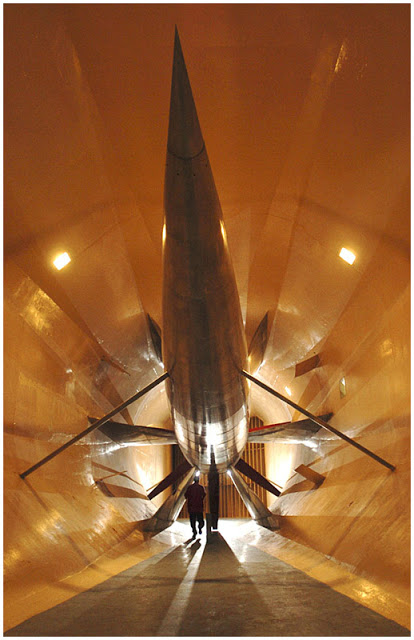
Long-time readers will recognize this shot, of the Glenn L. Martin Wind Tunnel in Maryland, as the photo from the very first post on Strobist in 2006. I was happy with it when I shot it. And to some degree, I still am.

But looking at it today, there are definitely some things I would approach differently. So let's walk through it, bearing in mind what we've learned since way back then.Read more »
Strobist

 
Comments Off on SLC-1L-02: One light, Inside the Frame

Posted in Photography


Panasonic Lumix DC-GH5S Review

06 Feb

The Panasonic GH5S is a video-focused Micro Four Thirds camera built around what the company markets as a 10.2MP sensor. It’s best understood as an even more video-centric variant of the GH5: it can shoot either DCI or UHD 4K footage natively (one capture pixel = one output pixel) at up to 60p.

Panasonic wasn’t the first company to introduce high quality video to what was otherwise a still camera, but with its GH series it has been constantly expanding the range of professional video features appearing in consumer stills/video cameras. The GH5S takes this logic one step further, by lowering the sensor resolution and omitting image stabilization to make a more single-minded video tool, rather than an hybrid intended to be similarly capable at both disciplines.

The ability to shoot DCI 4K at up to 60p with no crop is the most obvious distinction between this and the standard GH5, but the differences run deeper:

Key specifications

  • Oversized ‘Multi Aspect’ sensor with dual gain design
  • 10.2MP maximum usable area from at around 12.5MP total
  • DCI or UHD 4K at up to 60p
  • 10-bit 4:2:2 internal capture at up to 30p
  • 8-bit 4:2:0 internal 60p or 10-bit 4:2:2 output over HDMI
  • 1080 footage at up to 240p (with additional crop above 200p)
  • Hybrid Log Gamma mode
  • ISO 160 – 51,200 (80 – 204,800 extended)
  • AF rated down to –5EV (with F2 lens)
  • 3.68M-dot (1280 x 960 pixel) OLED viewfinder with 0.76x magnification
  • 1.62M-dot (900 x 600 pixel) fully articulated LCD
  • 14-bit Raw stills
  • 11 fps (7 with AFC) or 1 fps faster in 12-bit mode
  • USB 3.1 with Type C connector

As well as the ability to shoot DCI 4K at higher frame rates, Panasonic also claims the GH5S’s larger pixels and ‘Dual Native ISO’ sensor will mean it shoots significantly better footage in low light.

Differences vs GH5

  • “10.2” megapixel oversized sensor (vs 20.2MP Four Thirds sized sensor)
  • Dual-gain sensor design with two read-out circuits
  • Fixed sensor (no internal stabilization) for use with pro stabilization systems
  • DCI 4K available in 59.94, 50, 29.97 and 25p (GH5 is 23.98 / 24p only)
  • 1080 mode
  • AF rated to work in lower light (–5EV vs –4EV)
  • 14-bit Raw available in stills shooting
  • VLog-L enabled out-of-the-box
  • Time code in/out
  • ‘Like709’ and ‘V-LogL’ color profiles available in stills shooting
  • Mic socket offers Phantom Power and Line-level In options
  • LUT-corrected display available in playback as well as capture
  • 120fps viewfinder mode

Beyond these changes, the GH5S keeps the rest of the GH5’s capabilities, with matching codec options and the same support tools, such as vectorscopes, wave forms and preview modes for anamorphic, Log and Hybrid Log Gamma shooting, for instance.

As on the GH5, Panasonic recommends the use of V60 rated cards or faster for shooting 400Mbps video. However, the V60 standard itself seems to be vague enough that even some nominally V60-compliant cards are still not fast enough. The company says to use either its own brand V60 or V90 cards or to stick to well-known manufacturers with a proven history of producing fast cards (and, ideally, to buy from a source with a good return policy).

Multi-aspect sensor

The GH5S uses a chip that natively shoots DCI or UHD 4K, meaning one pixel on the sensor is used to produce each pixel in the final footage. The sensor, like that on the GH1 and GH2, is oversized. This means it can shoot different aspect ratios using the full extent of the imaging circle projected by the lens, rather than simply cropping down from the 4:3 region.

As well as using the maximum amount of pixels and silicon for each aspect ratio (with consequent image quality benefits), this also means that the diagonal angle of view is preserved, whether you shoot 4:3, 3:2, 16:9 or in DCI 4K’s roughly 17:9 aspect ratio.

It also means that the GH5S should offer a fractionally wider angle-of-view than the GH5 when shooting video, especially when capturing DCI footage.

The only downside is that the use of a larger region could limit the use of APS-C and Super35 lenses in conjunction with focal length reducing adaptors, such as SpeedBoosters. A 0.71x reducer needs to capture a roughly 30.5mm image circle to cover the GH5S’s larger video region, while a 0.64x reducer needs a 33.8mm image circle, both of which are larger than is guaranteed to be projected by an APS-C lens. You’ll almost certainly be OK with the 0.71x adaptor, since that’s been shown to work with the majority of APS-C lenses but with the 0.64x versions it’s likely you’ll have to check on a case-by-case basis.

Dual Gain

Panasonic describes the GH5S as having ‘Dual Native ISO,’ which is standard video terminology for a dual gain sensor design. Such chips have two read-out modes, one that maximises dynamic range at low sensitivity settings and a second designed to minimize noise but at the cost of dynamic range, at higher settings (the second mode changes the ‘conversion gain’: essentially increasing the pixel’s voltage output). It’s something we first encountered in Nikon’s 1 Series cameras but that’s become increasingly common over the past few years, resulting in visible improvements at high ISO settings.

The only difference we can see between the approach taken by Panasonic is that it lets you limit the camera to either one of the sensor’s modes, whereas other brands just change mode in the background, without the user ever knowing.

One of the only concepts fuzzier than ‘ISO’ sensitivity itself is the videography term
‘Native ISO’

From a stills point of view, the two circuits are used from ISO 160 – 640 and from ISO 800 and upwards, respectively. You’ll see talk of the camera having ‘Native ISO’s of 400 and 2500’ but this is perhaps best completely ignored.

One of the only concepts fuzzier than ‘ISO’ sensitivity itself is the videography term ‘Native ISO,’ which essentially appears to mean ‘setting at which the quality is good but that gives room to move either up or down from.’ This should not be confused with the idea of base ISO, which is the setting with the minimal amount of amplification, which usually results in the widest dynamic range.

Lower pixel count

The other thing Panasonic says contributes to giving the GH5S a performance boost in low light is the adoption of fewer and therefore larger pixels.

In general terms, there’s no significant advantage to large pixels over small ones: individually they have access to more light (which usually means less noise when viewed 1:1) but once you scale things to a common size, the noise and dynamic range levels tend to be similar. Instead, using more but smaller pixels can have a resolution benefit, even if you then downsize. This is because pixelated systems can only capture a certain percentage of their nominal resolution, but sampling at a higher resolution then downsizing (oversampling) can preserve some of the higher frequency detail it initially captures.

By concentrating on video capture, Panasonic is able to pick sides in this struggle

However, readout speed and processing/heat constraints mean very few cameras currently offer oversampled video, instead sub-sampling their sensors to find the ~8.5MP needed to capture 4K footage. This creates a tension between the needs of high-res stills photographer and lower-resolution of video capture. By concentrating on video capture, Panasonic is able to pick sides in this struggle.

The most obvious benefit is that it’s quicker to read out fewer pixels. So, while the latest processors are fast enough to generate oversampled footage from high pixel counts, the sensor read-out rate risks creating significant rolling shutter. Having fewer pixels means the GH5S should have less rolling shutter than the GH5.

Having a lower pixel count also means the GH5S is also able to include an anti-aliasing filter that reduces the risk of video moiré, without having to worry about limiting the stills resolution.

Just as we expect to see better pixel-level noise from larger pixels, logic would also lead you to expect greater pixel-level dynamic range (even though again, this advantage tends to disappear when you compare images at the same size). This additional pixel-level dynamic range is the reason the GH5S needs to offer 14-bit Raw files: because you need the extra bit-depth to provide room for that additional dynamic range.

No stabilization

From a photographic perspective it may seem odd to remove image stabilization from the camera but for high-end video shooting, Panasonic says it makes sense. Sensor-shift IS systems operate by ‘floating’ the sensor using a series of electromagnets. Even when they’re ‘off’ they’re not locked in place, they’re simply set so that the electromagnets aren’t attempting to correct for movement. This has the side-effect that, which mounted on a professional stabilization rig, there’s a risk of the sensor being shaken around.

For high-end video work, Panasonic says its users would prefer to use dedicated gimbals and dollies, rather than internal stabilization, and that means physically locking the sensor in place to avoid unwanted interactions between these systems and a floating sensor.

However, regardless of what Panasonic says, there’s also the limitation imposed by the oversized sensor: since the camera captures right out to the edge of the image circle there’s simply no room to shift the sensor without risking capturing footage of the inside of your lens barrel. This is highlighted in the one situation in which the GH5S does offer digital stabilization: when combined with a lens offering optical stabilization. When engaged, the video has to crop-in slightly to provide room to pan and scan around the sensor.

Review Publication History
January 8 Introduction, video specifications, video features, first impressions
January 29 Raw Dynamic Range & Log and DR in video sections added
February 5 Image Quality, Video Quality and Conclusion added

Articles: Digital Photography Review (dpreview.com)

 
Comments Off on Panasonic Lumix DC-GH5S Review

Posted in Uncategorized


Huawei may be the first to launch a triple-camera smartphone

06 Feb
Image: Forbes / Weibo

With dual-cameras pretty much a standard-feature on high-end smartphones these days, it was only a matter of time before the first manufacturer would announce a mobile device with three (or even more) camera modules per side. If rumors are true, it looks as if this manufacturer will be China’s Huawei.

Unlike in previous years, the Chinese device-maker won’t launch their new premium model at the Mobile World Congress in Barcelona at the end of this month. Instead, the P20 (as the new model is likely to be called) will be announced at a stand-alone event in Paris on the 27th of March.

According to a report by Forbes, the P20 will be the first smartphone to come with a triple-camera, offering a total resolution of 40MP and a 5x optical/digital hybrid zoom. Additionally, the front camera will feature 24MP resolution.

As, with previous models, the cameras have reportedly been co-developed with German optics manufacturer Leica.

The Huawei Mate 10 Pro features a dual cam co-engineered with Leica.

There are no further details regarding how the triple-camera technology exactly works, but we would assume the typical image output size will be considerably smaller than 40MP, and the high pixel count is mostly used for hybrid zoom and computational imaging purposes, such as de-noising and HDR.

The Mate 10 Pro is already one of the best smartphone cameras we have tested in a while, so it’ll be interesting to see what performance Huawei can squeeze out of a device with an additional camera module. We’ll know more in a few weeks time.

Articles: Digital Photography Review (dpreview.com)

 
Comments Off on Huawei may be the first to launch a triple-camera smartphone

Posted in Uncategorized


Yosemite’s Horsetail Fall ‘firefall’ event will require a vehicle permit this year

06 Feb
Photo by Ambitious Wench (CC-BY-SA-2.0)

For two weeks every February, Yosemite’s Horsetail Fall appears to be composed of flowing lava rather than water when illuminated by the setting sun. This beautiful illusion is referred to as a “firefall,” and it draws a large number of visitors who want to witness it in person. Due to the expanding size of these crowds, officials have announced that visitors (including photographers) will need to get a vehicle permit.

The permit requirement is an effort to deal with traffic issues and visitor safety, according to ABC7, which reports that officials are working with Yosemite Hospitality, Yosemite Conservancy, and the Ansel Adams Gallery on the matter. Details for the upcoming event are available on Event Brite where free reservations can be made.

According to the event page, Yosemite visitors planning to arrive via vehicle will need a permit to access Northside Drive between Yosemite Valley Lodge and El Capitan Crossover. Northside Drive will be closed to those without a permit from February 12th to February 26th.

A total of 250 parking permits are being offered for reservation on the Event Brite site.

The reservation requires visitors to provide vehicular information, including license plate, car make and model, and car color. Those who successfully reserve a spot will then need to pick up their permit from The Ansel Adams Gallery on the day of the reservation. Additionally, 50 or more first-come, first-serve permits will be offered at the gallery until 3PM each day.

According to the event page, in addition to getting a vehicle permit for the designation part of Northside Drive, visitors who want to see the firefall can either take a Yosemite Hospitality guided tour or hike to the viewpoints.

Articles: Digital Photography Review (dpreview.com)

 
Comments Off on Yosemite’s Horsetail Fall ‘firefall’ event will require a vehicle permit this year

Posted in Uncategorized