RSS
 

Archive for February, 2018

5 Tricks to Make Your Landscape Photos Stand Out

15 Feb

Are you passionate about portrait photography? Do you love sharing images of your trips and landscape photos? Or maybe you spend your free time capturing the streets of your city?

Let me tell you something you might not know about yourself. Every now and then you are a landscape photographer, too. Everyone is. Let’s be honest, you couldn’t resist that beautiful mountain view you photographed a few weeks ago on a hike. Your social media feeds are full of your friends’ photos of canyons, lakes, and forests. Even your grandma sent you a picture of a sunset from her backyard the other day.

01 Sunset in Ilulissat Icefjord Greenland - 5 Tricks to Make Your Landscape Photos Stand Out

The amount of landscapes captured and uploaded every day is overwhelming. So how can you make people stop and look at YOUR images? How do you make YOUR landscape photos stand out?

Here are some useful tips and tricks to help you. Save them for later, and the next time you are photographing a beautiful view make sure to follow them. You will have a much better chance of taking a good picture and making it noticed.

1. Less is more

“A designer knows he has achieved perfection not when there is nothing left to add, but when there is nothing left to take away.” – Antoine de Saint-Exupery

011 Greenland midnight sun - 5 Tricks to Make Your Landscape Photos Stand Out

This famous quote also applies very well to landscape photography. I know you are excited to show the whole world how beautiful nature is around you. However, often showing everything is equal to showing nothing.

For instance, look at the image below. It is simple and straightforward. You clearly know what the photographer tried to show.

Now, imagine there is a road below the greenery, two smaller mountains on the right and little pond on the left. You could capture all of that instead; it would give much more information about the location. However, then your viewer wouldn’t know where to look.

002 Bad weather Iceland - 5 Tricks to Make Your Landscape Photos Stand Out

Your viewer is exposed to thousands of images every day (social media, streets banners, TV, online advertising, etc.). Don’t give him any more work. Seeing your photo should be an effortless and enjoyable process. Here is how to get rid of the unnecessary parts of your images:

  • If you have a zoom lens, zoom into the frame.
  • Reposition yourself. Sometimes you have to walk closer to your subject or choose a different point of view.
  • As a last resort – crop your image later. Generally, It’s not advisable to crop more than 20% of your images. This rule will keep you more disciplined about your choices in the field. Also, it will help you keep your images in high resolution in case you decide to print them one day or participate in photography contests. (Many contests don’t allow cropping more than 20%).

2. Avoid distractions

Now you’ve decided which part of the scene is the most compelling. But before you click the shutter, make sure that these technicalities are in check:

A) Check that the horizon is straight. Turn on the grid in your camera to help you with that.

003 Nepal tilted horizon - 5 Tricks to Make Your Landscape Photos Stand Out

004 Nepal straight horizon - 5 Tricks to Make Your Landscape Photos Stand Out

B) Position your subject away from the middle of the frame. Most of the time you will find yourself following the rule of thirds

005 Rule of thirds precise - 5 Tricks to Make Your Landscape Photos Stand Out

.Sometimes following the rule, precisely.

006 Rule of thirds approximate - 5 Tricks to Make Your Landscape Photos Stand Out

Sometimes, not so much.

C) Get your settings right to avoid overexposed, underexposed, blurry, or noisy images.

3. Look for color contrast

This is an extremely important concept that you need to be familiar with.

Our brains are wired in a way that when we look at a picture, we first respond to contrasts in color and light, then to the shape, size and other characteristics of the scene.

Make sure you know the theory of color contrast. The general rule is that cold and warm colors work well together. Here are some examples:

007 color contrast moon iceberg - 5 Tricks to Make Your Landscape Photos Stand Out

008 color contrast aurora - 5 Tricks to Make Your Landscape Photos Stand Out

4. Test a thumbnail of your image

In a perfect world, you would make a large format print of your image and people would come and spend hours savoring every detail of it. In reality, your picture will be one of many tiny thumbnails on someone’s social media feed. (If you don’t post your images online, you can skip this part.)

A great exercise is to look at your image as a small thumbnail. Can you tell what’s on it? Would you pay attention to it if you saw it on your Instagram timeline or would you scroll past it? You’ll notice, that simple images with high color and/or light contrast stand out the most.

Can you guess which of the images from the grid below got the most amount of interaction on Instagram?

009 thumbnail grid - 5 Tricks to Make Your Landscape Photos Stand Out

5. Is the image good or does it make YOU feel good?

You just came back from a trip and that sunset you observed with your partner was amazing. You still remember the sound of the waves and the warm wind coming from the sea. Time to share that memory with the world!

99% of the time, that’s fine if you want a snapshot of a holiday, but not if you want people to see an artistic value in it. A great image should be great by itself, regardless of what emotions you have attached to it.

A good practice is to look through your photos weeks, or sometimes months after you took them. You will be surprised at how your selection will change compared to the day of the shoot.

Here are a couple more images that follow the tips above.

010 iceland beach - 5 Tricks to Make Your Landscape Photos Stand Out

012 Norway window lights - 5 Tricks to Make Your Landscape Photos Stand Out

Over to you

Do you have some images that reflect the points of this article? Share them in the comment section so that others can learn from you.

The post 5 Tricks to Make Your Landscape Photos Stand Out by Maria Sahai appeared first on Digital Photography School.


Digital Photography School

 
Comments Off on 5 Tricks to Make Your Landscape Photos Stand Out

Posted in Photography


LG will introduce a powerful new camera AI for the V30 smartphone at MWC

15 Feb

LG won’t unveil the successor to the G6 at MWC in the final week of February; instead, the new device will be launched at a stand-alone event at a later point in time. However, there will still be some interesting news for mobile photographers from LG at the trade show. Namely, the Korean manufacturer will introduce a suite of AI technologies for its smartphones, with the 2018 version of the flagship V30 being the first device to feature the new tech.

LG’s objective for the new system was to deliver a “unique and more intuitive user experience”, focusing on the camera technology and voice recognition.

“As we communicated last month at CES, the future for LG lies in AI, not just hardware specs and processing speeds,” said Ha Jeung-uk, senior vice president and business unit leader for LG Electronics Mobile Communications Company. “Creating smarter smartphones will be our focus going forward and we are confident that consumers will appreciate the advanced user experience with the enhanced V30 that many have been asking and waiting for.”

The Vision AI component puts the focus on camera usability and performance. It automatically analyzes objects and recommends the best suited out of the following shooting modes:

  • Portrait
  • Food
  • Pet
  • Landscape
  • City
  • Flower
  • Sunrise
  • Sunset

In addition to any detected objects in the frame, the system takes into account the angle of view, color, reflections, backlighting, and saturation levels in order to pick the best mode. For example, framing a plate of pasta will result in food mode being triggered. The final image result will show warmer colors and increased levels of sharpening for a pleasing visual presentation of your lunch.

A new low-light shooting mode, also on board, automatically brightens images in dim environments by a factor of two.

Like other AI systems—think Google Lens—Vision AI can provide shopping advice through image recognition. When the camera is pointed at an object the software can automatically scan QR codes, initiate an image search or display online shopping options to purchase the item or similar products.

For the development of the object recognition software, which is core to Vision AI, LG collaborated with a partner to analyze over a 100 million images and create more than a thousand image categories were created for accurate image analysis.

The AI system’s voice component lets you run apps and change settings through voice commands alone, working alongside Google Assistant. LG says that certain AI features won’t be limited to new models only, but will be available also to existing LG smartphones via over-the-air updates, depending on hardware specifications.

Vision AI isn’t the first system of its kind, but there is no doubt AI is part of the future of photography, and it’s good to see almost all large mobile manufacturers working in the field. We’re looking forward to having a closer look at LG’s Vision AI at MWC.

LG TO INTRODUCE OWN SMARTPHONE AI AT MWC 2018

New AI Functionalities Aligned Closely with Needs and Usage Behavior of Today’s Consumers

SEOUL, Feb. 13, 2018 — LG Electronics (LG) will introduce the first of a suite of AI technologies for its smartphones at this year’s Mobile World Congress in Barcelona, Spain. The new technology will be featured in the 2018 version of the LG V30, LG’s most advanced flagship smartphone to date.

LG spent more than a year researching how AI should be implemented in smartphones, long before announcing LG ThinQ at CES 2018. This research focused primarily on making AI-based solutions with the objective to deliver a unique and more intuitive user experience, focusing on the camera and voice recognition. The result is a suite of AI technologies that is aligned closely with the needs and usage behavior of today’s users.

Vision AI: Next Generation Image Recognition
On top of an already impressive list of camera features that include dual lenses, wide-angle low-distortion lenses, and the all-glass Crystal Clear Lens, Vision AI makes the camera of the LG V30 even smarter and easier to use.

Vision AI automatically analyzes objects and recommends the best shooting mode from among eight modes: portrait, food, pet, landscape, city, flower, sunrise, and sunset. The angle of view, color, reflections, backlighting, and saturation levels are all taken into consideration as the phone analyzes images in its database to determine what the camera is focusing on in order to recommend the best setting. For example, pointing the camera at a plate of pasta will result in food mode being invoked, resulting in warmer colors and heightened sharpening for the most appetizing shot possible.

LG collaborated with a partner in image recognition to analyze over a 100 million images in order to develop the phone’s image recognition algorithms. Over one thousand unique image categories were created for more accurate image analysis, resulting in better shooting mode recommendations.

Another feature of Vision AI provides shopping advice through smart image recognition. By simply pointing the camera at an object, LG’s Vision AI can automatically scan QR codes, initiate an image search or provide shopping options including where to purchase the item for the lowest price and other similar products that the customer might find of interest.

A new low-light shooting mode automatically brightens images in dim environments by a factor of two. Instead of conventional methods of measuring external light levels, Vision AI instead measures the brightness of the actual image that will be recorded, resulting in brightness levels that are adjusted much more accurately.

Voice AI: LG-Exclusive Voice Commands
Another new feature is Voice AI that allows users to run apps and change settings through voice commands alone. Working alongside Google Assistant, the 32 LG-exclusive Voice AI commands – up from 23 commands in 2017 – Voice AI eliminates the need to search through menu options and allows for direct selection of specific functions.

LG Exclusive Voice Commands for Google Assistant

VOICE COMMAND
FEATURE (PRECEDE WITH “OK GOOGLE”)
1 Wide-angle photo Take a picture on a wide angle
2 Wide-angle selfie Take a selfie on a wide angle
3 Wide-angle video Record a video on a wide angle
4 Wide-angle selfie video Take a selfie video on a wide angle
5 Cine Video Open camera on Cine Video
6 Expert Photo Mode Open camera on a manual mode
7 Expert Video Mode Open camera on a manual video
8 Cine Video (Romantic) Take a romantic Cine Video
9 Cine Video (Melodramatic) Take a melodramatic Cine Video
10 Cine Video (Thriller) Take a thriller Cine Video
11 Cine Video (Beauty) Take a beauty Cine Video
12 Cine Video (Blockbuster) Take a summer blockbuster Cine Video
13 Cine Video (Romantic Comedy) Take a romantic comedy Cine Video
14 Cine Video (Documentary) Take a documentary Cine Video
15 Cine Video (Landscape) Take a scenery Cine Video
16 Cine Video (Drama) Take a drama Cine Video
17 Cine Video (Historic) Take a historical Cine Video
18 Cine Video (Mystery) Take a mystery Cine Video
19 Cine Video (Noir) Take a noir Cine Video
20 Cine Video (Classic) Take a classic Cine Video
21 Cine Video (Flashback) Take a flashback Cine Video
22 Cine Video (Pop Art) Take a pop art Cine Video
23 Expert Mode (Graphy) Open camera with Graphy

NEW FOR 2018

24 Panoramic Photo Pending
25 Food Photo Pending
26 Time-lapse Photo (Video) Pending
27 Slow-motion Video Pending
28 Low-light Photo Pending
29 AI Cam Photo Pending
30 Image Search Pending
31 QR Code Scanning Pending
32 Shopping Search Pending


Upgrading and Expanding Smartphone AI
LG’s strategy for smartphones is to continue expanding its AI capabilities while also refining existing features to make them more convenient to use. Certain AI features will not be limited to new LG models only, but also to existing LG smartphones via over-the-air updates, taking into consideration various hardware specifications and stability of LG smartphone models for maximum user experience.

“As we communicated last month at CES, the future for LG lies in AI, not just hardware specs and processing speeds,” said Ha Jeung-uk, senior vice president and business unit leader for LG Electronics Mobile Communications Company. “Creating smarter smartphones will be our focus going forward and we are confident that consumers will appreciate the advanced user experience with the enhanced V30 that many have been asking and waiting for.”

Attendees of MWC 2018 are encouraged to visit LG’s booth in Hall 3 of Fira Gran Via from February 26 until March 1 for more information.

Articles: Digital Photography Review (dpreview.com)

 
Comments Off on LG will introduce a powerful new camera AI for the V30 smartphone at MWC

Posted in Uncategorized


US intelligence agencies warn against purchasing Huawei smartphones

15 Feb

Directors from six US intelligence agencies, including the CIA, FBI, and NSA, have told the Senate Intelligence Committee that they wouldn’t recommend Americans use Huawei services or products, according to CNBC.

FBI Director Chris Wray explained to the Committee:

We’re deeply concerned about the risks of allowing any company or entity that is beholden to foreign governments that don’t share our values to gain positions of power inside our telecommunications networks. That provides the capacity to exert pressure or control over our telecommunications infrastructure. It provides the capacity to maliciously modify or steal information. And it provides the capacity to conduct undetected espionage.

This saga actually began in 2012, when the Chinese tech company was the subject of a national security investigation by US government officials who worried that its products may pose a cybersecurity risk. Huawei publicly dismissed the concerns, though the final investigative report alleged the Chinese company wasn’t fully cooperative with investigators. Australian government officials had expressed similar concerns at the time.

Huawei has consistently denied claims that its products and services may be compromised by the Chinese government. These concerns, however, have persisted to varying degrees over the years, and recently came to a head when AT&T abandoned plans to offer the Huawei Mate 10 phone in its stores.

The Huawei Mate 10 Pro went up for pre-order in the United States earlier this month.

Sources speaking to Reuters last month claimed that US lawmakers pressured AT&T into cutting commercial ties with Huawei over national security concerns, and that included asking AT&T to stop offering Huawei phones through its Cricket subsidiary. Bloomberg reported similar issues related to Verizon’s abandoned plans to sell the Huawei Mate 10.

This intelligence report to the Senate Intelligence Committee is the latest, and possibly the worst, blow for Huawei, which has struggled to enter the US market. The Mate 10 Pro and its impressive camera only just went up for pre-order in the US, and already consumers are being warned against purchasing.

Chinese drone maker DJI recently faced similar issues following a leaked government memo and a report detailing what is claimed to have been a major security vulnerability.

Articles: Digital Photography Review (dpreview.com)

 
Comments Off on US intelligence agencies warn against purchasing Huawei smartphones

Posted in Uncategorized


Tamron teases new lens ahead of CP+

14 Feb

Tamron Japan has posted an intriguing teaser image on its Instagram account, just in time for an announcement at either WPPI or CP+ (probably the latter). The backlit image is all we have to go off of, but naturally, speculation is running rampant online.

Canon Rumors thinks this might be a 100mm f/2 VC or a 135mm f/2 VC, while Sony Alpha Rumors received an anonymous (and therefore still highly unreliable) tip that it is in fact a “28-75mm F/2.8 Di III RXD” for Sony FE mount. Based on the design alone, we’re leaning towards calling this a zoom lens—notice the two rubber rings and the gap between the top ring and the top of the lens.

As user Sharlin points out in the CR forums, the design is very to the Tamron 18-200mm F3.5-6.3 Di III VC.

Of course, all of this is errant speculation until Tamron decides to officially announce whatever its teasing. But if you have any educated guesses about what the lens might be, drop them in the comments along with your reasoning.

Articles: Digital Photography Review (dpreview.com)

 
Comments Off on Tamron teases new lens ahead of CP+

Posted in Uncategorized


Learning to shoot video with a gimbal: a frustrating, yet highly rewarding experience

14 Feb

A new Panasonic GH-series camera always seems to mean having to learn more about video, but that also tends to mean getting experience behind a video camera. I’d like to think I’m getting better as a videographer. Hell, I even remember to record some background audio most of the time, but the GH5S review meant having to learn about a whole new piece of kit.

The GH5S’s oversized sensor means there’s little scope for any kind of sensor-shift stabilization, which means it’s best suited to shooting with external forms of stabilization*. This meant that, in addition to borrowing a nice video lens, I needed to rent (and learn to use) a gimbal.

Gimbaling around

In just a few years, external stabilization has gone from being the preserve of Hollywood movies (most famously by Steadicam) to something that can be provided by sub-$ 1000 equipment. It probably shouldn’t come as a surprise that DJI, best known as a maker of drones, also sells the technology required to mount and control aerial cameras as stand-alone stabilization rigs.

The DJI Ronin M is essentially a scaled-up version of the gimbals DJI mounts its drone cameras on. It provides a cradle that can move in all three axes, with motors to correct for (or provide) movement in each of these directions. At its most simple, it provides a platform that tries to keep the camera steady, regardless of the movements you make while holding the handles. This is both its fundamental role and the thing that makes it tricky to get used to.

The GH5S with Metabones Speedboost Ultra and Sigma 18-35mm T2.0, mounted in a DJI Ronin M: a powerful combination but one that’s not particularly easy to hold at shoulder-height for any length of time.

Initial setup is pretty easy: you connect the camera cradle to a top handle, screw some lateral arms and handles on, then clip a large rechargeable battery pack on the back. You then have to carefully adjust the position of the cradle so that the camera and lens are neutrally balanced (that way the gimbal isn’t having to constantly fight against the camera’s weight to keep the it level).

To make the most of the GH5S I borrowed a couple of nice pieces of kit: a Sigma 18-35mm T2.0 CINE lens and a Speedbooster Ultra 0.71. The problem is that this is a pretty substantial combination, something that would come back to haunt me later.

Lens choice

A Speedbooster is essentially an equivalence machine, condensing the lens’s projected light down onto a smaller sensor, shortening the focal length and lowering the F-number (since you have the same entrance pupil but with a shorter focal length lens). The upshot is that the 18-35mm T2.0 ends up giving essentially the same angle of view and depth-of-field it was designed to provide on APS-C/Super 35 format.

The result is something along the lines of a constant F1.4 lens. And, while it’s not really sensible to start mixing F and T-stops**, it quickly becomes irrelevant. Because, to shoot in daylight, the camera’s base ISO setting (320 in Log mode) meant I had to use a variable ND filter to prevent over-exposure, which meant I could use the aperture primarily to control depth-of-field, without necessarily having an impact on exposure.

Only the realization that I really can’t think in Imperial took the shine off one of my favorite lenses

Coming from a photography background it still feels somehow wrong to throw away light like this, but if your minimum ISO is 320 and you need to keep the shutter speed somewhere around 1/50th of a second, you’re going to have to do something to prevent constant overexposure. Sacrificing it to an ND filter is preferable to stopping down, since you then lose control over depth-of-field and smooth your footage with the power of diffraction.

It was a lovely combination to shoot with, though, offering a really useful zoom range, more than enough control over depth-of-field and beautifully damped controls for everything. Only the realization that this version had its distance scale in feet, and that I really can’t think in Imperial, took the shine off this version of one of my favorite lenses.

In practice

There’s a difference, of course, between knowing the theory and putting it into practice. I knew in principle what 10-bit capture should mean and I knew how a gimbal was supposed to work, but that’s not the same as seeing it out in the field. Or, in this case, in one of Seattle’s public parks.

I’d tested the gimbal the night before. Checked it was level and, via an app on my phone, configured it to move the way I wanted it to. Because while the basic function of a gimbal is to correct for the operator’s movement, the Ronin can also be configured so that a large movement of the handles is treated as an instruction to move the camera. You can configure which axes it’ll move in, how sensitive the system is to your inputs and how quickly it moves the camera in response. It’s all really clever.

It’s also a bit of a handful, at first. I quickly found myself trying to operate the focus and exposure on a camera that was constantly trying to move away from my attempts to grab it. Between this, the sheer weight of the setup and the inability to see the camera’s screen, it was incredibly difficult to make or assess any changes on the camera: a deeply frustrating experience. Then the rain we’d timed our shoot to avoid started. And then turned to hail.

1’9? So that’s, what, about 1/6th my height, plus about one and a half of those 15cm rulers we used at school? I’m not very good at thinking in Imperial measurements.

I was feeling pretty defeated. I’d shot maybe 10 seconds of footage, couldn’t work out how to operate the camera and was beginning to think I was wasting everyone’s time. The rain hammered down and I desperately cast around for a Plan B.

But you know what they say about silver linings? Mine was that the enforced rain break gave me more time to learn to handle the gimbal. In the end I developed a technique that involved powering it down, reaching for the camera with my right hand and letting the carrying frame collapse into the crook of my arms. I could then hold and operate the camera comparatively normally before finally making a grab for the carry handle with my left hand, letting the camera hang, then powering it all back up again.

The Ronin M went from nearly bringing me to tears to being one of the most fun pieces of equipment I’ve ever used

It also became apparent that some of the difficulty I was having was the result of the combined weight of the camera and lens, rather than just user error. The quick-release lever that locked the cameras fore/aft movement wasn’t tightened quite enough to withstand the weight of my setup. So as soon as I let the camera hang on the gimbal to change settings, it was slipping forwards or backwards on its plate, throwing off the balance I’d so carefully set up. Hence its refusal to then work properly afterwards.

With these problems overcome and the sun starting to strike out from behind the clouds, I found myself getting more and more confident with every shot I took. And in a matter of hours, the Ronin M went from nearly bringing me to tears to being one of the most fun pieces of equipment I’ve ever used.

Back at the computer

Even after dragging all the camera gear back up the hill from the beach, the emotional peaks and troughs weren’t complete, though. As with every other video project I’ve undertaken, there’s a moment back at the editing machine where I wished I’d done almost everything differently, if given the chance to do it again. Obviously I was missing the necessary audio for a key part of the video (again) but I also found myself wishing I’d shot using a different color mode.

The moment I applied Nick Driftwood’s LUT to my sole HLG clip, I wish I’d shot the whole thing that way

As I wrote up my review, I speculated whether it’d be better to shoot using the HDR-video-made-easy ‘Hybrid Log Gamma’ (HLG) mode, rather than the V-Log L workflow designed for professionals. I had reason to believe the simpler mode might make better use of the GH5S’s 10-bit video capability. However, the knowledge that I already had the look-up table (LUT) to convert V-Log L footage into something that more usable was enough to tip the balance in that direction, so I shot everything but the closing shot that way.

The moment I applied Nick Driftwood’s LUT (found via Google) to my solitary HLG clip, I wish I’d shot the whole thing that way. It may not prove to be the professional choice but it immediately got me closer to the end point I was hoping for.

I’m acutely aware of the risks of over-using the effect that that gimbal gives

That said, for all that I’d do the whole thing differently, I’m pretty pleased by the way the video turned out. No, my gimbal work isn’t particularly polished and there are a thousand little tweaks and changes I wish I’d made (including, as always, the need to shoot more little ‘B-roll’ clips to cut away to), but I think the results look better than my previous efforts, and that’s how learning works.

I’m also acutely aware of the risks of over-using the effect that that gimbal gives. But I’m itching to get a chance to use one again, hone my skills and bring a little bit of drifty magic to my next project. Once my shoulders have stopped aching.


*Panasonic would say I’ve got cause and effect confused. The outcome is similar though: I needed a gimbal.

**Since these same optics sold for stills use as an F1.8, you could argue that, with a 0.71x focal length reducer it ends up being an F1.3 lens. Certainly it can’t be said to be a T1.4, since the additional glass in the SpeedBooster will inevitably reduce the light transmission a smidge. But, as I say, the numbers don’t matter so much as the effect.

Articles: Digital Photography Review (dpreview.com)

 
Comments Off on Learning to shoot video with a gimbal: a frustrating, yet highly rewarding experience

Posted in Uncategorized


How to Add a Sense of Scale to Your Landscape Photos

14 Feb

You might find that sometimes you take pictures of grand, scenic landscapes only to have viewers not react to the picture the way you had hoped. You present them with a well composed, properly exposed photo of a dramatic scene, but the viewers quickly pass it by. Why is this happening with your landscape photos?

Adding a Sense of Scale to Your Landscape Photos - Grand Canyon

One reason might be that the viewer cannot get a sense of the scale of the scene.  They cannot tell if they are looking at something really big, or just something that looks big in a picture. Viewers are used to being tricked by the camera, such that small things look huge.

Remember that a picture is just a two-dimensional representation of a scene and it is hard for the viewer to put things in the right context. You only have a split second to do so, or the viewer has likely moved on to other things.

Using items to add a sense of scale

It can be tricky to relay a sense of proper perspective in your photographs. For example, you might have a photo of some cliffs, but it might not be clear to the viewer whether these cliffs were 7 feet tall or 700 feet tall.

It happens to me all the time, and my hard drive is littered with photos of large cliffs and mountains that did not translate into compelling photographs because there is no sense of scale. In the example below, however, I think you get a sense of the height of these cliffs. How?

Adding a Sense of Scale to Your Landscape Photos - cliffs

I think it is because of the castle in the middle of the picture. It is just a tiny item, but your eye picks up on it and uses it to put the rest of the picture into context.

It is probably not something you really think about, but it happens nonetheless. You know that castles are fairly tall, and you subconsciously use that knowledge to add a sense of scale to the entire picture.

Finding items to use to add a sense of scale

The same dynamic works in other contexts. Your picture doesn’t need to be dramatic cliffs like the one above. It can be any landscape or coastal scene.

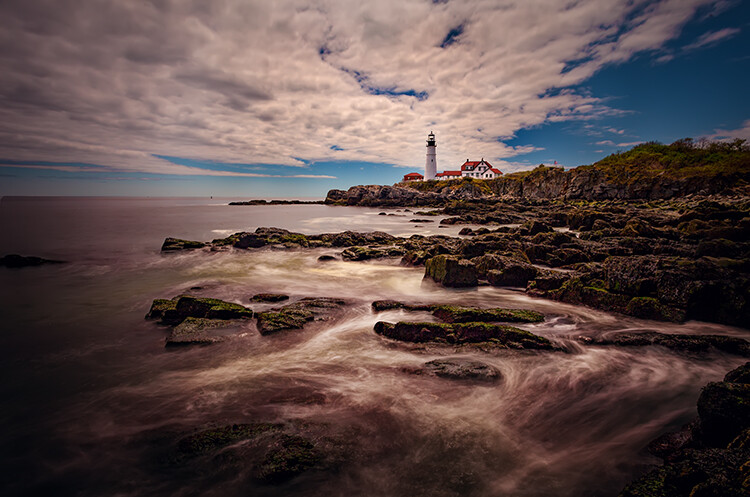
Look for things that your viewer knows. Those items give them something to use to add a sense of scale to the picture. It can be anything. Sometimes the item you use is the actual subject of the picture. For example, in this picture below, the lighthouse provides an actual subject or center of interest for the picture.

lighthouse - Adding a Sense of Scale to Your Landscape Photos

In addition to providing a point to the picture, the lighthouse is also providing your viewer with a sense of scale. It makes the viewer’s mind more comfortable with the entire image. The viewer has a better idea of what they are looking at, and the relative size of all the elements.

Small things provide scale too

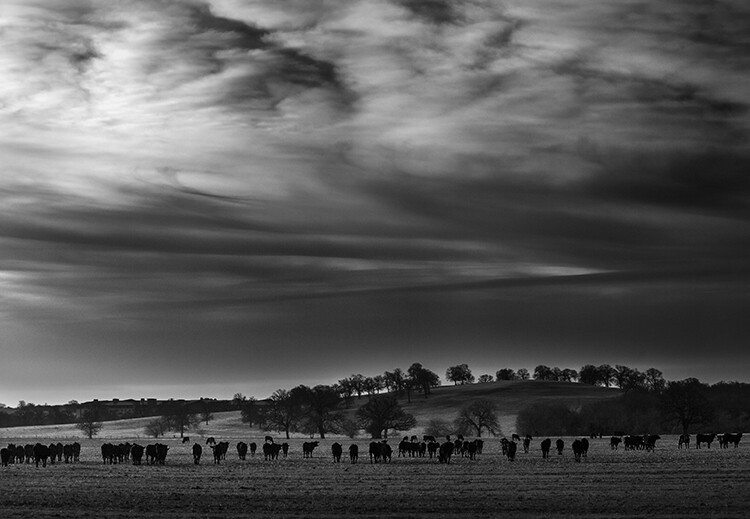
You don’t have to use a large structure like a lighthouse to provide this sense of scale though. You can also include small things that just give your viewer a little clue. In the case of landscapes, perhaps a bird or birds in the distance will help. In fact, animals of any kind often work. In the picture below, the herd of cows provides context for the picture.

cows - Adding a Sense of Scale to Your Landscape Photos

When there is nothing else available, just use trees. We have a sense of the general height of trees and our mind will use that to provide context to the photo. Of course, there are trees everywhere (you almost cannot avoid them) so that should be easy to do.

Keep the people in your pictures

The final item I want to mention is the one that you may struggle with, and that is adding people to your pictures. This is an incredibly powerful tool. We, humans, are amazingly adept at recognizing people in a picture and we will use that to provide context to the entire scene.

Therefore, there is no more powerful way to add a sense of scale than by including people to your pictures. Your viewer will see those people in the pictures and naturally use them to gain a sense of scale.

little people on a cliff - Adding a Sense of Scale to Your Landscape Photos

To do this, you will have to reverse your thinking in a lot of ways, particularly if you are a landscape photographer. You probably spend a lot of time trying to avoid having people in your pictures.

You probably ask the people you are with to step out of your frame. Or you might spend a lot of time standing around waiting for people to move. In many cases, you will still want to do that, but sometimes – to add this sense of scale – you might want to include those people in your image.

Adding a Sense of Scale to Your Landscape Photos

Conclusion

There is no magic bullet to creating a sense of scale in your images. It is something I get asked about from time to time, and I do not have a quick answer. The good news is that just thinking about it puts you ahead of the curve.

So next time you are out shooting, look around and find things that will work for you. Use them to add that sense of scale. Hopefully, the ideas in this article will provide you with some things you can use for your images.

The post How to Add a Sense of Scale to Your Landscape Photos by Jim Hamel appeared first on Digital Photography School.


Digital Photography School

 
Comments Off on How to Add a Sense of Scale to Your Landscape Photos

Posted in Photography


DPRSplit will help pull more dynamic range from Canon 5D Mark IV Dual Pixel Raw files

14 Feb

RawDigger and FastRawViewer have released the beta version of an application called DPRSplit, designed for Canon 5D Mark IV owners. With DPRSplit, photographers can input a CR2 file from a Canon 5D Mark IV and then extract a second image from it, one with an exposure value that is about one stop lower than the original CR2 image.

This utility works only if the camera’s Dual Pixel Raw mode was enabled when the shots were taken.

Canon explains how this technology works on its website:

The Dual Pixel sensor’s pixels have a dual photodiode construction. This sensor design means the sensor can receive an A and B signals from the subject and to detect any phase differences between the two signals, allowing them to attain focus as part of the Dual Pixel AF system … During Dual Pixel RAW shooting, a single RAW file saves two images into the file. One image consists of the A+B combined image data and the other only the A image data.

Photographers benefit from this technology by using Canon’s Digital Photo Professional software, which enables users to make “microadjustments” to focus, bokeh shift, and reduce ghosting. However, the software doesn’t enable users to extract both images from the CR2 file separately—that’s where DPRSplit comes in.

With this utility, photographers get access to that second frame, which has half the light of the composite image. This means that, in essence, the camera is automatically capturing two shots, bracketed by about 1EV.

Extracted images are saved as DNG files for editing with any software that supports the format, so you can blend the images back together and get about +1EV more usable dynamic range. And since the exposures are captured simultaneously, you don’t have to worry about motion blur in your image. The only potential “issue” is a minor parallax error between the two frames.

DPRSplit beta 0.8 is free to download for Windows 7 or higher and Mac OS X 10.6 through macOS 10.13. As with any beta software, it is possible users will encounter bugs, but if you’re a 5D Mark IV user and you already shoot in Dual Pixel Raw, this one might be worth a shot.

Articles: Digital Photography Review (dpreview.com)

 
Comments Off on DPRSplit will help pull more dynamic range from Canon 5D Mark IV Dual Pixel Raw files

Posted in Uncategorized


Lightroom Classic 7.2: Major performance boost, new features, and more

14 Feb

Lightroom Classic 7.2—the performance boosted version of Lightroom DPReview got to test for ourselves at the end of January—has finally arrived! And with it come numerous performance improvements, better support for Intel hardware, a fix for speed issues experienced by some users, and some new features to boot.

Additionally, Adobe has also updated the new cloud-based Lightroom CC ecosystem for both desktop and mobile operating systems. Let’s take them one at a time.

Lightroom Classic Performance Boost

The company explains that it has worked with Intel to improve performance scaling on computers that have multiple cores and at least 12GB of RAM, and as we showed in January, the result is much faster importing and preview generation, and improved speed for things like adjustments rendering in Develop, HDR/Panos rendering, and more.

“One key attribute of the enhancements is that they scale appropriately with a customer’s investment in hardware,” says Adobe. Users who invest in newer, more powerful hardware will see more performance improvements, particularly if the system has at least 12GB of memory. This time around, Adobe says it focused on batch processing improvements (how efficiently system resources are used and batch tasks are completed), but the company will also focus on Interactive (interface response speed) needs in the near future.

Some users had experienced problems with Lightroom Classic slowing down over time, an issue Adobe says it has fixed “in most cases,” though it is possible some users will still experience this issue.

Lightroom Classic Feature Enhancements

Performance improvements and fixes aside, Lightroom Classic 7.2 comes with multiple new features, including a text search for finding a specific folder (“Folder Search”), the ability to filter favorites within folders, an option for creating collection sets from folders for use with Lightroom mobile, as well as a feature for creating collections from Map Module pins.

This version of Lightroom Classic also adds a library filter for unedited and edited images and enables users to create smart collections with unedited or edited images.

$ (document).ready(function() { SampleGalleryV2({“containerId”:”embeddedSampleGallery_3173476968″,”galleryId”:”3173476968″,”isEmbeddedWidget”:true,”selectedImageIndex”:0,”isMobile”:false}) });

Finally, Adobe says it has enabled Photoshop Continuously Scalable User Interface in the Adobe Camera Raw plugin, with the scaling limited to 100% or 200%. Support for per-monitor scaling in Windows has also been added. In explaining the plugin update, Adobe said, “This is primarily a Windows change to sync up Photoshop, and Windows users will now be able to scale the ACR plugin from 100% to 500%, in increments of 100%.”

The full Lightroom Classic 7.2 update changelog is available here, new camera support can be found here, and new lens profile support can be found here.

Updates to Lightroom CC and Lightroom Mobile

In addition to the Lightroom Classic CC updates, the whole Lightroom CC ecosystem—including the Lightroom Mobile apps on iOS and Android—have been updated as well with “optimized performance, added support for new cameras and lenses, and some great new features for desktop and Android.”

Adobe says it put a lot of effort into “tuning and improving stability” with this update. Lightroom CC on Mac and Windows will see performance improve when moving between photos, grid scrolling, and exporting, while all the apps across mobile and desktop should be “a lot more stable.”

As for new features, Lightroom CC for desktop gets the ability to add copyright to imported images; meanwhile, Lightroom Mobile on Android gets a geometry tab for correcting perspective distortion, the ability to add a watermark upon export, the ability to search your Lightroom library with Google Assistant, and a new “Add to Lr” option that will allow you to add photos from third party apps directly into your Lightroom library.

$ (document).ready(function() { SampleGalleryV2({“containerId”:”embeddedSampleGallery_8528326624″,”galleryId”:”8528326624″,”isEmbeddedWidget”:true,”selectedImageIndex”:0,”isMobile”:false}) });

All of these updates are available now, so if you have a Creative Cloud subscription, update to the latest versions and give them a go. And if you want to dive deeper into all of these new features, head over to the Adobe blog.

Articles: Digital Photography Review (dpreview.com)

 
Comments Off on Lightroom Classic 7.2: Major performance boost, new features, and more

Posted in Uncategorized


Science photography award goes to image of a single trapped atom

14 Feb
Single Atom in an Ion Trap | Photo by David Nadlinger/University of Oxford/EPSRC/PA

A photo of a single trapped atom has won the Engineering and Physical Sciences Research Council’s (EPSRC) science photography contest. The image, which is titled “Single Atom in an Ion Trap,” was taken by David Nadlinger of the University of Oxford. Showcased in the image is single positively-charged strontium atom trapped by electric fields produced by metal electrodes.

You have to zoom in to really see it, but even that is incredible when you really wrap your mind around what you’re looking at. Here’s a closer crop:

This closer crop better shows the glowing strontium atom, trapped by electric fields produced by electrodes in the vacuum chamber.

According to the EPSRC, the image is a long exposure that was taken through an ultra-high vacuum chamber’s window. A blue-violet laser was used to illuminate the atom, which absorbed light particles and then re-emitted them. That process produces enough light that a regular camera can photograph the atom if a long exposure is used.

Photographer and overall EPSRC contest winner David Nadlinger discussed the idea behind the image:

The idea of being able to see a single atom with the naked eye had struck me as a wonderfully direct and visceral bridge between the minuscule quantum world and our macroscopic reality. A back-of-the-envelope calculation showed the numbers to be on my side, and when I set off to the lab with camera and tripods one quiet Sunday afternoon, I was rewarded with this particular picture of a small, pale blue dot.

Articles: Digital Photography Review (dpreview.com)

 
Comments Off on Science photography award goes to image of a single trapped atom

Posted in Uncategorized


Fujifilm Imaging Solutions posts excellent financial results

14 Feb

Fujifilm Holdings has posted its financial results for the first three quarters of the 2017 fiscal year, and it’s all good news for the Imaging Solutions division. The segment recorded a revenue of 297.7 billion yen (approximately $ 2.77 billion USD), a bump of 15.6% year-on-year. Imaging Solution operating income totaled 50.0 billion yen (approximately $ 465 million USD), up 76.1% over the same period during the previous year.

From the figures in its earnings presentation, it seems the bulk of the increase comes from the Photo Imaging business—read: Instax cameras—but strong sales in the Electronic Imaging business show the X-Series is starting to deliver. Quarterly revenue for Electronic Imaging is up 39%, thanks to strong sales of the X-E3, X-T20 and X100F models, and the mirrorless medium-format camera GFX 50S and corresponding lenses.

Sales also increased in the Optical Devices business, largely due to strong sales of various industrial-use lenses, used for example in vehicle cameras or projectors. And, finally, Fujifilm’s presentation also mentions the launch of the new MK series of lenses, which are designed for cinema cameras and targeted at the growing area of video creation for online purposes.

If you want to dive into more detail, you can find all the report documents, including a video of the presentation, on the Fujifilm Holdings website. But long story short: Fujifilm’s Imaging Solutions division seems to be doing very well.

Articles: Digital Photography Review (dpreview.com)

 
Comments Off on Fujifilm Imaging Solutions posts excellent financial results

Posted in Uncategorized