RSS
 

Archive for November, 2017

New Lightroom CC or Lightroom Classic: Which Version is Right for You?

10 Nov

You may have heard that Adobe recently unveiled some pretty significant changes to Lightroom. When you consider using Lightroom, you will now have two different versions to choose from; both are aimed at different audiences. In this article we will take a look at both the new Lightroom CC and Lightroom Classic, so you can choose the one that best meets your needs.

New Lightroom CC or Lightroom Classic: Which is Right for You?

How we got here

There are a lot of letters and numbers associated with Lightroom, so it might be helpful to walk through a quick timeline of how we got here.

In the beginning, way back in 2007, there was Lightroom. At first, Adobe was content to come out with periodic new releases and number them. So we had Lightroom 1.0, 2.0, 3.0, 4.0, 5.0, and 6.0, with each version they added some new features. If nothing else, the system was easy to understand.

After that, however, Adobe moved to a subscription model. They simply called it Lightroom CC, which stood for Creative Cloud. With the change to the subscription model, there wouldn’t be big periodic launches. Instead, new features would be rolled out periodically. That’s the world we lived in until recently.

Now, however, Adobe has essentially split Lightroom into two different applications. They are Lightroom CC and Lightroom Classic. Let’s take a closer look at each of them.

Lightroom Classic

Let’s start with the simple one, Lightroom Classic. If you are already familiar with Lightroom, then this is the easy one to understand. Lightroom Classic is basically the same Lightroom you have been using but it’s just updated a little bit. There are really only two changes.

The first is that it is faster. It uploads (imports) image faster, it moves through pictures faster, it edits faster – it seems to do everything faster. There have been a lot of complaints about speed in recent versions of Lightroom. As Adobe added more and more features, it gummed up the works so it was moving slower and slower. Adobe clearly made fixing this a priority.

So Lightroom Classic is faster – a lot faster – than previous versions of Lightroom. How much faster? I haven’t seen any numbers, but the increase in speed will be noticeable to you immediately. It is much faster.

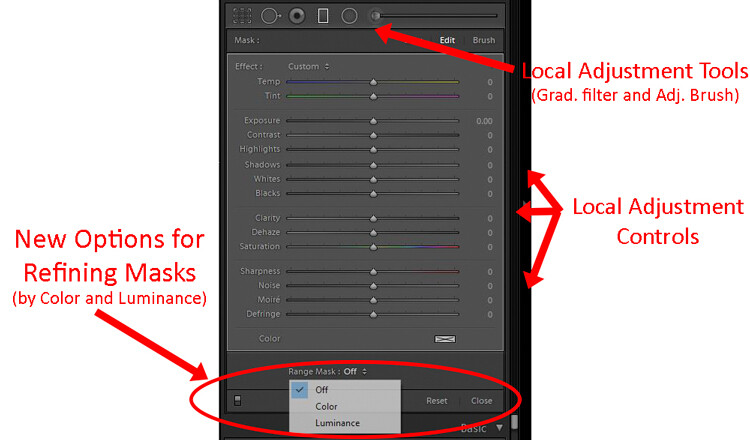
Beyond the speed, is there anything actually different between Lightroom Classic and the prior version? Yes, but not that much. In fact, when it comes to making global changes to your pictures, there is nothing different. The features and controls are all exactly the same. There is one change that is small but is really handy if you make local adjustments to your pictures (i.e. changes to discrete portions of your pictures rather than the whole thing).
New Lightroom CC or Lightroom Classic: Which is Right for You?

Adobe added new masking controls to the local adjustment tools – those being the Adjustment Brush, Graduated Filter, and Radial Filter. It is called the Range Mask feature, and it allows you to limit the selection you make by either the Luminance or the Color. In other words, if you make a selection with the Adjustment Brush or one of the filters, but there are things you don’t want to be included in your selection, you can remove them using these tools. This promises to make local adjustments much more doable in Lightroom.

Lightroom CC

Now comes the new part, and the one everyone is talking about (for good or for bad), Lightroom CC. This is a whole new Lightroom. It really comes down to three principles.

  1. Lightroom CC is simpler to use
  2. It is designed for mobile devices
  3. It relies largely on cloud storage

Let’s take a look at each of these.

#1 Lightroom CC is simpler

Lightroom CC has a simpler interface. It is streamlined and more intuitive. Those new to Lightroom will find it easier to navigate and use.

New Lightroom CC or Lightroom Classic: Which is Right for You?

Simplified Lightroom CC editing controls.

This comes at a cost though. Experienced Lightroom users will find the experience a little like switching from Photoshop to Photoshop Elements. There are entire modules of Lightroom that are missing from Lightroom CC.

There are no Print, Maps, or Books modules. There are some editing functions that are missing as well (the Tone Curve and Camera Calibration). There is no Photo Merge or HDR. In fairness, however, over 90% of the editing functions in traditional Lightroom are present in Lightroom CC.

New Lightroom CC or Lightroom Classic: Which is Right for You?

Expanded Lightroom CC editing controls.

#2 Lightroom CC is for mobile

Lightroom CC is designed for mobile platforms. It will look and work exactly the same whether you use it on your phone, your tablet, or your desktop. You’ll be editing full resolution versions of your photos, and they will be synced to all your devices. What’s more, Lightroom CC makes it easy to share your photos to various social media channels. Because of this, however, you can only export to JPEG (no PSDs or TIFFs) and only in sRGB, which is the color space that is used for all online photos.

#3 Cloud storage

All your edits in Lightroom CC are backed up to cloud storage. Of course, this will cost you extra. More about the plans below, but the first TB of data will cost you $ 10 a month, and it goes up from there. There is also an additional element of organization added in; Lightroom CC uses Adobe’s Sensei to automatically add keywords to your photos.

The Plans

Here’s the deal, though, you don’t necessarily have to choose between the different versions of Lightroom. If you subscribe to the Photography Plan (in my opinion, most readers of this website should be doing that) you already get Lightroom CC. It has just been added to your subscription, along with a token 20 GB of cloud storage. If you aren’t already familiar with the Photography Plan, it is where you get Photoshop and Lightroom for $ 10 a month.

If you want additional cloud storage, it will cost you more. 1 TB of cloud storage costs another $ 10 a month, taking the Photography Plan plus the 1 TB of cloud storage up to $ 20 a month.

Finally, if you only want the new Lightroom CC, you can get it along with 1 TB of cloud storage for $ 10 a month. That might be a good option for those that are very mobile, store everything to the cloud, and/or are just getting started with Lightroom.

Here is a chart from Adobe showing the options:

Purchased outright version is going away

There is one more thing you need to know. If you want to purchase Lightroom outright and avoid the monthly charge, you can still do so, but Lightroom 6 is your last chance. Adobe will also stop updating that fairly soon (meaning if you buy a new camera and LR 6 can’t open the raw files there will be no update for that – you’d have to convert them all to DNG before importing). The days of being able to purchase Lightroom (as opposed to renting it) appear to be just about over.

Which version of Lightroom is right for you?

So, which one is right for you? If you are just starting out with Lightroom and your photography is based on mobile platforms, then Lightroom CC might be for you. But if you are already using Lightroom, I think Classic is the way to go.

If you are used to Lightroom, then switching to CC will probably seem like a step backward. Further, if you tend to use desktops and laptops for your editing, then Classic is clearly the way to go. For those instances when you need to do something on your phone, there is always Lightroom Mobile (not ideal, but it works in a pinch).

Of course, all this assumes that Adobe keeps updating Lightroom Classic (the use of the term “Classic” has a lot of people scared since that is often the kiss of death in the tech world).  For the moment at least, Adobe is promising continued updates to it.

Poll

Fill in this quick poll and tell us what you’ll be choosing in regards to Lightroom.
Note: There is a poll embedded within this post, please visit the site to participate in this post’s poll.

The post New Lightroom CC or Lightroom Classic: Which Version is Right for You? by Jim Hamel appeared first on Digital Photography School.


Digital Photography School

 
Comments Off on New Lightroom CC or Lightroom Classic: Which Version is Right for You?

Posted in Photography


Tips for Shooting Cityscapes Through a Window at Blue Hour

10 Nov

Shooting cityscape photos from inside a building (such as an observation deck of a tower, hotel room, etc.) pose a different set of challenges that you won’t experience shooting outdoors. Here are a few easy-to-follow tips for shooting the city at blue hour, with a focus on how to eliminate unwanted reflections from the glass.

Japan - Tips for Shooting Through a Glass Window of an Observation Deck at Blue Hour

Shanghai - Tips for Shooting Through a Glass Window of an Observation Deck at Blue Hour

Vietnam - Tips for Shooting Through a Glass Window of an Observation Deck at Blue Hour

The reflection-free shots above of Fukuoka skyline (Japan, top), Shanghai skyline (China, center) and Ho Chi Minh City skyline (Vietnam, bottom) were shot through glass windows of Fukuoka Tower, Shanghai World Financial Center Observatory and Bitexco Financial Tower respectively – following the methods described in this tutorial.

Bring a mini-tripod

In order to shoot at blue hour, a tripod is essential whether you’re shooting indoors or outdoors. But some observation decks don’t allow tripods because they are seen as a hindrance for other visitors. In that case, you may try to bring in a mini-tripod like a Gorillapod, as it’s unlikely to disturb other non-photography visitors.

Even if tripods are allowed, you may as well bring a mini tripod just in case, as it comes in handy when there is no suitable space to set up a regular tripod.

Gorillapod - Tips for Shooting Through a Glass Window of an Observation Deck at Blue Hour

Wipe the glass with a cloth

Glass windows of an observation deck aren’t always clean. Make sure to keep a cloth in your camera bag so that you can wipe an area to shoot through if it’s dirty. Obviously, you can’t wipe the other side of the window, though, so choose an area that has no stains, etc.

How to eliminate reflections off the window

This is the biggest challenge when taking photos through a glass window. The window works much like a mirror and it’s hard to completely prevent reflections (e.g. such as yourself, room lights) from showing up.

Typical tips to follow are shooting in close and as straight as possible to the glass (i.e. leaving a little gap between the glass and the lens so as not to let indoor lights creep in) and using a polarizing filter which helps cut reflections to some extent. Aside from these tips, I’d recommend the following “tools”.

Reflections - Tips for Shooting Through the Glass Window of an Observation Deck at Blue Hour

Ho Chi Minh City skyline (Vietnam) shot through the window of Bitexco Financial Tower. I tried my best by getting the lens really close to the window (almost touching it) and using a polarizing filter, but the room interior and stray lights still got reflected in the glass.

Using a DIY blackout curtain

This might be an old-school method, but I recently came across a photographer doing this on the observation deck of Shanghai World Financial Center (see below). Not advisable to use such a large curtain, though, as it blocks the view for other visitors and you’ll run the risk of being asked to leave by floor staff.

Blackout curtain Tips for Shooting Through the Glass Window of an Observation Deck at Blue Hour

Using a black jacket

I used to rely on this method and it worked relatively well. Set up a tripod very close to the window, and cover the whole rig (camera and tripod) with a black jacket to create a closed-in area around the camera so that no indoor lights get inside the jacket. Make sure to use a “black” jacket to reduce reflections, as a lighter-colored jacket does more harm than good and causes even more reflections.

Using black neck gaiter

This used to be my favourite method, as it doesn’t really catch the unwanted attention of other visitors (compared to using the jacket, etc.). The concept here is the same as using a jacket. To block any stray lights from getting in, wrap the black neck gaiter (neck warmer or scarf) around the lens and push the whole setup (camera and tripod) onto the window to completely shade the front element of the lens.

Jacket neck gaiter - Tips for Shooting Through the Glass Window of an Observation Deck at Blue Hour

Using a black jacket (left) and a black neck gaiter (right) to shade the front element of the lens and cut reflections from the window.

Using a lenskirt

A lenskirt is a tool specifically created to cut out reflections. This is what I’ve been using for the past few years with great success. By attaching a lenskirt to the front of your lens and the pushing suction cups onto the window, it shades the front element of the lens. This helps cut reflections from the window, leaving no chance for any stray light to get in.

With a black neck gaiter, I always had to make sure not to have vignetting (dark corners) by checking through the viewfinder (due to the edges of the neck gaiter getting too close to the lens). But the window-facing end of a lenskirt opens up like a softbox, so there is no worry of any edge vignetting being introduced.

Lenskirt - Tips for Shooting Through the Glass Window of an Observation Deck at Blue Hour

Conclusion

I hope these tips help you take reflection-free cityscape photos through glass windows of an observation deck on your next visit.

Lastly, you may wonder why I didn’t mention a rubber lens hood (which is said to work well for shooting through glass). I’ve tried it before but found it prone to vignetting, especially at a wide angle like 18mm or wider. And, when shooting cityscape photos from high above like an observation deck, you’re very likely to shoot wide, therefore I’ve excluded it from the list.

If you have any other tips or experiences using these suggested tools in this post, please share them in the comments below.

The post Tips for Shooting Cityscapes Through a Window at Blue Hour by Joey J appeared first on Digital Photography School.


Digital Photography School

 
Comments Off on Tips for Shooting Cityscapes Through a Window at Blue Hour

Posted in Photography


Cinematic 4K footage shot with the Apple iPhone X

10 Nov

Matteo Bertoli, a California-based cinematographer, got a chance to try out the iPhone X’s video capabilities in Kauai and has just published the results. And before you ask – Bertoli states that it was all shot handheld.

“I DID NOT use any lenses, accessories, tripods or sliders. Everything was shot handheld, the only thing I had on the phone was the silicon case, that’s it. Also I DID NOT use Filmic Pro. Everything was done with the native camera app. Shot in 4K at 24fps,” he states on YouTube.

Bertoli did grade the footage in Davinci Resolve 14. He also stays that, impressively, most of the video was shot using the telephoto camera. The secondary camera module’s inclusion of OIS and a brighter F2.4 aperture means it’s more useful for these kinds of applications.

Take a look at the footage above and let us know what you think in the comments.

Articles: Digital Photography Review (dpreview.com)

 
Comments Off on Cinematic 4K footage shot with the Apple iPhone X

Posted in Uncategorized


DxOMark: DJI Zenmuse X7 outperforms GH5, on par with top-notch APS-C DSLRs

09 Nov

Remember when the DJI Zenmuse X7 drone camera was released, and we said DJI had become a camera company without anybody noticing? You might consider the latest scores out of DxOMark proof of that assertion. The sensor testing company just released its review of the X7, ranking it above the popular Panasonic GH5 and on part with top-scoring APS-C sensors like the Nikon D7500.

Sporting the largest sensor yet for a DJI camera module, the X7 boasts a Super 35/APS-C sized chip that DxO discovered will hold its own against the leaders in that category. In fact, going through the rankings, you’ll find that only two APS-C sensors have ever scored higher than 86. And when you compare it to one of the top-scoring APS-C cameras (the Nikon D7500) and the often-drone-mounted Panasonic GH5, you see that DJI is not playing around:

As DxOMark points out in their conclusion, this is an impressive showing for the drone maker:

Thanks to an increase in its size as much as to technological advancements, the DJI Zenmuse X7’s sensor takes a significant step up in performance from the Zenmuse X5S sensor. In fact, it delivers results that compete closely with those from a high-scoring APS-C format DSLR, despite being housed in a camera that’s mounted in a stabilized gimbal and specifically designed for aerial photography.

Be sure to head over to DxOMark to read their full DJI Zenmuse X7 review. And then check out our own opinion piece about DJI’s transformation from a drone maker, into a full fledged camera company.

Articles: Digital Photography Review (dpreview.com)

 
Comments Off on DxOMark: DJI Zenmuse X7 outperforms GH5, on par with top-notch APS-C DSLRs

Posted in Uncategorized


Panasonic Lumix DC-G9 first impressions

09 Nov

Introduction

The Panasonic Lumix DC-G9 is the company’s newest mirrorless interchangeable lens camera (ILC), and in many ways, the first Lumix camera ever to be aimed squarely at professional and advanced amateur stills photographers – and it shows.

But that doesn’t mean the G9 is light on video specs; Panasonic has long been a leader in ‘hybrid’ stills and video cameras with the impressive GH-series, but just as the GH-series leans slightly more to the video side of things, the G9 leans the other way.

Even though we’ve had only a few days with our G9, we’ve already seen improvements to the JPEG engine (color in particular), and been able to play around with some of its new features like the 80MP high-resolution mode, and been blown away by its incredibly large electronic viewfinder. Some of its capabilities – like impressive-looking 20 fps burst shooting with continuous autofocus – will need more in-depth testing.

But for now, we’ve put together some of our first impressions and takeaways – let’s get started.

Key specifications

Design sketch of the Panasonic Lumix DC-G9.

The Lumix G9 is overflowing with refinements and improvements both inside and out. There’s a lot to digest in this camera, but here are what we believe to be the G9’s most important qualities:

  • 20.3MP Live MOS sensor with no AA filter (same as GH5)
  • 6.5-stop 5-axis Dual I.S. 2
  • 0.83x (35mm equivalent) high-res, 120 fps electronic viewfinder
  • 80MP high-resolution mode
  • 20 fps bursts with continuous autofocus (60fps with focus locked)
  • Dual UHS-II SD card slots supporting new high-speed V-rated cards
  • Assortment of 4K and 6K Photo modes, in-camera focus stacking
  • Refined ergonomics and controls
  • USB charge and USB power capability, 400 shots per charge battery life (CIPA)

But for established photographers, particularly those Panasonic is targeting, equally important in addition to this list of objective specifications are the intangibles; how does the G9 feel in the hand, and how does it respond to your inputs?

Let’s get started with that first consideration, and look at the G9’s body and design.

Body, design and handling

The G9 isn’t a small camera, but with a suitably compact lens, it isn’t too intimidating. Out-of-camera JPEG, processed in-camera with increased exposure compensation. Panasonic Leica DG 25mm F1.4.
ISO 3200 | 1/500 sec | F1.4

The G9 comes with splash, freeze and dust proof construction, and feels in the hand as though you’re holding a chunk of solid magnesium alloy, as opposed to a hollow one filled with Panasonic’s most advanced photographic technology to date.

Battery life from the G9 is good if not downright impressive, at a CIPA rated 400 shots; it’s compatible with the same battery as the GH5, and will easily last you many hours of serious shooting. As always, exploring menus and rocketing through images in playback will shorten the battery’s stamina.

Speaking of playback, the rear jog dial does a good job of moving through your images quickly, handy for when you start firing off those 20 fps bursts. The new top-plate LCD allows you to check your settings at a glance, even if the rear screen is folded away, and the combined Mode + Drive dials on the left shoulder work surprisingly well; some competitors that have attempted this end up feeling kind of ‘fiddly.’

The top plate on the G9 is one of its key physical differentiators versus the GH5.

The AF joystick has been tweaked, with a new textured finish and a click-in option to toggle between your chosen AF point and the center. Unfortunately, we think it could still be faster to move your AF area when you tap it to the side, and if you’re holding it to the side, your moving AF area won’t respond to a change in your desired direction unless you release the joystick, and push in that new direction. Compounding this is that you can’t move the point diagonally; only horizontally and vertically.

As always, having an AF joystick is always better than not having one, and we’re hopeful to see these issues addressed in a future firmware update.

Body, design and handling

An abundance of controls and overall responsive performance helped me get this grab image of a low-flying plane in South Seattle. Out-of-camera JPEG, cropped to taste. Panasonic Leica DG 12-60mm F2.8-4.
ISO 200 | 1/640 sec | F4.5

The G9 has tons of controls, and tons of customization options. It can take a while for you to find your way around the camera, but that’s nothing out of the ordinary for a flagship. One thing we’ve noticed is that, likely on purpose, the shutter button on the G9 is very sensitive, so that could be something users may need to adjust to.

What shouldn’t require much adjustment to is the all-new 0.83x (equivalent) optical viewfinder. It’s among the largest electronic viewfinders ever built into a digital camera, providing an immersive shooting experience that’s enhanced by the use of an OLED display, which gives great contrast.

As someone who’s just officially griped about the necessity of USB charging, it’s nice to see it make an appearance on the G9 in addition to the ability to run off of USB power. The batteries by now are commonplace, but it’ll be great to power the camera with a USB power pack for longer shoots like timelapses, or when you need to top-up a battery off the grid.

The G9 has among the largest electronic viewfinders ever built into a digital camera.

And finally, let’s address the issue of size. There’s also no doubt that the G9 is fairly ‘chunky,’ especially given the Four Thirds sensor inside. Despite this, we think it’s likely to be a good fit for its intended audience.

After all, a comfortable grip, extensive external controls, decent battery life, robust weather sealing and a crazy stabilization system all come with size and weight penalties; but even so, the G9 is lighter than the GH5. Indeed, couple the G9 with the appreciably small size of many Micro Four Thirds lenses, and you have the potential to make for a lightweight yet comprehensive kit that doesn’t skimp on ergonomic comfort.

New and notable features

In this image, you can see how possible motion in your scene might impact your ability to use this mode – but you can also see just how much detail is there in the static portions of the scene. Panasonic Leica DG 12-60mm F2.8-4.
ISO 200 | 1/500 sec | F4

The new 80MP high resolution mode on the G9 works similarly to competitors’ offerings, and takes eight shots in quick succession, moving the sensor by a half-pixel for each image. In practice, it’s one of the faster implementations of a pixel-shift high res mode that we’ve seen, and predictably comes with a serious increase in image quality. Usually.

What you gain in detail and noise characteristics, you lose out depending on how much motion is in your scene. The above image is a good example of both the detail benefit you can get from this mode, as well as how it copes with moving subjects – and for the record, this is not necessarily the setting Panasonic would recommend for this feature, but we figured you, dear reader, might be curious about it.

Image stabilization on the G9 is a claimed 6.5 stops, which is basically magic.

As an added bonus, if you did attempt an 80MP image and were bothered by unintended motion artifacts, the G9 has an option to capture an additional ‘normal’ 20MP Raw and JPEG image simultaneously.

Image stabilization on the G9 is a claimed 6.5 stops – which is basically magic. With shorter lens, you’ll have an almost glidecam experience (even if you’re only using the in-body stabilization), and even with the new Panasonic Leica 200mm F2.8 lens and 2.0x teleconverter, you can easily frame your subjects shake-free through the viewfinder, even hand-held.

Image and video quality impressions

Panasonic told us that, for their latest JPEG engine, they’ve been working hard on the G9’s rendition of yellows and blues, particularly for blue skies. We think they look pretty darn good.

While we don’t yet have Raw support for the G9, the early JPEGs coming out of our camera look good. We’ve been critical of Panasonic’s JPEG color and noise reduction in the past, and our early sample shots seem to show noticeable improvements.

First, the automatic white balance seems to handle a variety of settings with much greater reliability – warm evening light is represented as such, without going over-the-top orange, colors are nicely saturated and exhibit far less ‘green-shifted yellows’ than before. We’ll wait until we can perform our studio testing to make a definitive call on noise reduction, but it looks to this reviewer that there’s less smearing of areas of fine detail, which was historically a problem even at lower ISO values.

Panasonic is claiming more sophisticated sharpening and noise reduction on the G9, but we’re waiting for our studio scene analysis before we can claim anything definitive in this regard.

In terms of video, the G9 offers 4K UHD capture at up to 60 fps, as well as an array of slow-motion modes in both 4K and Full HD. While you lose out on some more advanced features of the GH5, such as ultra-high bitrate recording, higher color depth capture and unlimited clip length (the G9 tops out at 10 minutes and 30 minutes for 4K/60p and 4K/30p respectively), video capture is still taken from the full width of the sensor and downscaled, and so should provide great detail. Lastly, our initial impressions show DFD autofocus to be more decisive and less prone to ‘wobble’ when shooting video, making run-and-gun capture more feasible.

Overall impressions and sample gallery

Out of camera JPEG. Panasonic Leica DG 12-60mm F2.8-4.
ISO 200 | 1/4000 sec | F4

Credit where credit is due, Panasonic has a long history of bringing cameras to market that bear impressive technical capabilities; from the lineage that gave us the first-ever mirrorless interchangeable lens camera, to the first mirrorless camera that could capture 4K video comes the stills-focused G9. With this new model, Panasonic has taken advantage of that greater emphasis on stills to pack some advanced and innovative features into a camera that is meant to be rugged and reliable for professional use.

Starting with ruggedness, we have to admit the G9 feels great in the hand. It’s all-metal, with a redesigned (and really comfy) grip. It’s far from compact, but it doesn’t feel heavy for a professional-level camera; its overall size allows room for an enormous viewfinder, good-sized battery and abundant external controls.

We’ve only had the G9 for a few days, and so we’ve not had time to fully evaluate all of the G9’s new features in-depth. For now, we remain impressed with overall JPEG image quality, video autofocus performance looks to be improved and the image stabilizer is really something you have to see to believe.

The G9 continues to use the same Four Thirds 20.3MP sensor as the GH5.

With the same mechanical shutter as the GH5, it offers 9 fps burst shooting with what should be similar (read: very good) autofocus performance at 9 fps, but we’re really looking forward to doing some sports testing at the full 20 fps with electronic shutter. We have to admit we’re also curious how the new V-rated SD cards holds up to the CFast and XQD slots in high-end sports DSLRs.

There will always be folks that will have a hard time seeing past the Four Thirds sensor in the G9, relative to APS-C and full-frame offerings. But the G9 nonetheless comes with incredible image stabilization, high shooting speed, high quality 4K video and compact-yet-high-quality lens offerings (all of which are made possible, or at least easier, with the smaller Four Thirds sensor). For this, we think the G9 represents a compelling option for professional photographers needing all of the capability, customizability and resilience they can get in a smaller package than many competitors are able to offer.

Articles: Digital Photography Review (dpreview.com)

 
Comments Off on Panasonic Lumix DC-G9 first impressions

Posted in Uncategorized


Panasonic announces Leica DG Elmarit 200mm F2.8 Power OIS telephoto prime

09 Nov

$ (document).ready(function() { SampleGalleryV2({“containerId”:”embeddedSampleGallery_9122994535″,”galleryId”:”9122994535″,”isEmbeddedWidget”:true,”standalone”:false,”selectedImageIndex”:0,”startInCommentsView”:false,”isMobile”:false}) });

Panasonic has announced its Leica DG Elmarit 200mm (400mm equiv.) F2.8 Power OIS telephoto prime. This hefty, weather-sealed and freezeproof lens features 15 elements, 2 of which are ‘ultra extra-low dispersion’. The lens has image stabilization onboard, though Panasonic does not quote a CIPA figure for shake reduction. The 200mm F2.8 is compatible with the Dual IS systems built into most modern Panasonic mirrorless cameras.

The lens features a triple linear focus motor system with a 240 fps sensor drive speed along with a ‘micro-step’ drive system that allows for precise aperture control.

Panasonic includes the new DMW-TC14 1.4x teleconverter in the box with the lens, bringing the focal length up to 280mm (560mm equiv.). It’s also compatible with the company’s 2x teleconverter.

When it launches in January 2018, some functions on the 200mm F2.8 will not be compatible with the Panasonic GH5, and a firmware update slated for March will take care of that.

The Panasonic Leica DG Elmarit 200mm F2.8 Power OIS will be priced at $ 2999.99.

Press Release

LEICA DG ELMARIT 200mm / F2.8 / POWER O.I.S. (H-ES200)

The New Compact, Lightweight Ultra Telephoto Lens with POWER O.I.S. For Handheld 400mm Equivalent Ultra-Telephoto Shooting

November 8, 2017 (Newark, NJ) – Panasonic Consumer Electronics Company is proud to introduce a new telephoto single focal length lens, the LEICA DG ELMARIT 200mm / F2.8 / POWER O.I.S. (35 mm camera equivalent: 400 mm). The LEICA DG ELMARIT 200mm / F2.8 / POWER O.I.S. is the first large-diameter ultra-telephoto fixed focal length lens with a name of LEICA DG. It boasts sharpest-ever image quality from corner to corner in the history of LUMIX digital interchangeable lenses. Featuring high mobility in a compact, lightweight design, it also realizes handheld ultra-telephoto shooting.

With its 400mm ultra telephoto focal length and stunning descriptive performance, the LEICA DG ELMARIT 200mm / F2.8 / POWER O.I.S. is suitable for wildlife or sports photography. The 1.4x Teleconverter (DMW-TC14) is bundled*1 to extend the focusing distance to 560mm (35mm camera equivalent) for close-up shots.

The fast F2.8 aperture lets you capture fast-moving subjects while the POWER O.I.S. (Optical Image Stabilizer) effectively compensates for hand-shake movement, making it easy to shoot even without a tripod or in low-lit situations. The lens works with Dual I.S.*2 (Image Stabilizer) and Dual I.S. 2.0*3 system when mounted on the compliant Panasonic LUMIX DSLM (Digital Single Lens Mirrorless) cameras for more powerful hand-shake suppression.
Clearing the stringent quality standard of LEICA, the lens is comprised of 15 elements in 13 groups, featuring two UED (Ultra Extra-low Dispersion) lenses. The use of UED lenses and Panasonic cutting-edge optical technology achieve high resolution, high contrast image from corner to corner while suppressing distortion and chromatic aberration.

Incorporating a triple linear motor system and max.240 fps sensor drive, the new LEICA DG ELMARIT 200mm / F2.8 / POWER O.I.S. achieves high-speed, high-precision contrast AF system for both photo and video recording. This stunning AF performance is excellent to record 4K video, where precise focusing is required. In addition, the micro-step drive system in the aperture control section helps the camera smoothly catch up to brightness changes when panning.

It boasts a rugged, dust/splash-proof design and are even freeze-proof down to -10? (14 degrees F) to withstand professional use under harsh conditions. Offered in sharp, metallic black color, it stylishly matches the LUMIX G Digital Single Lens Mirrorless (DSLM) cameras.
The LEICA DG ELMARIT 200mm / F2.8 / POWER O.I.S. can also be used with the 2.0x Teleconverter DMW-TC20 (sold separately), which extends the focusing distance to 800mm (35mm camera equivalent) to capture subjects at a greater distane.

*1 The 1.4x Teleconverter (DMW-TC14) is also sold separately as an optional accessory.
*2 Dual I.S. is available on GX8, GX80/85
*3 Dual I.S. 2.0 is available on GH5, G9, G80/81/85
•Some functions of H-ES200 cannot be used with DC-GH5. The firmware for DC-GH5 to fully comply with H-ES200 is scheduled to be released by the end of March, 2018.
•Design and specifications are subject to change without notice.
•LEICA is a registered trademark of Leica Microsystems IR GmbH.
•ELMARIT is a registered trademark of Leica Camera AG.

The new ELMARIT 200mm lens and accessories will be available in early January 2018. The lens with the 1.4x teleconverter MSRP will be $ 2,999.99 and the optional 2x teleconverter is $ 599.99.

Leica DG Elmarit 200mm F2.8 Power OIS specifications

Principal specifications
Lens type Prime lens
Max Format size FourThirds
Focal length 200 mm
Image stabilization Yes
Lens mount Micro Four Thirds
Aperture
Maximum aperture F2.8
Minimum aperture F22
Aperture ring No
Number of diaphragm blades 9
Optics
Elements 15
Groups 13
Special elements / coatings 2 ultra extra-low dispersion + Nano Surface Coating
Focus
Minimum focus 1.15 m (45.28)
Maximum magnification 0.2×
Autofocus Yes
Motor type Stepper motor
Full time manual Yes
Focus method Internal
Distance scale No
DoF scale No
Focus distance limiter Yes
Physical
Weight 1245 g (2.74 lb)
Diameter 88 mm (3.46)
Length 174 mm (6.85)
Materials Magnesium alloy
Sealing Yes
Colour Black
Filter thread 77.0 mm
Hood supplied Yes
Tripod collar Yes
Other
Notes Includes 1.4x teleconverter

Articles: Digital Photography Review (dpreview.com)

 
Comments Off on Panasonic announces Leica DG Elmarit 200mm F2.8 Power OIS telephoto prime

Posted in Uncategorized


Video: Meet the Panasonic Lumix G9

09 Nov

What happens when a company known for its video-centric hybrid cameras turns its attention to professional stills shooters? The Panasonic G9. Still equipped with high-end video specs like 4K/60p recording, it adds stills-centric features like 20 fps bursts and an 80MP high-resolution mode. Get caught up on everything that’s new in our quick overview video.

Articles: Digital Photography Review (dpreview.com)

 
Comments Off on Video: Meet the Panasonic Lumix G9

Posted in Uncategorized


VSCO adds ‘Recipes’ feature that lets you create 10 custom presets

09 Nov

VSCO has launched a new feature for VSCO X subscribers called Recipes. With Recipes, subscribers are able to save their favorite edits, making it possible to apply them as a batch to future images. Up to 10 Recipes can be saved at a time via a new menu item that you tap after the image edits are chosen for the first time.

Non VSCO X subscribers will be able to save only one recipe, so if you want to get into the preset making game, you’ll need to pony up for the VSCO X membership ($ 20/year).

The company explains how to use the new Recipes feature in the video below:

Articles: Digital Photography Review (dpreview.com)

 
Comments Off on VSCO adds ‘Recipes’ feature that lets you create 10 custom presets

Posted in Uncategorized


This is what happens when a ‘weather sealed’ camera takes a dip in salt water

09 Nov

$ (document).ready(function() { SampleGalleryV2({“containerId”:”embeddedSampleGallery_3338148904″,”galleryId”:”3338148904″,”isEmbeddedWidget”:true,”standalone”:false,”selectedImageIndex”:0,”startInCommentsView”:false,”isMobile”:false}) });

It shouldn’t need saying, but weather resistant, weather sealed and environmentally sealed do not mean waterproof. A cursory glance at your warranty should make this clear: no matter how good a reputation your brand has, if it isn’t covered by the warranty, you’re in ‘at your own risk’ territory.

Roger Cicala’s latest blog post over at Lens Rentals shows the damage that can occur when a nominally weather sealed camera gets wet—both the damage and the detective work made clearer by the fact that this particular camera took a dip in salt water. Cicala follows the path of the corrosion throughout the camera and explains why an encounter with seawater may render your camera not just non-functioning, but completely irreparable.

As is so often the case with Cicala’s ‘big picture’ blog posts, don’t get too hung up on the specific model he’s dissecting. As he points out in the comments, he’s written off some of every brand from salt-water damage.

Check out some of the pictures from this particularly painful teardown at the top, and then click the big blue button below to see the full post on Lens Rentals.

Teardown of a corroded camera

As an aside, this is the main of reasons we can’t test manufacturer claims in this area. Partly, of course, it’s because we have to return all the cameras to the manufacturers; but another aspect is that, like lens copy variation, camera failure is probabilistic: you’d need to test lots of cameras to know whether the model you’re testing is flawed or if you were just unlucky with your sample.

Cicala gets the kind of insight that the rest of us simply can’t get—he gets to see a much larger data set based on what the company rents and what it then has to repair—but even he doesn’t claim to have a solid answer to which brand is best. Just something to bear in mind the next time you’re thinking of sharing that ‘extreme torture test’ video of your brand’s flagship.

Articles: Digital Photography Review (dpreview.com)

 
Comments Off on This is what happens when a ‘weather sealed’ camera takes a dip in salt water

Posted in Uncategorized


How to Capture the True Nature of Indigenous Cultures with Sensitivity

09 Nov

This article is definitely going to be a switch from my normal contributions here on dPS, but it’s a topic that is quickly becoming relevant in today’s society. As more people travel and snap photos, it’s becoming increasingly popular to shoot photos of various indigenous cultures. Indeed many different indigenous groups offer travel packages where you can experience their culture and way of life.

Photographing Indigenous Cultures is Important

How to Capture the True Nature of Indigenous Cultures with Sensitivity

When you think of photos of indigenous people this image probably doesn’t come to mind but this is “us” too.

The additional attention is certainly not a bad thing. For far too long various indigenous groups throughout the world have suffered from racism and just plain poor treatment. As a member of an indigenous group, I see a lot of positives in the awakening and the growing awareness of the plight of these groups of people.

My mother’s side of the family is Algonquin. My ancestors and other members of the Algonquin nation inhabited a large territory that extended through the Ottawa area of Ontario, Canada into the province of Quebec. Algonquin Provincial Park (the largest Canadian Provincial Park) was established in the early 1900’s and essentially annexed my family’s traditional hunting grounds.

It’s a beautiful park, and many of my relatives were born on our family’s trap lines. After the creation of the park, my family members were considered poachers. (I only mention these facts to establish perspective.) So while the awakening of the public consciousness to the beauty of indigenous culture is definitely a positive occurrence, there are certainly some things to take into consideration.

How to Capture the True Nature of Indigenous Cultures with Sensitivity

Originally sewn by my great Aunt Helen. This is the fringe detail on a women’s dress.

We are friendly and welcoming

The first being that 100s of years of bad treatment cannot be erased in the blink of an eye. Hard feelings still exist. Canadian indigenous groups are slowly moving toward reclaiming their heritage and learning about the traditions that governments tried to erase. This holds true for so many other indigenous groups around the world. The indigenous groups of Australia have faced similar struggles to their counterparts here in Canada.

When attempting to make connections with various groups for photography, you may experience some skepticism. Sometimes people are suspicious. We are welcoming and loving people but when you’ve been beaten down as many times as most indigenous groups, you might experience some quiet reticence to requests to photograph various groups.

How to Capture the True Nature of Indigenous Cultures with Sensitivity

Photograph by Michelle Glassford Mackenzie

Educate yourself on the culture

My second recommendation would be to educate yourself about the people you wish to photograph before your visit. Become familiar with some of the language. For example, in the Algonquin language, you would say “Kwey” meaning “Hello”.

Knowing some words and showing respect for the culture may allow you to gain a more personal and friendly relationship with the people you wish to photograph. So look up the words. Ask questions of those who speak the language and try to greet people respectfully. Never just jump in and spout words without being sure you know how to use them properly. Generally, “Hello” and “Thank you” are enough.

How to Capture the True Nature of Indigenous Cultures with Sensitivity

Used for various ceremonies and during nation gatherings, my aunt also made this drum.

Get permission

Thirdly, and I make this point in very general terms, some ceremonies are very special and you always need to ensure you have permission before you photograph the event. In some cultures, photography is not allowed. There have been incidents where photographers have invaded very sacred events and angered the individuals involved.

Quite honestly, being ignorant and disrespectful just continues to create feelings of hostility and suspicion between indigenous groups and the general public. So please ask questions, be polite, and be respectful. The idea is to move on and repair the divisions created by years of colonial assimilation tactics.

Indigenous perspective

Finally, there’s just one other point I wish to make. I hope it doesn’t ruin your desire to learn about and experience an indigenous culture, but I hate to burst your bubble. We (all indigenous people) are regular people. We are not the romanticized “savages” of a bygone era. We get up in the morning and brush our teeth just like you do. Fellow indigenous photographer Nadya Kwandibens sums it up best in her mission statement.

“We, as Indigenous people, are often portrayed in history books as Nations once great; in museums as Nations frozen stoic; in the media as Nations forever troubled. These images can be despairing; however, my goal seeks to steer the positive course. If our history is a shadow, let this moment serve as a light. We are musicians, lawyers, doctors, mothers, and sons. We are activists, scholars, dreamers, fathers, and daughters. Let us claim ourselves now and see that we are, and will always be great, thriving, balanced civilizations capable of carrying ourselves into that bright new day.”

If you’re going to photograph our culture then, by all means, go ahead snap away, but please capture us as we are. We are living breathing human beings just like you. Don’t look for the past and the romantic notions of characters like Disney’s “Pocahontas”. (By the way, that whole story is so twisted the truth is buried in myth just like stories of King Arthur)

Never take that as the truth about the lives of indigenous people. Meet us, know us as humans and capture our heart and soul in the same way you would any other person you meet. Take the advice of my friend Michelle a fellow indigenous photographer.

How to Capture the True Nature of Indigenous Cultures with Sensitivity

Photography by: Michelle Glassford Mackenzie

“While photographing these public yet sacred events one must be both respectful and gracious. Despite being a public event it is best to ask permission to photograph individuals in their regalia, more than often the person will agree. For my photo of the gentleman (above), I asked if he would allow me to photograph him. He replied, only if he could return the favor and photograph me. So after I took this photo, he took my camera and photographed me. Sometimes, it is obvious when a person doesn’t want their photo taken and I will respect their wishes. Other times, you see the joy on their face, as in the female dancer. You don’t necessarily need to capture faces to tell a story, as seen in the photograph of the jingle dress. Also, during these ceremonies, there are Honour Songs and other sacred moments when Photography is not permitted….listen to the MC. Final words….Please be respectful.”

How to Capture the True Nature of Indigenous Cultures with Sensitivity

Another shot of the dress. This is a self-portrait.

Resources to help you

For those of you wishing to learn more and to explore photographing indigenous cultures, I’m leaving you with a list of resources. Ones which I hope will help you in your quest to capture amazing images and also help in capturing the true powerful nature of indigenous cultures and groups around the world.

It is my hope that this article helps to continue our journey. Indigenous people are moving towards a brighter future heading down the path towards the revitalization of our pride and our culture. Please don’t hesitate to ask me any questions. If I don’t know the answer, I will find those who do and share with you. This is not just about my family history but about the lives of millions of individuals who are moving forward in a modern society. We are still here, and we are amazing.

How to Capture the True Nature of Indigenous Cultures with Sensitivity

An indigenous mother and her children.

  1. The controversial book by Jimmy Nelson – I will let you decide how you feel about the photographs.
  2. Diego Huerto – Same thing with these images? What do you think?
  3. Aaron Huey’s Ted Talk – America’s Native Prisoners of War, a heart-wrenching account of the history of Native Americans from their perspective. Please note Aaron Huey is not an indigenous person.
  4. Matika Wilbur – Compare her photographs of indigenous women to the photographs by Jimmy Nelson and Diego Huerto. I think this difference speaks volumes, especially her Project 562.
  5. An example of the awakening and continued efforts to promote and reconnect with our culture from Windspeaker.
How to Capture the True Nature of Indigenous Cultures with Sensitivity

Photography by: Michelle Glassford Mackenzie

Note from the Editor

I have photographed a couple of Round Dances, which is a ceremony to celebrate the lives of those who have passed on. It is put on by a local charity organization; they provide the venue, food, and safe place. There were a few rules to doing photography such as no use of flash, and that at certain times no photos were to be taken. I was honored to capture this event and easily and happily abided by those rules. High ISO (12,800 in some cases) and a fast lens (f/1.8) did the trick. Respect is so important. Respect each other and gain understanding. I feel richer for having had these experiences and been allowed to photograph such a sacred event. Here are some of the images I captured – Darlene, dPS Managing Editor.


The post How to Capture the True Nature of Indigenous Cultures with Sensitivity by Erin Fitzgibbon appeared first on Digital Photography School.


Digital Photography School

 
Comments Off on How to Capture the True Nature of Indigenous Cultures with Sensitivity

Posted in Photography