RSS
 

Archive for October, 2017

The D850 is Nikon’s best video camera yet, but it’s not ideal for beginners

23 Oct

What’s it like to use D850 as a video camera?

Despite there being a mirror between the sensor and the thing you’re trying to film, the D850 is a pretty capable video camera

SLRs weren’t really designed for video but, thanks to the pioneering work of the Canon 5D Mark II, it’s increasingly expected to be a feature they offer. Nikon has struggled more than its big rival in this respect, not helped by a reliance on contrast detect AF and a lens mount designed around the assumption that you’d never need to change aperture while taking a shot. It’s also been somewhat held back by not having a camcorder or broadcast equipment division to lean on during the development process.

Despite all these hurdles, the D850 is the company’s most capable video camera yet, with 4K capture taken from the full width of the sensor. But how videographer-friendly is accessing this capability? And, just as importantly for this do-everything super camera, what’s it like to use for stills shooters, such as wedding photographers and photojournalists who’re increasingly being asked to capture clips as well as stills?

Features

Beyond the headline specs: 4K UHD capture from the full sensor width or 1.5x crop and slow mo 1080 from 120 fps capture, Nikon has added a host of features to make video capture easier.

The most obvious of these features is the addition of focus peaking to help indicate the plane of focus as you shoot. As is fairly common, there are three settings for peaking intensity and a choice of four colors. In addition, there’s a zebra-style highlight warning for setting exposure. But, as we’ll see, having a feature and having it well implemented are not always the same thing.

Having a feature and having it well implemented are not always the same thing

Other features include a Flat Picture Control color profile, which uses a low-contrast tone curve to avoid clipping to black as aggressively as the standard stills profiles do. Some users have tried to create Log or psuedo-Log profiles using Nikon’s Picture Control Utility software, but we’ve not had a chance to test any of these yet, and we’ve not heard of any attempts to build LUTs to simplify the grading process.

There are some other nice touches, too. The camera records its starting aperture and ISO setting along with other shooting metadata such as Picture Style and D-Lighting setting with each clip. This is something you take for granted as a stills shooter, but without any widely-adopted equivalent of the EXIF standard, it’s still pretty rare for the kinds of hybrid stills/video cameras we usually encounter.

The experience

The experience doesn’t always live up to the promise that this list of video-friendly features might imply. Sadly, it’s the headline features that fail first.

The D850 has focus peaking but it can’t be used when you’re shooting 4K. Or when you’re using electronic stabilization. Or Slo-Mo mode. Or when you’ve got highlight warnings engaged. Or in combination with Active D-Lighting. Which, in my experience, isn’t that different from not having focus peaking at all.

The highlight warnings are a lot better. They’re easily engaged* via the touchscreen and persist across the different view modes (grid view, histogram, audio meters, virtual horizon) as you cycle through them. They’re fairly simplistic, though, only indicating areas brighter than the threshold, so they can’t be set to indicate regions that are roughly 75% for Caucasian skin tones, for instance. Also, this threshold is specified in 8-bit brightness values, not IRE %, as is more common.

Then, of course, there’s video autofocus, which is every bit as bad as you’d expect of a system designed around contrast detection using lenses that weren’t. It’s jumpy and indecisive, even when asked to pull focus between two stationary objects.

However, the touchscreen access to many key settings is very good, allowing you to adjust the audio capture on-the-fly without the need for any noise or vibration-creating button presses.

Better still is the option to use the two buttons on the camera’s front plate to adjust either exposure compensation (if you’re using Auto ISO to maintain brightness in manual exposure mode) or Power Aperture, the smooth, motor-driven aperture control mode. These buttons are easily accessible as you shoot, without causing too much camera shake.

What does this end up meaning?

For experienced videographers, none of these are issues you can’t work around to one degree or another. Planning shots to minimize the need to refocus or ‘blocking’ a shot so that any movement is predictable are pretty basic techniques. When working this way, using magnified live view or tap-to-focus single AF to set initial focus then using the lens distance scale to judge movement may be enough.

Alternatively, adding on an external recorder will often bring much more powerful versions of Zebra and Peaking tools where the D850 fumbles, as well as features such as waveforms and false color that are vanishingly rare on hybrid cameras anyway.

Videographers are likely to appreciate the features gained from Nikon’s well-polished stills interface

The camera’s HDMI output is limited to an 8-bit 4:2:2 stream, so there won’t be a big hike in quality, but the videographer willing to experiment with homebrew Log-like profiles will no doubt find it a very capable camera. Ultimately, the D850’s video quality is easily good enough to make these sorts of workarounds worthwhile.

Videographers are also likely to appreciate the degree to which the video side of the camera has gained from Nikon’s well-polished stills interface. Hold the ISO button and the rear dial changes ISO while the front toggles Auto ISO, hold the WB button down when one of the camera’s 6 (!) Custom WB values is selected and you can set a new custom value at the tap of the rear controller. It’s pretty slick when you’re out and shooting.

For stills shooters

For the less experienced video shooter the D850 is likely to be quite a handful, though. Without usable autofocus, you’ll need to learn how to manual focus and minimize the need to, to work around the camera’s shortcomings. This makes it challenging for anyone who can’t control or choreograph the action, which is likely to include exactly the sort of wedding photographers and photojournalists who might be attracted to the D850.

However, you won’t need to learn too much about video exposure in order to make use of highlight warnings and the simple aperture control on the camera, beyond basics such as the 180 degree shutter ‘rule.’

This is helped by at least one feature we’ve been requesting for many years: the camera retains two banks of shooting settings, one for stills, one for video. This means you can specify a custom white balance and color profile and choose exposure settings (including ISO behavior) for video, then jump back to your stills settings at a moment’s notice.

In a clever piece of design, you can even define a button let you check your stills settings, while you’re shooting movies, so you need never be caught out. But this two-setting design is perfect for wedding shooters, who can hit the shutter button to shoot a grabbed still, fractions of a second after capturing some video footage, without the risk of everything looking, well, a bit Flat.

It’s also worth noting that the “e-stabilizer” mode that’s available when shooting 1080 footage is very impressive, making on-the-go handheld shooting a realistic proposition. Better still, its resolution is near indistinguishable from the unstabilized variety, so you can shoot both and intercut at will.

Overall, then, there’s a lot to like about the D850 and Nikon deserves recognition for putting a lot of thought and effort into making its video capture better. However, it does little to make video any easier to shoot for video novices in a way that Canon’s Dual Pixel AF system does. For now, at least, you still need to build up plenty of videography experience to work your way around the D850’s wobbly AF and occasional quirks.


Articles: Digital Photography Review (dpreview.com)

 
Comments Off on The D850 is Nikon’s best video camera yet, but it’s not ideal for beginners

Posted in Uncategorized


 7 Photography Exercises To Help You Be a Better Photographer

23 Oct

Photography is like most other professions or hobbies in that you will improve and get better with training. But, like other skills, you need to try and set yourself a structure and actively try and improve the areas that you may not be good at. Sure, like anything else, there are those that are naturally skilled at seeing a scene and pre-visualising a shot, but the following photography exercises will help anyone become a better photographer.

 7 Photography Exercises That Will Help Make You a Better Photographer

#1 – Use a Film Camera

Like most photographers who grew up in the 90s, my first introduction to photography was at college and university using film. I spent hours in the darkroom developing the photos I had taken. Whilst, like most, I love the romantic notion of shooting with film, the reality is that digital photography offers so much more freedom.

However, the one downside of digital photography is that it also allows you to snap away without really having to worry about the number of photos taken. Not like using film where literary every photo taken cost a few cents.

But also, without the ability to review the photo instantly on the back of your camera, it meant that you had to trust your instincts and ability for capturing a great photo. All of this combined to ensure that you really had to think before taking a photo – thus meaning you had to be better at seeing something and capturing it.

 7 Photography Exercises That Will Help Make You a Better Photographer

If you have been photographing for a while and want to take your skills to the next level, get or rent a film camera and spend a while using it. You may find yourself pleasantly surprised when you go back to your DSLR camera.

2 – Set Yourself a Limit of Six Photos

Another way that you can train yourself to make every shot count is by setting yourself a limit on a photo session. Say you are planning on photographing a local market, set yourself a limit of six shots for the day only. So if you reach six you’ll need to delete one before taking any more.

The reason for this is that you will have to become really analytical about your photos. Setting yourself a small shot list can help ensure you capture six photos with variety that capture the whole experience rather than just a small element.

 7 Photography Exercises That Will Help Make You a Better Photographer

As an example, if you were photographing a market you could set out your six shots as such:

  • A great portrait of a market vendor.
  • An environmental portrait (i.e. when a vendor is making/cooking something or making a sale).
  • A close up of the produce on sale.
  • Wide-angle shot of the venue.
  • Other people at the market (i.e. tourists enjoying their day out, a performer, etc.).
  • Something unique about the market (i.e. it could be a unique plaque or sign, or a famous old stall).

You would then work through your shot list and aim to capture the best photo that you can for each one and in theory replacing each shot you have taken with something better. You will then end up with six fantastic photos from a shoot rather than 300 mediocre ones. Do this enough times and you’ll notice that your “great” photos from a shoot will begin to rise.

Do this enough times and you’ll notice that your number of “great” photos from a shoot will begin to rise.

 7 Photography Exercises That Will Help Make You a Better Photographer

3 – Photograph What is Least Uncomfortable

Every photographer has something that they are the least comfortable with photographing. For you, it might be something technical like photographing in low light conditions. For others, it might be capturing landscapes or a fear of photographing people.

Whatever you are least comfortable with, you should aim to improve that. Not necessarily because it is something you will use in your branch of photography, but because it will teach you new skills that will become useful in your genre of photography.

For example, you may be a wedding photographer and decide that you are going to improve your sports photography. That genre requires you to work fast as the action moves quickly, so learning skills that can help you do that will no doubt come in useful at weddings.

Trying a new aspect of photography will also give you a glimpse into something different and you never know, you may end up loving it.

 7 Photography Exercises That Will Help Make You a Better Photographer

4 – Work With a Managed Stock Agency

New photographers often ask me what I would recommend they do when starting out in travel photography. I always respond that I think they should get a portfolio together and approach a managed stock agency. The key word in the previous sentence is “managed”. So what is a managed stock agency? Fundamentally there are two types of stock photo agencies. There are ones that you simply upload photos and as long as they pass technical quality checks (i.e. there are no chromatic aberrations, they are sharp, no nudity, etc.) they will be accepted regardless of composition or subject.

Then there are managed stock photo agencies where not only do your photos go through the same rigorous quality checks, but someone at the agency also edits them. This means someone might look through the 100 photos that you have submitted and choose 20 to go up for sale on their site. They obviously choose photos that they feel will sell and this is a really good way to gauge how sellable your photos are and also if you are improving over time.

 7 Photography Exercises That Will Help Make You a Better Photographer

For example, for your first few submissions, you may find that the agency accepts an average of 10 photos but by your 20th submission that average might be getting to 30 or 40. This shows that you are improving.

5 – Shoot in Difficult Conditions

The general rule of photography is that you photograph certain subjects at certain times to be able to capture the best photos. For example, landscape shots will be shot during the golden hour, portraits on overcast days, food outdoors in the shade, and so on. While there is a reason for these rules and wherever possible you should aim to follow them as you will capture great photos, sometimes breaking them will give you far more dramatic photos.

But photographing in harsh conditions like midday for outdoor photography, low light conditions or backlit for portraits, will also mean you have to think outside the traditional photography box and work out how you can tackle the difficult conditions. Not only will this help you gain valuable skills but it may also come in handy when you are on a real shoot and encounter these conditions.

 7 Photography Exercises That Will Help Make You a Better Photographer

6 – Work on a Brief

Another great exercise to improve your photography is to work on a brief. You can either set yourself a brief or you can ask someone you know to set you one, but treat it as a real-life brief that you might get from a client. Get the person setting the brief to give you as much detail as possible and when you have taken the photos, present them to him as if he is the client.

Get their feedback and if you need to shoot things again, do so. The great thing about working on a brief is that you have a very specific remit of what is needed and as such you will find yourself being much more focused. If you work with a stock photo agency then you can always ask them for a brief as they will often have specific photo needs that they will be more than happy to share.

 7 Photography Exercises That Will Help Make You a Better Photographer

7 – Don’t do any Post-Production

I have lost count of the number of times I have heard someone say, “I’ll fix that in post-production”. The purpose of post-production should be to enhance your photos rather than create them. You should always aim to get as much right when you are taking the photo rather than trying to fix it in post-production later.

By setting yourself a photography exercise that you won’t use any post-production you will have to try and get the photo right at the time of shooting. So if there’s a rubbish bin (garbage can) in your frame you’ll need to try and find a way to crop it out. Or if the light isn’t great you’ll need to wait until it is.

By removing the safety blanket of post-production you will find yourself getting better at taking photos.

 7 Photography Exercises That Will Help Make You a Better Photographer

Conclusion and Time for Action

The exercises above are not the only options. As you progress through your photography journey whether that is a profession or a hobby you will come up with your own photography exercises that you can do. The key is to constantly look to improve and never stop learning.

Have you got any other good photography exercises? Please share them below.

The post  7 Photography Exercises To Help You Be a Better Photographer by Kav Dadfar appeared first on Digital Photography School.


Digital Photography School

 
Comments Off on  7 Photography Exercises To Help You Be a Better Photographer

Posted in Photography


6 Sunset Pictures from 10 Minutes of Paddling on Boyd Lake

23 Oct

Here is another composition exercise from the old blog posted originally in June 2007. It is good to use a waterproof camera, especially, when you are paddling a tippy boat. And, always keep that camera on a leash. Usually, I […]
paddling with a camera

 
Comments Off on 6 Sunset Pictures from 10 Minutes of Paddling on Boyd Lake

Posted in Photography


Steel Mesh Kraken Sunken Off British Virgin Islands to Create an Artificial Reef

23 Oct

[ By SA Rogers in Destinations & Sights & Travel. ]

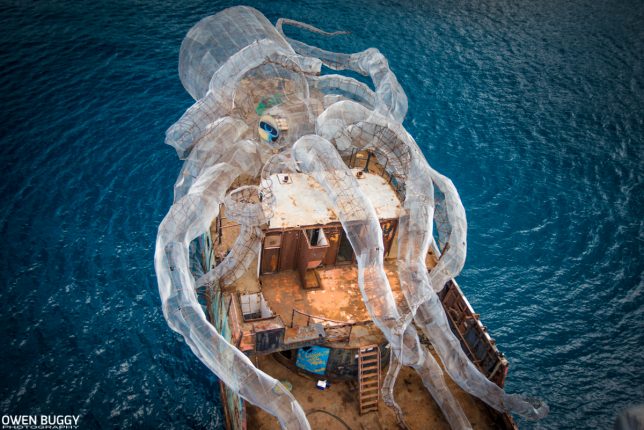
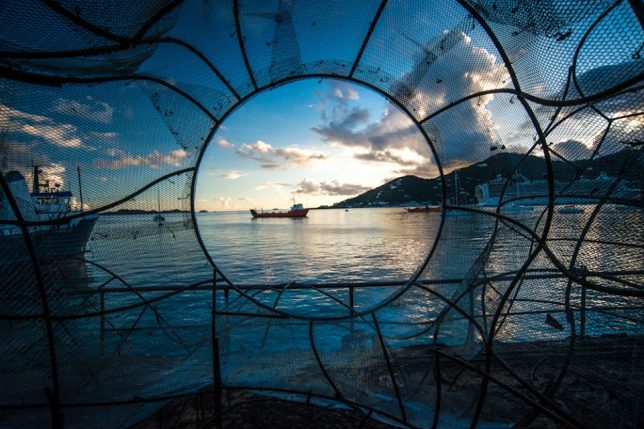
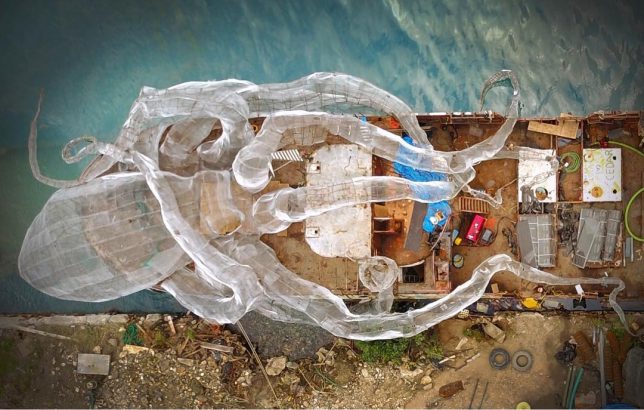
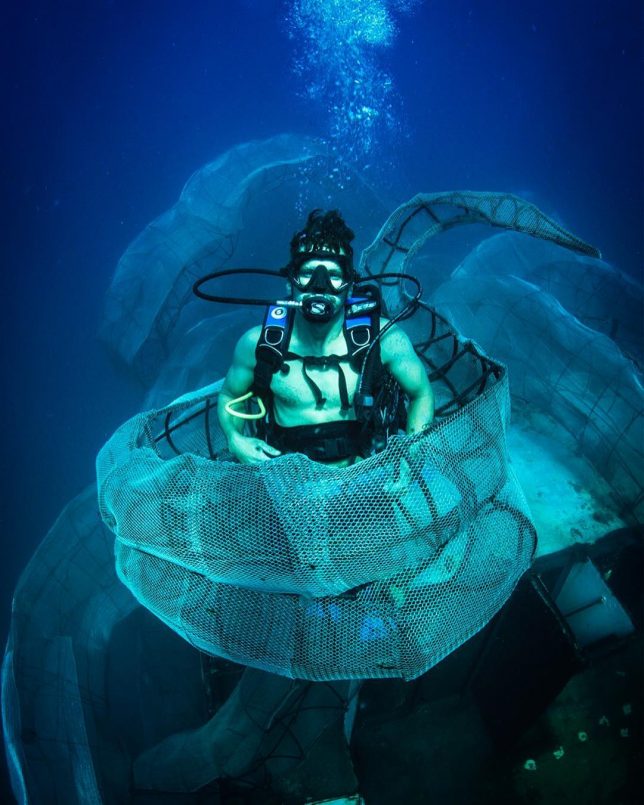
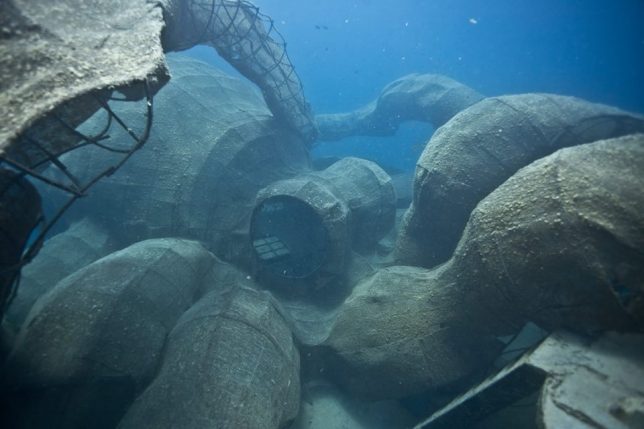
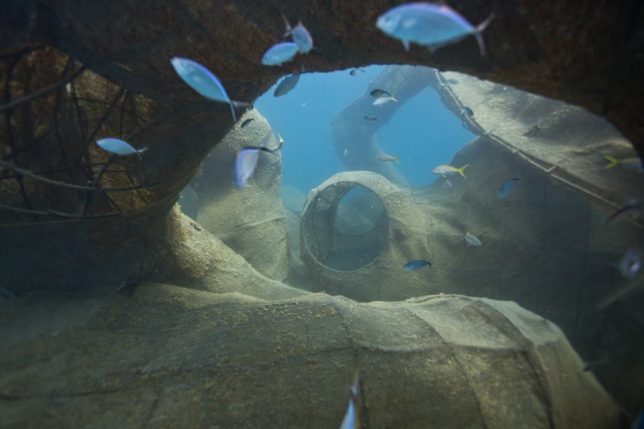
Perched atop the Kodiak Queen, a former WW2-era Navy fuel barge, this 80-foot ‘Kraken’ now serves as the base of an artificial reef and marine research station on the ocean floor near the British Virgin Islands. The project, entitled BVI Art Reef, accomplishes a range of goals all at once: saving a decorated ship from destruction, transplanting coral to a new site in the hopes that it will flourish, creating an epic dive site and underwater art gallery, and providing a new habitat for marine life.

Photographer Owen Buggy documented the process, from the early stages of building the massive sea monster to sinking it in April 2017 to checking out the results a few months later. Sunken off the coast of the island Virgin Gorda with the help of tugboats and helicopters, the installation is already helping to rehabilitate heavily over-fished marine populations. Filmmaker Rob Sorrenti also got some great footage, presented as a documentary entitled ‘The Kodiak Queen,’ which is due for release in early 2018.

“This is the story of learning from past lessons and coming together to create something greater; rooted in joy and fueled by the power of play,” reads the BVI website. “This is the story of a group of friends from around the world who fell in love with the BVIs… and turned a weapon of war into a platform for unity – and a catalyst for new growth. This charitable kick-off in the British Virgin Islands combine art, ocean conservation, world history, marine science and economy… to solve a series of challenges in the BVIs by asking: how can we use play and collaboration to install permanent solutions that boost the local economy, secure the prosperity of these pristine islands for generations to come?”

“Our solution: a fantasy art eco-dive and ocean conservation site that puts the BVIs on the map as having one of the most unique and meaningful dive sites in the world… and one of the most forward-thinking approaches to creative problem solving that secures the education of its youth, and the health and prosperity of this island nation.”

Get updates on the project at the BVI Art Reef Facebook page.

Share on Facebook


[ By SA Rogers in Destinations & Sights & Travel. ]

[ WebUrbanist | Archives | Galleries | Privacy | TOS ]


WebUrbanist

 
Comments Off on Steel Mesh Kraken Sunken Off British Virgin Islands to Create an Artificial Reef

Posted in Creativity


Applied LEGO: Design Graduate Sends Miniature Figures of Himself as Resumes

23 Oct

[ By WebUrbanist in Art & Sculpture & Craft. ]

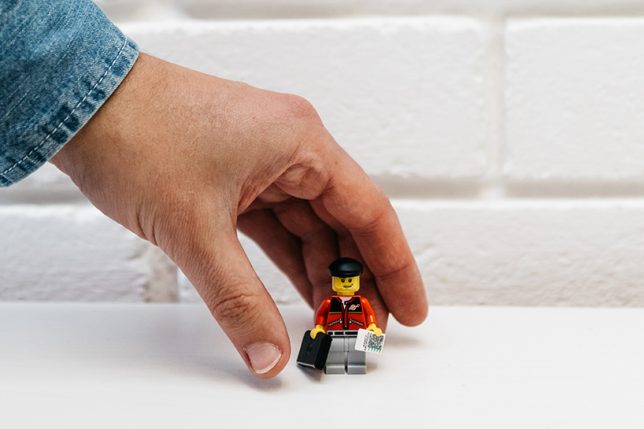
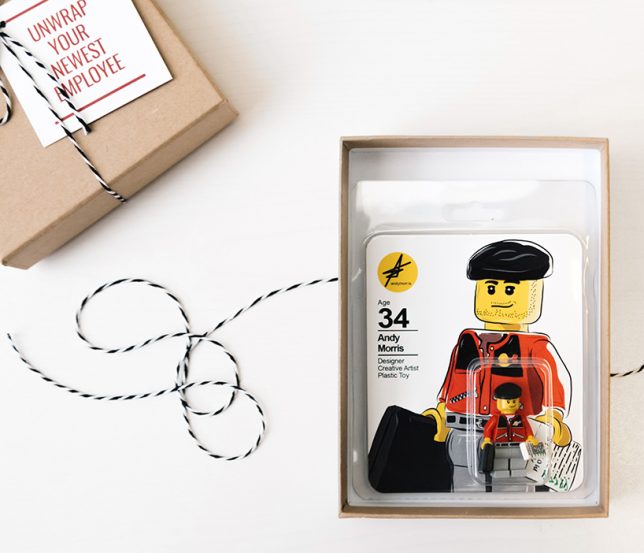
Design and architecture firms are used to getting creative resumes in the mail that unfold into portfolios or assemble into paper models, but this LEGO figurine may be the most creative variant yet.

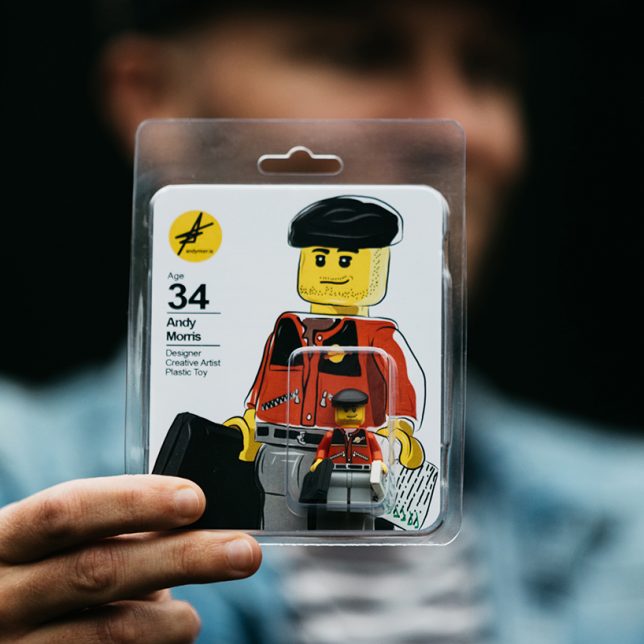
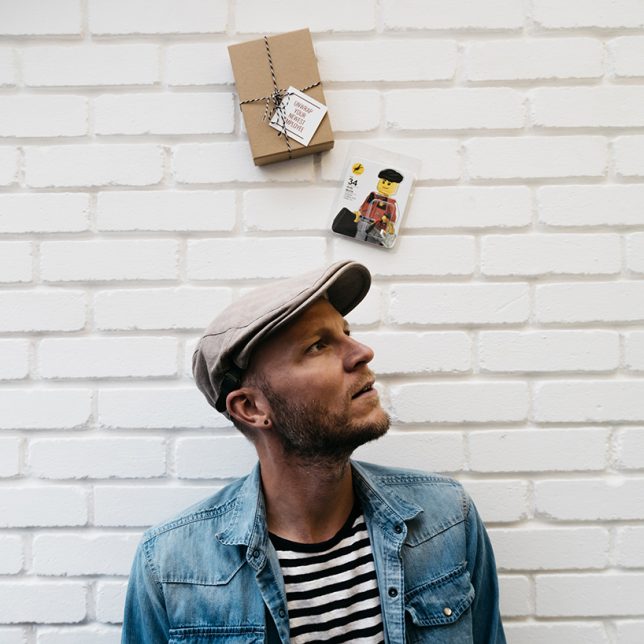
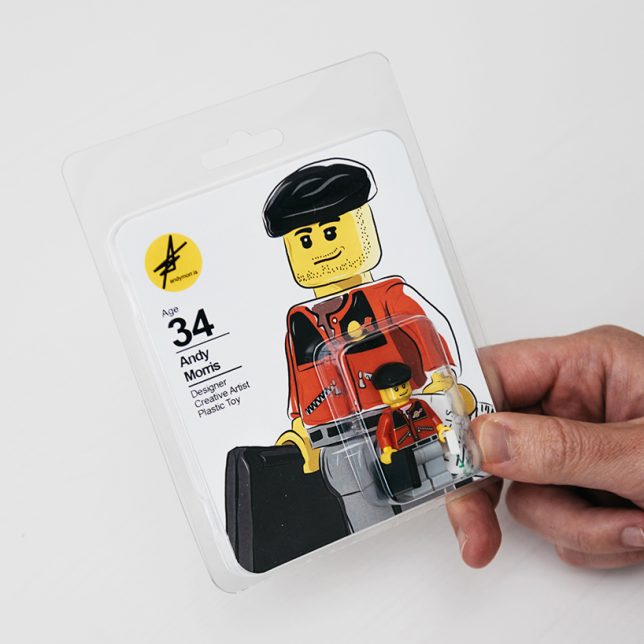
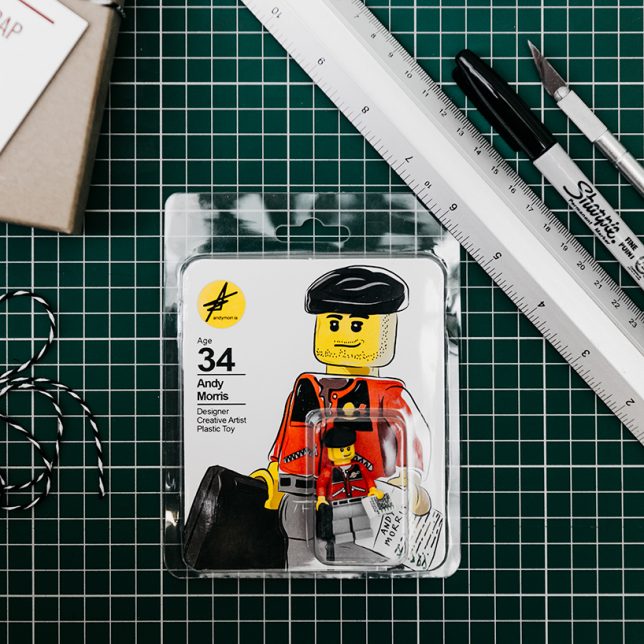
A designer and artist, Andy Morris decided to make a miniature of himself as a way to stand out to potential employers and highlight his creativity.

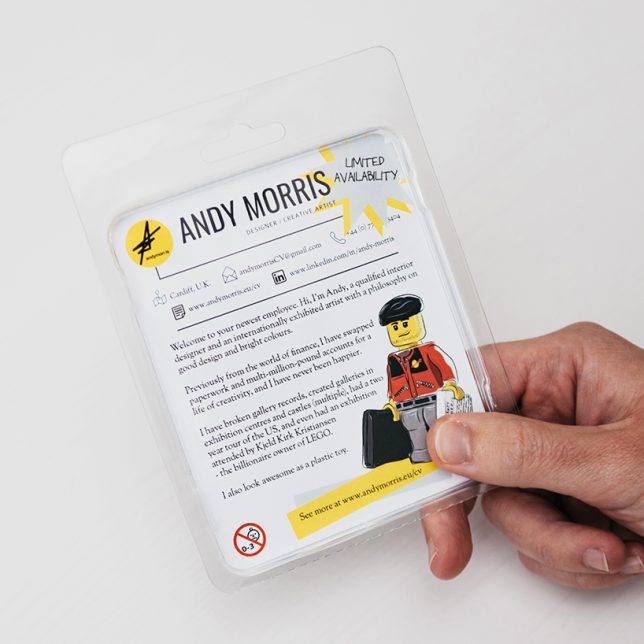
His three-dimensional curriculum vitae packaged like a toy figure but also includes graphic elements that convey aspects of his own creative work.

The packaging gives more details on his design capabilities and offers links to his website and portfolio, accompanied by descriptions of his experience and personal design philosophies. Hurry: supplies are limited!

He hopes not only that the figure will help him find a job, but that it will match him with a workplace that mimics his own quirky creative ambitions.

Share on Facebook


[ By WebUrbanist in Art & Sculpture & Craft. ]

[ WebUrbanist | Archives | Galleries | Privacy | TOS ]


WebUrbanist

 
Comments Off on Applied LEGO: Design Graduate Sends Miniature Figures of Himself as Resumes

Posted in Creativity


Make Sure You Know all the Drone Regulations Before You Fly

23 Oct

Everywhere you look, it seems like everyone has their hands on a drone. YouTube is crawling with aerial drone footage, and you can buy one at just about any electronics store. But just because drones are everywhere doesn’t mean you can (legally) fly them anywhere.

Here at dPS, we dove into topics such as tips to get started with drone photography and how to get stunning aerial photos with your drone. One thing we haven’t covered that’s worth talking about is where you can and can’t fly your drone. Read on for some tips on things to consider before you fly a drone.

Aerial Drone Photography Rules - Drone Regulations to Consider Before Traveling With One

Why Are There Drone Regulations?

On the surface, drones may seem like fun toys or new tools to add to your photography or videography kit. After all, they’re marketed as such and most of the time, they don’t do any visible harm. However, drones can be dangerous from the perspective of privacy and physical safety.

No one likes the idea of a drone spying on them, or worse yet, a drone that comes crashing down and damages property or hurts someone. But these very plausible scenarios are exactly why drone regulations exist – to protect drone pilots and the general public from accidents.

Aerial Drone Photography Rules

Who Makes Drone Regulations?

So who comes up with drone rules and regulations? That depends entirely on where you live. Generally speaking, drones are considered unmanned aerial vehicles (UAVs) and as such, they are regulated by the national aviation authority of each country. Thus, most countries will have their own rules, and often each state or city within the country might have further regulations.

So it’s important to do extensive research about where specifically you plan to fly your drone. Punishment for violating drone regulations can be hefty fines or even imprisonment, so it is very important to follow drone rules, especially in foreign countries.

What Kind of Drone Regulations Are There?

Aerial Drone Photography Rules

Drone rules vary in every country, but here a few common ones:

Register Your Drone

Today, drones vary from fitting in the palm of your hand to requiring a large backpack to transport them. Generally speaking, drones weighing any more than 0.55 pounds must be registered with your national aviation association before flying.

Get Licensed to Fly

Some countries require drone operators to pass an exam to get a license before flying a drone, so be sure to get licensed if it’s necessary.

Aerial Drone Photography Rules Drone Regulations to Consider Before Traveling With One

Get Insurance for Your Drone

In some places, you must have insurance for your drone in order to fly. But drone insurance is something you should have any way to protect your investment.

Avoid Flying over People and Properties

Even the tiniest drone can be a hazard to someone or something if it comes crashing down from the sky or runs into an airplane. As a general rule, don’t fly your drone over crowds of people or near private or government property. You should also avoid flying near airports or helipads.

Sample Drone Regulations in the USA

Drone Regulations to Consider Before Traveling With One

In the United States, drones are considered unmanned aircraft systems (UAS). As such, they are regulated by the Federal Aviation Administration (FAA). There are two sets of regulations: one for those flying drones for fun, and one for those flying for commercial (professional) reasons. A summary of the FAA rules is below, with more details available here.

  • Flying drones for recreational or educational use is okay without a permit. Drones must be registered if they weigh over 0.55 lbs (250g). Drones cannot be flown within five miles of an airport or helipad without prior notification to the airport and air traffic control.
  • If flying for commercial use, the drone pilot must be over 16 years of age, have a Remote Pilot Airman Certificate, and pass TSA vetting. The drone must fly under 400 feet and at or below 100 miles per hour. Drones can only fly during the daytime, and must not fly over people.

For More Information

  • Global Drone Regulations Database
  • Master List of Drone Laws

Apps

  • UAV Forecast
  • Hover

https://www.faa.gov/uas/

In Conclusion

If your head is spinning when you reach the end of this article, you’re not alone. There are many more drone rules and regulations than most people know about, which makes enforcement of them very patchy.

What’s more is that drone regulations are in a constant state of flux, so it’s hard to say exactly what rules exist and apply at a given time. But with that said, it’s better to know the rules and do your best to follow them, or risk getting arrested and potentially fined like this French tourist in Italy.

The post Make Sure You Know all the Drone Regulations Before You Fly by Suzi Pratt appeared first on Digital Photography School.


Digital Photography School

 
Comments Off on Make Sure You Know all the Drone Regulations Before You Fly

Posted in Photography


How to Photograph Agility Events and Other Dog Sports

22 Oct

Humans and horses aren’t the only athletes to reach massive feats – dogs do too! From the athletic sighthounds to the driven border collies, dogs have been competing in a slew of sports on the world stage since before you were born. Some of the most popular athletic canine sports include agility, dock diving, frisbee, flyball, barn hunt, nose work, weight pulling, lure coursing, and herding.

How to Photograph Agility Events and Other Dog Sports

Possibly the most well-recognized of these sports is agility, in which a dog has to race through obstacles (such as jumps, weave poles, tunnels, dog walks, A-frames, and teeters) with their handler. This fast-paced sport has been captivating dog photographers for years, but yet there remain so few agility photographers.

Some quit from frustration due to the degree of difficulty to photograph, while others find the long hours hard to manage. Whatever the reason, this article is here to make it easier for you! Many of these tips can be applied universally to all canine competitions, as most have these three things in common: action, speed, and unpredictability.

How to Photograph Agility Events and Other Dog Sports

Let’s start with equipment. You can’t photograph if you don’ a have camera. Here are the ideal gear recommendations for doing photography of dog sports.

The Right Camera

As most of the dog sports listed involve speed, you’re going to need a fast camera. Similar to photographing human sporting events such as football and baseball, the speed of your camera will determine what moments you can capture.

How to Photograph Agility Events and Other Dog Sports

You want to ensure that your shutter closes at the exact moment you want it to, or is able to capture an entire sequence of movement (which is what many competitors love to see from action photographers). The more frames per second your camera can shoot, the more sequence shots you can capture.

To anyone wanting to get very serious into this type of photography, I always recommend purchasing a DSLR that has a strong inclination towards action photography due to its frames-per-second, such as the Canon 7D (the 7D Mark II is the newest model – 10 frames per second), the Canon 1D-X Mark II (14 fps), the Nikon D5 (12 fps). I am sure there are additional Nikon (as well as other brands) equivalents with faster speeds, but I am versed in Canon so you’ll have to do your research.

How to Photograph Dog Agility Events and Other Canine Sports

Choose the Right Lens

The key to dog sports photography is to interfere as little as possible with the event going on. That means shooting from a distance so that your activity doesn’t distract the dogs from their task. As such, most (if not all) agility photographers will work with a telephoto or zoom lens. This allows you to be far enough away from the subject so as to not affect their performance while being able to zoom in tightly and capture some beautiful compositions.

My favorite lens for dog sports photography is the Canon 70-200mm F/2.8 L IS USM II. But I have seen many other photographers inclined toward the 300mm or 400mm range to get even closer to the dogs without needing to get in the way physically.

Finding a lens that has a maximum aperture of f/2.8, or around that range, is a great idea in order to isolate the dog from the rather cluttered frame. Since agility rings can make a photograph look chaotic due to a number of obstacles in close proximity to your subject, getting a lens that can shoot at f/2.8 will also all you to blur or soften some of the distracting elements in the background.

Camera Settings

Your settings will make a noticeable difference in your ease-of-shooting. Besides needing to shoot with a very fast shutter speed to freeze the action (1/1000th at a minimum but I personally like to shoot at 1/3000th and faster), there are a few other things you can do to get sharp images. Many new cameras have technological advancements that make action photography significantly easier than it has been in the past, such as new autofocus mechanisms. However, what the majority of new and old cameras have in common in regards to settings are the focus mode and burst (drive mode).

How to Photograph Agility Events and Other Dog Sports

First, change your focus mode to Continuous Focus Mode (AI Servo for Canon users or AF-C for Nikon users). This mode allows your camera to lock onto your subject and follow the dog around as it moves, preventing you from consistently needing to refocus. Where new technology comes into play are the additional customizations for your this mode.

Some new cameras allow you to either use the Continuous Focus Mode presets or make your own that pertain to what you are shooting. For example, on the Canon 7D Mark II, you can tell the camera how your subject moves and what obstacles may be present by adjusting the various levels of sporadic movement, obstacle interference, and more.

There are even presets for erratically moving subjects and following the subject despite obstacles getting in the subject’s way. I usually tell the camera that my subjects are moving erratically in multiple directions and that there are many obstacles in the way when photographing agility. In cameras that do not have this feature, your AI Servo (AF-C) is still a good focusing mode choice.

Next, take advantage of the frames-per-second your camera offers by using burst mode (high-speed drive mode). You can ensure that you get the right shot by setting your camera to burst mode (where you take multiple photographs in a row while pressing down on the shutter) and shooting with a fast shutter speed to freeze the action. Like I mentioned previously, competitors love sequence shots. The only way to get these cool sequences is by shooting in burst mode!

Shooting Technique

Partnered with your gear and your camera settings, your shooting technique will make or break your results. The most common technique that I see used for dog sports photography is to pre-focus on an obstacle and wait for the dog to get there. But I believe you miss a lot of key moments when you do that, especially since dogs can be unpredictable (and even though the obstacle is a part of the course, that doesn’t mean the dog will comply).

Be prepared to practice the art of panning. Panning is moving your camera horizontally with the subject’s movement. You synchronize your camera movement with that of the subject moving parallel to you. I find it easiest to focus on the dog while it is waiting to be released by the owner and then follow the dog throughout the course.

In agility, the course is preset and the handler must memorize it, and then lead the dog through. This makes panning much easier because, by the second or third dog, you will know the course by heart. With other sports where the movement is more unpredictable, like frisbee (where the dog has to catch frisbees before they touch the ground), just use your best judgment on where you think the dog is going to go. This takes practice, but nothing comes without practice!

How to Photograph Dog Agility Events and Other Canine Sports

Alongside panning, another tip to get the most dynamic actions shots is to photograph from the subject’s eye level. Be prepared to spend a lot of time on your knees as the dogs go through the obstacle course. This allows viewers to relate to the subject (as is the psychological nature of photography) and gives them an idea of the height the dog is jumping which aids in how dramatic the photograph appears.

In agility, depending on the type of organization that is governing that sporting trial, you may or may not have to shoot through a fence. If there is a fence, it is often full of large gaping holes that you can photograph through.

How to Photograph Dog Agility Events and Other Canine Sports

Now that you have our gear set, before running off to excitedly photography some cool dogs, there are several important rules and considerations to keep in mind while photographing these canine superstars. Please follow them to respect the owners and for the dog’s safety.

Ask for Permission before Photographing Events

Always ask for permission before photographing any dog sporting events. You do not want to tarnish your reputation by being asked to leave (even if you are only photographing for your portfolio, experience, or fun).

How to Photograph Agility Events and Other Dog Sports

Some clubs (such as a few that I work with) have an official photographer and do not allow outside photography to take place. Other clubs may have a vending fee and request liability insurance for all photographers wishing to make a profit from photographing the event. A few clubs do not even allow photographers in the first place. Always ask for permission. Asking also opens up the door to developing a great relationship with the people putting on the event.

Do Not Distract the Dogs

As tempting as it is to cheer when a cute dog does an obstacle well, or to make noises to have the dog look at you, please don’t. These dogs are there doing a very important job – showing off their skills! Agility trials and other competitive events are expensive for the handler to enter, the dogs train for many hours to compete, and they want to have just as much fun as you are having.

As such, we must all be respectful of each other. Much like you wouldn’t want someone trying to distract you while you work, these dogs don’t want that either. Make sure you aren’t photographing too loudly or too close to the obstacles, and try not to make any noise that could thwart a dog’s attention away from their handler.

If a Dog Comes Up to You, Ignore the Dog

Not all dogs have iron-clad self-control, especially the novice dogs that are still learning the ropes in the trialing world. If a dog happens to notice you while in the ring, turn your head, body, and camera away from the dog. If a dog runs up to you while in the ring, ignore the dog. Turn away, and do not pet or talk to the dog. The best way to help the dog focus back on their handler is to not pay the dog any mind.

How to Photograph Agility Events and Other Dog Sports

Be Considerate of the Competitor’s Wishes

If a competitor comes up to you and asks you not to photograph their dog, please be respectful of their request. As much as you want to photograph all of the dogs that come through, some owners may not want you to (and that’s okay). There are a hundred different reasons why someone might not want their dog photographed while the dog is competing.

Do Not Pet a Dog without Asking, Even at a Dog Sport Event

As much as this should be common sense, many people forget that even at dog events, you should still not pet a dog without consulting with their owner. Though many dogs are beautifully trained at dog sporting events, not all are friendly with people. As this is not a conformation dog show where a judge has to touch and handle a dog, not all of the dogs at an agility trial, herding event, or other sports like being petted by people (and the owners are not obligated to teach their dog to tolerate strangers petting them).

Do Not Set-Up Inside the Competition Ring without Consent

Some organizations that govern dog sporting events require a fence to be placed around the competition course. Though you may sometimes be able to set-up inside the boundary rather than outside of it, do not do so without consulting the competition judge or the trial secretary. Setting up inside the boundary can be a safety hazard for both you and the competitors. So if you are granted permission, listen to where the judge tells you to stay.

Don’t Set-Up Too Close to the Weave Poles and Tunnels

This is a lesser-known consideration that does not apply to all, but I have seen it applied to many in my career as a dog sports photographer. Some dogs get spooked or distracted if a photographer sets up in front of the exit of a tunnel, as the dog cannot see you until it leaves the tunnel. Likewise, some dogs get terribly distracted from doing their weaves if they see you at the weave pole entrance of exit.

These two obstacles tend to be a bit more difficult for some dogs than jumps or dog walks, and you want to ensure that you don’t add extra stress for them Instead, set up further away and use your zoom lens to capture the dog speeding out of the tunnel!

Don’t Eat Near the Competition Ring While Dogs are Running

Another common-sense piece of advice that goes ignored far too often is to not eat near the ring while the dogs are competing. The smell of a delicious hot dog could encourage even the most driven dog to forget what they’re doing and come ask for some food.

Now that you’re an expert, here are some tips and tricks to help you out:

Pay Attention to the Course

The easiest way to photograph a sporting event is to know where your subjects are going to go! For agility, there is a 15-minute walkthrough before a course begins in which the competitors learn the course. Watch them, or even participate in the walkthrough yourself, and learn about the route. For sports that don’t have walkthroughs, try and figure out what the course set-up is using logical reasoning.

Listen to the Briefing

Before a trial begins, most events will have a competitor briefing. Participate in the briefing to learn valuable information about the event that is about to take place. As well, the briefing is a great time to introduce yourself to the competitors.

Don’t Stress About Photographing All of the Obstacles at Once

This took me years to figure out. You do not need to worry about photographing every single obstacle in every single course. The courses get changed several times throughout the day, the sun will move every hour, and nearly all of the dogs will run at least three more times before they leave the event.

It saves a lot of time, energy, and stress to only focus on a few obstacles that you know you can photograph well (whether it be due to the lighting and/or the obstacle’s proximity to you) per course. If you come in the morning and stay until the end in the later afternoon, you will most definitely photograph everyone’s dog doing every single obstacle.

When Organizing, Sort Photos by Class or Jump Height

The real challenge comes after the photo shoot: how to make sure the competitors can find their dog (or you can find their dog). I find that organizing your images by class (every dog sports event has different classes, often named for their difficulty level) helps immensely.

For dog agility, sometimes photographing by jump height can be just as beneficial. Do keep in mind that height changes per organization that governs the agility trial. There are three organizations in the US that set the rules for their agility trials: The American Kennel Club, the United States Dog Agility Association, and the North American Dog Agility Council. Each of these has their own jump heights and class names.

Ask for the Run Order

It’s completely acceptable to ask for the run order from the trial secretary or someone higher up in order to help you organize the dog photographs. Do keep in mind that the run order may change throughout the competition, so listen to the announcements and keep notes on what changes are being made.

Knee Pads are Your Best Friend

Since you ideally want to photograph from the dog’s eye level, you will spend hours on your knees. Skating knee pads are a great idea to reduce the amount of bruising and pressure to your knees. Trust me, you’re going to want to do this after several trials of black and blue knees.

Stay Hydrated

Dog sporting events are long, tiresome, and depending on your location, can be very hot. Make sure that you stay hydrated and take care of yourself, even when you’re wrapped up in the shoot. Bring a cooler with plenty of water, and a backpack with snacks or food that you can eat during your breaks. Fruit is a great snack, it’s healthy and will give you a bit of an energy boost from the sugar.

That being said, I often break my no-junk-food routine at dog sporting events because the sweets and fast food are quick, easy, filling, and can help keep me going!

Don’t Forget to Photograph the Novice Dogs

Don’t leave out the new guys! Many of the advanced competitors have hundreds of photographs of their canine athletes over the years, but the novice dogs are brand new and probably don’t have any at all. So be sure to capture photographs of the new kids on the block. They will thank you immensely for them.

It Is Possible to Photograph More Than One Ring at a Time

This takes a bit of practice and stamina, but it is absolutely possible to photograph more than one ring at a time. In agility and some other sports, two different rings can be running simultaneously. Often, the rings will be very close to each other. If you position yourself between the two rings, and time the obstacles correctly, you will have enough time to turn from one ring to the other and photograph both. This is how I get photographs of both the novice dogs and the advanced dogs while they are running at the same time.

Most Importantly, Have Fun

Don’t lose sight of why you are there – to have fun! These events are long, tiresome, and chaotic, but are so rewarding. The photography is challenging and addicting. But don’t forget to have fun!

The post How to Photograph Agility Events and Other Dog Sports by Anabel DFlux appeared first on Digital Photography School.


Digital Photography School

 
Comments Off on How to Photograph Agility Events and Other Dog Sports

Posted in Photography


Canon G1 X III vs. Sony Cybershot RX100 V

22 Oct

Canon G1 X Mark III vs Sony RX100 V

The year is 2017. Smartphones have rendered the $ 200 compact obsolete, and they’re creeping up on $ 500 interchangeable lens cameras. Things look bleak. But lo! Camera manufacturers have stumbled upon a niche market that can soften the blow they’ve been dealt by mobile devices: the ultra-pricey premium compact.

Sony is five generations deep in the category. Canon offers a variety of large sensor compacts, but none have looked quite as promising as the G1 X Mark III. If you’re set on investing in a seriously capable compact, no doubt these two cameras will be on your list. Here’s how they square up.

Sensor

In the Canon G1 X III you get a very familiar 24MP APS-C sensor with Canon’s modern Dual Pixel design. The RX100 V offers a much smaller 1″ chip with 20MP and an evolved stacked CMOS design, with impressive tricks like slow motion video and 24 fps bursts.

They’re both very capable sensors, but there’s just no avoiding that the G1 X III’s chip is much bigger. This means it can tolerate more light, which will provide a little more flexibility in brighter light and high contrast scenes. But beware: even though larger sensors typically perform better in low light and blurry background applications, that won’t necessarily be the case in this comparison… because of the…

Lens

The G1 X III and RX100 V are both built around a useful 24-70mm equivalent zoom.

The Sony offers an F1.8-2.8 aperture to the Canon’s F2.8-5.6, and you might be tempted to think that the RX100 V offers more flexibility for separating subjects from backgrounds. Or collects more light in low light. Or you might be tempted to think that the Canon is better in both these departments because of its larger sensor. Resist the temptation. Repeat after me: equivalence is our friend.

Because of their size difference, the RX100 V’s lens is equivalent to a F4.9-7.6 on full-frame; the Canon is equivalent to F4.5-9. So it’s really likely to be a wash in both the subject isolation and low light departments: the Sony is a little better on the long end, and the Canon is a tiny fraction better on the wide end. Either way you’re getting a zoom range that’s handy for plenty of shooting situations, with a built-in ND filter to boot.

Autofocus

Canon’s 24MP chip offers depth-aware Dual Pixel phase detection autofocus, a feature we’ve come to know and appreciate in its DSLRs and EOS-M cameras. Sony in turn offers phase detection autofocus with a total of 315 points; both cameras essentially offer autofocus across most of the frame.

We’ve generally found the RX100 V to focus better and faster in continuous drive than most Dual Pixel cameras we’ve tested, impressively even at the RX100 V’s 24 fps top burst rate. They’re both quite capable in single shot mode – Sony’s Eye AF mode is handy, though the G1 X III offers a usability advantage in its touch screen. Each system has its pros and cons, but they’re both way ahead of the contrast-detection systems used by cheaper compacts and many smartphones.

Screen/viewfinder

Great news: either way you go, you’ll have a built-in electronic viewfinder at your disposal, and you should for such a handsome price. But there are significant differences in rear screen specs. Canon gives you a fully articulated 3″ 1.04M-dot touch screen. Sony offers a higher-res 3″ 1.23M-dot tilting-only non-touch screen. For Pete’s sake Sony, put a touch screen in this thousand-dollar compact!

If you’re, say, a vlogger, the Canon’s fully articulating touch screen is clearly going to work better for you. Not everyone needs or wants a touch screen, but it does help you get the most out of a super fast autofocus system.

Video

In terms of sheer video capabilities, the RX100 V comes out way ahead with 4K/30p oversampled from 5K footage, 1080/60p, 1080/120p slow motion, SLog2 for wide dynamic range capture and helpful tools like zebra and focus peaking.

The G1 X III’s mere 1080/60p looks paltry in comparison, but don’t rule it out on that spec alone. Its Dual Pixel/touchscreen combination is incredibly useful for creating smooth shifts in focus or quickly choosing the subject you want the camera to track.

If you’re an advanced videographer and you need all of the bells and whistles, or a casual user that wants highly detailed video (and you’re OK with leaving focus in complete auto mode, where it performs really well) then the RX100 V is for you. But if you’re a novice looking to create good-looking video without much effort, then you should give the G1 X III a good look.

Battery

There’s no real good news here – battery life stinks on both of these cameras. The RX100 V is CIPA-rated to 220 shots per charge; the G1 X III is rated for 200 shots. Actual results are usually better than that, but if you intend to shoot lots of bursts, plan on getting a backup battery too. A fancy compact camera with a dead battery is just a very expensive paperweight.

Form factor

Let’s give credit where credit is due: these cameras are incredible feats of engineering. They each pack cutting edge technology into a body that seems way too small for its spec list. But you can’t cheat the laws of physics: the G1 X III’s much bigger sensor makes for a bigger camera. The RX100 V has “just a 1-inch sensor,” but it’s also truly pocketable. With its chunkier grip, viewfinder and protruding dials, the G1 X III is more of a “honey I shrunk the DSLR” shape and size.

We can offer some guidance around the other points of comparison, but this one’s on you. If small cameras seem too fiddly, you probably won’t like the RX100 V. If you want to slip your camera into a coat pocket when you’re not using it, the G1 X III might be a bit too big.

Articles: Digital Photography Review (dpreview.com)

 
Comments Off on Canon G1 X III vs. Sony Cybershot RX100 V

Posted in Uncategorized


Zeiss reveals Milvus 25mm F1.4 lens, the 11th in the manual-focus family

22 Oct

Zeiss has added a new wide-angle lens to its Milvus line of full-frame, manual focus lenses for Nikon and Canon DSLRs. The new Milvus 25mm F1.4 is now the fourth widest lens in the family—which ranges from 15mm to 135mm—and brings the total number to Milvus lenses to 11, four of which boast fast F1.4 apertures.

According to Zeiss, the Milvus 25mm F1.4 is “suitable primarily for landscape and architecture photography, and for journalistic shots and videos” thanks to its fast aperture and a new optical design that uses 15 elements in 13 groups to deliver “high-contrast photos and a harmonious bokeh.” They also claim “hardly any color fringes,” even when you’re shooting with the lens wide-open.

Like the entire Milvus line, the new 25mm F1.4 is manual focus only, and features a robust all-metal housing as well as ‘special seals’ for protection against dust and splashes.

The new Milvus 25mm F1.4 will be available starting November 2nd for 2,400 Euros (including tax) or $ 2,400 USD. To learn more about this lens or the entire Milvus line, head over to the Zeiss website by clicking here.

Press Release

ZEISS Unveils High-Speed DSLR Lens: ZEISS Milvus 1.4/25

With its new wide-angle focal length, the ZEISS Milvus family now boasts eleven lenses for single-lens reflex cameras, including four focal lengths with a maximum aperture of 1.4, which are perfect for videographers too.

OBERKOCHEN/Germany, 2017-10-18.

The ZEISS Milvus 1.4/25 is the latest focal length to be added to ZEISS’s largest range of lenses for full-frame single-lens reflex cameras. The lens, which was developed for the DSLR systems from Canon and Nikon is suitable primarily for landscape and architecture photography, and for journalistic shots and videos. “The completely new optical design ensures superior performance across the entire image field,” says Christophe Casenave, Product Manager at ZEISS. “This results in high-contrast photos and a harmonious bokeh.”

High-speed wide-angle lens

Thanks to a maximum aperture of 1.4, this lens can even capture exceptional images in poor light. “Even at full aperture, there are hardly any color fringes,” says Casenave. “The finest details can be reproduced in high definition and contrast all the way into the corners.” The metal housing is what makes the lens robust, and its dirt and dust protection even makes the ZEISS Milvus 1.4/25 ready for action in adverse weather. The large 172-degree focus rotation angle enables precise manual focusing for adding creative touches to photos and videos.

The largest ZEISS lens family yet

Featuring eleven focal lengths ranging from 15 to 135 millimeters, including two macros, the ZEISS Milvus family covers a host of applications, such as portrait, landscape, architecture and street photography. “We can offer every photographer just the right lens,” says Casenave.

Perfect for videographers too

The four ZEISS Milvus focal lengths 25, 35, 50 and 85 millimeters with an aperture of 1.4 are just perfect for filming. Thanks to their high speed, they are suitable primarily for interviews and documentaries where the videographer can utilize natural light. Thanks to the de-click function in the version for the Nikon-Mount the aperture can be adjusted continuously. ZEISS Lens Gears in a range of sizes permit the use of follow-focus systems.

Price and availability

The ZEISS Milvus 1.4/25 retails for 2,400 Euros including 19 percent sales tax (RRP) or $ 2,400 USD and will be available starting November 2nd 2017 at dealers and from the ZEISS online shop.

Articles: Digital Photography Review (dpreview.com)

 
Comments Off on Zeiss reveals Milvus 25mm F1.4 lens, the 11th in the manual-focus family

Posted in Uncategorized


More Nikon D850 samples images added

22 Oct

Our review process is based both on studio testing and real-world shooting. We make sure every camera goes through the hands of several photographers and is shot in a variety of circumstances, to give a broad representation of how the camera will perform.

All those images and experiences are considered as we draw our conclusions about a camera. So, even if you’ve looked through the D850 gallery before, you may well find there are shots you’ve not seen before. Take a look, and be sure to check out the full review if you haven’t already.

$ (document).ready(function() { SampleGalleryV2({“containerId”:”embeddedSampleGallery_5682971467″,”galleryId”:”5682971467″,”isEmbeddedWidget”:true,”standalone”:false,”selectedImageIndex”:0,”startInCommentsView”:false,”isMobile”:false}) });
Articles: Digital Photography Review (dpreview.com)

 
Comments Off on More Nikon D850 samples images added

Posted in Uncategorized