RSS
 

Archive for July, 2017

How to Adapt to any Situation for Portrait Photography

09 Jul

We all make plans and we all have expectations. Then when portrait photography, we want these plans to work well. We’ve got customers to please, memories to create and stories to tell. Plus clients have expectations. They want their pictures to look a certain way. They’ve hired you to recreate that vision.

As a professional, you need to be ready for anything

So when the best-laid plans fall apart, you’ve got to adapt. If you’re shooting portraits professionally, you need to remember that part of the reason you are being paid is you can produce great images no matter the circumstance. This is the difference between you and an amateur. You have the skills and know how to make any situation work.

How to Adapt to any Situation for Portrait Photography

I used the white sheet and the black couch for this family portrait. Then in post-processing added a vintage feel to the image.

Have a plan and a backup plan

I can’t stress this enough. It’s important to meet with clients and discuss plans for the shoot. Among the topics, you should discuss a backup plan. What will do if the weather doesn’t cooperate for an outdoor shoot? What if the children won’t cooperate by sitting in a tree? There are all sorts of possibilities, and you need to discuss the fact that sometimes the plans may have to change.

How to Adapt to any Situation for Portrait Photography

I had the benefit of a large window behind me but because it was so grey and dark outside I also needed to use my lights.

Sometimes the simple solution is setting an alternate date in case of weather issues. Other times you might discuss the need to use a different location. I love shooting family sessions outdoors. I’ll be honest, I prefer it. Natural light is my best friend, and I have very little patience for setting up studio lights. If at all possible I shoot outdoors. But recently I had a situation where I was unable to set up a “rain date”. The family had only one day together, and if the session didn’t occur on that specific date, well it just wasn’t going to happen. But, I made a mistake, I forgot to discuss alternate plans.

The need to adapt quickly

On the date of the session, the weather was cold, grey, blustery and very unpleasant. We could have shot the session outdoors but the wind wasn’t going to help my cause, and it was too cold outside for their small children. I don’t think the kids would have cooperated. I was lucky, my clients were flexible, and we quickly worked to discuss an alternate plan.

How to Adapt to any Situation for Portrait Photography

The boys loved being able to crawl all over the couch and be silly. I made sure I had mom’s permission first.

They had a beautiful, large bay window. So we shifted some furniture, hung up my large white sheet as a backdrop, and used a large couch as a prop. It wasn’t an ideal setting, but it did the trick. My clients were happy with the results, and that’s all that matters.

How to Adapt to any Situation for Portrait Photography

The boys weren’t centered on the couch but I wasn’t worried, as it was more about capturing their relationship.

Suggestions for making it work on the fly:

  1. Think outside the box. Be creative and look for places that will suit your purpose and still create an eye-catching image. You might use a bedroom or fireplace if you have to shoot indoors. Outdoors, maybe you could shoot underneath a large umbrella or veranda. The front door of a house can be quite attractive as well.
  2. Don’t get nervous. Be calm and confident. This will ensure your clients that you are confident in your abilities. They, in turn, will relax and give you those amazing relaxed smiles you’re looking for and that you want to capture so much.
  3. Always take a portable lighting kit to every session. You never know when you will need it. As much as I hate using the lights they’ve saved me so many times.
  4. Make sure you have a really large backdrop and a white sheet. The white sheet can be pinned to the wall in a pinch or used as a large reflector if need be. I’ve even used the sheet to cover up an ugly floor.
  5. Reassure clients that they are not the first to have plans change suddenly. Even if it is the first time, it’s ever happened to you, tell them it’s no big deal.
  6. Go with the flow. Don’t be rigid, let things unfold as they will. If you always come to a photo shoot with a very specific plan, you may get easily flustered. Just relax and see what happens.
  7. Rely on your skills, they are your biggest asset. Use all the knowledge you’ve gained to help you produce amazing images. Never forget all you’ve learned.
How to Adapt to any Situation for Portrait Photography

In this case, he lay on the floor near the window so we accessed all the light we could possibly get.

Conclusion

Portrait photography is often unpredictable but isn’t that the fun of it all? You never know what’s going to happen. Enjoy the rush that comes from turning a potential disaster into an amazing opportunity. Let it test your skills and push the limits of your creativity. Leave us some your tips for managing the unexpected in the comments section below. Tell us your anecdotal stories. We want to hear it all.

Leave us some your tips for managing the unexpected in the comments section below. Tell us your anecdotal stories. We want to hear it all.

How to Adapt to any Situation for Portrait Photography

He loved to pose for the camera so I let him. I later used a filter to create the vintage film look.

How to Adapt to any Situation for Portrait Photography

The parents relaxed when they saw how much fun the kids were having during the session.

The post How to Adapt to any Situation for Portrait Photography by Erin Fitzgibbon appeared first on Digital Photography School.


Digital Photography School

 
Comments Off on How to Adapt to any Situation for Portrait Photography

Posted in Photography


Water You Can Eat: Edible Drink Bubbles Aim to Eliminate Plastic Bottle Waste

09 Jul

[ By WebUrbanist in Design & Products & Packaging. ]

So far so good: the creators of these edible water balls have begun deploying them at large-scale festivals, the kinds of places where hundreds of disposable plastic bottles are used and trashed. But while this type of innovation bodes well for the future of biodegradable design, there are still some flaws to be sorted out before it can begin to seriously tackle the big problem: 35 billion plastic water bottles tossed in the garbage every year.

Ooho!’s solution is pretty simple and ingenious: drop frozen balls of water (or other beverages) into a (thankfully) tasteless solution that forms a gelatinous layer around the outside. Once the ice melts, drinkers can pick up and pop a gulp, or if that seems too strange: puncture the membrane (which then biodegrades in weeks) and drink from it. Made of seaweed, the “container” layer can also be colored and flavored.

Between crowdfunders and other backers, they have a lot of funding behind them, and “the team at Skipping Rocks Lab—made up of chemists, engineers, designers and business advisors–are continuing to pioneer the use of seaweed in other packaging uses, with a mission to become the leading global producer of seaweed-based packaging.”

The whole process uses a lot less energy than normal bottles require, but does it serve to replace them? In pop-up settings, like festivals and sporting events, it could — especially if the machinery used to make them can be made mobile. But for ordinary everyday use the problem is trickier — the membranes are delicate and would pop if tossed into bags or pockets.

Still, the science is worth pursuing: the same method could be expanded to make more robust and larger frameworks (better analogs for ordinary bottles). And the technology could be improved to, made to create and dispense water balls on a more mobile and automatic basis in public-event settings (e.g. ball-vending machines). For now, it isn’t the invention to end plastic bottles some might hope, but it is a step in the right direction and — at least in limited contexts — makes for a sustainable drinking alternative.

Share on Facebook


[ By WebUrbanist in Design & Products & Packaging. ]

[ WebUrbanist | Archives | Galleries | Privacy | TOS ]


WebUrbanist

 
Comments Off on Water You Can Eat: Edible Drink Bubbles Aim to Eliminate Plastic Bottle Waste

Posted in Creativity


How to Make $500 a Month From Your Photography Hobby with Microstock

09 Jul

I am an amateur photographer, but I make around $ 500 in revenue from my photos each month. Photography is a hobby for me, but it can be an expensive hobby at times. This money pays for photography software, computer hardware, and lenses, so the hobby I love doesn’t cost a dime. This article will discuss how I did this with microstock, and provide tips on how you can do the same.

How to Make $  500 a Month From Your Photography Hobby with Microstock

Making your first buck

In 2010, I wanted to improve my photography so I purchased an entry-level DSLR and started to actively study how to become a better photographer, mainly from resources on the internet. As I tried different techniques, compositions, and camera settings, I posted my photos to sites like Flickr, Facebook, and 500px. In the beginning, I didn’t get very many views or likes but still enjoyed posting and learning from other photographer’s photos on those sites.

After shooting, learning, and posting for two and a half years, a design company saw a photo of mine on Flickr and asked if they could purchase a commercial license. I did a couple of quick searches about licensing and pricing on the internet, then sold my first commercial license for $ 75. This is the first photo I ever licensed.

How to Make $  500 a Month From Your Photography Hobby with Microstock

Pay for your hobby

Before this first sale, I hadn’t considered selling licenses to my photos. However, I had gotten to the point where I wanted to upgrade my entry level DSLR and lenses to a full frame system but couldn’t justify the cost for my hobby. However, I could justify the cost to myself (and my wife) if the money for the upgrade came from licensing my existing photos.

Microstock

So, I started researching photo licensing and learned about microstock sites. These sites are websites that act as an intermediary between buyers of photo licenses and photographers. They are called “micro” because they typically sell photo licenses for less than where professional photographers have historically set their prices.

As a result, there is a lot of negative information about microstock sites on the Internet. Despite this negative information I decided to try posting my photos on Shutterstock, one of the most popular microstock sites. At the time, I had only made one sale ever so I felt that getting a small payment for each sale was better than no payment at all.

The first month I made less than $ 10 with 55 photos accepted by Shutterstock. However, I kept uploading my photos when I had time. A monthly later I had 100 photos on the site. In my third month, I checked my stats one morning and found I made $ 56 dollars from selling extended licenses from these two photos.

How to Make $  500 a Month From Your Photography Hobby with Microstock

How to Make $  500 a Month From Your Photography Hobby with Microstock

A work in progress – keep at it

This was a bit of beginner’s luck because after that I didn’t have a day with more than $ 50 in sales for many more months. But it kept me motivated to continue uploading my photos to Shutterstock and even upload to multiple other microstock sites as well.

I also started uploading my better photos to art-on-demand sites like Fine Art America. These sites allow you to upload your photos, set a price, and create a storefront for anyone to purchase prints of your photos. When someone purchases the art, these sites handle the payment, printing, and shipping of the photo and send you money from the sale.

Lastly, I upgraded my photo blog to sell licenses directly from my website. Despite the fact that my photos are available on all the popular microstock sites, stock photo buyers continue to see my photos on social media and purchase licenses directly from my website.

How to Make $  500 a Month From Your Photography Hobby with Microstock

Realistic numbers – don’t expect to get rich

Two years after my first photo license sale, my monthly revenue from photos was about $ 500 a month. This $ 500 is an average, with my biggest month was $ 1400, while some months have been lower. Now that my photos have been posted, they can continue to get sales indefinitely. In 2016, I did not have much time for photography and only posted eight photos over the course of the year. However, I still averaged $ 460 a month in revenue from the photos I had posted in previous years.

These revenue numbers are for all the photos I have posted online. I only post my best photos from each day out shooting. My current online portfolio of all my photos is around 700 total. Microstock sites don’t accept all of my images, so on some of the sites, I only have 300 photos accepted and up for sale there. Doing the math, my photos earn less than $ 1 a month on average (per photo). And in reality, it is even less because I have one photo that has earned over $ 4000 over the years, while others have gotten no sales.

How to Make $  500 a Month From Your Photography Hobby with Microstock

However, I am fine with this because I take the photos I want to take and then post to stock sites to see if they sell. Photography is still a hobby and the pleasure it gives me comes first, making money is secondary. Often, the photos I like best are not the best sellers on microstock sites. For example, I prefer the photo of me and my shadow below because I really enjoyed making it, but the snapshot I took of a split trail while on a hike, sells much better.

How to Make $  500 a Month From Your Photography Hobby with Microstock

How to Make $  500 a Month From Your Photography Hobby with Microstock

What sites work best

Although I have posted a portion of my collection to over 20 sites over the years, all of these sites can be categorized into one of two types; microstock and art-on-demand. 75% of my photography revenue has come from microstock sites, while only 8% came from art-on-demand sites. The remaining 17% is through direct sales from my photography website.

I have tried a number of art-on-demand sites over the years but currently only post to Fine Art America because it is the only site where my images consistently sell. I have also tried many microstock sites. Typically, if I hear of a new one, I will upload 100 of my best photos to begin. If I start to get sales, then I will upload the rest of my collection. Here are my top five microstock sites based on earnings. I currently only post to these five sites as I have found the other ones aren’t worth the time it takes to post the photos.

  • Shutterstock
  • 500px
  • Fotolia / Adobe Stock
  • 123RF
  • Big Stock Photo (Owned by Shutterstock)

How to Make $  500 a Month From Your Photography Hobby with Microstock

Last tips for you

If you are an amateur photographer who wants to make additional revenue from photo licenses, here are the steps you can take:

  • Post your photos to social sites. My favorite is 500px, but I have also started posting to Instagram, and I still post to Flickr, which was my favorite a couple of years ago.
  • Setup your own photography blog. My blog does not get as many photo views as my social sites, but all my social sites link back to my photo blog. It makes it easy for potential buyers to purchase licences if they see them on social media. I used Squarespace for my blog because it was easy to set up in one day.
  • Upload photos to Shutterstock. Most microstock photographers who post their revenue on the web list Shutterstock as a top earner. So it is likely that if your photos will sell, they will sell on Shutterstock more than other sites, making it a good place to start.
  • Upload photos to other stock sites. Once you see some success on Shutterstock then go ahead and post your top photos to other microstock sites.

How to Make $  500 a Month From Your Photography Hobby with Microstock

Conclusion

It has been seven years since I decided to take photography seriously and I have improved a lot over the years. However, I still have a lot to learn, but these days the software, courses, and gear that help me make photos are all paid for by revenue from the sale of photo licenses, rather than out of the family budget from my day job.


NOTE from the dPS team: Check out our Going Pro Kit with more stock photo success tips and other ways to make money through your photography

The post How to Make $ 500 a Month From Your Photography Hobby with Microstock by James Wheeler appeared first on Digital Photography School.


Digital Photography School

 
Comments Off on How to Make $500 a Month From Your Photography Hobby with Microstock

Posted in Photography


All Deals are Back – Photography eBooks, Presets and Courses at up to 88% Savings

08 Jul

It has been a big week with our dPS Mid Year Sale and we know thousands of our readers have picked up some great photography training at crazy low prices.

Today we have a special surprise for you – all our deals are back for one last time!

Dps mid year sale deals FB v1

Each of the deals this week have been enjoyed by many readers but whenever we do deals like these we get emails from people to miss out – particularly as we know many of you are celebrating holidays at this time of year.

So – we decided to bring ALL the deals back for a couple of days to give those who missed out the chance to enjoy one of these bargains.

A quick reminder of what’s on offer in our dPS resources store:

  • All of our eBooks are just $ 9 (normally $ 19-$ 49)
  • All of our Lightroom Presets are $ 19 (normally $ 49)
  • All of our Courses are $ 29 (normally $ 99)

And then there’s our 4 deals from our friends:

  • Mastering Shutter Speed Course (save 62%)
  • Phil Steele’s Photoshop Basics for Photographers (save 40%)
  • Cole Joseph’s Photo Collage Tool for Lightroom (save 88%)
  • Richard Scheider’s How to Photograph Fireworks eBook (save 55%)

All of our our dPS products and those from our partners come with no-risk money back satisfaction guarantees. Try them out and if you don’t love them simply let us know and we’ll arrange a full refund – no questions asked.

Whether you pick up just one or create a collection of training to last you the next 6 months – we hope you find something in what’s on offer this week that will help you take your photography to the next level.

But don’t wait too long – these deals will only last a couple more days and then they’ll be gone forever.

The post All Deals are Back – Photography eBooks, Presets and Courses at up to 88% Savings by Darren Rowse appeared first on Digital Photography School.


Digital Photography School

 
Comments Off on All Deals are Back – Photography eBooks, Presets and Courses at up to 88% Savings

Posted in Photography


How to Use Your Camera’s Color Profiles in Lightroom

08 Jul

Your camera has several color profiles that you can enable to change the look of your photos. On most cameras, these have names like Standard, Portrait, and Landscape. The names are fairly self-explanatory and tell you what each profile is designed to be used for. This article will show you how to use those camera color profiles in Lightroom.

Color profiles in Lightroom.

This photo was taken with the Canon Portrait Picture Style color profile which is ideal for portraits.

Why do cameras have color profiles?

Back before digital photography, when everybody used film, it was common practice to select a film that suited the subject being photographed. A landscape photographer might use Fujifilm Velvia, a slide film that produced high contrast, deeply saturated images perfect for landscape photography. A portrait photographer, on the other hand, might use a film like Kodak Portra to create portraits with softer, more subtle colors.

When digital cameras first became available, all photos looked the same when it came to color. You could adjust parameters like contrast and saturation if you knew where to find the menu option, but there was no easy or straightforward way of doing so.

Then manufacturers started adding color profiles to their cameras. I’m using the term color profile deliberately because every manufacturer has a different name for it. They are listed below:

  • Canon: Picture Style
  • Nikon: Picture Control
  • Fujifilm: Film Simulation Mode
  • Sony: Creative Style
  • Pentax: Custom Image
  • Olympus: Picture Mode

Fujifilm’s approach is interesting because they have named their profiles after genuine film types. As a result, Fuji color profiles are more nuanced and subtle than those made by the other manufacturers. This new approach to color profiles is one of the features that sets Fujifilm cameras apart from the competition.

Color profiles in Lightroom

This image was taken with the Fujifilm Velvia color profile. This Film Simulation setting works well for landscape photos.

How to use color profiles

You can enable color profiles both in-camera and in Lightroom. Check out; The dPS Ultimate Guide to Getting Started in Lightroom for Beginners for more help.

In-camera color profiles are really designed for JPEG users. If you use the JPEG format, it’s important to choose the most appropriate profile as you cannot change it afterward in Lightroom. If you use Raw then it doesn’t matter which color profile you select as you can change it late in Lightroom (or ACR).

Color profiles in Lightroom

If you go to the Camera Calibration panel in Lightroom and look at the Profile menu you will find a list of your camera’s available color profiles. The options you see depend on the camera used to take the photo. Black and white profiles are only available for newer cameras.

These are the options presented in Lightroom for photos taken with my Canon EOS camera. The profiles in the red square emulate the camera’s built-in Picture Styles. The other profiles are Adobe Standard (present for all camera types) and those that came with a set of VSCO presets I purchased.

Color profiles in Lightroom

Some people recommend a top-to-bottom workflow in Lightroom’s Develop module. That is, you start at the top in the Basic panel and work your way down to Camera Calibration.

The only problem is that Color Profile is one of the most important settings in Lightroom. I recommend that you go to the Camera Calibration panel before you do anything else and select the profile you want to use first.

To see why, select a portrait in Lightroom, go to the Camera Calibration panel and select the Portrait profile (Fujifilm users can use the Camera Pro Neg. Hi setting). Take a good look at the skin tones. Now change the profile to Landscape (or Velvia for Fujifilm). See the difference that makes to the skin tones? Which looks more natural? This is why it’s so important to set the profile first.

Color profiles in Lightroom

Monochrome color profiles

Most cameras have several black and white (or monochrome) color profiles. Again, these are designed for JPEG shooters and are not much practical use for Raw users. The best way to convert a photo to black and white in Lightroom is to go to the Basic Panel and set Treatment to Black & White.

My article, How to Convert Photos to Black & White in Lightroom explains how to convert your photos to black and white in Lightroom in more detail.

Color profiles and White Balance

Color profiles work together with the White Balance setting on your camera to control the colors in your photos. For example, if you are shooting portraits you could set the profile to Portrait and White Balance to Cloudy to give your portraits a pleasing warm color cast.

Just like color profile, if you use the Raw format you can set the White Balance in Lightroom. This lets you decide how cool or warm you want your photos to be at the development stage.

Color profiles in Lightroom

Portrait developed using Portrait color profile and Cloudy White Balance. The result is warm and flattering.

Color profiles and Lightroom Develop Presets

Most cameras have less than ten color profiles. This doesn’t seem like a lot, especially compared to the wide variety of film types available to photographers 20 years ago. But it’s possible to create your own customized color profiles using Lightroom. The way to do this is to create a Develop Preset.

Let’s say that you like your camera’s Portrait color profile, but would prefer the colors to be less saturated. In this case, you could develop a portrait in Lightroom, using negative Vibrance or Saturation settings to reduce the intensity of the colors. You could also adjust the saturation settings in the HSL / Color / B&W panel. Then, create a new Develop Preset that saves those settings, and call it something like Portrait Preset.

Color profiles in Lightroom

Click the Plus icon in the Presets panel to create a new Develop Preset.

Color profiles in Lightroom

Decide which settings you want to include in the new Develop Preset by ticking the appropriate boxes. Give the preset a name and click Create.

Now you can apply that preset to any photo you like by going to the Presets panel in the Develop module and clicking on it. For example, I developed the following portrait by making adjustments to the HSL / Color / B&W panel and Tone Curve panels.

Color profiles in Lightroom

Once you are competent at using Lightroom’s Tone Curve and HSL / Color / B&W panels to control color you can create some very beautiful presets that you can use on your photos. Alternatively, you can take advantage of the knowledge of other photographers and buy Develop Presets that somebody else has created.

Conclusion

You can probably appreciate that the usefulness of Color Profiles depends very much on your personal workflow. If you use the JPEG format then both color profile and White Balance settings determine the way the colors in your photos come out. So, it is really important to get both settings right when you take the photo.

But if you are like most photographers and you shoot Raw, you can leave that decision until the post-processing stage. You can even go further, using Lightroom’s color control tools to alter the colors in your photos.

If you have any questions about any of this, please let me know in the comments below.


Are you a fan of the natural/vintage look in portraits? Then check out my Vintage Portrait Presets for Lightroom. There are over 30 presets to help you create beautiful portraits in Lightroom.

The post How to Use Your Camera’s Color Profiles in Lightroom by Andrew S. Gibson appeared first on Digital Photography School.


Digital Photography School

 
Comments Off on How to Use Your Camera’s Color Profiles in Lightroom

Posted in Photography


Pixel Peeper can now show you what Lightroom preset was used on a photo

08 Jul

Last month, a website called Pixel Peeper launched with the ability to determine which Lightroom edits were made to an image. Thanks to a recent update, users can now also use Pixel Peeper to determine which Lightroom preset was applied to an image.

The Preset Finder feature requires users to upload their previously-used Lightroom presets. Once uploaded, the system will identify which preset was applied to any image uploaded to Pixel Peeper. This feature only works with presets the user has already purchased and uploaded, however—it doesn’t identify presets that haven’t been uploaded to the system.

The new feature is limited to 10 presets that expire after 30 minutes for free users, but it’s unlimited for premium users who pay the $ 25/year fee.

In addition to finding presets, Pixel Peeper retains its original ability to figure out which Lightroom settings were used to edit an image, something it presents using a series of sliders for settings like exposure, tint, clarity, and more. The tool also displays EXIF data when possible, including the camera model and lens used to take the image, shutter speed, aperture, ISO, and more.

Articles: Digital Photography Review (dpreview.com)

 
Comments Off on Pixel Peeper can now show you what Lightroom preset was used on a photo

Posted in Uncategorized


VSGO Camera Sensor Cleaning Kit Review

08 Jul

Cleaning your camera sensor for the first time can be a scary thing! But the fact of the matter is that it’s not as scary as many people make it out to be. Indeed if you get the chance to watch a professional sensor your camera, they’re pretty stress-free and just get on with the job, and while there is a (mostly!) good level of care, they’re not carrying on as if they’re performing open-heart surgery.

Yes, our cameras are our babies. But they’re also tools and despite what we may think, they can handle a little bit of hard work and a good cleaning, too. In this article, I’m going to tell you about my experience cleaning my own sensors and using the VSGO sensor cleaning kit.

VSGO sensor cleaning kit

See below for the video demonstration.

VSGO Sensor Cleaning Kit

The first time I ever tried cleaning my own sensor was on my new Canon 5D MarkII. I remember being super nervous and thinking that I was going to cause some irreversible damage!

Well, as it happens, I managed to put a big streak of cleaning fluid on the sensor and when I took a test shot I was horrified. I thought I’d scratched the sensor right down the middle! So I did a little bit of Googling to find that almost all modern sensors have some sort of protective layer in front of them to protect them from fools like me! I added a tiny dot of cleaning fluid, did it again and my sensor was sparkly and clean!

It is scary, but it’s not hard to effectively clean your own sensor.

I’ve used other sensor cleaning kits before. They worked fine, but they were just bigger and bulkier than this simple VSGO kit so I left them at home. With the VSGO sensor cleaning kit, I chuck a couple of swabs and a little bottle of cleaning fluid in my camera bag and I’m always ready should the need arise.

Sensor cleaning demo

I’ve put together this quick video to show you the exact procedure I use with these VSGO cleaning swabs, take a look!

As you can see in the video above, it’s easy to see the bigger dust spots, they’re sitting there waiting to be wiped away. Many people like the idea of blowing those right off, but I prefer not to do that. I don’t like the idea of blowing the bigger bits of dust off of my sensor and straight into the shutter box or sensor cavity to blow around at a later date and make your sensor clean mostly invalid! Kinda like driving through a car wash that’s just had its washy bits coated in dirt, no thanks.

In my few months of testing the VSGO cleaning system, I’ve found that with most camera sensors, you will only need one VSGO brush with a wipe from left to right. Then one more back from right to left using the opposite side of the brush and you’re done. But there have been one or two sensors that have required a couple of extra wipes!

How do you know when to clean your sensor?

When you’re out taking photographs and you close down your aperture (bigger f-number, for those of you that are newer to photography) for a deeper depth-of-field, you may notice little dark smudges, particularly around the edge of your photographs. Those cheeky little things are dust spots on the sensor (unless you had a pack of rabid pigeons flying around you looking for chips!)

They’re not very obvious when you’re taking a photograph with a shallow depth of field, and many photographers are prone to using our lenses as wide as they will go for the most part, so it’s not an issue. But from time to time, given the right situation, you will notice them.

In the photo below, I’ve bumped up the Contrast and Clarity in Lightroom to make the little smudge stand out a bit – pretty sure you’ll spot them!


My experience with the VSGO sensor cleaning kit was a very positive one and I have a couple of swabs and a bottle of cleaning fluid in both of my camera bags. (Thanks to Jeff at ProTog in Melbourne for telling me about these kits!) There is no downside to buying and having the VSGO cleaning kit with you, so I award it five out of five stars!

The post VSGO Camera Sensor Cleaning Kit Review by Sime appeared first on Digital Photography School.


Digital Photography School

 
Comments Off on VSGO Camera Sensor Cleaning Kit Review

Posted in Photography


6 Photography Tips for Cyclists

08 Jul

In this article, I’m going to talk about photography from a cyclist’s perspective, rather than the other way around. So here are some photography tips for cyclists to get the most of out of your cycling journeys.

There are many reasons why people take up cycling; to get fit, lose weight, explore new places, and to have the feelings of exhilaration and freedom are among them. One thing exercise does for you is put you in touch with your own body and highlight any health issues you may have. For photographers, it also opens creative opportunities. On a bike, you’ll travel farther than you can by foot and see more than you would when driving. You can also stop more easily than you can in a car and aren’t forced to bypass great pictures.

6 Photography Tips for Cyclists

Cyclists tend to want slightly different things than regular photographers; they’re looking to record their adventure, rather than passively photograph what’s around them. That adventure might include an amazing sunset or two, but there will be more emblematic photos of cycling itself. Often the bike will be included in the picture, which has more aesthetic appeal to cyclists than non-cyclists. Cycling companions may also feature, of course.

#1 – Camera choices for cyclists

A touring cyclist that bedecks his/her bike with panniers may decide to carry an SLR on a cycling trip. However, most cyclists are looking for a camera that’s light and compact enough to fit in a jersey pocket. A smartphone is an obvious choice since it’s likely to be carried anyway. However, photographers may prefer something with a bigger sensor and higher image quality.

There are a couple of candidates that immediately spring to mind as ideal cyclists’ cameras. The first of these is any of the Sony RX100 series. These are slim enough to be easily carried in a pocket, while also offering high image quality through a relatively large sensor. I sometimes carry this camera, which replaced an old Panasonic LX3. The latter was also okay, but lumpier than the Sony and less easy and comfortable to slip into a pocket.

6 Photography Tips for Cyclists

Sony Cyber-Shot RX100 MK I

Choosing a light camera is especially desirable if you climb a lot of hills when cycling since gravity becomes your worst enemy. It’s no coincidence that the world’s fastest climbers among cyclists are either skinny, short, or both. Even if you’re slim, you don’t want to carry more weight on your bike than is necessary. Along flat roads, this is less of an issue, as wind resistance becomes the biggest obstacle to your effort.

A second camera that is popular among cyclists is the Ricoh GR. This camera isn’t quite as compact as the Sony RX100 but it is ruggedly constructed and offers high image quality. The Ricoh has a fixed wide-angle lens as opposed to the zoom of the Sony, so is a little less versatile. I haven’t used a modern Ricoh GR but can attest to the quality of these cameras having once owned a film version.

#2 – Cycling effort and its effect on creativity

All cyclists enjoy riding their bike, but their reasons for doing so are often quite different. A performance cyclist who trains for races will very often not stop once during a ride, regardless of its length. Such a rider will typically go on long, moderately paced rides to build endurance as well as some high-intensity rides to improve strength and speed. Rides with a relaxed pace are more conducive to taking photos than those where the cyclist is barely able to converse.

Rides with a relaxed pace are more conducive to taking photos than those where the cyclist is barely able to converse.

6 Photography Tips for Cyclists

Touring cyclists, I’d contest, are in a better position to take good photos, since they’re predisposed to admiring their surroundings and less bothered about performance. I’ve tried fast rides (“fast” only to me) and find it immensely difficult to stop during the effort, take a decent picture and move on. Whether it’s lack of oxygen to the brain or low glycogen levels, I always feel my chances of a good picture are reduced on faster rides. Photography, being a contemplative sort of pastime, needs a certain amount of attention before it can be done well.

Photography, being a contemplative sort of pastime, needs a certain amount of attention for it to be done well.

6 Photography Tips for Cyclists

The very act of getting up early for a bike ride may result in photos that you wouldn’t otherwise get. One type of motivation very often benefits another. Thus, even if you’re going on a fast group ride, there might be the chance of a good picture before you even reach the meeting point. Big cycling sportives, which are as much social events as athletic, should also provide a chance for good photos and are usually purposely designed to take in impressive scenery.

Big cycling sportives, which are as much social events as they are athletic ones, should also provide a chance for good photos and are usually purposely designed to take in some impressive scenery.

early morning photography - 6 Photography Tips for Cyclists

Early morning bike rides for me often involve crossing the misty River Seine.

#3 – Planning rides for photography

Cycling adventurers like to explore new roads whenever possible. It’s fun to do this without any preplanning just by taking a random turn here and there. However, you can also plan a route on your computer using tools like Google Maps, MapMyRide, Ride with GPS, and Strava Route Builder. If you have a bike computer capable of navigation, you can load a route into the computer in the form of a TCX or GPX file and then follow its course out on the road.

Strava route builder cycling photography - 6 Photography Tips for Cyclists

Strava Route Builder, which lets you create routes and download them for use in a GPS bike computer.

Some bike computers will randomly generate a route for you, though they might take you along roads or through areas that are unsafe, so you must be a bit wary of that. If you really want to predict photo opportunities, an app such as LightTrac (or PhotoPills) will tell you what time the light will be at its best at any given location. Not everyone wants to plan their journey down to the finest detail, but the possibility does exist.

#4 – Bike Preparation

Non-cyclists are unlikely to “get” this, but people who love to ride bikes also tend to like looking at them. Most cyclists appreciate a stylish or characterful bike. So, what is the best way to prepare a bike for photography?

Here are some slightly tongue-in-cheek details that may make a bike portrait look better:

  • Remove any bidons (water bottles) from their cages for the picture.
  • Ensure the saddle is level.
  • Cut any excess from the steerer tube (an untidy protrusion that often exists when handlebars are lowered).
  • Match the colour of the handlebar tape to the saddle.
  • Line the pedal cranks up with the chain stay so they don’t cut across the bike frame (manufacturers do this in catalogue photos).
  • Install matching tires.
  • Remove saddle bags for the photo. (Impractical for fully loaded touring bikes.)
  • Gum wall tires outline the shape of the wheels nicely, but don’t hide dirt very well. They tend to offer a plusher ride, so you might buy them for aesthetics and comfort. Make sure they’re clean.
fixie bike portrait cycling photography - 6 Photography Tips for Cyclists

Portrait of a single-speed “fixie” bike, often considered to be the height of urban cool.

Clearly, these are not all things that can be addressed out on the road, and you can attend to any or none of them as you please. The stuff you carry on a bike might be part of your adventure, so whether you remove it or not will depend on the story you’re trying to tell. On a bike ride of a couple of hours, most people don’t carry much, so don’t need to include it in a picture.

mountain bike photography touring cycling - 6 Photography Tips for Cyclists

Bike luggage is part of the story when touring.

#5 – Background and composition

However good your bike looks, you’ll let it down if you don’t set it against a pleasing background. If the background complements the color of the bike, so much the better. Nice light helps, too.

If you’re traveling, of course, you’ll want to include some scenery in the picture or any iconic buildings and monuments. The same rules that apply elsewhere also apply here. Keep the composition as simple as possible and don’t include clutter or any unnecessary elements. Pay attention to detail and remove litter and unwanted objects. Use roads to create strong diagonals, which will lead the eye into the picture.

6 Photography Tips for Cyclists

Cyclists well positioned along a road that leads the eye into the picture.

#6 – Photos on the move

Though it’s highly inadvisable among traffic, a lot of cyclists can handle their bikes well enough to be able to take a photo while moving. There are several possibilities here:

  • When moving at the same pace as a companion, you’ll be able to take a portrait with a motion-blurred background.
  • You can take photos of a cycling group up ahead, preferably on a quiet road or cycling path where you don’t endanger yourself or them by taking the photo.
  • You can take a selfie while riding, either from side-on or from the front. Holding the camera/phone at a high angle will capture any cyclists behind you, too.
  • When you’re riding with sympathetic companions, set the camera up before moving for a particular type of shot. For instance, a slow shutter speed will enable you to take a portrait while maximizing the effect of movement.
cycling photography group rides - 6 Photography Tips for Cyclists

When it’s safe to do so, you may want to photograph other participants in a group ride.

Other photo ideas and summary

There are various other types of pictures you might take as a cyclist. If you puncture a tire, you could photograph your bike in its state of disrepair and record the process of fixing it. Then there’s the obligatory café stop that’s part of the group-riding culture.

Photographic subjects on a bike ride are almost limitless, but those most relevant to your journey will often be bridges, roads, tracks, trails, grass banks, sweeping fields and vistas, wildflowers, woodlands, road signs, traffic, tanned legs and cool sunglasses.

Most of all, enjoy your cycling and your photography. The two go hand in hand once you’ve found the right balance of exercise and creativity. Please share your cycling photos and tips below.

The post 6 Photography Tips for Cyclists by Glenn Harper appeared first on Digital Photography School.


Digital Photography School

 
Comments Off on 6 Photography Tips for Cyclists

Posted in Photography


These Nikon videos break down the gear and settings you need to shoot the eclipse

08 Jul

The total solar eclipse that’s about to take place next month presents an extremely rare photo opportunity. We have some pointers (and a little bit of opinion) coming at you from an expert in the coming days, but in the meantime, the folks at Nikon have put together a useful pair of tutorial videos that will help you nail that perfect eclipse shot when the time comes.

To be clear: these videos were created by the Nikon USA YouTube channel. To that end, there are a few points in the gear video specifically where the branding is laid on pretty thick; however, if you can get past the PR, the information is very useful and, in fact, brand-agnostic. Photographer Lucas Gilman knows his stuff.

Nikon broke down their tutorial into two 3-minute videos: Gear & Prep and Camera Settings. If you’re planning to shoot the eclipse, grab yourself a pen and pad, scroll down, and click play.

Part 1: Gear and Preparation

The first stop on the gear and prep train is safety—get proper eye protection and slap a solar filter onto your lens to prevent sensor damage. Then, Gilman touches on the kind of camera and lens you should choose.

For his needs, he’s picked a D500 APS-C body for a bit of extra reach, and a Nikkor 200-500mm lens attached to a Nikon 1.4x teleconverter.

Finally, Gilman outlines some of the accessories you’ll want to bring along. Namely: a stable tripod, extra memory cards, a few fully charged batteries, and a cable release.

Camera Settings

Now that you have the proper gear, it’s time to set up your camera. In the second video, Gilman discusses how to determine the proper exposure for two key eclipse shots: a closeup of the sun at totality and photographing the crescent.

While your settings will obviously vary depending on the conditions on the day you’re out there shooting, the tips in the video above will get you most of the way there.


Photos courtesy of Nikon USA

Articles: Digital Photography Review (dpreview.com)

 
Comments Off on These Nikon videos break down the gear and settings you need to shoot the eclipse

Posted in Uncategorized


Defiant Democracy: Parthenon Replica Made of 100,000 Banned Books

08 Jul

[ By SA Rogers in Art & Installation & Sound. ]

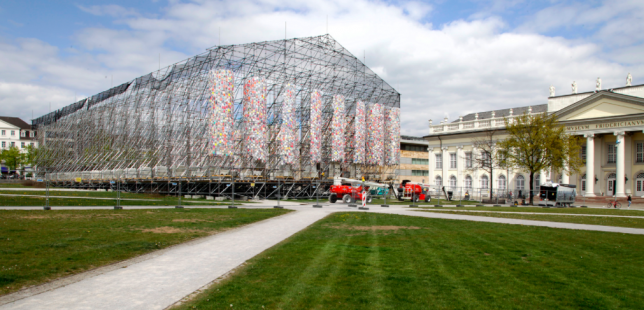
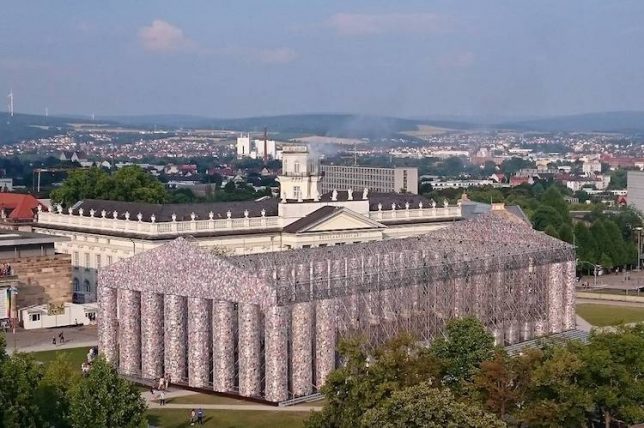
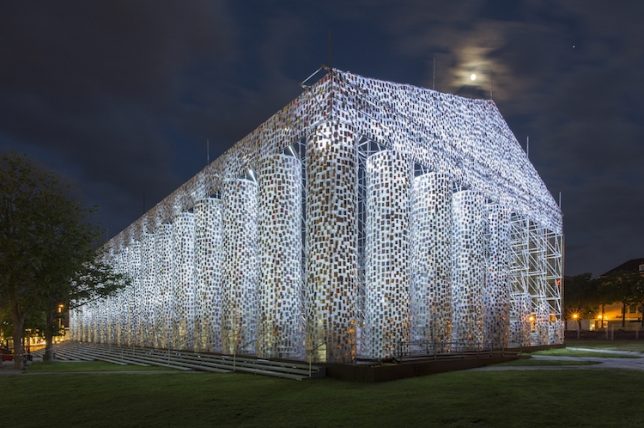
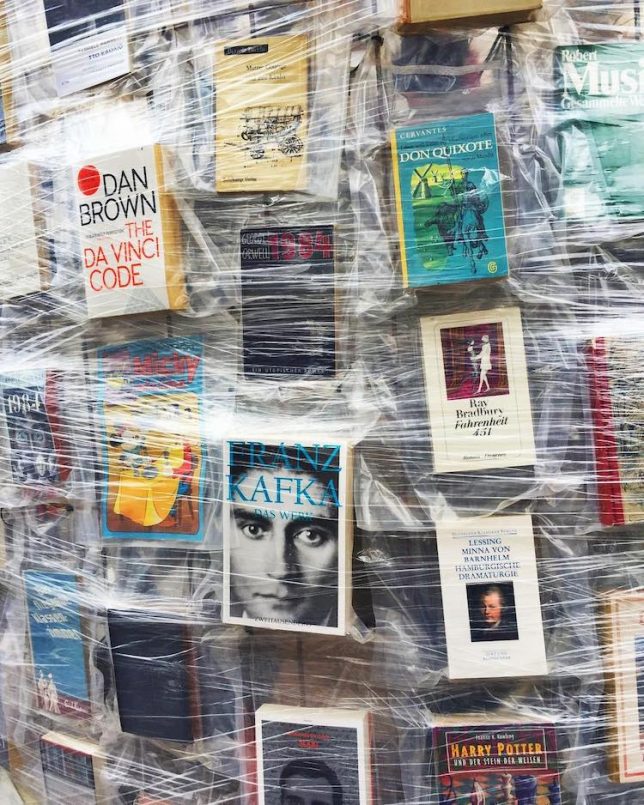
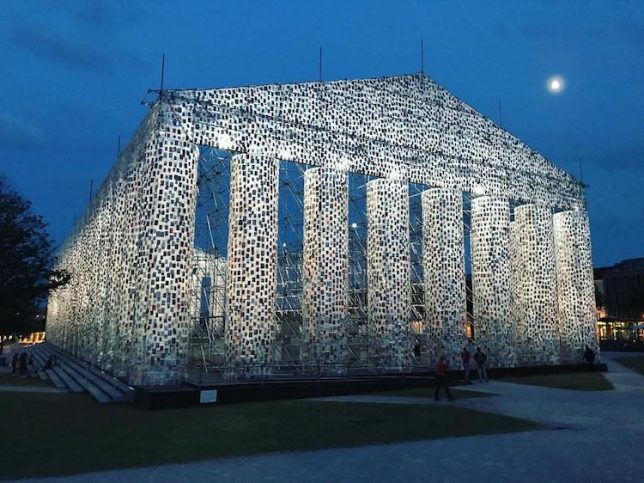
Standing on the site where Nazis burned 2,000 books by Jewish and Marxist writers, this Parthenon is not made of marble, but of 100,000 books that have been or remain banned by various governmental entities around the world. The Parthenon of Books by Argentine artist Marta Minujin faithfully recreates the historic Athens landmark in Kassel, Germany with various editions of 170 banned books, all wrapped in plastic and donated by the public.

Why the Parthenon? Because Athens was one of the world’s first democracies and the Parthenon was built as a negotiation between the government and the Athenian public, with each element voted upon. Today, it stands as a potent symbol of democracy itself. Minujin aims to make a statement about censorship.

The titles include Mark Twain’s The Adventures of Tom Sawyer, the Kite Runner by Khaled Hosseini, Salman Rushdie’s The Satanic Verses, Cecily von Ziegesar’s Gossip Girl, Harry Potter and the Sorcerer’s Stone and George Orwell’s 1984. The books are wrapped around a metal frame like a shingled facade with their covers visible, proving that despite efforts to keep their contents from the public, they have endured.

The Parthenon of Books was erected as part of the Documenta 14 art festival, and maintains the same dimensions as the original. It’s also the second time Minujin has installed the piece; in 1983, she erected a similar installation of books to condemn censorship imposed by the military dictatorship after the falling of the junta in her home country of Argentina.

The artist will keep accepting copies of the banned books and adding them to the structure until Documenta ends on August 4th, and then the books will be distributed to anyone who wants them.

Photos by: Rosa Maria Ruehling, Ictanner, Alex Gorlin, ahoisparky, rachelmijaresfick

Share on Facebook


[ By SA Rogers in Art & Installation & Sound. ]

[ WebUrbanist | Archives | Galleries | Privacy | TOS ]


WebUrbanist

 
Comments Off on Defiant Democracy: Parthenon Replica Made of 100,000 Banned Books

Posted in Creativity