RSS
 

Archive for July, 2017

Google introduces Backup and Sync for Photos and Drive

16 Jul

Google Photos is a very efficient tool for storing and sharing your images online, and can be conveniently used via dedicated mobile apps for iOS and Android. Now, using the service has become easier for desktop computer users as well.

Google has just introduced the Backup and Sync desktop app for Windows PCs and Apple Mac computers to replace the existing Google Photos desktop uploader and Drive for Mac/PC.

Google says the new app is a simpler, speedier and more reliable solution than the previous tools, and safely backs up files and photos from your computer or connected memory cards and cameras. Simply choose the folders you want to back up, and the app takes care of the rest.

Backup and Sync is now available for download on the Google website. More information on how Backup and Sync works is available in the Google Help Center.

Articles: Digital Photography Review (dpreview.com)

 
Comments Off on Google introduces Backup and Sync for Photos and Drive

Posted in Uncategorized


The Fujifilm Instax Square SQ10 is less fun than it should be

16 Jul

Fujifilm Instax Square SQ10
$ 280/£249 | www.fujifilm.com | Buy Now

The Instax Square SQ10 represents two firsts for Fujifilm’s Instax line. It’s the first to use the brand’s new square format film, which looks more like a classic Polaroid than the credit card-sized Instax Mini film used by all of the company’s other instant cameras. It’s also the first ‘hybrid’ instant camera offered by Fujifilm, meaning it’s actually a digital camera with the ability to print photos on instant film. You can do this as soon as you snap the shutter for a just-like-instant experience, or manually once you’ve had the chance to review it.

That’s right, this is a digital camera imitating a mobile app that imitates the effects of film cameras. What a time to be alive.

Since it is a digital camera, the SQ10 offers some modern conveniences that its instant-only peers don’t. For one, there’s a real LCD for image composition and menu navigation. There are also a few straightforward image setting adjustments available, like exposure compensation (+/-3 EV).

Key specifications

  • 3.6MP 1/4-in CMOS sensor
  • 3″ 460k-dot LCD
  • microSD card slot / built-in memory for 50 photos
  • Fixed 28.5mm equiv. F2.4 lens
  • Auto ISO only (100-1600)
  • Shooting modes: Standard, double exposure, bulb mode
  • Self timer: 10 or 2sec
  • Built-in NP-50 battery rated to 160 prints
  • Micro USB charging
  • 119mm x 47mm x 127mm / 4.7 x 1.9 x 5″

You can also save photos to internal memory and microSD. The camera automatically stores the last 50 images it printed to internal memory, so you can re-print photos. The SQ10 includes a selection of Instagram-style filters that can be used while shooting or added to images later, as well as a vignette effect. That’s right, this is a digital camera imitating a mobile app that imitates the effects of film cameras. What a time to be alive.

In use

In my first few outings with the camera I was determined to treat it like a true instant camera and left it in Auto print mode. But when not everybody in the photo was looking the right direction, or it turned out that I’d left the flash turned off when it was needed, it felt like I’d really screwed up and wasted a print. Just knowing that it could have been different made the experience less enjoyable than the carefree “Oh well, that’s film!” attitude I can take with my Instax mini 90.

If you dial in exposure compensation or turn the flash off, the SQ10 will continue to honor those settings even if you turn the camera off and back on. But it’s easy to forget they’re enabled as there’s no information displayed on the shooting screen. Before switching to manual printing I lost a few precious prints that way.

I also found that in printed images, shadow tones tend to come out significantly darker than they appear on the screen when viewed straight on. Features that were visible when I previewed images ended up being crushed in shadows when printed. Tilting the camera and viewing the LCD at an angle actually gives a more accurate print preview in some cases than viewing the image straight on.

The good news is that any modern digital camera will take nice photos in the right light

The good news is that any modern digital camera will take nice photos in the right light, and in ample sunshine the SQ10 produces very nice images. I got the best results leaving exposure compensation alone and embracing the punchy contrast. Flash portraits with subjects at a reasonable distance also look pleasant. Images taken in shade or under cloudy conditions have a noticeably cooler tint, and there’s no way to adjust white balance.

$ (document).ready(function() { SampleGalleryV2({“containerId”:”embeddedSampleGallery_7023332162″,”galleryId”:”7023332162″,”isEmbeddedWidget”:true,”standalone”:false,”selectedImageIndex”:0,”startInCommentsView”:false,”isMobile”:false}) });

When you do end up with a nice exposure, print quality is the Square’s strong point. It’s expensive, but I prefer Fujilm’s Instant film’s deep blacks and rich colors over the zero-ink Polaroid-branded competitor any day. And the square format is a selling point for my money – it’s the format associated with instant photography and if it’s good enough for OutKast, it’s good enough for me.

Fujifilm claims you can print photos from other cameras using the SQ10 if you load them onto a microSD card. I followed the instructions in the manual to the letter and never got anything but a read error when trying to view it on the camera. Your mileage may vary. Even if you can get it to work, it’s a pretty clumsy process. There’s no Wi-Fi included for printing from a phone or Fujifilm camera, which is a shame.

The SQ10 is also significantly heavier than the Instax mini 90 – at least it felt significant to my shoulders. The SQ10 weighs about a pound (450g) fully loaded; the 90 is half that Not back-breaking, but noticeable when you carry it around all day. The built-in battery is rated to 160 prints, and indeed it never needed a recharge during the course of this review.

Summing up

The Instax Square SQ10 offers a convincing imitation of instant photography, plus some of the modern comforts of digital. And there are plenty of benefits from this mashup of digital and instant technology. Having the ability to save the printing step for a convenient time is very nice if you’re say, on a hike, and don’t want to carry around a developing photo. Being able to make multiple prints is another bonus, and if you run out of film, great news – you can still take pictures.

But the truth is, if you opt to print manually rather than as you go, you’re basically just carrying around a mediocre digital camera that’s glued to an instant printer. The camera in the SQ10 is just not as good as a modern smartphone camera, plain and simple.

To be sure, smartphone cameras are awfully sophisticated these days, and if you count the phone they’re attached to, cost well more than the SQ10. And the great thing about the year 2017 is that even a bad digital camera will take nice photos in many conditions. If bright-light snapshots and flash portraits are your aim, then the SQ10’s digital camera component will serve you just fine. But if you plan to take photos without flash in lighting that’s less than ideal, you’d be better off using your phone.

The camera in the SQ10 is just not as good as a modern smartphone camera

If instant photography appeals to you but you want more control over the output than an all-film camera, the Instax Square SQ10 is worth a look. But it’s hard to recommend over Fuji’s standalone Instax SP-2 printer used with a smartphone. The camera that’s already in your pocket or purse likely offers a better automatic exposure mode, a polished user interface, infinite film-simulation filters and better control over exposure settings.

Shortcomings like poor image quality in low light are much easier to forgive in an all-film instant camera, but somehow feel more egregious in the SQ10 simply because it seems like the camera should be able to do better. To me at least, it feels less fun than all-instant photography, with not enough of the convenience of digital to make up for it.

What we like:

  • Digital conveniences like saving images and printing later
  • Lovely square format film
  • Good battery life

What we don’t like:

  • Small sensor struggles in low light
  • Prints are expensive at around $ 1.50 each
  • Tendency to crush shadows can make it difficult to judge exposure

Articles: Digital Photography Review (dpreview.com)

 
Comments Off on The Fujifilm Instax Square SQ10 is less fun than it should be

Posted in Uncategorized


Corephotonics publishes white paper on dual-cameras and image fusion

16 Jul

Not too many smartphone users have heard of Corephotonics, but the Israeli technology company is one of the innovation drivers in the area of dual-cameras, with its zoom technology currently shipping in devices ranging from Xiaomi, to OPPO, to OnePlus and others. It’s also the company behind the 5x zoom camera with folding optics that was displayed at MWC by Oppo.

Now Corephotonics has published a white paper titled “Image Fusion – How to Best Utilize Dual Cameras for Enhanced Image Quality” that was authored by the company’s Director of Product Marketing, Roy Fridman, and Director of Algorithms, Oded Gigushinski.

The paper looks at the challenges that have to be overcome when adding a second camera in either Wide + Tele or Color + Monochrome setups, such as calibration issues, how to switch between cameras in a way that enhances user experience and how to optimize image quality using algorithms and software tools.

The document is written in an easy-to-understand way and makes for interesting reading for anyone who wants to dive a little deeper into the dual-cam and image fusion topics. If that describes you, you can find the white paper on the Corephotonics website.

Articles: Digital Photography Review (dpreview.com)

 
Comments Off on Corephotonics publishes white paper on dual-cameras and image fusion

Posted in Uncategorized


Ten ways to shake ‘photographers block’ for good

16 Jul

Get your groove back

Have you ever found yourself in a photographic rut, feeling uninspired to go out and shoot? Most of us have – it’s a frustratingly easy place to end up. So what’s the best way to reclaim your inspiration when ‘photography block’ strikes? Through self discipline, which can be a breath of fresh air at a time when memory cards are large enough to feel limitless and social feeds provide an endless stream to flip through.

What follows are 10 tips to help you not only feel refreshed in your photography, but to stay inspired to go out and shoot. Think of these tips as a workout routine to lead you toward a healthier creative state. They are meant to supplement your photographic goals, not replace them, and they’re geared towards nurturing the skill sets that will help make you a stronger photographer. Get ready to get disciplined!

All photos by Dan Bracaglia unless otherwise credited

Switch up your medium from time to time

If you primarily shoot digital, try your hands at film. Or if you only shoot film, try digital. Why? Because the inherent nature of both mediums offer separate benefits that will help you to improve your photography. Digital gives instant feedback, which is useful for honing technical skills as well as better understanding the behavior of your gear, while film teaches us to take our time and be decisive.

These are two very different skill sets that when practiced together, create a well-balanced photographer.

Try shooting in green square mode

Take your beloved digital camera and throw it in ‘green square’ mode or whatever other fully automatic mode is offered. This will force you to work around the camera’s chosen parameters which in turn will force you to think outside the box and get creative.

It will also teach you a little bit more about how your camera behaves when it’s left to make its own decisions. Understanding the default behavior of your camera is important, even if you mostly shoot full manual.

Limit your memory card size

Want to simulate the limitations of the film era without the actual hassle of shooting film? Grab some 1GB memory cards. Depending on how you shoot (and what you’re shooting with) you’ll get a pretty limited amount of shots per card (a 1GB card in my personal camera is about 30 images). This will help you to be more decisive and intentional with your shots.

For an even more difficult challenge, disallow yourself from viewing images in playback, or deleting files. Just shoot, and swap your card for a fresh one when it’s full.

Shoot with a prime

We’ve all heard the phrase ‘zoom with your feet,’ and as hackneyed as it sounds, this is still some of the best photography advice there is. Shooting a single focal length forces you to move around more, which in turn opens up new compositional paths. But that isn’t the only benefit. You also generally have the advantage of shooting with a lighter, less obtrusive lens, compared to a zoom (there are of course large, heavy primes).

Fixed lens compacts, like the Fujifilm X100 series, Ricoh GR series and Sony RX1 series are great carry-everywhere cameras that will also force you to zoom with your feet.

Consider a disposable

Hey, did you know disposable cameras still exist? They’ve survived the dawn and maturing of the digital area and can still be found at many local corner stores (in the US, at least). So why on Earth would you shoot one? Because they are the perfect tool for living in the moment, while still being a photographer. With a disposable, neither framing nor exposure are precise arts, so there’s no need to put a lot of effort into either. The only thing you, the shooter can truly control is moment the shutter is snapped, the general direction of the camera and whether the flash fires.

Disposables also do a surprisingly good job at close distances, balancing flash with ambient light. And they’re the perfect companion for a rowdy night with friends (a time when some of the best/worst images get taken), while your expensive gear stays home, safe and sound.

Keep a camera on you, always

You’re a photographer – act like one. Whenever you got out, whether its to the store, the doctor or the circus, bring a camera, any camera! Because inspiration plays by its own rules, but you can beat it at its own game by always having a camera on you.

Point and shoots, whether film or digital, are perfect for this (I personally like the Olympus Stylus Epic and Ricoh GR II). And while a smartphone can offer image quality comparable to many compacts, the act of carrying and using an actual camera is arguably more beneficial to your photographic improvement.

Compose pictures even when there’s no camera

OK, this contradicts the previous slide, but allow me to explain: Once in a while, make the choice to not bring a camera along to something you’d ordinary shoot. And while you’re there, challenge yourself to compose mental photographs. The more you get in the habit of doing this, the more you’ll recognize compositions you like when you do have a camera on you.

Photo: Wenmei Hill

Draw, doodle, sketch

This one plays off of the previous slides’ advice in terms of preparing yourself for desirable compositions before they present themselves. Even if you are a terrible with a pen or pencil, spend some time pre-visualizing and drawing out scenes you like, whether abstract or realistic. This exercise can also be surprisingly helpful at helping you to better understand the concept of 3D space on a 2-dimensional plane.

Look at more pictures

Get in the habit of consuming quality photography every day. Social media is both a savior and a curse when it comes to daily consumption of imagery. The relentless nature of ‘the feed’ can lead to binge consumption – try to slow down and take the time to look into images, not at them. Apps like Instagram allow you to easily curate and view only the work of those photographers that inspire.

Better yet, view photography outside the context of a screen: go to a museum or gallery show. Photo books are another great way to quickly inspire. Keep one or two favorites easily accessible, so when you’re feeling creatively drained, you need only pop them open to recharge.

Post your images, watch your progress

Maybe you aren’t ready to share your work with the world just yet, no problem! Start a photoblog anyway. Even if you don’t share the link with anyone, by maintaining a place you update often, you’re making a record of your photographic progress. So when you’re feeling uninspired or low about your work, simply look back on how much you’ve improved to lift your spirits.

Because hopefully, you will have.

Share your tips

Have any other tips? Share them in the comments below.

Articles: Digital Photography Review (dpreview.com)

 
Comments Off on Ten ways to shake ‘photographers block’ for good

Posted in Uncategorized


The Gudak app turns your iPhone into a disposable camera

16 Jul

Before there were smartphones, disposable cameras used to be the go-anywhere cameras of choice for many casual photographers. If you are the nostalgic type, you can now get a simulated disposable camera experience on your iPhone, thanks to the new Gudak app by Korean startup Screw Bar.

Like a real disposable camera, the app offers a “film roll” of 24 shots and a small viewfinder.

Shoot through that roll and, once you’ve finished, it is sent to the app’s “lab” where it’s kept for three days of processing. You also have to wait twelve hours until you can “insert” a new roll of film, which means you probably want to be pretty careful with your shot selection.

Processed images show the typical color casts and occasional light leaks that should be familiar to anyone who has ever used a real disposable camera. If that sounds appealing (if a bit nostalgic and silly) to you, you can download the app now on the Apple App Store for $ 0.99. No word yet on an Android version.

Articles: Digital Photography Review (dpreview.com)

 
Comments Off on The Gudak app turns your iPhone into a disposable camera

Posted in Uncategorized


Video: Seven ‘hidden secrets’ in Adobe Lightroom

16 Jul

It’ll be a little while before Adobe can deliver on its recent promise to make Lightroom faster, but that doesn’t mean you can’t still figure out ways to make the program work faster for you. Case in point: photoshopCAFE founder Colin Smith has put together this really useful video outlining 7 ‘hidden secrets’ in Adobe Lightroom that will definitely help you get more out of the Raw editor.

Some of these tips are genuinely useful, and we’re going to guess that at least one or two of them will be new to you even if you’ve been using Lightroom for years.

Smith covers the tips in detail (and shows you how to use them) in the video above, but here’s the TL;DW version:

  1. Right click in the panels of the Develop module and enable ‘Solo Mode.’ This only allows one panel to stay open at a time, collapsing the rest.
  2. Click and drag your panel sidebar out to the left to make your sliders longer.
  3. Hold down Command (CTRL on Windows) and double click the center of a shape like a radial filter, and it will automatically snap to the edges of the photo you’re editing.
  4. Right click and uncheck to hide both modules and panels you don’t use.
  5. The Develop module doesn’t work on videos, but you can sync edits made to a single frame of that video onto the full thing. Just pull a frame, edit it, and then select the frame and video both and click Sync.
  6. You can turn any collection into a ‘Quick Collection’ by right clicking it and selecting ‘Set as Target Collection.’ Now you can curate photos into that collection with a single click.
  7. If you have multiple photos selected, you can still see the metadata for an individual photo without deselecting the bunch. Just click Metadata > Show Metadata for Target Photo Only.

And that’s it! Obviously these tips are easier to take in by actually watching the video, so click play, learn a little something and let us know which (if any) of these ‘hidden secrets’ were actually new to you.

Articles: Digital Photography Review (dpreview.com)

 
Comments Off on Video: Seven ‘hidden secrets’ in Adobe Lightroom

Posted in Uncategorized


Photo of the week: Spires of the Arctic Night

16 Jul
A spiky iceberg reflecting in the waters of Disko Bay, under intense sunrise colors.

I took this shot while scouting for my Greenland workshop. It was the last morning of our trip on a Russian Yacht, and little did I know that it would be the best by far.

The trip was done in the Arctic summer, on the first few days when the sun first touched the horizon in Disko Bay, western Greenland. There is no darkness, and sunset is quickly followed by sunrise, with pastel pink/purple/blue in between.

When sunrise drew near, it was clear from the way the clouds looked that it was going to be a spectacular sunrise. We were sailing around in the bay when we reached an area with lots of ice. This served us in two ways. Firstly, it provided a barrier to waves, making the water extremely calm and reflective. And secondly, we had an almost infinite selection of icebergs to shoot.

I took many images that night. This is one of my favorites. The bright pink and red clouds, stretched across the sky, looked like they were taken out of a painting. The intricate iceberg was a perfect subject to contrast the calmness of the sky and water, both in its color and in its sharp, pointy texture.

The photo was captured using my Canon 5D Mark III and Canon 16-35mm F4L IS lens.


Erez Marom is a professional nature photographer, photography guide and traveler based in Israel. You can follow Erez’s work on Instagram, Facebook and 500px, and subscribe to his mailing list for updates. Erez offers photo workshops worldwide.

Articles: Digital Photography Review (dpreview.com)

 
Comments Off on Photo of the week: Spires of the Arctic Night

Posted in Uncategorized


Buildings as Backdrops: Playful Photography Humanizes Built Environments

16 Jul

[ By WebUrbanist in Art & Photography & Video. ]

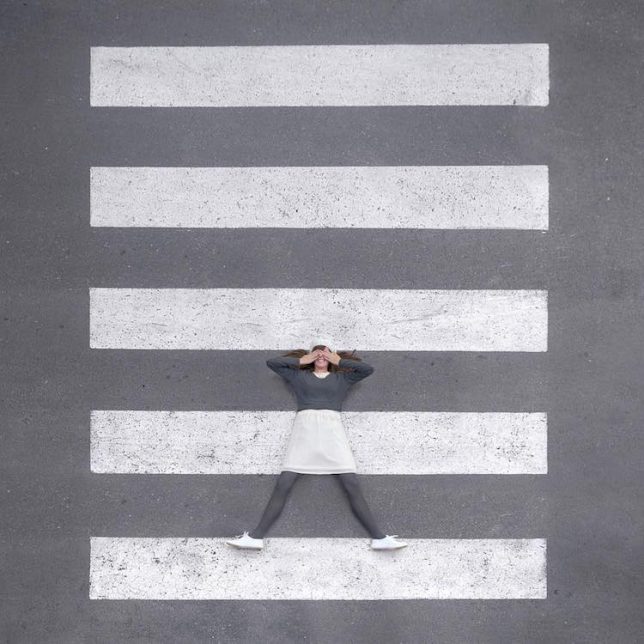
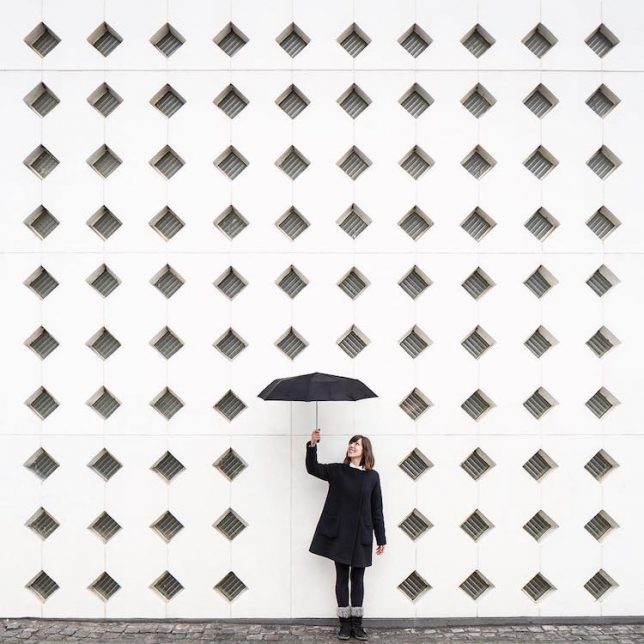
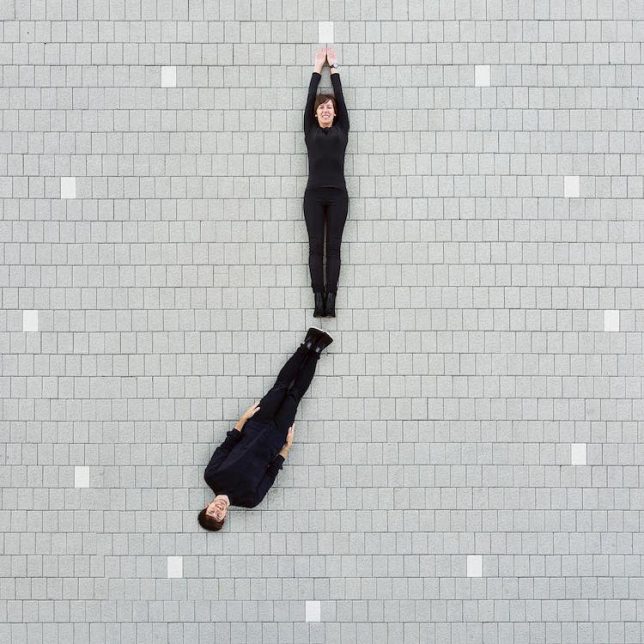
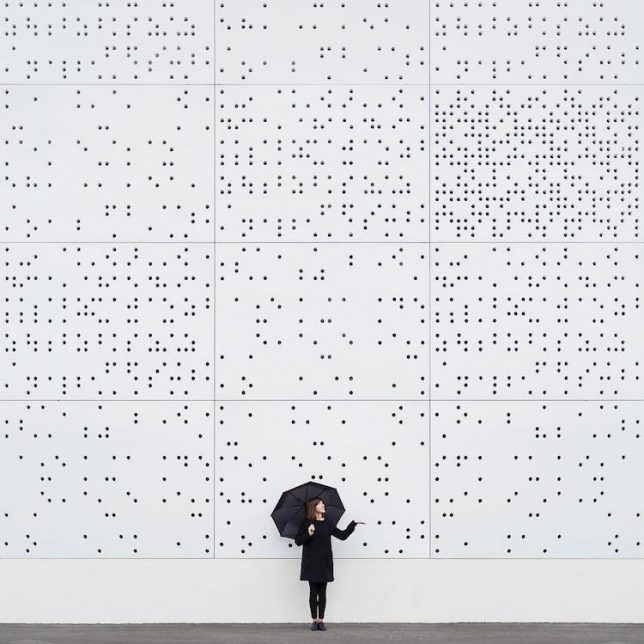
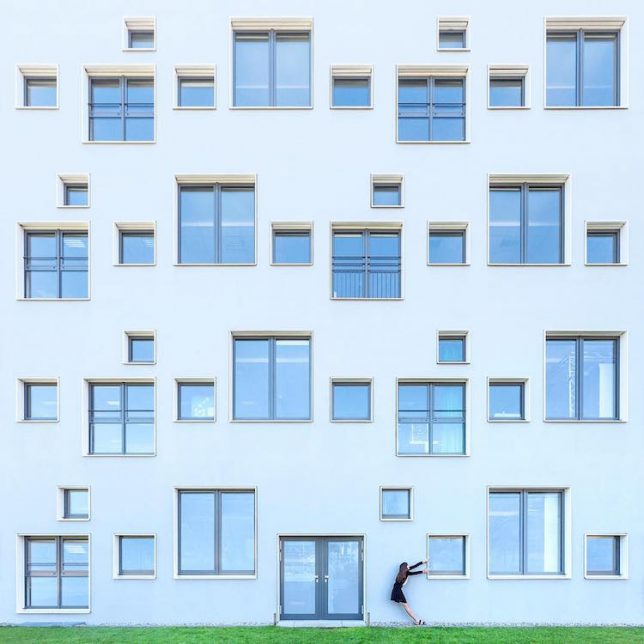
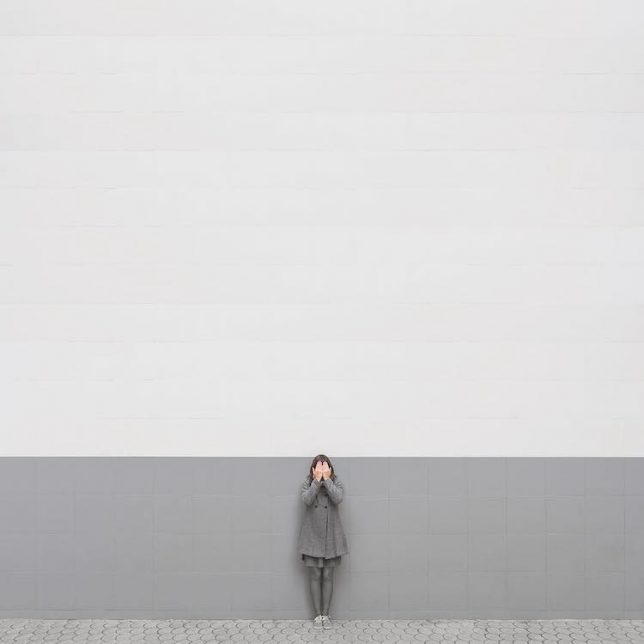
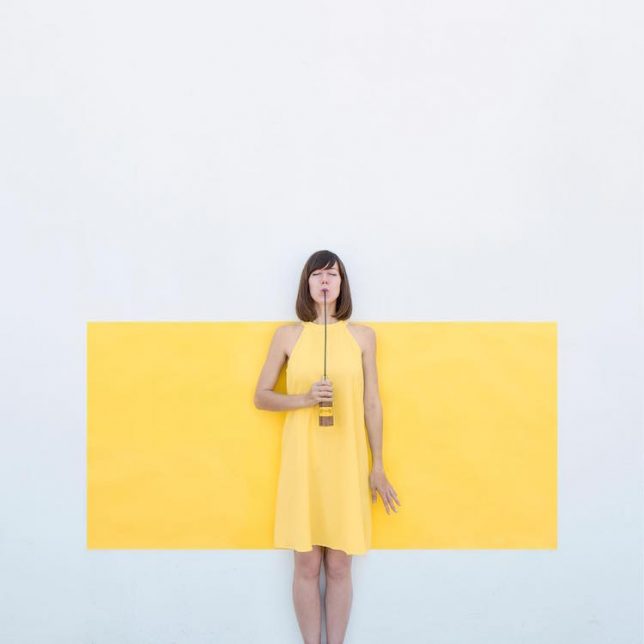
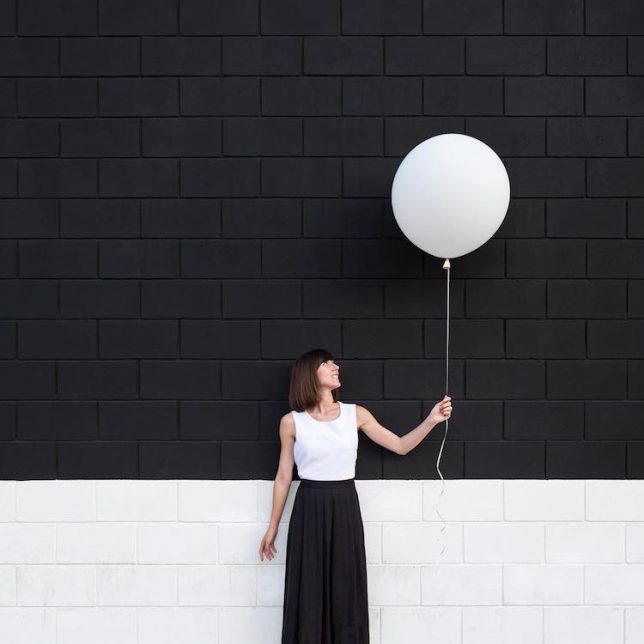
People often play a small part in architectural photography and renderings – not so in this series of travel photographs, which would lovely but otherwise unremarkable without clever human inclusions.

Anna Devis and Daniel Rueda are a design-minded couple, one an illustrator and the other an architect. And they have taken their creative sensibilities on the road, filling in the implicit gaps in built environments across Europe.

The settings represent a range of architectural styles, often bold yet minimalist except for that added element of interactivity, sometimes using props or costumes to turn facades into theatrical sets.

In Denmark, Spain, Italy and other countries they visit, Devis and Rueda take that old idea of a person seeming to ‘tip’ the Leaning Tower of Pisa to new heights. Pixelated surface suddenly become other things, like clocks or canvasses, apparently manipulated by the duo.

That critical personal element that animates each scene also serves as a foil for showing off the patterns and colors of each context, subverting but also highlighting design details. In some cases, added manipulations warp their surroundings as well. For more on their work, follow the pair’s journeys via their Instagram accounts.

Share on Facebook


[ By WebUrbanist in Art & Photography & Video. ]

[ WebUrbanist | Archives | Galleries | Privacy | TOS ]


WebUrbanist

 
Comments Off on Buildings as Backdrops: Playful Photography Humanizes Built Environments

Posted in Creativity


How to hack a Bronica ETRS to shoot Fuji Instax Mini film

15 Jul

Photographer Brock Saddler has published a really interesting and comprehensive guide detailing how he was able to modify a Bronica ETRS film camera to shoot Fuji Instax Mini film. Saddler is, kindly, allowing us to share his hack with our readers.

The hack requires two cameras: the Bronica ETRS, of course, as well as a donor camera that supports Instax Mini film. In the case of this project, Saddler used an old Polaroid 300.

A broken Instax camera can be used for this project, according to Saddler’s guide, assuming the film plane is undamaged. The disassembly process is tedious and involves freeing the film plane from the other components, such as the electronics and lens assembly. The removal process will vary depending on the camera model used.

Once free from the donor camera, the film plane must be carefully modified so that it can rest flat on the back of the Bronica ETRS; Saddler used a Dremel tool and razor blade to do this, warning that any protrusions or dips in the plastic may impair the light seal.

Trickier still is the ejector hook, of which Saddler writes, “You’re pretty much fabricating yourself a new ejection system.”

The process is still quite involved from there, requiring the careful use of epoxy, a felt liner to help form a light seal, and the removal/addition of material and components depending on the donor camera.

Finally, a pair of rubberbands round out the Bronica Instax hack, forming the two units into a single ugly-but-functional camera.

If you plan to perform this clever hack yourself, you’ll definitely want to check out the full guide on Saddler’s website.

It’s definitely not for the DIY faint of heart, but if you’re willing to get your hands and workbench a little dirty, you’ll be rewarded with something original that produces pretty neat photos to boot:


All photos © Brock Saddler, used with permission.

Articles: Digital Photography Review (dpreview.com)

 
Comments Off on How to hack a Bronica ETRS to shoot Fuji Instax Mini film

Posted in Uncategorized


Panasonic Leica DG Vario-Elmarit 12-60mm F2.8-4.0 sample gallery

15 Jul

Panasonic’s Leica DG Vario-Elmarit 12-60mm F2.8-4 lens first debuted at CES earlier this year. It contributed to samples taken for our Panasonic GH5 review, and recently we’ve been putting its 24-120mm equivalent range to work on another 20MP Panasonic body: the GX8. Check out our full sample gallery below, and for even more, head to our Panasonic GH5 review gallery for additional images.

See our Panasonic 12-60mm F2.8-4
sample gallery

$ (document).ready(function() { SampleGalleryStripV2({“galleryId”:”4993293251″}) })

Sample photoSample photoSample photoSample photoSample photo

Articles: Digital Photography Review (dpreview.com)

 
Comments Off on Panasonic Leica DG Vario-Elmarit 12-60mm F2.8-4.0 sample gallery

Posted in Uncategorized