RSS
 

Archive for June, 2017

Firmware update improves AF performance of Sigma 100-400mm F5-6.3 DG OS HSM lens for Canon

07 Jun

Sigma has released new firmware for its 100-400mm F/5-6.3 DG OS HSM lens for Canon mount. According to Sigma, firmware version 1.01 improves the AF performance of the lens. When attached to the Sigma mount converter MC-11 AF performance will be improved as well. In addition the optical image stabilization mechanism can operate at faster speeds.

As usual, Sigma lens owners with the Sigma USB Dock must first update the Sigma Optimization Pro software to, at minimum, version 1.4.1 (Windows) or version 1.4.0 (Mac) before downloading and installing the new firmware.

Articles: Digital Photography Review (dpreview.com)

 
Comments Off on Firmware update improves AF performance of Sigma 100-400mm F5-6.3 DG OS HSM lens for Canon

Posted in Uncategorized


Platypod Ultra compact camera support launches on Kickstarter with more features than Pro model

07 Jun

Platypod, the company behind the compact camera support of the same name, has launched a new product on Kickstarter called Platypod Ultra. This latest model is designed for mid-size and mirrorless cameras, unlike the larger Max model and original Pro model. Ultra is compatible with the majority of pro-tier tripod ball heads, according to Platypod, though the device itself is only about the size of a smartphone, making it ultra-compact.

Platypod Ultra is thicker (4.6mm vs 4.0mm) and 10% wider than the original Platypod Pro, making it sturdier, according to the company. The Ultra model comes with four spiked, threaded feet with rubber tips on one end, enabling the device to be used at a variety of angles on both rough and smooth surfaces. The Platypod Ultra also features five threaded holes for greater balancing and positioning options.

The company has also added three new openings to the Ultra plate so that it can be transported on bags using bungie cords or carabiners; there are also three countersunk holes for screwing the plate to a surface, such as a wood post. Finally, the plate also has two belt slots for strapping the tripod to irregularly shaped or vertical surfaces. The company is including a Velcro cinch strap with the kit.

The company is also launching a multi-accessory kit with accessories for both the Ultra and Max models. This kit includes a non-slip pad, 36-inch cinch strap, 3-inch spigot adapter, and a riser for certain tripod ball heads.

The Kickstarter campaign has exceeded its funding goal with more than two weeks remaining. The company is offering backers who pledge at least $ 49 a single Ultra unit, while a $ 69 pledge will also include the multi-accessory kit. Shipping to backers is estimated to start this upcoming July.

Via: Kickstarter

Articles: Digital Photography Review (dpreview.com)

 
Comments Off on Platypod Ultra compact camera support launches on Kickstarter with more features than Pro model

Posted in Uncategorized


Shiftcam for iPhone 7 Plus review

07 Jun

The selection of accessory lenses for most iPhone models is pretty overwhelming. However, there is one exception: the iPhone 7 Plus dual-cam with its new 28 and 56mm equivalent lenses makes design and engineering of accessory lens solutions somewhat more complex than on the standard models. As a result, there still aren’t a lot of add-on lenses to choose from. Some time ago we tested the Kamerar attachment which adds more tele reach, macro capability and a fish-eye lens to the 7 Plus camera.

Now, you can get behind a new option on the Kickstarter crowdfunding platform. The Shiftcam camera lens case offers a similar concept to the Kamerar but aims to take things one step further by adding even more lens options. The current prototype design includes the following three lens pairs that slide over the iPhone’s dual-camera lenses:

  • 120-degree Wide-angle / 2X Telephoto
  • 10X Macro / 20X Macro
  • 180 Degree Fisheye Lens / 2X Telephoto

The makers of the Shiftcam are currently collecting funds for finalization of the design and mass production on the Shiftcam Kickstarter page, but got ahold of a prototype unit. Read on to find out how it performed in our testing.

Operation and build quality

The Shiftcam system consists of two parts: a protective case and the lens module that slides into a guide rail on the case. The module can be removed if you aren’t planning to use the lenses for a while and want to keep them in a safe place. The build quality is a far cry from the premium look and feel of the iPhone, but the Shiftcam’s plastic material feels solid and the design is functional. The lens module moves noticeably smoother than on the Kamerar, but still slots into place with reassurance. A small camera grip allows for comfortable holding and the corrugated surface ensures a safe grip. You can also attach a camera strap.

As with the Kamerar, it is advisable to use a camera app that allows you to force the camera to use the tele-lens in lower light, such as Camera+ or Manual Camera for example. In dimmer conditions, the iPhone 7 Plus stock camera app will digitally zoom the wide-angle rather than using the telephoto lens, which means the Shiftcam lenses don’t line up properly with the iPhone’s camera modules anymore.

Image quality

As you can see in the samples below the add-on lenses only have a minimal impact on color response and exposure. Both wide-angle and fisheye are sharp at the center of the frame but fall off towards the edges. As you would expect, this fall-off is more drastic on the fisheye. Some vignetting is noticeable when photographing bright scenes on the wide-angle but the effect is within acceptable limits.

Overall the optical quality of the Shiftcam wide-angle and fisheye is not outstanding, but decent for smartphone add-on lenses in this price range. Both lenses are useful for those situations when you want to squeeze more of a scene into your frame.

iPhone 7 Plus wide-angle, ISO 20, 1/754 sec
Shiftcam wide-angle, ISO 20, 1/2037 sec
Shiftcam fisheye, ISO 20, 1/2179 sec

The Shiftcam comes with two tele lenses, one combined with the wide-angle, the other comes in a pair with the fisheye. The two lenses offer an identical focal length multiplier but having two of them simply means you don’t have to change the position of the Shiftcam lens slider so often.

However, on our prototype unit the image results of the two tele lenses were quite different. One lens showed a very noticeable softness across the frame while the other was much sharper. If Shiftcam manages to get the optical quality for both tele lenses on the same high level as our second telephoto sample shot below, it offers a great way of getting closer to your subject when shooting with an iPhone.

iPhone 7 Plus tele lens, ISO 20, 1/2128 sec
Shiftcam telephoto lens 1, ISO 20, 1/643 sec
Shiftcam telephoto lens 2, ISO 20, 1/736 sec

The Shiftcam case also comes with 10x and 20x macro lenses which are located next to each other on the lens slider. The 10x uses the iPhone’s wide-angle lens, the 20x is in front of the tele. Both lenses are capable of producing good sharpness in the focal plane and very useful levels of magnification.

That said, depth-of-field is minimal and putting the focus where you want it is a real challenge. As you can see in the sample below, shooting handheld I did not quite manage to do so with the 10x lens, despite several attempts. My hit rate with the 20x was better and with the right subject it’s possible to capture very nice macro images. You’ll have to get very close to the subject though, so living creatures might be scared away. You also have to be careful to not shade the scene with your phone.

Shiftcam 10x Macro, ISO 20, 1/1140 sec
Shiftcam 20x Macro, ISO 20, 1/479 sec

Conclusion

The optical quality of the Shiftcam lenses is pretty much in line with typical add-on lenses in the lower price bracket. The wide-angle and fisheye are fine at the center of the frame but get pretty bad towards the edges. One of the tele lenses is pretty sharp, but the other one on our test unit appears to be slightly misaligned. The macro lenses can produce decent quality if focused correctly.

However, the Shiftcam’s unique selling proposition is not optical quality but the fact that it combines all those lenses in a very easy-to-use lens case. Switching lenses is really quick and much less fiddly than with individual add-ons or even the Kamerar, which, despite a similar concept to the Shiftcam, uses 2 lens sliders instead just one.

If you own an iPhone 7 Plus, the Shiftcam is a very affordable and convenient way of experimenting with add-on lenses and expanding the focal range of your built-in camera. Given that we were using a prototype unit, there is also a chance that optical quality will be further improved for production lenses. You’ve still got a few more hours to secure a Shiftcam case by pledging $ 59 on Kickstarter. The Shiftcam makers have also modified the original August shipping date and are now envisaging the first units to ship by the end of June.

What we like:

  • Easy operation
  • Useful hand grip and good ergonomics
  • Good selection of lenses

What we don’t like:

  • Strong corner softness on fisheye and wide-angle
  • One of the tele lenses is soft
  • Macro lenses difficult to focus

Sample gallery

There are 17 images in our Shiftcam for iPhone 7 Plus samples gallery. Please do not reproduce any of these images on a website or any newsletter / magazine without prior permission (see our copyright page). We make the originals available for private users to download to their own machines for personal examination or printing (in conjunction with this review), we do so in good faith, please don’t abuse it.

Unless otherwise noted images taken with no particular settings at full resolution.

$ (document).ready(function() { SampleGalleryV2({“containerId”:”embeddedSampleGallery_4825250164″,”galleryId”:”4825250164″,”isEmbeddedWidget”:true,”standalone”:false,”selectedImageIndex”:0,”startInCommentsView”:false,”isMobile”:false}) });
Articles: Digital Photography Review (dpreview.com)

 
Comments Off on Shiftcam for iPhone 7 Plus review

Posted in Uncategorized


Photoshop Versus Lightroom: Which is Best for Beginners?

07 Jun

If you’re new to photography, you’re likely wondering how to post-process or edit your photos. There is a wide selection of photo editing software to choose from, but the two that you probably hear debated the most are Adobe Photoshop versus Lightroom. So what are the main differences and which program is best for beginners and for you? Read on for a basic overview!

Photoshop v Lightroom

A Quick Note

While going through this article, please keep three points in mind:

  1. This is not meant to be a thorough comparison review of the two programs. There are endless features to compare between Photoshop and Lightroom, but this article is meant to give beginning photographers a point of reference as to which program to start with first.
  2. Ever since the Creative Cloud rolled out, Photoshop and Lightroom are constantly being updated with new tools and features. So depending on which version of the programs you are using, some of the tools and features mentioned below may or may not be present in your version of Photoshop or Lightroom.
  3. There are many other comparisons written several years ago that aren’t up to date don’t reflect the new features and changes in Photoshop and Lightroom. So if you read other comparison articles (including this one), be sure to double check when they were published and if they have been updated. For reference, I have Lightroom CC 2015.10 and Photoshop CC 2017.0.1

Get both Photoshop and Lightroom here and receive 20% off the Creative Cloud Photography membership now for dPS readers. 

What is Adobe Photoshop?


Photoshop Versus Lightroom: Which is Best for Beginners?

What the photo editing layout typically looks like in Photoshop.

Photoshop is a name that has become synonymous with photo editing. Today, thanks to its extensive functionality, Photoshop is used by not only photographers, but also by graphic designers, web designers, architects, and publishers.

Photoshop is also a pixel-based image editor, giving you ultimate control of every single pixel that makes up your digital photograph. This means you have limitless options when it comes to manipulating your photos. Want to stitch your friend’s head to a frog’s body or swap out gray skies for sunny skies? These are instances when you would turn to Photoshop.

What is Adobe Lightroom?

If you take a look at the main Photoshop interface for the first time, you’re likely to feel overwhelmed. There is a seemingly endless array of tools and options to choose from, and it’s hard to know where to start. This is because Photoshop contains features not only for photographers but also for designers and those of other creative skillsets. So when it comes to easily finding the photo editing tools you need, this is where Lightroom typically excels, especially for those new to photo editing.

Lightroom takes many of Photoshop’s features that are specific to photographers and puts them in an easy-to-find panel. Previous versions of Lightroom lacked extensive editing tools, but today, Lightroom contains many of the main image manipulation tools you need to process your photos.

Another benefit to using Lightroom is that it is also a fantastic image management software. You can use it to import, organize, manage, and edit your photos. In essence, Lightroom is your all-in-one photo management and editing tool. On the other hand, if you want to manage and organize your images with Photoshop, you must use the accompanying software called Adobe Bridge (which automatically comes with Photoshop).

Photoshop Versus Lightroom: Which is Best for Beginners?

What you’ll typically see in Lightroom after you import some photos.

Lightroom versus Photoshop?

Not long ago, you had to purchase Photoshop or Lightroom individually, and it was truly a challenge to figure out which was a more worthwhile investment. Today, you now get access to both programs if you purchase a subscription to Adobe Creative Cloud. For around $ 10 a month, you can purchase the Photography Creative Cloud package, which gives you access to both Lightroom and Photoshop (with Bridge). If you need other Adobe software such as Illustrator, InDesign or Premiere Pro, you can upgrade to the $ 50 per month Creative Cloud subscription.

However, the average photographer will be just fine with the simple plan that includes Lightroom and Photoshop. So from a financial perspective, it’s a no-brainer to get both photo editing programs. But in practice, here are some rules of thumb when deciding whether to use Lightroom or Photoshop.

Use Lightroom if…

You are brand new to photo editing

Most beginning photographers will probably prefer the layout of Lightroom. It presents all of your main editing tools in an easy-to-find column, and it is pretty intuitive to figure out. In Photoshop, you have to do a little more customization to set up your workstation exactly how you want; this leads to more flexibility, meaning you can further customize what tools you choose to appear. However, this can be confusing for beginning photographers.

Photoshop Versus Lightroom: Which is Best for Beginners?

For comparison: Lightroom automatically presents your basic photo editing tools in a column.

Photoshop Versus Lightroom: Which is Best for Beginners?

On the other hand, you have to customize which photo editing tools appear in your Photoshop work area.

You want to batch process multiple images

If you have a bunch of photos that you want to batch process, it is much easier to do in Lightroom using presets and its smooth workflow. Batch processing can still be done in Photoshop using Actions, but Lightroom is arguably more straightforward.

 You value a smooth, straightforward workflow

When it comes to workflow, Lightroom is arguably much better than Photoshop. Using Lightroom, you can easily create image collections, keyword images, share images directly to social media, batch process, and more.

Photoshop Versus Lightroom: Which is Best for Beginners?

In Lightroom, you can both organize your photo library and edit photos.

Adobe Bridge - Photoshop Versus Lightroom: Which is Best for Beginners?

If you want to organize or manage your photo library with Photoshop, you must use another program called Adobe Bridge.

Use Photoshop if…

You can’t do it in Lightroom

This is the easy answer since Lightroom will truly meet the photo editing needs of most beginning photographers. With that said, there are a few instances in particular when Photoshop will outperform Lightroom.

Advanced Retouching

While the latest versions of Lightroom do include some basic retouching tools for patching and removing blemishes, you can do much more in Photoshop. Want to make a person look thinner, whiten teeth, and remove small objects? While you can do this in Lightroom, Photoshop’s retouching tools are much more powerful. It might take some extra time to figure out where these tools are within Photoshop and how to use them, but you’ll be able to enhance your photos much more than in Lightroom.

Compositing

Do you want to combine the elements of multiple images into a single one? This is termed as compositing, and you will want to use Photoshop to combine and further manipulate images.

In Conclusion

If you are a beginning photographer looking for a relatively intuitive photo editing software, Lightroom is generally best, to begin with. You can always add Photoshop to the mix later, if and when you’re in need of advanced photo manipulation techniques.

What do you think? In the Photoshop Versus Lightroom debate, which is best for beginners? Why? Let us know in the comments below.

The post Photoshop Versus Lightroom: Which is Best for Beginners? by Suzi Pratt appeared first on Digital Photography School.


Digital Photography School

 
Comments Off on Photoshop Versus Lightroom: Which is Best for Beginners?

Posted in Photography


Think Tank Signature 13 Camera Shoulder Bag Review

07 Jun

There are certain features most people would expect to find in any camera bag, such as spacious areas for holding gear, a shoulder strap, and pockets in and around the bag for carrying smaller items like memory cards, a flash, or even car keys. Judged by those standards, the Think Tank Signature 13 Shoulder Bag excels admirably. But handing out that kind of compliment for a camera bag is like giving kudos to a car company for including seats and a steering wheel on one of their latest sedans.

Pick nearly any camera bag on the market and you’ll find options and features similar to what you might see in Think Tank’s latest creation. But evaluating a bag like this by talking about a bulleted list of features kind of misses the point. This is one case in which the whole truly is much more than the sum of its parts, and the result is a capable and refined camera bag that will suit the needs of most photographers quite well.

Think Tank Signature 13 Camera Shoulder Bag Review

The Think Tank Signature 13 Camera Shoulder Bag

I have owned and used many camera bags over the years, from freebies that were included with a camera to expensive models uniquely suited to specific purposes. In my closet right now I’ve got backpack-style bags, messenger-style bags, over-the-shoulder bags, sling-style bags, and even one small little oddity whose purpose I can’t even articulate clearly. The Think Tank Signature 13 easily rests at or near the top of this relatively crowded consortium. Not necessarily because it has one single standout feature, but because it does many things so well and with a level of craftsmanship and refinement that I don’t often see especially on less expensive bags.

Design and appearance of the Think Tank Signature 13

The first thing I noticed when I got this bag, which held true for everyone to whom I showed it, is that the Signature 13 looks fantastic. Not that a nice-looking bag will help you take better photos or protect your gear, but if you value style then the Signature series is definitely worth a look. I have the Slate Gray version. It also comes in a greenish color called Dusty Olive, which I didn’t see in person although online it seemed a little too dull for my taste.

Bold leather accents and thick metal clasps made some heads turn when I brought the bag to my office. But these flourishes could also send a message to would-be camera pilferers that inside the bag is a lot of gear worth stealing. It’s not a drawback of the Signature 13 per se but is a reality of using a nice-looking camera bag. It’s also one of the reasons my father continues to keep his camera gear in what’s basically an old padded lunch sack. I do think even he would be tempted by the Signature 13 though, and it’s certainly a cut above some of the black and gray monochromatic nylon bags in my closet.

Details

Small, but significant, design touches abound, and you’re not likely to find a zipper, clasp, or velcro that isn’t a cut above what you’re used to seeing. The material from which the bag is made feels quite soft and yet surprisingly durable. My wife remarked that it felt a little bit like wool even though it’s actually a blend of nylon and polyester. In terms of overall appearance I like the way the fabric is accented with thick leather trim, hefty and durable clasps, and a generously-padded shoulder strap that distributes weight quite nicely. One of my coworkers stated that this bag would easily be suited to a professional environment such as business travel or public presentations, even though its primary function is to hold camera gear.

Think Tank Signature 13 Camera Shoulder Bag Review

Detail of the Think Tank Signature 13

Size

The Signature series comes in two sizes. A smaller Signature 10 is designed for mirrorless systems or those without a lot of camera gear, and the larger Signature 13 which can accommodate more equipment and even a 13″ laptop. I have the latter version which I found more than adequate for my camera kit on any given day of shooting. Although if I wanted to put all my gear inside it probably wouldn’t fit.

A bag like this is not really comparable to something like my Everyday Backpack 30L whose cavernous compartments can swallow up cameras, lenses, laptops, batteries, and a myriad of other accessories all at the same time. The Signature series takes a more measured and thoughtful approach to gear transportation. Instead of lugging everything you own, it’s ideally suited for the times when you want a bag that is small enough to hold the essentials, yet large enough that you can take what you need without having to worry about trade-offs.

Think Tank Signature 13 Camera Shoulder Bag Review

Practicalities of the Signature 13

In terms of regular daily usage there are lots of little details that make the Signature 13 bag pleasant to carry, with a couple of small nagging items that cast a shadow on an otherwise outstanding product.

Shoulder strap is a cut above

The main shoulder strap is, and I hope I don’t come across as overly effusive, exceedingly comfortable and ideally suited to carry a bag of this size with whatever gear you choose to put in it. Plenty of the bags in my collection seem to treat the shoulder strap as an afterthought, with basic nylon construction and perhaps a small sliding pad to keep your shoulder from hurting too much. The shoulder strap on the Signature 13 bag is almost worth the price alone, with thick luxurious (I’m serious, it’s really nice) padding running a full 20 inches throughout the length of the strap and a classy leather accent to boot. It’s a huge improvement over most other shoulder straps and makes carrying the bag an easy and pleasant experience.

There’s also a traditional handle for times when you want to grab the bag with one hand. While that isn’t generally how I use my camera bags I did find it to be sturdy and comfortable.

Think Tank Signature 13 Camera Shoulder Bag Review

These clasps fasten securely but I did sometimes have trouble opening them quickly.

Bag flaps

Inside the bag are other equally thoughtful considerations that are quite well suited to the needs of photographers. The main protective flap closes securely with two metal clasps on the front of the bag. They work just fine but did leave me frustrated a few times when I needed to open the bag quickly or close it without looking down.

The flap opens to reveal a front pouch with a dual-position strap to hold it shut, and an additional zipper pouch behind it for thin items like a cell phone, memory cards, shot list, etc. I did find myself fishing around in both of these front pouches a bit more than I thought I would, but it’s not really a design flaw so much as it’s a result of the pockets being so deep. There’s also a zippered top for the main storage compartment that acts as a second layer of protection if you’re a bit nervous at the thought of only using the main flap to keep your gear from tumbling out. But fortunately, this flap can be either buttoned to the top flap or tucked away altogether so it stays out of your way unless you really need it.

Signature 13 interior

The main cavity of the Signature 13 bag is, in many respects, standard fare for this type of storage device. Look inside and you will see a deep and well-padded chamber with plenty of velcro-style dividers that you can customize and reposition to your heart’s content. Some people like this style of bag and others don’t, so I can’t say whether this will specifically work for every photographer. But if you are the kind of person who likes to use velcro dividers to separate your gear then the Signature 13 will certainly work very well for you.

It’s not so much the functionality of this bag that differentiates it from others on the market, but the thoughtful construction and design choices made when creating it. One example is the quilted nature of the inner pocket and dividers which help them feel strong, sturdy, and quite durable. I found the dividers just as easy to use and reposition as any bag of this type, but they did have a more solid, confident feel than most others.

Detail inside the Signature 13

Detail inside the Signature 13

Bottom of the Signature 13

Rounding out the design of the Signature 13 is a massive leather base that extends the length of the bag and wraps about an inch up on either side as well. I don’t know if it’s because of this leather base or the sidewall construction, but I never had issues with the bag tipping over when I set it down regardless of whether it was empty or stuffed with cameras and lenses. Combine this with the nicely padded exterior and I would feel quite comfortable taking this bag on an extended trip, knowing my gear would be safe whether tossed in an overhead luggage bin or sitting among suitcases in the trunk of my car.

The Verdict

It probably sounds like I’m heaping compliments on this bag and to some extent that’s true. But I feel like praise is best given when it is well earned and that is certainly the case here. Still, I do have a few issues with the Signature 13 and would be remiss in not pointing them out for other buyers.

Con – the bag is not waterproof

For one, the bag is not entirely waterproof which could be a major drawback for some photographers who carry their gear in all kinds of weather. I do believe it would keep things dry well enough (though I must admit I am loathed to take it out in a rainstorm to test this out) but even so, the copious amounts of leather accents would likely get damaged or at least discolored in heavy amounts of rainfall. According to Think Tank the polyester/nylon shell is water resistant, so in theory, it should keep your gear safe and dry. It also comes with a collapsible nylon shell if you do find yourself caught in a downpour.

Think Tank Signature 13 Camera Shoulder Bag Review

The Signature 13 easily accommodates a DSLR body, 70-200 f/2.8 lens, external speedlight, and an iPad with some room to spare.

Con – clasps can be a bit clunky to use

I also think the dual front clasps are a bit impractical, and at times I found myself getting a little frustrated when trying to release or secure them in a hurry. They work just fine for what they are, but I tend to prefer magnetic or snap-based closure mechanisms that are easier to use with one hand or without looking.

Con  – large price tag

One other potential drawback is the price which, at $ 249 for the Signature 10 and $ 279 for the Signature 13, is not exactly cheap. For that price, you are certainly getting a high level of quality, but you are also paying for some of the appearance and design elements that just might not matter to some photographers. If the price is your primary consideration you might want to look elsewhere as there are certainly less expensive bags which perform most of the same functions as the Signature series. But you are also not likely to get a bag with such pleasantly pervasive flourishes and design touches.

Think Tank Signature 13 Camera Shoulder Bag Review

A sturdy leather base helps the bag sit upright whether empty or stuffed with gear.

Overall I have found the Think Tank Signature 13 Shoulder Bag to be outstanding and a fine addition to my carrying collection. It’s not revolutionary in any one single way, but it takes the concept of a shoulder-style bag with velcro dividers and enhances it to a level of refinement and craftsmanship that I don’t see in a lot of other bags. If you’re the kind of photographer who likes this type of bag, I heartily recommend the Think Tank Signature 13.

Rating (out of five stars)

  • Design: 5
  • Ease of Use: 4.5
  • Comfort: 5
  • Durability: 4.5
  • Functionality: 5
  • Overall: 4.5/5

The post Think Tank Signature 13 Camera Shoulder Bag Review by Simon Ringsmuth appeared first on Digital Photography School.


Digital Photography School

 
Comments Off on Think Tank Signature 13 Camera Shoulder Bag Review

Posted in Photography


NanGuang releases compact LED panels and accessories for studio use

07 Jun

Chinese lighting and accessory manufacturer NanGuang has revealed a new compact LED light panel for studio use, as well as a wall arm and a background support kit. The Combo 40C LED flat panel light comes with a built-in soft diffuser and features 0-100% dimming control. Stepless color temperature adjustments are possible from from 5600-3200K.

The light measures 230 x 400 x 60mm and comes with 400 LEDs that in total produce 40W of power and 2115 LM at 5600K. According to the manufacturer the average LED life is 50,000 hours.

Also new is the NanGuang wall arm which is designed to support most manufacturers’ light heads up to 5kg in weight. The arm folds out for use and can be pushed flat against the wall when not needed. It can also achieve a full range of lateral horizontal and vertical movement and features a 2-section, extendable arm (93-180cm), a reversible lighting spigot and a 1/4in tripod screw.

The new Background Support Kit can be dismantled for easy transport to location shoots and comes with two tripod-style support stands and three locking cross bars of 100cm length each. It can be used with full or half-length rolls of background paper or any other type of background material that requires a simple pole support. The maximum width is 300cm and the height can be adjusted up to 286cm.

All new NanGuang products are available through distributor Kenro in the UK. The Combo 40C is £179.94 ($ 232), the wall arm will set you back £99.96 ($ 129) and the background kit has a price tag of £77.94 ($ 100). No US pricing information has been released yet.

Articles: Digital Photography Review (dpreview.com)

 
Comments Off on NanGuang releases compact LED panels and accessories for studio use

Posted in Uncategorized


Mike Olbinski releases stunning sunset time-lapse featuring unusual cloud formations

07 Jun

‘Tis the season for dramatic weather in the middle parts of the US, and as such, it’s also the season for incredible time-lapse videos. If you thought we reached peak weather time-lapse just last week when we posted Chad Cowan’s excellent Fractal, well, see what you think after watching Mike Oblinski’s latest.

He captured unusual cloud formations called Undulatus Asperatus rolling across the plains of North Dakota at sunset. As always, we recommend going full screen and cranking the resolution up.

Articles: Digital Photography Review (dpreview.com)

 
Comments Off on Mike Olbinski releases stunning sunset time-lapse featuring unusual cloud formations

Posted in Uncategorized


Flickr’s Redesigned Profile Page

07 Jun

Following on the successful redesign of the Flickr homepage last Fall, today Flickr is announcing the redesign of the photographer profile page. As far back as I can remember the Flickr profile page has remained the same — probably at least over the past decade or so — complete with the odd request for your airport code, even though that information never seemed to actually appear anywhere on your profile.

The new redesign is much more photocentric and offers a beautiful showcase of your most popular photos published to Flickr. Tiny little square thumbnails on the profile page have been replaced by much bigger, bolder versions of your own most popular images in an attractive mosaic format.

The new profile page will start rolling out to users over the next few days so if you don’t already have it, don’t fret, it’s on the way.

The redesign makes several changes in terms of what and how the information on your profile page is presented. Some information has been added, some removed and some streamlined.

Your Most Favorited, Interesting, Commented, and Viewed Photos on the New Flickr Profile Page
Flickr’s new profile page shows your most favorited photos on Flickr.

1. Most dramatically, by default the new Flickr profile page has a beautiful mosaic of large sized photos showcasing your 25 most favorited photos on Flickr. Additionally your profile visitors can use a pull down menu to look at your 25 most interesting (as rated by Flickr’s algorithm) photos, along with your most viewed and commented photos. This is a super helpful way to get a quick impression of the type of photographer you are looking at when you find someone new that you might want to follow on Flickr. Personally this is my favorite feature of the new profile page.

Your Custom Photo Showcase on the New Flickr Profile Page
Flickr’s new profile page lets you customize 25 photos on your page.

2. Because some people would rather show off other photos than their most favorited, popular, commented or viewed, Flickr now also allows you to add a custom collection of 25 photos as chosen by you manually from your stream. So you can showcase up to 50 total photos now on the profile page between your own chosen photos and Flickr’s selections. The organizer used to build your custom mosaic is super intuitive and allows you to review your albums or search for specific photos you want to add. You can change what photos appear here whenever you want. I’m looking forward to the creative ways that users come up with using this mosaic.

Links to Your Other Social Networks on the New Flickr Profile Page
Flickr now makes user view counts public.

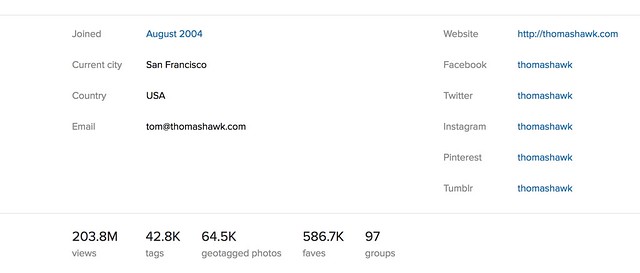
3. With the new profile page Flickr now shows you how many views a user has racked up on Flickr. If there is anything even mildly controversial about the new page design it would probably be this. In the past your total view count was available to you and you only through the stats page if you were a paid Pro account. Now your view count is posted publicly on your profile page for the entire world to see. So for the first time we can see that the Obama White House page has racked up an impressive 303 million views on Flickr, while alas, the current Trump White House has only racked up only a mere 2.1 million views on Flickr thus far.

Not that anyone’s keeping track or cares about these type of things though, am I right? ?

4. On the old profile page Flickr allowed you a single website link. On the new profile you can include a link to your website and also additional links to your pages on Facebook, Twitter, Instagram, Pinterest and Tumblr.

Testimonials Make the Cut in the New Flickr Profile Page
Testimonials make the cut for the new Flickr profile page.

5. Testimonials are still included in the new Flickr profile page. I think it’s been several years since I’ve actually written someone a testimonial, but they were a lot of fun to get and give back in the old school days of Flickr. I’m glad they made the cut on the new page.

6. The old profile page prominently featured a link to everyone you were following on Flickr and featured the avatars of the last 16 people you had followed. This section has now been reduced to a small link at the top of the page linking to everyone you follow listed alphabetically.

7. The old profile page had a link to your favorites from other Flickr members including thumbnails of the last 12 photos that you’d favorited. The new page has a smaller link that just takes people directly to your favorites page.

8. Hometown and current location information has been retained and is still shown on the new profile page, but gender and relationship status has been removed.

9. Additional links on the new profile page include links to a photographer’s tags (listed alphabetically), geotagged photos (shown on a cool interactive map), links to your favorites and your groups.

Large Photos You are Tagged in on the New Flickr Profile Page
Photos you are tagged in are larger.

10. Photos of a user are featured in much larger format with a link to all of the photos you are tagged in on Flickr.

Overall I think the new Flickr profile page is a terrific refresh to the site. It is good to see that Flickr continues to innovate finding fresh new ways to share photos. Although not the largest photo sharing site on the web today, Flickr is still my personal favorite and where I keep my primary archive of images. As a paid pro account (old skool) I am provided an unlimited amount storage for full high res photos at $ 49.99/year — a huge bargain. New Pro users get 1TB instead of unlimited storage so if you are old skool Pro *don’t* let that subscription expire. I also get detailed stats and an ad free browsing experience both for myself and for people who view my photo pages. If you are not Pro on Flickr already you should definitely consider it. It’s a wonderful community of photographers on the web where I personally interact on a daily basis.

Anyways, nice job to team Flickr on another big improvement to the site. Keep up the good work! More details in the help forum on the new page here.

You can follow my own photography on Flickr here. ?


Thomas Hawk Digital Connection

 
Comments Off on Flickr’s Redesigned Profile Page

Posted in Photography


Photographer captures Miami Beach air show with Nikon 800mm and custom rig

07 Jun
Jim Winters with his TRIAXEZ rig. Photo by Pete Boden

The AF-S Nikkor 800mm F5.6 VR is an absolute beast of a lens. Shooting handheld with it for more than a few seconds is pretty much unbearable unless you’re a champion bodybuilder. Wanting it utilize it for aviation photography, Jim Winters built a rig to accommodate the lens and a camera body that he can use for hours.

His ‘triple axis’ TRIAXEZ rig includes a counterweight and 12V battery. The battery provides additional counterweight to balance the rig – an earlier evolution used lead pellets as counterweights – and also provides charge to the camera for long shooting sessions. Winters says he can even use it to charge his phone. The whole thing is easily transported to and from shooting locations thanks to a pair of wheels.

It’s a pretty clever piece of engineering, and the proof is in the images below, shot at the National Salute to America’s Heroes in Miami Beach over Memorial weekend.

Photo by Jim Winters

It looks like the rig is working well for Winters, but he’s envisioning ways to improve it. ‘Due to the weight of the rig assembled with lens and counterweight, I was experimenting with a single shoulder mounted rig. You would look through a POV set of glasses so that you don’t have to look through the camera body, nullifying the need for a counterweight.’ That’s a pretty enticing solution, but in the meantime, we think he’s done an excellent job of adapting his equipment to his needs.

See all of his photos from the Miami Beach show at his Team Nikon Miami website.

Articles: Digital Photography Review (dpreview.com)

 
Comments Off on Photographer captures Miami Beach air show with Nikon 800mm and custom rig

Posted in Uncategorized


Aromatic Art: Empty NYC Trash Bins Turned into Beautiful Floral Bouquets

07 Jun

[ By WebUrbanist in Art & Street Art & Graffiti. ]

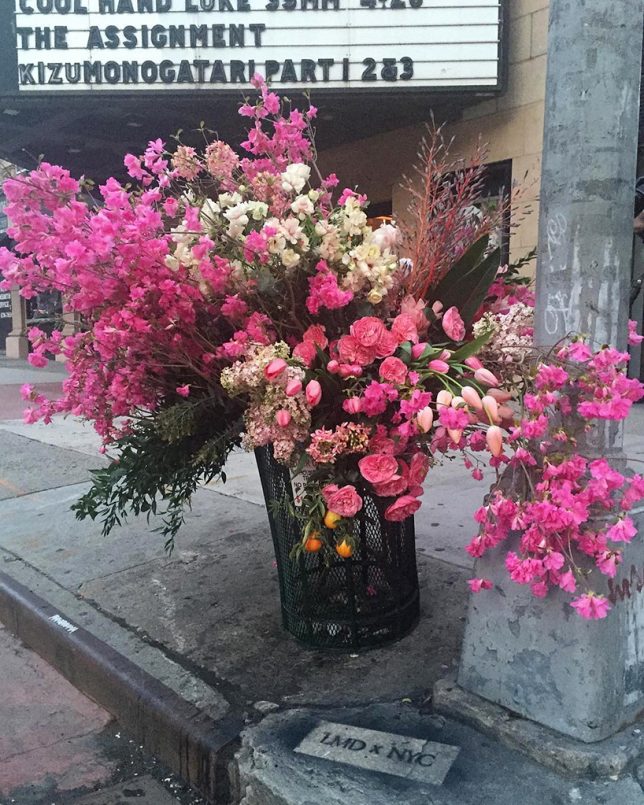
Sprouting up alongside the streets of New York City, garbage cans packed with colorful flowers are turning repelled waste receptacles into attractive centers of attention for garbage-weary pedestrians.

Floral designer Lewis Miller has been turning heads — passersby are quite literally stopping to smell the roses (and other plants) appearing in his carefully arranged bouquets, each unique and site-specific.

His ongoing project takes empty bins and uses them as blank canvasses, creating botanical art through sunflowers, azaleas, and other more exotic species. Something about the juxtaposition with beat-up wire-mesh containers makes them all the more stunning, too.

“We are storytellers through the art of floral design, transforming an arrangement into a love song and an event into an indelible experience,” says the artist. Different arrangements also pick up patterns and colors from their context, be it stickers, signs, architecture or other street art.

The temporary installations may not be a permanent solution for bad-smelling trash in a city well known for its street-side waste, but at least they offer a colorful (if passing) reprieve from the normal contents of these containers.

Share on Facebook


[ By WebUrbanist in Art & Street Art & Graffiti. ]

[ WebUrbanist | Archives | Galleries | Privacy | TOS ]


WebUrbanist

 
Comments Off on Aromatic Art: Empty NYC Trash Bins Turned into Beautiful Floral Bouquets

Posted in Creativity