RSS
 

Archive for April, 2017

How to Photograph People Outdoors Without Using a Reflector

28 Apr
How to Photograph Outdoors Without Using a Reflector

Subject: Kota Wade

You just got booked for a marvelous portrait photo shoot out in a gorgeous natural landscape. You run out the door, with camera gear in tow. Then you arrive at the location, the fresh air filling your nose, the beautiful natural world flourishing all around. You meet with your lovely portrait subject. The sun is beating down on you from above. Then it hits you… you forgot your reflector at home.

Or maybe you don’t have a reflector, maybe you just never felt the need to spend money on one. All of this is totally okay because there are some tips and tricks to take stunning photographs without the use of a reflective disc! Keep reading to learn more.

How to Photograph Outdoors Without Using a Reflector

Subject: Bina Monique

What is a reflector?

A reflector is a simple tool that redirects existing light. A reflector does not illuminate, it merely allows you to manipulate the light that you already have.

Photographers use reflectors to fill shadows, which is why you often see them used in outdoor settings where you cannot control the light. Being at the mercy of the sun, you add a level of control to your situation with the use of a reflector. However, there are ways to take advantage of your situation without one.

How to Photograph Outdoors Without Using a Reflector

Subject: Skylar Roberge

Find even lighting

Essentially, part of the trouble with shooting outdoors comes from the lighting. Clients often see a clear blue sky with the beaming sun and think that is an absolute joy for photographers. But we shooters silently scream in agony at the prospect of overblown highlights, underexposed shadows, and the dreaded contrast.

What’s the best solution for this? Find some even lighting!

Positioning your subject under a tree, in the shadow of a building, or simply positioning yourself so that the sun hides behind a mountain can all make for some nice even lighting. Although the background might be overexposed if you are simply using a small patch of shadow, try to change your perspective to make the most of the situation.

How to Photograph Outdoors Without Using a Reflector

ISO 400 – Shutter Speed: 1/100 – Aperture: f/2.8
Even Lighting: Rooftop overhang

Make even lighting

Are you out in a field or a desert and don’t have access to any form of even lighting? Is the sun too bright to have on your subject’s face? Then it’s time to get creative!

You can make your own even lighting utilizing things you may already have in your car. Use an umbrella and position that over your subject, or to block out the sun in your frame. You can use a vehicle windshield cover or shade to do the same.

How to Photograph Outdoors Without Using a Reflector

ISO 1250 – Shutter Speed: 1/500 – Aperture: f/2.8
Even Lighting: Umbrella

Use the contrast to your advantage

Are neither of the aforementioned tips applicable to your scenario? Well then, this is where we get inventive.

Photography is an art form, and artists are creative, imaginative, and inspired. Instead of fighting against the contrast, why not use it to your advantage? Work your shoot around the contrasting shadows and highlights, and create dramatic photographs. Several well-known clothing designers, such as Prada and Dolce & Gabbana, use contrast in their fashion editorials to stage a theatrical scene and illicit an intense response in the viewer.

How to Photograph Outdoors Without Using a Reflector

ISO 200 – Shutter Speed: 1/1000 – Aperture: f/2.8

Shoot at the right time of day

When a choice presents itself, shooting at the correct hour of the day can ease your lighting woes. The golden hour is infamous for being an excellent time to photograph. Aiming to photograph when the sun is low and producing a more even light removes the need for a reflector.

How to Photograph Outdoors Without Using a Reflector

ISO 1600 – Shutter Speed: 1/640 – Aperture: f/2.8

Fill shadows by finding a natural reflector

Various surfaces can double as reflectors, such as water or windows from a building. Positioning your model just right can garner the same effect as if you had a reflector yourself.

How to Photograph Outdoors Without Using a Reflector

ISO 2000 – Shutter Speed: 1/320 – Aperture: f/2.8
Reflector: Car windshield, parked to his right side

Fill the shadows in post-processing

The computer is your friend, and it is okay to use programs to help you bring your vision to light (no pun intended). Shooting in RAW format (an image file that contains minimally processed data from the image sensor of a camera – Raw files are named so because they are not yet processed) gives you better control over your image when you edit it. RAW files have more shades of colors compared to JPEG files, higher image quality, significantly better control over editing lightness, white balance, hue, saturation, etc., and all of the changes made on a raw image file are non-destructive. You can use any post-production software to lighten the shadows in your image and darken the highlights.

Original image before processing.

How to Photograph Outdoors Without Using a Reflector

After processing.

There you have it, sounds like you have a solution to your no-reflector problem.

The post How to Photograph People Outdoors Without Using a Reflector by Anabel DFlux appeared first on Digital Photography School.


Digital Photography School

 
Comments Off on How to Photograph People Outdoors Without Using a Reflector

Posted in Photography


Novoflex ClassicBall ball heads can be mounted upside-down for level panoramas

28 Apr

Novoflex has launched a trio of new Classicball tripod ball heads that can be mounted upside-down for producing level panoramas. The new lineup is comprised of the CB 2, CB 3 II and CB 5 II models, each able to accommodate cameras and gear weighing up to 5kg/11lbs, 8kg/17lbs and 12kg/26lbs, respectively. All three models feature a leveling bubble built into the base of the mount.

According to Novoflex, all three new Classicball models are compatible with all ‘common’ tripods, and each can be used with optional quick-release accessories. A lever on the side of the ball head clamps the camera into position; users can also adjust the friction using the blue 5-stop friction dial. Each model features a trio of 90-degree openings for positioning the camera fully backward, forward, and to the side. The ball head’s design allows for 360-degree rotation, including in reversed (upside-down) mode, which itself supports optional L-bracket, plate and quick-release accessories.

The new Classicball models are available on Novoflex’s website now for $ 495 (CB 2), $ 475 (CB 3 II) and $ 692 (CB 5 II).

Via: DIY Photography

Articles: Digital Photography Review (dpreview.com)

 
Comments Off on Novoflex ClassicBall ball heads can be mounted upside-down for level panoramas

Posted in Uncategorized


3 Lighting Setups for Photographing Headshots

28 Apr

I do a lot of corporate and actors headshots around Washington, DC and I wanted to share some of the simple but effective lighting setups that I use over and over, which you can easily copy and use yourself.

lighting for headshots

The One Light Wonder

My standard setup consists of a large soft light source to the left or right of the subject, a reflector under the face, and another reflector opposite the main light source. I shoot hundreds of headshots per year using this simple setup. I use a Paul C. Buff Einstein unit with a large octabox in my studio, but you could easily put together something similar with a cheap speedlight, an umbrella, and a couple of $ 20 reflectors.

You can see this setup in the photo below, with my poor wife Karen standing in as a subject. She was just coming downstairs to make some tea, and got ambushed!

headshots lighting

Reflectors and adjustments

Once my subject is in place, I do some tweaking. First I will adjust the light source so it is slightly above their eye level. For most people, I think it looks best to have the light coming from above to cast subtle shadows under the chin, accentuating the jaw and helping to hide any double chin.

Then I will adjust the reflector underneath their face and bring it up to about their mid-chest level. This reflector helps fill in shadows on the face and provides a really nice extra catch light in the eyes. Some folks will use another (powered) light source down here, but I find the reflector to be much simpler to set up, and it also has the virtue of being idiot proof.

For example, if you have another light instead of a reflector below the subject, and you accidentally overpower it (so it is more powerful than the main light), you have created some horrible Frankenstein lighting! It is physically impossible to do this with a reflector, which can save from you from costly mistakes.

headshots lightingYou can see the side reflector in my studio in this photo (it’s just to Karen’s left).

Finally we have the reflector opposite the light source. For this one, I will often use a black-sided panel to create a darker shadow on that side of the face. This effect can be very dramatic, and has added benefit of slimming the face. The downside is that if your subject is very wrinkly, you’re not filling those wrinkles with light from that side. So it doesn’t work for everyone.

Here’s an example where of a headshot where I used this effect to create a nice dramatic edge:

headshots lighting

Some additional tweaks

With this simple setup, it’s very easy to make tweaks and see what works best with a particular person’s face. Often I will leave the basic setup in place with the black reflector, but a few examples where I might make changes are:

  1. The subject has a double chin, so I really want to define the jaw. In this case, I may raise the light up extra high to cast more shadow under the chin (make sure you don’t go too high and lose your catchlights), and/or lower or remove the under reflector.

headshots lighting

  1. The subject has long dark hair. In this case, the dark reflector is not necessary because we already have a dark edge there from the hair. So in this case I would go with a white reflector on the side or bring in a hair light from behind (more on that in the next section)

In the photo below, you can see a lot of detail in her hair on the shadow side. That’s because I brought my big white reflector in close.

headshots lighting

  1. Subject has deep set eyes. We want to fire more light into those sockets or our poor subject will end up looking like a serial killer or a cave man! In this case, I might lower the main/soft light so it is right at eye level.

Two Lights

You could run a whole business just using the one light system, but if you’re anything like me you get bored and like to try new things. So let’s bring in a second light.

The second light for me is usually a “kicker” (also called a rim or accent light) coming from behind and opposite the main light. I use this to accentuate the jaw, especially in men, or hair in women. It’s especially nice to create a little highlight on darker hair.

In the photo below, I needed a way to separate this young man from the dark background. My kicker light did the trick!

Headshots lighting

In my studio, I use a strip softbox for this purpose, but you could also use a bare head with a grid or even an old speedlight with a paper towel roll taped to it to make a simple snoot. The important thing is that you want to control the light so it doesn’t spray into your lens and create flare or lack of contrast.

You can see my kicker light in this setup shot with Karen.

headshots

Three and Four Lights

I use lights three and four to create a clean white background. You can either use one light fired at the background from just behind the subject, or two lights off to either side.

The white background is my favorite look these days for a lot of reasons. I think it looks super bright, modern and happy, and really pops on LinkedIn and other online profiles. It is also a great way to go for companies because it is easy to replicate and get a consistent look from shoot to shoot (for example, when photographing a new employee months after the initial shoot, or replicating the same look with shoots done across the country by different photographers).

headshots lighting setups

headshots lighting setups

headshots lighting setups

headshots lighting setups

Whether you use one or two lights for the background depends on your budget and the space where you are working. Two lights can give you a larger more even spread of light, whereas with one light you might have some fall off around the edges that you need to clean up in post-production. So I usually stick to two lights unless I’m on location somewhere and space is tight.

Conclusion

So I hope you all found this article helpful and you can use the lighting setups for your headshot. I look forward to your comments and questions!

The post 3 Lighting Setups for Photographing Headshots by Dennis Drenner appeared first on Digital Photography School.


Digital Photography School

 
Comments Off on 3 Lighting Setups for Photographing Headshots

Posted in Photography


Harbortronics’ DigiSnap Pro is designed for long-term time-lapse photography

28 Apr

Harbortronics has announced DigiSnap Pro, its new low-power complete system controller for long-term time-lapse photography. The controller supports both networked and autonomous operation and can be used with the company’s Cyclapse Pro, a time-lapse photography system that includes a camera housing and solar panel for use in locations where AC power is unavailable. 

According to Harbortronics, the DigiSnap Pro controller can be used with ‘practically any modern high quality digital camera,’ which is said to include medium format models, mirrorless, and full-frame SLRs. When used with the Cyclapse Classic systems, the company says DigiSnap Pro replaces both the Cyclapse Power Module and the DigiSnap 2700, and that all the cables support the DigiSnap Pro. The new controller can be remotely configured using the company’s Android app and Bluetooth LE, and a network remote configuration option is being developed. 

DigiSnap Pro itself offers all the functions one would typically need for long-term time-lapse photography, according to the company, including power management, automated image transfer and local data storage, and monitoring the system for issues. Status emails are sent when a problem is detected, including issues with the housing door, camera failure, low battery, temperature issues, and more.

Articles: Digital Photography Review (dpreview.com)

 
Comments Off on Harbortronics’ DigiSnap Pro is designed for long-term time-lapse photography

Posted in Uncategorized


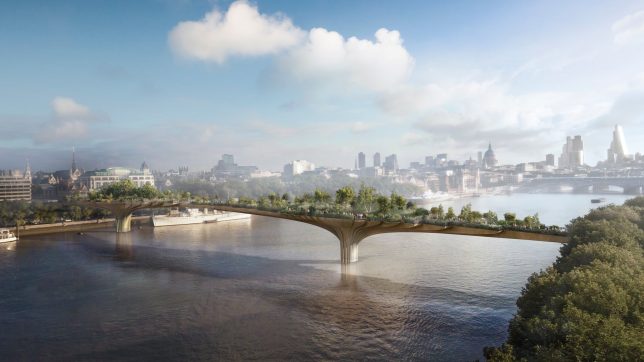
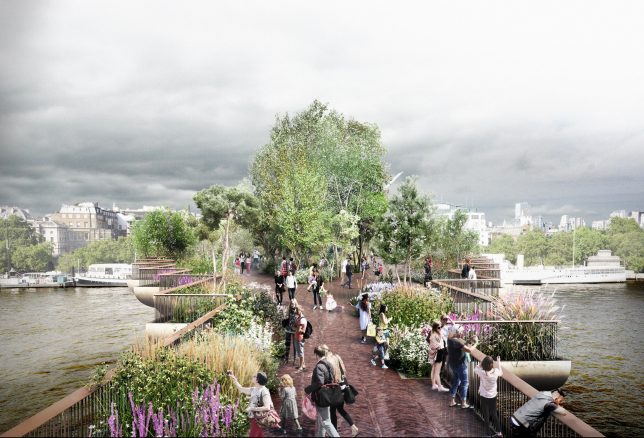
End of Elevated Parks? UK Garden Bridge & US Pier 55 Projects in Doubt

28 Apr

[ By WebUrbanist in Architecture & Cities & Urbanism. ]

It has been a challenging few weeks for architect Thomas Heatherwick, whose proposals for elevated green urban spaces in both London and New York City face uncertain futures. While the specifics vary, there may be lessons for elevated parks that spans both cases — and if these fail to move forward, it could spell the end of a decade-long trend for lofted public parks.

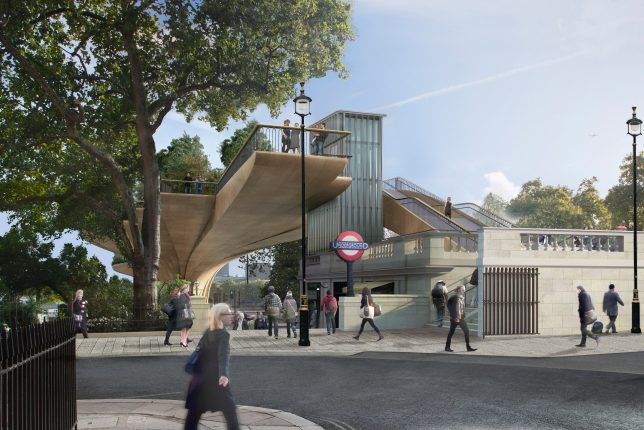
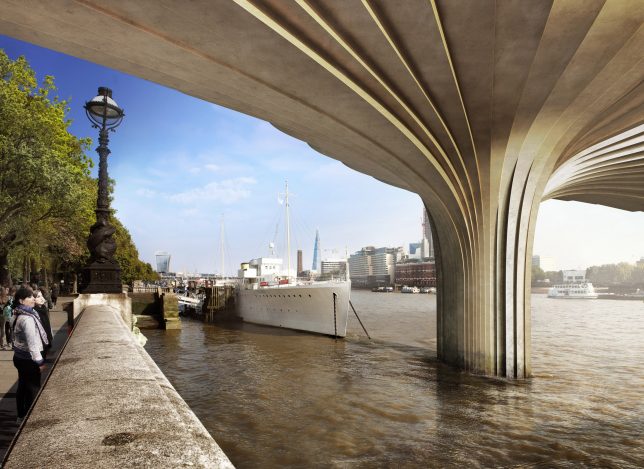
The Garden Bridge project in London has long been criticized based on its cost and officials are getting serious about making sure the investment (especially tax dollars) will pay off. The design has been touted as a kind of High Line Park for England’s capital, but unlike the High Line it is a brand new construction project (not adaptive reuse) and not positioned to revitalize areas of its city.

At the heart of the issue, unsurprisingly, is money: an initial projection of £60,000,000 has blossomed into an estimated cost of around £200,000,000. Shockingly, even cancelling the project now would result in a bill of over £40,000,000, despite the fact that construction has not even started. While £70,000,000 in private funding was secured at the outset, the rest would have to be covered by taxpayer money, which is less than popular with the public. As of now, the mayor’s financial inquiry has resulted in a recommendation to scrap the project.

According to a governmental report on the project, “Decisions on the Garden Bridge were driven by electoral cycles rather than value for money,. From its inception when there was confusion as to its purpose, through a weak business case that was constructed after contracts had been let and money had been spent, little regard has been had to value for money.” It is unclear whether the project is stalled or slated for abandonment, but it looks unlikely to proceed at this point.

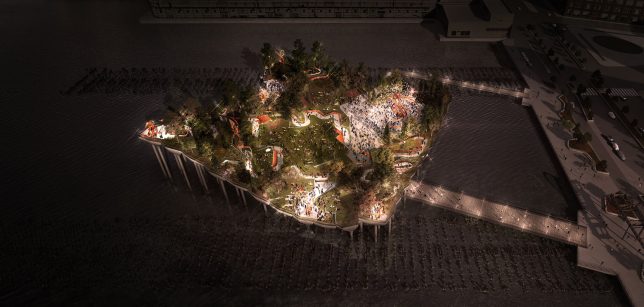
Meanwhile, across the pond, Heatherwick’s proposed Pier 55 project (images by Luxigon), an elevated park stretching out over the water next to Manhattan, is also stalled out, at least for now. Its permit was recently revoked in part based on environmental studies that concluded it would disrupt local marine habitats. There are also concerns that it will block views along the waterfront.

The 10,000-square-foot, $ 200,000,000 park was designed to replace a disused pier in the heart of New York City, but once again it lacks some of the conditions that made the High Line a viable solution, particularly its lack of reuse. Perhaps the elevated parks trend is coming to an end, or (more likely): it is too often pitched as a solution, even in cases where there is no obvious problem to be solved.

Share on Facebook


[ By WebUrbanist in Architecture & Cities & Urbanism. ]

[ WebUrbanist | Archives | Galleries | Privacy | TOS ]


WebUrbanist

 
Comments Off on End of Elevated Parks? UK Garden Bridge & US Pier 55 Projects in Doubt

Posted in Creativity


Aurora Aperture launches 16-stop ND filter and rear filters for Canon’s super-wide lenses

28 Apr

US filter brand Aurora Aperture has announced a neutral density filter that it claims reduces exposure by 16 stops. The company has launched a new family of fixed factor ND filters called PowerND and is offering strengths of 6, 12 and 16 stops in screw-in and square formats.

The ND64, ND4000 and ND65000 filters will be available for threads of 37-95mm as well as a special 105mm version that will fit an adapter for the Nikkor AF-S 14-24mm F2.8G ED wide-angle zoom. Those preferring a filter system will be able to use the 100 x 100mm square filters. The 16-stop filter is designed for those wanting to make long exposures in daylight conditions and can knock a 1/1000sec shutter speed situation down to 1 minute.

Aurora Aperture has also introduces a series called Aurora CR with filters designed to fit over the rear mount of Canon super-wide lenses. The arch-window-shaped Gorilla Glass filters slide into a holder that screws on to the rear of the lens, and while aimed at users of the Canon EF 11-24mm F4 L USM the system will work with a range of the company’s wide-angle zoom lenses.

The filters are available via Kickstarter with delivery and general sales due to begin in August. Prices start from $ 34 for small screw-in filters of any of the strengths, to $ 117 for the 150mm circular filter. The CR kit including the holder and three filters is $ 165. For more information see the Aurora Aperture website and the company’s Kickstarter page.

Press release

Aurora Aperture Introduces PowerND Family and an Industry First Rear Mount Glass Filter for Canon EF 11-24mm F4L USM

Aurora Aperture Inc., a Southern California startup, today has introduced the PowerND family of high quality fixed neutral density (ND) filters.

The PowerND family consists of three ratings of light reduction capability: ND64 (6 stops),ND4000 (12 stops), and ND65000 (16 stops). Four different formats are available: circular filters from 37mm to 95mm, 100 x 100mm square filters compatible with popular square filter adapters, 150mm circular filters with an adapter for the Nikon AF-S 14-24mm f/2.8G ED lens, and the Aurora CR format, an industry first, a rear mount glass filter for the Canon EF 11-24mm F4L USM lens.

The 6 stop filter is typically used in low light conditions such as during sunrise or sunset for sub-second shutter speed. The 12 stop filter can slow down shutter speed to minutes in dusk and dawn conditions. The 16 stop filter can do magic on a bright day, allowing photographers to expose up to several minutes or more.

The ND4000 and ND65000 have distinct advantages in having more stops than the typical ND1000 or ND32000. They allow users to avoid diffraction softening by enabling users to avoid very small aperture settings or alternatively allowing for longer exposures. In the case of the PowerND 4000 that means two more stops than the typical ND1000 and for the Power ND65000 there’s one additional stop.

“We introduced a variable ND family last year and it was embraced by photographers and videographers worldwide,” said Jinfu Chen, founder and CEO of Aurora Aperture Inc. “the fixed ND family we introduce today is much more powerful in terms of light reduction capability and offers even better optical performance, along with more formats for different camera lenses.”

A small rear mount filter using Gorilla® Glass for the Canon EF 11-24mm F4L USM is an industry first. Prior to this users would have to use extremely large filters with diameters up to 186mm with a bulky front lens shade adapter. The Aurora CR format filter mounts in the rear of the lens, making it much easier to carry and lower in cost. Other Canon lenses that Aurora CR format filter can be used in* are the EF 8-15mm f/4L Fisheye, EF 11-24mm F4L USM, EF 14mm f/2.8L US, EF 15mm f/2.8 Fisheye, EF 16-35mm f/2.8L USM, and EF 17-40mm f/4L USM.

Designed in California by Aurora Aperture, the Aurora PowerND filters employ up to 128 layers of double sided nano coating** in order to achieve color accuracy and powerful light reduction capability. Hydrophobic and oleophobic coating is applied to filter surface with PFPE coating. The end result is that water droplet on the filter surface can maintain a static contact angle of 110 degrees, one of the best in the industry.

Availability and Pricing
The Aurora PowerND family will be available through Kickstarter starting in April 2017 and to dealers and direct orders in August 2017. List price starts at US$ 42 and varies depending on filter format and size.
http://www.aurora-aperture.com
info@aurora-aperture.com
* As of April 21, 2017
** ND4000 and ND65000

Articles: Digital Photography Review (dpreview.com)

 
Comments Off on Aurora Aperture launches 16-stop ND filter and rear filters for Canon’s super-wide lenses

Posted in Uncategorized


Updated: A closer look at Sony a9 image quality and autofocus

27 Apr

While combing through our thousands of images from Sony’s a9 launch event last week, we’ve taken a critical look at the camera’s revamped JPEG engine and the effectiveness of its 653-point autofocus system. Read more

Articles: Digital Photography Review (dpreview.com)

 
Comments Off on Updated: A closer look at Sony a9 image quality and autofocus

Posted in Uncategorized


Serious speed: Sony a9 real world samples gallery

27 Apr

The Sony a9 made headlines shortly after its announcement due in no small part to its laundry list of impressive specifications. With 20fps burst shooting, 693 autofocus points and a 3.7m dot electronic OLED viewfinder with no blackout at all in continuous shooting, this camera’s got some serious specs and Sony has made some serious claims about its performance.

During our time in New York for the announcement, we were able to learn the ins-and-outs of the camera while photographing hockey players, figure skaters, and a full-on track meet to see just how the camera fared – and it fared well. But don’t take our word for it, check it out for yourself in our real world samples gallery. The AF system combined with 20 fps allowed us to nail the exact moment, while the excellent JPEG engine retained detail and minimized noise even at ISOs in the thousands.

See the Sony a9 real world samples gallery

But we’ve also been hard at work digging into the Sony a9 as much as we could, given our limited time with it and lack of Raw support. Our shooting experience has been updated with impressions of both JPEG image quality and autofocus performance.

DPR’s updated impressions of the Sony a9

$ (document).ready(function() { SampleGalleryStripV2({“galleryId”:”5484254968″}) })

Sample photoSample photoSample photoSample photoSample photo

Articles: Digital Photography Review (dpreview.com)

 
Comments Off on Serious speed: Sony a9 real world samples gallery

Posted in Uncategorized


Sphere of frustration: Nikon KeyMission 360 review

27 Apr

360-degree capture is still a relatively new concept, and one that can be hard to explain to the casual consumer. But play someone a 360 video and you suddenly have the ability to expand their idea of what photography is. This is especially true when 360 content is viewed with a smartphone that senses its position in space, allowing viewers to explore an entire surrounding area, revealing more – behind, above, and below the viewer – as they move the device around. Where most photography provides a window onto an experience, 360 puts the viewer smack in the middle of a scene.

When Nikon announced the KeyMission 360 more than a year ago it appeared, on paper, to be the category leader. 4K image resolution, a somewhat compact form factor, weather sealing for action sports, dual lenses to capture a full sphere of image data: it was all there.

  • Dual F2.0 lenses for full 360-degree image, each with a 1/2.3″ 21MP CMOS sensor
  • 4K UHD video capture
  • 29MP still capture
  • Shockproof and waterproof housing
  • Removable battery and microSD card
  • Prominent, easy-to-access physical controls

Well…mostly there. When it was finally released in September 2016, the KeyMission 360 arrived with a personality as dual as its opposing lenses. The hardware impresses in many ways, but the software and interaction with mobile devices quickly make you forget about those advantages. Although Nikon is making incremental progress, you may find the urge to test the camera’s shockproof construction by throwing it across the room.

  Nikon KeyMission 360  Ricoh Theta S  360fly 4K  Samsung Gear 360 (2017)
Max Video Resolution

3840 x
2160/24p 

1920 x 1080/30p 2880 x 2880/30p

4096 x 2048/24p

Photo Resolution 7744 x 3872 5376 x 2688 2880 x 2880 5472 x 2736
Waterproof (without a housing) Yes No Yes No
Field of View 360 degrees (dual lenses) 360 degrees (dual lenses) 240 degrees (single lens) 360 degrees (dual lenses)
Storage microSD card 8 GB internal 64 GB internal microSD card
Weight 198 g 125 g 172 g 130 g
MSRP $ 500 $ 350 $ 500 TBD

It’s worth noting a new 4K Ricoh Theta will likely be announced soon. The Nikon KeyMission 360 is available now for a a street price of $ 496.95. 

But let’s start with the overall experience, because shooting in 360 degrees takes a different approach from most cameras.

Handling

When we talk about how a camera handles, we usually mean how it feels in the hand, how much it weighs, and how comfortable it is to shoot using a viewfinder or an LCD. With the KeyMission 360 (and most other 360-degree cameras), the entire surrounding area is recorded as a sphere. Its dual lenses (each backed by a 1/2.3″ CMOS sensor) capture two separate images that are stitched together by software, leaving nowhere for a photographer to hide.

The camera itself is compact and solid, with a size and heft a bit larger than a baseball (roughly 6.4cm/2.5in cubed), including the space occupied by the curved lens covers. The KM360 weighs in at around 198g (7oz). If you’re holding the camera, though, your hand and arm dominate much of the field of view. When I asked in the DPReview offices if anyone had a selfie stick I could borrow, I thought I would be knocked over by a concussion wave from eyerolls. And yet, 360 works best when you can get the camera away from yourself, be that on an extended mount, a tripod, or a helmet mount. The KeyMission 360 has a standard 1/4 inch socket at the bottom for attaching almost anything.

Two prominent buttons on the case let you capture video or stills. They’re sized and placed in such a way that you can easily trigger a shot by feel alone: video recording using the rectangular button on top, or still photos using the smaller square button on one side. They’re also large enough that you can initiate a capture if you’re wearing gloves. (The typical way to turn the camera on or off without recording is to press and hold the video-capture button for a few seconds.)

Additionally, pressing a button starts a capture even when the camera is off, an unusual feature for most cameras that, in this case, is often helpful. If the camera is mounted on top of your head, for instance, you don’t want to mess around trying to start recording when it’s time to hurl yourself down a snow-covered mountain. By default, the still photo is on a timer so you don’t capture just your King Kong-looking giant hand. The downside to this feature is that it’s easy to accidentally start a video recording as you’re putting the camera back into a bag (I have the hour-plus videos to prove it), or occasionally capture a still image while opening the interface hatch on the opposite side of the button. I’d like to see a setting or lock switch for toggling this feature on and off.

That exterior hatch reveals one of the KeyMission 360’s strengths: the battery (the EN-EL12, which is also shared by several of Nikon’s Coolpix compact cameras) and microSD memory card can be removed and swapped with others when needed. Many 360-degree cameras have sealed-in batteries and internal memory, requiring you to stop and recharge the battery or offload media when the storage is full (or both). You’ll also find a microUSB port for charging and data transfer, as well as an HDMI micro (type D) connector.

Nikon claims a CIPA battery rating of 230 still shots and about 1 hour and 10 minutes of video capture per battery charge. In my experience, I got a little less than 1 hour of video when shooting continuously until the battery ran out, without controlling the camera via Bluetooth and Wi-Fi (which consumes a bit more power). Shooting stills using the exterior button and with minimal interaction from the phone app resulted in an impressive 479 shots, however.

The hatch seals tight when closed with a double-locking door, retaining the camera’s waterproofing down to 30m (98ft). It’s also shockproof from 2m (6.6ft) and freezeproof down to -10°C/+14°F.

The wide-angle lenses sit behind protective plastic lens covers that you’ll want to keep clean from fingerprints and dust. Unlike most 360-degree cameras, the KeyMission’s covers are removable so you can swap in an alternate set of included covers designed for use underwater (to adjust for distortion). Although I could have used the camera without any covers, I didn’t see much difference in the image quality, and would rather pay to replace lens covers than the lenses themselves if the KeyMission took a tumble.

Articles: Digital Photography Review (dpreview.com)

 
Comments Off on Sphere of frustration: Nikon KeyMission 360 review

Posted in Uncategorized


Meet The Aquapac Waterproof DSLR Case

27 Apr

Water and camera guts don’t mix. That’s just science.

So, give your precious DSLR the ultimate protection – the Aquapac Waterproof DSLR Case!

It’s rated to keep your camera bone dry down to 30 ft below the water’s surface.

Aquapac protects your photo snapping pal from sand, snow, rain and all your messiest adventures.

Head on over to the PJ shop to learn about our cameras’ new favorite go-to outfit.

LEARN MORE or BUY


© laurel for Photojojo, 2017. |
Permalink |
No comment |
Add to
del.icio.us

Post tags:


Photojojo

 
Comments Off on Meet The Aquapac Waterproof DSLR Case

Posted in Equipment