RSS
 

Archive for March, 2017

5 Tips for Photographing Water

23 Mar

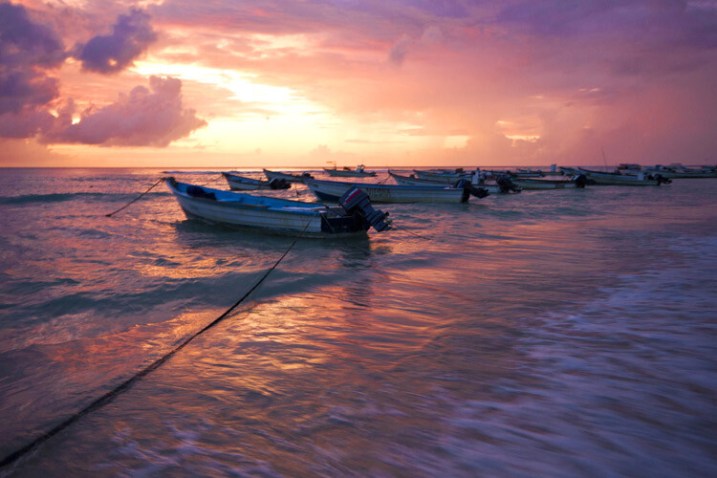
Water is a beautiful subject to photograph. It can be as dramatic as a waterfall, predictable as a fountain, vast like the ocean, or just a winding exciting river. Whatever the source, it can be a point of interest in your image or an element of your composition. If you are enchanted with photography water, here are a few tips you can use to improve your final image.

5 Tips for Photographing Water

1. Capture Motion

Firstly, think about what you want to convey and how to add that characteristic to the shot. This may be as simple as choosing the right shutter speed. A fast shutter speed freezes motion and works well for crashing waves to show the activity of an ocean. Sometimes when using faster shutter speeds, your camera may indicate that you are getting insufficient light – this is where adjusting your ISO can come in handy. When using shutter speeds of 1/500th and above, timing is key for spectacular shots.

On the opposite side of fast shutter captures are long exposures. If you want to show greater motion or get that silken effect, slowing down your shutter speed gives you that cool effect. A few key things; aim for an exposure between 0.5 and 10 seconds which means that your camera needs to be absolutely still (a tripod is a definite, you can also use a shutter release cable/remote if possible). Dusk and dawn are great times for long exposures but there is no need to limit yourself to these times of day if you have a neutral density filter (discussed lower down in this post).

Bonus Tip: Getting closer to the water makes the blurring effect of moving water more noticeable.

2. Mirror Mirror

Water is a natural mirror. Seek out reflections and classify them. Is the reflection enhancing your image or distracting from it? In the latter case, move around a bit to eliminate reflections where possible or return to your location when the sun is at a different angle. A polarizing filter can help eliminate some of the reflections and give you nice contrast (rotate the filter and check out what’s possible).

Reflections can also add to an image and are used a lot where water is calm and still. That being said, ripples can also be interesting as they add texture and effect. There are also abstract reflections that look great in moving water such as the lights of a cityscape.

With reflections you can go for a symmetrical composition or not, depending on what you want to portray. You can even just shoot the water reflection and not the subject itself; the possibilities are endless.

3. Filter it

Using a polarizer was mentioned above, but it is worth a second thought as it is quite a useful tool to have in the field when photographing water. In addition to removing reflections (when they’re not wanted), a polarizer is very helpful in cutting out glare. By eliminating glare, it helps bring out any color details of the water and what lies below the surface.

Neutral Density (ND) filters are quite useful for creating long exposures during the day as they give you better control over your exposure. They do this by stopping/restricting light from reaching your camera sensor, thus allowing you to leave your camera with a higher aperture for a longer amount of time.

Note: ND filters do not affect the color in your photo in anyway, while the same cannot be said for a polarizer filter.

4. Underexpose when photographing water

Perfect exposure in-camera is your ideal goal. When water is your subject though, too many highlights can make it look white and it is difficult to recover the details in large areas that are blown out or clipped. If water is the dominant subject in your frame, it will benefit you to underexpose by 1/3 to 1/2 a stop.

Bonus Tip: Shooting waterfalls in overcast conditions is something many landscape photographers would recommend. There is no direct sunlight on the water itself.

5. Get your feet wet

If you can get into the water safely with your tripod, it’s a perspective worth trying. Use extra caution when setting up on slippery rocks and be aware of your surroundings. Make sure your equipment is insured, and you’re all set to try something different.

If this is not an option for you, grab a zoom lens for some close up details. It is worth the time to experiment with unusual angles.

Conclusion

Water is indeed a fascinating subject and with so many ways to capture it, why not give it a try? Are you drawn to the dreamy motion of long exposures, or do you find yourself caught up in a reflection? What other fun tip would you share to help improve other’s water photography?

The post 5 Tips for Photographing Water by Nisha Ramroop appeared first on Digital Photography School.


Digital Photography School

 
Comments Off on 5 Tips for Photographing Water

Posted in Photography


World’s Sexiest Parking Garage Has a New Competitor For the Crown

23 Mar

[ By SA Rogers in Architecture & Public & Institutional. ]

parking garage cliniques 1

It may not be as jaw-dropping and awe-inspiring as Detroit’s decaying Michigan Theater parking garage, nor quite as multifunctional as the stunning Herzog de Meuron structure at 1111 Lincoln Road in Miami – but this new structure in Belgium is definitely one for the books. The undulating wooden slate facade of this staff parking garage for the Cliniques Universities Saint-Luc hospital in Brussels is beautifully fluid, with a clever design that disguises most of its bulk underground while remaining architecturally interesting.

parking garage cliniques 5

parking garage cliniques 8

parking garage cliniques 4

Modulo Architects and De Jong Gortemaker Algra Architects were charged with creating a functional industrial structure capable of holding 985 cars that would also serve as a welcoming introduction to the hospital itself, incorporating daylight, natural materials and a striking look. Taking inspiration from natural canyons, they created a stepped design that brings sunlight down into the first two subterranean levels.

parking garage cliniques 9

parking garage cliniques 6

parking garage cliniques 10

The two above-ground parking decks “bridge the terrain gradient” between street level and the green roof, which is designed to be both a functional outdoor space and something pleasant to look at from the higher floors of the adjacent hospital. The parking garage effectively raises this green space above street level for a sense of privacy, avoids obscuring views of the surrounding architecture and manages to be pretty cool to look at, itself.

parking garage cliniques 7

parking garage cliniques 2

parking garage cliniques 3

“We challenged ourselves to also make the underground decks clear and pleasant,” the architects say. “By introducing a sinuous ‘canyon’ encompassing the garage that allows light and air to reach even the lowest deck. Natural light and this (eventually green) canyon-wall contribute to orientation and ensure a positive experience for the user. The facades, made of meandering hardwood slats (FSC), naturally relate to the character of the canyon. An appealing building, nicely embedded with added value for the user is the result.”

Share on Facebook


[ By SA Rogers in Architecture & Public & Institutional. ]

[ WebUrbanist | Archives | Galleries | Privacy | TOS ]


WebUrbanist

 
Comments Off on World’s Sexiest Parking Garage Has a New Competitor For the Crown

Posted in Creativity


How to Create Artistic Photos with a Magnifying Glass

23 Mar

A magnifying glass is a handy little tool, popular with intrepid detectives and bug collectors. As the name suggests, the convex lens produces a magnified image of an object, but it can also be used to make some unusual and eye-catching imagery. Pairing a photographic lens with a magnifying glass will probably not create a flawless alternative to a macro lens, but the unique properties of a handheld convex lens mean that there are endless combinations of optical effects to exploit.

How to Create Artistic Photos with a Magnifying Glass

What you will need:

  • DSLR camera
  • Magnifying glass
  • Subject to photograph
  • Cleaning cloth
  • Tripod

Getting Started

How to Create Artistic Photos with a Magnifying Glass

The first thing to remember when using this technique is that the glass in your average, run-of-the-mill magnifying glass will be of far lesser quality than that of the glass inside your camera. The nature of the cheaper quality glass lends a softening effect to an image so sharpening in post-production (using software like Photoshop or Camera Raw) will help to add a bit more definition to the photographs. But don’t worry if you aren’t getting pin-sharp precision, the softness can actually add to the image overall.

Using a tripod to photograph subjects through the lens of a magnifying glass is a good idea too. Without a tripod, camera shake will add another layer of difficulty to a process that can be slightly tricky at times. For the purpose of this tutorial, I’ve chosen flowers as my subject. They make good subjects for this technique because they are colorful, interesting and they don’t move around. Getting the hang of this technique on a static subject will save you a bit of frustration when moving onto more animate subject matter later

How to Create Artistic Photos with a Magnifying Glass

This leaf was photographed against a window with the afternoon sun pouring through from behind. The light illuminated the veins in the leaf and the magnifying glass helped capture the detail in its intricate fibers.

Magnification depends upon a magnifying glass’s distance relative to the subject or camera, so there are endless angles and distances to experiment with to create imagery with soft light and diffused bokeh-like effects.

Method

First, clean the glass of the magnifying glass with a tissue or cleaning cloth to avoid dust spots. Maneuver your camera up close to the subject. If you are using a zoom lens, zoom in as far as possible. Your autofocus will most likely get confused by the additional glass between the lens and the subject, so set your lens to manual focus instead.

Hold the magnifying glass over the front of the lens with your hand.  Notice that it will either make the subject appear bigger or just extremely out of focus. With one hand you will need to either adjust the camera focus manually or move the magnifying glass forward and backward between the camera and subject. Trying to find a sweet spot where part or all of the image looks focused can be tricky – but be open to how the magnifying glass alters the photograph. The results can often surprise you.

How to Create Artistic Photos with a Magnifying Glass

Keep in mind that the extra layer of glass will cut down the amount of light that reaches the camera sensor so you may have to adjust the exposure compensation, depending on the available light of your setup. Don’t forget to experiment with depth of field by adjusting the aperture as well. Taking control of the aperture will guide the viewer’s eye around the photograph. That can be crucial in more abstract images like these floral landscapes.

Experiment!

The best bit about this technique is that it rewards experimentation. Once you have a feel for photographing your subject through a magnifying glass, why not use two taped together for greater magnification? Or take a chance at photographing a friend or pet? Or why not try including the loop of the magnifying glass to create a framing effect? With even the slightest adjustment in angle or distance a magnifying glass can render some unique results. Take the time to experiment and have fun.

How to Create Artistic Photos with a Magnifying Glass

Experiment with black and white images to highlight shape and form.

How to Create Artistic Photos with a Magnifying Glass

Tape two magnifying glasses together for greater magnification.

How to Create Artistic Photos with a Magnifying Glass

Create unusual framing effects by incorporating the loop of the magnifying glass in your photograph.

How to Create Artistic Photos with a Magnifying Glass

How to Create Artistic Photos with a Magnifying Glass

How to Create Artistic Photos with a Magnifying Glass

After you get the hang of photographing still objects, why not move onto something more animated.

The post How to Create Artistic Photos with a Magnifying Glass by Megan Kennedy appeared first on Digital Photography School.


Digital Photography School

 
Comments Off on How to Create Artistic Photos with a Magnifying Glass

Posted in Photography


Instagram will soon let you book photographers and other services directly in the app

23 Mar

Photographers with a strong presence on Instagram might soon be able to monetize their accounts in a more tangible way than has been possible so far. In an interview with Bloomberg, James Quarles, Instagram’s head of business, has confirmed that Instagram will soon add a function to book a business or service directly from the mobile app. The feature is expected to be launched within the next couple of months. 

In practice, business accounts will be able to add a booking option, allowing potential customers to schedule appointments through the app, without the need to use other means of communication. The Bloomberg article gives the example of booking an appointment in a hair salon but the new feature could be especially interesting for commercial photographers, many of whom maintain a strong presence on the image sharing platform.  

The move will put Instagram into direct competition with services such as Yelp or OpenTable. Quarles also said that currently about 8 million businesses use profiles on Instagram and 80% of users follow a business. The company may eventually add more tools, such as reviews. If you are a photographer offering commercial services, now seems like a good time to brush up your profile. 

Articles: Digital Photography Review (dpreview.com)

 
Comments Off on Instagram will soon let you book photographers and other services directly in the app

Posted in Uncategorized


Midwest Photo camera store thieves reportedly cut hole in roof to steal gear

23 Mar

Midwest Photo, a retail store in Columbus, Ohio, has been the subject of a reported theft that the company president Moishe Appelbaum describes as ‘Mission Impossible style.’ On Wednesday, March 15th, an unknown thief or multiple thieves broke a hole through the store’s roof and used that hole to gain access to a pipe, which was then used by the thieves to slide down into the shop.

Once inside, the thieves stole a cache of items from Midwest Photo’s storage area, including cases, cameras, and lenses. A surveillance camera was able to capture at least part of this theft, though the store says it has now rolled out additional security crews. Speaking to local news affiliate FOX 28 Columbus, Appelbaum said, ‘[It was a] really professional crew that knew what they were doing.’

Appelbaum goes on to state that this may be the work of a professional burglary ring that is targeting camera shops across the Midwest and possibly the nation. ‘This is the third camera store burglary overnight we’ve seen in the Midwest in the past week-and-a-half,’ he said. ‘This is a crew I believe is making their way across the country.’ The company is encouraging anyone with info to contact Midwest Photo or the Columbus police department.

As DPReview previously reported, California lens company Veydra suffered a similar theft a couple days prior to Midwest Photo’s burglary. In that case, thieves broke into Veydra’s California headquarters on Sunday, March 12, and made off with more than 200 lenses. Whether the two incidents are related is unknown. At this time, it doesn’t appear the stolen items in either case have been recovered.

Via: FOX 28

Articles: Digital Photography Review (dpreview.com)

 
Comments Off on Midwest Photo camera store thieves reportedly cut hole in roof to steal gear

Posted in Uncategorized


Drobo announces ‘easiest and fastest ever’ 5-bay NAS storage with 5N2

23 Mar

Digital storage solutions company Drobo has updated its 5N desktop network attached device with a new version that it claims is easier to use and faster than any previous NAS it has produced. An upgraded processor makes the Drobo 5N2 twice as fast as the previous model, and it comes equipped with a pair of Gigabit Ethernet ports so two units can be connected for additional capacity and safety via what Drobo calls Adaptive Link Bonding.

The 5-bay device can accept up to 64TB total capacity and allows users to add and switch drives at any time. The 5N2 is happy to accept spinning and solid state storage, and can accommodate both varieties at the same time. One of the benefits of the company’s BeyondRaid system is that disk capacities don’t have to match and users can top-up the system using empty bays and can upgrade existing individual disks to higher capacities when needed. As the unit doesn’t use trays or carriers new disks simply slot in.

Drobo says the 5N2 is aimed at home networks, media professionals and small businesses and that up to 250 user accounts can be created. The device takes only ten minutes to set up and account holders can use a range of Apps to access data remotely and via smartphones and tablets. Read and write speeds are said to average around 190-197MB/s.

The Drobo 5N2 is available now and costs $ 499/€599/£518 with a pair of Ethernet cables. For more information see the Drobo website.

Press Release

Drobo Launches Next Era of Storage Solutions with the 5N2 NAS

The Drobo 5N2 brings a revolutionary storage solution for the connected home or small office environment

Today, Drobo is launching the revolutionary 5N2, the fastest 5 Bay Drobo NAS with expanded functionality that includes the advanced technology features of Drobo’s enterprise level products. The 5N2 is built with Drobo’s patented BeyondRAID™ technology to meet the demanding data storage requirements of connected home users, media professionals and small businesses. The 5N2 has an impressive list of customer centric, industry-leading features such as:

  • Two, One Gigabit Ethernet ports for unparalleled performance
  • Upgraded processor for increased speed and throughput
  • DroboDR, the Simplest to use Disaster Recovery (DR) solution available
  • 2x Performance boost over the original 5N with port-bonding enabled
  • Two Year Warranty
  • DroboApps for turn-key applications and file management support

Designed From the Ground up for Connected Homes and SMBs

The 5N2 is perfect for the connected home and Small to Medium Businesses (SMBs) who want a simple, safe, and smart storage solution. The 5N2 has secure remote access and enterprise level DroboDR functionality. The 5N2 also includes access to DroboApps, which extends the functionality of Drobo NAS devices. Applications such as DroboAccess (private cloud solution) and DroboPix (mobile pictures and video management) allow users both privacy and security of their data on a Drobo they own — unlike public cloud solutions.

“The team at Drobo is working hard to deliver on the commitments we have made to customers, partners and ourselves,” said Mihir Shah, CEO of Drobo. “Our customers have been asking for our enterprise level technology in our 5 bay NAS products and the 5N2 delivers just that, at a cost effective price. We strive to be the storage company that is laser focused on our customer’s requirements.”

Superior Performance With Disaster Recovery

The 5N2 is the fastest 5 bay network attached Drobo ever. This allows for superior performance for data intensive applications that most connected homes and small businesses have. To ensure data is safe, the 5N2 also comes with the DroboDR software solution developed by Drobo. With DroboDR, users can set up a pair of 5N2s to make an

offsite copy of data. DroboDR is simple to setup and manage and replicates data to another 5N2, ensuring availability in case of disaster. Furthermore, the remote 5N2 stores all user account information, resulting in a quick and painless recovery with a single click in the Drobo Dashboard. The Drobo 5N2 also comes with an internal battery that protects against data loss during a power outage.

Customer Driven Focus

The 5N2 is the 7th new product introduced after the company underwent an acquisition and management change in 2015. Drobo is committed to introducing innovative products that preserve simplicity and customer confidence. The 5N2 includes a two-year warranty to extend peace of mind for users.

The 5N2 is the easiest to use NAS on the market today with automation usually reserved for more expensive solutions. This ease of use is what customers expect from Drobo’s award-winning focus on simplicity. This is evident in Drobo’s unique features such as:

Internal battery back-up for zero data loss during a power outage
Expandability with any size disk
Award winning ease of use setup and management dashboard
mSATA cache for speedy access to frequently used data
Ability to mix and match any size HDD’s and SSD’s

Price and Customer Loyalty Program

The Drobo 5N2 is available today at an MSRP of $ 499 USD through www.drobostore.com and select channel partners.

Drobo is offering Drobo FS and 5N customers a $ 50 USD discount when they purchase a new Drobo 5N2 through www.drobostore.com.

US customers will also receive a limited edition GelaSkin if purchased on the US Drobo Store. The limited edition GelaSkin offer and $ 50 rebate are valid until April 4th, 2017 or while supplies last.

Articles: Digital Photography Review (dpreview.com)

 
Comments Off on Drobo announces ‘easiest and fastest ever’ 5-bay NAS storage with 5N2

Posted in Uncategorized


Major firmware updates coming for Fujifilm X-T2 and X-Pro2

23 Mar

Fujifilm will launch a couple of major firmware updates for its X-T2 and X-Pro2 cameras. The first one, available at the end of this month, brings the X-T2 up to version 2.00 and the X-Pro2 up to 3.00. Another update will arrive in late May.

The first update brings no less than 27 feature improvements to Fuji’s flagship mirrorless cameras, including an option to enable focal length-dependent minimum shutter speed in ISO Auto, up to 15 minute exposures in T mode, more options for bracketing while shooting Raw and added autofocus flexibility.

Several other updates are aimed at improving handling during video shooting, including the addition of a live histogram for X-T2 owners.

A second round of updates will come in May. Firmware 2.10 for X-T2 and 3.10 for X-Pro2 will add -6 and -7 EVF brightness settings for very low light shooting and the ability to assign functions to the rear command dial. A few functions are added for the X-T2 only including tethered shooting via Wi-Fi. See the very long list of updates below.

X-T2 version 2.00 & X-Pro2 version 3.00 – due late March 2017

1. Shooting RAW in Bracketing and Advanced Filters
The update enables you to use the RAW format when shooting not only in AE Bracketing but also in other Bracketing modes (ISO, Dynamic Range, White Balance, Film Simulaitons) and also in Advanced Filter modes.

2. Extended ISO 125 and 160 selectable
The update adds ISO125 and ISO160 to extended ISO levels available.

3. Programmable long exposure of up to 15 minutes
Long exposure in the T mode currently goes only up to 30 seconds. The update will allow users to extend it up to 15 minutes.

4. ON/OFF for 1/3-step shutter speed adjustment (X-T2 only – already in X-Pro2)
The update allows you to turn off the Command Dial’s function to adjust shutter speed by 1/3 steps in order to prevent unintended adjustments.

5. Full-range ISO adjustments with the Command Dial (X-T2 only)
With the update, set the ISO “A” position to “Command” to adjust ISO sensitivity across the full range, including extended ISOs, with the Front Command Dial.

6. “AUTO” setting added for the minimum shutter speed in the ISO Auto setting
The update adds an AUTO option for the minimum shutter speed in the ISO Auto setting, that allows the camera to automatically define the minimum shutter speed according to the focal length of the lens attached.

7. Faster “Face Detection AF”
The update enables the use of Phase Detection AF for faster performance in Face Detection AF.

8. Improved in-focus indication in the AF-C mode
The update reduces focus hunting in the AF-C mode, making it easier to track a subject.

9. Addition of a smaller Focus Point size in Single Point AF
The update adds a smaller Focus Point size in Single Point AF, bringing the total number of available sizes to six. The new smallest size facilitates pin-point focusing.

10. Addition of “AF Point Display” (X-Pro2 only – already on X-T2)
With the update, you can choose to have AF Points constantly displayed in Zone AF and Wide / Tracking AF, making it easier to track a subject.

11. Addition of “AF-C Custom Setting” (X-Pro2 only – already on X-T2)
The update adds “AF-C Custom Setting” for specifying focus-tracking characteristics. Choose from five presets according to your subject’s type of movements.

12. Addition of “Portrait / Landscape AF Mode Switching” (X-T2 only)
The update allows you to specify separate AF mode and AF point settings for portrait orientation and landscape orientation.

13. Change of focus frame position while enlarging it
The update allows you to move the position of focus frame while enlarging it in Single Point in the AF-S mode or in the Manual Focus

14. Activation of the Eye Sensor in video recording (X-T2 only)
The update allows you to use the Eye Sensor during video recording to automatically switch between EVF and LCD.

15. Change of ISO sensitivity during video recording (X-T2 only)
The update allows you to change ISO setting during video recording.

16. Re-autofocusing in video recording
With the update, half-press the Shutter Release button or press the button assigned to “AF-ON” function during video recording to re-do autofocusing.

17. Display live histogram during video recording (X-T2 only)
The update allows you to display a live histogram during video recording.

18. Optimization of external microphone’s input level (X-T2 only)
The update optimizes external microphone’s input level (lower limit revised from -12dB to 20dB) to reduce white noise when an external microphone with preamp is connected.

19. Addition of “Eye Sensor + LCD Image Display” in the View Mode
The update gives the “Eye Sensor + LCD Image Display” option in the View Mode that allows you to shoot through the viewfinder and check images on the LCD, just as you would with an SLR.

20. Shorter EVF display time-lag (X-Pro2 only – already in X-T2)
The update shortens EVF’s display time-lag in the AF-C mode so that you will not miss a photo opportunity.

21. Constant “Dual” mode display (X-T2 only)
With the update, the small window in the Dual mode stays on even when you half-press the shutter release button.

22. Automatic vertical GUI for LCD (X-T2 only)
With the update, when you hold the camera in the portrait orientation, the camera will automatically display the GUI on the LCD in the same orientation.

23. Name Custom Settings
The update allows you to assign a specific name to Custom Settings 1 – 7.

24. Copyright information in EXIF data
The update allows you to register the photographer’s name and the copyright holder’s name in advance so that the camera automatically adds the information to EXIF data for each image.

25. Voice Memo function
The update enable you to record 30-second “Voice Memo” clips in the Playback mode.

26. Extended AE Bracketing
The update extends AE Bracketing from the current 3 frames +/-2EV to up to 9 frames +/-3EV.

27. Addition of “Shoot Without Card” mode
With the update, you can have the “Shoot Without Card” mode turned OFF so that the camera can not shoot when there is no SD card inserted.

X-T2 version 2.10 & X-Pro2 version 3.10 – late May 2017

28. Support for computer tethering via Wi-Fi (X-T2 only)
The update adds support for computer tethering via Wi-Fi.

29. Addition of “All” AF mode (X-T2 only)
With the update, select “All” in the AF mode so that you can select the AF mode and Focus Area size by only using the Command Dial.

30. Function extension for “Shutter AF” and “Shutter AE” (X-T2 only)
With the update, you can specify different settings for AF-S and AF-C in “Shutter AF” and for AF-S / MF and AF-C in “Shutter AE.”

31. Addition of “-6” and “-7” to EVF’s brightness setting
Additional options of “-6” and “-7” to the “EVF Brightness” setting so that, even in an extremely low-light condition, the brightness of the EVF does not distract you from shooting.

32. Switchover of the main and sub displays in the Dual Display mode (X-T2 only)
The update allows you to switch between the main and sub displays in the Dual Display mode.

33. Function assignment to the Rear Command Dial
With the update, you can assign a specific function to be activated when the Rear Command Dial is pressed.

Articles: Digital Photography Review (dpreview.com)

 
Comments Off on Major firmware updates coming for Fujifilm X-T2 and X-Pro2

Posted in Uncategorized


Play On, LEGO Brick Layer: 14 Complex & Creative Toy-Brick-Inspired Projects

23 Mar

[ By SA Rogers in Art & Sculpture & Craft. ]

lego main

Play on, LEGO brick layer, ’cause the projects adults are coming up with using these little plastic toy bricks are totally incredible. Some amazing recent creations either made from or inspired by LEGO bricks include a functional camera that prints photos, a plastic helmet based on LEGO figures’ bowl-cut hair, stop-motion animation, a life-sized Batmobile and a robot that folds and flies paper airplanes.

Twin-Lens LEGO Camera Prints Photos

lego camera

lego camera 3

lego camera 2

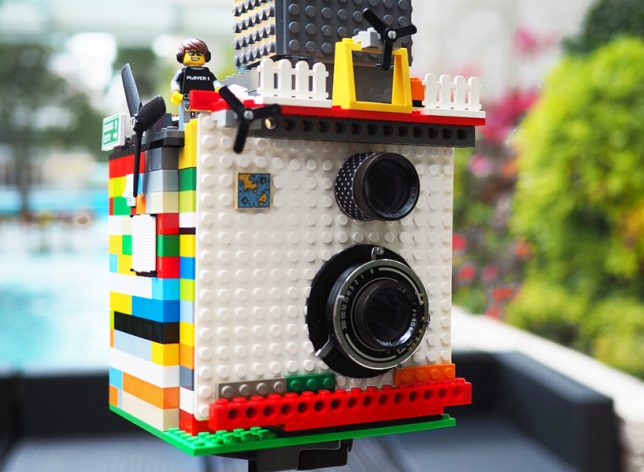
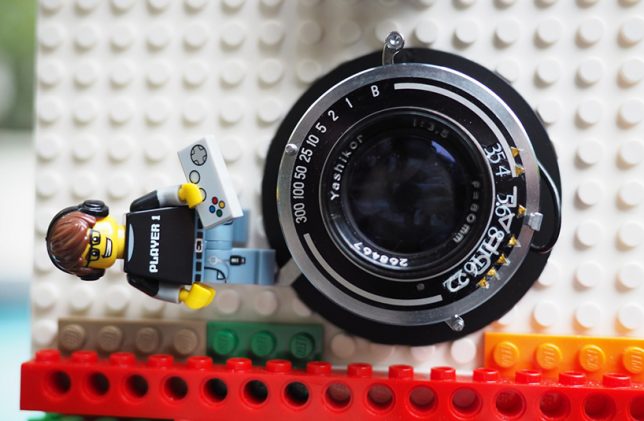
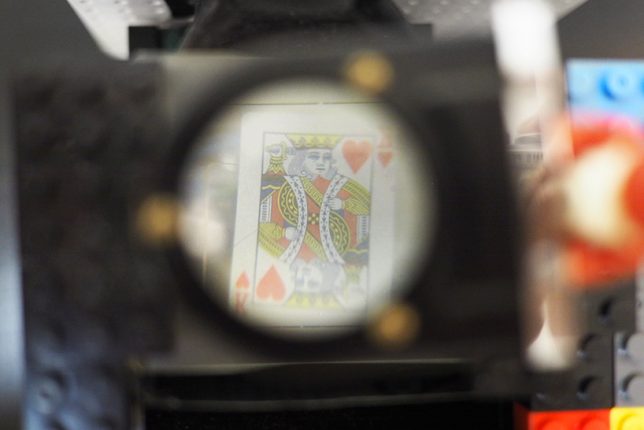
Making use of two retrofitted camera components and a LEGO brick housing, this fun model by a Hong Kong photographer blogging as Instax Magic doesn’t just take real photos, it also prints them. Taking lenses from a vintage Japanese Yashica camera and an ejection mechanism modified from a Fuji Instax mini camera, the creation playfully incorporates LEGO elements like figurines, fences and turbines. After seeing a neighbor throw a box of toy bricks in the trash, the photographer says “I started to think about the possibility of modifying a camera with LEGO. My impression is that there is always some creative way to use LEGO.”

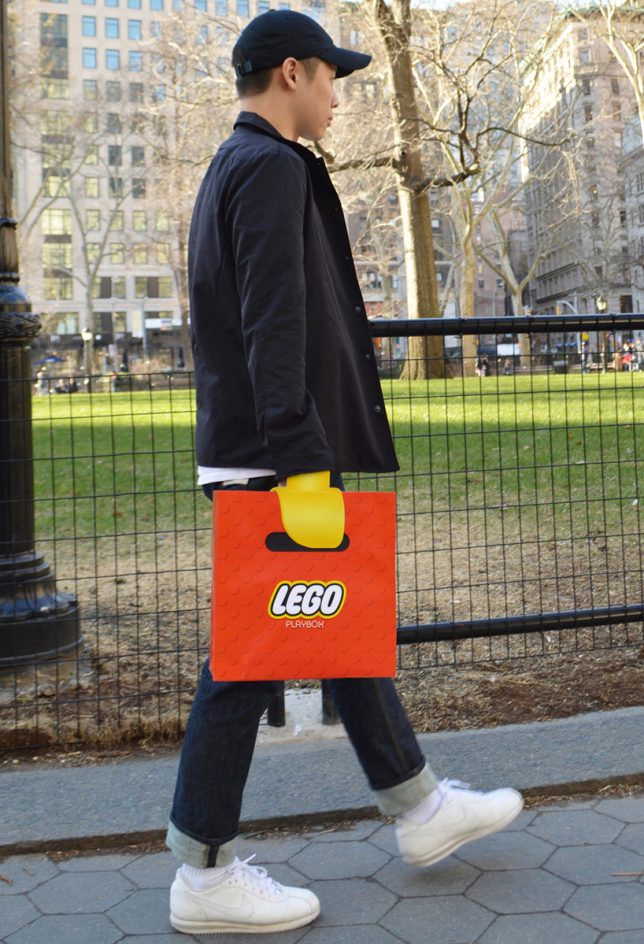
LEGO Claw Shopping Bag

lego claw shopping bag

lego claw shopping bag 2

Walk down the street looking like you’ve got a yellow LEGO claw for a hand with this fun promotional shopping bag by New York-based advertising and designers Junho Lee and Hyun Chun Choi. The illusion only works when you’re wearing long sleeves, and you clutch a fabric ribbon hidden inside to hold the bag.

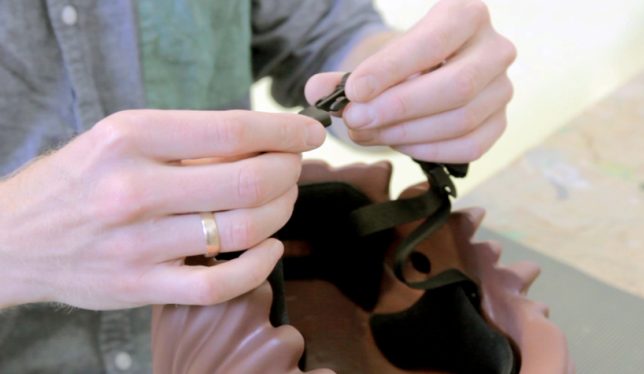
Intentional Helmet Hair, Courtesy of LEGO

lego bike helmet

lego bike helmet 2

Helmet hair is actually desirable if you wanna bike around town looking like a LEGO figure that sprouted to real-life dimensions. Design firm MOEF created a functional bicycle helmet mimicking the proportions and characteristics of the original plastic toy thanks to 3D scanning. Right now, it’s just a prototype, but it could go into production with the aim of encouraging kids to wear helmets.

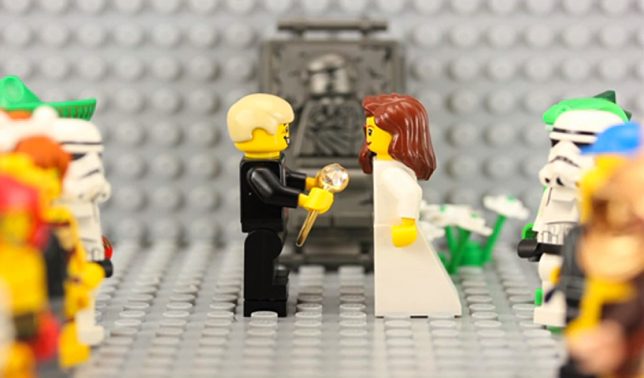
LEGO Stop-Motion Marriage Proposal

lego stop motion marriage proposal

It took Atlanta-based filmmaker Walt Thompson 22 hours, 2,600 photos and hundreds of LEGOs to create a stop-motion animation marriage proposal to his girlfriend of four years, Nealey Dozier, even going so far as to dress the LEGO couple in outfits that matched what the real-life couple wore when they met.

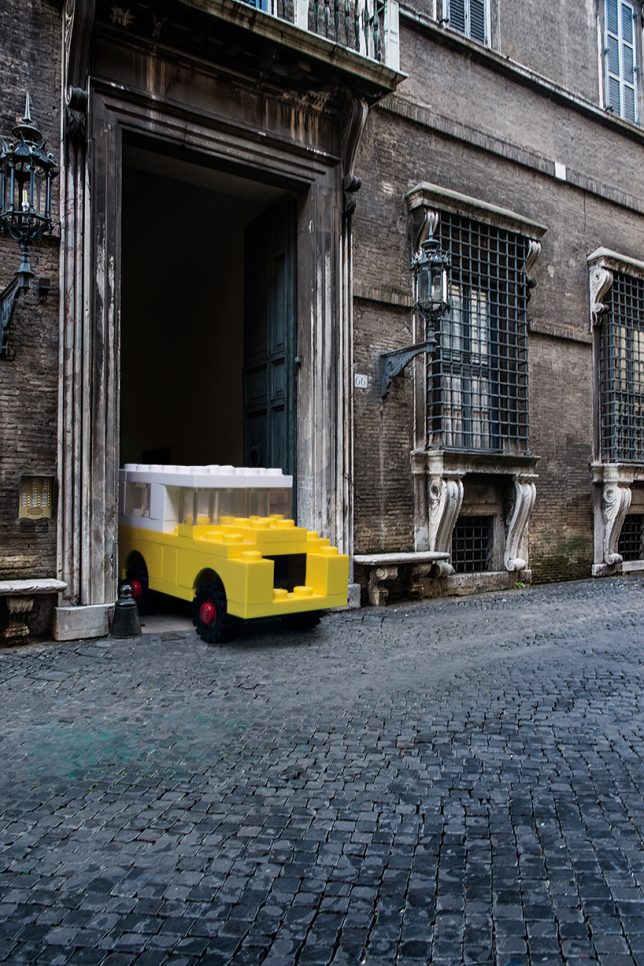
Enlarged LEGO Vehicles in Real-Life Environments

life size lego cars

life size lego cars 2

life size lego cars 3

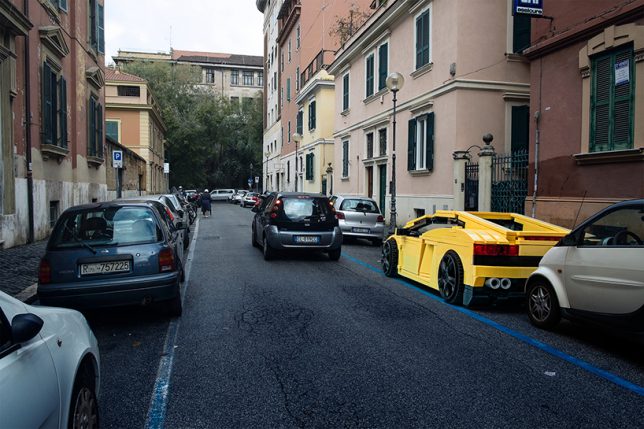
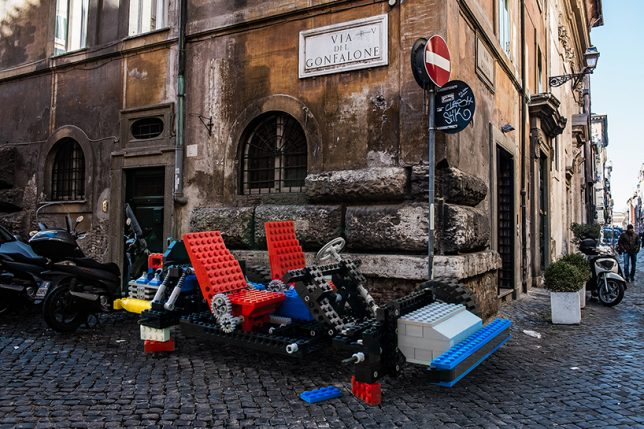
What would LEGO Lamborghinis, trucks, camper vans and helicopter models look like if they were kept exactly as they are, but enlarged to fit into the real world? Pretty ridiculous, as it turns out in this series of digital images by Italian photographer Domenico Franco, which sets them among Italian scenery. But at the same time, the models are so familiar, they don’t seem particularly out of place. “The aim is to transform ordinary contexts into extraordinary ones, thus compelling the toys to get out of the idyllic and politically correct landscapes belonging to their perfect and idealistic cities, with the result of instilling them in those vices, virtues and desires typical of human beings.” says Franco.

Next Page – Click Below to Read More:
Not Just For Kids 14 Complex Creative Lego Inspired Projects

Share on Facebook


[ By SA Rogers in Art & Sculpture & Craft. ]

[ WebUrbanist | Archives | Galleries | Privacy | TOS ]


WebUrbanist

 
Comments Off on Play On, LEGO Brick Layer: 14 Complex & Creative Toy-Brick-Inspired Projects

Posted in Creativity


Studio Starter Kit: How to Design a Starter Portable Studio

22 Mar

In this article, I will give you some tips for creating your own studio starter kit. A portable studio that doesn’t break the bank or the budget.

For many new photographers, the idea of using strobes and portable flashes may seem too daunting. Once you get over that fear, however, you will realize that it is not as difficult as you once thought, nor it is completely unaffordable. I’m sure many of us see famous professional photographers use top brand names such as Profoto, Broncolor, Westcott, Pocket Wizard, Elinchrom, Bowens, Manfrotto, and Lastolite, just to mention a few. We look at the price tag and quake in our boots. That kind of gear is worth its weight in gold for sure and would last many many years, even with daily use, as long as they are used appropriately and with care.

But fear not! These are not the only brands that work and if you are after a starter kit, there are plenty of other more affordable options out there that do the job just fine.

Studio Starter Kit: How to Design a Starter Portable Studio

So, I will share with you some alternatives to top brands for a studio starter kit especially if you just what to try it out. Of course you can go the full nine yards and shell out for the best brands, or alternatively you could rent a few items first to test them out.

#1 Know your subject and understand your audience

First of all, assess what you need your portable studio for. What will you be shooting; headshots, photobooths, full body shots? Knowing your usage requirements will dictate the height your light stands, the power of your strobes or capabilities of your speedlights, for example.

googletag.cmd.push(function() {var gpt_slot = googletag.defineSlot( “/1005424/_dPSv5in-post-mobile(300×250)”, [300, 250], “pb-ruleset-mobile-ad-0” ).addService( googletag.pubads() );ruleset_mobile_slots.push( gpt_slot );});

googletag.cmd.push(function() {var gpt_slot = googletag.defineSlot( “/1005424/_dPSv5in-post-mobile(300×250)”, [300, 250], “pb-ruleset-desktop-ad-4” ).addService( googletag.pubads() );ruleset_desktop_slots.push( gpt_slot );});

Secondly, how often will you need to use your portable kit as you need to take into consideration the wear and tear on your equipment. This has more to do with the quality of the materials used in manufacturing. You don’t want your umbrellas and softboxes to rip from frequent use, for example, or the screws of your stands to come off so quickly.

Thirdly, what backdrop will you be using? Your stands need to be sturdy enough for the weight of your backdrop.

Studio Starter Kit: How to Design a Starter Portable Studio

#2 Do your research and read reviews

When you have a clear idea of your needs, allowing room for improvement and progression into other subjects, get on the internet and read reviews of various brands and compare them. It is a good idea to stick to a budget and if you can manage it, not to get into debt when acquiring equipment, although I know that sometimes that is not an option.

For the most basic studio starter kit, all you need is a light and one stand. That’s it. Of course, you do need a subject and a camera with a memory card. But, you don’t even need a remote trigger if you can use the built-in creative lighting system of your camera and flash. This works using infrared so that your camera and off-camera flash can communicate with each other for as long as both are within line of sight. For a better starter kit, though, I suggest you add a light modifier and a transceiver.

Studio Starter Kit: How to Design a Starter Portable Studio

Portable studio wish list

This would be my list for a good portable starter studio:

  • Backdrop stands x 1 set (a set will have two stands and a bar from which to hang the backdrop)
  • Clamps for your backdrop x 12 or depending on length of bar and number of clamps needed
  • Sandbags (one for each your stands)
  • Transceivers (or remote trigger and receiver system)
  • Light stands (preferably air-cushioned, as many as your lights)
  • Reflectors (preferably foldable and at least a 5-in-1)
  • Speedlight x 1 minimum (either the same brand as your camera or a third party compatible brand) or …
  • Strobe x 1 minimum (preferably with a battery pack so you won’t have to worry about power sockets on location)

Left image: background stand (Photosel) and clamps (Neewer)
Right image: Manfrotto Monopod with ballhead, Gorillapod, stands by: Neewer, Pixapro, and Photosel. I can’t remember the brand of my tripod (far left).

googletag.cmd.push(function() {var gpt_slot = googletag.defineSlot( “/1005424/_dPSv5in-post-mobile(300×250)”, [300, 250], “pb-ruleset-mobile-ad-1” ).addService( googletag.pubads() );ruleset_mobile_slots.push( gpt_slot );});

googletag.cmd.push(function() {var gpt_slot = googletag.defineSlot( “/1005424/_dPSv5in-post-mobile(300×250)”, [300, 250], “pb-ruleset-desktop-ad-5” ).addService( googletag.pubads() );ruleset_desktop_slots.push( gpt_slot );});

  • Adaptors for speedlight to stands x 1 minimum (you need this so that your speedlight can be connected to your light stand)
  • Light modifiers which can be any of the following; an umbrella (silver, white, black on the outside, silver on the inside, all white diffusion), octabox umbrellas (with or without grid), foldable softbox (with a speedlight mount)
  • Tripod or monopod (preferable but not essential)
  • Light meter (preferable but not essential)
  • Plenty of Gaffer tape
  • Spare batteries for your camera, speedlight, and/or strobe (whichever you are using)

Left image: A studio strobe by Pixapro, transceivers (Yongnuo on the left, Paul Buff Cybersyncs on the right), Nikon SB 910 Speedlight, and a Sekonic L-358 lightmeter on the far right.
Right image: Ring Flash by Neewer, video lights are Yongnuo, and the magic tube is by Travor.

Third party options

Alternative cheaper brands that offer an astonishing array of photographic accessories at a fraction of top brand name prices.

  • Pixapro (UK)
  • StrobePro (Canada)
  • Neewer
  • Fotodiox
  • Photoflex
  • Yongnuo
  • Paul C Buff – (Alien Bees and White Lightning)
  • Rogue Photographic Design
  • Godox
  • Walimex

These are only some of the many alternatives easily accessible nowadays through the internet. The photos shown within this article have been taken with my portable studio starter kit made up the Pixapro, Yongnuo, Neewer, Paul C Buff, Rogue Photographic Design, Sekonic, Nikon, and Manfrotto. Sometimes I use just one light, other times two, and sometimes I include a reflector as well.

Left image: The flash softbox is Westcott. The flat rectangular modifiers are Rogue flash benders and the mini-versions on the left (one is rolled up into a black tube which I use as a snoot) are from Kaavie, again from Amazon. 5-in-1 reflector showing in gold is Neewer.
Right image: The collapsable gray card is by Lastolite, next to it are light stand adaptors as well as spare batteries.

Continuous lighting

In addition to strobes, you might also want to include some continuous lighting in your arsenal.  There are many types of continuous lights, the most popular of which are video lights, ring and tube lights. The usually come with filters too, which is handy. The great thing about continuous lights is not only their portability but the price tag – they are super affordable nowadays with various brands competing in an already saturated market. Personally, I only use these occasionally and cannot justify spending much on them.

Backdrop

For backdrops, you can use paper or fabric. A good tip is to use fabric that doesn’t crease and doesn’t need ironing. There is nothing worse than having to Photoshop all the creases from a backdrop. Trust me, I have done it before!

googletag.cmd.push(function() {var gpt_slot = googletag.defineSlot( “/1005424/_dPSv5in-post-mobile(300×250)”, [300, 250], “pb-ruleset-mobile-ad-2” ).addService( googletag.pubads() );ruleset_mobile_slots.push( gpt_slot );});

googletag.cmd.push(function() {var gpt_slot = googletag.defineSlot( “/1005424/_dPSv5in-post-mobile(300×250)”, [300, 250], “pb-ruleset-desktop-ad-6” ).addService( googletag.pubads() );ruleset_desktop_slots.push( gpt_slot );});

Studio Starter Kit: How to Design a Starter Portable Studio

#3 Use your new studio

Having a studio in a box that never sees the light of day is a waste of your precious time doing all the above, not to mention money. Use your new kit and try out what works for you and what doesn’t. You will learn new things by experimenting and actually using your gear, rather than just reading what other people say. You will learn how to troubleshoot, and how to pack and unpack in the quickest time. If you don’t have a live subject to photograph, then take pictures of still life subjects to practice and find things out.

While there is no doubt that there are differences in the quality of the material used between brands, I believe that the difference in the quality of light is debatable and I’m pretty sure these differences are not life-changing. Ultimately, it’s not about the gear but how you use what you have.

Studio Starter Kit: How to Design a Starter Portable Studio

When it comes to light, the important thing to remember, more than the brand name, is that the bigger the light the better the quality, the closer the light to the subject the softer it is. When it comes to a portable studio kit, make portability a priority so that everything is easily collapsible. Don’t forget to consider the weight of your portable studio too as well as how much room it will take when transported. Many of the materials nowadays are made of lightweight durable metal, alloys or steels. You want a portable starter studio that really folds into a pocket!

Do share here any tips for starter portable studios especially if there is anything I haven’t included on the list above.

googletag.cmd.push(function() {var gpt_slot = googletag.defineSlot( “/1005424/_dPSv5in-post-mobile(300×250)”, [300, 250], “pb-ruleset-mobile-ad-3” ).addService( googletag.pubads() );ruleset_mobile_slots.push( gpt_slot );});

googletag.cmd.push(function() {var gpt_slot = googletag.defineSlot( “/1005424/_dPSv5in-post-mobile(300×250)”, [300, 250], “pb-ruleset-desktop-ad-7” ).addService( googletag.pubads() );ruleset_desktop_slots.push( gpt_slot );});

The post Studio Starter Kit: How to Design a Starter Portable Studio by Lily Sawyer appeared first on Digital Photography School.


Digital Photography School

 
Comments Off on Studio Starter Kit: How to Design a Starter Portable Studio

Posted in Photography