RSS
 

Archive for January, 2017

CES 2017: Hands-on with the Kodak Super 8

08 Jan

CES 2017: Hands-on with Kodak Super 8

First launched in 1965, Kodak’s Super 8 format was one of the most influential developments in amateur filmmaking. And now it’s back, with an all-new (kind of) camera. We headed to the Kodak booth earlier today to get our hands on one.

CES 2017: Hands-on with Kodak Super 8

The new Super 8 camera is truly a hybrid of the very old, and the very new. At its heart is a cartridge of 8mm film, totaling 50 feet in length. How many minutes of footage you can shoot depends on which frame-rate you select. The Super 8 camera can shoot at 18, 24, 25, or 36 fps. 

CES 2017: Hands-on with Kodak Super 8

The ‘viewfinder’ is a 3.5in LCD, which provides a live view image, via a split-prism behind the attached lens. Although a large flipping, tilting screen is definitely a huge improvement over classic all-analog Super 8 cameras of the past, the live view image is hazy, grainy, and hard to use as a means of judging critical focus. In other words – pretty familiar, if you’ve ever shot Super 8 before.

CES 2017: Hands-on with Kodak Super 8

The main control on the Super 8 camera is the circular ‘wheel’, shown here on the body, facing the flipped-out screen. It works rather like a second-generation iPod. The central button brings up a menu, and the touch-sensitive wheel allows you to navigate the settings by scrolling. The screen itself is not touch-sensitive.

CES 2017: Hands-on with Kodak Super 8

Super 8 cameras will be bundled with a manual focus Ricoh 6mm F1.2 prime lens (roughly equivalent to a 40mm F7 in 35mm terms) but the C-mount is compatible with a huge number of lenses stretching back decades.

CES 2017: Hands-on with Kodak Super 8

Here’s that click wheel in action. The Super 8 is reasonably customizable. Many of the features that would have been managed with physical switches in the past (like frame rate) can be set in the camera’s menus. As a result, the camera body is impressively clean and minimalist.

CES 2017: Hands-on with Kodak Super 8

The Super 8 is a true ‘hybrid’ device. While the film takes care of the images, sound can be recorded to an SD card, via an external microphone. Cartridges must be mailed back to Kodak for development, and the price (TBC) will include film development, scanning and uploading to the cloud.

CES 2017: Hands-on with Kodak Super 8

Oh yes – and Kodak has also promised to bring back Ektachrome! 

It feels a bit surreal to be covering the launch of new film products in 2017, especially from Kodak, but after using an almost production-ready sample of the Super 8 camera today we’re actually pretty impressed by how well the company has married the analog and digital sides of the product. What do you think?

Articles: Digital Photography Review (dpreview.com)

 
Comments Off on CES 2017: Hands-on with the Kodak Super 8

Posted in Uncategorized


Dell Canvas 27 launched as world’s first ‘horizontal smart workspace’

08 Jan

At CES 2017, Dell introduced what it claims is the world’s first ‘horizontal smart workspace,’ the 27-inch touch-sensitive Dell Canvas display. Canvas is designed for creatives, including photographers, artists, and graphic designers, and can be used in two orientations: lying flat on a desk or propped up at an angle via a kickstand. The display likewise offers support for a stylus, totems (Dell’s large control dials), and touch input.

Dell Canvas isn’t necessarily an alternative to Surface Studio; rather, it is a large display that can be connected to nearly any Windows 10 device, says Dell. The monitor has a 2560 x 1440 QHD resolution. The model will be available from Dell.com in the U.S. on March 30 starting at $ 1799.

Via: Dell

Articles: Digital Photography Review (dpreview.com)

 
Comments Off on Dell Canvas 27 launched as world’s first ‘horizontal smart workspace’

Posted in Uncategorized


Ambarella announces 8K-ready H3 SoC for drones and video cameras

08 Jan

Image processor maker Ambarella has released the H3 System-on-Chip (SoC) for high-end drones and video cameras, including those capturing 360-degree and virtual reality footage. The H3 supports 8K Ultra HD H.264/AVC video at 30 frames per second or multiple video streams with equivalent performance, for example 360-degree cameras that use dual 4K/60fps sensors. 

With the introduction of H3 we believe we provide the highest video performance and best image quality solution for high-end drones and multi-sensor video cameras,” said Fermi Wang, president and CEO of Ambarella. “H3 delivers 8Kp30 video performance to match the next generation of displays, such as 8K televisions and high resolution head-mounted displays.

The chip comes with a multi-channel ISP for 360-degree video capture and multi-sensor drone applications. 10-bit HDR processing should help deal with high-contrast scenes and Ambarella’s electronic image stabilization should keep things steady, even in difficult conditions, such as high winds or when panning quickly. The chipset is powered by a quad-core ARM Cortex-A53 CPU and an integrated hardware de-warping engine supports wide-angle panoramic camera designs and fish-eye lenses. Ambarella has not provided any information as to when the H3 is likely to make its appearance in consumer products, but it’s good to see that in the near future there should be a range of capture devices capable of recording content for the latest 8K displays. 

Press Release:

Ambarella Introduces 8K Ultra HD SoCs for Virtual Reality and Drone Cameras

Ambarella H3 SoC delivers 8K Ultra HD at 30 frames per second and 4K Ultra HD at 120 frames per second

SANTA CLARA, Calif., January 5, 2017 — Ambarella, Inc. (NASDAQ: AMBA), a leading developer of low-power, HD and Ultra HD video processing semiconductors, today introduced the H3 System-on-Chip (SoC) for high-end drones and a new generation of video cameras, including 360-degree and virtual reality cameras. The H3 video SoC enables 8K Ultra HD H.264/AVC video at 30 frames per second, as well as multiple video streams with equivalent performance, including 360-degree cameras with dual 4KP60 sensor video capture.

8K videos played on large 8K displays provide a better viewing experience to the end user, as pixels at this resolution are indistinguishable to the human eye at any reasonable distance. The combination of 8K video capture together with Ambarella’s advanced oversampling and image stabilization also enables higher video quality 4K video recording.

“With the introduction of H3 we believe we provide the highest video performance and best image quality solution for high-end drones and multi-sensor video cameras,” said Fermi Wang, president and CEO of Ambarella. “H3 delivers 8Kp30 video performance to match the next generation of displays, such as 8K televisions and high resolution head-mounted displays.”

H3 includes a powerful multi-channel ISP for 360 degree video capture and multi-sensor drone applications. Its 10-bit HEVC High Dynamic Range (HDR) video processing handles high contrast and wide color range scenes. It also features Ambarella’s advanced Electronic Image Stabilization (EIS), capable of generating a smooth 4Kp60 video output under challenging conditions, including during high winds and with high degrees of rotation. The integration of a quad-core ARM® Cortex®-A53 CPU with floating point and NEON™ provides significant processing power for customer applications including computer vision, wireless networking, and multi-sensor stitching algorithms. The H3’s hardware de-warping engine supports wide-angle panoramic camera designs and fish-eye lenses.

Ambarella will demonstrate the new H3 SoC at a private, invitation-only event held during the Consumer Electronics Show (CES) in Las Vegas, January 5 – 8, 2017.

Articles: Digital Photography Review (dpreview.com)

 
Comments Off on Ambarella announces 8K-ready H3 SoC for drones and video cameras

Posted in Uncategorized


Hawks Factory announces new 35mm F2 in M-mount

07 Jan

Japanese optical manufacturer Hawks Factory has released details of a new lens it has designed in homage to ‘old-style’ Leica M lenses. The Tsubasa Swallow 35mm F2 comes in a Leica M-mount and intends to produce images with a retro feel, according the company. It will display high resolution in the center of the frame and a soft blur at the edges when used wide open. Hawks Factory claims that the style of image the lens produces is something that ‘fascinates people all over the world’. 

The Tsubasa Swallow 35mm F2 is constructed using eight elements in six groups and features an iris created with 14 blades that closes to F16. The company says the glass and the polishing are Japanese, and that they designed their own helicoid for the focusing ring. The lens has an all-metal barrel that is said to be designed to withstand decades of use, but the company doesn’t specify whether the focusing mechanism is coupled to the camera’s rangefinder system or whether users will be expected to focus via Live View.

The lens is expected to be released for sale in February and, according to Leica Rumours, will be priced ¥198,000 (approx. $ 1800). For more information and some sample images see this translated version of the Hawks Factory website.

Articles: Digital Photography Review (dpreview.com)

 
Comments Off on Hawks Factory announces new 35mm F2 in M-mount

Posted in Uncategorized


CES 2017: hands-on with the Canon PowerShot G9 X II

07 Jan

CES 2017: Hands-on with the Canon PowerShot G9 X II

We’re at the Consumer Electronics Show in Las Vegas, Nevada where Canon has taken the wraps off a new high-end compact camera: the PowerShot G9 X Mark II. We dropped by the Canon booth to take a closer look. 

CES 2017: Hands-on with the Canon PowerShot G9 X II

Externally, the G9 X Mark II looks a lot like the PowerShot Mark I. In fact, the two cameras are almost impossible to tell apart. Canon even forgot to add a ‘II’ to the name. The improvements are all internal. 

An upgraded Digic VII processor provides a major speed boost, enabling continuous shooting up to 8.2 fps (compared to 1fps in the original G9 X). Canon has also added Dual Sensing Image Stabilization, meaning that information from the lens and sensor is combined to offer a claimed 3.5 stops of image stabilization.

CES 2017: Hands-on with the Canon PowerShot G9 X II

The G9 X Mark II uses the same 20MP 1-inch sensor as its forebear, and the same 28-82mm equiv. F2-4.9 lens. Aside from the faster continuous shooting, other additions include greater customization options, improved AF tracking, better scene recognition in auto mode and in-camera Raw conversion.

CES 2017: Hands-on with the Canon PowerShot G9 X II

In terms of body size, the two cameras are identical, too, making the Mark II a highly attractive pocket compact, just like its predecessor.

This image gives a good indication of the G9 X Mark II’s slim construction. When turned off (shown here) the body is a mere 31mm thick. 

CES 2017: Hands-on with the Canon PowerShot G9 X II

The GX9 II gets a bit bigger when it’s powered up, but not much. Here you can also see the main control dial around the lens. This ring can be customized to serve various functions. By default, it controls the main exposure parameter (i.e., aperture, in Av mode). 

CES 2017: Hands-on with the Canon PowerShot G9 X II

The rear of the G9 X Mark II is dominated by a large touch-sensitive LCD, boasting 1.04 million dots. It’s fixed, which keeps the camera nice and slim, but could mean that it’s a bit harder to take selfies. 

CES 2017: Hands-on with the Canon PowerShot G9 X II

A tiny flash (gn 6) can be popped up manually for fill light and social photography. The G9 X Mark II is set to ship next month in your choice of black or silver, for $ 529. 

Articles: Digital Photography Review (dpreview.com)

 
Comments Off on CES 2017: hands-on with the Canon PowerShot G9 X II

Posted in Uncategorized


DJI reportedly takes majority stake in Hasselblad

07 Jan

DJI is reported to have acquired a majority share in Hasselblad, according to an article posted January 4 on Luminous Landscape. We asked DJI’s Corporate Communication Director of North America, Adam Lisberg, about the reports and he declined to comment. It’s telling, however, that DJI isn’t making an effort to deny the reports.

The initial report from LL, written by Kevin Raber, recounts the history of Hasselblad from the company’s aerial beginnings to the announcement of the X1D system. Raber speculates that unexpectedly high demand for the X1D forced Hasselblad to look for funding to produce the camera. He says:

“Hasselblad still needed to stay afloat. The investors wanted their money and they were not willing to contribute any more to this cause. What now?

Simple, the minority shareholder becomes the majority shareholder. DJI now owns the majority share of Hasselblad. You heard me right. This information has come from numerous, reliable sources. Hasselblad, the iconic Swedish camera company, is now owned by the Chinese drone maker DJI. Sooner or later, this will all become public.”

Kevin Raber, Luminous Landscape

You can read the entire article here. 

What does this mean for the future of Hasselblad? What kind of products could the two create together? Let us know what you think in the comments.

Articles: Digital Photography Review (dpreview.com)

 
Comments Off on DJI reportedly takes majority stake in Hasselblad

Posted in Uncategorized


Timelapse Tour: Watch How Cities Grow Between 1984 to 2016

07 Jan

[ By SA Rogers in Culture & History & Travel. ]

google-earth-timelapse-san-francisco

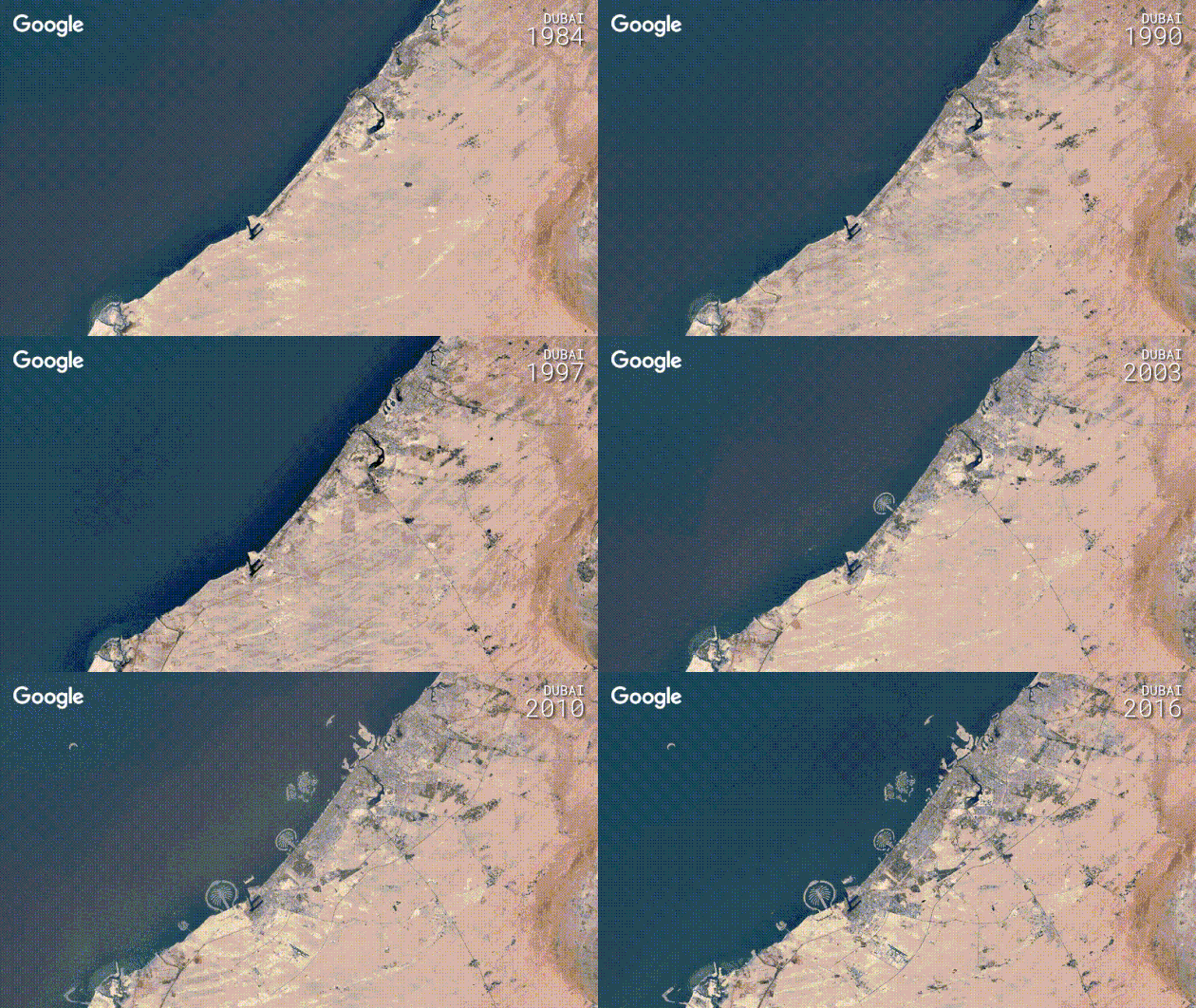
Human civilization has grown and expanded at an amazing rate – or alarming, depending on who you ask – and you can watch the last 32 years of it unfold via satellite imagery thanks to Google’s Timelapse feature. Originally released in 2013, Timelapse has been updated to add four more years of data and tons of new imagery data from two new satellites, offering clearer views with more detail than ever before. Choose any location in the world to see how it has changed – from cities to the shrinking ice caps.

google-timelapse-3

google-timelapse-gif-2

Some of the most dramatic changes have occurred in Las Vegas, Los Angeles, Dubai and Chongqing, China, but you can also watch the Aral Sea dry up and the Shirase Glacier of Antarctica melt into the sea.

Aral Sea

Miami, Florida

Beijing, China

Las Vegas, Nevada

Shirase Glacier

Hangzhou, China

Look for the location of your choice and create your own annual time lapse at Google’s Time Engine Tour Editor.

Share on Facebook


[ By SA Rogers in Culture & History & Travel. ]

[ WebUrbanist | Archives | Galleries | Privacy | TOS ]


WebUrbanist

 
Comments Off on Timelapse Tour: Watch How Cities Grow Between 1984 to 2016

Posted in Creativity


Hands-on with new ‘Graphite’ Fujifilm X-T2 and X-Pro2 (and the XP120)

06 Jan

Hands-on with new ‘Graphite’ Fujifilm X-T2 and X-Pro2 (and the XP120)

For the most part a glittering parade of the utterly unnecessary*, CES does occasionally throw up a gem for camera geeks. Last year it was Nikon’s D500 and D5, and this year we’re very taken with Fujifilm’s new ‘Graphite’ editions of the X-T2 and X-Pro2. More specifically, the X-Pro2 is ‘Graphite’, while the X-T2 is offered in a lighter, shinier ‘Graphite Silver’.

You’ve seen the cameras before, but not like this – click through for a closer look. 

*I saw something last night called a ‘Smart Lawn’. I’m not kidding.

Hands-on with new ‘Graphite’ Fujifilm X-T2 and X-Pro2 (and the XP120)

The X-T2’s new graphite silver finish is actually really nice. The gloss silver looks flashy without being gaudy. It will certainly attract more attention than the standard body but doesn’t scream ‘bling’. 

Hands-on with new ‘Graphite’ Fujifilm X-T2 and X-Pro2 (and the XP120)

According to Fujifilm, the new finish is achieved by layering three coats, over the magnesium-alloy shell. The first coat is matte black…

Hands-on with new ‘Graphite’ Fujifilm X-T2 and X-Pro2 (and the XP120)

…the second coat uses something that Fujifilm calls “Thin-film Multilayer Coating Technology” to apply the smooth silver finish… 

Hands-on with new ‘Graphite’ Fujifilm X-T2 and X-Pro2 (and the XP120)

…and the final coat is a clear varnish, for a glossy finish. The end result is very nice indeed, we think. 

Hands-on with new ‘Graphite’ Fujifilm X-T2 and X-Pro2 (and the XP120)

The graphite silver X-T2 will ship later this month, for $ 1799 body-only. That’s $ 200 more than the standard X-T2.

Hands-on with new ‘Graphite’ Fujifilm X-T2 and X-Pro2 (and the XP120)

Not to be left out of the party, the X-Pro2 is getting a new color treatment, too. This time, it’s just plain ‘Graphite’. Darker and more subtle than the silver X-T2, the graphite X-Pro2 looks great. It’s still glossy, but not ostentatious. 

Hands-on with new ‘Graphite’ Fujifilm X-T2 and X-Pro2 (and the XP120)

The Graphite X-Pro2 will be kitted with a special matching 23mm F2 R WR lens (not available separately). These pictures were taken under pretty rotten mixed hotel lighting, but hopefully you get the idea.  

Hands-on with new ‘Graphite’ Fujifilm X-T2 and X-Pro2 (and the XP120)

The graphite finish is also a multilayer coating, and according to Fujifilm the distinctive shade is achieved by increasing the amount of black pigment in the top coat. 

Hands-on with new ‘Graphite’ Fujifilm X-T2 and X-Pro2 (and the XP120)

The Graphite edition X-Pro2 kit will come with a dedicated LH-XF35-2 lens hood for the 23mm F2, in matching graphite finish (of course).

Hands-on with new ‘Graphite’ Fujifilm X-T2 and X-Pro2 (and the XP120)

In all functional respects, the Graphite X-Pro2 is precisely the same as the standard model that we reviewed here. The Graphite kit will be available later this month for $ 2,299.95, which is about $ 150 more than the standard camera and lens. 

Hands-on with new ‘Graphite’ Fujifilm X-T2 and X-Pro2 (and the XP120)

As well as the new graphite editions of the flagship X-series, Fujifilm also took the wraps off a new rugged camera, the XP120. 

The XP120 has a 16.4MP BSI-CMOS sensor and a 28-140mm lens, and is waterproof to 20m/65ft, shockproof to 1.8m/5.7ft and freezeproof to -10C/+14F.

Hands-on with new ‘Graphite’ Fujifilm X-T2 and X-Pro2 (and the XP120)

Other features include a 3″ LCD, unique ‘Cinemagraph’ feature, which ‘produces still photos with moving elements’, 1080/60p video (with a wind filter) and Wi-Fi.

Hands-on with new ‘Graphite’ Fujifilm X-T2 and X-Pro2 (and the XP120)

The XP120 will come in four colors – blue, sky blue, green and yellow – and will be available in February for $ 229.

Articles: Digital Photography Review (dpreview.com)

 
Comments Off on Hands-on with new ‘Graphite’ Fujifilm X-T2 and X-Pro2 (and the XP120)

Posted in Uncategorized


CES Video: The Panasonic GH5

06 Jan

One of the most anticipated cameras at CES is the Panasonic GH5, so it’s no surprise that the company’s booth was overrun, in part, by people wanting to see it in person. We met up with Panasonic’s Matt Frazer, who walks through some highlights (and things he likes) on this new camera.

Articles: Digital Photography Review (dpreview.com)

 
Comments Off on CES Video: The Panasonic GH5

Posted in Uncategorized


Take a look at a 380-shot mosaic of Apple’s new campus created with a 100MP Phase One camera

06 Jan

A composite of 380 100MP aerial images has been created of the site of Apple’s new campus by photo mapping and data company SkyIMD. The company usually provides the kit for other aerial photographers to use, but on this occasion wanted to show off the amount of detail that can be captured with a Phase One iXU RS1000 100MP aerial camera. The company used software to create flight paths over the 0.5 square mile construction site and spent just thirty minutes shooting 420 images with the camera attached to a Cessna 172 light aircraft.

When combined to create a single picture of the whole area, the images allow dramatic magnification so that people in the scene can be picked out – even though the plane was flying at 2000ft with a lens just longer than standard for the format.

The Phase One iXU RS1000 industrial camera uses the same CMOS sensor that is used in the IQ3 100 back for the XF 645-style DSLR body, but in this case it is used in a body with no moving parts. The firm used a Rodenstock 90mm lens with the body and once all 420 images were combined and cropped to the equivalent of 380 images, the file measured 4.76GB. SkyIMD used Photoshop’s Photomerge feature to combine the images, but to maintain manageable amounts of data the company divided the images into batches of over 70 covering specific areas of the site. Once the batches were combined those composites were also combined to create the final image, which you can see on the SkyIMD website.

SkyIMD’s Michael Estigoy has provided some detail about how the image was shot and created.

All of the images were captured using our FAA/EASA/ANAC STC certified Aerial Camera Platform. The platform mounts to the strut of a plane (Cessna) and holds the PhaseOne iXU RS1000 90mm camera in a vertical (nadir) position.

During the pre-flight process, we used a software program called Flight Planner from AeroScientific (http://www.aerosci.info/flightplanner/) to create our flight paths, and calculate the frequency of the intervalometer based on the speed, altitude and desired GSD (ground sample distance).

Using the PhaseOne iX Capture Software, we set the exposure and ISO to obtain the best image balance we could. There was some consideration given to capture as much detail as possible – balancing the exposure between not making the shadows too dark and whites/brights too blown out.

We loaded up the flight plan on our iPad – we use an application called Galileo Offline Maps (https://galileo-app.com/) – to depict the flight lines and line up our airplane. Our pilot, who has years of experience flying missions like this, lined up the plane at the speed and altitude we calculated pre-flight, and then flew the lines straight and level. I controlled the camera operation and made sure that the image quality and coverage was being captured successfully.

The parcel required us to fly 7 flight lines to capture the imagery. We flew one grid.
We are planning follow up flights and will fly a double grid pattern on those, or a cross hatch pattern, to capture more images and enable us to create better mosaics and perhaps a 3D model or flyover.

Stitching and imaging process
We typically use photogrammetry software such as those offered by Pix4D and Agisoft. However, this time I elected to try and use Adobe Photoshop to create the Mosaic. I used the Photomerge function.

We had a total of 420 images. We have a high-powered computer (8 core i7, 64GB RAM, m.2 SSD drives, etc., GeForce GTX video card), but 420 is almost impossible to process all at once. I grouped the images into six separate folders, each representing an area of parcel. Each group shared some images with the other groups in order to facilitate matching. After each group, or chunk, of images was merged, I corrected them for distortion and then merged the groups together. After merging, any major flaws were cut out and images were sourced to fill in the holes.

Photoshop used 90% of our installed RAM and approx. 700 GB of scratch disk space on two m.2 SSD drives to complete each group, including the final mosaic.

As mentioned on our site, we did not take any time to massage the resulting mosaic Photoshop produced. I may have adjusted curves, performed some slight sharpening, and that’s about it. There are obvious mis-alignments and distortions in the image. We wanted to share the image rather than spend another week making it perfect.

The final image was cropped to the final size. I had seen the plans Apple submitted to the City of Cupertino and wanted to try and represent that area of view (pages 3 & 4 of this PDF – https://s3.amazonaws.com/apple-campus2-project/Site_Plan1_Submittal7.pdf). The crop was made visually. We eliminated the use of about 40 photos, hence the approx 380 images mentioned on our site.

The image was too large for TIFF or JPG format so it was saved as a Photoshop Large Document (.PSB). In order to support the zooming feature on our web, we used a photoshop plugin from Microsoft:
http://research.microsoft.com/en-us/um/redmond/groups/ivm/HDView/HDPhotoshopPlugin.htm. This created the thousands of tiles for zooming.

I used Openseadragon for the javascript/web enablement for the zoom/interactive viewer:http://openseadragon.github.io/

Articles: Digital Photography Review (dpreview.com)

 
Comments Off on Take a look at a 380-shot mosaic of Apple’s new campus created with a 100MP Phase One camera

Posted in Uncategorized