RSS
 

Archive for June, 2016

Instagram introduces business profiles with insights, promoted posts and contact button

02 Jun

Instagram has introduced business profiles as a free feature for businesses using the service. Business profiles differ from regular profiles in a few ways, allowing companies or individuals operating as a business to add contact details, promote posts and view insights related to their account. 

The new tools are designed to better aid businesses — including individuals operating as a business, such as independent photographers — in managing their Instagram presence while using it to attract new clients. The insights tool shows users how popular individual posts are and provides information on followers, including their demographics and behavior. High-performing posts can now be turned into ads within the Instagram mobile app, as well, and account owners will be able to target specific audiences.

Business profiles also have a contact button that can be connected with a business number or email address, enabling prospective clients to directly contact the company rather than having to seek contact details elsewhere. Instagram plans to rollout business profiles ‘in the coming months’ for users in the United States, Australia and New Zealand. By the end of 2016, business profiles should be available to all users across the globe.

Via: Instagram

Articles: Digital Photography Review (dpreview.com)

 
Comments Off on Instagram introduces business profiles with insights, promoted posts and contact button

Posted in Uncategorized


Is HDR dead? Some dPS Writer’s Thoughts on this Controversial Topic

02 Jun

HDR (High Dynamic Range) photography has been around for quite a few years now. It is a technique that allows you as a photographer to use bracketed images, to capture as much of the dynamic range in a given scene as possible. Dynamic range is the measurable difference between the brightest highlights, and darkest shadows, in a scene that you are photographing.
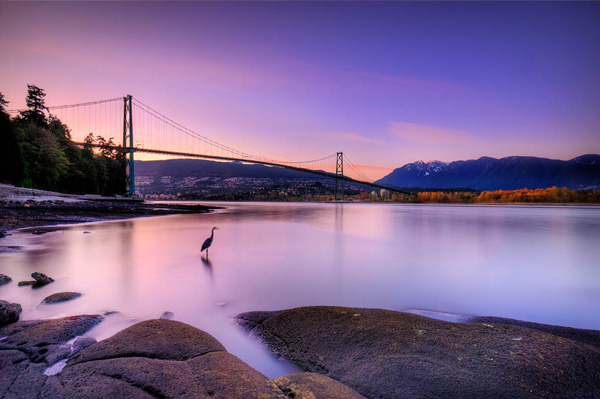
Lions Gate Bridge Vancouver - HDR image

Lions Gate Bridge Vancouver – HDR from three bracketed images.

HDR became a very useful tool a few years ago as digital cameras were initially really bad at exposing the highlights in a scene correctly. Many photographers (myself included) would expose for the highlights in the scene and then pull back detail in the shadows in Photoshop or Lightroom. This technique caused other problems. When editing afterwards in Photoshop, the shadow areas that had been lightened were really noisy, and looked gritty and low quality. HDR came along and solved some of these issues.

HDR was able to blend the highlights in the scene correctly and show details in the shadows. This was great news, and almost overnight, there were many top photographers singing the praises of this new technique. It was really a huge step forward in the digital photography world. There were a few glitches though. If you wanted to do HDR images, you needed to purchase a third party piece of software, Photoshop did not have an HDR tool at first. Secondly, you had to shoot between three and five bracketed shots to get all the detail into the final image. If you did both those things, and you did them well, you were rewarded with a unique looking image.

The other challenge was that the HDR software often made images look overdone. While the dynamic range in the HDR image was good, there were often halos and artifacting in the image. Sometimes the saturation was erratic and the images looked just a little weird. For a time, this HDR look became quite trendy. Trey Ratcliff became one of the leading voices on HDR, and was a proponent of using HDR wherever possible and on any image. He gathered a strong following and HDR became the new thing to do to your images.
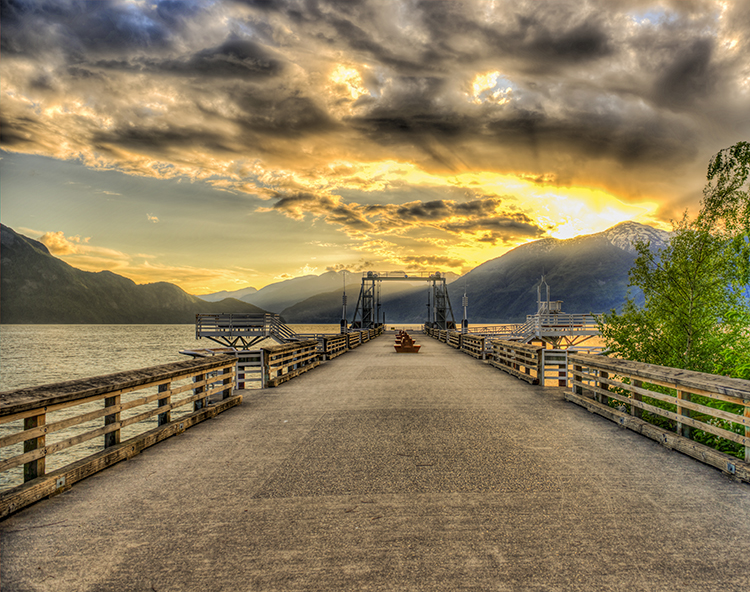
A somewhat overdone HDR image

A somewhat overdone HDR image

Fast forward to today. In recent years, the new camera sensors have improved on their dynamic range ability significantly. Also, improvements in RAW editors and quality means that cameras are now able to capture a lot more information that they did even five years ago, and a good RAW editor can bring back significant detail in the shadows and highlights.

So, the big question is this, is HDR dead or will it make a comeback? To add some insight to this, a few weeks ago, we posed this question to our own dPS writers and here are some of their responses:

What dPS writers have to say about HDR

All I know is, when I shoot my D750 at base ISO I can get more colors, and pull more from the shadows than I ever could on my D7100 with 5 stops of bracketed shots. So yeah…maybe the whole idea of bracketing to get HDR is going the way of the dodo bird. – Simon Ringsmuth
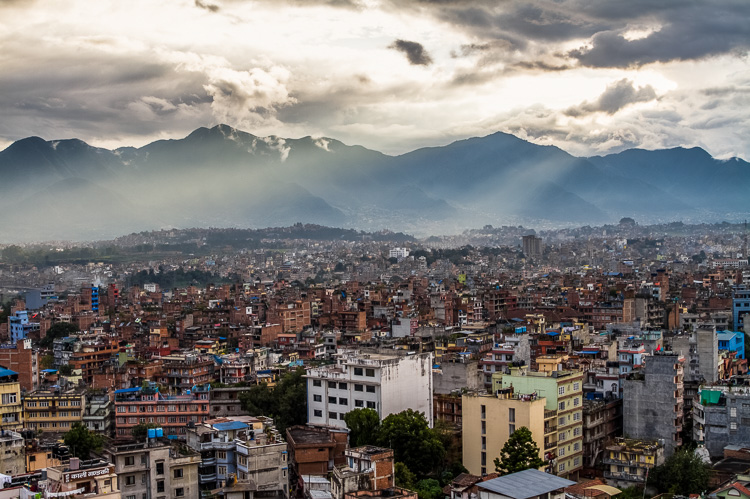
Sun rays wash over Kathmandu, Nepal (HDR by Peter West Carey)

Sun rays wash over Kathmandu, Nepal (HDR by Peter West Carey)

I think the technique has reached a more comfortable point, in that most people can recognize the truly horrible overcooked stuff now, and shy away from it….and more and more photographers are being responsible with it, merely pulling some dynamic range in their images with positive results. Lightroom doesn’t do a great job with the HDR merge, but the one thing it does is limit the super hot, overcooked messes 3rd party software can create. Personally, if I’m bracketing, I use LR to do a very subtle tonal merge. So I think LR will take a bit more of that market, especially as they update and improve the merge tool. So it’s not dead, in my humble opinion, it’s not even reborn. It’s just morphed into something a bit more pleasing, and still relevant. But it’s also true that these sensors are allowing for some really amazing single-file stuff. – Tim Gilbreath

The over processed, halo skies, over saturated look are popular on Instagram! But that’s about it now. HDR has been declining in popularity (at least amongst pro’s) for a while now…medium format users have always had an advantage, though! – Daniel Smith
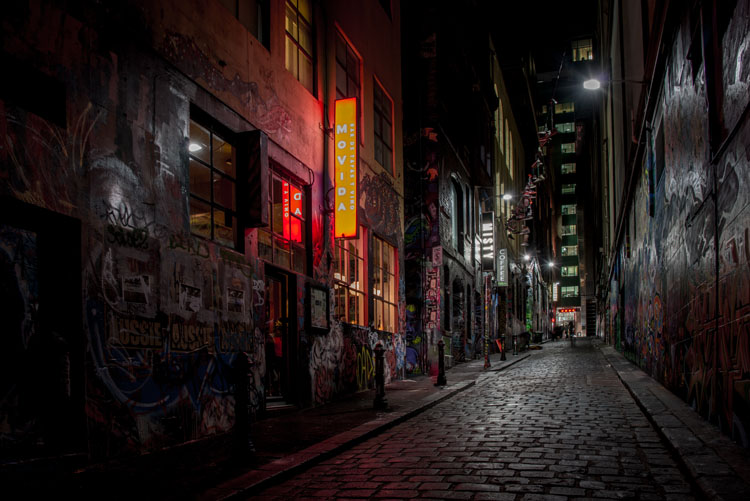
HDR by Leanne Cole

HDR by Leanne Cole

HDR might not be dead, but the newer DSLR (especially the newer full frames) wider dynamic range makes it needed less. I only do HDR when I can’t get the range I am looking to achieve in the final image. LR’s merge to HDR has made creating HDR much easier. I like the natural look to HDR, and not the overcooked look that some are using. Since switching to full frame I don’t do nearly as many HDR images as I once did. – Bruce Wunderlich

It’s becoming less and less important, and in 5 years it won’t be needed, in that dynamic range and presentation out of camera will be the same as what the human eye sees. Beyond some artistic renderings, once you pass what the eye and brain are used to, it jolts people out of the natural experience and into something else, another form of art. I don’t like having to use HDR techniques and am happy that LR’s version works just fine for most of my uses. I just WYSIWIG straight out of the camera. As a side note, the in-camera HDR in the Canon 7D Mark II is not that usable, and I’d rather do it in post-processing. – Peter West Carey
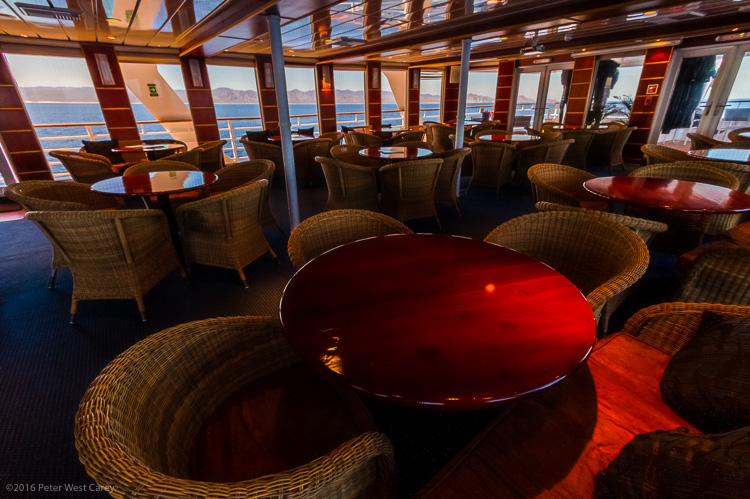
HDR by Peter West Carey

HDR by Peter West Carey

Cameras will continue to improve. We saw the megapixel war, and the ISO range war, and now maybe there will be a dynamic range war. In regards to software I think we’ve seen both simplified solutions (i.e., Lightroom’s built-in option) and more complex solutions (Trey’s Ratcliffs new software – Aurora HDR) try and tackle the job. In the long run, simplified wins in my mind, especially as cameras become more capable. HDR as a style though, may still persist. I’d argue that overall it will continue to mature as a style, and as a result the over processed, over saturated photos, will become fewer and fewer – but there will still be those that enjoy that type of work – so it could still persist. – John Davenport

I really think the HDR war is going to be the new frontier, at least for the next few years. Even on mobile phones it’s going to be all about how much light you can capture (i.e. shooting at high ISO values, or making lenses with wider apertures) but ultimately the focus is going to be on coaxing as much data out of the image as possible. Whether through automated in-camera software processes, which we already see quite a bit, or using software like Lightroom or Aurora HDR, we’re going to see a lot of emphasis not on how many pixels the image has, but what software can do with those pixels to make the best possible image. – Simon Ringsmuth

I rarely do HDR now, but I still love it for night photography. – Leanne Cole
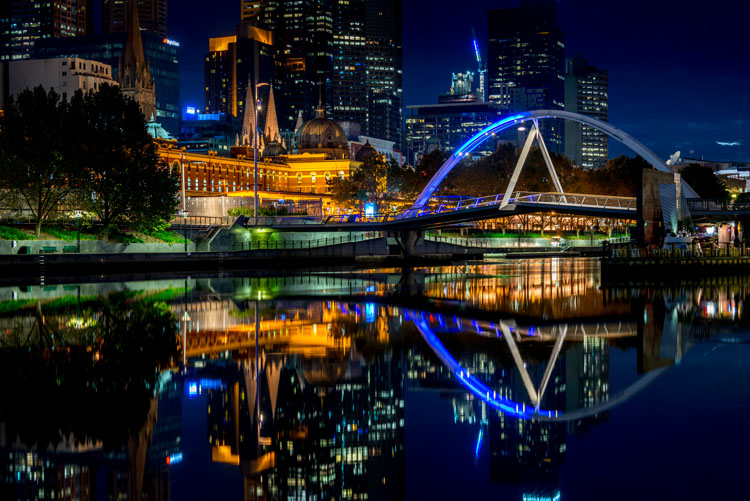
leannecole-Is HDR dead article-1

HDR by Leanne Cole

When we were browsing real estate listings the other day, the listings were FULL of HDR photos of things like…people’s living rooms. We’re not talking million dollar homes, or spectacular views. We’re talking Joe Plumber’s 1000 sq. ft. starter home HDR’ed to high heavens. It looked so absurd! – Meredith Clark

I have the D750 and its dynamic range is phenomenal! However, I have never been a fan of the over processed HDR effect that seemed popular at one time…or maybe still is! – Sarah Hipwell

HDR processing still has its place. While today’s cameras capture a higher dynamic range than older cameras, there are still situations when blending exposures results in greater detail throughout the range. To avoid the “overcooked” look, which thankfully was a fad, I tend to blend my exposures manually rather than use a plugin. – Anne McKinnell
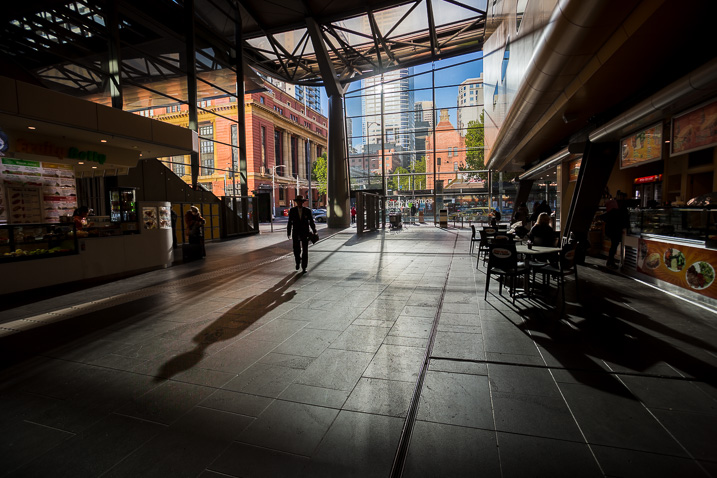
HDR-dead-dps717px-01

HDR of 6 bracketed images, merged and processed in LR – image by Darlene

HDR isn’t new, it’s decades old. Ansel Adams did it with his Zone System and dodging and burning in the darkroom were also a form of HDR (tone control for more detail). Somewhere along the way it became more about a particular style. To me, HDR simply means what the letters stand for – High Dynamic Range – which represents a scene that your camera is unable to capture the entire tonal range due to high contrast. How that is dealt with that is up to each photographer. Do you bracket and blend exposures, do you use layer masking or luminosity masks to open up detail, or do you just let it all fall where it may and go realist? I’ve gone through all the stages of an HDR photographer and now I tend to lean towards more natural, and using LR’s merge to HDR works for me. – dPS Managing Editor Darlene Hildebrandt

What has changed?

With all the new sensors and updated software (Lightroom, Photoshop and standalone products like Aurora HDR and Photomatix) there are plenty of options to create truly amazing HDR images. The other option is to create a well balanced, and well edited photo, from just one image. This requires a bit of know-how with your chosen image editing suite. But with a bit of practice, you can create some amazing images that have just as much detail as any HDR image. Also, your images will look more realistic, and sometimes that may be necessary (for example, you may be shooting for a client who does not like the HDR look).

Below you will see an example where I have compiled an HDR image from 3 bracketed images. The next image is the best shot edited alone in Photoshop CC.
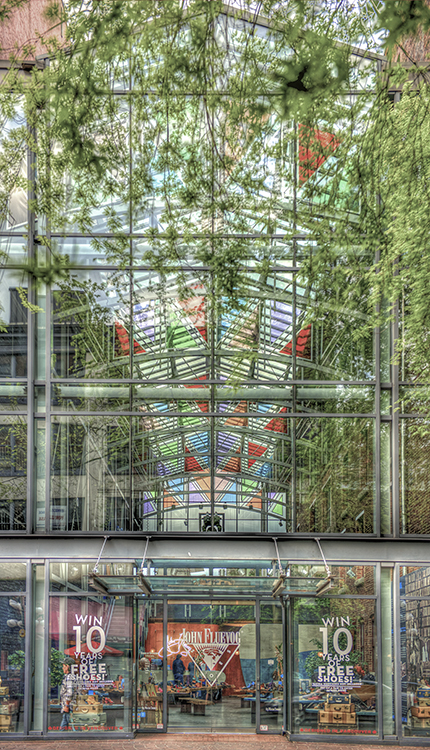
This image was 3 shots processed in HDR software

This image was 3 shots processed in 3rd party HDR software

This image was a one stop underexposed shot, edited in Photoshop CC

This image was a one stop underexposed shot, edited in Photoshop CC

Depending on what your goal is with HDR, you can achieve a lot with the right editing tool. The single image above, that was edited was done from one image, was shot on a Nikon D800 and edited in Photoshop CC. The details on this image are fantastic and you can see it’s pretty close to the HDR image style-wise. The result is not as random as the HDR image, and for the most part, when I use HDR software, I would edit to get the most realistic results, not a punchy, psychedelic look.

The next two images are of Vancouver Convention Centre at blue hour. It shows how much detail can be pulled out of a single image. The first image is the unedited version, the second image is the final shot. The details are pretty close to what you could get with HDR, but without some of the punchy tones.
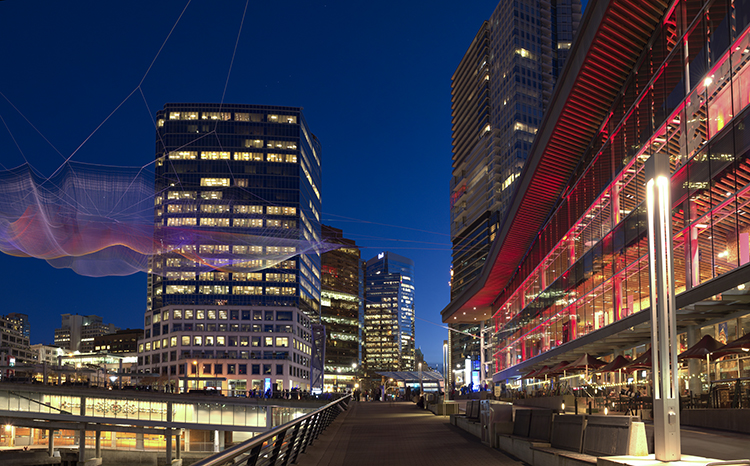
Unedited image shot in Vancouver
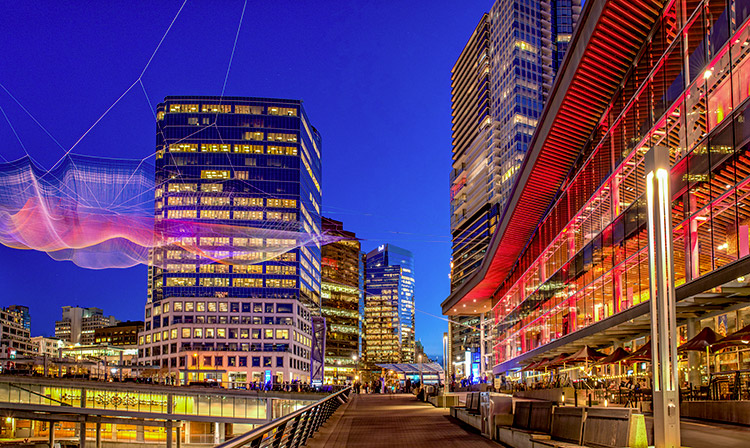
Unedited image shot in Vancouver

Vancouver-after

Edited image, notice how much detail can be pulled out of one shot

So, what do you think? Is HDR dying? do you still use it or do you use it less? When do you use it?

Let us know what your comments and ideas are, we are curious to know.


Editor’s Note: This is one of a series of articles this week that are Open for Discussion. We want to get the conversation going, hear your voice and opinions, and talk about some possibly controversial topics in photography.

Let’s get it started here – do you agree or disagree with the points in the article above? Do you have any others to add? Give us your thoughts below, and watch for more discussion topics each day this week.

See all the recent discussion topics here:

  • 7 Commonly Accepted Photography Beliefs Debunked

googletag.cmd.push(function() {
tablet_slots.push( googletag.defineSlot( “/1005424/_dPSv4_tab-all-article-bottom_(300×250)”, [300, 250], “pb-ad-78623” ).addService( googletag.pubads() ) ); } );

googletag.cmd.push(function() {
mobile_slots.push( googletag.defineSlot( “/1005424/_dPSv4_mob-all-article-bottom_(300×250)”, [300, 250], “pb-ad-78158” ).addService( googletag.pubads() ) ); } );

The post Is HDR dead? Some dPS Writer’s Thoughts on this Controversial Topic by Barry J Brady appeared first on Digital Photography School.


Digital Photography School

 
Comments Off on Is HDR dead? Some dPS Writer’s Thoughts on this Controversial Topic

Posted in Photography


Flat-Pack Wall Furniture Folds into its Own Isometric Projection

02 Jun

[ By WebUrbanist in Design & Furniture & Decor. ]

3d wall flat pack

This furniture series not only folks up to pack flat for shipping or storage, but also hangs on the wall, each piece in the shape of a two-dimensional isometric drawing of itself.

De-Dimension by Jongha Choi uses a set of hinges and locking pins to fold out and lock into position, providing support when the pieces are used as seats and tables. Like other flat-pack furniture designs, this set boasts reduced weight and space requirements, though arguably at the expense of long-term durability and stability (depending in part on hidden bracing and the quality of components used).

3d furniture designs

The set is in part a commentary on representation versus reality, two-dimensional forms versus three-dimensional figures. From the designer: “Even the advent of 3D printing skills shake our fundamental notion of the image. Unlike the past, we are not only seeing the image as a means of reproducing objects, but also giving essential identity to the image itself. In other words, though the image still shows its visual effect on a flat plane, it is not just an expression of representation, but a making real an experience.

3d wall furniture

“In our current situation, in which modern society experiences the image, in relation to advertising, image circulation and the internet, why do we not question an images’ confinement to a flat surface. Why don’t we try to get more stereoscopic and attempt for direct experience with the image. My question started with this point and I tried several experiments in order to realize this idea from a personal point of view.”

Share on Facebook


[ By WebUrbanist in Design & Furniture & Decor. ]

[ WebUrbanist | Archives | Galleries | Privacy | TOS ]


WebUrbanist

 
Comments Off on Flat-Pack Wall Furniture Folds into its Own Isometric Projection

Posted in Creativity


Fujifilm X70 User Review: Sweet for Street

01 Jun

Fujifilm x70 is the newest little beast in Fujifilm lineup of premium compact cameras. This camera is targeted towards enthusiast and professional photographers (thanks to retro styling and large APS-C sensor) who want to travel light and want image quality at the same time. Fuji x70 is a trade-off between the legendary Fujifilm x100T and more travel oriented point and Continue Reading

The post Fujifilm X70 User Review: Sweet for Street appeared first on Photodoto.


Photodoto

 
Comments Off on Fujifilm X70 User Review: Sweet for Street

Posted in Photography


Sweet Spot: Panasonic Lumix DMC-GX85 Real World Samples

01 Jun

The Panasonic Lumix DMC-GX85 has the makings of one sweet camera. It uses a well-regarded 16MP Four Thirds sensor (with no AA filter), is 4K capable and features Panasonic’s depth from defocus AF system.

Packed inside a sleek, customizable body, the GX85 features a new shutter mechanism that appears to solve the thorny issue of shutter shock, a problem that plagued its big brother, the GX8. The GX85 also features a 3-axis stabilized sensor, that when combined with a Panasonic stabilized lens, offers 5-axis of stabilization, making it the most steady Panasonic Four Thirds camera to date.

DPReview writer Dan Bracaglia has been using the GX85 for a while, and as well as various locations around Seattle he also took it on a recent trip to New Jersey.

Articles: Digital Photography Review (dpreview.com)

 
Comments Off on Sweet Spot: Panasonic Lumix DMC-GX85 Real World Samples

Posted in Uncategorized


Vitrima lens aims to bring low-cost 3D video capture to GoPro action cameras

01 Jun

$ (document).ready(function() { SampleGalleryV2({“containerId”:”embeddedSampleGallery_0450741422″,”galleryId”:”0450741422″,”isEmbeddedWidget”:true,”standalone”:false,”selectedImageIndex”:0,”startInCommentsView”:false,”isMobile”:false}) });

Looking to bring more excitement to your POV snowboarding videos? A new case called Vitrima is in the works, which would enable GoPro action cameras to record 3D video. The lens attachment uses mirrors to deliver two images to the GoPro camera’s own lens. The resulting resulting stereoscopic videos appear to be 3D when viewed through a VR viewer like Google Cardboard or the Gear VR.

The Vitrima lens is waterproof and will ship already attached to a standard GoPro camera housing, and can also be used with various mounts. Because the lens is simply composed of carefully arranged mirrors, it works out of the box without any software. Though the resulting videos won’t feature 3D audio, the lens – which will cost $ 50 when the product launches – presents a low-cost way for someone to record 3D videos without purchasing a dedicated 3D camera like the $ 799 Vuze VR camera.

The website lists Vitrima as ‘launching soon.’

Articles: Digital Photography Review (dpreview.com)

 
Comments Off on Vitrima lens aims to bring low-cost 3D video capture to GoPro action cameras

Posted in Uncategorized


Waterfails: We test Pentax K-1’s Pixel Shift

01 Jun
Punch Bowl Falls in the Columbia River Gorge of Oregon State offered a unique setting to push the limits of the K-1’s pixel shift technology.  This is a conventional single exposure utilizing no Pixel Shift. Pentax K-1, HD Pentax D FA 24-70mm F2.8 ED SDM WR 70mm, F16, 0.3 sec, ISO 100.

Introduction

It’s clear that the Pixel Shift Resolution shooting modes make a huge difference to image quality from our studio tests, but how does that translate to real world shooting situations?

In previous iterations of this feature (in the K3 II) we found that movement within a scene could cause major issues during Pixel Shift Capture in ACR conversions. So if leaves rustled in the wind or your subject moved in any way the camera compensated poorly for the movement, which then resulted in pixel blur and artifacts in the regions where the movement occurred.

The latest iteration of Ricoh’s Pixel Shift technology found in the K-1 takes four separate images that it uses to build the final full resolution image upon and if movement occurred in subsequent images, the camera is supposedly able to differentiate the pixels that moved from the first frame it shot and clone in pixels for that area from the sharpest (for that region) of the four single (demosaiced) Raws to produce a much sharper final product then was possible in the Pentax K3 II.

To determine just how much the technology has improved in the K-1 over the previous iterations, I took the camera out into the field to really push the limits of the Pixel Shift Resolution shooting modes.

The Gorge

The Columbia River Gorge, located along the Columbia River that borders Washington and Oregon state offers a variety of amazing scenic locations in addition to a number of challenging shooting environments. In order to test the capabilities and limitations of the Pixel Shift resolution mode in the K-1, I decided to focus on the seemingly endless amount of waterfalls that parallel the Columbia River about an hour or so outside of Portland, OR.

In an effort to get the most bang for my buck I decided to hike along the Eagle Creek trail, heading toward Punch Bowl Falls. There are a number of beautiful spots to take in the views and two waterfalls (Punch Bowl and Metlako falls) to make the trip more than worthwhile. The weather conditions were, well, pretty miserable. My fiancé and I experienced moderate rain throughout most of the day which definitely put a damper (literally) on the trip.

Most of the Eagle Creek trail is carved into some fairly steep cliffs and snakes its way back along the deep river valley that lies several hundred feet below the trail. 

Pentax K-1, HD PENTAX-D FA 28-105mm F3.5-5.6 ED DC WR, 28mm, F6.3, 1/50, ISO 100

Pixel Shift Real World Testing

Our first stop was Metlako Falls located about a mile from the trail head. The access trail to Metlako is poorly marked, so it’s definitely easy to miss if you aren’t careful. I chose this waterfall because it offers an excellent opportunity to examine not only how the Pixel Shift deals with movement but also detail resolution as well.  

The widget below gives you an idea of the detail resolution that is possible when you are able to use the Pixel Shift Resolution shooting mode. The files were shot at an aperture of F10 to avoid the effects of diffraction at smaller apertures. The two files below were shot either (1) without Pixel Shift Resolution, or (2) with Pixel Shift Resolution with Motion Correction turned on.

$ (document).ready(function() { ImageComparisonWidget({“containerId”:”reviewImageComparisonWidget-22760863″,”widgetId”:363,”initialStateId”:null}) })

As you can see, despite the issues with movement, there are benefits to shooting with the Pixel Shift Resolution mode turned on. The detail in the foliage is much better with Pixel Shift, and a nearly 2EV theoretical increase in dynamic range means greater latitude for Raw processing of contrasty scenes. 

We already knew from our studio tests that in static environments with little to no movement, Pixel Shift mode allows you to attain a huge amount of noise-free detail in a single file.

Unfortunately, at least when it comes to landscapes, finding truly static shooting environments can be difficult, if not impossible. To examine how the Pixel Shift modes handles movement, I took three separate exposures within a few seconds of each other, at the same settings, using the same lens for each test. The photos were shot with either (1) Pixel Shift Resolution mode turned off, (2) Pixel Shift Resolution Mode turned on without Motion Correction, or (3) Pixel Shift Resolution mode turned on with Motion Correction. The following are ACR conversions of the Raw files.

$ (document).ready(function() { ImageComparisonWidget({“containerId”:”reviewImageComparisonWidget-38320267″,”widgetId”:362,”initialStateId”:null}) })

From looking at these shots, it’s obvious that Pixel Shift Resolution shooting modes are challenged by motion of any kind. Immediately obvious in the ACR conversions above are the large patches of green and magenta artifacts in the ‘On’ shot, and cross-hatching in both ‘On’ and ‘On w/ Motion Correction’ shots. The lack of large color artifacts in the ‘On w/ Motion Correction’ shot is really just dumb luck: recall that a similar Raw above had such artifacts. Note that artifacts are drastically reduced in out-of-camera JPEGs with Motion Correction on (not shown), but the issues with the Raws might crop up whenever motion is present in the scene. 

We continued our trip up the Eagle Creek trail to the lower Punch Bowl falls trail where you can get up close and personal with one of the most gorgeous waterfalls in the Columbia River Gorge. I decided to focus on just the Motion Correction Pixel Shift Resolution shooting mode for this test as I really wanted to see how it handled subtle water movement away from the main waterfall compared to the normal shooting mode.   

Normal Shooting Mode (Raw scaled 50%)

HD Pentax D FA 24-70mm F2.8 ED SDM WR, 70mm, F16, 1/4, ISO 100

Download Raw (PEF) file

Pixel Shift Resolution with Motion Correction (Raw scaled 50%)

HD Pentax D FA 24-70mm F2.8 ED SDM WR, 70mm, F16, 1/4, ISO 100

Download Raw (PEF) file

In the above image you can see how poorly the Pixel Shift mode fared in this test. It had a great deal of difficulty even in areas where movement was a lot more subtle such as water lapping at the rocks in the lower left-hand corner of the frame. The green and magenta artifacts can be seen here along with a fair amount of pixelation in any area that showed movement during the imaging process.

If you don’t mind JPEG output, there is some good news. You can retroactively add motion correction in-camera to an image shot as part of a Pixel Shift burst.

After applying the Pixel Shift to the file you can export it as an out of camera JPEG. With that said, I don’t know too many landscape photographers that shoot in JPEG or want to produce out of camera JPEGs, since they’re mostly un-editable from a post processing standpoint.

Out of Camera JPEG Pixel Shift (50% crop)

No Motion Correction

HD Pentax D FA 24-70mm F2.8 ED SDM WR, 70mm, F16, 1/4, ISO 100

Out of Camera JPEG Pixel Shift (50% crop)

Motion Correction

HD Pentax D FA 24-70mm F2.8 ED SDM WR, 70mm, F16, 1/4, ISO 100

There’s another benefit to Pixel Shift we briefly alluded to: since information from four Raw files are essentially combined, noise is decreased, since you’re effectively averaging 4 frames. This nearly 2 EV increase in dynamic range is evident in the example below: while the non-pixel shift file still shows respectable noise performance, thanks to the very high dynamic range sensor, the Pixel Shift file is even cleaner, particularly at 100%. 

$ (document).ready(function() { ImageComparisonWidget({“containerId”:”reviewImageComparisonWidget-54913034″,”widgetId”:364,”initialStateId”:null}) })

So what does this mean?

After analyzing the results from this test we determined that there really is no difference (outside of shooting variables such as water current and wind) between the Motion Corrected Raw files and the Normal Pixel Shift Raw files with no Motion Correction applied. It appears that Motion Correction is a JPEG only process that the camera’s JPEG engine is able to apply to the Pixel Shift files (even retrospectively for Pixel Shift Raw files). 

That explains why it appears that the Motion Corrected Raws actually looked worse in some cases than the non-motion corrected Raws in some of the examples provided above; there really wasn’t a difference in what the camera ‘did’ per se but more in the shooting conditions at hand (water motion, wind, current etc). This also explains why the motion corrected in camera JPEGs looked much better than the non-Motion Corrected JPEGs that the camera produced. 

With that said the waterfall Raw examples just provided too many variables (wind, variable water motion and current) to really nail down a firm explanation of what we were seeing from this small sample set of images.  We are currently working on a supplemental piece with some nice concrete image examples and data that will really solidify what the differences are between the Pixel Shift Motion Corrected and Non-Motion Corrected Raw and JPEG files. 

Conclusion

Overall, the results of this test were honestly a bit disappointing. I think that everyone here, myself included, had hoped that Pentax was able to get the Pixel Shift movement issues we saw in the K3-II resolved, but it looks as though the company still has a lot of work to do. The amount of detail in the Pixel Shift files is markedly better than those taken with the mode turned off, but for landscape work (assuming anything short of totally still conditions) artifacts caused by movement in the scene almost negate the benefits. It should be noted that the color artifact issues can be rectified with processing software such as Silkypix, but the issues with pixel blur wherever motion occurred are still apparent even when using other post processing tools.   

In absolutely perfect conditions, the K-1’s Pixel Shift shooting modes can offer outstanding results, but if there is a chance of any movement occurring in the frame I would definitely recommend staying away from them or at least backing your files up with non-pixel shift exposures as well. We’ll be posting more sample images from my trip to the Gorge soon, and and be on the look out for our forthcoming full review of the K-1 as well!


Please note that all of the images published in this article were processed using Adobe Camera Raw 9.5 (unless otherwise stated). We’re currently examining the appearance of Pixel Shift files processed using other Raw converters and we’ll continue to update this article with our findings.

Articles: Digital Photography Review (dpreview.com)

 
Comments Off on Waterfails: We test Pentax K-1’s Pixel Shift

Posted in Uncategorized


Street Smart: Theft-Proof Bike Comes With Recovery Service Guarantee

01 Jun

theft proof smart bike 8

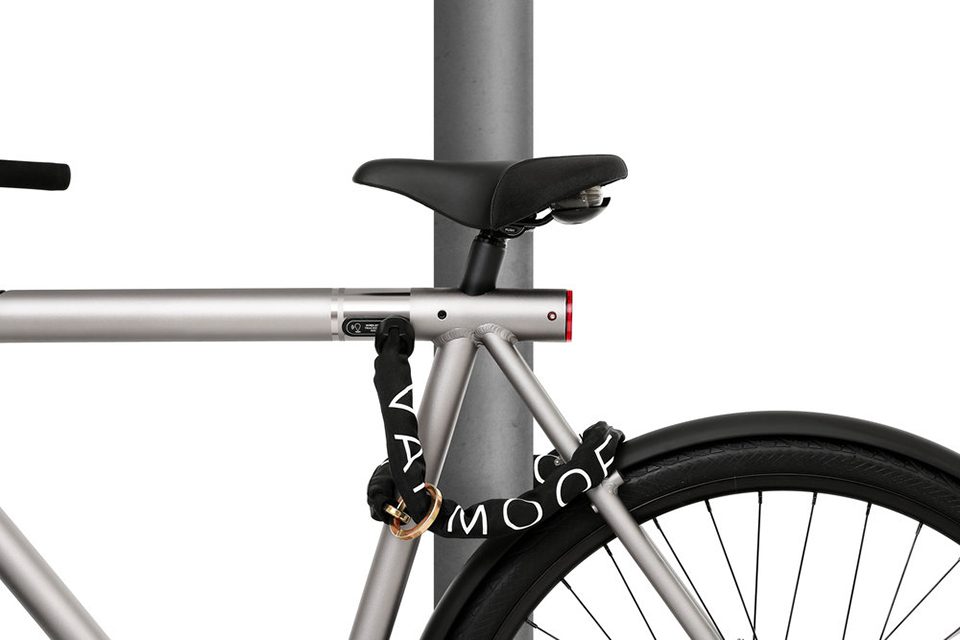
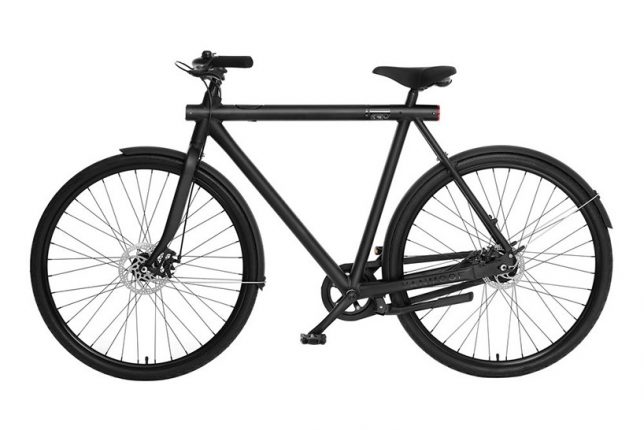
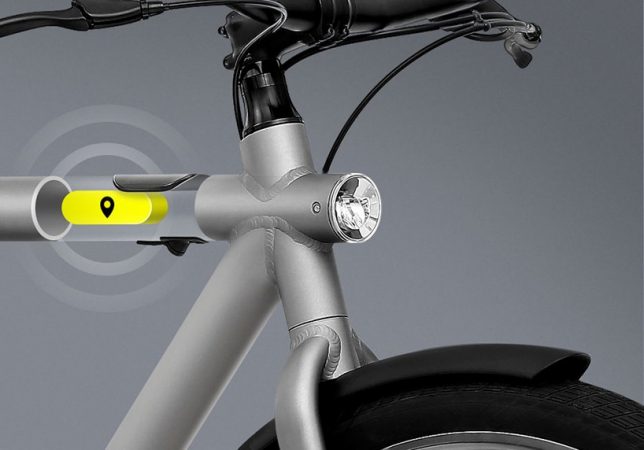
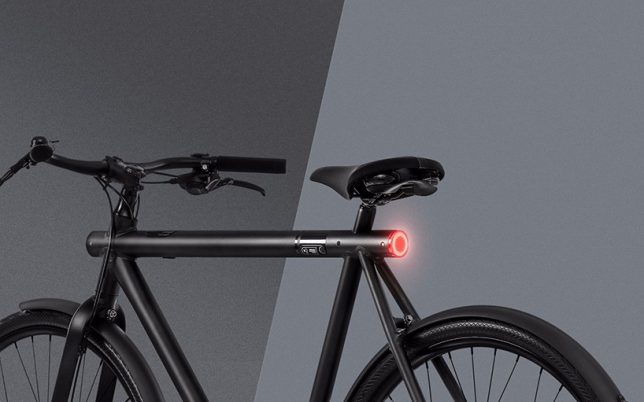
Even the strongest bike locks aren’t totally foolproof, but when locks fail or risky storage options don’t pay off, the makers of this smart bike will send a recovery team after your ride. The ‘SmartBike’ by Amsterdam-based bike specialists VanMoof comes with a lot of cool features, but this anti-theft guarantee is definitely the most valuable of them all, and they’ll even buy you a new one if they can’t find it once it’s stolen.

theft proof smart bike 3

theft proof smart bike 2

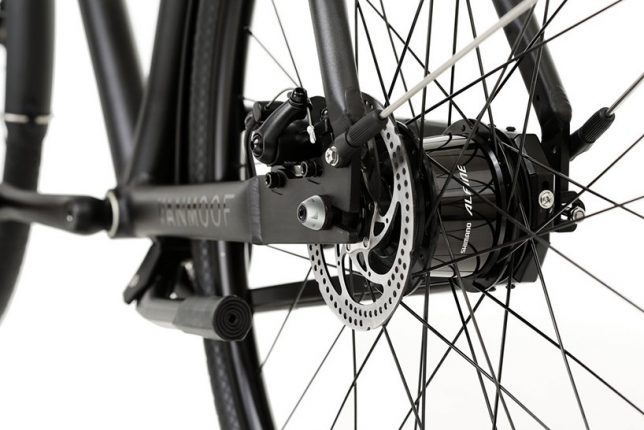
Available in 3 speed in grey or 8 speed in black, the VanMoof SmartBike features GSM anti-theft tracking with ‘Peace of Mind Service’ free of charge for the first two years of ownership. If a thief manages to make it past all the built-in anti-theft parts, like tamper-proof nuts and screws, the GSM cellular info will activate, allowing the recovery team to find it even if it’s inside a building. They promise to get it back within two weeks, with the last mile of tracking powered by a “top-secret” locating technology.

theft proof smart bike 6

theft proof smart bike 7

theft proof smart bike 5

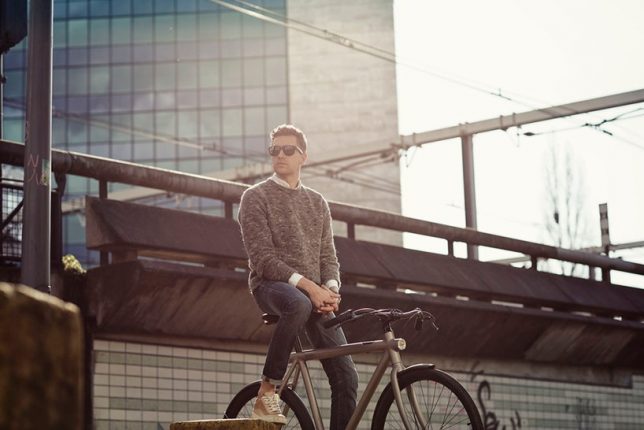
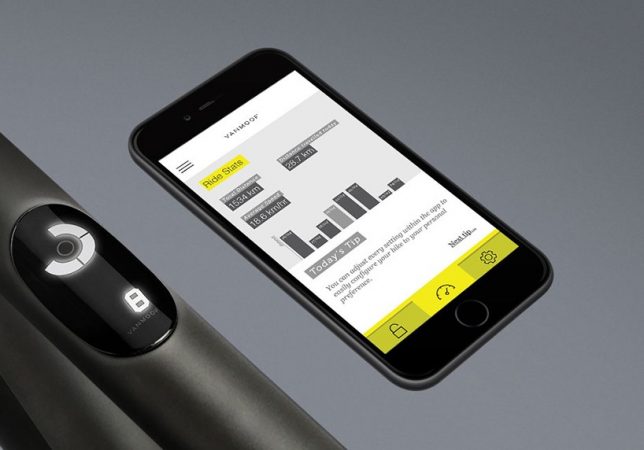
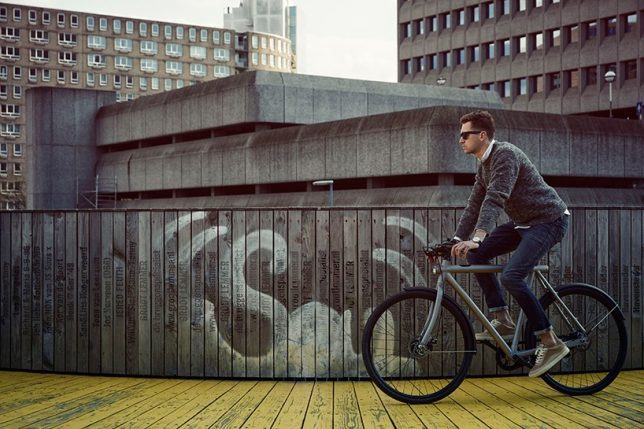
But theft isn’t the only special feature on this bike. Designed to be the ultimate city ride, this one comes with a smartphone app, and can be unlocked with a tap of your finger on your phone or the bike’s dashboard. The software will automatically check via your smartphone’s Bluetooth that it’s really you before it unlocks your bike, so freeing it takes seconds. The app also offers personalized direction and weather for your commute and ride stats, and the bike has head and tail lights that automatically turn on and off. All electric components are pedal-powered, so there’s no charging required.

theft proof smartbike 1

theft proof smart bike 4

The bike is now available for pre-order starting at $ 1098.00, with free shipping.


WebUrbanist

 
Comments Off on Street Smart: Theft-Proof Bike Comes With Recovery Service Guarantee

Posted in Creativity


Rainbow Connection: Huge Mural Spans 200 Houses on Hillside in Mexico

01 Jun

painted town after

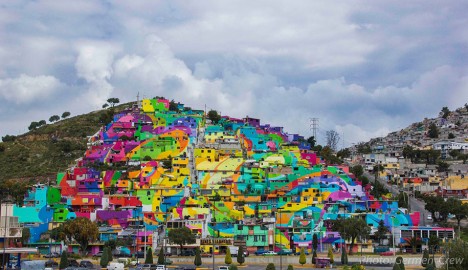
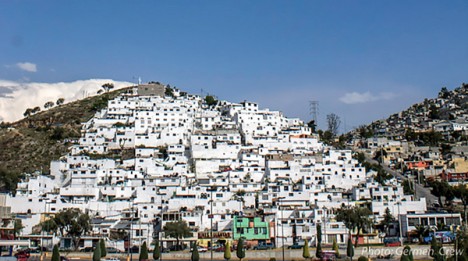
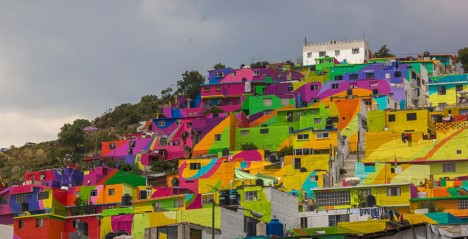
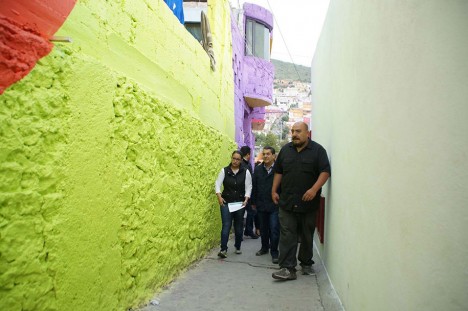
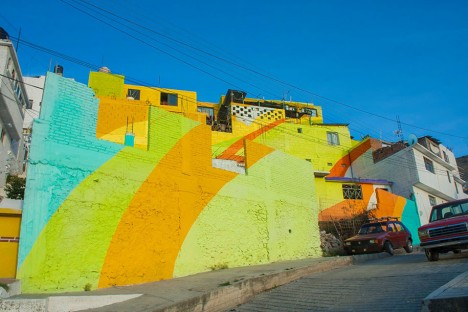
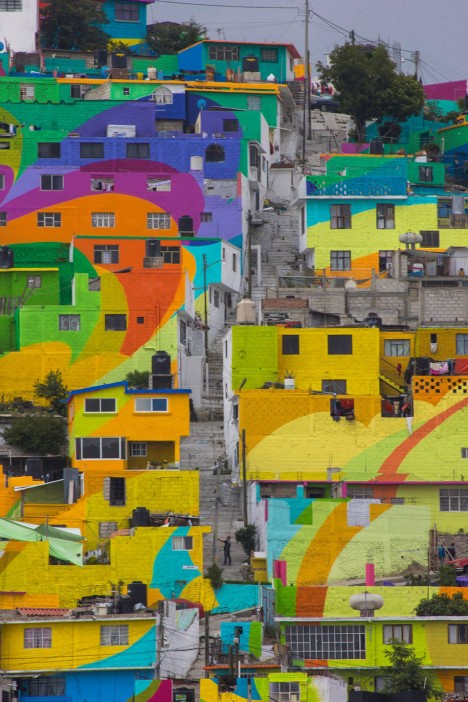
Representing an enormous collective effort, this remarkable mural manages to look complete from a distance while, upon closer inspection, brightening 209 houses occupied by 452 families, impacting the lives of 1808 residents of this hillside community.

painted town before

painted town hillside

Even more remarkably, the color selections for different sections (totalling over 200,000 square feet of paint) were worked out in conjunction with those occupying the houses of Palmitas, who were asked about their favorite colors and included in the design scheme. The project has been credited with reducing youth violence and local crime rates while creating jobs for the area.

painted town tour

painted wall house closeup

The group orchestrating this massive undertaking is called Germen Crew, self-named after germs, the seeds of ideas and art. Led by Mibe, a street artist from nearby Mexico City, the group sees itself as much as collection of community organizers and facilitators as artists or creators.

painted town mexico

For them, residents provide multiplier effects strengthening project, process and outcome and making for a much different endeavor than murals made under the radar by individuals. In turn, the artists used a simple pallet of conventional and replicable paint colors, making it both easy to maintain but also enabling those in the neighborhood to turn doing so into a collaborative activity.

painted town steps

Like the Favela Project in Rio or Blue Town of Morocco, there are secondary benefits for the locals as well, including projected increases in tourism. In the case of the latter, the strange site of a single-colored town brought in close to 100,000 visitors in the six months following its completion. This project was completed with support from regional governments as well as the national government of Mexico


WebUrbanist

 
Comments Off on Rainbow Connection: Huge Mural Spans 200 Houses on Hillside in Mexico

Posted in Creativity


The Not-So-Obvious Reason for Using HDR

01 Jun

Get Viktor’s Rapid Editing for HDR eBook, Course & Presets Bundle at 60% off now over at Snapndeals, only until June 7th (AUS time). 

Over the past five years or so, HDR (high dynamic range) has become a huge part of my photography.

Even with the latest advances in camera sensor technology, the dynamic range of the human eye is much wider than any modern camera sensor, and as a result, can only partly interpret the human experience. The goal of HDR photography is to artificially increase the dynamic range of a given photograph, making it as close as possible to the human experience.

Images The Not So Obvious Reason 01

I do not consider HDR to be a photography style, but rather, a technology that helps us to extend our creative reach and overcome the limitations of modern photo equipment, specifically a camera’s sensor.

When the dynamic range of the scene we capture exceeds the dynamic range of the camera’s sensor, it results in the loss of information (or details) in both the highlight and shadow areas. HDR technology allows us to separately capture these details from the darker and brighter areas of the scene, and merge that information during the editing process.

Even though every generation of modern camera offers a larger and larger dynamic range that gets even closer to the human experience, HDR technology continues to be an extremely valuable tool to have in your toolkit.

But, those who read my blog and follow me on social media often give me a hard time when I post an HDR processed image with a dynamic range that is not extreme. As a result, I get blamed for using HDR for no reason and am accused of intentionally complicating the editing process.

Images The Not So Obvious Reason 02

In this article, I will demonstrate exactly why and how I use HDR when the lighting of a scene is not too extreme.
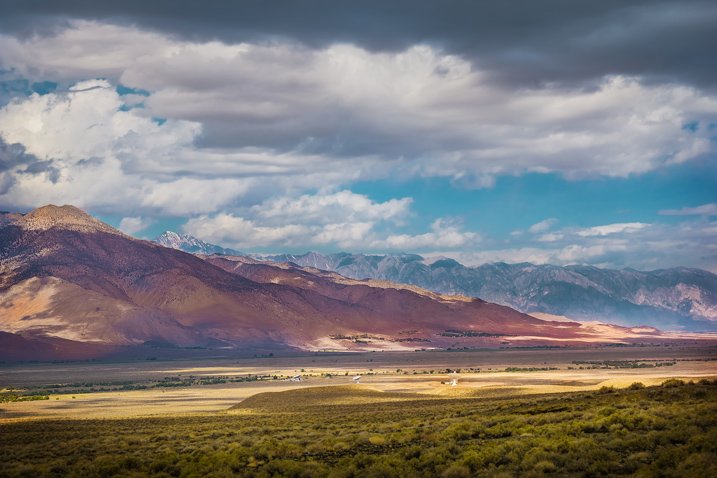
I took the featured photo in the Eastern Sierra during my driving trip to the Southwest.

Images The Not So Obvious Reason 03

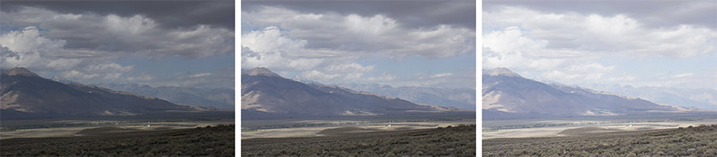
Covered by the clouds, the sun diffused the light and made it less dynamic. I could see right away that I did not need HDR processing to capture and preserve the entire light range. However, I took three bracketed shots anyway just to make sure I collected as much information from the scene as possible.

When I started editing the photo in Lightroom, I only used a single RAW image (middle bracket). The challenge was to overcome the mild haze in the air, so I had to apply pretty aggressive edits in Lightroom (contrast, clarity and vibrance) to bring back the contrast and colors of the scene.

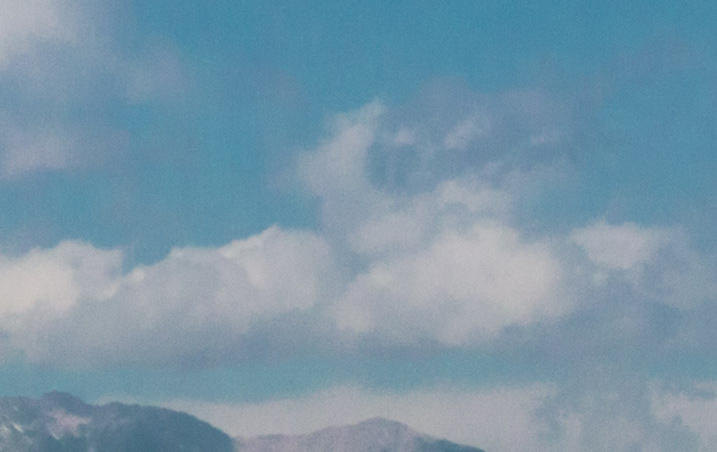
Once I was happy with the result, I evaluated the image by zooming in to 100% (1:1 in Lightroom), in order to see what noise reduction setting to use. When I did this, I realized that the image started to break up because of my aggressive editing. The deterioration in the image was beyond digital noise and was almost impossible to fix even using the dedicated noise reduction tool.

Images The Not So Obvious Reason 04

This is when HDR came to the rescue. I selected three bracketed shots and merged them to HDR using the HDR Merge module of Lightroom.

Images The Not So Obvious Reason 06

After Lightroom produced a brand new HDR image in DNG format, I used the Sync functionality of the program to apply the editing setting of the original RAW file, to the new HDR image.

The effect of the edits were identical to the original RAW file, but the image was much cleaner without any traces of deterioration. The newly created HDR file had much more information and details, which allowed me to push it much harder without producing negative artifacts.

Images The Not So Obvious Reason 05

The image is cropped 100% without any noise reduction added.

The digital noise of the image was mild and was completely eliminated using the noise reduction plugin.

Conclusion

By merging multiple images to HDR, it not only helps us overcome the dynamic range limitations of modern photo equipment, but can also to produce images that have more digital information and details, compared to individual out-of-camera RAW files.

Get Viktor’s Rapid Editing for HDR eBook, Course & Presets Bundle at 60% off now over at Snapndeals, only until June 7th (AUS time). 

googletag.cmd.push(function() {
tablet_slots.push( googletag.defineSlot( “/1005424/_dPSv4_tab-all-article-bottom_(300×250)”, [300, 250], “pb-ad-78623” ).addService( googletag.pubads() ) ); } );

googletag.cmd.push(function() {
mobile_slots.push( googletag.defineSlot( “/1005424/_dPSv4_mob-all-article-bottom_(300×250)”, [300, 250], “pb-ad-78158” ).addService( googletag.pubads() ) ); } );

The post The Not-So-Obvious Reason for Using HDR by Viktor Elizarov appeared first on Digital Photography School.


Digital Photography School

 
Comments Off on The Not-So-Obvious Reason for Using HDR

Posted in Photography