RSS
 

Archive for June, 2016

4 Batch Processing Techniques to Speed Up Your Workflow in Lightroom

09 Jun

0 copy

Lightroom is a fantastic program for keeping your photos organized, but it also provides many tools to speed up your editing workflow. You can even process many photos at once with batch editing. These techniques are by far the biggest time savers Lightroom provides. Once you start using them you’ll wonder how you ever edited each image individually.

Technique 1: Applying presets on import

Presets are hugely popular, and for good reason. They allow you to apply frequently used edits and adjustments to photos, instead of having to manually adjust the settings for each new image. But did you know you can apply your favorite preset during import and cut out a lot of steps?

1 copy

Step 1: Start an import in the library module

2 copy

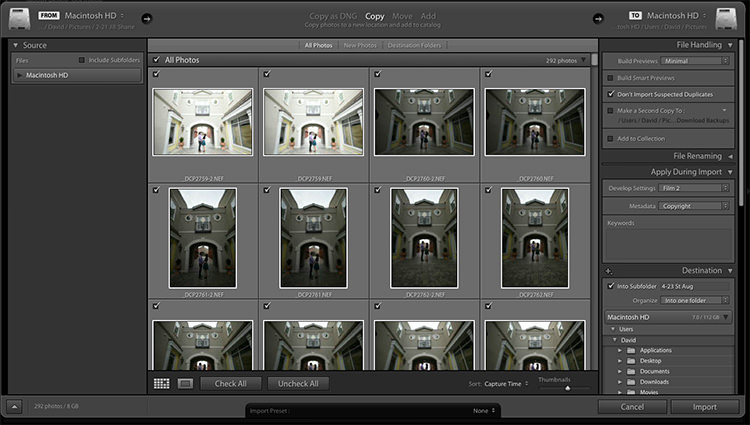
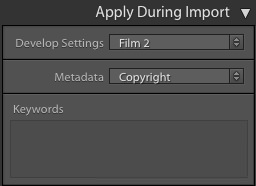
Step 2: On the right panel in the import dialog you’ll see the “Apply During Import” module.

Step 3: If you have a base preset, or a most commonly used one, select it here and click import to have it automatically applied to all of the photos as they are imported into Lightroom.

This not only skips a lot of clicks for you, but it applies them faster than selecting them individually in the develop module later.

Technique 2: Apply presets in the Library module

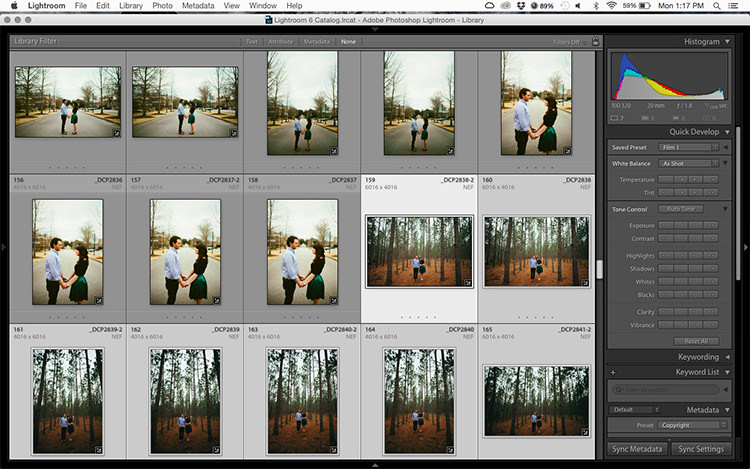
Applying presets on import is great if all the photos are similar, but you may need to use different presets on varying scenes, poses, etc. Instead of applying these one image at a time, you can select them in the library module and apply them in a group. This trick is great for weddings, or similar shoots where you may be inside then outside, or have constantly changing light conditions.

3 copy

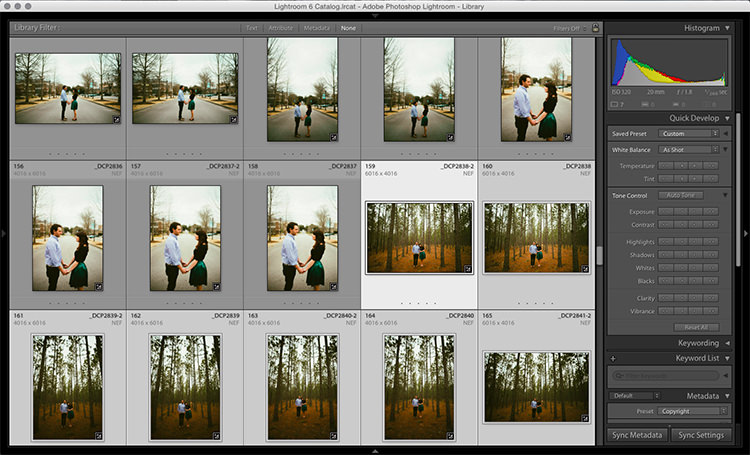
Step 1: Click the first image in the set, then hold down the Control button and click any others to which you want to apply the same preset.

4 copy

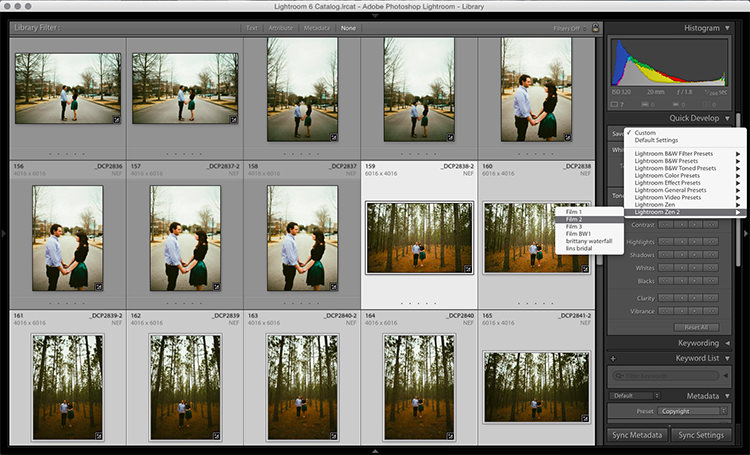
Step 2: At the top of the Quick Develop panel, click the drop down menu under “Saved Preset” and select the new preset. It will update the settings from that preset to all the selected photos.

5 copy

Step 3: Repeat for each changing scene as needed.

Technique 3: Edit in the Library module

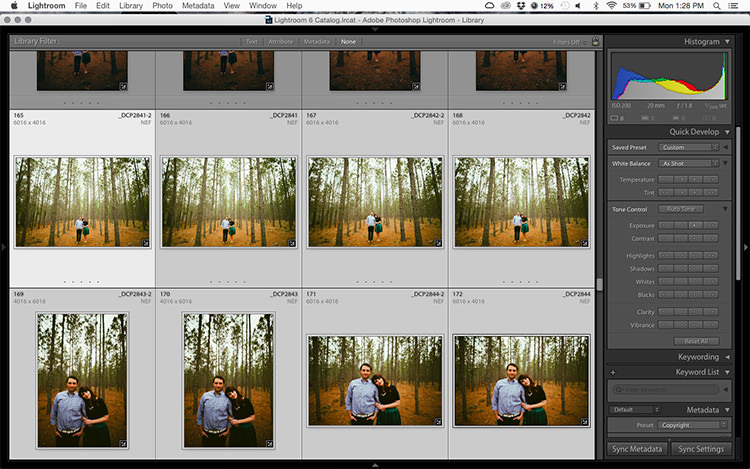
The Library module runs much smoother, and processes changes faster than the Develop module. Since you have already applied your presets to the images, you will mostly need to make broad adjustments to your photos now. The Library module can edit the major adjustments like white balance, exposure, contrast, and more. Even better, you can apply these adjustments to multiple photos at once, making them more consistent, and saving you a lot of time.

6 copy

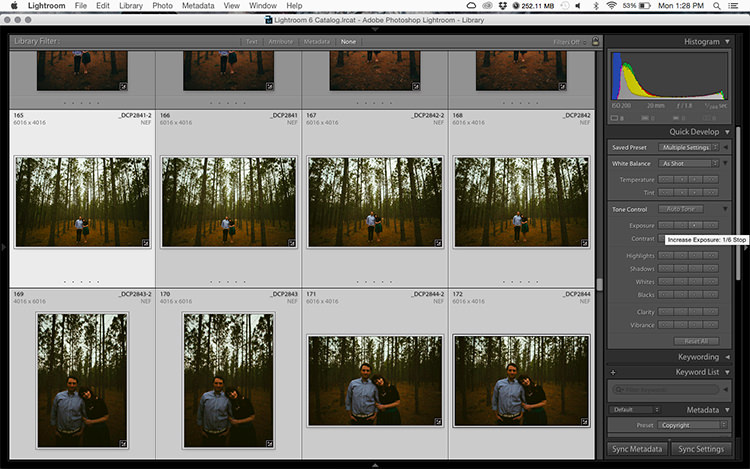
Step 1: Select a group of images as above (CTRL + click to add to your selection) in the Library module.

7 copy

Step 2: In the Quick Develop panel on the right, click the arrows under Exposure, Contrast, and any other applicable options, to apply the changes to all selected photos at once.

Step 3: You can use the + and – key to enlarge or minimize the library view, allowing you to get a better view of the adjustments you are applying.

Technique 4: Sync adjustments across multiple photos in the Develop module

After applying the broad adjustments, you may need to fine-tune a few things in your images. These may include changes like a curve adjustment, add a gradient filter to fine tune a bright sky, etc. These are changes you have to make in the Develop module, but you can still apply them in batches, instead of doing them one photo at a time.

8 copy

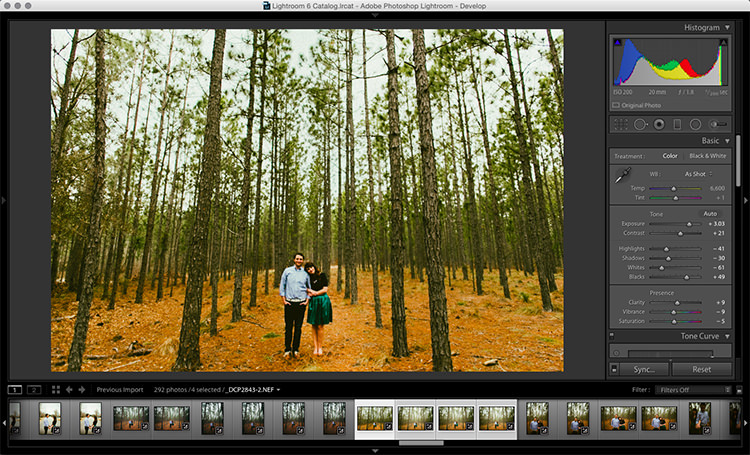
Step 1: In the Develop module, apply the adjustments to a single photo.

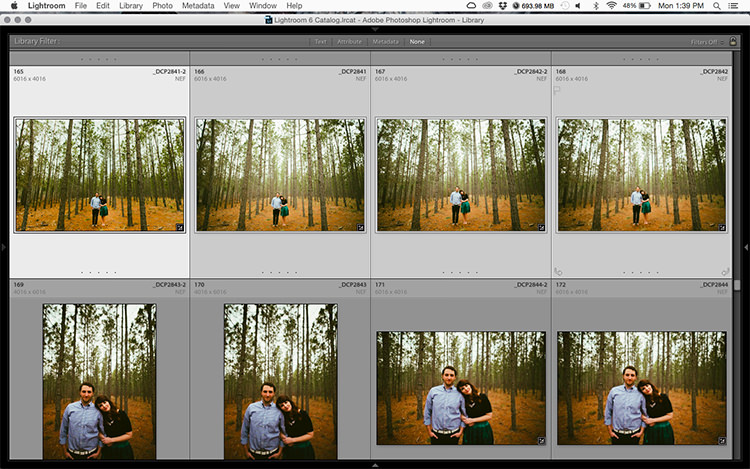
Step 2: In the Develop filmstrip or Library grid view, select multiple photos (CTRL + click).

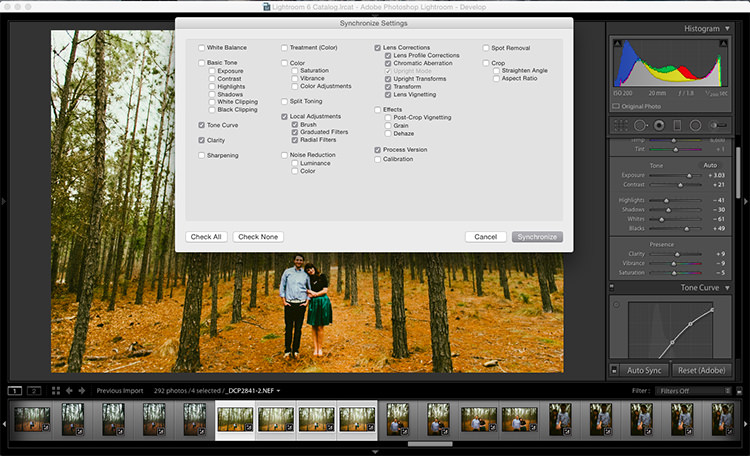
Step 3: At the bottom of the right hand panel, select “Sync”, it will be the left button beside “Reset”

9 copy

Step 4: Check the options that you want to sync with all the selected photos. These should include any adjustments you just made in the Develop module.

10 copy

Keep in mind

When batch editing, be careful you don’t sync anything that you don’t want applied to all of the selected images. If you use the adjustment brush on skin in one photo and sync that to another photo, chances are that the subject has moved slightly, and the brush will be applied to the wrong part of the image.

Stick with it!

Do you think these batch editing techniques have a spot in your workflow? For me, learning to batch edit allowed me to cut my wedding editing time down to a fraction of what it was before. You can focus on the big picture and style of each shoot, and not get lost spending 10-15 minutes on every image. Batch editing lets you get more work done in less time, and that is fantastic!

Do you have any additional tips to add? Please do so in the comments below.

googletag.cmd.push(function() {
tablet_slots.push( googletag.defineSlot( “/1005424/_dPSv4_tab-all-article-bottom_(300×250)”, [300, 250], “pb-ad-78623” ).addService( googletag.pubads() ) ); } );

googletag.cmd.push(function() {
mobile_slots.push( googletag.defineSlot( “/1005424/_dPSv4_mob-all-article-bottom_(300×250)”, [300, 250], “pb-ad-78158” ).addService( googletag.pubads() ) ); } );

The post 4 Batch Processing Techniques to Speed Up Your Workflow in Lightroom by David Childers appeared first on Digital Photography School.


Digital Photography School

 
Comments Off on 4 Batch Processing Techniques to Speed Up Your Workflow in Lightroom

Posted in Photography


Versailles Transformed: Palace Artificially Obscured by Fog and Mist

09 Jun

[ By SA Rogers in Art & Installation & Sound. ]

Screen Shot 2016-06-08 at 2.03.18 PM

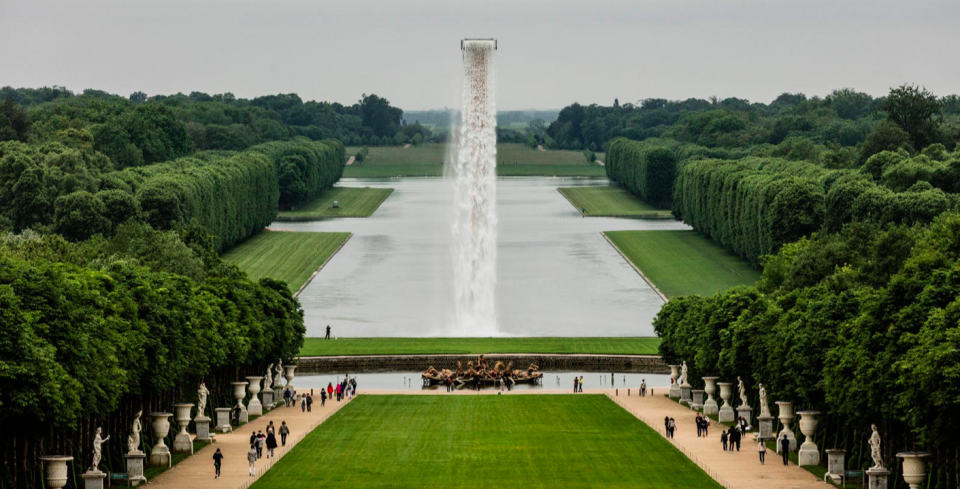
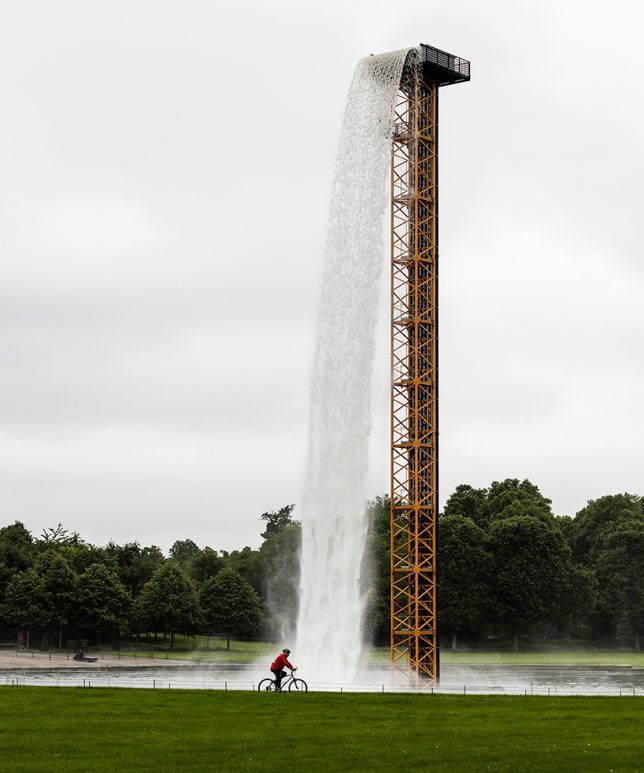
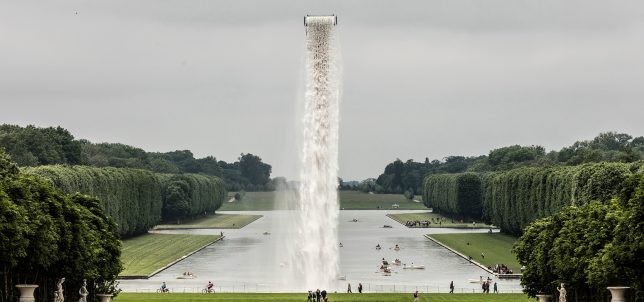
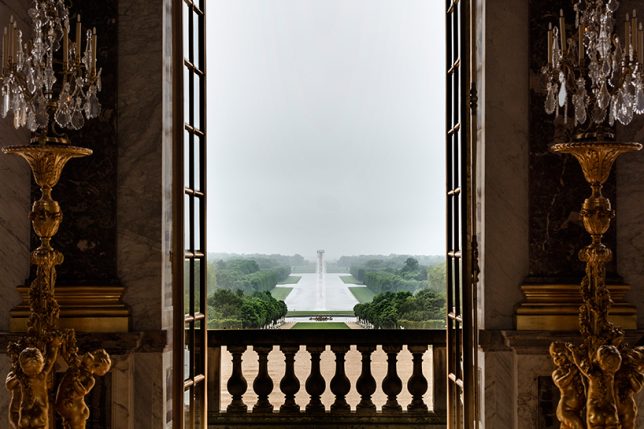
Approaching the Grand Canal of Versailles from the palace, something seems off about the landscape: a tower of water pours from a seemingly invisible support, as if a hole has opened up in the sky. It’s only when you step to either side that you notice the steel structure that sends the waterfall crashing onto the glassy surface of the canal. This intervention is just one of nine that artist Olafur Eliasson has installed in the gardens and inside the Palace of Versailles, shifting visitors’ perception of their environment and themselves. ‘Olafur Versailles’ will be in place through October.

versailles eliasson 4

versailles eliasson 2

versailles eliasson 13

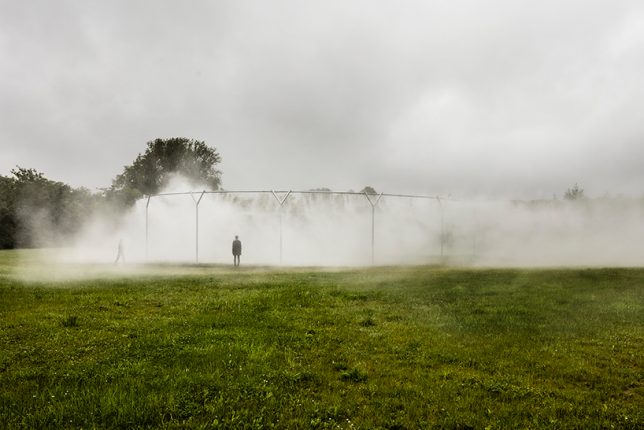
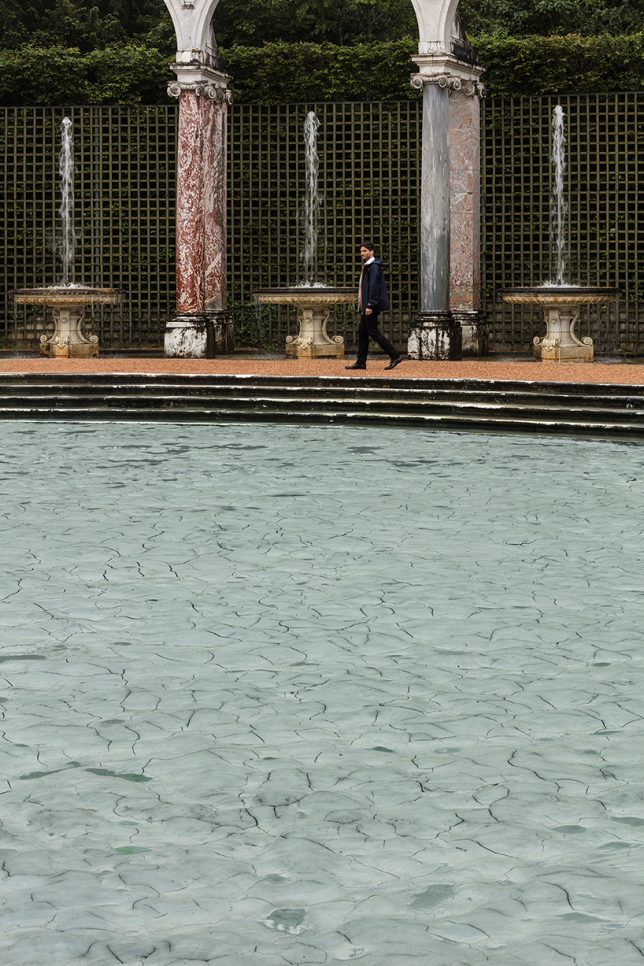
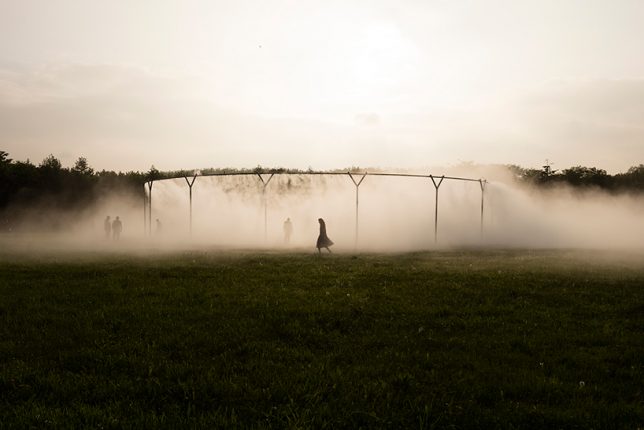
Continuing an eight-year tradition of inviting artists to transform the Palace and its grounds with their work, the new installation seems to shift this French landmark slightly off the axis of reality, adding a dreamy sense of strangeness that changes the atmosphere of the entire château. In the gardens, three installations represent various states of water; the second is a circular arrangement of steel pipes pumping fog onto the lawn while the third fills the Bosquet de la Colonnade with ‘glacial rock flour.’

versailles eliasson 8

versailles eliasson 9

versailles eliasson 10

versailles eliasson 11

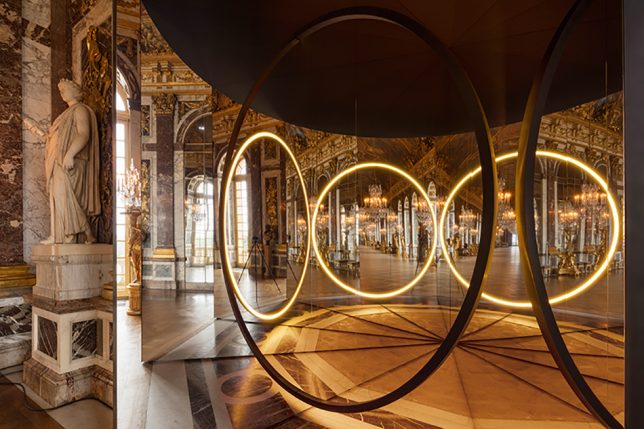
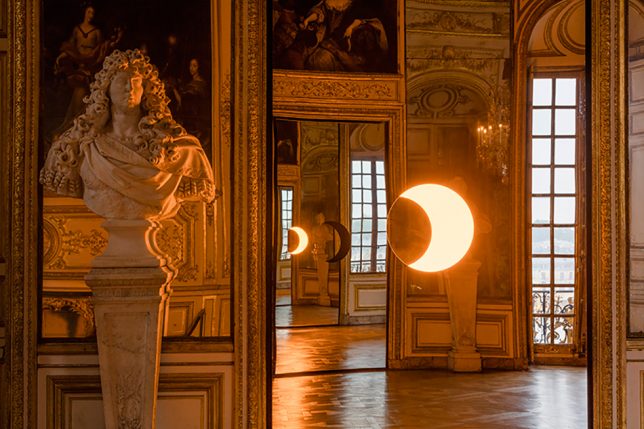
Step inside to face illusions of light and reflection, using mirrors to make it unclear whether you are looking at your real surroundings or a mere facsimile of them at any given time. Perspectives of the interiors suddenly lose their sense of balance, and visitors catch glimpses of their own reflections in unexpected places, as if witnessing their own identical twins moving through the space.

versailles eliasson 1

versailles eliasson 5

versailles eliasson 6

“The Versailles that I have been dreaming up is a place that empowers everyone. It invites visitors to take control of the authorship of their experience instead of simply consuming and being dazzled by the grandeur. It asks them to exercise their senses, to embrace the unexpected, to drift through the gardens, and to feel the landscape take shape through their movement.”

Share on Facebook


[ By SA Rogers in Art & Installation & Sound. ]

[ WebUrbanist | Archives | Galleries | Privacy | TOS ]


WebUrbanist

 
Comments Off on Versailles Transformed: Palace Artificially Obscured by Fog and Mist

Posted in Creativity


Ricoh introduces weather-resistant Pentax K-70 with Hybrid AF and Pixel Shift

09 Jun

$ (document).ready(function() { SampleGalleryV2({“containerId”:”embeddedSampleGallery_3094295769″,”galleryId”:”3094295769″,”isEmbeddedWidget”:true,”standalone”:false,”selectedImageIndex”:0,”startInCommentsView”:false,”isMobile”:false}) });

Ricoh has unveiled the Pentax K-70, an advanced entry-level DSLR with an AA-filterless 24MP APS-C sensor and a body that’s designed to stand up to the elements. It boasts a dustproof, freezeproof and weather-resistant design, and is the first Pentax DSLR to offer Hybrid AF in live view. 

The K-70 offers in-body shake reduction image stabilization, bringing with it Pixel Shift Resolution and AA filter simulation. An 11-point AF system offers nine centrally located cross-type sensors, and burst shooting is offered at 6 fps.

A PRIME MII image processor allows for 14-bit readout and a maximum ISO of 102,400. Movie recording tops out at 1080/30p, augmented by a 4K interval mode that combines 4K resolution stills into a movie file. On the back panel, the K-70 provides a 3″ 921k-dot vari-angle LCD where its K-50 predecessor used a fixed monitor. Rounding out the feature set is built-in Wi-Fi.

The Pentax K-70 will cost $ 649.95. Somewhat cryptically, Ricoh says it will announce availability at the beginning of July.


Press release:

Ricoh Imaging unveils weather-resistant, advanced digital SLR camera designed for the great outdoors

PENTAX K-70 incorporates speedy, high-accuracy AF, ultra-sensitive imaging engine and other technologies for producing high-resolution images in a wide variety of challenging conditions

DENVER, Colo., June 8, 2016—Ricoh Imaging Americas Corporation today announced the PENTAX K-70 advanced digital single-lens reflex (SLR) camera. Compact, dustproof and weather-resistant, the new PENTAX K-70 camera incorporates features — many of which have previously only been available on top-of-the-line PENTAX models — that enable photographers to produce high-resolution still photos and HD videos in a wide variety of challenging conditions, including low light and temperatures as low as 14°F (-10°C). The camera’s weather-resistant capabilities and compact design make it an ideal photographic companion for hikers, climbers and snow sports enthusiasts, as well as for nature and landscape photographers.

With a newly developed image accelerator unit providing a top sensitivity of ISO 102,400, plus the PENTAX-developed PRIME MII image processor, the PENTAX K-70 is capable of capturing high quality images in extremely low-light conditions. A new Hybrid Autofocus (AF) system, integrating both image-plane phase-matching and contrast-detection autofocus technologies, delivers speedy and accurate autofocus while also providing continuous auto focus for HD video recording.

“PENTAX has a long history of developing cameras and lenses that can withstand the rigors of the great outdoors. The K-70 goes a step further, with new, advanced features that enable the creation of higher quality images and make the camera very easy to use, both in the backyard and in the field,” said Kaz Eguchi, president, Ricoh Imaging Americas Corporation. “Combined with any one of our many available weather-resistant lenses, this camera is in a class of its own for outdoor photography.”

The PENTAX K-70 provides a variety of advanced features found only in Ricoh’s high-grade PENTAX K-series models, such as the PENTAX Pixel Shift Resolution System, which produces high-resolution, finely detailed images. These also include an AA Filter Simulator that effectively eliminates moiré without the need for an anti-aliasing filter, a variable-tilt LCD monitor, and an in-body shake-reduction mechanism that reduces the effects of camera shake up to 4.5 shutter steps. The K-70 also incorporates built-in Wi-Fi for remote shooting and easy transfer to smart devices using Ricoh’s dedicated Image Sync app.

The PENTAX K-70’s exterior is designed with outdoor operations in mind. Features such as a newly designed grip, mode dial and control buttons on the camera’s top and back panels are designed to be easy and intuitive to operate, even with a gloved hand. It also comes equipped with an outdoor-friendly LCD monitor with an illumination control that can be instantly adjusted to the lighting level of any shooting location. The K-70 also has a red-lighted monitor display function which keeps ambient light from interfering with astrophotography.

In conjunction with the PENTAX K-70 camera, Ricoh Imaging is announcing the HD PENTAX-DA 55-300mm f/4.5-6.3ED PLM WR RE lens, a compact, weather-resistant telephoto zoom (see details in separate news release, also issued today); plus the Cable Switch CS-310, a remote shutter release designed especially for use with the K-70.

| Pricing and Availability |

Availability of the PENTAX K-70 camera, which comes in black and silky silver finishes, will be announced at the beginning of July. When available, it can be purchased at www.ricohimaging.com for $ 649.95, as well as at Ricoh Imaging-authorized retail outlets throughout North America.

Pentax K-70 specifications:

Price
MSRP $ 649/£559 (body only), £799 (w/18-135mm lens)
Body type
Body type Compact SLR
Sensor
Max resolution 6000 x 4000
Other resolutions 4608 x 3072, 3072 x 2048, 1920 x 1280
Image ratio w:h 3:2
Effective pixels 24 megapixels
Sensor photo detectors 25 megapixels
Sensor size APS-C (23.5 x 15.6 mm)
Sensor type CMOS
Processor PRIME MII
Color space sRGB, AdobeRGB
Color filter array Primary color filter
Image
ISO Auto, 100-102400
White balance presets 8
Custom white balance Yes (3 slots)
Image stabilization Sensor-shift
Image stabilization notes 4.5 stop correction
Uncompressed format RAW
JPEG quality levels Best, better, good
File format
  • JPEG (Exif v2.3)
  • Raw (PEF or DNG)
Optics & Focus
Autofocus
  • Contrast Detect (sensor)
  • Phase Detect
  • Multi-area
  • Center
  • Selective single-point
  • Tracking
  • Single
  • Continuous
  • Face Detection
  • Live View
Autofocus assist lamp Yes
Manual focus Yes
Number of focus points 11
Lens mount Pentax KAF2
Focal length multiplier 1.5×
Screen / viewfinder
Articulated LCD Fully articulated
Screen size 3
Screen dots 921,000
Touch screen No
Screen type TFT LCD
Live view Yes
Viewfinder type Optical (pentaprism)
Viewfinder coverage 100%
Viewfinder magnification 0.95×
Photography features
Minimum shutter speed 30 sec
Maximum shutter speed 1/6000 sec
Exposure modes
  • Program
  • Shutter priority
  • Aperture priority
  • Shutter and aperture priority
  • Manual
Scene modes
  • Portrait
  • Landscape
  • Macro
  • Moving Object
  • Night Scene Portrait
  • Sunset
  • Blue Sky
  • Forest
  • Night Scene
  • Night Scene HDR
  • Night Snap
  • Food
  • Pet
  • Kids
  • Surf & Snow
  • Backlight Silhouette
  • Candlelight
  • Stage Lighting
  • Museum
Built-in flash Yes
Flash range 12.00 m (at ISO 100)
External flash Yes
Flash modes Auto, auto w/redeye reduction, flash on, flash + redeye reduction, slow sync, trailing curtain sync, manual
Flash X sync speed 1/180 sec
Drive modes
  • Single
  • Continuous
  • Self-timer
  • Remote control
  • Bracketing
  • Mirror-up
  • Multi-exposure
  • Interval shooting
  • Interval composite
  • Interval movie
  • Star stream
Continuous drive 6.0 fps
Self-timer Yes (2 or 12 secs, continuous)
Metering modes
  • Multi
  • Center-weighted
  • Spot
Exposure compensation ±5 (at 1/3 EV, 1/2 EV steps)
AE Bracketing ±5 (2, 3, 5 frames )
Videography features
Resolutions 1920 x 1080 (60i, 50i, 30p, 25p, 24p), 1280 x 720 (60p, 50p)
Format MPEG-4, H.264
Microphone Stereo
Speaker Mono
Storage
Storage types SD/SDHC/SDXC (UHS-I compatible)
Connectivity
USB USB 2.0 (480 Mbit/sec)
HDMI Yes (mini-HDMI)
Microphone port Yes
Headphone port No
Wireless Built-In
Wireless notes 802.11b/g/n
Remote control Yes (wired or wireless)
Physical
Environmentally sealed Yes
Battery Battery Pack
Battery description D-LI109 lithium-ion battery & charger
Battery Life (CIPA) 410
Weight (inc. batteries) 688 g (1.52 lb / 24.27 oz)
Dimensions 126 x 93 x 74 mm (4.94 x 3.66 x 2.91)
Other features
Orientation sensor Yes
Timelapse recording Yes
GPS Optional
GPS notes O-GPS1

Articles: Digital Photography Review (dpreview.com)

 
Comments Off on Ricoh introduces weather-resistant Pentax K-70 with Hybrid AF and Pixel Shift

Posted in Uncategorized


Not Just a Facade: 15 Dynamic Modern Exterior Treatments

09 Jun

[ By SA Rogers in Architecture & Offices & Commercial. ]

facades fish 3

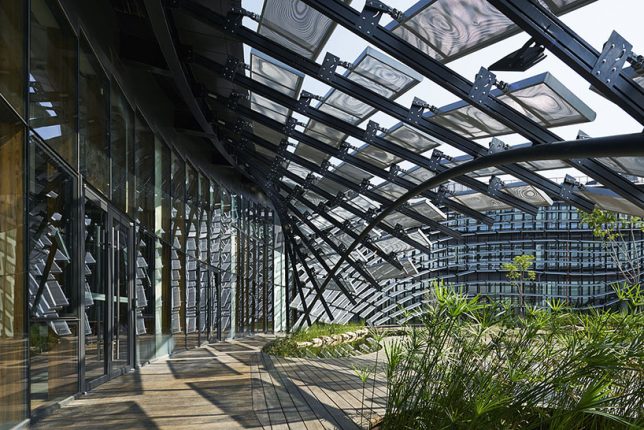
The word ‘facade’ implies illusion, and that can be true even when it’s used to refer to the faces of buildings, as secondary structures wrap around them like veils, obscuring their true form and creating dazzling displays of light and shadow like a distracting sleight of hand. Some facades disguise the original building in a form of low-impact renovation, while others are kinetic, opening and closing or rippling in the wind.

Geometric Planter Facade

facades geometric planter 1

facades geometric planter 2

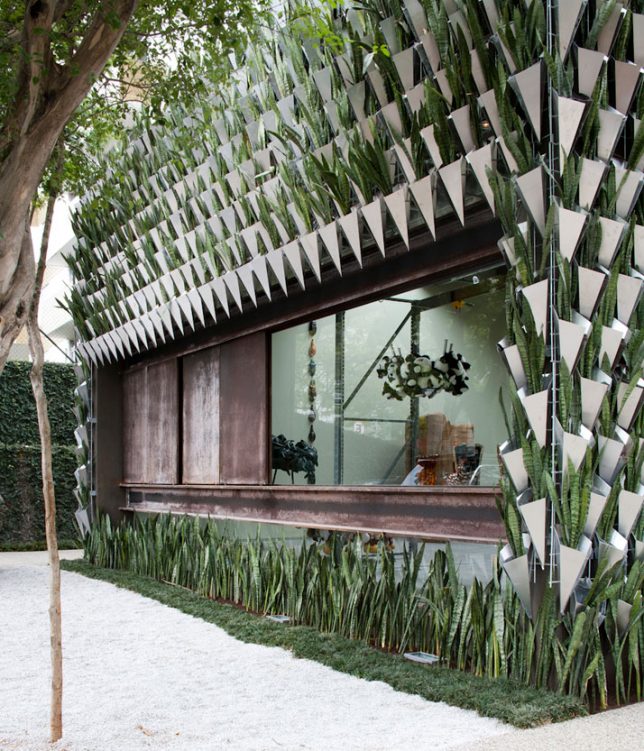
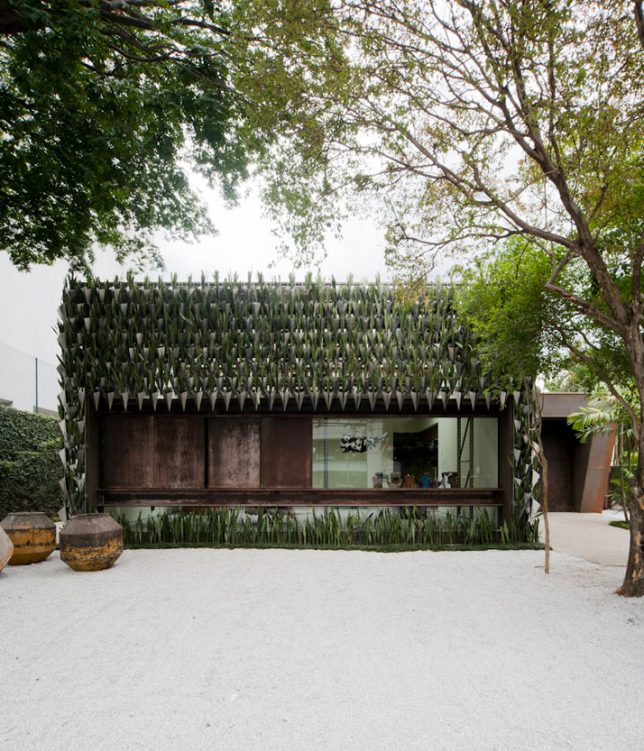
The exterior of the Firma Casa store in São Paulo, Brazil, which promotes young Brazilian furniture designers, gets an appropriately hip and modern look with the addition of a screen of geometric vases. 3,500 individual planters hold 9,000 seedlings and project slightly out from the exterior walls, keeping soil and water away from them for a relatively low-impact and low-budget green wall solution.

Roll-Up Facade Forms Canopy

Facade roll up 1

facade roll up 2

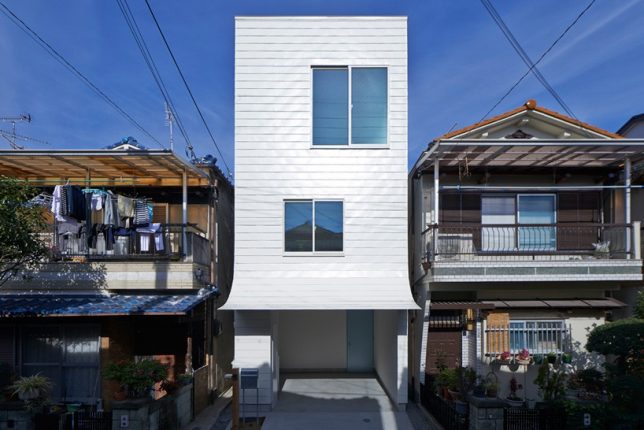
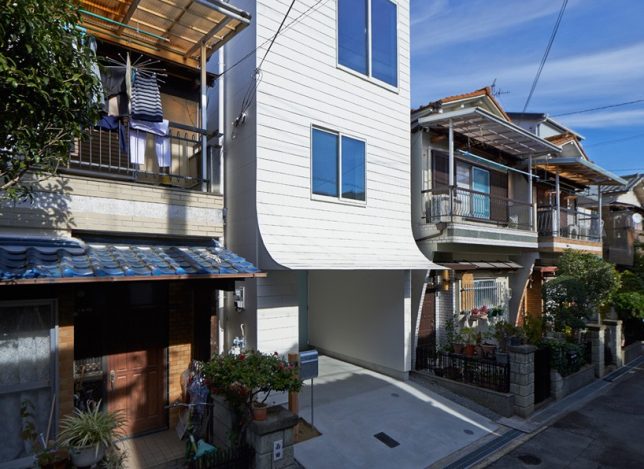
Incredibly simple, yet unusual enough to stop you in your tracks on the street, this facade uses ordinary materials with an unexpected twist. Tokyo-based studio Ninkipen! made this contemporary white home stand out from its neighbors with a peeling facade that rolls up slightly from the ground level to create an awning for the garage.

Undulating Facade of Fins Looks Like Swimming Fish

facades fish 1

facades fish 2

facades fish 3

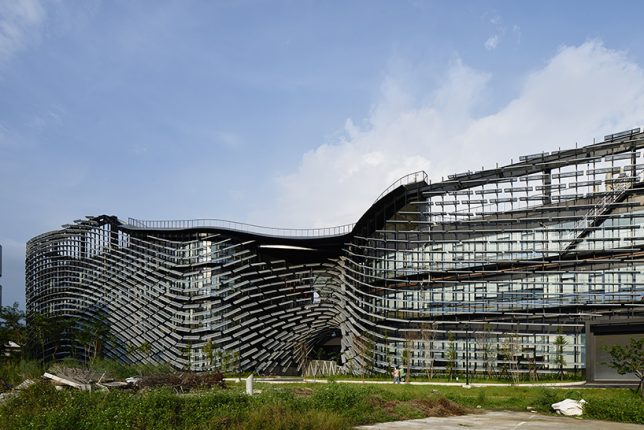
The angled steel fins enveloping the Industrial Technology Research Institute at the Central Taiwan Innovation & Research Park is intended to recall the look of a school of fish swimming in synchronicity. Noiz Architects customized the opacity of the screen according to the function going on inside each particular area of the building, since some research areas, exhibition spaces, greenhouses, cafes and other programs require different degrees of sunlight. This veil-like screen is separate from the building itself, making for easy repairs and additions and occasionally stretching out to create indoor/outdoor spaces.

Kinetic Parking Garage Facade

facades kinetic garage 1

facades kinetic garage 2

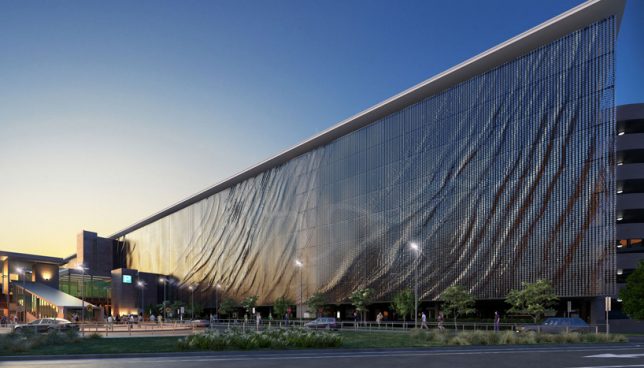
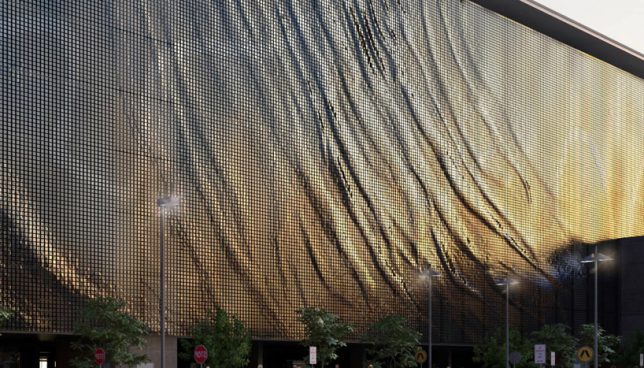
118,000 suspended aluminum panels gently flap in the wind, creating textures reminiscent of flowing textiles and rippling water. Designed by artist Ned Kahn and fixed to the exterior of the Brisbane Airport parking garage in Australia, the kinetic facade reacts to its natural environment, constantly changing as it provides shade and ventilation for the interior.

Perforated Shutters on a Concrete Home

facade perforated 1

facade perforated 2

facade perforated 3

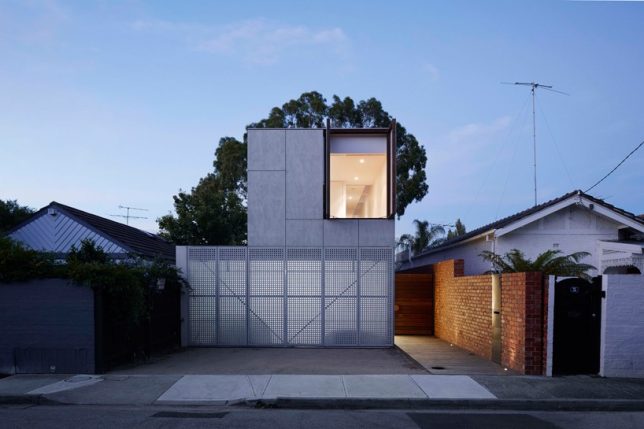
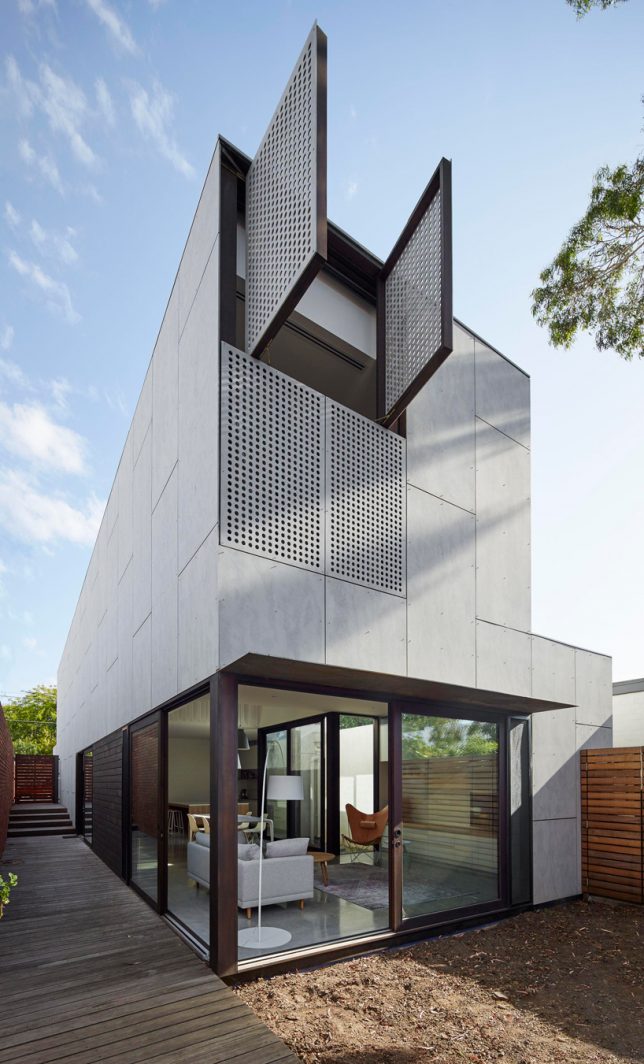
All street-facing and neighbor-visible windows on the ‘May Grove’ residence in Melbourne by Jackson Clements Burrows can be covered with perforated shutters integrated right into the facade, or opened when the inhabitants want a clear view. Not only do they control ventilation and privacy for this low-cost modern home, they create a play of light and shadow throughout the interior during the day.

Next Page – Click Below to Read More:
Not Just A Facade 15 Dynamic Modern Exterior Treatments

Share on Facebook


[ By SA Rogers in Architecture & Offices & Commercial. ]

[ WebUrbanist | Archives | Galleries | Privacy | TOS ]


WebUrbanist

 
Comments Off on Not Just a Facade: 15 Dynamic Modern Exterior Treatments

Posted in Creativity


Canon USA launches new online photography courses

09 Jun

Canon USA has announced seven new photography courses that will form the beginning of the company’s new Canon Online Learning program. The courses are aimed at the full spectrum of photographers from beginner to professional says Canon, and students will be able to learn at their own pace as the resources aren’t live. There will be video tutorials and downloadable worksheets and assignments for the practical courses, while equipment-based courses intend to help users get the most out of their Canon cameras and accessories.

The first seven courses will be:

  • Understanding EOS Camera Operations
  • Photo 101: How to Take Great Pictures
  • Printing Basics & Beyond
  • Great Landscapes Made Easy
  • Child’s Play: Simple Tips for Photographing Children
  • Getting Started with Flash Photography
  • Canon Insider Guide: EOS Rebel Series

Courses will be priced from $ 19.99 to $ 59.99.

For more information visit the Canon Online Learning website.


Press release

Canon Educates & Inspires With New In-Depth Online Learning Program

Canon Online Learning Courses Designed to Support and Develop Imaging Skills for Passionate Photographers of All Levels

Canon U.S.A., Inc., a leader in digital imaging solutions, is launching Canon Online Learning, a new program of immersive digital courses designed to help photo and video enthusiasts of all levels develop their skills at their own pace. The program, which expands upon Canon’s robust mix of existing free and paid educational offerings, looks to educate parents, travelers, imaging hobbyists and working professionals with proven techniques from recognizable industry talents.

Available now are these initial seven courses, suitable for all skill levels:
* Understanding EOS Camera Operations
* Photo 101: How to Take Great Pictures
* Printing Basics & Beyond
* Great Landscapes Made Easy
* Child’s Play: Simple Tips for Photographing Children
* Getting Started with Flash Photography
* Canon Insider Guide: EOS Rebel Series

These first seven courses, and subsequent classes to follow, will include video guides unique to each course with the option to download or print PDF materials. With the exception of Canon Insider Guide: EOS Rebel Series, courses will also include complementary resources such as bonus video content, lighting/shooting diagrams, shot lists, resource guides and interviews with course instructors. Additional interactive materials may include quizzes, assignments, interactive images and diagrams.

“Canon has always provided industry leading educational resources for our customers. Over the years, we have expanded our offerings to include live workshops, one-on-one in-person sessions and countless free lectures across the country. Now, for those passionate customers looking to take a deeper dive into photography or videography, we have developed a curriculum of content that addresses the various ways our customers use our products today, and it’s available at their convenience online, day or night,” said Yuichi Ishizuka, president and COO, Canon U.S.A., Inc. “This new program also helps familiarize the imaging community with our wide range of educational tools, allowing them to learn valuable tips from our technical experts, as well as our Explorers of Light professional photographers.”

Initial course offerings range from $ 19.99-$ 59.99. To learn more about Canon Online Learning please visit: http://usa.canon.com/onlinelearning or email learning@cusa.canon.com.

Articles: Digital Photography Review (dpreview.com)

 
Comments Off on Canon USA launches new online photography courses

Posted in Uncategorized


Video: Canon EOS 7D versus leaf-cutter ants

08 Jun

Taking pictures of wildlife in the jungle isn’t easy, which is why a lot of photographers set up ‘trap’ cameras. But every now and then, you end up attracting the wrong species altogether. Watch what happened when conservationist and YouTube host Phil Torres set up his Canon EOS 7D near a nest of leaf-cutter ants, in the jungles of Peru.

It’s never pleasant seeing an expensive camera get destroyed but quite honestly we’re more concerned about the health of the ants after eating all of that plastic. Also, sorry Phil, but that’s not how Gorrillapods got their name. 

Articles: Digital Photography Review (dpreview.com)

 
Comments Off on Video: Canon EOS 7D versus leaf-cutter ants

Posted in Uncategorized


Firmware update adds watermarking and improves user interface of DxO ONE

08 Jun

DxO has released a firmware update for its ONE connected camera. The main additions in firmware version 1.4 are support for copyright/author metadata as well as watermarking. Users can now preview aperture and exposure compensation settings in real-time on the ‘viewfinder,’ better known as an iPhone or iPad. DxO has also tweaked the user interface, with quicker access to camera and app settings. And, as with most firmware updates, overall camera performance has been improved.

Version 1.4 of the DxO ONE app for iOS is now available in the iTunes Store. The camera firmware is updated via the app.

Press Release:

DxO ONE continues to redefine mobile photography with v1.4 update

A new streamlined user interface helps protect your photos with integrated copyright and watermarking support

PARIS—June 8th, 2016—DxO announced today the immediate availability of another major update to the multi-award-winning DxO ONE Miniaturized Pro Quality Camera™ for iPhone® and iPad®. Continuing with the promise to make the DxO ONE even better after you’ve bought it, version 1.4 adds integrated copyright/author and watermarking support to help protect your photos from unauthorized use. In addition to important performance enhancements, the update also features a dramatically improved user experience that puts all of your capture and application settings in their own, quick-access menus.

“Like my DSLR and tripod, the DxO ONE has become an important part of my workflow, allowing me to instantly share high quality, high res photos with my clients and followers”, said noted motorsports photographer, John Thawley. “By adding integrated copyright info and watermarking support, I can be confident that my shared DxO ONE images are now protected from unauthorized use.” 

Since its initial introduction revolutionized the world of mobile photography, literally dozens and dozens of new features have been added to every DxO ONE via automatic (and free) software and firmware updates. Photographers the world over told our team they love the instant sharing capabilities of the DxO ONE, but wanted a way to better protect their work. DxO’s engineers responded by providing the ability to automatically embed copyright and author info directly into the EXIF data of every DxO ONE photo. In addition, version 1.4 introduces the option to automatically add a watermark to photos shared to Instagram, Twitter, Facebook and every other photo sharing service supported by Apple iOS.

As more and more sophisticated controls have been added to the DxO ONE iOS app, the design team in Paris determined through exhaustive usability studies, that access to these controls could be even more efficient. The resulting version 1.4 update sports a streamlined user interface that provides one-tap access to capture settings, all of which are now logically grouped in a consolidated design. In addition, application settings, such as the Message Center and online support, can now be accessed with one tap from the Gallery view. The net result is that the bright, beautiful Retina viewfinder of the iPhone is now far less cluttered, leaving more room to compose your DxO ONE images.

“DxO has a world-class design team in Paris that values direct user feedback above everything else,” said Kirk Paulsen, consulting CMO for DxO. “They continue to innovative at a breakneck pace, adding exciting new features and useful controls with each successive release. It’s remarkable how far the DxO ONE has advanced in less than a year since it was first introduced.”

Version 1.4 also introduces a host of other features based on direct user feedback, including the ability to preview in the viewfinder, in real-time, camera controls such as Aperture and EV-bias. Users can now determine when they want their DxO ONE to go into power saving mode, and all-important firmware updates that unlock new features and functionality are now more visible via top-level notifications, so you’ll never miss the opportunity to take advantage of cool new ways to control your DxO ONE.

Every DxO ONE camera includes free access to DxO Connect, very simple but extremely powerful software for Mac and PC, that can make your best DxO ONE photos look even better. DxO Connect v1.4 now leverages the new DxO OpticsPro 11 engine, which includes even more remarkable noise reduction for high ISO, low-light images. The new processing engine also makes use of face detection to automatically extend the dynamic range, add fill light, and improve contrast while optimizing illumination on faces in your photos. DxO Connect can even automatically add microcontrast to sharpen fine details in your images, but it’s smart enough to leave those details intact with photos involving faces or with those captured at a high ISO in low light. Mac users, who use OS X Photos as their primary photo editing software, may want to download the updated extension (DxO OpticsPro for Photos – DxO ONE Camera only) from the App Store, which lets you tap into the power of the new DxO OpticsPro 11 photo engine without ever leaving the Photos app.

Pricing & Availability

The DxO ONE Miniaturized Pro Quality Camera™ for iPhone® and iPad® is available for purchase at dxo.com, Amazon, Best Buy, B&H, Target and other respected retailers for only $ 499 (US).

The DxO ONE iOS v1.4 app and companion Apple Watch app are both available for free via the iTunes App Store. New firmware, also immediately available, can be downloaded to the iPhone and installed on existing DxO ONE cameras with a simple tap. The 1.4 updates to DxO Connect and ‘DxO OpticsPro for Photos – DxO ONE Camera only’, are also immediately available for existing users to download from dxo.com and the Mac App Store, respectively.

Articles: Digital Photography Review (dpreview.com)

 
Comments Off on Firmware update adds watermarking and improves user interface of DxO ONE

Posted in Uncategorized


2016 Roundup: $1200-2000 Crop-Sensor Interchangeable Lens Cameras

08 Jun

For those wanting to step up from entry-level to midrange ILCs, there are many things to consider, including the choice between a DSLR or mirrorless camera, what sensor size suits you best, how important video is to you, and of course the lens system. 

While full-frame cameras typically offer superior low light image quality and more control over depth-of-field, crop-sensor cameras are extremely capable in their own right – and (usually) more compact and less costly.  

We’ve split the $ 1200-2000 ILC marketplace into two segments – cropped sensor cameras (which you’ll find in this roundup) and full-frame options (coming soon). 

There’s a lot of variety in this group of crop-sensor cameras. Two of them are DSLRs and five are mirrorless. While most use APS-C sensors, the Olympus PEN-F and Panasonic Lumix DMC-GH4 use smaller Four Thirds sensors. Some of these cameras are aimed toward still shooters, while others are more video-centric.

Here are the competitors in this crop-sensor round-up:

  • Canon EOS 7D Mark II
  • Fujifilm X-Pro2
  • Fujifilm X-T1
  • Leica T (typ 701)
  • Nikon D500
  • Olympus PEN-F
  • Panasonic Lumix DMC-GH4

Articles: Digital Photography Review (dpreview.com)

 
Comments Off on 2016 Roundup: $1200-2000 Crop-Sensor Interchangeable Lens Cameras

Posted in Uncategorized


Everything you Always Wanted to know about a Career in Photography but were Afraid to Ask

08 Jun

Before I get into this article, I want to set the stage by saying that the objective here is not to diminish or make light of the concerns and questions that novice photographers have. In fact, at some point in our careers, we have all asked similar questions – sometimes out loud, and sometimes just in the solitude of our own minds. There is no wrong or silly question, and there are no right or wrong answers. These are in no particular order, and the views expressed here are solely based on my own experiences.
Memorable Jaunts DPS Article What you want to know - Beach sunset photos

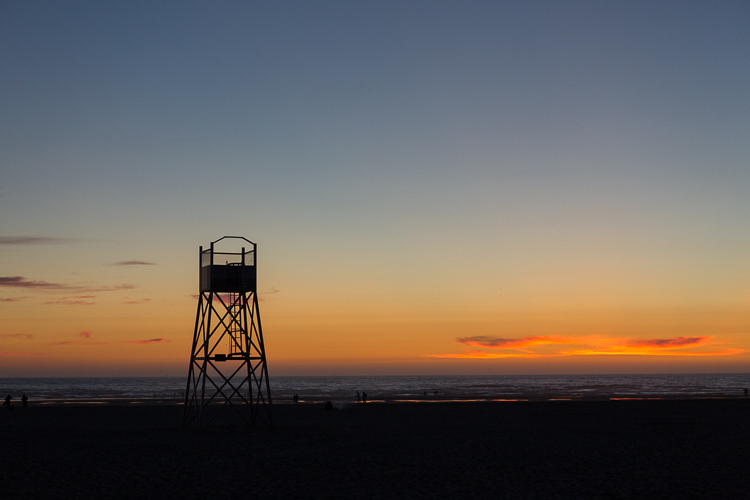
One of my favorite images to date happened by pure accident – I saw the image in my mind even before I took a single frame.

Where can I learn about everything related to photography for FREE?

We are both lucky and unlucky to live in the era of the Internet. Any google search, on average, yields thousands of pages, articles, and YouTube videos. If you have a burning question about anything and everything, the easiest way to learn is via the Internet.

Sites like our own Digital Photography School are a great resource for almost any topic related to photography, from a beginner to an experienced photographer. Other sites like Creative Live offer many classes on various aspects of photography, as well as other creative genres. While most sites provide a great overview of a particular topic, any in-depth research requires time and money. There are number of virtual, as well as live workshops, all over the world covering all aspects of photography. A few that come to mind are The Design School and Clickinmoms (I have used both services and am very happy with the level of instruction provided there – this is just my personal experience).

You could also check out our dPS ebooks and online courses.

Memorable Jaunts DPS Article What you want to know - Chicago Wedding Photos

I learn a lot online, in the comfort of my own home, but every once in while, I like to take a live workshop – not just to update my portfolio, but also to learn from and meet others in the industry!

How do I shoot in manual mode?

Shooting in manual mode is one of the most intimidating things that most amateur photographers face. If you have a DSLR camera that has a manual mode, it is really not that hard once you get the hang of it. The best thing you can do in learning to shoot in manual, is to understand the exposure triangle and how the three key components of photography – shutter speed, ISO and aperture work – independently and with each other. Here is a good article that digs deeper into photographing in manual mode. Remember this too take time and practice. There is another interesting article here in the Digital Photography School archives that explains all three shooting modes and is worth a read.

Memorable Jaunts DPS Article What you want to know - Understanding backlight

Mastering manual mode is important, especially for images like this – backlit golden hour images…this is SOOC (straight out of the camera).

What lens will give me a blurry background?

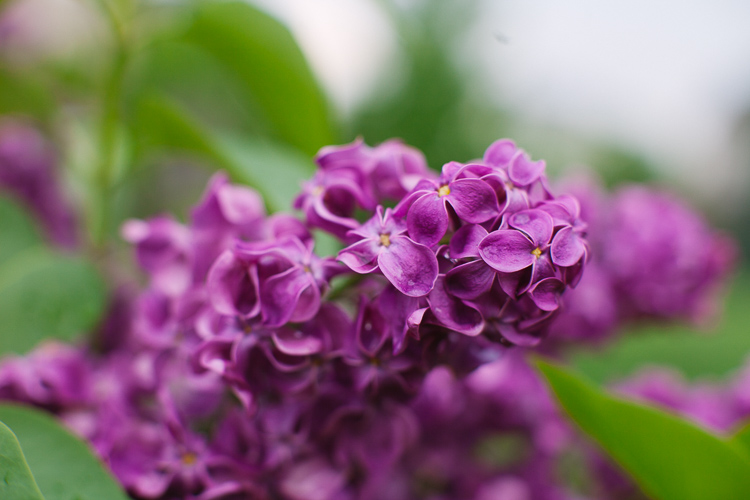
If I had a penny for the number of times that I get asked this question from other photographers, as well as my clients who are looking to upgrade their DSLR cameras, I would have an overflowing piggy bank! Blurry backgrounds, or bokeh as it is know in the photography space, is actually a function of aperture (i.e. f-stop), focal length, and distance of the subject from the background. Check out How To Achieve Nice Bokeh [In Plain English] from the dPS archives that addresses this issue specifically.
Memorable Jaunts DPS Article What you want to know - Lilacs in the rain-1

A wide aperture on 50mm lens gives a shallow depth of field where most of the background is blurry.

How much money do I need to spend to get started with a photography business?

There are again any different ways to answer this question. You can essentially spend as much, or as little as you want, to get started. At a bare minimum you will need a good camera system (good is a very relative term here, there are several prosumer cameras on the market today, at various price levels). In many places in the world, particularly in the US, there are several rental companies that offer various cameras and lenses for rent. Borrow Lens, Lensrental and LensProToGo are a few that come to mind. You can also check with your local camera shop to see if they offer rental services.

You do not need the latest and greatest camera system to be a professional photographer. While gear is definitely a plus, skill and the ability to work with what you have to get the results you need are far more important, especially when you are just starting out. Once you develop your own shooting style as well as what you want to focus on, you can slowly build up your gear by adding equipment based on your current needs.

How can I make money from my photography, and do it fast?

401(K) 2012

By 401(K) 2012

Sorry to burst your bubble, but the short answer here is that you cannot make money in anything fast. Everything takes time, practice, and patience. Just like any other career, the more time and effort you invest in your photography, the more experience you will gain. With experience comes confidence and recognition. So if your end goal is to be a internationally recognized photographer, treat it like a career and a business and invest in yourself, your education, and your experience. Don’t be afraid to roll up your sleeves and do the hard work – and in time, you will reap the benefits.

How much should I charge for my photography?

This is again something that is very subjective. What you charge for your services depends on many factors like your skill level, the value of photography in the area that you live in, and the buying capacity of the clients that you are targeting. Another thing to understand is the monetary value of your time. Remember your time is not just the amount of time you spend photographing the client – also take into account any travel to and from the location, editing time, and backend work like backing up photos, uploading galleries, and other administrative tasks. Once you have a handle on all these factors as it relates to your situation, charge an amount that makes it worth your while to photograph your clients. If you are looking to earn a living through your photography, then treat it like a business and not just a hobby. Read: 7 Things That Keep You From Charging What You’re Worth (and how to get over them).

What kind of photography should I focus on?

The easiest way to answer this question is to ask yourself what you enjoy photographing. Write down all the genres of photography that interest you, and try them all out if possible. Ask family and friends to model for you, if you are interested in portraits. Photograph different locations at different times of day if you are interested in landscape photography. Experiment with different types of food and styling if you are interested in food photography. Once you have a reasonable amount of experience in these categories, pick one or two to focus on, and give it your best. Don’t be afraid to experiment once in awhile in other genres, just to flex your creative muscles.
Memorable Jaunts DPS Article What you want to know - Bridal Portraits

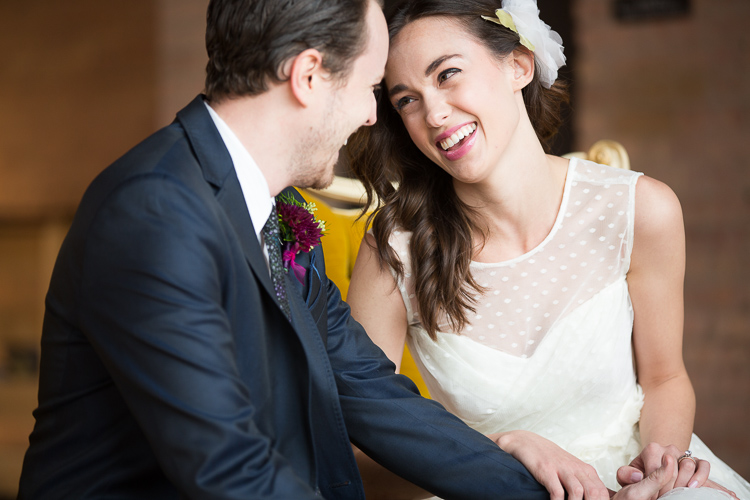
I am a wedding and lifestyle photographer – that is what I enjoy doing the most. But mixed in my portfolio will be a bit of travel and editorial images that help me flex my creative muscles.

How can I get clients?

This is another big one that I get asked a lot, and I wish there was an easy answer. In fact, this is something that even I still struggle with, six years into my business. Getting new clients, and keeping a steady stream of clients is hard work. You have to constantly market yourself and your services at every opportunity you get. When you meet new people, don’t be afraid to say what you do. It took me a long time to introduce myself as a professional photographer, but once I said it often enough, I realized that I got more confident in not only my photography skills, but also in my business skills. Network and connect with your competitors, as well as other businesses in your area. Do a trade for images if appropriate, and remember not everyone you meet will be interested in getting pictures taken, and that is totally okay.
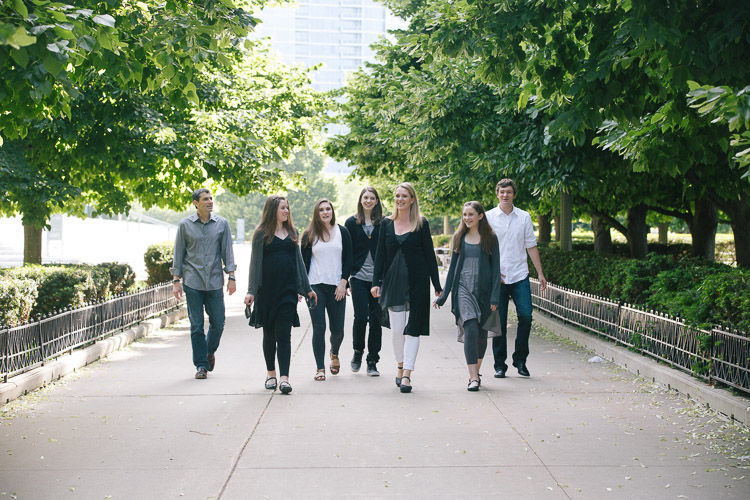
Memorable Jaunts DPS Article What you want to know - Lifestyle Portraits

A casual conversation at a networking meeting led to an epic family photoshoot and I gained a good friend too.

How can I build a portfolio of my work?

The length of time you invest in yourself and your photography skills is directly proportional to how long you will take to build your portfolio of work. If you constantly focus on learning and improving yourself, the more confident you will become, and the more opportunities you will find to create work that you are proud of. I have a few general rules that I follow in my photography journey

  • Photograph something every week if not every day – the objective here is to learn new techniques and perfect things I already know with respect to my gear.
  • 10:1 ratio – for every 10 minutes I shoot, I want to produce at least one image that I am proud of.
  • Spend time on personal projects – my mantra here is create for the sake of creation.

For me, this is an easy way to constantly update my portfolio with work that I am proud of, and which also represents my creative style.

Memorable Jaunts DPS Article What you want to know - Wedding Styled Shoot

Creating for the sake of creation is a great way to update your portfolio as well as connect with other vendors and creatives in your space.

This is just a small set of questions that I found helpful when I was starting off on my career in photography. If you have others that have helped you navigate the photography waters, feel free to list them in the comments so others can benefit as well.

If you have different questions that you’ve been wanting to ask, this is the place to do it. Let’s see if we can’t get them answered for you as well.


Editor’s Note: This is one of a series of articles this week that are Open for Discussion. We want to get the conversation going, hear your voice and opinions, and talk about some possibly controversial topics in photography.

Give us your thoughts below on the article above and watch for more discussion topics.

See all the recent discussion topics here:

  • 7 Commonly Accepted Photography Beliefs Debunked
  • Is HDR dead? Some dPS Writer’s Thoughts on this Controversial Topic
  • How to Find your Personal Photographic Style
  • Why You May be Failing to Reach Your Potential as a Photographer
  • To Process or Not To Process? Let’s Discuss
  • How much do you process your images? – a dPS POLL
  • Does the Camera Matter? SLR versus Mirrorless versus Smartphone
  • Natural Light Versus Artificial Light: Which is Better?
  • How Limitations Can Help You Grow as a Photographer
  • Brand Name Versus Third-Party Photography Gear: Which is better?

googletag.cmd.push(function() {
tablet_slots.push( googletag.defineSlot( “/1005424/_dPSv4_tab-all-article-bottom_(300×250)”, [300, 250], “pb-ad-78623” ).addService( googletag.pubads() ) ); } );

googletag.cmd.push(function() {
mobile_slots.push( googletag.defineSlot( “/1005424/_dPSv4_mob-all-article-bottom_(300×250)”, [300, 250], “pb-ad-78158” ).addService( googletag.pubads() ) ); } );

The post Everything you Always Wanted to know about a Career in Photography but were Afraid to Ask by Karthika Gupta appeared first on Digital Photography School.


Digital Photography School
 
Comments Off on Everything you Always Wanted to know about a Career in Photography but were Afraid to Ask

Posted in Photography


Magnum signed square print sale returns for third year

08 Jun

$ (document).ready(function() { SampleGalleryV2({“containerId”:”embeddedSampleGallery_1660447426″,”galleryId”:”1660447426″,”isEmbeddedWidget”:true,”standalone”:false,”selectedImageIndex”:0,”startInCommentsView”:false,”isMobile”:false}) });

Signed or estate stamped prints for $ 100 from over 60 Magnum photographers and artists will be available for a limited time, from 9am EST on Monday 6 June until 11pm Friday 10 June 2016, here: shop.magnumphotos.com
Magnum’s Square Print sale is back, offering up museum-quality signed prints for just $ 100 each. Upwards of 70 prints are on sale from photographers like Martin Parr, Alex Webb, Rene Burri, Eve Arnold, Tim Heatherington and many more. Each photographer contributed an image that plays on a theme of ‘The More or Less Decisive Moment(s)’. 

The 6×6″ prints are available for five days only, starting now through 11pm ET on Friday, June 10 at shop.magnumphotos.com.


Press release:

THE MAGNUM SQUARE PRINT SALE, June 6 – 10, 2016 THE (MORE OR LESS) DECISIVE MOMENTS

Signed and estate stamped, museum quality, 6×6” prints for $ 100. For 5 days only.

Magnum Photos co-founder Henri Cartier-Bresson is synonymous with the idea of ‘the decisive moment’, a critical idea in the theory and history of photography. In this Square Print Project the agency looks back at the impact and legacy of Cartier-Bresson, his influence on contemporary photography and the ways in which the decisive moment is manifest in the work of Magnum photographers today.

For five days only, prints by Magnum photographers which respond to the meaning of the decisive moment, will be available to buy as signed, museum quality, 6×6” square prints, exceptionally priced at just $ 100. Including both classic and contemporary photography, over 60 works by Martin Parr, Alex Webb, René Burri, Elliott Erwitt, Tim Hetherington, Newsha Tavakolian, Peter van Agtmael, Eve Arnold and many more Magnum photographers will be available for a limited time only.

ABOUT THE DECISIVE MOMENT

The notion of the decisive moment was coined by Cartier-Bresson’s English language publisher Simon & Schuster in 1952, translating the French title of the book, Images à la Sauvette. Cartier-Bresson annotated Martin Parr’s personal copy to read ‘The More or Less Decisive Moment(s)’, hinting at the plurality and ambiguity of its meaning.

Every photographer within Magnum Photos has been invited to select an image from their archive and to reflect upon how the photographic concept of the decisive moment influences their practice. Accompanied by personal written responses, these images and texts create a collective portrait of the critical thinking that defines the agency.

The works included in the Square Print sale are intended to spark debate around the meaning of the decisive moment. What goes through a photographer’s mind when capturing a shot? What are the moral or ethical implications in the quest to find the decisive moment? What part does the unconscious play? Is the realisation of a decisive moment always in the present, or can that come later? Is there even such a thing as the decisive moment?

The Magnum Square Print Sale will take place at the Magnum Photos Online Shop: shop.magnumphotos.com.

It will be open from Monday, June 6th, 2016, at 9AM EST until Friday, June 10th, 2016, at 6PM EST.

Articles: Digital Photography Review (dpreview.com)

 
Comments Off on Magnum signed square print sale returns for third year

Posted in Uncategorized