RSS
 

Archive for November, 2015

Power Plants: Scientists Grow Conductive Wires in Living Roses

23 Nov

[ By WebUrbanist in Conceptual & Futuristic & Drawing & Digital & Technology. ]

wired rose plant

A group of Swedish scientists has developed a successful method for integrating conductive wire systems into plants, naturally soaked up from a gel into leaves and stems to create complete circuits in bionic hybrids. The implications, like the currents, run in two directions: power can be harvested from plants, but the plans can also be changed through the application of external energy.

rose robot

Botanists and mechanical engineers from the Laboratory of Organic Electronics at Linköping University added the gel at the base of test plants, which in turn hardened into flexible wires within the stems and leaves, all without damage to the organic components. They were then able to send electrical impulses through the plants, lightening and darkening flowers and leaves.

rose hybrid bionic plant

“Although many attempts have been made to augment plant function with electroactive materials, [until now] plants’ ‘circuitry’ has never been directly merged with electronics,” write the researchers in their paper Electronic Plants. “With integrated and distributed electronics in plants, one can envisage a range of applications including precision recording and regulation of physiology, energy harvesting from photosynthesis, and alternatives to genetic modification for plant optimization.”

rose hacked

A number of material combinations were tried before the effective solution was discovered. Some hardened and harmed the plants while others proved toxic or provided insufficient connectivity to be effective. The transparent organic polymer they settled on is able to fully wire a living rose, creating a bionic hybrid without compromising its natural functions.

wired rose detail

More from the abstract: “The roots, stems, leaves, and vascular circuitry of higher plants are responsible for conveying the chemical signals that regulate growth and functions. From a certain perspective, these features are analogous to the contacts, interconnections, devices, and wires of discrete and integrated electronic circuits. The four key components of a circuit have been achieved using the xylem, leaves, veins, and signals of the plant as the template and integral part of the circuit elements and functions.”

Share on Facebook


[ By WebUrbanist in Conceptual & Futuristic & Drawing & Digital & Technology. ]

[ WebUrbanist | Archives | Galleries | Privacy | TOS ]


WebUrbanist

 
Comments Off on Power Plants: Scientists Grow Conductive Wires in Living Roses

Posted in Creativity


22. November 2015

23 Nov

Das Bild des Tages von: Milan V.

Eine Frau im Blätterwirbel

Heute gibt es ein wenig Herbstzauberei im Ausblick.
kwerfeldein – Fotografie Magazin | Fotocommunity

 
Comments Off on 22. November 2015

Posted in Equipment


Suckers! Japan’s Ubiquitous Octopus Playground Slides

23 Nov

[ By Steve in Culture & History & Travel. ]

japan-octopus-slide-1
Weird anthropomorphic, gaudily painted concrete octopus slides lurk within hundreds of Japanese playgrounds, silently traumatizing generations of kids.

japan-octopus-slide-1b

These playground octopi climbing frame/slide installations are so common and have been around for so long, it’s really no surprise Japanese parents are nonplussed by their ominous presence – doubtless they played on the very same structures when they were kids.

japan-octopus-slide-1d

Visibly showing its age, the pastel pink cephalopod playground set above can be found at Hattori Ryokuchi Park in northern Osaka. It was visited by Akira Nakajima in 2009, David Kawabata (sleepytako) in 2013, and Trout Monroe (troutfactory) on January 1st of 2015.

Two-Toned In Tokyo

japan-octopus-slide-2a

japan-octopus-slide-2b

Nestled into a small playground in the Kitasenju neighborhood of Tokyo’s crowded Adachi ward, this unusually two-toned octopus slide and the manicured grounds surrounding it are pristine enough to be a zen garden… for kids. One wonders if children are even allowed to climb on it.

Reddy Or Not

japan-octopus-slide-3a

japan-octopus-slide-3c

japan-octopus-slide-3b

Unlike many American playgrounds whose old lawsuit-encouraging equipment continues to be updated in the interest of safety, Japan’s vintage octopus slides are, were and will always be perfectly safe… not to mention easy to maintain. Take the venerable installation above, which needed nothing but a new coat of paint to make it good as new. Once sun-bleached as pink as a beached conch in Flickr user sallyhancox’s 2009 photo, it blazes fire engine red in her image snapped two and a half years later.

Next Page – Click Below to Read More:
Suckers Japans Ubiquitous Octopus Playground Slides

Share on Facebook


[ By Steve in Culture & History & Travel. ]

[ WebUrbanist | Archives | Galleries | Privacy | TOS ]


WebUrbanist

 
Comments Off on Suckers! Japan’s Ubiquitous Octopus Playground Slides

Posted in Creativity


The Who What Where When Why How of Doing a Photowalk

23 Nov

Recently I was privileged, for the first-time, to be a walk leader as part of the Scott Kelby Worldwide Photowalk. It was a great experience for me, one I plan to repeat again, and one in which I encourage all photographers of every skill level to participate. While a photowalk is something you may choose to do by yourself, I recommend taking some friends along with you. German photojournalist Alfred Eisenstaedt (1898-1995) once said, “It is more important to click with people than to click the shutter.” I agree! Let’s take a look at some FAQs concerning photowalks.

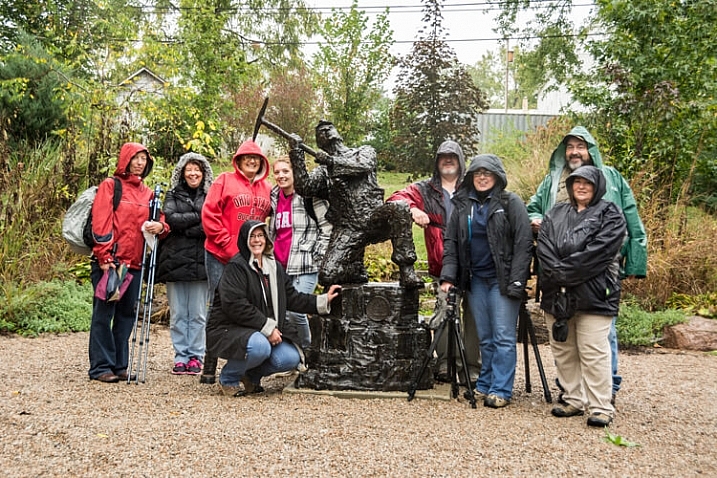
Group picture from World Wide Photowalk. The group is dressed in rain gear as it was raining at the beginning of our walk.

Group picture from the 2015 World Wide Photowalk I led. The participants are dressed in rain gear because it was raining when the event began.

Just what is a photowalk?

Wikipedia defines photowalk as: the act of walking with a camera for the main purpose of taking pictures of things that a photographer might find interesting. Obviously, but a photowalk can be so much more than that! If you invite friends or others who share your passion for photography to walk with you, it can be a social event. It can be a source of inspiration if you feel like you’re in a photography rut, and it can also be a time of learning new techniques and sharing your own knowledge and ideas with fellow photographers.

Look for shapes and colors

Take a close look for interesting shapes and colors.

Why should you attend a photowalk?

One of the main reasons to photowalk is to practice your skills as a photographer, and to stretch your skills by trying new things and learning from others. Photographers of all skill levels can benefit from a photowalk, as participants can observe and learn from those more advanced, or help and encourage those who are just beginning to develop their interest in cameras and photography. Don’t be afraid to experiment and try new accessories or techniques; rather, practice using them on a photowalk! For example, perhaps you have never tried back button focusing before, so use the time on your walk to give it a try and have another photographer that uses it help you to get familiarized with this option.

If you are a member of a photography club, a photowalk can be a memorable outing. Some groups even set them up intentionally as a form of friendly competition. Photowalking can also be an opportunity to network with other photographers who share the same interest, or photography ambition as you.

The act of photowalking needn’t be just about the pictures –  in fact, one activity you might try is a photowalk without your camera. Sounds crazy, I know! As you see things that you would have photographed if you had your camera with you, discuss with others in the group how to photograph the object or scene. Sharing these opinions might help you see the subject more creatively.

After the walk, create a social media page, on sites such as Facebook or Flickr, where the group can share the images they captured during the walk. This is a way of staying in touch with the friends, new and old, you may have made during your walk.

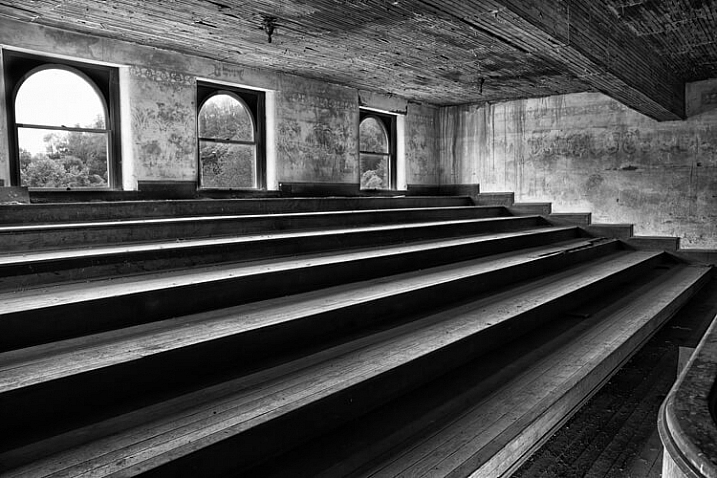
Look for unique angles.

Unique angles create a striking image in an abandoned theater balcony.

What time of day is best?

This is a trick question, because any time of the day is a fine time for a photowalk. You just need to use the elements presented to you, as even the harsh mid-afternoon light can be an ideal time to shoot silhouettes. Or try a night walk in a safe downtown area of a local city, because that can be an opportune time to shoot some really awesome streetlight or headlight images. As American pioneer photographer, Alfred Stieglitz (1864-1946) stated, “Wherever there is light, one can photograph.”

Look for patterns

Patterns appear in aging structures. These three windows lend themselves to a balanced composition.

What are the best locations?

Anywhere there is something interesting to photograph can be a perfect spot for a photowalk, from a city park to one’s own backyard. If you are organizing a more formal photowalk for a group, be sure to choose a venue or area that is spacious enough to handle the number of participants, without making them feel crowded. Look for a location that might present a wide variety of photo ops such as: macro, landscape, architecture, portraiture, still life or even wildlife. Keep the walk to a reasonable time and distance (two hours of shooting is sufficient for a photowalk). Some ideas for locations are:

  • A short sidewalk or street loop in a city or town
  • A city or public park
  • A hike in the woods
  • Walk a long a river or lakeshores
  • A zoo
  • Your own neighborhood

Whichever location you choose for your walk, try to do some pre-shoot scouting, either via internet or with a personal visit, in order to be aware of the area. If you are leading the walk, try to find out as much information about the area before-hand as you can, maybe even enlisting a local guide to show the group the most picturesque spots or points of interest. Remember to give participants maps or other heads-up information so they can make the best use of their time.

Dramatic details can be found when looking beyond the obvious subject.

What if the weather is bad?

Check the weather forecast before you leave for your walk, and be prepared for adverse weather conditions. If you are leading a walk, making plans for an alternative indoor location could make for a more pleasant experience for everyone participating.

What equipment should you carry?

Well, of course, the most important equipment is a camera! Do you need a high-end camera for a photowalk? Absolutely not! Your camera can range from an iPhone to a point-and-shoot or a DSLR. Challenge yourself to shoot with a limited amount of equipment, and you may find this helps stimulate some very creative shooting.

Pack light, because doing a photowalk with a heavy pack of equipment on your back will not only get old quickly, but will also limit your mobility. Leave the bulky camera bag at home, and take only what you can carry along in your pockets:

  • Camera: Try walking with just one camera and one lens.
  • Tripod: A sturdy light-weight tripod or monopod can do double-duty as a photography tool and as a walking stick.
  • Batteries: Make sure you have a fully charged battery in your camera, or carry an extra in your pocket.
  • Microfiber cleaning cloths: As you will be walking with your lens cap off most of the time, carrying a lens- cleaning wipe in your pocket is helpful to keep the lens dust-free.
  • Extra memory card: If you plan to shoot a large number of images, a spare memory card often comes in handy.
  • Business cards: As photowalks are a great networking tool, be sure to carry business cards with you if you have them.
  • Photography vest: This option allows you to carry a few more items on the walk, such as filters or even possibly a second lens if you feel so inclined.
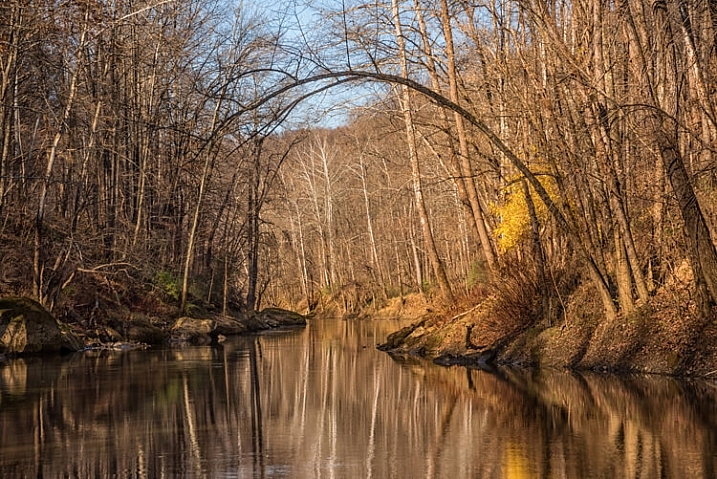
On a fall Photowalk along a river was a great locations for reflections

On a fall Photowalk, a spot along a river was a great locations for reflections

What should you photograph?

Whatever subject you are drawn to as you photowalk, try to look past the obvious and seek out details. Find interesting angles and perspectives to capture images of subjects you’ve never noticed before. Look for objects with unique colors, shapes, textures, patterns or reflections. Challenge yourself and/or your group members to look for certain subject matter, such as: photograph anything red. Also, by all means if you are a walk leader, take a group picture on location so you can share later on social media!

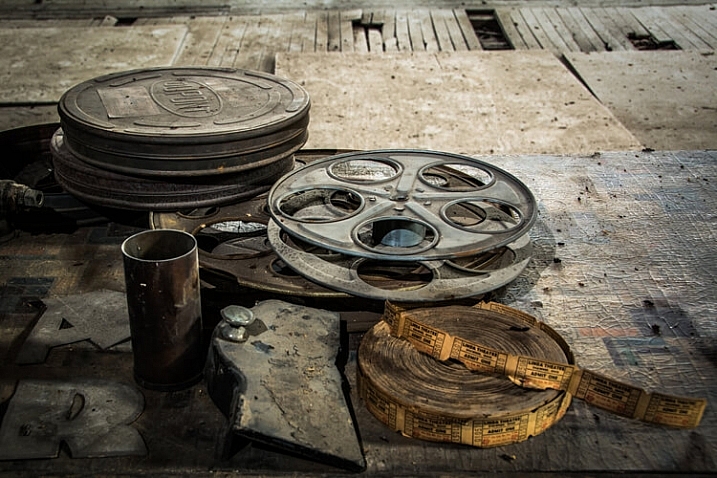
Look for objects that might tell a story about the location of your walk.

Look for objects that tell a story about the location of your walk.

So get out there and walk

Walking is great exercise. Photowalking is also valuable exercise for camera-buffs. Have some fun and experiment with some new techniques, while networking with other photographers.

Have you ever participated in an organized photowalk? If so, what kind of subjects did you shoot, and were you pleased with the results? Please share your experience and pictures in the comments below.

googletag.cmd.push(function() {
tablet_slots.push( googletag.defineSlot( “/1005424/_dPSv4_tab-all-article-bottom_(300×250)”, [300, 250], “pb-ad-78623” ).addService( googletag.pubads() ) ); } );

googletag.cmd.push(function() {
mobile_slots.push( googletag.defineSlot( “/1005424/_dPSv4_mob-all-article-bottom_(300×250)”, [300, 250], “pb-ad-78158” ).addService( googletag.pubads() ) ); } );

The post The Who What Where When Why How of Doing a Photowalk by Bruce Wunderlich appeared first on Digital Photography School.


Digital Photography School

 
Comments Off on The Who What Where When Why How of Doing a Photowalk

Posted in Photography


Readers’ Showcase: Tom Goodman

22 Nov

After taking a 25 year break from photography, Tom Goodman started taking pictures again and hasn’t stopped since. With a background in art history and fine art, he took a break from photography earlier in his career to run an agency representing artists and photographers. Having returned to creating images, he says he has ‘no time to lose.’ Read our Q&A and see his work. Read more

Articles: Digital Photography Review (dpreview.com)

 
Comments Off on Readers’ Showcase: Tom Goodman

Posted in Uncategorized


Photoshop Tip: Using the High Pass Filter to Sharpen Images

22 Nov

If you’ve used Photoshop, you are likely aware by now that there are many ways to accomplish the same tasks. One of the more important ones that should be done to almost every digital image is sharpening. This is necessary because most digital camera sensors make use of an anti-aliasing filter, which very slightly blurs the image, to reduce the chances of moire occurring in the image. This slight blurring, generally only one pixel in size, causes a slight loss of detail in an image. To correct for the slight blurring, tools such as Unsharp Mask are used. For a good tutorial on Unsharp Mask, check out How To Sharpen Photos: An Introduction.

High Pass Sharpening

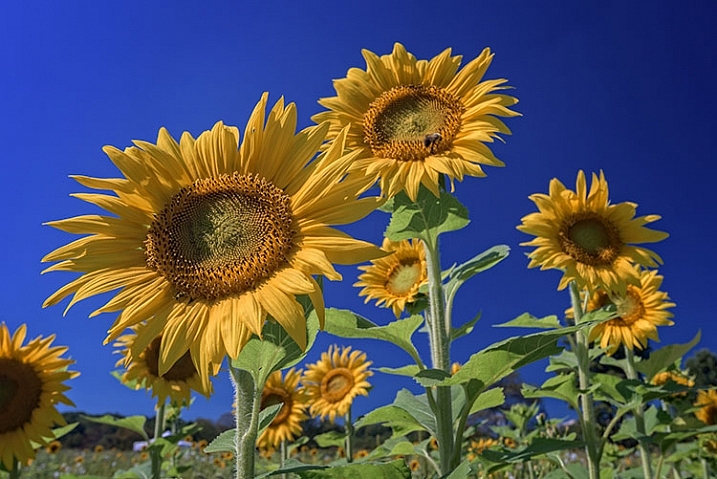
This shot of sunflowers benefited from the High Pass filter by sharpening the fine detail in the center of the flower.

Another easy way to sharpen your images is with a filter that’s not even found in the Sharpen menu under Filters in Photoshop. It’s relegated to the Other category at the bottom of the Filters menu, and is called High Pass. The High Pass filter is a bit easier to use than Unsharp Mask, in that it only has one slider to worry about, and the technique for using it allows for some experimentation even after it’s applied, so you can get your image looking exactly as you want.

Note: I am using the latest version of Photoshop, version 2015.0.1 in Creative Cloud.

Step 1: Edit your image, then flatten it

Before you use the High Pass filter, you’ll first want to process the image to your liking. Generally speaking, sharpening should be the final step in image editing, because it is directly dependent on image size. You will sharpen an image sized to 5×7″ differently than one sized to 13×19″. Once your image is edited, flatten all layers by going to the Layer menu and selecting Flatten Image. Then adjust your image size as needed if you’re going to print or to display online.

Step 2: Duplicate Layer

Now that your image is flattened, duplicate that layer by pressing <CTRL + J> (in Windows) or <CMD + J> (on a Mac). You’ll then want to zoom in to view the image at 100% by pressing <CTRL + 1> (in Windows) or <CMD + 1> (on a Mac), or just double clicking the magnifying glass in the toolbox. You’ll want to be at 100% so you can see the detail of the image clearly.

Step 3: The High Pass Filter

High Pass Filter Selection

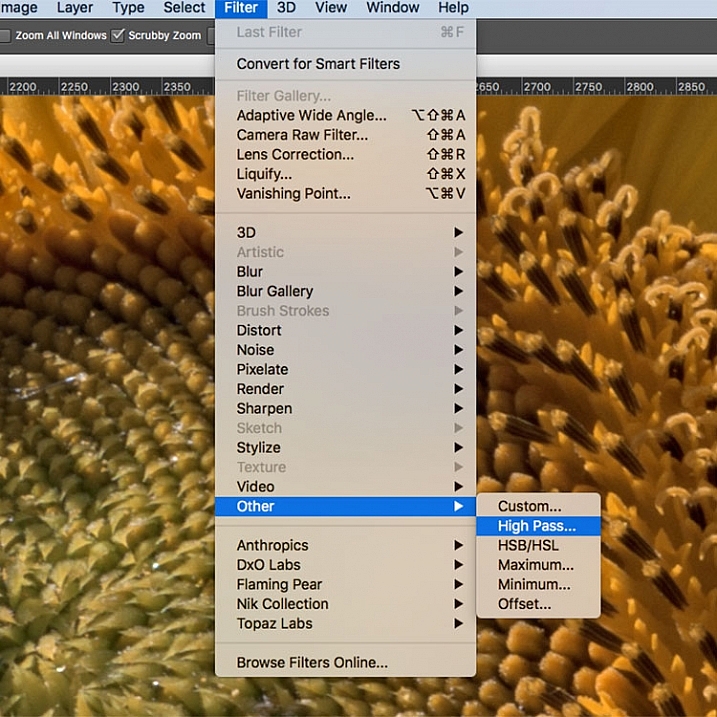
In the Filter menu, select Other, then High Pass.

Go to the Filter menu and select Other, and then High Pass. You will see the entire image turn a flat grey color. Not to worry, as this will allow you to see what the filter is doing.

Step 4: Adjust the amount of sharpening

high pass filter sharpening

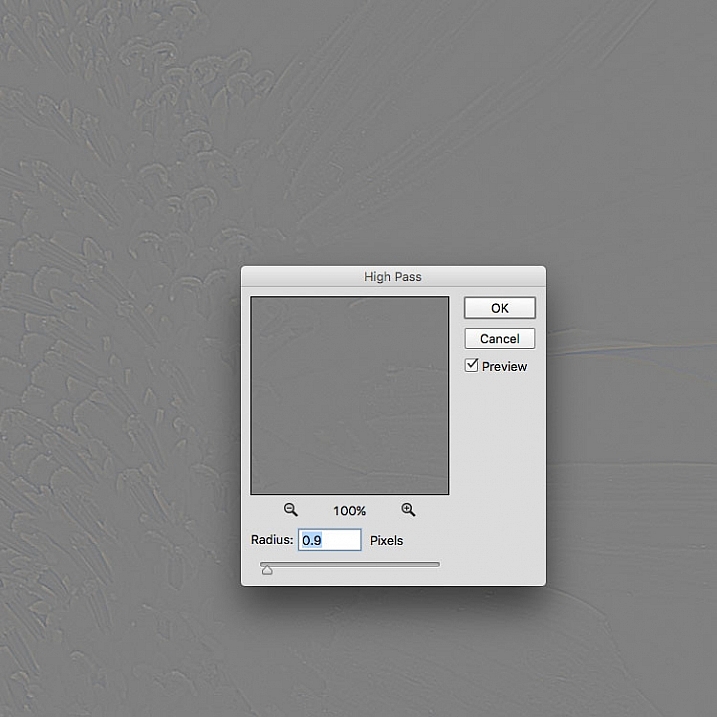
Once the High Pass filter dialog box pops up, use the slider to adjust the radius.

Once you run the filter, you’ll see a dialog box open up, showing a preview along with a radius slider. In addition, the image behind the dialog box will have turned grey, with some edge lines showing.  This allows you to see exactly what is being sharpened. The High Pass filter only sharpens edges, so anything that’s not an edge becomes flat grey. The amount of sharpening you do will largely be image dependent, as well as size dependent.

For this image of the sunflowers, I was making a large print, using the full resolution of the image. When doing so, I’ve found my radius amount will usually fall somewhere between 0.5 and 5 pixels. You need to be careful here, as too much sharpening will introduce unwanted artifacts and noise into the image. I use the preview as my guide. I want to see thin black lines over the grey areas, with little to no white. Once you see any white, it means you’ve begun to get a halo, which you want to avoid. The final effect will be a subtle sharpening, not a drastic pop. For this image, I used a radius of 0.9. You can see above that there are only black lines around the edges of the flower, with very little halo. Click OK when ready.


Step 5: Adjust Layer Blending Mode

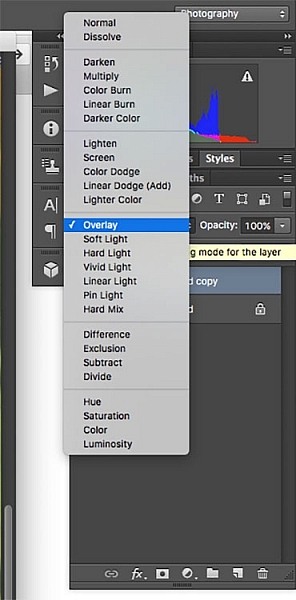
High Pass filter layer blending modeOnce you’ve applied the High Pass filter, it’s time to get rid of that flat grey image and bring your photo back to life. Go to your Layers palette and select the Blending Mode drop-down menu and set it to Overlay. Your image will regain its color, and you can toggle the sharpened layer off and on, to compare the image with and without sharpening.

You can also experiment with different blend modes, including Soft Light, Hard Light, Vivid Light, Linear Light, and Pin Light. In addition, you can use the Layer Opacity setting to reduce the effect a bit, if you decide the sharpening is a bit too strong. The beauty of this technique is that it’s completely adjustable (non-destructive) after you’ve applied the filter, and because you’ve worked on a separate layer, you can easily undo the sharpening and start over again if needed. Also, again because you’re working on a separate layer, if there are certain areas in the image where you want the sharpening to be applied, you can use Layer Masks to hide or show it.

Final results

High pass filter comparison

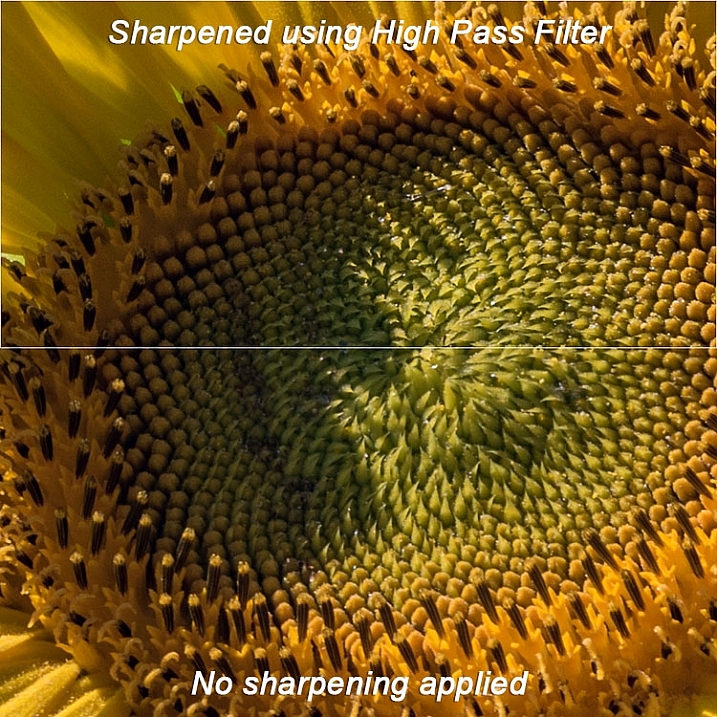
In this comparison image, the top half has been sharpened using the High Pass filter, while the bottom half has not been sharpened.

The High Pass filters allows a lot of flexibility in sharpening photos and is simple to use. It’s a great way to give your images a sharper, crisper look before uploading or printing. Give it a try and let me know what you think!

googletag.cmd.push(function() {
tablet_slots.push( googletag.defineSlot( “/1005424/_dPSv4_tab-all-article-bottom_(300×250)”, [300, 250], “pb-ad-78623” ).addService( googletag.pubads() ) ); } );

googletag.cmd.push(function() {
mobile_slots.push( googletag.defineSlot( “/1005424/_dPSv4_mob-all-article-bottom_(300×250)”, [300, 250], “pb-ad-78158” ).addService( googletag.pubads() ) ); } );

The post Photoshop Tip: Using the High Pass Filter to Sharpen Images by Rick Berk appeared first on Digital Photography School.


Digital Photography School

 
Comments Off on Photoshop Tip: Using the High Pass Filter to Sharpen Images

Posted in Photography


Die 5 Videos des Monats

22 Nov

Urban Media Festival © Aileen Wessely

Ein Versuch über Vielfalt: In die heutige Ausgabe der Videos haben wir einen möglichst vielseitigen Strauß Videos mit Bezug zur Fotografie gepackt – ein erratischer Bogen von Natur-Timelapse über Kurzfilm und Kunstfilm bis hin zur experimentellen Dokumentation und zum Photoshop-Tutorial. Wir hoffen, dass Ihr etwas Spannendes entdeckt und vielleicht sogar einmal ein Video anschaut, das euch nicht auf den ersten Blick interessiert, denn genau so stolpert man über neue Inspiration.
kwerfeldein – Fotografie Magazin | Fotocommunity

 
Comments Off on Die 5 Videos des Monats

Posted in Equipment


21. November 2015

22 Nov

Das Bild des Tages von: Roger Albani

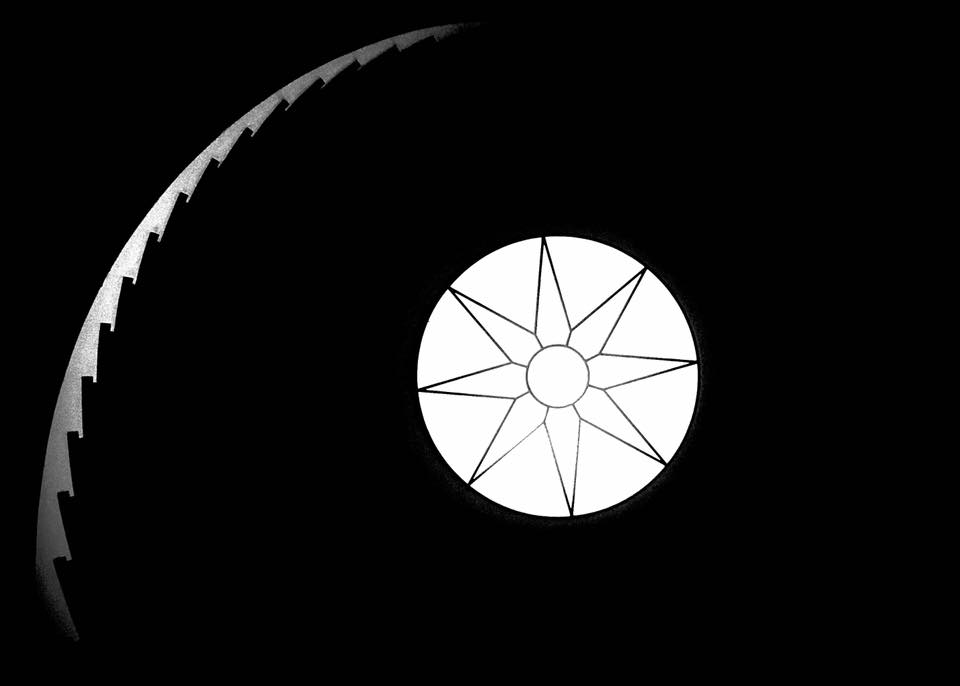
Silhouetten einer Treppe, im Zentrum ein Fenster

Bei unserem heutigen Bild des Tages ist „Reduktion“ das Stichwort.
kwerfeldein – Fotografie Magazin | Fotocommunity

 
Comments Off on 21. November 2015

Posted in Equipment


Beginner’s Guide to Photographing Horses

22 Nov


Equine-photography-3b

There are two main aspects to consider when beginning to attempt any variety equine photography, the photographic side (technical and creative) and the dealing with horses side (sometimes unpredictable and dangerous).

Lets start with the animal side, in this beginner’s guide to photographing horses.
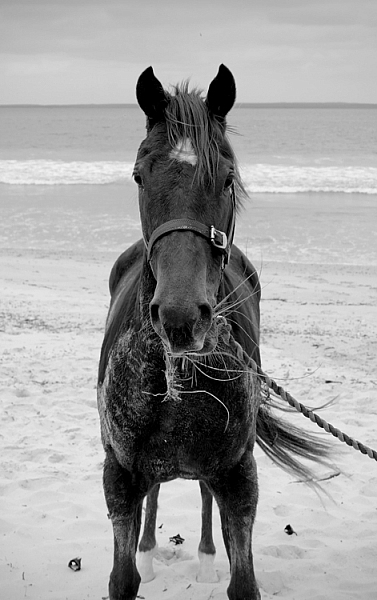
Equine-photography-4

I am not a horse person, but I have photographed a lot of them, and have spent a fair bit of time around them, their owners, and trainers, who have all taught me a lot.

Horses have distinct personalities which can range from extremes such as: a tendency gallop across a paddock to attack you on one end of the scale, to willing to defend you at their own expense at the other end. Their main instinct is flight, and they can be easily spooked by just about anything – including cameras.

There is a whole horse language involving their ears, leg stance, and head movement. The horse owners I have worked with prefer certain positioning of these things in photographs. For example, they really don’t like images where the horses ears are pinned back, which means the horse is not very happy. I would suggest spending some time googling horse body language before you set out on your first equine photo session – not only to know all the best positions, but to also know if a horse is about to attempt to do you some serious damage.
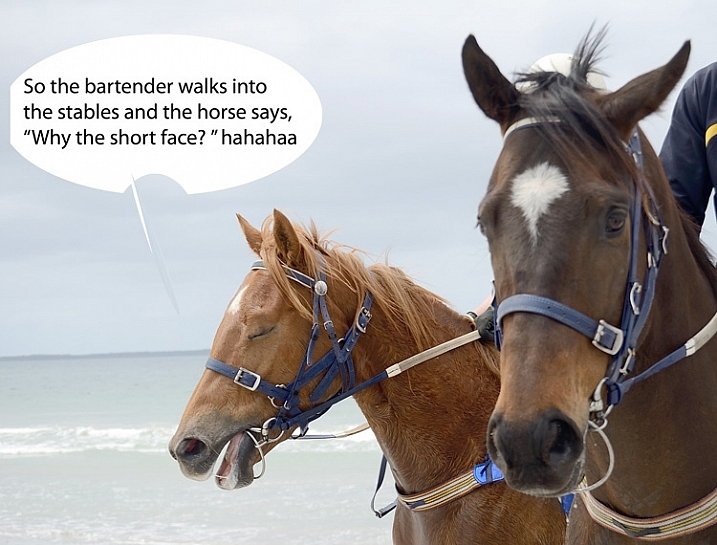
Equine-photography-1

Ears forward but relaxed means the horse is happy, where as ears like the other guy in the above image, can mean the horse is confused.

Never stand behind a horse. Never catch a horse by surprise. Make sure horse knows where you are, they don’t like people jumping out from behind bushes, or sudden movements. Never run up to a horse. One owner trainer tells me that even wearing bright colors can startle some horses.

Horses and cameras

Unless you know that a horse is very used to flash, using one could endanger you, the horse, or the handler/rider. I would avoid it at all costs. The sight and any sound of your camera can be enough to startle them, even just the slap of the mirror.

I recommend having a chat with owner or handler about the horse’s personality – is he flighty, bite-y? Loves to kick? Hates photographers? Has never seen a camera? Know all that before you go in camera blazing.
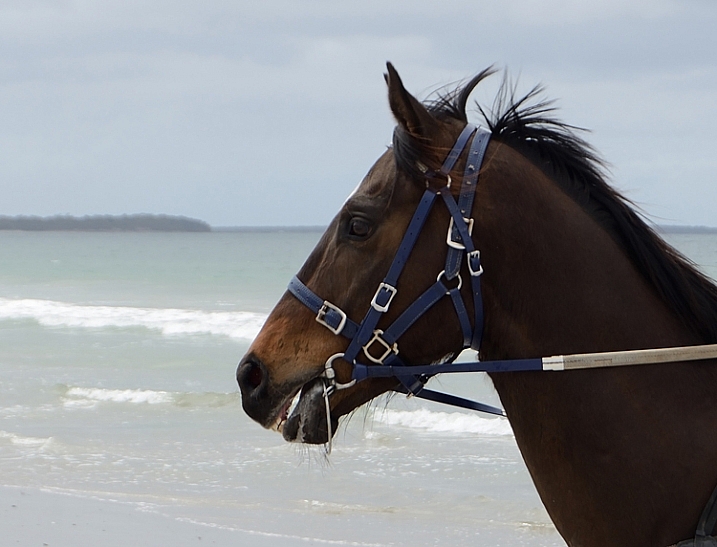
Equine-photography-10

If the horse is calm enough, have the handler introduce you. Let the horse approach you, sniff the camera, and move slowly, talk softly and calmly, and if it’s all okay to do so, give it a pat. If you’re unsure how the horse will react to camera sounds (or use silent mode if your camera has it), organize with handler to do a few test shots while the horse is calm, and you are all in safe positions, should the horse start bucking and kicking.

Pretty much all my horse photographs have been taken with a standard 18-55mm kit lens. That’s all we had at the local newspaper to photograph every kind of event, equestrian or otherwise. Regardless of what style of equine photography you are attempting, I would recommend a zoom lens so you can get in close on detail, without getting too close to the horse.

The photography

You’ll want a fairly fast shutter speed, even for portraits – those ears move fast. I’d recommend a minimum of 1/250th  for general photography, faster if the horse is moving at high speed. Generally you want good horse shapes where you can see all four legs, and the animal has its ears forward.
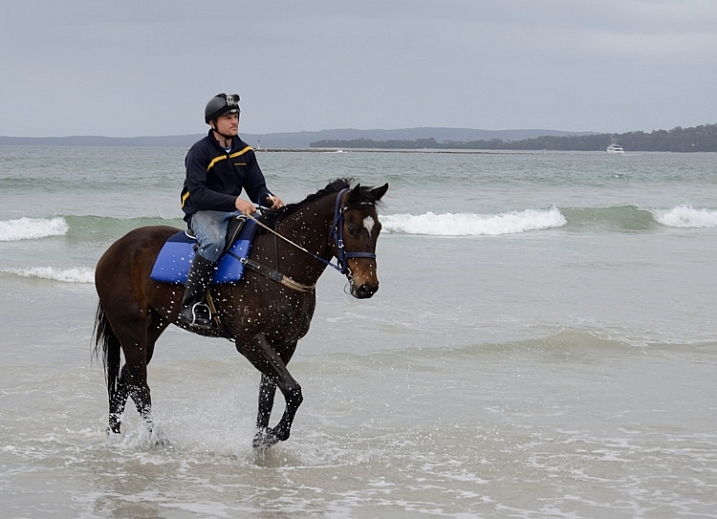
Equine-photography-12

Race horse trainer Ritchie Butler on Tom.

Events

When photographing equine events, like show jumping, you aren’t necessarily that close to the horse, but the same rules apply. Make sure you find a safe spot where the horse can see you from a distance, and don’t keep moving about. Remember not to move towards the horse and rider, and do not use flash. Check with any officials before you start.

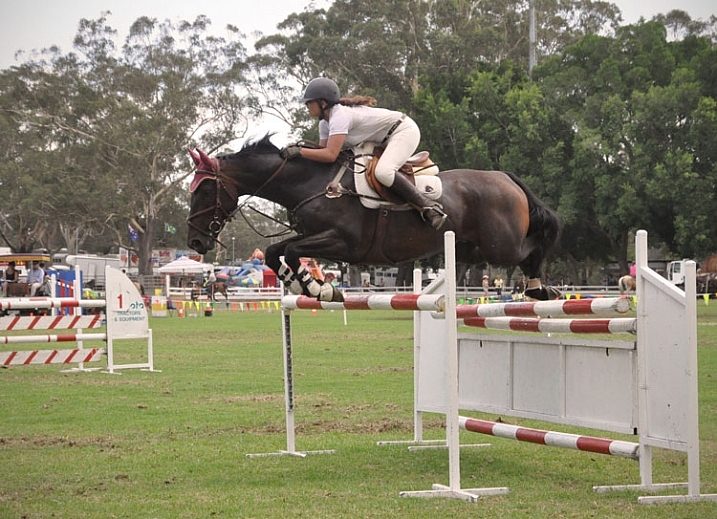
An image that involves horse and rider in mid-jump, with all legs off the ground and front legs tucked under, is generally preferred by riders and owners. You’ll need a fairly fast shutter speed, somewhere around 1/650th – 1/800th is a good place to start. Set your camera to continuous release (burst) mode, and press the shutter just as the horse lifts off.
Equine-photography-7b

Photographs mid-leap, all feet off the ground and front legs tucked in, are preferred by show jumpers.

The races

When photographing horse racing I’d recommend the fastest shutter speed the light will allow, and again using continuous release mode. At some smaller race meets, it’s possible to get permission to get fairly close to finish line. For the shot below I asked officials if there was a safe position I could stand near the finish line, as well as capture horse and winners in the ring. They were happy to oblige once I told them I don’t use flash, and am aware that horses are very easily spooked.

Equine-photography-8

You don’t need super zooms or high-end gear to get a winning post shot, just access to a good position on the track.

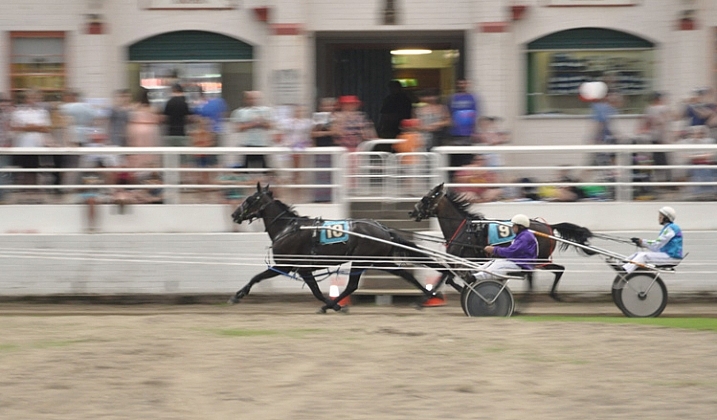
The races is a good time to try your hand at some panning shots. Panning helps to capture the sense of movement and speed, by moving your camera along with your subject, creating a blur of motion in the background.  It can be a bit tricky at first, but here is a great article to help get you started with this technique.
Equine-photography-9

Panning to create a sense of movement.
Equine-photography-6

Portraits

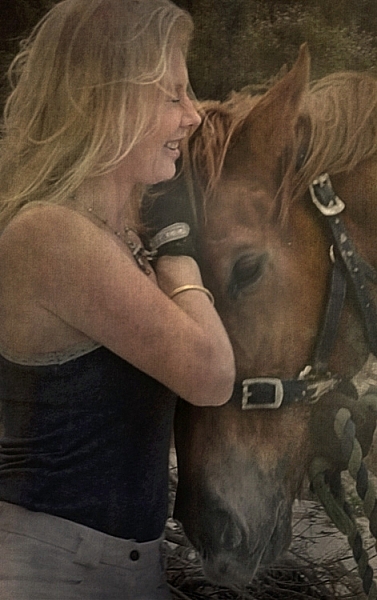
Horse people generally not only love their animals, but are also obsessed with them, and have a strong connection to them. Aim to capture the love between horse and person.

The tender moments when horse and rider have forgotten about you and your camera, often happen at the beginning or end of your photo session, while getting the horse organized.

Details

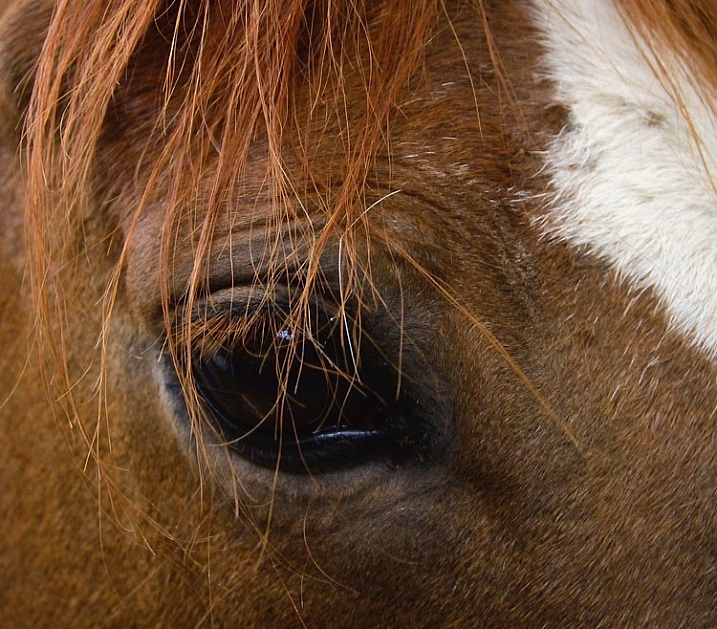
Horses are great for detail shots. Owners often have favorite parts of their horse, like the star on a forehead or other markings, or the way the horse’s mane sweeps. A zoom lens would be handy for this, unless you, the horse, and your camera, get on well enough to get up close and personal.
Equine-photography-11

I didn’t need a zoom to get a close detail of this horse. This is Monty, I used to feed and blanket him twice a day for a several months, so we are old pals. His only concern about my camera was whether or not it was edible.

Take your time

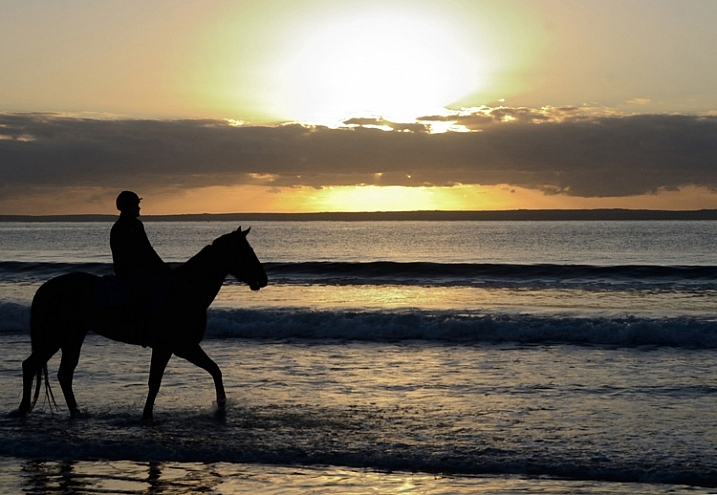
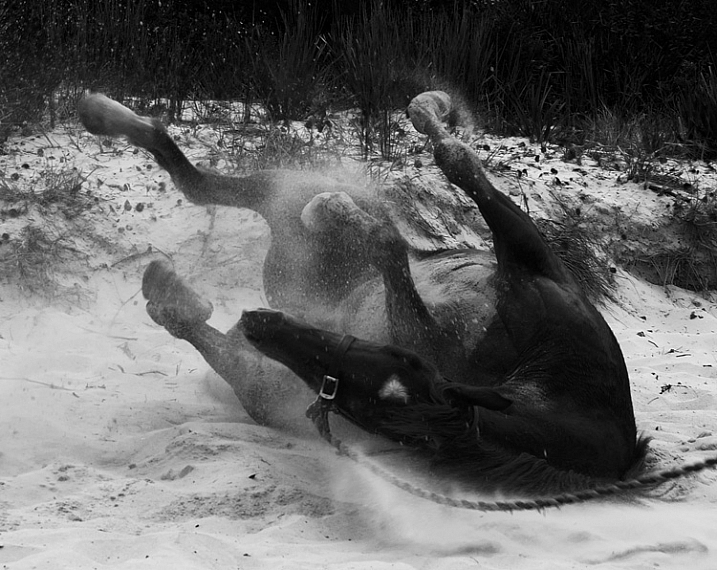
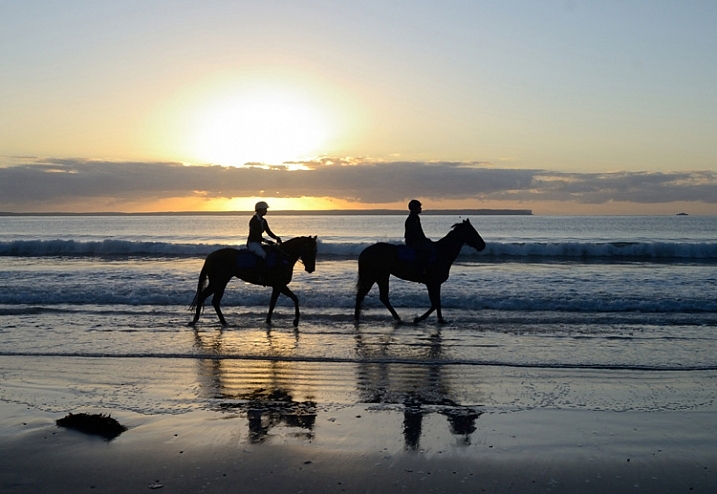
Spend as much time as you can with both horse and owner. Take a whole day if you can. Slow down enough to notice opportunities like interesting backgrounds or light. Ask questions about the horse’s favorite things to do. A horse might get really happy after being taken out for the day, and like to jump around in the paddock afterwards, where you can grab some interesting images. The photo below was taken after horses were exercised on the beach. Once the saddle was removed, they threw themselves in the sand and rolled around delightedly.
Equine-photography-5

It’s a lovely thing to see and photograph happy horses.

Horses are wonderful to photograph, sometimes challenging, and with a wide scope of photographic styles and skills involved.  I highly recommend giving it a go. Just stay safe, be respectful of the horses, get creative, and have fun.
Equine-photography-2

Are you a horse person? I’d love to hear any more tips from you if know these creatures well, or have experience photographing them. We’d also love to see more horse photography from you, so post away in the comments below.

Giddy up!

googletag.cmd.push(function() {
tablet_slots.push( googletag.defineSlot( “/1005424/_dPSv4_tab-all-article-bottom_(300×250)”, [300, 250], “pb-ad-78623” ).addService( googletag.pubads() ) ); } );

googletag.cmd.push(function() {
mobile_slots.push( googletag.defineSlot( “/1005424/_dPSv4_mob-all-article-bottom_(300×250)”, [300, 250], “pb-ad-78158” ).addService( googletag.pubads() ) ); } );

The post Beginner’s Guide to Photographing Horses by Lea Hawkins appeared first on Digital Photography School.


Digital Photography School

 
Comments Off on Beginner’s Guide to Photographing Horses

Posted in Photography


Meal of Worms: Kitchen Farm for Growing Edible Insects at Home

22 Nov

[ By WebUrbanist in Design & Products & Packaging. ]

insect meal worms

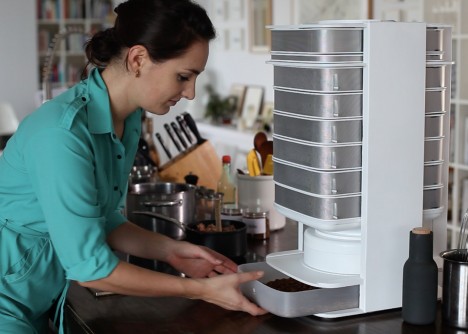
Helping you grow and harvest edible mealworms right on your kitchen counter, the world’s first desktop-sized insect hive aims to aid a rebranding of an unpopular but nutrient-rich source of protein.

edible insect farm

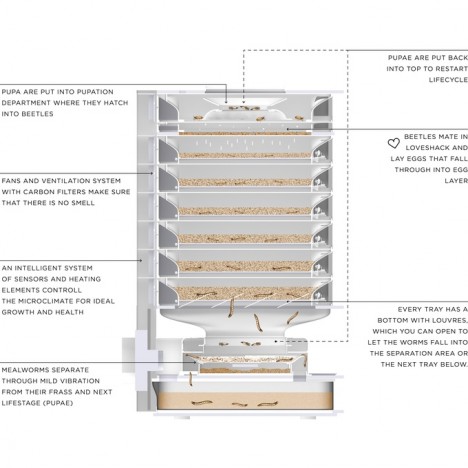
The Livin Farm by Katharina Unger and Julia Kaisinger is just a few two feet tall and contains eight shelves for housing mealworms at various stages of growth, from egg and pupae to beetle.

meal worm diagram

The pupae mature in the top drawer, turning into egg-laying beetles. The eggs in turn fall through holes in the floor and grow into worms.

insect feeding time

The key to the whole operation is a customized micro-climate within the case as well as a fan, filter and ventilation system. The insects themselves can subsist on vegetable scraps and other kitchen waste.

insect in salad

insect food protien

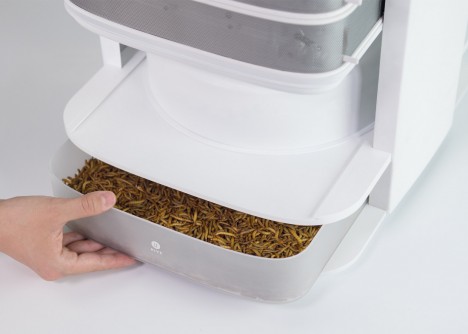
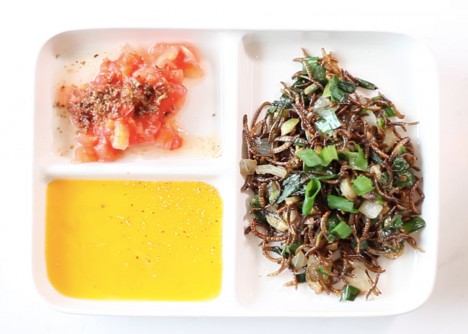
A button on the box vibrates the operation, separating insects from waste automatically rather than the conventional and less appealing way: sorting by hand. These are chilled in the bottom drawer for storage or can be frozen before being minced and boiled into meals.

meal worm benefits

Each harvest yields a few hundred grams with protein amounts roughly equivalent to similar weights of meat. The inputs are where the real savings is: less space, water and energy are needed for this system to work.

livin kitchen farm

insect kitchen counter

If the ‘yuck factor’ seems tough to overcome, consider for a moment the foods that have become popular over time across cultures, including the rise of sushi (raw fish and seaweed) in the United States and elsewhere.

Share on Facebook


[ By WebUrbanist in Design & Products & Packaging. ]

[ WebUrbanist | Archives | Galleries | Privacy | TOS ]


WebUrbanist

 
Comments Off on Meal of Worms: Kitchen Farm for Growing Edible Insects at Home

Posted in Creativity