RSS
 

Archive for June, 2015

10 Fantastic Natural Wedding Posing Tips

16 Jun

It’s been a long time since the 80s and 90s formal wedding portraits in studios, that have given wedding photography a bad name in some circles. Nowadays there are really amazing wedding photographers creating images that look like art and capture true emotion, not staged photos. If you are thinking about getting into wedding photography or want an insiders look at how some of that beautiful, natural wedding posing is created, here are 10 tips to help keep it real.

1. Stay in Touch

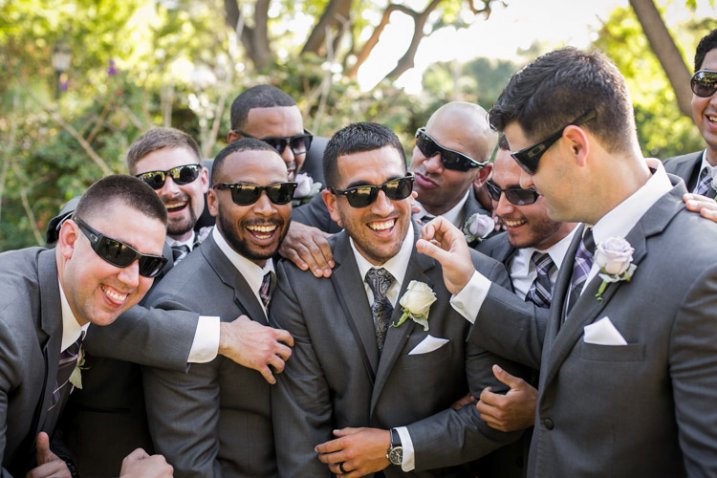
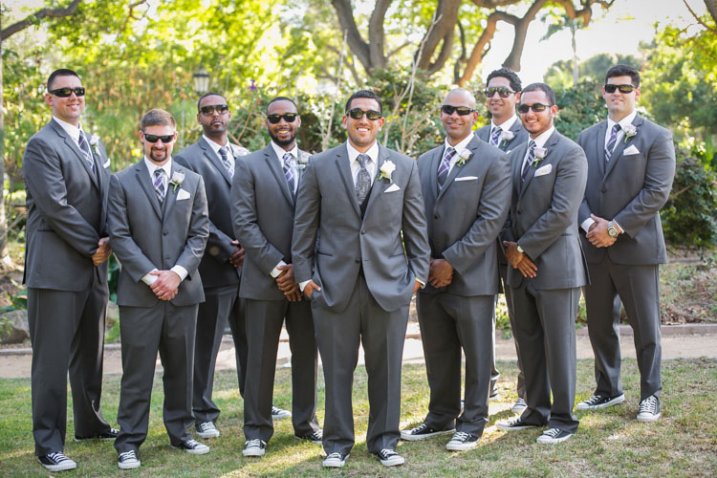
There is something very intimate and powerful about seeing people touching. This might seem obvious to you, but I think a mistake can be made by leaving space between couples or groups. Tell your groups “Get real close- don’t be afraid of each other!” Or something silly like “Pretend you like each other!” with a big smile on your face. With the groomsmen, I love getting them in a line for something formal, and then telling everyone to “Harass the groom!”
digitalphotographyschool-1-6

Standard photo of groomsmen.

digitalphotographyschool-1-7

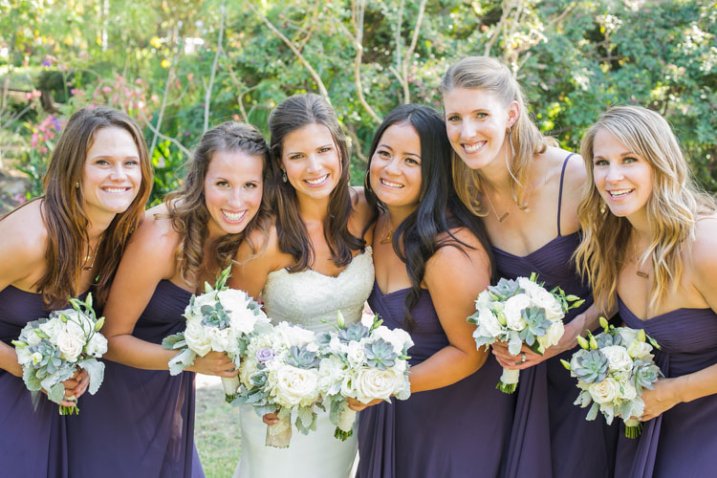
Look at the difference in a photo when you have people connecting physically. It doesn’t always have to be romantic to get a great photo.
digitalphotographyschool-1-9

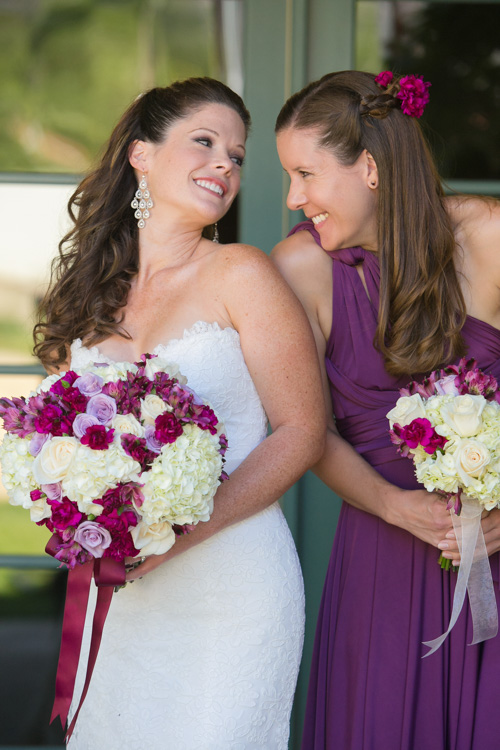
Telling the bridesmaids to get as close as possible, and then lean towards me, gets them connecting physically with each other and elicits natural smiles.

2. Walk Away and Come Back

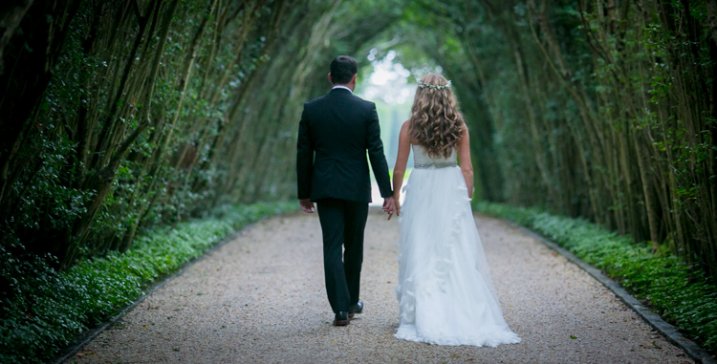
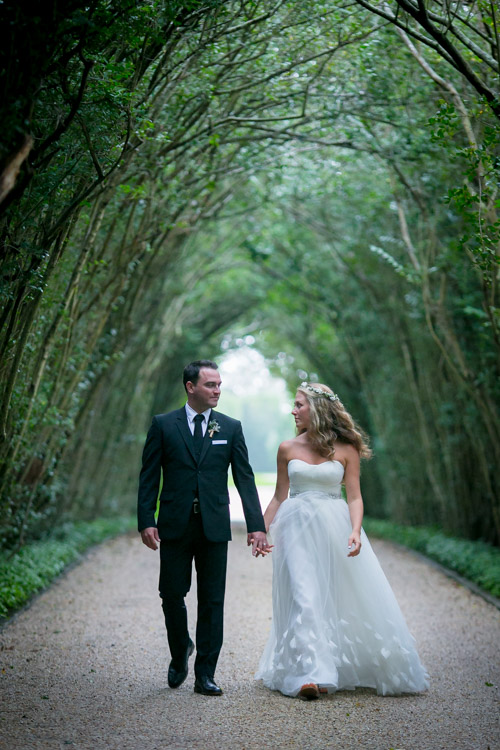
This is my go to wedding posing instruction for most brides and grooms. I tell them to “Walk away, talk about what you’re going to do tomorrow.” Then after a few good shots I tell them to “Come back.” It’s the easiest thing for them to do, they aren’t thinking about themselves or me because I’m far enough away, and it looks natural because it is natural.

digitalphotographyschool-1-10

digitalphotographyschool-2-3

digitalphotographyschool-1-11
digitalphotographyschool-1-12

3. Look at Your Shoes

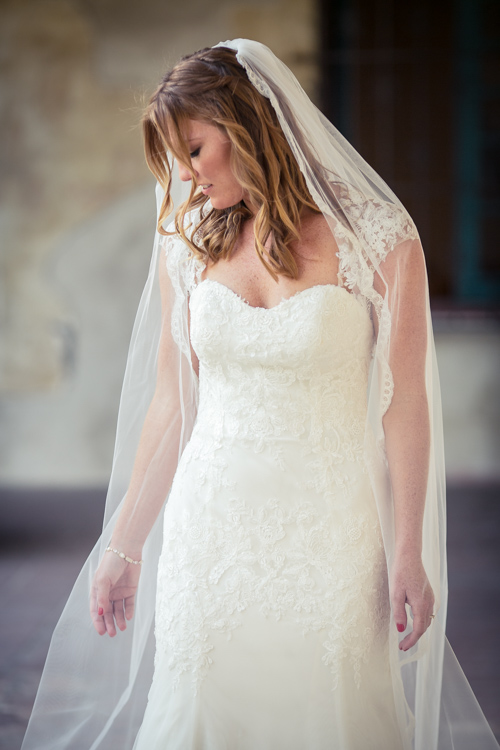
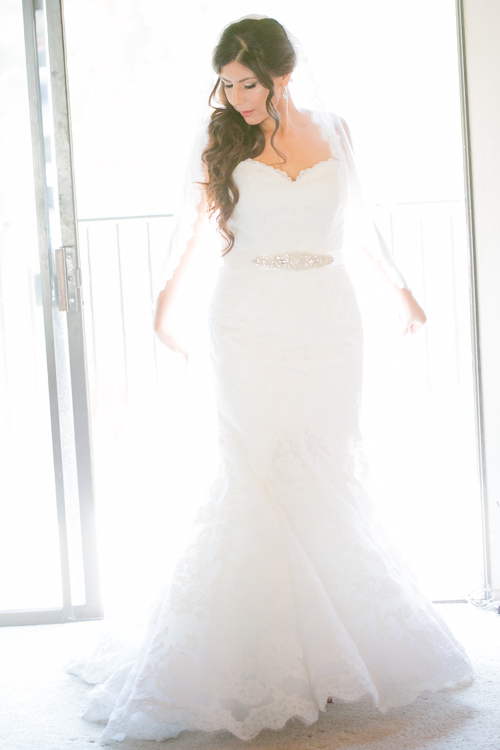
This is a fun one that I’ve discovered makes for a very pretty glamour shot with the brides. Often I’ll see them look over their side at their shoes or the bottom of their dress, and the moment always seems fresh and natural and pretty, especially showcasing their profile. If they aren’t doing that naturally, you can always say “Look over your shoulder at your shoes.” Be ready to click in a moment!
digitalphotographyschool-1-13

digitalphotographyschool-1-14

4. Button Up

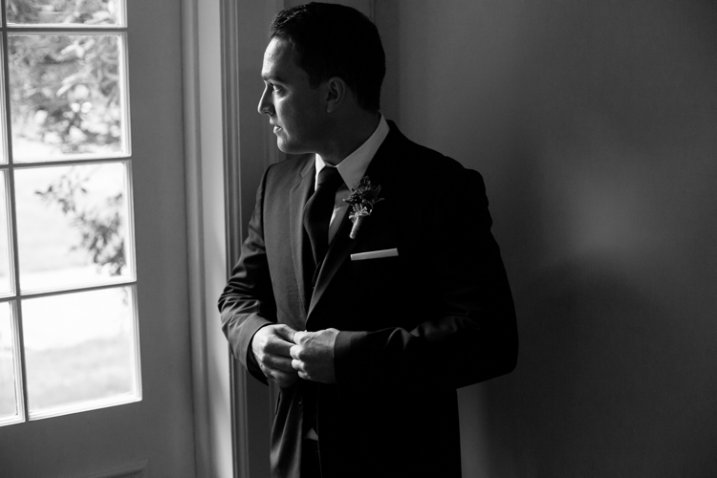
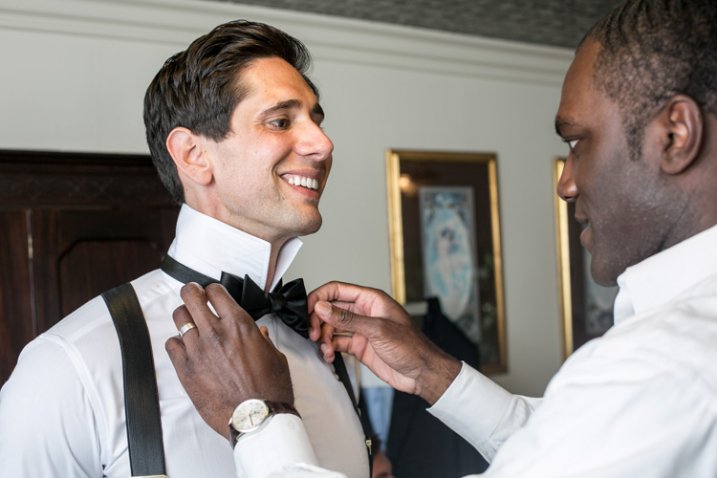
There are some great natural wedding posing moments with the groom as he is getting ready. As the title suggests, tell the groom to unbutton and button his jacket up. Or put on his cufflinks. Or adjust his bowtie/tie. This gives him something to do, the moment looks natural and masculine, and if you are near some nice window light, you’ve got your money shot.

digitalphotographyschool-1-17

digitalphotographyschool-1-21

5. Help the Groom Get Ready

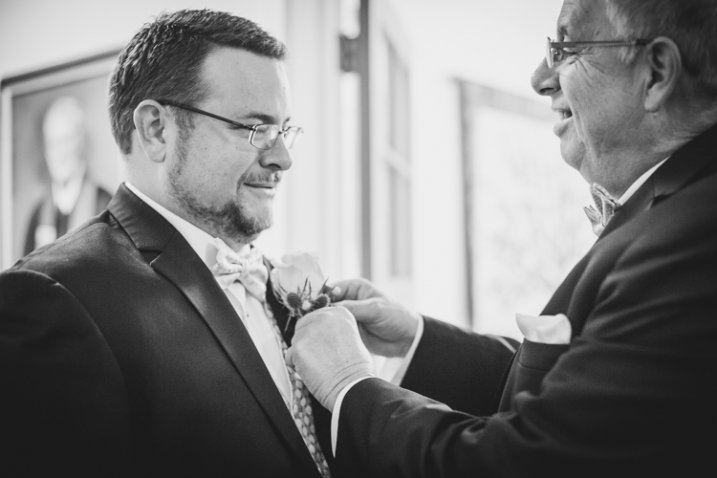
This also involves the groom, but is a slight variant on the last tip. Have the groom’s father or best man (or anyone, really) help adjust something on the groom. Ideally his bowtie, tie, or boutonniere. If they aren’t doing it already, ask a groomsman if he can “make sure the groom’s tie is on right.” This creates a natural moment that looks great, and also involves tip #1, Stay in Touch.
digitalphotographyschool-1-18

digitalphotographyschool-1-20

6. Spin

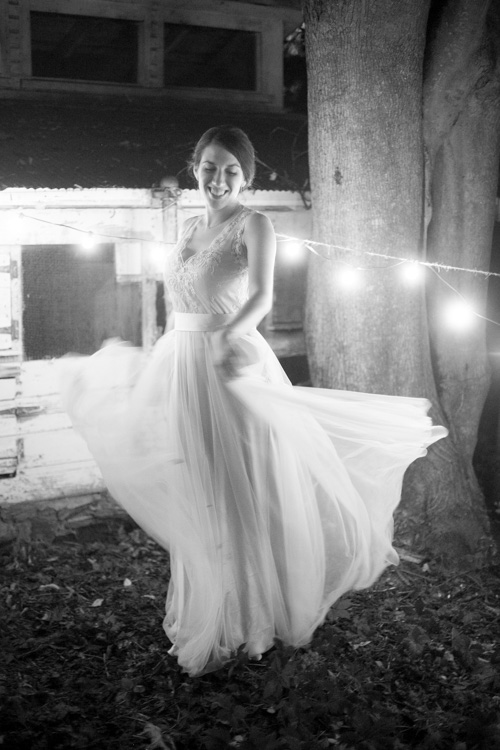
If the bride has got the dress, use it! With the right personality and dress combination, you can bring out your bride’s inner child with this fun wedding posing tip. Ask her to spin! Slow down your shutter speed for a fun movement photo.
digitalphotographyschool-1-22

7. Something with Personality!

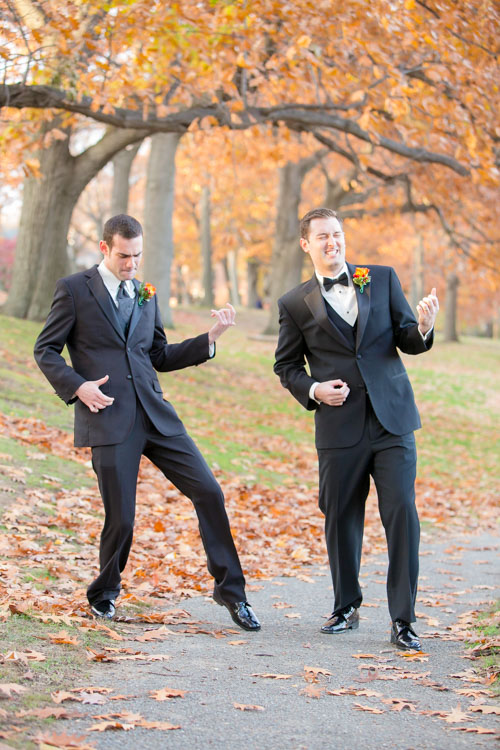
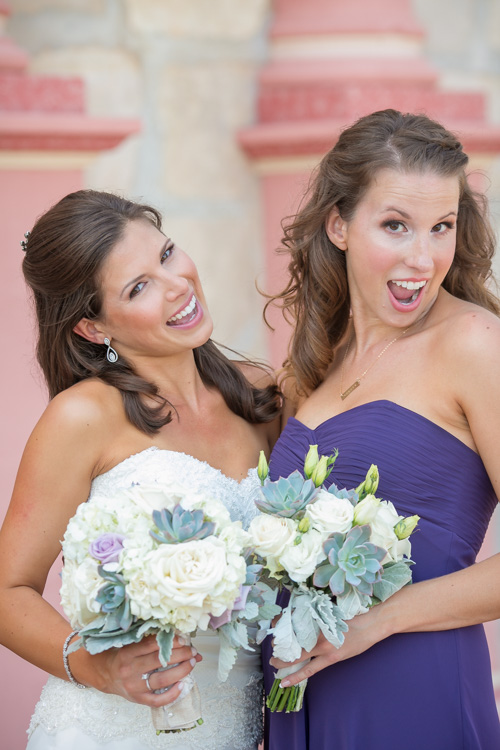
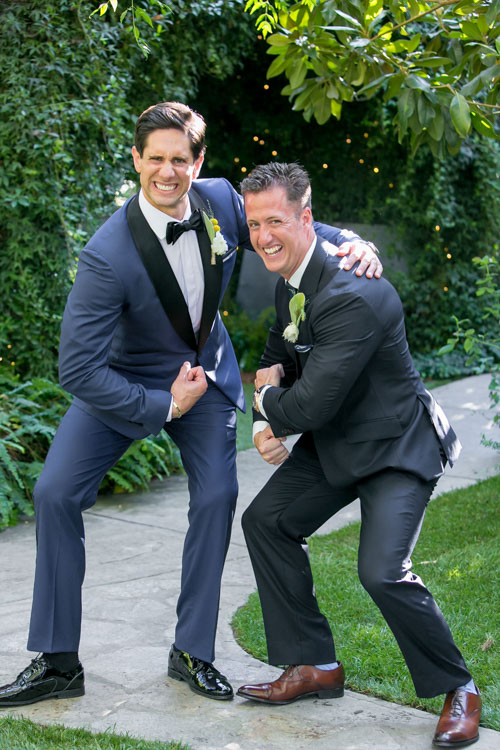
I like doing this during photos with the wedding party. I typically will take a photo with the groom and each of his groomsmen separately, and the bride and each of her bridesmaids separately. To make it fun for them (and if the group seems like the type to do it) after each standard photo I’ll tell them to give me “something with personality!” This is typically what comes out, completely on their own:
digitalphotographyschool-1-24

digitalphotographyschool-1-52

digitalphotographyschool-1-25

digitalphotographyschool-2-5

There are always lots of laughs during this time, and everyone enjoys something that could potentially be a bit tedious.

8. Look Away, Look at Me

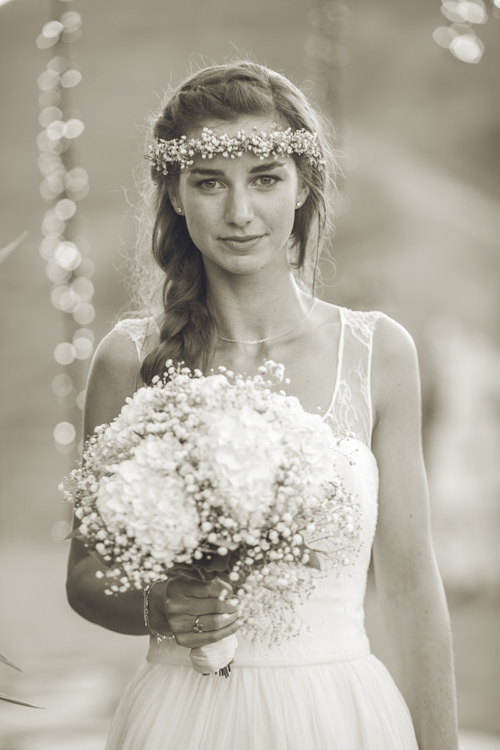
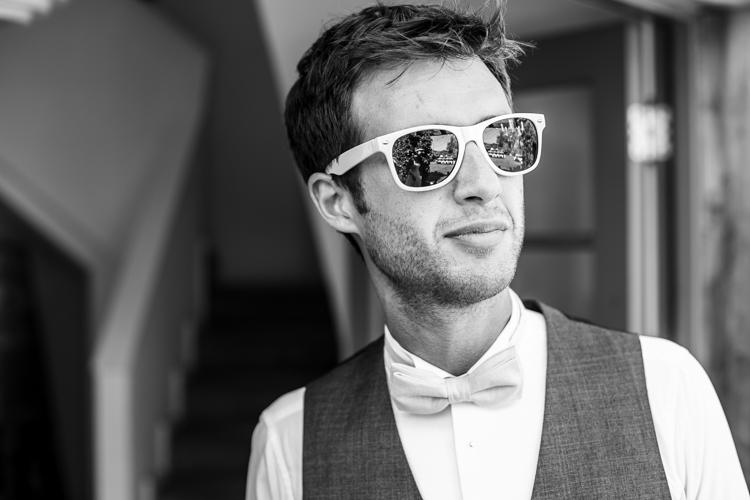
Good portrait photographers know there is a fleeting moment that occurs half a second before a person focuses their vision on something. It’s a completely natural moment that is entirely unselfconscious. The person is busy deciding where to look and in that moment they are truly themselves, unaware of the camera or how they look. Take advantage of that moment. You can create this moment by telling your bride or groom to “look away…now look at me”, then *snap* you’ve got it.
digitalphotographyschool-2-6

digitalphotographyschool-1-54

Bonus – looking away is also a nice photo moment that is unselfconscious.

9. Compliment

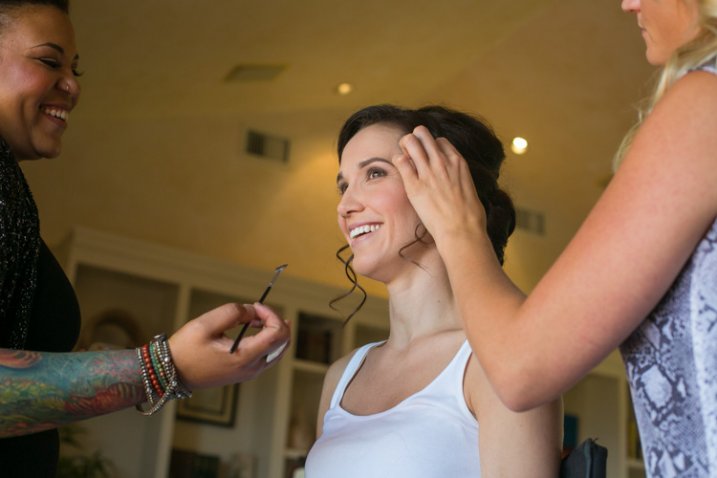
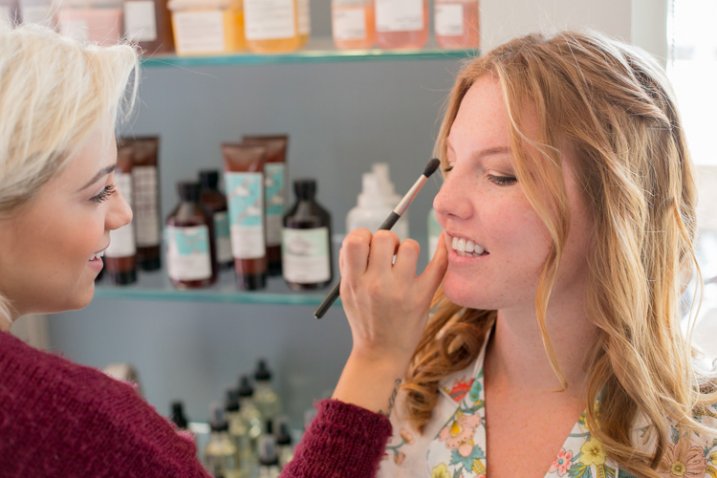
Don’t be afraid to compliment your brides – or their mothers, sisters, grandmothers, etc. – this one is mainly for the ladies. I use this wedding posing tip at the beginning of the day, usually when makeup is being applied. Nothing brings out a natural smile like a genuine compliment. “You look amazing!” “So beautiful.” I’ve heard married guys say they have a hard time doing this, but it doesn’t have to be creepy and I’m never overstepping any boundaries when I tell someone I think they look fantastic. Doing this turns a bored getting-makeup-done look, into a lovely smile.
digitalphotographyschool-1-55

digitalphotographyschool-1-56

digitalphotographyschool-1-57

10. The Almost Kiss

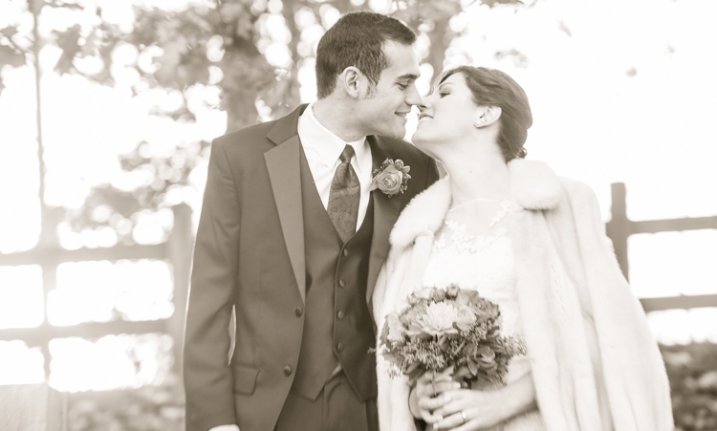
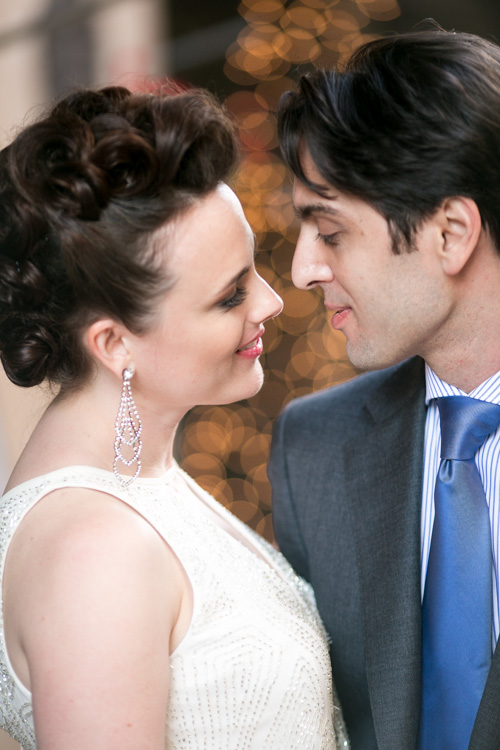
A little secret in the wedding photography industry is something called the “almost kiss.” This is used to create fantastic natural wedding posing. Kisses are fine but can sometimes be sloppy, maybe too intimate, and they give it all away. You can create palpable tension by telling a bride and groom to “get close for a kiss, but you are not allowed to kiss. Don’t do it!” This creates the best photo moments ever. In the end, give them what they want and let them kiss.
digitalphotographyschool-1-15

digitalphotographyschool-1-16

Hopefully some of these tips have given you some inspiring ideas! Feel free to add your own awesome natural wedding posing tips in the comments below. I know there are many more great ways to make your wedding photos fantastic. Thanks for reading- Phil

googletag.cmd.push(function() {
tablet_slots.push( googletag.defineSlot( “/1005424/_dPSv4_tab-all-article-bottom_(300×250)”, [300, 250], “pb-ad-78623” ).addService( googletag.pubads() ) ); } );

googletag.cmd.push(function() {
mobile_slots.push( googletag.defineSlot( “/1005424/_dPSv4_mob-all-article-bottom_(300×250)”, [300, 250], “pb-ad-78158” ).addService( googletag.pubads() ) ); } );

The post 10 Fantastic Natural Wedding Posing Tips by Phillip Van Nostrand appeared first on Digital Photography School.


Digital Photography School

 
Comments Off on 10 Fantastic Natural Wedding Posing Tips

Posted in Photography


Die Protagonisten der Kersti K.

16 Jun

Zwei Personen mit Papiertüten auf dem Kopf beugen sich zueinander..

Ein Beitrag von: Brent Smith

Durch mein Vorhaben, eine Einleitung zum Werk der schwedischen Fotografin Kersti K. zu schreiben, hatte ich sofort ein Dutzend Fragen an sie. Ich habe mir einen Fragebogen ausgedacht in der Hoffnung, so in ihre Arbeit und Gedankenwelt einsteigen zu können, ihre Urspünge und Einflüsse zu erkennen, um am Ende besser zu verstehen, was mich eigentlich an ihren Fotos so anzieht. Zum Glück habe ich ihn ihr nie geschickt. Indem ich mich länger mit ihren Bildern beschäftigt habe, wurde mir klar, dass die Besonderheit ihrer Arbeiten nicht durch Antworten in Fragebögen zu erfassen ist.
kwerfeldein – Fotografie Magazin | Fotocommunity

 
Comments Off on Die Protagonisten der Kersti K.

Posted in Equipment


Surf’s Up!

16 Jun

Capturing the drama, movement, varied textures and colors of the sea is something almost every artist attempts. We’ve come a long way from mixing pigment on cave walls. These days we can snag a wave with a tap of our finger.

Technology has elevated our ability to catch waves, and in more ways than pop-out boards. Waterproof casings, almost infinite storage capacity and lighting fast shutters make for stunning photos when combined with daring photogs.

Take a look at this article with gallery on three such surf chargers.

Been craving to carve out some of your own photos? Check out the waterproof iPhone Supersuit. You could snap a photo, edit and share all before taking the drop. Epic!


Photo by Clark Little


© Erin for Photojojo, 2015. |
Permalink |
No comment |
Add to
del.icio.us

Post tags:


Photojojo

 
Comments Off on Surf’s Up!

Posted in Equipment


Adobe Updates Photoshop and Lightroom with Creative Cloud 2015 and Launches Adobe Branded Stock Photography Library

16 Jun

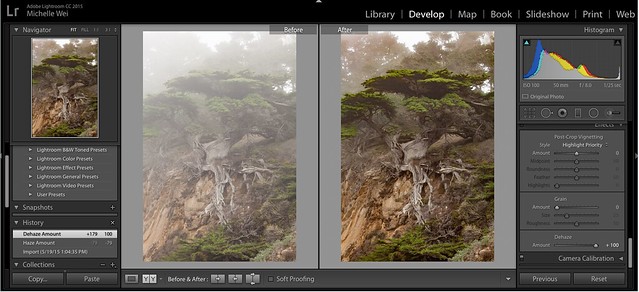
Lightroom Dehaze UI

Today Adobe is announcing updates for their Creative Cloud 2015 Photography package as well as the launch of their new stock photography offering Adobe Stock.

I saw a demo last week of the new Creative Cloud enhancements. The enhancement that I liked the most was a new slider in Lightroom for haze and dehaze. With the haze slider you can now reduce unwanted haze in photos or add haze back in if you want more of an ethereal foggy type mood. I think that this tool will be especially dramatic when working with long exposure photography where you have clouds or low fog and want to get the mix of fog to subject just perfect.

Photoshop is also adding in an additive noise function where you can produce more camera like realistic bokeh and blur noise when desired, making the transition in blur more natural. The Photoshop healing brush also now heals in real time and is faster than previous versions.

These feature enhancements and updates will not be available to the current desktop versions of Lightroom and Photoshop, they will only be available for Adobe Creative Cloud subscribers. This is in line with Adobe’s previous stated goal of providing fast and rapid real time updates and upgrades to their subscription customers. I’m assuming that eventually these new enhancements will make their way to desktop upgrades/updates, but at present Adobe seems to be focused on providing the best and most current features available to their subscription customers.

There are also additional features being launched for the mobile versions of Adobe products including better tone and vignette adjustment for Lightroom mobile and an Android version of Photoshop Mix.

Adobe’s Creative Cloud photography package costs $ 9.99/month and you can subscribe to it here. They also offer a 30 day trial for you to try out Creative Cloud to see if it is right for you.

Adobe Stock

In addition to the improvements in Lightroom CC and Photoshop CC, Adobe is also announcing the launch of their new stock photography service simply called Adobe Stock.

Because Adobe is so widely used by creatives in general, leveraging their software products to sell an Adobe labeled stock photography library seems to make a lot of sense. Adobe’s stock photography service will be featured as a menu item in Photoshop and will allow stock buyers to use watermarked versions of stock photos to create mockups and test design/layout ideas. Once a stock buyer is ready to license an image they can license it directly from Photoshop and download the unwatermarked version of the image.

Images will cost $ 9.99 each to license or Creative Cloud subscribers can purchase one of two different subscription plans. The first plan costs $ 29.99/month and allows a subscriber to license up to 10 images a month and a second plan will cost $ 199.99 per month and will allow a subscriber up to 750 images per month.

Adobe will pay out 33% of their sales proceeds to photographers — photographers interested in applying can apply here.

Because so many stock photography buyers are connected into Adobe’s ecosystem, I think this stock photography offering will end up being very successful and represents formidable competition to the current stock photography giant Getty Images. Earlier this year Adobe purchased the stock photography agency Fotolia, but this new stock offering appears to be a different offering marketed directly under the Adobe brand and available through Adobe’s flagship Photoshop product.

More: MacRumors, The Verge, Engadget, Techmeme.


Thomas Hawk Digital Connection

 
Comments Off on Adobe Updates Photoshop and Lightroom with Creative Cloud 2015 and Launches Adobe Branded Stock Photography Library

Posted in Photography


Adobe Creative Cloud update introduces de-haze feature and speedier healing brush

16 Jun

Adobe has announced a number of updates to its Creative Cloud suite, including some feature enhancements and additions to Photoshop CC and Lightroom CC. A previously demonstrated de-haze tool has been added to CC versions of Photoshop and Lightroom, and the effects of Photoshop’s popular healing brush will now be displayed in real time as the tool is used. Read more

Articles: Digital Photography Review (dpreview.com)

 
Comments Off on Adobe Creative Cloud update introduces de-haze feature and speedier healing brush

Posted in Uncategorized


Brutalist Playgrounds: Sharp Surfaces + Unforgiving Drops

16 Jun

[ By Steph in Art & Installation & Sound. ]

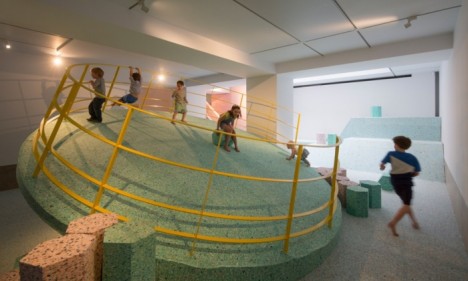
brutalist playgroudn 2

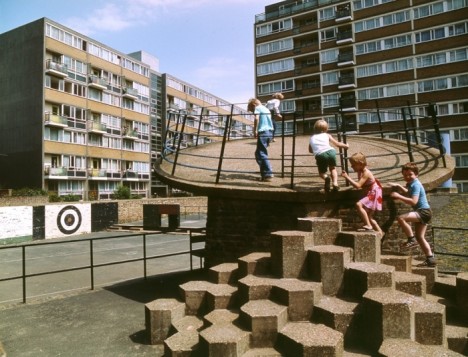
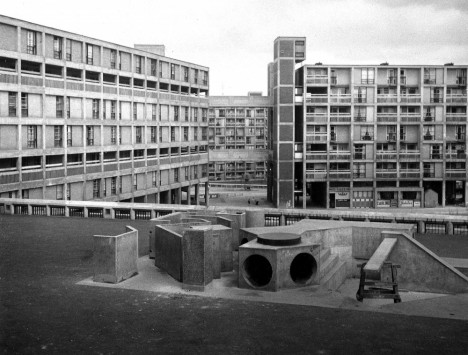
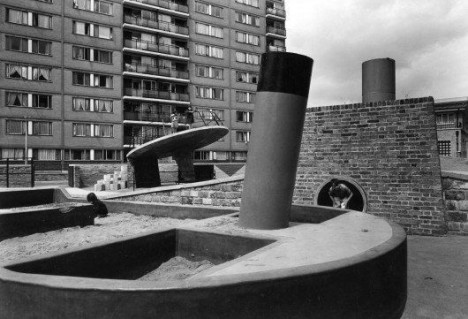
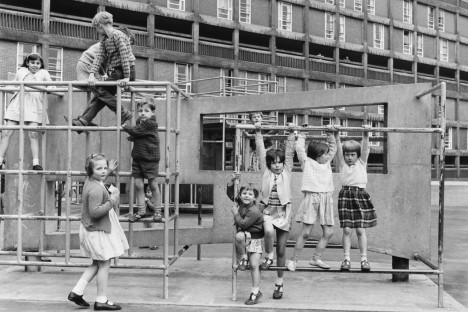
The phrase ‘brutalist playground’ kind of sounds like a joke, emphasizing the great potential for injury that would seem inherent to a sharp, harsh play structure where kids are encouraged to roughhouse. But the very same rawness, heavy materials and stark shapes seen in the architecture that was built in this style after World War II was extended to quite a few playgrounds. Today, there are all sorts of laws about kids’ safety that would nix these designs before they were ever built, but as we all know, the ’70s were a different time.

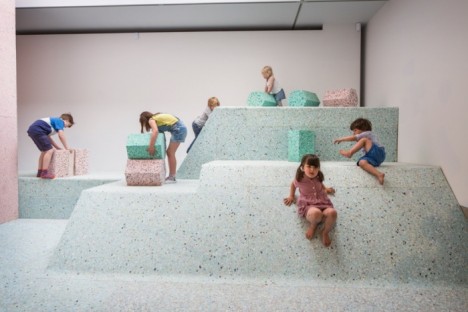
brutalist playground 7

brutalist playground 6

The actual Brutalist playgrounds were demolished long ago, but a new installation at RIBA in collaboration with artist Simon Terrill and architecture firm Assemble brings them back in the form of full-scale replicas. Housed within the RIBA headquarters in London, these recreations look just like the real thing.

brutalist playground 8

Being that they’re inside a museum – and meant for kids to actually play on – the replicas were made not of the original concrete, but of foam. The installation “encourages visitors to look at the materiality and visual language of now lost Brutalist landscapes in new ways through an immersive and conceptual landscape.”

brutalist playground 9

“Although the value of brutalist residential buildings today is much debated, this exhibition shifts the focus to the equally important playgrounds found at the feet of these structures, offering a renewed understanding and critique of the architects’ original designs and intentions.”

brutalist playground 5

brutalist playground 4

The installation will be in place through August 2015, and the photographs of the originals are just as fun to look at. Like all Brutalist structures, they’re not exactly inviting. Says Terrill of the Churchill Gardens playground in Pimlico, London (pictured top in 1978,) “Before these postwar playgrounds were built, children would have been playing in the bomb sites left after the war. It’s possible the architects were referencing that in their design.”

Share on Facebook


[ By Steph in Art & Installation & Sound. ]

[ WebUrbanist | Archives | Galleries | Privacy | TOS ]


WebUrbanist

 
Comments Off on Brutalist Playgrounds: Sharp Surfaces + Unforgiving Drops

Posted in Creativity


Panasonic announces Lumix DMC-CM1 US pricing and availability

16 Jun

Earlier this year, Panasonic announced that its hybrid smartphone/compact would be coming to the US sometime this summer. That time is now – the Panasonic Lumix DMC-CM1 is currently on sale in the US to the tune of $ 1000 unlocked for GSM networks. Read more

Articles: Digital Photography Review (dpreview.com)

 
Comments Off on Panasonic announces Lumix DMC-CM1 US pricing and availability

Posted in Uncategorized


15. Juni 2015

16 Jun

Das Bild des Tages von: Martin Ruckert

© Martin Ruckert

Im Ausblick: Humans of New York, kurdische Kämpfer und Detroit.
kwerfeldein – Fotografie Magazin | Fotocommunity

 
Comments Off on 15. Juni 2015

Posted in Equipment


A Step Above The Rest: 15 Spectacular Modern Staircases

16 Jun

[ By Steph in Design & Fixtures & Interiors. ]

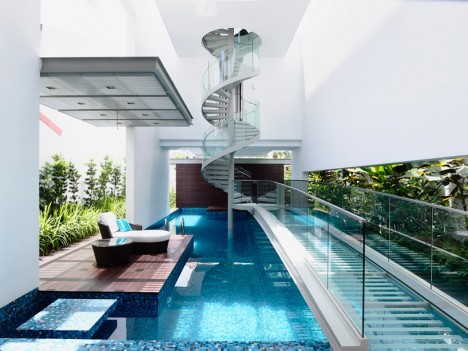
modern stairs pool bridge

Going far beyond their practical function of connecting one level of an interior to the next, these modern staircase designs make a striking statement, often doubling as a sculptural element or offering some other additional purpose. Some act as amphitheater seats, some have built-in gardens and some simply steal the spotlight no matter what else is in the room.

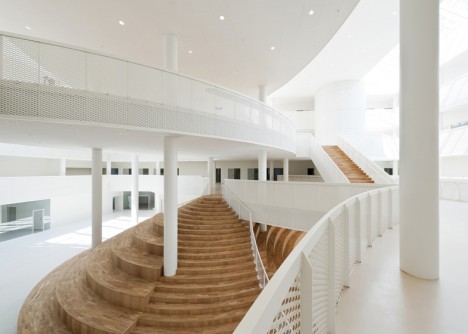
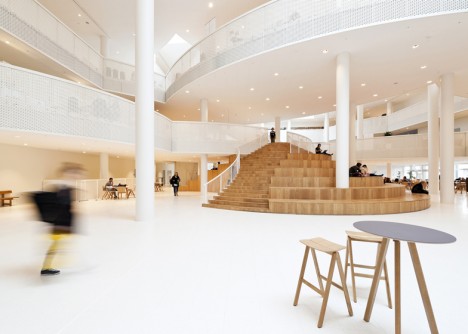
Amphi-Staircase

modern stairs amphista

modern stairs amphi-staircase 2

modern stairs amphi-staircase 1

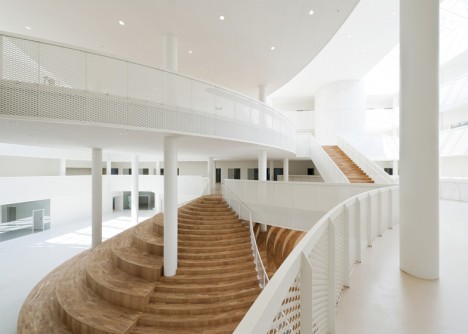
Inspired by the ‘circles and ovals’ that make up Disney characters like Mickey Mouse, this amphitheater-style staircase stands as the heat of an adult learning center in Denmark by architecture studio CEBRA. The lines of the multi-functional staircase echo those of the curving white balconies that jut out into the atrium at every level.

Glossy Spiral Stairs in a Modular Library

modern stairs glossy library

modern stairs glossy library 2

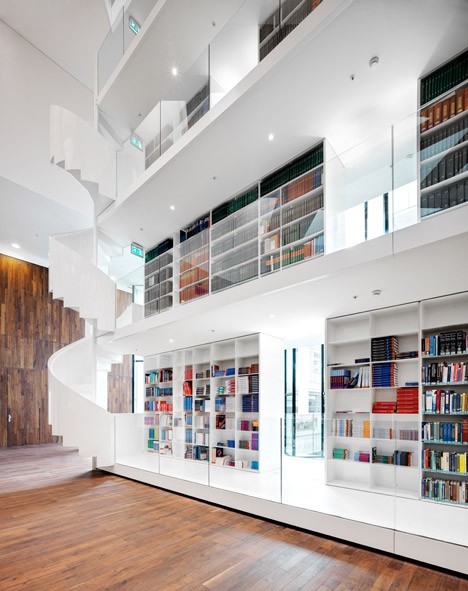
Soaring 115 feet toward the elevated ceiling, this glossy white building-within-a-building adds a library to a modern medical research center at a Rotterdam hospital. It basically functions like one very big bookcase within the large open space, featuring spiraling staircases on either end.

4-Story Living Staircase

modern stairs planted circle

modern stairs planted circle 2

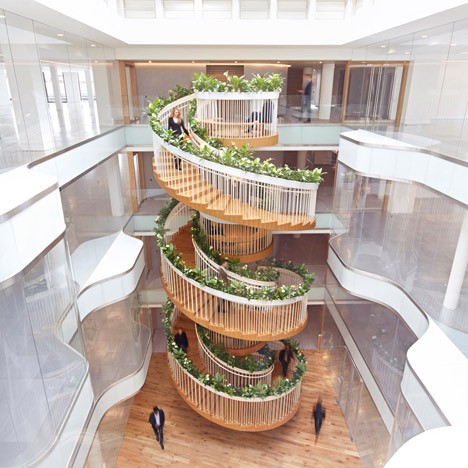
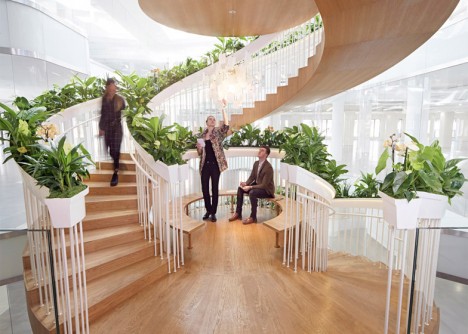
A garden, tea bar and library can be found within a stunning four-story spiraling staircase by designer Paul Cocksedge at the Ampersand office building for creative technology businesses in London. Designed to encourage interaction between workers, it features a different function at every level, including a small curated selection of books on the first floor. Pick your own mint from the garden boxes along the railing to make tea at a hot water machine once you’ve reached the top.

Floating Staircase in an All-Black Room

modern stairs floating

modern stairs floating 2

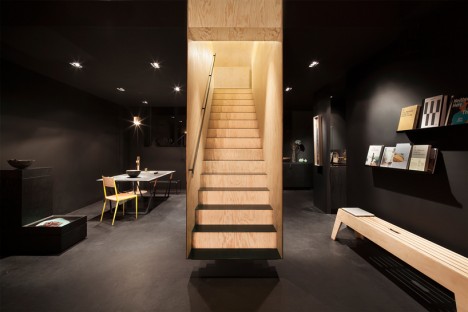
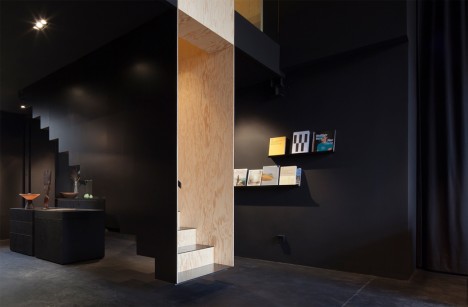
The warm wood lining the interior of this floating staircase by Hidden Fortress makes it glow against the black surfaces of a Berlin concept store, giving it the feel of an optical illusion. The maritime pine used throughout the store is left in its natural state upstairs, so the staircase serves as a visual connection to the next level as well as a literal one.

Partially Suspended Staircase

modern stairs partially suspended

modern stairs partially suspended 2

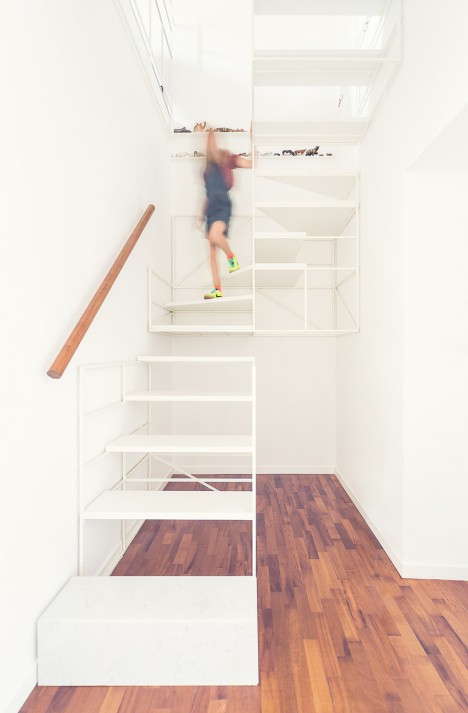
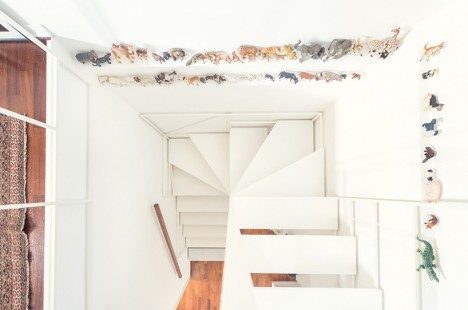
Italian architecture firm Francesco Librizzi Studio suspends most of a white-framed staircase from the stairwell, making it seem as if it’s supported by nothing but the walls. A separate section stands on its own at ground level. The designers were trying to use the stairs as a narrative scheme, asking questions like “Can a staircase tell us that time passes and children grow up?”

Next Page – Click Below to Read More:
A Step Above The Rest 15 Spectacular Modern Staircases

Share on Facebook


[ By Steph in Design & Fixtures & Interiors. ]

[ WebUrbanist | Archives | Galleries | Privacy | TOS ]


WebUrbanist

 
Comments Off on A Step Above The Rest: 15 Spectacular Modern Staircases

Posted in Creativity


Guide to Growing a Large Online Audience for Photographers

16 Jun

In this article, learn about how you can grow an online following that will enable you to profile your work, make important new contacts, and eventually monetize your photography.

TravelPhotographyMonetizedResized

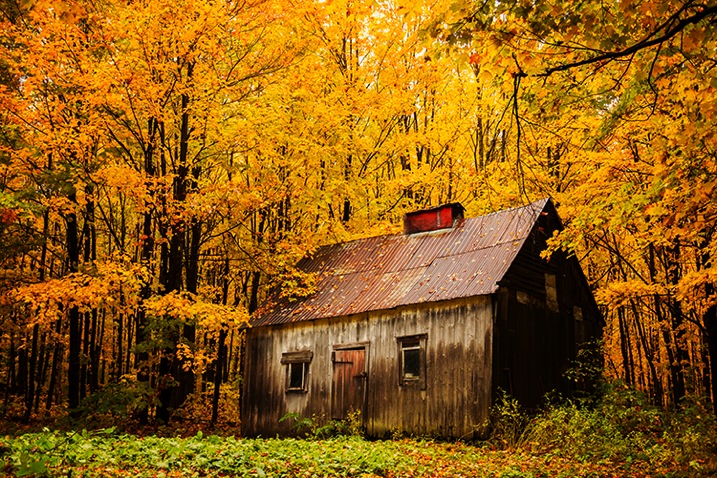
Through growing my online following I have successfully monetized a career in travel photography, visiting amazing destinations like Quebec, Canada.

First, you need to decide on the best way to share your work. Is it a blog, a social media platform, or a combination of the two? Which social media platforms lend themselves best to photography? How many should you have? There are slight nuances between all social media platforms but the core ways to share remain the same.

Choosing your platform

The best advice for choosing your platform is to follow your heart. You should put your time and effort into the things that you enjoy. A great rule of thumb is to use a platform that you love, religiously, and then supplement it with one or two others. The best way to figure out what you love is to try everything, and I mean really try it. Give different platforms a few weeks each as you learn how to share content, how to engage with the community there, and how to navigate the different features. Look at how much momentum you can pick up in that time, how many users you connect with, and the sort of feedback you are receiving on your photography.

Some great platforms for you to try are Facebook pages, Instagram, Steller, Trover, Google+, Flickr, 500px, Tumblr, Pinterest, Ello and of course, your own blog. Each social media platform is different with its own benefits and limitations. Make some effort to learn about each as you try them and remember that social media is social! If you’re not sure of something, just ask someone that you follow.

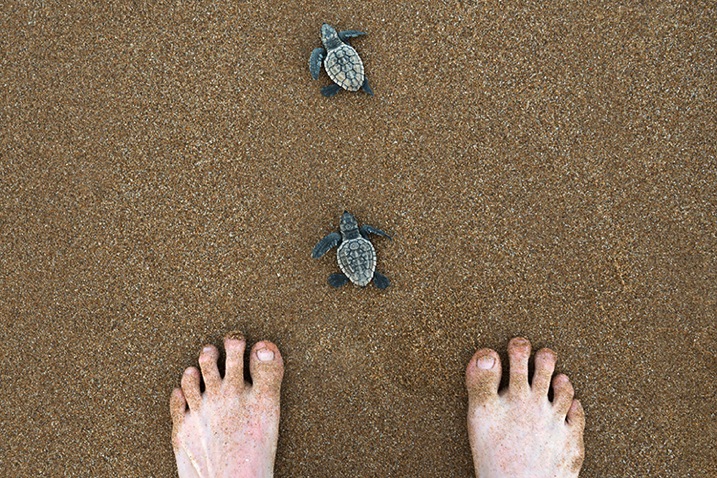
ThePlatformILoveResized

The platform that I love the most is Instagram because it lends itself well to the simple compositions I favor, plus users love uncomplicated images and subject matter such as these baby turtles in Bundaberg Australia.

Sharing content

Each platform is a little different, as are the ways of sharing your photographs, but despite subtle differences the core of sharing remains the same. Share your best work, network within the platform to get that work seen, and engage with the people who are engaging with you.

What is your best work? From any shoot or session that you do, whether it is landscape, portraiture, a family shoot, wedding, macro, food photography, etc., choose a handful of favorites and feed them out slowly, as opposed to all at the same time. Build a story into your posts and talk about the work. You might wish to share your camera settings, a gaff you made during the shoot, some information about the subject matter, or maybe even ask for feedback or advice. Again this comes down to online sharing being social. Put yourself out there and you will be amazed at what can happen.

ChooseTheBestResized

I must have taken 500 photographs of the icebergs in Jökursárlón but I only shared a coupe online, and I made sure they were perfect for my audience, uncluttered with my trademark simple composition.

Networking can be as easy as discovering photographers that you admire and commenting on their work, or using hashtag searches to find inspiration or even liking streams of images that you’re into. When another user receives a notification that you’ve engaged with their work they’re likely to come and check out yours. If they don’t, find others who will. Sharing your work online to grow an audience requires time and persistence as well as a genuine love and passion for what you’re doing. That’s why it’s important to use the platforms that you enjoy.

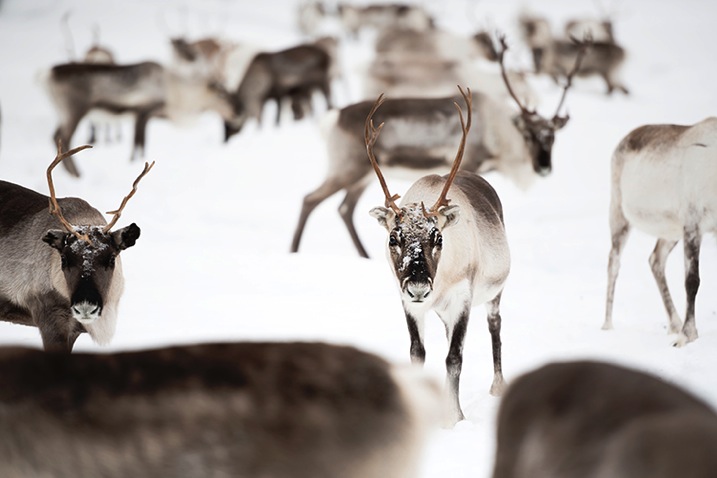
WhyIEnjoyResized

Another reason why I enjoy Instagram is because it is so populated. I can find any type of image, any destination, and many people with similar interests by sharing there. Reindeer fan anyone?

Engaging can be done in several different ways but one of the most important ways is to thank people that have commented on your work or reply to questions as they’re asked. You don’t need to dedicate your life to it, but you will find that a little effort will enable you to snare new followers and build new connections.

Over time, you may notice that you receive more likes and comments on a certain type of image. For example, if your macro photography is getting double the likes of your portrait photography then your followers are telling you what they really love. You can choose to give them more of what they love, or continue to diversify. In my experience the biggest social media accounts often have quite consistent subject matters. You will start to get people following you just for your macro photography, and perhaps you’ll notice a dip in engagement when you post anything else. It’s up to you how to manage this, but the best advice is to always stay true to your passions.

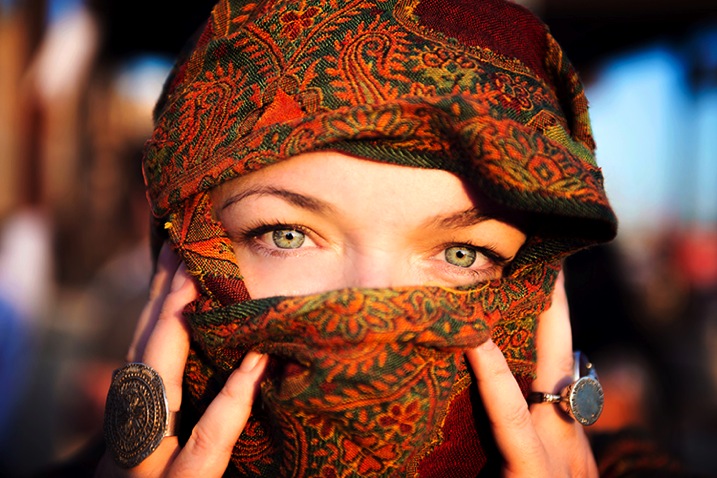
StarTrueResized

Although I am well known for travel photography and landscapes I also love portraiture, and despite the lower engagement I continue to post the work that resonates with me.

Networking

It’s a funny thing networking on social media; so many people do it badly. If you want to do well with people online then simply remember to be a person! You are not a faceless photographer pumping out uploads; you are a person with feelings, opinions, humor and personality, so you should let that shine through. Whatever platform you are using, you should have a profile photo that looks like you and a bio with a little information about yourself. Each time you upload a photograph you should write an engaging caption, and when people talk to you, talk back as you would in real life. You may be astonished at how many amazing people there are using social media, and they are all at your fingertips.

ProfileShotResized

A strong profile shot of you looking like yourself, doing something you love, in a scenic but uncluttered background, will help people engage with you.

Over time you may realize that brands you admire use the same platform you do, and you should treat them the same way you would treat others. Engage with the brand and offer real feedback on what they’re doing in that space. Share your personality and you may find them discovering you back. The same goes with potential clients if you are trying to break into a certain photography industry. Just be yourself, share great work, network, engage, and persist.

Monetize

If you ever get to the stage where you have a large online following on any platform, then the time may be right to monetize. There are various ways of doing so. This can be really dependent on the type of photographer you are, and the kind of work you are doing. You may be a wedding photographer you has stylists offering you money to promote them on your channels. You might love travel photography (like me) and find a way to promote destinations to your online followers. Maybe you’re into lifestyle photography and brands pay you to include their product in shots in exchange for a fee. With an audience you will find that the photography industry will open up to you as more and more businesses are hiring based on both photography style and online reach.

OnlineReachResized

It’s not a complicated image, perhaps any decent photographer could have taken it, but combine this image with a 400,000 strong audience and I get a foot in the door thanks to my online reach. (Follow Lauren on Instagram here)

If not the above, then having an online following will expose you daily to an audience that may one day need a photographer. Online sharing gives you a chance to be seen by everyone from businesses, to journalists, to tourism boards, and of course potential clients and friends. By finding the platform that you love and sharing great work; by putting your best foot forward and networking and by keeping an eye out for opportunity, you can definitely go places no matter the level of your photography.

WeAllStartSomewhereResized

We all start somewhere. Online sharing has enabled me to take my photography to places I never would have believed possible and having an audience makes me proud and accountable for every image I share.

googletag.cmd.push(function() {
tablet_slots.push( googletag.defineSlot( “/1005424/_dPSv4_tab-all-article-bottom_(300×250)”, [300, 250], “pb-ad-78623” ).addService( googletag.pubads() ) ); } );

googletag.cmd.push(function() {
mobile_slots.push( googletag.defineSlot( “/1005424/_dPSv4_mob-all-article-bottom_(300×250)”, [300, 250], “pb-ad-78158” ).addService( googletag.pubads() ) ); } );

The post Guide to Growing a Large Online Audience for Photographers by Lauren Bath appeared first on Digital Photography School.


Digital Photography School

 
Comments Off on Guide to Growing a Large Online Audience for Photographers

Posted in Photography