RSS
 

Archive for April, 2015

Shoot Your Own Frozen Flower Photos!

23 Apr

Spring is upon us. And it’s bringing a ton of flowers.

Now the only question is: whatcha gonna do with all those blooming beauties?

Ooh, we know! You should freeze ‘em, photograph ‘em, and then marvel at the gorgeous results.

Seriously, frozen floral photos are so pretty and unique that it’s almost unfair . So let us show you how to make them with this easy peasy (freezy) tutorial.

Freeze Flowers for Stunning Photos

Thanks for the inspiration Mo Devlin!
(…)
Read the rest of Shoot Your Own
Frozen Flower Photos! (508 words)


© Taylor for Photojojo, 2015. |
Permalink |
No comment |
Add to
Frozen Flower Photos!”>del.icio.us

Post tags:


Photojojo

 
Comments Off on Shoot Your Own Frozen Flower Photos!

Posted in Equipment


How to Shoot Panoramic Photos

23 Apr

Image stitching is not new, neither is panoramic photography. Since almost the beginning, photographers have been intrigued with providing a wider view of a given scene. The reason is that panoramic images provide context. In a normal frame of a large expansive scene, we only see a small part of the bigger picture. A panoramic image however, gives us a broader view, and a context for that image. The word panorama is derived from two greek words, “pan” which means everything and “horama” which means that which is seen or the view. So, panorama literally means – a view of everything.
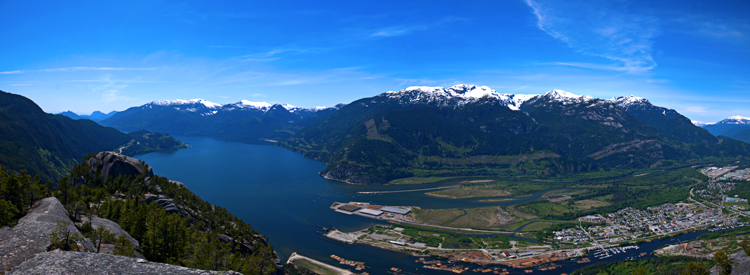
Stitched Panorama

A six image pano of Howe Sound, Squamish BC

Early on, photographers would make panoramics manually, by simply panning across a scene and taking sucessive images. Once the images were printed, they would manually stitch them by overlaying one image on top of the other, or even cutting them into place. This was a new way of viewing and capturing scenes. I saw my first panoramic image as a young boy. It was a huge scene of photographs that had been stuck together and overlaid. It was in a museum in the city where I grew up. I was intrigued, it gave me a view of the city I was living in, that I had never seen before. It gave me a whole new perspective on the place that I called home. I wasted many rolls of film as a youngster trying to do the same shots, but never managed to get it right.

One solution to this challenge was the panoramic camera. These cameras revolutionized panoramic photography. They were able to capture a panoramic scene of 180 degrees in a single shot. No more cutting and sticking photographs together. These rotating cameras captured great images of scenes and did it with ease. There were also wide-angle panoramic cameras that took in much more of a scene in a single image and again, changed the way we viewed images and scenes. These cameras changed the views, and contexts of many famous places. In their day, they were the pinnacle of technology.
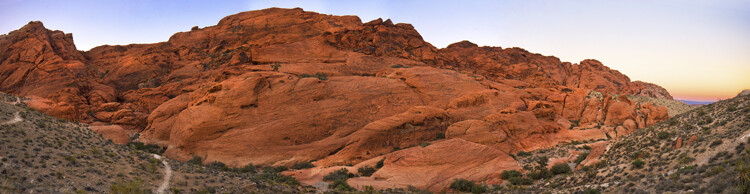
Stitched Panorama

Red Rock Canyon, Las Vegas

Once again, the wheel of progress turned and all of this changed when digital panoramics became possible. The photographer only had to pan across the scene and take successive images, as in the past, but now the stitching process in the computer gave a seamless result. The photographer simply dropped these images into a photo stitching tool and voila, an amazing panoramic image magically appeared. Well, that was the idea anyway, in practical terms it was not so easy.

1. How to shoot panoramic photos

Autopano giga is a standalone software tool that stitches your images together. There are a few guidelines to follow when you do a photostitch. By following these guidelines, you will be almost guaranteed that your image will stitch properly the first time.

A. Shoot in Manual mode

Expose for your scene manually and don’t change the exposure between shots. You may have to do a light meter reading for the brightest and darkest parts of your scene. Adjust your settings to make sure that you have good exposure throughout the images and then start shooting.

B. Overlap your shots by at least 30%

Overlap each image by at least 30% if you are shooting in landscape orientation and up to 50% if shooting in portrait. By overlapping you will have duplicates of parts of your scene, this will allow the software to stitch the images together better and adjust for the perspective distortion too.
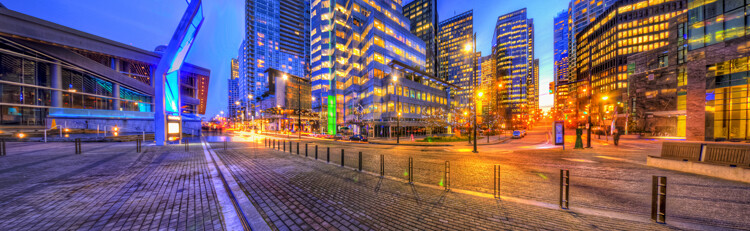
Stitched Panorama

Five images stitched, Jack Poole Plaza, Vancouver

C. Use a tripod

You can shoot handheld, but using a tripod will ensure that the images will be shot along the same horizontal plane. This can also help with the stitching process too.

D. Keep your aperture between f/8 and f/11

You will want to keep everything in focus, so be sure that your aperture is set to at least f/8. At f/2.8 your focal point may change and this could cause some parts of your image to be out of focus. It may also be a good idea to set your aperture to f/8, focus your camera, then switch to manual focus. That way your camera won’t be focusing on a different part of the scene in each image. At f/8 or f/11 the whole scene should be in focus.
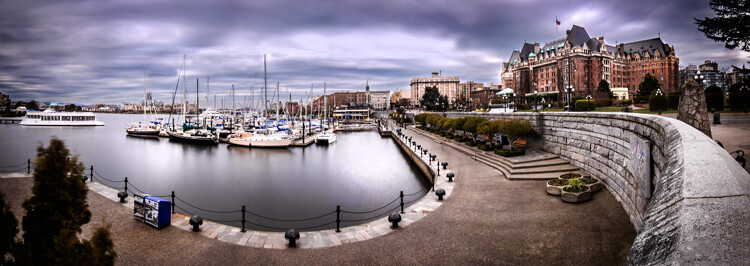
Stitched Panorama

Six image Pano, Victoria Harbour on a snowy, windy day

Now the magic part, digitally stitching the images together. You can do this using Autopano Giga or Photoshop, my preference is Autopano Giga. To learn more about how to do this, take a look at these articles I wrote on image stitching: Walk Through and Review of Autopano Giga – Image Stitching Software and Step By Step How to Make Panoramic HDR Images.

Lets make this fun, upload some of your images that you have stitched, then tell us what software you used. Enjoy, happy shooting and stitching.

googletag.cmd.push(function() {
tablet_slots.push( googletag.defineSlot( “/1005424/_dPSv4_tab-all-article-bottom_(300×250)”, [300, 250], “pb-ad-78623” ).addService( googletag.pubads() ) ); } );

googletag.cmd.push(function() {
mobile_slots.push( googletag.defineSlot( “/1005424/_dPSv4_mob-all-article-bottom_(300×250)”, [300, 250], “pb-ad-78158” ).addService( googletag.pubads() ) ); } );

The post How to Shoot Panoramic Photos by Barry J Brady appeared first on Digital Photography School.


Digital Photography School

 
Comments Off on How to Shoot Panoramic Photos

Posted in Photography


Adobe Camera Raw 9 released with Merge to HDR and Panorama features

23 Apr

With the launch of Lightroom 6 and Lightroom CC, Adobe has released Camera Raw 9 with some of the some added features. Merge to HDR and Panorama are now available in ACR, using Raw image data to automatically assemble HDR and panoramic images, which are output as DNG files. This eliminates the need to edit files before merging them in Photoshop. Read more

Articles: Digital Photography Review (dpreview.com)

 
Comments Off on Adobe Camera Raw 9 released with Merge to HDR and Panorama features

Posted in Uncategorized


Kipon adapter to allow AF with Canon lenses on Micro Four Thirds bodies

23 Apr

Chinese lens adapter manufacturer Kipon has announced plans to introduce the first adapter that allows AF operation when a Canon EF or EF-S lens is attached to a Micro Four Thirds camera body. Previous adapters have either been entirely manual or, more lately, offered aperture control, but the Shanghai-based company has said that its next model will allow full frame and APS-C EOS system lenses to focus automatically too. Read more

Articles: Digital Photography Review (dpreview.com)

 
Comments Off on Kipon adapter to allow AF with Canon lenses on Micro Four Thirds bodies

Posted in Uncategorized


Ricoh unveils Pentax K-3 II with Pixel Shift Resolution mode

23 Apr

Ricoh has just launched the Pentax K-3 II semi-pro DSLR with an improved image stabilization system that drives a new Pixel Shift Resolution feature. Retaining its predecessor’s 24MP sensor, 27-point AF system, and durable construction, the K-3 II now offers sensor-shift IS with a claimed 4.5 stops of shake reduction. Read more

Articles: Digital Photography Review (dpreview.com)

 
Comments Off on Ricoh unveils Pentax K-3 II with Pixel Shift Resolution mode

Posted in Uncategorized


Drei Labore im Vergleich

23 Apr

© Normen Gadiel

Ein Beitrag von: Normen Gadiel

Wer nicht gerade in einer Großstadt wohnt und ein Labor für die Filmentwicklung um die Ecke hat oder einfach nicht selber entwickeln möchte/kann, muss seine Filme wegschicken. Für den folgenden Artikel habe ich das Kosten-/Leistungsangebot von drei Anbietern verglichen.
kwerfeldein – Fotografie Magazin | Fotocommunity

 
Comments Off on Drei Labore im Vergleich

Posted in Equipment


R2-D2 Express: Take a Ride on a Real Star Wars-Themed Plane

23 Apr

[ By Steph in Technology & Vehicles & Mods. ]

star wars plane 1

Pretend like you’re on a journey to a galaxy far, far away while aboard a real Star Wars-themed aircraft painted to look like R2-D2 on a Japan-based ANA Airways flight. The R2-D2 Dreamliner aircraft is an officially Star Wars-branded 787-9, the logo writ large across the body of the plane, and is set to take flight for the first time in September 2015.

star wars plane 2

ANA chose R2-D2 not just because the shape happens to be convenient for the nose of a plane, but because the character is “not your typical droid,” they explain. “No matter the challenge, the highly loyal R2-D2 never fails to complete his mission and surprise us with his clever solutions.”

star wars plane 4

Never mind that as passengers on an international flight, most of us would prefer that clever solutions never have to come into play in the first place. The plane’s design is a welcome change from the usual airline logos, and it’ll be fun for unsuspecting onlookers to spot it from the ground.

star wars plane 3

The plane is a promotional tie-in for the upcoming film Star Wars: The Force Awakens, due to hit theaters on December 18th.

Share on Facebook


[ By Steph in Technology & Vehicles & Mods. ]

[ WebUrbanist | Archives | Galleries | Privacy | TOS ]


WebUrbanist

 
Comments Off on R2-D2 Express: Take a Ride on a Real Star Wars-Themed Plane

Posted in Creativity


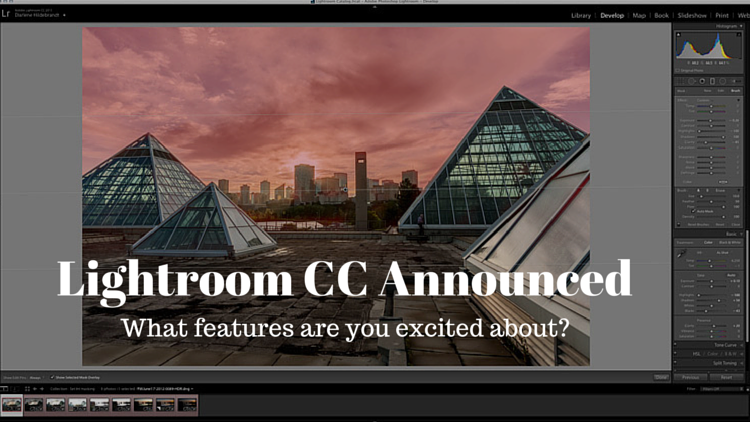
Adobe Announces New Lightroom CC – What Features are You Most Excited About?

23 Apr

Lightroom CC

Well yesterday Adobe pulled the trigger on the much anticipated release of the new Lightroom 6, which is actually called Lightroom CC (part of the Creative Cloud). It will still be available as a stand alone product but many people, myself included were eagerly downloading the new version as soon as it was available.

We’ll have one of our writers doing a more involved look at the new features soon but I wanted to see what you are most interested in with this new version.

LR-CC-03

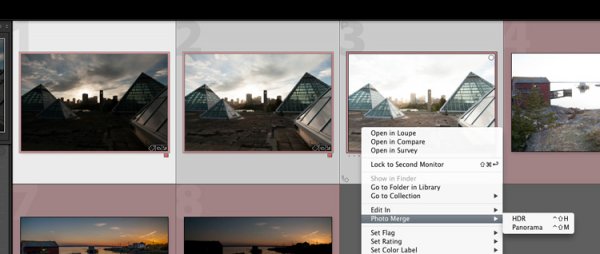
New Photo Merge feature in LR CC

What features were on your LR wish list?

So tell me in the comments below – what things were you hoping Adobe would build into this incarnation of Lightroom? Did you get all the features you wanted? What’s still missing in your opinion?

Was there anything you wanted removed?

What new features are you most fired up about?

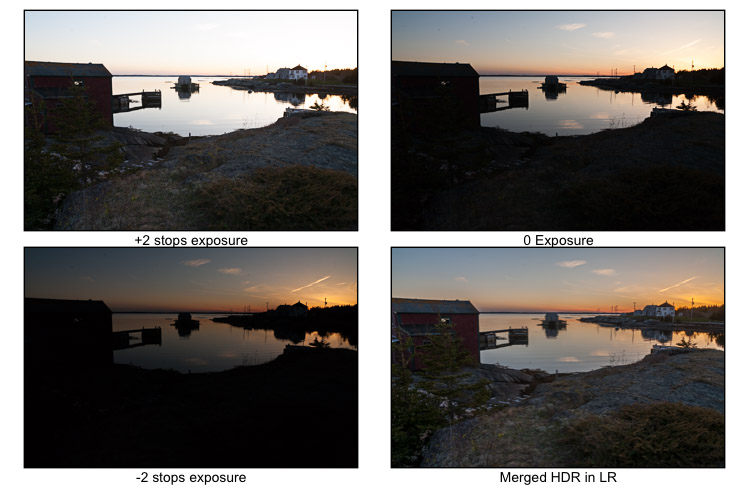
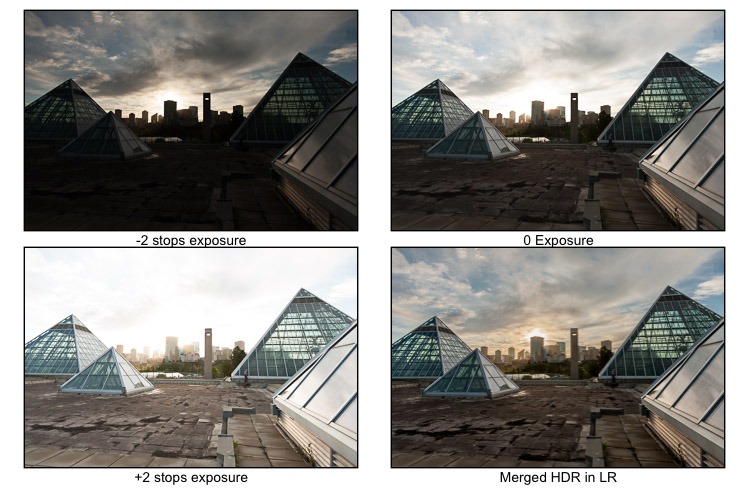
In watching some of the live broadcast of the announcement I picked up on a few of the new features and was eager to try them out, most of all the Merge to HDR (Pano also available). It takes your bracketed shots which you previously had to take to either Photoshop or another plugin to work with – and now Lightroom merges them into a gorgeous 32-bit file which comes back in as a DNG no less! So you have all the editing power of a 32-bit file at your fingertips without every leaving Lightroom CC – I’m sold!

I ran a couple sets through the HDR to test it. Was pretty impressive and super easy. I’ll have to dig into it more later.

LR-CC-02 LR-CC-01

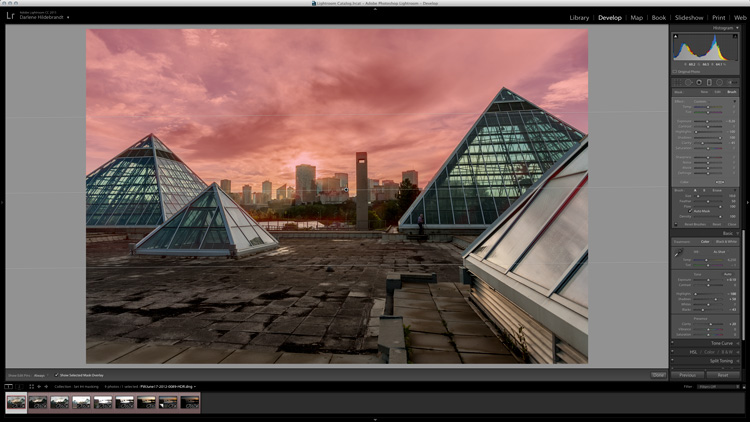
Previously on the set of images above I had to mask the sky back in – but using LR local adjustments and the new HDR Merge I was pretty happy with the result which took about three minutes.

Some of the new features I’m excited about and keen to try are:

  • The Merge feature (to Pano and HDR – it even handles alignment, auto tone and deghosting)
  • Add to Collection on import
  • Filter in Collections (search)
  • Enhanced video slideshows (I use it now for easy shows, this looks like it can make them look better now too)
  • Auto-straighten on the crop tool
  • New finer control using the graduated filter and radial filter. You can now brush out, or mask (hide) part of it to bring back buildings, trees and areas you do not want affected by the filter. Brilliant!

See a complete run down of all that’s new on the Adobe site.

LR-CC-04

New brush option on graduated filters, very slick!

How about you?

We’ll have more on the new Lightroom in the coming weeks but for now tell us what you think in the comments below.

googletag.cmd.push(function() {
tablet_slots.push( googletag.defineSlot( “/1005424/_dPSv4_tab-all-article-bottom_(300×250)”, [300, 250], “pb-ad-78623” ).addService( googletag.pubads() ) ); } );

googletag.cmd.push(function() {
mobile_slots.push( googletag.defineSlot( “/1005424/_dPSv4_mob-all-article-bottom_(300×250)”, [300, 250], “pb-ad-78158” ).addService( googletag.pubads() ) ); } );

The post Adobe Announces New Lightroom CC – What Features are You Most Excited About? by Darlene Hildebrandt appeared first on Digital Photography School.


Digital Photography School

 
Comments Off on Adobe Announces New Lightroom CC – What Features are You Most Excited About?

Posted in Photography


Meet PJ:Drew Edition

23 Apr

Name: Drew “DJ DevDad” Johnston

What Do You Do Here? I program all the things.

Favorite Camera: My trusty Canon T1i with a 28mm f/1.8 lens.

Learn Even More About Drew
(…)
Read the rest of Meet PJ:
Drew Edition (82 words)


© laurel for Photojojo, 2015. |
Permalink |
No comment |
Add to
Drew Edition”>del.icio.us

Post tags:


Photojojo

 
Comments Off on Meet PJ:Drew Edition

Posted in Equipment


Hands-on with the Pentax K-3 II

23 Apr

The Pentax K-3 II is a modest update to its predecessor, but that doesn’t mean that its new features are insignificant. While faster autofocus and more shake reduction is great, we’re most excited about the Pixel Shift Resolution feature. While we can’t share any samples photographs yet, we can give you an overview of what’s new with the K-3 II. Read more

Articles: Digital Photography Review (dpreview.com)

 
Comments Off on Hands-on with the Pentax K-3 II

Posted in Uncategorized