Sony is selling half its stake in Olympus to investment bank JP Morgan to free up cash for ‘strategic investments,’ the company has announced. Sony bought a 10% stake in the medical and camera company in 2012, primarily to gain access to the global medical market to which it hoped to apply its sensor, 3D and display technologies. At the time Olympus’s future was in doubt, following revelations that it had misstated its accounts having been secretly redirecting money to pay off long-standing debts that has been hidden from investors. Read more
Month: April 2015
-
Tips for Photographing a Lunar Eclipse
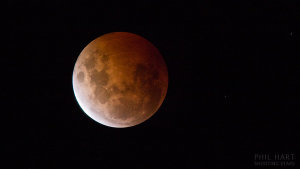 While some obscure astronomical events get over-hyped, a total lunar eclipse is always a crowd-pleaser. It is easy to observe and photograph, even among the bright lights of the big cities. April’s Easter Lunar Eclipse (2015) is visible from North America, across the Pacific to Australia, and eastern parts of Asia. The photography advice below will also serve the rest of the world well in September when an eclipse is visible to those who miss out on this one.
Eclipse Details for Saturday April 4th, 2015
A lunar eclipse occurs when the alignment of the moon’s orbit is just right, taking it inside Earth’s shadow at the time of full moon, when the moon is opposite the sun. This total eclipse occurs on Saturday April 4th, 2015, in the morning for observers in the Americas, and the evening for those in Australia and Asia. In total, this eclipse lasts for three and a half hours but totality, where the moon is fully inside our shadow, only lasts for around five minutes.
Because the moon only grazes into the shadow, this eclipse is likely to be a little brighter than usual, and the color more orange than red. For people in eastern Canada and the United States, as well as western parts of South America, the moon will set before the total eclipse begins, but you will have the opportunity to create unique images of the moon setting partially eclipsed.
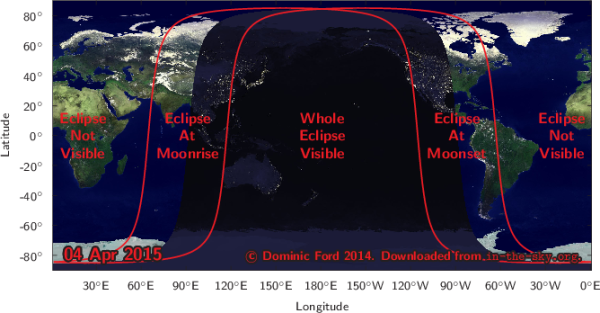
Visit in-the-sky.org for event times in your area. Change your location on the right hand side if the automatic selection is incorrect.
Photographing a Lunar Eclipse
There are two main approaches to photographing a lunar eclipse using just a DSLR and a tripod, excluding more complex approaches with telescopes and tracking mounts.
- You can get in as close as possible with a telephoto lens to capture detail of the changing partial, and total phases of the eclipse.
- Create wide-field and composite images showing the stages of the eclipse as the moon moves through the sky.
Wide-field Eclipse Composites
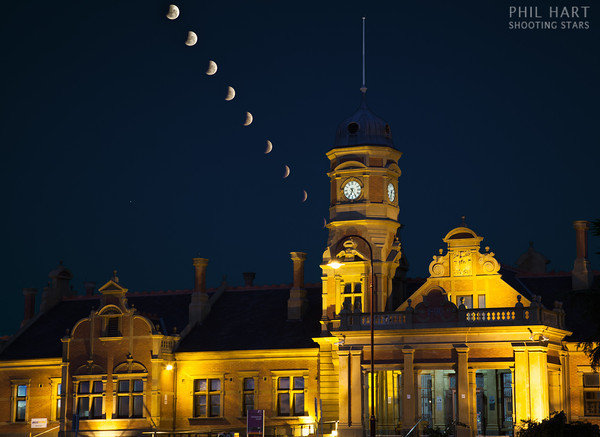
Partial phases of a lunar eclipse over Maryborough Station.
Canon 5D Mark II, 24-105mm lens at 82mm.
Nine exposures of the moon each 1/90 sec, f/8, ISO 200.
Images stacked is PS using lighten blending mode with one 2 second exposure of the foreground.The moon moves across the sky at approximately 15 degrees per hour or 50 degrees over the full duration of the eclipse. You need a wide angle lens around 18mm focal length (28mm on a full frame camera) to capture all the stages of the eclipse in one field of view. An alternative is to frame up part of the eclipse with a longer focal length about 50mm (80mm on a full frame camera) like the image above which shows the partial stages in more detail.
In the northern hemisphere, the moon (like the sun) moves from left-to-right through the sky. So at the start of the eclipse, position the moon in the left side of the frame leaving it room to move across the image during the eclipse. Reverse that advice in the southern hemisphere. Night sky planetarium Apps such as Stellarium and SkySafari (iOS only) allow you to visualize the path of the moon through the sky to help plan your framing.
Telephoto Eclipse Images
With a moderate telephoto lens you can get nice detail of the changing stages of a lunar eclipse. During the partial stages the brightness of the moon allows for very short exposures, so trailing it should not be a problem, although you will need a sturdy tripod and use mirror lock-up to reduce vibration.
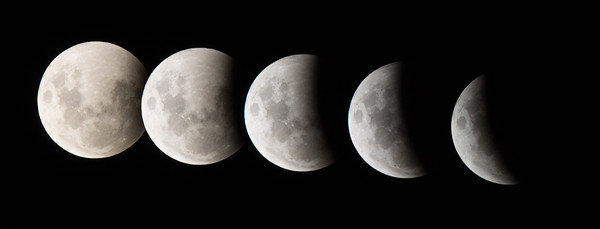
Lunar eclipse partial phases composite.
Canon 1100D, 300mm lens with 1.4x teleconverter, 1/125 sec, f/5.6, ISO 200During totality, the Moon’s brightness greatly reduces, however this eclipse will be a little brighter than usual. Aim for exposures of around one second with the aperture wide open, and push the ISO as much as you need to, being careful not to blow the highlights on the brighter edge. You should be able to capture images like this one below, which is an example of what you can do even with regular affordable cameras (although nice lenses do help).
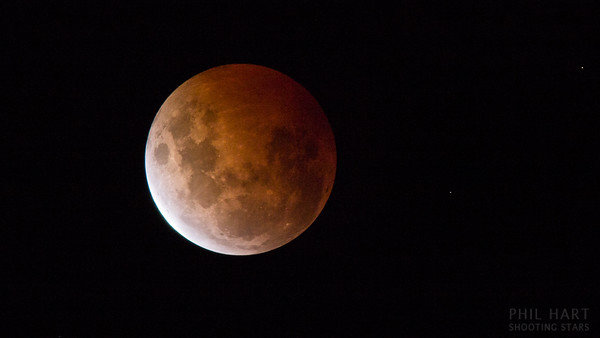
Totality during a lunar eclipse
Canon 1100D, 300mm lens with 1.4x teleconverter, 1/2 sec, f/5.6, ISO 200Eclipse at Moonset
In the eastern United States and Canada, and the western half of South America, the moon will set during the partial stages before total eclipse. Through central areas the moon will set while totally eclipsed which will make it much dimmer than a normal moonset and potentially hard to see amongst bright city lights. In the western half of North America you get to enjoy the partial phases leading up to, and including the total eclipse, then capture the moon setting as the partial phases reverse at the end of the eclipse.
You can use apps and software like The Photographers Ephemeris (Android/iOS) and Photo Pills (iOS only) to plan the alignment of the moon against landscape features as it rises or sets. Australian photographer Colin Legg captured this shot of the moon rising during an eclipse last year. An astronomer would immediately recognize the unusual configuration – a crescent moon can normally only appear in a twilight sky in the same direction as sunrise or sunset. Here the crescent moon appears amidst the beautiful shading of Earth’s shadow and The Belt of Venus, opposite where the sun set about 15 minutes earlier. Similar images before sunrise will be possible across North and South America during April’s lunar eclipse.
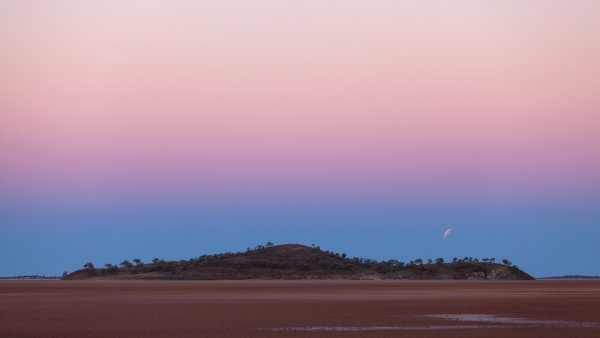
Lunar Eclipse over Lake Ballard, Western Australia – image courtesy of Colin Legg
Will you get out and give it a go? Share any comments and questions below, and if you get a great shot of the eclipse share it here too. You might want to share it on the weekly photography challenge Shoot the Moon also.
 Want more night sky photography tips? Right now Phil’s eBook Shooting Stars is 50% off over at Snapndeals. Now only until April 27th!
 googletag.cmd.push(function() {
tablet_slots.push( googletag.defineSlot( “/1005424/_dPSv4_tab-all-article-bottom_(300×250)”, [300, 250], “pb-ad-78623” ).addService( googletag.pubads() ) ); } );googletag.cmd.push(function() {
mobile_slots.push( googletag.defineSlot( “/1005424/_dPSv4_mob-all-article-bottom_(300×250)”, [300, 250], “pb-ad-78158” ).addService( googletag.pubads() ) ); } );The post Tips for Photographing a Lunar Eclipse by Phil Hart appeared first on Digital Photography School.
-
1. April 2015
Das Bild des Tages von: una.knipsolina

Im Ausblick: Objektive richtig lagern, Aurora Borealis in vitro und eine Unterwasser-Sofortbildkamera.
kwerfeldein – Fotografie Magazin | Fotocommunity -
Post-Processing Tips for Overcoming Beginners Acts of Omission
In an old dressmaking shop in Paris, a master-tailor has finished stitching a bridal gown. He is eager to show it to the world, but he knows that the job is not yet done. He has a few thoughts passing through his mind, and he has to make sure that the dress is presentable before the bride arrives. He tells himself that these threads dangling from here and there need to be trimmed, the ruffles need to be neatened, and the seams still need to be pressed. The master in him criticizes the dress until the tailor in him fixes the final details.
When it comes to photography, the story is no different. You must lose ownership of your image for a few seconds, and look at your own work with a fine-tooth comb. As beginners, we often rush to upload or print our photos, eager for appreciation and likes from others.
I have also been impatient in this way, though with time, I have now made it a habit to review my image critically at the end of post-processing. Here are some tips I hope that will help you taking your post-processing experience to the next level and pick up on some things that beginners often miss. I use Adobe Lightroom and Photoshop, so I will be talking about both where applicable.
Crooked images
There is nothing more embarrassing than your client telling you that the photo is a bit askew. Once spotted, it is an eyesore that will forever jar when you look at your image. It is not easy to judge tilted images when it comes to mountains and forests, but landscapes are also more forgiving when it comes to a tilt. With seascapes, however, one needs to ensure that the sky meets water on the perfect horizontal for a harmonious and balanced image. Similarly, check the angles of your doorways and buildings, that they are aligned appropriately. Adobe Lightroom has a useful Straighten tool, as well as options in Photoshop.
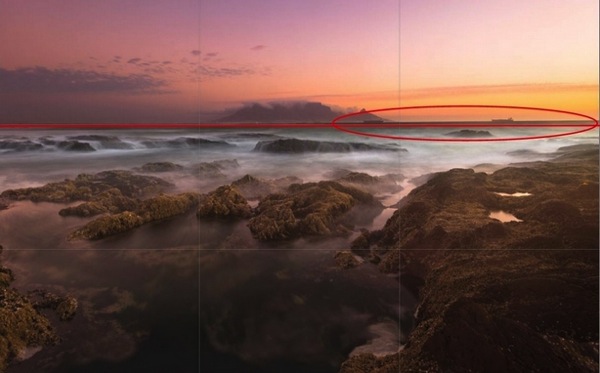
A crooked horizon is not always obvious; verify it using the proper tools.
Spots
Zoom-in and inspect your photo to make sure that there are no spots. Dried water droplets and dust become more visible when you increase the contrast of colors in your post-processing. Adobe Lightroom has a Spot Removal tool, and Adobe Photoshop also provides various ways to remove spots from your image.

Imagine printing a large image with these spots. These are very visible.
Chromatic aberration
Chromatic aberration, or color fringing, often happens around the edges of objects in your images. Why this happens is a technical topic on its own related to your lens, but what you need to know is that modern tools help remove this problem. Adobe Lightroom has a Remove Chromatic Aberration tool that you can use to overcome this issue.
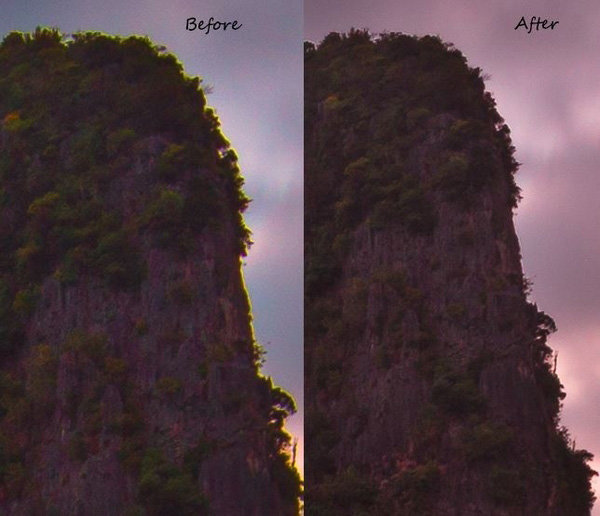
With just one click, I was able to remove the color fringe from the edges.
Barrel distortion
Barrel distortion is associated with wide angle lenses. It causes your image to look more like a sphere. You might get away with it if the elements in your scene are uneven, and not particularly familiar to the eye. However, you need to be aware that the wider your focal length, the more distortion your image will have. Adobe Lightroom allows you to remove barrel distortion using the Lens Corrections feature. In the following image, people standing on each side of the image have elongated faces. I did not, of course, include this in the bridal album!

Unwanted objects
Look for unwanted objects in the scene. Remove shopping bags, cans, tins, ships on the horizon, and even people if they are not desired in the scene. I use Adobe Photoshop’s Content Aware fill tool to achieve the desired results.
Image in black and white
Before and after post-processing, I usually check my images in black and white. By not allowing yourself to be distracted by colours, this is a good way to see if an image is flat. I do this for several reasons. Some images are just meant to be black and white, especially the ones in which the colour adds little by way of interest, and in fact may distract from the subject. You might also want to turn an image into black and white because the sky is overexposed, in this way salvaging, rather than discarding the image altogether. By converting an image to black and white, sometimes unwanted distracting elements in the background of your image can be de-emphasized, with some additional light adjustment (e.g. a person standing behind your main subject in a portrait).
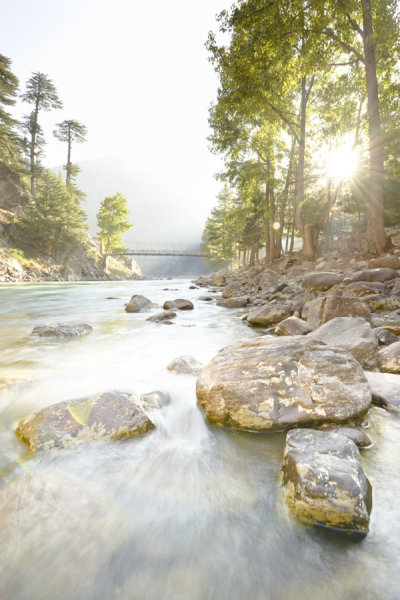
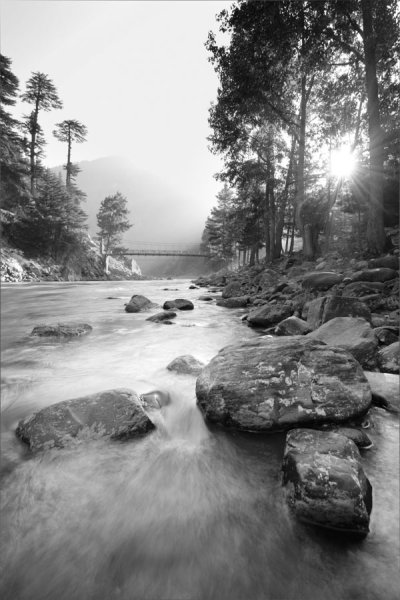
Black and White allows you to appreciate the landscape with emphasis on the harmonies and lines rather than on the colours.


In black and white, the background is not as distracting.
Tip: Walk away
Once you have finished editing your image (or a batch of images), step back and give review it full screen. Turning off the room lights and leaning back is a good idea. Without the mouse and the keyboard in my reach, I can think about the image critically. I sometimes even walk away and let the image lie there for some time before returning for a fresh approach.
Whether you are a beginner or a professional, after putting effort into post-processing, you tend to think that you have done enough to make the image ready. You focus on certain areas too much, and your mind forgets to tell you that you need to look in other areas to see if the image is balanced and harmonious. So, take your time and allow the image to fully absorb without patience in the post-processing phase. A lovely image can be converted into a magical one by proper processing.
Though these steps may sound pedantic, a good image needs loving care.
I hope these tips are helpful. Your feedback and comments are welcome.
googletag.cmd.push(function() {
tablet_slots.push( googletag.defineSlot( “/1005424/_dPSv4_tab-all-article-bottom_(300×250)”, [300, 250], “pb-ad-78623” ).addService( googletag.pubads() ) ); } );googletag.cmd.push(function() {
mobile_slots.push( googletag.defineSlot( “/1005424/_dPSv4_mob-all-article-bottom_(300×250)”, [300, 250], “pb-ad-78158” ).addService( googletag.pubads() ) ); } );The post Post-Processing Tips for Overcoming Beginners Acts of Omission by Mujahid Urrehman appeared first on Digital Photography School.
-
Microsoft announces Surface 3 tablet running full Windows
Microsoft has announced the latest model in its Surface line of tablets, the Surface 3. The big news here is that, unlike its predecessors which were running Windows RT, the new model comes with a full version of Windows 8.1. This means, like on the more expensive Surface Pro models, you can install and run any Windows application including Adobe Photoshop or Lightroom, making the Surface 3 a real alternative to a conventional PC. Read more
-
My Most Unique Photo of Yosemite Yet

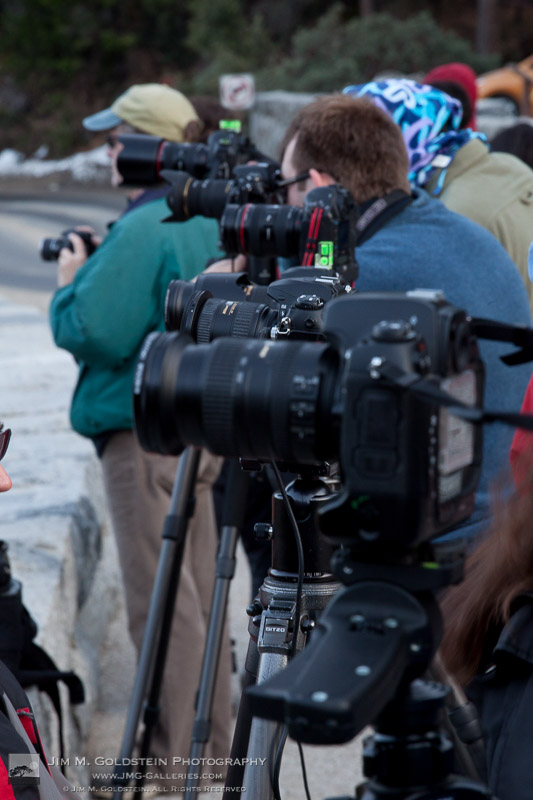
After spending days researching one of my favorite photo locations on Flickr, Instagram and 500px and then tracking down the almost exact location through shared camera GPS data I drove 5 1/2 hours to capture this amazing Yosemite view that is destined to be a centerpiece of my landscape portfolio. Just when I thought I was the only person who might have thought of capturing this unique vantage point I ran into my friend Colleen Miniuk-Sperry as I was leaving. Apart from some brief small talk as I left, my friend Colleen took my spot in the photographer lineup (after all it was standing room only) to capture her own unique take of this iconic view. I highly recommend seeing her photo on her blog You Can Sleep When You’re Dead.
Happy April 1st – Creative Debt
Copyright Jim M. Goldstein, All Rights Reserved
My Most Unique Photo of Yosemite Yet
The post My Most Unique Photo of Yosemite Yet appeared first on JMG-Galleries – Landscape, Nature & Travel Photography.


Related Stories
- My Most Unique Photo of Yosemite Yet – Enclosure
- Before the Tempest, Yosemite
- Before the Tempest, Yosemite – Enclosure
-
Der Mann im Kleid: Ein unaufhaltsamer Trend

Männer sehen in Kleidern einfach wahnsinnig gut aus. Vor allem in figurbetonten Gewändern kommen männliche Hüften besonders gut zur Geltung. Leider hat sich die Mode des kleidtragenden Mannes aus mir unverständlichen Gründen noch nicht so richtig durchgesetzt. Brandheißes Archivmaterial bezeugt:
kwerfeldein – Fotografie Magazin | Fotocommunity -
Nikon D7200 real-world samples gallery posted
The Nikon D7200 improves over its predecessor in one important way, offering a greatly improved buffer. Other improvements are more subtle, but more sensitive AF and an improved video specification make the D7200 a more capable camera than the model which came before it. We’ve had a D7200 for a few days, and wasted no time pairing it with Sigma’s excellent 18-35mm F1.8 A to get some real-world samples. Click through to see more
-
2,300 Floating Flowers: Interactive Garden Makes Way as You Walk
[ By WebUrbanist in Art & Installation & Sound. ]

Responding to the movements of visitors passing through the space, this immersive work of installation art puts you in a private bubble in the midst of dense hanging garden – except this remarkable bubble that moves with you.
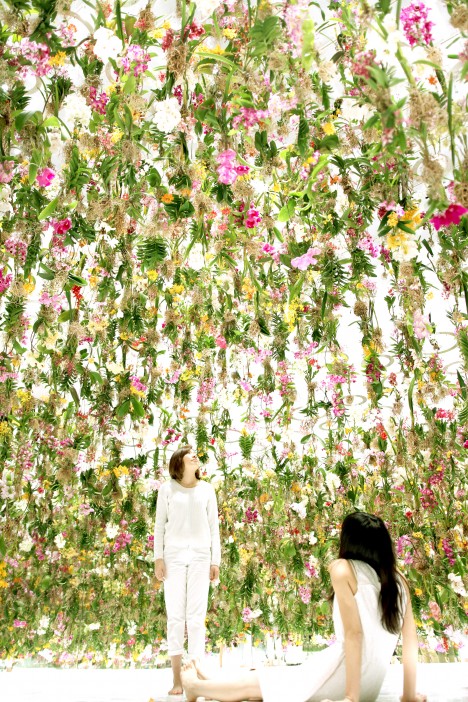
The Floating Flower Garden by TeamLab, a Japanese art collective, is on display in Tokyo, having been extended due to popular demand. Suspended from above, the plants are pulled up or dropped down to both envelop visitors but also given them hemispheres of personal space amid the floating foliage.

The idea is to make each guest part of the installation, allowing them to separate from friends and experience it alone or to move in groups and see how the computer system responds in realtime.
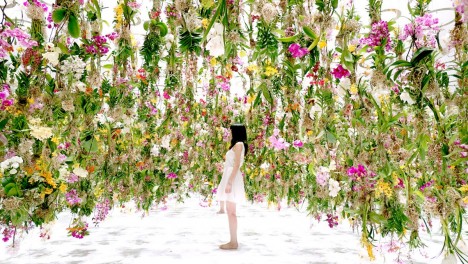
Meanwhile, the digital setup is not the only piece that changes things over time: “these flowers are alive and growing with each passing day. Each flower has a partner insect and the scent of the flowers becomes stronger at the time that the insect is most active, as a result the scent of the air in the garden space changes according to the time of day, morning, noon, and evening.”
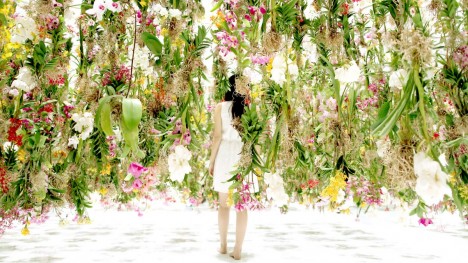
TeamLab believes technology elevates art, but their work also places into pre-modern knowledge and ancient ideas of spatial awareness originating in Japanese philosophy and religion, including Zen gardens. More from the artists: “When a viewer gets close to this flower-filled space, the flowers close to the viewer rise upwards all at once, creating a hemispherical space with the viewer at its center.”

“In other words, although the whole space is filled with flowers, a hemispherical space is constantly being created with the viewer at its center and the viewer is free to move around wherever they want. If many viewers get close to one another, the dome spaces link up to form one single space. In this interactive floating flower garden viewers are immersed in flowers, and become completely one with the garden itself.”
Want More? Click for Great Related Content on WebUrbanist:
Bone Flowers: Sculptures Made of Rodent Skeletons
A white sculpture of a dandelion becomes infinitely more interesting the closer you look, as you begin to pick out the tiniest of paws, vertebrae and tufts of …
Click Here to Read More »»
Weightless Space: Ghostly Floating Room Hovers in Midair
A fantastic feat of architectural trickery, this anti-gravity ante-room installation appears to hover in thin air and open up into nothingness. It sports a …
Click Here to Read More »»
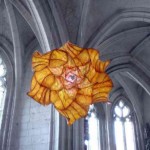
Giant Paper Flowers Bloom Inside Abbey Church in France
Sculptor Peter Gentenaar fills a stunning, vaulted-ceiling Gothic cathedral in France with over 100 of his delicate paper flower sculptures.
Click Here to Read More »»


[ By WebUrbanist in Art & Installation & Sound. ]
[ WebUrbanist | Archives | Galleries | Privacy | TOS ]
-
Meet PJ:Darby Edition

Name: Darby “Professional Designer or something” Thomas
What Do You Do Here? I draw funny pictures and make funny websites.
Favorite Camera: The Lomo Instant (this guy here).
Learn Even More About Darbton Abbey
(…)
Read the rest of Meet PJ:
Darby Edition (103 words)
© laurel for Photojojo, 2015. |
Permalink |
No comment |
Add to
Darby Edition”>del.icio.us
Post tags: