RSS
 

Archive for April, 2015

How to Make a Triptych in Lightroom

05 Apr

Lightroom print module triptych

It seems that the majority of photos we see online or in print are presented individually. But if you have several strong images on a related theme, you may be able to create a stronger presentation by placing them together.

The triptych – three images laid out side by side – is a traditional way of doing this. While there is no way of creating a triptych in Lightroom’s Develop module, it’s easy to do in the Print module. It’s a simple procedure and saves you having to leave Lightroom to create the triptych in Photoshop. Then you can either print it directly from Lightroom, or export it as JPEG file to use in a photo book or upload to a photo sharing website like Flickr.

Here’s how to make a triptych in Lightroom

Step #1 – Create a collection of the photos for the triptych

Go to the Grid View in the Library module and create a new Collection containing the photos you want to use in the triptych. The photos should be the same orientation and aspect ratio. Click and drag to arrange them in the desired order.

Lightroom print module triptych

Step #2 – Setup in the Print module

Go to the Print module, click the Page Setup button and make sure the paper orientation is set to landscape. Then go to the Template Browser panel and select the Triptych template from the Lightroom Templates list.

Lightroom print module triptych

Step #3 – Crop images correctly

For some reason Lightroom crops the photos to square format and arranges them vertically, so you need to change that. Go to the Image Settings panel and uncheck the Zoom to Fill box. Then go to the Layout panel and, under Page Grid, set Rows to 1 and Columns to 3, and untick the Keep Square box. It will look something like this:

Lightroom print module triptych

Step #4 – Show guides

To see how the layout is created, go to the Guides panel and tick the Show Guides box. The screen shot below shows the Margins and Gutters (light grey, indicating the three column and one row layout) and the Image Cells (black).

Lightroom print module triptych

Step #5 – Size images

Return to the Layout panel and move the Height slider under Cell Size right to increase the size of the Image Cells. All three are adjusted together – you cannot make adjust them individually. You can also adjust the left and right margins to increase the space around the three photos.

Lightroom print module triptych

Step #6 – View without guides

Return to the Guides panel and uncheck the Show Guides box to view the photos without any guides. This makes it easier to see whether you have the right amount of spacing between images.

Lightroom print module triptych

Step #7 – Save your print layout

Lightroom print module triptychClick the Create Saved Print button at the top of the Content window and give the print a name in the Create Print window that appears. The print is saved inside the Collection of your choice, and marked by a printer icon. Now you can leave the print and come back to it later without losing any of your work. To export the triptych as a JPEG file simply click the Print to File button under the right-hand panels.

Other options

You can use the same template to create a diptych by setting Rows to 1 and Columns to 2, like so:

Lightroom print module triptych

If you set Rows to 1 and Columns to 5 you can lay out five images side by side like this:

Lightroom print module triptych

You can also explore the other templates in the Print module for alternative layouts. How do you use the Print module for laying out your photos? Please let us know in the comments.


The Mastering Lightroom Collection

Mastering Lightroom ebooksMy Mastering Lightroom ebooks will help you get the most out of Lightroom 4 and Lightroom 5. They cover every aspect of the software from the Library module through to creating beautiful images in the Develop module. Please click the link to learn more or buy.

googletag.cmd.push(function() {
tablet_slots.push( googletag.defineSlot( “/1005424/_dPSv4_tab-all-article-bottom_(300×250)”, [300, 250], “pb-ad-78623” ).addService( googletag.pubads() ) ); } );

googletag.cmd.push(function() {
mobile_slots.push( googletag.defineSlot( “/1005424/_dPSv4_mob-all-article-bottom_(300×250)”, [300, 250], “pb-ad-78158” ).addService( googletag.pubads() ) ); } );

The post How to Make a Triptych in Lightroom by Andrew S. Gibson appeared first on Digital Photography School.


Digital Photography School

 
Comments Off on How to Make a Triptych in Lightroom

Posted in Photography


Readers’ Showcase: Rajesh Bhattacharjee

04 Apr

Like many of our site readers, Rajesh Bhattacharjee is a self-taught photographer who connected with other photographers online and in person to help improve his craft. He’s a keen traveler, spending his free time in National Parks pursuing great landscapes. Based on his portfolio, we’d say he’s found more than a few. Take a look at his images and read more in our Q&A. See gallery

Articles: Digital Photography Review (dpreview.com)

 
Comments Off on Readers’ Showcase: Rajesh Bhattacharjee

Posted in Uncategorized


Tips for Choosing a Tripod Head

04 Apr

NO PARKING

One of the first accessories many people buy after getting a camera is a tripod, and most of those are the all-in-one kind with three legs on the bottom, and a top part called a head, onto which you mount your camera. Typically these heads feature a handle that juts out from one side that can be tightened or loosened to allow you to change the angle at which your camera is situated. These tripods usually cost about $ 25 to $ 50 which makes them quite attractive to photographers looking to invest in some gear to help them take better photos. However, one of their main limitations involves the head: it is usually non-removable, which means you are bound by its constraints, and you may soon discover that your creative sensibilities outstrip the capabilities of the tripods.

two-tripods

All-in-one tripods like this are inexpensive and great for beginners.

I remember the first time I walked into a camera store to look at a some tripod heads and was shocked to find that the sticker price was well beyond what I thought was reasonable. I thought to myself, “Why would anyone spend $ 150 on a tripod head alone, when a basic tripod could be had for less than half that amount?” Then I looked at the price of tripod legs and just about hit the floor. Over the years I came to realize that the reason these components are so expensive was because they are made of much higher-grade materials and built to specifications that demanding photographers need.

When you’re ready to take the step of buying a tripod head and set of legs separately, there are so many options from which to choose it can leave you in a state of confusion with no clear answers. When you’re thinking about spending hundreds of dollars you don’t want to make a bad choice. So, I’m going to take a look at four of the most common types of tripod heads and discuss how they would suit different types of photography. Hopefully it will give you a better idea of what to look for the next time you walk down to your local camera shop, or browse through some of your favorite online photo stores.

Ball Heads
manfrotto-496rc2

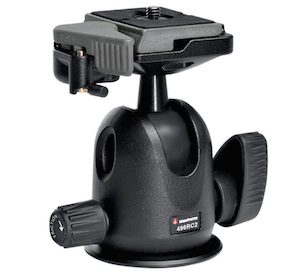
Manfrotto 496CR2 ball head

This is my favorite type of tripod head, and one that I think suits most casual or enthusiast photographers quite well–much moreso than the standard pan/tilt head that comes with all-in-one tripods. Ball heads are designed around a 360-degree swivel (basically a large ball bearing, hence the name, ball head) which you can tighten or loosen with a lever or dial on the side. You can turn your camera from side to side, rotate it in a circle, or change its orientation from portrait to landscape in an instant, all with virtually no effort on your part.

Some are specifically designed to let you change just one direction of motion at a time, which is useful if you are into special types of shots like panning. The first time you use one it can be a bit disorienting until you get used to the sheer amount of freedom they offer. But be careful to keep one hand on your camera while you adjust the locking mechanism on the ball head. If you don’t, your camera may suddenly flop to the side which can be a bit scary the first time it happens. This degree of freedom can actually be a bad thing if you only want to adjust one parameter at a time, and it can be tricky to operate ball heads when you want micro-level adjustments. But, as an overall step up from an entry level tripod, it’s hard to go wrong with a ball head.

Pan/Tilt Tripod Heads

manfrotto-804rc2

Manfrotto pan/tilt tripod head 804CR2

If this model looks familiar to you, it’s because you might already have one like it, or have seen them on all-in-one tripods. Basic models have one or two adjustment levers, but if you spend a bit more you can get one with three levers to give you fine-tune control over specific adjustments. They are much more precise than ball heads in this regard, and it is not uncommon to find pan/tilt heads with built-in bubble levels to help you make sure you have your camera positioned exactly how you want. While it takes more steps to reposition your camera compared to a ball head, it can actually be a good thing because you can adjust just one parameter at a time. For example if you have your subject perfectly aligned up but need to rock your camera to one side, you can use one lever to adjust only the tilt. A pan/tile head is not as simple as a ball head, but the added control it offers is nice, once you get the hang of working with multiple levers.

Pistol Grip Tripod Heads

vanguard-gh-200

Vanguard GH200 pistol grip tripod head

Pistol grips are designed to give you the same degree of control as a ball head but some photographers find them much easier to adjust, due to their full-handed grip mechanism. Whereas a ball head requires you to turn a relatively small knob in order to alter the position of your camera, which can leave your camera flopping around like a wet noodle unless you keep one hand on it too – the pistol grip head, which is also available as a joystick style, gives you precise one-handed control over the exact position of your camera. To use it, just squeeze the grip and the head will unlock so you can reposition it. Most of these have tension dials to adjust how easily you can change things when you squeeze the grip, and more advanced ones allow you to rotate the camera along one axis which makes panning shots much easier. As you can see in the photo they are much larger than ball heads which makes them slightly less portable, but the tradeoff can be well worth it if you need precise control over the position of your camera, while maintaining a high degree of freedom, as well as quick access to a full range of motion with a squeeze of your hand.

Pan/Tilt Tripod Heads for Video

manfrotto-700rc2

Manfrotto 700CR2 tripod head

Similar to the pan/tilt head shown earlier, these specialty heads are designed with video shooters in mind, and while they can be used for still photography, they are less than ideal due to some important limitations. As is common with most video heads, these often feature a long extension arm which allows for greater control and smooth movements for panning shots, but is not very practical when shooting still photography. Contrary to what you might think, the extension arm does not twist in your hand to let you adjust your camera: it is merely a lever that lets you swing your camera from side to side, and does not actually do anything itself. You lock your camera in place by turning knobs on the side of the head, and loosen them to gain access to movement. This particular head is designed for two types of movement: rocking back and forth and twisting from side to side. This means if you want to tilt your camera to the left or right (to shoot a vertical image) you simply can’t do it–at least not without spending much more money on a high-end version.

Recommendations

vanguard-sbh-100

Vanguard SBH-100 ball head

If you’re looking to step up from a basic tripod my recommendation is almost always to get a ball head, partially because it allows such a fantastic amount of control, but also due to the more intimate relationship it creates between you and the camera. Using a ball head with your eye to the viewfinder (as opposed to the LCD screen) while positioning your camera is an incredibly freeing experience if you have only used an all-in-one tripod, and might even help you find new types of shots that you had not considered before. While ball heads do not offer the same type of precision control as dedicated pan/tilt heads, some like the  model shown here, do allow you to at least adjust the rotation of your camera separately from the other movements which can assist with motion or panning shots. If you like to shoot video with your DSLR perhaps a video head would suit your needs a bit more, and virtually all dedicated tripod heads feature solid construction and well-lubricated parts which make operating them much smoother overall.

Using a ball head made positioning my camera for this shot much easier than if I was working with a standard all-in-one tripod head.

Using a ball head made positioning my camera for this shot much easier than if I was working with a standard all-in-one tripod head.

What about you? What is your favorite type of tripod head, or do you have any other tripod tips to share? Leave your thoughts in the comments below!

googletag.cmd.push(function() {
tablet_slots.push( googletag.defineSlot( “/1005424/_dPSv4_tab-all-article-bottom_(300×250)”, [300, 250], “pb-ad-78623” ).addService( googletag.pubads() ) ); } );

googletag.cmd.push(function() {
mobile_slots.push( googletag.defineSlot( “/1005424/_dPSv4_mob-all-article-bottom_(300×250)”, [300, 250], “pb-ad-78158” ).addService( googletag.pubads() ) ); } );

The post Tips for Choosing a Tripod Head by Simon Ringsmuth appeared first on Digital Photography School.


Digital Photography School

 
Comments Off on Tips for Choosing a Tripod Head

Posted in Photography


El Hierro

04 Apr

© Susann Probst

Beim Gedanken an Urlaub auf einer kanarischen Insel sehen die meisten Fotografen vor ihrem inneren Auge wohl bunte Sonnenuntergänge, exotische grüne Natur und ein weites, blaues Meer. Susann Probst trotzt diesen Klischees und fotografierte auf El Hierro, der kleinsten der kanarischen Inseln in schwarzweiß mit harten Kontrasten. Der Insel wird sie damit vielleicht sogar gerechter.
kwerfeldein – Fotografie Magazin | Fotocommunity

 
Comments Off on El Hierro

Posted in Equipment


24 Powerful Images With Complementary Colors

04 Apr

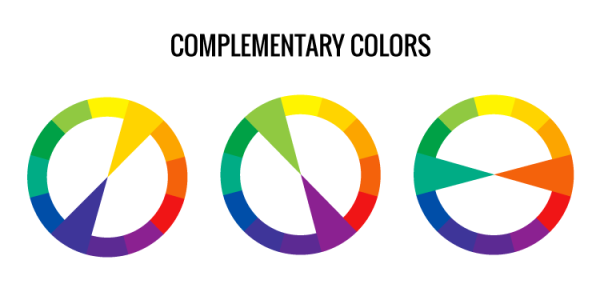
Complementary colors are ones which are opposite on the color wheel.

Lacie Lynnae

By Lacie Lynnae

They appear often in nature and are called complementary because they do just that, complement one another. They work well and make strong compositions.

Photograph Water and fire by wim denijs on 500px

Water and fire by wim denijs on 500px

Examples of common color combinations that work are:

  • Orange and blue
  • Yellow and purple
  • Red and green

Here are 24 examples of images that use complementary colors for a powerful composition:

Photograph Flower 03 by MaX Smiles on 500px

Flower 03 by MaX Smiles on 500px

Photograph The Concert Hall by Jürgen Lehmann on 500px

The Concert Hall by Jürgen Lehmann on 500px

Photograph The Red Dress by Ken Thai on 500px

The Red Dress by Ken Thai on 500px

Photograph Cloud Atlas by Meer Sadi on 500px

Cloud Atlas by Meer Sadi on 500px

Photograph Silent Witness by Moni  on 500px

Silent Witness by Moni on 500px

Photograph Cosmos by Julia Carvalho on 500px

Cosmos by Julia Carvalho on 500px

Photograph Fickle macro by Stolpulus II on 500px

Fickle macro by Stolpulus II on 500px

Photograph Dream sailing by Roberto D'Antoni on 500px

Dream sailing by Roberto D'Antoni on 500px

Photograph Calm Sunset in El Nido by Sunny Merindo on 500px

Calm Sunset in El Nido by Sunny Merindo on 500px

Photograph Heart of October by Mihai Dulu on 500px

Heart of October by Mihai Dulu on 500px

Photograph Norah by Suzy Mead on 500px

Norah by Suzy Mead on 500px

Photograph A colorful morning by Martijn Barendregt on 500px

A colorful morning by Martijn Barendregt on 500px

Photograph Perfect Cuteness by Gurdyal Singh on 500px

Perfect Cuteness by Gurdyal Singh on 500px

Photograph BayBridgeBlueFull by Bill Nichols on 500px

BayBridgeBlueFull by Bill Nichols on 500px

Photograph Star Chamber by Joseph Rossbach on 500px

Star Chamber by Joseph Rossbach on 500px

Photograph pondering by Alex Serres on 500px

pondering by Alex Serres on 500px

Photograph attractor by Pascal Faber on 500px

attractor by Pascal Faber on 500px

Photograph white eye by Woody L. Chu on 500px

white eye by Woody L. Chu on 500px

Photograph I am not a Lady Bug :P by Gideon James Draviam on 500px

I am not a Lady Bug :P by Gideon James Draviam on 500px

Photograph delicious pomegranate cocktail by Oxana Denezhkina on 500px

delicious pomegranate cocktail by Oxana Denezhkina on 500px

Photograph ...complementary colors... by Marko  Grubisic on 500px

…complementary colors… by Marko Grubisic on 500px

Photograph Complementary colors by Mauro Moroni on 500px

Complementary colors by Mauro Moroni on 500px

Photograph Red sea by Vitaliy Sokol on 500px

Red sea by Vitaliy Sokol on 500px

Photograph Yellow Butterfly by alaine  on 500px

Yellow Butterfly by alaine on 500px

googletag.cmd.push(function() {
tablet_slots.push( googletag.defineSlot( “/1005424/_dPSv4_tab-all-article-bottom_(300×250)”, [300, 250], “pb-ad-78623” ).addService( googletag.pubads() ) ); } );

googletag.cmd.push(function() {
mobile_slots.push( googletag.defineSlot( “/1005424/_dPSv4_mob-all-article-bottom_(300×250)”, [300, 250], “pb-ad-78158” ).addService( googletag.pubads() ) ); } );

The post 24 Powerful Images With Complementary Colors by Darlene Hildebrandt appeared first on Digital Photography School.


Digital Photography School
 
Comments Off on 24 Powerful Images With Complementary Colors

Posted in Photography


3. April 2015

04 Apr

Das Bild des Tages von: Thomas Lieser

Eine Katze streckt sich schnurrend aus.

Im Ausblick: Geschlechtergrenzen überschreiten, starke Kinder und Liverollenspieler zuhause.
kwerfeldein – Fotografie Magazin | Fotocommunity

 
Comments Off on 3. April 2015

Posted in Equipment


Weekly Photography Challenge – Complementary Colors

04 Apr

This week I thought we’d do another photography challenge based on color, but not just one color – complementary or opposite ones like the images shared earlier here.

Pichenettes

By pichenettes

Complementary color appear opposite on the color wheel. Find them in the example above. Use them in the challenge this week.

Weekly Photography Challenge – Complementary Colors

Your job is to find and photograph things with complementary or opposite colors. Many pairs of them occur in the natural world if you just look around. If you can’t find any, make your own. Here are a few more examples:

Shålaco

By Shålaco

Margaret Almon

By Margaret Almon

Andy Farnsworth

By Andy Farnsworth

Eileen McFall

By Eileen McFall

Distant Hill Gardens

By Distant Hill Gardens

Jeyp.

By jeyp.

Kate Ter Haar

By Kate Ter Haar

HIM LEE

By HIM LEE

Bogdan Suditu

By Bogdan Suditu

Michael Wallace

By Michael Wallace

Surajram Kumaravel

By Surajram Kumaravel

Share your complementary images here:

Simply upload your shot into the comment field (look for the little camera icon in the Disqus comments section) and they’ll get embedded for us all to see or if you’d prefer upload them to your favourite photo sharing site and leave the link to them. Show me your best images in this week’s challenge. Sometimes it takes a while for an image to appear so be patient and try not to post the same image twice.

googletag.cmd.push(function() {
tablet_slots.push( googletag.defineSlot( “/1005424/_dPSv4_tab-all-article-bottom_(300×250)”, [300, 250], “pb-ad-78623” ).addService( googletag.pubads() ) ); } );

googletag.cmd.push(function() {
mobile_slots.push( googletag.defineSlot( “/1005424/_dPSv4_mob-all-article-bottom_(300×250)”, [300, 250], “pb-ad-78158” ).addService( googletag.pubads() ) ); } );

The post Weekly Photography Challenge – Complementary Colors by Darlene Hildebrandt appeared first on Digital Photography School.


Digital Photography School

 
Comments Off on Weekly Photography Challenge – Complementary Colors

Posted in Photography


DPReview week in review: April showers

04 Apr

When it rains, it pours – that was definitely the case this week, both outside our office windows (Thunder! In Seattle!) and in terms of content on the site. We posted our Sony a7 II review, got out shooting with Nikon’s newest DX-format DSLR, and reviewed another Nikon crop sensor camera. Don’t be an April fool – take a look back and get caught up. Read more

Articles: Digital Photography Review (dpreview.com)

 
Comments Off on DPReview week in review: April showers

Posted in Uncategorized


Tamron USA announces fourth travel-themed photo contest

04 Apr

Tamron has announced a competition for US-based customers, who are encouraged to submit 8-14 images with a travel theme. Prizes for the winner include having his or her work featured on Tamron’s website and in its newsletter, as well as the opportunity to pick up a shiny new SP 15-30mm F/2.8, 24-70mm F/2.8 or 70-200mm F/2.8. Learn more

Articles: Digital Photography Review (dpreview.com)

 
Comments Off on Tamron USA announces fourth travel-themed photo contest

Posted in Uncategorized


25 Fabulous Easter Egg Photos for Your Inspiration

04 Apr

Easter is a few days ahead and it’s a great opportunity for shooting! While you will be taking photos of your family and friends, turn your camera a bit to the treasure you have on your table – Easter eggs! Creative and colorful eggs with all those Easter decorations look just fabulous. See yourself! Here we have put together 20 Continue Reading

The post 25 Fabulous Easter Egg Photos for Your Inspiration appeared first on Photodoto.


Photodoto

 
Comments Off on 25 Fabulous Easter Egg Photos for Your Inspiration

Posted in Photography